Visual Database Creation with MySQL Workbench

Visual Database Creation with MySQL Workbench

In today’s tutorial, you’ll learn how to use a visual database modeling utility to draw a database diagram and automatically generate SQL. Specifically, we’ll review how to use MySQL Workbench, a cross-platform, visual database design tool.


What is MySQL Workbench?

MySQL Workbench is a powerful tool developed by MySQL with three primary areas of functionality:

  • SQL Development: Replaces MySQL query browser. Allows the user to connect to an existing database and edit and execute SQL queries.
  • Data Modeling: Complete visual database design and modeling.
  • Database Administration: Replaces MySQL administrator. Graphic interface to start/stop servers, create user accounts, edit configuration files, etc.
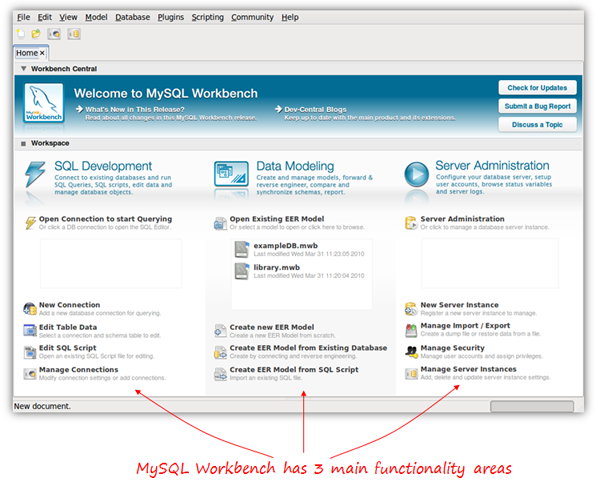
In this tutorial, we’ll focus on the Data Modeling aspect to create a database from scratch, and then have just a quick look at the SQL editor to execute our generated SQL script and create the database within MySQL.

MySQL Workbench is available for Windows, Linux and Mac OSX. There are two different editions: the Community OSS Edition and the commercial Standard Edition. The community edition is Open Source and GPL licensed, as you’d expect. It’s fully functional, and is the one we’ll be using in this article. The commercial edition adds some extra functionalities, such as schema and model validation or documentation generation.

Note: this tutorial is based on the Community OSS Edition version 5.2 (5.2.16), currently in beta release at the time of the writing (April 2010).


Planning our Database

To learn how to use MySQL Workbench, we’ll use a very simple database for online classes as an example. Suppose a group of teachers want to offer online classes for several subjects, using Skype or any other video conferencing software. For our little project, we have decided that we need to store the following information:
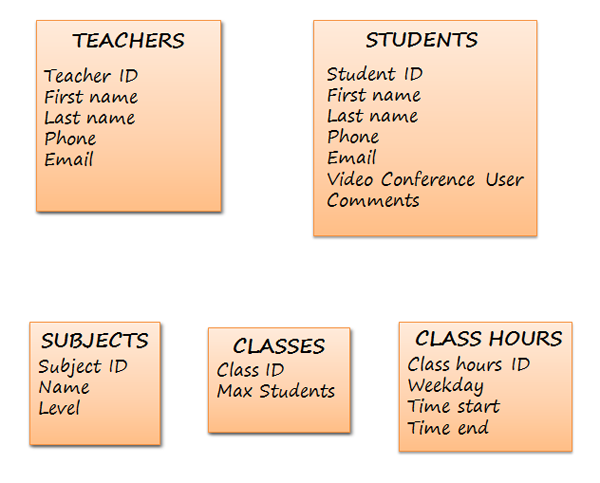
When drawing our diagram, we will need to know the relationships between these groups of data as well; so we better think about that now!

  • One teacher can teach many subjects
  • One subject can be taught by many teachers
  • Each class has only one teacher
  • One teacher can teach many classes
  • One student can attend many classes
  • One class has many students
  • One class may have several hours (in a week)
  • At one particular day and hour, there may be several classes
  • A class is about one subject
  • One subject may be taught in many classes

At this point, we have all the information we need to meet the star of this show…


Send in MySQL Workbench

It’s time to launch Workbench. In the data modeling part of the home screen, we click ‘Create new EER Model’, and the following screen appears:
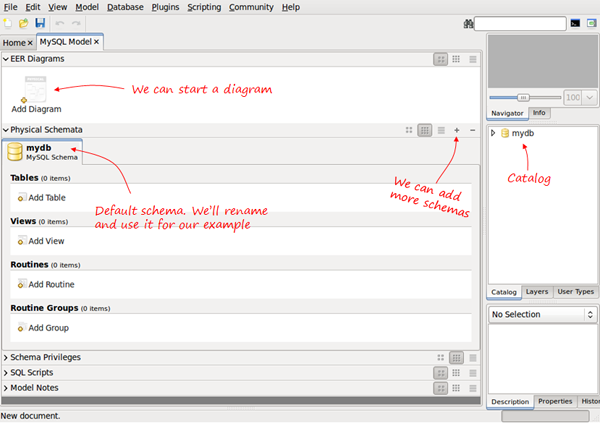
When we create a new database model, it contains the default mydb schema. We can rename it and use it as our DB schema. A database model can have several different schemas.

The catalog on the right will show every element in our schema, and allow us to drag and drop elements to diagrams if needed.

Having the separate sections for Physical Schemata and EER Diagrams, and the possibility to include several Schemas in one database model may be confusing. The next section explains these concepts and how they are related.


Clarifying Concepts

The physical schema contains all the necessary pieces to define the database: tables, columns, types, indexes, constraints, etc. This is what we are really defining. Every object added in the graphical model also shows up in the physical schema. It is, in fact, a visual way to define our schema.

We can have several schemas for the same database model in the same way we can have several databases in a MySQL server. Each schema will be a MySQL database. For example, in the next screen, we have two schema tabs:
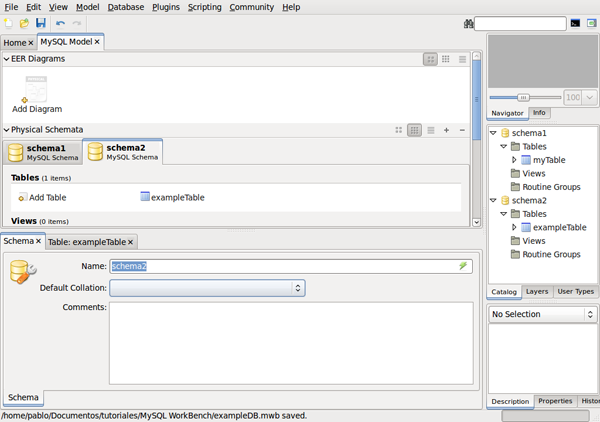
If we generate the SQL script, we will have two separate CREATE DATABASE statements – actually we will have CREATE SCHEMA which is just a synonym.

CREATE SCHEMA IF NOT EXISTS `schema1`;
CREATE SCHEMA IF NOT EXISTS `schema2`;

“EER stands for Extended (or Enhanced) Entity-Relationship. EER diagrams are just a way to model the data and the relationships between data using standard symbols”

They will be listed as databases within the MySQL server host when using SHOW DATABASES.

Now, what is an EER Diagram?. EER stands for Extended (or Enhanced) Entity-Relationship>. EER diagrams are just a way to model the data and the relationships between data using standard symbols. EER models can be complex, but MySQL Workbench uses only a subset of all possible graphical elements, because the purpose of this diagram (in this tool) is to have every element mapped to the physical schema.

We can use an EER diagram to define the whole database, or just small parts. For example, we can have a schema with five tables defined, and then create a new diagram to define two more tables using the visual editor. The diagram will contain only two tables, but those two tables will also be included in the schema, together with the previous five.


Creating our Tables

Back to our initial example; we have to rename the default schema by double clicking the name. At this point, we have two possibilities: we can start adding tables to our physical schema using the add table icon, or we can start an EER Diagram and add all the tables there.

I prefer to add a new diagram from the beginning and create my schema visually; however, in order to show how to do it with both methods, we are going to create the first two tables in the schema tab, and then continue with the EER Diagram.

When you click the Add Table icon, the table editor opens as a tab below:
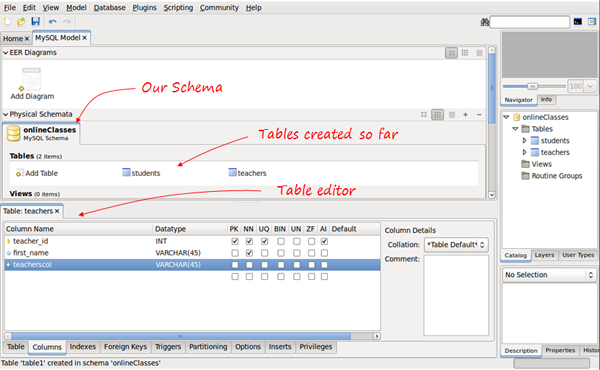
Using the table editor, we change the table name and switch to the columns tab (in the tabs below the editor) to enter our columns. We can choose the data type (there is a drop-down list with all the MySQL data types), assign default value, if needed, and we have seven checkboxes to mark any of the following properties:

  • PK – Primary key
  • NN – Not null
  • UQ – Unique
  • BIN – Binary
  • UN – Unsigned
  • ZF – Zero fill
  • AI – Autoincrement

Go Visual

This is one way to add our tables, though we can also create them using the diagrams. If we click the Add Diagram icon now, we will begin a new, empty diagram, and that’s not what we want. We want the two tables that we just created to be in the diagram.

If we go to the menu, select Model/Create Diagram from Catalog Objects, now we have our diagram, and are ready to continue.

Select the table icon on the left; the pointer changes to a hand with a little table. Next, click anywhere in the canvas to create a new table.
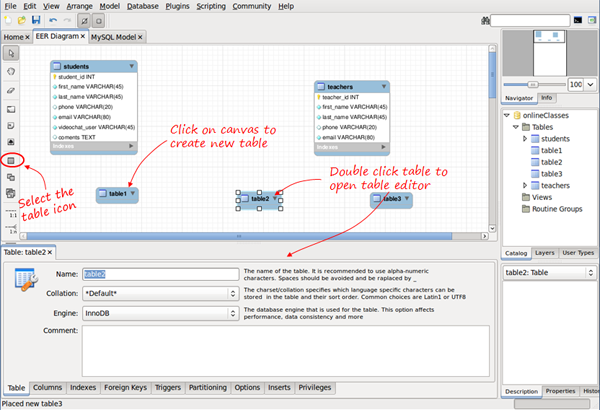
Now you just have to double click the table, and the editor tab appears to edit the name, columns, types, etc.- the same way as we did before.

After entering the column details for the new tables, we’ll be ready to start drawing the relationships.

Drawing Relationships

In the vertical tool bar on the left, we have six tools available to create relationships.
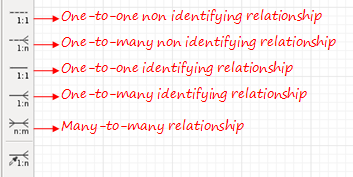
Don’t worry about the last one, we’ll explain it later. For the 1:1 and 1:n relationships, we have two different types of symbols: identifying and non identifying. What does that mean?

A relationship is considered identifying when one table is entirely dependent on the other to exist.

A relationship is considered identifying when one table is entirely dependent on the other to exist. A row in that table depends on a row in the other table. A common example is to have a separate table to store phones for users. It may be necessary to have it in another table, because there can be several phones for one user, but each row in that table is entirely dependent on the user – it belongs to the user.

You should be aware that relationships have some implications. If we want to create the physical tables in MySQL, relationships must be mapped in some way. There are a few rules to map relationships into tables:

  • 1:1 relationships. Primary key for one of the tables is included as foreign key in the other table.
  • 1:n relationships. Primary key of the table in the ‘1′ side is added as foreign key in the table in the ‘n’ side.
  • n:m relationships. A new table (join table) is created. The primary key is composed of the primary keys from the two original tables.

Identifying relationships are typically used for the join tables created from a many-to-many relationship. These new tables are entirely dependent on the two original tables.

Also, in the case of 1:1 and 1:n identifying relationships, the foreign key introduced will be part of the primary key for that table, forming a composite primary key.

The good news is that MySQL Workbench knows these rules better than most of us. We just draw our lines, and the foreign keys or join tables will be automatically be created. We can also choose to do it manually, as we’ll see shortly.

To draw a relationship, click the icon, and then click the two tables to relate. For one-to-many relationships, click on the “many” side table first, and then on the “one” side table. Let’s see how to do it for the n:m teachers-subjects relationship, and for the 1:n teachers-classes.
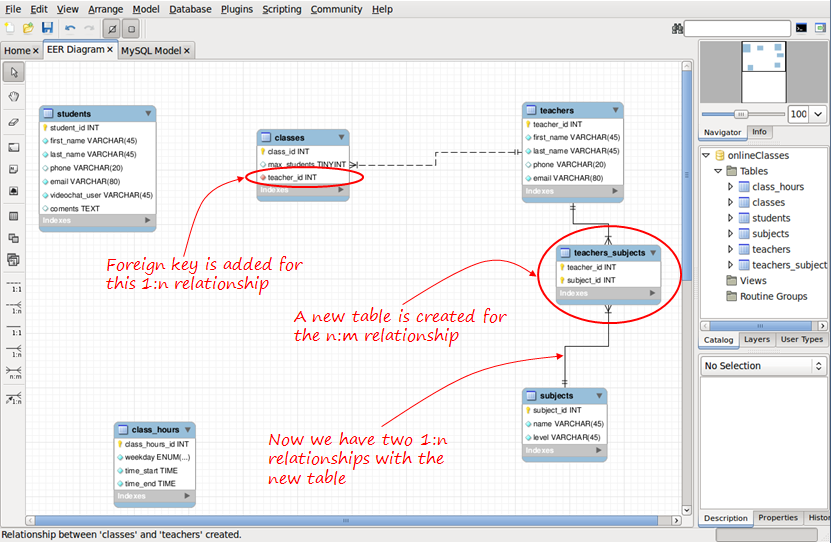
The default name assigned for the foreign keys, and for the join tables can be changed globally in Edit/Preferences/Model Tab, or only for the present project in Model/Model Options.

If we don’t want tables and foreign keys to be generated in this way, we can use the mysterious “sixth symbol.”

The “sixth symbol” creates a relationship using existing columns, meaning that you have already included the necessary foreign keys in your tables and created the necessary join tables (n:m mapping tables). Since we’ve already created these Join tables, we don’t need n:m relationships; only 1:n is available.

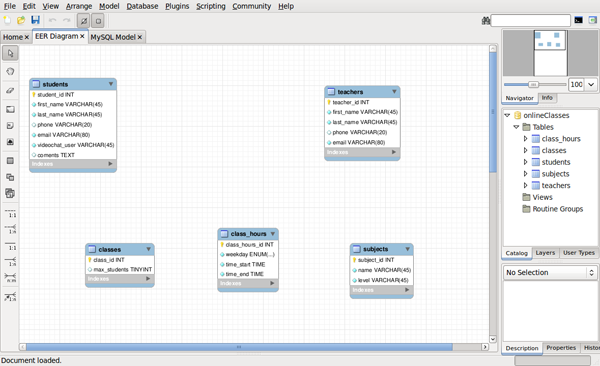
When we have all our relationships defined, our diagram should looks like so:
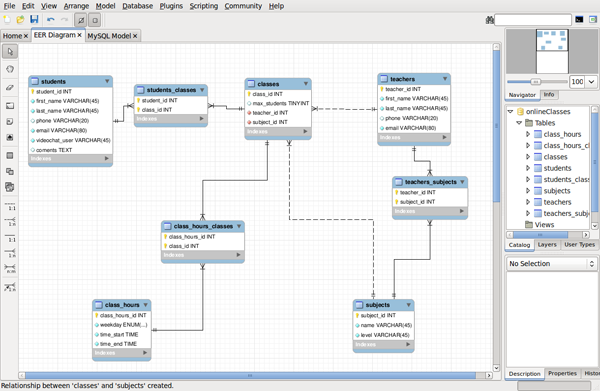
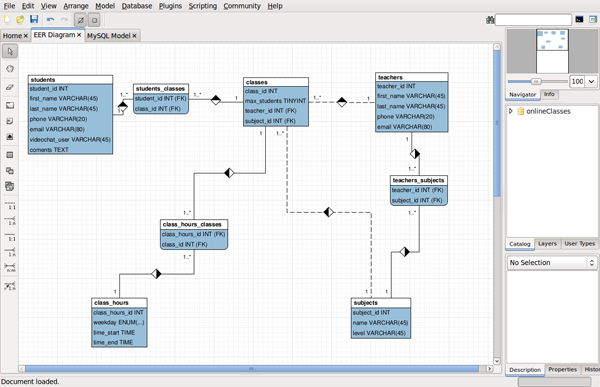
Be aware that we have been using the default MySQL Workbench notation for the diagrams, but you can change that in Model/Object Notation and Model/Relationship Notation. This is an example of our model in Classic notation:
At this point, our model is ready, and we can generate the SQL to create the MySQL database.


Generating SQL

Select File/Export/Forward Engineer SQL CREATE Script. We are only three wizard screens away from generating our file!
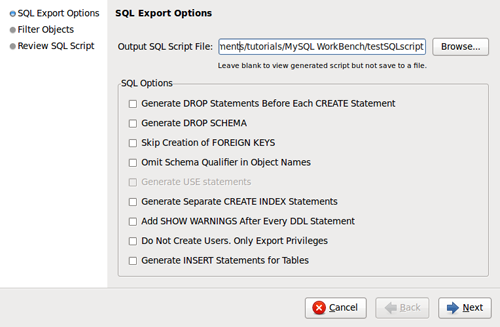
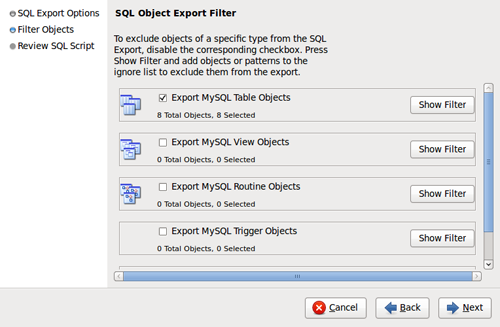
We even have the option to review and edit the generated SQL before saving it:
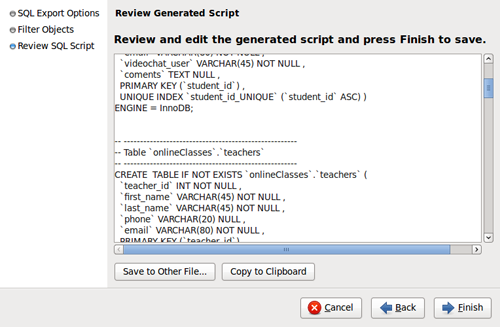
And that’s it. Clicking finish, the SQL script will be generated and saved. Now, we can use it in any way we wish. We can load it using the command-line mysql client:

mysql> SOURCE scriptName.sql

Or, we can use MySQL Workbench to finish the work, connecting to our MySQL server and running the script.


Connecting to a MySQL Server

Select Database/Manage Connections from the menu, and click NEW.
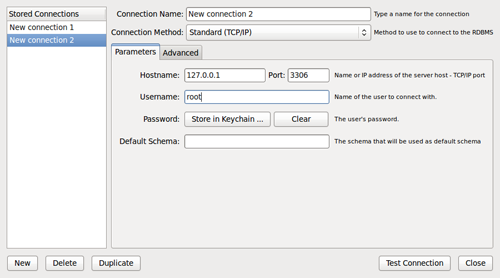
If you don’t want to set the password here, you’ll be prompted for it when needed. Click “Test Connection” to check if your parameters are correct, and then click close.

Now, to load the script, we’ll use the SQL editor. In the main menu select Database/Query Database; a window prompts you to select a connection, and then the SQL editor tab opens.
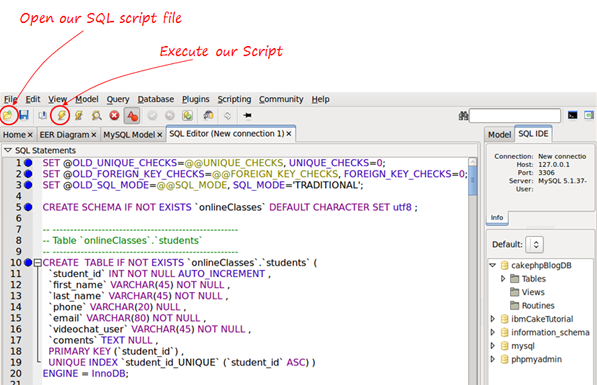
Now click the lightning icon to execute the SQL script, and your database will be generated!

We could also have generated the MySQL database directly from the model, without referencing the actual file, using Database/Forward Engineer from the menu; however, I find it useful to generate the script and then use it how I wish.


Conclusion

MySQL Workbench is an impressive tool. We have only seen a few basic possibilities in the data modeling part, and only peeked at the SQL editor in the second half of this tutorial. We learned how to create a database visually and draw diagrams that can be kept as documentation. You can export the diagrams as a PNG, SVg, PDF or PostScript file. Thanks for reading, and let me know what you think!


Magento Deployment Expert/trou

Magento Deployment Expert/trou
I require a magento expert to finish a mangento website Project requirements
– setup store to take payments within store using securepay Australia and ssl
– fix “500 internal error” that keeps happening.

** please note – only people with lots of magento experience bid **
— good bonus will paid to do quickly–

Key things to note.
– site is live
– multistore site
– magento is setup up on mainstore.com and second store is setup on substore.com , ssl needs to be setup for substore.com
– customised themes needs to remain funtional

Categories Php

Categories Php
Hi,

I need someone who can please complete the categories and subcategories on my website. I already have the 9 categories that I need and although they are almost completed, they need editing and cleaning up and some even need information such as sub categories added. I need someone honest and reliable who can complete this fast. If I hire you, I will pay half amount in esrow immediatly

Thank You

Automated Browser App

Automated Browser App
This project is small, and very specific. It should be trivial for someone with reasonable web client programming skills.

What we’re looking for is a screen scraping, or more accurately a browser-emulation app that will log into a site that I use and retrieve some contact information that is not readily available otherwise.

Here’s the details.

I’m in the auction business, and I use a site to handle my auctions. What I need is the contact information for the bidders, but it’s not available in any kind of downloadable list, or through an API. It is available on a web page, however, from which I can copy and paste the data.

I’m tired of copying and pasting.

So what we’re looking for is an app that will emulate a browser to log into the website I use. You’ll click a few links to navigate to the Bidder Information page.

The list of bidder names will show in a framed window. Your software will need to “click” on each of the names in the bidder list. Each time you click, the main window will update, showing the bidder’s contact information.

It’s typical contact info, such as:
Name
Email address
Phone number 1
Phone number 2
Mailing Address
City, State, Zip

Some of the data is outside the USA, so the format may differ slightly based on the country the contact is from.

Your app will parse the contact information, save the information (see below) and then move onto the next contact name in the Frame.

When saving the information, you will either write it to a CSV, or write it directly to an SQL table across the network. I know that our contact management system uses SQL, and CAN import data via CSV. So it’s likely easier to just save the file to a CSV file, named with a convention that I’ll specify, somewhere on the network.

The altername method would be to update an SQL contacts table, but that may be problematic. Please just let me know if you have the capability to do that, if necessary.

The network is entirely windows-based, and I would like the app to run locally on one of our workstations. They mostly run Windows XP, but some run Windows 7.

I’d prefer this program run on a schedule (ie a CRON job), however I’d also want to be able to run the program on demand right on the desktop.

It does not matter to me which language you use for this project. You can use Microsoft tools, Perl, PHP, Python, Ruby, or whatever you think is the best tool to both emulate a browser, parse data from HTML source, and write it to a CSV.

My goal is to have this project done within a day or two. I’m ready to make a decision almost immediately if I can find the right programmer at the right price.

You’ll be paid in full upon successful testing of the program.

NOTES: This is a work for hire. I will own the copyright for the code you produce. I require a complete set of source code at the completion of this project. All code must be documented.

Logo Design/template Customi 2

Logo Design/template Customi 2
I need a logo designed for a youth focused website. I want the logo to be urban, very hip and trendy.

I will also like to have the swift wordpress theme (The swift theme is already installed on the website) that the site is currently on to be customized to look hip and trendy…should be made to look like http://good.is as much as possible and have facebook connect and other http://good.is features installed on the website.

Applicants should have experience customizing wordpress templates to look good and clean…please submit samples of past wordpress customization jobs that you have. Would need the work concluded as soon as possible

Php Drupal And Ubercart Help

Php Drupal And Ubercart Help
New website went live with Ubercart and Drupal. Website needs minor cosmetic changes. The automatic reply email to customer needs to be changed requiring PHP knowledge. My Ubercart is complex and needs tweaking. I need some changes made within 24 hours, but am looking for a long term support person. I will pay hourly. You must be able to speak english and work within the Eastern Time Zone.

Rotating Banner W Links

Rotating Banner W Links
Hello,

I have a php based site that needs a new rotating banner system. I need the system to be installed on a test server, then onto the live server with documentation on how to change banners.

Banners are 418px × 229px and need to have arrow for quick navigation

Must be able to communicate via skype, or yahoo messanger.

Work starts immediately I need it done asap.

Thank you for your time.

Kiddiworld

Kiddiworld
NEW TEMPLATE ON OPENCART

Please read this:
In order to process our work I will not deposit any money in to script lance account until you show us the example work this is to save our time, you’re and scripts lance staffs as well. Thank you.

Website name www.kiddiworld.com
Using script: http://www.opencart.com/index.php?route=common/home
Website about: online store for children’s toys and clothes etc.

Now our domain is going to run using this script, and we seeks new templates
New design, or anyone who got a design already and we looking the same person to integrate for us we cannot find someone again for integrate.

Example templates:
https://www.oscommercetemplates.com/Childrens-Gift-Toy-Store-CRE-Loaded-Template.html
http://www.outletparabebes.com/
http://templates.entheosweb.com/ecommerce_templates/Toy-Stores.asp?page=1

thank you.

Facebook Api Development

Facebook Api Development
Job Type: PHP, AJAX, RoR, Facebook API (FQL FBML)

Hello,

We are interested in developing a contest/give-away Facebook application where people can enter basic data and receive winning/losing notifications via SMS and Facebook message. The application should load quickly and spread easily via online social interactions: the app will publish interactions on users newsfeeds and invite other people to join the app (by posting the app to other users profiles/mailboxes.. more info about this is given to the winning bid). Additionally, the app will need to pull and display the photos of all users using the app.

This application must interface with Facebook Connect and allow for users to sign up for SMS/email notifications within the app. Users can also register offline via incoming SMS or Facebook mobile (iphone, blackberry, mobile web) registration. Eventual iphone app incorporation may be included in subsequent iterations. Auto-respond SMS & social media messages will be used to notify users of app winning entries, etc.

Selected coder(s) will be asked to sign a Non-Disclosure Agreement (NDA) prior to project start.

Developer requirements:

• Develop a functional app where users can enter basic info and receive notification of winning entry/offers. App must conform to Facebook API guidelines and incorporate latest platform updates.
• API must quickly pull user’s names and information within app.
• Coder must design a database to cache user information & randomly select winners.
• API must incorporate Facebook Connect for SMS registrations/notifications.
• API must incorporate Google analytics to manage data.

We are looking for a reliable, experienced coder. Please include a portfolio of your previously developed Facebook/social-media apps for review.

Scope:

The scope of this project will include the following:
• App coding & development
• Database creation & interface with API
• App-database-Facebook integration
• SMS & Facebook Connect integration
• Basic app skinning (design)
• Testing and bug-fixes

Following successful project completion we will have additional development and design needs (possibly leading to full-time opportunities). Ideally, the winning bidder will look to establish a long-term working relationship for future development iterations.

Bid Requirements: Please address the following points in your response

1. Projected cost
a. Future maintenance fees for updates (optional)
2. Timeframe for project completion
3. Facebook Apps previously developed (link to portfolio)
a. References from previous clients
4. Capabilities
a. Do you operate as an individual or as part of a development team/company?
5. Preferred method of communication and availability
a. Office hours, access to skype, etc.
6. Payment terms (paypal, bank transfer?)
7. How are bug fixes managed? (Are they included in your bid?)

Php Sql Insert & Login

Php Sql Insert & Login
Seeking someone that is 110% fluent in PHP and Smarty Classes & Functions and knows how to write code qucikly.

I need somone that is available to work with me immediately starting right now when I choose your bid to work on this project until complete. Small 1hr job I think, 2hrs at most.

PLEASE comment everything you do and why you are doing it //////////code todo this // code todo that etc etc etc

Please message me via yahoo messanger once accepted so we can communicate quickly and effeciently.

I have already prepped 99% of the HTML and made 100% of the sql tables and fields needed for this job.
I know the logic for everything already and need it programmed to work.
I have very good example scripts so you will understand quickly plus this is normal stuff for websites.

The Project:

customers go here to register ….
http://alliedtrustdiamondstore.com/?page=register

we need to give them a unique customer_id and insert all of these fields

`login`, `password`, `email`, `first_name`, `middle_initial`, `last_name`, `phone1`, `phone2`, `phone3`, `drivers_license`, `dl_state`, `ssn1`, `ssn2`, `ssn3`, `dob1`, `dob2`, `dob3`, `security_question`, `security_answer`, `street`, `city`, `state`, `zip`, `newsletter`, `date_joined`, `activationcode`, `account_number`, `txn_id`, `payment_method`, `referred_by`

then I need them to be able to login and send them to page http://alliedtrustdiamondstore.com/?page=user_home upon succesful login …

that’s it , …insert data from form …check for login and send them to thier account…

Simple Php Script Fix

Simple Php Script Fix
Hello:

I got a simple PHP Script that post into wordpress.

What posts:

– Google Images
– Blog Search News
– Youtube Videos
– Summary (Plot) from IMDB.com

Well the Script was developed to use into Movie Sites (WordPress)

What i want?

– The summary function is not working well on cronjob. I think because the cronjob settings are saved at bad way…

– Well the summary function works but no on cronjob, because when i post differents posts – always show me the same summary for the same cronsetting.

You can check here:

http://www.2010moviesonline.info/

if you see summary is the same for all posts. need change this and get works.

– Cronsetting are saved into /cronsettings/ folder.

– Also need add more functions from IMDB.com (like actors, genre and poster image)

This is so simple to fix – because all functions are on the script. Just need edite and fix to works.

My max budget is $20
Payment after check you can do the project.

Only PHP Experts!

Need in 1 day.