Easy Weight Loss Journal

I. Project Main Goal:
———————
weight loss results tracking

II. Project Brief:
——————

PHP, Ajax, Mysql, Html, Javascript

There are 4 pages:
a) initial project setup
b) overall stats
c) weekly stats update form
d) history view
e) profile settings

Everything needs to be installed in a wordpress blog page. This is why every page should be loaded through ajax. you can run php scripts on page.

attached you will find drawings for 3 pages. The other 2 are just simple forms.

III. Detailed project description:
———————————–

a) initial project setup: in this step the user will have to setup the follwing: his weight goal and some units like: pounds/kg, inches/cm

b) overall stats: this is the page where users will see their overall stats when they click on the tab associated to this application: the first picture they uploaded, the latest, some overall stats on the right, and chart with their results (weight, waist size). The charts should display also the trend line.

!The chart should be in flash. If needed we can buy a web application like FusionCharts, but I know there are some good free aps.

c) weekly updates: this page should be simple to understand.

Note that I want ajax verification on all fields (check mark on the right)

d) history view: this should give the ability to visualize the user’s history. The text depicted on my drawing represents the 3 answers form “weekly updates”.

Below there should be a javascript horizontal scroll, activated on mouse move. Each image should be clickable.

Important: to make sure you have read this entirely please copy this in your reply <QWERTY>

e) profile settings: There will be the follwing fields: name, email,password, weight loss goal, weight units, size units, clicks (don’t bother it’s stored in session). They will not have the ability to change their name and clicks settings.

IV. Other info you should know:
——————————–

a) this is the current database:

CREATE TABLE `members` (
`prId` smallint(6) NOT NULL,
`firstName` varchar(50) NOT NULL,
`lastName` varchar(50) NOT NULL,
`email` varchar(200) NOT NULL,
`cbReceipt` varchar(15) NOT NULL,
`duplicates` tinyint(4) NOT NULL,
`clicks` int(11) NOT NULL,
`id` int(11) NOT NULL auto_increment,
PRIMARY KEY (`id`),
KEY `id` (`id`)
) ENGINE=MyISAM AUTO_INCREMENT=277 DEFAULT CHARSET=latin1 AUTO_INCREMENT=277 ;

b) the follwing variables are stored in PHP session: firstname, lastname, email, clicks, cbReceipt

Quick Tip: Create a Wood Panel Texture in Photoshop

In today’s quick tip tutorial we will demonstrate how to create a wood panel texture in Photoshop. Let’s get started!


Step 1

Start by opening a new document. For this tutorial, I chose 900 x 600 pixels with a transparent background. Fill the document with #473722


Step 2

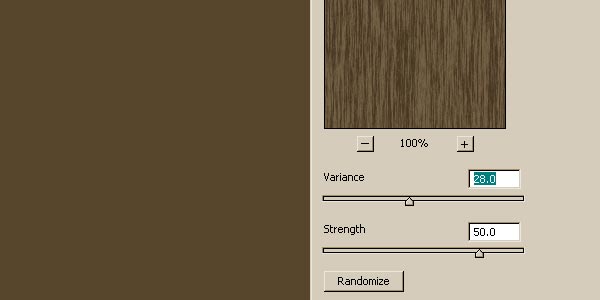
Duplicate layer 1 and name this duplicate "fibers". Set your foreground color to #746045, and then go to Filter > Render > Fibers and use the following settings:


Step 3

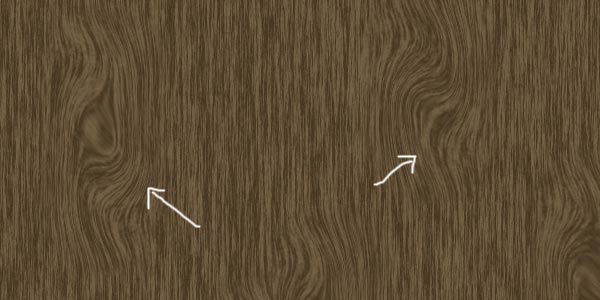
Hit “OK” and you should end up with the following:


Step 4

Duplicate the previous layer and name it "knots". We are now going to add what I call knots in the wood. To do this, go to Filter > Liquify. In the upper left-hand panel, select the Twirl Clockwise Tool (C). On the right side panel, your settings may differ from mine depending on the size you made your document, but for the sake of this tutorial your settings should match mine: Brush Size – 151, Brush Density – 62, Brush Pressure – 100, Brush Rate – 50. Leave all other settings as is. On your document, click in the desired spot and quickly drag upwards or downwards with your mouse button still pushed. You should have something similar to this:


Step 5

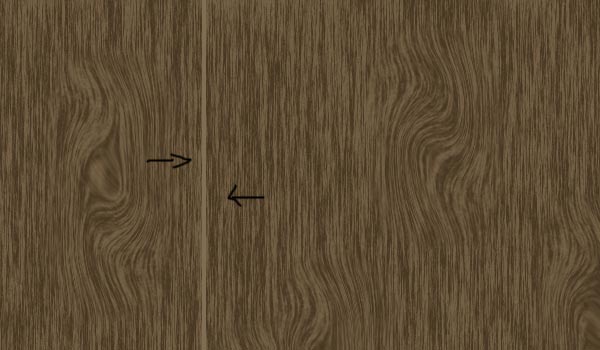
Make a new layer and name it “separator 1″. We are now going to make the notches or separators in the paneling. Select the rectangular marquee tool
and set it to a fixed ratio with a width of 4px and height of 600px and then place it somewhere near the left side of your document. Fill this block with #806d53.
Should look like the following:


Step 6

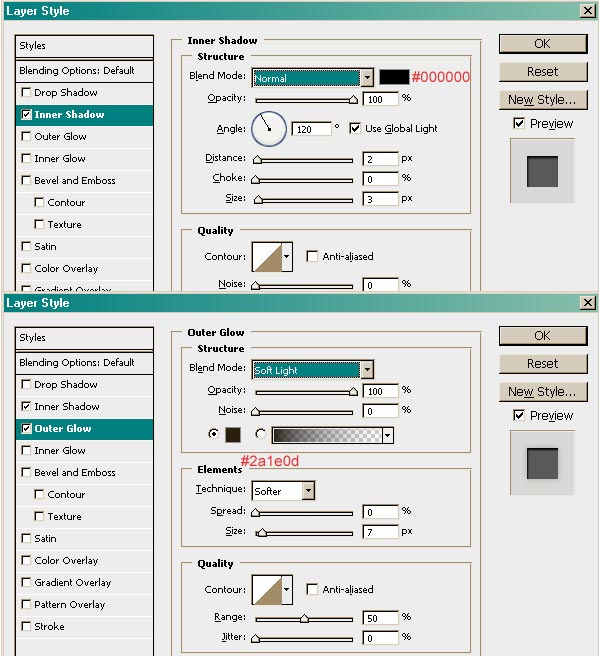
Now we make the line look more realistic! Double click the separator 1 layer to bring up the blending options and match it with the following settings:


Step 7

Duplicate your first separator about 4 different times and place them so that they’re not evenly spaced. For added touches, you can place some text that
looks as if it was carved in, like so:


Final Image

You’re all finished! I hope you enjoyed this tutorial.


Soccer Fantasy Webpage

I need a single page website created.
The purpose of the webpage is for users to go through a form with radio buttons and make 1 selection per group. At the end of the form there needs to be a submit button that will send the form data to my email address.

At the bottom of the form I would like a link for people to pay me via paypal.

Please refer to the image attached. I would like the look of the page to be exactly like that with some soccer images / world cup logo.

I have no problem leaving the money in escrow during the project but no payments will be made until the project is 100% completed. I always pay my freelancers upon completion.

Email Pipe To Mysql (php)

I need to send information from an email to a database and then have the information displayed on a web page. I think I can pipe the email to a php file via CPanel, but I need someone with php and mysql knowledge to make this happen. There is also a picture in the email that needs to be pulled off and displayed on the web page.

Please put the word Toto in your responce so I know you fully understand what needs to be delivered and it is not spam.

Thanks

Psd To Website Finish

I have a website that needs to be finished off, I have all the necessary PSD files.

The website has a custom video and podcast player, these have already been created but will need to be adjusted and integrated into the website

A version of this website is already up, www.noteabilities.com/old
To see what the video player looks like and how it works please see: http://www.noteabilities.com/kibbles_rockin_clubhouse.html
To get an idea of how the podcast player should work please see:
http://www.noteabilities.com/parent_toolkit.html

We are looking for someone to finish the website, making sure that it is fully compatible with all major browsers.

Please download the PSD files from: http://www.noteabilities.com/PSD/Kibbles.zip , to understand the pages that need to be added and finished.

Thank You

Magento Multi Store Setup

Hi all, we have Magento setup and what we want to achieve is not complex for someone used to it.

Basically we want main site to be about fishing bait, with navigation for it, but what we want is when a user clicks on Carp Tackle on the nav bar they are taken to the Carp Tackle store with a fresh new nav bar with just fishing tackle, and obviously a link to carp bait which will go back to the main site.

Urls will all be through the same one, site is www.h a m p s h i r e b a i t s.co.uk

Please respond back to me with what you propose, site still has to be updateable.

Once this project is complete there will be loads more magento tasks to do on this site, as long as you are good, quick and reasonable priced.

Thanks John

Javascript Effects In Form

I have a form that forwards to URLs when the options are clicked on. I want to add in tooltips through “Overlib” software http://tinyurl.com/ndmpr. I need to add in an “id” attribute in the option tag and have a mouseover of an item in the list create a tooltip, and a click through create a new page (destination URL).

The working onchange looks like this..

<form>
<label>Archive of Past Articles</label>
<select ONCHANGE=”location = this.options[this.selectedIndex].value;”>
<optgroup label=”Choose an Article”>
<option value=”http://search.msn.com/”>Test1</option>
<option value=”http://www.google.com/”>Test2</option>
<option value=”http://www.search.com/”>Test3</option>
</optgroup>
</select>
</form>

Now I need the mouseover tooltip..

Java/struts/hibernate/jsp

I am looking for a web Java web developer to add functionality to a new web site.

The site is coded using the following technologies and frameworks:

JSP and JSTL
Struts 2, Spring and Hibernate
Eclipse, MySQL and Tomcat

The is a web front end to a gaming site has several functions.

Attached is a prototype of the web site. This prototype should be used to give an idea of how the web site functions.

The XHTML/CSS and graphic design will be done by another programmer.

The coder should have good communication skills and provide regular updates. The additional code should be well commented and well structured.

The coder will need to understand the existing code to provide enhancements:

1) The tournament creator can delete a tournament. All invited players notified will notified by email that the tournament has been canceled. Please add a ‘delete’ action link alongside in the upcoming tournaments table (tournaments.html). This link will appear only for the creator of the tournament. The user should be able to confirm this.

2) When creating tournaments (and leagues) please allow the user to confirm the details before submitting. The details of the tournament or league should be displayed to the user. If the details are not correct the user should be able to go back and edit the tournament or league details.

3) Times for tournaments etc should be shown in the correct time zone. When the user is logged in the times should also be displayed in the users time zone. For non-registered users the time zone should be captured with javascript. A simple calculation should be performed to display the times of the tournaments in the users time.

Non-registered users should also be able to change their time zone via a drop down. This value should be stored in a persistent cookie. The actual time zone should always be displayed on the screen (above the tables) so that the user knows in which time zone the tournaments are being displayed.

4) There will be new functionality to enable users to create “leagues”. From a web developer perspective this is very similar to “user created” tournaments (tournaments.html) but the data will be held in a new database called ‘league’. The main difference is there will be a finish day and time instead of a start. Also there will be a checkbox to allow users who do not play all of their games to be excluded from the league. The screen layout and database schema is almost identical to tournaments.

Results for league matches will be displayed differently to tournaments because all players in the league will play each other (tournaments are knockouts). The player with the highest points in the league will win the league. A table will be displayed showing the position and points of the players in the league and how many games played. Users will be able to click through and see a list of the games for that player.

5) Fix an error in the “regular system generated” tournaments results (tournamentdef.html). This this error is schematic due to the misunderstanding of the data by the original programmer.

6) The current site requires the user to validate their email address when registering with the site (by clicking on a link from the email address). The site should also require users to validate their email address when the user is changing the email address.

Install 2 Joomla Components

Hi,

I am in need of someone who is an expert in Joomla and would be able to installt he following 2 components into my web site. I have tried to them myself but they keep giving me errors.

The components are:

– corePHP WordPress MU – Gives me error when installing
– OSE PHP Security Suite – requires additional measures of database / ftp installation.

Need to have this done today / tomorrow.

WordPress Blog Fixes

Hello, I need someone familiar with the Builder Theme form iThemes.. I need some work done on my fashion blog.. brand pictures with short descriptions added to posts or categories… however you would like to set it up.. I have a After5, Denim, Dresses, Sportswear, Shoes, and Tops. with around 10 brands in each category. I have all brand pics and some of the brand descriptions… you will need to find a few of them, just cut and paste of the actual brands websites either a short bio or about us… several of the pages are finished they just need moved into categories or however you set it up… I need this done within the next couple hours if possible.. I will pay via paypal after project is complete, thanks.

Cameron offers deal to Lib Dems

David Cameron

David Cameron is to set out within hours his plans to form a "stable" government, after the Tories won most votes but not an overall majority.

With results still coming in, the Tories have 294 seats in a hung parliament. He will say he plans to govern "in the national interest".

Nick Clegg, leader of the third biggest party the Lib Dems, said the Tories had the first right to seek to govern.

But Labour leader Gordon Brown is also hoping for a deal with the Lib Dems.

He is expected to make a statement in Downing Street within the next half an hour.

Under the rules of Britain’s constitution, the sitting prime minister in a hung parliament has the right to make the first attempt at forming a ruling coalition.

As counting continues the Tories have gained 93 seats, Labour have lost 87 and the Lib Dems five, despite hopes of a breakthrough for the third party.

‘National interest’

Mr Cameron is to make a statement setting out how he will seek to form a government at 1430 BST. The Conservatives said he would spell out how he would try to form an administration which is "strong and stable with broad support, that acts in the national interest".

It follows comments from Mr Clegg – whose party has done worse than in 2005 despite favourable opinion polls – that he believed the Tories had gained the "first right" to attempt to form a government in the "national interest".

Speaking outside Lib Dem headquarters in London, Nick Clegg said: "It is vital that all parties, all political leaders, act in the national interest and not out of narrow party political advantage."

He admitted it had been a "disappointing night" for the Lib Dems.

Labour sources told the BBC they believed Mr Clegg had left the door open to a deal with them – as he had also reiterated his belief that the current first-past-the-post voting system was "broken".

Labour is expected to wait to talk to Mr Clegg until sufficient results are in showing they have enough seats between them to out-vote the Conservatives.

But BBC political correspondent Carole Walker said Conservative sources were not ruling out electoral reform and could agree to Lib Dem demands for a referendum on voting reform, although they would then campaign for a "no" answer.

The Tories have won 294 seats so far but it is now not possible for them to reach the 326 seats needed to win an overall majority.

Mr Brown, whose party has 252 seats so far, has returned to Downing Street with aides and is expected to make an offer to Mr Clegg’s Lib Dems, who have so far won 52 seats, to try to form a coalition government.

He said earlier: "My duty in all of this is that there be a stable, strong and principled government and to play my part in making that possible."

Downing Street has authorised the civil service to support other parties in hung parliament negotiations – essentially giving the go-ahead for talks to begin.

Graphic

The BBC projection suggests David Cameron’s Conservatives will have 305 seats. If there are 10 Unionists elected in Northern Ireland then Mr Cameron might be able to command 315 – probably still slightly too few for him to be sure of winning a Queen’s Speech.

But Labour and the Lib Dems together would have 316 seats, according to the BBC figures, which even with three SDLP MPs would still leave them at 319 – again a few votes short of a majority

In other election night news:

Northern Ireland’s first minister and DUP leaderPeter Robinson has been defeatedinEast Belfastby the Alliance party TheGreens gained their first MPat Westminster – party leader Caroline Lucas inBrighton PavillionEducation secretary Ed Balls hung on inMorley and Outwoodby just over 1,000 votes but former Home Secretary Charles Clarke narrowly lost to the Lib Dem candidate inNorwich SouthJacqui Smith, who stood down as home secretary over her expenses,lost her Redditch seat to the Conservativesbut Hazel Blears retained her seat in Salford Labour’s Margaret Hodge beat the BNP’s Nick Griffin inBarking and Dagenham,with a 5% increase in her vote Esther Rantzen came fourth inLuton South,which went to the Labour candidate Lib Dem frontbencher Lembit Opik has lost his Montgomeryshire seat after suffering a 13.2% swing to the Conservatives There were angry scenes and calls for an inquiry after people wereturned away from polling stationsas long queues formed ahead of the 2200 BST voting deadline.

Business Secretary Lord Mandelson said Mr Brown had returned to Number 10, and was going to rest and "catch his breath" adding: "We have to be patient for some time more."

"It’s not possible to make definite claims or reach final conclusions about the outcome of the election because there are results still to come in," he said.

"You could say the electorate have voted for change but what they haven’t done is voted decisively in favour of the Conservatives."

Asked if it would be "inconceivable" to have a Labour minority or coalition government which did not have Gordon Brown as prime minister, Lord Mandelson said: "Frankly there are quite a number of permutations."

But he added it was "premature" to "start getting into hypotheses".

Shadow schools secretary Michael Gove said voters would not be "entirely happy" if Mr Brown "after a defeat like this, were to try to cling on and try to form some sort of coalition of the defeated, some sort of alliance of the dispossessed".

He said: "David Cameron has secured a larger number of votes and a larger share of the votes than Tony Blair secured in 2005 when he became prime minister. The logical next step is for David Cameron to form a Conservative-led government."

Gordon Brown

The Conservatives are predicted to take 297 seats in England, with Labour on 194 and the Lib Dems on 41. The Tories have also made significant gains in Wales – where Labour also regained their former stronghold Blaenau Gwent – but the Lib Dems and Plaid Cymru failed to gain target seats.

But in Scotland the Tories failed to make a significant breakthrough, while the Labour vote held up, with the party re-taking two seats it lost in by-elections – Glasgow East and Dunfermline and West Fife. The SNP and Lib Dems fell short of their targets.

Northern Ireland’s First Minister, DUP leader Peter Robinson lost his seat in the first shock result of the night. The other main unionist leader – the UUP’s Sir Reg Empey, was also defeated in South Antrim.

With 17 of 18 Westminster seats declared – the DUP have eight, Sinn Fein have four, the SDLP have three, the Alliance Party has one and one has gone to an independent.

This article is from the BBC News website. © British Broadcasting Corporation, The BBC is not responsible for the content of external internet sites.