Zendesk Raises Prices, Pisses Off Customers

We’re all for startups trying to make money, but we also recognize a good old ‘bait and switch’ tactic when we see one. Case in point: on-demand help desk software maker Zendesk, which has just emailed its customers to let them know they’re raising their prices – resulting in a 300+ percent increase in monthly fees for some.

The announcement, which was also posted on the company’s forums, comes in the form of an introduction of new product features, with the new pricing scheme mentioned underneath (never a good sign).

The startup claims the new pricing plans are being offered in response to “customer requests for different packaging and features”. But judging from the commentary on the forum entry and on Twitter, we’re not so sure that’s really the case.

Coincidentally, we just reported on Zendesk crossing the 5,000 business customer mark.

Here’s what’s changing for them:

Before:

Solo package: $9/month per agent, 1 agent only
Regular package: $19/month per agent, minimum of 3 agents
Plus+ package: $39/month per agent, minimum of 5 agents

Now:

Starter plan: $9/month per agent, 1 to 3 agents
Regular plan: $29 per month, 3 to 20 agents
Plus+ plan: $59/month, 5 to 100 agents

For what it’s worth, Zendesk is trying to appease outraged customers with ‘grandfathering terms’, but that forces many to switch to annual billing rather than monthly or quarterly, which a lot of them appear unwilling to do. Besides, it’s not a long-term solution.

Some of the reactions on the forum post speak volumes about how Zendesk customers feel about the changes:

So, with 19 agents, our monthly bill goes from 645 USD to 1121 USD? An increase of 74% ? Seriously??!!!

We pay $99 for 5 users, now its 5 x 59 = $295 per month.. This cannot be for real, we have been supporting zendesk since the early days, how can this be justified…If I pulled a stunt like this on my clients I am sure we would lose..Especially as the option to stay on your current price range involved stumping up a years fees.. come on guys, give us a fair go, this is outrageous!!!!

I’m with David, our account is going from $153 per month (9 agents) to $261 per month, a 58% increase. Using a huge price increase to force people into an annual billing plan is going to leave a bitter taste in a lot of mouths.

We currently have 41 agents and would have been up to 50 by mid-June. Not anymore. Our monthly bill is going to increase from $1503 to $2419. That is an annual increase of approx $11,000. A roughly %62 increase.

This seems extortionate, we are facing a 100%+ increase ,what are you playing at Zen Desk?

I’ve also managed to find someone who was actually happy with the transparency Zendesk displayed in its email to customers, so maybe we’re just hearing the voices of the angry here.

Again, it’s fine for startups to make money, even if it means they need to change their pricing plans and hike fees at some point. But in this case, perhaps Zendesk would have been better off checking exactly how profoundly these changes would affect the bills of their early customers.

How can you explain a price increase of more than 300% for a service that you’re far from the only one to provide? Zendesk doesn’t even really do that, they’ve just communicated the new fees and keep pointing customer who complain to the grandfathering terms, which do not explain the rationale behind the price hikes either.

We’ve contacted Zendesk CEO Mikkel Svane for more insight and hope to hear back soon.

UPDATE: Svane responded to us with this statement:

Yes, we are raising our prices on two of our plans. We now have three plans at three different price points (starting at $9). This is the first time EVER that we have increased pricing. But we have added new functionality to the service for every week for the last two and a half years.

And today we’re launching a lot more functionality for knowledge base and community support. Zendesk has gone from a traditional ticket management system to a complete customer engagement platform, supporting 1-to-1, 1-to-many and many-to-many customer conversations and support interactions. Zendesk is investing heavily in new features and our customers will continue to experience great things with Zendesk.

We will deliver on our promise. Are we the cheapest show in town? No. But we do think that we have an excellent offering for almost every budget starting at $9 per agent seat. And we do offer to grandfather our existing customers for one additional year at their current price point with all of their current functionality grandfathered indefinitely.

The price per agent has gone up with $10 and $20 on the Regular and Plus+ plans respectively. That’s a 50% increase. Some customers may experience disproportional price hikes due to earlier introductory discounts, and we will look into these accounts on a case-by-case basis.

Let me finally point out, that we have been completely open and transparent about the price changes. We don’t try to sneak it in.

Information provided by CrunchBase


SimpleGeo Digs Up Another $8 Million And A Group Of Former Digg Employees

Almost exactly one year ago, we first wrote about former Digg lead architect, Joe Stump, and former Social Thing founder, Matt Galligan, teaming up to form Crash Corp., an “alternate reality mobile gaming” startup. A lot can change in a year.

Today, Stump and Galligan are well into building out SimpleGeo, the location platform company that Crash Corp. turned into. That transformation started only a little over 6 months ago — and it may turn out to be one of the smartest pivots for a startup in years. SimpleGeo has just closed a new $8.14 million round of funding. And they’re announcing five new hires to go along with it.

The company’s Series A round pushes their total funding to just about $10 million (their $1.5 million seed round happened at the end of last November). This round was led by former backer Redpoint Ventures, with previous investors First Round Capital, Lowercase Capital (Chris Sacca’s fund), and Ravi Narasimhan also participating. SimpleGeo also picked up new backer, Foundry Group, in the latest round.

The money will be used to build out datasets, improve the API, and continue work on a new product they’re working on (for the API), Galligan tells us. The funds will also give the fast-growing company two years of burn — and that’s factoring in significant headcount increases, Galligan says. That’s good planning, considering how quickly the startup is adding new team members.

The immediate thing that sticks out about the five new hires announced today is that four of them come from the same place: Digg. As we mentioned, Stump used to work at Digg, but there was no funny business going on here, as three of them were a part of Digg’s layoffs earlier this month (a fourth left on his own). Included in this group is well-known designer Jeffrey Kalmikoff, who will now be heading up product development and design for SimpleGeo.

The others coming over from Digg include engineer Ian Eure, who will be working on Python infrastructure. Paul Lathrop, who will be a part of the Systems team. And Nicole Williams who will serve as the “Ambassador” of SimpleGeo — basically, taking care of all the logistics, facilities, and office management of the company.

SimpleGeo’s other big hire is Rob Bailey, who will be joining as the Vice President of Business Development. No, Bailey didn’t work at Digg, he comes from a company he co-founded called Delicious Brands. Alongside BD, Bailey will be in charge of sales as well, we’re told.

Two months ago, SimpleGeo hired 5 people to bring their total headcount to 13. Now, as they’re pushing 20, it’s time for another office. The startup has just signed a lease for a second office that will open in mid-June in San Francisco to go along with their headquarters in Boulder, CO. The team will be evenly split between the two cities for now, but Galligan foresees the San Francisco office quickly becoming the larger one.

With seemingly everyone in the technology space interested in location-based services right now, SimpleGeo finds itself in a very good position. Ever since Twitter acquired Mixer Labs (makers of GeoAPI) back in December, SimpleGeo hasn’t had a lot of competition in its space. They now have over a terabyte of geodata at their disposal to serve up to other startups who wish to use their plug-and-play packages.

The new version of the API will scale better, work faster, and include more redundancy and servers around the world,” Galligan says. There will also be a new pricing model with this new API to fit different business models. This should make the service cheaper as well, Galligan says.

Not bad for what should have been an alternate reality gaming startup celebrating its first birthday.

Information provided by CrunchBase


Merchant Focus And Inner Fence Acquire iPhone Credit Card Processer AppNinjas

E-commerce company Merchant Focus Processing and Inner Fence have acquired AppNinjas, creator of Swipe Credit Card Terminal for iPhone (formerly iSwipe). Terms of the deal were not disclosed.

Inner Fence, which is actually a competitor of AppNinjas, develops a credit card processor for the iPhone and Mac computer. Both Inner Fence and AppNinjas will be rolling out integrated retail hardware to allow for retail-based swiped transactions for processing on both iPhone and iPod touch. The plan is to offer the hardware free of charge to new merchants that enroll with either Inner Fence or AppNinjas.

Of course, AppNinjas and Inner Fence will face competition from Jack Dorsey’s Square, which just debuted in the app store and has been receiving rave reviews. Square works by way of a tiny card reader that plugs into the headphone jack on the device. It takes finger signatures on the touchscreen, generates email or SMS receipts, calculates sales tax, and comes with an online accounting dashboard to keep track of sales.

Unlike Square, however, AppNinjas’ app does not come with a actual swiping device. You input a credit card’s information into the app to process the transaction.


Twitter To Become Bigger In Japan: SoftBank Outs 13 Cell Phones With Twitter Pre-Installed

We’ve shown you the summer cell phone lineup from KDDI (Japan’s No. 2 carrier) yesterday. Today, Japan’s third largest carrier, SoftBank Mobile, showed its own summer lineup during a special press conference, and all of their 13 new models have one thing in common: they all come with Twitter pre-installed.

The buyers of these cell phones will be able to access Twitter either via a pre-installed app or through a pre-installed widget on the homescreen. The background is that SoftBank CEO Masayoshi Son himself is a huge Twitter fan (he has almost 300,000 followers) and believes Japan is set to become Twitter country. And in fact, by some measures it’s already No. 2.

Photo gallery of all the 13 new Twitter-powered cell phones over at MobileCrunch.


LinkedIn Adds Netflix Marketing Chief Leslie Kilgore To Board

Professional social network LinkedIn is adding another member to its board, Netflix Chief Marketing Officer Leslie Kilgore. LinkedIn, which has 65 million members, recently named former Ask.com CEO Skip Battle to its board, joining founder and chairman Reid Hoffman, current CEO Jeff Weiner, Greylock’s David Sze, and Sequoia’s Marc Kvamme.

Kilgore joined Netflix in 2000 and has helped the company grow its subscriber base from fewer than 100,000 to more than 13 million subscribers. Prior to joining Netflix, Kilgore was director of marketing for Amazon.com, and also held positions at Procter & Gamble and Booz, Allen and Hamilton.

Of course, the appointment of Kilgore and Battle to the board is interesting when you consider that both executives have significant experience in advising technology companies through the IPO process. Kilgore, of course, has helped Netflix go public and Battle serves on the board of OpenTable, Expedia and Netflix.

Is an IPO in LinkedIn’s future? CEO Jeff Weiner isn’t ruling out any possibilities, but the idea has certainly been bandied about quit a bit. While LinkedIn is a strong IPO candidate, LinkedIn co-founder and Chairman Reid Hoffman told us at TechCrunch50 last fall that he’s not in any rush to go public. Later, Hoffman told Reuters that the company plans to pursue an IPO at some point, but not any time soon.The company was valued at around $1 billion in its last round of financing in 2008, and has been profitable since 2007.

Information provided by CrunchBase


Top 50 Web Graphics, Admin Skins and Scripts to Accelerate Development


As the Beatles so elegantly wrote, we could all use a little help from our friends to get by. And when it comes to design and development who couldn’t use a friend to speed things up? Thanks to our sister sites ThemeForest, GraphicRiver and CodeCanyon, there are plenty of web graphics, admin skins and scripts to drop in to your work. Best of all they are all made by our massive community of authors. Today across Tuts+ we’re celebrating and showcasing the quality of marketplace goods to bring over the Tuts+ masses to browse the plethora of super work on sale. So without further ado, here they are!

1. Admin Skins


Complete Liquid Admin Control Panel

Complex Liquid Admin template contains a login page as well as a modular content page that includes all the elements you could possibly need in your admin. From these elements you should be able to generate pretty much any required page!


Flexy

Advanced and easy to use administration theme which comes in 7 different colour variations. The theme is liquid, which means the width of the content area adapts to your browsers window size.


Admintasia

Admintasia is a complete backend administration user interface that has the flexibility to house any kind of application. It loads last, it’s intuitive and easy to use, it uses only three small images and it also looks good.


Simpla Admin

Simpla Admin is a professional template with a beautiful and user friendly interface. With various smart and intuitive jQuery functions, navigating the interface is a breeze.


Profi Admin

Profi Admin is a clean and simple style template but it’s complexity and expandability goes beyond expectations. The big visual menu creates the intuitive navigation while the tabbed and the hidden submenu expands the structure to 3 menu levels. Inspired by the WordPress Administration layout.


Cleanity Complete Admin

This professional looking and highly flourished skin is suitable for almost any kind purpose. Cleanity is a compilation of all features you might need on an administration theme.


Boxie Admin

Simple, stylish and modern template for your website’s administration


Wide Admin

Wide admin is a powerful lightweight backend interface application, ready to use for any software / CMS you want.


Quik v1 Admin Skin

Quik is a simple skin for use on little back end applications. It’s just a clean way of presenting say a CMS or some other little app to a client. The general admin template, includes a table style, error and alert styles, a sidebar, tabs, form fields and some general text styles.


Meta Admin

Advanced yet easy to use administration panel template. It includes 4 color schemes (blue, green, grey, red) and is divided in a login page and a content page that includes all the the elements you could possibly need in your admin. From these elements you can generate any required page.


2. Web Graphics


Web Ribbons & Corner Graphics

These ribbons are specially designed for the websites which are indeed of High Quality corner graphics and Featuring ribbons on the websites or products highlighting and need of some cool graphics like seal icons ribbons on featured products or some highlight banners and money back guarantee ribbons etc


Clean Web Navigation Menu

Cool, clean and contemporary Web navigation menu using Arial font. I have used Arial because it is freely available across all operating systems, but you can change the to whatever you want! Menu comes in three flavors! File includes a fully layered Photoshop PSD version and a fully editable Fireworks vector PNG file.


Shoppify Buttons

Set includes 5 buttons with icons: – Buy now (with price tag) – Download – FREE Trial – Take a Tour – Live Demo


Badges and Sale Tags for Online Shop

Attractive Online Shop Badges and Tags for your Online Shop, Make your Products/Promos Speak More


Light Arrow Buttons

This is a pack of arrow buttons for web sliders, scroll boxes, or anything that needs arrows!


Stylish Menu For CSS Sprites

This is a very Stylish menu including a fully layerd PSD file, it could be used for a CSS Sprite menu or whatever type of menu.


Great Web boxes

2 Different designs 3 different color scheme (you can create many more)


Web Pricing Tables & Premium Buttons

These boxes are specially designed for the websites which are indeed of web 2.0 styled pricing tables boxes or featuring any tables or comparision tables on the websites and need of some cool graphics like download now or register now buttons, banners and signup buttons etc.


Clean Navigation Menu

Fully-editable, fully-layered Photoshop file. You can very easily change the gradient of the menu.


Web Elements – Volume 1

A detailed, large collection of layered, grouped and named web elements that can be easily edited.


Shadows Pack for Web Boxes

Spice up your plain html container with a simple but stylish web2.0 style shadow!


Tags Stickers and Labels

This set of tags, stickers and labels features 100% photoshop paths, NO raster layer at all. ensures easy scalability and editing.


10 Styles of Login/Signup

These Login/Signup screen elements are designed in Adobe Photoshop CS4 , and to be used for your projects of web application and or website. You can modify or can change their colors according to your project theme. Each Login/Sign-up design is layered and categorized in layer groups.


We’re on a Break

Unique style of under maintenance screen, a full layered Photoshop file, very easy to edit text.


Clean Web Menus

This is a fully-editable, fully-layered Photoshop file for clean, stylish web menus.


Premium Gold and Platinum Seals

Gold and Platinum Seals for everyone, maybe used for web and for graphics too, as it’s dimension is 2267 by 1442, now that’s large baby! -Includes the item preview and 2 ready-made PNG file, that was created using the save for web feature of photoshop at 15% of actual size.


User Interface Elements – Simple White

Easily customizable web design / application / user interface elements in one consistent, clear style.


Web Photo Frames

Give the smaller photos on your site a Polaroid look with a sexy spin. This set of web photo frames gives the photos on your website a clean border with the option of a title.


Delicious Buttons

Fully editable .psd vector buttons with 2 stylish colours (green and gray).


Web 2.0 Buttons, Social icons & Product Showcase

Website and internet Web 2.0 Buttons, both normal and rollover are included(except small button – no rollover state). buttons contains texts and icons.


3. 404 Pages


AK – 404 Error Pages

These template pages can use for 404 errors on your web site. It comes by 8 different themes.


404 Idea Style

Beautiful 404 Error Page inspired by Idea Template. Site links included for better user experience.


Sleek Server Error Pages

This is a clean, web 2.0 design for website / server error pages. It is flexible and very easy to customize. It comes with 5 of the most common error pages (404, 403, 401, 500 and 503) but it’s very easy to add more if needed. All


404 Pingu

Funky Pingu 404 page. Suitable for every website. Give it a try!


Oops…404 Page Template

This is a nice, clean modern and solid template for your 404 page. It is designed to go straight to the point.


Modern Error Page Template

These template pages can be user for any HTTP errors on your website. It comes in 5 color variations (purple, blue, red, green and orange) and 5 error codes (401, 403, 404, 500 and 503).


Smart 404 Page

A Simple 404 Error Page in 6 Different Color Variations with there respective psd’s.


Fancy Jquery 404 Error Popup

This is a JQUERY script that is simple, unobtrusive, no need extra markup and is used to display 404 error in fancy popup box on the current page instead of redirecting to 404 page.


Powerful Errors – PHP/Ajax error template

This is a very useful and adaptable error template which features jQuery animation and effects as well as an Ajax Error Report form in PHP.


Creative 404 Error Page

Error pages are often overlooked by many designers. No more ugly 404/503/500 pages! Produce the wow effect.


3. Scripts


Twitter Reactions

Twitter Reactions is a quick and easy method of displaying Tweets on a website that mention that particular page. It is a simple script that can be easily integrated on any website as long as your have access to the source code.


Sexy Slider

SexySlider is a JQuery plugin that lets you easily create powerful javascript Sliders with very nice transition effects. Enhance your website by adding a unique and attractive slider.


jSocial

With jSocial you can easily place social share buttons under your articles and pages on your website. This script uses the jQuery framework and works completely client side. So you can use it on static and dynamic webpages.


Sticky Nav Menu

If you’ve ever seen those neat little bars that stick to the bottom of a website – like the one at Envato.com – this mimics that functionality.


FeaturedBox

With this script you can make a nice interactive slide gallery like you find on every big site these days. Because the script is highly customizable you can use this script for lots of purposes.


Put Me On The Map

Put Me On The Map is simple JavaScript component that marks a location on The Google Maps based on its street address. This is a useful component for any “Contact Us” page on your website to mark exactly where you are located.


Smart Menu

Smart Menu is simple JavaScript driven menu, which is written on top of jQuery framework.


My Video Channel

My Video Channel is a jQuery based script which makes it possible to display a list of YouTube videos from a specific user and play them in your own website.


Flickr Import

Flickr Import is an extremely lightweight, quick and robust tool to display photos from Flickr onto your website.


tweetGrab

tweetGrab is an unobtrusive jQuery plugin and a jQuery-ed WordPress plugin that simplifies and enhances the process of embedding and referencing individual Tweets, @user feeds, #hashtag feeds, $ticker feeds, and general search results.


Got something to sell? Become an Author!

Authors on the Envato Marketplaces earn literally thousands of dollars a month. The absolute highest selling author makes over $25,000 every month. Of course he’s got more talent in his left thumb than most of us can dream of, but even so regular authors can still earn a good income on the side. Best of all it just keeps trickling in, no matter what you are doing, no matter where you are. So if you think you have the skills and know-how to make files like the ones showcased here, head over and become an author!

Basic Page Numbering with InDesign CS5


Most of us have experience using the Adobe Suite, but how much do you know about InDesign? This powerful program has an entire host of features that you wont find in Illustrator or Photoshop, it’s for this reason that it has remained one of the most popular programs for graphic design and typography. The thought of learning InDesign may seem daunting to some, but there’s some really useful functions that are easy to learn and will save you hours of work. In this tutorial you will gain experience working with the page palette and special characters to make a basic page numbering system. You will also learn a few shortcuts that will help you work faster with InDesign.

Continue reading “Basic Page Numbering with InDesign CS5”

Quick Tip: Create a Barcode Sticker in Photoshop


In today’s quick tip tutorial you will learn how to create a barcode sticker and a paperboard background texture. Let’s get started!


Step 1

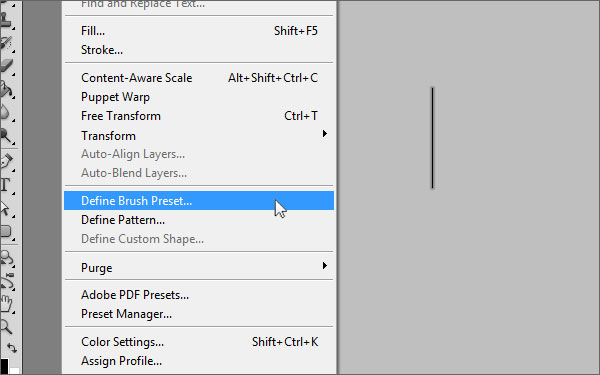
First, we will set up our brush preset for the barcode. Create a new document with a width of 1 px and a height of 100 px. Now pick the paint bucket tool and fill the document with black. Go to Edit > Define Brush Preset, choose a name for your brush and click OK.


Step 2

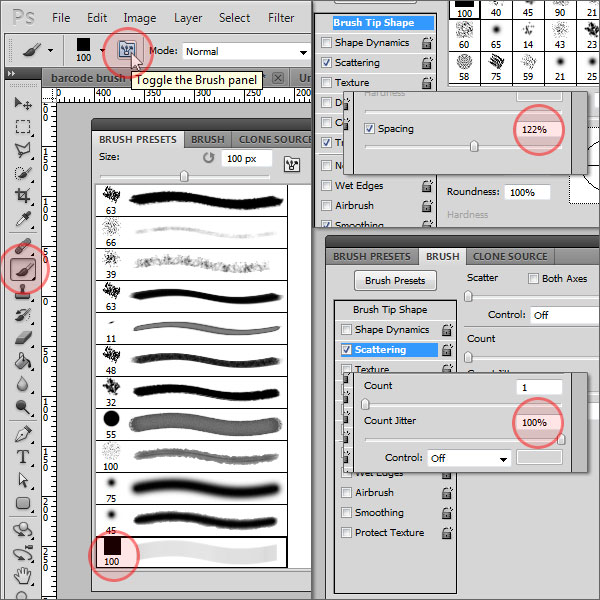
Create another new document, I chose 600 x 400 px for width and height. Select the brush tool and open the brush preset panel. Scroll down and select the brush preset you just created. Switch to the brush panel, make sure "Brush Tip Shape" is selected on the left-hand side and change the "Spacing" value to about 120 %. (Tip: By changing the spacing value you can determine how close the lines of the barcode will be together) Next, click on "Scattering" just below "Brush Tip Shape" and increase the count jitter value to 100%.


Step 3

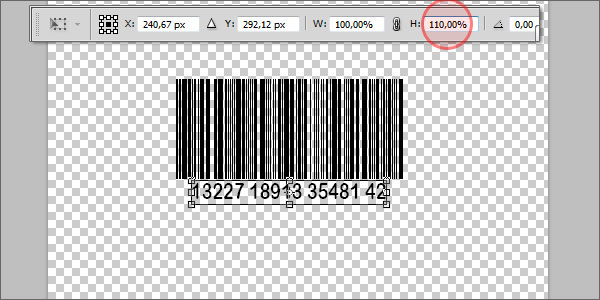
Now make sure the foreground color is set to black, and paint from left to right while holding the shift key, which straightens your barcode line automatically. Select the text tool and add some random numbers below the barcode. Press Cmd + T and increase the vertical scale just a little bit.


Step 4

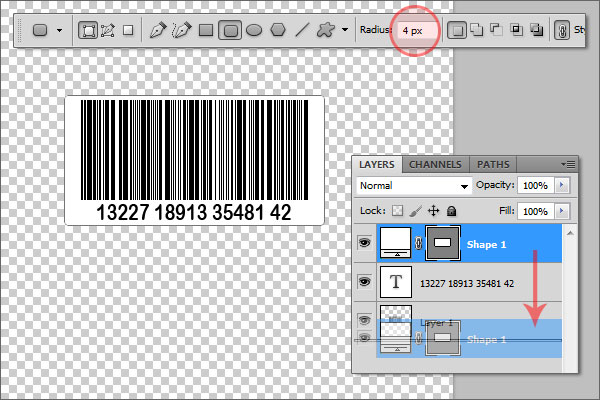
Switch the foreground color to white, pick the rounded rectangle tool with a radius of 4 px and draw a sticker-like shape around the barcode. Drag this shape layer behind the text and the barcode.


Step 5

Double-click on the shape layer and add the following layer styles (leave unmentioned parameters at defaults):

  • Drop Shadow: Opacity: 25%, Distance: 2px, Size: 3px;
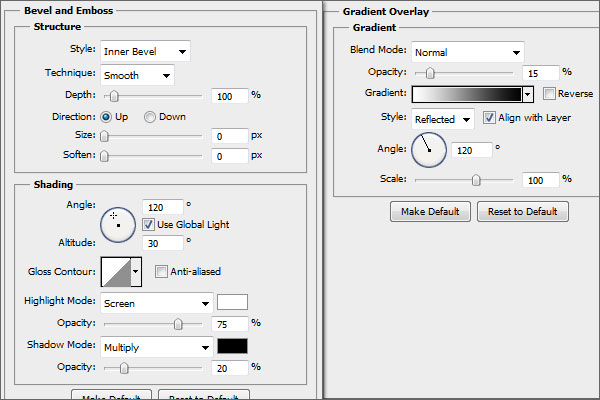
  • Bevel and Emboss: settings see image;
  • Gradient Overlay: settings see image;
  • Stroke: Size: 1px, Color: #d6d6d6;

Step 6

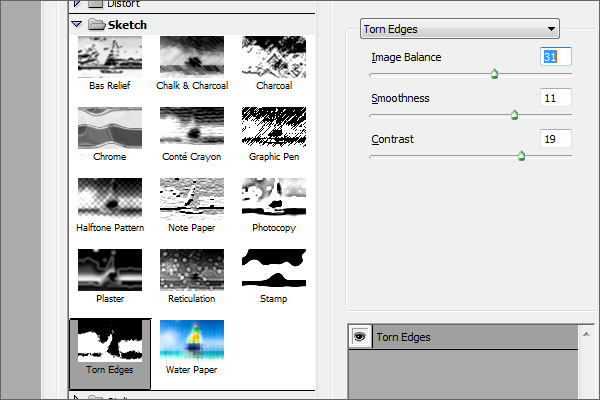
Now we are going to create the paperboard texture. Create a new layer, drag it behind the others, and fill it with black. Go to Filter > Noise > Add Noise with an amount of about 65% and check "Monocromatic". Then, make sure that the foreground color is set to white and the background color to black, go to Filter > Sketch > Torn Edges and apply it with the settings as seen on the image below.

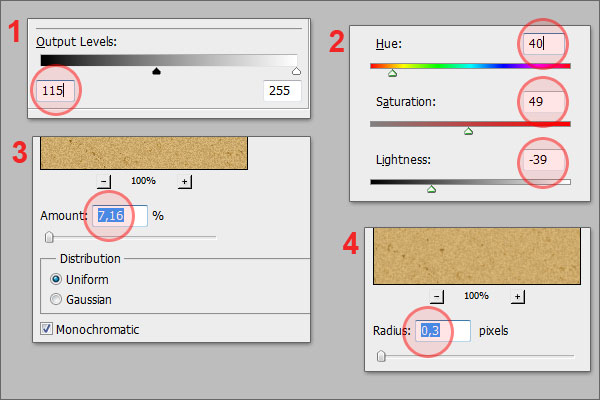
Press Cmd + L to access the levels adjustments and drag the left handle of the "Output Levels" to about 115. Press Cmd + U, make sure "Colorize" is checked and apply the following values: Hue: +40, Saturation: +49, Lightness: -39. Then, apply the "Add Noise" filter again with an amount of about 7%. Go to Blur > Gaussian Blur and apply it with a radius of 0.3 px.


Step 7

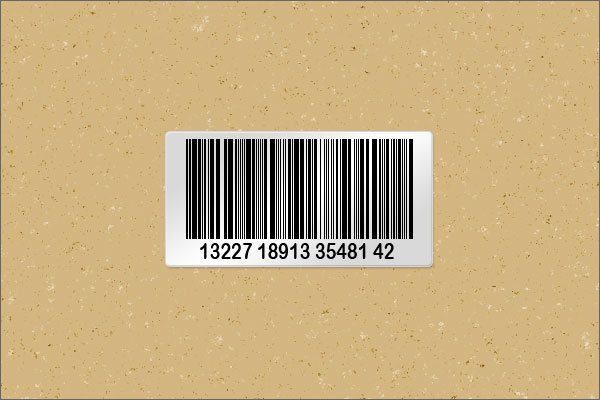
Create another new layer filled with black, change the foreground and background color to white and black again, and apply the "Add Noise" filter with an amount of 120%, then again the "Torn Edges" filter with the following settings: Image Balance: 1, Smoothness: 11, Contrast: 19. Set the layer’s blending mode to "Screen" and lower the opacity to about 50%. So far, you should have something like the image below.


Step 8

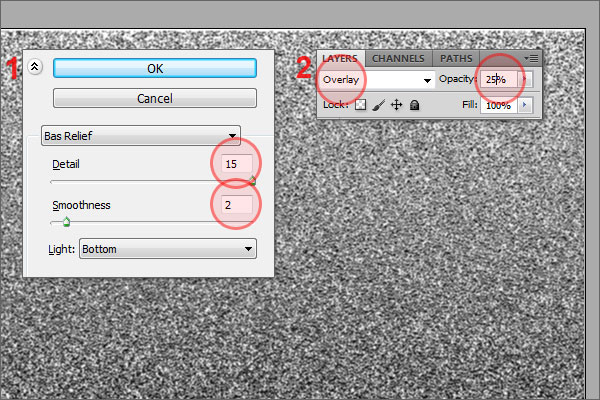
To add a little bit more depth, create another new layer, fill it with white and apply the "Add noise" filter with an amount of about 120%. Go to Filter > Sketch > Bas Relief and apply it with the settings as seen on the image. Set the blending mode to "Overlay" and lower the opacity to 25%.


Conclusion

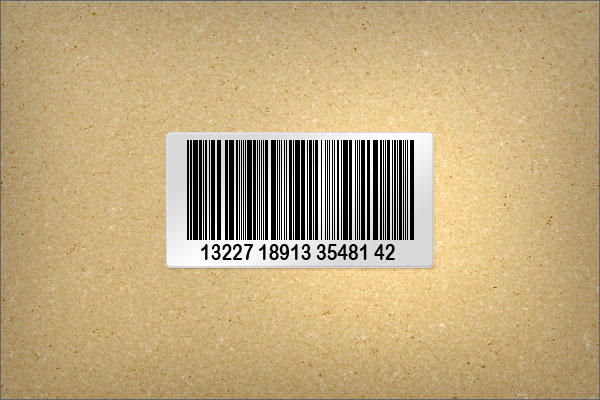
Congratulations, you are done! I added a simple vignette effect to my final result as you can see here.

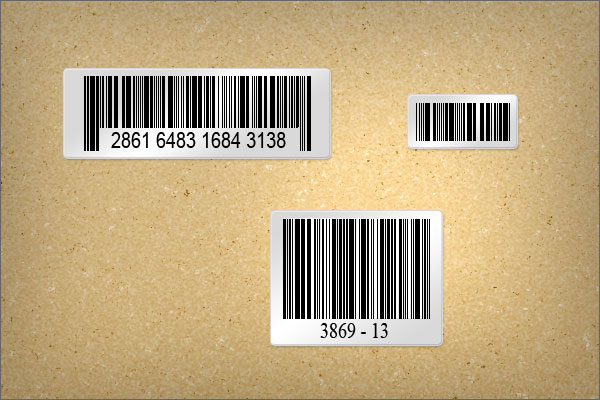
Here are some additional examples that I created using this technique.

Creating Typography Inspired by the Seventies and Eighties


Typography from the 70s and 80s is inspirational to both designers and illustrators. It often takes on a storytelling role in it’s design. With the tools that you and I have available to us today, we can be inspired by the work that has been done in the past, but try to push forward into new territories. Software like Illustrator, Photoshop, and Cinema 4d really allow me to create illustrative typography quickly and explore many options – which is always good when dealing with clients. I’d like to share with you some tips and observations I have made from doing numerous retro typography illustrations.


Inspiration

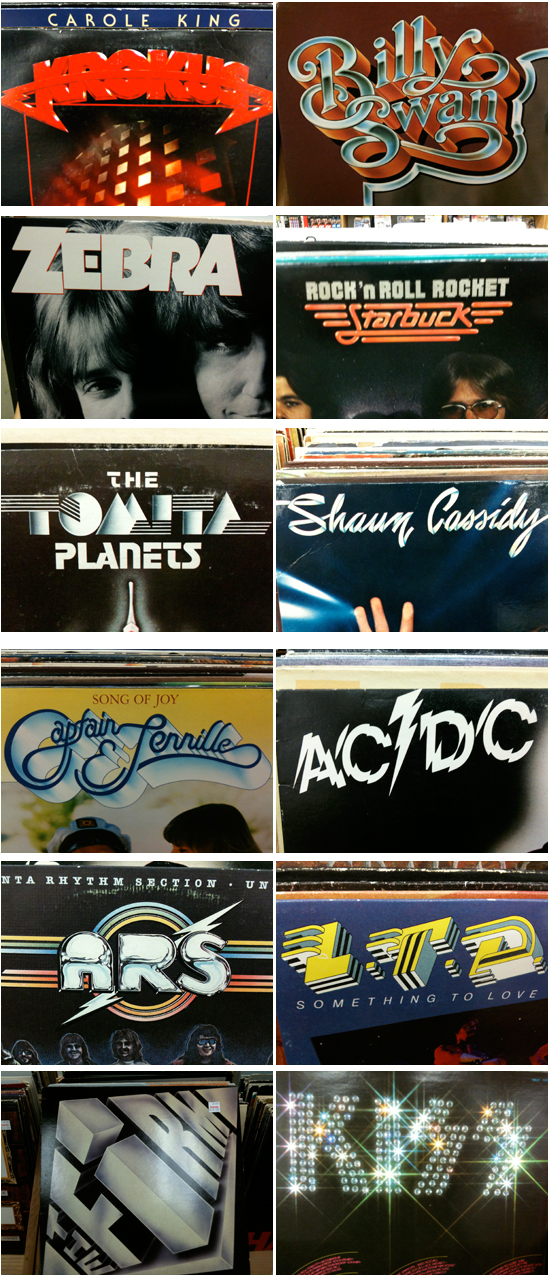
Inspiration for retro typography can be found online relatively easy these days. I do searches for old album covers as well as movie posters from the 70s and 80s. Used book stores or music stores are often filled with inspirational artwork and designs. I found all of these amazing examples of type artwork in the same store one night.

80s-typography

Originality

Retro typography has been very popular over the last couple years because there are some amazing artists like Ronald Ashburn and Sakke Soini breaking new ground with their techniques. I think the key to having some success in this style of typography is to bring something new to the forefront of your designs. Study what has been done, but look for ways to use modern tools to be creative rather than just recreate.

Finding inspiration from more obscure sources always helps with originality as well. If you are being inspired by the ACDC logo, then there’s a good chance people will notice it and your work will get lost in the comparison to the original. I saw this Petra album created in the late 70s and was blown away by the detail and the concept. The lighting effects look as if Chuck Anderson got ahold of them and the flying spaceship-guitar looks as if it should have been created in Cinema 4d. Truly amazing work!

petra

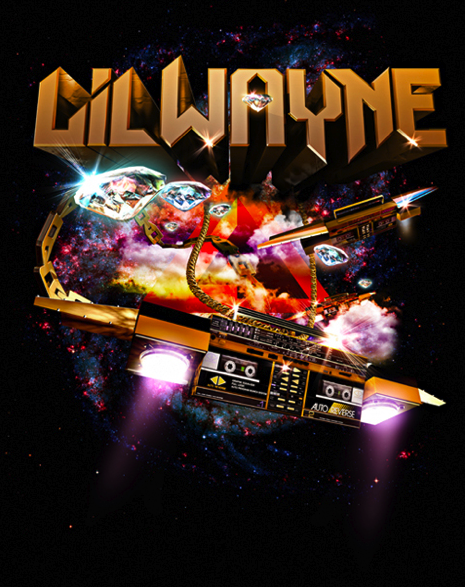
My concept for this Lil’ Wayne tee was a direct inspiration from the Petra album cover. I modeled the boombox spaceship so that I could use it from multiple angels – something that would have taken me forever to try to accomplish by hand.

lil_wayne

Font Choice

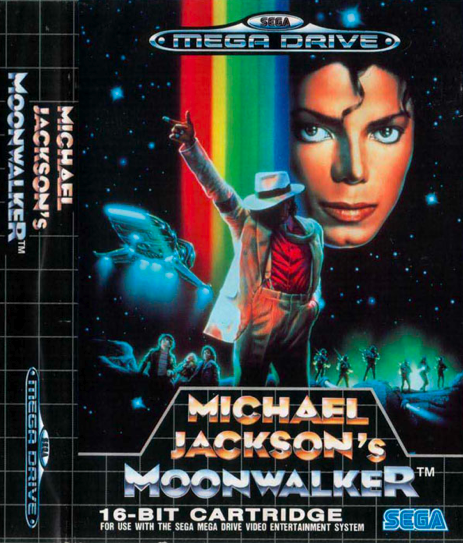
I noticed in my research and the retro artwork that grabbed my attention, most of the fonts were custom illustrated. The fonts take on a form of illustration rather than design/layout. Whether it was KISS and their bling type logo treatment or Shaun Cassidy and his continuous line drawing font (both shown above), there was a lot of detail and storytelling happening in the lettering. Chrome is a popular method for making your text feel very retro. I love this font treatment for the cover of Michael Jackson’s Sega video game debut.

mj

The detail in this font for MJ inspired my Vertigo artwork/typeface. This Vertigo poster was also used in Owl City “Fireflies” video – which was very retro in theme.

final

Texture and Colors

I love how an old album cover shows its age with colors that fade and scuff marks. That is a big part of how I treat my artwork. Adding the right type of wear and tear contributes so much to the retro vibe.

The blacks are never black anymore. The colors are slightly faded and don’t really pop like they once did. Adding a worn in texture can be a tough step to take. It’s easy to feel done with your design without including those details. I remember the first time I treated my artwork with a retro texturing. I was very nervous that I was ruining the artwork and the client would never go for it. Now it is a go-to technique that is often requested.

age

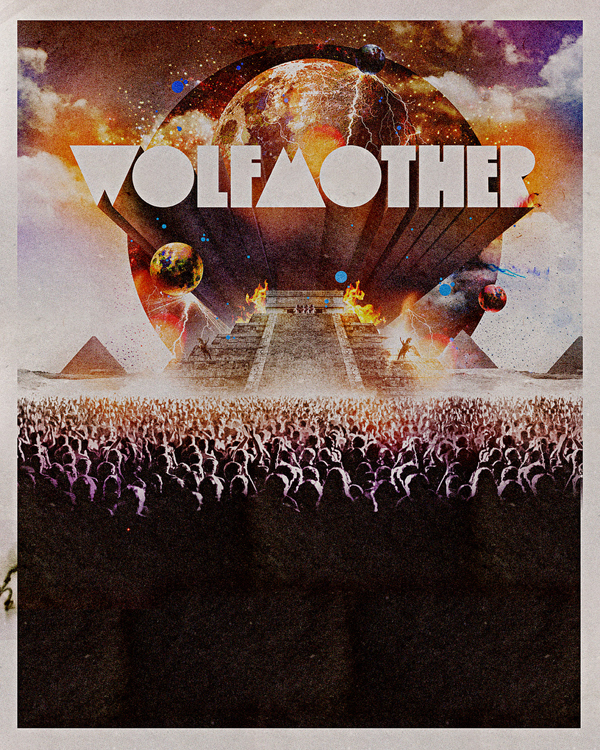
I used very similar texturing techniques for the following: Wolfmother, Owl City, and Carlos Whittaker type-artwork pieces.

wolfmother
owl-city
carlos

Final Thoughts

Computers and Software allow us to experiment quite a bit more than the artists of the 70s and 80s. It’s important to keep originality at the forefront of your concepts in order to stand out. Look for ways to be inspired by artwork from the past, but use technology to your advantage. See where you can push your limits and add something to what has been done before.


45 Beautiful Springtime Photo Manipulations


As the symbol of youth and beauty, artists have always portrayed spring organically, with bright colors, beautiful women, and flowers. Spring brings love and happiness, fills our hearts with joy and since spring has been with us for a while now, we thought we would show you some excellent spring-related photo manipulations to inspire you.


Spring…by Tysmin


Spring by Elanordh


Spring Eye by Violakaia


Spring by Sunstone72


The Voice of Spring by Healersmoon


Spring by Patrick Boyer


Spring – Breathe by Sxd-gfx


Calling on Spring by Kattnboys


Spring Awaits by Ceara-finn24


Waiting for My Spring by SheerHeart


Spring by Dedgirl72


The Coming of Spring by Saphia


Spring by Kayceeus


Spring Fae by SilentPlea


Spring Awakening by Drezdany


Spring Fancy by Kattnboys


Spring Tale by Agatha24


Follow Mr Winter by Copy of Me


Spring Beauty by 3ddream


Victorian Spring by FroweMinahild


Spring Blossom by mMissHeroin


Spring Night by Yayoi-Matsunaga


Reflect of Spring by Atumbleweed


Spring Will Come by Daywishes


Spring is coming by Rosiehardy


Spring Break by Cristian Toffolo


Spring by Helleana


Gardens of Spring by Cosmosue


Passage to Spring by Saiaii


Spring by FFrederik


Spring Comes by Ioneek


Ode to Spring by Iza87


News of Spring by InertiaK


Spring Twilight by Frostmaster


The Spring by M4gik


Tinted with Spring by Lizeth


Winter in Spring by MilkyBerry


The Prince of Spring by Rewston


Into Spring by KedtheMidnightWalker


Time for Spring by Schneeengel


The Spring by Audream9


Double Pact by Detail24


Spring by Morten Winther


A Child’s Eye by Valse-des-ombres


Spring by EscorpioTR