Ppv/ppm Web Cam Site Mod

Ppv/ppm Web Cam Site Mod

Please state a specific bid amount to be considered.

Site is already up and running. It is written in PHP and a little Flash. It was purchased as a cloned site. I have made my own modifications but need a few more that are beyond my scope.

These are the features that it has and the ones that we wish to add/modify:

Model side:

Script has a non-functioning schedule – Need a working model schedule so members can view accordingly.
Need more options added to model profile, such as bra size, etc.
Need ability for script to take automatic cam snapshots and upload to our server, perhaps every 15 sec or so, during live shows.
Need ability for script to auto-record all live shows. These videos would then be auto-uploaded and sold for either pay per minute or pay per view.
Need to add a “willingness” questionnaire after model is approved. What the models are willing to do on camera.
Using the existing resources, would like to add a video interview process for prospective models. This would be in conjunction with the required ID submission process.

Member side:

Would like to implement a way to schedule live shows with the models. Member would be charged a flat rate for reschedules and for no shows.
Creation of a voyeur mode or ghost mode, where they can view a live show in progress with no interaction between model and/or other members. Voyeur mode would be at a discounted rate.
Voyeur mode can be joined by several members at a time.
Addition of an ability to credit a model’s account for purchases at our future online store implementation.

Admin side:

Script is currently set up for Flash Media Server. Would love to have the script set up to work with Red5, so as to save on expensive FMS package.
Need to tweak current flash player , making it larger (full screen possibly), better site theme implementation, and the text area be a little less obstructive. Perhaps when no one is typing, the text fades away.
I will retain the rights to this script and be able to make modifications to it, if necessary.
Half the payment will be submitted when a working model of the program is available for me to view.
The other half will be presented upon completion.

Facebook Clone Web.

Facebook Clone Web.

We are looking for a company who can make a high quality, stable and secure website for multiple users, with a clean, easy to use design. The site was concepted to be similar to the old Facebook (1-2 years ago), with it’s easy design and ability to network easily. Please do not bid if you do not have enough experience, because we will only accept somebody can provide examples of similar social media websites. We will need to see demos of previous sites, we will also need to see admin section of these sites. The admin panel must be very detailed and expansive!

We will need a set timeframe, once the timeframe has been set, we would not like to go over that.

The party designing the website will be asked to sign a non-disclosure agreement and all website materials will be property of the company. We will also copyright the website. You cannot keep or resell any of the script made for us. We will only select a company with which we will see that we can have many years of business relationship.

The project: The social website must be very stable and qualitative, with very easy to use design. I will not list every feature and function here which the site must have. If you are a programmer with experience in social websites you must know which features myspace and facebook have.
We would like the website to be similar to the original aspect, in terms of ease of use, the design and look/feel should be different and easier. The features of this site should include, but not limited to are:

*Robust Mailing system (similar to Facebook)
*Easy to use internal IM
*Who’s viewed Me
*Family tree option for each user
*Enhanced mouse overs when searching.
*Photo albums, the ability to go private or public
* Users can download pictures if given access
*All basic features should be included without explanation.

Admin Features must be very ROBUST and should include, but not limited to:

* User-friendly, convenient online administration system
* Moderators Accounts to approve and edit profiles
* Easy to follow calendar
* Members Pictures Customized Water Mark
* Individual member promotion and membership assignment
* Search by ID, e-mail and nickname
* Confirmed User email notification for admin
* "Variables" section to manage sitewide functions
* Site’s styles file modification
* Automatic update availability alerts
* Admin interface to create moderators
* Featured profiles generating
* Optional profiles auto-approve
* Automatic database cleaning (administrator can specify allowed inactivity period)
* Displaying the number of registered members who are online/present
* E-mail notifications/newsletter system/Mass Mailer
* Ability to bring random profiles, online profiles, last profiles, and top rated profiles to home page
* Ability to set minimal number of characters for About me and About you fields
* Ability to set required size of Password field
* Customizable number of photos a member can upload
* Admin ability to set matches number
* Email extractor
* Negative Keyword filter
* Ban system per name, username, ip address, country, temporary bans and definitive bans options.
* Sitemap – dynamic sitemap for robots and visual sitemap for authority link

SEO:

Please make sure every aspect of this site is SEO friendly for Google spiders. Seo traffic is vital in the success of this project and must be a focal point.

These are the rules for the link building:

* Not disallowed by robots.txt or NOINDEX, NOFOLLOW tags.
* All links must be one way from quality websites
* No directory submission, free for all (FFA), blog, guest books, links within forums, links within newsgroups or links farms, or any site that seems to have incurred a Google penalty
* Links must be permanent and static
* Absolutely NO SPAM! If you use blog comments or Social Networks all links must
* Links from websites which currently link to us will not be counted.
* No Black Hat tactics and similar cheating. Only ethical correct white hat methods
* No hidden links – All links must be readable and the link page must be interlinked within the site.
* No links from pages with more than 20 outbound links.
* No automated submission. Creating thousands of links overnight will not help.
* Link page must be search engine friendly, i.e. no redirects, cloaking, framed pages, etc
* No links from: pharmacy, illegal, gambling, or pornographic sites.
* Links must not be labeled, sponsored, links, or ads
* No scraper sites, mirror sites, link exchanges
* No sites banned by google.
* Links must be in text, no graphics.
* No link schemes, No ping sites, No links within newsgroups
* Links must be from different Class-C IP addresses
* Linked sites must be in production (developed and not under construction).

You are free to use additional strategies assumed that it is ethical and “white hat”.

Please make our code unique and do not use existing code from other websites. The site can be built with a php script base, taking as a priority to make a very good and attractive design, having in mind that the site should be a 2.0 style.

Reliable Php Coder 4 Projects

Reliable Php Coder 4 Projects

experienced coders only
coders able to work on a return basis only

There are many separate supporting scripts to our
main script you will be the coder for all these.

This first project will be in several parts. I need
my stats script replaced completely, this will select
data off the database and display in a a nice panel.

So for this part I need the basic panel to be created
and for daily traffic to be selected

Slice Design + Cms

Slice Design + Cms

I provide:

PSD file

Deliverables (what I would like receive):

1. Sliced template
+ css
+ html
+ dynamic text (different fonts are used)
+ tableless
+ clean & fast code

2. CMS
+ NOT a standard cms (like Joomla, etc)
+ manage categories (tabs)
+ manage pages
+ manage news

Function categories:
– add, delete, rename

Function pages:
– add, delete, rename
– hide-unhide from front-end
– button save: page is saved
– button publish: page is published

Function gallery:
– add, delete, rename categories
– add (upload), delete, rename pictures
– resize images to goal format and delete original uploaded picture
– if description is added to categorie: show
– if description is added to picture: show
– lightbox for bigger pictures (or something better)

Function contactpage:
– contactform with a few fields: name, email, message
– button: send
– add, change, delete emailadres(ses) of the recipients

Function blog:****
– add, delete, rename articles
– possibility to set maximum blog-articles per page
– possibility to view/hide newer-older buttons
– archive: at bottom of blog. 10 clickable titles of older articles.
– A blogitem has: title, content, date, direct link
– Content of a blogitem can be: youtube movie, text, (part of) Picturegallery, other?

Function user:
– add, delete, edit user
– set new password
– generate random password

Function settings:****
– Name of website (title)
– Meta tags
– Photoalbum: size thumbnails, big pictures
– Standard emailadres (for contactform)

Template:
– Easy integration (front-end)
– Easy integration (back-end)****

****optionally: This is an extra but not necessary option and would be appreciated if it will be realized.

Please note: This is not the final design. It will be finetuned. No big changes are expected.

The CMS should be used for the sliced design.

Time schedule:
deadline: 7 may

Technical aspects:
– PHP 5.x
– MySql

Social Engine Plugin Php

Social Engine Plugin Php

Project is create a Social Engine plugin using PHP and Smarty.

http://www.socialengine.net/tutorials_view.php?tutorial_id=54

Similar to this: http://rainbow.arch.scriptmania.com/scripts/post_it.html
Here’s one put on Social Engine: http://epicbaydesigns.com/ but it doesn’t move, is hard to edit, and does not dismiss (close)

Admin Panel would be similar to:

Admin Post-it Note Enabled □

Enter Message

Frequency of Appearance
□ Once per browser session
□ Every page load

Position of Post-It
From Left XXXX px
From Top XXXX px

Post-it Size XX x XX px

Post-it Color
□ Yellow
□ Bright Yellow
□ Light Blue
□ Pink
□ White

Dismiss Indicator
□ Text Close
□ Text [Close]
□ Icon 1
□ Icon 2
□ Close on click

If you have not created a Social Engine plugin, there is a two-part tutorial:
http://www.socialengine.net/tutorials_view.php?tutorial_id=50
http://www.socialengine.net/tutorials_view.php?tutorial_id=54

Payment when files install and run as a plugin, administrated through the Admin Panel.

Professional Design Needed

Professional Design Needed

Our business is running web magazines within the computer hardware market in different languages. We seek an experienced company with previous work with similar brand/design where the signals/symbolic values of the design is the key focus of the development. We have been running our business for approx 10 years and we need a design where key words are:
– The content of the website is the voice of the website, not the design
– Less is more
– Good looking design, without excessive effects
– Design suitable for a computer related magazine
– Clean design

The design will be working together with a Joomla template

In the budget these moments are included in the project:
– Creating 4 different designs with different angle of approach
– From those 4, 3 are selected and develop these further,
– From those 3 we go for one final option that we do final adjustments to.

– Creating template

The partner we seek in this:
– must be experienced with creating design fitting existing brands
– must be available on a daily basis over phone or msn
– must master english or swedish very well
– should be able to give references to previous similar work
– must be tolerant, if the needs change during the project and we start over on a new angle of approach. (of course to a limited extent)
– must have experience in this to be able to guide us away from obvious mistakes when it comes to conventional designing point of view.

Working with Advanced 3D CSS: New Premium Screencast

Working with Advanced 3D CSS: New Premium Screencast

CSS is capable of so much more than browsers can currently handle, namely when it comes to working in 3D spaces. In this week’s premium video tutorial, I’m going to teach you how to work with CSS transitions, animations, and specifically how to work with Webkit’s CSS 3D capabilities. Help give back to Nettuts+ by becoming a premium member!


Preview

Screenshot

You’ll Learn About:

  • CSS3 radial gradients
  • HTML5 mark-up
  • Using the Webkit nightlies
  • CSS perspective
  • Defining keyframes for animations
  • preserve-3d

Join Net Premium

NETTUTS+ Screencasts and Bonus Tutorials

For those unfamiliar, the family of TUTS sites runs a premium membership service. For $9 per month, you gain access to exclusive premium tutorials, screencasts, and freebies from Nettuts+, Psdtuts+, Aetuts+, Audiotuts+, and Vectortuts+! For the price of a pizza, you’ll learn from some of the best minds in the business. Join today!


Introducing Moneybookers Payment & Pre-paid Premium Memberships

Introducing Moneybookers Payment & Pre-paid Premium Memberships

Always wanted to go Premium but don’t have a PayPal account, or a credit card linked to your PayPal account? Well, we have good news! Thanks to the stellar work of our developers, we can now accept payments from a Moneybookers account. We hope this will open Tuts+ Premium Memberships to a lot more people.

Even more good news: if you don’t have a credit card you can now purchase a pre-paid Premium membership. Pre-paid memberships don’t require you to have a credit card linked to your PayPal account to become a Premium member. Your pre-paid options are:

  • $22 – Three Month Membership
  • $40 – Six Month Membership
  • $78 – One Year Membership
  • This news comes at a good time, because we’re one day away from launching CG Premium (the Premium program for Cgtuts+) and after that, Active Premium (the Premium program for Activetuts+).

    Become a Premium member and gain instant access to 279 exclusive tutorials and over 700 source files. You’ll get all the content for Psd Premium, Net Premium, Audio Premium, Ae Premium and, very soon, Active Premium and CG Premium.


How to Build a Simple Twitter Widget with ASP.NET

How to Build a Simple Twitter Widget with ASP.NET

In this tutorial, I’ll be walking you through how to a write a Twitter widget for ASP.NET in the form of a reusable server control complete with nice things such as automatically turning URLs into links, and caching to speed up page load times.


Step 1 Getting Started

To follow this tutorial, all you need is Visual Studio (You can use MonoDevelop if you’re not on Windows, although there’s no guarantees there.) If you don’t want to fork over cash for the full version of Visual Studio, you can grab the free Express Edition.

You’ll also need knowledge of C# 3.0, as this tutorial makes use of some of the newer features of the language, such as lambda expressions and the var keyword.


Step 2 Creating the Control

ASP.NET includes a handy feature known as Server Controls. These are custom tags that aim to help developers structure their code. When a page using a server control is requested, the ASP.NET runtime executes the Render() method and includes the output in the final page.

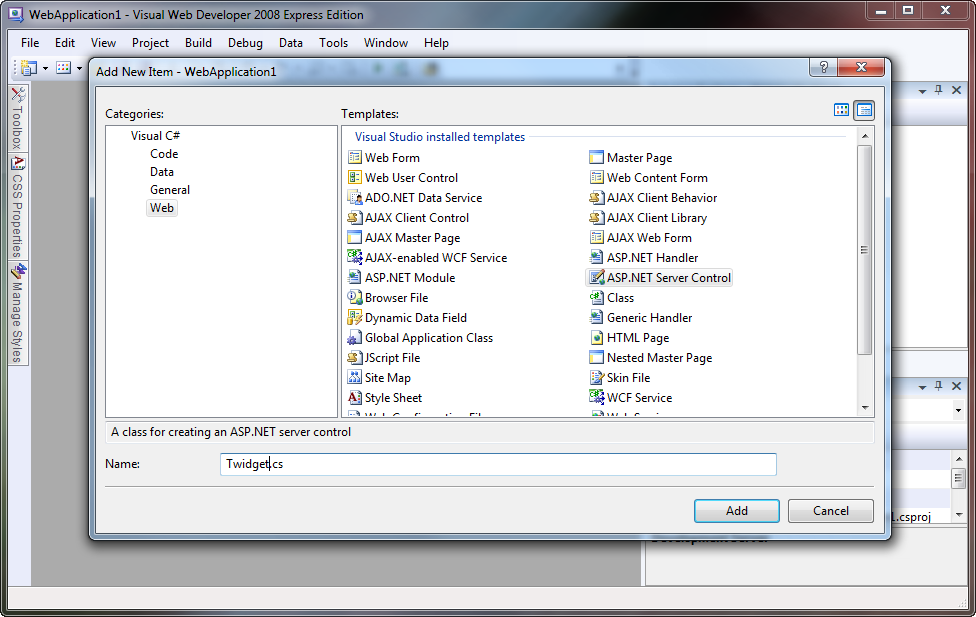
Once you’ve created a new Web Application in Visual Studio, right click in the Solution Explorer and add a new item to the solution. Select ASP.NET Server Control, and give it a name. Here, I’ve called it Twidget.cs, but you’re welcome to call it whatever you like. Paste the following code in, and don’t worry if it all looks a bit foreign – I’ll explain it all shortly.

using System;
using System.Collections.Generic;
using System.Linq;
using System.Web;
using System.Web.UI;
using System.Web.Script.Serialization;
using System.Net;

namespace WebApplication1
{
    public class Twidget : Control
    {
        public string Account { get; set; }
        public int Tweets { get; set; }

        protected override void Render(HtmlTextWriter writer)
        {
            writer.Write("<ul>");

            foreach (var t in GetTweets().Take(Tweets))
                writer.Write("<li>{0}</li>", HttpUtility.HtmlEncode(t));

            writer.Write("</ul>");
        }

        public List<string> GetTweets()
        {
            var ls = new List<string>();

            var jss = new JavaScriptSerializer();
            var d = jss.Deserialize<List<Dictionary<string, object>>>(
                new WebClient()
                .DownloadString("http://api.twitter.com/1/statuses/user_timeline.json?screen_name=" + Account)
                );

            foreach (var x in d)
                ls.Add((string)x["text"]);

            return ls;
        }
    }
}

This is about as basic as you can get for a Twitter widget. Here’s how it works:

When a user requests a page with this control on it, the Render() method gets executed with a HtmlTextWriter passed as a parameter. It writes out the <ul> tag, and then enters a loop which prints out each tweet as a list item. The magic here happens in the GetTweets() method. Notice how we are using the Take() extension method to make sure we only print the amount of tweets that we’re asked to.

Once execution passes to the GetTweets() method, we setup a List>string< to hold our tweets and a JavaScriptSerializer to parse the JSON from the Twitter API servers. The statement on lines 31 – 34 (split up for readability) retrives the user timeline in JSON format, then deserializes into .NET types we can work with. On line 36, we loop through all the tweets and add them one by one to the tweet list. We have to manually cast x[“text”] to a string because we deserialized it as an object. We had to do this, because the JSON returned by the Twitter API uses a smorgasboard of different types – which is fine for JavaScript, but a little tricky with C#.


Step 3 Using the Control

Now we have the code for our Twitter widget; let’s put it to use! Open your Default.aspx page (or whichever page you want to use this in) and put the following code immediately after the <%@ Page %> directive:

<%@ Register TagPrefix="widgets" Namespace="WebApplication1" Assembly="WebApplication1" %>

Feel free to change the TagPrefix to whatever you like, but make sure that the Namespace attribute is correctly set to whatever namespace you placed the widget code in, and ensure that the Assembly attribute is set to the name of your web application (in our case, WebApplication1).

Once you’ve registered the proper tag prefix (and you’ll need to do this for every page you want to use the control on), you can start using it. Paste the following code somewhere into your page, and once again, feel free to change the attributes to whatever you want:

<widgets:Twidget runat="server" Account="twitter" Tweets="10" />

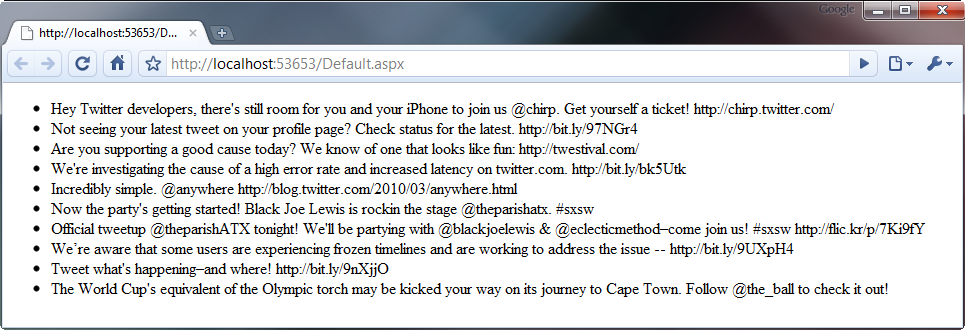
If you’ve done everything properly, you should see a page similar to this when you run your web application:


Step 4 Some Fancy Stuff…

You’ve got to admit, the control we’ve got at the moment is pretty rudimentary. It doesn’t have to be though, so let’s spiffy it up a little by turning URLs into nice, clickable links for your visitors.

Find the foreach loop in the Render() method and scrap it completely. Replace it with this:

// you'll need to add this using directive to the top of the file:
using System.Text.RegularExpressions;

foreach (var t in GetTweets().Take(Tweets))
{
    string s = Regex.Replace(
        HttpUtility.HtmlEncode(t),
        @"[a-z]+://[^\s]+",
        x => "<a href='" + x.Value.Replace("'", "&quot;") + "'>" + x.Value + "</a>",
        RegexOptions.Compiled | RegexOptions.IgnoreCase
        );

    writer.Write("<li>{0}</li>", s);
}

It’s all pretty much the same code, except for the humongous call to Regex.Replace() on line 6. I’ll explain what this does.

The first parameter is the input, or the string that the Regex works on. In this case, it’s just the tweet text after being passed through HttpUtility.HtmlEncode() so we don’t fall victim to a vicious XSS attack. The input is then matched against the second parameter which is a regular expression designed to match a URL.

The third parameter is where it gets a little involved. This is a lambda expression, a feature new to C# 3. It’s basically a very short way of writing a method like this:

public static string SomeFunction(Match x)
{
    return "<a href='" + x.Value.Replace("'", "&quot;") + "'>" + x.Value + "</a>";
}

All it does is wrap the URL with an <a> tag, of which all quotation marks in the URL are replace with the HTML entity &quot;, which helps prevent XSS attacks. The fourth and final parameter is just an ORed together pair of flags adjusting the way our regex behaves.

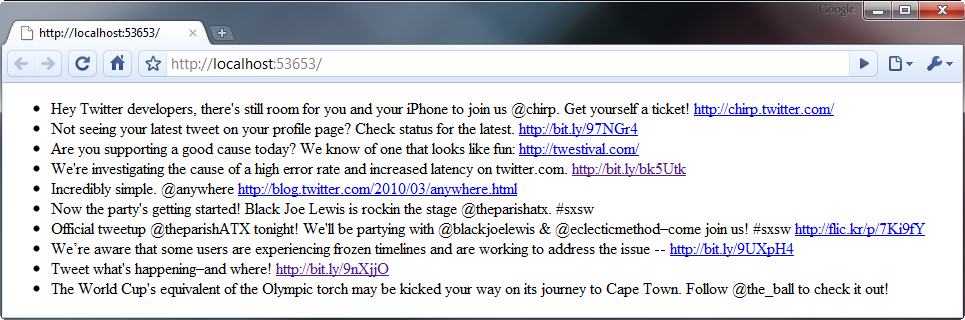
The output of the control after making this adjustment is somewhat similar to the screenshot below.


Step 5 Caching

There’s a big problem with the code I’ve given to you above, and that is that it doesn’t cache the response from the Twitter API. This means that every time someone loads your page, the server has to make a request to the Twitter API and wait for a response. This can slow down your page load time dramatically and can also leave you even more vulnerable to a Denial of Service attack. Thankfully, we can work around all this by implementing a cache.

Although the basic structure of the control’s code remains after implementing caching, there’s too many small changes to list, so I’ll give you the full source and then – as usual – explain how it works.

using System;
using System.Collections.Generic;
using System.Linq;
using System.Web;
using System.Web.UI;
using System.Web.Script.Serialization;
using System.Net;
using System.Threading;
using System.Text.RegularExpressions;

namespace WebApplication1
{
    public class Twidget : Control
    {
        public string Account { get; set; }
        public int Tweets { get; set; }
        public int CacheTTL { get; set; }

        static Dictionary<string, CachedData<List<string>>> Cache = new Dictionary<string, CachedData<List<string>>>();

        protected override void Render(HtmlTextWriter writer)
        {
            writer.Write("<ul>");

            foreach (var t in GetTweets().Take(Tweets))
            {
                string s = Regex.Replace(
                    HttpUtility.HtmlEncode(t),
                    @"[a-z]+://[^\s]+",
                    x => "<a href='" + x.Value.Replace("'", """) + "'>" + x.Value + "</a>",
                    RegexOptions.Compiled | RegexOptions.IgnoreCase
                    );

                writer.Write("<li>{0}</li>", s);
            }

            writer.Write("</ul>");
        }

        public List<string> GetTweets()
        {
            if (!Cache.Keys.Contains(Account)
                || (DateTime.Now - Cache[Account].Time).TotalSeconds > CacheTTL
                )
                new Thread(Update).Start(Account);

            if (!Cache.Keys.Contains(Account))
                return new List<string>();

            return Cache[Account].Data;
        }

        public static void Update(object acc)
        {
            try
            {
                string Account = (string)acc;

                var ls = new List<string>();

                var jss = new JavaScriptSerializer();
                var d = jss.Deserialize<List<Dictionary<string, object>>>(
                    new WebClient()
                    .DownloadString("http://api.twitter.com/1/statuses/user_timeline.json?screen_name=" + Account)
                    );

                foreach (var x in d)
                    ls.Add((string)x["text"]);

                if (!Cache.Keys.Contains(Account))
                    Cache.Add(Account, new CachedData<List<string>>());

                Cache[Account].Data = ls;
            }
            catch (Exception) { }
        }
    }

    class CachedData<T>
    {
        public DateTime Time { get; private set; }

        T data;
        public T Data {
            get {
                return data;
            }
            set
            {
                Time = DateTime.Now;
                data = value;
            }
        }
    }
}

As you can see, the Render() method remains unchanged, but there’s some pretty drastic changes everywhere else. We’ve changed the GetTweets() method, added a new property (CacheTTL), added a private static field (Cache), and there’s even a whole new class – CachedData.

The GetTweets() method is no longer responsible for talking to the API. Instead, it just returns the data already sitting in the cache. If it detects that the requested Twitter account hasn’t been cached yet, or is out of date (you can specify how long it takes for the cache to expire in the CacheTTL attribute of the control), it will spawn a seperate thread to asynchronously update the tweet cache. Note that the entire body of the Update() method is enclosed in a try/catch block, as although an exception in the Page thread just displays an error message to the user, if an exception occurs in another thread, it will unwind all the way back up the stack and eventually crash the entire worker process responsible for serving your web application.

The tweet cache is implemented as a Dictionary<string, CachedData<string>>, where the username of the twitter account being cached is the key, and an instance of the CachedData<T> class is the value. The CachedData<T> class is a generic class and can therefore be used with any type (although in our case, we’re only using it to cache a string.) It has two public properties, Data, which uses the data field behind the scenes, and Time, which is updated to the current time whenever the Data property is set.

You can use the following code in your page to use this caching version of the widget. Note that the new CacheTTL attribute sets the expiry (in seconds) of the tweet cache.

<widgets:Twidget runat="server" Account="twitter" Tweets="10" CacheTTL="600" />

Conclusion

I hope this tutorial has not only taught you how to make a Twitter widget, but has given you an insight into how server controls work as well as some best practices when ‘mashing up’ data from external sources. I realise that the browser output of this control isn’t exactly the prettiest, but I felt that styling it and making it look pretty was outside the scope of the article and has therefore been left as an exercise for the reader. Thanks for reading! Feel free to ask any questions that you might have in the comments section below.


Original 40 Articles Needed 2

Original 40 Articles Needed 2

I need 40 original articles( I will check with copyscape) written for my weight loss websites with a minimum of 350-400 words per article.(topics will be send on PMB) lower bid will be selected!

The right person…:

• Writes FLUENT English – this is very important, native writers preferred, non natives don’t waste your time, don’t try to lie me your are a native because I can tell if your are not from your writing style from miles.

If the successful bidder performs an excellent job with this
I will likely employ them for similar projects in the future.

Seo For Mostly Flash Site

Seo For Mostly Flash Site

Hello, I need SEO done for my FLASH site faceflow dot com
I do have some static pages :
faceflow com/ladder.php?game=threedpong
faceflow com/ct4ladder.php

You can click on a player and he has a player profile also.

Thought 99% of my website is directly on faceflow dot com, all made in flex/flash.

I need some brains that can still make my website top of google and yahoo for a few specific keywords.

If you just copy and paste a message of your old SEO technique, you will 100% not be chosen, you need to show me you have experience or solutions for my flash site.

Thanks