20 Helpful jQuery Methods you Should be Using
So you’ve been playing with jQuery for a while now, you’re starting to get the hang of it, and you’re really liking it! Are you ready to take your jQuery knowledge to level two? Today, I’ll demonstrate twenty functions and features you probably haven’t seen before!
1 after() / before()
Sometimes you want to insert something into the DOM, but you don’t have any good hooks to do it with; append() or prepend() aren’t going to cut it and you don’t want to add an extra element or id. These two functions might be what you need. They allow you to insert elements into the DOM just before or after another element, so the new element is a sibling of the older one.
$('#child').after($('<p />')).text('This becomes a sibling of #child'));
$('#child').before($('<p />')).text('Same here, but this is go about #child'));
You can also do this if you’re working primarily with the element you want to insert; just use the insertAfter() or insertBefore functions.
$('<p>I\'ll be a sibling of #child</p>').insertAfter($('#child'));
2 change()
The change() method is an event handler, just like click() or hover(). The change event is for textareas, text inputs, and select boxes, and it will fire when the value of the target element is changed; note that this is different from the focusOut() or blur() event handlers, which fire when the element loses focus, whether its value has changed or not.
The change() event is perfect for client-side validation; it’s much better than blur(), because you won’t be re-validating fields if the user doesn’t change the value.
$('input[type=text]').change(function () {
    switch (this.id) {
        /* some validation code here */
    }
});??????????
3 Context
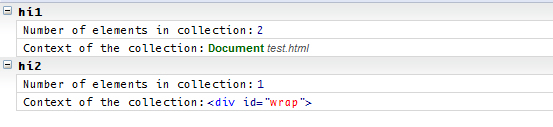
Context is both a parameter and a property in jQuery. When collecting elements, you can pass in a second parameter to the jQuery function. This parameter, the context, will usually be a DOM element, and it limits the elements returned to item matching your selector that are children of the context element. That might sound a bit confusing, so check out this example:
<p class="hello">Hello World</p>
<div id="wrap">
    <p class="hello">Hello World</p>
</div>
var hi1 = $('.hello'),
    hi2 = $('.hello', $('#wrap').get(0));

console.group('hi1');
console.log("Number of elements in collection:", hi1.length);
console.log("Context of the collection:", hi1.context);
console.groupEnd();
console.group('hi2');
console.log("Number of elements in collection:", hi2.length);
console.log("Context of the collection:", hi2.context);
console.groupEnd();
So where would this be useful? One place might be inside an event handler function. If you’d like to get an element within the one the event was fired on, you could pass this as the context:
$('ul#options li').click(function () {
    $('a', this) . . .
});
4 data() / removeData()
Have you ever wanted to store some bit of information about an element? You can do that easily with the data() method. To set a value, you can pass in two parameters (a key and a value) or just one (an object).
$('#wrap').data('myKey', 'myValue');
$('#container').data({ myOtherKey : 'myOtherValue', year : 2010 });
To get your data back, just call the method with the key of value you want.
$('#container').data('myOtherKey'); //returns 'myOtherValue'
$('#container').data('year'); //returns 2010
To get all the data that corresponds with an element, call data without any parameters; you’ll get an object with all the keys and values you’ve given to that item.
If you want to delete a key/value pair after you’ve added it to an element, just call removeData(), passing in the correct key.
$('#container').removeData('myOtherKey');
5 queue() / dequeue()
The queue() and dequeue() functions deal with animations. A queue is list of animations to be executed on an element; be default, an element’s queue is named ‘fx.’ Let’s set up a scenario:
HTML
<ul>
  <li id="start">Start Animating</li>
  <li id="reset">Stop Animating</li>
  <li id="add">Add to Queue</li>
</ul>
<div style="width:150px; height:150px; background:#ececec;"></div>
JavaScript
$('#start').click(animateBox);

$('#reset').click(function() {
    $('div').queue('fx', []);
});

$('#add').click(function() {
    $('div').queue( function(){
        $(this).animate({ height : '-=25'}, 2000);
        $(this).dequeue();
    });
});

function animateBox() {
  $('div').slideUp(2000)
           .slideDown(2000)
           .hide(2000)
           .show(2000, animateBox);
}
So, here’s what’s going on: in the animateBox function, we’re setting up a queue of animations; notice that the last one calls back to the function, so this will continually repeat the queue. When we click li#start, the function is called and the queue begins. When we click li#reset, the current animation finishes, and then the div stops animating. What we’ve done with jQuery is set the queue named ‘fx’ (remember, the default queue) to an empty array; essentially, we’ve emptied the queue. And what about when we click li#add? First, we’re calling the queue function on the div; this adds the function we pass into it to the end of the queue; since we didn’t specify a queue as the first parameter, ‘fx’ is used. In that function, we animate the div, and then call dequeue() on the div, which removes this function from the queue and continues the queue; the queue will continue repeating, but this function will not be part of it.
6 delay()
When you’re queuing up a chain of animations, you can use the delay() method to pause the animation for a length of time; pass that time as a parameter in milliseconds.
$('div').hide().delay(2000).show(); // div will stay hidden for 2 seconds before showing.
7 bind(), unbind(), live(), and die()
Did you know that when you add a click event to an element like this . . .
$('#el').click(function () { /*******/ });
. . . you’re really just using a wrapper for the bind() method? To use the bind() method itself, you can pass the event type as the first parameter and then the function as the second.
If you use a lot of events, you can categorize them with namespacing; just add a period after the event name and add your namespace.
$('#el').bind('click', function () { /*******/ });
$('#el').bind('click.toolbarEvents', function () { /*******/ }); // namespaced
You can also assign the same function to multiple events at the same time, by separating them with spaces. So if you wanted to make a hover effect, you could start this way:
$('#el').bind('mouseover mouseout', function () { /*******/ });
You can also pass data to the function if you’d like, by adding a third parameter (in the second position).
$('#el').bind('click', { status : 'user-ready' }, function () {
    switch(event.data.status) {
    /********/
    }
});
Sooner or later, you’ll find yourself inserting element into the DOM via an event handler; however, you’ll find that the event handlers you’ve made with bind (or its wrappers) don’t work for inserted elements. In cases like this, you’ll need to use the live() (or delegate) method; this will add the event handlers to the appropriate inserted elements.
$('.toggle').live(function () {
    /* code */
    $('<span class="toggle">Enable Beta Features</span>').appendTo($('#optionsPanel'));
    /* more code */
});
To remove event handlers created with bind(), use the unbind() method. If you don’t pass it any parameters, it will remove all the handlers; you can pass in the event type to only remove event handlers of that type; to remove events from a specific namespace, add the namespace, or use it alone. If you just want to remove a certain function, pass its name along as the second parameter.
$('button').unbind(); // removes all
$('button').unbind('click'); // removes all clicks
$('button').unbind('.toolbarEvents'); // removes all events from the toolbarEvents namespace
$('button').unbind('click.toolbarEvents'); // removes all clicks from the toolbarEvents namespace
$('button').unbind('click', myFunction); // removes that one handler
Note that you can bind/unbind functions you’ve passed in anonymously; this only works with the functions name.
If you’re trying to unbind an event from inside the function called by the event, just pass unbind() the event object.
$('p').bind('click', function (event) {
    $('p').unbind(event);
} );
You can’t use unbind() for live events; instead, use the die(). Without parameters, it will remove all live events from the element collection; you can also pass it just the event type, of the event type and the function.
$('span').die(); // removes all
$('span').die('mouseover'); // removes all mouseovers
$('span').die('mouseover', fn); // remove that one handler
And now, you can wield jQuery events with deftness and power!
You should also review the delegate() method, as there can be substantial performance benefits to using it over live().
8 eq()
If you’re looking for a specific element within a set of elements, you can pass the index of the element to the eq() method and get a single jQuery element. Pass in a negative index to count back from the end of the set.
var ps = $('p');
console.log(ps.length); // logs 3;
ps.eq(1).addClass('emphasis'); // just adds the class to the second item (index in zero-based)
You can also use :eq() in your selectors; so the previous example could have been done like this:
$('p:eq(1)').addClass('emphasis');
9 get()
When getting a collection of element, jQuery returns them as a jQuery object, so you have access to all the methods. If you just want the raw DOM elements, you can use the get() method.
You can specify an index to get only one element.
alert( $('p') ); // [object Object] - the jquery object
alert( $('p').get(1) ); // [object HTMLParagraphElement]
10 grep()
If you’re not familiar with Unix/Linix shells, you might not have heard the term grep. In a terminal, it’s a text search utility; but here in jQuery, we use it to filter an array of elements. It’s not a method of a jQuery collection; you pass in the array as the first parameter and the filtering function as the second parameter. That filter function takes two parameters itself: an element from the array and its index. That filter function should perform its work and return a true or false value. Be default, all the items that return true will be kept. You can add a third parameter, a boolean, to invert the results and kept the items that return false.
Jeffrey Way did a great quick tip about the $.grep not long ago; check that out to see how to use it!
var nums = '1,2,3,4,5,6,7,8,9,10'.split(',');

nums = $.grep(nums, function(num, index) {
  // num = the current value for the item in the array
  // index = the index of the item in the array
  return num > 5; // returns a boolean
});

console.log(nums) // 6,7,8,9,10
11 Pseudo-Selectors
Sizzle, the CSS Selector engine inside jQuery, offers quite a few pseudo-selectors to make the job of selecting the elements you want easy. Check out these interesting ones:
$(':animated'); // returns all elements currently animating
$(':contains(me)'); // returns all elements with the text 'me'
$(':empty'); // returns all elements with no child nodes or text
$(':parent'); // returns all elements with child nodes or text
$('li:even'); // returns all even-index elements (in this case, <li>s)
$('li:odd'); // can you guess?
$(':header'); // returns all h1 - h6s.
$('li:gt(4)'); // returns all elements with an (zero-based) index greater than the given number
$('li:lt(4)'); // returns all element with an index less than the given number
$(':only-child'); // returns all . . . well, it should be obvious
There are more, of course, but these are the unique ones.
12 isArray() / isEmptyObject() / isFunction() / isPlainObject()
Sometimes you want to make sure the parameter that was passed to a function was the corrent type; these functions make it easy to do. The first three are pretty self explanatory:
$.isArray([1, 2, 3]); // returns true
$.isEmptyObject({}); // returns true
$.isFunction(function () { /****/ }); // returns true
The next one isn’t as obvious; isPlainObject() will return true if the parameter passed in was created as an object literal, or with new Object().
function Person(name) {
	this.name = name
	return this;
}
$.isPlainObject({})); // returns true
$.isPlainObject(new Object()); // returns true
$.isPlainObject(new Person()); // returns false
13 makeArray()
When you create a collection of DOM elements with jQuery, you’re returned a jQuery object; in some situations, you might prefer that this be an array or regular DOM elements; the makeArray() function can do just that.
var ps = $('p');
$.isArray(ps); //returns false;
ps = $.makeArray(ps);
$.isArray(ps); // returns true;
14 map()
The map() method is remotely similar to grep(). As you might expect, it takes one parameter, a function. That function can have two parameters: the index of the current element and the element itself. Here’s what happens: the function that you pass in will be run once for each item in the collection; whatever value is returned from that function takes the place of the item it was run for in the collection.
$('ul#nav li a').map(function() {
  return $(this).attr('title');
});  // now the collection is the link titles
// this could be the beginning of a tooltip plugin.
15 parseJSON()
If you’re using $.post or $.get—and in other situations that you work with JSON strings—you’ll find the parseJSON function useful. It’s nice that this function uses the browsers built-in JSON parser if it has one (which will obviously be faster).
$.post('somePage.php', function (data) {
    /*****/
data =  $.parseJSON(data);
    /*****/
});
16 proxy()
If you have a function as a property of an object, and that function uses other properties of the object, you can’t call that function from within other functions and get the right results. I know that was confusing, so let’s look at a quick example:
var person = {
  name : "Andrew",
  meet : function () {
    alert('Hi! My name is ' + this.name);
  }
};
person.meet();
$('#test').click(person.meet);
By itself, person.meet() will alert correctly; but when it’s called by the event handler, it will alert “Hi! My name is undefined.” This is because the function is not being called in the right context. To fix this, we can use the proxy() function:
$('#test').click($.proxy(person.meet, person));
// we could also do $.proxy(person, "meet")
The first parameter of the proxy function is the method to run; the second is the context we should run it in. Alternatively, we can pass the context first, and the method name as a string second. Now you’ll find that the function alerts correctly.
Prefer a video quick tip on $.proxy?
17 replaceAll() / replaceWith()
If you’d like to replace DOM elements with other ones, here’s how to do it. We can call replaceAll() on elements we’ve collected or created, passing in a selector for the elements we’d like to replace. In this example, all elements with the error class will be replaced with the span we’ve created.
$('<span class="fixed">The error has been corrected</span>').replaceAll('.error');
The replaceWith() method just reverses the selectors; find the ones you want to replace first:
$('.error').replaceWith('<span class="fixed">The error has been corrected</span>');
You can also pass these two methods functions that will return elements or HTML strings.
18 serialize() / serializeArray()
The serialize() method is what to use for encoding the values in a form into a string.
HTML
<form>
    <input type="text" name="name" value="John Doe" />
    <input type="text" name="url" value="http://www.example.com" />
</form>
JavaScript
console.log($('form').serialize());??? // logs : name=John+Doe&url=http%3A%2F%2Fwww.example.com
You can use serializeArray() to turn the form values into an array of objects instead of a string:
console.log($('form').serializeArray());???
// logs : [{ name : 'name', value : 'John Doe'} , { name : 'url', value : 'http://www.example.com' } ]
19 siblings()
You can probably guess what the siblings() method does; it will return a collection of the siblings of the whatever items are in your original collections:
<div> . . . </div>
<p> . . . </p>
<span> . . . </span>
$('p').siblings(); // returns <div>, <span>
20 wrap() / wrapAll() / wrapInner()
These three functions make it easy to wrap elements in other elements. First off, I’ll mention that all three take one parameter: either an element (which is an HTML string, a CSS selctor, a jQuery object, or a DOM element) or a function that returns an element.
The wrap() method wraps each item in the collection with the assigned element:
$('p').wrap('<div class="warning" />'); // all paragraphs are now wrapped in a div.warning
The wrapAll() will wrap one element around all the elements in the collection; this means that the elements in the collection will be moved to a new spot in the DOM; they’ll line up at the place of the first element in the collection and be wrapped there:
HTML, Before:
<p>
    <span> . . . </span>
    <span class="moveMe"> . . . </span>
    <span class="moveMe"> . . . </span>
</p>
<p>
    <span> . . . </span>
    <span class="moveMe"> . . . </span>
    <span class="moveMe"> . . . </span>
</p>
JavaScript
$('.moveMe').wrapAll(document.createElement('div'));
HTML, After:
<p>
    <span> . . . </span>
    <div>
        <span class="moveMe"> . . . </span>
        <span class="moveMe"> . . . </span>
        <span class="moveMe"> . . . </span>
        <span class="moveMe"> . . . </span>
    </div>
</p>
<p>
    <span> . . . </span>
</p>
Finally, the wrapInner function wraps everything inside each element in the collecting with the given element:
HTML, Before:
<p>
    <span> . . . </span>
    <span> . . . </span>
</p>
JavaScript:
$('p').wrapInner($('<div />'));
HTML, After:
<p>
    <div>
        <span> . . . </span>
        <span> . . . </span>
    </div>
</p>
Conclusion
Well, now you’ve got more than twenty new jQuery features to play with on your next project; have fun with them!