Interview with Jesse Hora Dot Com

Interview with Jesse Hora Dot Com

Interview with Jesse Hora Dot Com:

Interview with Jesse Hora Dot Com

“Jesse Hora Dot Com is an illustrator and art director living in Chicago, IL. He has a true love for typography and lettering, a playful comedic voice, and a stark, stripped down vector style, which has caught the eye of Kanye West, and helped numerous high end clients. Jesse puts just as much passion, and careful crafting, into his commercial work as he does his constant creative explorations. Fans of Vectortuts+ will know Jesse’s artwork on first glance. He’s written quite a few tutorials for us. Get to know him better in this interview.”

Web Pricing Tables + Premium Buttons by system32. “These…

Web Pricing Tables + Premium Buttons by system32.
“These…

Web Pricing Tables + Premium Buttons by system32.

“These boxes are specially designed for the websites which are indeed of web 2.0 styled pricing tables boxes or featuring any tables or comparision tables on the websites and need of some cool graphics like download now or register now buttons, banners and signup buttons etc.”


Creative Sessions Roundup

Creative Sessions Roundup

Creative Sessions Roundup:

Creative Sessions Roundup

“April has seen the commission of the latest Tuts+ site, Creative Sessions. There’s one session per topic per month, our first session is on Character Illustration. Sessions is aimed at taking you through the why rather than the how, and we’re also giving away this amazing wallpaper made by Ryan Putnam.”


Create a Detailed Vintage Television Icon in…

Create a Detailed Vintage Television Icon in…

Create a Detailed Vintage Television Icon in Photoshop

“While Photoshop is a very powerful raster-based image editor, it also comes stocked with many powerful vector-based editing tools. In today’s tutorial, we will demonstrate how to create a detailed vintage television icon using Photoshop’s vector editing capabilities. This tutorial is an excellent example of how Photoshop’s vector tools can be combined with layer styles to produce an illustration that is not only editable but scalable as well.”


40 Best Photoshop Tutorials for Creating Fantasy…

40 Best Photoshop Tutorials for Creating Fantasy…

40 Best Photoshop Tutorials for Creating Fantasy Scenes

“With our unwavering imagination, we are able to create fantastic scenes that corresponds to our moods and feelings… As designers, of course, we are gifted with large amounts of imagination that helps us create cool and unique images. We tend to formulate meaningful images that expresses conscious and sub-conscious desires and wants. Equipped with useful gadgets, softwares,proper techniques and creativity, amazing results are created…

“This next post on 40 Photoshop Fantasy Scenes Tutorials will be able to provide you with cool techniques that will be helpful in your designs… Read through this cool tutorials and learn new ways of manipulating photos, creating awesome effects and many others with Photoshop. Enjoy reading!!!”


How jQuery Beginners can Test and Improve their Code

How jQuery Beginners can Test and Improve their Code

jQuery’s arrival has made the process writing JavaScript laughably easy. But, you’ll notice that making small changes to your code improves the readability and/or performance significantly. Here are some tips to get you on your way to optimizing your code.


Setting up the Platform

We’ll need a solid platform to conduct our tests. Here is the HTML markup for the test page in which we’ll be running all our tests:

 
<!DOCTYPE html>
<html lang="en-GB">

<head>
<title>Testing out performance enhancements - Siddharth/NetTuts+</title>
</head>

<body>

<div id="container">
<div class="block">
<p id="first">
  Some text here
</p>
<ul id="someList">
  <li class="item"></li>
  <li class="item selected" id="mainItem">Oh, hello there!</li>
  <li class="item"></li>
  <li class="item"></li>
</ul>
</div>
</div>

<script  src="http://ajax.googleapis.com/ajax/libs/jquery/1.4.2/jquery.min.js"></script>
<script>
  console.profile() ;

  // Our code here

  console.profileEnd();
</script>

</body>
</html>

There’s nothing special here; just a bunch of elements that we can target and test. We’re using Firebug to log the times here. profile begins the process, and profileEnd stops it, and makes a note of how much time the task took. I typically use Firebug’s main profile method, but for our devious purposes, this will be sufficient.


1. Detect an Element’s Presence First

As is often the case, you’ll be serving a single script file containing your code to all the pages in your site. This is usually code which often performs actions on nonexistent elements in the current page. Though jQuery handles problems such as these quite gracefully, this doesn’t mean that you can just ignore any problems.

As a best practice, only run code which is applicable to the currently loaded page, instead of bunching all of your code into a single document ready check, and serving it to the client.

Let’s look at the first scenario:

 console.profile() ;

 $("#somethingThatisNotHere").text("Some text").slideUp(300).addClass("editing");
 $("#mainItem");

 console.profileEnd();

 //Some more awesome, ground shattering code here ._.

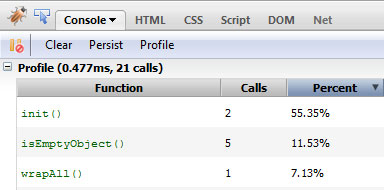
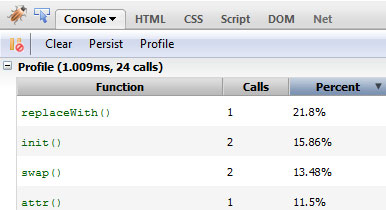
Firebug’s spits out the following result:

Tutorial Image

This time, let’s check whether the element we’re looking to perform actions on exists before doing so.

console.profile() ;

if ($("#somethingThatisNotHere")[0]) {
   $("#somethingThatisNotHere").text("Some text").slideUp(300).addClass("editing");
}
$("#mainItem");

console.profileEnd();

//Some more awesome, ground shattering code here ._.

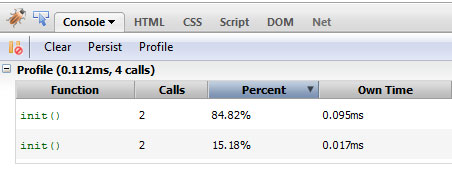
And the results:

Tutorial Image

See? It’s pretty simple, to the point and gets the job done. Note that you don’t need to check whether an element exists for every single bit of your code. You’ll notice in your page that certain bigger parts will generally benefit from this method. Use your judgment here.


2. Use Selectors Effectively

Try to use an ID instead of passing a class.

This is a big topic so I’ll keep it as concise as possible. First up, when passing in selectors, try to use an ID instead of passing a class. jQuery directly uses the native getElementById method to find an element by ID while in the case of a class it has to do some internal voodoo to acquire it, at least in older browsers.

We’ll look at the different selectors you can use to target the 2nd li element. We’ll test each one of them and how they modify the performance.

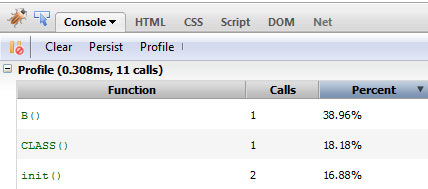
The first method, the easiest, will be to plainly target it using the selected class. Let’s see what Firebug’s profiler returns.

console.profile() ;

$(".selected");

console.profileEnd();
Tutorial Image

And the result: 0.308ms. Next, we prefix a tag name to narrow it down. This way, we can narrow down our search by first targeting only the selected DOM elements, with document.getElementsByTagName.

console.profile() ;

$("li.selected");

 console.profileEnd();
Tutorial Image

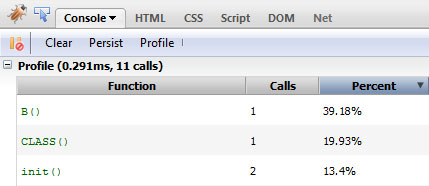
And the result: 0.291ms. Roughly 0.02 ms shaved off. This is negligible due to the fact that we’re testing in Firefox; however, it should be noted that this performance boost will be notably higher in older browsers, like Internet Explorer 6.

Next, we descend from the ID of the parent element.

console.profile() ;

$("#someList .selected");

console.profileEnd();
Tutorial Image

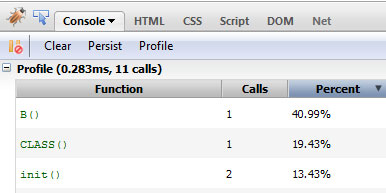
And the result: 0.283ms. Let’s try to be a bit more specific. We also specify the type of element in addition to the ancestor’s ID.

console.profile() ;

$("#someList li.selected");

console.profileEnd();
Tutorial Image

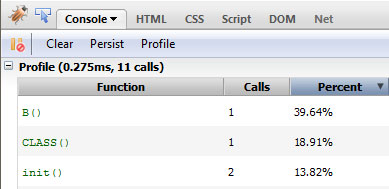
And the result: 0.275 ms. Another small part shaved off. Finally, let’s just target it directly using an ID to.

console.profile() ;

$("#mainItem");

console.profileEnd();
Tutorial Image

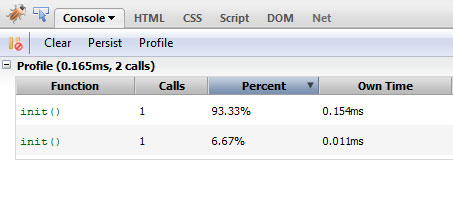
And the result: 0.165ms. Impressive! This really shows you how much faster it is to run native methods Note that while modern browsers can take advantage of things like getElementsByClassName, older browsers cannot – resulting in much slower performance. Always consider this when coding.


3. Account for Sizzle’s Parsing Model and Adding Scopes

Sizzle, the selector engine that jQuery uses – built by John Resig – parses selectors from right to left, which raises a few unexpected chains of parsing.

Consider this selector:

$("#someList .selected");

When Sizzle encounters such a selector, it first builds the entire DOM structure, discards items that don’t have the required class, and, for every element with the class, it checks whether its parent has an ID of someList.

To account for this, make sure that the right-most part of your selector is as specific as possible. For example, by specifying li.selected instead of .selected, you cut down the number of nodes it has to check. This is the reason why performance jumped in the previous section. By adding additional constraints, you effectively reduce the number of nodes it has to check.

To better fine-tune the way elements are obtained, you should look into adding a scope for each request.

var someList = $('#someList')[0];
$(".selected", someList);

By adding a scope, the way the element is searched changes completely. Now, the element providing the scope – someList in our case – is first searched for, and once it has been obtained, child elements that don’t have the requisite class are removed.

Note that it’s generally a best practice to pass a DOM element as the context of your jQuery selector. Using a context is most helpful when it is stored in some variable. Otherwise, you can streamline the process and use find() — which jQuery, itself, does under the hood.

$('#someList').find('.selected');

I’d like to say the performance increase will be clearly defined, but I can’t. I’ve run tests on a number of browsers and whether the scoped approach performance beats that of the vanilla version depends on a number of factors including whether the browser supports specific methods.


4. Avoid Query Waste

When you’re browsing through someone else’s code, you’ll often find.

// Other code

$(element).doSomething();

// More code

$(element).doSomethingElse();

// Even more code

$(element).doMoreofSomethingElse();

Please don’t do this. Ever. The developer has essentially obtained the element in question again and again instead of reusing a reference to it.

Let’s see how much time such horrendous code takes to run.

 console.profile() ;

 $("#mainItem").hide();
 $("#mainItem").val("Hello");
 $("#mainItem").html("Oh, hey there!");
 $("#mainItem").show();

 console.profileEnd();
Tutorial Image

If the code is structured like above, one after the other, you can use chaining like so:

console.profile();

$("#mainItem").hide().val("Hello").html("Oh, hey there!").show();

console.profileEnd();

By chaining, the element initially passed in is acquired and a reference is passed along to each subsequent calls cutting down on execution time. Otherwise a new jQuery object is created each time.

But if unlike above, the sections referencing the element aren’t concurrent, you’ll have to cache the element and then do all the same operations as before.

console.profile() ;

var elem = $("#mainItem");

elem.hide();

//Some code
elem.val("Hello");

//More code
elem.html("Oh, hey there!");

//Even more code
elem.show();

console.profileEnd();
Tutorial Image

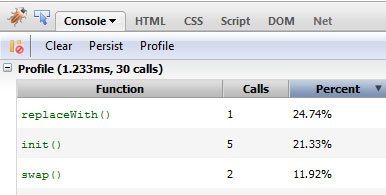
As is evident from the results, caching or chaining considerably decreases the execution time.


5. Perform DOM Manipulation more Intelligently

Suggesting non-traditional DOM manipulation in my earlier article drew a little flak from a few people before being shown that the performance boost really is worth it. We’ll now test it ourselves.

For the test, we’ll create 50 li elements, and append them to the current list, and determine how much time it takes.

We’ll review the normal, inefficient method first. We’re essentially appending the element to the list every time the loop runs.

console.profile() ;

var list = $("#someList");

for (var i=0; i<50; i++)
{
   list.append('<li>Item #' + i + '</li>');
}

console.profileEnd();

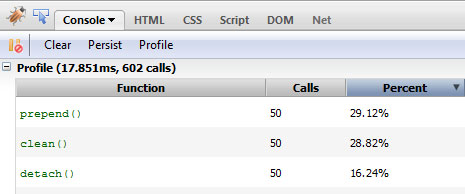
Let’s see how it did, shall we?

Tutorial Image

Now, we’ll follow a slightly different path. We’ll essentially append the required HTML string to a variable firs, and then only reflow the DOM one time.

console.profile() ;

var list = $("#someList");
var items = "";

for (var i=0; i<50; i++){
     items += '<li>Item #' + i + '</li>';
 }

list.append(items);

console.profileEnd();
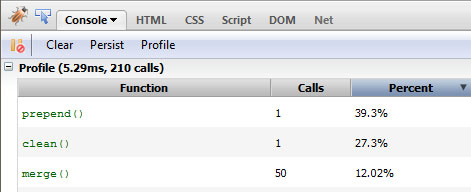
Tutorial Image

As expected, the time taken has decreased significantly.

And finally, a more optimized version. Instead of appending the content, we’ll copy over the existing contents of the list first, and then completely replace the HTML of the parent container.

console.profile() ;

var list = $("#someList");
var items = list.html();

for (var i=0; i<50; i++){
     items += '<li>Item #' + i + '</li>';
 }

list.html(items);

console.profileEnd();
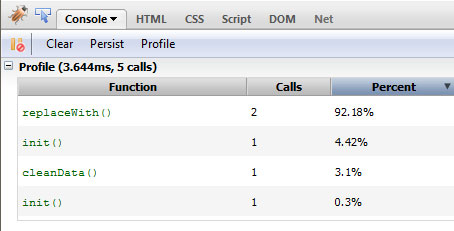
Tutorial Image

If you’re using jQuery as a replacement for getElementById, but never utilize any of its provided methods, then you’re doing it wrong.

As expected, the time taken to run the code decreases. If you’d like to take things further, ask yourself if you really need to create a new jQuery object all for the purpose of targeting some element? If you’re using jQuery as a replacement for document.getElementById, but never utilize any of its provided methods, then you’re doing it wrong. In this case, we can get away with raw JS.

console.profile() ;

var list = document.getElementById('someList');
var items = '';

for (var i=0; i<50; i++){
     items += '<li>Item #' + i + '</li>';
 }

list.innerHTML = items;

console.profileEnd();

A Few Caveats

You’ll notice that the difference in execution time between the optimized and un optimized code is in the fraction of a millisecond range. This is because our test document is very small with an impossibly small number of nodes. Once you start working with production level sites with a few thousand nodes in it, it’ll really add up.

Also note that in most of these tests, I’m simply accessing the elements. When you start applying proper functions to them, the delta in the execution time will increase.

I also do understand that this isn’t the most scientific of methods to test performance, however, to gain a general feel for how much each of these changes affect the performance, I think this is suitably sufficient.

Ffinally, in most of your web apps, the connection speed and response time of the web server in question is going to play a bigger role in the performance of your app more than the tweaks in the code you’ll make. Nevertheless, this is still important information and will help you down the line when you’re trying to eke out as much performance as possible from your code.


That’s all Folks

And we’re done. A few points to keep in mind when you’re trying to optimize your code; this is not the all encompassing list of tweaks, of course, and the points may not necessarily apply to all situations. Either way, I’ll be watching the comments closely to read what you have to say on the topic. Any mistake you see here? Drop me a line below.

Questions? Nice things to say? Criticisms? Hit the comments section and leave me a comment. Happy coding!


WordPress tip: Quickly secure plugin files

WordPress tip: Quickly secure plugin files

Paste the following in your .htaccess file. Don’t forget to backup the file before edition!

<Files ~ "\.(js|css)$">
  order allow,deny
  allow from all
</Files>

This recipe has been submitted by Greg Winiarski. Thanks for your contribution!

Looking for WordPress hosting? Try WP Web Host. Prices starts at $5/month and you can try it for free!

WordPress tip: Quickly secure plugin files

Working with Advanced 3D CSS: New Premium Screencast

Working with Advanced 3D CSS: New Premium Screencast

CSS is capable of so much more than browsers can currently handle, namely when it comes to working in 3D spaces. In this week’s premium video tutorial, I’m going to teach you how to work with CSS transitions, animations, and specifically how to work with Webkit’s CSS 3D capabilities. Help give back to Nettuts+ by becoming a premium member!


Preview

Screenshot

You’ll Learn About:

  • CSS3 radial gradients
  • HTML5 mark-up
  • Using the Webkit nightlies
  • CSS perspective
  • Defining keyframes for animations
  • preserve-3d

Join Net Premium

NETTUTS+ Screencasts and Bonus Tutorials

For those unfamiliar, the family of TUTS sites runs a premium membership service. For $9 per month, you gain access to exclusive premium tutorials, screencasts, and freebies from Nettuts+, Psdtuts+, Aetuts+, Audiotuts+, and Vectortuts+! For the price of a pizza, you’ll learn from some of the best minds in the business. Join today!


Introducing Moneybookers Payment & Pre-paid Premium Memberships

Introducing Moneybookers Payment & Pre-paid Premium Memberships

Always wanted to go Premium but don’t have a PayPal account, or a credit card linked to your PayPal account? Well, we have good news! Thanks to the stellar work of our developers, we can now accept payments from a Moneybookers account. We hope this will open Tuts+ Premium Memberships to a lot more people.

Even more good news: if you don’t have a credit card you can now purchase a pre-paid Premium membership. Pre-paid memberships don’t require you to have a credit card linked to your PayPal account to become a Premium member. Your pre-paid options are:

  • $22 – Three Month Membership
  • $40 – Six Month Membership
  • $78 – One Year Membership
  • This news comes at a good time, because we’re one day away from launching CG Premium (the Premium program for Cgtuts+) and after that, Active Premium (the Premium program for Activetuts+).

    Become a Premium member and gain instant access to 279 exclusive tutorials and over 700 source files. You’ll get all the content for Psd Premium, Net Premium, Audio Premium, Ae Premium and, very soon, Active Premium and CG Premium.


How to Build a Simple Twitter Widget with ASP.NET

How to Build a Simple Twitter Widget with ASP.NET

In this tutorial, I’ll be walking you through how to a write a Twitter widget for ASP.NET in the form of a reusable server control complete with nice things such as automatically turning URLs into links, and caching to speed up page load times.


Step 1 Getting Started

To follow this tutorial, all you need is Visual Studio (You can use MonoDevelop if you’re not on Windows, although there’s no guarantees there.) If you don’t want to fork over cash for the full version of Visual Studio, you can grab the free Express Edition.

You’ll also need knowledge of C# 3.0, as this tutorial makes use of some of the newer features of the language, such as lambda expressions and the var keyword.


Step 2 Creating the Control

ASP.NET includes a handy feature known as Server Controls. These are custom tags that aim to help developers structure their code. When a page using a server control is requested, the ASP.NET runtime executes the Render() method and includes the output in the final page.

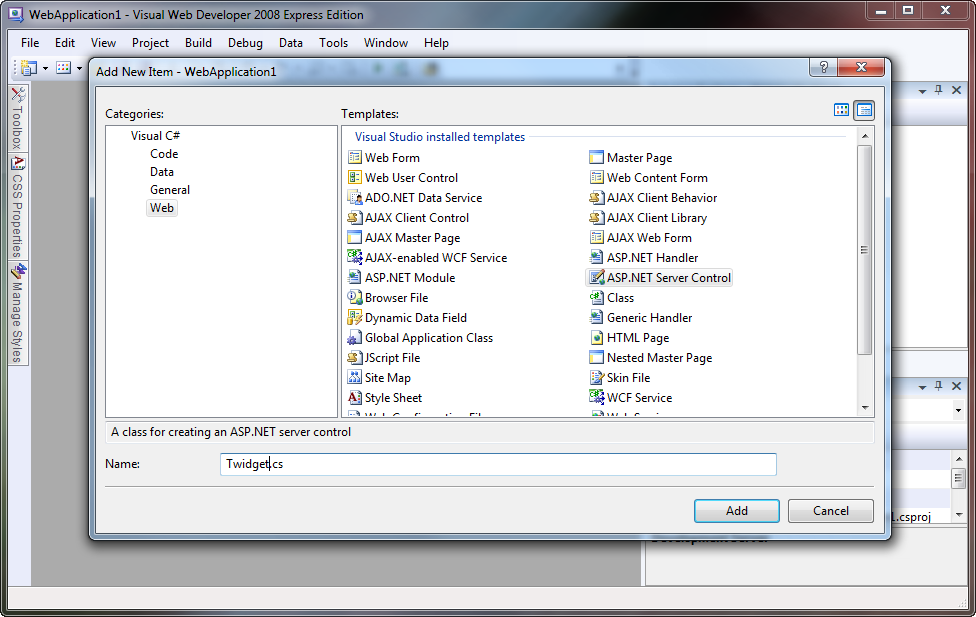
Once you’ve created a new Web Application in Visual Studio, right click in the Solution Explorer and add a new item to the solution. Select ASP.NET Server Control, and give it a name. Here, I’ve called it Twidget.cs, but you’re welcome to call it whatever you like. Paste the following code in, and don’t worry if it all looks a bit foreign – I’ll explain it all shortly.

using System;
using System.Collections.Generic;
using System.Linq;
using System.Web;
using System.Web.UI;
using System.Web.Script.Serialization;
using System.Net;

namespace WebApplication1
{
    public class Twidget : Control
    {
        public string Account { get; set; }
        public int Tweets { get; set; }

        protected override void Render(HtmlTextWriter writer)
        {
            writer.Write("<ul>");

            foreach (var t in GetTweets().Take(Tweets))
                writer.Write("<li>{0}</li>", HttpUtility.HtmlEncode(t));

            writer.Write("</ul>");
        }

        public List<string> GetTweets()
        {
            var ls = new List<string>();

            var jss = new JavaScriptSerializer();
            var d = jss.Deserialize<List<Dictionary<string, object>>>(
                new WebClient()
                .DownloadString("http://api.twitter.com/1/statuses/user_timeline.json?screen_name=" + Account)
                );

            foreach (var x in d)
                ls.Add((string)x["text"]);

            return ls;
        }
    }
}

This is about as basic as you can get for a Twitter widget. Here’s how it works:

When a user requests a page with this control on it, the Render() method gets executed with a HtmlTextWriter passed as a parameter. It writes out the <ul> tag, and then enters a loop which prints out each tweet as a list item. The magic here happens in the GetTweets() method. Notice how we are using the Take() extension method to make sure we only print the amount of tweets that we’re asked to.

Once execution passes to the GetTweets() method, we setup a List>string< to hold our tweets and a JavaScriptSerializer to parse the JSON from the Twitter API servers. The statement on lines 31 – 34 (split up for readability) retrives the user timeline in JSON format, then deserializes into .NET types we can work with. On line 36, we loop through all the tweets and add them one by one to the tweet list. We have to manually cast x[“text”] to a string because we deserialized it as an object. We had to do this, because the JSON returned by the Twitter API uses a smorgasboard of different types – which is fine for JavaScript, but a little tricky with C#.


Step 3 Using the Control

Now we have the code for our Twitter widget; let’s put it to use! Open your Default.aspx page (or whichever page you want to use this in) and put the following code immediately after the <%@ Page %> directive:

<%@ Register TagPrefix="widgets" Namespace="WebApplication1" Assembly="WebApplication1" %>

Feel free to change the TagPrefix to whatever you like, but make sure that the Namespace attribute is correctly set to whatever namespace you placed the widget code in, and ensure that the Assembly attribute is set to the name of your web application (in our case, WebApplication1).

Once you’ve registered the proper tag prefix (and you’ll need to do this for every page you want to use the control on), you can start using it. Paste the following code somewhere into your page, and once again, feel free to change the attributes to whatever you want:

<widgets:Twidget runat="server" Account="twitter" Tweets="10" />

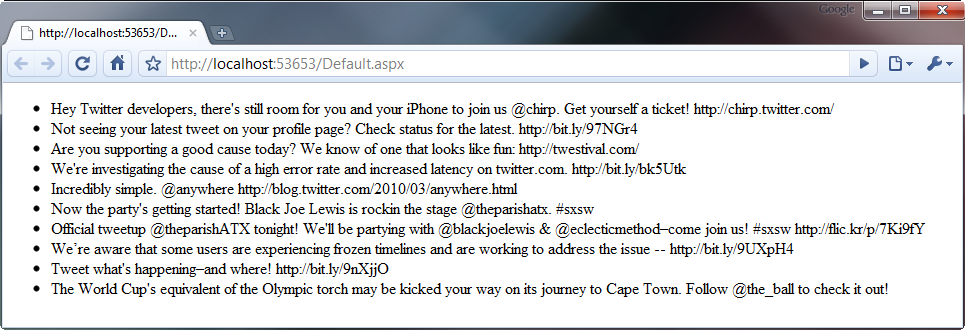
If you’ve done everything properly, you should see a page similar to this when you run your web application:


Step 4 Some Fancy Stuff…

You’ve got to admit, the control we’ve got at the moment is pretty rudimentary. It doesn’t have to be though, so let’s spiffy it up a little by turning URLs into nice, clickable links for your visitors.

Find the foreach loop in the Render() method and scrap it completely. Replace it with this:

// you'll need to add this using directive to the top of the file:
using System.Text.RegularExpressions;

foreach (var t in GetTweets().Take(Tweets))
{
    string s = Regex.Replace(
        HttpUtility.HtmlEncode(t),
        @"[a-z]+://[^\s]+",
        x => "<a href='" + x.Value.Replace("'", "&quot;") + "'>" + x.Value + "</a>",
        RegexOptions.Compiled | RegexOptions.IgnoreCase
        );

    writer.Write("<li>{0}</li>", s);
}

It’s all pretty much the same code, except for the humongous call to Regex.Replace() on line 6. I’ll explain what this does.

The first parameter is the input, or the string that the Regex works on. In this case, it’s just the tweet text after being passed through HttpUtility.HtmlEncode() so we don’t fall victim to a vicious XSS attack. The input is then matched against the second parameter which is a regular expression designed to match a URL.

The third parameter is where it gets a little involved. This is a lambda expression, a feature new to C# 3. It’s basically a very short way of writing a method like this:

public static string SomeFunction(Match x)
{
    return "<a href='" + x.Value.Replace("'", "&quot;") + "'>" + x.Value + "</a>";
}

All it does is wrap the URL with an <a> tag, of which all quotation marks in the URL are replace with the HTML entity &quot;, which helps prevent XSS attacks. The fourth and final parameter is just an ORed together pair of flags adjusting the way our regex behaves.

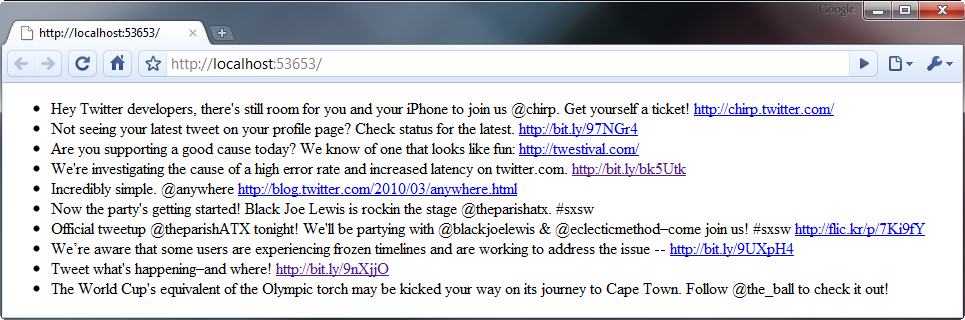
The output of the control after making this adjustment is somewhat similar to the screenshot below.


Step 5 Caching

There’s a big problem with the code I’ve given to you above, and that is that it doesn’t cache the response from the Twitter API. This means that every time someone loads your page, the server has to make a request to the Twitter API and wait for a response. This can slow down your page load time dramatically and can also leave you even more vulnerable to a Denial of Service attack. Thankfully, we can work around all this by implementing a cache.

Although the basic structure of the control’s code remains after implementing caching, there’s too many small changes to list, so I’ll give you the full source and then – as usual – explain how it works.

using System;
using System.Collections.Generic;
using System.Linq;
using System.Web;
using System.Web.UI;
using System.Web.Script.Serialization;
using System.Net;
using System.Threading;
using System.Text.RegularExpressions;

namespace WebApplication1
{
    public class Twidget : Control
    {
        public string Account { get; set; }
        public int Tweets { get; set; }
        public int CacheTTL { get; set; }

        static Dictionary<string, CachedData<List<string>>> Cache = new Dictionary<string, CachedData<List<string>>>();

        protected override void Render(HtmlTextWriter writer)
        {
            writer.Write("<ul>");

            foreach (var t in GetTweets().Take(Tweets))
            {
                string s = Regex.Replace(
                    HttpUtility.HtmlEncode(t),
                    @"[a-z]+://[^\s]+",
                    x => "<a href='" + x.Value.Replace("'", """) + "'>" + x.Value + "</a>",
                    RegexOptions.Compiled | RegexOptions.IgnoreCase
                    );

                writer.Write("<li>{0}</li>", s);
            }

            writer.Write("</ul>");
        }

        public List<string> GetTweets()
        {
            if (!Cache.Keys.Contains(Account)
                || (DateTime.Now - Cache[Account].Time).TotalSeconds > CacheTTL
                )
                new Thread(Update).Start(Account);

            if (!Cache.Keys.Contains(Account))
                return new List<string>();

            return Cache[Account].Data;
        }

        public static void Update(object acc)
        {
            try
            {
                string Account = (string)acc;

                var ls = new List<string>();

                var jss = new JavaScriptSerializer();
                var d = jss.Deserialize<List<Dictionary<string, object>>>(
                    new WebClient()
                    .DownloadString("http://api.twitter.com/1/statuses/user_timeline.json?screen_name=" + Account)
                    );

                foreach (var x in d)
                    ls.Add((string)x["text"]);

                if (!Cache.Keys.Contains(Account))
                    Cache.Add(Account, new CachedData<List<string>>());

                Cache[Account].Data = ls;
            }
            catch (Exception) { }
        }
    }

    class CachedData<T>
    {
        public DateTime Time { get; private set; }

        T data;
        public T Data {
            get {
                return data;
            }
            set
            {
                Time = DateTime.Now;
                data = value;
            }
        }
    }
}

As you can see, the Render() method remains unchanged, but there’s some pretty drastic changes everywhere else. We’ve changed the GetTweets() method, added a new property (CacheTTL), added a private static field (Cache), and there’s even a whole new class – CachedData.

The GetTweets() method is no longer responsible for talking to the API. Instead, it just returns the data already sitting in the cache. If it detects that the requested Twitter account hasn’t been cached yet, or is out of date (you can specify how long it takes for the cache to expire in the CacheTTL attribute of the control), it will spawn a seperate thread to asynchronously update the tweet cache. Note that the entire body of the Update() method is enclosed in a try/catch block, as although an exception in the Page thread just displays an error message to the user, if an exception occurs in another thread, it will unwind all the way back up the stack and eventually crash the entire worker process responsible for serving your web application.

The tweet cache is implemented as a Dictionary<string, CachedData<string>>, where the username of the twitter account being cached is the key, and an instance of the CachedData<T> class is the value. The CachedData<T> class is a generic class and can therefore be used with any type (although in our case, we’re only using it to cache a string.) It has two public properties, Data, which uses the data field behind the scenes, and Time, which is updated to the current time whenever the Data property is set.

You can use the following code in your page to use this caching version of the widget. Note that the new CacheTTL attribute sets the expiry (in seconds) of the tweet cache.

<widgets:Twidget runat="server" Account="twitter" Tweets="10" CacheTTL="600" />

Conclusion

I hope this tutorial has not only taught you how to make a Twitter widget, but has given you an insight into how server controls work as well as some best practices when ‘mashing up’ data from external sources. I realise that the browser output of this control isn’t exactly the prettiest, but I felt that styling it and making it look pretty was outside the scope of the article and has therefore been left as an exercise for the reader. Thanks for reading! Feel free to ask any questions that you might have in the comments section below.


Win FusionCharts Licenses worth $5,000

Win FusionCharts Licenses worth $5,000

How would you like your web reports to look wow with animated Flash charts? You would love it, wouldn’t you? We have just the right thing for you.

FusionCharts is generously giving away seven Professional Licenses for its flagship product, FusionCharts v3 (worth $499 each), to our readers. Using it, you can create great-looking animated and interactive Flash charts for your web applications and websites. You might have come across it in one of the numerous web applications it is being used in: LinkedIn Polls, AWeber, Vertical Response, Wufoo, PollDaddy and AddThis.


How to Participate?

Just leave a comment below telling us:

  • Where do you need charting?
  • What is the single biggest challenge you face with charting?
  • What do you love most about FusionCharts? In case you haven’t heard of them before, check out the online demos
Flash Chart

Choosing the Winners

We and the FusionCharts team will select the seven users with the most insightful comments as the winners. The results will be announced on this page on May 7th, 2010 (Eastern Standard Time).


Wait a Second…

If you did a little math, you might have realized that seven licenses worth $499 each doesn’t equal $5,000, as we mentioned in the title. So where’s the rest?

Well, there comes in the big one: If the number of comments exceeds 500, then we will select one winner for the FusionCharts Professional Bundle. The bundle is worth $1,499, and contains a license of each of their other data visualization components as well:

  • FusionWidgets – for gauges and data streaming charts
  • FusionMaps – for interactive data-driven maps
  • PowerCharts – for super-powerful specialized charts for specific domains

So what are you waiting for? Get typing now. And tell your friends too.


9 Useful PHP Functions and Features You Need to Know

9 Useful PHP Functions and Features You Need to Know

Even after using PHP for years, we stumble upon functions and features that we did not know about. Some of these can be very useful, yet underused. Not all of us have read the manual and the function reference from cover to cover!


1. Functions with Arbitrary Number of Arguments

You may already know that PHP allows you to define functions with optional arguments. But there is also a method for allowing completely arbitrary number of function arguments.

First, here is an example with just optional arguments:

// function with 2 optional arguments
function foo($arg1 = '', $arg2 = '') {

	echo "arg1: $arg1\n";
	echo "arg2: $arg2\n";

}

foo('hello','world');
/* prints:
arg1: hello
arg2: world
*/

foo();
/* prints:
arg1:
arg2:
*/

Now, let’s see how we can build a function that accepts any number of arguments. This time we are going to utilize func_get_args():

// yes, the argument list can be empty
function foo() {

	// returns an array of all passed arguments
	$args = func_get_args();

	foreach ($args as $k => $v) {
		echo "arg".($k+1).": $v\n";
	}

}

foo();
/* prints nothing */

foo('hello');
/* prints
arg1: hello
*/

foo('hello', 'world', 'again');
/* prints
arg1: hello
arg2: world
arg3: again
*/

2. Using Glob() to Find Files

Many PHP functions have long and descriptive names. However it may be hard to tell what a function named glob() does unless you are already familiar with that term from elsewhere.

Think of it like a more capable version of the scandir() function. It can let you search for files by using patterns.

// get all php files
$files = glob('*.php');

print_r($files);
/* output looks like:
Array
(
    [0] => phptest.php
    [1] => pi.php
    [2] => post_output.php
    [3] => test.php
)
*/

You can fetch multiple file types like this:

// get all php files AND txt files
$files = glob('*.{php,txt}', GLOB_BRACE);

print_r($files);
/* output looks like:
Array
(
    [0] => phptest.php
    [1] => pi.php
    [2] => post_output.php
    [3] => test.php
    [4] => log.txt
    [5] => test.txt
)
*/

Note that the files can actually be returned with a path, depending on your query:

$files = glob('../images/a*.jpg');

print_r($files);
/* output looks like:
Array
(
    [0] => ../images/apple.jpg
    [1] => ../images/art.jpg
)
*/

If you want to get the full path to each file, you can just call the realpath() function on the returned values:

$files = glob('../images/a*.jpg');

// applies the function to each array element
$files = array_map('realpath',$files);

print_r($files);
/* output looks like:
Array
(
    [0] => C:\wamp\www\images\apple.jpg
    [1] => C:\wamp\www\images\art.jpg
)
*/

3. Memory Usage Information

By observing the memory usage of your scripts, you may be able optimize your code better.

PHP has a garbage collector and a pretty complex memory manager. The amount of memory being used by your script. can go up and down during the execution of a script. To get the current memory usage, we can use the memory_get_usage() function, and to get the highest amount of memory used at any point, we can use the memory_get_peak_usage() function.

echo "Initial: ".memory_get_usage()." bytes \n";
/* prints
Initial: 361400 bytes
*/

// let's use up some memory
for ($i = 0; $i < 100000; $i++) {
	$array []= md5($i);
}

// let's remove half of the array
for ($i = 0; $i < 100000; $i++) {
	unset($array[$i]);
}

echo "Final: ".memory_get_usage()." bytes \n";
/* prints
Final: 885912 bytes
*/

echo "Peak: ".memory_get_peak_usage()." bytes \n";
/* prints
Peak: 13687072 bytes
*/

4. CPU Usage Information

For this, we are going to utilize the getrusage() function. Keep in mind that this is not available on Windows platforms.

print_r(getrusage());
/* prints
Array
(
    [ru_oublock] => 0
    [ru_inblock] => 0
    [ru_msgsnd] => 2
    [ru_msgrcv] => 3
    [ru_maxrss] => 12692
    [ru_ixrss] => 764
    [ru_idrss] => 3864
    [ru_minflt] => 94
    [ru_majflt] => 0
    [ru_nsignals] => 1
    [ru_nvcsw] => 67
    [ru_nivcsw] => 4
    [ru_nswap] => 0
    [ru_utime.tv_usec] => 0
    [ru_utime.tv_sec] => 0
    [ru_stime.tv_usec] => 6269
    [ru_stime.tv_sec] => 0
)

*/

That may look a bit cryptic unless you already have a system administration background. Here is the explanation of each value (you don’t need to memorize these):

  • ru_oublock: block output operations
  • ru_inblock: block input operations
  • ru_msgsnd: messages sent
  • ru_msgrcv: messages received
  • ru_maxrss: maximum resident set size
  • ru_ixrss: integral shared memory size
  • ru_idrss: integral unshared data size
  • ru_minflt: page reclaims
  • ru_majflt: page faults
  • ru_nsignals: signals received
  • ru_nvcsw: voluntary context switches
  • ru_nivcsw: involuntary context switches
  • ru_nswap: swaps
  • ru_utime.tv_usec: user time used (microseconds)
  • ru_utime.tv_sec: user time used (seconds)
  • ru_stime.tv_usec: system time used (microseconds)
  • ru_stime.tv_sec: system time used (seconds)

To see how much CPU power the script has consumed, we need to look at the ‘user time’ and ‘system time’ values. The seconds and microseconds portions are provided separately by default. You can divide the microseconds value by 1 million, and add it to the seconds value, to get the total seconds as a decimal number.

Let’s see an example:

// sleep for 3 seconds (non-busy)
sleep(3);

$data = getrusage();
echo "User time: ".
	($data['ru_utime.tv_sec'] +
	$data['ru_utime.tv_usec'] / 1000000);
echo "System time: ".
	($data['ru_stime.tv_sec'] +
	$data['ru_stime.tv_usec'] / 1000000);

/* prints
User time: 0.011552
System time: 0
*/

Even though the script took about 3 seconds to run, the CPU usage was very very low. Because during the sleep operation, the script actually does not consume CPU resources. There are many other tasks that may take real time, but may not use CPU time, like waiting for disk operations. So as you see, the CPU usage and the actual length of the runtime are not always the same.

Here is another example:

// loop 10 million times (busy)
for($i=0;$i<10000000;$i++) {

}

$data = getrusage();
echo "User time: ".
	($data['ru_utime.tv_sec'] +
	$data['ru_utime.tv_usec'] / 1000000);
echo "System time: ".
	($data['ru_stime.tv_sec'] +
	$data['ru_stime.tv_usec'] / 1000000);

/* prints
User time: 1.424592
System time: 0.004204
*/

That took about 1.4 seconds of CPU time, almost all of which was user time, since there were no system calls.

System Time is the amount of time the CPU spends performing system calls for the kernel on the program’s behalf. Here is an example of that:

$start = microtime(true);
// keep calling microtime for about 3 seconds
while(microtime(true) - $start < 3) {

}

$data = getrusage();
echo "User time: ".
	($data['ru_utime.tv_sec'] +
	$data['ru_utime.tv_usec'] / 1000000);
echo "System time: ".
	($data['ru_stime.tv_sec'] +
	$data['ru_stime.tv_usec'] / 1000000);

/* prints
User time: 1.088171
System time: 1.675315
*/

Now we have quite a bit of system time usage. This is because the script calls the microtime() function many times, which performs a request through the operating system to fetch the time.

Also you may notice the numbers do not quite add up to 3 seconds. This is because there were probably other processes on the server as well, and the script was not using 100% CPU for the whole duration of the 3 seconds.


5. Magic Constants

PHP provides useful magic constants for fetching the current line number (__LINE__), file path (__FILE__), directory path (__DIR__), function name (__FUNCTION__), class name (__CLASS__), method name (__METHOD__) and namespace (__NAMESPACE__).

We are not going to cover each one of these in this article, but I will show you a few use cases.

When including other scripts, it is a good idea to utilize the __FILE__ constant (or also __DIR__ since PHP 5.3):

// this is relative to the loaded script's path
// it may cause problems when running scripts from different directories
require_once('config/database.php');

// this is always relative to this file's path
// no matter where it was included from
require_once(dirname(__FILE__) . '/config/database.php');

Using __LINE__ makes debugging easier. You can track down the line numbers:

// some code
// ...
my_debug("some debug message", __LINE__);
/* prints
Line 4: some debug message
*/

// some more code
// ...
my_debug("another debug message", __LINE__);
/* prints
Line 11: another debug message
*/

function my_debug($msg, $line) {
	echo "Line $line: $msg\n";
}

6. Generating Unique ID’s

There may be situations where you need to generate a unique string. I have seen many people use the md5() function for this, even though it’s not exactly meant for this purpose:

// generate unique string
echo md5(time() . mt_rand(1,1000000));

There is actually a PHP function named uniqid() that is meant to be used for this.

// generate unique string
echo uniqid();
/* prints
4bd67c947233e
*/

// generate another unique string
echo uniqid();
/* prints
4bd67c9472340
*/

You may notice that even though the strings are unique, they seem similar for the first several characters. This is because the generated string is related to the server time. This actually has a nice side effect, as every new generated id comes later in alphabetical order, so they can be sorted.

To reduce the chances of getting a duplicate, you can pass a prefix, or the second parameter to increase entropy:

// with prefix
echo uniqid('foo_');
/* prints
foo_4bd67d6cd8b8f
*/

// with more entropy
echo uniqid('',true);
/* prints
4bd67d6cd8b926.12135106
*/

// both
echo uniqid('bar_',true);
/* prints
bar_4bd67da367b650.43684647
*/

This function will generate shorter strings than md5(), which will also save you some space.


7. Serialization

Did you ever need to store a complex variable in a database or a text file? You do not have to come up with a fancy solution to convert your arrays or objects into formatted strings, as PHP already has functions for this purpose.

There are two popular methods of serializing variables. Here is an example that uses the serialize() and unserialize():

// a complex array
$myvar = array(
	'hello',
	42,
	array(1,'two'),
	'apple'
);

// convert to a string
$string = serialize($myvar);

echo $string;
/* prints
a:4:{i:0;s:5:"hello";i:1;i:42;i:2;a:2:{i:0;i:1;i:1;s:3:"two";}i:3;s:5:"apple";}
*/

// you can reproduce the original variable
$newvar = unserialize($string);

print_r($newvar);
/* prints
Array
(
    [0] => hello
    [1] => 42
    [2] => Array
        (
            [0] => 1
            [1] => two
        )

    [3] => apple
)
*/

This was the native PHP serialization method. However, since JSON has become so popular in recent years, they decided to add support for it in PHP 5.2. Now you can use the json_encode() and json_decode() functions as well:

// a complex array
$myvar = array(
	'hello',
	42,
	array(1,'two'),
	'apple'
);

// convert to a string
$string = json_encode($myvar);

echo $string;
/* prints
["hello",42,[1,"two"],"apple"]
*/

// you can reproduce the original variable
$newvar = json_decode($string);

print_r($newvar);
/* prints
Array
(
    [0] => hello
    [1] => 42
    [2] => Array
        (
            [0] => 1
            [1] => two
        )

    [3] => apple
)
*/

It is more compact, and best of all, compatible with javascript and many other languages. However, for complex objects, some information may be lost.


8. Compressing Strings

When talking about compression, we usually think about files, such as ZIP archives. It is possible to compress long strings in PHP, without involving any archive files.

In the following example we are going to utilize the gzcompress() and gzuncompress() functions:

$string =
"Lorem ipsum dolor sit amet, consectetur
adipiscing elit. Nunc ut elit id mi ultricies
adipiscing. Nulla facilisi. Praesent pulvinar,
sapien vel feugiat vestibulum, nulla dui pretium orci,
non ultricies elit lacus quis ante. Lorem ipsum dolor
sit amet, consectetur adipiscing elit. Aliquam
pretium ullamcorper urna quis iaculis. Etiam ac massa
sed turpis tempor luctus. Curabitur sed nibh eu elit
mollis congue. Praesent ipsum diam, consectetur vitae
ornare a, aliquam a nunc. In id magna pellentesque
tellus posuere adipiscing. Sed non mi metus, at lacinia
augue. Sed magna nisi, ornare in mollis in, mollis
sed nunc. Etiam at justo in leo congue mollis.
Nullam in neque eget metus hendrerit scelerisque
eu non enim. Ut malesuada lacus eu nulla bibendum
id euismod urna sodales. ";

$compressed = gzcompress($string);

echo "Original size: ". strlen($string)."\n";
/* prints
Original size: 800
*/

echo "Compressed size: ". strlen($compressed)."\n";
/* prints
Compressed size: 418
*/

// getting it back
$original = gzuncompress($compressed);

We were able to achive almost 50% size reduction. Also the functions gzencode() and gzdecode() achive similar results, by using a different compression algorithm.


9. Register Shutdown Function

There is a function called register_shutdown_function(), which will let you execute some code right before the script finishes running.

Imagine that you want to capture some benchmark statistics at the end of your script execution, such as how long it took to run:

// capture the start time
$start_time = microtime(true);

// do some stuff
// ...

// display how long the script took
echo "execution took: ".
		(microtime(true) - $start_time).
		" seconds.";

At first this may seem trivial. You just add the code to the very bottom of the script and it runs before it finishes. However, if you ever call the exit() function, that code will never run. Also, if there is a fatal error, or if the script is terminated by the user (by pressing the Stop button in the browser), again it may not run.

When you use register_shutdown_function(), your code will execute no matter why the script has stopped running:

$start_time = microtime(true);

register_shutdown_function('my_shutdown');

// do some stuff
// ...

function my_shutdown() {
	global $start_time;

	echo "execution took: ".
			(microtime(true) - $start_time).
			" seconds.";
}

Conclusion

Do you know any other PHP features that are not widely known but can be very useful? Please share with us in the comments. And thank you for reading!


Color Inspiration: Awesome Red Websites

Color Inspiration: Awesome Red Websites

Red is a very powerful and strong color. It’s associated with a variety of things, from courage and bravery to warnings and danger. It’s also, of course, strongly tied to love and passion.

It’s a popular color in website design, though, due to its boldness, it’s most commonly used as an accent color. With that said, there’s no reason why it can’t take on a more prominent role in a website’s overall design, as demonstrated in these twenty-five awesome red websites.


Intensity in Ten Cities


Big Spaceship


Grafik


jonwallacedesign


Codebutton.com


Chrome


Khai Liew


Thierry Castel


Hemlock


Sonze Design Studio


Host Riser


Youth Against Sudoku


Take the Walk


Remood


Waider Mediendesign


Liga Retro


Saforian


Red Relevant


Coalmarch Productions


Avalon Business Advice


Mirror Communications


Blogsessive


New to York


Associate


Truf Creative

You Almost Might Like


Quick Tip: Loop Through Folders with PHP’s Glob()

Quick Tip: Loop Through Folders with PHP’s Glob()

Are you still using opendir() to loop through folders in PHP? Doesn’t that require a lot of repetitive code everytime you want to search a folder? Luckily, PHP’s glob() is a much smarter solution.


Introduction

Here’s an example of echoing out some information from a folder, using the traditional opendir() function.


	$dir = "/etc/php5/";

	// Open a known directory, and proceed to read its contents
	if (is_dir($dir))
	{

		if ($dh = opendir($dir))
		{

			while (($file = readdir($dh)) !== false)
			{
				echo "filename: $file : filetype: " . filetype($dir . $file) . "\n";
			}

			closedir($dh);

		}

	}

That should look somewhat familiar. We can massively shorten the code above with:

	$dir = "/etc/php5/*";

	// Open a known directory, and proceed to read its contents
	foreach(glob($dir) as $file)
	{
		echo "filename: $file : filetype: " . filetype($file) . "<br />";
	}

Isn’t that much easier? Eager to learn how the method works? If yes, then let’s get on with it.

glob() supports a total of two arguments, with the second argument being optional. The first argument is the path to the folder, however, it’s a bit more powerful than that.


Step 1. The First Argument

This first argument supports a pattern. This means that you can limit the search to specific filetypes or even multiple directories at the same time by using multiple asterixes “*”. Let’s assume that you have a website that allows users to upload images (just because I read this). Each user has his/her own folder within the folder “userImages.” Inside these folder are two additional folders, called “HD” and “TN,” for high definition (full-sized) images, and for thumbnails. Let’s imagine that you want to loop through all your users’ “TN” folders and print the filenames. This would require a relatively large snippet of code if you were to use open_dir(); however, with glob(), it’s easy.

	foreach(glob('userImages/*/TN/*') as $image)
	{
		echo "Filename: " . $image . "<br />";
	}

This will search userImages/any/TN/any and will return a list of the files that match the pattern.

	Filename: userImages/username1/TN/test.jpg
	Filename: userImages/username1/TN/test3.jpg
	Filename: userImages/username1/TN/test5.png
	Filename: userImages/username2/TN/subfolder
	Filename: userImages/username2/TN/test2.jpg
	Filename: userImages/username2/TN/test4.gif
	Filename: userImages/username3/TN/styles.css

We can even take things a step further, and be more specific by including a file format in our foreach statement:

	foreach(glob('userImages/*/TN/*.jpg') as $image)
	{
		echo "Filename: " . $image . "<br />";
	}

Now, this will only return Jpegs.

	Filename: userImages/username1/TN/test.jpg
	Filename: userImages/username1/TN/test3.jpg
	Filename: userImages/username2/TN/test2.jpg

It gets even better. What if, for instance, you require Jpegs, but also Gifs; nothing else? Or what if you want to print only folder names? This is where the second argument comes into play.


Step 2. The Second Argument

The second argument is, as mentioned previously, optional. It does, however, provide a very nice set of optional flags. These will allow you to change the way your glob() behaves.

  • GLOB_MARK: Adds a slash to each directory returned
  • GLOB_NOSORT: Return files as they appear in the directory (no sorting)
  • GLOB_NOCHECK: Return the search pattern if no files matching it were found
  • GLOB_NOESCAPE: Backslashes do not quote metacharacters
  • GLOB_BRACE: Expands {a,b,c} to match ‘a’, ‘b’, or ‘c’
  • GLOB_ONLYDIR: Return only directory entries which match the pattern
  • GLOB_ERR: Stop on read errors (like unreadable directories), by default errors are ignored

As you see, the potential requirements that we noted at the end of Step 1 can easily be fixed with GLOB_BRACE:

	foreach(glob('userImages/*/TN/{*.jpg,*.gif}', GLOB_BRACE) as $image)
	{
		echo "Filename: " . $image . "<br />";
	}

which will return this:

	Filename: userImages/username1/TN/test.jpg
	Filename: userImages/username1/TN/test3.jpg
	Filename: userImages/username2/TN/test2.jpg
	Filename: userImages/username2/TN/test4.gif

If we wish to only print subfolder names, we could use GLOB_ONLYDIR:

	foreach(glob('userImages/*/TN/*', GLOB_ONLYDIR) as $image)
	{
		echo "Filename: " . $image . "<br />";
	}

which will print:

	Filename: userImages/username2/TN/subfolder

Conclusion and One More Example

This method has been available since PHP 4.3, however, it’s not used very often, strangely. I didn’t learn it until quite late myself. Now, I often use glob() when loading plugins into my framework:

	foreach(glob('includes/plugins/*.php') as $plugin)
	{
		include_once($plugin);
	}

That’s all; I hope you enjoyed this quick tip, and let me know if you have any questions!