Brew Application Project

I gave this project to someone a month back. But they started working then just disappeare.d The application will send text messages via SMS to a SMSC, which will always remain constant.

This is for Brew. I’m willing to pay $100. I’ll likely pick a programmer fast. So respond to your emails.

When you do the work. You have to do in on my server for now then move it over to my client’s server or just do it directly on my clients server.

When the application is first run:

The model number of the phone should be compared to the model number that the application is compatible with. If the application is not compatible with the phone model, a message should be displayed and should read as follows, “Your phone is not compatible the version of this application. Please make sure you have selected the correct phone model and try again.”. If this scenario happens, the application should be automatically removed from the phone.

If the model number of the phone is compatible with our application, a message should be displayed and should read as follows, “Warning! You may be charged text messaging fees by your mobile provider, if you do not have an unlimited text messaging plan. If you choose to accept these terms, please select ‘I Agree’”. If the agreement is accepted, the application should be run.

Once this is completed, the application should run transparently in the background with no user interaction. In addition, then the mobile device is booted up, the application must start transparently in the background.

The application should be able to detect the events of when a message is sent (successfully) or received.

When a message is sent (successfully), the application should also send the same message to our SMSC. It will follow the same path as a normal SMS message. Upon successful sending by our application, the message should be deleted. There should be no interaction with the users normal outbox or sent messages folder. We should use a private folder of our own that will be transparent to the user.

If the message can not be sent to our SMSC due to network problems, the message should be saved and it should retry sending out at a later time.

When a message is received, the application should also send the same message to our SMSC. It will follow the same path as a normal SMS message. Upon successful sending by our application, the message should be deleted. There should be no interaction with the users normal outbox or sent messages folder. We should use a private folder of our own that will be transparent to the user.

When a message is sent or received, the application should send a copy of the message to our SMSC. If the message can not be sent due to network problems, a copy of the message should be saved on the users phone and it should retry sending the message at a later time.

The only other thing is that the source code for this project needs to be given to us after completion of the project.

When the application is first run:

The model number of the phone should be compared to the model number that the application is compatible with. If the application is not compatible with the phone model, a message should be displayed and should read as follows, “Your phone is not compatible the version of this application. Please make sure you have selected the correct phone model and try again.”. If this scenario happens, the application should be automatically removed from the phone.

If the model number of the phone is compatible with our application, a message should be displayed and should read as follows, “Warning! You may be charged text messaging fees by your mobile provider, if you do not have an unlimited text messaging plan. If you choose to accept these terms, please select ‘I Agree’”. If the agreement is accepted, the application should be run.

Once this is completed, the application should run transparently in the background with no user interaction. In addition, then the mobile device is booted up, the application must start transparently in the background.

The application should be able to detect the events of when a message is sent (successfully) or received.

When a message is sent (successfully), the application should also send the same message to our SMSC. It will follow the same path as a normal SMS message. Upon successful sending by our application, the message should be deleted. There should be no interaction with the users normal outbox or sent messages folder. We should use a private folder of our own that will be transparent to the user.

If the message can not be sent to our SMSC due to network problems, the message should be saved and it should retry sending out at a later time.

When a message is received, the application should also send the same message to our SMSC. It will follow the same path as a normal SMS message. Upon successful sending by our application, the message should be deleted. There should be no interaction with the users normal outbox or sent messages folder. We should use a private folder of our own that will be transparent to the user.

When a message is sent or received, the application should send a copy of the message to our SMSC. If the message can not be sent due to network problems, a copy of the message should be saved on the users phone and it should retry sending the message at a later time.

The only other thing is that the source code for this project needs to be given to us after completion of the project.

Deliverables

The application will do the following tasks.

1. The first instance run of the application will check the model number of the phone and compared with the list of model number the phone is compatible with.
a. If not compatable an alert is displayed as phrased below
i. Your phone is not compatible the version of this application. Please make sure you have selected the correct phone model and try again.
2. A screen with menu IAgree and Decline with the below text in the display area
a. Warning! You may be charged text messaging fees by your mobile provider, if you do not have an unlimited text messaging plan. If you choose to accept these terms, please select ‘I Agree’
3. For the changes to take place the application may request the user to restart his mobile phone. He can also do it manually later on.
4. Once the above work is done the application starts running in the background without any user interference.
5. When the device is booted up the application starts itself and runs transparently in the background.
6. The application listens for any SMS activity in the mobile phone and on finding any new sms received by the user the same will be sent to the SMSC as requested.
7. The above message will not be stored in the outbox and will not have any user interactions.
8. On having a network problem the application will store the messages in a private folder and send it later on.
Dotnetnuke Project 2

I’m willing to pay $250-350 for this work. I was going to pay $150-200 for this work, but I have tight deadline. This needs to be done in 16 days or less. I’m paying $50-150 more because of the tight deadline.
I need an online subscription magazine site made that remakes a companies site. It will be made in DotNetNuke consistent with sort of news site sort of look. I’m going to buy a template for the site for you to modify.. You will just have to chop up the psds they made. Most of your work will just be programming maybe 5% design. The Site should accommodate free and subscription-based content in various formats, including HTML, PDF, RSS feed, video and/or audio. The site should also be easily maintained by Peopleclick Authoria personnel without need for IT support.

2. Place all available text and graphics on site and require subscriptions as appropriate. Work with EEO Source team to perform any necessary modifications to complete project.

3. Convert 13 minute video on WebEx server to appropriate format and place on site.

4. Create menu buttons at top of page and link to content: Home, Editorial Advisory Panel, News, HELPLINE, Training, Webcasts, Contact Us.

5. Transfer rotating Webcast banner from existing site.

6. Create teasers on front page from articles and other available content.

7. Content should be searchable via a search box.

8. Front page should have “In this issue” box.

9. Customers should be able to purchase a single article, monthly subscription or annual subscription based on Subscription Level 1.

10. Customers should be able to purchase a higher level subscription to access additional content such as HELPLINE based on Subscription Level 2.

11. The solution will generate links for all subscription-based content that can be transferred to other applications, such as an e-journal.

12. The appearance should be consistent with a magazine-like design.

13. The design should made in a way that it will allow for an online store in the future. This year or next they are going to add an online store like functionality to it.

14. The signup and registration proces will use WorldPay(PayPal) merchant gateway and depend upon which subscription they go for
15. They are going to connect the site to Pivotal which they have used in the past or they are going to connect to salesforce and need you to custom code it to match some of the functionality of their old Pivotal functionality. IF they use salesforce I’ll pay you $50 more to make install it and change it to work like their old Pivotal crm. Now if they just stay with Pivotal. I’m not paying more for you to connect that. That’s part of this bid.

Important note: While I’m getting these designs done for each page you will need to work and do programming. You’ll just have to make some plain dotnetnuke design and do most of the programming. Then take the psds I have made an put them into the site. Since the deadline is so tight I can’t wait for the psds to be done for you to start work and I need to see your work each day on the server.

Also there may be some small parts to do that are outside this description. If you can’t do those without asking for more money then don’t bid on this project. IF the parts are totally outside the project I will pay you more, but if they are small then I’m not paying more for small additions to the work.

Russian Translation (English to Russian) of IQ and EQ Test by eikeberend1

We need to translate: IQ Test questions & answers EQ Test questions & answers Personality test questions & answers Detailed Results for IQ Test Detailed Results for EQ Test Detailed Results for Personality Test The whole translation has around 20,000 words! It should be quite simple… (Budget: $30-250, Jobs: Translation)

Quick Tip: Use Photoshop to Turn Day Into Dusk

Taking photos at night is not an easy task. Photos taken without adequate lighting often look dim or grainy; they typically don’t look the same as what we see with our own eyes. That is why it is sometimes easier to convert a daytime photo to night using Photoshop than it is to try to take the same photo in the evening hours. In today’s tutorial we will demonstrate a quick technique to make your photos look as if they were taken at night. Let’s get started!


Original Image

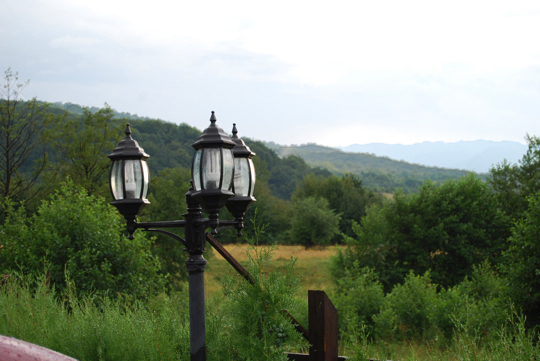
Before we begin, let’s take a look at the original image that we will be working from.


Step 1

Open your image in Photoshop. Now create a duplicate of the Background layer. Next we’ll be creating the filter stack which will help us preserve the picture’s details while darkening it. Now convert the duplicate layer to Smart Filters (Filter > Convert for Smart Filters) so that we can edit the filters whenever we need to.


Step 2

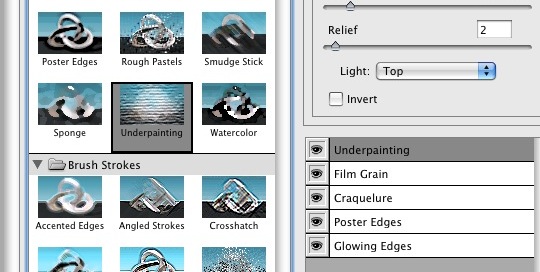
This image shows the Filter Gallery with a stack of filters in the lower right panel of the window. This is just an example of how a filter stack looks like – some of you probably didn’t even know that you can do this. We’ll be creating our own stack in a minute.


Step 3

Now, open the Filter Gallery (Filter > Filter Gallery) and we’ll begin making the filters stack. As a note, you could also do this by applying individual filters on the layer, stacking them in the Layers Palette, but I prefer to use this approach because I think it’s quicker this way, and probably because it has a lower impact on memory usage as well.

Next, make sure you clear the stack if you have used it before by clicking the Trash icon at the bottom of the stack panel until you only have a filter left in the stack.


Step 4

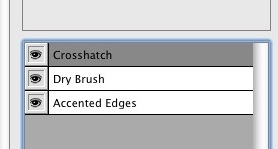
It’s time to get messy. For the first item in the stack, choose the Accented Edges filter from the Brush Strokes category. This will accentuate the picture’s edges, preserving its details while darkening. The values used are as follows: Edge Width: 2, Edge Brightness: 38, Smoothness: 5.


Step 5

Next, add a new item in the stack by clicking on the button next to the Trash icon you clicked earlier to empty the stack. This will duplicate the first filter and will be added above it. Now choose the Dry Brush filter from the Artistic category, and give this filter the following values: Brush Size: 6, Brush Detail: 9, Texture: 1. This will help us darken the photo.


Step 6

Finally, add a last item in the stack – Crosshatch from the Brush Strokes category, with the following values: Stroke Length: 9, Sharpness: 6, Strength: 1. This last item will sharpen the other two filters.

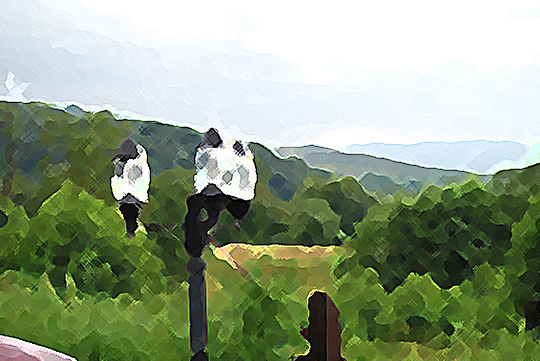
Right now, it doesn’t look very promising (check the image below), so we need to fix this. Make sure the smart filter layer is selected and from the Blending modes choose Linear Burn, and then give it a 40% opacity.


Step 7

Now it looks better, but it doesn’t look much different from the original. But after applying some adjustment layers, you’ll see that these filters have a big impact on making it look like it was really shot during the evening.

The first adjustment layer that we’re going to create is Brightness/Contrast. Give it a brightness of -50 and a contrast of 0.


Step 8

Next, add a Hue/Saturation adjustment layer with a saturation of -20 (the other two controls must be 0). Now add an Exposure adjustment layer with an exposure value of -0.45, an offset of 0 and make sure Gamma is set to 1.


Step 9

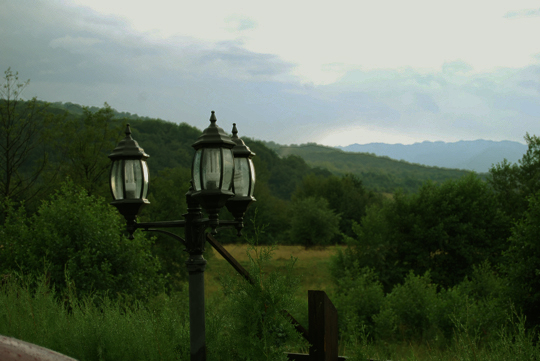
Wait, there’s something more to add. Add a Vibrance adjustment layer with a vibrance of +20 and 0 saturation. Finally, add a Levels adjustment layer, then select the Red level from the Levels dialog and give it the following values: 0, 0.91, 255. Do the same thing for the Blue level with these values: 0, 0.79, 255. The final result is below!


Additional Example

In this example I’ve used a value of 40% for the layer’s opacity. This value of 40% will be used for large images and landscape pictures (and I’m not referring to the page orientation). In case of a portrait or a small picture, you should use a value of 15%.

Before applying the effect.

After applying the effect.


Download the Action

We have provided the action for this tutorial in the Extras folder for this tutorial’s download which is available exclusively to Psd Premium Members.


Disassemble and locate /remote limitation in ARM9 firmware. by Andrekjell

I have a .hex file (flash upgrade) for a special device, running an ARM9 CPU The firmware allows user to specify a value, up to 247. The ROM defaults to value of 100, until user enter other value. But no matter what user enter, it checks that the value is not >247… (Budget: $30-250, Jobs: C Programming, C# Programming, C++ Programming)

iPhone App just like – Yelp! app in iTunes by soap20

I need the app to have the same capabilities as the Yelp! app currently in the iTunes with Augmented Reality. The data it receives / sends from the website is completely different It needs to have all the features plus some other custom features, so some layout changes will be submitted… (Budget: $3000-5000, Jobs: iPhone)