Realistic Fog Without 3rd Party Plug-ins

Creating atmospheres within a 3d app can be tricky and there are often times when you just need a quick turn around without having to worry about render time. Today we’re gonna look at how to create realistic looking fog without the use of ANY 3rd party plug-ins. Enjoy!


Preview

Want access to the full AE project files and assets for every tutorial on Aetuts+, including this one? Join Ae Premium for just $9/month. You can view the final effect preview video below.

Tutorial

Download Tutorial .flv

File size 36.5MB


Achieve a Microfilm Machine Look – AE Premium

This tutorial covers a technique to create a microfilm machine look step by step. It start by searching for and analyzing references, then continues onto collecting source materials, animating the different attributes and giving the composition a final polished look. This can be useful as a motion graphics style or for rendering the contents for screen replacements in film or TV.

Premium Tut Preview

This is a Premium Tutorial. To view you must Join Premium.

Tutorial Sneak Peek

Step 1

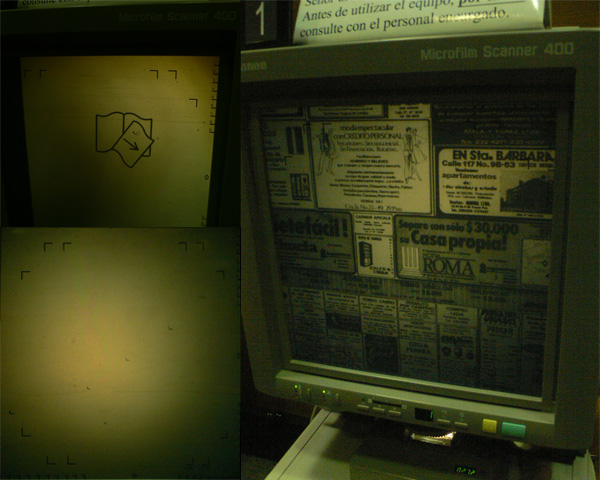
The first thing you do for a project like this is to seek for reference on what the microfilm machine‘s screen looks like. I went to the closest library and took some pictures of the microfilm machines. This way you can start to think about the different features that compose the "look" of this screen.

With the references you can clearly see a yellowish cast on everything, a strong, yet uneven vignetting effect with a reddish tone in the upper right side, going to a greenish tone on the other corners. For the texture, there is a lot of dust, grain, small hairs and leftovers of scotch tape and paste.

Step 2

Next, let‘s search for references on how the machine moves. Here I‘ve got a little reference video on how the machine works; There manual control over the x/y axis relative to the image and the rotation in the center of the screen. There is also manual control over the focus. The zoom is mechanical and it multiplies the movement inputted. finally there is a scroll control which quickly goes through the microfilm roll.

Step 3

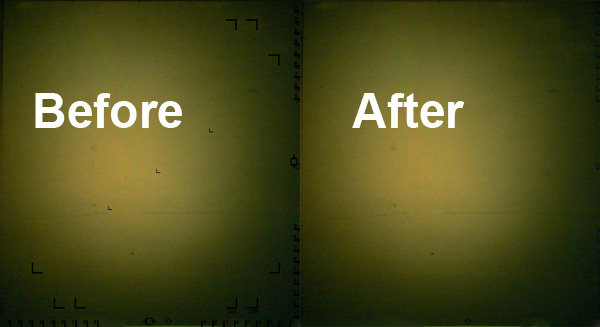
Now start in photoshop. Create a clean plate of the background by cloning and healing one of the reference pictures. You can find the reference file "ReferenceScreen.jpg" in the elements folder.

Step 4

After that, rebuild the different overlay elements, the grids and the numbers by using the tools of your preference. Now we have separated layers for the background and overlays of the Machine‘s screen. You can find the finished photoshop file "screen.psd" in the elements folder. Make sure you end up with a photoshop file with just the overlay and background layers and name them that way.

To continue this tutorial, you must log-in to the Tuts+ Dashboard with your username and password, you can immediately access your all Premium Content. Navigate to Ae Premium via ‘Premium Categories’ in the sidebar. You’ll be able to grab the tutorial videos, project files and assets in the members’ area.


Quick Tip: Make Eye Catching Designs with Inkscape


Sometimes all you need is an abstract or intricate motif to beautify your design, but when you try to find a stock image you often have to pay for it or it’s not exactly what you’re after. Thankfully there’s some interesting tools in Inkscape suitable for this kind of work. In a few easy steps you can make abstract or floral designs in exactly the style that you need.

Continue reading “Quick Tip: Make Eye Catching Designs with Inkscape”

Best of the Vector Web – May 2010


It’s the end of May. Spring has come and gone. Summer is here and it’s time to break out the swimsuits and beach towels and get in shape for our summer vacations. As you know, each month we round up some of the best vector related content on the web. In May, we discovered some really nice vector-based tutorials, freebies, and vector-related articles. Please take a moment to review some of these articles. We think you will enjoy them!

Continue reading “Best of the Vector Web – May 2010”

An Awesome Guide to Guitar Mixing – Audio Premium

In this week’s Audio Premium content, Björgvin Benediktsson teaches you the best techniques for mixing electric and acoustic guitar. While the screenshots for this tutorial are taken in Logic Pro, the content is not Logic-centric and is equally useful and valuable in any other DAW software.

To learn more about what you get as part of Audio Premium, read this.

There are a thousand ways to mix guitars. And no, before I disappoint, this tutorial does no include one thousand mixing tips. Every guitarist has a sound and every mixing engineer has specific mixing tricks that he likes using to draw forward the true character of the guitar. At least the sound of the guitar he hears in his head.

Because a guitar sound isn’t set in stone as much as the necessity of having a great drum or vocal sound, you can get away with a lot of really radical and crazy guitar effects and sounds if you feel that it serves the purpose of the overall mix. However, there are a few things that are good to keep in mind when mixing guitars.

In the following Premium tutorial I’ll be going through a few guidelines regarding EQ and compression on both acoustic and electric guitars as well as showing you some handy mixing tricks that are always good to fall back on when you are out of ideas.

Here’s the kind of music you’ll be able to create once you harness the knowledge inside:

Download audio file (example.mp3)

Table of Contents

  • Equalization
  • Acoustic Guitar
    • High Pass Filtering to Fit the Bass

    • Equalization Guidelines
    • Alternative Method
    • Compressing Out the Pick Sound
    • Chorused Acoustic Guitar
  • Electric Guitar
    • Equalization

    • Compression
  • Distorted Guitars
    • EQ

    • Compression
  • Some Handy Mixing Tricks
    • Enhancing Lead Lines with Delay

    • Panning Clean Electric Guitars, Spreading Out the Tracks
    • Double Tracking Technique
    • Placing the Guitar Into a Room
    • Allow Yourself Some Craziness

Existing Premium members can log-in and download. Not a Plus member? Join now.


Open Mic: What Advice Would You Offer Someone Considering Learning the Guitar?

Learning a musical instrument can be a major commitment. What advice would you offer someone considering learning the guitar?

Each Tuesday we open our mic to readers and lurkers alike to come out of the woodwork and tell us your thoughts and opinion, your experiences and mistakes, what you love and what you hate. We want to hear from you, and here’s your chance.


If someone told you they were thinking about learning the guitar, what advice would you give them? You might want to take into consideration the time and financial commitment needed, advice about equipment, and what their expectations should be.


Workshop #77: The Party by Delta City

At Audiotuts+ we irregularly put up a reader track for workshopping and critique (find out how to submit a track). This is how it works: you upload your song, and every week or so we’ll publish one here and step away from the podium. The floor is yours to talk about the track and how the artist can fix problems in and improve upon the mix and the song.

This track has been submitted for your friendly, constructive criticism. They have put their track (and their heart and soul) in your hands to learn and get useful feedback.

  • Do you enjoy the song or track itself? Does it have potential?
  • Can the arrangement be improved?
  • How did you find the mix? What would you do differently?
  • What do you enjoy about the rhythm track? What can be done to improve it?
  • Is the choice of instruments relevant and effective for the style/song?
  • Are the lyrics (if any) effective? Does the style, arrangement and genre of the song suit them?
  • Can you suggest any specific techniques that might improve the track?
  • Do you have any other constructive feedback?

The Party by Delta City

Artist’s website: olafsmetalface.blogspot.com

Description of the track:

A funky house track that’s in the workings. Would love to get some feedback. My first full song produced in Logic. It’s not mastered and barely mixed.

Download audio file (ThePartyDeltaCity.mp3)

Terms of Use: Users can stream the track for the purposes of giving feedback but cannot download or redistribute it.

Have a listen to the track and offer your constructive criticism for this Workshop in the comments section.


Submit Your Tracks for Workshopping

Need constructive criticism on your own tracks? Submit them using this form.


Best of the Web – May 2010


Each month the Internet churns out some great content for pretty much everybody. This month was no different. In this month’s best of the web roundup we have some exceptional tutorials covering a wide variety of design styles. Each tutorial is extremely detailed and well explained. In addition, the final results from those tutorials look amazing. Let’s also not forget about some of the cool freebies released this month like wallpapers, RSS icons, and unique textures. To wrap it up we have some informative and interesting articles that focus on many different aspects of the design industry. So lets get into another roundup!


Tutorial Wrap

  • Break an Egg in Photoshop

    Personally, I think this is one of the best tutorials we have featured in our monthly roundups. The author of this tutorial gives the reader a 19-page, step-by-step tutorial on how to create a broken egg from scratch. This means you will only use basic Photoshop tools; another reason why this tutorial is so great is because of the end result and the amount of detail you can put into something as simple as a cracked egg. This is recommended especially for beginners because it stresses details and simplicity in Photoshop, but everyone else should check this out too.

    Visit Tutorial

  • Fashion Inspired Photo Illustrations

    Our next tutorial is another great one that focuses on some awesome fashion inspired illustrations. This tutorial will instruct the viewer on how to create custom shapes to decorate fashion photographs. It also goes into some other cool ways to give some more depth to a photo. So if you are into this type of art then this is another must check out for you.

    Visit Tutorial

  • Creating Number Based Illustration

    This great tutorial is a mix of typography and simple illustration. The author instructs the reader on how to take a number and add a bunch of patterns that mix into a cohesive whole. Everything from the colors to the types of patterns work in this illustration so it is something everyone should also check out.

    Visit Tutorial

  • Adding 3D Depth to 2D Images

    For those who like merging 3d art with 2d images this is the tutorial for you. The talented designer Saad Moosajee shows the viewers how to take some custom made 3d images that were created in Cinema 4D and bring them into a simple 2D photo. The tutorial then goes into
    merging these two elements and having them complement each other in the overall illustration.

    Visit Tutorial

  • Mixing Brushes and Layers

    Our next tutorial focuses on taking some simple brush stroke brush sets and creating a whole illustration with them. This simple technique makes for some great art and this tutorial is a prime example of that. The author will show you how to take an image of a woman, and use filters to give it that brushed painted look, then you will use some brush strokes to give the whole
    illustration a painted feel. So check this one out if you are interested in this type of design style.

    Visit Tutorial

  • Creating Magic Wood Scenery

    The last tutorial of the month is another unique and interesting one. This 60+ step tutorial uses random pictures to create images of birds and trees. The technique used to make this illustration is
    extremely creative and takes some time to perfect but this is definitely something to look at because the possibilities are endless if you try it out.

    Visit Tutorial


(FREE!) Download Picks

  • Fabric Textures

    Our first freebie is an interesting and unique set of textures, this post rounds up 40+ fabric textures. They come in a variety of patterns and design styles so this is
    definitely something to checkout if you think you will find yourself in need of some fabrics.

    Visit Download Site

  • Ladies Lineaments

    The next freebie we are showing you guys is a pack of women lineaments. Now unfortunately if you don’t have a premium membership with the website you can only download a pack with 2 but in my opinion it is still worth it because making these yourself is somewhat tedious and even 2 of them can bring some use. So check these lineaments out and see if you can find some use for them.

    Visit Download Site

  • 10 Random Textures

    Our next texture pack featured has a wide assortment of textures, each for a different need. This pack features textures like raindrops, broken wood, and concrete. They are all high quality and worth downloading so check it out and download the ones you like.

    Visit Download Site

  • 12 Wooden Social Networking Icons

    This freebie is a pack of 12 wooden social networking icons. This sleek pack goes well with any simple design and features your standard social networks. So if you feel these icons will go with your websites current design then check them out and download them.

    Visit Download Site

  • RSS Icon Showcase

    This roundup features a huge number of free RSS icons. It is definitely worth it to dig through these icons because you will most
    likely find some gems in the pack. Some of the icons are very well designed and could be a great addition to your feed. So check this one out.

    Visit Download Site

  • Mac Spencer Wallpaper

    To finish it off we are showing you guys an awesome free wallpaper designer by Max Spencer. The wallpaper features a simple yet visually pleasing abstract design. As always the wallpaper comes in all popular resolution and now you can even find the iPad resolution, so if you have snagged one already make this your new wallpaper.

    Visit Download Site


Article Wrap

  • 10 Useful iPhone Apps for Designers

    Our first article gives all those iPhone users some helpful apps to download. The article runs down 10 different applications that are beneficial to graphic designers and web developers, some of the apps included deal with different brushes, and fonts. So if you have an iPhone head to the app store and check out these helpful apps.

    Visit Article

  • The Psychology of Web Design

    Here we have one of the more interesting articles put out in the past few months. The author looks at some of the basic psychological principles and how they can affect how a person views your website. The article makes the point that if the designer understands them then they can design a better website. This is a very informative read for everybody because the psychological perspective can be applied to may aspects of design.

    Visit Article

  • Simplicity Sells

    This article is based off of a quote by Leonardo DaVinci, and it then leads to a 20 minute video of New York Times columnist David Pogue talking about technology and design as well as how simplicity sells in our current times.

    Visit Article

  • 7 Deadly Sins Represented With Web Design Colors

    Our next article is another interesting one and is mostly featured for inspirational purposes. This
    original article focuses on the 7 deadly sins and then gives each of them a basic color and shows example of web designs that embody these sins. It is a very interesting read so everyone should check it out.

    Visit Article

  • Blue Collar Design Lessons

    This article shows that most designers can learn a few lessons from blue collared workers. These hard workers have some great values that can be used by designers to make their overall productivity better. For example the article talks about hard work, as well as the tools of the trade. So check this out because it is another unique and interesting read.

    Visit Article

  • Architecture Vs Web Design

    Finally we have another unique article that takes a look at the designs implemented in modern architecture compared to web design. The author focuses on the differences and
    similarities these two disciplines share, although there are more differences this is still a good read for most.

    Visit Article

Interview with Chris Gross, Plus SourceMate License Giveaway!

SourceMate is a new plugin for FlashBuilder which promises to add a lot of “missing” features some of us of taken for granted in other IDEs.

Read on to hear SourceMate Architect Chris Gross answer some questions about the product, plus find out how you can win a free license!

sm_title

QSourceMate is a new Plugin for Flash Builder which adds some much needed refactoring, code generation, and automation to the IDE. How did you guys come up with the product, who’s on the team and what is the goal?

There are 3 of us on the SourceMate team including myself as the primary architect. We developed SourceMate pretty quickly after founding ElementRiver. Being experienced Java developers, we’ve become used to many of the features found in the popular Java IDEs. Things like code templates and snippets, but most of all the huge time-saving refactoring features. We wanted those features for ourselves but we also understood that other Flex and ActionScript developers wanted them too. With our significant Eclipse expertise to back us up, we jumped right in and started developing SourceMate.


QOut of all of the amazing features, what would you say is the one you are most proud of?

Good question. The code templates seem to be very popular. I use the code generation features (like Generate Getters/Setters) daily. The features around metadata tags, which are becoming more and more important in today’s Flex frameworks, are significant.

Generate-Getters-and-Setters%25202

But I’d have to say the refactoring features like Extract Interface are really my favorites. Using Extract Interface just once can save you hours of time. Do you have a few methods in a class that you’d like to pull out into a separate interface? Click a few buttons and SourceMate will do it for you. It will create the interface class, add the implements clause to the original class, and most importantly go through your entire workspace to see if it can change variables referring to the class’s type to the new interface type.

Extract-Method

QHave you been working with Adobe on this project or is it something you have undertaken on your own?

We’ve spoken with Adobe and they’re supportive but SourceMate is solely an ElementRiver creation.

www.elementriver

QLet’s talk about the ASDoc and Ant Generation Wizard. Historically these two features of the Flex SDK have been hard to set up for beginning to intermediate users. How does SourceMate automate this process and how customizable is the workflow?

Generate-ASDoc-Comments

Building ASDoc is a pain without SourceMate. You have to run the asdoc command from the console and you have to dig up all the appropriate command line arguments from the documentation. Then you have setup all the arguments correctly including the library paths and compiler arguments. It’s a real pain. With SourceMate, you just click through the wizard. SourceMate inspects the project, determines the necessary arguments, gathers any options you specified in the wizard, and executes the ASDoc builder right inside Flash Builder. And when it’s done, SourceMate gives you a hyperlink to the generated documentation.

Using Ant to build Flex applications is very similar. As developers, we create these build scripts so rarely that we’re always digging through documentation to remember what we need to do. Just like with ASDoc, SourceMate will inspect your project and pull out the necessary configuration parameters and create the build.xml for you. SourceMate will even handle complex projects that include modules. The generated build.xml will include the necessary tasks to build the main application and all of its sub-modules using the link reports and any other necessary options. Once the build.xml is created for you, you can customize it however you wish. It’s so much easier to tweak a few parameters when the example is right in front of you.


QWhat other features do you have planned for future versions of SourceMate?

We’ll continue to focus on core productivity features like refactoring and code generation. You can expect to see the list of refactorings to grow pretty rapidly. We also have a few great ideas up our sleeve that we think will make SourceMate even more exciting. And as always, if anyone out there has any ideas or suggestions send ‘em our way at sourcemate [at] elementriver [dot] com.


QAt the end of the day, money talks. It’s hard to get people to spend money on additional software. How do you plan to price SourceMate and when do you think developers will see a return on that investment?

SourceMate will be priced at $79. If you buy SourceMate on a Monday, I’m confident it will have paid for itself by Friday. In some cases, using just one of the refactoring features once can save you 2 or 3 hours of time. With the low price and the abundance of features, we hope every Flex and ActionScript developer will put SourceMate in their toolbelt.


SourceMate License Giveaway!

Ian: We’re giving away a SourceMate License; to be in with a chance of winning it, all you need to do is comment. Make sure to include your correct email address with your comment so that we can contact you. This giveaway is open worldwide, but make sure to get your comment in before midnight this Friday, Pacific Eastern Standard Time.

Please note: Envato staff and people who have written more than two tutorials/articles for a Tuts+ site are not eligible to enter.

Thanks to Jesse and SourceMate for a great interview and stumping up the free license, good luck everyone!

How to Simulate a Torn Flag Animation using 3ds Max and After Effects – Day 1

In this 3ds Max tutorial you will learn how to generate a torn flag animation using cloth simulation, and also how to combine all of the elements, such as the flag, debris, and dust, in order to create to the final scene in After Effects.

This tutorial is Day 1 in a series – Go to Day 2.


Video 1

Download

Note: click the ‘Monitor’ icon to view tutorial in full-screen HD.


This tutorial is Day 1 in a series – Go to Day 2.


Don’t miss more CG tutorials and guides, published daily – subscribe to Cgtuts+ by RSS.

6 Articles That Will Improve Your Writing

(Editor’s Note: This article is a follow-up to a recent piece by WorkAwesome contributor Carl Natale – an article that garnered quite a few comments.)

When I listed tips that can help you improve your writing, I wanted to make writing accessible to people who don’t have much confidence in their writing ability.

But even accomplished writers can use some help. No matter what your skill level, you can improve. The good news is that there is no shortage of advice for improving your writer. After all, writers love to write about writing.

What follows is a collection of blog entries that tackle writing as a craft and offer tips for improvement. No matter how comfortable you are with writing or prolific, you can find something that will help you here.

How Writing Can Be Like Great Sex: 17 Hot Tips

Keep your pants on because this headline is a bit of a tease. Literally. Barrie Davenport prescribes a type of mental Viagra to get the creative juices flowing. And we’re going to stop the sexual metaphor right there. Because there some potential images we just don’t want to evoke. But his 17 tips focus on finding inspiration to write something. He has some good ideas worth trying.

My favorite is very “unsexy.” If you have a topic but are unsure how to work it, create an outline. No one will see it but you. So there’s no harm in just writing phrases or points relating to the topic. This is where index cards come in handy. As you create points you can reorganize them or toss them out easily.

The outline becomes a frame for what you want to write. It will be much easier to fill in the words and finish now you took this step.

10 Tricks For Getting Inspired to Write

OK, if the sex metaphor isn’t doing it for you, Jon Morrows has 10 tips you can do with your pants on. For the most part his tips involve consuming other medium for ideas. These are very practical, good ideas. Although not the final word. He does follow it up with 10 more sources of inspiration.

I go looking for complaints. Complaints are signs of people’s problems. If they care enough to complain, I might be able to put together enough words to help them solve their problems. Twitter and Facebook are gold mines loaded with problems and complaints.

How to Improve Your Writing

Ali Hale recognizes that all writers – even her – have room to improve. It boils down to three basics:

  1. Write As Regularly as Possible
  2. Focus on One Genre of Writing
  3. Read Great Writing

This isn’t quick fix kind of stuff. It’s an investment that takes some time. If you’re short on that, she a 10-minute exercise that you can do daily.

8 Tips to Write a Tutorial That Gets You Noticed

Jessica Howard focuses on how to write a tutorial that goes on your blog. But tutorial writing isn’t just for bloggers. At some point we’re all going to have to write about how to do something. So advice on identifying your audience and avoiding jargon will serve you well. It may be an informal e-mail to the coworker covering you while you’re on vacation or the client who hired you set up a Website.

There are two things worth remembering. One, we’re very visual. Photos of the end product, materials and processes help illustrate what needs to be done. The images also reinforce the steps in our memories.

Two, test it on someone. You know what you meant. But does the reader? It’s easy to skip over information that we know intimately. It may seem too basic to need mentioning.

How to Write a Gear Review

This is kind of a guilty pleasure. Who doesn’t want to be be paid to be a reviewer? You get to sample music, movies, restaurants and all kinds of gear. It may not make you rich but it has a certain cache.

Stephen Regenold writes gear columns for newspapers and offers 8 tips for reviewing packs, outerwear, tents and such. There are some basic tenets that apply to writing all kinds of reviews. Like you’re not to write ad copy. Again, photos help but jargon doesn’t.

5 Common Word Usage Mistakes that Make You Sound Stupid (or Worse, Pompous)

I know I recommended not worrying about grammar so much. But it’s worth recognizing there are some basics you need to master – such as when to use “who” instead of “whom” or “that.” Note that Ann Handley’s list here is not universal. Other people have their pet peeves.

It’s worth reading the comments to pick up more grammar tips and get an idea when you can follow my advice. And thanks to the comments, I learned about the Grammar Girl Quick & Dirty Tips podcast. If you’re going to break some rules, you should know about them before deciding your style can do without them.

By no means is this list exhaustive. There are a lot of resources and blogs with tips. Where do you find great advice on writing?

How Much Sleep Do You Need?

In order to be productive, you need to be well-rested.  Breaks are part of the equation, but you also need to make sure you’re getting enough sleep.  There are plenty of different ways of making sure you’re getting enough “shut eye.”

One method is napping.  When you were a kid you probably had enough of them, but there’s an impressive list of people who couldn’t have achieved what they did without them.  The power nap is a popular way to grab some much-needed sleep during the day and leave you recharged to tackle the rest of it.  But some of us don’t have the type of job that allows for “naptime.”  It’s unlikely your boss would be impressed if they saw you catching some z’s in your cubicle during your workday.

Even if you do manage to get some sleep in throughout the day, you still need to get a good night’s sleep to keep at your productive best.  Which begs the question:

“What is a good night’s sleep for you?”

How much sleep do you need to stay at the top of your game?  Are you getting the sleep you need?  Let us know in the comments…before you “hit the hay.”

The Productivity Rule of Three

Being consistently productive is hard work and it takes a lot of discipline to maintain.  There are tasks and projects coming at you from colleagues.  We all run the risk of information overload thanks to websites, RSS feeds and – most recently – social media.  Even if you have a system in place there are times when it is going to seem impossible to keep up with everything.

So don’t.

If you can get three big things done per day (Leo Babauta refers to them as MITs or Big Rocks), then you’re winning.  You’ll most certainly handle little things here and there that you come across throughout your day – routine stuff – but if you decide that you must get three big things done every day, you’re being really productive.  Be sure to prioritize them accordingly, otherwise you’re going to be doing some tasks that may not move you forward as much as others might.  The mind works well with the number three.  Two seems easy and four seems a bit daunting, but three is like Baby Bear’s porridge…just right.

This isn’t anything new, of course. Productivity experts have been preaching this in some form or another for years.  We just tend to forget about it every once in a while.

So if you find that you’re getting caught up and your wheels start spinning, just roll up your sleeves and do three big things.  You’ll end up doing bigger things down the road if you do.

50 Beautiful Examples of City Skyline Photography

Today we’re taking a look at fifty beautiful examples of city skyline architecture. Some images are captured at night, some in the day, and some in twilight. There’s plenty of inspiration for any urban, city photograph project!


Why Shoot a City?

There are hundreds of beautiful city skylines in the world. Some take their beauty because of the architecture itself, while others are complemented by their natural surroundings. In either case, the way a photographer chooses to capture a particular skyline has just as much impact on the final image as the skyline itself. Even a less-than-stellar skyline can be a work of art in the hands of a skilled photographer.

Below are fifty great skyline photos. There’s a mix of daytime, nighttime, and twilight shots. Some have extensive post-processing while others do not. Not all are professionally taken—it’s obvious some are simply snapshots—but they all capture the essence of the city they feature. Some are taken from odd angles, and while some may argue that they’re not traditional skyline shots, they still have a similar look and are worth inclusion.

Please feel free to share links to your favorite city skyline photos in the comments.


San Diego Skyline 2 by WouteR

Tower Bridge & Skyline – London, England by Trodel

Skyline – Hong Kong, China by Trodel

The lighting and long expsoure time here really make the lights of the city stand out and create an almost ethereal look.

Jakarta Skyline Part 2 by yohanes budiyanto

Richmond Skyline and James River by taberandrew

Don’t disregard the foreground when taking a skyline photo. The river and trees turn what might have been a very ho-hum photo into something more special.

Louisville Skyline by The Pug Father

A Night View of Skyline of Portland, Oregon by Curt Deatherage

Toronto Skyline by ChoudhrySaab

The Living Skyline by kennymatic

Shanghai Pudong Skyline by pamhule

New York Skyline by wwarby

Skyline – Paris, France at Night by Trodel

Singapore Skyline by redeye^

Skyline – San Diego, California at Night by Trodel

Manhattan Skyline (Panorama) by Francisco Diez

Skyline. by Sarah Jane

Hong Kong Skyline by das farbamt

New York City Skyline by ajagendorf25

SF Skyline by angeloangelo

Weather patterns, like the fog here in San Francisco, can often add extra depth and interest to your photos. The tower in the background appears larger than it actually is since its base is obscured.

Frankfurt Skyline by icarus_shift

Seattle Skyline with Mount Ranier From Kerry Park Stitch by Walakazoo

Sydney by Corey Leopold

Sydney Skyline by jemsweb

Seattle Skyline by papalars

New York Skyline by geoftheref

New York Skyline Sunset 2 by thenails

City of Gold – Hong Kong by Dennis Wong

From the North Shore by kennymatic

Dark City 2 by fehlart

Another fantastic example of how weather can really add depth and interest to a photo.

City of Lights by paul (dex)

Good Morning Toronto by purplepick

Puget Sound Just Before Dawn by joiseyshowaa

Boston Back Bay at Night by Werner Kunz

Chicago HDR 1 by dielotr

The Needle & Rainier by papalars

California San Francisco by Benjamin Rossen

Southbank Waiting 12 by Looking Glass

Sunset Skyline by Sienar

Just Beautiful by gyverchangphotos

Calgary Skyline by LipBomb

Buenos Aires – Night Pano by lrargerich

Saint Paul from Mounds Blvd by StArHaCkT

I Still Call Rialto Home by

Hong Kong Island Light Show by calloutLOUD

Brisbane Skyline at Night by slord

Skyline – New York City, New York at Night by Trodel

New York City Skyline by hyunlab

City Skyline by jordanpermenter

The skyline itself stands out more here because of the expanse of sky above it.

The Skyline by ecksunderscore

San Fransisco by TenSafeFrogs

Your First WordPress Plugin: Simple Optimization


WordPress is the largest blogging platform available on the internet today; and with the official release of version three just around the corner, it’s only going to get bigger. As such, over the next few self-contained tuts, we’re going to learn the ins and outs of WordPress plugin development, starting with the creation of our first simple plugin, “Simple Optimization.”


Step 0 Before we Begin

This tutorial is going to assume that you have at least a beginner’s understanding of PHP and the WordPress syntax. Though we’ll be covering everything, some knowledge beforehand will help you grasp the concepts much more easily. I’ll also assumes that you have a WP blog setup and ready to go.


Step 1. What our Plugin Does

The very first step, when writing a WP plugin, is to determine everything you want it to do. Since this is our first plugin, we won’t do anything too drastic. Let’s create something which will speed up our blog; our pages will render faster, and we’ll also do a little SEO to improve our search rank and findability.

“Always create a list of what you want your plugin to actually do before you write any code!”

Remove useless meta tags:

  • “rsd_link” – Really Simple Discovery Link
  • “wlwmanifest_link” – Windows Live Writer link
  • “wp_generator” – WordPress version number

Remove unnecessary filters:

  • “wptexturize” – Curly quotes
  • “wp_filter_kses” – HTML in user profiles

SEO:

  • Insert post tags into <head> as keywords
  • Insert post excerpt into <head> as description

Step 2. Laying the Groundwork

To start, navigate to your plugins folder (“/wp-content/plugins/”), and create a new folder. We’ll call ours “simple-optimization.” Next, inside of this folder we’re going to need to create two files. The first will be the actual plugin file (named “main.php”), and the second will be the mandatory README (“readme.txt”). We’re going to leave readme.txt empty for the time being; so open main.php in your preferred text-editor and copy in the code below.

    <?php
/*
Plugin Name: Name Of The Plugin
Plugin URI: http://URI_Of_Page_Describing_Plugin_and_Updates
Description: A brief description of the Plugin.
Version: The Plugin's Version Number, e.g.: 1.0
Author: Name Of The Plugin Author
Author URI: http://URI_Of_The_Plugin_Author
License: A "Slug" license name e.g. GPL2
.
Any other notes about the plugin go here
.
*/
?>

This text is the bare-bones minimum needed for a plugin to appear in the WordPress plugin directory. You’ll obviously need to fill each part as you see fit.


Step 3. Adding Features

The first two features we’re going to implement will also be the simplest. By default, WordPress adds several meta-tags to the <head> section of your blog, but the simple fact of the matter is that these meta-tags have absolutely no value at all; so we’re simply going to stop WordPress from adding them. Anytime WordPress performs an action, it’s either called a filter or an action, and we can either remove or manipulate these filters and actions (you can find a list of all the filters here, and all the actions here). In this case, we want to remove the various actions that add those meta-tags.

To do so, we use a very simple function called “remove_action(‘action’,’function’)”. This function will remove the function declared in the second parameter from the action, the first parameter.

// Clean up wp_head
// Remove Really simple discovery link
remove_action('wp_head', 'rsd_link');
// Remove Windows Live Writer link
remove_action('wp_head', 'wlwmanifest_link');
// Remove the version number
remove_action('wp_head', 'wp_generator');

The same exact same principle applies to the two filters we’re going to remove:

// Remove curly quotes
remove_filter('the_content', 'wptexturize');
remove_filter('comment_text', 'wptexturize');

// Allow HTML in user profiles
remove_filter('pre_user_description', 'wp_filter_kses');

Step 4. SEO

Now that we’ve cut out that bloat, let’s ensure our blog has some basic SEO; meaning, let’s make sure we have keywords per-page, which correspond to that page and change the description to match more with the article. For our keywords, we’re going to grab the tags of the current page/post. This is made super simple by the function “wp_get_post_tags()”. wp_get_post_tags will return an array of tags from the current post. We can then easily format this array into a string and place it within our header (inside the function “wp_head()”, that every theme should have in it already) by attaching our function to the wp_head action.

Let’s start out by creating a new function, tags_to_keywords(), and, inside of this function, we’ll write a simple if statement, which checks to see if the current page is a single post or page (using the WP functions: is_single() and is_page()). Next, we’ll create a variable inside this if statement, named $tags, and set its content to the function wp_get_post_tags(); however, in order for this function to work, we need to pass in a parameter of “post_id”. The easiest way for us to obtain that is to globalize the WP variable $post which contains the post ID ($post->ID, $post is an object which is why we’re calling its values like so).

// SEO
// add tags as keywords
function tags_to_keywords(){
    global $post;
    if(is_single() || is_page()){
        $tags = wp_get_post_tags($post->ID);
    }
}

Next, we’ll use a foreach to filter through the $tags data, and create a new array with only the information we want ($tag_array). Following that, we’ll implode the array into a string and separate each item from the array with a comma and space ($tag_string). Then, we’ll create another if statement that checks to see if $tag_string has a value (meaning, do we have any tags for the post) and if it does, echo out the final HTML.

function tags_to_keywords(){
    global $post;
    if(is_single() || is_page()){
        $tags = wp_get_post_tags($post->ID);
        foreach($tags as $tag){
            $tag_array[] = $tag->name;
        }
        $tag_string = implode(', ',$tag_array);
        if($tag_string !== ''){
            echo "<meta name='keywords' content='".$tag_string."' />\r\n";
        }
    }
}

The last thing we need to do now is attach our new function with the wp_head action. To do this, we’re going to call add_action(‘action’,’function’), and pass it the parameters “wp_head” and “tags_to_keywords” (in that order).

add_action('wp_head','tags_to_keywords');

To further increase our SEO, we’re going to add our description meta-data to the header as well, using the same method as the keywords. Once we have the if statement rewritten, we’re going to create a new variable $all_post_content and fill it using the WP function wp_get_single_post() (and pass the parameter of $post->ID). This will give us an object full of all the data about our post. With this variable, we can create a description using the actual content of the post, but we’re going to shorten it down to one hundred characters using the function substr ($excerpt). And then, we’ll just echo out the HTML with the excerpt written in. (Optionally, you can also add an else statement, and echo your blog description using the function get_bloginfo(‘description’).)

// add except as description
function excerpt_to_description(){
    global $post;
    if(is_single() || is_page()){
        $all_post_content = wp_get_single_post($post->ID);
        $excerpt = substr($all_post_content->post_content, 0, 100).' [...]';
        echo "<meta name='description' content='".$excerpt."' />\r\n";
    }
    else{
        echo "<meta name='description' content='".get_bloginfo('description')."' />\r\n";
    }
}
add_action('wp_head','excerpt_to_description');

Step 5. Optimizing the Database

The final feature for our plugin is going to optimize our database tables by removing overhead (useless/excess data in a SQL table created by manipulating the database). To begin, we’ll create a new function (optimize_database), and inside of it, we’re going to call the global WPDB variable ($wpdb). That way, we can interact with the database, without having to re-enter our authentication details. $wpdb has several methods you can use to interact with and retrieve information from the database (Full list here), but we’re only going to be using one, get_results. Using get_results with the parameters of “SHOW TABLES” and “ARRAY_A” will return to us an associative array of all the table names in the database. At that point, we can use a foreach to loop through each of the array values (using array_values to get the table name, because of how it’s layered by the function) and use another $wpdb method, query to run the optimize command (“OPTIMIZE TABLE _____”).

//Optimize Database
function optimize_database(){
    global $wpdb;
    $all_tables = $wpdb->get_results('SHOW TABLES',ARRAY_A);
    foreach ($all_tables as $tables){
        $table = array_values($tables);
        $wpdb->query("OPTIMIZE TABLE ".$table[0]);
    }
}

While this function works, it will never actually run because WordPress has no way to know to run it. Luckily, WordPress has a feature called cron, which schedules functions to run at specific intervals (daily, weekly, etc…); this is perfect for us, since we want to frequently optimize our database. To use Cron, we’re going to create a new function (simple_optimization_cron_on), and fill it with another function call to wp_schedule_event(). To work, wp_schedule_event needs three things: a time to run, an interval between each run, and a function to call; so we’ll pass it the parameters: ‘time()’ (we’ll assume that whenever the cron event is created is a good time to call the function), ‘daily’, ‘optimize_database’ in that order.

function simple_optimization_cron_on(){
    wp_schedule_event(time(), 'daily', 'optimize_database');
}

Great, now we have our optimize_database function being added to the WP cron list, or we would if we were to call the simple_optimization_cron_on function. It’s really unsafe and is a bad practice to call your own event addition functions, because through some arbitrary system of events, it could cause the function to be called multiple times. WordPress happens to have a set of specific hooks for plugins to solve this problem: register_activation_hook and register_deactivation_hook. These functions are called when a plugin is turned on (activated) and turned off (deactivated). This way, our cron function can only be added once. Now, we have the ability to remove the cron event if the plugin stops being used. To work, these functions need two pieces of information: the url to the file that has the activation and deactivation functions (99% of the time “__FILE__” will work perfectly here), and the name of the activation and deactivation function. We’ll also create a new function (simple_optimization_cron_off), and fill it with a call to another function (wp_clear_scheduled_hook(‘optimize_database’)) to delete our cron event.

function simple_optimization_cron_off(){
    wp_clear_scheduled_hook('optimize_database');
}
register_activation_hook(__FILE__,'simple_optimization_cron_on');
register_deactivation_hook(__FILE__,'simple_optimization_cron_off');

Step 6. Filling out the ReadMe

The last thing we need to do for our new plugin is fill in the readme.txt file. The readme.txt file is used by the WordPress Plugin directory to display all the information you provide it about your plugin. The best way to learn how to write an effective readme.txt file is to download the default from WP, and alter it accordingly to fit your plugin. Since ours was so simplistic, this is what I personally ended up with:

=== Simple Optimization ===
Contributors: Jonathan Wolfe
Plugin link: http://net.tutsplus.com/
Tags: simple, optimization, keywords, tags, description, SEO, optimize, database
Requires at least: 2.5.1
Tested up to: 2.9.2
Stable tag: trunk

Silently adds several optimizing functions to the WordPress back-end to make your blog or site run faster.

== Description ==

Simple Optimization adds several functions to WordPress that help trim the fat from the system and also clean up after itself a little bit all leading to a faster loading time for your blog or website.

**Features**
_Remove useless meta tags:_
* "rsd_link" - Really Simple Discovery Link
* "wlwmanifest_link" - Windows Live Writer link
* "wp_generator" - WordPress version number
_Remove useless filters:_
* "wptexturize" - currly quotes
* "wp_filter_kses" - HTML in user profiles
_SEO:_
* Insert post tags into <head> as keywords
_Routinely optimize the database_


== Installation ==

1. Download, unzip and upload to your WordPress plugins directory
2. activate the plugin within you WordPress Administration

That’s it!

You just successfully wrote your first WordPress plugin, which is working and ready for the WP Plugins Directory. Along the way, you learned about filters and actions, using WP global objects, a lot about the WordPress nomencalture, how to interact with the database, cron events, and activation/deactivation hooks. If you have any questions, please leave a comment and I’ll respond as soon as I can.

The final code:

<?php
/*
Plugin Name: Simple Optimization
Plugin URI: http://net.tutsplus.com
Description: A super-simple plugin to improve your blog
Version: 1.0
Author: Jonathan Wolfe
Author URI: http://fire-studios.com
License: GPL2
.
This plugin written for NETTUTS at http://net.tutsplus.com
.
*/

// Clean up wp_head
// Remove Really simple discovery link
remove_action('wp_head', 'rsd_link');
// Remove Windows Live Writer link
remove_action('wp_head', 'wlwmanifest_link');
// Remove the version number
remove_action('wp_head', 'wp_generator');

// Remove curly quotes
remove_filter('the_content', 'wptexturize');
remove_filter('comment_text', 'wptexturize');

// Allow HTML in user profiles
remove_filter('pre_user_description', 'wp_filter_kses');

// SEO
// add tags as keywords
function tags_to_keywords(){
    global $post; // Get access to the $post object
    if(is_single() || is_page()){ // only run on posts or pages
        $tags = wp_get_post_tags($post->ID); // get post tags
        foreach($tags as $tag){ // loop through each tag
            $tag_array[] = $tag->name; // create new array with only tag names
        }
        $tag_string = implode(', ',$tag_array); // convert array into comma seperated string
        if($tag_string !== ''){ // it we have tags
            echo "<meta name='keywords' content='".$tag_string."' />\r\n"; // add meta tag to <head>
        }
    }
}
add_action('wp_head','tags_to_keywords'); // Add tags_to_keywords to wp_head function
// add except as description
function excerpt_to_description(){
    global $post; // get access to the $post object
    if(is_single() || is_page()){ // only run on posts or pages
        $all_post_content = wp_get_single_post($post->ID); // get all content from the post/page
        $excerpt = substr($all_post_content->post_content, 0, 100).' [...]'; // get first 100 characters and append "[...]" to the end
        echo "<meta name='description' content='".$excerpt."' />\r\n"; // add meta tag to <head>
    }
    else{ // only run if not a post or page
        echo "<meta name='description' content='".get_bloginfo('description')."' />\r\n"; // add meta tag to <head>
    }
}
add_action('wp_head','excerpt_to_description'); // add excerpt_to_description to wp_head function

//Optimize Database
function optimize_database(){
    global $wpdb; // get access to $wpdb object
    $all_tables = $wpdb->get_results('SHOW TABLES',ARRAY_A); // get all table names
    foreach ($all_tables as $tables){ // loop through every table name
        $table = array_values($tables); // get table name out of array
        $wpdb->query("OPTIMIZE TABLE ".$table[0]); // run the optimize SQL command on the table
    }
}
function simple_optimization_cron_on(){
    wp_schedule_event(time(), 'daily', 'optimize_database'); // rdd optimize_database to wp cron events
}
function simple_optimization_cron_off(){
    wp_clear_scheduled_hook('optimize_database'); // remove optimize_database from wp cron events
}
register_activation_hook(__FILE__,'simple_optimization_cron_on'); // run simple_optimization_cron_on at plugin activation
register_deactivation_hook(__FILE__,'simple_optimization_cron_off'); // run simple_optimization_cron_off at plugin deactivation
?>