Premium Vector Pack – 200+ Edge Design Icons!


We have a new set of icons available exclusively for Vector Premium members. Crafted by Jonathan Patterson, you will find over 200 Vector Interface Icons in this pack! These high quality vector icons will enhance any design. You can even mix–and–match them to create your own custom designs. Learn more at the jump!

Continue reading “Premium Vector Pack – 200+ Edge Design Icons!”

Quick Tip: How to Create an Isometric Grid in Less than 2 Minutes!


This Quick Tip will show you – in just a few easy steps – how to make an useful isometric grid. You will learn how to use the Rectangular Grid Tool with the "SSR technique", and in less than two minutes you’ll be ready to draw your isometric designs.

Continue reading “Quick Tip: How to Create an Isometric Grid in Less than 2 Minutes!”

Quick Tip: How to Use DXF Patches in East West Quantum Leap Orchestra

Do you have high standards about achieving realism with orchestral sounds? DXF Patches in East West Quantum Leap Orchestra are controlled via the mod wheel and they can help you achieve better realism when sequencing orchestral music in your DAW.


What is a DXF Patch?

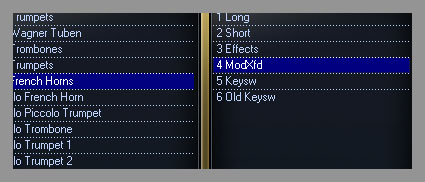
DXF stands for Dynamic Cross-Fade and is actually an instrument patch which for example is made of two samples, recorded in p and f dynamics. It’s called ModXFd, because the transition between these samples is smoothly controlled with the Mod Wheel (CC#1).

ModXfd in Play interface


So what’s the difference between an ordinary violin patch, which is controlled with CC#11 and a DXF patch, controlled with CC#1? Let’s hear for ourselves:

Download audio file (dxf_violins.mp3)

In this particular example we have some violins playing a G. The first recording is controlled with CC#11 (expression) only and the second one is a crossfade patch, controlled with subtle CC#11 and CC#1 (mod). Did you hear the difference? If not, listen to this:

Download audio file (dxf_corni.mp3)

So, the difference is hurting our ears now. The thing that CC#11 (expression) and CC#7 (volume) do is that they only change the volume of a single sample. As if you have grabbed the remote control of your TV and you’re turning your volume up or down.

However, the crossfade not only changes dynamics in terms of volume. It changes the overall timbre of the instrument! Therefore you get more sophisticated and real sound, because when playing live, musicians don’t just turn the volume. They add slight vibrato and expand the sound.

Here’s how a crossfade should look like:


One Thing to Remember

Remember that DXF patches can’t be controlled with velocity. They have two (or more) constant samples that are controlled only by Mod Wheel. If you want to create a sound that comes from pp dynamics (very low) and it suddenly bursts up to fortissimo, you should use Expression (CC#11) or Volume (CC#7).

Good luck!


10 Ideas That Will Get You Playing Music Outside Your Bedroom

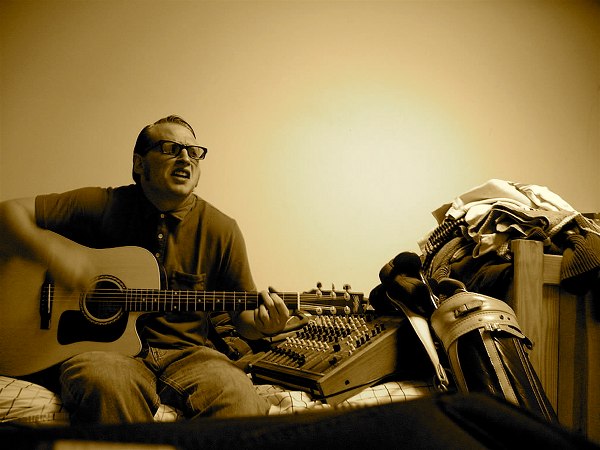
Many of us learn to play our musical instruments in our bedroom. Too many of us keep playing them there, too nervous to play in public, or just lacking the opportunity. Here are 10 suggestions to become musical in public.

Audiotuts+ has a very broad group of readers. This article is aimed at those starting out in music by spending time in their bedroom learning the rudiments. But it’s also aimed at experienced music producers slaving over their DAW without experiencing the joy of playing live in front of real people.

I’m also really keen to hear about your experiences in the comments. When did you first play in public? How did it go? And what advice do you have to those who are starting out?


1. Play In Someone Else’s Bedroom

Do you have a friend or relative that plays a musical instrument? Get together with them and have a jam. Strictly speaking it doesn’t need to be in their bedroom, but that’s as good a place as any.

When I first started playing guitar I didn’t get lessons, but had a friend who played. I’d go over to his place and play along with him. That meant I had to play in time with his playing, so had to change chords faster than I did when on my own. I also got to watch his fingering and technique. It was fun and educational.


2. Play at Parties

If you can play guitar and know a few songs, take your guitar along to parties, barbecues, picnics, or anywhere you get together with friends. You might find a few people keen to have a sing-along with you, especially as the night goes on and the empty cans start to pile up.

I have friends who are in the habit of taking an instrument with them everywhere they go, just in case the opportunity arises. One friend kept his drum kit in the back of his car, and you’d be surprised at how many gigs he got to sit in on. It was a great learning experience, and got him started in the industry. Another friend brought his bass guitar to my sister’s wedding, but that was because he was worried it would get stolen if he left it at home. He lived in one of those neighborhoods.

You don’t have to be the official gig of a party to play there, especially if you’re among friends. But as you get good, you never know how many paid jobs you’ll be offered.


3. Put On a Concert

If you’re getting lessons, many teachers organize a concert at least once a year where there students get a chance to show off their skill to adoring relatives. If you get that opportunity, take it! The opportunity of playing in front of a crowd can teach you a lot about yourself.

If you’re not getting lessons, organizing a concert might be too difficult, though you never know what opportunities are around until you look. And check out the Talent Competition and Open Mic ideas below.


4. Try Busking

Over the years I’ve spent a fair amount of time playing music on the street, usually in busy shopping centers during the prime times of the week. It’s quite an experience, and I loved it. I don’t think there’s any better way to get instant feedback on your music – good or bad – from total strangers!

A friend of mine spent many years living on the street of Kings Cross in Sydney with nothing but his guitar. He had to play well if he wanted to eat, and that was a musical education he still tells stories about to this day.

Be aware that in many places in the world you need a license before you can busk. Check this out before you get arrested for disturbing the peace. And remember that you don’t have to busk alone. Even just taking a friend along to sing with you can make your experience a lot more fun. And that way you’ll only get half the eggs thrown at you.


5. Play In a Nursing Home

If you’re keen to try busking but don’t think you could handle the rejection, play somewhere that you know you’ll be appreciated. There are plenty of places that people are starved for attention, and will appreciate your music no matter how bad you are. Well, almost. And nursing homes and retirement communities are a great place to start.

Quite a few times over the years I’ve played music in nursing homes. Sometimes on my own, other times with a friend, occassionally with a whole band. Some times I went back monthly, other times it was a one-off gig. But every time it was much-appreciated. Schools and preschools might offer similar opportunities.

Not all types of music lend themselves to nursing home visits, though. When I lived in the Blue Mountains I had a teenage friend who wanted to start a punk rock band to play in the local nursing homes. I’m sure the elderly folk there are glad they never got past the rehearsal stage.


6. Form a Band

If you’re playing with a friend regularly and things are starting to cook, consider pulling a few more friends together and starting a band. Bands don’t have to start big – three or four people might be enough – and it’s probably easier to set the direction of the band and develop a distinctive sound when there’s only a few of you.

If you’ve been in a band you probably know that it can take a lot of time and practice for things to come together. This isn’t a bad thing, and you’ll learn a lot even if you’re just a garage band for some time. Choose some songs and stick at them until you know them back to front and they sound great.

If you get to this stage without killing each other you can then start to think about gigging. You might become a local hit and go on to bigger things!


7. Join a Church Band

This suggestion isn’t for everyone, but church is one place that normal people get the opportunity to play in front of a crowd week in and week out. And this usually comes with a sense of commitment and achieving something for a higher cause.

I’ve often noticed on Australian and American Idol that there is a fairly high number of people in the top 12 who sang in church. That would have to be partly because of the opportunity to perform in public on a weekly basis for much of their lives, not to mention the endless practice sessions.

I’m using “church” in a generic sense here, and churches vary as much in their musical styles as anything else. Many of them have quite contemporary music these days. After playing music in church for several decades, I can certainly say it’s helped my playing and given me the opportunity to play with some amazing musos.


8. Play At a Christmas Carol Event

Every year like clockwork I see dozens of Christmas Carol events in schools, parks and shopping centers. Some of these are very professional events, while others (while not necessarily sounding any less professional) feature the talents of musicians from the local community.

I’ve had the privilege of organizing quite a few of these types of events, and one of my favorite parts of the job was discovering the local talent. A guitarist would know a bass player up the road. The keyboard player lived next door to someone who played dobro on some bluegrass albums a decade ago. Someone would introduce me to a professional opera singer who lived locally. Musos would come out of the woodwork.

Try to find out who is organizing your local carols, and see if you can get involved. At worst, wait until they are on this year and grab someone in the band after it’s finished to find out how to get involved next year.


9. Try Out In a Talent Competition

From huge TV events like American Idol or Australia’s Got Talent a talent quest at your local club or karaoke bar, there are plenty of opportunities to get to sing or play live, and get some helpful – and possibly painful – experience.

Not long after I started playing keys my teacher entered me in a talent competition run by a local music store. I hated him for it! But I went anyway. The pressure made me practice all the harder, and learn the song to perfection. My family (who had never heard me play before) came to support me.

I nervously got on stage and did my best, which I think was pretty good – though I was severely out-classed by some of the other contestants. And I still remember the written comment made by one of the judges: “You looked awful, pal.”


10. Turn Up At an Open Mic

Your local pub may host some open mic nights for up-and-coming talent. These are usually more relaxed than talent quests, and without all of the hype. But you won’t want to try one until you’re fairly confident of your playing and/or singing. If you feel comfortable and do well, you might want to try out for a more permanent gig.

Well, there are my 10 suggestions about how you can ease your way out of your safe bedroom and start playing in front of others. Take it slow, enjoy the experience, give yourself permission to make mistakes, and learn from them. You might even bring some joy into the life of a stranger.


Psdtuts+ Reader Survey


Our recent Tuts+ Survey showed that many of you have feedback on how we can make Psdtuts+ better for you. Now is your chance to let us know what you want from Psdtuts+. Please take a few minutes to complete our reader survey.

All questions are optional. You only need to provide a response when you have something to say.

You’ll have the chance to tell us what you like, don’t like, and to make suggestions for the site. Every completed survey will be read, and your feedback will lead to real, tangible changes in the kinds of content we publish.

Thank you!

Take the Psdtuts+ Reader Survey

36 High Resolution Cloud Brushes – Premium Psdpack


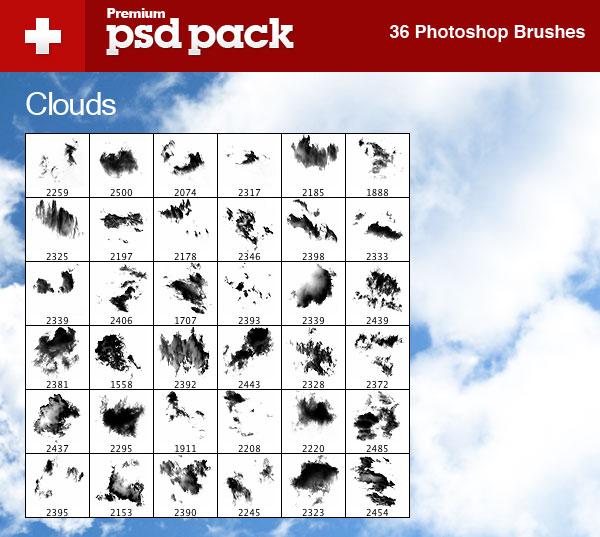
Today, we have a new set of Premium Brushes available for Psd Premium Members. This set was crafted by Grant Friedman of Colorburned and includes 36 High Resolution Photoshop Cloud Brushes. If your next project calls for a scenic sunset or a beautiful cloudy day, then this set is perfect for you. Learn more at the jump!


New Premium High Resolution Cloud Brushes

This new Premium Psdpack Pack is available for Psd Premium Members today and includes 20 high resolution brushes ranging somewhere in the neighborhood of 2500 pixels by 2500 pixels. Members can Log in and Download! Otherwise, Join Now! A preview of the brushes are below.

sample

This new Premium Psdpack Pack was created by Grant Friedman of Colorburned and is available for Psd Premium Members to download today. Grant is the Associate Editor of Psdtuts+ and creates loads of professional quality Photoshop brushes on a regular basis. We’re excited to partner up with him on this release.

pack

Psd Premium Membership

As you know, we run a Premium membership system that costs $9 a month (or $22 for 3 months!), which gives members access to the Source files for tutorials as well as periodic extra tutorials, and Premium Packs like this one! If you’re a Premium member you can log in and download this set. If you’re not a member, you can of course join today!

Is it iPhone 5 time already?

This one seems to be a bit early. It isn’t quite Apple rumor time and it surely is not the time for a new iPhone to be discussed. Or is it?

The whole iPhone 4 antenna drama has spawned a new round of rumors, iPhone 5 rumors. One of those industry sources suggested that Apple is pushing up the release of the fifth generation iPhone up to early January 2011 to deal with the antenna issue. Sort of a redesigned iPhone 4. That is a tough one to believe, but then we never know. By the way, Apple just deleted the antenna performance comparison videos from its website. There was no information why that happened, but we think it is a good idea. A justification has never been really necessary anyway.

Besides the new iPhone 5, rumor has it that there will also be a smaller iPad with a screen size of seven inches. The source also talks about an iPod nano, a shuffle with a small 1.7” screen as well as the new iPod touch. There is one more product update cycle in September and there is no doubt in our mind that Apple will be updating its iPods then. It will be interesting to see how far Apple will take its iOS, whether it will make it into the nano or whether Apple will put a much stronger focus on the touch, which was highlighted by the company as the reason why the iPod line can still deliver somewhat stable revenues during Apple’s most recent earnings conference.

The iPhone 5 got us thinking though. Apple rumors have been very accurate lately, but it seems more likely that Apple will just redesign the iPhone 4, which may be feasible until January 2011 and a subsequent release. An entirely phone, which would also spark a discussion of a new iOS may be a bit optimistic.

iPhone Maintains the Edge in Web Usage

There are some now statistics out that indicate an extremely high product loyalty among iPhone users as well as impressive web usage that is most likely fueled by the iPhone 4.

Net Applications found that 0.70% of all web browsing now originates from iPhones. That may not sound much, but that is close to the web traffic posted by Linux systems, which is now at 0.93%, according to the market research firm. Mac OS X 10.5’s share, by the way, is at 1.82% and Mac OS X 10.6 stands at 2.48%, which shows that 0.70% from a smart phone is a big deal: The iPhone has gained 0.11 points in July alone, which was largest single-month usage gain ever. Android, by the way is estimated at a total web usage share of 0.18%.

Nielsen has released some charts that highlight the user loyalty of the iPhone. 89% of iPhone users intend to buy another iPhone, while 6% say they want to switch to Android and 2% say they are looking for a Blackberry. 71% of Android users say they want another Android phone, but 21% want an iPhone next. 29% of Blackberry owners are likely to switch to an iPhone and 21% to an Android phone.

Android seems to be gaining market momentum especially in the U.S. Nielsen said that 27% of new smartphone acquisitions went to Android in the second quarter of the year and only 23% to the iPhone.

Workshop #103: SunFlowers by diSapia

At Audiotuts+ we irregularly put up a reader track for workshopping and critique (find out how to submit a track). This is how it works: you upload your song, and every week or so we’ll publish one here and step away from the podium. The floor is yours to talk about the track and how the artist can fix problems in and improve upon the mix and the song.

This track has been submitted for your friendly, constructive criticism. They have put their track (and their heart and soul) in your hands to learn and get useful feedback.

  • Do you enjoy the song or track itself? Does it have potential?
  • Can the arrangement be improved?
  • How did you find the mix? What would you do differently?
  • What do you enjoy about the rhythm track? What can be done to improve it?
  • Is the choice of instruments relevant and effective for the style/song?
  • Are the lyrics (if any) effective? Does the style, arrangement and genre of the song suit them?
  • Can you suggest any specific techniques that might improve the track?
  • Do you have any other constructive feedback?

SunFlowers by diSapia

Artist’s website: soundcloud.com/disapia

Description of the track:

This track is called Sunflowers.

Inspired by the recent sun and setting up a local flower market over the weekend. It has flavours of deep melodic house, twisted acid and free style drums.

I recorded sounds from the market place and used them in the production. I use logic, NI Massive, sound tools, some of the audio damage plug-ins, Vintage Warmer and logics own ES2, comp and EQ.

SunFlowers by diSapia

Terms of Use: Users can stream the track for the purposes of giving feedback but cannot download or redistribute it.

Have a listen to the track and offer your constructive criticism for this Workshop in the comments section.


Submit Your Tracks for Workshopping

Need constructive criticism on your own tracks? Submit them using this form.


28 Creative PowerPoint and Keynote Presentation Designs


There’s a certain art to putting together a solid presentation and PowerPoint and Keynote are the primary tools of the trade. The “art” comes into play when you’re trying to set yourself apart; so how you use the tools is of great importance. Often it is the design of the presentation itself that does the trick. In an effort to help you put together a great-looking presentation, we’ve put together 28 examples of creative presentation designs using Powerpoint and Keynote over on WorkAwesome.

( Continue Reading at WorkAwesome )

Composite A Super Stellar Jet Chase Shot – AE Premium

In this step by step tutorial, you will learn how to take various elements from 3D into After Effects, using the Max2AE plug-in. These elements will include camera animation and helper objects, to use as particle emitters. You will use color adjustments to add realism to the 3D jet element. You will learn how to create contrail and exhaust particles using Trapcode Particular. You will also learn how to create 3D cloud layers in After Effects, to give a realistic flight movement. And you will learn how to add camera shake animation, to help sell the chase-plane look and feel…


This is a Premium Tutorial. To view you must Join Premium.

Once you’ve joined, log-in to the Premium Dashboard with your username and password to immediately access your Premium Content. Navigate to AE Premium via ‘Premium Categories’ in the sidebar. You’ll be able to grab the tutorial videos, project files and assets in the members’ area.


Quick Tip: How to Create a Satisfaction Guaranteed Graphic


In the following Quick Tip you will learn to create a satisfaction guaranteed seal with basic shapes and gradients. You will find that the basic structure of this graphic can be reused many times to make a set of web assets that are perfect for e-commerce. Let’s get started!

Continue reading “Quick Tip: How to Create a Satisfaction Guaranteed Graphic”

How to Create a Professional Magazine Layout


Have you ever wondered how professional designers strike the perfect balance between text and image? Using InDesign’s powerful type tools, you will learn techniques to help you set and arrange a magazine layout.

Continue reading “How to Create a Professional Magazine Layout”

Essential Synthesis Part 3: Synth Bass

If you followed the last few parts of this series then you’ll know that we are looking at a group of synth patches that represent the building blocks of subtractive synthesis. In the first instalment we looked out how to manipulate a simple noise oscillator and then we looked at how to create a really useable pad sound.

In this instalment we’ll take a look at how to create a solid synth bass patch, an essential part of any synthesists armoury. The last tutorial was completed using Cubase 5.5′s Prologue synth, this time around I’ll be using Propellerheads Thor from Reason 5 / Record 1.5. In fact I’ll be using a different instrument for each instalment, to show that these techniques are truly generic in nature.


Step 1: Grasping the Bass-ics

So, what makes a good synth bass? Well to be honest that’s a tough question and hugely subjective but saying that there are some qualities that most of us find pretty satisfying. It goes without saying that a bass should have a solid low end. Also some filtering and light use of effects can make things interesting.

Due to the fact that the bass patches you’ll eventually create yourselves will be infinitely varied, I can only show you one possibility. Because of this I thought I’d demonstrate how to program a classic Moog sounding analog bass patch. This should be a useful sound, regardless of the genre you work with and it will give you a great bass-is with which to start. (Sorry I couldn’t help it!)


Step 2: Choosing Our Oscillators

As usual I have started with an initialised patch that consists of a single sawtooth waveform, an open low pass filter and very basic envelope settings. It’s always a good idea to start with a clean slate and very few modulations when creating your own patch.

The initialised patch in Thor.

Download audio file (2.mp3)

The raw untreated initialised patch

I then moved on to adding a second saw wave, detuning them for some ‘fatness’ and finished off with a sub oscillator, in the form of a sine wave a whole octave below the others. Below you can here the oscillators with and without the sub.

Please note this isn’t the best bass line I’ve ever written, it was just thrown together to demonstrate the patch !!

The three oscillators are loaded.

Download audio file (2b.mp3)

The first two detuned oscillators

Download audio file (2c.mp3)

… and now with a sub oscillator


Step 3: Filter, Filter, Filter

When it comes to bass patches there aren’t many that don’t require some heavy filtering. Generally low pass filters are used to remove high end frequencies and add resonance, for extra harmonic content. Many filters also feature a drive function which can impart from extra grit and edge to your patch if needed.

In this case I’ve opted for a low pass model and removed loads of top end. This gives the patch a warmer, more rounded character. Don’t worry about it being a little static as we’ll sort that in the next stages. Also you may be able to hear some clicks and pops, this is due to the default amplifier envelope settings and will also be rectified in the next step.

The simple low pass filter settings.

Download audio file (3.mp3)

The patch with some basic filtering.


Step 4: Amplitude and Filter Envelopes

First up I turned my attention to the dynamics of the sound, all in all I was pretty happy with the way the patch played. The main issue for me was the clicks and pops I was hearing. These are caused by zero settings in both the attack and release phase of a typical ADSR envelope.

Essentially you are hearing the sound moving from nothing to something in a very short time. This results in a click and it can also occur when the sound ends. By moving the attack and release settings up even a small amount you can pretty much eradicate these clicks.

The amplitude envelope is altered to avoid clicks and pops.

Download audio file (4.mp3)

The clicks and pops are just about gone

The next step was to look at our envelope settings was to spice up the filtering a touch. As I previously mentioned it was a little static and some dynamic movement was needed. We can introduce this by using Tho’s dedicated filter envelope.

A simple decay based envelope setting was used here and then the envelope modulation was turned up the filter. This really brings the whole patch to life and with a touch more resonance, it really starts to take on that Moog like character.

The filter envelope settings.

The filter is tweaked to accommodate the new envelope setting.

Download audio file (4b.mp3)

And the dedicated filter envelope is activated.


Step 5: Voicing Modes and Effects

Most analog style bass sounds are monophonic in nature and as my initial patch was already playing back in a monophonic mode no change had to be made here. Saying that some portamento was used in the voicing area.

Some portamento is added.

Some subtle effects were also applied to add some sheen to the patch. A very small amount of chorus and soft saturation were used. This simply gave the patch a little crunch and depth.

… then a touch of drive.

… and finally some chorus.

Download audio file (5.mp3)

The final patch with a few effects


Step 6: Conclusion

As you can see this is a very straight forward sound to reproduce and is a great starting point for more complex bass patches. You should find you are able to program this sound on pretty much any soft synth, so if you don’t have Reason try to recreate it using your favourite instrument.

The final patch.


Quick Tip: Using External Tools in FL Studio

FL Studio comes with pretty much everything you need to make most sounds, but there might be something else you like to use, like an audio editor or some other audio application. FL Studio has an extremely useful ‘external tools’ feature that makes it easy to edit sounds with an application outside of FL Studio right from the browser.

I’m going to be using the amazing Akaizer oldschool sampler timestretcher that’s available from akaizer.blogspot.com. When we’re done, right clicking any sample in FL Studio’s browser will bring up an option to open Akaizer or any other external tool, where it will open with the sample already loaded for quick and easy processing.


Step 1

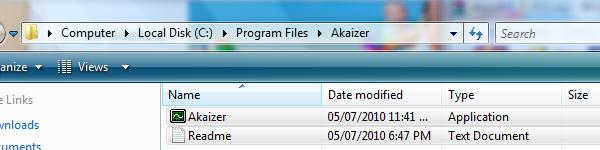
Install Akaizer or whatever application you want to use. When you’re done, be sure to remember where the main executable is located. Akaizer requires a .dll to be installed in order to be used with Vista or Windows 7, but other than that it’s just a matter of dropping the .exe onto your hard drive.


Step 2

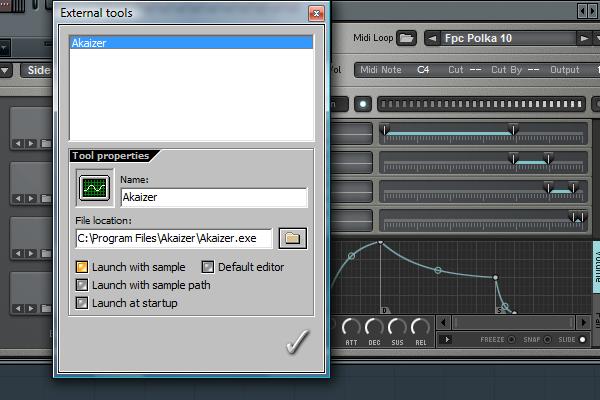
Open up FL Studio and under the ‘Tools’ menu, select ‘External tools…”. In the resulting window, click the file browser button and find your executable. Below the file location are a bunch of options for how the third party application should behave. We’ll want to check ‘Open with sample’ so that Akaizer opens with the sample all ready to go. If you want to use a different audio editor than Edison with FL Studio, you can check ‘Default editor’ and FL Studio will open your external tool whenever you click ‘Edit’ on a sample, instead of opening Edison.


Step 3

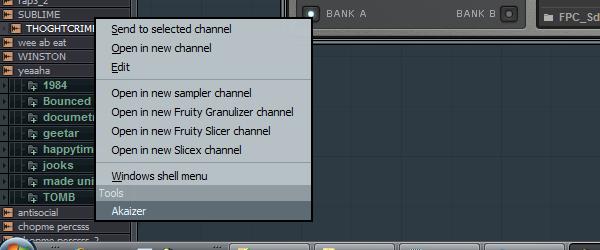
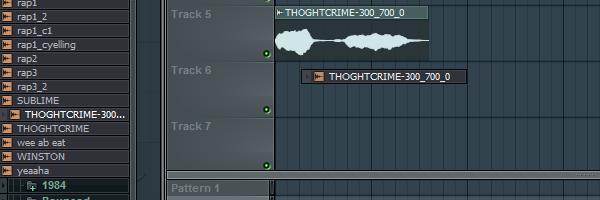
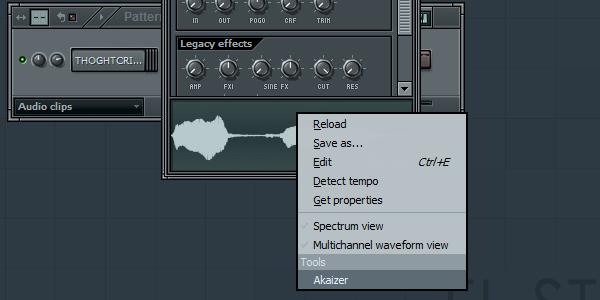
Now let’s find a nice sample to timestretch in FL Studio’s browser. When you right-click the sample’s name, the usual options pop up, but at the bottom there’s an option to open it with Akaizer, nice! My computer’s audio drivers are a little messed up, so I have to set the driver in FL Studio’s audio settings window to the default driver instead of the ASIO driver in order to have two sound applications running at once, but it should work normally for you.


Step 4

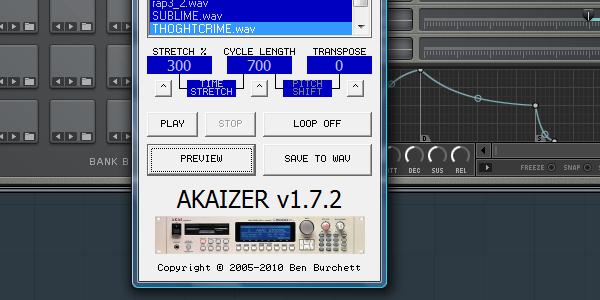
Now that we the sample opened in our external tools, we can start processing it. I’m going to take a vocal snippet and stretch it a whole bunch to get that creepy, metallic type sound.

Download audio file (4.mp3)


Step 5

Once you’re happy with how the sample sounds, save it to the same directory as the orignal, or wherever you want, and then you can just drag your new sample from the browser like any other sample. You may need to press the ‘Refresh structure’ button at the top of the browser before you can see it.


Step 6

In addition to the browser, you can also open samples with external tools in a few other places, mostly where FL Studio shows a waveform preview. If we drag a sample into the step sequencer to load it into a Sampler channel, right-clicking the waveform will bring up the same external tools option as before. This didn’t really work for me, but in some places, like FPC, right-clicking the waveform will bring up an option to show the sample in the browser, where it’s easy to open it with the external tool.