Flash for Android: Introduction to Git

GitHub.com is a web-based hosting service for projects that use the Git revision control system. This screencast is designed to help you work with projects on GitHub.com.


Section 1: Setting Up

In this introduction to Git I will cover setting up a git repo (git init), adding files (git add), and committing changes (git commit -m “commit message”).

Don’t like ads? Download the screencast, or subscribe to Activetuts+ screencasts via iTunes!


Section 2: Pushing and Pulling

In part 2 of my introduction to Git I’ll cover setting up cloning a repo (git clone url/to/repo), pushing changes (git push origin master), and pulling down changes (git pull).

Don’t like ads? Download the screencast, or subscribe to Activetuts+ screencasts via iTunes!


Section 3: Tagging, Branching and Merging

In this section I’ll cover tagging a repo (git tag tag_name), branching (git branch branch_name), and merging (git merge branch_name).

Don’t like ads? Download the screencast, or subscribe to Activetuts+ screencasts via iTunes!

Don’t forget you can tart up your desktop and mobile devices with the Flash for Android Wallpaper!

Modelling the Audi R8 in 3Ds Max, Day 1 – Premium Tutorial

You asked for it, and Madhan_2005 has delivered! Over the course of this amazing tutorial series, Madhan will be walking us through how he modelled and rendered a photorealistic Audi R8 using 3Ds Max, after which you’ll be well equipped to create your very own dream cars! This tutorial series is a must-watch for any artists looking to expand their portfolio and learn the sought-after art of car creation. Can’t wait to get started? Become a Premium member, or learn more after the jump!

Step by step car creation

Follow freelance CG artist, Madhan, as he walks us through the modelling workflows he uses to create stunning, photorealistic car models such as the Bugatti Veyron, previously featured on the site, and the Audi R8 shown above. An expert in pushing a programs basic toolset to it’s limit, Madhan_2005′s tutorial is a must-have for any artists interested in either vehicle or product design.

Want to Join Plus?

The Tuts+ network runs a membership service called Premium. For $9 per month, you gain access to exclusive high quality screencast tutorials, downloadable content packs, and freebies at CGtuts+, Psdtuts+, Vectortuts+, Audiotuts+, Nettuts+ and Aetuts+! For less than the price of a movie, you’ll learn from some of the best minds in the business all month long!!. Become a Premium member today!

Don’t miss more CG Premium tutorials and content packs, published weekly – subscribe to Cgtuts+ by RSS.

Awesome Links #9: Secure Wireless, Accountant Hiring, Google Failures

The Complete Guide to Securing Your Home Wireless Network

This article at Guiding Tech talks about the steps you need to take to make sure that your home wireless network cannot be easily hacked into.

How the internet works [Infographic]

A nice illustration explaining how the internet actually works from Make Use Of.

Accountant Hiring Simplified

Need to hire an accountant? This guide by our sister site The Netsetter will make the process simpler for you.

12 Social Media Monitoring Tools Reviewed

Some prominent social media monitoring tools reviewed by Six Revisions.

Let’s Celebrate Google’s Biggest Failures!

Google Wave’s shutdown announcement prompted Danny Sullivan to take a look at some of the biggest Google products that failed to live up to the expectations.

5 Tips for Managing Your Facebook Privacy

While spending time on Facebook may not be the most productive thing you can do, it can be a valuable tool – when used in moderation.

But have you seen the new Facebook privacy settings? Do you know that if you are not cautious, your personal data could appear in public streams? Follow these privacy tips to remove any doubts you might have.

1. Don’t Add Applications Randomly

Certainly the most important tip if you love spending time on Facebook. There have been instances in the past when certain apps were hacked into and user data was compromised. So, be careful and don’t just add every other Facebook app you come across.

2. Create Lists

Facebook lists are a great way to manage your news feed and your friends. Also, learn how to create friend lists in Facebook chat.

3. Check Privacy Settings Carefully

Sometime ago, Facebook simplified user privacy settings. Check them out. Read this official guide too, to know more about those settings.

4. Protect Your Photos

You must have heard stories of private photos of certain celebrities appearing in public Facebook stream. If you don’t want it to happen with your pictures, make sure you check what’s there for the photos you upload in the privacy settings, and how to customize it.

5. Think Before Sharing

And finally, it’s always good to give a second thought to that status message you are going to enter, or the video you are going to upload. May be, it doesn’t need to be on Facebook.

What do you think? Should we be cautious on Facebook? Or is the whole privacy thing blown out of proportion?

The Practical Guide to Doing Laundry

Laundry: the weekly time-consuming chore that ties you up for some hours.  If you’re one of us poor folks who can’t afford help, you’re likely to dread doing laundry, especially if you have to go to a laundromat.  I’ve picked up some best practices on how to do laundry that I share here to help save you some time and energy while preserving your garments.

1. Get a hamper with 2 or 3 divisions (or use 3 buckets)

To save time when doing laundry, get a hamper with 2 divisions – 1 for whites and another for colored clothes – or with 3 divisions if you have clothes that need dry cleaning.  Otherwise get 2 or 3 buckets or whatever containers you want to keep your clothes separated.  It’s much easier than going through a big container and separating everything.

(I can hear men saying, “What do you mean ‘separate’ garments?  Don’t you just throw everything in?”  To avoid whites staining from color bleeds and to prevent whites from turning the color of faint pee, it’s best to separate colors from whites).

2. Wash whites last

Bleach should be all washed away by the time your whites are done washing but to be safe it’s best to wash whites lastly.  Use warm or hot water to wash whites and never pour bleach directly on the garments as some formulas can stain the clothes.

3. Separate your socks

It’s a pain looking for socks in the washing machine – and sometimes you can’t even find them!  There are 2 things you can do:

Get sock clips (this link is from the Container Store but you might be able to find cheaper ones near you).  This is more time consuming to put together but makes it easy to put away socks since you don’t even need to look for the pairs; you might even decide to just put your socks away in the clips if you don’t want to fold them.

Keep a bag of sock clips hanging off the side of your hamper and pair up your socks before throwing them in the hamper.  The clips can go in the dryer, too.

4. Use a mesh bag for small garments

Zippered mesh bags are your laundry’s good friends.  You can put your socks (if you don’t want to use the clips mentioned above) and underwear in the mesh bags so you don’t have to look for and separate your small garments later.  Mesh bags are sold as bags for delicate garments and they save you from the headache of detangling tights or pantyhose from your clothes too.  I don’t recommend bags with strings as they usually open in the wash.

(If you’ll be washing delicate garments with sequins or other decorations you should still turn them inside out to wash even when using the mesh bag).

You should be able to find a mesh bag with a zipper in a big home store or at a local 99-cent type of store.  Hang your mesh bag on the side of your hamper and throw your small garments in there as you take them off.  Don’t fill more than 2/3 of the bag though otherwise your garments won’t dry well.

5. Use cold water for colored clothing

Washing your clothes in cold water prevents or reduces color bleeding and fading as well as shrinkage and overall wear of clothes.  In addition, it reduces a little your energy costs and CO2 emissions.

Unless you work with manual labor your everyday clothing doesn’t need the heavy cleaning hot water provides.  For everyday sweat and dust cold water works just as well.  For heavy sweat spots you can use pre-washing home treatments or buy products specific for this.

6. Dissolve the soap before throwing in clothes

This is for top-loading home machines.  I used to put all the clothes in my machine then throw soap on top but that stained a few delicate garments.  So what to do is run the water first and throw the soap in.  Wait for the water to filla bit and dissolve the soap then throw in the garments.

7. Use drying sheets to prevent static

Especially in the winter, pulling clothes out of the dryer will give you a tiny shock.  Drying sheets prevent this and make your clothes smell good.  (You can use the used drying sheets to clean dust off your computer monitors and TV screens).

8. Use sweat pads to prevent sweat spots

Sweat pads are thin patches that prevent your shirt from touching your underarms and creating a sweaty spot.  There are disposable and reusable pads, though I’ve only seen reusable ones for women as they need to attach to something like a bra strap.  Disposable pads stick to your shirt’s underarms.  I must confess that I didn’t find the disposable pads very comfortable but I know of many people who use them and can’t live without them.

Putting into practice the tips offered in this guide will get your laundry done in a practical and productive manner, leaving you dressed your best for the work week ahead. If you have any other laundry tips, please leave them in the comments!

How Helpful is Blue Sky Thinking?

The blue sky view. Not a cloud in sight. Perfect conditions, endless opportunity, unlimited potential.

People often formulate ideas using the “blue sky view,” a hypothetical landscape where challenges are nonexistent, success is straightforward, and every lucky break seems to go your way.

Advocates of blue sky thinking say that brainstorming in an idealized, setback-free setting allows you to focus solely on the idea, not the related obstacles or logistics. You develop the idea in a perfect, immaculate universe, and then approach the potential challenges separately.

But, even a bad idea can look good if you picture it within an idealized, utopian scenario. The blue sky view could distort your expectations and affect your judgment. Under the blue sky, a risky move can look like a safe bet.

Undeniably, the road to success will seem clearer if you wish away the obstacles. The question is: Does the blue sky view truly help you formulate viable plans, or does it leave you unprepared for the inevitable challenges of reality?

Planning an Unconventional Home Office Setup

I’ve had a home office for the past ten years. During that time, my wife and I have moved four times. Besides working full time at jobs we love, Lori and I also run our own side hustles: I write, and she creates art and jewelry. Juggling all that leaves little room for a social life, especially in the suburbs. That’s why we traded a bigger space for a shorter commute.

While I’m not looking forward to the process of relocating my home office, I am excited about our new space. After leaving our three-bedroom townhouse, we’re moving into a 900-square foot condo in the center of town. Most Americans wouldn’t even consider this option, but it’s designed to help us spend more time together. This caused us to rethink what we want to get from a work space in our home, and we’ve come up with five guidelines that shaped how we’re designing the new home office setup.

#1: Think Multipurpose

For the first time in a decade, we won’t have a dedicated room as a home office. Trading off space for lifestyle doesn’t mean giving up functionality. Instead of sacrificing a whole room as a home office, we’ve set up what would have been our dining room into three potential configurations. That corner desk lets us flex between a home office space, a dining area, and a crash pad.

With a dining room table that collapses against the wall next to the desk, we can have some surface area when we really need it for projects. If we find ourselves hosting more overnight guests than we have couches, there’s plenty of room for that air mattress. While entertaining, the desktop computer can stow away in the closet, making our corner desk perfect for a drinks station.

#2: Be Inclusive

You could describe my first home office as a mashup of Mad Men and Twin Peaks: a misguided attempt at feng shui that left my huge wooden desk facing toward the door of our spare bedroom. Instead of a real office, I really created a man cave. Lori felt shut out from what was meant to be a family business.

Although home-working friends often complain about their interruptive spouses, Lori and I have developed some cues and clues to keep us from stepping on each others’ creativity. Our space is open enough to simulate co-working, with enough privacy when we need it.

#3: Capture the Clutter

Two creative people getting married can result in disaster if you’re not prepared for some give and take. In our current home office, we finally had the right amount of space to set up a desk that wrapped around two walls of the room. It gave us lots of space to work, and lots of space to collect clutter.

Our new space forces us to get things done. We picked a corner desk that gives us the right amount of space for a small inbox. Papers get scanned with a tiny Doxie scanner into Evernote, so we can both access copies of key bills, paperwork, and receipts. Everything other than critical documents makes a one-way trip to the shredder.

#4: Stay Flexible

When we work together, it’s often about getting photos of her creations onto the web or proofing cover art and photos for one of my books. That’s why we chose small, fairly portable pieces of furniture. Having a few pieces we can quickly whip around the room means we can go from a pop-up photo shoot to a markup session with just a few moves.

It’s also important for us to share the room’s resources when we can get the most done. I tend to do most of my best work in the early morning, before I head out to the Major Corporation. Lori gets creative at night. The corner computer’s big screen lets us get a lot done during our hot zones. If we need two computers at once, we’ve got laptops and that convertible dining room table as fallback.

#5: Have Fun and Think Funky

I still have nightmares about the ugly, pressboard home office furniture my dad and I glued together when I was still in high school. Instead of a typical office desk, Lori found a corner unit that enhances the color and texture of our hardwood floors. The folks at the furniture store indulged us by helping me carry upholstered dining room seats across the showroom to find one that had the same kind of ergonomic support as my favorite mesh task chair. Lori loves the unusual design of the chairs we chose: green with playful embroidery on the back that will make our new space bright and cheerful, even when we’re working hard.

These five ground rules really helped us hammer out a new kind of home office for our new space. Everything’s on delivery trucks now, but I’ll update the post with some pictures of the final product once we’re done moving in.

Individual Contributor vs Manager: What’s Your Preference?

In roughly 30 years of full-time employment, I have been both a manager and an individual contributor.  Through the years of experience I’ve developed my own preference, of course. While I’ve come to my own conclusion on the matter, some of you are just beginning to explore both options as possibilities. Let’s talk a little bit about what is attractive – and what is not – about both types of jobs.

Manager

What is attractive?

  • A manager title tends to carry with it an air of importance or significance in the workplace.  This is just a fact of life.  Certainly, the level of significance between managing and individually contributing has diminished over the years due to the increased importance of specialization.
  • There is much more interaction with people, whether it be the people that you manage, or with other managers.  Some may not consider this an attractive aspect of managing, but going in a manager certainly understands that this will be the case.
  • More $$$.  The pay scale, at most companies, tends to be higher for a manager.  Not always, but more often than not.
  • As a manager you can delegate responsibilities thereby displacing some of the mundane tasks that your job title entails.
  • Opportunities will exist for you to go to seminars to help make you a better manager and to develop personally.  Some of these seminars may be “Dealing with controversy”, “Time Management”, or “Effective Public Speaking”.

What is not?

  • Managers have to deal with the many personal issues related to the employees who work for them.  This could take up an exorbitant amount of time in the life of a manager.
  • Pressure.  You will be asked to give presentations at various meetings or seminars.  If you are not comfortable with public speaking this could be a major headache.
  • You will have to guide the employees that work for you to grow as effective employees.
  • As a manager, you will be responsible for annual reviews which, depending on the number of workers you have, could be a large part of your job.

Individual Contributor

What is attractive?

  • You can focus more on the job at hand without the distractions that could come with a manager’s position.
  • You are only responsible only for yourself and your own actions.
  • You can much more easily become an “expert” in a particular area at your workplace.  If you are a PC technician you can concentrate solely on that expertise.  If you are a manager of PC technicians, you may have to service computers in the event of one of your workers is on vacation.  But you won’t become an expert by constantly building, servicing, and upgrading personal computers on a regular basis.
  • If you can specialize in a particular area of expertise, such as a database administrator, your pay may match or exceed that of other managers in your company.
  • Depending on your job, it is much more probable that you are able to telecommute since you don’t have to manage people who are at the office.

What is not?

  • You may not be taken as seriously in the workplace as a manager. 
  • You cannot delegate anything you don’t want to do, to an underling.  On the other hand, your manager may delegate mundane tasks to you, leaving you less time to work on your area of expertise.
  • Your manager can dictate areas of development in which may not be interested.  Perhaps your manager wants you to handle all oral presentations for your group and you have no interest in public speaking.  You basically have no control over what your manager wants for you, even if your manager is guiding you to develop public speaking skills for selfish reasons.
  • Stuck in the office.  Managers typically have more access to travel in the workplace, whether it be to training classes, seminars, symposiums, or to sister offices.  As an individual contributor you may not have as many opportunities of getting out of the office as a manager may have.

As stated above, managing and individual contributing have their positives and their negatives.  In my own personal experience, my preference is as an individual contributor, which is my current job type.  I think the ability to become proficient in one particular area of expertise, is extremely important to me.  Today, specialization in a desired area of technology translates to job security.  As an individual contributor, I can focus.  As a manager, I always had to be aware of the people who worked for me and whether or not they were doing their jobs.  That is a responsibility that I simply did not relish.

Obviously your personality type has a lot to do with whether you will be happy in either role.  For me, there is no “individual contributor vs manager” competition.  I am happy to be responsible for myself – because I know that is one person I can always count on.

Quick Tip: Super Simple Post Processing to Get That Vintage Look

Gorgeous old vintage photographs always have certain qualities about them that are unmistakable, but many of these qualities disappeared with the great shift from film photography to digital photography. In today’s quick tip, we’ll have a look at a few very simple tips to bring that vintage look back, into the digital age.


Step 1

The first thing we need to do is select an appropriate image to use. Typically warm images with a strong light source and a lot of contrast work best, but you should also think about the subject of the photograph itself. Does it have an old-school feel about it? If so, then it’s probably a good candidate for this effect!


Step 2

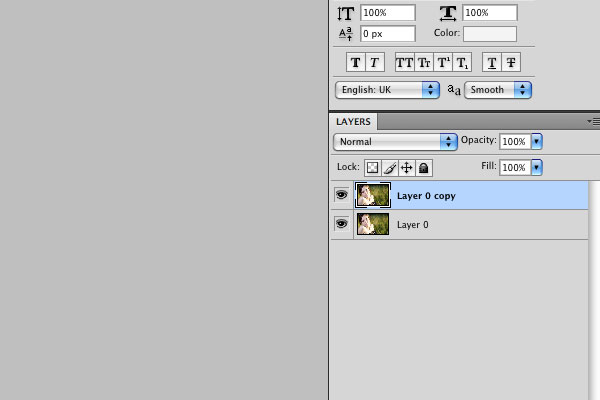
To get started, the first thing we’ll do in Adobe Photoshop is to duplicate the layer. You can do this by right-clicking on the layer and selecting “Duplicate Layer.”


Step 3

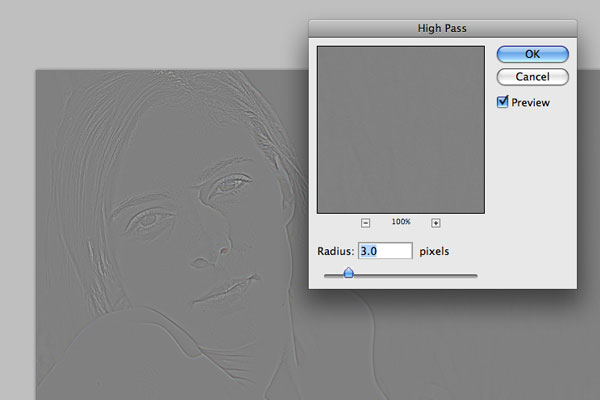
Now we’re going to turn our duplicated layer into a high-pass filter, which will add more detail to the image. Select Filter > Other > High Pass from the Photoshop menu bar, and set the radius to 3 pixels.

Once you’ve done this, set the blending mode of the layer to “Overlay” – and you should be able to see the effect clearly by toggling the layer visibility on and off.


Step 4

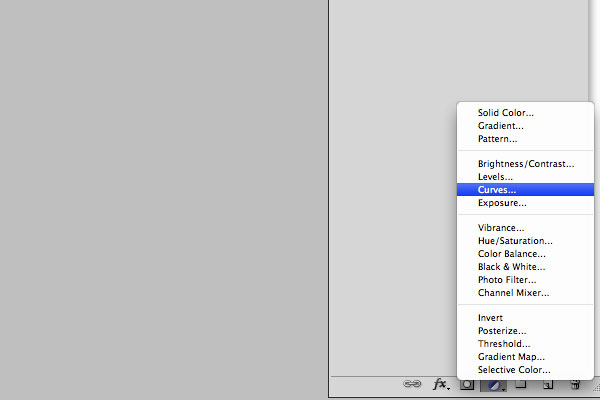
Next, we’re going to add a couple of layer adjustments. Select the layer which contains the original image, then click on the circular icon at the bottom of your layers window to add a new adjustment.


Step 5

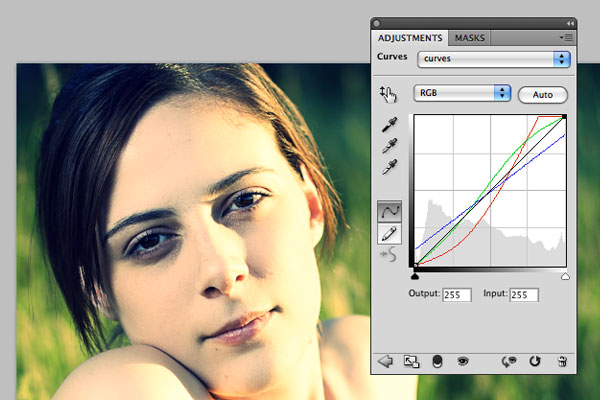
The first adjustment that we’ll add is Curves, this is the most complicated of the three adjustments. First select the Red channel from the RGB dropdown menu and mimic the shape in the screenshot below, then do the same with the Green and Blue channels respectively. Switch the dropdown back to RGB to see all three channels overlaid in the same way as they appear below.

Once you’ve done that, go ahead and close the layer adjustment window.


Step 6

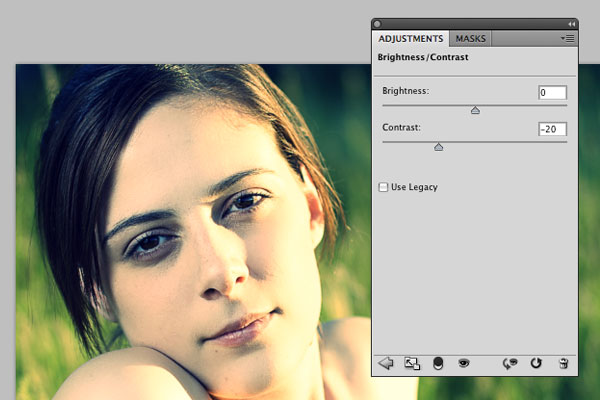
Now select the original image layer again and add another layer adjustment, but this time select Brightness/Contrast instead of Curves. All we’re going to do with this adjustment is drop the contrast to -20. Once that’s done, close that layer adjustment window.


Step 7

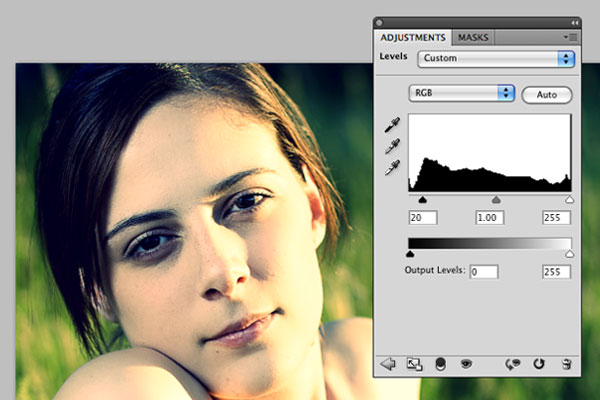
Selecting the original image layer again, we’re going to add one last layer adjustment. This time select Levels from the layer adjustment menu. The only we’ll do here is to move the left-hand slider (black) from 0 up to 20. Once that’s done, close the layer adjustment window.


Step 8

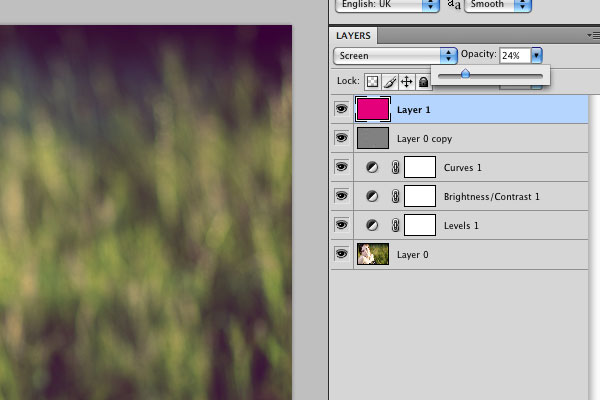
The last step is to add the magenta hue that really completes this effect. Create a new layer that sits above all your other layers and fill it with solid magenta. You can do this easily by setting C, Y, and K to 0% in the colors palette, and setting M to 100%. Next set the layer blending mode to “Screen” and drop the opacity down to around 25%.


The Final Image

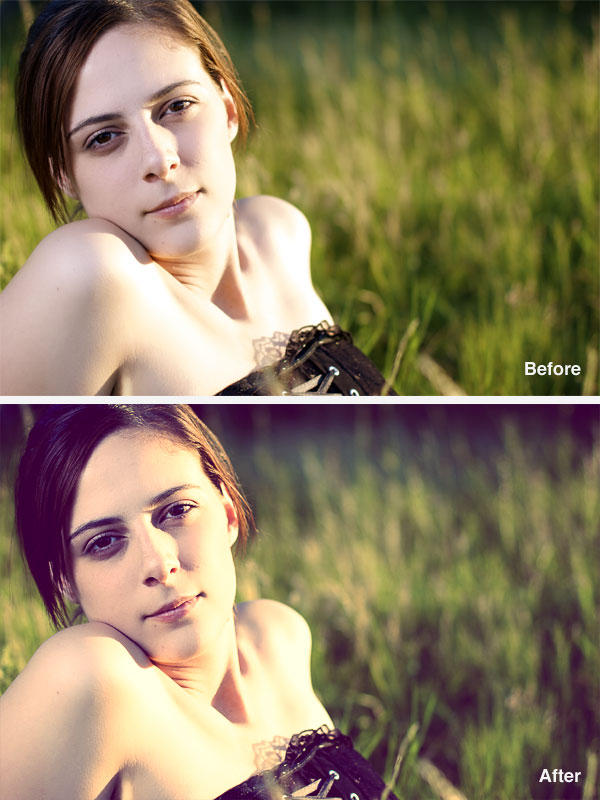
That’s it! You’re done – and your final image should now look something like this:

Friday Photo Critique #44

Friday Photo Critique is our weekly community project, where we publish a photograph submitted by one of our wonderful readers, then ask you all to offer constructive feedback on the image. It’s a great way to learn more about photography, express your viewpoint, and have your own image critiqued!


Quick Ground Rules

  1. Play nice! We’ve deliberately chosen photographs that aren’t perfect, so please be constructive with any criticism.
  2. Feel free to offer any type of advice – composition, lighting, post-processing etc.
  3. You can also link to photographs that you feel offer a great example of this type of image shot exceptionally well.

Without further ado, here is this week’s candidate for Friday Photo Critique!


The Photograph

Photo Critique

Photographer: Igor Vilela Rotundo

Please let us know what you think in the comments – how would you have approached the scene or taken the photo differently? A massive thank you to everyone who commented last week.

The most constructive and helpful comments will be featured on the site. Interested in submitting your own photo? You can do so here!

The Problem with PHP’s Prepared Statements


PHP’s prepared statements (for database access) are fantastic. Not only do they help secure your database queries, but they’re also particularly more efficient for larger products. However, there are a couple issues that appear to make these methods less flexible than we’d hope. For one, we must utilize the bind_result method, and pass in a specific number of variables. However, what happens when this code is within a class, and we won’t immediately know how many variables to pass? Luckily, there’s a solution! I’ll show you what it is in today’s video tutorial.


Final Code

<?php

function read()
{
   $parameters = array();
   $results = array();

   $mysql = new mysqli('localhost', 'root', 'root', 'db') or die('There was a problem connecting to the database');
   $stmt = $mysql->prepare('SELECT body FROM posts') or die('Problem preparing query');
   $stmt->execute();

   $meta = $stmt->result_metadata();

   while ( $field = $meta->fetch_field() ) {

     $parameters[] = &$row[$field->name];
   }

   call_user_func_array(array($stmt, 'bind_result'), $parameters);

   while ( $stmt->fetch() ) {
      $x = array();
      foreach( $row as $key => $val ) {
         $x[$key] = $val;
      }
      $results[] = $x;
   }

   return $results;

}

$results = read();
?>
<!DOCTYPE html>

<html lang="en">
<head>
   <meta charset="utf-8">
   <title>untitled</title>
</head>
<body>
<?php foreach ($results as $row) : ?>

   <p> <?php echo $row['body']; ?> </p>
<?php endforeach; ?>
</body>
</html>

Interview With Jonathan Foerster


Jonathan Foerster is another designer with a unique and imaginative style. His artwork reflects his deep emotional feelings at the time of creation. His goal is to put a face to the many feelings we perceive. In our interview we talk about everything from design inspiration to why Jonathan decided to choose this specific style. Let’s get started!

Q Welcome to Psdtuts+, please introduce yourself. Could you tell us where you’re from and how you got started in the field?

I’m Jonathan Foerster, currently 27 years old from Indianapolis, Indiana. My roots are in traditional artwork, pencil and ink illustration mainly. Around the age of 15 I stumbled onto creating artwork on the computer starting with early versions of Paintshop Pro and Photoshop, then finding out about Bryce 3d. As the years passed I kept working with these tools until finally working my way into using Studiomax around 2002, where I feel my digital artwork really blossomed.

Q You have an extremely unique style, if you were to describe it in a few words what would it be?

I like to think of my work as a representation of feelings, emotions, thoughts and ideas. Since there are no visual aspects to how these are perceived; I’m basically putting a face to them. Love, fear, anxiety, anger, passion, lust, death, life are all covered widely within my work and there is usually a combination of many. My work is a timeline of my life and what I’m going through or working out at the time, if I’m not trying to work something out, my personal artwork output slows down drastically.

Q From looking at your portfolio I noticed that the majority of your art is very sharp and striking. Why do you prefer this look over something calmer?

I think it’s just a product of how I perceive things. I view my artwork more like paintings. I’d like people to look at my work and feel a message or relate to what I’m saying through my artwork, rather than just say oh that’s nice and walk away. I like to try and hit people’s inner core, emotions are deep and complex and intertwine with other emotions and thoughts, and I try to represent that. Hopefully people can relate.

Q You incorporate a lot of 3D elements in your work, why is that? And give us a little insight into how you create them.

To put a face to my thoughts. Try to explain the unexplainable or unseen through shape and form in combination with color. I output a lot of renders of single forms at different angles and perspectives and then composite and edit them in Photoshop to reflect what I want.

Q Your illustration “Bellus” is obviously something different because of its extremely vibrant colors. Why did you choose to go out your design norm for this one? And give us a look into the process of its creation.

Just kind of what I was going through at the time and they fit the piece, if it were darker tones or muted colors I don’t think the visual aspect of it would have worked. For that moment in time I was pretty happy with everything going on, and wanted to create something a bit different. Near the end of working on Bellus I fell into a rut again and felt I was finished with it, my pieces that followed began to become darker, richer but less vibrant.

You can view a progression timeline of Bellus here. After viewing it I wish I would have left in some aspects that I took out or worked through.

Q Who are some of your “art heroes”? Meaning those in the field who you look up to, Also why have you chosen them?

Inside the field, anyone producing in the Depthcore Collective. I have been a part of Depthcore since 2002 and the talent involved continually amazes me. Big things coming from Depthcore down the pipeline. Outside, I take a lot of influence from traditional painters and artists such as H.R. Giger, Roger Dean, Wayne Barlowe and Robert Venosa, their visions continually inspire me and have really made their mark with me.

Q What are some of the current projects you are working on? And what can we see from you later in the year?

My personal work has slowed down as of lately, I am working on a new piece but it probably wont see the light of day till the end of the year. I’ve been busy with work as well, outside of my personal work, for 3 years I’ve been a multimedia designer for an agency here in Indianapolis working on projects for Pepsi, Gatorade and Tropicana. Also, I’ve been focusing on having my artwork displayed locally here in Indianapolis, trying to get my name and work out there.

II

Q Thanks again for providing Psdtuts+ with this opportunity to interview you. Any final thoughts for our readers?

Don’t be a follower; create from what comes from within. Experiment and don’t be afraid to push the bounds.


Where to find Jonathan on the Web

iPad App Store Gets Genius, Try Before You Buy

Demo versions have always been a big part of software download stores on the Internet – just not so much for the App Store, which in the end, created an environment of “lite” versions and, if we believe Mashable, also software piracy. Piracy is unlikely to go away entirely, but there is now a new try before you buy section in the App Store that may discourage piracy somewhat. And, Apple quietly introduced Genius as a new feature for the App Store.

Apple was never especially receptive for demo versions and that has not changed yet. However, lite versions are now specifically available in a try before you buy section. You can always argue what may have prompted Apple to introduce the feature. Perhaps it was just about time, considering the fact that there are more and more users and more and more apps – and sometimes you just don’t want to pay before you have not seen what an app can do. Mashable, however, believes that Apple may think that this category may prevent a scenario of would-be pirates – users who just don’t want to pay before they have tried the app.

The iPad App Store now has a Genius tab, enabling users to find new apps depending on the Apps they already have. While the feature was added quietly and there isn’t much information available, it appears that the Genius feature only recommends apps with a 2-star rating or higher. That is rather unfortunate for those apps that do not have a rating yet, but surely helps to get to the higher quality apps first. However, it means that good ratings will get even more important for apps and while the Genius feature is marketing help provided by Apple, it requires that you do your homework first – and get a good rating in the first place.

For those who keep count, there are more than 225,000 apps in Apple’s App Store.

Discover Cakewalk’s SONAR

SONAR is a Windows-only MIDI sequencer and digital audio workstation developed by Cakewalk. Roland acquired a majority share in the company in 2008, and their logo was changed to “Cakewalk by Roland”. The program runs on Windows Vista (including 64-bit), and version 8.5 is the first DAW for Windows 7. It is also the only major DAW to have a scripting language.

This is our eighth article in the series “Exploring Digital Audio Workstations”. If you’ve missed the earlier articles, you can find them here:

Now let’s have a look at SONAR.

SONAR 8.5

History and Background

Cakewalk was a DOS MIDI sequencer developed by a company originally called Twelve Tone Systems (and later, Cakewalk) way back in 1987. Cakewalk became Cakewalk Pro (to distinguish it from the more limited Cakewalk Express), and then became Cakewalk Pro Audio when digital audio recording and editing features were added. Cakewalk also features the Cakewalk Application Language (CAL), a flexible and fairly undocumented scripting language that can be used to extend and customize the program.

SONAR is the successor of Cakewalk—a different product with nearly all the same features, including CAL. There is a range of SONAR products—some including music production hardware—and the most recent version of the digital audio workstation software is SONAR 8.5 Producer. Home studio and LE versions are also available.

SONAR’s Features

Cakewalk’s SONAR 8.5 Features page summarizes the program’s main features.

Music creation features:

  • Session Drummer 3 allows you to create drum parts for your productions. It includes hundreds of patterns ranging from vintage rock to electronica, and 20 complete drum kits including genuine Roland 707, 808, and 909 kits.
  • Matrix View gives a new approach to music creation. It allows you to rapidly load audio or MIDI tracks, loops, and one-shots to improvise compositions on the fly, creating remixes and sketching out different arrangements for a song.
  • Step Sequencer 2.0 lets you create drum tracks, beats, bass, and synth lines with a click of the mouse. It has an auto-populate feature for common rhythmic patterns, and a Per-step Probability feature to add automatic variations.
  • A one-click Arpeggiator .
  • The Rapture LE synthesizer, which includes over 200 programs and hundreds of oscillator shapes.
  • TruePianos Amber, a VSTi that provides realistic piano sounds.
  • Dimension Pro allows you to add both real and synthesized instrument sounds to your projects, including synths, strings, basses, acoustic and electric guitars, vocal hits and more.
  • A Media Browser lets you browse and preview audio and MIDI groove clips and patterns.

Music recording features:

  • Guitar Rig 3 LE, a guitar amp modeler from Native Instruments, which includes 3 amps and cabinets, 11 effects, tuner, metronome, and over 50 presets.
  • A variety of Track Templates for audio, virtual instrument tracks, and entire projects.
  • Support for unlimited tracks of audio and MIDI.
  • Loop Recording.
  • Optimization for high track counts with low latency.

Audio editing features:

  • AudioSnap 2.0 lets you correct drum and instrument timing, including tempo changes.
  • Roland V-Vocal 1.5 provides natural sounding vocals with simple pitch correction, including the popular  robotic vocals sound.
  • Smart MIDI Tools which provide a customizable workflow and can perform multiple operations.
  • Tools that make comping breeze, allowing you to piece together a flawless performance.

Control features:

  • A Synth Rack gives easy access to all the virtual instruments in your project.
  • Active Controller Technology (ACT) includes templates for most MIDI controllers and surfaces, automatically mapping parameters, and allowing customization.
  • Supports popular control surfaces including those from Edirol, Mackie, Euphonix, and Frontier Design.
  • Track folders organize groups of tracks such as drums or strings which can take up screen space, and the Navigator View lets you get around large projects faster.

Mixing features:

  • PX-64 Percussion Strip is a 7 stage multi-effects processor, including EQ, compressor, expander, transient shaper, delay, and dual-stage saturator.
  • VX-64 Vocal Strip is a 7-stage multi-effects processor, including EQ, compander, de-esser, doubler, delay, and dual-stage saturator.
  • Channel Tools provides channel processing for adjusting L/R channel placement, gain, pan/width, and phase; sample delay for precision timing adjustment of L/R channels in recordings; Automatic Mid-Side decoding of imported Mid-Side recorded material.
  • VC-64 Vintage Channel is a channel strip, dynamics processor, EQ, and De-Esser.
  • External hardware support.
  • Transient Shaper adjusts the transient dynamics of any percussive based source material like drum loops and percussion, electric and acoustic guitars, and piano.
  • Configurable Console controls volume, EQ, sends, pan, and much more just like a hardware mixer.

Mastering features:

  • LP-64 EQ is a linear-phase equalizer.
  • LP-64 Multiband is a linear phase mastering compressor/limiter.
  • Boost 11 is a peak limiter.
  • TL-64 Tube Leveler is a line driver/ leveling processor with advanced analog vacuum-tube circuit modeling algorithm.

User Comments

What do SONAR users think of the product? Here are some comments by users and reviewers that I found around the Net. I’d love to hear from you in the comments too.

  • “SONAR is really a DAW in the traditional sense. It does everything. It doesn’t hide features. Given a choice between taking something out and putting something in, it puts the thing in. It has a lot of knobs and buttons. There are positives and negatives to the approach – it’s the reason some readers of this site return to software on game machines that has more in common with early Amiga software. But if you like the feeling of a packed studio, a tool like SONAR can be terrific. As much as I love Ableton Live for sound design and live performance, I find myself returning to something like SONAR for arrangement.” (Peter Kirn)
  • “Lovely app and extremely powerful. What will they add to the next version? There is not much to really dislike about it. A graphical refresh would be nice. Pro Tools, Cubase and Logic have had theirs, Sonar IMO could do with one. Also if only the audio engine was totally gapless. It’s pretty smooth but not best in class.” (Monarch)
  • “I skipped Sonar 7 because I didn’t think it offered enough beyond 6 to make it worth what they were asking, and besides, it turned out to be cheaper in the long run when I finally upgraded to 8 last year; Had I upgraded from 6 to 7 to 8, it would have cost more than it did to just jump from 6 to 8. Go figure. I’m shelling out this time only because I really want to try that matrix view thingie.” (Electric Puppy)
  • But what pleases me the most is the new Bitbridge 2.0.  It is a new beast with better 3rd party plugin compatibility (as reported by other users who are now able to load their favorite 32 bit VST’s in Sonar64), improved stability and a transparent integration.  Bitbridge 1.0 was very flaky when it first came out, but later became less unstable (yet still flaky).  Now, at version 2.0, it is super stable.  I don’t have to worry about it crashing my system if I load too much RAM or push it with plugin numbers due to the well integration and number of servers that automatically open when resources demand it.  For the first time ever, I was able to push my system’s RAM capacities (signature below) to the max using only 32 bit plugins.  That’s just f’ing amazing!  The old RAM limits are gone :-) ”  (Jose7822)

Have you used SONAR? Do you love it or hate it? What are your favorite features? Let us know in the comments.