Rigging a Cartoon Bottle using Maya

Animation can be a nightmare if you don’t have an easy to use, well-made rig to work with, and in this tutorial Donato Marotta shows us how to create just that using joints, locators, custom attributes, set driven keys, expressions and constraints in Maya!

The tutorial is laid out as follows :

  • From Step_1 to Step_6 I explain how to setup the scene before we start rigging.
  • From Step_7 to Step_26 we will create all controls, joints and the parental structure.
  • From Step_26 to Step_49 I will connect all joint and controls using constraints and expressions.
  • From Step_50 ti Step_66 we will insert the stretch and squash control, and finally skin the bottle!

Note: Click images to access high-res versions.

Step 1

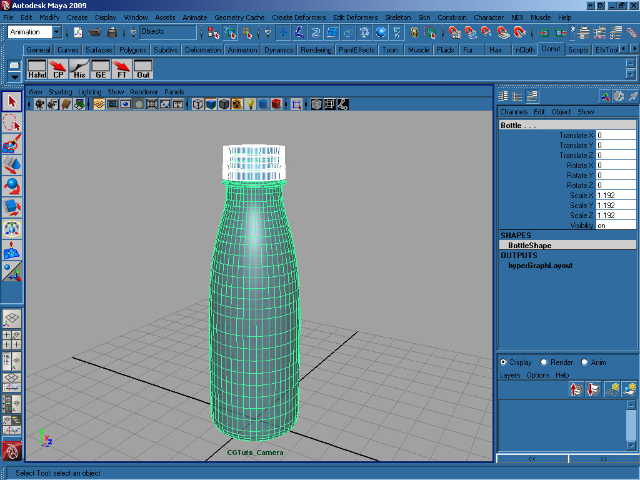
Create a new scene and import the bottle with stopper. Select the stopper, then hold down shift and select the bottle. Press P to parent the stopper to the bottle.

Step 2

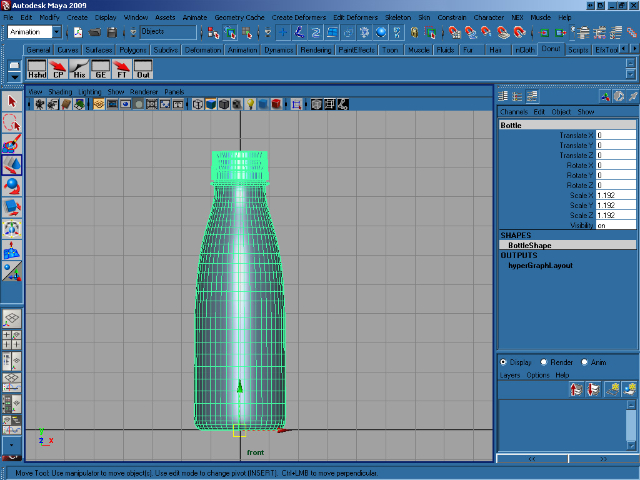
We need to move the bottle’s pivot point, so select the bottle in the front view and press ins on your keyboard. This allows us to move the object’s pivot using the transform gizmo. Move the pivot to the bottom of the bottle and when you’re happy with it’s position, press ins again. Finally, press W and move the bottle so that it rests on Y=0 as shown.

Step 3

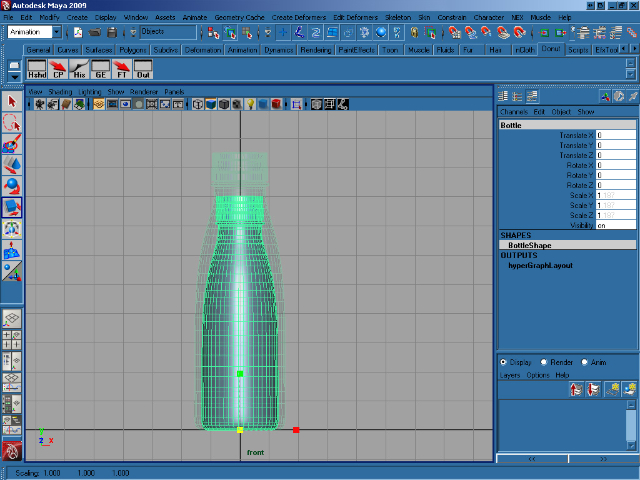
Press R and scale the bottle proportionally so that it is eight units high, as shown.

Step 4

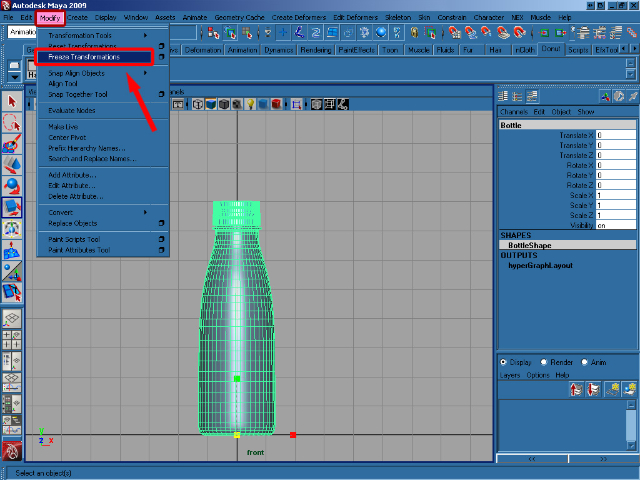
With our bottle in place, select Freeze transformations from the Modify menu.

Step 5

With the bottle and stopper selected, create a new layer and rename it to Bottle_Layer. Then add the selected objects to our new layer by clicking the button shown.
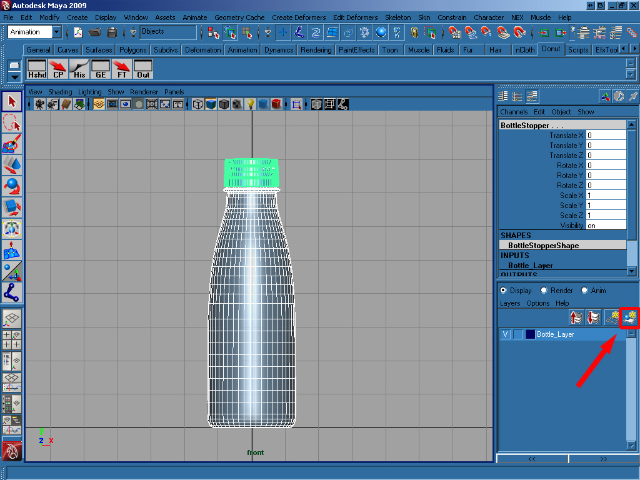

Step 6

Click on the center square on the Bottle_Layer to template the bottle, which allows us to see it, but not select it.
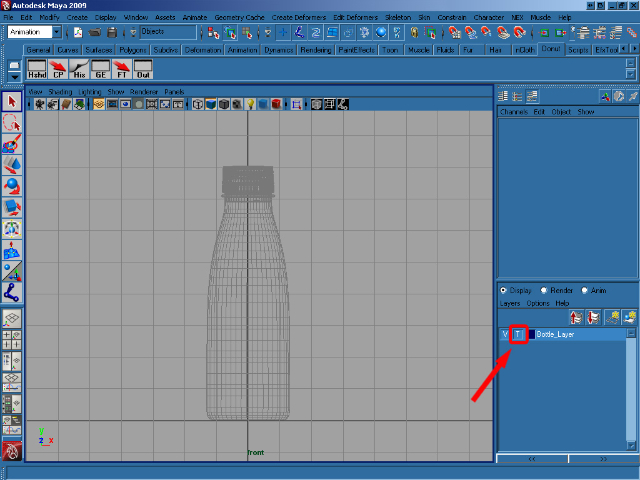

Step 7

In the Animation menu click on the Skeleton/Joint Tool.
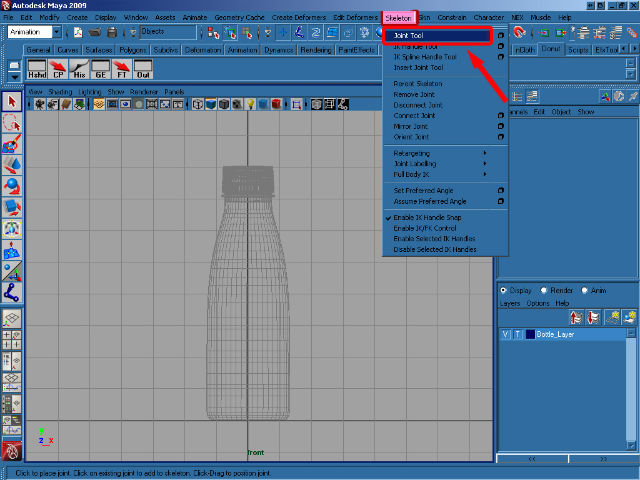

Step 8

Press hold X to enable grid snap, and create eight Joint from the bottom to the top of the bottle – one on each of our grid squares. When you’re happy, press Enter to drop the tool.
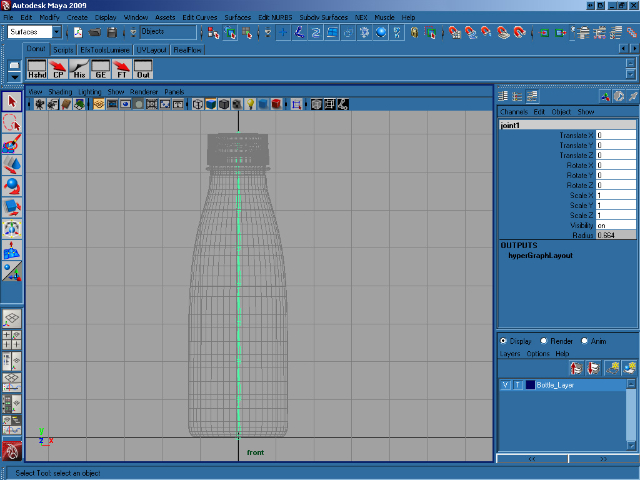

Step 9

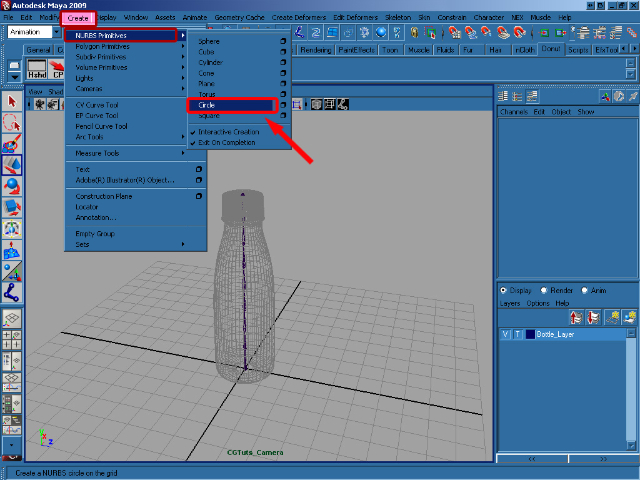
In the Create menu select NURBS Primitives >Circle.

Step 10

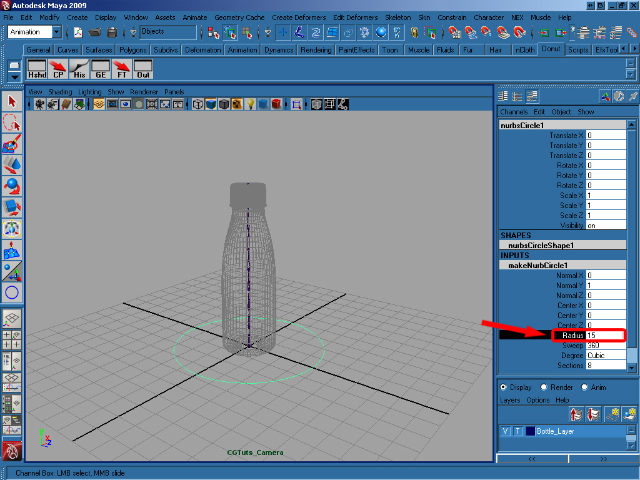
Create a circle with a Radius of 15.

Step 11

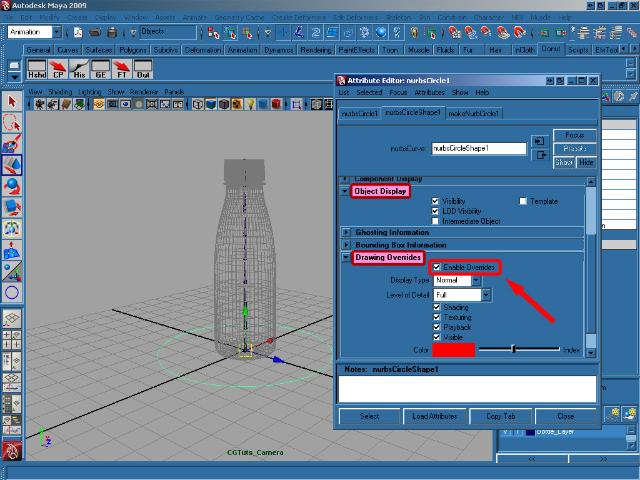
Press Ctrl+A to activate the Attribute Editor for the object, and then go to Object Display > Drawing Overrides > Enable Overrides and choose the Red color.

Step 12

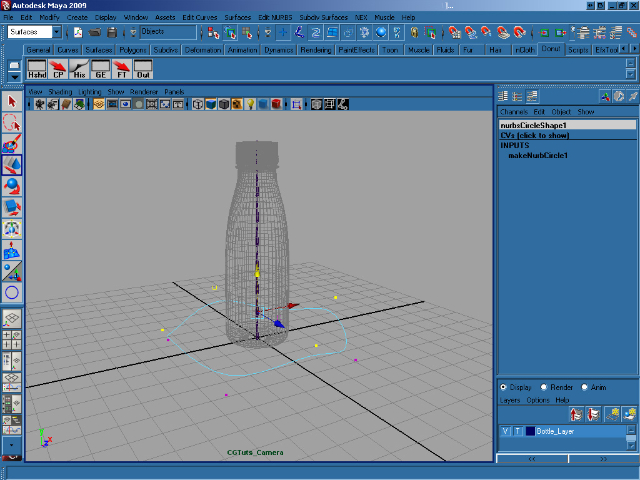
Now we’re going to modify the circle a little bit! Right click on it and select Control Vertex. Now grab the vertices one by one and move them into place (you can create any shape you want!) When you’re done, rename the circle as Ctrl_Bottle.

Step 13

Now create another nurbs circle in the center of axis, with a Radius of 10. Then go to the Attribute Editor and make it yellow.
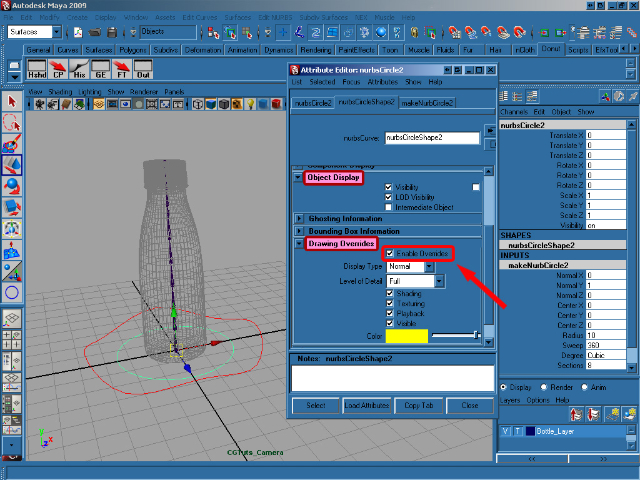

Step 14

Move the last created circle to 8 on the Y axis, and rename it as Ctrl_Spine1.
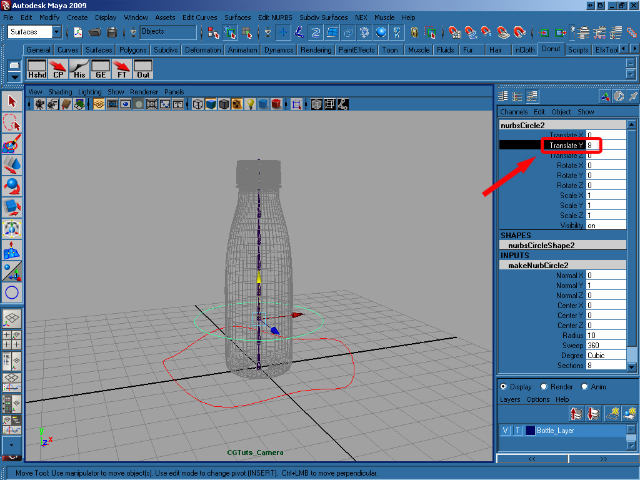

Step 15

Duplicate Ctrl_Spine1 twice, and move the first to 16 and the second to 24 on the Y axis.
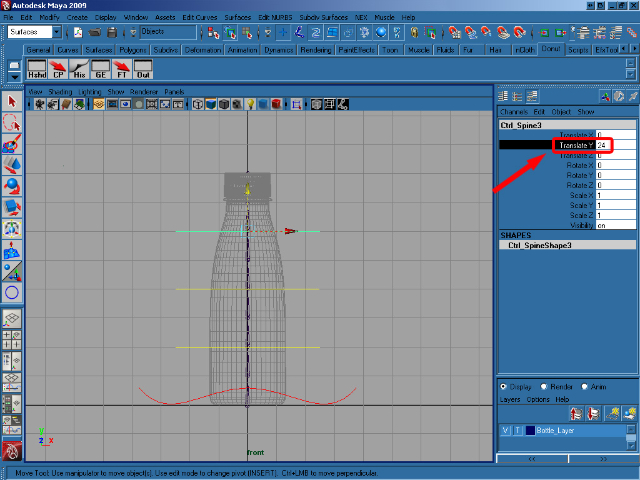

Step 16

Select menu Create > Locator.
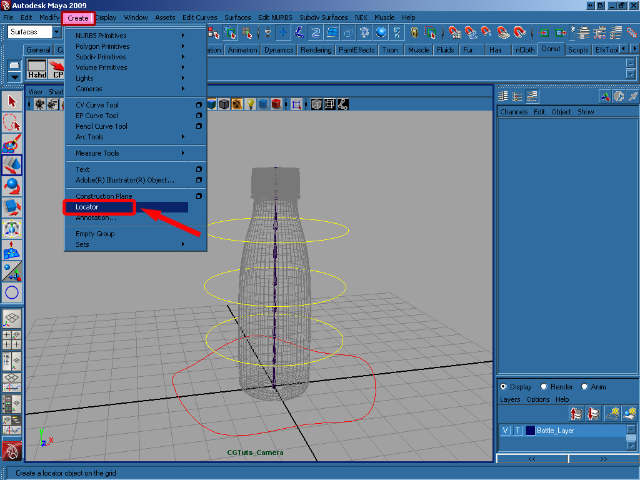

Step 17

Scale the new locator proportionally to 8, move it to 16 on the Y axis and rename it to locator1.
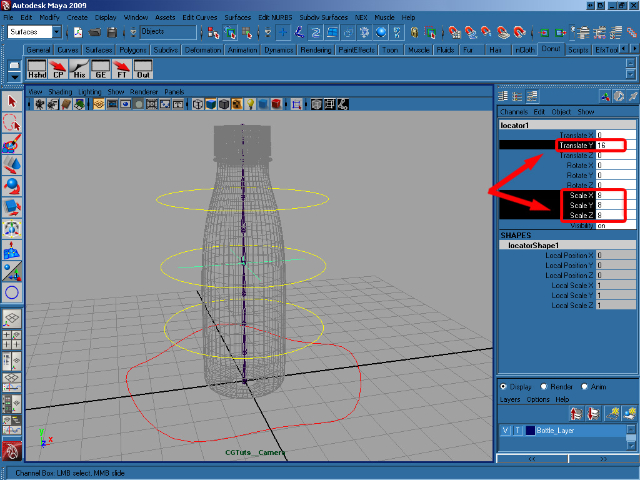

Step 18

Duplicate the locator, and move the duplicate to 24 on the Y axis, to match the position of the circle. Rename it to locator2.
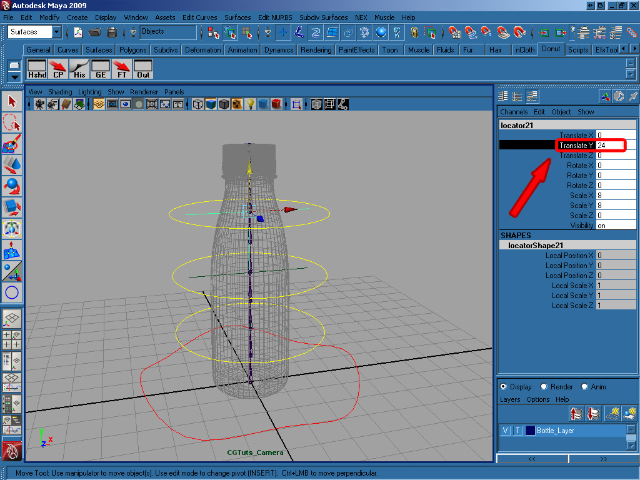

Step 19

Now select Ctrl_Spine3, duplicate it, and scale it proportionally to 0.5.
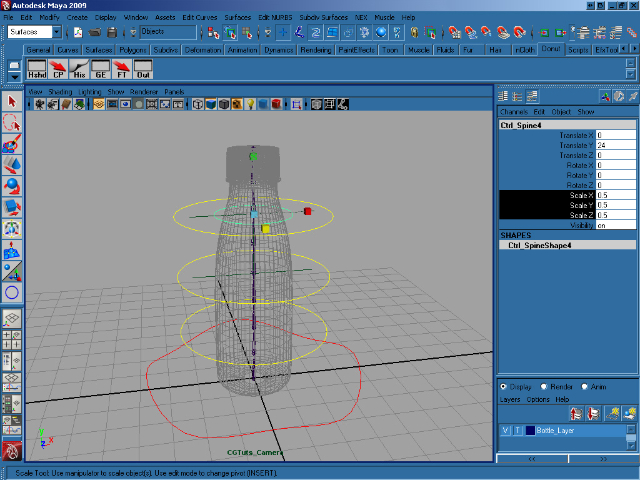

Step 20

Color the last duplicated Circle to match the color of it’s locator and rename it to locator_circle.
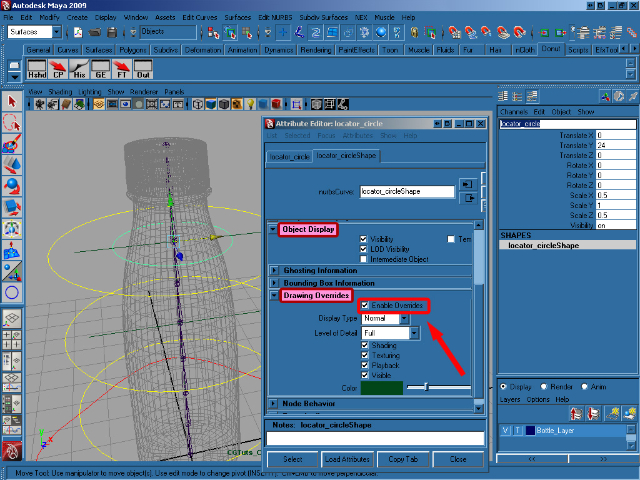

Step 21

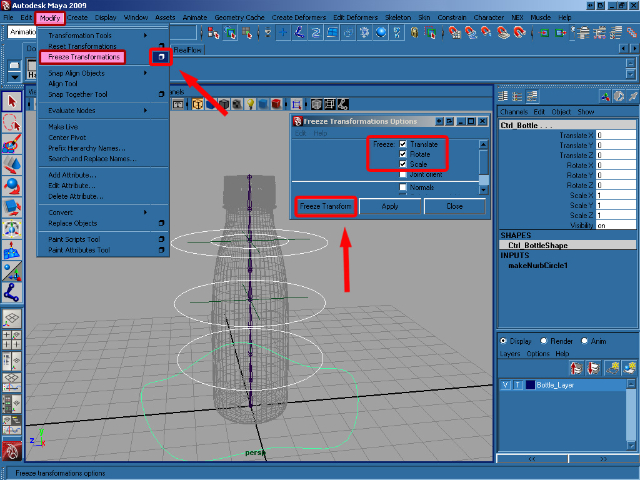
Now select all of the created controls except locator1 and locator2, and go to Modify > Freeze Transformation (Options). In the options, select Translate Rotate Scale and then click on Freeze Transform.

Step 22

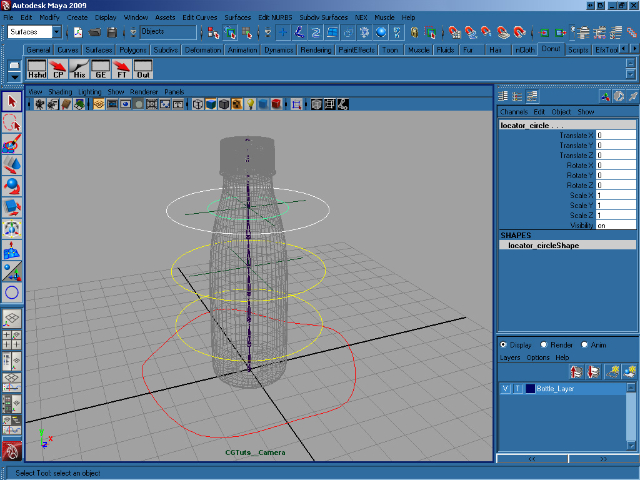
Select Ctrl_Spine3, and holding down Shift select locator_circle. Now press P to parent them together.

Step 23

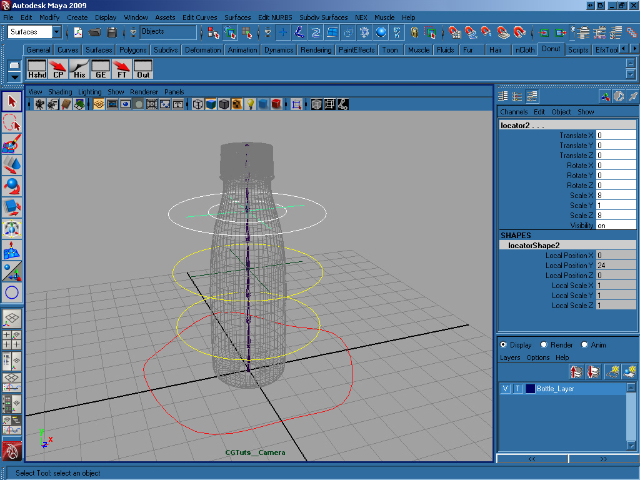
Select locator_circle, and again holding down shift select locator2. Press P to parent them together.

Step 24

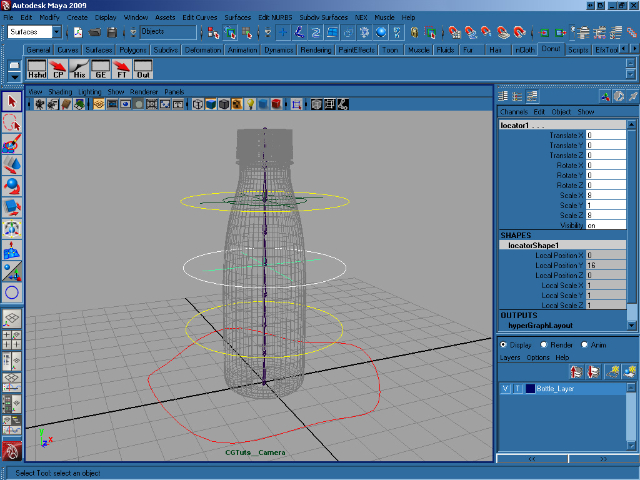
More parenting! Select Ctrl_Spine2, hold shift and select locator1 and then press P to parent.

Step 25

Now select locator2, hold shift and select locator1, Ctrl_Spine1 and Ctrl_Bottle. With all 4 selected, press P to parent. If you open the Hypergraph, it should look very similar to the image below.
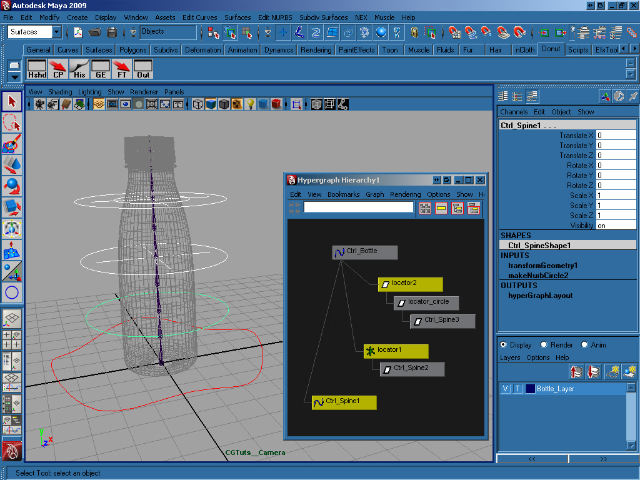

Step 26

Now with our controls in place and set-up, we’ll start work on the joints. Select joint1, hold shift and select Ctrl_Bottle and press P to parent all of the joints to the main control, Ctrl_Bottle.
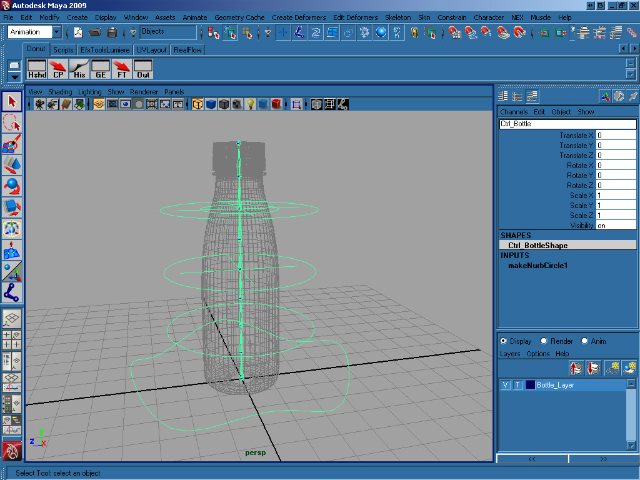

Step 27

Select Joint4 and in the Channel Box select Rotate Y and at the top of the Channel Box go to Edit > Expressions to open the Expression Editor.
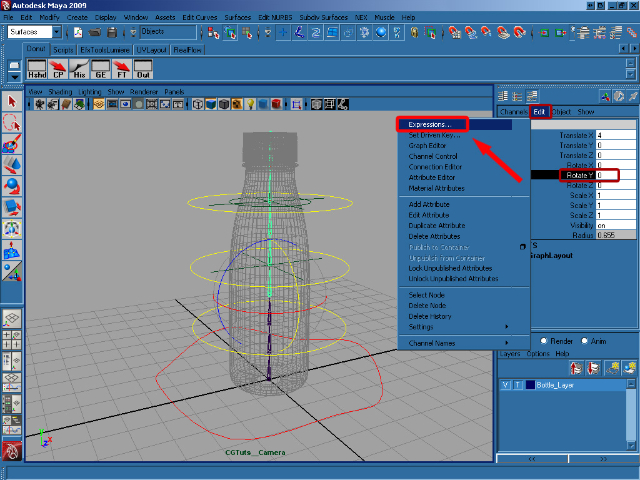

Step 28

Add the following expression to rotateY and then click on Create :

joint4.rotateY=joint3.rotateY;
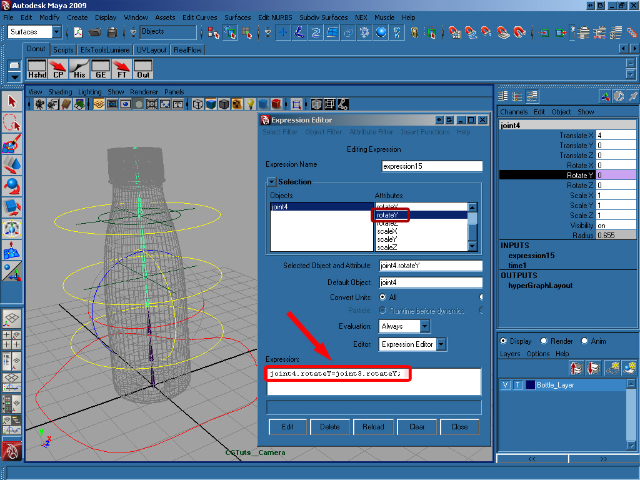

Step 29

Now select rotateZ in the Expression Editor and add/create this expression :

joint4.rotateZ=joint3.rotateZ;
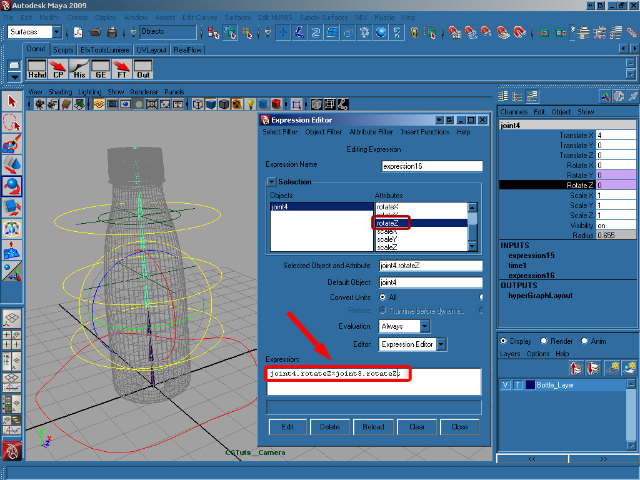

Step 30

Select joint2, and then select rotateY in the Expression Editor. Add/create this expression :

joint2.rotateY=Ctrl_Spine1.rotateX/4;
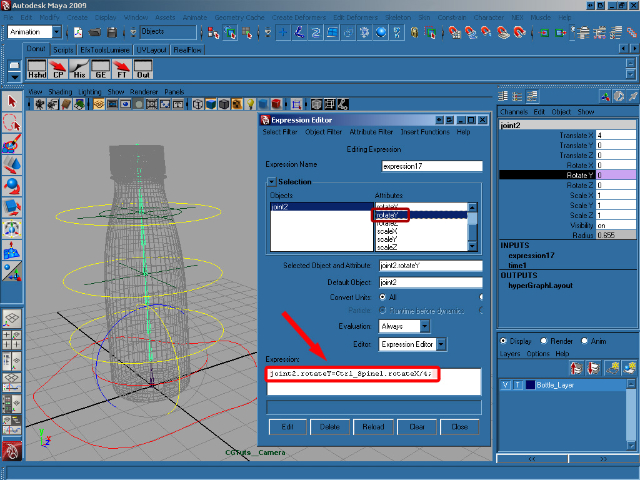

Step 31

Select rotateZ and add/create this expression :

joint2.rotateZ=-Ctrl_Spine1.rotateZ/4;
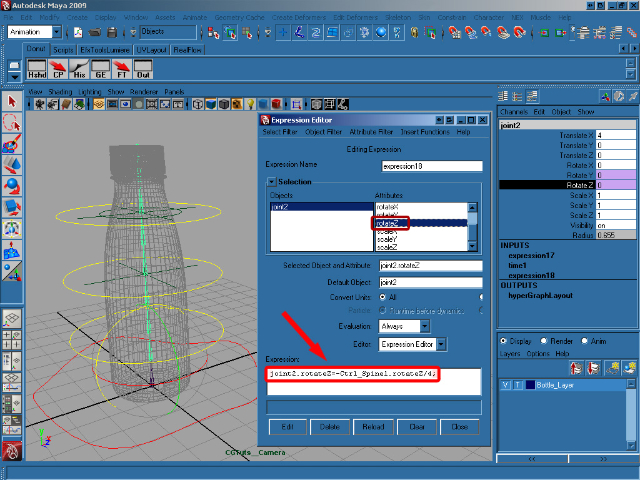

Step 32

Select Ctrl_Spine1 and shift select joint3. In the Animation menu select Constrain/Orient.
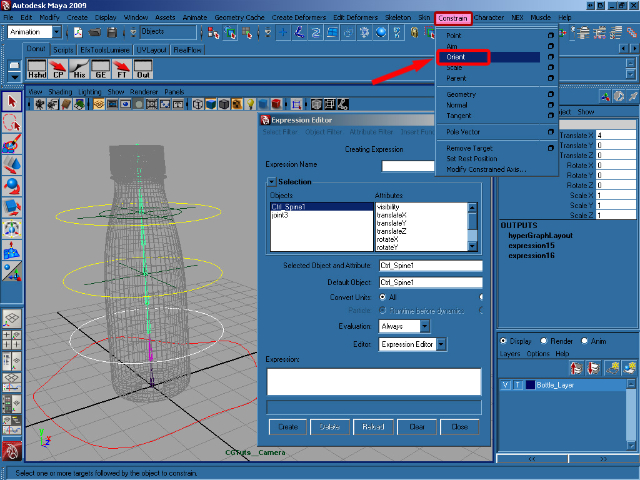

Step 33

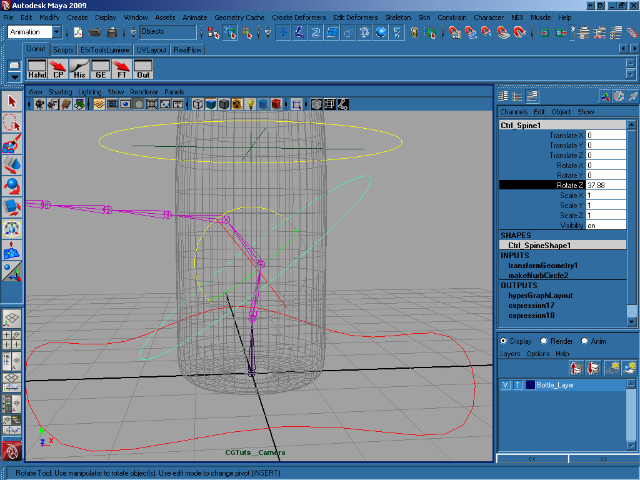
As you can see to the image below, rotating Ctrl_Spine1 correctly rotates the joints. Now it’s time to repeat the process for the other controls.

Step 34

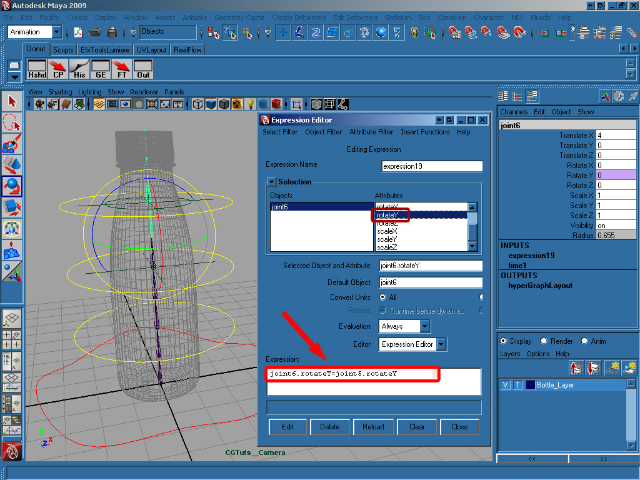
Select joint6 and then select Rotate Y in the Channel Box, open up the Expression Editor as before, and add this expression to rotateY, remembering to hit Create when you’re done :

joint6.rotateY=joint5.rotateY;

Step 35

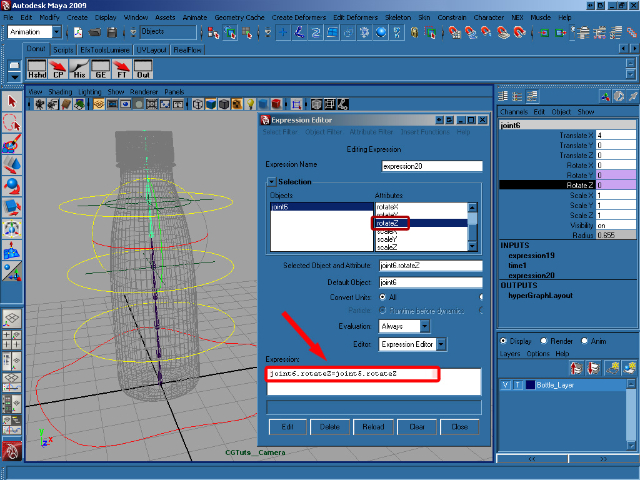
Select rotateZ in the Expression Editor and add/create this expression :

joint6.rotateZ=joint5.rotateZ;

Step 36

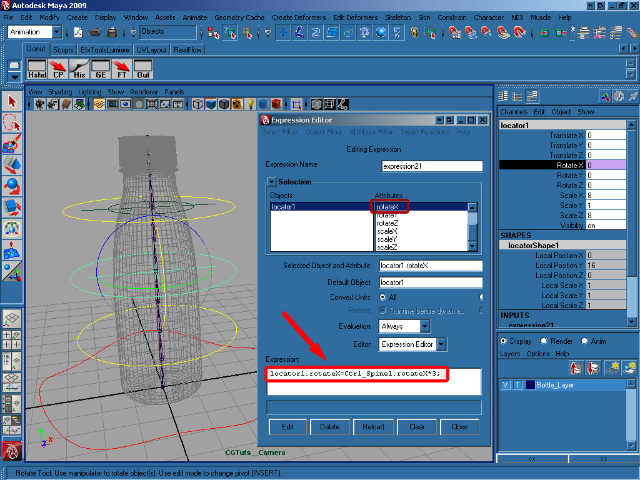
Select locator1 and then in the Expression Editor select rotateX and add/create this expression :

locator1.rotateX=Ctrl_Spine1.rotateX*3;

Step 37

Select rotateZ and add/create this expression :

locator1.rotateZ=Ctrl_Spine1.rotateZ*3;
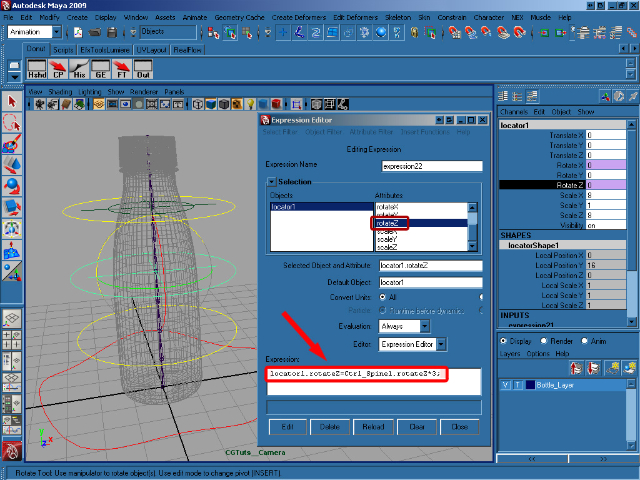

Step 38

Select Ctrl_Spine2, shift select joint5 and select Constrain/Orient from the Animation menu.
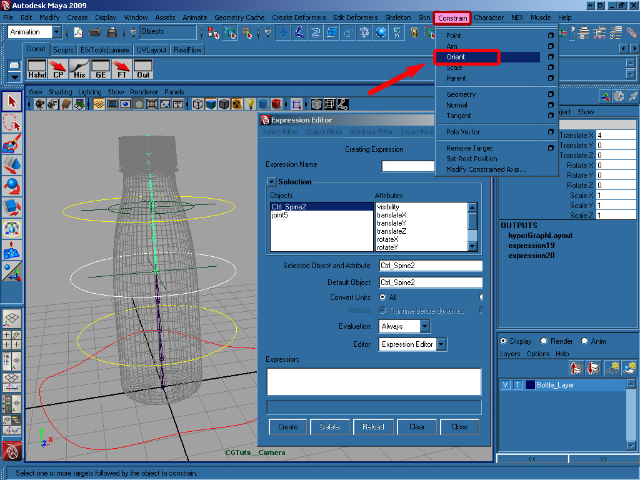

Step 39

Select joint5, shift select locator1 and choose Constrain/Point (Options) from the same menu.
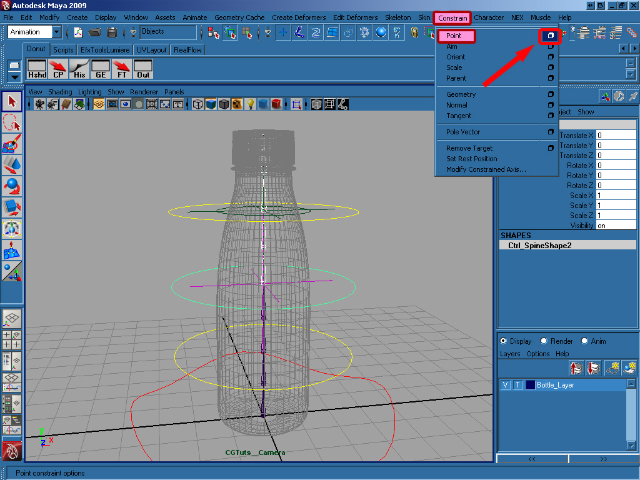

Step 40

In the Point Constraint Options, select Maintain offset and Constraint axes (All) and click on Add.
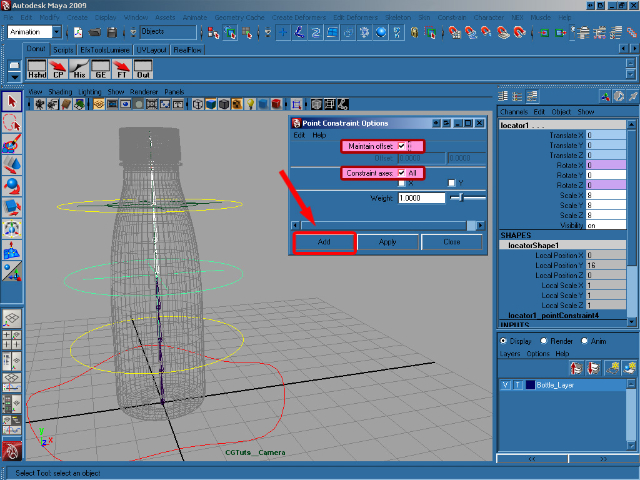

Step 41

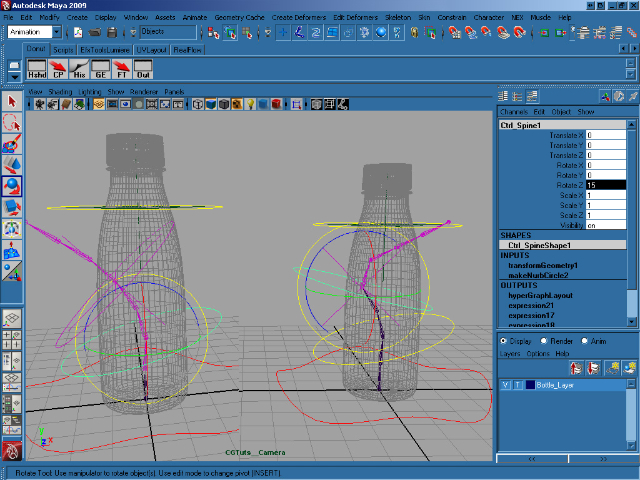
As you can see in the image below, we can now rotate Ctrl_Spine1 and Ctrl_Spine2 separately, although the second is influenced by the first.

Step 42

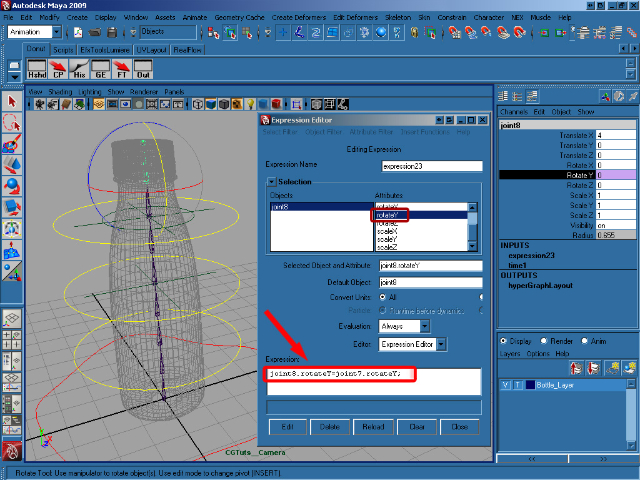
Now select joint8, bring up the Expression Editor, select rotateY and add/create this expression :

joint8.rotateY=joint7.rotateY;

Step 43

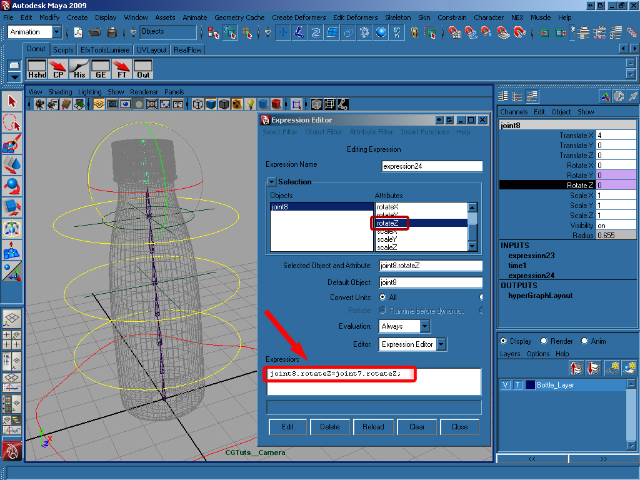
Select rotateZ and add/create this expression :

joint8.rotateZ=joint7.rotateZ;

Step 44

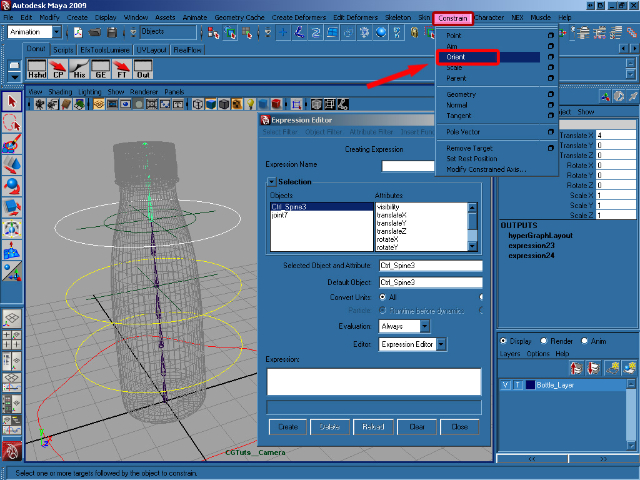
Select Ctrl_Spine3, shift select joint7 and select Constrain/Orient from the animation menu.

Step 45

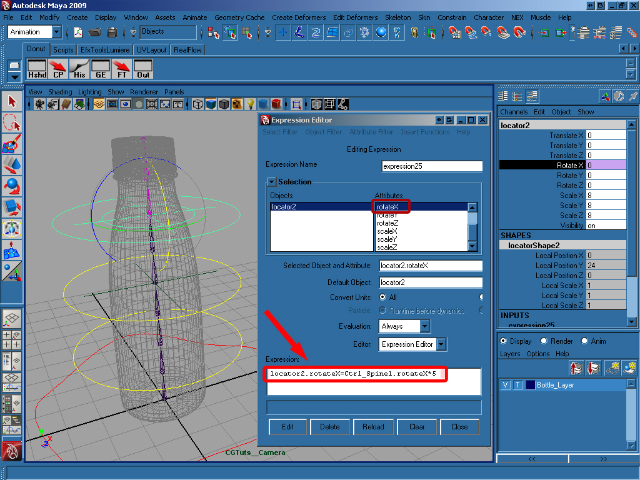
Select locator2, open the Expression Editor, select rotateX and add this expression :

locator2.rotateX=Ctrl_Spine1.rotateX*5;

Step 46

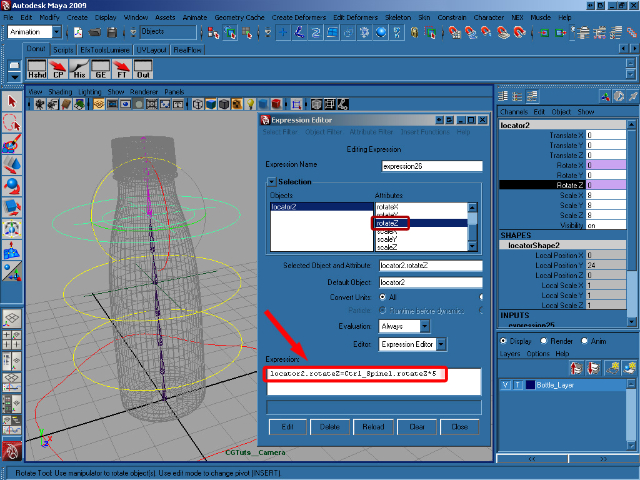
Select locator2, then rotateZ in the Expression Editor and add/create this expression :

locator2.rotateZ=Ctrl_Spine1.rotateZ*5;

Step 47

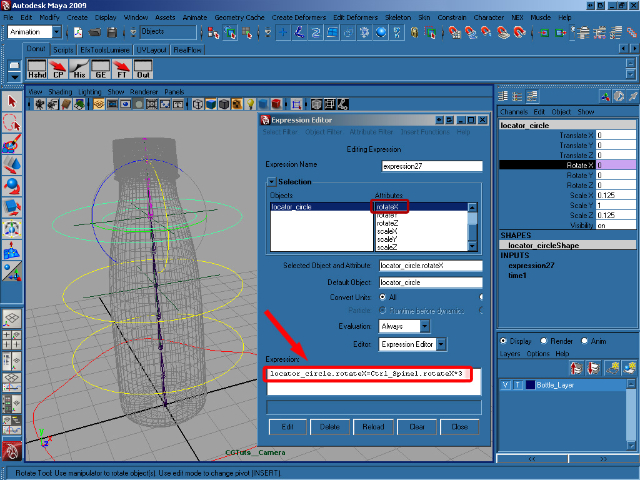
Select locator_circle, and add this expression to rotate X :

locator_circle.rotateX=Ctrl_Spine2.rotateX*3;

Step 48

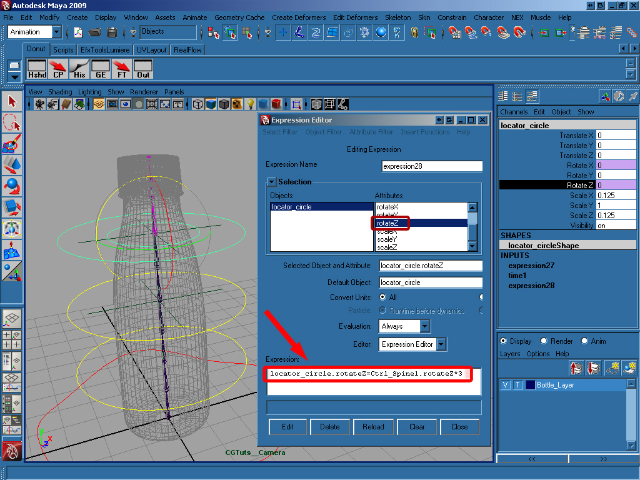
Select rotateZ and add this expression :

locator_circle.rotateZ=Ctrl_Spine2.rotateZ*3;

Step 49

Select joint7, shift select locator2 and select Constrain/Point from the Animation menu.
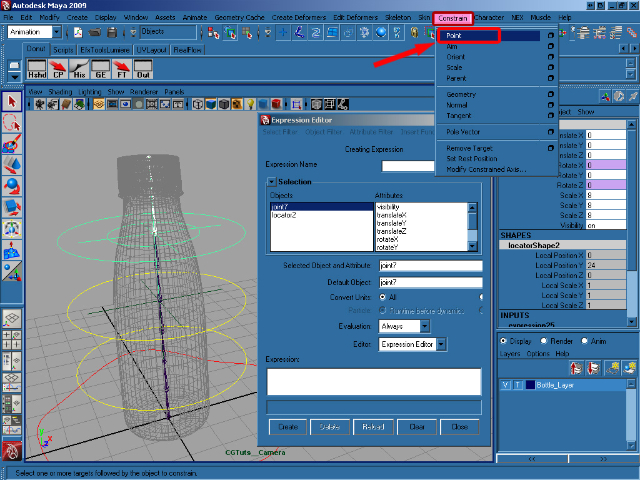

Step 50

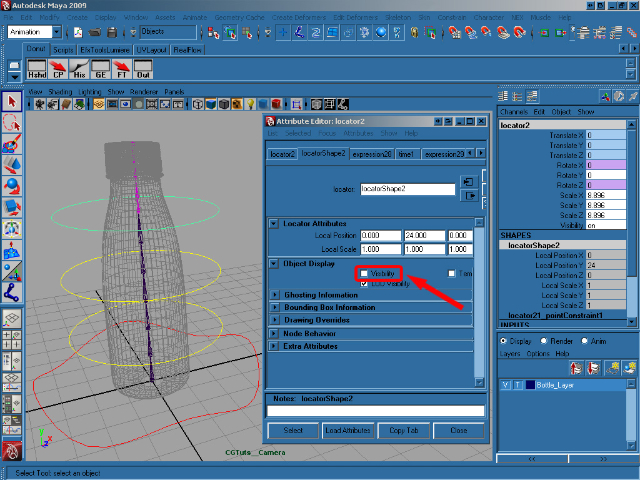
Select locator1 and open the Attribute Editor (Ctrl + A). In the Object Display Panel turn off the Visibility. Now do the same thing for locator2 and the circle_locator.

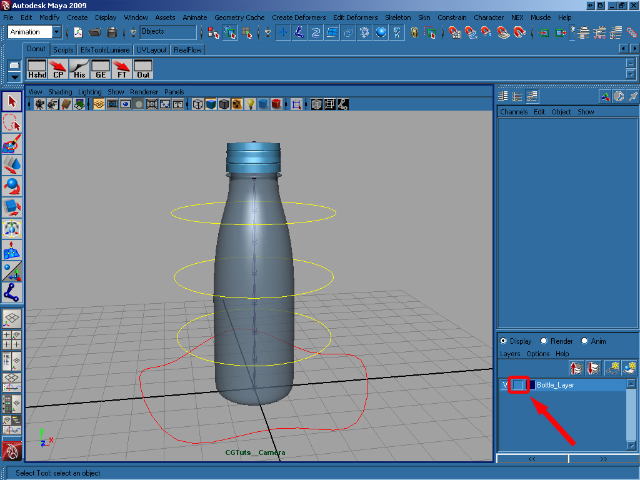
Step 51

In the Layer Editor, click twice on the middle box on our BottleLayer make the bottle selectable.

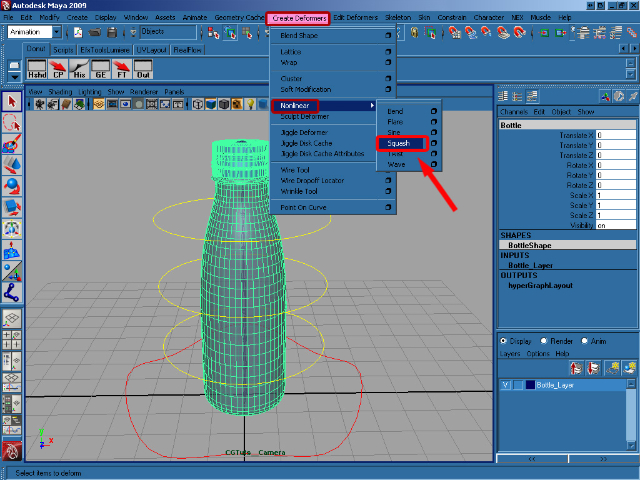
Step 52

Select the bottle and, making sure you’re viewing the Animation menus, go to Create Deformers > Nonlinear > Squash.

Step 53

Select Ctrl_Bottle and in the Channel Box click on Edit > Add Attribute.
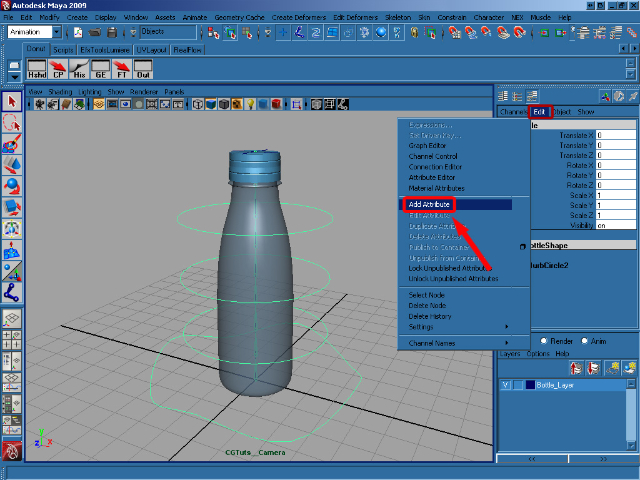

Step 54

In the Add Attribute dialog, for Long name write Stretch Squash, in Data Type choose Float, in Numeric Attribute Properties insert a Minimum of -10 and a Maximum of 10, and finally add a Default of 0. Click on OK to add our new attribute.
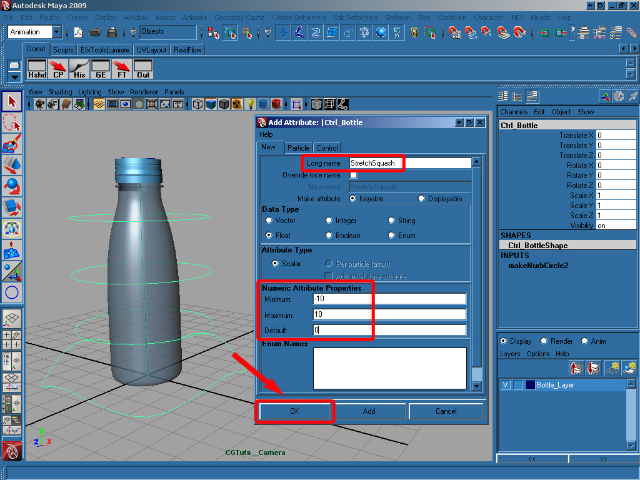

Step 55

Now we have our new attribute, we need to make it do something! In the Channel Box select Stretch Squash and go to Edit > Set Driven Key.
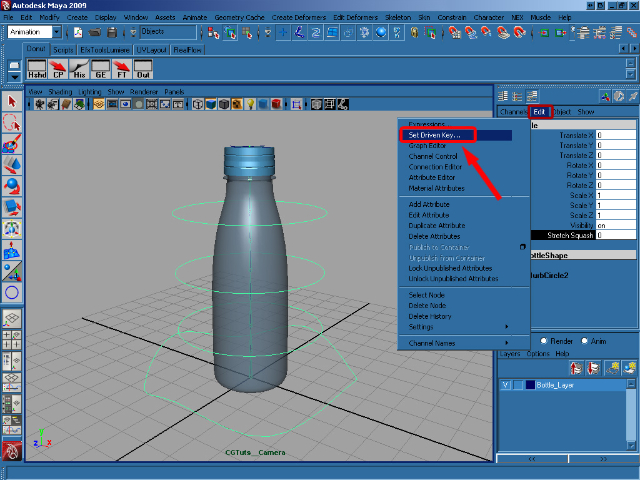

Step 56

Select the Ctrl_Bottle and in the Channel Box click on our new Stretch Squash attribute. In the Set Driven Key window click Load Driver to add our Ctrl_Bottle in as our driving object. In the now-populated Driver box select Ctrl_Bottle and then Stretch Squash.
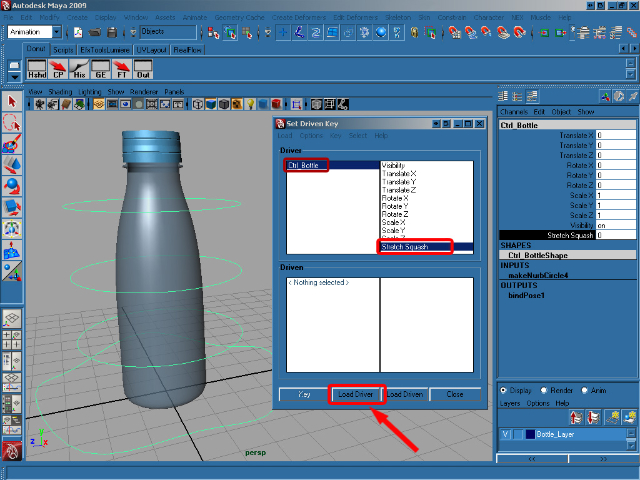

Step 57

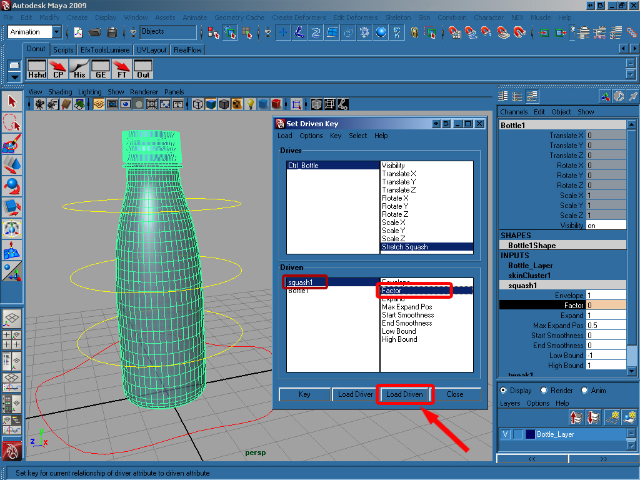
Now we need to choose the driven object. So select the Bottle and in the Channel Box select squash in the INPUTS section. Now click Load Driven in the Set Driven Key window to populate the driven section. Click on squash in the Driven Box and then select Factor. With our driver and driven attributes setup, we can now click Key to create our first connection.

Step 58

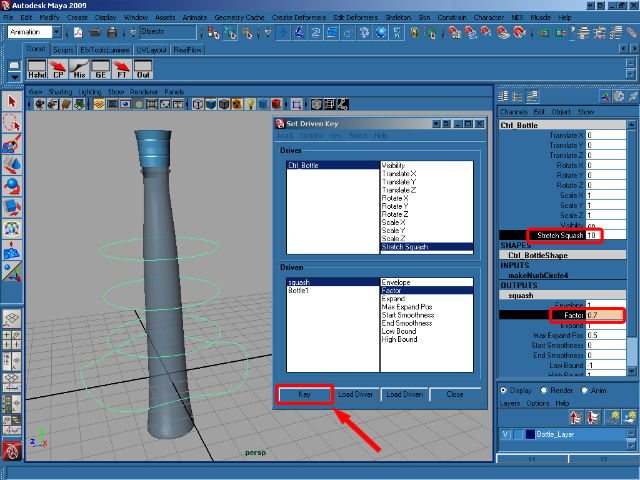
Now select Ctrl_Bottle and set the Stretch Squash attribute to 10. Select squash in the OUTPUTS section of the Channel Box and change the Factor value to 0.7. Back in the Set Driven Key window, click on Key to create another connection.

Step 59

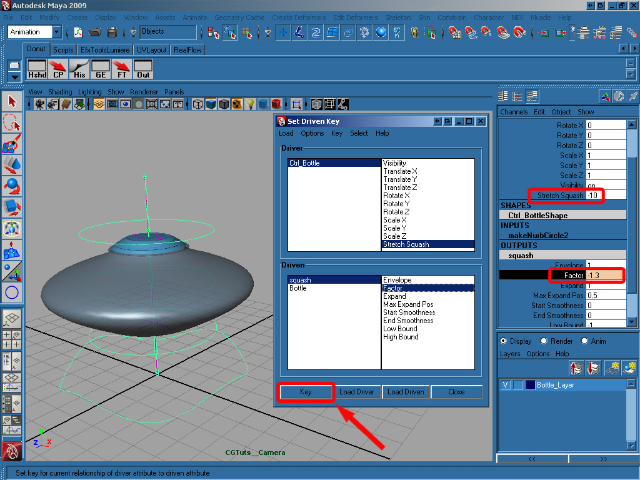
Set the Ctrl_Bottle‘s Stretch Squash attribute to -10, select squash in the OUTPUTS section and change the Factor value to -1.3. Now create our final key by clicking Key in the Set Driven Key window.

Step 60

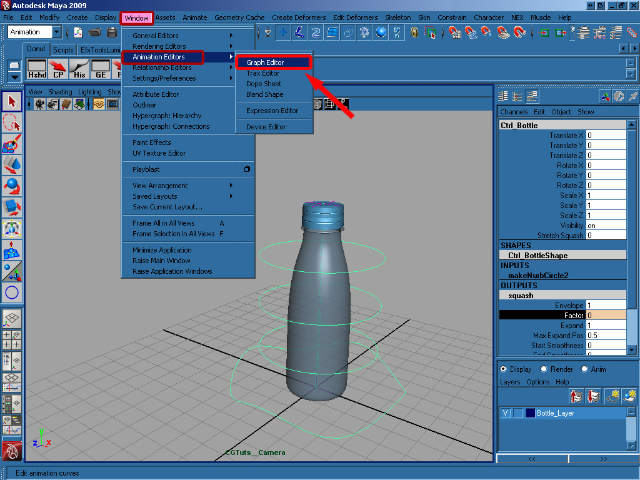
Set the Stretch Squash attribute back to 0 and close the Set Driven Key window. Go to Window > Animation Editor > Graph Editor.

Step 61

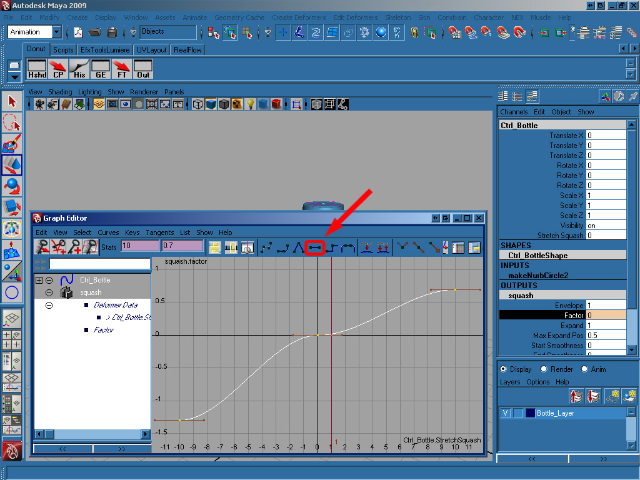
Select squash in the OUTPUTS section of Ctrl_Bottle to update the Graph Editor. Select all of the animation keys and press F to smooth them as you can see in the below image.

Step 62

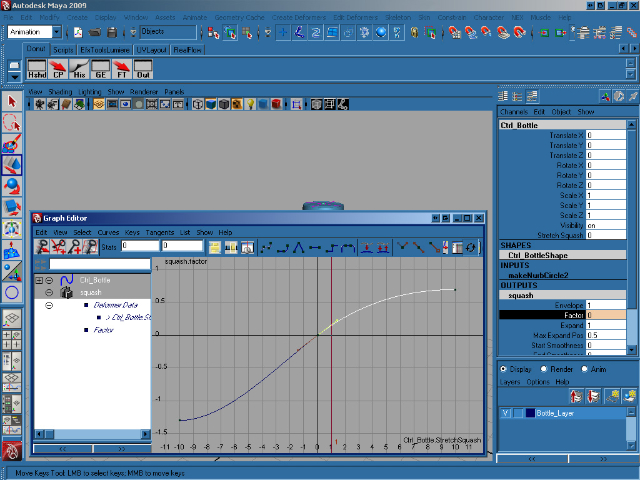
With that done, now select just the middle key in the Graph Editor and, using the bezier handles sticking out of the key itself, adjust the animation curve to smooth things out fully as you can see below. Close the Graph Editor.

Step 63

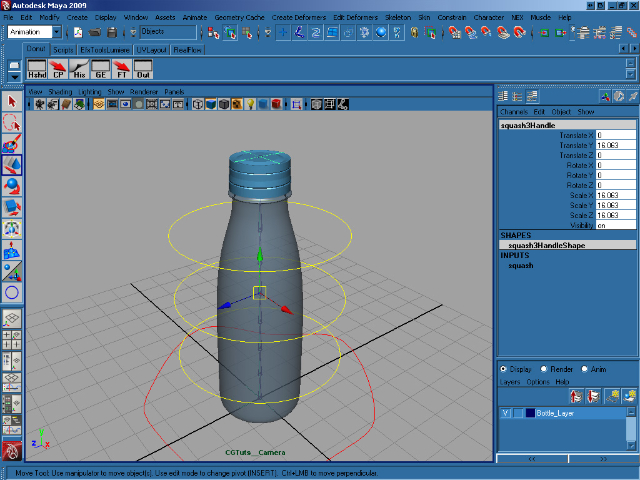
Select the squashHandle and press Ctrl + H to hide it.

Step 64

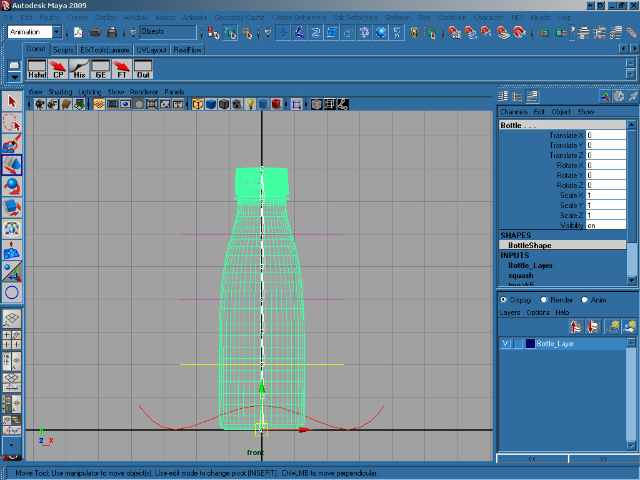
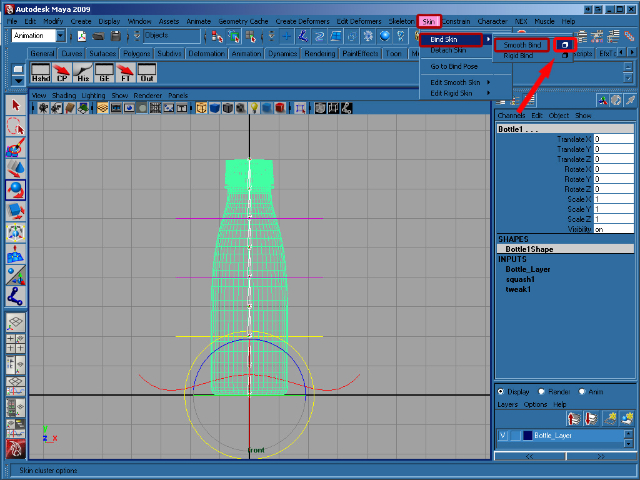
With our rig in place, and our squash/stretch complete, we now need to connect the rig up to the bottle geometry itself. Go to the front view and press 4 to switch to wireframe view. Select joint1 and Shift select the bottle.

Step 65

In the Animation menu click on Skin > Bind Skin > Smooth Bind (options).</p

Step 66

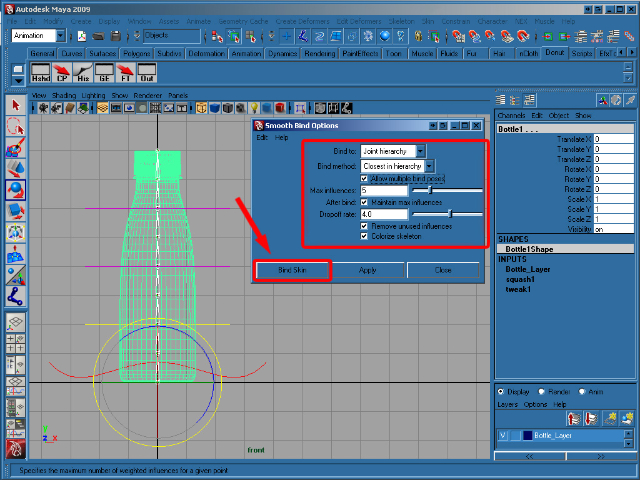
In the Smooth Bind Options windows set Bind to to Joint hierarchy, Max influences to 5, and then click on Bind Skin. Finally select Ctrl_Spine1, in the Channel Box, right-click Rotate Y select Lock Selected to disable editing for this channel, as it will be affected by our rig. Now repeat this lock for Ctrl_Spine2 and Ctrl_Spine3.

And that’s it, you’re ready to animate! Play around with the rig and see what you can come up with! I hope you enjoyed the tutorial, and if you have any questions just let me know in the comments.


Don’t miss more CG tutorials and guides, published daily – subscribe to Cgtuts+ by RSS.

How Do You Ease into the Work Week?

A freelance friend of mine recently commented that she has a hard time transitioning from weekend to weekday. “How do you ease into your work week?” she asked. “Monday mornings are always killer!”

I’m afraid I have the opposite problem: work days and weekends blend together thanks to my BlackBerry and MacBook addictions. This means I rarely have a huge email overload on Monday morning, but I also miss out on the chance to feel completely relaxed and rested because I’m never fully unplugged. However, I do make sure I have something fun to do Sunday night (often watching Mad Men with the aforementioned friend), so I’ll start the week on a positive note. It helps that I also try to stick to roughly the same sleep schedule so I’m not throwing my circadian rhythms out of whack.

Your turn! How do you transition into the work week? Do you keep worktime and playtime clearly delineated? Or, like me, do you sometimes find they blend together?

5 Useful Multi-Monitor Setup Tools

It seems that a lot of you love working on more than one monitor. At least that’s what the comments on my dual monitor setup post imply. I was in fact surprised to find that many are using a 3 monitor setup!

So the following are five tools that can greatly enhance your multi-monitor setup.

1. UltraMon

UltraMon is a must-have tool for Windows users on a multi-monitor setup. It adds a ton of functions (smart taskbar, quick window movements etc) that make managing the monitors a cakewalk.

2. MultiMon TaskBar

MultiMon TaskBar (Windows only) adds a taskbar to the second monitor which isn’t there by default when you are extending your primary monitor onto a new one.

3. Dual Monitor Tools

Dual Monitor Tools (again, Windows only) is a free and open-source multi-monitor management software that lets you play with wallpapers, move windows and do much more.

4. Synergy

Synergy is for those who not only use more than one monitor but, also, more than one operating system on those monitors. It lets you easily share the same keyboard and mouse across different platforms.

5. Keyboard Trick

This isn’t a tool but a trick Windows 7 users would find useful. If you are using a dual monitor setup with Windows 7, Win+Shift+Left/Right arrow key can quickly move the active window between monitors.

If you’ve been tempted and just getting started with more than one monitor, check out this multi-monitor setup guide. And if you’ve been using them forever, do suggest some tricks and tools in the comments (especially for Mac and Linux).

Should You Switch to a Health Savings Account?

The high cost of health insurance has led to the expansion of an extremely popular type of healthcare plan called a High Deductible Health Plan (HDHP).  This type of plan, in conjunction with a Health Savings Account (HSA), is becoming the healthcare plan of choice in the United States.  It is clear that the enrollment trend is way up for this type of coverage.  At my place of employment, this option was added to our available healthcare choices, a couple of years ago.

In fact, a statement from an annual census by America’s Health Insurance Plans (AHIP), verifies this:

“The number of people with HSA/HDHP coverage rose to 10 million in January 2010, up from 8 million in January 2009, and 6.1 million in January 2008.”

Last year, due to a lack of truly understanding the plan, I chose to stick with my traditional plan.  Basically, I was nervous about switching to a plan that I really didn’t truly comprehend.  But, this year, after listening to coworkers who had made the switch the previous year, I took the plunge and switched over to this new option.

For those of you who are not familiar or simply do not understand this type of healthcare plan, here are some of the basics.

  1. A Health Savings Account (HSA) is a pre-tax account that employees and their family members can use to pay for qualified medical expenses, which can include prescriptions, vision care, dental care, etc.
  2. The employee chooses how much pre-tax money to contribute each year to this plan.  There typically is a maximum amount you can contribute each year.  This year, 2010, I elected to contribute $6000 to my Health Savings Account.  This was almost identical to the amount it would’ve cost me to stick with my traditional healthcare plan.  The $6000 is equally divided up into the number of paychecks I receive each year.  I get paid twice a month so, for me, I contribute $250 per paycheck.  Remember, all the money contributed is pre-tax, so it basically also lowers your tax liability, which is the same as a 401K contribution.
  3. In my plan, the employee (that’s me) will pay for the first $3000 of medical expenses and, after that, the plan will pay 80% of the expenses and the employee will pay 20%.  After the total amount of out-of-pocket expenses reaches a certain amount (for me it is $6000), the plan will pay the full amount.  The maximum annual contribution for a family in 2010 is $6150 if the employee is under 55 years of age.
  4. The employee, and spouse, if needed, will receive a checkbook and a credit card that will be used to pay for the qualified medical expenses.

Pros

  • This is, by far, the most important!  If you don’t use the full amount of your annual contribution, it is STILL YOUR MONEY!  This money will stay in your account and will roll over to the next year.  In the past, I have had pre-tax healthcare spending accounts which was “use it or lose it” in the year that you contributed.  As the balance of the account grows, you may open an investment account and transfer money into a mix of mutual funds, similar to a 401K.
  • If you have built up enough in your bank account, you can lower or curtail your contribution in the ensuing year.  As a result, you can free up some money for other expenses that you may have.  Or you can continue to contribute in a pre-tax manner, building up the amount in your account.
  • You tend to be a lot more discerning when it comes to your medical care.  Believe me, doctors do not like these types of plans, because they think that their patients may compromise their healthcare by neglecting to have procedures performed because of the cost.  I don’t look at it this way.  Instead of just going along with what the doctor suggests, I tend to ask more questions about what is being prescribed.  I think this is healthy (no pun intended).
  • If, by chance, you had to pay any qualified medical expenses out-of-pocket, you can pay yourself back later in the year when there are sufficient funds in your account.  In other words, as long as you have kept the receipts and can justify the payments, you can write yourself a check from your Health Savings Account.
  • The cost to contribute to this plan is roughly exactly the same as I would’ve contributed to my traditional health plan.  And the fact that if there is anything left over goes to me is the greatest advantage of this plan.

Cons

  • Probably the biggest negative about this new healthcare plan is trying to understand it fully.  As I mentioned earlier, I didn’t opt to switch over to this plan in the first year it was offered.  I didn’t because I simply did not understand its implications.  Educate yourself on what a High Deductible Health Plan is with a Health Savings Account.  It is a drastic change from your traditional healthcare plan.
  • You may not initially have enough money built up in your plan to pay a medical bill since you are responsible for the first $3000.  What you can do is write a check for as much as you have in your account and pay the remainder later when there is money in the plan.  This is a different mindset from paying bills on-time, as I have always done.  Healthcare providers recognize the popularity of Health Savings Accounts and certainly understand that there may not be enough funds at one point in time to pay a bill.
  • You will want to keep a detailed record of all of your medical bills and when you paid them.  I don’t necessarily consider this a hassle because I like to keep detailed records.  But, for most people, this may be considered painful.

I am just over six months into this new healthcare plan.  Currently, I have about $700 in outstanding medical bills that I have yet to pay.  But, I know that in a couple of months, the funds will be available to pay those bills.  This is a different mindset that I have had in the past about paying any bill.  I definitely think that the pros far outweigh the cons when it comes to switching to a Health Savings Account.  I am convinced that there will be money left at the end of the year that will still be my money that I can use in ensuing years.  If not, I also know that I will be fully covered and I will be paying basically the same as I would have with my traditional healthcare plan.

It is my suggestion that you get educated and learn about this revolutionary healthcare plan, especially if you are given this option through your employer.  If you do your homework, I am convinced that you will reach the same conclusion that I did.  It is time to switch.

The Newbie’s Guide to Test-Driven Development


Testing your code is annoying, but the impact of not doing so can be orders of magnitude more annoying! In this article, we’ll use test-driven development to write and test our code more effectively.


What is Test-Driven Development?

Since the dawn of the computer era, programmers and bugs have battled for supremacy. It’s an inevitable occurrence. Even the greatest programmers fall prey to these anomalies. No code is safe. That’s why we do testing. Programmers, at least sane ones, test their code by running it on development machines to make sure it does what it’s supposed to.


Sane programmer who tests his programs.
Image courtesy of http://www.youthedesigner.com

Insane programmer who doesn’t test his programs.
Image courtesy of http://www.internetannoyanceday.com

Test-driven development is a programming technique that requires you to write actual code and automated test code simultaneously. This ensures that you test your code—and enables you to retest your code quickly and easily, since it’s automated.

How does it work?

Test-driven development, or TDD as we’ll call it from now on, revolves around a short iterative development cycle that goes something like this:

  1. Before writing any code, you must first write an automated test for your code. While writing the automated tests, you must take into account all possible inputs, errors, and outputs. This way, your mind is not clouded by any code that’s already been written.
  2. The first time you run your automated test, the test should fail—indicating that the code is not yet ready.
  3. Afterward, you can begin programming. Since there’s already an automated test, as long as the code fails it, it means that it’s still not ready. The code can be fixed until it passes all assertions.
  4. Once the code passes the test, you can then begin cleaning it up, via refactoring. As long as the code still passes the test, it means that it still works. You no longer have to worry about changes that introduce new bugs.
  5. Start the whole thing over again with some other method or program.

Great, but how is this better than regular testing?

Have you ever purposefully skipped testing a program because:

  • You felt it was a waste of time to test, since it was only a slight code change?
  • You felt lazy testing everything again?
  • You didn’t have enough time to test because the project manager wanted it moved up to production ASAP?
  • You told yourself you’d do it “tomorrow”?
  • You had to choose between manual testing, or watching the latest episode of your favorite TV show (Big Bang Theory)?

Most of the time, nothing happens, and you successfully move your code to production without any problems. But sometimes, after you’ve moved to production, everything goes wrong. You’re stuck fixing a hundred holes in a sinking ship, with more appearing every minute. You do not want to find yourself in this situation.


Screw it, just move it to production!
Image courtesy of http://phenomenaonbreak.wordpress.com

TDD was meant to eliminate our excuses. When a program has been developed using TDD, it allows us to make changes and test quickly and efficiently. All we need to do is run the automated tests, and voila! If it passes all automated tests, then we’re good to go—if not, then it just means we broke something with the changes. By knowing which exact parts of the test failed, it also allows us to easily pinpoint at which part of the changes it broke, so it makes fixing the bugs easier.


Okay, I’m sold. How do we do this?

There’s a multitude of PHP automated testing frameworks out there we can use. One of the most widely-used testing frameworks is PHPUnit.

PHPUnit is a great testing framework, which can easily be integrated into your own projects, or other projects built on top of popular PHP frameworks.

For our purposes though, we won’t need the multitude of functions that PHPUnit offers. Instead, we’ll opt to create our tests using a much easier testing framework, called SimpleTest.

In the next steps, let’s assume that we’re developing a guestbook application where any user can add and view guestbook entries. Let’s assume that the markup has been completed, and that we’re simply making a class which contains the application logic of the guestbook, which is where the application inserts and reads to the database. The reading portion of this class is what we’re going to develop and test.


Step 1. Set up SimpleTest

This is arguably the easiest step of all. Even this guy could do it:


I can do this…I can use, my, um…brain!
Image courtesy of http://longstreet.typepad.com/

Download SimpleTest here, and extract to a folder of your choice — preferably the folder where you’re going to develop your code, or your PHP include_path for easy access.

For this tutorial, I’ve set up the folder like so:

Index.php will run guestbook.php, and invoke the view method and display the entries. Inside the classes folder is where we’ll put the guestbook.php class, and the test folder is where we place the simpletest library.


Step 2. Plan Your Attack

The second step, which is actually the most important one, is to start creating your tests. For this, you really need to plan and think about what your function will do, what possible inputs it will get, and the corresponding outputs it will send. This step resembles playing a game of chess—you need to know everything about your opponent (the program), including all his weaknesses (possible errors) and strengths (what happens if it successfully runs).

So for our guestbook application, let’s lay down the schematics:

View

  • This function will not have any inputs since it will just retrieve all of the entries from the database and send back the data to be printed out.
  • It will return an array of guestbook records, stating the name of the poster and his message. If there are no records, then it should still return an empty array.
  • If there are records, the array will have 1 or more values in it.
  • At the same time, the array will have a specific structure, something like:
Array (
    [0] => Array (
        ['name'] = "Bob"
        ['message'] = "Hi, I'm Bob."
    )
    [1] => Array (
        ['name'] = "Tom"
        ['message'] = "Hi, I'm Tom."
    )
)

Step 3. Write a Test!

Now, we can write our first test. Let’s start by creating a file called guestbook_test.php inside the test folder.

<?php
require_once(dirname(__FILE__) . '/simpletest/autorun.php');
require_once('../classes/guestbook.php');

class TestGuestbook extends UnitTestCase {

}

Then, let’s convert what we’ve determined from step two,.

<?php
require_once(dirname(__FILE__) . '/simpletest/autorun.php');
require_once('../classes/guestbook.php');

class TestGuestbook extends UnitTestCase {
    function testViewGuestbookWithEntries()
	{
		$guestbook = new Guestbook();
		// Add new records first
		$guestbook->add("Bob", "Hi, I'm Bob.");
		$guestbook->add("Tom", "Hi, I'm Tom.");
		$entries = $guestbook->viewAll();

		$count_is_greater_than_zero = (count($entries) > 0);
		$this->assertTrue($count_is_greater_than_zero);
		$this->assertIsA($entries, 'array');
		foreach($entries as $entry) {
			$this->assertIsA($entry, 'array');
			$this->assertTrue(isset($entry['name']));
			$this->assertTrue(isset($entry['message']));
		}
	}

	function testViewGuestbookWithNoEntries()
	{
		$guestbook = new Guestbook();
		$guestbook->deleteAll(); // Delete all the entries first so we know it's an empty table
		$entries = $guestbook->viewAll();
		$this->assertEqual($entries, array());
	}
}

Assertions make sure that a certain thing is what it’s supposed to be—basically, it ensures that what’s returned is what you’re expecting it to return. For example, if a function is supposed to return true if it’s successful, then in our test, we should assert that the return value is equal to true.

As you can see here, we test the viewing of the guestbook with entries and without. We check if these two scenarios pass our criteria from step two. You probably also noticed that each of our test functions start with the word ‘test.’ We did this because, when SimpleTest runs this class, it will look for all the functions that start with the word ‘test’ and run it.

In our test class, we’ve also used some assertion methods, such as assertTrue, assertIsA, and assertEquals. The assertTrue function checks whether or not a value is true. AssertIsA checks if a variable is of a certain type or class. And lastly, assertEquals checks if a variable is totally equal to a certain value.

There are other assertion methods provided by SimpleTest, which are:

assertTrue($x) Fail if $x is false
assertFalse($x) Fail if $x is true
assertNull($x) Fail if $x is set
assertNotNull($x) Fail if $x not set
assertIsA($x, $t) Fail if $x is not the class or type $t
assertNotA($x, $t) Fail if $x is of the class or type $t
assertEqual($x, $y) Fail if $x == $y is false
assertNotEqual($x, $y) Fail if $x == $y is true
assertWithinMargin($x, $y, $m) Fail if abs($x – $y) < $m is false
assertOutsideMargin($x, $y, $m) Fail if abs($x – $y) < $m is true
assertIdentical($x, $y) Fail if $x == $y is false or a type mismatch
assertNotIdentical($x, $y) Fail if $x == $y is true and types match
assertReference($x, $y) Fail unless $x and $y are the same variable
assertClone($x, $y) Fail unless $x and $y are identical copies
assertPattern($p, $x) Fail unless the regex $p matches $x
assertNoPattern($p, $x) Fail if the regex $p matches $x
expectError($x) Swallows any upcoming matching error
assert($e) Fail on failed expectation object $e

Assertion method list courtesy of http://www.simpletest.org/en/unit_test_documentation.html


Step 4. Fail to Win

Once you’re finished writing the code, you should run the test. The first time you run the test, it SHOULD FAIL. If it doesn’t, then it means that your test doesn’t really test anything.

To run your test, simply run guestbook_test.php in your browser. You should see this first:

This happened because we haven’t created our guestbook class yet. To do so, create guestbook.php inside your classes folder. The class should contain the methods we’re planning to use, but shouldn’t contain anything yet at first. Remember, we’re writing the tests first before writing any code.

<?php
class Guestbook
{

	public function viewAll() {

	}

	public function add( $name, $message ) {

	}

	public function deleteAll() {

	}
}

When you run the test again, it should look something like this:

As we can see here, our test is now winning by failing. This means that our test is now ready to get “answered.”


Step 5. Answer Your Test by Writing Code


At some point, we’ve all felt like this when we’re programming.
Image courtesy of http://fermentation.typepad.com/fermentation

Now that we have a working automated test, we can start writing code. Open up your guestbook.php class and start creating the answer to your test.

<?php
class Guestbook
{
	// To save time, instead of creating and connecting to a database, we're going to
	// simulate a "database" by creating a static entries array here.
	// It will be like we have two entries in the table.

	private static $_entries = array(
		array (
			'name' => 'Kirk',
			'message' => 'Hi, I\'m Kirk.'
		),
		array (
			'name' => 'Ted',
			'message' => 'Hi, I\'m Ted.'
		)
	);

	public function viewAll() {
		// Here, we should retrieve all the records from the database.
		// This is simulated by returning the $_entries array
		return self::$_entries;
	}

	public function add( $name, $message ) {
		// Here, we simulate insertion into the database by adding a new record into the $_entries array
		// This is the correct way to do it: self::$_entries[] = array('name' => $name, 'message' => $message );
		self::$_entries[] = array('notname' => $name, 'notmessage' => $message ); //oops, there's a bug here somewhere
		return true;
	}

	public function deleteAll() {
		// We just set the $_entries array to simulate
		self::$_entries = array();
		return true;
	}
}

This guestbook.php class has some bugs in it on purpose, so we can see what it looks like if our test fails.

Once we run our test, we should see something like this:

The test output shows us in which test and in which assertion our code failed. From this, we can easily pinpoint that line 16 and 17 was the assertion that threw the error.

<?php
require_once(dirname(__FILE__) . '/simpletest/autorun.php');
require_once('../classes/guestbook.php');

class TestGuestbook extends UnitTestCase {
...
...
...
	$this->assertTrue(isset($entry['name']));
	$this->assertTrue(isset($entry['message']));
...
...
...
}

This clearly tells us that the returned entry array did not have the correct array key. Based on this, we’ll easily know which part of our code went wrong.

<?php
class Guestbook
{
...
...
...
	public function add( $name, $message ) {
		// Here, we simulate insertion into the database by adding a new record into the $_entries array
		self::$_entries[] = array('name' => $name, 'message' => $message ); //fixed!
		return true;
	}
...
...
...
}

Now, when we run our test again, it should show us:


Step 6. Refactor and Refine Your Code

Since the code we’re testing here is pretty simple, our testing and bug fixing didn’t last very long. But if this was a more complex application, you’d have to make multiple changes to your code, make it cleaner so it’s easier to maintain, and a lot of other things. The problem with this, though, is that change usually introduces additional bugs. This is where our automated test comes in—once we make changes, we can simply run the test again. If it still passes, then it means we didn’t break anything. If it fails, we know that we made a mistake. It also informs us where the problem is, and, hopefully, how we’ll be able to fix it.


Step 7. Rinse and Repeat

Eventually, when your program requires new functionality, you’ll need to write new tests. That’s easy! Rinse and repeat the procedures from step two (since your SimpleTest files should already be set up), and start the cycle all over again.


Conclusion

There are a lot more in-depth test-driven development articles out there, and even more functionality to SimpleTest than what was displayed in this article—things like mock objects, stubs, which make it easier to create tests. If you’d like to read more, Wikipedia’s test-driven development page should set you on the right path. If you’re keen on using SimpleTest as your testing framework, browse the online documentation and be sure to review its other features.

Testing is an integral part of the development cycle, however, it’s too often the first thing to be cut when deadlines are imminent. Hopefully, after reading this article, you’ll appreciate how helpful it is to invest in test-driven development.

What are your thoughts on Test-Driven Development? Is it something you’re interested in implementing, or do you think it’s a waste of time? Let me know in the comments!

News roundup: Trek artists muse Apple design, Illustrator CS5 patched, Apple urged to pay dividends, free apps and more

Each week is busy and with summer winding down and several of us on vacation, we can’t hit it all at once. So here’s a little roundup of what happened over the past few days.

  • Ars Technica has a lovely chat with some designers from Star Trek: The Next Generation, the show where you may recall seeing an iPad-like device called the PADD (for Personal Access Display Device). You may be surprised to discover all those flat control panels were designed that way, in part, because they were cheaper than a panel with a bunch of physical buttons.
  • As Apple keeps piling up cash ala Scrooge McDuck, some folks are calling for the iCompany to start doling out that cash back to stockholders in the form of a dividend. It’s a familiar refrain (Microsoft gets this one frequently as has Google), although we’re not so sure Apple won’t need that cash in case the economy tanks again or in case they need to buy Facebook or Nintendo.
  • Illustrator CS5 had a bug, and Adobe patched it. Well, it was actually a pretty significant bug for people running professional work Macs and who had more than 4GB of RAM. Apparently the app would cause all sorts of bad things to happen. But this patch makes it better, so apply it now if you haven’t already.
  • Free apps! Toodledo is usually around $3 but is currently free. If you’ve been wondering what the hubbub about Scott Pilgrim is, you can download six volumes of the comic on your iPhone or iPad. Duck Hunt is also free today for your retro arcade pleasure.
  • MacRumors reports that Apple has hired a NFC (near-field communications) expert, which could herald ticketless concert trips for iPhone users, or the ability to buy stuff by just waving your iPhone around like an idiot. The future is soon!

TUAWNews roundup: Trek artists muse Apple design, Illustrator CS5 patched, Apple urged to pay dividends, free apps and more originally appeared on The Unofficial Apple Weblog (TUAW) on Mon, 16 Aug 2010 19:00:00 EST. Please see our terms for use of feeds.

Read | Permalink | Email this | Comments

TUAW Review: PinPoint Lightning wants to keep you alive

Wherever you live, lightning can be dangerous if you spend a lot of time outdoors. In the USA alone, an average of 58 people per year are killed by proximity to lightning strikes. PinPoint Lightning (US$5.99), a new app from MyWeather, LLC, hopes to reduce that number by providing push notifications of lightning strikes within 30 miles of your present location within seconds of a strike.

This app only provides lightning strike data for the USA and Canada, with information coming from the National Lightning Detection Network in the 50 states, and from Environment Canada in the Great White North. The strike data used by PinPoint Lightning is rather expensive, which explains the rather high cost of the app. For hikers, bikers, golfers, and anyone else who spends time working or playing outside, $5.99 is a small cost to pay for advance warning of nearby lightning activity.

TUAW received a review copy of the software, and PinPoint Lightning is an extremely well-done and functional app that does precisely what it is designed for. Read on for a full review of PinPoint Lightning.

TUAWTUAW Review: PinPoint Lightning wants to keep you alive originally appeared on The Unofficial Apple Weblog (TUAW) on Mon, 16 Aug 2010 20:00:00 EST. Please see our terms for use of feeds.

Read | Permalink | Email this | Comments

Code shows future iOS devices currently in testing

I don’t know how much of a newsflash it really is that Apple is working on brand new versions of the iPhone and iPad, but just in case you thought that the current iterations were the last, let’s set the record straight. Code in the latest iOS release shows that Apple is currently working on “unreleased hardware.” The code, which bypasses the required iTunes activation, assuming that you have the right hardware, tends to show up before an iPhone revision — in other words, while the new hardware is out, about, running the iOS system, and in testing. The code then disappears as the hardware goes off to launch.

The code does mention “iPhone 3,2,” “iPhone 3,3,” and “iProd 2,1,” but those names don’t tell us anything about the actual hardware, just that they’d be new versions, obviously. And we’ve seen these names before hidden in iOS documentation, so these aren’t new developments — whatever these versions are, Apple has been working on them for a while. Still, if you haven’t been following along over the last few iterations of the iPhone, yes, we can tell you that we’ll see new iOS devices at some point in the future. Maybe someone will even leave one sitting around a bar.

TUAWCode shows future iOS devices currently in testing originally appeared on The Unofficial Apple Weblog (TUAW) on Mon, 16 Aug 2010 18:00:00 EST. Please see our terms for use of feeds.

Read | Permalink | Email this | Comments

Flight Control coming to PS3 on September 15

There have been a lot of console adaptations brought to the iPhone, but sending games the other way hasn’t been as common. Firemint is changing that, however — they’ve announced that they’ll be bringing iPhone superhit Flight Control to the PlayStation 3 as a downloadable title, and the game will even support the new Move controller, so you’ll be able to draw flight paths in the air with a motion control wand (or you can use a regular dual stick controller if you’d rather do that). The game will also bring 1080p support, as well as a four-player drop-in/out mode and an exclusive map named “Metropolis.” Flight Control HD will be available on the PSN on September 15th.

I’d be interested to see some other iPhone-specific titles make the jump to major consoles as well — with the onset of Kinect and Move, translating the iPhone’s touch controls to the television should get a little easier. We’ll likely see a few more big iPhone titles (Angry Birds? Doodle Jump?) head across from Apple’s platforms to more traditional gaming outlets in the future.

TUAWFlight Control coming to PS3 on September 15 originally appeared on The Unofficial Apple Weblog (TUAW) on Mon, 16 Aug 2010 18:30:00 EST. Please see our terms for use of feeds.

Read | Permalink | Email this | Comments

Twelve South joins the fray of high-end iPad cases

Twelve South got our attention in January with the beautiful BookBook case for the MacBook Pro. Now they’ve done it again by offering a BookBook case for the iPad.

The BookBook case resembles a vintage leather bound book with a hard cover and bookmark ribbon. It’s a real standout among the huge pile of cases and sleeves that have sprung up around the iPad. Besides its good looks, there’s one clever feature that makes the BookBook case interesting.

Inside the case’s front cover is a short string. With the case half open, you can pull that string around the underside and attaching it to a button on the opposite side, creating a clever stand.The interior is lined with soft material and will hold your iPad firmly in place.

Each one is stitched by hand, so have patience after ordering and bring your wallet — they sell for US$69.99. It’s pricey but beautiful. Let us know if you pick one up.

TUAWTwelve South joins the fray of high-end iPad cases originally appeared on The Unofficial Apple Weblog (TUAW) on Mon, 16 Aug 2010 12:00:00 EST. Please see our terms for use of feeds.

Read | Permalink | Email this | Comments

Get a free e-copy of Guy Kawasaki’s book The Macintosh Way

For those of us who were followers of Apple back in the 80s and 90s, there was no single person who defined the enthusiasm and overall attitude of the company more than Guy Kawasaki. Guy was part of the team responsible for the original marketing of the Mac, and is credited with the use of evangelism in tech marketing to create a passionate following for a product.

His 1989 book The Macintosh Way was the first in a series of successful books about the sometimes uneasy marriage of tech and business, and to this day is not only a must-read for tech marketers, but also a wonderful history of the early days of Apple. Kawasaki went on to write other books: a copy of his book Selling The Dream (1992) remains on my bookshelf as inspiration to this day, and The Art of the Start (2004) is a how-to gem for tech startups. Kawasaki is now a venture capitalist and blogger, and is involved in the Alltop RSS aggregator.

Kawasaki now has the rights to The Macintosh Way in his hands, and he’s giving away electronic copies of the book to anyone who follows him on Twitter. To nab a digital copy of the book, run out to this site. There will be a short delay (or long wait if the Fail Whale is breaching), and as soon as you’re validated as a follower of @guykawasaki you’ll be able to download your copy.

TUAWGet a free e-copy of Guy Kawasaki’s book The Macintosh Way originally appeared on The Unofficial Apple Weblog (TUAW) on Mon, 16 Aug 2010 13:00:00 EST. Please see our terms for use of feeds.

Read | Permalink | Email this | Comments

Arrrrr. The pirates have plundered StarDunk

You’d think that an iOS game that was originally priced at $0.99 and is now selling for $1.99 wouldn’t have a piracy problem.

You’d be wrong.

French game developer Godzilab recently tweeted that they’ve seen a 37.5% piracy rate for their massively mulitplayer online basketball game, StarDunk. The tweet also included a plea for help — “37.5% of StarDunk players are using a cracked version. If anybody has a good way of detecting them, we’ll take it.”

Mobile gaming site PocketGamer noted that in a followup, Godzilab said that the figure was calculated from the total number of copies of StarDunk that were sold in the App Store and the number of unique accounts that have been registered with the online (Plus+) server. The latter number was much larger than the former, leading to the online disclosure of the StarDunk piracy problem.

Whether the solution comes from Plus+, the developer, or a combination of the two, it’s certain that someone is going to find a way to stop the piracy. Perhaps releasing the game in a free, ad-supported version for the people who can’t afford to spend two bucks might sink the pirate ship.

Note: As the developers have noted in the comments, “We are actually counting the number of unique accounts, so if you install the game on iPad/iPod/iPhone multiple time and still use the same account we will count this as one game bought.
So yes, we might count a few users who have multiple account but that should only be a few.”

TUAWArrrrr. The pirates have plundered StarDunk originally appeared on The Unofficial Apple Weblog (TUAW) on Mon, 16 Aug 2010 14:00:00 EST. Please see our terms for use of feeds.

Read | Permalink | Email this | Comments

Safari extension highlight: Safari Access Keys

With the addition of the Safari Extensions Gallery to Apple’s website, TUAW will be highlighting extensions that we think are special, useful, or just plain fun.

Fellow keyboard jockeys will appreciate this one. Safari Access Keys displays a site’s keyboard shortcuts in the browser’s toolbar. Many sites like Wikipedia employ keyboard shortcuts, which make navigation faster and easier. However, they aren’t always readily apparent or even consistent. Safari Access Keys solves the problem by displaying each key combo clearly.

As a bonus, the extension’s author explains how to enable the HTML accesskey attribute on your own site. Well done, Dale!

TUAWSafari extension highlight: Safari Access Keys originally appeared on The Unofficial Apple Weblog (TUAW) on Mon, 16 Aug 2010 15:00:00 EST. Please see our terms for use of feeds.

Read | Permalink | Email this | Comments

Hyperbole police: Apple is the most reviled brand?

Is Apple the most reviled brand online? Answer: not by a long shot. Some of you may recall a few studies this year and last year, or a few quarterly earnings calls to suggest that no, Apple is far from being the “most reviled brand” that Mr. Gralla claims in his linkbaiting headline over at Computerworld.

Brandwatch
, another one of those awesome social media analyst firms, claims to have tracked over 1,200 messages on Twitter in a month directed at Apple. Which, to me, sounds astoundingly small given Apple’s dominance in the tech news world. But Brandwatch has to get clients, so why not spout some nonsense about how Apple is “reviled” given a bunch of cranky tweets, right? I mean, it’s not like Twitter is full of vacuous, id-fueled reactionary comments, right? Nah, clearly tweets and blog posts complaining about stuff is enough to let the Cupertino goldmine know that its days are numbered.

Yes, as Apple grows and expands it will carry along with it an ever-increasing number of people unhappy with their experience. We’ve all had some goofy thing happen to our Mac, iPhone, iPod or iPad. We’ve all been somewhat irked when a pleasant experience was “ruined” by this issue. But just because we feel the need to tweet our displeasure — as opposed to constantly tweeting our positive experiences — it doesn’t mean Apple has a PR disaster on its hands.

That said, the tech consumer is a fickle sort. Gralla likes to bait the “fanbois” with his language, but the fact is that Apple hasn’t courted the cult for a while. In case you’ve been asleep for a decade, the “Think Different” campaign died long ago and Apple’s latest mantra has been to gain marketshare. You don’t do that by focusing solely on your rabid fans. You do that by going into new markets, broadening your appeal and making insanely great products. According to Apple revenues, this seems to be working quite well. No doubt the geniuses at Brandwatch know better.

TUAWHyperbole police: Apple is the most reviled brand? originally appeared on The Unofficial Apple Weblog (TUAW) on Mon, 16 Aug 2010 16:00:00 EST. Please see our terms for use of feeds.

Read | Permalink | Email this | Comments

VMware Fusion gets an update with some important Mac fixes

VMware has pushed out an update for their virtual machine software for Intel-based Macs.

Version 3.1.1 includes:

  • Improvements to iSight Camera access
  • Fixes an issue where an incorrect disk error message pops up after A Mac hard crash while working in VMware
  • Fixes audio recording issues when the device output was not 44.1 kHz

The update is free for all VMware Fusion 3 users, and the update notice should appear when you launch the app. This is the 4th update to version 3 since it was launched in October of last year.

VMWare Fusion 3.1 is available for US$79.99 as a download, and you can add a subscription to all updates for 1 year for an additional twenty dollars.

TUAWVMware Fusion gets an update with some important Mac fixes originally appeared on The Unofficial Apple Weblog (TUAW) on Mon, 16 Aug 2010 17:00:00 EST. Please see our terms for use of feeds.

Read | Permalink | Email this | Comments