Animated Coming Soon & Maintenance Pages (Animated SVGs)

Animated Coming Soon And Maintenance Pages is a pack of 5 different animated coming soon/maintenance pages. You can easily take your favourite file and use it on your website.

All the different pages are distributed as separate files so that you can easily take one page and use it on your next awesome project.

Download Animated Coming Soon & Maintenance Pages (Animated SVGs)

Multipurpose Quality Assurance System (PHP Scripts)

Quality assurance is the way by which anyone can track about the quality of the of the system which he is developing. The quality of the system depends on that how your quality assurance system is authentic and able to track to the performance or quality of your product. Organizations use the quality assurance systems to make sure that their products are meeting their objectives and goals which they need. The quality assurance system is the way to of measuring that what the organization does and how it is competing with its competitors.
A multi purpose quality assurance system has a huge scope. It can be used in every field and for every product to ensure its quality. In a multi purpose quality assurance system, there are lots of options to measure different kind of thing for different kind of projects.
Our Multipurpose Quality Assurance System have following features:

  • Can create multiple projects
  • Create as many users as you want
  • You can select custom color for your list
  • Can check mark items
  • Can generate PDF
  • You can send PDF to anyone via email
  • Project Status Option
  • You can assign Category to you tasks list
  • You can clear whole checklist at once
  • You can add remarks on every single item
  • And many more…

For testing purpose
Admin Account Details:
email: [email protected]
password: admindemo

User Account Details:
email: [email protected]
password: userdemo

Download Multipurpose Quality Assurance System (PHP Scripts)

Bulk specials editor + the countdown timer (OpenCart)

The module is completely compatible with OpenCart 2.x

The module is able to manage all specials – create/modify/delete different specials. Also, the module includes a display of the timer in the promotional products (on different pages and in different modules).

In addition, this module will help you to increase the income of your store (by using timer and promo badge).

Module Possibilities:
1) You can see all specials in one place (in the admin panel)
– You can add/edit/delete settings of specials quickly
– Filter product specials by different criteria (product name, quantity, status, old/special price, manufacturer, category, customer group)
– A quick change special parameters
– Delete chosen product specials

2) Customize a display of the timer (on the site)
– On the Category page
– On the Special page
– On the Manufacturer page
– On the Search page
– On the Detailed Product page
– In the module “Featured”
– In the module “Latest”
– In the module “Specials”
– In the module “Bestseller”

3) Customize a display of filters (in the admin panel)
– Category
– Manufacturer
– Customer group (new)
– Product Status
– Old Price
– Special Price
– Product Quantity

4) Customize a display of columns (in the admin panel)
– Product Photo
– Product Categories
– Product Manufacturer
– Product Status
– Product Quantity
– Product Price

5) Massive install of specials by different parameters
– By Selected Products
– By Categories
– By Manufacturers
– You can also manage specials massively (set sum of the discount in % or amount; date start and date end of the special; choose customer group for specific products, set priority of special; turn on/off showing timer)

6) Massive deletion of specials
– By Categories
– By Manufacturers
– Delete all specials (through one click)

7) Adding promotional badge with a discount size

8) Multilingual
– Russian and English languages have been already installed
– All module’s labels are located in the language file
– About 30-languages are included for the timer
– In the case of switching language, the timer will change language automatically

9) Customize your design (about 40 parameters)
– Text size of labels in timer and prices
– Border size of timer and other blocks
– Text color
– Internal/External padding of the timer, and texts

10) Other benefits
– When you refresh the page, countdown timer does not mess up (If you want you can loop the timer (in this case, it’ll be repeated every 24 hours)
– The module was implemented on OCMOD and doesn’t modify core files
– Mobile-friendly design (tested in Google Chrome)
– If you want to loop the timer, then you should set the expiration date of special to 0000-00-00. Then the timer will show the time until the end of the current day. (24:00).

DEMO Access for the module:
Login: demo
Password: demo

For any questions, please leave a comment or send me an e-mail (dev.dashko dog gmail.com).

Download Bulk specials editor + the countdown timer (OpenCart)

Imagist, multilayer image editor plugin for jQuery (Images and Media)

Imagist is a responsive and easy to use Jquery image editor plugin for simple drag and drop image manupulation. You can crop, resize, rotate, flip, merge and work in a powerful but simple multilayer image editor like a web based Photoshop.

Features

  • Simple Drag and drop interface
  • Crop Images
  • Resize Images
  • Rotate Images
  • Horizantal and Vertical Flip Images
  • Merge Images
  • Layer Based Platform
  • Responsive Design
  • Save in PNG Form
  • And many more to come

Customization

Imagist is a modular platform. All of the actions (resize, move, flip etc.) are separate from the base code, so that you can work on, add or remove features from all of the actions individually.

Package Content

  • Javascript code (source and build)
  • Detailed documentation and examples
  • Simple XHR Uploader plugin

Requirements

  • jQuery (tested with 1.12)
  • Simple XHR Uploader (optional)

Support

If you have any questions that you can’t find in the documentation, you can contact me via my profile page.

Download Imagist, multilayer image editor plugin for jQuery (Images and Media)

LaramBy – Amazon and Ebay Affiliate PHP Script (Miscellaneous)

LaramBy is simple blogging system… but have a power in amazon and ebay affiliate products. you can easily add amazon and ebay product keyword in blog post. LaramBy is built using Laravel, No need to have any programming skills to put this script live. you can manage anything in Admin Panel.

Features

  • SEO Optimized
  • Dynamic Sitemap
  • Responsive Design
  • 20 Theme Color
  • Easily enable amazon and ebay Api
  • Multilingual
  • Disqus Comment System
  • Social Media Sharing Plugin
  • Support All Locale Amazon Api
    • Brazil
    • Canada
    • China
    • France
    • Germany
    • India
    • Italy
    • Japan
    • Mexico
    • Spain
    • United Kingdom
    • United States
  • Support All Locale Ebay Api

    • eBay United States
    • eBay Canada (English)
    • eBay UK
    • eBay Australia
    • eBay Austria
    • eBay Belgium (French)
    • eBay France
    • eBay Germany
    • eBay Motors
    • eBay Italy
    • eBay Belgium (Dutch)
    • eBay Netherlands
    • eBay Spain
    • eBay Switzerland
    • eBay Hong Kong
    • eBay India
    • eBay Ireland
    • eBay Malaysia
    • eBay Canada (French)
    • eBay Philippines
    • eBay Poland
    • eBay Singapore

Admin Panel

Download LaramBy – Amazon and Ebay Affiliate PHP Script (Miscellaneous)

4 Colors with AdMob and Leaderboard (Games)

Addictive game with HD graphics. Turn the circle to the correct side to hit the colored balls. Enjoy!

Try demo on Google Play

Features

  • LibGDX framework used
  • Hillmix Game Map Editor used
  • AdMob Banner integrated
  • AdMob Interstitial integrated
  • Google Play Games Leaderboard integrated
  • HD graphics
  • Optimized for tablets
  • Background music and sounds

How to Setup and Reskin

  • Install latest Android SDK
  • Open Gradle project in Android Studio
  • Change Package ID, App Name, icons, graphics and sounds
  • Set up Google Play Games Services
  • Set up AdMob ID, Google Play Games App ID and Leaderboard ID
  • Build an APK file

Credits

  • Some graphic elements designed by Freepik.com
  • Background music: “Global Connect” (playonloop.com)

Download 4 Colors with AdMob and Leaderboard (Games)

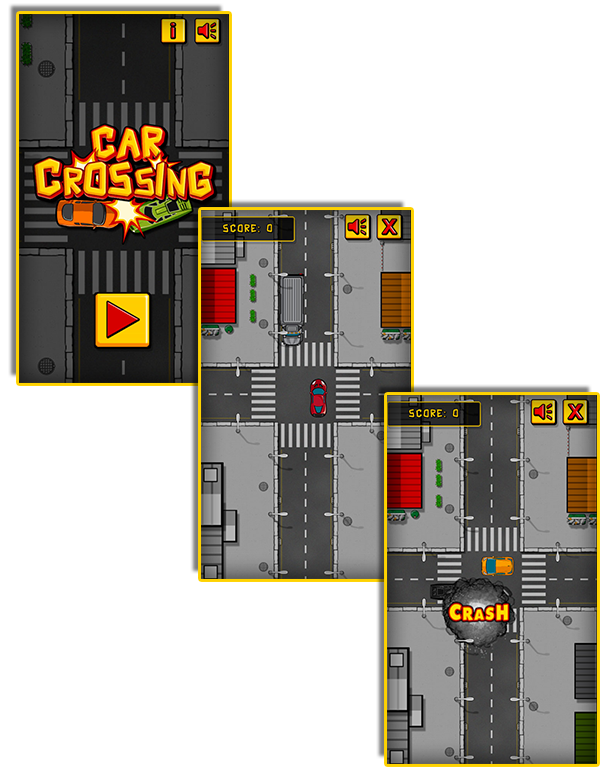
Car Crossing – HTML5 Construct Skill Game (Games)

Play It Now!

Car Crossing is a HTML5 Skill Game.
Control the traffic and prevent accidents clicking on vehicles to speed them up and avoid other cars.
Beware: If cars crash, the game is over!

Admob ads banner

This Game is already Compatible with AdmobAds
Use the AdmobAds to add your ads’ ID and start monetizing with this game!

Please read the documentation to get more info!

This game has been developed with Construct 2 R207 release: https://www.scirra.com/construct2

The ZIP package contains the game at 540×960 resolution that scales to fit current screen device.
The game is fully compatible with all most common mobile devices. We just can’t ensure full compatibility with the audio on all devices.

WARNING:
The game can not be modified with a free license of Construct 2. The game was created with Construct 2 R207 release.
The game contains some non-native plugins / behaviors you need to install in Construct2 if you want to modify the game.
Please refer to the documentation for a detailed list of these plugins/behaviors and their link.

Game Screenshoot

CTL Arcade

This game is fully compatible with CTL Arcade
A WordPress Plugin that allows you to create a real arcade on your website.

Easy to Install

With CTL Arcade you can:

  • Monetize with your games adding Ads Banners
  • Promote your website with Social Share Buttons
  • Improve our games with Leaderboard, and Rating Feature

=== Even if we do our best to minimize any inconvenience, we can’t ensure the full compatibility of all our games on every device and every operating system update.
Thank you for the understanding. ===


 Follow Us

 Contact Us

CODETHISLAB’S MOST-WANTED GAME OF THIS MONTH:

Jumper Frog

YOU MIGHT ALSO BE INTERESTED IN:

Drive Your Car

Park Your Car

The Bandit Hunter

My Zombie Classmates

8 Ball Pool

Air Hockey

Galactic Shooter

Playful Kitty

Lady Celebrity Dress Up

Sweety Cooking Chocolate Cake

Sweety Memory

Slot Space Adventure

Scratch Fruit

Wheel of Fortune

All games

All Graphic Assets

All Models

Flag Counter

Download Car Crossing – HTML5 Construct Skill Game (Games)

Creative Social Links – WordPress Widget & Visual Composer Add-on (Add-ons)

Creative Social Links is a WordPress Widget and Visual Composer Add-on from the creators of Colors Creative WordPress theme that will help You create the best looking Social Links on the planet!


\


\


\


\


\


\

Main features overview

  • Simple to use plugin with Simplified controls
  • Links can be set to open in new tabs
  • Easy and Fast to setup
  • Unlimited colors
  • Major Global Provider Supported
  • Option to link Share, Subscribe, directly to Profile, Stream using direct URL
  • Cross-Browser Compatibility: Firefox, Safari, Chrome, IE9-11
  • Ready for WP 4.2+
  • Friendly Support
  • Unstressful documentation

Download Creative Social Links – WordPress Widget & Visual Composer Add-on (Add-ons)

Visual Composer : All in One Grid (Add-ons)

Visual Composer : All in One Grid

Visual Composer : All in One Grid Main Features

  • Portfolio Grid and Carousel
  • Team Grid and Carousel
  • Social Grid and Carousel
  • 5 Grid Block Layouts
  • 100% Responsive Design Layouts.
  • Responsive Timeline Layout
  • 7 Post Grid Style Available( Grid / List)

  • Inline Post read popup (Full Customize)

  • 9 effect for Inline popup
  • Custom Columns Layout
  • Custom background Color and hover background color
  • Fit row and Masonry Grid Layout
  • WPML supported.
  • RTL Support
  • SEO friendly code
  • Pagination
    • Show more
    • Infinite Scroll
    • Number Pagination
  • Multi taxonomies Filtering
  • Social Share icon for each post
  • Custom post-type Support
  • Custom Columns layout (4 Columns,3 Columns,2 Columns,1 Columns)
  • Custom post background and hover color
  • One page multiple layout support
  • List and Drop down Filter option with Sorting option
  • 60+ post Animation effects
  • Fully responsive and mobile ready.
  • Unlimited grid anywhere.
  • Query any post type.
  • Query from multiple post type.
  • Different Theme.
  • Pagination support.
  • Custom number grid post per page.
  • Display or hide post meta’s.
  • Awesome hover effect.
  • Social share buttons.
  • Category wise grid
  • Post Read more translate option.
  • Device wise grid defines e.g. how many shows on desktop/tablet/mobile both grid and carousel.
  • Unlimited overlap colors with various opacity
  • Build Query : You can choose data source(post,custom post,page,…),number of items and order by, then you

    can filter them by category,tags and …

    • Choose data source : Select post types to populate posts from. Note: If no post type is

      selected, WordPress will use default “Post” value.

    • Post Count : How many teasers to show? Enter number or word “All”.
    • Order By : Select how to sort retrieved posts. More at WordPress codex page
    • Categories : Filter output by posts categories, enter category names here.
    • Tags : Filter output by posts tags, enter tag names here.
    • Taxonomies : Filter output by custom taxonomies categories, enter category names here.
    • Individual Posts/Pages/Custom Post Types : Only entered posts/pages will be included in the

      output. Note: Works in conjunction with selected “Post types”.

    • Author : Filter by author name.
  • Thumbnail Popup
  • Read More text translate
  • Hide/Show excerpt in items

New features :

  • Animations : Now animate your grid items with stunning CSS3 animations when you scroll down.
  • New: Ajax loaded post quick view : Now you can set quick view for your posts. Display more detailed information for your users

    without visiting actual post page.

  • Custom Taxonomy Filter and Sorting : You can enable custom taxonomy filter for post type grid. It will pull

    all registered taxonomies for that post type and will display each in dropdown and linear tab so the user can easily filter and

    sorting what he needs.

Carousel/slider Features:

  • Device wise items show options e.g. how many shows on desktop/tablet/mobile both items and carousel.
  • Auto-play off/on with set Custom Time.
  • Navigation off/on.
  • Pagination off/on.
  • Mouse Draggle.
  • Touch Draggle.
  • Single Slide Animation
  • Custom Post type Support.
  • Category wise carousel/slider

Download Visual Composer : All in One Grid (Add-ons)

Circle Wheel (Games)

-Circle Wheel made on Construct 2 game engine, Infinity game play
-Responsive on all device
-Easy to reskin
-Included all the source file ready to export for mobile and web game (html5, cordova, cocoonjs) and .CAPX file

-Flexible event system

Features

-Construct 227+
-Play on desktop and device
-Easy export to HTML5 for website
-Ready to export for Android, iOS with Cordova platform such as intel XDK, phonegap, CocoonJS – Ludei.
-AdmobAds integration
-Touch & Mouse
-Share on Facebook, Twitter, Google plus

Download Circle Wheel (Games)

Huge Carousel for Visual Composer (Add-ons)

Huge Carousel Add-on for Visual Composer

Huge Carousel for Visual Composer is an elegant carousel add-on, which allows you to create a beautiful display for your images. It is the perfect solution to showcase your portfolio, rooms, services, landscapes and other image galleries. You can grab the visitors’ attention right away, with a large images section, that speaks more than any number of words. The carousel is fully responsive, with both text and images adjusting to any screen size. You can set everything up just as easy as any default Visual Composer element.


Features

  • Easy to use
  • Displays the Large Image size of your WordPress
  • Allows smart integrated text in the carousel item
  • Fully responsive, both text and images
  • Slick Navigation, drag or click
  • 3 Image Formats available: Normal, Narrow and Square
  • You can add a link to each carousel item on title
  • Set the autoplay speed how you want
  • Pause on hover option

FREE SUPPORT

We offer a modern free ticket support application for all clients, through a real-time license code automatic verification. You can also read through our extensive documentation and the FAQ section.

PLEASE NOTE THAT VISUAL COMPOSER WP PLUGIN IS NOT INCLUDED!

CREDITS
Weather for Visual Composer plugin was developed by Curly Themes. A complete credits list can be found in the documentation file.

Download Huge Carousel for Visual Composer (Add-ons)

Magento 2 Advanced Reports (Magento Extensions)

Overview

Magento 2 don’t support chart for most of reports. User must see data table and analysis data manually.
Reports of magento 2
show data on screen, but without calculation or compare. There are a lot of questions when see basic
reports, Advanced Reports Extension
handles the data and present the data to understand easier.

Advanced Reports was combined by two popular chart technologies: nvd3 (based on D3) and Google chart. these
frameworks was designed to achieve the best user experience. Colors and interaction effects help user focus on the main data.

Magento 2 gets data from statistics, hence some reports is not real time, to ensure that the data is latest,
please refresh statistics

Features

  • Revenue Report:
    • Today Revenue: The system loads data from magento statistic database, then
      calculate correlation between today and yesterday revenue. This correlation is expressed by
      percentage.
    • Today Orders, Today Avarage Revenue, Today Shipping, Today Refunded:
      Like today revenue repport, all results are calculated by statistic data. All of reports are
      compared to yesterday data.
    • Last 7 days revenue: Show revenue of last 7 days, the result is compared to
      previous days (from 8th to 14th)
    • Last 30 days revenue: Show revnenue of last 30 days, the result is compared to
      previous days (from 31st to 60th)
    • Revenue by Days: Show revenue each day, number of days can change in
      configuration section.
    • Revenue by last weeks: Show revenue each week, number of weeks can change in
      configuration section.
  • Customer Group Report:

    Classifies customers based on group name. The data detail is displayed on data table, and percentage of each group will be calculated to show on chart. There are two charts with two purposes: [Total – Group] and

  • Geolocation Report:

    Final data is calculated by statistic data and customer billing address. Based on billing address,
    geochart show location of customer and total based on that location. The geochart is customized from
    google geochart api. User can filter and view details of data in data table, geochart also update
    when table change.

  • Sales Report:

    Inherit basic sales orders report of magento, Advanced Reports provide multi-columns chart which show
    columns in table data, this chart type also allow user hide unneccessary data. The filter form also
    apply for this chart.

  • Bestseller Reports:

    Show products and their sales data. This report based on basic bestseller reports of magento.

Demo version:

Backend: http://demo.x-mage2.com/xmage2admin
username: ardemouser
password: xmage2demouser

Installation

  • Downloads the extension
  • Unzip the file
  • Open folder “Advanced Reports”
  • Copies all content to {Magento 2 Root Folder}

To enable extension:

  • php -f bin/magento module:enable—clear-static-content Yosto_AdvancedReport
  • php -f bin/magento setup:upgrade

After that, you need to refresh cache at System -> Cache Management. If magento get some trouble such as
broken UI, css or js not found, please run this command:

  • php bin/magento setup:static-content:deploy 

Change Setting:

Log into your Magento Admin, then goto Report -> Advanced Reports -> Configuration

Request Support

Feel free to get support via email: [email protected]

Download Magento 2 Advanced Reports (Magento Extensions)

Magento 2 Wishlist Monitoring (Magento Extensions)

Overview

Wishlist Monitoring provides utility services for store owner and customer. A lot of customers added product
to wishlist, but they don’t visit e-commerce website frequently, even they visit websites and forget.
To avoid that, an email notification is needed. The customer don’t need to remember, they can view
products which are added to their wish list in email box.

Magento2 lacks of some reports about wish lists. To understand product trending such as what products most
people want to have, this extension shows data on chart, based on that, store owner can make meaningful
decision.

This extension is full configuration. All functions are able to change on configuration page.

Demo Version

There are frontend & backend demo version, you can see notification log and reports in backend

Frontend: http://demo.x-mage2.com

Backend: Wishlist Monitoring Demo

Username: demouser

Password: xmage2demouser

Features

  • Sending email: When customer add product to wish list, an email contains customter information and
    product will be sent to customer’s email address. Content of email base on pre-design
    template 
  • Changes email template: User can create or modify email template, then select template in configuration section.
  • Changes image size of product in email
  • Top products chart in wish list
  • Top customers chart report in wish lists
  • Changes height & width of chart
  • Changes number of items of chart.
  • Supports 5 types of chart: column, line, bar, area, pie. 

Installation

  • Downloads the extension
  • Unzip the file
  • Open folder “Wishlist Monitoring”
  • Copies all content to {Magento 2 Root Folder}

To enable extension:

  • php -f bin/magento module:enable—clear-static-content Yosto_WishlistMonitoring
  • php -f bin/magento setup:upgrade

After that, you need to refresh cache at System -> Cache Management. If magento get some trouble such as
broken UI, css or js not found, please run this command:

  • php bin/magento setup:static-content:deploy 

Change Setting:

Login to Admin, then go to Store -> Configuration -> Wishlist Monitoring or Wishlist Monitoring ->
Configuration

  • Clicks on “Email Notification” tab to change setting for this function.
  • Clicks on “General Report” tab to change setting for report charts.

Request Support

Feel free to get support via email: [email protected]

Download Magento 2 Wishlist Monitoring (Magento Extensions)