Featured Premium Product Slider for Opencart
Category: code
download PHP, ASP.NET, Java and Javascript from CodeCanyon – the marketplace for code scripts and snippets.Javascript, Java, Program, Code, Snippet, Script, Dev, Development, Codebase, MySQL, Class, Widget, System, CMS
PDF Acrofields – reader & writer (Miscellaneous)
What this app can do for you?
- Read and fill PDF Acrofields with ease!
- Fill PDF Acrofields with tabular data from an external source (e.g CSV)
- Help you fill PDF acrofields quicker with less or no knowledge of PDF Acrofields
- No extension or plugin required; just install and use.
Download PDF Acrofields – reader & writer (Miscellaneous)
SeoMonster – OnPage SEO Raporting Sript (Project Management Tools)
What is this script about
SeoMonster is a unique script wich allows your users to run SEO tests over their sites.After a user submits a site,the script performs the necessary tests,and returns to him in a clean way,crawling checks,head elements checks,url structure tests,content checks and links checks.Also,every category has a special area,with all kinds of tips and tricks so he can improve his SEO.The script is ready to use,the only thing for you to do is to upload it on your ftp account,nothing else!
Main features
- Crawling check(HTPP code,robots.txt,sitemap)
- Head elements check(title,keywords,description)
- Content check
- Url Structure check
- Links check
- Host informations
- Tips and tricks
- Slick and clean design(Bootstrap)
- Domain informations
- No api key required
- No mysql database required
- Ready to go in a few minutes
and much more…
Dependecies:cURL extenstion for php and fsockopen (optional,required for google pagerank grabbing)
Updates:
04/12/2013 [1.1] (to be approved)
- Fixed some design problems
- Fixed some bugs with blacklist status
- Fixed a major problem related to alexa rank
Download SeoMonster – OnPage SEO Raporting Sript (Project Management Tools)
PhotoShare FX (iOS)
Photo Share FX is an iPhone component and demo app. Photo Share FX uses the GPUImage framework to take full effect of OpenGL ES 2.0 for fast hardware-based image manipulation.
Learn how to create a camera app with Instagram-style filters that significantly outperforms Core Image and equivalent CPU-based filters.
- Take a picture with camera or choose an existing photo from the photo library
- Scrollview menu for filters like Instagram
- Fully functional app with retina and iPhone 5 resources included
- Provides 14 filters: Sepia, Kick, Xpro, Venice, Moscow, B&W, Rinse, Amatorka, Aqua, Spark, Retro, Surreal, Elegant, Neg
- Documentation provided to easily add additional filters or customize filters
- Customize the artwork and submit to the Apple App Store as-is or easily use the view controller and classes in your app
- Share photo directly to Twitter, Facebook, send mail, save to photo album, print etc. (iOS 6 Social framework)
- UI is 100% in easy to read code – no Storyboard or XIB external dependencies
- iOS 5.0+ compatible (as a deployment target)
- iOS 6.1 SDK to build (Xcode 4.6)
- ARC
Live Demo in the App Store
Example of an app using item in the App Store:
https://itunes.apple.com/us/app/reinsta/id602436017?ls=1&mt=8
Download PhotoShare FX (iOS)
Lida – Accordion menu (Tabs and Sliders)
Lida – Accordion Menu
Based in pure CSS3
CSS 3 Transition Effects (for Modern browser)
JQuery fallback for IE browsers
Features
- 8 STYLES
- PURE CSS3/HTML5
- ICON SUPPORT (240+)
- CROSS BROWSER
- CSS ONLY (JQuery for IE6-9)
- CSS3 TRANSITION EFFECTS
- EASY USE
- DOCUMENTED
Support
Please send me an email to : [email protected]
Credits
- Font Awesome by Dave Gandy.
- Colorzilla
Download Lida – Accordion menu (Tabs and Sliders)
Vertical Elan – Responsive CSS3 Vertical Menu (Navigation and Menus)
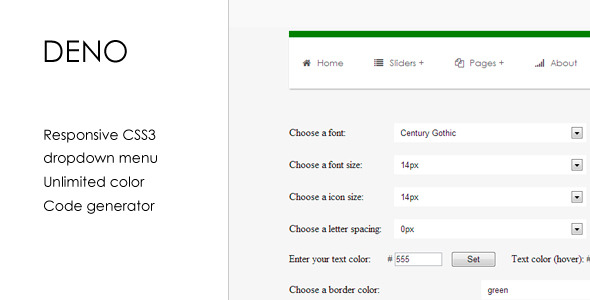
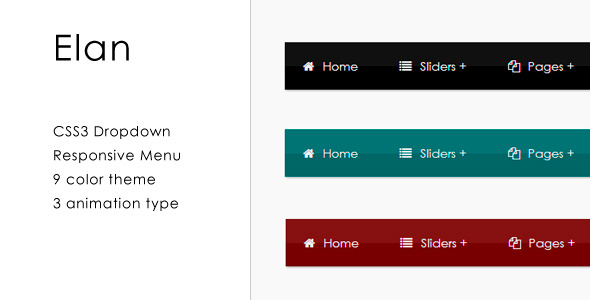
CSS3 mega drop down responsive menu for your web site. You can change font size, font color, background color and other options. Menu has 5 columns grid and work on all major browsers. But animation and some feauters on IE do not work.
See also
Download Vertical Elan – Responsive CSS3 Vertical Menu (Navigation and Menus)
URL2IMAGE ASP.NET Module (Add-ons)
USPS Shipping method for WooCommerce (WooCommerce)
The USPS Shipping method for WooCommerce will get real-time rates from the UPS API. The plugin work with domestic and International package.
Domestic
- Priority Mail
- Express Mail
- Standard Post
- First-Class
International
- Express Mail International
- Priority Mail International
- Global Express Guaranteed
- First Class Package Service
Download USPS Shipping method for WooCommerce (WooCommerce)
Login & Sign Up Modal Forms (Forms)


- Login & Sign Up Modal Forms
Inside Pack
- Folder Css
- Folder Images
- Folder Font
- index.html
- Read_me.pdf
Icons Used in Project –
IcoMoon
Free Font
FONT USED IN PROJECT (Free Font) –
Font PT Sans
Rate it if you like … Enjoy…!!! 
Download Login & Sign Up Modal Forms (Forms)
Inject – Control WordPress Dynamic Content (Utilities)
Inject Plugin
Inject is a very special WordPress plugin.
Inject was developed to give WordPress users more control over their contents in an elegant way.
In WordPress, if you want to show things in an original way, you can write custom page template, use great user friendly plugins or widgets. If you’re not a web developer, writing a PHP template can be a little tricky. If you use plugins or widgets, you have to adapt yourself to it, and most of time you are limited or frustrated by a lack of customization.
Inject allow you to inject any content in any part of your website : What, Where, How
A few conversations excerpt we had with clients:
the client : I want to display a small menu to access child pages, but I don’t want to update it every day !
me : It could be possible. But was it planned :-/ in our brief ? (Sometimes clients just don’t want to spend another penny on that sort of functionality).
the client : Why my pdf not automatically accessible on my page !
me : Because it’s not magic and you have to include it manually in your content.
the client : I want to display in this page a list of the lastest posts from “movies” category !
me : You can put a link in the page to go to the category page “movies”.
It shows that each websites are different, each customers are different and that WordPress is great, but can’t do every thing we want by default.
The Inject Plugin was created to reduce this lack of flexibility !
Inject principles
Inject relays on Twig, an easy to use template engine (that dispense to work with PHP) and common WordPress functions which allow to query your WordPress content.
The principles :
- Write a template using Inject – how my data will be displayed
- Generate the shortcode – which information I want to display
- Insert the shortcode – where I put my new polish content
Here, a non-exhaustive list of what you can do with Inject Plugin :
- display a list of posts as a slider, as a simple list of title, excerpt and thumbnail, as a gallery…
- make a navigation of top-level pages, or recurrent sub-menu on pages
- display a gallery, slider of images linked to a post
- display a box with pdf documents or zip files linked to a post
- …
Who can use Inject Plugin
On small website, you have a way to speed up the creation of custom elements or to add functionalities without increasing the final price.
On big site with lots of content, you would have more time to spend on custom page template, widgets or modules but Inject Plugin gives you even more flexibility.
In Inject Plugin, there is two parts which demand minimum skills :
- Creating an Inject template requires some basic skills in Twig (php template engine), html, css and javascript depending on what you need and what you want to do. So it’s more destined to web developers or integrators, but you can still make really great things with Inject with a minimum knowledge.
- Adding the Inject shortcode, for displaying custom content doesn’t required any further skills and could be use by anyone.
Features
- Reuse the content already present in your WordPress site without rewriting complex php template.
- Display content the way you want, fully customizable with your css and javascript.
- Add flexibility to your WordPress sites.
- Create templates directly in WordPress admin.
- …
Inject other uses
- Snippets manager / storer: keep your codes in Inject.
- API widget (paste code from addthis, mailjet, …), to be used anywhere on WordPress: posts, pages, …
- Easy paste code: instead of copy and paste large piece of code you often use. Create an Inject and you will simply have to paste the shortcode everytime you need that important piece of code.
For more information and examples visit the Inject website.
Support
Inject Plugin needs at least PHP 5.2.4 and WordPress 3.1 to run.
Before asking your question, you can read the documentation and/or look at the examples we’ve created.
If you still have a question or want to get in touch with us, you can use our support section.
Download Inject – Control WordPress Dynamic Content (Utilities)
SabaiDirectory for WordPress (Miscellaneous)
SabaiDirectory is a premium business directory plugin for WordPress. The plugin features the ability to build a community driven local business directories like Yelp.com, Google+ Places, or Yahoo! Local.
Features
- Display listings in list or map view
- Search listings by keywords, category, distance, and location
- Fully interactive map – show listing details on hover/click, refresh search results on map drag, autocomplete location field, etc.
- Add new or claim existing listings
- Post reviews of listings with 1-5 star rating system
- Upload photos of listings
- Comment on reviews and photos
- Vote reviews helpful/non-helpful
- Vote up photos and comments
- Bookmark listings, reviews, and photos
- Flag listings. reviews, photos, and comments
- Show directions on map
- Dashboard for users to manage their claimed listings, payment orders, and bookmarks
- Featured listings
- Display reviews, photos, and bookmarks by user
- Unlimited hierarchical categories
- Custom map styles and marker icon
- Create multiple directories
- Paid listings with custom pricing plans
- Manage payment orders
- Flexible role-based permission system
- Schema.org microdata support
- RTL language support
- 24 e-mail notifications
- 7 custom Google map styles
- 6 widgets
- 3 shortcodes
Feature Highlights
Interactive Listing Search

Search listings by keywords, category and location, sort by date, review count, rating and distance.
You can also easily switch view modes between list and map views. Fully ajaxified, and it can also
be embedded to any WordPress page using a shortcode.
Drive Engagement with User Generated Content
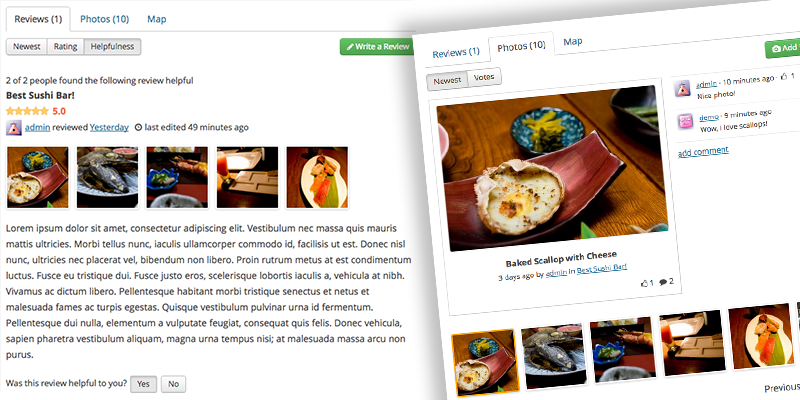
Users can post reviews with 1-5 star rating system, upload photos, vote on reviews and photos,
comment on reviews and photos!
Custom Fields
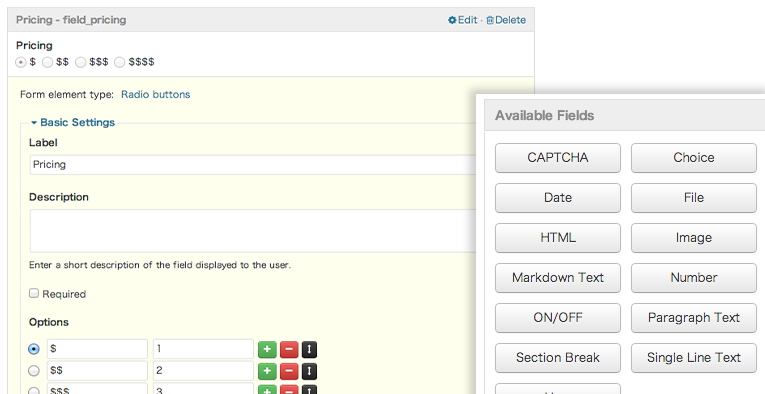
Create custom fields using a visual form editor with more than dozen field types available.
Custom Map Styles

Included are 9 Google map styles to choose from with support of custom marker icons.
Paid Listings
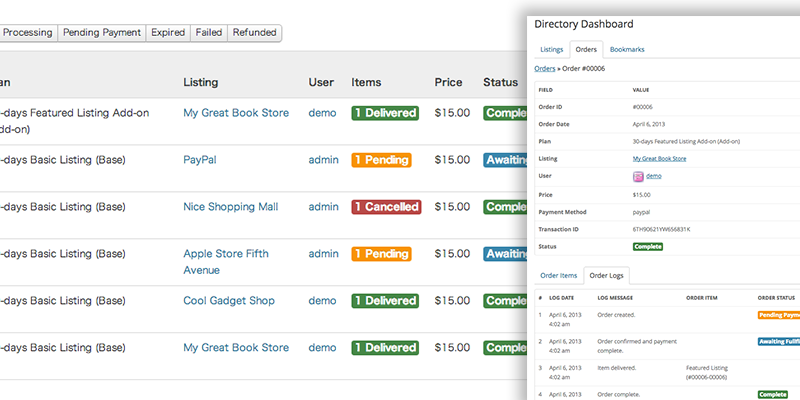
Monetize your site with paid listings. Create multiple pricing plans. Process orders and track
their progress with complete order history.
Changelog
v1.2.0 – 12 Apr 2013
- initial release
Download SabaiDirectory for WordPress (Miscellaneous)
Pinterest Basic Script (Social Networking)
We’ve done the hard work for you! Run your own Pinterest basic site with our script.
Earn top dollar
Sit confortable on your chair, bring traffic and see money coming from Sponsored Pins. PayPal IPN integrated. All works automatically.
Our application is paypal integrated so you just configure the pricing for three periods (sponsored pins):
- 1 Day
- 7 Days
- 1 Month
for a pin to become featured on homepage.
Easier to add/upload images for your users than ever with four options : Upload local file, Upload by direct image url, Search/Scrap remote URL for images
Videos section to allow youtube video embedding.
Membership System. Users can register and have profiles showing their Pins, Likes, Followers, Following & their Boards
Likes system: registered users can like others pins.
Followers system: registered users can follow each others. A follower pins will appear on the other person’s homepage.
Category system & Boards: categories dropdown & user boards to separate pins & boards.
Facebok Comments: users can leave comments if they’re already logged in into facebook.
Search system: visitors can look for a specific set of pins by entering their keyword.
And so much more to enjoy when using our Pinterest Basic Script.
Demo Account
Username : demo
Password : demo123
Note : no admin panel access, do not insist. I am tired of abuses.
Download Pinterest Basic Script (Social Networking)
Super Carousel – Responsive WordPress Plugin (Sliders)

Credits
Special thanks to the followings.
www.jquery.com/
www.gsgd.co.uk/sandbox/jquery/easing/
www.no-margin-for-errors.com
www.brandonaaron.net
www.plugins.jquery.com/project/touchSwipe
www.wordpress.org/
Updates
12-04-2013 – Compatibility with PHP 5.2
Download Super Carousel – Responsive WordPress Plugin (Sliders)
AutoPupo – Automatic Ads Post Generator Plugin (Advertising)
AutoPupo WordPress Plugin Automatic Ads Post Generator ; that increase your earning by new place to add Ads ; it is a post placed after “X” number of posts automatically , ADS-Post can be customized by wordpress wysiwyg text editor to add your Script or want you want ; it is a simple and efficacious as a smart solution .
Encourage us by rate the plugin with 
Tutorial Video Demo available in HD Here

Features
- Increase your earning by new place to add Ads ; And Great Mobile Ads Solution
-
Customize your automatic ads-post with wordpress wysiwyg text editor
- Categories Support
- Chose the Place of the Ads-Post by customizing the Nnumber of “X” Posts
- Easy admin panel
- Install/Configue And Forget !
Download AutoPupo – Automatic Ads Post Generator Plugin (Advertising)
Responsive HTML5 Video Player & Gallery (Media)
This is Responsive HTML 5 Video Player with/without gallery. You can use player without gallery with only one video, or you can build your own gallery with thumbnails, titles and descriptions. Number of videos is unlimited. Player look is customisable via CSS, so you can easily customize colors and adjust it to your needs. Player is resizeable so it fits perfectly in every website design.
Features
- easy setup
- responsive
- optional gallery
- multiple themes included
- click & drag (touch) to control gallery
- mobile friendly (iPhone, iPad, android)
- 100% vector icons, retina-ready
- all browsers compatible
- multiple instances: you can insert more players in same page
- optional logo: you can add your logo as image (.jpg, .png). Logo position can be in bottom-left corner, bottom-right ot top-right corner.
- optional preview image: if you want your player to be paused when page loads, you can set preview image
- autohide controls: you can choose after how much seconds player controls will disappear
- hide / show gallery with playlist button (with this functionality you can “stretch” player over gallery to have better view for video, as well as “shrink” player to see gallery menu again to choose videos)
- autoplay: on/off
- complete volume control
- optional share menu: facebook, twitter, myspace, wordpress, linkedin, flickr, blogger, delicious, mail
- optional embed code: for visitors to embed your player in their sites
- information window with HTML formatted text (it means you can insert links, change fonts, sizes with standard HTML tags)
- rewind
- tooltip for time
- tooltip for volume percentage
- fullscreen support (when not supported real fullscreen it switches to full browser support)
- double click to enter/exit fullscreen
- SPACE key play/pause
- ESCAPE key to exit fullscreen
- installation instructions included
Credits:
Thanks to Dorde Pivnicki
You may also like…
HTML5 Responsive Video Player & Advertising

HTML5 Video Player with/without Gallery

3 in 1 – Video players pack Youtube / Vimeo / Flv / Mp3 / Image / Advertising

Customisable Vimeo / Youtube / Flv / Mp3 / Image gallery

Customisable Vimeo / Youtube / Flv Video Gallery

VIMEO / YOUTUBE / FLV VIDEO PLAYER WITH PLAYLIST
