Google admits wi-fi data blunder

Street View car (Google)

Google has admitted that for the past three years it has wrongly collected information people have sent over unencrypted wi-fi networks.

The issue came to light after German authorities asked to audit the data the company’s Street View cars gathered as they took photos viewed on Google maps.

Google said during a review it found it had "been mistakenly collecting samples of payload data from open networks".

The admission will increase concerns about potential privacy breaches.

These snippets could include parts of an email, text or photograph or even the website someone may be viewing.

In a blogpost Google said as soon as it became aware of the problem it grounded its Street View cars from collecting wi-fi information and segregated the data on its network.

It is now asking for a third party to review the software that caused the problem and examine precisely what data had been gathered.

"Maintaining people’s trust is crucial to everything we do, and in this case we fell short," wrote Alan Eustace, senior vice president of engineering and research.

"The engineering team at Google works hard to earn your trust – and we are acutely aware that we failed badly here."

‘Pushing the envelope’

Google said the problem dated back to 2006 when "an engineer working on an experimental wi-fi project wrote a piece of code that sampled all categories of publicly broadcast wi-fi data".

That code was included in the software the Street View cars used and "quite simply, it was a mistake", said Mr Eustace.

"This incident highlights just how publicly accessible, open, non-password protected wi-fi networks are today."

Dan Kaminsky, director of penetration testing for security firm Ioactive, said there was no intent by Google.

"This information was leaking out and they picked it up. If you are going to broadcast your email on an open wi-fi, don’t be surprised if someone picks it up."

John Simpson, from the Consumer Watchdog, told the BBC: "The problem is [Google] have a bunch of engineers who push the envelope and gather as much information as they can and don’t think about the ramifications of that."

This article is from the BBC News website. © British Broadcasting Corporation, The BBC is not responsible for the content of external internet sites.

Mums-to-be rate mothers’ wisdom

Pregnant women

Mothers-to-be think their own mothers know better than the medical profession when it comes to health advice, researchers say.

A University of London team talked to women who gave birth in the 1970s, 1980s and the 2000s.

Modern women were more likely to take a mixture of advice – but were still more likely to follow family wisdom.

One baby charity said family tips were useful, but medical advice should be sought if mothers-to-be had worries.

The researchers talked about pregnancy and childbirth advice to seven women who gave birth in the 1970s and 12 of their daughters who had babies in the 2000s.

They then also analysed interviews on the same topic which had been carried out with 24 women in the 1980s.

The 1970s women were most likely to take advice from family members.

But researchers found that women who had babies between 2000 and 2010 had to evaluate a wide range of information from doctors, midwives, books, magazines and, latterly, the internet – as well as that from their families.

In these women, it tended to be family advice that won out – particularly if a mother-to-be was dealing with a specific symptom.

One woman, Hetty, from the 2000s generation, said she had tried to stop drinking tea because she had read on the internet that caffeine could cause miscarriages in the first few weeks of pregnancy.

But she then added she had taken her grandmother’s advice that tea could help relieve morning sickness.

"She just used to stay in bed and have a cup of tea. And that did help actually."

‘Strike a balance’

Professor Paula Nicolson from Royal Holloway, University of London, who led the study, said: "When it comes to the crunch – if women feel sick for example – they will take their mother’s or their grandmother’s advice.

"They wouldn’t necessarily recognise how important it was to them, but it would override the science."

She added: "Taking all the guidelines too seriously leads to anxieties. Lack of self-confidence also can lead to worry about ‘doing the wrong thing’ which is potentially more harmful than taking the odd glass of wine or eating soft cheese."

Jane Brewin, chief executive of baby charity Tommy’s, said women had to "strike a balance" about what advice they took.

"It’s only natural to want to talk about the significant changes that happen to a woman’s body and how she feels; mums and close friends often have first-hand experience and tips that are helpful.

"However we always stress that if any mum-to-be is worried about anything during their pregnancy they should seek medical advice without delay."

This article is from the BBC News website. © British Broadcasting Corporation, The BBC is not responsible for the content of external internet sites.
Looking for Cheap WordPress Bloggers for Laptop Blog by runelgna

I am looking for a talented bloggers. Cms which you will use will be wordpress. You should publish the articles with least 1 picture. All articles must be least 300 words and must be unique. Niche: Laptops i want least 2 blog posts a day and am willing to pay $1 for 2 blog posts… (Budget: $30-250, Jobs: Articles, Blog, Research, Reviews, Technical Writing)

Article creation for Building Inspections site, SEO by reportsplus

We are looking for a fluent english speaker to help us create 4 articles for our Building Inspection site. We need 4 articles created similar to the following: http://www.inspectorsgalore.com.au/the-importance-of-a-pest-inspection.html… (Budget: $30-250, Jobs: Article Rewriting, Articles, Copywriting, Research, SEO)

Only team who can deliver 20k solved captcha per day by saddam42

Please do not bid here if you can not deliver 20k solved captcha per day. if you are individual i will post another project recently , wait till then rate is fixed $1 per k. do not bid if you need more then my budget … (Budget: $30-250, Jobs: BPO, Data Entry, Data Processing, Excel)

Using Sound Effector to Create Animations in Cinema 4D – Basix

Sound effector is a tool of the Mograph module in Cinema 4D that you can use to create animations which are perfectly matched to a sound or musical score. Through this tutorial you are going to learn how to use sound effector as well as its fine-tune function. We will also use Adobe After Effects to blend the animation that was exported from Cinema 4D with the sound track to make our final composition.

Step 1

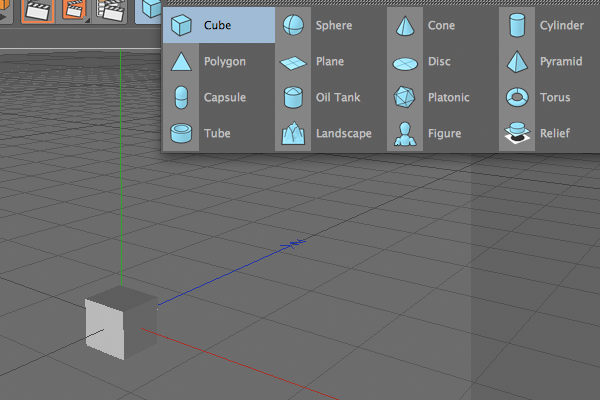
Create a 50×50×50 Cube object.

Step 2

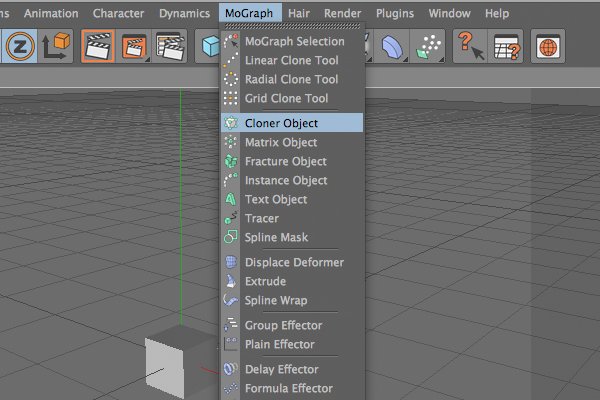
Add Cloner Object to the scene.

Step 3

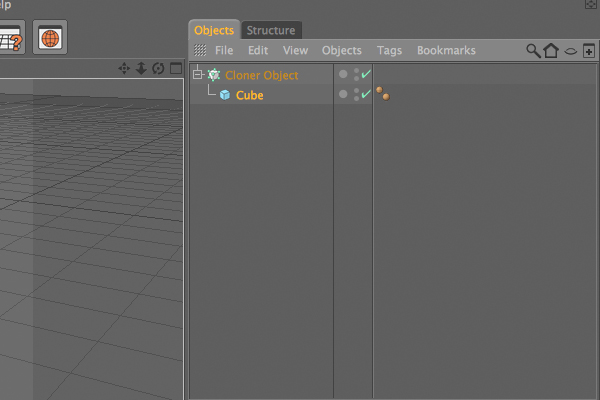
Make the Cube a child of that Cloner object.

Step 4

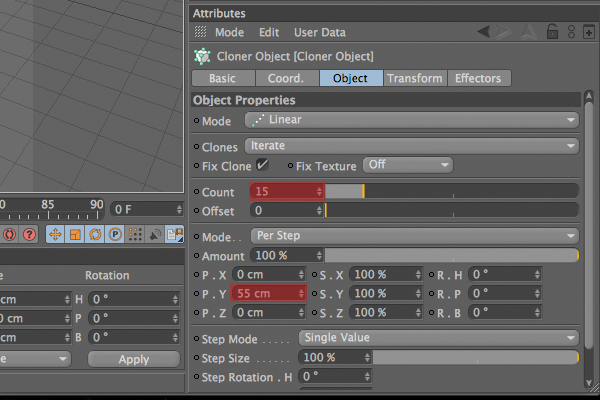
Select the Cloner object, and under the Object tab, set the Count value to 15 and the P.Y value to 55.

Step 5

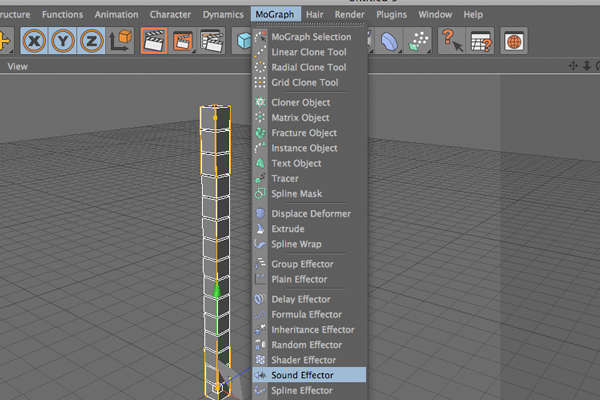
Add Sound Effector to scene.

Step 6

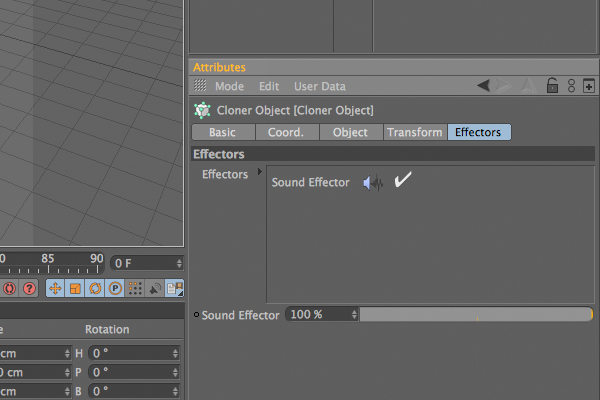
Be sure that that Sound Effector is enabled under the “Effectors” tab of Cloner object. If not, drag and drop the Sound Effector over that box.

Step 7

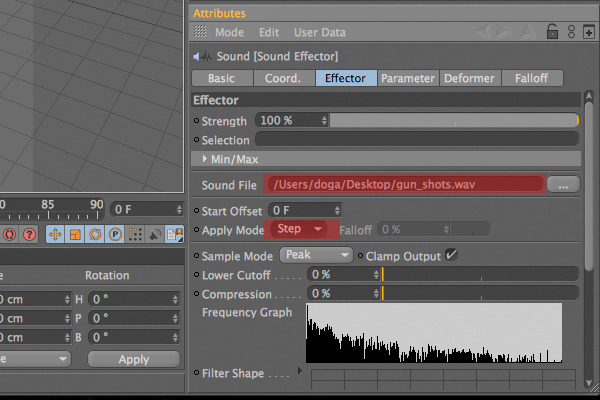
Select the Sound Effector object, and under the Effector tab, select a sound file to use. That file must be .wav file, otherwise it won’t work. Again under that tab select “Step” for “Apply mode”.

Step 8

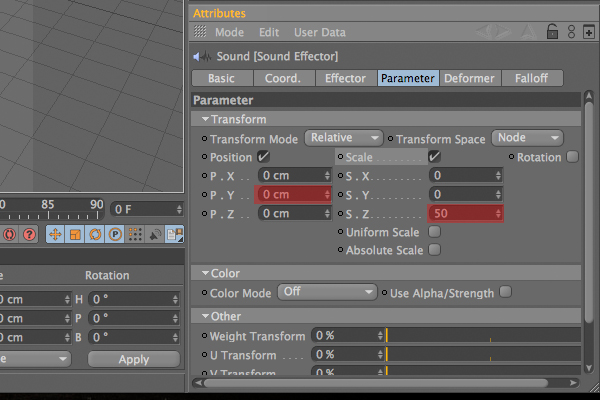
Go to the “Parameter” tab. Under the Transform section, turn on the “Scale” option. Now enter 50 for the S.Z value and delete the P.Y value, which is set to default.

Step 9

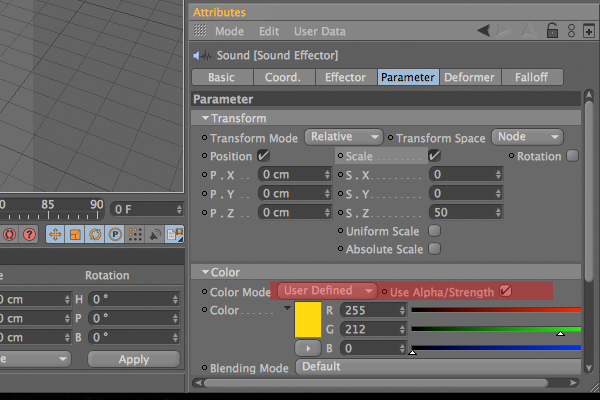
Under same tab, go to the Color section and choose “User defined” for the Color Mode. Choose any color you wish. I prefer yellow. Then turn on the “Use Alpha/Strength” option.

Step 10

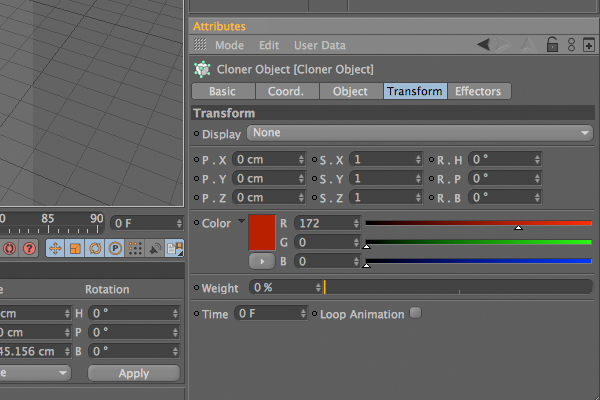
Select the Cloner object, and under the “Transform” tab, select another color to blend with previous color.

Step 11

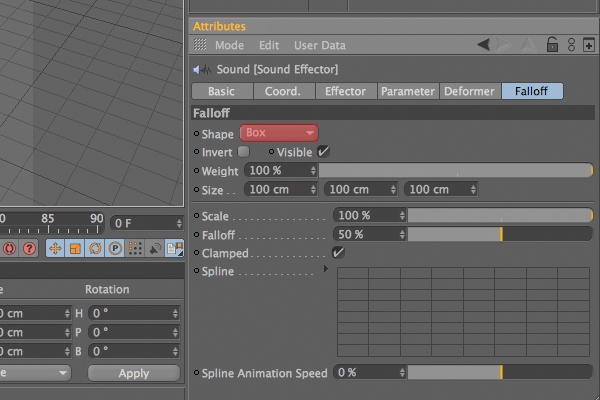
Select the “Effector” object, and under the “Falloff” tab, choose “Box” as the “Shape”.

Step 12

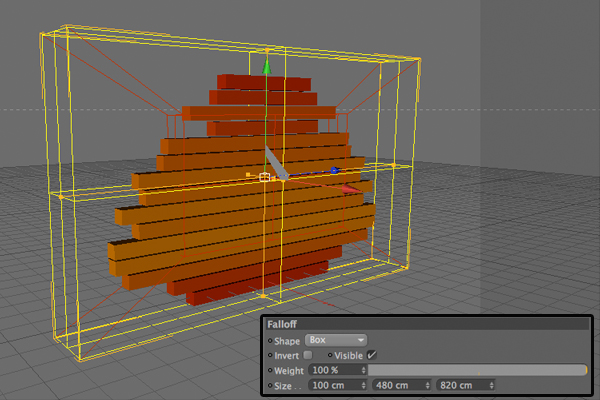
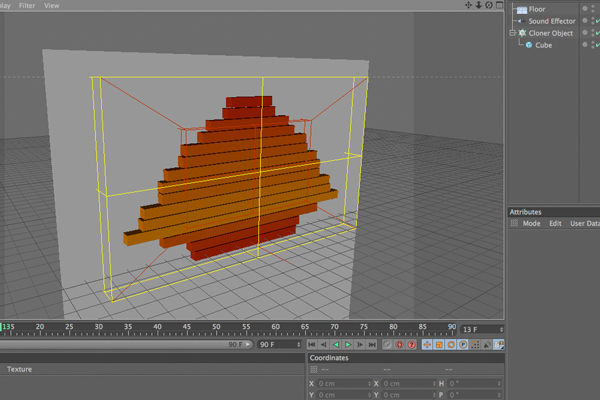
Now you can edit that box anyway you like to get best result. I used 100x 480 x 820 for mine.

Step 13

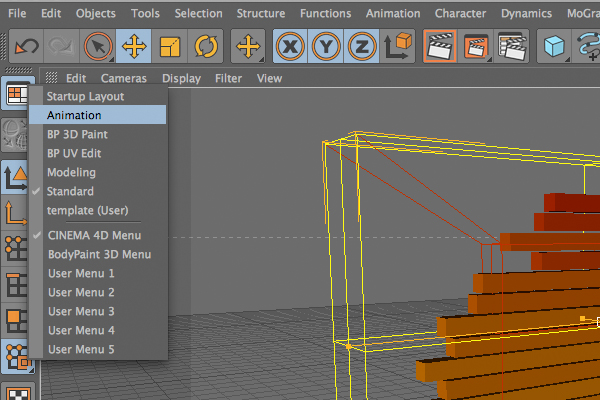
Select the “Animation” layout.

Step 14

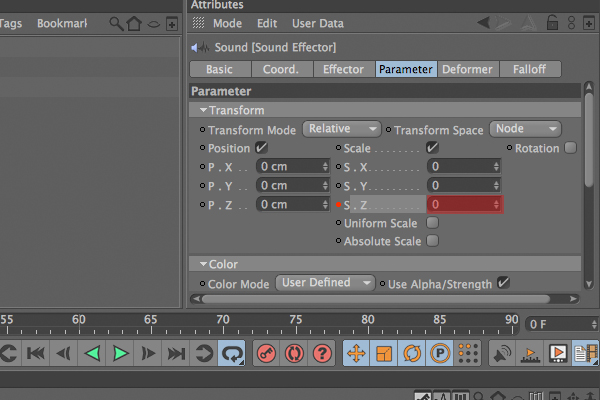
Go to the “Parameter” tab of “Sound Effector” and delete the value of S.Z which you had assigned before as 50. Press and hold to control key on your keyboard and click to little dot right near the S.Z section. It must turn to red.

Step 15

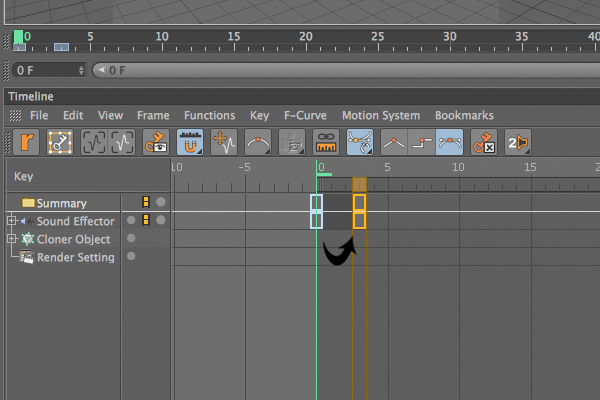
There should now be a key on timeline. Click over it and while pressing control key, and drag it to right side. This will copy it.

Step 16

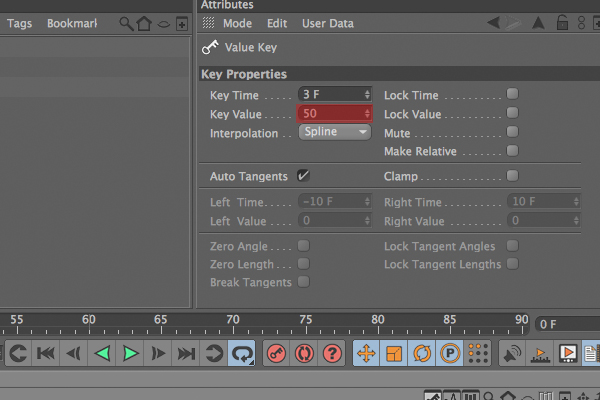
Click over the new key, and under key properties, set the “Key Value” to 50.

Step 17

Return to standard layout. Add a “Floor object” (Object > Scene > Floor) to the scene, and rotate it by 90 degrees to create a wall.

Step 18

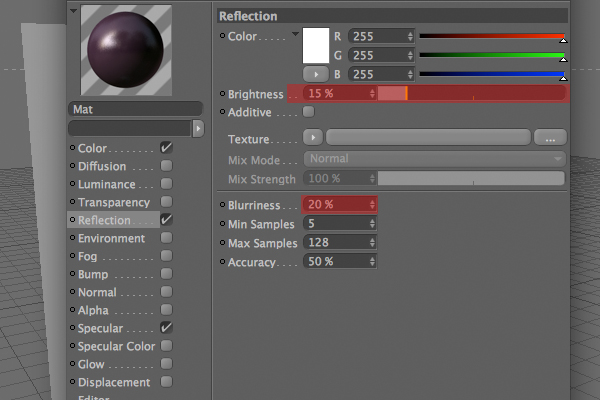
Create a new material. Choose a color, and turn on the “Reflection” channel. Now reduce the Brightness to 15% and set the “Blurriness” to 20%. Use that material on the “Floor” object.

Step 19

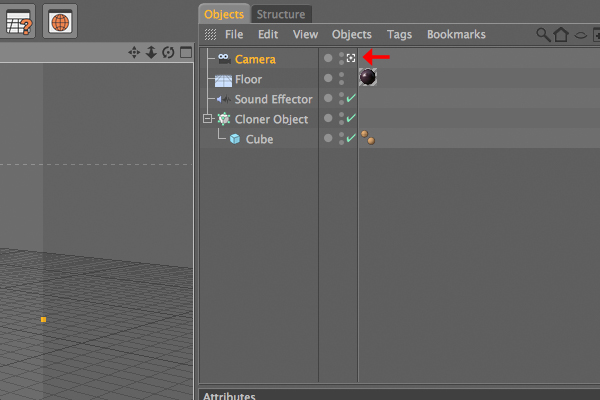
Add a Camera object and to set it as main camera. Click the little symbol right next to it.

Step 20

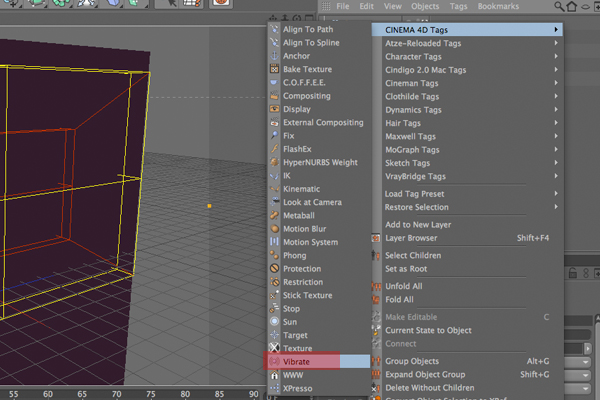
Right click the camera object and select the “vibrate” tag.

Step 21

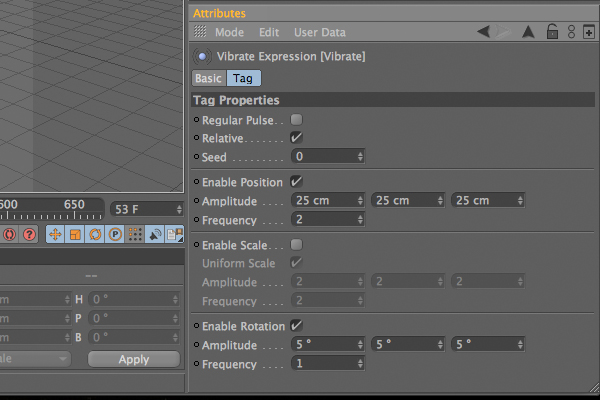
Turn on the “Enable Position” and “Enable Rotation” options. Then set the Frequency of Position to 2, and choose “25 x 25 x 25″ for Amplitude. Set the Frequency of Rotation to 1, and choose “5 x 5 x 5″ for Amplitude.

Step 22

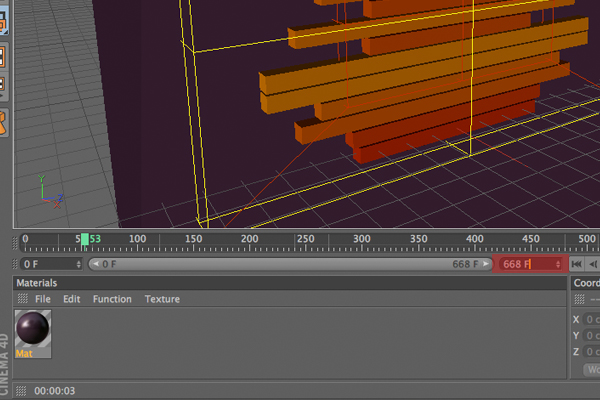
The sound track is approximately 668 frames long, so set the last frame to 668 on the timeline.

Step 23

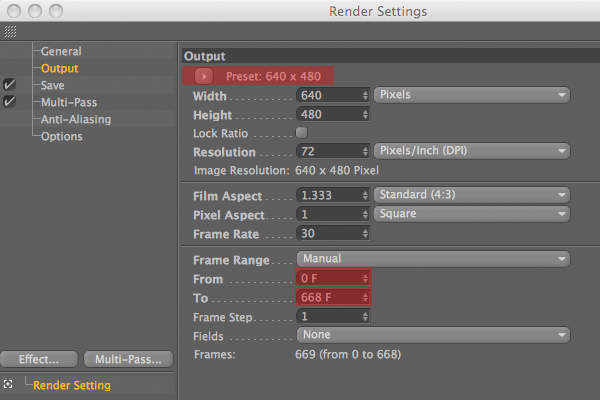
Go to the Render Settings (Cmd + B), and navigate to the “Output” section. Here you can set the size of your video. At the bottom, set the range to “from” as “0 F” and “to” as “668 F”.

Step 24

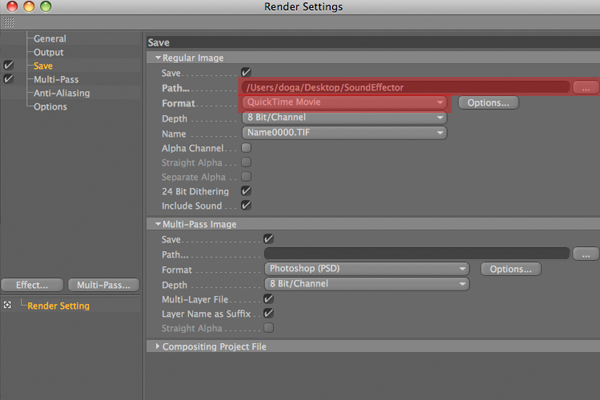
Go to the “Save” section. Select “Quicktime movie” as the format, and choose the location and name to save the video as.

Step 25

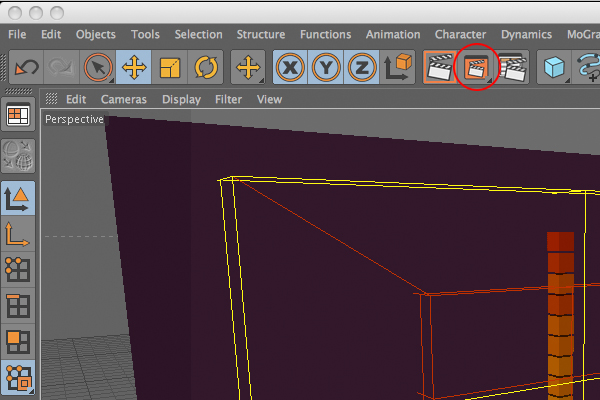
Click the “Render in Picture View” button and wait for the render. It may take a while depending on your computer.

Step 26

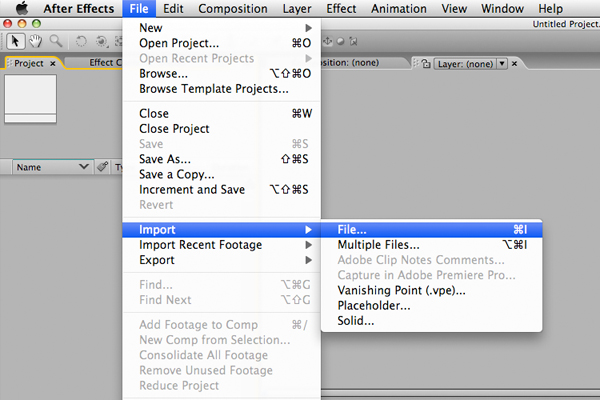
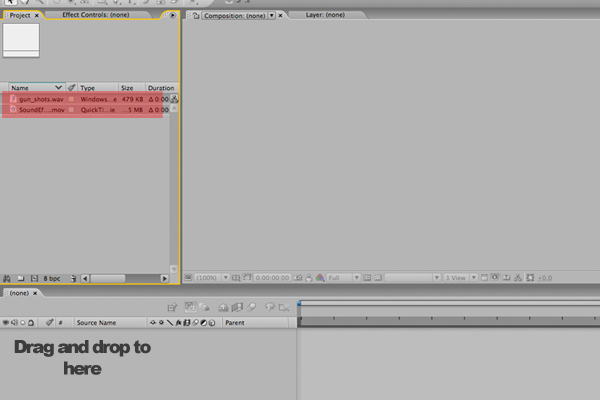
Now open After Effects to combine the exported video with the sound. Go to (File > import > file) and then select the video file. Do the same thing for sound file.

Step 27

Select those two object, and drag and drop them onto the workflow beneath.

Step 28

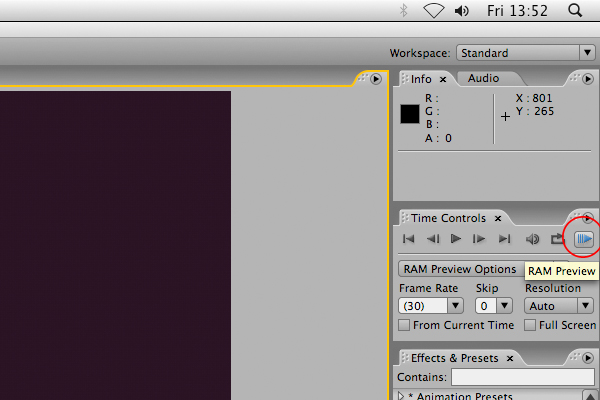
Click the RAM Preview button, and you will see the combined result.

Step 29

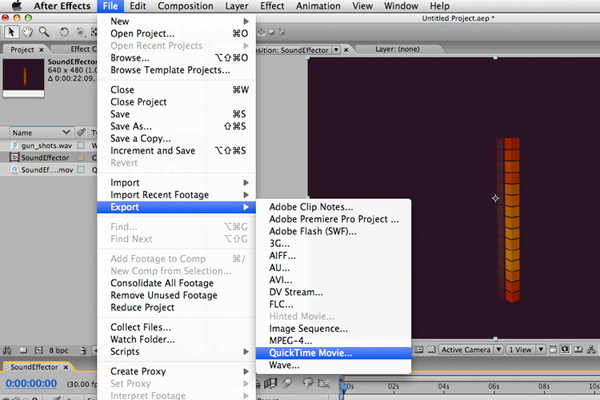
Go to (File > Export) and select any file format you want your final video to be!. That’s it. You have successfully used Sound Effector. Now let’s see what you can make it do to!!

Don’t miss more CG tutorials and guides, published daily – subscribe to Cgtuts+ by RSS.

Filipino WordPress Theme Developer/SCO expert – Full Time by anthonyjohnson64

Filipino WordPress Theme Developer/SCO expert wanted – Full-time position Greetings! We are a Fast-growing Internet marketing company in search of a full-time WordPress developer to customize premium WordPress templates for specific niche markets… (Budget: $250-750, Jobs: CSS, Website Design, WordPress)

I need a Paypal account with its debit card by niloykhan1212

I need a full verified Paypal account with the Paypal Debit card.I will select the appropriate bid and escrow the funds but I will not release the payment until the debit card reaches my home.You need… (Budget: $30-250, Jobs: Advertising, Data Entry, Data Processing, Paypal API, Virtual Assistant)