Interface Between Two Files Using the LocalConnection Class

In this tutorial we will use the AS3 LocalConnection class to send and receive data between two different SWF files. Today we will use this to detect mouse movement in one SWF and mirror it in another.


Final Result Preview

Let’s take a look at the final result we will be working towards. Below are two completely different files.

This tutorial is split into two sections. The first will concentrate on the sending SWF and the second will involve building the receiving SWF. I will also be using the document class throughout this tutorial.


Section 1: Sending Information


Step 1: Sending New Flash Document

Firstly, create a new ActionScript 3.0 file.
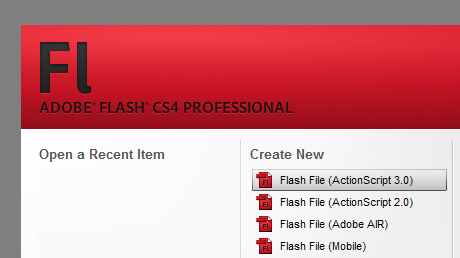
Creating a new AS3 file.

Then, resize the file to 600px × 250px.
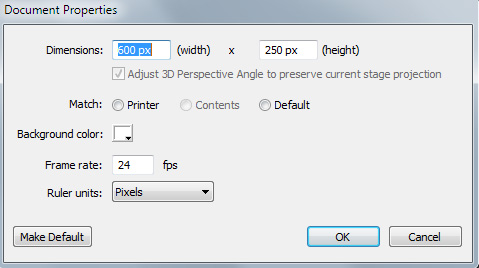
Resizing the file.

Step 2: Sending Add a Background

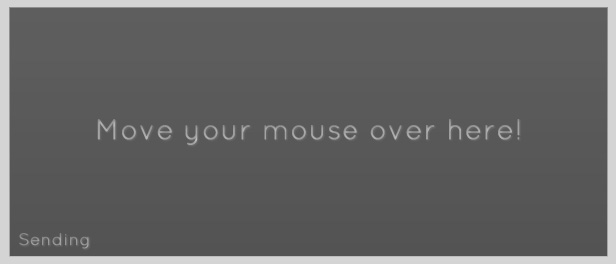
This step is not necessary for functionality, but more for aesthetics. Add your image to the stage and then lock its layer.
Adding a background.

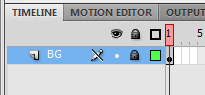
Locking the background layer.


Step 3: Sending Create Document Class

Save your FLA as Sending.fla and then create a blank AS file. Save this file in the same folder as your FLA and name it Sending.as.
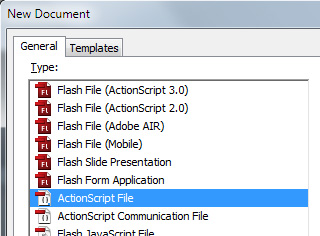
Create a new ActionScript file.

Then go back and link the document class to the FLA.
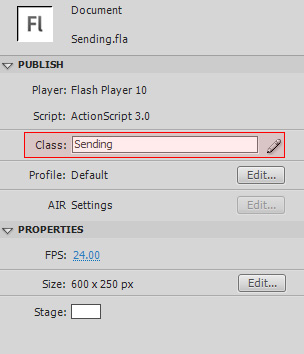
Link the document class to the FLA.


Step 4: Sending Set Up Document Class

Add a blank package, class and constructor function to your AS file.

package {

	public class Sending extends MovieClip {

		public function Sending() {
		}

	}

}

Step 5: Sending Import Classes

The first thing we need to do in our document class is to import all the classes which we will need in the future.

package {

	import flash.display.MovieClip;
	import flash.events.Event;
	import flash.events.StatusEvent;
	import flash.events.MouseEvent;
	import flash.net.LocalConnection;

	public class Sending extends MovieClip {

		public function Sending() {
		}

	}

}

Step 6: Sending LocalConnection Usage

Before we start sending information with a Local Connection, it is best that we learn exactly how to use it. This is really simple and consists of only two parts:

  • Declaring an instance of the class.
  • Using the .send() method.

Declaring an instance of the Local Connection class is easy:

private var localConnection:LocalConnection = new LocalConnection();

Next we need to use the .send method. This method connects to the other SWF and then triggers a function in the receiving file which handles any variables which are sent across. Let’s see an example:

localConnection.send("_connectionName","methodName",variable1,variable2);

Both the connection name and the method name should be enclosed in quotation marks (as they are strings). In addition, it is best to start the connection name with an underscore ( _ ). The method name is simply the name of the function which you want to be triggered in the receiving SWF. The function, in the receiving SWF, will be provided with the variables as arguments. Now, let’s use what we’ve just learnt!


Step 7: Sending Variables & Constructor

Here are all the variables we need to declare:

private var localConnection:LocalConnection = new LocalConnection();

private var mX:Number;
private var mY:Number;

After declaring an instance of our local connection, we create two variables. mX will hold the mouse’s ‘x’ value and mY will hold the mouse’s ‘y’ value. This code needs to be placed before the constructor function, but inside the class.

Next is the constructor function. This function contains just one line: adding an event listener for the Event.ENTER_FRAME event. We will cover the function it calls in the next step. Here is the finished constructor function:

public function Sending() {
    stage.addEventListener(Event.ENTER_FRAME,mainLoop,false,0,true);
}

Step 8: Sending mainLoop Function

In the previous step, we created an event listener which calls this function once every frame. This function will be doing two things. The first is to set the variables mX and mY equal to the mouse’s ‘x’ and ‘y’ position respectively. The second is to send these two variables, through the Local Connection, to the other SWF file.

Here is the finished function:

private function mainLoop(e:Event):void {
    mX = mouseX;
    mY = mouseY;

    localConnection.send("_mouseConnection","processData",mX,mY);
}

When sending the data, we use “_mouseConnection” as the connection name and “processData” as the method name. This means it will try to call processData(mX, mY).


Step 9: Sending Status Event

We are very nearly finished. All that remains to be done is to handle the status event. The LocalConnection object dispatches status events; in this project we will not be using the events; however, if we do not listen out for them, we will receive errors such as this: ‘Error #2044: Unhandled StatusEvent:. level=error,code=’

We have already imported the event in Step 5, so first we will add an event listener for a status event in the constructor function:

public function Sending() {
    stage.addEventListener(Event.ENTER_FRAME,mainLoop,false,0,true);
    localConnection.addEventListener(StatusEvent.STATUS, onStatus);
}

Now we need to create a blank function to respond to the event. The function is called ‘onStatus’.

private function onStatus(e:StatusEvent):void {};

Step 10: Sending Summary

In Section 1, we have learnt how to use the LocalConnection class to send information, via a connection, to another flash file. Here is our finished AS file for Section 1:

package {

	import flash.display.MovieClip;
	import flash.events.Event;
	import flash.events.StatusEvent;
	import flash.events.MouseEvent;
	import flash.net.LocalConnection;

	public class Sending extends MovieClip {

		private var localConnection:LocalConnection = new LocalConnection();

		private var mX:Number;
		private var mY:Number;

		public function Sending() {
			stage.addEventListener(Event.ENTER_FRAME,mainLoop,false,0,true);
			localConnection.addEventListener(StatusEvent.STATUS, onStatus);
		}

		private function mainLoop(e:Event):void {
			mX = mouseX;
			mY = mouseY;

			localConnection.send("_mouseConnection","processData",mX,mY);
		}

		private function onStatus(e:StatusEvent):void {};

	}

}

Section 2: Receiving Information


Step 11: Receiving New Flash Document

Firstly, create a new ActionScript 3.0 file.

Creating a new AS3 file.

Then, resize the file to 600px × 250px.

Resizing the file.

Step 12: Receiving Add a Background

As before, this step is not necessary for functionality, but more for aesthetics. Add your image to the stage and then lock its layer.

Adding a background.

Locking the background layer.


Step 13: Receiving Create an Object

We now need to create an object to mirror the mouse pointer. It will be given the same X and Y values as the mouse pointer in the other file via ActionScript.

In this example I am using an icon of a pencil (courtesy of WeFunction). Import the icon to the stage, in its own layer, and then convert it to a MovieClip and give it an instance name of cursor_mc.
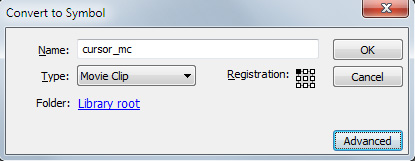
Convert the object to a movieclip.

By default, the registration point (the cross, not the circle) is in the top left corner. This means that when we complete the project, the pencil will be slightly off from the location of the mouse. To fix, double click on the pencil, and realign it so that the end of the pencil is on the registration point.
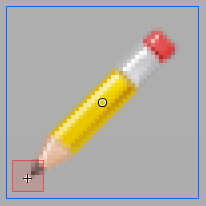
Realign the image to match the registration point.


Step 14: Receiving Create Document Class

As in the first part, save your FLA as Receiving.fla and then create a blank AS file. Save this file in the same folder as your FLA and name it Receiving.as.

Create a new ActionScript file.

Then go back and link the document class to the FLA.
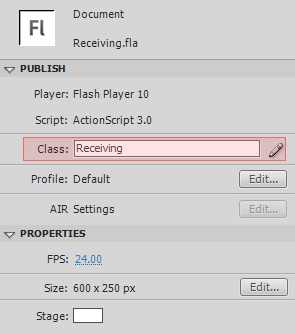
Link the document class to the FLA.


Step 15: Receiving Set Up Document Class

Add a blank package, class and constructor function to your AS file.

package {

	public class Receiving extends MovieClip {

		public function Receiving() {
		}

	}

}

Step 16: Receiving Import Classes

Just like before, import all the classes we will need.

package {

	import flash.display.MovieClip;
	import flash.events.Event;
	import flash.events.StatusEvent;
	import flash.net.LocalConnection;

	public class Receiving extends MovieClip {

		public function Receiving() {

		}

	}

}

Step 17: Receiving LocalConnection Usage

We are now ready to start writing the code to receive the information from the local connection. Here is what we need to do:

  • Declare an instance of the class.
  • Connect to the local connection.
  • Set the client for the local connection.
  • Create a method to receive data from the local connection.

Declaring an instance of the Local Connection class is the same as before:

private var localConnection:LocalConnection = new LocalConnection();

Next we need to connect to the connection which we created when we sent the data from the other file.

localConnection.connect("_connectionName");

Now we set the client. The client indicates the object on which the functions are called. It is normally set to this.

localConnection.client = this;

Finally, we need to create a blank function which will receive the data through its arguments.

public function methodName(variable1:type,variable2:type...):void {};

Step 18: Receiving Declaring the LocalConnection and Writing the Constructor Function

Now that we know how to receive information with a local connection, we can begin writing the script. First declare a new LocalConnection instance. Place this before the constructor function in the class.

private var localConnection:LocalConnection = new LocalConnection();

Then, in the constructor function, connect to the local connection and set its client:

public function Receiving() {
    localConnection.connect("_mouseConnection");
    localConnection.client = this;
}

(Notice that we are connecting to a local connection with the same ID as we used in the Sending file.)


Step 19: Receiving processData() Function

When information was sent from the sending file, a receiving function or method was named. In this project, I used the function processData(). The following function receives the X and Y coordinates as arguments and then uses them to set the pencil’s position.

public function processData(mX:Number,mY:Number) {
    cursor_mc.x = mX;
    cursor_mc.y = mY;
}

This function needs to be a public function so that it can be accessed through the local connection.


Step 20: Receiving Status Event

As with Section 1, because we are using a local connection, we will need to handle status events. The event has already been imported in Step 16, so we now need to add an event listener for the events. Let’s add a line to the constructor function:

public function Receiving() {
    localConnection.connect("_mouseConnection");
    localConnection.client = this;
    localConnection.addEventListener(StatusEvent.STATUS, onStatus);
}

Then we create a blank function to respond to the event listener:

private function onStatus(e:StatusEvent):void {};

Step 21: Receiving Summary

In this second part we have successfully received information from a local connection and processed it. Here is our finished AS file:

package {

	import flash.display.MovieClip;
	import flash.events.Event;
	import flash.events.StatusEvent;
	import flash.net.LocalConnection;

	public class Receiving extends MovieClip {

		private var localConnection:LocalConnection = new LocalConnection();

		public function Receiving() {
			localConnection.connect("_mouseConnection");
			localConnection.client = this;
			localConnection.addEventListener(StatusEvent.STATUS, onStatus);
		}

		public function processData(mX:Number,mY:Number) {
			cursor_mc.x = mX;
			cursor_mc.y = mY;
		}

		private function onStatus(e:StatusEvent):void {};

	}

}

Conclusion

In this tutorial we have learnt how to use the LocalConnection class. You have seen how to send information, receive information and also how to handle status events. This method is often used in web advertising when an advertiser wishes to synchronise an advert between two different ad positions on a single webpage. This same principle can easily be developed to include two-way communications between two files.

Thank you for reading this tutorial; I hope you enjoyed it!

Quick Tip: iPad-Proof Your Flash Website

In this tutorial you will learn how to use SWFObject script to set up automatic redirection from a Flash website to a non-Flash backup website when it’s viewed on an iPad.


Final Result Preview

Here’s a very simple mock-up of a Flash website we’ll be using in this tutorial. If you try to access that page using iPad you won’t be able to see any content.

And here’s the final result we’ll be working toward. if you access it with iPad you’ll be able to see the animated page.


Introduction

When the wind of change blows, some people build walls, others build windmills.

– Ancient Chinese proverb

I think iPad is a great device, even though I can understand why the introduction of the Flashless tablet made quite a few people mad. I admit it did make me mad at first: just before iPad appeared in my local Apple store I finished a Flash website I considered my personal masterpiece, and I was taken aback when, trying to open it with iPad, instead of my ultra-cool Flash animation I was redirected to the backup non-Flash site I set up “just in case”. I confess it took me some time to adapt my mind to iPad, but gradually I’ve learned to believe that, like all pioneering works, it had to break out of the comfort zone, and I guess I’m cool with that.

Of course what helped me to arrive at that philosophical attitude was the number of people who hired me to set up similar redirections for their existing Flash websites. They either couldn’t afford to, or didn’t want to replace their fancy, well-designed Flash sites with simpler but more iPad-friendly ones, so the option of setting up automatic iPad redirection to a simpler, pure HTML site appealed to them.

(One may argue that, even not being able to play Flash animations, iPad is more open toward JavaScript, but unfortunately that’s not the case. The majority of JavaScript-animated sites don’t play well on iPad. Test any of these ten JavaScript animated websites on your computer and then on iPad to see what I mean.

We’ll have to wait until HTML5 is fully implemented to see the new Internet where third party plugins like Flash Player gradually lose its importance. In the meantime, the release of the iPad tablet has created a new temporary niche in web development: iPad-proofing existing Flash websites. There are thousands of excellent Flash websites out there that could benefit from such service; it’s a great work opportunity for guys like you and me.

There can be many different ways to iPad-proof a Flash website, some better than others. This tutorial offers just one possible simple solution. So let’s get down to business.


Step 1: Prepare the Backup Website

It could be a complete non-Flash website containing the HTML version of all the content copied from the Flash site, or just a single web page with only basic information and a message to the visitor, something along the lines of “you are viewing our website on a device that doesn’t allow Flash content to be displayed. To access all the features, please open our website using a computer with the latest version of the Flash player installed.”

For this tutorial, I prepared a simple JavaScript-animated web page to serve as backup. iPad is capable of playing the animation moderately well. Creating iPad-friendly JavaScript animations is beyond the scope of this tutorial, but you can find some useful information about it on the home page of the $FX() JavaScript animation library (and you are also welcome to explore the source code of the JavaScript-animated page we’ll be using as our backup).

Note: to allow the JavaScript-animated page to play when uploaded on your server you will also need to upload the fx.js file located in the Scripts folder among the downloadable files for this tutorial.


Step 2: Flash Website Source Code

We need to find out what code was used to embed the SWF file of the original Flash website into its HTML page. We can do this by opening the page in the browser and selecting the View Source option. Alternatively, we can open the page in any text editor or specialized HTML editor.

The snippet of code that embeds a SWF file in the HTML page is easy to recognize within the source code. Activate the Find function and search the page for “swf”. Doing so will reveal the name of the swf file embedded in the html page. The code surrounding the name of the swf file is the code that embeds it in the html page.

SWF files can be embedded in an HTML page in a number of different ways. Describing them all would make this tutorial endless, so if you’re curious you can just Google it. I’ll only mention some of the most popular ones.


Using HTML tags

Basic HTML tag-based code for embedding a SWF file may look like this:

<object classid="clsid:D27CDB6E-AE6D-11cf-96B8-444553540000" codebase="http://download.macromedia.com/pub/shockwave/cabs/flash/swflash.cab#version=6,0,0,0" width="800" height="580" id="FlashWebsite" align="">
<param name=movie value="FlashWebsite.swf">
<param name=quality value=high>
<param name=bgcolor value=#FFFFFF>
<embed src="FlashWebsite.swf" quality=high bgcolor=#FFFFFF width="800" height="580" name="FlashWebsite" align="" type="application/x-shockwave-flash" pluginpage="http://www.macromedia.com/go/getflashplayer"></embed> </object> 

Chances are, that Flash site was made a while back: from the codebase attribute of the object tag we can see that the SWF is to be played by the 6th version of the Flash player.

The code is mostly self-explanatory, it’s very clear what parameter does what. One thing to mention is that as you can see, for some seemingly mysterious reason most of the parameters are indicated in the code twice. This is easy to explain: the code targets two different Internet browsers separately.

The <object> tag with all its attributes and parameters targets Internet Explorer. The <embed> tag targets the currently deprecated Netscape Navigator (that browser ignored the object tag). Hence, the repetition of the same information.

I should also mention that classid attribute of the <object> tag tells Internet Explorer that it should load the ActiveX plugin if it’s not installed; pluginpage attribute of the <embed> tag tells Netscape Navigator to display the link to the plugin page.


Using AC_RunActiveContent.js file.

AC_RunActiveContent.js is a JavaScript file that was still widely used only a few years ago. Some programmers still working with Flash CS3 Professional may still use it even now.

The code embedding the swf file using AC_RunActiveContent.js may look like this:


<script type="text/javascript" >
AC_FL_RunContent('codebase','http://download.macromedia.com/pub/shockwave/cabs/flash/swflash.cab#version=8,0,0,0','width','800','height','580','align','middle','src','FlashWebsite','quality','high','bgcolor','#ffffff','name','FlashWebsite','allowscriptaccess','sameDomain','pluginspage','http://www.macromedia.com/go/getflashplayer','movie','FlashWebsite' );
</script> 

There’s also a line of code within the tag of the page that may look like this:


<script src="Scripts/AC_RunActiveContent.js" type="text/javascript"></script>

The purpose of the inclusion of the AC_RunActiveContent.js file was the change made by Microsoft Corporation to Internet Explorer browser in 2006. As a result of that change (brought about by certain legal matters known as “Eolas patent problem” and not directly related to technical aspects of web programming), the visitors who opened Flash websites using Internet Explorer had to click the embedded content before being able to see or interact with it.

AC_RunActiveContent.js file was a workaround that allowed users to skip that bothersome click and display the active content right away, by the means of generating the html tags within the JavaScript file. That file is typically located in the Scripts folder in the same directory as the HTML page where the swf file was embedded. Not to go into too much detail, the AC_RunActiveContent.js file is called via the AC_FL_RunContent function, and the attributes and values are passed to the file in pairs: ‘width’, ’800′, ‘height’, ’500′ and so on. You do not need to include file extensions with the names of swf files, the JavaScript file does that automatically.


Using ufo.js

UFO (an acronym that stands for Unobtrusive Flash Objects) is a JavaScript file used since 2006 for detecting versions of Flash Player and embedding swf files into HTMl pages. It was created by Bobby van der Sluis.

The code for embedding a SWF file into an HTML page with ufo.js may look like this:

<script type="text/javascript">
		var FO = { movie:"FlashWebsite.swf", width:"800", height:"580", majorversion:"8", build:"0" };
		UFO.create(FO, "container");
		</script>

The reference to the JavaScript file within the <head> tag may look like this:

<script type="text/javascript" src="Scripts/ufo.js"></script>

The arguments of the ufo.js are self-explanatory. The file was very popular, but is currently deprecated.


Using FlashReplace.js file.

FlashReplace.js is a lightweight (2.1 kb) JavaScript file created by Robert Nyman.

The code for embedding a SWF file in an HTML page using FlashReplace.js may look like this:


<script type="text/javascript">
    FlashReplace.replace("container", "FlashWebsite.swf", "Flash Website", 800, 580);
</script>

Obviously, as is the case with AC_RunActiveContent.js and ufo.js files, you will also find the reference to the JavaScript file within the <head> tag. It may look like this:


<script type="text/javascript" src="Scripts/FlashReplace.js"></script>

As you can see, FlashReplace.js is really easy. The first argument is the name of the HTML tag whose content is to be replaced with the swf file; the second argument is the name of the swf file, the third argument is the arbitrary id you can assign to the object you’re embedding, and the last two arguments are the width and height of the SWF file.


Using swfobject.js file.

swfbject.js was created by Geoff Stearns, Toby Boudreaux and Bobby van der Sluis. It is currently (2010) the most popular and widely used JavaScript library for detecting versions of Flash player and embedding swf files into HTML pages.

The code for embedding a SWF file in an HTML page using SWFObject.js may look like this:


<script type="text/javascript"><!--
			var so = new SWFObject("FlashWebsite.swf", "FlashWebsite", "800px", "580px", "9", "#FFFFFF", "high");
			so.write("container");
// --></script>

The snippet of code you just read is a very basic example of how the swfobject.js may be implemented. The code may be much more complex. For more information, check out this swfbject.js tutorial and consult the developers documentation.

The reference to the JavaScript file within the <head> tag may look like this:

<script type="text/javascript" src="swfobject.js"></script>

Step 3: Redirect to the Backup Website

If the existing Flash website is using SWFObject.js to embed swf file, you’re in luck: we are going to use SWFObject.js type of embedding to set up redirection to the non-Flash web page. If any other kind of embedding scenario is used, we’ll have to erase the old code from the HTML page and replace it with the SWFObject embedding. We are going to use SWFObject to redirect iPad visitors to the backup non-Flash website.

For the purposes of this tutorial, we are going to use a training page that has the SWF file embedded using the AC_RunActiveContent.js file. If we open the FlashWebsite.html page in a browser, we’ll see the familiar SWF file embedded in the page.

Let’s open the page called FlashWebsite.html in any text editor or any specialized HTML editor.

We should remember or write down the important information about our SWF file, such as its name (FlashWebsite.swf in our example), width (800), height (580) and background color (#FFFFFF).

Now let’s replace the line that references the AC_RunActiveContent.js file in the tag:


<script src="Scripts/AC_RunActiveContent.js" type="text/javascript"></script>

with this line:


<script type="text/javascript" src="Scripts/swfobject.js"></script>

We have now created the reference to the SWFObject library.

Let’s locate a code that looks like this:


<script type="text/javascript" >
AC_FL_RunContent('codebase','http://download.macromedia.com/pub/shockwave/cabs/flash/swflash.cab#version=8,0,0,0','width','800','height','580','align','middle','src','FlashWebsite','quality','high','bgcolor','#ffffff','name','FlashWebsite','allowscriptaccess','sameDomain','pluginspage','http://www.macromedia.com/go/getflashplayer','movie','FlashWebsite' );
</script> 

We’ll select that bit of code and erase it. What we have now is the empty <div> tag:


<div id="container">
</div>

Below that tag, let’s paste the following:


<script type="text/javascript"><!--
			var so = new SWFObject("FlashWebsite.swf", "FlashWebsite", "800px", "580px", "9", "#FFFFFF", "high");
			so.write("container");
// --></script>

Note that the argument in parentheses for the single added parameter (so.write("container")) matches the name of the empty <div> tag: “container”. That argument tells the browser where to place the Flash content. The swf file will be embedded inside the empty <div> tag marked with the id “container”.

Note: the fifth argument in the parentheses of the SWFObject function, “9″, refers to the major version of the Flash player. When it’s of no particular importance, I prefer to give browsers some slack and to not demand the laterst version of the Flash player, so I set it here to 9, even though the current version today (2010) is 10.

Let’s save the HTML page and open it in a browser. It should look like this.

So far, nothing seems to have changed. The Flash animation played when embedded using the AC_RunActiveContent.js file, and it plays in quite the same way now, being embedded with swfobject.js file. If we tried to open that page with iPad we still wouldn’t see any content.

Let’s add two more arguments at the end of the series of arguments within the parentheses of the main function call. The first argument should be empty, just the quotation marks: “”, and the second argument should be the path to the backup non-Flash web page we want to redirect the iPad visitors to: “./JavaScriptWebsite.html”

The complete bit of code with the two new arguments added should look like this:


<script type="text/javascript"><!--
			var so = new SWFObject("FlashWebsite.swf", "FlashWebsite", "800px", "580px", "9", "#FFFFFF", "high", "", "./JavaScriptWebsite.html");
			so.write("container");
// --></script>

The first, empty argument we’ve just added is called xiRedirectUrl, and it’s used by SWFObject script to redirect users who complete the ExpressInstall upgrade. We are not using the ExpressInstall here, so we leave the argument empty. The second argument, called redirectUrl, is used by SWFObject to automatically redirect the users who do not have the required version of a Flash player installed – which is exactly the function that we needed all along. iPad tablet doesn’t have ANY version of Flash player installed, so it qualifies!

Note: “./JavaScriptWebsite.html” is the local path to the JavaScript-animated backup page we use in this tutorial. That path will allow us to test the redirection locally as well as on the server. Working with your own projects, you can set the absolute path to your backup html page instead of the local path, or a local path to any directory or subdomain where you may choose to host the backup page.


Step 4: Test the Redirection Locally

Before uploading the files to the server, we should test redirection locally. To be able to do that, we’ll simulate the iPad by setting the version attribute of the SWFObject to a non-existing version of the Flash player. Let’s go wild and set it to a 1000 (that version of the Flash player should be available sometime around 3000 A.D. if things go well at Adobe).

The code should look like this:


<script type="text/javascript"><!--
			var so = new SWFObject("FlashWebsite.swf", "FlashWebsite", "800px", "580px", "1000", "#FFFFFF", "high", "", "./JavaScriptWebsite.html");
			so.write("container");
// --></script>   

Don’t forget to save the file.

Now let’s open the FlashWebsite.html in a browser and take a look at the title bar of the web page. Instead of saying “Flash Website”, it should say “JavaScript-Animated Website”, and the last part of the URL should be JavaScriptWebsite.html instead of FlashWebsite.html. Congratulations, our redirection is working: the ultra-advanced animation you see in your viewport is done not with Flash but with JavaScript. It should look and behave like this.

Let’s reset the version value back to “9″. The code in the FlashWebsite.html should again look like this:


<script type="text/javascript"><!--
			var so = new SWFObject("FlashWebsite.swf", "FlashWebsite", "800px", "580px", "9", "#FFFFFF", "high", "", "./JavaScriptWebsite.html");
			so.write("container");
// --></script>

Make sure to save the file again.


Step 5: Upload Files to a Server

Using any FTP client software, let’s upload the following files to a selected directory on your server:

  • FlashWebsite.html
  • FlashWebsite.swf
  • JavaScriptWebsite.html

Upload the Scripts folder containing swfobject.js and fx.js files to the same directory on the server (to remind you, swfobject.js is the file that enables swf embedding as well as redirection, and fx.js file is the one that allows you to create and play JavaScript animation used in the backup web page which is suitable for being played on iPad).

You do not have to upload the AC_RunActiveContent.js also located in the Scripts folder to your server, even though if you’ve accidentally done so, that file would in no way interfere with the performance of all the other files you’ve uploaded.


Step 6: Test the Redirection with iPad

Here it comes, the moment of truth! Fire up your iPad tablet and access the FlashWebsite.html page uploaded to your server. Voilà! You should see the JavaScript-Animated mockup page instead of the Flash page. We’ve just iPad-proofed a Flash website.


Conclusion

You’ve just learned one of possible ways to iPad-proof an existing Flash website. There are many ways in which that goal can be achieved, and not all of them involve automatic redirection. I’d like to ask you all to share your ideas about the subject of iPad-proofing Flash website in the comments to this tutorial. Thank you for reading!

Write a Material Renamer using Maxscript in 3Ds Max

Keeping your scenes organised can be a somewhat tedious task, so any tools that can be used to speed up and simplify the process can be very useful! In this tutorial, Benoit Staumont takes us through how to write a much-needed custom Material Renamer script, using Maxscript in 3Ds Max. The result is an incredibly useful script that you can use easily on any future projects.

Video 1

Download

Note: click the ‘Monitor’ icon to view tutorial in full-screen HD.


Don’t miss more CG tutorials and guides, published daily – subscribe to Cgtuts+ by RSS.

Using Xplode to Shatter Objects in Cinema4D

In today’s tutorial, David Kwasnik takes us through the process of creating an amazing Cgtuts+ ident, using the Xplode plugin for C4D. This plugin allows you to very easily and quickly cut any object up into many different pieces, and in the following video David shows us how to art-direct the size of these pieces to get the required result. This process, combined with MoDynamics and Mograph 2.0, is used to create an impressive shattering effect. It’s then over to AE for some optional compositing work!

Video 1 – C4D

Download

Note: click the ‘Monitor’ icon to view tutorial in full-screen HD.


Video 2 – AE

Download

Note: click the ‘Monitor’ icon to view tutorial in full-screen HD.


Don’t miss more CG tutorials and guides, published daily – subscribe to Cgtuts+ by RSS.

Win 1 of 3 Marmoset Toolbag V1.01 Licenses in our July Competition!

To celebrate the release of Marmoset Toolbag V1.01, the real-time model presentation tool, we’ve teamed up with 8monkeylabs to give away 3 full licenses in our fantastic July competition! Read on to find out how you can enter…

What is Marmoset Toolbag?

Marmoset Toolbag is a fully-featured, real-time material editor and presentation tool. You can easily import your models, add texture maps and custom environments as well as tweak material settings, all in real-time. Once you have your model looking exactly as you want, Toolbag gives you the ability to render out single images or setup full turntable animations which can then be captured using software such as Fraps or the open-source CamStudio. The video below shows a portion of just what is possible :

You can visit the 8monkeylabs site to read more about the application : http://www.8monkeylabs.com

What you can win

The three winners of the competition, jointly chosen by 8monkeylabs and Cgtuts+ will each be awarded one full, node-locked license for the newly released Marmoset Toolbag V1.01.

Please be aware that Toolbag is currently a Windows-only application, although it does run smoothly on OSX Bootcamp!


How to enter

Using the many different features in the evaluation version of Marmoset Toolbag, we want you to come up the coolest image or animation you possibly can, and then post a link to it in the comments below. Don’t have a model you can use for your entry? No problem; Toolbag comes bundled with several simple models you are free to use. And remember, we’re not looking for the most complex model, just the coolest looking final result!

To get started, you’ll need to head over to the 8monkeylabs site and download an evaluation copy of the software. To do this, click this link and then at the bottom of the Toolbag page, click the top Add To Cart button on the Evaluation Download line. In the window that pops-up, click the Checkout button and then add in your information and click OK to be provided with your download link.

The evaluation version is fully-featured, allowing you to sample all of the available tools, and it lasts for 20 days. Once downloaded and installed be sure to take a look at the User Manual to quickly get up to speed on the application itself.

8monkeylabs have kindly offered to keep a close eye on the comments, so if you have any problems with the install, the workflow or any of the features, just leave a comment with as much detail as you can and they’ll do their best to get back to you quickly! Alternatively, you can email [email protected].

Submitting your entry

Once you have your final image or animation, we want you to upload it to one of the many free file hosting sites (MegaUpload, YouShare, Flickr, Youtube and Vimeo to name just a few) and then post a link in the comments below, making sure that you add the word ENTRY in capital letters to the start of your comment.

This competition is open worldwide, and runs for 14 days, so make sure to get your comment in before midnight on August 3rd, 2010, Pacific Standard Time.


Competition Rules

  • Although you can post as many images and animations in the comments as you’d like (in fact, we encourage it!) each user can only have ONE final entry. If you submit more than one comment containing the text ENTRY, only the first comment will be counted.
  • Envato staff and people who have written more than two tutorials/articles for a Tuts+ site are not eligible to enter.
  • The judges decision is final, and no alternative prize is being offered.

Other than that, have fun, enjoy the software and good luck! I can’t wait to see what you all come up with!


Don’t miss more CG tutorials and guides, published daily – subscribe to Cgtuts+ by RSS.

16 Tips for Being Productive While Working From Home

I work from home. My friends think I am the luckiest. I have all the time in the world. I don’t need to commute everyday. My work’s easy. I can go out whenever I want. Great life, right?

I wish all of that was true.

Despite the benefits of working from home, it is no less challenging than an office job. In fact, I’d argue that working from home is more difficult because it’s not always easy to alienate your family from your work. Also, since there’s no boss screaming all the time, you could easily fall into the procrastination trap. Haven’t you experienced that? I bet, you have. Being productive while getting things done from home isn’t as easy as it looks. In this article, I explore 16 ways that could help you work smartly if you are one of us. Most of the tips come from my personal experience of working from home for over two years. Hope you find them useful.

Scheduling

1. Routine is a must. Getting into a state of mind that you could work whenever you want and you don’t need a routine is the first step towards procrastination. Whether you are working from home or an office, a routine is a must. Of course, there are days when exceptions need to be made, but for most of the time, you have to follow a fixed schedule. That’s the best way to get things done productively, from home.

2. Know your best times. The good thing about working from home is that you can make your routine. It doesn’t necessarily have to be 9 to 5. It could any fixed time-frame in the 24 hour span. Hence, check what are your best working times, and make your routine accordingly.

3. Plan the day before. Making a tentative work schedule for the next day before you go to sleep is usually a fruitful exercise. The next day, when you begin work, you will have an idea about the things you need to accomplish (unless some urgent tasks need to be attended). For more on this, check what my fellow WorkAwesome contributor Andre has to say on beginning your work day at the end of it.

4. To-do lists. To-do lists give you a clear picture of the tasks ahead. And as you complete them one by one, checking them off the list is kinda satisfying too. Learn how to create effective to-do lists. Also, there are some nice online to-do list tools you could make use of.

Handling Distractions

5. What distracts you? Some people need pin-drop silence to work. Some work best when they’ve got music on. Some cannot work with people around. Some need people around to work. Hence, a distraction for one could be a good work environment for the other. So, what distracts you? You can handle them only once you know them.

6. Make your friends and family aware. Often you will find that friends and family fail to realize the seriousness of your work just because you are not going to an office. Your friends would stop by when they are free (doesn’t matter you are free or not), your family members would disturb often, and so on. You need to make them aware about your work schedule, and the fact that working from home doesn’t mean you are always free. The onus is on you.

7. Switch off, disconnect. You may need the internet to work, but being connected all the time might not be wise since there are so many tempting distractions (read Twitter and Facebook). If possible, disconnect from the internet when you are doing creative stuff like writing or designing. Also switch off your phones (or put them in silent mode) if that’s an issue.

8. Take breaks. It is very important to take regular breaks and take your eyes off the computer. Working for long hours in the same position isn’t good for your health. You could take small 5 minute breaks after each 20-25 minute stretch, or may be a 15 minute break after a 1 or 1 and a half hour stretch. But do take them frequently.

Monitoring

9. Are you measuring quality or quantity? It is important to monitor if you are actually producing a productive output while working from home. What are you focusing on? the quantity of work done or the quality? Are you able to follow your routine effectively? Is life happier or stressful?

10. Get a work buddy. If self-discipline or procrastination is an issue, may be a work buddy could help you out. Someone who would track your progress and give you feedback. Working from home doesn’t mean you stop collaborating with people. Talk to people online, make friends and ask them for suggestions.

11. Use RescueTime. We’ve previously talked about RescueTime here. RescueTime is web based time tracking software lets you know how you spend your time on your computer everyday. Once you know which sites you are addicted too, you could take steps to visit them less often.

12. Time your tasks. Whether you are writing an article, or browsing through your feeds, use a timer to time the tasks. For more on this, check how to time your tasks. Also, take a look at my previous list of web based time tracking tools for effective time tracking.

13. Set up daily milestones. Setting up daily milestones gives you an idea of the actual work you could get done contrary to what you think you can get done. Also, it lets you track if you are getting things more efficiently after you’ve implemented the productivity-enhancing steps discussed above.

Health, Fun & Life

14. Exercise. This is a no-brainer, but, worth repeating in every productivity related article. Why? Because people just don’t understand how important it is to stay fit and productive. Understand that you don’t need to visit the gym everyday. Half an hour of yoga, or a short run in the morning is enough. But do it consistently, everyday.

15. Spend time with family and friends. If you are being productive in your work, you should be able to take out time for family and friends on weekends. That’s the goal, isn’t it? Work-life balance has to be maintained. Dedicate a day each week for your loved ones. Set aside time. Try to get your work done in 5 or 6 days of the week. Take a day off.

16. Do things that make you happy. All productive work and no play would make you unproductive in the long run. Spending time with yourself is as important as spending time with your loved ones. Play guitar, draw sketches, go for a long drive. Take time out, free up your mind and indulge yourself. Be happy!

Have You Hired a Business Coach?

Though I’ve been freelancing full-time for two years, and I’m happy with where I am in my business, I’m a big fan of personal development. I read books, follow blogs, take classes, and attend conferences in my field. After all, everyone has areas where they could improve. Recently, I had the idea that I should hire a business coach to help me rethink some of the strategies I use and help my business climb to the next level.

A colleague suggested several business coaching candidates, so I contacted a smaller subset of that group and discussed my needs over the phone. The first coach seemed friendly, yet professional, and we clicked almost immediately. As our conversation concluded, she agreed to send me a proposal of what our coaching relationship would look like.

The second coach seemed equally friendly and professional, but after we chatted for awhile, she did something that few self-employed professionals do: discouraged me from becoming a client. “It sounds like you have solid strategies in place, and the few issues you’ve had were unusual circumstances,” she said. “I hate to turn away business, but I’m just not sure you need this right now.” I told her appreciated her honesty and that I’d get in touch if I really did need her in the future. When the first coach got back to me with her proposal, I responded similarly. I’d also been thinking about hiring a personal assistant and that seemed like a better use of resources anyway.

Though I didn’t end up using a business coach, there are others who went the other way.

Have you hired a business coach or a life coach? What did you look for? How did they help you?

How Do You Get Energized?

It’s three in the afternoon. You’re tired, lethargic and ready to call it quits. Although you may be tempted to slump in your chair and let your eyes roll back in your head, you try to stay awake. After all, this isn’t the first time you’ve encountered the afternoon blahs. By now you’ve probably discovered a few pick-me-ups to help you stay productive during times like these.

For some, a quick walk around the block is all it takes. Other people get energized by checking out their favorite blogs or listening to music. A steaming cup of coffee or a lively chat by the water cooler are other standbys.

So what’s your favorite pick-me-up? How do you get a quick jolt of positive energy?

Managing Your Personal Brand Online

No matter your field, there are several advantages to establishing a presence online. You can connect with colleagues and customers, learn new things and help others learn, as well. But as you establish your online identity, it’s important to think about your personal branding.

Just like Pepsi and Starbucks, we each have a brand. It represents how people perceive us—who we are, what we stand for, what we do and how and why we do it. On the web, it can be distributed across a range of platforms, such as Twitter, Facebook and maybe our own website or blog. This puts the burden on you to make sure your online personal branding is up-to-date, accurate and presented to your satisfaction.

Here are a few ways you can manage and monitor your personal brand on the web:

Personal Digital Strategy

Before diving in and setting up a bunch of accounts, think through what you want to achieve on the web. Who do you want to communicate to or engage with? Are you looking to learn about a topic of interest? Do you want to gain customers or make business connections?

Then, consider how each platform could help you achieve your goals. Not every platform will necessarily apply, so don’t be dazzled by the array at your disposal. Only commit to developing as much of a presence as you can commit to maintaining. Sitting down and mapping out your strategy for managing your brand online may not take very long, but it will provide a helpful road map going forward.

Google Yourself

One of the most basic and most essential things you can do is to regularly Google your name (including variations, such as nicknames or potential misspellings) to see where you are being mentioned on the web and in what context. You can also set up Google Alerts for any variation of your name so you can see where it’s popping up. There are several tools available to cast a wider monitoring net.

Mhairi Petrovic of Out-Smarts made the good point in this Slideshare presentation that it is important to see yourself as others see you. To that end, log out of your services and view your profiles as others see them. Do they look how you expect them to look, both visually and in terms of messaging?

Privacy

As you conceive your personal digital strategy, the next step is to think through your personal privacy policy. What information do you want to protect? Some things to consider:

  • Stay on top of changes in Facebook privacy settings, keeping in mind that anything you list as an interest on Facebook is publicly visible by default, even to non-friends.
  • On Twitter, if you choose to protect your tweets, you may be missing out on a lot of conversation and opportunity; create a separate, protected account if you want to engage on Twitter in a more personal and less brand-minded manner.
  • On LinkedIn, how much of your activity (e.g. recommendations, tweaks to your profile) do you want made public, if you are concerned about how other people might read into that?

Cross-Posting

As you manage your digital outposts, it is important to be aware of how these services interact. Many of these services allow you to send updates to the others, but by doing so, you may unintentionally create a lot of noise and redundancy. Check your settings and adjust appropriately. Some examples of this are:

  • Piping your Twitter updates into LinkedIn
  • Sharing your YouTube activity on Twitter, Facebook, Google Buzz/Reader
  • Cross-posting Facebook updates to Twitter, or vice versa

Maintain a Hub

You may do an excellent job managing your presence on Flickr, YouTube, Twitter and LinkedIn, but two facts remain:

  • These are still distinct, unconnected sites — linking from one to the others only goes so far
  • Despite your best efforts, you will never be able to absolutely control how these sites use and present your information

For these reasons, it is important to own your own digital brand with a website. Your website is your online hub, where all of your digital outposts should point to and come home to roost. It is the one space on the web that you can completely control. If you decide to get a website, consider your domain name very carefully. It is also advisable to reserve – even if you don’t have a plan to use them – your desired names across a range of social networks via a tool like namechk.com.

Online and Offline Alignment

The challenge of having our brand distributed across a range of services and platforms is that there is no way to update all of them at once. Since in all likelihood you will set up one platform to link to all or most of your others, it is important to have your information and presentation be up-to-date and consistent across the board. This includes details about your current employer, contact information and goals. This can also extend to your professional portrait, and even your color scheme.

In addition, any non-digital material you have – memorable business cards, a portfolio, even a downloadable PDF on your website – should also remain up to date and aligned with your digital collateral. Make a checklist of online and offline materials to review whenever you have a change in your professional life.

Search Engine Optimization

A successful brand is one that is useful and relevant. Search engine optimization (SEO) is the practice of tailoring your website content to rank highly in search engines. One way of elevating your personal brand is to elevate your content, whether it’s your blog posts or static pages on your website. If people find your information useful, your personal brand gets a boost. For a good introduction to SEO, visit SEOMoz.

Be a Professional

This is both the simplest bit of advice and perhaps the most critical. Sure, it’s the web and it’s fun, but if you are using it toward professional ends, be mindful of what you say and who you associate with – just as you would in the real working world.

What have you done to manage your personal brand online?

9 Ways to Sync Bookmarks

I’m writing this on a desktop computer. I also use a laptop – when I’m away from home or working from the patio. In addition, there are two mobile devices in my messenger bag that can access the Internet. Oh, and I used to work for an employer who provided yet another desktop computer.

That means five different Web browsers with different sets of bookmarks. So if I save a site to my bookmarks at work, how do I remember it when I’m at home or working from my favorite coffee shop?

Thankfully. there are plenty of ways to sync bookmarks. Basically they store your URLs on their servers and sync them with your computer – or allow access via the Web. I prefer the tools that integrate smoothly with my Firefox browsers and keep bookmarks private.

  • Xmarks: This is my preferred choice for the Firefox browser. It’s seamless, fast and easy. It also will save passwords if you like.
  • Google Chrome Sync: This is  built into Chrome so you don’t have to download or install anything.
  • Sync2It: This offers a toolbar and mobile access with your device/phone browser.
  • Evernote: A lot of people love Evernote’s features for taking notes and clipping web pages. It can serve as a bookmark storage if you use someone else’s computer or one with community access. Note this isn’t as easy as using the previous tools.
  • Gmail: Lifehacker explains how to create a bookmarklet that saves links to your Gmail account. It’s a hack and takes some work. But it may serve your needs.

If you don’t have anything to hide when you’re surfing and saving URLs, maybe a social bookmarking service is for you. There several that let you easily share and categorize the pages you think are worth saving. Plus these sites have privacy features that let you keep URLs hidden.

The beauty of social bookmarking sites is that they are great places to look for other sites you may be interested in seeing.

  • Delicious.com: One of the earliest services that’s easy to use.
  • Stumble Upon: Again, easy to use. Many bloggers and Internet marketers credit the service with increasing traffic.
  • Google Reader: If you use this RSS reader, you also can create a bookmarklet that saves URLs and clips text to a central page. Privacy and keyword categorization are available.
  • Bit.ly: Yes this primarly a URL shortener. But it does keep track of the URLs you shorten, which could end up being a handy bookmark storage system.

These services and tools also serve as backup for my bookmarks. If something goes wrong, I don’t lose the important addresses I need.

What bookmarking tools work well for you?

How Relative Is “Being on Time”?

In some cultures it is acceptable to be late, meaning arriving after the agreed upon time. This makes the definition of “being on time” subjective as some take it as meaning being 5 minutes before the agreed upon time, for others 15 minutes after.

I’ve asked this of many people and some swear there’s no such thing as cultural differences when it comes to being on time. Others argued that everyone knows that everyone else will be 15 minutes late so, in fact, everyone is on time.  In today’s increasingly diverse workplaces these differences can create some tension – and make some team members feel they’re being taken advantage of.

Do you deal with this cultural difference in your workplace? What approach do you take?

10 Life-Changing Benefits of the Internet Age

It is hard to imagine life without the internet.  Actually, I am old enough to do just that.

But it is amazing the effect that the internet has had on our lives.  Believe it or not, there are still many people who don’t even own a PC – but that number is dwindling each year.  It brings to mind all of the technological benefits of the internet age.  My life has certainly changed within the past thirty years due to the internet and it’s a fine time to reflect on the impact it has had over its lifespan so far.

1. Modes of Communication

I remember when there were basically three different modes of communication: face-to-face communication, telephone conversation, and snail mail.  Today, email is the preferred method of communication.  It is an indirect method that most people prefer.  Your recipient can either choose to respond or not – and you have conveyed your message without needing to have direct communication.  In the internet age we also have VoIP (Voice over Internet Protocol – popularized primarily with the emergence of Skype and Google Voice), instant messaging and texting.  Texting has usurped email as the main type of communication with young people.  Instant messaging is still being used in the business world, while Skype and Google Voice are used for personal and business communication.

2. Online Banking

The only time I write a check now is for a gift at a christening or a wedding.  If you haven’t started online banking, you should definitely consider it.  I’ve been online banking for at least the past ten years and I absolutely love it.  The reasons for doing so are numerous, such as:

  • You don’t have to be constantly writing out checks to pay your bills, licking envelopes, and buying postage.
  • You can easily pay your regular bills like mortgage and car loan with a couple of clicks and the payments will be made electronically on the proper day to avoid late charges.
  • You can also receive your bills electronically and an email will notify you when the bill arrives.  Then, after logging into your bank website, you can schedule your bills to arrive on a given date.

Another great thing about online banking is that you can set up anyone as a recipient of funds.  So, if you want to send a check to a relative you can do so online either by having a paper check mailed to them or directly depositing the money into their account.

3. Online Degrees

I could be considered an authority on online education as I just completed another college degree taking online classes exclusively.  I just received my diploma in the mail last week and I never once visited the college.  I am a huge proponent of online education.  The benefits far outweigh any drawbacks – especially for anyone who works full-time – since the logistics of driving to and from class would simply be too time-consuming.  There wasn’t even the hassle of having to go to the bookstore as I could order those online as well.  Sure, there are some drawbacks – such as not having face-to-face interaction with classmates – but even that is possible if you want to Skype with them. If you have the inclination to go back to school for your degree, you should really consider taking an online degree.  Take one class as a test drive; you will not regret it.

4. Online Training and Seminars

I remember a time that the only way you could get training on the job was either by going to a training class or having a trainer come into your workplace.  Well, the landscape has certainly changed here.  Webinars have become extremely popular in the internet age, bringing together a virtual class online.  Gone are the travel costs for both the trainer and the trainee, which lowers the cost for the class itself.  Anyone can basically put together a training class from the comfort of their own home with tools such as GoToMeeting.  I regularly schedule GoToMeeting training classes with foreign counterparts and customers.

5. Searching

There were days when you wanted to learn more about a particular subject you would open a book, an encyclopedia or a dictionary.  At my house, we always had a full collection of World Book Encyclopedias. When the end of each year came, we would receive the edition that chronicled that particular year.  To this day I use a dictionary and thesaurus on a daily basis – but now they live online and not on my bookshelf.  Today, we have lightning fast search engines that can give us thousands of links based on specific keywords.  Just yesterday I used the internet to scope out farmer’s markets in my neck of the woods. Not only did I find a local one, but I got directions on how to get there.

6. Researching

My brother, a professor at a prestigious liberal arts college on the West Coast of the US , has written text books in the area of Government and Political Science.  He has told me that with the advent of the internet age, the manner in which he does his research for his books has changed dramatically.  In the past, he would have to go to a library to do his research.  Today all of this research is done online, in the comfort of his own office.  His main concern is to be conscious of sites with faulty information.  Fortunately for him, his research is typically done on legitimate government and political science websites – so that is a minor concern.

7. Buying Online

If you can’t find it in a local store, you can always find it online.  A case in point is that I recently could not find canned pumpkin anywhere in local stores.  My wife uses pumpkin to make pumpkin breads, pumpkin ravioli and for other baking needs.  It appears that there is a pumpkin shortage in the United States due to excessive rain.  So, I mentioned to my wife that we should try to find it online – and we did. We were able to order a case of canned pumpkin for a fairly reasonable price.  If you can’t find it at a local store, chances are you can find it online.

8. Telecommuting

The internet age has completely redefined how we work.  The ability to sit in your home office while connecting to all of the same resources as if you were in your work office is a reality in today’s workplace.  This has allowed people like me to avoid a two and a half hour commute on the days that I am allowed to telecommute.  The time savings, gas savings and the wear and tear on my car (and on me) is a huge gain.  There is nothing I can do at work that I cannot do at home – other than walk over to somebody’s office.  As mentioned previously, I use GoToMeeting if I need to meet with someone and share my computer.

9. Freelance Writing

With the popularity of the internet, there has been an explosion in online content.  As a result of this, there has been a huge boon in freelance writing.  Opportunities exist as never before in this area.  If you love to write and are good at it, chances are you can find an online presence that will pay for your services.  I have had the good fortune of doing just that for this very popular blog, which happens to be based halfway across the world.  Being able to develop a portfolio of your work, and get paid for it, is a tremendous opportunity in the online world.

10. Worldwide media accessibility

The internet has opened up all users to worldwide media.  Internet radio is accessible to anyone in the world connected to the internet.  An example of this is that the other morning my wife (of Greek descent) was going to put on some Greek CDs on the stereo as she cooked for a large group that was visiting later in the day.  I suggested to her that we should search the internet for a Greek radio site.  We quickly found a Greek radio website that had links of roughly fifty different radio stations, most of which were music stations.  We found a radio station based in Thessaloniki, Greece, which is where her mother was born.  I hooked up some cheap $5 speakers to my laptop and we were able to enjoy hours of Greek music, at no cost.  My wife was flabbergasted with the quality of the sound and the variety of the music.

These are just some of what I call “life-changing” advancements of the internet age.  The productivity and personal gains that the internet has given to the world are tremendous.  This list is not meant to be comprehensive but these are some of my favorites.  I am fortunate in that I am able to remember what life was without these conveniences.

I sometimes wonder if the young people of today can truly appreciate the gifts that the internet has bestowed upon us.

What Are You Doing to Impress Your Customers?

What do you do to show your current clients the difference between you and your competition?

There seem to be two schools of thought on this topic:

  • Do an excellent job on exactly what the client is looking for;
  • Do a good job on the project, and provide additional value as a bonus.

I got to thinking about this after reading about optimizing your freelance career, especially the reference to “undepromise and overdeliver.”

Do people try and compensate for a perceived shortcoming – maybe they are concerned about their grammar or the originality of their concepts – by adding in additional value?  Does a client look at the job and think, “Well, the concept is ok, but we’ve got three pages of web copy that we weren’t expecting – hooray!” or “Wow – brilliant concept, I know we didn’t ask for more, but it would have been nice to get a few more pages of copy”?

Have you found that it is better to deliver “excellence” to your customers and nothing else, or provide” acceptable” with bonus material?

Friday Photo Critique #42

Friday Photo Critique is our weekly community project, where we publish a photograph submitted by one of our wonderful readers, then ask you all to offer constructive feedback on the image. It’s a great way to learn more about photography, express your viewpoint, and have your own image critiqued!


Quick Ground Rules

  1. Play nice! We’ve deliberately chosen photographs that aren’t perfect, so please be constructive with any criticism.
  2. Feel free to offer any type of advice – composition, lighting, post-processing etc.
  3. You can also link to photographs that you feel offer a great example of this type of image shot exceptionally well.

Without further ado, here is this week’s candidate for Friday Photo Critique!


The Photograph

Photo Critique

Photographer: Torgeir Sundli

Please let us know what you think in the comments – how would you have approached the scene or taken the photo differently? A massive thank you to everyone who commented last week.

The most constructive and helpful comments will be featured on the site. Interested in submitting your own photo? You can do so here!

The Photographer’s Guide to Preparing for an African Safari

I had the extreme pleasure of embarking on a classic safari while on a recent visit to Tanzania. It was everything I had hoped and more, both from a photographic standpoint as well as having the chance to share it with my daughter. Today we’ll be sharing some fantastic tips on how to prepare for this type of photography trip.

As you might expect, an epic trip of this nature required a bit more planning than a roadtrip to Yellowstone National Park might. To get the most, photographically, from a once in a lifetime trip like this, I’ve compiled some obvious (and not so obvious) tips. I found that these helped me enjoy the experience and bring back some wonderful photos. This advice should apply to any location of safari on the continent of Africa.


Guidebooks, Maps And Videos

I’d highly suggest getting a wide variety of guidebooks when starting the planning stages, along with maps. My experience showed me that no single guidebook had all the information I really wanted. For one thing, there can be hundreds of tour operators in any given location and the process of narrowing them can be daunting.

This is the same for the folks writing the guidebooks. Each guidebook can only review a slice of those available so it’s best to get more than one opinion. And before you rush off to the bookstore, I’d suggest a quick trip to your local library first. The library is a wonderful place to start your search as you can get a feel for different guidebooks (some don’t list prices, some have a lot of photos, etc).

Maps are another must have in my book. I’m a bit of a map nut (just a warning), but without maps, we’d all be lost! When I started planning our trip to Africa I really had no idea just where all the National Parks we wanted to visit were located in reference to each other or, frankly, anything else in the country.

Is it physically possible to drive between point X and Y in a day? How far away from airports are our destinations? And what does the terrain look like (mountains, lakes, etc)? A map will help you get a handle on all these questions. Plus a map can help you understand the backgrounds and directions you may want to shoot at different times of day.

Lastly, videos can be a great way to get accustomed to your destination (and they are perfect to pique children’s interest!). I found a number of videos made by a husband and wife team for the parks we were visiting. While the large budget National Geographic videos are astounding and captivating, I found these videos to show a more realistic view of what we eventually saw in country. Again, the library can be an invaluable resource to view the videos for free.


Storage

Photo storage can be a big issue while on safari but it is no different than most travel situations. Odds are you won’t have an Internet connection for most of your trip (although this is changing constantly) so your storage solution needs to travel with you. There are a few ways to handle this:

Multiple Cards

The multiple cards path can often seem the easiest, but it has its downfalls. For one thing, you only have one copy of each picture so if a card goes missing or corrupt, you might lose a large part of your trip. Also, organizing them can be an issue, making sure you keep the cards that have images on them separate from those ready to use and correctly identified requires a system.

An External Storage Device

If you bring an external storage device, one of the devices that does not require a computer but allows for direct download from your cards, you can reduce the total number of cards needed. Although, if you both increase the number of cards to cover your total anticipated photo needs AND purchase an external storage device, this can present a safe backup system if the cards and device are kept separate (and on you/in your carry-on baggage) while traveling. These devices can add weight and the added need for batteries during a trip.

A Laptop Computer

Lastly is a laptop computer. While they obviously add a lot more weight and cost than the portable device, there may be many other reasons to bring one. If it’s just for photo storage during a trip, I’d suggest the external device. But if you plan to share photos and check in with email and those back home while traveling, a laptop makes sense. Just make sure the hard drive is large enough to store all the photos.

Combining all three options is the safest method to making sure your digital memories come home with you. I often travel with all three but sometimes will leave the laptop behind when I don’t want to worry about theft or the added weight.


Card Identification

Picture this scenario; It’s day six of your safari. The sun has been off the horizon for only 20 minutes and you’re standing on the brink of a small river. The bend in the water course before you has caused the water to slow and pool up making it a haven for hippos. Hippos are fairly active in the mornings and often can be found out of the water at this time.

Safely in your safari vehicle, you hear a crashing noise behind you and turn with your camera in time to snap off a dozen shots at high frame rate of a mother and baby hippo returning to their pool (and avoiding your vehicle once they see it). Before you’re even done “ohhhh”ing and “ahhhh”ing over their cuteness, a fight breaks out in the water below you. Two big hippos showing their massive, foot long teeth and thrashing in the water. You hold down the shutter for only a second before your display lets you know, “Card Full”.

Quick! Before the action stops you reach into your camera bag and unzip the one pocket containing all your unused cards. Or are those your used cards? Who put the SD card in with the compact flash cards and why is there a Kingston card mixed with the others? No time – grab a card and throw it in your camera only to have it tell you, “Card Full” again!

Card identification and organization can be crucial to capturing a fleeting moment like the one described above. But more than likely, it’ll just help you stay sane when looking for a new card in any situation.

Try labeling your cards and making a habit of using them in order. If you only have one camera this makes things very easy. Just pulled out card #4? Grab #5 and keep shooting. Some people will also bring two containers for cards, like those small hard cases that help keep the dust out. Don’t be afraid to take a permanent marker to the outside to make it clear which holder is for used cards and which is for new. I’ve also seen people place colored stickers on the cards and then rip then off when the card is full. This can work if you have really good adhesive.

Whichever system you work out for identifying used and new cards, practice it at home a few times to make sure you have the system figured out well.


Lens Selection

One bit of advice that hasn’t changed much from with the switch from film cameras to digital is that of lens selection. Most animals you’ll spot on safari will be at a distance, especially if you’re lucky enough to experience a chase on the open savannah. Your main choices here are between a telephoto zoom or a prime lens.

Prime lenses are those with a fixed focal length. In this case, think 300mm or longer. Those lenses will get you close to the action and have the added advantage of a larger f/stop than their zoom counter parts. This means more light can make it to your sensor and thus, you can use a lower ISO with less grain. You can also choose a faster shutter speed to stop fast moving cats or hippos (yes, hippos can move very fast).

If you do choose a prime lens, you may want to bring a secondary camera. I know this isn’t always possible, but changing that lens out on the savannah, with all the dust from 4x4s and animals swirling in the air, can quickly dirty your sensor. Plus, when that ‘friendly’ big cat comes walking close to your vehicle, you’ll be zoomed in too far with the prime lens.

If your choice is to go with a telephoto zoom lens, pick something that starts at at least 100mm. The 70-200mm lenses that are popular with the wedding shooting crowd are fine and will work, but if there is an opportunity to go longer, do it. A 100-400mm lens would be ideal for this type of trip.

And don’t forget to factor in the advantage during a safari of owning a cropped sensor camera. Those cameras with a 1.4x or 1.6x crop factor effectively give you more zoom for the dollar. Your 70-200mm lens is now a 112mm-320mm lens with a 1.6x crop factor camera body attached. This makes a big difference when out on the plains and the animals are far off.

If you don’t currently own any of the above types of lenses, don’t fret! While it is true that the more you pay for your lens (typically) the better the lens, purchasing a 300mm prime lens can make a large dent in your pocketbook. But there are many options on the internet and locally to rent a lens. Sites like BorrowLenses.com will ship you a lens or three and include return postage.


Let Your Operator and Driver Know Your Intent

Communication will be the key to any successful safari, and this starts before you send a single penny to your potential tour operator. Ask a lot of questions before and tell them your intent for photography. Let them know if you’re just on the trip for some sightseeing or if you’re very serious about bringing back a frame worthy cheetah shot. But be warned that the person on the other end of the line (or email) may not pass on your requests to your guide.

When you do meet your guide, go over with him or her what you’d like during the trip. Most guides are happy to make sure you get what you paid for and can tailor the trip to help you find that cheetah. If they know your desires ahead of time, they can let you know you’ll need to be getting up extra early or staying a bit late depending on your desires.

They can also concentrate on areas where you’re most likely to find your favorite animals. Plus, guides talk to each other all the time when passing and via two-way radio. So if they know what you’re looking for up front, they can keep their ears open as well.


Keeping Charged

Camera battery charging can be an issue when on safari. Ask your operator if a power inverter will be made available. This is a device that takes the DC voltage vehicles run on and converts it to AC current (typically 110V but often 240V) that can be used by standard plugged items (again, often North America style plugs but Europe can be found as well).

Some of the nicer outfitters have plugs near each seat in the vehicle, which is quite handy as you’ll be spending a lot of time in the vehicle. If the operator does not supply inverters, ask if you can bring your own. They can be found at may electronics or automobile stores.

Another consideration is where you’ll be staying. If in lodges, ask if they have solar charging facilities. While some lodges are located close enough to hooked up to rural electric grids, the majority exist ‘off the grid’ and either survive on solar panels or no power at all. It may be that one or two camps or lodges on your trip will have power, such as Ngorongoro Crater in Tanzania, but others will not.

If you will be long stretches between outlets, you have basically two options: (1) Purchase additional batteries. Just like more memory cards, this is as straightforward as it sounds, but can add a lot of weight. (2) Bring a foldable or rollable solar panel to charge while in the bush. The solar panels can range from small units costing no more than one or two batteries for your camera, to units that are well over $500US.


Notes – Time To Write

Having time to write and take notes is vital to staying organized on the trail. Things go by fairly quickly at times as you suddenly spot a cheetah stalking its prey. Your driver stops and out come the cameras, focused intently on the action in the grass. Then the chase is on and dust is flying everywhere as some of the fastest animals on our planet replay a millennia old tale of survival. And it gets your heart racing too!

After all of the excitement, there’s the down time between spottings. Most safaris have some downtime when you are transporting from one high activity spot to another. During these times it’s extremely handy to have a notebook handy to capture your fresh, raw thoughts about what’s going on around you.

If you plan to share the photos with others back home, jot down some of the things they won’t be able to see, such as the smell of the grass, the blast of the wind coming through the open windows as you hunt for your next photo opportunity, or the taste of dirt that has coated you through for the past five hours.

Not only that, a notebook will help you capture names of animals, locations and other tidbits. I have a list of Swahili names of at least a dozen animals from Africa in my latest notebook. Write down your emotions, and what it feels like where you are. What’s going through your head and heart when you look through the lens?

You’ll be taking in so very much during your trip that even by the end of a five day safari, it’s wonderful to look in a notebook page from day one and realize you had already forgotten small details you cared enough for at the time to write down. It’s wonderful, because you know you now get to take all of it back with you.


Pop-Top or Roll-Top

This last subject is something I never thought to ask before heading to Africa. What type of roof top does will your vehicle have? There are two basic types.

One is the classic roll top canvas top. This top is ideal if you’re into birds and want to have an unobstructed view of the sky. The down side? Not much shade and they can make a racket when on the road if not battened tight.

The other type of roof is one that raises up on hydraulic legs and remains above you. As you can imagine from the photos here, more shade is provided but the viewing area is more limited. It’s not hugely limited, but you do have to work around the posts and looking at things flying overhead, like vultures, gets tough. Decide what you’re mainly interested in shooting and go with a company that can match that with their vehicles.


Conclusion

Preparing for what is often a once in a life time photographic safari to Africa can seem like a daunting task. I certainly had a lot of worries when I started planning my trip. But I’m hoping this advice will help steer you in the right direction and take away some of the unknown about planning such a trip.

While there is a world of advice that can be handed down for taking award winning photographs of the animals you’ll see, that’s best left for another article!