Unlock iPhone 4 iOS 4.0.1 with UltraSn0w 1.0-1 (Baseband 01.59.00)

UltraSn0w 1.0-1 is out to unlock for iPhone 4. This guide is on how to unlock iPhone 4 with UltraSn0w on iOS 4.0.1/4.0 baseband 01.59.00. iPhone 4 unlock instructions can be found below.

unlock iphone 4
IMPORTANT

Disclaimer: This guide is for educational and informational purposes only. Use it at your own risk. we cannot be held responsible if anything goes wrong.

Unlocking is LEGAL.

Let’s unlock iPhone 4 with UltraSn0w 1.0-1 unlock on baseband 01.59.00.

How to Unlock iPhone 4 with UltraSn0w

***T-Mobile USA users please disable 3G network first.*** Settings >General >Network and turn the “Enable 3G” switch to OFF.

Assuming that your iPhone 4 is already jailbroken:

  • Open the Cydia.
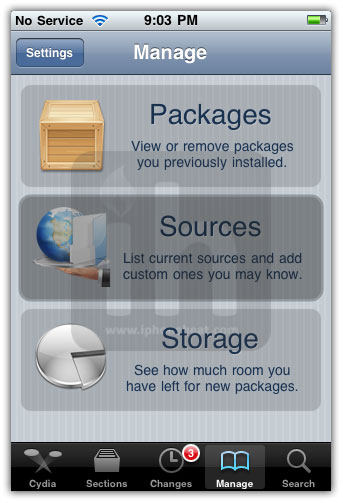
  • Go to manage Tab at bottom.
  • Hit the big Sources button.

unlock iphone 4 baseband 01.59.00

  • Hit the Edit button on Top-Right
  • Then Hit the Add button on Top-Left
  • Then Enter the following URL: http://repo666.ultrasn0w.com and hit the Add Source button.

unlock iphone 4 baseband 01.59.00

  • Once the Source is added to the Cydia, hit the big return to Cydia button at bottom of the screen and then Done button.
  • Go to Search tab and search for ultrasn0w and install it.

unlock iphone 4 baseband 01.59.00unlock iphone 4 baseband 01.59.00

Installing UltraSn0w will unlock iPhone 4 iOS 4.0.1, 4.0 with baseband 01.59.00. Once the installation is completed, reboot your iPhone 4.

Voila! You have unlocked iPhone 4 baseband 01.59.00 with UltraSn0w 1.0-1 and can use SIM from any carrier now.

If you’re an iPhone 3GS or iPhone 3G and want to jailbreak and unlock it, follow the guides linked below:

You can follow us on Twitter, Join us at Facebook, and also Subscribed to RSS Feed to receive latest updates.

Also checkout:

Download iOS 4.0.1 or Download iOS 4

How to: make FaceTime call over 3G

How to: Get free iPhone 4 case / bumper

How to: activate iPhone 4 without original SIM

iPhone 4 Specs

How to:

Digg
Twitter
StumbleUpon
Facebook
Reddit
del.icio.us

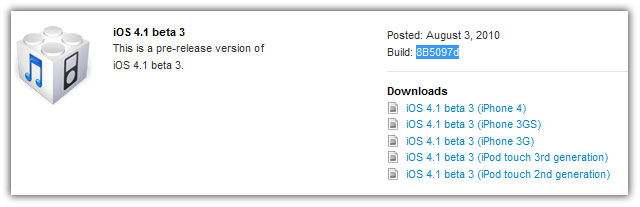
Download iOS 4.1 Beta 3 for iPhone, iPod Touch Build 8B5097d [Dev only]

iOS 4.1 beta 3 for iPhone 4, iPhone 3GS, 3G, and iPod Touch 3G, 2G is now available for download. You can download iOS 4.1 beta 3 build 8B5097d from the iPhone Dev Center if you’re a registered Apple developer.

download ios 4.1 beta 3

What’s New in iOS 4.1 Beta 3 Firmware

GameCenter no longer in iPhone 3G. More updates to follow soon.

WARNING: Avoid the iOS 4.1 beta 3 firmware if you depend on jailbreak/unlock until further notice.

download iOS 4.1 beta 3

Download iOS 4.1 Beta 3 8B5097d

iOS 4.1 beta 3 is available to developers only. Developers can download iOS 4.1 beta 3 from the iPhone Dev Center. However, if you still want to give it a shot, Google the queries listed below. (Please don’t ask for the links)

Download iOS 4.1 for iPhone 4

  • iPhone3,1_4.1_8B5097d_Restore.ipsw
  • ios_4.1_beta_3__iphone_4__8B5097d.dmg

Download iOS 4.1 for iPhone 3GS

  • iPhone2,1_4.1_8B5097d_Restore.ipsw
  • ios_4.1_beta_3__iphone_3gs__8B5097d.dmg

Download iOS 4.1 for iPhone 3G

  • iPhone1,2_4.1_8B5097d_Restore.ipsw
  • ios_4.1_beta_3__iphone_3g__8B5097d.dmg

Download iOS 4.1 for iPod Touch 3G

  • iPod3,1_4.1_8B5097d_Restore.ipsw
  • ios_4.1_beta_3__ipod_touch__3rd_generation__8B5097d.dmg

Download iOS 4.1 for iPod Touch 2G

  • iPod2,1_4.1_8B5097d_Restore.ipsw
  • ios_4.1_beta_3__ipod_touch__2nd_generation__8B5097d.dmg

Digg
Twitter
StumbleUpon
Facebook
Reddit
del.icio.us

Ultrasn0w 1.0-1, The iPhone 4 Unlock is Out Now!

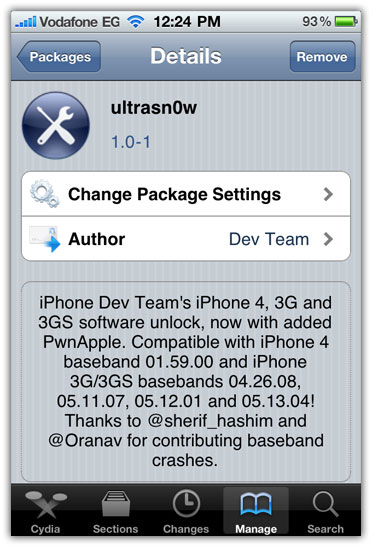
UltraSn0w 1.0-1, the iPhone 4 unlock is out now. Ultrasn0w 1.0-1 can unlock iPhone 4 iOS 4.0.1, 4.0 baseband 01.59.00 and also iPhone 3GS and 3G. Ultrasn0w 1.0-1 screenshot along with the compatibility list after the jump…

ultraSn0w 1.0-1 unlock iPhone 4, 3GS, 3G
Ultrasn0w 1.0-1 can:

  • Unlock iPhone 4 baseband 01.59.00
  • Unlock iPhone 3GS, 3G on
    • baseband 05.13.04 (iOS 4.0/4.0.1)
    • baseband 05.12.01 (3.1.3)
    • baseband 05.11.07 (3.1.2)
    • baseband 04.26.08 (3.0)

So, Ultrasn0w 1.0-1 can unlock iOS 3.0 through iOS 4.0.1. Unlock Guide right below the screenshot.

NOTE: In order to unlock iPhone 4, 3GS or 3G it MUST be jailbroken. You can jailbreak iPhones using the guides linked below with JailbreakMe. Also, don’t forget to save SHSH blobs for iOS 4.0.1 before the new firmware comes out to secure future jailbreak.

ultraSn0w 1.0-1 iphone 4 unlock

Ultrasn0w 1.0-1 image was found in Hashim Sherif’s Photobucket album (deleted now). via BlogsDNA Mobile-Geeks

Update 1: How to Unlock iPhone 4 with UltraSn0w 1.0-1

You can follow us on Twitter, Join us at Facebook, and also Subscribed to RSS Feed to receive latest updates.

Digg
Twitter
StumbleUpon
Facebook
Reddit
del.icio.us

Jailbreak iOS 4.0.1 Firmware (iPhone 4, 3GS, 3G, iPod Touch 3G, 2G)

All guide to jailbreak iOS 4.0.1 firmware on iPhone 4, iPhone 3GS, 3G and iPod Touch 3G, 2G (MC, non-MC). JailbreakMe 2.0, the new userland jailbreak by Comex can jailbreak 4.0.1 firmware on all iPhones and iPod Touches including New BootRom devices.
jailbreak ios 4.0.1

Jailbreak iOS 4.0.1 Firmware

Follow the Guides linked under your concerned device to jailbreak it with JailbreakMe 2.0.

Jailbreak iPhone 4

How to: jailbreak iPhone 4 iOS 4.0.1 with JailbreakMe

Jailbreak iPhone 3GS

How to: jailbreak iPhone 3GS iOS 4.0.1 with JailbreakMe

Jailbreak iPhone 3G

How to: jailbreak iPhone 3G iOS 4.0.1 with JailbreakMe

Jailbreak iPod Touch 3G

How to: Jailbreak iPod Touch 3G iOS 4.0.1 with JailbreakMe

Jailbreak iPod Touch 2G

How to: Jailbreak iPod Touch 2G iOS 4.0.1 with JailbreakMe

Also checkout:

You can follow us on Twitter, Join us at Facebook, and also Subscribed to RSS Feed to receive latest updates.

Digg
Twitter
StumbleUpon
Facebook
Reddit
del.icio.us

Make FaceTime Call Over 3G on iPhone 4 with My3G

Now you can make FaceTime video calls over 3G network with My3G. My3G for iPhone 4, a jailbroken app, lets you FaceTime over 3G. My3G is exactly similar to 3G Unrestrictor, only difference is the FaceTime on 3G support. By default, Apple won’t let you make FaceTime calls over 3G network.


facetime over 3g
NOTE: Your iPhone 4 MUST be jailbroken to install My3G app. JailbreakMe 2.0 is the new jailbreak for iPhone 4. You can jailbreak iPhone 4 using the guide linked below:

My3G Description

Facetime over 3G!!!! My3G: Take back your 3G! My3G makes Apps believe that they are on WiFi instead of 3G. With My3G, you can now watch HiDef YouTube videos, use Skype/Fring/Other VOIP apps over the 3G network!

My3G Features

  • In-App popup request to enable/never ask for My3G to be enabled for that app
  • In-App indicator when My3G changes the network from 3G to WiFi
  • Ability to select which apps are My3G enabled and not.
  • Default Apps – no configuration for the most popular apps!
  • SBSettings Toggle! You can temporarily enable My3G for all apps or toggle back using your defined Apps list
  • Dynamic enablement – Higher successs rate (near 100%) then 3G Unrestrictor (which does one off solutions for apps). My3G enables 3G indicators more dynamically.

My3G is developed by the same Dev behind MyWi.

How to Install My3G

  • Go to Cydia
  • Search for My3G and install it.
  • It will also install RockApp.

My3G to enable video calls over 3G on iPhone 4 is available in both Cydia and RockApp for $3.99.

Digg
Twitter
StumbleUpon
Facebook
Reddit
del.icio.us

Fix FaceTime / MMS Issue on iPhone 4 After Using JailbreakMe 2.0

There are numerous reports on FaceTime / MMS issues on iPhone 4 after jailbreaking with JailbreakMe 2.0 “Star”. After jailbreaking iPhone 4 with JailbreakMe 2.0, FaceTime and MMS stopped working for some users. Within a few hours, we have a fix for MMS / FaceTime problem, thanks to Comex and the Dev-Team.

fix facetime mms jailbreakmeIf you jailbreak your iPhone now using JailbreakMe 2.0 it should work fine because the issue has been addressed in the Jailbreak as well. However if you have already jailbroken iPhone before the issue was fixed, then there are two ways to fix the issue:

Install Base Structure Update from Cydia

  1. Open the Cydia.
  2. Go to changes tab and hit refresh.
  3. There you’ll find an update available for Base Structure.
  4. Install it.
  5. Reset Network Settings: Settings > General > Reset > Reset Network Settings

Done!

Restore Firmware and re-Jailbreak

  1. Restore the firmware
  2. then re-jailbreak iPhone with JailbreakMe 2.0
    NOTE: re-jailbreaking without restoring firmware does NOT fix the FaceTime/MMS.

If you want to jailbreak your iPhone, iPad or iPod Touch, follow the guides linked below:

Update 1: How to FaceTime over 3G

Digg
Twitter
StumbleUpon
Facebook
Reddit
del.icio.us

Jailbreak iPod Touch 3G, 2G (MC, non-MC) iOS 4.0.1 / 4 with with JailbreakMe 2.0

JailbreakMe 2.0 is the new iPod Touch 3G, 2G (MC, non-MC) jailbreak for iOS 4.0.1, 4.0 firmware. In this guide you’ll learn how to jailbreak iPod Touch 3G, iPhone Touch 2G iOS 4.0.1 / 4 with JailbreakMe 2.0 jailbreak.

jailbreak ipod touch jailbreakme
Comex is the guy behind JailbreakMe 2.0 jailbreak. JailbreakMe is a web-based userland jailbreak for all iPod Touches, iPhones running iOS 4.0.1 / 4.0 / 3.1.3 / 3.1.2 and iPad running iOS 3.2.1 / 3.2.

NOTE

  • JailbreakMe 2.0 can jailbreak iPod Touch 3G, 2G (MC, non-MC)
  • JailbreakMe can jailbreak  iOS 4.0.1, 4.0, 3.1.3 and 3.1.2.

Lets jailbreak iPod Touch 3G, 2G iOS 4.0.1 / 4 firmware with JailbreakMe.

Disclaimer: This guide for educational purposes only. So, try it at your own risk. We can NOT be held responsible if anything goes wrong.

How to Jailbreak iPod Touch 3G, 2G iOS 4.0.1 / 4 with JailbreakMe

Step 1

Rest of the steps to jailbreak iPod Touch 3G and jailbreak iPod Touch 2G are exactly similar to the guide posted earlier. So, please navigate to the guide linked below and continue from Step 2 to jailbreak iPod Touch 3G and iPod Touch 2G (MC, non-MC) running any firmware from 3.1.2 to 4.0.1.

Also checkout:

Digg
Twitter
StumbleUpon
Facebook
Reddit
del.icio.us

Jailbreak iPhone 3GS (New BootRom, Old), iPhone 3G iOS 4.0.1 / 4 with JailbreakMe

JailbreakMe 2.0 is the new iPhone 3GS, 3G jailbreak for iOS 4.0.1, 4.0 firmware. In this guide you’ll learn how to jailbreak iPhone 3GS (New BootRom, old), iPhone 3G iOS 4.0.1 / 4 with JailbreakMe 2.0 jailbreak.
jailbreak iphone 3gs 3g jailbreakme
Comex is the guy behind JailbreakMe 2.0 jailbreak. JailbreakMe is a userland (web-based) jailbreak for all iPhones, iPod Touches iOS 4.0.1 / 4.0 / 3.1.3 / 3.1.2 and iPad running iOS 3.2.1 / 3.2.

NOTE

Lets jailbreak iPhone 3GS, 3G iOS 4.0.1 / 4 firmware with JailbreakMe.

Disclaimer: This guide for educational purposes only. So, try it at your own risk. We can NOT be held responsible if anything goes wrong.

How to Jailbreak iPhone 3GS, 3G iOS 4.0.1 / 4 with JailbreakMe

Step 1

Rest of the steps to jailbreak iPhone 3GS and jailbreak iPhone 3G are exactly similar to the guide posted earlier. So, please navigate to the guide linked below and continue from Step 2 to jailbreak iPhone 3GS New bootRom, old BootRom and iPhone 3G running any firmware from 3.1.2 to 4.0.1.

How to Unlock iPhone

iPhone 3GS and 3G users can always use UltraSn0w 0.93:

Also checkout:

Digg
Twitter
StumbleUpon
Facebook
Reddit
del.icio.us

Jailbreak iPad iOS 3.2.1 / 3.2 with JailbreakMe 2.0

Comex has released the JailbreakMe 2.0 jailbreak for iPad iOS 3.2.1 / 3.2 firmware. In this guide you’ll learn how to jailbreak iPad 3.2.1 with JailbreakMe. Both the iPad Wifi and iPad 3G can be jailbroken with JailbreakMe 2.0.


jailbreak ipad 3.2.1 jailbreakme
JailbreakMe is a browser-based userland jailbreak, means you can jailbreak your iPad from with the device. No need to run any software from your computer.

Let’s jailbreak iPad WiFi / jailbreak iPad 3G running iOS 3.2.1 / 3.2 firmware with JailbreakMe 2.0 jailbreak.

Disclaimer: This guide for educational purposes only. So, try it at your own risk. We can NOT be held responsible if anything goes wrong.

How to Jailbreak iPad (WiFi/3G) iOS 3.2.1/3.2 with JailbreakMe

Step 1

Step 2

  • Make sure your iPad is connected to the internet.
  • Open the Safari Browser from your iPad Springboard.
  • Input one of the following URLs:
    • http://jailbreakme.com
    • http://jailbreakme.modmyi.com/

jailbreak ipad 3.2.1 jailbreakme

Step 3

Now Slide to Jailbreak iPad WiFi or iPad 3G on iOS 4.0.1 or 4.0 firmware.

jailbreak ipad 3.2.1 jailbreakme

  • First it will download the jailbreak data
  • then the jailbreak process will begin

jailbreak ipad 3.2.1 jailbreakme

Once the process is complete, the following popup message will appear:

jailbreak ipad 3.2.1 jailbreakme

Hit the OK button and close Safari.

Voila! You’ve successfully jailbreak iPad with JailbreakMe userland jailbreak by Comex. Don’t forget to share your experience in the comments section below.

Issues and Fixes

Stuck at the purple screen:

  • Go to: Settings > Safari and clear Browser History, Cookies and Cache.
  • Then Reboot your iDevice.

Hanging on slide to unlock:

  • Put it in airplane mode then turn it off.

Misc.

  • Reset Network Settings: Settings > General > Reset > Reset Network Settings

Jailbreak iPhone and iPod Touch

Also Checkout:

You can follow us on Twitter, Join us at Facebook, and also Subscribed to RSS Feed to receive latest updates.

Digg
Twitter
StumbleUpon
Facebook
Reddit
del.icio.us

Jailbreak iPhone 4 iOS 4.0.1 / 4 with JailbreakMe 2.0

JailbreakMe 2.0 is the new iPhone 4 jailbreak for iOS 4.0.1, 4.0 firmware. In this guide you’ll learn how to jailbreak iPhone 4 iOS 4.0.1 / 4 with JailbreakMe 2.0 jailbreak. Comex is the guy behind JailbreakMe 2.0 jailbreak for all iPhones, iPod Touches iOS 4.0.1 / 4.0 / 3.1.3 / 3.1.2 and iPad running iOS 3.2.1 / 3.2.


jailbreak iphone 4
NOTE

Warning: Some of the users are facing FaceTime/MMS issues. The developer is working on it. (hearing a few reports of people rebooting a few times and it fixing facetime issues, perhaps this is something that will resolve itself) FaceTime and MMS issue has been addressed :) For those who have already jailbroken iPhone 4 before the fix, follow the Fix linked Below.

JailbreakMe 2.0 is a userland (Web-based) jailbreak for all iDevices running firmware 3.1.2 up to 4.0.1. Lets jailbreak iPhone 4 4.0.1 / 4 firmware with JailbreakMe.

Disclaimer: This guide for educational purposes only. So, try it at your own risk. We can NOT be held responsible if anything goes wrong.

How to Jailbreak iPhone 4 iOS 4.0.1 / 4 with JailbreakMe

Step 1

Step 2

  • Make sure your iPhone is connected to the internet.
  • Open the Safari Browser from your iPhone 4 Springboard.
  • Input one of the following URLs:
    • http://jailbreakme.com
    • http://jailbreakme.modmyi.com/

Step 3

Now Slide to Jailbreak iPhone 4 on iOS 4.0.1 or 4.0 firmware.

jailbreak iphone 4 jailbreakme

  • First it will download the jailbreak data
  • then the jailbreak process will begin

jailbreak iphone 4 jailbreakmejailbreak iphone 4 jailbreakme

Once the process is complete, the following popup message will appear:

jailbreak iphone 4 jailbreakme

Hit the OK button and close Safari.

Voila! You’ve successfully jailbreak iPhone 4 with JailbreakMe userland jailbreak by Comex. Don’t forget to share your experience in the comments section below.

How to Unlock iPhone

UltraSn0w 1.0-1, the iPhone 4 unlock will be out soon after the testing on a few jailbroken iPhone 4 is complete is out now. iPhone 4, iPhone 3GS and 3G users can always use UltraSn0w:

How to: Unlock iPhone 4 with UltraSn0w 1.0-1

How to: unlock iPhone 3GS, 3G with UltraSn0w

Issues / Fixes

FaceTime / MMS Issue: How to Fix

Stuck at the purple screen:

  • Go to: Settings > Safari and clear Browser History, Cookies and Cache.
  • Then Reboot your iDevice.

Hanging on slide to unlock:

  • Put it in airplane mode then turn it off.

Misc.

  • Reset Network Settings: Settings > General > Reset > Reset Network Settings

Also checkout:

You can follow us on Twitter, Join us at Facebook, and also Subscribed to RSS Feed to receive latest updates.

Digg
Twitter
StumbleUpon
Facebook
Reddit
del.icio.us

JailbreakMe: Jailbreak for iPhone 4.0.1 / 4, iPad 3.2.1 / 3.2 and iPod Touch 4.0.1 / 4.0

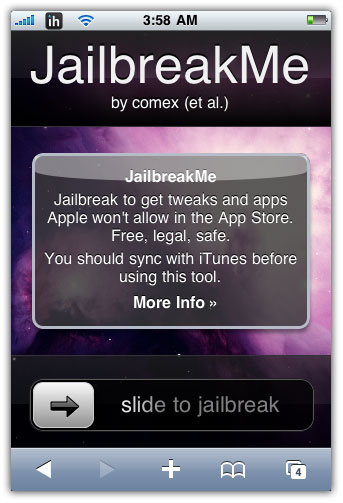
JailbreakMe is the new userland jailbreak for iPhone 4, 3GS, 3G iOS 4.0.1 / 4.0, iPad iOS 3.2.1 / 3.2, iPod Touch iOS 4. JailbreakMe 2.0 by Comex can jailbreak All iPhones, iPads and iPod Touches starting from iOS 3.1.2.

JailbreakMe is, without a doubt, the easiest iPhone, iPad and iPod Touch jailbreak on the planet. It’s a browser based jailbreak.

jailbreakme 2.0

JailbreakMe Supports

  • iPhone 4, iPhone 3GS, iPhone 3G running iOS 4.0 / 4.0.1 / 3.1.3 / 3.1.2
  • iPad iOS 3.2.1 and iPad iOS 3.2
  • All iPod Touches iOS 4.0 / 4.0.1 / 3.1.3 / 3.1.2

NOTE

  • Your iPhone MUST be activated to use JailbreakMe 2.0.
  • JailbreakMe 2.0 does NOT work on Custom Firmware.

In order to jailbreak your iPhone, iPad or iPod Touch with JailbreakMe 2.0 simply point your Safari Browser to:

http://jailbreakme.com

or

http://jailbreakme.modmyi.com/

and follow the on screen instructions. Don’t forget to share your experience. Guides will be posted soon are here:

jailbreakme 2.0

Issues / Fixes

FaceTime / MMS Issue: How to Fix

Stuck at the purple screen:

  • Go to: Settings > Safari and clear Browser History, Cookies and Cache.
  • Then Reboot your iDevice.

Hanging on slide to unlock:

  • Put it in airplane mode then turn it off.

Misc.

  • Reset Network Settings: Settings > General > Reset > Reset Network Settings

You can follow us on Twitter, Join us at Facebook, and also Subscribed to RSS Feed to receive latest updates.

Digg
Twitter
StumbleUpon
Facebook
Reddit
del.icio.us

OpenAppMkt: AppStore for Web Based iOS Apps

OpenAppMkt is a new Web-based third-party app store for iPhone, iPod Touch and iPad, like Cydia and Rock. OpenAppMkt consists of Web based apps, completely written in HTML format, which means there’s no need to jailbreak your iDevice in order to install it.


openappmkt
Installing OpenAppMkt

OpenAppMkt runs in browser and installation of apps simply require a simple tap on: “add to home” button. To install OpenAppMkt:

  • Simply point your mobile browser to http://www.OpenAppmkt.com/
  • Tap the “+” button and select “Add to Home Screen”
  • Then input your desired name.

That’s it. Now you can open OpenAppMkt from the bookmark you added to your home screen and browse through the apps available and install them. To be clear, OpenAppMkt or any app installed via it, you aren’t actually installing anything but a Safari bookmark on your homescreen. via [iDB][TechDirt]

openappmktopenappmktopenappmkt

openappmktopenappmktopenappmkt

Also checkout:

You can follow us on Twitter, Join us at Facebook, and also Subscribed to RSS Feed to receive latest updates.

Digg
Twitter
StumbleUpon
Facebook
Reddit
del.icio.us

Asphalt 5: Supports iPhone 4 Gyroscope and iOS 4

Gameloft has updated Asphalt 5, a popular racing game for iPhone and iPod Touch, to support support the iPhone 4 gyroscope and iOS 4 firmware.
Asphalt 5 Description, Screenshots and download link after the jump…
asphalt 5

Asphalt 5 Description

Get in, start up and punch it in the fastest dream cars ever created by some of the most prestigious manufacturers in the world.
Everything you’ve ever dreamed of doing behind the wheel is here on your iPhone/iPod Touch.

Stop dreaming and get in!

THERE’S A DREAM CAR FOR YOU
Take a ride in over 30 of the fastest, most prestigious cars you’ve ever dreamed, from manufacturers like Ferrari, Lamborghini, Audi and Ducati.

THE WORLD IS YOUR RACETRACK
Highly polished HD graphics let you see every detail and animation of the track as you speed over snow, mud, dirt and more in 12 beautiful locations around the world including St. Tropez, Aspen and Las Vegas. Discover hidden shortcuts and jump off ramps!

NEW WAYS TO PLAY
Challenge yourself to 8 different racing events including Drift Contest, Cop Chase, Time Attack, Duel Mode, Last Man Standing and Escape.

RIDE WITH THE PACK
Six-player Bluetooth and Online Multiplayer lets you compete against friends and anyone around the world in tournaments and join the Asphalt Academy on asphalt-5.com. Speed your way to the top of the online leaderboard!

THE SOUND OF SPEED
Tune your car radio to play your favorite songs stored on your iPhone/iPod Touch during the race and let the music move you.

UPDATE COMING SOON:
– Difficulty tuned in Cop Chase mode
– Minor bugs fixed

FULL LIST OF CARS:
Audi R8, Audi TT-RS, Audi Q7, Lamborghini Gallardo LP 560-4, Lamborghini Murciélago LP 670-4 SV, Lamborghini Reventón, Ferrari 599 XX, Ferrari California, Ferrari F430 16M, Ferrari FXX Evolution, Nissan 370Z, Nissan GT-R R35, Bugatti Veyron 16.4, BMW X6M, Caterham CSR Superlight, 2009 Chevrolet Corvette ZR1, 2010 Chevrolet Camaro SS, Ducati 1198, Ducati Monster 1100s, Ford GT, Ford Shelby GT500, Gumpert Apollo, Kawasaki Z750, Kawasaki ZX6-R, Lotus 2-Eleven, Lotus Evora, Mercedes E Class, Mercedes ML 63 AMG, Mercedes-Benz S65 Black Series, MINI Cooper S, RUF 3400 K, RUF Dakara, RUF Rt 12

Download Asphalt 5

You can purchase and download Asphalt 5 from the App Store for $4.99. [iTunes Link]

Asphalt 5 Screenshots

asphalt-5-iphone-1
asphalt-5-iphone-2
asphalt-5-iphone-3
asphalt-5-iphone-4
asphalt-5-iphone-5
asphalt 5

Also checkout:

Digg
Twitter
StumbleUpon
Facebook
Reddit
del.icio.us

Hero of Sparta II for iPhone Hits the App Store

Gameloft has released Hero of Sparta II for iPhone and iPod Touch and is now available in the App Store. Hero of Sparta II, the action game, is now fully optimized for the iPhone 4 Retina Display.

Full game description, Screenshots, video and Download Link after the jump…
hero of Sparta II iPhone

Hero of Sparta II Description

** OPTIMIZED FOR iPHONE 4! High-definition graphics that fully utilize the iPhone 4 Retina display.
Argos is finally back! The popular Spartan saga continues on iPhone, following the huge success of its revolutionnary first opus: Winner of IGN 2008’s “Best Action Game” and “Best Graphics Technology” Award, “A Nintendo DS or Sony PSP-quality title on the iPhone” (iLounge).

Sailing back from Hell after many battles, Argos finally reaches the shores of his homeland: Sparta. But no human leaves Hades’ kingdom alive without consequences. A new odyssey begins for our hero – a journey that will force him face the gods, his fate and his own choices to answer for his arrogance!

THE NEXT-GEN ACTION GAME ON iPhone & iPod touch
A thrilling, non-stop hack’n’slash game jam-packed with action and innovation.
– Furious combat against even more colossal enemies: more combos, more violence!
– Hold your breath all along your adventure: each level provides the player a new experience – a new weapon, a new gameplay, a new power and more.
– Improved interaction with the environment: break gates, climb cliffs, ruin temples and force your way through all obstacles!

OPTIMIZED CONTROL SCHEME FOR INTENSE ACTION
– Advanced action virtual pad: don’t just tap the screen – actually aim your attacks!
– New 360° jump control offering more freedom and enhanced platforming gameplay: jump anywhere, even during fights to perform air combos.

A NEW ADVENTURE, A NEW GRAPHICAL REVOLUTION
– 12 levels to explore, set up in 8 new majestic environments: from Sparta to the depths and heights of Earth.
– Unique and exclusive 3GS graphics providing additional 3D, light and relief effects.

WRITE A NEW PAGE OF ARGOS’ LEGEND
– New powers & new weapons: only the best gear will give you a chance to survive the challenges ahead.
– Fight and kill the mythical foes that dare cross your path. But be warned: stronger enemies will always be lurking.
– Only the bravest warriors are worthy of entering the Arena. Will you be good enough to face the ultimate challenge?

Download Hero of Sparta II

You can purchase and download Hero of Sparta II from the App Store for $6.99. [iTunes Link]

Hero of Sparta II Demo and Screenshots

hero-of-Sparta-II-iPhone-1
hero-of-Sparta-II-iPhone-2
hero-of-Sparta-II-iPhone-3
hero-of-Sparta-II-iPhone-4
hero-of-Sparta-II-iPhone-5
hero of Sparta II iPhone

Also checkout:

Digg
Twitter
StumbleUpon
Facebook
Reddit
del.icio.us

SpringFlash: The First iPhone 4 Only Cydia App

BigBoss announces SpringFlash, the First iPhone 4 Only Cydia App which will be available as soon as the iPhone 4 jailbreak is out.

SpringFlashSpringFlashfor iPhone 4 is a springboard activator based LED flashlight for your iPhone 4. In short, you can have a touch of a button for a bright LED flashlight without hassling with unlocking your iPhone, closing your app, or even turning on your screen.

Once the comex jailbreak is released you will be able to install SpringFlash then go to the Settings App > Activator pane > choose the activation method of your choice and select Flashlight.

Hopefully, Comex jailbreak will be out in a couple of days then you’ll be able to download SpringFlash for free! [via theBigBoss]

UltraSn0w unlock for iPhone 4 will be out along with the Comex jailbreak.

You can follow us on Twitter, Join us at Facebook, and also Subscribed to RSS Feed to receive latest updates.

Digg
Twitter
StumbleUpon
Facebook
Reddit
del.icio.us