Iomega’s SuperHero backup and charger for iPhone syncs without a PC

Iomega was at CES last week showing off its upcoming SuperHero Backup and Charger for the iPhone. You may ask why anyone needs a backup system for the iPhone as iTunes backs up your iPhone when you sync. The Iomega rep explained that many iPhone users don’t plug their iPhone into a PC or Mac. They simply use a wall charger, downloading apps directly onto the phone, almost never syncing up with iTunes. Sources at Apple retail confirm this is the case. Personally, I plug my iPhone into iTunes every night to update my podcasts and apps as often as possible.

For those who don’t sync, however, Iomega is releasing the SuperHero. It’s super simple — you just download an app onto the phone, and then whenever you plug the iPhone into the dock, the app will turn on and backup your contacts and pictures onto an included 4 GB SD card. Lose your iPhone, and you won’t lose your important information.

Yes, for family members or friends who don’t ever sync through iTunes, this might be helpful. But wouldn’t it be worth it to teach them how to do it? Syncing seems simple enough to me. Then again, if you don’t own a PC or Mac and use your iPhone like a small computer, this would at least give you some assurance your data will persist. The Iomega SuperHero backup and charger should be available by the end of next month for US$69.99.

Iomega’s SuperHero backup and charger for iPhone syncs without a PC originally appeared on TUAW on Wed, 12 Jan 2011 16:00:00 EST. Please see our terms for use of feeds.

Source | Permalink | Email this | Comments

Bodega and MacAppsThatRock help you find new Mac apps

I switched to the Mac several years ago, and I’m still finding apps that have been around for a long time that I wish I had known about sooner. Hopefully the Mac App Store will help, but it also raises two issues: 1) What about apps that aren’t in the store (for whatever reason, perhaps because they don’t fit Apple’s guidelines), and 2) How do you find apps in the Mac App Store?

Turns out that “there’s an app” for the former and a website for the latter.

Regarding the issue of finding apps that aren’t in the App Store: Bodega lists many apps, and it even offers deals like NetworkLocation for $14.50 (50% off today). Bodega also lets you keep a wishlist of apps, and it will point out any you’ve got installed that are in need of updates. Another nice touch is that they have linked to the “Buy” page for apps and will let you purchase them without leaving the app (although it’s important to note that you are not buying through Bodega itself, they’re just providing a nice wrapper around whatever setup the developers already have in place).

But what about apps that are in that shiny new Mac App Store? It opened with almost 1,000 apps on day one, and it’s already a challenge to find less popular gems that might not make the “Top” lists or the “Featured” page.

That’s where macappsthatrock.tumblr.com comes in. The premise and the execution are simple: find great apps, include a screenshot, the official description and the price (if any).

I’ve already found a few gems through the site, including Apptivate (US$3) and Screenninja ($10). My only complaint about the site is that it just pulls the official description in from the app’s description pages, making it more of a rehash of the official marketing information than “Here’s why I think this app is great and worthy of your attention.” On the other hand, the descriptions are usually nice and short, and (if the developers have done a good job writing them) clearly explain what the apps do. Having the prices listed right there is a very good thing too, as I find it annoying to read a review of an app with no indication whether it’s free, $5 or $50.

You don’t have to be a Tumblr user to use MacAppsThatRock, of course. Browse the archive or use the random page feature to find an app that was listed on the site, or grab the RSS feed.

(While you’re there, don’t forget about another of our favorite Tumblr sites, safariextensions.tumblr.com, which highlights more Safari Extensions than are shown on the official page.)

Bodega and MacAppsThatRock help you find new Mac apps originally appeared on TUAW on Wed, 12 Jan 2011 15:30:00 EST. Please see our terms for use of feeds.

Source | Permalink | Email this | Comments

Trend Micro says iOS a ‘more secure platform’ than Android

Verizon customers and others who are picking up iPhones and iPads can rest assured that their shiny new iOS devices are going to be less likely than Android smartphones and tablets to pick up viruses and malware.

In a recent interview in Taipei, Trend Micro chairman Steve Chang said that Google’s Android operating system is more susceptible to hacker attacks and viruses than iOS. Chang ought to know; his company is the leader in security software for corporate servers.

Chang noted that Android, which is an open-source operating system, makes it easy for hackers to “understand the underlying architecture and source code.” He went on to say that Apple’s sandbox concept “isolates the platform, which prevents certain viruses that want to replicate themselves or decompose and recompose to avoid virus scanners.”

That doesn’t mean that iOS devices won’t get hit with viruses or other malware in the future. Chang commented that iOS devices could be compromised by social-engineering attacks, in which users are scammed into downloading or installing malicious software.

Trend Micro makes security products for both the Android and iOS platforms. Their free Smart Surfing app for iPhone and iPad is a web browser that calls upon the company’s Web Reputation technology to block users from visiting malicious web pages.

[via Electronista]

Trend Micro says iOS a ‘more secure platform’ than Android originally appeared on TUAW on Wed, 12 Jan 2011 15:00:00 EST. Please see our terms for use of feeds.

Source | Permalink | Email this | Comments

Hauppauge announces Broadway: live TV streaming for iPhones and iPads

Here’s another solution for streaming TV in your home or over 3G: Hauppauge Computer Works has just announced the new Broadway box. The US$199 device has a built-in HD H.264 video compressor, an ATSC tuner for local broadcasts and support for QAM digital cable, so if that’s all you want, the box can be used on its own. It also allows hookup to your cable or satellite box.

The programming you select can be viewed over Wi-Fi or the internet on any iOS device. Details are a bit sketchy, and despite the announcement at CES 2011, the Broadway hasn’t even shown up on the Hauppauge website.

It looks like a solid competitor to the Slingbox line, but we’ll wait until we actually see one before making our mind up. The Broadway should be available in mid-February.

Hauppauge announces Broadway: live TV streaming for iPhones and iPads originally appeared on TUAW on Wed, 12 Jan 2011 14:30:00 EST. Please see our terms for use of feeds.

Source | Permalink | Email this | Comments

Apple, Verizon negotiations from the inside


Bloomberg has posted an interview
with Verizon Communications Inc. President Lowell McAdam that explores a bit of the lengthy process that brought the iPhone to Verizon. The technical acrobatics took the most time, while “the commercial deal took us a day,” McAdam said.

The two companies actually built Verizon cell towers at Apple’s Cupertino campus, and Apple also received “their own laboratory to play with,” according to McAdam. Additionally, Verizon’s executive director of technology David McCarley spent a year working at Infinite Loop.

The two companies also had to agree on branding. Verizon typically places a logo their handsets; Apple allows only its own. It was a concession Verizon was apparently OK with.”They don’t put a lot of logos on their phones,” McAdam told Bloomberg. “So that wasn’t a major issue for us.”

There’s no mention of the clearly redesigned antenna, or how the associated brouhaha in 2010 might have influenced negotiations. The interview concludes with speculation on likely sales numbers (spoiler: a lot) and the announcement’s effect on each company’s stock prices. It’s an interesting peek into a very high-profile business deal.

[Via MacRumors]

Apple, Verizon negotiations from the inside originally appeared on TUAW on Wed, 12 Jan 2011 14:00:00 EST. Please see our terms for use of feeds.

Source | Permalink | Email this | Comments

TUAW TV Live at 5 PM ET: Chasing the paperless office and more

CES 2011 is over, Macworld Expo 2011 is just two weeks away, and just twelve days into the new year, we’ve had a lot to be excited about. Our favorite computers have their very own Mac App Store, the iPhone has a second carrier in the U.S., and the rumors of iPad 2 are beginning to fill the air.

Today on TUAW TV Live, I’ll be talking about all of these topics and more. You can join in on the discussion through the Ustream chat tool, suggest topics and even see if I can touch my cat without having my mic go offline (you should have been there last week…).

I also plan on discussing my mixed success in going to a paperless office in 2010, what software and hardware I used to be able to accomplish those goals and how I expect to move even further towards a paper-free office in 2011.

Join the usual suspects for TUAW TV Live at 5 PM ET / 2 PM PT / 10 PM GMT today. Drop by TUAW about 5 minutes before the show goes live, and you’ll find a post with instructions on how to watch the live streaming video and use the chat.

TUAW TV Live at 5 PM ET: Chasing the paperless office and more originally appeared on TUAW on Wed, 12 Jan 2011 13:30:00 EST. Please see our terms for use of feeds.

Source | Permalink | Email this | Comments

Verizon iPhone reportedly unaffected by "death grip" issue

After getting their hands on the Verizon iPhone at yesterday’s press event, several people have noted that it seems unaffected by the “death grip” phenomena that troubled iPhone 4 users last year.

First up, Ars Technica’s Chris Foresman noted that gripping the phone by its edges did not cause any CDMA signal reception attenuation, even during a call. Slashgear’s Evan Sellek reported a loss of one bar while bridging the antenna gap (from four out of five to three out of five), noting that, “…we still couldn’t reproduce the ‘death grip’ symptoms that plagued the initial launch of the iPhone 4 … it looks like Verizon’s confidence in the iPhone 4 on their network seems to be pretty sound.” Finally, PCMag’s Sascha Segan managed to bridge all four gaps — an uncommon way to hold an iPhone for sure — and only lost a single bar.

We noticed right away that the antenna had been redesigned for Verizon, with the notches shuffling about a bit. Sure, you’ll need a new case, but that’s a small concession to make for a phone that can actually place and receive phone calls.

Verizon iPhone reportedly unaffected by “death grip” issue originally appeared on TUAW on Wed, 12 Jan 2011 13:00:00 EST. Please see our terms for use of feeds.

Source | Permalink | Email this | Comments

Mechanized joystick built to control iPhone tilt sensor, rack up high score

What do you do when you just can’t get that high score you’re looking for in Tilt to Live? You build a computer that’s better at playing the game than you are. For Shane Wighton, that turned out to be a mechanized joystick for tilt-controlled iPhone games.

When Shane couldn’t achieve the score wanted on Tilt to Live, he asked himself, “[Can] I program a computer to detect patterns in the enemies, be strategic, and make the best moves using its superior reaction time and raw processing power?”

As part of answering that question Shane’s made the above illustration a reality by building a mechanized joystick with an Arduino, some servo motors and metal. The next phase is for Shane to mount the webcam, write the code that will actually play the game for him and, hopefully, rack in some damage on the score board.

Check out the video after the break to see the beast in action.

Shane, we’re looking forward to seeing how this works out for you. From all of us here at TUAW, we wish you the best of luck. Go get ’em!

[Via Joystiq, TouchArcade]

Continue reading Mechanized joystick built to control iPhone tilt sensor, rack up high score

Mechanized joystick built to control iPhone tilt sensor, rack up high score originally appeared on TUAW on Wed, 12 Jan 2011 12:30:00 EST. Please see our terms for use of feeds.

Source | Permalink | Email this | Comments

Calibrate your monitors for cheap

In the world of computer monitors, there’s quality, … and then there’s the rest of us. I buy my monitors at places like Costco, Target and Best Buy, where you can pick up a 27-inch unit for under $300.

Remember that statement about “you get what you pay for?” It’s particularly true of low-end monitors where color calibration is often an afterthought rather than a guiding product principle. TUAW Talkcast regular Shawn “Doc Rock” Boyd offers a great workaround for all of us who buy low on the food chain.

Instead of spending upwards of $200 for a display calibrator, he’s discovered that you can rent a color meter from your local photo shop for somewhat less than $20. He offers a quick but excellent write-up on his personal blog, with hints about the process. (Don’t forget to save your calibrated settings in case you need to swap out hard drives or upgrade to a new OS.)

Apple-branded shiny and white is a wonderful thing, but it’s not a solution for everyone. Doc’s calibration rental solution provides an effective workaround for people who want to make the most of the equipment they can afford.

Calibrate your monitors for cheap originally appeared on TUAW on Wed, 12 Jan 2011 12:00:00 EST. Please see our terms for use of feeds.

Source | Permalink | Email this | Comments

Twitter for Mac update removes hidden features

Twitter for Mac

MacHeist bundle owners may be disappointed to discover that the latest version of Twitter for Mac removes the hidden Super Secret menu, which was covertly added by developers. This backdoor was included as a bonus for disgruntled customers who purchased the MacHeist bundle before Tweetie was acquired by Twitter. Bundle owners were promised a free update to Tweetie 2, but that update never materialized.

The Super Secret menu was enabled by pressing Control, Option/Alt, and Command keys simultaneously, clicking MacHeist Secret Stuff and entering your credentials into the resulting dialog box. These extra settings let you hide the app in the background, type anywhere to start a tweet and more. The latest version of Twitter for Mac disables this feature by preventing users from accessing the initial MacHeist Secret Stuff menu, at least by using the method listed above.

Twitter for Mac users that enabled the Super Secret menu will keep this feature, but new downloads lose the ability activate it using the above method. Though perhaps not desirable, the removal of the Super Secret menu was expected. When this hidden feature was first discovered, we wondered how Apple would respond. Thankfully, Twitter did not have to pull the app from the Mac App Store and was able to push out an update quickly.

Twitter for Mac update removes hidden features originally appeared on TUAW on Wed, 12 Jan 2011 11:45:00 EST. Please see our terms for use of feeds.

Source | Permalink | Email this | Comments

Microsoft files objection to Apple’s "App Store" trademark application

The happy holidays are obviously over; the AT&T / Verizon sniping is going to reach a fever pitch soon, and Microsoft wants to deny Apple a trademark.

The latest skirmish in the lawsuit battles comes against Apple’s application for a trademark on the term “App Store.” Apple had applied for this trademark soon after the original iPhone App Store launched in mid-2008, with the application describing the App Store in almost computer-like terms: “retail store services featuring computer software…”

Microsoft has filed a motion for a summary judgment to deny Apple the App Store trademark. The Monday filing states that “app store is generic for retail store services featuring apps” and suggests that the term cannot be registered. To add insult to injury, the motion quotes Steve Jobs using the term generically to describe “app stores for Android.”

The big bad purveyor of Windows states that Apple is preventing other companies from using the term “app store.” Part of the motion states that “Microsoft would like the ability to use ‘app store’ to fairly describe its own retail store services for apps, but Apple asserts that such uses are infringements of its rights….” We’ll have to wait and see how this one shakes out.

[via AppleInsider]

Microsoft files objection to Apple’s “App Store” trademark application originally appeared on TUAW on Wed, 12 Jan 2011 11:30:00 EST. Please see our terms for use of feeds.

Source | Permalink | Email this | Comments

The Daily Show takes on the Verizon iPhone

Jon Stewart Verizon iPhone

While the tech world debates both the merits and the shortcomings of the Verizon iPhone, The Daily Show’s Jon Stewart and John Oliver used the occasion to do some good ol’ AT&T bashing. They celebrated the announcement of the Verizon iPhone with a rousing chant of “Freedom!” and poked fun at the dropped calls that plague iPhone owners on AT&T. The pinnacle of the seven-minute skit occurred when a band of frustrated iPhone owners trampled an AT&T sign. You can enjoy watching the segment in its entirety after the break.

The video comes straight from The Daily Show’s website, which uses Flash; sorry!

Continue reading The Daily Show takes on the Verizon iPhone

The Daily Show takes on the Verizon iPhone originally appeared on TUAW on Wed, 12 Jan 2011 11:00:00 EST. Please see our terms for use of feeds.

Source | Permalink | Email this | Comments

iOS 4.3 Features List (What’s New)

iOS 4.3 beta is now available for download to developers. As of iOS 4.3, Apple has discontinued firmware updates for iPhone 3G and iPod Touch 2G. iOS 4.3 also brings a lot of exciting new features fr iPhone, iPad, iPod Touch and Apple TV 2G.

Detailed iOS 4.3 features list after the jump…

iOS 4.3 Features List

Personal Hotspot

iOS 4.3 brings the recently rumored Personal Hotspot for GSM iPhones which turns your iPhone into a Wi-Fi router. It works over AT&T but you need to sign up for the tethering plan. [BGR]

New Multi-touch Gestures to iPad

iOS 4.3 beta contains a preview of new Multi-Touch gestures for iPad. You can use four or five fingers to:

  • Pinch to the Home Screen
  • Swipe up to reveal the multitasking bar
  • Swipe left or right to switch between apps.

[Gizmodo]

AirPlay for third-party apps, Web apps

The first beta of iOS 4.3 significantly expands AirPlay functionality for the iPhone, iPad and iPod touch. In 4.3 beta 1, developers of third-party native iOS apps and third-party Web apps can now utilize AirPlay functionality. Before this, only native Apple applications can make use of AirPlay, which allows multimedia content to be streamed wirelessly from iOS devices and Mac computers to compatible hardware.

New FaceTime icon

iOS 4.3 brings a redesigned FaceTime icon for iPod Touch 4G. [9to5mac]

Full Screen iAds

First beta od iOS 4.3 also brings full screen iAds banners on the iPad. “iAd full screen banners grab the attention of the user by taking advantage of the larger screen of iPad to launch an immersive interactive iAd experience. This new banner format is easy to implement.”

Configurable slide switch for iPad

iOS 4.3 lets users decide whether the hardware switch above the volume buttons on the iPad controls mute or rotation lock in Settings. [Macstories]

New Camera Effects

iSpazio found an info.plist in updated SDK that hints at some Photo Booth like new camera effects. These are the effects found in the updated SDK which could be implemented in Camera app:

  • Thermal Camera
  • X-ray
  • Kaleidoscope
  • Normal
  • Tunnel of Light
  • Collapse
  • Turbine
  • Enlarge

New Message alert settings

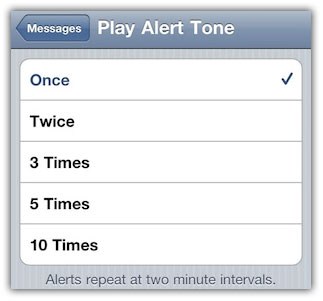
iOS 4.3 comes with  the ability to choose how often repeat the alert (from one to 10 times).


New Keyboard Layout

iOS 4.3 includes a new, semi-transparent keyboard layout, which turns out to be even semi-transparent. The keyboard is even more responsive now. [macstories]


New look for App Store Updates

iOS 4.3 also brings a new look for App Store Updates screen. [Macstories]


New Font

“Noteworthy”, a new font added to iPad.

HTTP Live Streaming Statistics

Added new API for AVFoundation which allows you to obtain detailed statistics on how many people are watching your videos, how long they are watching them, and performance metrics like observed bitrate and number of dropped frames.

We’ll update this post as soon as we know more. Stay Tuned!

You can follow us on Twitter, Join us at Facebook, and also Subscribed to RSS Feed to receive latest updates.

Digg
Twitter
StumbleUpon
Facebook
Reddit
del.icio.us

iOS 4.3 Beta for iPhone, iPad, iPod Touch and Apple TV Seeded to Developers

Apple has seeded the iOS 4.3 beta for iPhone, iPad, iPod Touch and Apple TV 2G to developers. If you’re a registered iOS developer, you can download iOS 4.3 beta build 8F5148b for iDevices from the iOS dev Center.


Unfortunately, Apple has discontinued firmware updates for iPhone 3G and iPod Touch 2G with iOS 4.3. iOS 4.3 will be available for iPhone 4, 3GS, iPad, iPod Touch 4G, 3G and Apple TV 2G only. We are going to cover iOS 4.3 new features in another blog post. Stay Tuned!

Download iOS 4.3 beta build 8F5148b

iOS 4.3 is available to developers only. Developers can download iOS 4.3 beta from the iOS Dev Center. However, if you still want to give it a shot, Google the queries listed below. (Please don’t ask for the links)

Download iOS 4.3 beta for iPad

  • iPad1,1_4.3_8F5148b_Restore.ipsw
  • ios_4.3_beta__ipad__8F5148b.dmg

Download iOS 4.3 beta for iPhone 4

  • iPhone3,1_4.3_8F5148b_Restore.ipsw
  • ios_4.3_beta__iphone_4__8F5148b.dmg

Download iOS 4.3 beta for iPhone 3GS

  • iPhone2,1_4.3_8F5148b_Restore.ipsw
  • ios_4.3_beta__iphone_3gs__8F5148b.dmg

Download iOS 4.3 beta for iPod Touch 4G

  • iPod4,1_4.3_8F5148b_Restore.ipsw
  • ios_4.3_beta__ipod_touch__4th_generation__8F5148b.dmg

Download iOS 4.3 beta for iPod Touch 3G

  • iPod3,1_4.3_8F5148b_Restore.ipsw
  • ios_4.3_beta__ipod_touch__3rd_generation__8F5148b.dmg

Download iOS 4.3 beta for Apple TV 2G

  • AppleTV2,1_4.3_8F5148b_Restore.ipsw

via [BGR]

You can follow us on Twitter, Join us at Facebook, and also Subscribed to RSS Feed to receive latest updates.

Digg
Twitter
StumbleUpon
Facebook
Reddit
del.icio.us

iOS SDK 4.3 Beta Up For Download

Apple has placed the iOS 4.3 Beta up for download, and it looks like an interesting update.

Included in the update are new APIs allowing for Airplay video support within developer apps, new AVFoundation API’s for tracking performance and popularity of live HTTP streams, and full screen iAD support in the iPad (yippee!).

Also included is a preview of the new gestures that will be made available on the iPad in the future.

You can read more about the update and download it on Apple’s website here.

This post is the first in the new iPhone Dev News category as I look to rework this site in a more logical arrangement :)

©2011 iPhone, iOS 4, iPad SDK Development Tutorial and Programming Tips. All Rights Reserved.

.

DeliciousTwitterTechnoratiFacebookLinkedInEmail