Police in the UK have seized approximately £114 million (about $158 million) worth of cryptocurrencies as part of a money laundering investigation.
Category: Tutorials
Tutorials,freelance,projects,joomla,php,mysql,wordpress,blancer.com
NASA’s Perseverance rover shot 62 images for its iconic selfie with Ingenuity
It turns out, Perseverance capturing an epic selfie of itself wasn’t so easy as the rover posing, taking a single photo and calling it a day.
Telegram finally adds group video calling
The long wait for group video calling to come to Telegram is over.
Microsoft’s fast game-loading tech won’t come to Windows 10
One of Windows 11’s most exciting gaming-related features won’t make its way to Windows 10.
The best Amazon Prime Day deals you can still get today
Here are the best Amazon Prime Day 2021 deals you can still get today, including sales on robot vacuums, streaming devices, Apple products and more.
Amazon buys the secure messaging platform Wickr
Amazon has bought the secure messaging platform Wickr to offer secure messaging. It’s meant for AWS, but it raises other possibilities.
43 Best Music Flyer Templates (PSDs and Using a Music Flyer Maker)
If you’re a musician or promoter and looking for great music flyer templates to create a flyer or poster to promote an event, then you’re in the right place.


Today, we’ll show you 43 of the best music flyer templates available at Envato Elements and Placeit. So sit back and enjoy.
Best Music Flyer Templates on Envato Elements (Unlimited Downloads)


Envato Elements is a terrific source when you need the very best music flyer templates for important projects. What makes Elements so outstanding is that it offers you thousands of gorgeous templates by the most talented designers in the field, and you can download as many as you want, as often as you want, for one flat monthly fee.
One low monthly fee = unlimited access to the best fonts available on the internet today. What’s more, that monthly fee also allows you to access thousands of premium digital assets like logos, mockups, photos, business card templates, and much more.
Let’s take a look at a few of the outstanding music flyer templates available at Elements.
21 Music Flyer Template From Envato Elements
If you have a working knowledge of Adobe Illustrator, Photoshop, or InDesign, then these templates from Envato Elements are perfect for you. You won’t have to wonder how to create band flyers from scratch because these templates do all the hardest work for you.
Indie Music Flyer Design Template (AI, EPS, PSD)


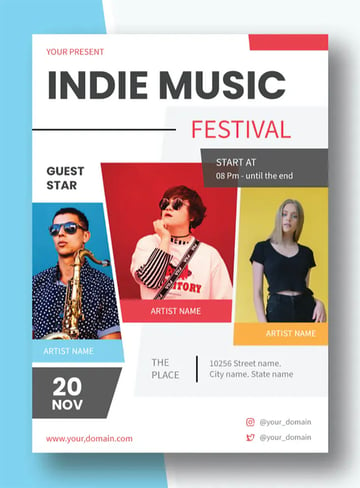
It doesn’t get cooler than this awesome music flyer design template. The A4 template is offered in well-organised, layered files, and customisation is easy using the smart object function to replace images in a click.
Music Flyer for Virtual Concerts and More (PSD)


Virtual concerts have become quite a thing in this age of Covid-19, so if you are planning one and want to promote it online, this music concert flyer is the perfect choice. It comes in A4 with a bleed area, and all text, colours, and images are customisable.
Photoshop Music Poster Templates (PSD)


This is a terrific template for solo artists who want to invite fans to their next performance. The flyer music PSD file is well organised and very simple to customise, but there is a help file included if you need it.
Music Festival Flyer Template (INDD, IDML)


This is one of the only InDesign templates featured here, and it’s a great one. With its cool, modern and clean music flyer design, this is the perfect flyer for musicians of every stripe. Of course, you need a working knowledge of InDesign to customise it, but it’s a well-organised and layered file designed to make your work easy.
Widtemp Music Flyer Design (AI, EPS, PDF)


Looking for a flyer with a unique feel? Then check out this terrific music flyer design. The A4 template is perfect for all types of musical events from concerts to festivals to solo performances.
Cool Music Event Flyer Template (PSD)


Get your solo performance off to a good start with this highly versatile music promo flyer. Modern and simple, with a unique layout and great typography, this template is fully editable using Photoshop.
Jazz Music | Flyer (PSD, AI)


This Jazz Music Concert Flyer Template is fully editable in both Photoshop and Illustrator. Replace the placeholder images with your own images in a single click, and then add your text and change the colour of the template to suit your needs.
Live Music Flyer (PSD, AI, EPS)


A terrific live music flyer that is completely versatile and suitable for other music events. The A4 template flyer for music is fully customisable in multiple programs, so choose your favourite software and get to work today.
Urban Music Promo Flyer Template (AI, EPS, PSD)


This cool Urban Music Promo Flyer Template is eye-catching and can also be used for other types of concerts or performances. The A4 sized file can be edited in Photoshop or Illustrator.
Indie Band Promo Music Flyer (AI, PSD)


Indie band promoters should check out this stunning music promo flyer template. Use Photoshop or Illustrator to swap the placeholder image with your own, add your text and chosen colour scheme, and your flyer is ready to send out.
Minimal Music Flyer Template (PSD)


How awesome is this music flyer design? Can’t you see your image and information on it? This modern and stylish template is fully editable in Photoshop. Give it a try.
Madona Music Flyer Maker (AI, EPS)


The best music events are those long summer festivals, aren’t they? Capture the beauty of summer with this flyer music PSD template. The sunny colours are perfect, but of course you can change them in Photoshop if you want.
Illustrator & Photoshop Music Poster Templates (AI, PSD)


If you’re planning an electronic dance music (EDM) event, then this beautiful, abstract flyer is the perfect template for you. There’s plenty of room for you to add all the relevant details, without detracting from the bold, eye-catching design.
Photoshop Music Poster Templates (AI, PSD)


This is quite a busy design, but it’s so well laid out that the key information is still easy to pick out. That’s the beauty of a professional design like the one you get in this flyer music PSD template. All you have to do is add your own text and images to make an outstanding music concert flyer.
Acoustic Musical Flyer Design (AI, PSD)


When you’re looking at these templates, pay special attention to the design and layout. After all, you’ll be changing the images and text anyway. This one, for example, is billed as an acoustic music flyer design, but you could adapt it to any genre you choose.
Music Flyer Maker Template (AI, EPS, PSD)


The days when pasting a flyer up on a wall was the only way to promote your event are gone. These days, bands routinely use social media to reach larger audiences. So it makes sense that this template includes not only an A4 flyer, but also templates for an Instagram post and story. It’s all here, ready for you to customise in Photoshop or Illustrator.
Music Flyer Design (AI, EPS, PSD)


This stylish, contemporary musical flyer design is ideal for promoting pretty much any kind of event. It comes in A4 size, with CMYK colours and bleeds so that it’s ready for printing. The fully layered template file is easy to customise in Photoshop or Illustrator.
Music Festival Flyer (AI, PSD)


Photoshop music poster templates don’t come much better than this. The sleek layout and tasteful colour scheme make this one perfect for a jazz festival, as pictured here, but you could also use it to promote other events. It comes with three ready-made colour schemes, and of course you can dive in and change things up as much as you want.
Minimal Music Flyer Template (PSD)
Many of the music flyer designs we’ve looked at today use images and colour across the whole page, but this one makes generous use of white space. See how it helps the design to breathe and makes the details really pop? The cool image, elegant text and bright colours help too.
Hand Lettering Music Flyer (PSD)


If you want your flyers to look hand-written, but without spending hours creating that lettering by hand, then this is the template for you. It has the look and feel of a painstakingly hand-lettered flyer, but all you have to do is jump into Photoshop and type your own text into the placeholders. That leaves more time for you to rehearse and plan the perfect gig!
Summer Musical Flyer Design (AI, EPS, PSD)


Summer is here, and so are summer concerts. Promote yours with this wonderful summery music event flyer template. The well-organised and layered file is editable in Photoshop or Illustrator.
23 Best Music Flyer Templates From Placeit
If you don’t have Photoshop skills or need an easier way to create a music flyer template, then Placeit is for you. Placeit provides an affordable online music flyer maker that you can use to create your flyers directly in your browser. Let me show you what I mean.
1. Go to Placeit.net > Type Music Flyer in the Search Bar


2. Click on the Flyer Template You Like to Open the Music Flyer Maker


3. Add Your Text > Change Fonts > Change Font Colours


4. Select Background Graphics and Colours for Your Flyer


5. Download Your Customised Music Flyer


With Placeit, you can buy just one item for a small fee, or if you regularly need templates, mockups, logos, and various designs, you can sign up for a low monthly or yearly plan. This gives you access to unlimited downloads of any and all the digital assets available at Placeit.
Music Promo Flyer Maker for a Techno Festival


Planning a big musical event? Then a musical flyer design like this one is exactly what you need to help you promote it. The music flyer maker allows you to add all the details you need, so that in a matter of minutes your flyer is ready to download.
Musical Flyer Design Template for an Electronic Festival


DJs promoting an electronic music festival have a ready-made template here. But, of course, you could also switch the image and text and promote any kind of event.
Music Poster Design Template to Promote a New Album


Want to announce a new album in an aesthetically pleasing way? How about Music Flyer Template to Promote a New Album? The music flyer maker provides you with tons of creative control so that you can change just about every aspect of the template to suit your needs.
Flyer Design Template for a Trendy Music Event


Looking to promote your next DJing event on or offline? You’ll need well-designed flyers with just the right amount of information. The great thing about Placeit’s music promo flyers is that they are professionally laid out, so you have the perfect foundation for adding your own details.
Live Music Flyer Design


This live music flyer design is super easy to customise. All you need to do is add your own photo, change the text and text colour, add the background colour that suits your taste, and voila! Your flyer is ready to download and share.
Music Poster Design Template


This sweet music event flyer template is just what you need to create both flyers and posters for your next event. Simply choose a wonderful illustration from the selection on offer, edit the text fields, and customise the colours to create your very own promo materials.
Music Festival Online Flyer Maker


If you’re going for something more classical, then try this musical flyer design, featuring a trumpet and sheet music. The grainy background adds to the traditional vibe.
Music Poster Design Template for a Virtual Music Festival


In the Covid-19 pandemic, lots of events had to go “virtual”, and music festivals are no exception. This template is perfect for a virtual music festival, although there’s no reason you can’t adapt it for a real-life event too.
Flyer Maker for a Music Ticket Sale


The best concert flyers are simple and eye-catching, so that they clearly communicate the key information of when, where, and how to book. This is a great example.
Music Poster Design Template With a Stencil Style for a Band’s World Tour


Ready for your big world tour? Then try this template, and see how to create band flyers the easy way. Just update the information and download your flyer. You can even change “World Tour” to something more local if you’re not at the Wembley Stadium stage yet.
Violin Online Flyer Maker


Here’s a great classical music concert flyer for you to customise and download. Try different colours, different instruments, change the text, move it around… it’s all so easy with Placeit’s music flyer maker!
Music Poster Design Template for Music Tour Featuring a Retro Print Style


Tap into the design style of iconic music festivals from the 1960s and 70s with this wonderful retro template. It’ll have your audience flocking to hear you.
Music Promo Flyer Template for Music Festivals Featuring Abstract Geometric Graphics


The actual sound of music is tough to represent visually, so that’s why abstract graphics are such a popular and effective choice for music flyer designs.
Music Poster Design Template to Promote a Music Tour


The great thing about a band promo poster template like this one is that it’s so flexible, and it could make a great flyer too. The design and layout options are all there for you, so you can customise the details and create whatever end result you want!
Musical Flyer Design for an Online Music Festival


More abstract graphics for you, but this time with a simple, clean, black and white style. If you want a pared-back style, this template is ideal. You’ll save on printing costs too!
Custom Music Flyer Maker for Open Air Festivals


If you’re travelling to a gig, please put your equipment somewhere safer than this! But as a whimsical, nostalgia-infused promo for your event, this works perfectly.
Jazz Band Promo Poster Template


Jazz concerts and festivals are always popular, so why not use this classy illustrated template to make your own promo flyer?
Music Concert Flyer for Concerts and Music Festivals


This live music flyer works well because of the contrast between the text and the background image. So keep that in mind as you’re customising—make sure the text stands out!
Live Music Flyer for Musicians Featuring Modern Abstract Graphics


Remember that monochromatic flyer design we looked at earlier? This is a similar layout, but in beautiful, bright colours! See how much variation you can get from the same basic template? Try it out and see what you can create.
Band Promo Poster Template to Promote a Music Battle


There’s nothing to generate a buzz like a music battle! Promote your next event using this cool music flyer design.
Music Concert Flyer Maker for a Rock Concert


With this template, you can either keep the bold colours and plain text of this example, or you can add musical instrument illustrations from the selection provided.
Band Promo Poster Template With an Illustration of a Rooster for a Local Festival


Looking for something a bit different? This strange illustration of a rooster and roses will make your music flyer stand out from the crowd. And there are plenty of other illustrations to choose from too, so you can experiment to get the look you want.
Musical Flyer Design Template Featuring Wavy Lines


Like all the best concert flyers, this one features an innovative layout and eye-catching graphics. This example doesn’t include the all-important event details, but of course you can add that using the text placeholders provided.
Choose Your Music Flyer Template Today
Both Placeit and Envato Elements are excellent resources for premium music flyer and poster templates. If you also regularly need mockups, icons, and other design resources, Elements offers unlimited downloads for one low monthly fee.
Alternatively, if you just want to buy a single music flyer, Placeit is the resource for you, but you can also sign up for a monthly or yearly membership which also offers unlimited downloads of templates, mockups, logos, and various designs. Head over to either site to download your favourite template today.
And finally, if you want even more information on flyer templates, check out these really helpful articles below:

 Flyers30+ Best New Event Flyers for 2021Melody Nieves
 Flyer Mockup25+ Best Free Flyer Templates (InDesign, Photoshop, Illustrator, etc.)Nona Blackman
 Flyers23 Best Free Flyer PSD Templates (Photoshop Designs to Download)Nona Blackman
 Flyer Mockup31 Best Flyer Mockups (Using a Mockup Generator)Nona Blackman
 Flyers23 Best Sale Flyer Templates (Using a Flyer Maker)Nona Blackman
 Flyers42 Best InDesign Flyer Templates (For Business, Events, Parties, and More!)Melody Nieves
 Flyers20+ Best Party & Event Flyer (Maker App) Template DesignsNona Blackman
 Flyers24 Cool Event Flyer Templates Using a Flyer Maker (Without Photoshop)Nona Blackman

{excerpt}
Read More
10 Top Tips on What Makes a Good Leaflet (With Leaflet Examples!)
One of the most effective forms of marketing media, leaflets allow you to reach prospective audiences in-store or through the mail. What makes a good leaflet? To avoid your leaflet being consigned to the trash, use thoughtful leaflet design to give your advertising leaflet templates a more lasting impact.
Here we look at ten tips for what makes a good leaflet design, from experimenting with origami folds to turning your leaflet designs into keepsakes that recipients will want to hang onto for longer. What makes a good information leaflet? Accessible type, adequate color contrast, and helpful extra features such as QR codes, maps and offers are just as important as your leaflet template’s aesthetic features. Scroll down to discover inspirational leaflet tutorials and leaflet examples, to help you create an artful and effective leaflet template for your next marketing campaign.
Explore a wide range of leaflet templates, from simple A5 leaflet templates to lengthier six-page leaflets, on Envato Elements.


1. Consider the Size of Your Leaflet
It may seem an obvious first step, but giving careful consideration to the size of your leaflet is vital before you begin designing your leaflet template. Leaflets are printed in a variety of standard sizes, the dimensions of which will vary depending on your chosen printer and territory.
It’s important to design a flyer based on locally accepted sizes for two reasons. Firstly, you want to ensure your printer will be able to print your design (many will only print and fold standard sizes), and secondly, these sizes also ensure your leaflet can be easily stacked on standard-sized display shelves or posted through mailboxes without the risk of crumpling or ripping (see more information about this below).


In the US, a good rule of thumb is to size your leaflets based on a sheet of Letter-sized paper, 8.5 by 11 inches (216 x 279.5 mm). This can be used as a stand-alone, non-folded flyer, or folded twice (to create a tri-fold, z-fold or gate-fold leaflet) or three times (to create a four-panel accordion fold leaflet).
Outside of the US and Canada, a wider variety of leaflet sizes tend to be used, but there are a couple of standard sizes that are especially widely used.
A5 (148 by 210 mm) can be used as a non-folded flyer or folded once to create a slim, compact bi-fold leaflet. A4 (210 by 297 mm) is larger, and can be folded in a variety of different ways to create a bi-fold or tri-fold leaflet.
Refer to the article below for a comprehensive list of standard sizes for both the US and Canada (known as the ANSI standard) and international territories (termed ISO 216):
-


A Guide to Standard US and International Flyer and Poster Sizes
Standard paper sizes can be confusing. If your head’s in a whirl trying to pick the right size for your flyer or poster, we’ve got you covered.
2. How to Stack
The size and folding format you choose for your leaflet design should depend on the end purpose of your leaflet.
Will the leaflet be posted through the mailbox? In this case, it needs to fit through a standard letterbox width (in the US, this is usually a minimum of 10 inches wide).
Will your leaflet be stacked on a display shelf? If so, the height should be no taller than the height of a standard-sized shelf.


If your leaflet is going to be handed out on the street or placed in a pile for recipients to pick up, you have a bit more flexibility in terms of the size of your design. For example, you could create a leaflet that has a slightly more generous height and/or width because these will not be constraints for how the leaflet is displayed. However, you should still consider how your leaflet will be transported to its destination. If the leaflets are to be delivered in the mail to the point of display, then you will still need to observe standard mailing requirements for leaflet size to avoid crumpling or large postal fees.
Another consideration regarding leaflet distribution is how recipients will respond to the size of your leaflet. A large leaflet that edges towards brochure or magazine size can actually be quite off-putting for individuals, whereas a compact leaflet size is more portable, making it more likely they can put it into a pocket or bag.
In the world of leaflets, while creating bespoke designs can be fun and result in highly creative designs (see below), it’s generally a good rule of thumb to use tried-and-tested sizes and aim for a design that’s small but full of visual impact.


3. Experiment With Origami
You don’t have to create a swan (although if you want to, by all means go for it!), but rethinking how your leaflet design could be folded can give your design a real point of difference.
A simple bi-fold or tri-fold is simple and effective, while an accordion fold (with folds that vary from inwards to outwards) gives a satisfying unfolding action. If you have a large-scale unfolded design, such as a city map, you might want to create a leaflet that folds into a small square to make it compact, or even simply folding over one corner of your design to create a cut-out color effect can be bold and impactful.


Research on Pinterest or Envato Elements for folding leaflet examples and inspiration—you’ll be amazed at the complexity of some of the folded designs that can be achieved.


A note of caution—even if your design has unusual folds, still try to create a leaflet design that folds flat. This will ensure you can stack multiple copies without a problem.


4. Design With the Folded-Out Layout in Mind
Leaflet design can be surprisingly complex, especially when folds are taken into account. A design might look fabulous in 2D form on the screen, but a little lacklustre in its folded reality. When creating a leaflet design, it’s important to keep both the folded and unfolded forms of the design in mind. The folded design is essential for drawing the individual’s attention, but the folded-out design is likely to be the design that converts that individual to take action or to keep the leaflet for longer than a fleeting moment.
When designing your leaflet in layout software like Adobe InDesign, you can pull out guides to mark out the folds on your folded-out leaflet. However, you shouldn’t feel restricted by these fold lines. The best leaflet designs extend elements across fold lines, to give the folded out design more impact. After all, the folded out leaflet offers much more space and flexibility for creating something larger.
How can you make the most of your folded-out layout? This can be as simple as extending images across multiple sections of your leaflet design, such as in the leaflet example below. This is a no-effort way to visually increase the size of your layout.


Uniform use of color can also help to bring your fold-out design together, and a graphic pattern, such as in the leaflet examples below, can be extended across the page to create a visual flow throughout folded sections.


A good rule of thumb is to allow visual elements, such as images, graphics, and color, to extend across multiple folded sections, while text should generally be confined to individual sections, to avoid any difficulty with reading content when the design is fully or partly folded.
5. Balance Attention and Detail
A leaflet is usually a marketing tool, intended to raise awareness of a brand, product, or event, and as such the leaflet design should serve this purpose. Ultimately, a leaflet needs to be picked up and taken away, for an individual to digest in their own time. In the same way that a book or magazine cover uses attention-grabbing techniques to entice the viewer to pick it up, a leaflet should also have a front page that draws the eye.


The front page of your leaflet template is your sales pitch, the ‘look-at-me’ section of your design. Suggested attention-grabbing techniques include photos of individuals that maintain eye contact with the viewer, a large headline in a contrasting color, or an enticing arrow or corner color that encourages the leaflet to be opened.
The attention-grabbing emphasis of the front page can be balanced with interior sections that go into the detail of the offer. Whether it’s must-know information about an event, a handy map, or useful contact details, the inside sections are where you can place the essential information.
If you can successfully balance attention and detail in your leaflet design, this is where the humble leaflet really comes into its own. At once both an advertising space and a detailed information brochure, it plays the role of a whole website or catalog in an extremely limited page space.


6. Color Is Key
Leaflets often have to compete alongside hundreds of other designs on display shelves. With this in mind, it pays to use techniques that can help your leaflet template to stand out. Color is an especially effective tool for drawing eyes to your leaflet design, as well as having a potential psychological effect on the viewer.


Bright and bold colors, like neon pastels or modernist primary brights, can help your leaflet to stand out in a sea of navy and white. Optimistic, warm colors like yellow and orange not only feel welcoming and vibrant, but also are often associated with warming and alertness (think hazard signs), making them appear instantly more visible on a crowded shelf.


If bright colors don’t feel like the right fit for your subject matter, consider employing color contrast instead. A nearly all-black leaflet design takes on a whole new personality when teamed with a chic dash of white. Pull out geometric shapes in contrasting tones to make a monochromatic leaflet design feel more dynamic, or use a complementary color pairing (such as blue and orange, or yellow and purple) to make viewers feel instinctively more receptive to your leaflet’s message.


7. Proof Your Type Size
By the time your leaflet is folded into increasingly minuscule sections, it can be difficult to know if the majority of readers will find your text legible. For many leaflet designers, one of the greatest challenges is incorporating vast quantities of text onto limited page space. Before you attempt to squash extensive copy onto your design, consider reducing your text length significantly. This will not only improve the overall design of your leaflet template but also make the content more accessible for viewers.


Accessibility is sometimes overlooked when it comes to printed media like leaflets, but sizing your text to a large scale (and certainly greater than a 10 pt size) and in a high-contrast colorway (black text against white being the easiest to see) will help visually impaired users to read the information. Consider also if it is possible to include Braille in your design, or to produce a standalone Braille version.
-


How to Improve the Accessibility of Fonts and Typography in Your Designs
Font types, font design and typography can have a huge impact on the legibility and visibility of designs for visually-impaired viewers. Here, you can find…
While you are designing your leaflet using digital software, get into the habit of printing off a rough hard copy at an accurate size on your home or office printer. This will allow you to assess if your text is sized well for legibility and to ensure that your chosen fonts are easy to read. While serifs can look fantastic for headlines and subheadings, a geometric sans serif is normally much easier to read at small sizes.
8. Create a Keepsake
With your leaflet space at a premium, it can be tempting to crowd your layout with everything you have to hand. Exercise restraint—your leaflet design will be more effective if it features areas of white space (areas which include only background color or decorative graphics, or indeed nothing at all), which can help to direct viewers’ attention to essential information.
When your leaflet is unfolded, a viewer will spend more time looking at the unfolded front side of the document, so this is the place to lay out the essentials—event details, product prices, or a QR code for discovering more information or booking tickets online.


On the reverse side of the leaflet is a vast space which can be often overlooked. This is an opportunity to include something genuinely useful for the user, which has the capacity to transform your leaflet from a throw-away disposable to a keepsake item.
For events, hotels, or tourism, the reverse is a natural place to include a map (alongside local advertising spots), but there are other things you could include to boost the longevity of your leaflet. A color-in activity for children, a restaurant or event offer, or a holiday calendar with local events—all of these give your leaflet extra life beyond the initial pickup, ensuring the marketing message stays with your intended audience for longer.


9. Twin Your Media
The humble leaflet design is an incredibly effective marketing tool because it has the power to engage with people who are already interested in the subject or offer. For example, someone who’s interested in family days out will be more likely to pick up a leaflet about a local museum’s events for children. Because your leaflet is a highly targeted form of marketing media, it can be wise to consider your leaflet as part of a wider marketing campaign.


In terms of the designer’s duties, what does this entail? A leaflet isn’t necessarily a stand-alone design. It will often be supported by other types of media, such as a website or app, posters, flyers, or signage. If your leaflet will be a part of a larger marketing campaign, consider how these different types of media could work together to create a cohesive campaign. You may have access to brand guidelines for creating your designs, but if not, using similar imagery, fonts, and colors across all related designs can help users to connect your designs with the event or brand being advertised.


Establishing a brand style for your leaflet design is also helpful if you will need to create leaflet designs in the future for similar events or offers. In this case, creating a leaflet template in software like Adobe InDesign can allow you to return to the bones of your original design and adjust color or images to give the leaflet a different feel.
10. Consider Tactility
What’s the difference between the pages of a book and the pages of a promotional magazine? The paper stock used in books feels more substantial, making the experience of turning pages feel more meaningful and luxurious. A magazine or flyer usually uses much thinner paper stock (which is measured in GSM, grams per square meter) for economical reasons, but the downside of this is that these types of media often feel much cheaper and therefore more disposable.


How your leaflet will feel is almost as important as how it looks, and paper thickness and finish—whether it is coated or uncoated, gloss or matte—will play a subtle but important role in whether users feel more inclined to keep your leaflet to hand rather than dispose of it in a matter of minutes.


Request a slightly thicker paper stock than your printer normally uses for leaflets (although not so thick as to compromise the flat fold of your design), and ask for both gloss and matte paper samples. Leaflets are often printed on gloss or semi-gloss coated paper to embolden colors—perfect for brands looking to stand out—but matte textures can feel more modern and chic, and are usually a better fit for cultural events, for example.
Conclusion: Techniques to Make Your Leaflet Designs More Effective
What makes a good leaflet design? From bold use of color to immersive imagery that crosses foldable sections, there are plenty of ways designers can maximise the visual impact of the humble leaflet template.
Of course, what makes a good visual design isn’t necessarily what makes a good information leaflet. Ensuring your leaflet layout is accessible, with adequate color contrast and large type—and perhaps the inclusion of Braille text—plays an equally important role in making your leaflet design effective and genuinely useful for viewers.
If you’re looking for more print design or marketing design inspiration, don’t miss the following articles, tutorials, and template selections, from fantastic brochure templates to top tips for creating layout designs in Adobe InDesign:
-


How to Make a Digital Brochure
In this tutorial, we’ll look at how to make a digital brochure in InDesign. Working with a digital brochure format could be preferable for remotely… -


42 Best Digital Brochure Templates (For InDesign, Word, PDF, PSD)
Looking for a digital brochure template you can customise to suit your needs? Today we share 42 of the best digital brochures from Envato Elements and… -


How to Make an InDesign Catalog Template
Learn how to create an InDesign catalog template for showcasing products. This simple and stylish design could also be adapted as a lookbook for fashion… -


10 Best Free InDesign Brochure Templates (Download Creative Designs 2021)
InDesign brochure templates can make your life infinitely easier. This collection of free and creative designs remove the guesswork so you can get to… -


42 Best InDesign Template Tutorials
Whether you are a skilled designer or just starting out, Adobe InDesign templates are a great resource to have in your toolbox. -


15 Free InDesign Catalogue Templates With Creative INDD Layouts 2021
Check out this collection of free InDesign catalogue templates. They’re creative and really capture attention, so you’re certain to make some sales. -


25+ Best Customizable Marketing Flyer Template Design Ideas for 2021
Whether you run a consulting agency or restaurant, you’ll face tough competition and customers with short attention spans. Marketing flyers are the perfect… -


25+ Best New Product Flyer Design Templates (Inspirational Examples 2021)
Announce a new product in style! This collection of new product flyer design templates is sure to inspire your creations for the rest of the year.

{excerpt}
Read More
Basics of the Java Language
{excerpt}
Read More
Best Free Canvas Libraries in JavaScript
{excerpt}
Read More
Get Real-Time Exchange Rates With exchangeratesapi
{excerpt}
Read More
Google Fi’s VPN service is rolling out to subscribers with iPhones
While Google has narrowly missed its original timeline, it’s now starting to roll out its Fi VPN service to Apple phones on its MVNO network.
TCL’s OLED wearable display will finally launch next month
TCL is finally releasing its wearable display, called the Nxtwear G, next month.
‘The Sims 4’ is hosting a (partly Simlish) music festival
Starting on June 29th, EA will host a music festival inside of the Sims 4 that will feature pop star Bebe Rexha, one part of indie band Glass Animals and singer-songwriter Joy Oladokun.
Amazon is adding ‘DIRT 5’ and ‘Saints Row The Third’ to its Luna+ game library
Amazon is adding DIRT 5, Saints Row The Third: Remastered and Valkyria Chronicles 4 to the Luna+ channel in July.