It’s no secret that email signatures have a major impact in the world of email marketing. It’s also clear that they are one of the easiest ways to re-engage with your existing customers, without spending any (or very little) money.
Successful businesses are using the untapped power of their email signatures because they know that decisions are all about prioritizations based on invested effort vs benefit.
Let’s take a look at how you can revamp your email signature for 2019 to give it that “pop” factor.
1. Create Your Signature with Mobile in Mind
It’s amazing how many people completely skip over this step, without knowing the consequences. Mobiles account for 46% of all email opens, meaning that testing your email signature for mobile compatibility is essential.
A common misconception is that your email signature will be compatible across all email clients. The sad truth is…it won’t. Although I would love to blame Outlook for this, the reason is actually that most email clients (mobile included) use different HTML rendering engines and that means they all display email signatures differently.
In addition, mobile screens are much smaller than PC displays, and they also use scaling. Because of this, vertical layouts work much better on mobiles. Using a wide layout on mobile devices can cause your signature to look squashed and the images to be scaled up which makes them look blurry.
2. Include Only Essential Details
The details a college student includes in their signature will be a lot different to the details a lawyer includes. Only include the details which are relevant to you. For example, if you’re a college student, you would probably include the university you’re attending and the subject you’re studying. You wouldn’t include those details if you’re a lawyer.
Most people aren’t interested in knowing your favorite band, or color. Your email signature should include the information needed to contact you, and any other relevant information. If you’re unsure, ask yourself “Would I give that information to a business associate I had just met?”.
Here are the most popular fields to include in your email signature:
Full Name
Job Position
Company
Mobile Phone Number
Office Phone Number
Office Address
Profile Picture and/or Logo (or both)
Social Icons (optional, but recommended)
Promotional Banner (optional)
Disclaimer (optional)
Details which are not needed only bloat the signature and make it hard for your recipient to find the details they actually need.
3. Consider Fonts
A font can completely change the look and feel of an email signature. The same can be said for the colors and spacing. You should never use multiple fonts in your email signature. The only exception is if your logo uses a different font to your signature.
In terms of font sizes, you shouldn’t have more than 2-3 different sizes throughout your whole signature.
4. Use Colors Which Reflect Your Brand
Like fonts, keep your selection to around 2-3 different colors. Any more and you risk creating that “rainbow email signature”.
It’s important that the colors match your logo as much as possible. Otherwise, your logo can look misplaced, or your signature could have that “template” look which you don’t want.
5. Use Beautiful Images
In sales-based roles (such as real estate agents) where you’re dealing directly with the public, using an image of your face can add a personal touch to your signature. If you’re not too fond of using a profile picture in your signature, you can just use your company logo.
Only use good quality images which have been professionally taken.
Use PNG or JPEG type images for maximum compatibility and always ensure you compress them using a tool like TinyPNG.
PNG’s work best for logos and when you need transparency in your images. JPEG’s are best for profile pictures where the color quality needs to be perfect.
Avoid using GIF animations (more on this later).
6. Tweak the Spacing
Behind every great looking email signature is consistent spacing. If you’ve got 10 pixels of spacing above the contact information, then you should have the same spacing under the contact information too. The same goes for all sections of the signature.
Consistent spacing makes the signature look professional and clean, even at a quick glance. It also makes it easier to spot information that you’re trying to find.
7. Keep an Eye on Size
With email signatures, there’s 2 sizes to check. The size in pixels, and the size in kilobytes (KB).
Size in Pixels
The size in pixels determines visually how big your signature is, and whether it will fit mobile screens. Keep in mind that narrower signatures look better on mobiles because of screen sizes and scaling.
For desktops and larger screen sizes that don’t use scaling, the recommended maximum email signature size is 700(w) x 300(h) pixels.
For mobile phones which have smaller screens that use scaling, the recommended maximum email signature size is 320(w) x 600(h) pixels.
Checking the size of your signature is as simple as opening your signature in a web browser like Google Chrome, right clicking on it and clicking inspect element. You should then be able to hover over the outer most table, and it should show you the height and width of the signature.
Size in KB
The size in KB is the amount of disk space the email signature will take up when it’s stored on a mail server. If you send roughly 30 emails a day, your email signature will be stored 30 times on your server, which can take up valuable space in the long run. And that’s only with you sending emails. If you have multiple staff sending emails, it can add up very quickly.
You should aim to keep your email signature under 50KB in size. There generally isn’t a need to have an email signature that is any larger (even if you have a promotional banner).
8. Test Your Email Signature for Compatibility
Remember earlier we touched on the subject of email signature compatibility? To ensure your signature looks the same in all email clients, you must cross test it between all the popular email clients. Just because your signature looks perfect in Outlook, doesn’t mean it will look perfect in Gmail.
This is an example of how cross testing should be done:
Sending from Outlook 2013 to Gmail
Sending from Outlook 2016 to Gmail
Sending from Gmail to Outlook 2013
Sending from Gmail to Outlook 2016
…and so on.
Hopefully, now you can see what an enormous task cross testing can be if want your signature to be compatible with the top 10 email clients. Just because you have done cross testing, it doesn’t mean that your email signature will work flawlessly in all email clients. For example, Gmail inserts gaps below images, and there is nothing you can do about it.
Sometimes you can fix compatibility issues, other times you simply can’t.
9. Things You Shouldn’t Do
Don’t make your whole email signature an image
If you’re considering making a fancy email signature, but you can’t do it using HTML + CSS, then either change the design so it can be coded, or don’t do it at all.
Whatever you do, don’t make your whole email signature an image, as the size (in KB) is usually large and your recipients won’t be able to copy your phone number or other details out of it.
Basically, it screams “I care more about looks, than I do about functionality”.
Also, you can’t do split testing on things like CTA buttons, and you can’t easily make changes to the signatures.
Don’t Over Complicate the Design
A simple design goes a long way. Don’t think of your signature as needing to cram as much information into it as possible. Simple designs are easier to code, and also have a much higher chance of looking consistent across all mail clients.
Don’t Insert GIF Animations
Animations are fun to look at, but most of the time they don’t work with email signatures. In addition to possibly being perceived as immature, animations don’t always technically work with email clients.
Some email clients convert GIF animations to still images. So, if you have an animation of your head moving around, your recipient might see a still image of the side of your head…not a good look.
Don’t Use Inspirational Quotes
There isn’t enough room for them, and the idea is to keep your email signature clean and clutter free. Avoid using quotes in email signatures, unless it’s something like a CEO quote that enhances the brand image.
Conclusion
Creating an email signature is quite straight forward as long as you keep these tips in mind. Hopefully, now you should be fully equipped to make a really great looking email signature that will be compatible and at the same time have all the features you want.
To begin with, the
United Kingdom (UK) is paving the way for a future dominated by online
retail. Many recent surveys indicated that the UK is the
country that spent the most money each year on online shopping. As a
result, more and more business owners are looking for a suitable eCommerce
platform to start selling online. Now, there are a lot of options for them to
choose, from free to paid ones. To make the selection process easier, this
article will show the most popular eCommerce platforms in UK as well as make a
comparison among their pricing. Let’s discover now!
1. Magento
When it comes to the
eCommerce platform, Magento is always on the top of the list, not only in the
UK but also worldwide. It’s true to say that Magento can provide all
you want to develop an eCommerce website, regardless of your business
scale.
If you are a
startup, Magento Open Source (previously Magento Community)
will be a perfect match. Although this is just a free platform, it includes a
comprehensive list of eCommerce features for Product & catalog management,
Site management, Order management, Checkout, Payment, Shipping, SEO & Marketing,
Analytics & reports, etc.
On the other hand, if
you are possessing a generous budget or running a big business, and you require
an advanced platform, Magento Commerce (previously Magento
Enterprise) can satisfy your needs.
Compared to Magento
Open Source, Magento Commerce brings about many cutting-edge features related
to B2B eCommerce, PWA, business intelligence, sales channels, global expansion,
marketplace, cloud deployment, customer personalization, and so on.
How much does it cost
to create a Magento eCommerce store in UK?
For Magento Open
Source, you can download it at no cost. However, Magento Commerce
pricing is very expensive, starting from $22,000 on an annual basis.
Besides acquisition
cost, you have to invest in the Magento development cost. In other words, you
will have to hire Magento developers to build your site, starting from
$2,500. To get a free estimate for your project, you can contact
this UK Magento agency.
Examples of UK Magento
websites:rebelliousfashion.co.uk, missguided.co.uk, lasula.co.uk, prettylittlething.com, inthestyle.com, humblechic.com
2. Shopify
The second name in the
list of prevalent eCommerce platforms in UK is undoubtedly Shopify. There are a
variety of reasons that make people opt for Shopify.
One of the most
persuasive reasons is that it’s relatively easy and quick to set up a new
eCommerce site on Shopify from scratch, even without technical knowledge.
Different from
Magento, Shopify is a self-hosted platform so you don’t need to pay extra fees
for the host service provider.
Also,
Shopify offers its own payment gateway, which is powered by Stripe.
You don’t have to pay transaction fees and also enjoy low online
credit card rates by using this available payment gateway. Otherwise, you can
still integrate other payment gateways into your Shopify store; but obviously,
it will incur the transaction fees.
Besides many pros,
there are several cons when developing your site on Shopify platform. For
example, Shopify is less flexible and hard to customize than Magento. To
acquire advanced eCommerce features, in most cases, you will need to buy and
install a plugin. It seems that Shopify is more suitable for small businesses.
How much does it cost
to build a Shopify website in UK?
Now, Shopify is
offering 3 pricing plans: $29/month, $79/month, and $299/month. However, more
than 70% of Shopify users must go for the most expensive plan to access the
necessary features. That’s why in the short-term, building a website on Shopify
might be cheaper than Magento Open Source, but it’s a different story in the
long-term.
Apart from it, if you
don’t want to spend a lot of time learning about Shopify to set up a site,
hiring Shopify developers might be a good idea. In general, you will have to
pay $1,000-5,000 for the developers.
Examples of Shopify websites: academyandco.com, pinkboutique.co.uk, isawitfirst.com, serenabutelondon.com, hauslondon.com, and
fancypantsbakery.com.
3. BigCommerce
Another prevalent
eCommerce platform in UK is BigCommerce. Up to now, there have been more than
100,000 BigCommerce online stores across the globe.
Here are some
noticeable advantages of this hosted eCommerce platform:
Ease of use, 15-day trial.
No transaction fees, regardless of your selected payment
gateway.
Unlimited staff accounts, bandwidth, products, and storage
space regardless of your chosen plan.
Be able to download the themes and edit them offline.
Various built-in eCommerce and marketing features.
Notwithstanding,
BigCommerce has some disadvantages such as extra fees for stores that cross a
certain revenue amount, expensive themes, limited phone hour support, etc.
How Much Does a
BigCommerce Website Cost in UK?
There are 4
BigCommerce pricing plans for you to consider: Standard ($29.95/month), Plus
($79.95/month), Pro ($249.95), and Enterprise (custom pricing).
In most cases, the
store owners will look for a trusted BigCommerce website development company to
build their website. The thing is that the number of BigCommerce Agency is much
lower than that of Magento and Shopify. Also, the cost of creating a BigCommerce
website starts from $3,000.
Examples of
BigCommerce websites: natori.com, rollienation.com, ezpzfun.com, skullcandy.com, stagarms.com, shopthomaspaul.com
4. Volusion
Volusion provides
almost everything you need to build an eCommerce store as you want.
The outstanding
features of Volusion include responsive theme, rich content editor, custom
domain, navigator editor, product and catalog search, homepage slideshow, CSS
editor, barcode generator, vendor codes, product variant pricing,
warehouses, firewall settings, and so on. Although these features are not
as powerful as Magento’s, it’s enough for you to build a basic eCommerce
website.
Before deciding to go
for Volusion, you can try it for free within 14 days (no credit card
required).
How Much Does It Cost
To Develop A Website On Volusion?
You will be charged
from $29 to $299 per month for using Volusion eCommerce platform (based on your
annual sales revenue). Similar to Shopify, you can set up a Volusion website
yourself or hire a reliable website development company to do it. The hourly
rate of Volusion developers in UK is often in the range of $70-150.
Examples of Salesforce websites: kitchen-universe.com, globalonesupply.com, fascofas.com, brucerossmeyer.com, mathieupoulain.com
5. Drupal
The final name that we
want to mention in this list of eCommerce platforms in UK is Drupal. This
open-source platform comes with both strengths and weaknesses:
Strengths: free
acquisition, high security, powerful content management, SEO and mobile
friendly, quality support, great built-in features, scalability, and large
community.
Since it requires
strong technical skills to develop a Drupal eCommerce website, it’s relatively
pricey to hire a Drupal web design and development company. From some reference
sources, it will cost at least $5,000 to build an online store on Drupal from
the beginning.
Furthermore, compared
to Magento website development, it can take a longer time for Drupal
development.
Examples of Drupal
websites: instyle.de, mattel.com, virgin.com, warchild.org.uk, princeofwales.gov.uk
Among Above eCommerce Platforms in UK, Which One Is Most Suitable For Your Business?
So, our top 5
eCommerce platforms in UK include Magento, Shopify, BigCommerce, Volusion, and
Drupal. Each platform has its own advantages and disadvantages. Depending on
your specific needs and budget that you can select the most suitable one.
However, from our experience, Magento might be the best one among all available
eCommerce platforms in UK. On the one hand, this platform can satisfy the needs
and requirements of both small to large online businesses. On the other hand,
it’s very reasonable to develop a new eCommerce website on Magento,
compared to the others.
Short on time? Use Photoshop actions and Photoshop templates for impressive photo effects! Check out the latest Photoshop actions from Envato Market and Envato Elements.
26 New Photoshop Actions, Photo Effects and Photoshop Templates
Photoshop actions transform your photos with just one click! Save countless hours with fast photo effects for incredible results!
Today we bring you an amazing collection of 26 Photoshop actions and photo effects from Envato Market and Envato Elements. This selection features the latest add-ons to hit the scene for 2019.
From modern duotone effects to beautiful bokeh overlays and so much more, you’ll just love the unlimited possibilities. Breathe life into your social media accounts with gorgeous imagery your followers will adore!
Need more help? Get quality advice from our experts at Envato Studio.
Learn More About Photoshop Actions
New to Photoshop? Follow along with our experts in these great lessons:
Create the aesthetics of professional photography with this stunning collection of Photoshop actions. Aesthete includes 140 handcrafted artistic actions to apply various colors and moods to your work. Enjoy beautiful bokeh overlays and so much more!
This magnificent collection of 42 premium overlays
will add delight to all your festive holiday photos! Great for
beginners and professionals, this pack includes 20 confetti overlays, 10 garland
bokeh images, and 12 stardust overlays. You’ll love this pack!
Design a beaming wall of lights! This Photoshop action makes it simple and easy to turn any subject into a rock star. Enjoy 20 color effects with fully editable graphical elements. Also included is a detailed video walk-through and guide.
Tested on multiple versions of Photoshop, this
action is designed to create a beautiful painting effect inspired by
Impressionism. Create your very own works of art with one simple click!
Included are 20 total effects for non-destructive results.
Duotone Photoshop actions apply gorgeous color
filters to your photos in minutes! Get stunning results with this
incredible pack of 30 high-quality duotone actions. They’re super
easy to use with completely modifiable layers. Download them today!
You won’t need to do any of the work to get these stunning typography effects! This five-in-one bundle includes high-quality actions with varying typographic compositions. Create awesome text overlays, exploding text, and so much more with one suite!
Just hit play and enjoy cool, old school VHS effects! This next Photoshop action comes from designer Sko4. Get one action file along with the necessary brushes and patterns to complete the effect. Try this out with Photoshop versions CS5 and above!
Make a trendy double exposure effect in less time! This next Photoshop action creates stunning, high quality visuals for just $4. For the best result, try it with image sizes between 2000-5000 pixels. Great for photographers, designers, and various creatives.
Easily replace the skies in your photos with this essential Photoshop action. Featuring an incredible auto-masking option, this action allows you to easily swap out the sky before tweaking the overall brightness and saturation. Presto! You’ll be done before you know it!
Every traditional artist knows that ink pens are very difficult to work with. But you can achieve that fabulous pen sketch look with this Photoshop Action. Follow the step-by-step video tutorial to watch the process unfold, and then try it out yourself!
Blend abstract shapes with eye-popping color palettes using this Color Fusion action pack. Discover vibrant color schemes to draw in more followers and engagement. Included in this pack are six total files, eight lighting angles, and several color presets.
Want to fly with the cosmos? Try out this fun and wicked photo effect! This Photoshop action changes your subject into a beautiful burst of stars that you can customize in minutes! Use it with your action shots and more for incredible effects.
Ready to become a superhero? Create powerful, edgy portraits with this amazing superhero Photoshop action. For just $5, you’ll get a complete pack of patterns, brushes, and Photoshop actions. Enjoy taking your portraits to new levels!
Make the ultimate collage with this awesome Photoshop action. New for 2019, this action let’s you blend your favorite images together with high quality textures and more. Simply, open and arrange your images then press play. See more previews at the link!
Turn your photos into epic geometric pop art with this brilliant Photoshop action. A unique take on traditional comic-styled photo effects, this action breaks up your photos into dozens of triangular elements. You’ll want this style!
Modeled after the famous video game covers for Call of Duty, this Call of Honor action makes for an impressive photo effect. Just open your image to brush over any area with color before applying the action. In seconds, the action will apply explosive shards and dynamic pieces for maximum impact.
Create gorgeous, textural masterpieces with this next Photoshop action. This one-click action turns your photography into realistic traditional paintings. This download contains Photoshop brushes and action files to help you achieve this effect. Try it out!
Light leaks are an essential asset for photographers. Simply overlay them over any image for a realistic film look. This pack includes 32 easy light leaks designed specifically for Adobe Photoshop. They’re subtle and non-obtrusive and include eight additional film effects.
One of the easiest ways to improve your projects is with a Photoshop action. Textum, an unbelievable lettering action, features watercolor and sketch effects that will blow you away. Blend your favorite quotes and images together for a one-of-a-kind look. Try it out today!
Add mind blowing grunge styles and color grading to your photos! This Photoshop action works great on rustic-looking photography. It was made for creatives who want that cinematic look. No professional skills necessary. Check it out!
Retouch away those pesky imperfections with this incredible bundle! This pack includes high-quality Photoshop actions to remove freckles, smooth skin, and so much more. Suitable for Photoshop versions CC and above, just install these actions to try them out now!
Get inked with epic tattoos created from your photos! Suitable for Photoshop versions CS3 and above, this awesome action creates high-end visual results in seconds! Follow the simple video walk-through to watch the effect unfold.
Draw abstract effects right on your canvas without ever using a pencil! This mixed art Photoshop action is great for beginners! Create vintage-looking traditional drawings in only a few moments. Tweak the style to fit your needs for all of your favorite social media outlets.
Painting your very own digital art is as easy as pressing play! This Photoshop action creates that realistic, hand painted look in just seconds. It’s been tried and tested on Photoshop versions CS5 and above and also includes a helpful video tutorial.
Add sparkly bokeh and creative duotone effects to your work. This double light Photosop action is best suited for Adobe Photoshop versions CS4 and above. Choose any color or photo you want to create some pretty lovely double light effects.
Lastly, let’s take a look at Dystopian, a lightning-fast action bundle. Apply futuristic, neon colors to your night-time scenes with this pack of Photoshop actions. All the effects are pre-rendered so you won’t have to test them out one by one. Enjoy this download!
Conclusion
This list features exciting
resources for the avid designer
familiar with Adobe Photoshop. For
additional help with your photo effect needs, enlist the skills of a talented
professional by choosing one of the amazing designers from Envato Studio.
And
with loads of Photoshop Actions available at your fingertips, chances are we’ve
missed a few to add to your personal collection. Be sure to browse Envato Market and Envato Elements for more resources, and let us know your favorites in the comments below!
If you on the lookout for a unique gift for someone special,
but you are unsure what to buy, then we have a great idea for you. Have you considered
creating your own Personalised Star Map? Maybe you don’t know what these are,
so let’s start with the basics.
What is a Personalised Star Map?
A personalised star map is a map of the sky created using some pretty complex software which shows where the stars were on any night that you select. Maybe this could be a date that signifiess something special in your life? The map that is produced will grid the constellations on the date you have selected. It is possible to add other pieces of information on a personalised star map, such as names, dates, and any other personalized text that you wish to add. When the Personalised Star Map is framed, it makes for a truly special gift.
Here are some ideas for creating your own…
1)
Create a Personalised Star Map for the Day You
Met Your Partner
Maybe when the “stars aligned” and you found your soul mate, you can mark this special day with a personalised star map. This day will always be special, so it could be great to show to your partner how special this was to you.
2)
What About Creating a Star Map to Mark Your
Engagement
Maybe you proposed under the stars to your wife or husband? This
is a unique way to see where the stars were on this date. You could also create
one to mark a wedding day for a friend or family member. It will show to the
person receiving the personalised star map that you have thought long and hard about
this gift. I am sure they will appreciate this more than a bland card with
money in it.
3)
Create a Star Map for the Date Your First Child
was Born
Many consider the day your first born comes into the world
to be the happiest day of anyone’s life. It is easy to see why. Not only could
this be a personal gift, it could be given to your child to mark their
birthday.
As a popular
tourist destination on Mexico’s Yucatán Peninsula, Cancún is considered a
tropical paradise with beautiful beaches, coral reefs, water sports and vibrant
nightlife. To visit Cancun is therefore ideal to enjoy the sun and idleness.
Located near Playa del Carmen, Xcaret is a very popular amusement park in the
Yucatan region. The Riviera Maya has many crowded spots, yes, the area is very
touristy and attracts a lot of local tourists. Cancun Tower isn’t the exception, but it’s totally worth it.
If you are in the
area, you may be wondering about spending a day on your trip. It’s quite
difficult to escape the various advertisements in the area about Xcaret Park. Cancun Tower turned out to be one of the
main stars of the park since it offers the highest point of view of the Riviera Maya.
However, it is by
exploring the rest of Yucatán that you can really enjoy your Mexican adventure
through the Mayan archaeological sites, beautiful natural wonders, theme parks
and other discoveries. Here are some of the best things to see and do in
Cancún:
Chichen Itzá
Xcaret: Cancun Tower and fun
Isla Mujeres
Tulum
The Sian Ka’an Biosphere Reserve
1.
Chichen Itzá
A visit to Cancún
would not be complete without a day trip to Chichén Itzá, one of the most
visited sites in Mexico. Dating from 750 to 1200 AD JC, Chichén Itzá was an
important religious, commercial and political center during the Mayan
civilization. The remains installed here
testify to the impressive knowledge of the Mayas in terms of architecture and
astronomy. The important works not to be missed are El Castillo, a
remarkable pyramid dedicated to the feathered serpent god (Kukulkan), the
Temple of warriors, the large ball playground, the wall of skulls, the
observatory and the Sacred Cenote.
2. What
to see in Xcaret: Cancun Tower and more
Xcaret offers a lot
of things and a day is not too much to see everything.
First of all, you
have the fauna and flora: aquarium, felines, reptiles and a wide variety of
animals. You also have the reconstruction of typical houses from different
parts of Mexico, various attractions, shows throughout the day, snorkeling,
river descents, and even water park where you can spend the whole day with your
family.
The ticket also includes a lunch buffet, so meals are not something to worry about.
3.
Isla Mujeres
One of the most
popular things to do in Cancun, Isla Mujeres is a small island of about 8
kilometers long only. With white sand and shallow waters, the island’s beaches are ideal for swimming, snorkeling and relaxation.
Nature lovers will enjoy a visit to Turtle Farm, a hatchery and a sanctuary for
endangered sea turtles. History buffs can visit the Mayan ruins in Punta Sura
and the beautiful Hacienda Mundaca of the 19th century, built by a pirate of
the Caribbean. Towards the southern tip of the island, there is also a very
original museum to discover: the MUSA, which is a subaquatic museum.
4.
Tulum
Tulum is a famous
tour from Cancún for both its Mayan relics and for being one of the most
beautiful beaches in Mexico. Once a major commercial and ceremonial center, the
Mayan ruins of Tulum are made up of several different structures that make
their visit interesting. The remains are perched on a cliff overlooking a
picturesque beach of white sand and blue-green water. A favorite place for
photographers, this beach is also suitable for divers and kitesurfers. Near the
ruins and the beach is the Cenotes Park
where you can explore some of the most incredible caves and cenotes in the
world.
5. The
Sian Ka’an Biosphere Reserve
Representing one of the most impressive excursions on the Yucatán Peninsula, Sian Ka’an is a large nature reserve that is home to hundreds of animal and bird species as well as beautiful landscapes. It is possible to kayak through the wetlands, walk along the wooden walks and wade in the crystal clear water of the lagoons to meet egrets, sea turtles, tropical fish, crocodiles and much more.
You will also experience fishing, snorkeling and bird watching. In addition, there are more than 20 archaeological sites located in this reserve such as the ruins of Muyil, an ancient Mayan trading center.
Learning to drive is often a difficult and costly process.
But, once you have your licence, it will give you the freedom of driving from A
to B without relying on public transport. If you are looking into taking driving
lessons, here is what you should know before you get started, with help from East London Driving School.
Who is Allowed to Teach Me to Drive?
You don’t necessarily need to be taught by a driving instructor on how to drive. If you are on a budget, you can be taught by anyone who has a full driving licence for at least 3 years and is older than 21. But, they may teach you bad habits which are hard to “unlearn”, so we would recommend you enlist the services of a qualified and approved driving instructor from the start.
Before you learn to drive, you must be in possession of a valid provisional driving licence. You can apply for a provisional licence from the age of 15 years and 9 months. It is important to note that you can only drive unsupervised when you are 17 years of age and fully qualified, and not before. Otherwise, you can be in a lot of trouble, especially if you cause an accident.
How Many Driving Lessons Do I Need to Take?
There are no minimum number of lessons that you need to take before you sit a driving test. We would recommend that you only arrange a test when you and your instructor are confident that you will pass. There is no point jumping the gun and paying the test fee, only to fail. This will waste money and time that can be better spent preparing you for the test. We would recommend that you download a progress form to allow you and your instructor to track your progress. This allows you to see when you are ready to sit the test.
What is the Cost of the Driving
Test?
The cost of the UK driving
test depends on when you take it. For a car on a week day, the fee as of 2019
is £62. For weekends, evenings and bank holidays, this fee is £75. For those
who are re-sitting their test due to being disqualified, the fee is £124 for
weekdays and £150 for evenings, weekends and Bank Holidays.
If you are in need
of driving lessons in the London area, we would recommend you contact Driving Lessons East London for
more information.
For those of us who
like to travel on a one-way ticket, it is essential you get proof of onward
travel, otherwise you won’t be able to board your flight. You don’t necessarily
need to buy a return ticket to the destination you are leaving from. To help
you out in this situation, here are a few (legal) ways to get proof of onward
travel in a cost-effective way.
Buy A Refundable Ticket
Buying a refundable
ticket to attain proof of onward travel is a good idea, but you may need to
wait many months in order to get a refund. The only way to do this is to book
the return ticket before you depart, otherwise, it will not be possible.
Once you have arrived
at your destination, you can then go ahead and cancel the return ticket that
you have booked. Then, keep an eye on the refund. Some airlines are more strict
than others, and sometimes you only receive a refund as credit for future
flights.
Rent A Ticket Confirmation
Renting a ticket confirmation from a travel agency is by far the best way to get proof of onward travel. A service that is able to do this is OneWayFly.com. They allow you to book a real return ticket and most importantly, in your name aswell. They then go ahead and cancel the ticket for you at a later date. Their service costs just 19 euros, and it is possible to get the official ticket confirmation in a few hours. This is way cheaper than buying a “real” return ticket.
Book Your Return Ticket With Airline Miles
If you are a regular
flyer, and in the process of being a regular flyer you have managed to build up
a stock of air miles on your travel credit cards, it may be possible to book a return
ticket with these miles then cancel the flight at a later date. If you do this,
you will most likely get a refund of your points directly to your card.
Buy A Cheap Ticket to Another Country
If you are looking for
another option, a more expensive option may be to buy a cheap ticket to another
country. This tends to work well in South East Asia for example, where you can
get a flight from Thailand to Malaysia for around $40. This is still more
expensive than the “rent a ticket” idea discussed above.
Sometimes, airline
check in staff may accept bus travel to another country as proof of onward
travel, but sometimes this is frowned upon. Many people believe that the
success of this method depends on the mood of your check in staff member. So,
be nice to them!
Many of you will have heard of a blower motor, but you may
not be sure what it is actually is. Let’s put you right in the picture. A
blower motor can be best described as a component within the HVAC system of your
home. The motor functions by blowing hot air through the vents in your system
to keep your home warm. Similarly, it also blows cold air when you want to keep
your home cool.
Principally, there are two types of blower motors, namely, a
single-speed motor and a variable-speed motor. As the names suggest, a single-speed
blower motor consistent blows air at the same speed time after time. On the
other hand, a variable-speed motor is able to adjust itself to blow air at
varying levels depending on your requirements. Essentially, a blower is vital to
having a comfortable temperature in your home.
Tips for Choosing a Blower Motor
If you are looking for tips on what replacement blower motor
to select, we would recommend that you try and get an exact replacement unit. If
you don’t know what model your blower is, just get a note of the serial number
and check with the company who supplies the motor and you will likely be able
to get a replacement unit ordered.
If the blower motor is old and is no longer manufactured, it
can be possible to find a “universal” model that may be compatible as a
replacement. Make doubly sure that the motor is compatible before buying it.
Look After Your Blower Motor
It is essential that you take measures to properly maintain
your blower motor. If you notice that your furnace is running, yet the house
feels cold, it may not be working properly. This is when a repair or
replacement may need to be sourced. Sometimes it could be the case that you
need to source replacement parts, rather than replacing the whole unit. There
are plenty of websites where you can source HSI blower parts
from.
Before it gets to that stage, make sure you regularly
lubricate the motor, as well as ensuring the fan blades are wiped down. You may
wish to check for regular wear and tear now and again. If you don’t maintain
your blower motor, there will be a greater chance of the motor wearing out or
breaking down.
For more information about blower motors and other types of
systems, such as wastewater
blower systems, head over to lonestarblower.com.
Writing essays can be a difficult process, mainly because writers haven’t properly followed good practice when embarking on their essay. So, with this in mind, here are some tips to make your essay as good as it possibly can be.
Create an Outline
It can be tempting to just power into the content of the essay.
Before you start, we would recommend that you create an outline. This allows
you to create a proper argument and gives you a plan on how the essay will be
structured. You should make a plan for the essay by jotting down ideas for an
introduction, the body and the conclusion. Maybe add ideas about appropriate areas
of evidence that will support your argument.
Grammar and Punctuation
Grammar and
punctuation are so important when it comes to the overall delivery and tone of
your essay. Failure to follow basic grammar and punctuation will result in a
poor grade, even if your arguments are sound. Many writers miss out commas. It
is imperative that you use commas throughout your essay to break up sentences,
as and when required.
Also, it is important that you ensure sentences are concise, and are not fluffed up with more unnecessary words, just to reach the word count.
Develop the Argument & Critically Analyze
Whilst working on your essay, it is important to state your main argument and develop upon this argument with evidence. Make sure you stick to the topic and don’t add needless information. It can be tempting to add a little piece of unrelated information, but stay clear of doing this and focus on the job at hand. With any evidence you write, you need to ask yourself – “Does this really add to my argument?”. If it doesn’t, just remove it from the essay.
A Properly Written Conclusion
Arguably, the conclusion is the most important part of your essay. In the past, people just thought that the conclusion was summing up the essay before it finished. But, the conclusion needs to draw all your ideas together to allow you to come to an understanding of the topics you have discussed. Often a good essay is ruined by a poorly written conclusion, which is vague and doesn’t draw any reasoned conclusions to the issues under discussion. So, make sure you make your conclusion as perfect as possible before submitting your essay.
Are you eyeing a new position? If so, is your resume design current? And will it represent you creatively—allowing you to stand out distinctively in a crowded pool of applicants?
Creative Professional Resume Template – One of the professional creative resume examples that are trending in 2019.
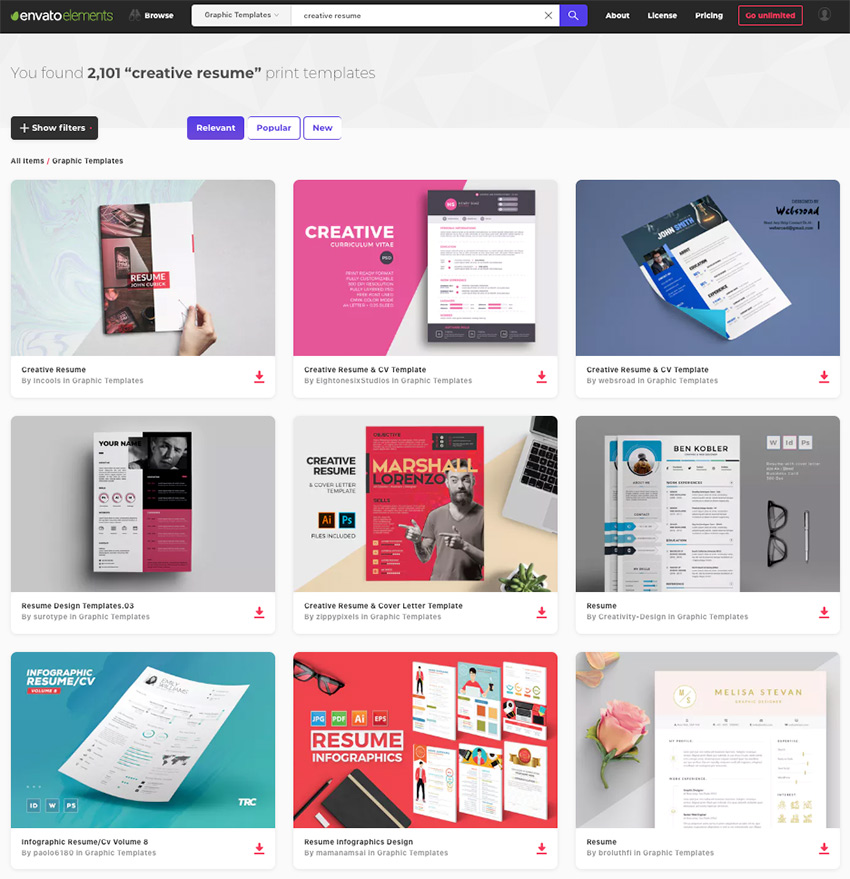
If you’ve recently seen a compelling job ad, or you worked your contacts to find an irresistible open position, now is the moment to act. You can’t let a career opportunity pass you by! Now’s a great time to level-up your resume, and make sure it represents your experience and skill set effectively. A good place to begin is with any of the creative resume templates on Envato Elements or Envato Market.
The Best Creative Resume Templateson Envato Elements (With Unlimited Use)
Discover tons of professional creative resume templates on Envato Elements, with a great offer: download as many as you want for one low price.
Each of these top creative resume ideas from Envato Elements has tons of professional and creative design options. While stacked with pro design features, they’re also quick and easy to work with.
Browse through the resumes for creatives to find one that resonates with your personal brand and goals. They’re set up to work with popular software, like Photoshop, InDesign, Illustrator, or Word. They’re also print-ready and designed for quick customization.
Showcase your innovative portfolio alongside your work skills. Just add your text, images and preferred colors to these already visually-impactful creative resume templates. Work smart and fast by leveraging off visual features like subtle infographics, organized layouts, and multiple page options. Print your resume and you’re all ready to impress. It’s that easy!
5 Creative Resume Ideas (New From Envato Elements – For 2019)
Here are a handful of resumes for creatives for 2019 (with creative and professional designs to represent your personal brand) that’s trending on Envato Elements:
This is a template of a resume for creatives. It comes in handy when you need to showcase your portfolio or creative projects while not being restricted by the number of pages. Creative Resume Template InDesign consists of 10 fully editable and customizable pages that can be turned in to a resume or portfolio booklet.
This single page creative resume design just screams fun! It’s perfect if you’re looking for something to help you stand out from the crowd. Simple, fun, and fully layered illustrations are included in this Photoshop template. This creative resume design can be used to display your key information like; contact details, educational background and work experience in a concise manner. Potential employers can then be directed to a personal website to view your extensive portfolio.
Creative Professional Resume template is a six-page printable resume that’s organized, clean, simple, modern and impressive. Though it was created for someone in the creative profession, it’s also suitable for anyone in the job market.
This professional creative resume design helps present your info as simple, fun and vibrant infographics. Making it easier to comprehend and remember. This creative business resume template comes with 140 icon sets that’ll help create that resume that’s visually appealing.
Summarize your entire professional career with a unique timeline infographic, plot your international work experience on a map, highlight your skills visually and easily show your level of competence for each of them. Fast track your job search with a resume as professional, creative, and versatile as you are! This resume template for creatives makes it easy.
Envato Elements (Design Without Limits)
Envato Elements – Unlimited creative template downloads for one low price.
Envato Elements has a single compelling (all inclusive) offer:
Get unlimited downloads from a massive digital warehouse of creative assets.
That’s right! Download as many creative resume templates, graphics and royalty-free audio as you want, then customize them to fit any of your project needs.
While Envato Elements is a powerful option, if you prefer to buy a new creative marketing resume template one at a time (instead of getting unlimited access to hundreds of creative designs), check out the selection from our Envato Market below.
Best Creative Resume Examples for 2019 on Envato Market (Buy It One At A Time)
We also have you covered if you need to buy a resume template for creatives one at a time, in our creative business resume template category, which is part of our Envato Market. Here are a few creative resume examples from our best-selling creative marketing resume templates from the last year (2019):
This One-Page Resume Template will help you keep your resume concise by sticking to the most relevant information. That’s right, resumes for creatives need not be long! However, if you ever need additional pages, let the designer know and they’ll help you out.
This package includes a cover letter template as well, and you can edit the files in Microsoft Word, Mac Pages, Photoshop, and Illustrator.
Consider the Clean Resume template if you’re applying for a more traditional job but want to express your creativity without going overboard. The use of columns and color blocks helps keep your details organized and never gets overbearing.
This is a template for a two-page resume and cover letter. You can edit all the pages easily with either Adobe Illustrator or Microsoft Word.
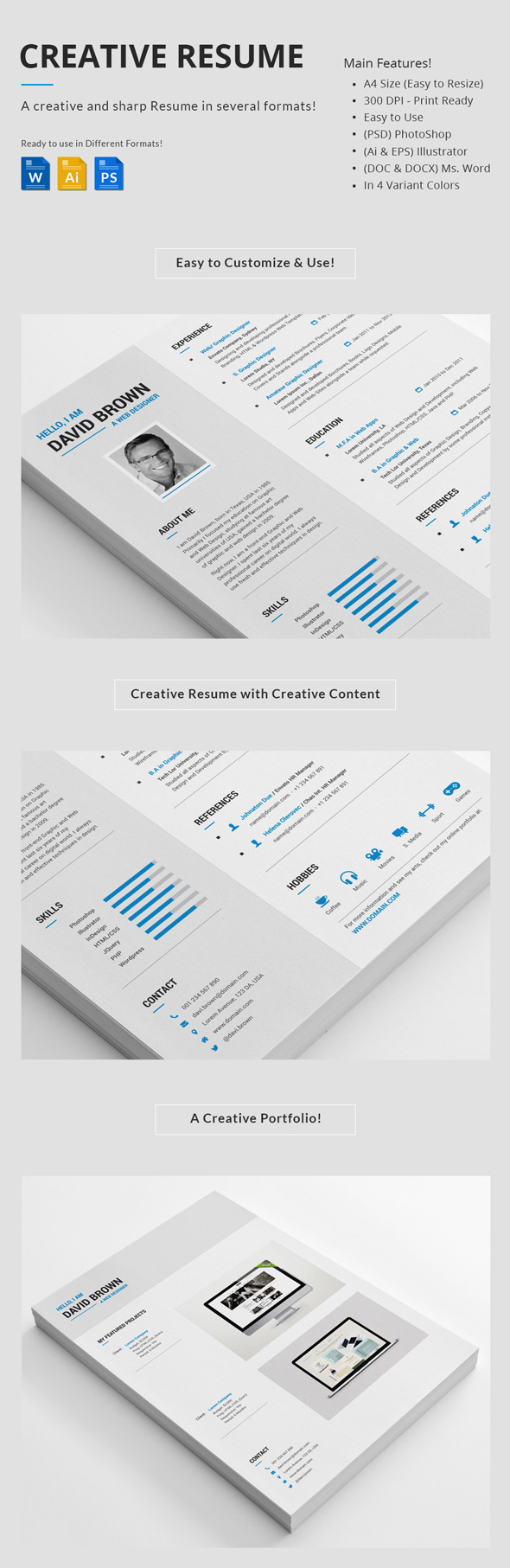
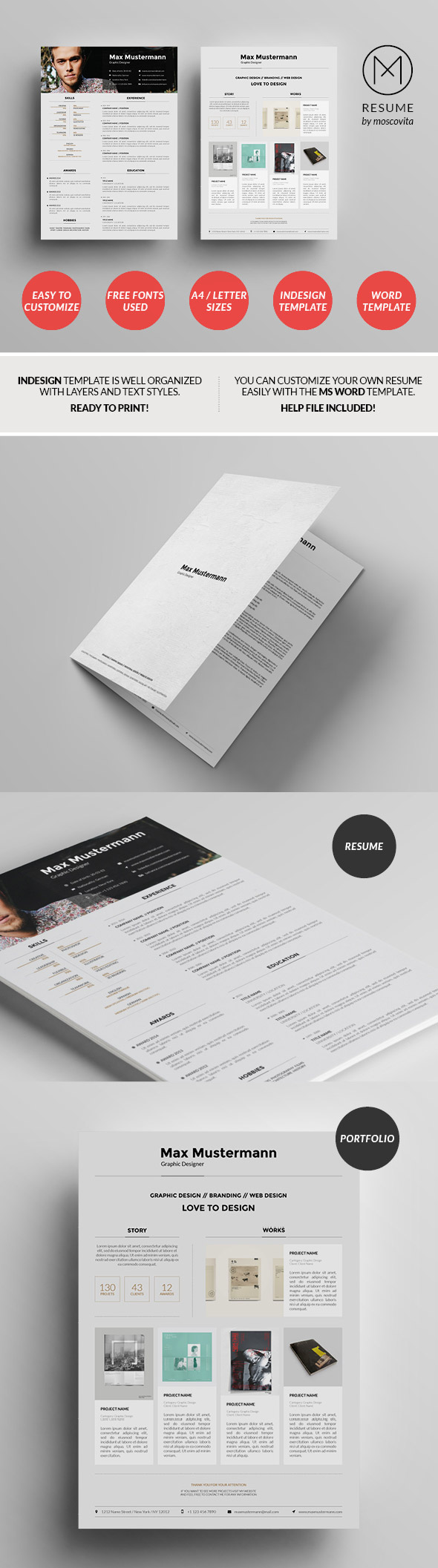
This is a professional creative resume with a sharp design set in PSD, AI, and MS Word formats. It’s packed with multiple color variations, a full assortment of cover letter, resume, and portfolio templates, as well as infographic and icons options.
You can display your photo to make a personal connection, include your visual work in the portfolio page, and make a professional impression with this elegant resume design set.
This is a beautiful modern resume design. It’s got a flat web style, with understated highlighted white boxes, set against a mid-gray background. If you’re a marketer, digital creative, or web professional, this is a resume template design to take notice of.
Packed with a full assortment of features and files, this set has resume page, cover letter, portfolio work page, and business cards as well. There are 11 files in total. They’re all 100% customizable in MS Word or Photoshop and fully print-ready. It includes a number of subtle infographic details and featured area to display your headshot and stand out as a creative applicant.
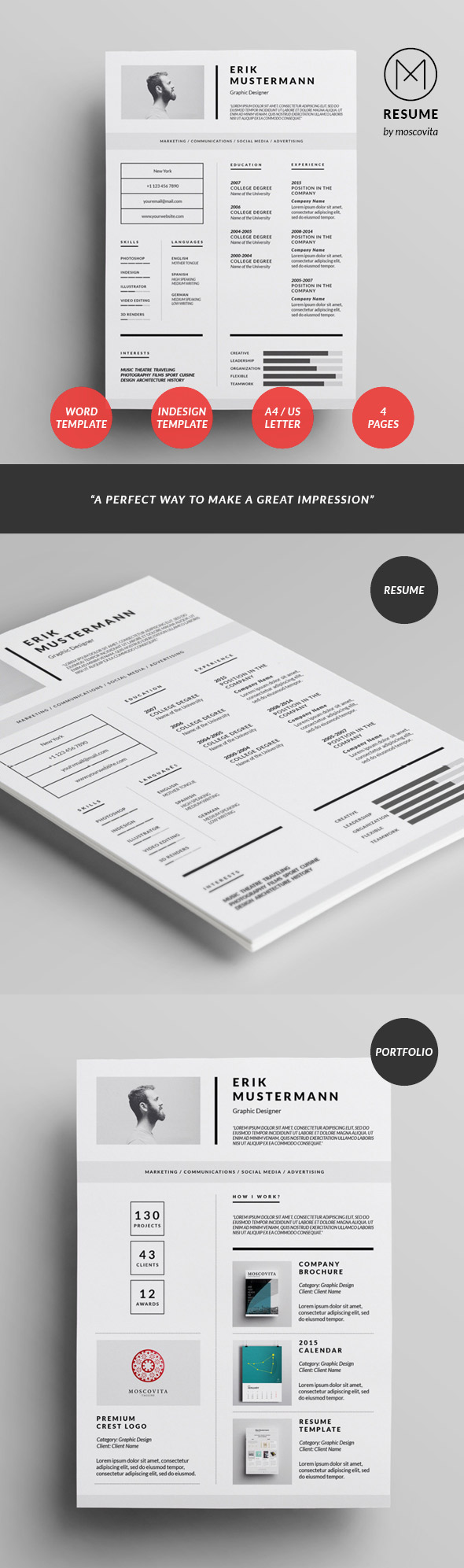
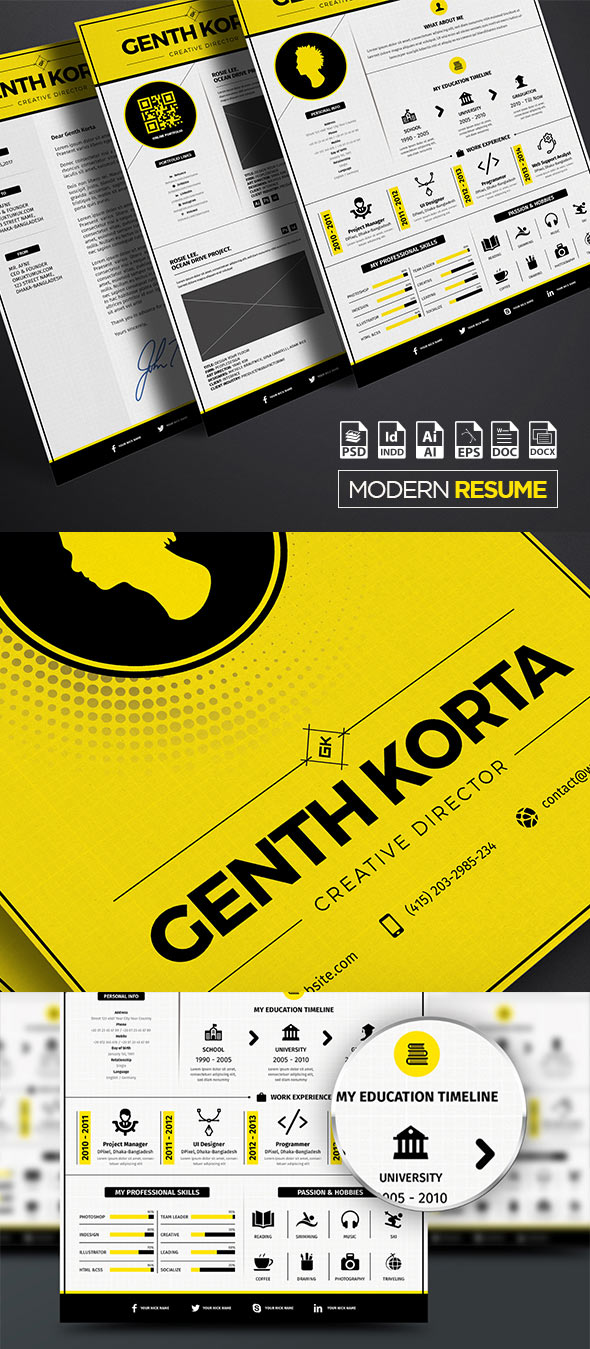
If you’re applying for a creative position, or want to stand out from job applicants visually, this modern resume is a distinctive option. It’s got a minimal design with a clean box and bold line style that punctuates your job history and skills.
In addition to a resume, cover letter, and references pages, this design pack also includes a portfolio page for displaying your work. It comes in A4 / US Letter size. Also, the files come with both InDesign (INDD) and MS Word template options.
It’s set up with organized layers, character styles, and easy to customize features. Using this set, you can get your resume ready, and out to potential employers fast!
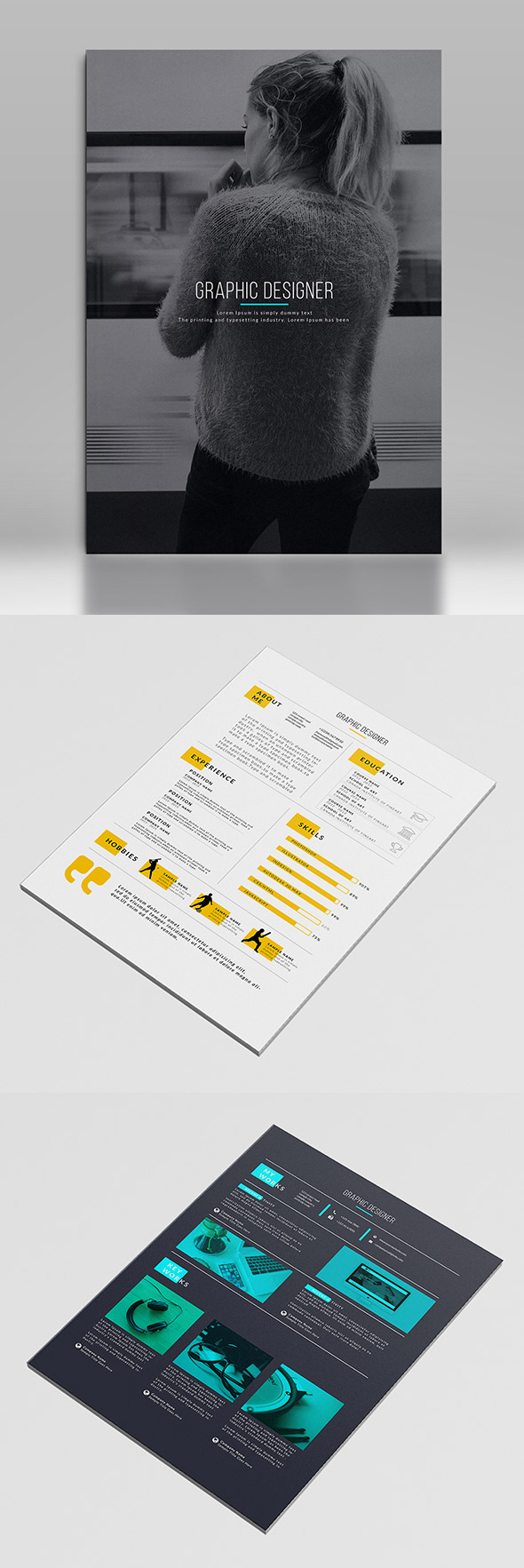
If you’re a graphic designer, looking to land a creative job, this is the resume made just for you. It’s got a distinctive modern design with a highlighted visual theme that drives the eye to key areas of each page.
It includes a distinctive cover, resume, letter, portfolio display options, and more. There are 24 pro pages that are fully-editable in InDesign or Photoshop. You can use a dark or light version. Just add your own career info and folio images, then print or export to PDF.
If you’re a digital worker, this creative template has a clean, modern design that feels on-style for professionals working online. It’s great for web designers, UI/UX experts, or marketing pros.
It comes packed with resume/CV, cover letter, portfolio page, and matching business card template. It’s ready to work with Photoshop (PSD), Illustrator (AI), or MS Word (DOC). There’s also a matching material style site template (HTML5/LESS CSS) you can grab as well, so you present a cohesive brand when applying for jobs.
This professional creative resume template has a clean, structured design that highlights relevant job info, and is made to read easily. It’s attractive to present your work and has a minimal intuitive design flow. It presents all your career detail in an organized, orderly manner—with subtle design details and infographic callouts.
This professional resume template set is packed with InDesign and Word files. It includes four different pages: cover page, cover letter, resume, and portfolio. You only get that first chance to spark interest as an applicant, make the right first impression with a great resume design!
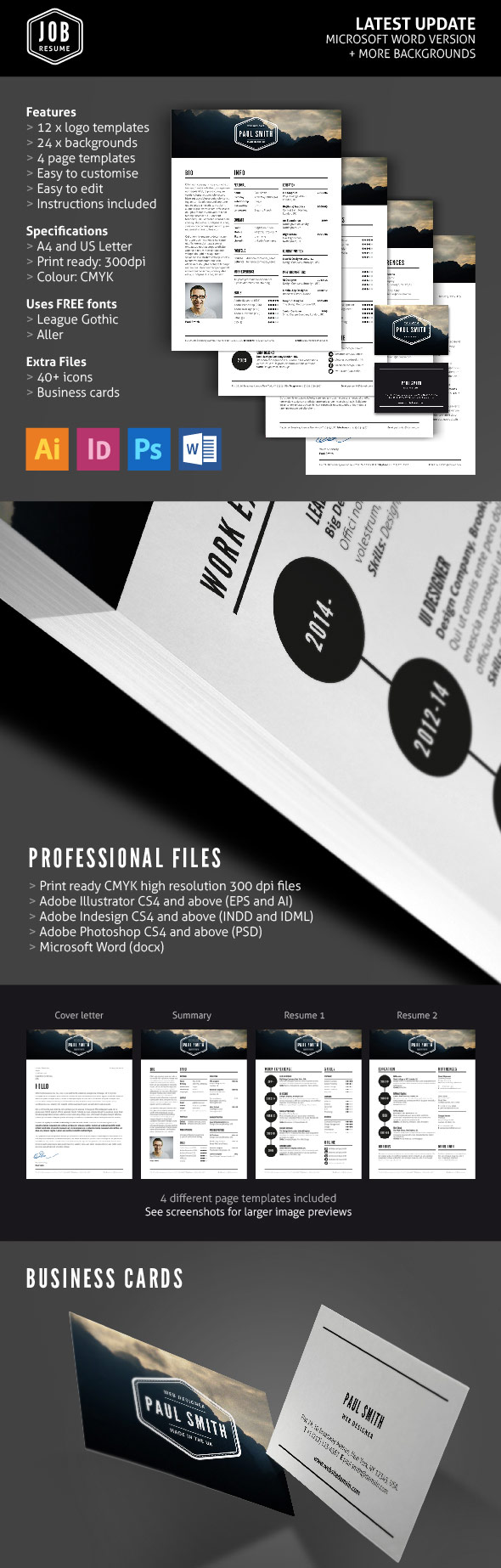
With a classic modern design, and ample visual options, this resume template pack has a full assortment of files to build a creative resume with. It comes with 12 vintage logo styles, 24 retro images with effects, customizable resume pages, business cards, icons, and more.
The files come in Adobe Illustrator (AI), Adobe Photoshop (PSD) and Microsoft Word (DOCX). Create your identity and resume quickly, and stand out with sharp, bold graphics and clean typography.
This minimal resume template has a strong baseline grid, that makes great use of font choices and whitespace. Present your resume and cover letter professionally, with subtle visual details, and simple infographics and icon options.
With InDesign, Photoshop, and MS Word file options, this clean modern template is ready to customize with your details. Fonts and colors are editable, it’s set with paragraph and object styles, print-ready, and comes with extensive PDF help files. Highlight your creative work history and personal brand with minimal style!
Whether you’re a photographer or want to make use of extensive portfolio display options, this resume is a visually engaging template for creatives. Work with the 10 pages it comes packed with, such as: cover, distinctive quote, cover letter, multiple resume pages, portfolio, and back cover.
This minimal concept, with its clean-cut design, is made to help land you that creative job and elevate your career progress. You can even use this as a PDF portfolio to help land gigs as a freelancer. It’s as much a creative booklet as a resume. It comes with InDesign and Illustrator files. It’s print-ready and has 17 pre-made color options. Make use of this fully-loaded pack today!
This resume template has strong typographic features, infographic options, clean professional structure, distinctive icons, and diamond offset boxes. It comes with both light and dark versions.
It’s also packed with files to work with, such as resume templates, cover letter, portfolio, and business cards as well. The resume is print ready and easy to customize. The files are ready to work within Photoshop, Illustrator, or MS Word.
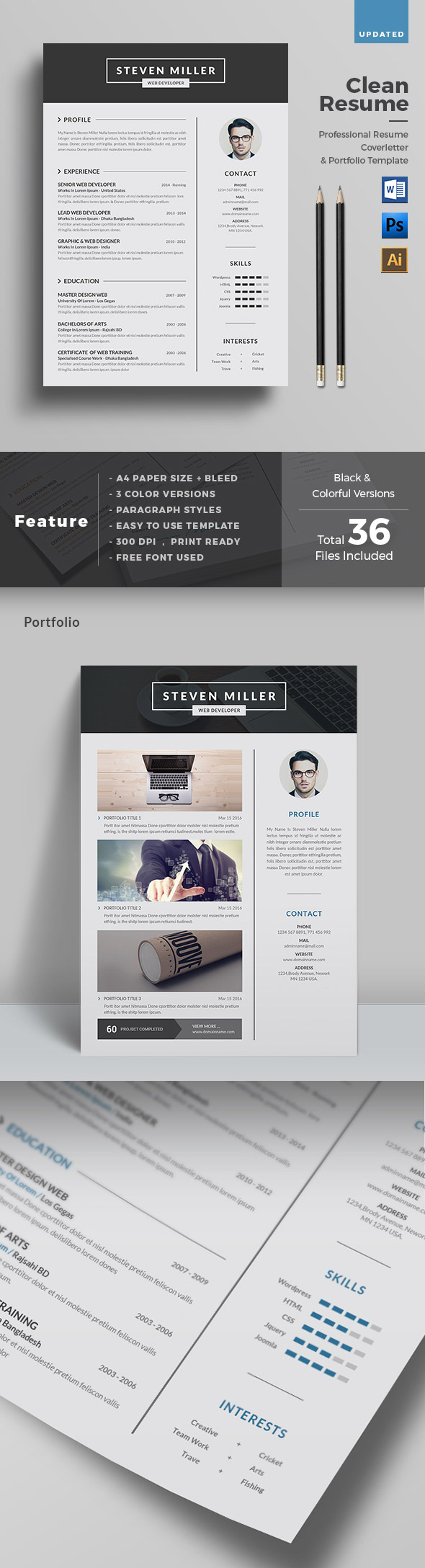
This professional resume, cover letter, and portfolio template set has a clean minimal design. It includes multiple color versions, infographic features, paragraph styles, easy to use files, and is set with free fonts.
You’ve got three creative resume format options: Photoshop, Illustrator, or MS Word. So, you can work in the software you’re most comfortable in. The flexible page designs are ready to add your details to, so you can land that creative job you’re aiming for!
If you’re a creative, needing a full package of resume files, then this minimal style set is a great option. It comes with 52 files, with multiple color options, and resume, cover letter, portfolio pages, and matching business cards. Work in PSD, AI, or MS Word. Whether you’re aiming for a design job, or a creative online position, you want to stand out visually as a professional applicant.
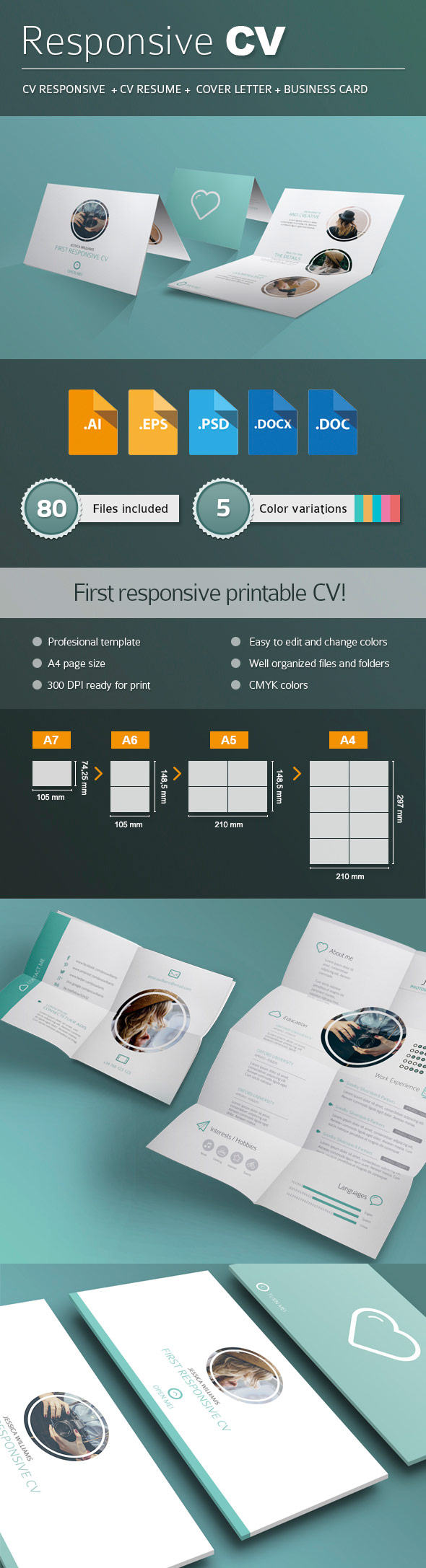
This responsive resume design is a big pack with 80 files in AI, EPS, PSD, DOCX, and DOC formats. It’s professional and easy to edit with your details. Includes: resume, cover letter, thank you card, business cards, icons and more.
This unique resume is double-sided and can fold up for mailing. It also features a distinctive modern design with unique centered photo area to display your creative self-portrait—whether that’s you smiling, busy working, or zoomed-in holding your tools. Make an instant connection when applying for creative jobs or gigs.
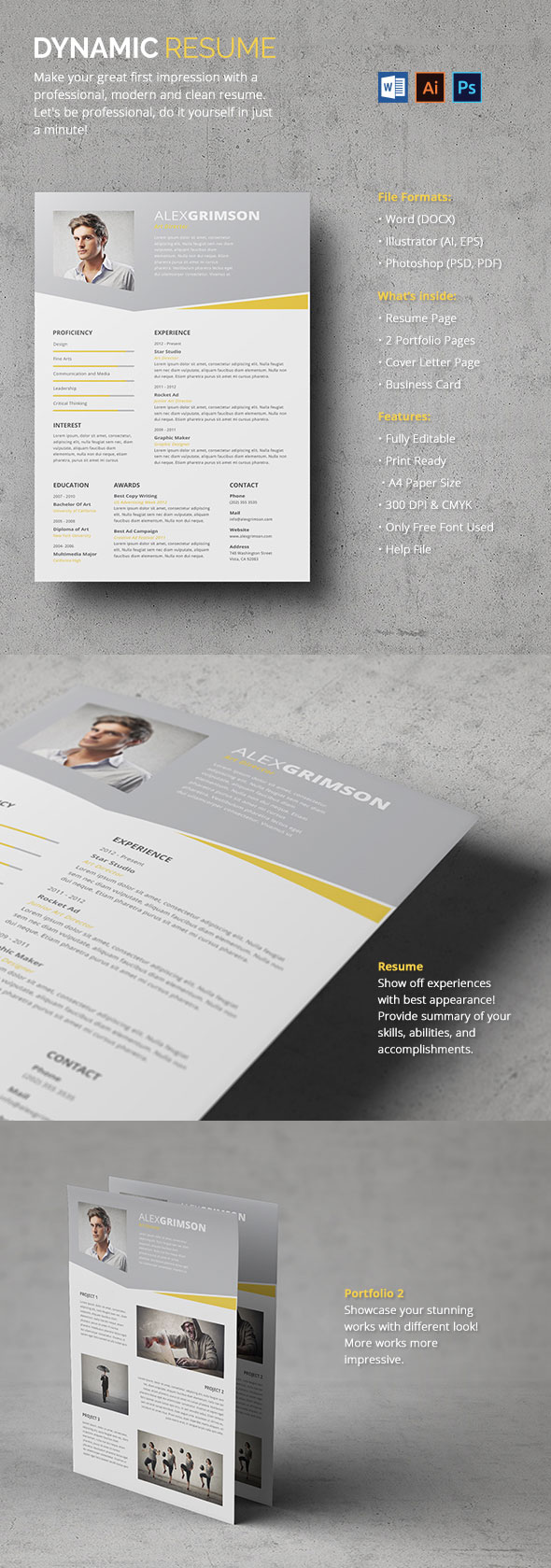
This is a professional resume template set with two dynamic portfolio page options. You can impress new clients or potential employers by showcasing your best work samples. Provide three large thumbnails with titles and detailed descriptions.
Also included are resume and cover letter pages with distinctive header design, as well as matching business cards. Work in Word, Illustrator, or Photoshop, to add your custom work and summarize your skills and abilities. Then apply for that creative job you’re eyeing!
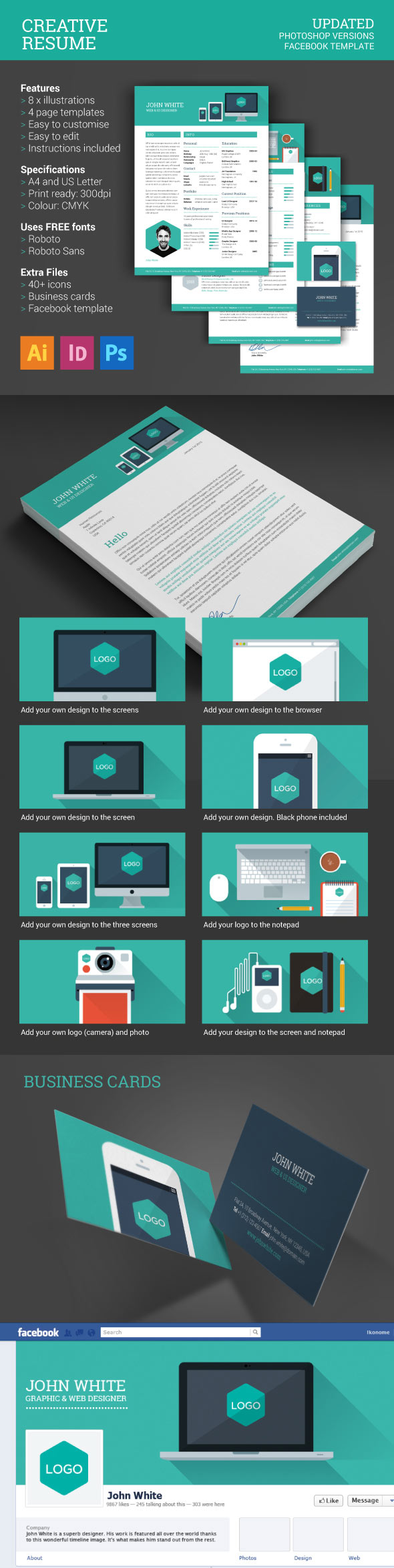
If you’re a web professional, whether a marketer, coder or designer, this is a great way to stand out in modern style. This minimal resume template set has a number of creative features. It’s designed with bold type, and flat design illustrations, to showcase your personality and professionalism.
It includes A4 and US Letter print-ready files in Illustrator, Photoshop, and InDesign. With templates for a resume, cover letter, Facebook templates, icons, and business cards. You can build your own resume and brand set in a few steps and easily customize with your own logo and screen design illustrations. It comes with all the instruction and asset you need!
This template has a number of great user comments, such as:
“I really enjoy this template. I have researched over 50 templates for resumes and this one is comprehensive and professional. Thank you for this design.”
If you’re needing to visually make an impression as a creative job candidate, Omni Resume is a professional choice. You get a full assortment of resume, cover letter, reference sheet, and portfolio pages in AI and PSD, as well as icons and infographic options to work with.
This is a modern resume with a unique style that features icons, flat graphics, and infographics to visually engage potential employers a creative applicant. This high-energy resume design comes with Photoshop, Illustrator, InDesign, and MS Word files. It includes a resume, cover letter, portfolio page, business card templates, and distinctive design features.
This is a clean, modern resume with a creative design. It features minimal infographics, a black and white monochrome design, great use of whitespace, a portfolio page, business cards and icons. It’s bold, simple, and clear.
Prep these resume files in Illustrator, InDesign, Photoshop, or MS Word. Add your accomplishments and emphasize your skills. Display your creative brand, showcase your best work, and make an impact that’ll land your next position as a creative pro!
When applying for any new job, you need to make the right initial impression, and that starts with your resume. With two creative resume design options, this graphics pack comes loaded with options.
Either of these Photoshop sets can readily be customized to your brand. They come with resume, portfolio displays, infographics, photo areas, business cards, covers and more. Two awesome resume style options in one affordable set.
This web design style resume, with a digital-inspired theme, features both light and dark options and neon pops of color. It’s designed in Photoshop (PSD) and the files are made to customize fast.
If you’ve got a job to apply for this week, then you need an attractive resume that’s easy to update with your info and is on-style for the position. This clean-cut design has clear sections to display your work experience, education, profile, and data-like icons to highlight your strongest skills.
This clean resume template design has an organized layout with clear columns to structure your work experience and achievements. The sharp design highlights your headshot and information about your profile on the left side with a large rectangular strip.
There are four pieces in this set with two resume options, cover letter, portfolio page, and also both light and dark versions. You can edit them in Photoshop, Illustrator, InDesign, or Word. Then get them off to the printers or exported as a PDF.
Ready to knock the socks off a potential employer! This visually striking resume template is made for individuals that work in creative fields. If you need to include portfolio images with your written resume or CV, then this InDesign brochure template is an appealing design to use.
It includes resume page, cover page, cover letter, and portfolio page. It’s set up with master pages, character styles, editable text, a 12-column grid, and ready to customize features. Use this creative resume to land a coveted new position!
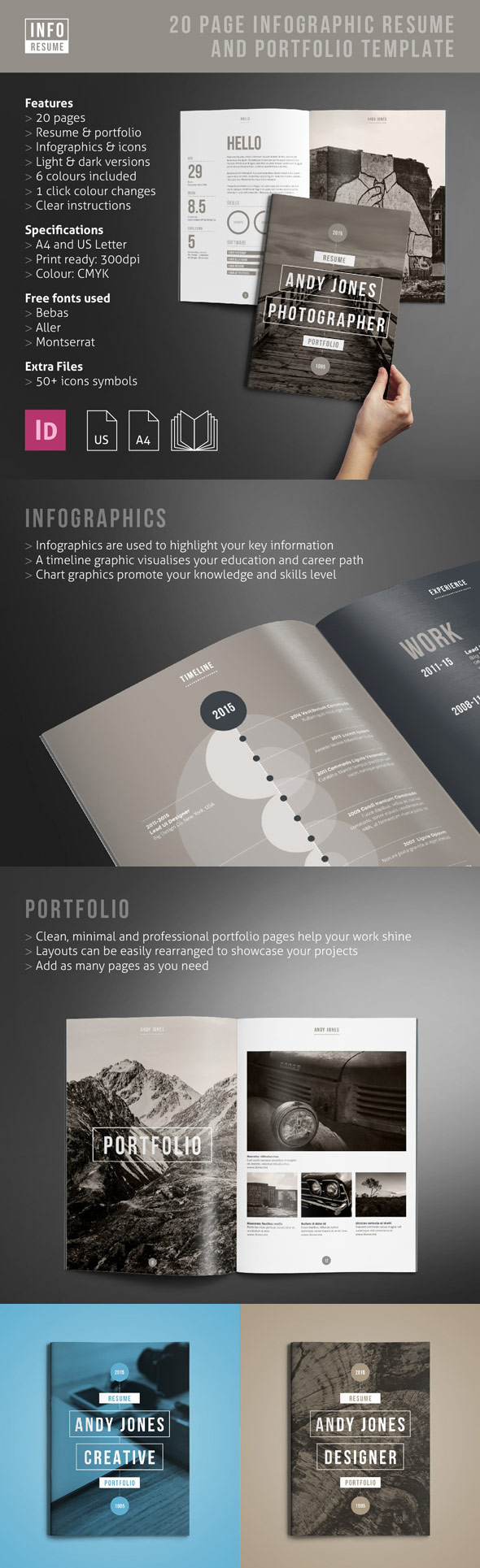
Make a statement and visual impression with this creative infographic resume. This modern template is designed to highlight your experience, showcase your work, and demonstrate your creative talent.
It’s packed as a multi-page design with introduction page, timelines, work experience, multiple portfolio pages, brands experience folio, awards, testimonials, contact page, and covers. It’s more a booklet presentation, than a standard resume.
It comes with multiple color options, clean infographics, over 50 icons, light and dark versions, and ready to work within InDesign (INDD). If you need to shoot a PDF off to an art director or contact at an agency, this template set is packaged with the design files that’ll help you land that job!
Five Ways to Make Your Creative Resume Stand Out
1. Don’t Be Generic
If you’re sending exactly the same resume to different job applications, then your applications are too generic. Instead, tailor the resume to each specific job and company you apply for.
The Summary Section of your resume is a prime spot. Don’t waste it! Forget about using vague words in the summary. If it can be used to describe someone else, then it’s not specific enough. Use this space to highlight the key achievements and highlights of your career.
3. Use Appropriate Keywords
Study the job description carefully and highlight keywords that appear to be important to the employer. Include them as many times as possible in your resume. Many companies today use applicant tracking systems that scan resumes for desired keywords. If the software doesn’t find them on your resume, the hiring manager may not even see it at all.
4. Show Results, Not Responsibilities
In the job experience section, don’t just talk about the responsibilities or tasks you’ve had. Mention the measurable results you’ve gotten for previous employers. If you can back up your accomplishments with data, your resume becomes even more powerful.
Even if you’ve been working for decades, you can distill your experience and experience in two pages, at the most. Remove details that are irrelevant. Move some items to your cover letter. And save some specifics for the job interview.
Learn More About Resumes
Build your resume-making skills with these articles:
If you’ve got an important job you’re considering applying to, then you should take some time to craft a visually engaging resume and position yourself to stand out as a suitable candidate for the role.
There are plenty of ways to create that professional and modern CV for creative jobs with these easy to use templates. Browse our wide selection of creative business resume templates for 2019 from Envato Elements, or Envato Market and grab the ones that are right for you. Start marketing your personal brand with a creative professional touch to land that new job in style and level-up your career.
Editorial Note: Our staff updates this post regularly—adding creative marketing resume templates with the best, creative and professional designs.
Securing your website with a simple file backup is not enough. You need to go an extra mile to ensure that you do not ruin your reputation because getting hacked affects your SEO ranking. Here are simple ways that will help you to secure your WordPress website in 2019.
Unique passwords
When creating WordPress account passwords, use unique combinations. This is the part to play with sophisticated ideas that hackers cannot guess. Instead of using letters and numbers alone, sprinkle in symbols in a unique pattern.
Once you have a password, try to remember it. Do not save your password on Google. Similarly, change your password on a regular basis. It helps you to secure private client information and to keep your website free from hackers.
The two-factor authentication
It is imperative that you practice the two-factor authentication strategy. This involves having a password at two different security levels to verify your account. Remember, there are different ways to authenticate your account. They include using a secret question, a secret code on your mobile phone and an email verification through a unique code. While this process can be hectic, it plays a significant role in enhancing the security of your WordPress website in 2019.
Embrace core automatic updates
Hackers are always trying out new hacking techniques. For this reason, it is imperative that you update your apps whenever there are formal updates from Google and other related sources. It helps you to stay up to date with WordPress. Lucky enough, most automatic updates are usually set on as default and you are assured of important notifications. However, you need to always check on your WordPress settings to ensure that you haven’t switched off your notifications.
Limit your login attempts
In a WordPress website, you and other users are allowed to try to log in as much as you can. While this gives users a convenient approach to access their accounts, it also exposes your website to hackers. Therefore, to avoid creating security loopholes, it is wise that you limit your login attempts. Use different free plugins to limit attempts and by doing so, hackers will have very few chances of hacking your account.
Customize your URL address
It is always advisable that you customize your URL address or login page to keep hackers away. Ensure the page cannot be seen in the site’s main URL because it makes it vulnerable to hackers. However, if you customize the page, you are making it safe and unbreakable. Therefore, set up iThemes Security plugins or create a unique custom URL for example, my-custom-login. The former changes your login URL automatically.
Most importantly, do not use common names such as ‘admin’ as your username. In the event where you have already used the default admin name, it is recommended that you update it immediately using PHPMyAdmin and replace it by something much more unique and difficult for hackers to crack.
Switch to HTTPS
HTTPS protects your WordPress website from different security attacks and hackers. It offers a high level of encryption between your web server and browser, therefore, keeping attackers away. It also prevents the unauthorized transfer of data from one server to the other.
HTTPS also protects your WordPress site from various hidden scripts on your computer system.
With these security ideas, you can avoid a security breach on your WordPress website. Protect your admin and login page with the ideal security tools and apps to stay safe.
There are lots of food ordering apps on the market these
days, but one that is attempting to grab a slice of the pizza market is…Slice!
The app, which used to be known as MyPizza, allows the user
to order from up to 10,000 different pizzerias. This allows smaller independent
pizzerias the opportunity to get online without having to set up their own website
and deal with payments.
The ultimate aim of Slice is to make it as simple as
possible for you to order and enjoy pizza in the comfort of your own home on
your phone.
When we tried the app out, we were able to view a list of
available nearby pizzerias. Once you have chosen your favorite pizza retailer,
you can then go ahead and choose your pizza, as well as making any customizations.
If you have a friend or family member that doesn’t want pizza, there may be
pasta for sale, or other yummy alternatives to get their taste buds flowing.
If you order the same pizza every time from the same pizzeria,
you can easily re-order with the tap of a button. But, sometimes it is good to
try new pizzerias and new toppings!
The CEO of Slice, Ilir Sela, said that Slice is very useful
for those who don’t reside in a city. The reason being that there may not be
any restaurants close by that offer delivery through a service such as Seamless.
There is a far greater chance that there is a local pizzeria who will be able
to offer delivery through Slice.
For your first order, make sure you visit https://slicelife.com and on the homepage, enter your phone number in when prompted to do so, and you can enter the promo code APP3 to enjoy $3 off your first order. This is a great way to try the app out whilst saving money.
Slice is also good from the pizzerias point of view. It
allows them to escape the clutches of other more expensive online ordering
platforms, allowing them to grow and stay in business. If you are a pizzeria,
you may wish to check out https://slicelife.com/pages/about-restaurants
for more details.
There have been many great reviews of the Slice app. In fact,
it has been reviewed over 35,000 times on the iOs app store, and 6,500 times on
the Android app store.
Have you tried out the Slice app? If so, let us know what
you think of it!