It didn't take long for Porsche's rumored Taycan recall to become official. The German car maker has recalled about 43,000 Taycan and Taycan Cross Turismo EVs worldwide over a sudden power loss issue. You'll have to take your electric sports sedan to a workshop to receive an hour-long software update (over-the-air isn't an option this time), although Porsche said you could continue driving until the update is ready.
The bug has already been addressed for models rolling off the line, Porsche said.
The recall was prompted by an NHTSA investigation of nine incidents where power shut off while the cars were in motion, with six of the cars refusing to restart. Autoblognoted that Porsche found the problem in 130 cars after conducting its own investigation. There haven't been reports of collisions or injuries.
The recall is a blow (if minor) to Porsche, which has generally enjoyed strong sales for the Taycan. The EV is now popular enough in the US that it's outselling the 911, 718 and Panamera. While this isn't likely to tank sales, it comes as Porsche is still trying to persuade buyers that it's worth ditching the company's legendary gas engines for electric motors — it might face some hesitancy after this, even if EVs are likely to be more reliable.
Broadcom is facing a major antitrust crackdown. Gizmodoreports that the Federal Trade Commission has charged Broadcom with "illegally monopolizing" the markets for broadband and TV chips, including WiFi parts. The FTC claimed that Broadcom struck exclusive deals with vendors and service providers that prevented them from buying chips from rival suppliers.
The FTC also accused Broadcom of obtaining "exclusivity and loyalty commitments" for chip supplies, making it difficult for companies to compete on their own merits. The vote was near unanimous, although newly installed Commissioner Lina Khan bowed out.
The Commission's proposed action would forbid Broadcom from negotiating certain exclusivity and loyalty deals, bar the company from conditioning chip access based on commitments, and ban retaliation against customers who buy from Broadcom's competitors.
Broadcom signalled to Engadget that it might cooperate on a settlement. It still disagreed with the FTC's portrayal and claimed that it didn't break the law. You can read the full statement below.
The chipset giant hasn't exactly won favor from regulators in recent years. It spent 2017 and 2018 aggressively trying to buy Qualcomm, only to give up after the White House blocked the deal. We wouldn't expect regulators to make too many concessions as a result, even if a settlement seems likely. Broadcom hasn't been shy about wanting to dominate the chip business — the FTC will want assurances the company won't push boundaries in the future.
"We are pleased to move toward resolving this Broadband matter with the FTC on terms that are substantially similar to our previous settlement with the EC involving the same products. While we disagree that our actions violated the law and disagree with the FTC’s characterizations of our business, we look forward to putting this matter behind us and continuing to focus on supporting our customers through an environment of accelerated digital transformation. We are equally pleased that the FTC investigation into our other businesses has been closed without action."
Tesla won't sit by the wayside as electric trucks like the Hummer EV and Rivian R1T lure customers with special features. Elon Musk has revealed that Tesla is adding rear-wheel steering to the Cybertruck to help the EV maneuver with "high agility." It's a rough answer to the Hummer's "Crab Mode" and R1T's tank turns, in other words. You might not have much trouble with a tight U-turn or tricky off-road scenario.
Musk also reiterated that the Cybertruck's design will be "almost exactly" what you saw at the introduction in November 2019, although he teased that there were many "other great things" in the pipeline. The pickup is still due to enter production in late 2021.
Rear-wheel steering may be virtually necessary. The Cybertruck is large even by truck standards — it might be a tough sell if it's difficult to steer out of a parking lot. Moreover, rivals like GMC, Rivian and Ford are all launching electric trucks that might match or sometimes beat Tesla's feature set. The category has changed since the Cybertruck introduction, and Tesla risks losing some business if it doesn't update its technology.
Friday afternoons are usually Tesla design studio time. Cybertruck will be almost exactly what was shown. We’re adding rear wheel steering, so it can do tight turns & maneuver with high agility.
Hackers just perpetrated one of the largest known supply chain cyberattacks so far. The Financial Times and Wall Street Journal report that IT management software giant Kaseya has fallen victim to a ransomware attack that compromised its VSA remote maintenance tool. The company initially claimed that "fewer than 40" of its customers were directly affected, but security response firm Huntress said three managed service providers it worked with had also succumbed to the attack and compromising over 200 companies.
The number could be higher. Huntress noted there were eight affected cloud service providers, potentially affecting many more firms. Swedish supermarket chain Coop closed almost 800 stores after one of its contractors became a target.
Kaseya said it had identified the likely source of the security flaw and was developing a patch that would be "tested thoroughly." In the meantime, though, the company urged all customers to shut down their VSA servers and keep them offline until they could install the update. Software-as-a-service customers were "never at-risk," Kaseya added, although the company took down that functionality as a precaution.
The incident is the latest in a string of high-profile ransomware attacks, including JBS and Colonial Pipeline. It also follows the large-scale SolarWinds breaches attributed to another group, Nobelium. Online security is quickly becoming a major issue in the supply chain, and it's not clear these problems will disappear any time soon.
Kaseya's breach also reflects the dangers of relying heavily on one company's software platform. While the number of directly affected clients is small, the supply chain network appears to have created a ripple effect that damaged numerous companies down the line. The situation might not improve until there's either tighter security among Kaseya-like providers or more competition that reduces the potential damage.
Half a month after OnePlus announced that it's becoming an Oppo sub-brand, it has revealed that it's also merging its OxygenOS with its new parent company's ColorOS. The two brands have come to the decision to "best leverage [their] shared resources" and to standardize the software experience across their portfolio. But what does OnePlus mean exactly when it said that they're "working on integrating the codebase of OxygenOS and ColorOS?" It said you may not even notice a difference, because the changes are happening behind the scenes.
OxygenOS will still be the operating system for OnePlus devices released globally. As 9to5Google notes, OnePlus phones released in China already run ColorOS, and that will likely remain the case — it's just that the operating systems will now shade a codebase. All new devices the sub-brand will release will run the new OxygenOS, while current devices that are still receiving updates will get the new platform via an over-the-air update.
Speaking of updates, OnePlus is promising better and longer Android update support, which now rivals Samsung's, with the change. The OnePlus 8 series and the brand's newer flagships will receive three major Android updates and four years of security updates going forward. Meanwhile, the first Nord and any newer Nord and Nord CE devices will receive two major Android and three years of security updates. Finally, the affordable Nord N series phones starting from the N10 and the N100 will get one major Android update and three years of security updates. Unfortunately, you can continue expecting two major Android and three years of security updates if you have a flagship older than the OnePlus 8.
When the merge was announced, the companies said OnePlus will remain independently operated. Since the move was meant to pool their resources and to better streamline their operations, though, linking their operating systems more closely doesn't come as surprise.
Creating annual reports doesn’t have to be time consuming or cost a lot of money. Use professionally designed annual report templates for Microsoft Word and Google Docs to create a stunning presentation.
The Company Profile Word Template is one of the many high-quality all-purpose premium business templates available on Envato Elements.
Premium professionally designed annual reports helps you focus on the content of the report instead of the design. These can be hard to read as they’re full of detailed financial information. This makes it incredibly important for you to have a design that’s not only easy to read, but stylish.
Best Annual Report Templates for Word and Google Docs on Envato Elements (With Unlimited Use)
Free annual report templates available on the web can help you begin your annual report template. But they won’t provide you with all the features that premium templates have that’ll make your presentation stand out.
On Envato Elements, explore the hundreds of the best premium annual report design templates. For one low monthly fee, download as many annual report templates for s as you want. Not only do you get access to all the premium annual report templates for Word available, but you also get complete access of the all the creative assets on Elements including:
web themes
photos
presentation templates
and more
All Elements premium design templates available come ready to use. They feature stylish designs and are fully customizable to help you make the best possible document.
Best Selling premium Word & Google Docs Annual Report Templates on Envato Elements
Let your clients know who you are as a business, highlight your company’s accomplishments, or present your company’s financials with the template annual report Word available on Envato Elements.
These templates are packed full of features that are sure to help you create the best annual report possible. Here are a few of the features that you can expect most templates to come with:
Next, we’ll go over the top selling annual report templates available on Elements and GraphicRiver.
5 Annual Report Templates for Word and Google Docs on Envato Elements & GraphicRiver (For 2021)
In this section, we’ll explore some premium annual report templates for Word and Google Docs from Envato Elements and GraphicRiver. Pick and download any one of these for your next presentation in 2021:
This annual report template is perfect for the publication of a professional and complete annual report or company profile. It’s divided into two parts. The first part contains photos and a narrative. The second part contains financial details with graphs.
Here’s what you can expect from this template:
A4 size : 297×210 mm + 3 mm bleeding
US Letter size : 11×8.5 inch + 0.125 inch bleeding
CMYK @ 300 DPI – print-ready
Adobe InDesign for CS4, CS5, CS6 and CC (.idml, .indd)
This template for an annual report in Word has 25 print page template and optional size A4 Letter size. It’s perfect for any purposes. You’ve got a variety to choose from to find the perfect fit for your project.
The Business Template is an all-purpose template that can be used for any type of business project. The design features a modern and spacious layout with an attractive looking red and black color scheme.
Here are a few notable features for this template:
This annual report template for Word or Google Docs is divided into two parts. The first part contains photos and a narrative for you to add a summary of the report. The second part contains the financial details. This template not only can be edited in Microsoft Word, but also Adobe InDesign, and Apple Pages.
Here are a few features for this template annual report for Word:
If you need to deliver a professional and modern looking template, this GraphicRiver template is ideal. You can add all types of information in the report such as procedures, data analysis, performance analysis, a company’s financial health, working procedure, and much more.
You can expect the following features with this template:
international A4 paper size with 3 mm bleed
24 unique pages
color swatches for easy color changing (CMYK)
free fonts used
On a budget, but still need to create an annual report in Microsoft Word? Keep on reading as we go over 10 free annual report templates for you to download right now!
10 Top Free Word Annual Report Templates to Download for 2021
Before looking for a free annual report template for Word or Google Docs on the web, check Envato’s free offerings first.
Each month Envato Elements offers a different selection of free files for you to try. You can also find free files each month on Envato Market.
Here’s more information about Envato’s free offerings:
Every month Envato Elements offers 12 different hand-selected files, (fonts, presentations, videos, and more). Create a free account to download this month’s free premium files now.
Or try Envato Market for free. They offer seven handpicked monthly freebies. Log in with your Envato Market account to get this month’s handpicked premium freebies.
If you didn’t find what you were looking for above, don’t worry. To help you with your search for annual report templates in Microsoft Word if you’re on a budget we’ve collected 10 templates for you to check out below:
This annual or project report template for Word has a cover page with extra-large title text and an abstract section. It includes a three heading body and a sidebar text box.
The cover of this free annual report template includes a photo insert, an abstract section, and an extra-large title text and a quote box. This will be able to fit your needs if you’re looking for a basic report design.
This is a one page annual report template for Word that includes a side bar and two columns There are also two inserts for you to include any type of graphics or charts that you need to display.
This free annual report template comes with 11 pages. Included is a cover page, table of contents, and separate pages for each heading in the table of contents.
This report template contains a multi-colored title page and a customizable body. It’s broken down into three separate headings. You can use this for any type of business report.
You can expect an abstract cover page and spots for titles, subtitles, and a paragraph on the cover page of this free annual report template. It comes with two pages, a cover page and a standard report page to include your reports information.
The cover of Report has an insert image that takes up two thirds of the page. There’s a green colored rectangle and a long white colored strip for your title and subtitle. You can expect two pages in this free annual report template.
This annual report template for Word comes in booklet form. The booklet features a title page, table of contents and one page design where the details of your report can go.
Add your own logo, images, and content to this six page free annual report template. You can also include SmartArt charts to make the report more interesting.
Now let’s look at a few free Google Docs annual report templates.
5 Best (On-Topic) Free Google Docs Annual Report Templates From Across the Web
Besides the 10 free Microsoft Word annual report templates above, you can also check out the five best annual report templates for Google Docs below:
Project Proposal is a Google Doc template with a basic layout that’ll work for various business reports and proposals. This template comes with two formatted pages.
This can be downloaded free from Google Docs. This design features an up to date design. Use it in technology, digital, advertising, and professional service industries.
This free template is divided into many sections for scope, vision, target market, and objectives. The template and its sections can be modified to contain any type of information needed for an annual report or business proposal.
Included with this template are seven pages, including a table of contents and cover page. The template leaves plenty of room for you to add graphs, charts, and any type of visual that would be needed for an annual report.
Need help with designing your annual report template? Keep on reading as we go over five contemporary design tips that can help take your annual report to the next level in the following section!
How to Customize Your Annual Report Microsoft Word Template
After you’ve chosen an annual report Microsoft Word Template, you’ll want to customize it. For this tutorial, we’ll use this premium Microsoft Word Annual Report template from Envato Elements:
For this tutorial, we’ll be using page 5. Here’s what this page looks like with no edits made:
Page 5 of the premium annual report template
Let’s customize page 5:
1. Add an Image
Add an image to your premium annual report template.
To add an image, click on the Insert tab. Next, click on the Insert Picture button in the toolbar.
When you click on the Insert Picture button, a menu appears. Select an option depending on where your image is located. Then, adjust your image as needed by dragging the handles.
2. Change the Font Color
Change the font color on your annual report page.
To change the color of the font, begin by highlighting the font that you want to change. Once the font is highlighted, click on the Home tab. Next, click on the Font Color button in the toolbar. When you click on this button, a color menu drops down, From the dropdown menu, choose any color you need.
3. Change the Color of the Background
Change the color of the background in your annual report template.
To change the color of the background, click on an empty spot on your template page. Next, click on the Design tab. In the toolbar, click on the Page Color button. When you click on this button, a color menu drops down. Click on a color of your choice.
4. Change the Font Type
Change the font type in your annual report template.
To change the font type of your text, begin by highlighting the text. Next, click on the Home tab. Then click on the Font menu. When you click on the Font menu, a list of fonts drops down. Select the font that you want from the list.
5. Delete an Object
Delete an object in your premium annual report template
To delete an object, click begin by selecting the object that you want to get rid of. You’ll know it’s selected when a box with handles appears around the object. Next, click Delete on your keyboard. The object is gone.
Now let’s learn how to customize Google Report templates.
How to Customize Your Annual Report Google Docs Template
Envato Elements doesn’t have annual report templates specifically for Google Docs. But you can easily convert an annual report Microsoft Word template to Google Docs. Here’s how:
How to import a Microsoft Word template into Google Docs
Go to your Google Drive. Next, click on the New button. When you click on the New button, a menu drops down.
Select a Microsoft Word template for use in Google Docs.
Next, click on the File Upload option from the dropdown menu. Then, select the file of the template you want to convert. Click on your uploaded file from Google Drive, and you’re ready to start customizing.
The Word to Google Docs conversion happens more or less automatically. But there may be formatting differences that you’ll need to correct.
From this template, we’ll use page 4. Here’s what this page looks like without any edits:
In this tutorial we’ll use page 4 of the annual report template
Let’s customize the template:
1. How to Highlight Text
Highlight text in your annual report template.
You can add a highlight color to sections of text in your annual report. To highlight text, begin by selecting the text you want to highlight and double-clicking. This will cause a window to pop up with the text in the middle.
Select the text and click on the More button in the toolbar. A menu drops down. From this menu, select the Highlight Color button. A color menu drops down. Choose which color you want.
2. How to Add Your Logo
Add your logo to your annual report template.
You can add a logo to your annual or project report template for Google docs by adding a graphic image.
Place your cursor where you want to add the image and click on the Insert tab in the toolbar. A menu appears. From this menu, select the Image option. When you select the Image option, another menu drops down. Click on the Upload from Computer option to add your image.
3. Change the Text
Change the text in your annual report template.
Changing the text of your annual or project report template in Google Docs is a big way that you can customize your template. It’s important to add your own information into the template.
To change the text double, click on the text that you want to edit. A pop-up window appears with the text in the middle. Click on the text again. Erase the text that you see and type your own text. Next, click on the Save and Close button to save your changes.
4. Resize Your Text
Resize the text in your annual report template.
Resizing text is necessary to get your report template in Google Docs to look the way that you want it to. Just click on the text that you want to resize.
When a blue box with handles appears around the text, drag a handle to adjust the size.
5. Turn on the Spelling and Grammar Checker
Turn on the Spelling and Grammar checker.
Spelling and Grammar mistakes can leave a bad impression. So, take advantage of the Google Docs Spelling and Grammar checker. All you need to do is click on the Spelling and Grammar button in the toolbar. It’ll check the whole document and suggest changes where there may be errors.
5 Quick Annual Report Writing & Design Tips for 2021
While the premium templates mentioned in this article have professional designs that’ll work well for your next annual report, they may still need customizing to fit your report’s exact needs. Below are five modern design tips for your next annual report:
1. Included Layered Page Layouts
This premium template features a layered design for a more professional look.
Contemporary designs give you a sense of three dimensionality to make the design seem more appealing. The best way to create this three dimensional look is to have layered page layouts. By adding in graphics, images, shapes, and color overlays, to your pages, you can create a modern looking page layout that your readers will enjoy.
2. Keep Your Color Palette Simple
It can be tempting to add many different colors to your annual report to create a flashy looking design. This will only make your design seem unprofessional and cluttered. By choosing two to three different colors in your color palette for the template, your readers will have a much easier time reading your report.
3. Provide Important Company Information First
While the actual details are the most important part of your document, providing a bit of information about your company and how it operates is a must. This helps prime the reader for the details and helps them get a better understanding of your company rather than throwing a bunch of numbers at them.
This premium template features a section for you to include information about the company at the beginning of the proposal. Easily change it to create an annual report.
4. Include Icons
Icons, Icons, Icons. Icons are essential to any report as they add subtle interest. Don’t overdo it here. Just adding in a few icons here and there will be more than enough. Also, make sure that the icons contextually fit the text and page that they’re on.
5. Include Space
Modern designs leave plenty of room between the different elements on each page. Your annual report should do the same as well to capitalize on this modern look. To do this, break up long paragraphs and use headings where necessary to make the report more appealing.
Looking for even more annual report designs that weren’t covered in this article? In the next section we’ll go over even more best-selling templates designs that can help you create stunning looking annual reports.
Discover More Top Annual Report Designs
Looking for more high-quality designs? Check out more best-selling annual report template for Word in 2021. Here are three unique compilations of annual report designs:
Interested in creating the best annual report possible? In the next section will go over a few important resources that you can use to take your reports to the next level.
Learn More About Making Annual Reports
Is this your first attempt at creating an annual report on MS Word? Or are you struggling with something specific in Microsoft Word while creating your document?
We’ve got loads of helpful MS Word related articles and how-to tutorials that you can browse through. Pick and choose specific topics you’d like to read more about.
Are you unsure whether a premium template is the right choice for you? Maybe you’re not sure about the value of a premium template.
Here are five benefits and reasons why you should use a premium business report template for Google docs or a premium template for Microsoft Word:
Saves time. When you use a premium template, you’re starting with a good base. When you download a template, it’s ready to use. Just add your information into the template and make any customization that you want.
Impressive presentation. Professionals make every template from Envato Elements, and GraphicRiver look nice and impress your audience. Not only are they impressive designs, but they’re on-trend too.
Templates come with Ideas. Most templates come with all the features that you need. Good templates have placeholders, so all you need to do is add the information.
Every template is customizable. Just because you’re paying for a premium template doesn’t mean that you’re giving up customization. Good templates allow you to make any customization you want easily.
Templates stand out. Templates stand out from other handmade presentations. Your collogues most likely won’t use a template, so the professional design will stand out.
Benefits of Envato Elements (The Power of Unlimited Use)
Envato Elements: one flat rate, thousands of awesome presentation templates.
Envato Elements is a unique service. It’s a flat-rate subscription that includes thousands of great PPT templates for a single flat-rate price.
Sign up for Envato Elements. You’ll get access to thousands of unlimited use graphics and templates. Choose from web themes to annual report templates, and more—all for one low price.
Get Your Word & Google Docs Annual Report Templates Today!
Creating an annual report can seem like a time consuming and energy draining process. Both Envato Elements and GraphicRiver help you create annual report templates quickly and professionally.
If you’re looking for a flexible option where you can try out as many annual report template for Word or Google Docs as you can, then Envato Elements is your go to option. Not only can you get access to all these templates, but you’ll have unlimited downloads to all the creative assets available on Envato Elements.
If you only need a single template and know exactly what kind of style you’re looking for, check out annual report templates over on GraphicRiver.
Don’t miss out on what these two marketplaces have to offer and download an annual or project report template for Google Docs or Word now!
Editorial Note: This post has been updated with contributions from Sarah Joy. Sarah is a freelance instructor for Envato Tuts+.
When it comes to building a website, nowadays you don’t have to resort to learning how to code or finding the right developer for the job. Thanks to content management systems, everyone can easily and quickly create a website for their business, agency, portfolio, resume or a blog.
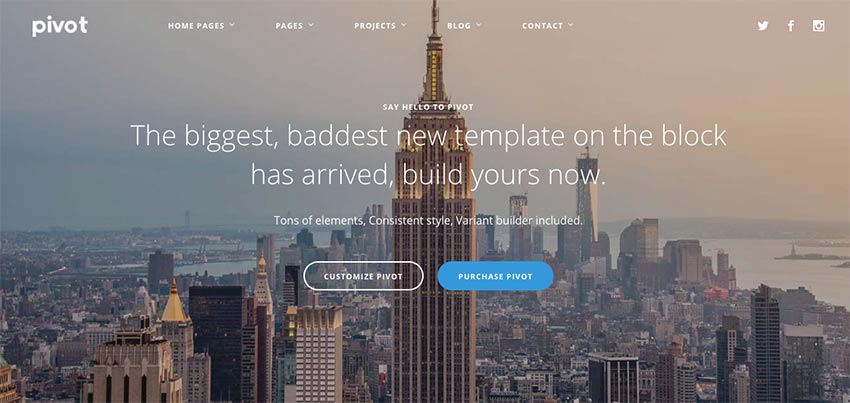
Pivot is one of our popular Drupal 8 responsive themes from Envato Elements.
Drupal has thousands of modules available to extend the functionality of your website, along with thousands of Drupal 8 premium themes on marketplaces such as Envato Elements and ThemeForest.
In this article, we’ll showcase the best themes for Drupal 8 & 9 that can be used to build any type of website.
Where to Find the Best Drupal 8 & 9 Themes for 2021
You can find the best Drupal themes on Envato Elements, a subscription-based site. Pay a low ongoing monthly fee that allows you to download as many assets as you need and use them in both personal and commercial projects.
Envato Elements includes many design elements, including Drupal Themes – with unlimited access.
The premium Drupal CMS templates we feature here from Envato Elements are designed especially for building a Drupal website from scratch or giving a site a redesign. If you need a Drupal template that you can customize quickly, we’ve got the best designed ones to work with in this article.
Swiftly add your business ideas, insert your data, showcase your innovative solution, and craft exactly the website you need to attract customers for your startup or new small business.
If you’re a developer or a designer who needs creative assets on a regular basis for client projects or if you’ve got many websites and want to save money on themes, graphic files, and fonts, Envato Elements is a great choice.
5+ Best Drupal 8 Templates on Envato Elements For 2021
As we’ve mentioned before, themes for Drupal 8 can be found on marketplaces like Envato Elements. It’s a creative marketplace where you can find assets such as graphic templates for presentations, resumes, cover letters, fonts, Drupal themes, and any other asset you might need for your project.
The first Drupal theme on our list is Bobby, a responsive and clean Drupal blog theme that’s perfect for landing pages and one-page websites. The theme supports image and video backgrounds and comes with working forms and modals. You’ll find plenty of customization features along with Font Awesome icon support so you can add extra visual appeal to your site.
Looking for premium Drupal templates? This is a great option for you. Pivot is one of our most popular Drupal 8 responsive themes. Use the multipurpose Drupal 8 blog theme for business, education, portfolio or any other project.
This Drupal blog theme is fully responsive, comes in 14 color schemes and it’s compatible with Bootstrap 3.x.
If you’re looking for a blog or magazine theme, look no further than Reader. With an attractive grid-based layout and plenty of ad space, this Drupal blog theme lets you share stories and monetize your site by selling ad space. The Drupal 8 blog theme is also fully responsive and optimized for SEO.
The Velocity theme is a great choice for anyone looking for complete control over the functionality of their website. Use Drupal themes responsive like this for corporate and portfolio or agency websites. It’s got plenty of sections to display your past projects, services, skills, team members, and more. You’ll also find powerful layout builder, premade page templates, and support for many content types so you can create a truly powerful website.
The Nonid theme is a great choice if you’re looking for a Drupal 9 theme. This theme has a professional look and feel. It’s a great fit for any business website that wants to leave a great first impression on its visitors. This Drupal 9 theme comes with five different homepages and a powerful theme control panel.
The Pillar theme is a multipurpose Drupal 9 theme. It can be used for any type of website. You can create a business, portfolio, agency or a personal website quickly and easily with this theme. It includes 100+ pages and customizable blocks as well as multiple color and typography schemes.
The Drupal 8 responsive themes featured above are just a small part of our entire Drupal themes collection. As you can see, you’ll find Drupal templates suitable for:
hospitals and medical websites
construction websites
portfolio and agency sites
business and corporate sites
glog, news, and magazine sites
and more
Customize all the Drupal themes (responsive) to your heart’s content. They’ve been designed with the best coding practices in mind to help you stand out among your competition. They’ll also to rank better in search engines thanks to responsive design, SEO optimization, and fast loading times.
Envato Elements (Design Without Limits)
Envato Elements – Unlimited creative template downloads for one low monthly price
Envato Elements has a fantastic (all inclusive) offer:
Get unlimited downloads from a massive digital warehouse of creative assets.
That’s right! Download as many Drupal 8 premium themes, resume templates, graphics and royalty-free audio as you want. Then customize them to fit any of your project needs.
While Envato Elements is a powerful option, if you prefer to buy Drupal themes responsive and premium one at a time (instead of getting unlimited access to hundreds of creative designs), check out the selection from our Envato Market below.
15 Best Drupal CMS Templates on ThemeForest
Another great marketplace where you can get Drupal CMS templates is ThemeForest. It isn’t subscription based, but rather you pay for each item when you need it.
There are no ongoing fees and the premium Drupal templates can be used on a single site only. ThemeForest is a great choice for developers working on a one-off project or business owners who want to DIY their site and don’t need to have a need for other creative assets on a regular basis.
To build the best possible website, you’ll need Drupal themes responsive and modern. Tico is a professional Drupal 9 theme for businesses and companies. This premium Drupal template is easy to use and customize. Check some of its best features:
Now, if you need premium Drupal templates for your online shopping website, this is the one for you. Wosh is a Drupal 9 theme with eCommerce integration using Drupal commerce. This responsive Drupal theme features different product types, product reviews and product attributes. It’s got all you need for your online store.
You know that directory and listing websites are pretty useful, especially if you’ve got a travel or city guide website. This responsive Drupal 9 theme is one of our best premium Drupal templates.
The Batiz theme features a clean and elegant magazine layout. It’s perfect for anyone looking for a Drupal 9 theme to launch a news website or an online magazine.
The theme comes with Gavias Content Builder, which is a drag and drop builder that allows you to build professional blocks without touching a single line of code. You’ll also find several homepage layouts and plenty of customization options to make this theme your own.
The Signflow theme is perfect for tech companies and startups that want a clean, modern, and responsive design. Easily customize fonts, colors, background, and more. Choose from more than a hundred page templates to create any type of page you need for your website. The Drupal 8 blog theme also includes 15 different portfolio layouts, extensive documentation, and video background support.
Consider the Kunco theme if you need to create a website for your charity or a crowdfunding campaign. This Drupal 9 blog theme is packed with features which include:
6 homepage styles
drag & drop Content Builder – video guide
drag & drop SliderLayer
3x widget types included by default
15 color schemes and unlimited color customizations
The Enzio theme features a unique, modern design suitable for business websites as well as personal portfolio or resume websites. The Drupal 9 theme has its own powerful theme control panel with lots of useful options and tools to customize your site. Our customers love the functionality as well as the support from the developer:
The Up.Co theme was built with coworking spaces and open offices in mind. There’s plenty of room on the homepage to feature all the benefits of your coworking space, the prices, and showcase how the offices look. The theme includes features such as:
drag and drop block builder and SliderLayer
30+ widget types included by default
custom types: article, portfolio, gallery, testimonial, team
post and portfolio formats: image, gallery, video, audio
Do you need themes for Drupal 9 for education? The EdMix theme is the perfect choice for anyone who wants to build a website for their school, university or an online course website. The theme allows you to feature your most popular courses and allow visitors to find classes near their location. On top of that, it’s fully customizable and responsive. Customers praise this template:
Gavias has created a really intuitive and functional template for d8. I have tried and tested it, and am loving it more than any other. His support is extremely outstanding, and i strongly recommend his templates and support. All the very best for sales of this. Great job!
The Whole Drupal template can be used to build any type of website thanks to its beautiful, multipurpose design. The theme is fully responsive. It includes over 20+ homepage concepts as well as a huge range of styled pages such as About, Services, Testimonials, Clients, FAQ, Gallery, Pricing, Solutions, Team & Single Member Profiles, and many more. Plus, the theme is fully responsive and can be easily customized.
The Dawn theme comes with a clean, elegant design suitable for a variety of websites both personal and business. The theme allows you to showcase your services and feature team members and testimonials from past clients to build your credibility. You can also make use of many portfolio and blog layouts as well as use premade elements such as accordions, tabs, and others to add extra functionality to your site.
Customers love the visual style of this theme as well as the support:
Theme is extremely solid, well documented and comes with excellent support. Support is prompt, solving any misunderstanding of concepts and communicated extremely well.
The Splash theme is a professional multipurpose Drupal template suitable for any business or portfolio website. It’s fully responsive and retina-ready and allows you to put your work at the center of attention. Easily change layouts and colors, as well as any other element on your site.
Enar is a great Drupal blog theme. It’s a responsive, multipurpose Drupal 9 theme that’ll work for any of your website projects. Check some of its best characteristics:
We close the selection of Drupal 8 premium themes with our best-selling Drupal 8 theme: Porto. With more than 6,000 sales, this is one of our best Drupal 8 responsive themes. This Drupal 8 blog theme features:
Drupal Commerce support
grid system and responsive design
touch swipe support
wide and boxed layout
light and dark versions
SEO optimization
5 Quick Website Design Tips to Use in 2021
Once you’ve found the perfect Drupal theme for your website, it’s time to install it onto your website and get to customizing it. But before you jump in, here are five quick website design tips to keep in mind and put in place in 2021:
1. Use White Space to Your Advantage
As you’ll notice in the screenshot below, white space can make a world of difference in your website design. Use it to your advantage to give individual elements plenty of space. This will also help your content stand out more.
Images can be the biggest culprit for slow loading websites. While they need to be crisp, optimize them before uploading them to your website. You can use a tool like TinyJPG to reduce their size.
3. Make Buttons Stand Out
Make sure your buttons and call to actions stand out on your website. This will make it easier for visitors to take action on your site. Use a contrasting color than the rest of your site to make those buttons easier to spot.
Set your text and font size to at least 18px for body text and 24px and larger for your headings. After all, you don’t want your website visitors to struggle with reading what’s written.
5. Use a Color Overlay
If you’re using background images, add a color overlay. This will not only make the image more on-brand, but it’ll also make it easier for your visitors to read the text.
Aside from the tips above, it’s a good idea to keep track of current web design trends so you can ensure your website looks modern. Here are top five web design trends for 2021 to keep in mind as you’re designing your website:
1. Minimalism Paves the Way
Minimalism is still in. Plenty of whitespace, simple fonts and color schemes still characterize a good number of websites online.
In place of bold and bright colors, this year muted colors reign supreme. Keep this in mind when you’re choosing the color palette for your website, but don’t forget to account for your audience.
3. Simple Fonts
Simple, readable fonts seem to take the lead in 2021. This trend makes the entire website easier to read not only on desktop but also on mobile devices.
With the popularity of videos, it’s no wonder that multimedia experience made its way into web design trends. Video backgrounds, audio and video files, AR and VR are all a great way to make your website more engaging.
5. Geometric Grids
Grids keep your design structured and visually appealing. This year puts the focus on geometric grids which gives your website a dynamic feeling.
Envato Elements vs Envato Market: Which One Is Right For You?
Both Envato Elements and Envato Market have trendy popular Drupal themes for your website. The question is should you buy your template on Envato Elements or Envato Market? What are the benefits of each marketplace?
1. Key Benefits of Envato Elements
Envato Elements is a subscription-based marketplace. You can download unlimited creative assets for a low monthly fee. That’s a compelling offer.
Download as many Drupal themes as you need, customize them to your liking, and explore their features. Your Envato Elements subscription also includes fonts, stock photos, and other creative assets you need to launch your website in style. Here are the Drupal themes on Envato Elements:
Envato Market is the leading marketplace for Drupal themes. It’s a suite of marketplaces catering to different creative needs where you can buy single-use creative assets.
When you need a Drupal theme to use right now, head on over to Envato Market to buy your theme. Here are Drupal themes from Envato Market:
If you’re a web designer working with many clients or if you’re a website owner with multiple websites, Envato Elements makes the most sense. For a single monthly fee, you can download as many website themes as you need.Sign up for Envato Elements now.
But, if you need a single Drupal theme to use right now, head on over to Envato Market to find what you need.
Discover More Premium Drupal Templates
You’ve seen our best themes for Drupal 8 and 9. Next up, let me share with you more Drupal 8 premium themes inspiration and resources for your next website:
Launch Your Website With Drupal and a Responsive Drupal Theme
If you’re looking to launch your website with Drupal, the first choice you’ll have to make is how you want your website to look. Use our selection of best responsive Drupal themes as a starting point.
Don’t forget to check out the full collection of even more responsive Drupal themes on Envato Elements. Plus, there are more Drupal 8 responsive themes on our single-purchase Envato Market, so you can find the perfect theme for your new site.
Editorial Note: This post has been updated with contributions from Maria Villanueva and Brenda Barron. Maria is a staff writer with Envato Tuts+. Brenda is a freelance instructor for Envato Tuts+.
Hey, designers! Throw out your spray paint and download a premium stencil font instead!
Mind The Gap is one of the thousands of stencil alphabet fonts on Envato Elements.
Today we bring you an awesome collection of the best stencil fonts created by the industry’s leading design experts! Curated from the font sections at Envato Elements and GraphicRiver, this selection includes fresh, modern designs with creative aesthetics.
Envato Elements not only offers an outstanding selection of the best stencil fonts available on the internet today, but also the opportunity to download as many as you want, as often as you want, for one flat monthly fee.
You heard it here first, folks! One low monthly fee = unlimited access to the best fonts available on the internet today. What’s more, that monthly fee also allows you to access thousands of premium digital assets like logos, graphic templates, mockups, photos, business card templates, and much more.
Let’s take a peek at just a few of the outstanding stencil fonts available to you.
Let’s start things off with the Monty stencil letters font. It’s a special typeface that belongs to a unique font family, grotesque sans serif. Monty also comes with alternate characters for multilingual support.
Towards is a futuristic stencil typeface. The design of the letters is minimal and can fit your modern projects. When you download this sans serif stencil font, you’ll also get a web font file for your online work.
Are you looking for something fashionable for your text? Then Quas is what you’re after. This stencil font download features a sleek and elegant design that’s right for 2021. Quas pairs well with projects that have script and sans serif fonts.
First up, this stencil letters font was inspired by Hemingway’s adventurous lifestyle. The Hemingwar font is a writer’s dream. Set a charismatic tone with this impressive typeface. The bold letters and rounded corners make it charming and approachable, and it works perfectly for logos, headlines, and more.
Make a bold statement with the Arkibal stencil typeface. Its designer drew inspiration from old store signs and vintage family documents. He ended with a bold, modern typeface with historical roots reminiscent of military serif stencil fonts. Try it out to get access to over 270 stencil glyphs.
Pay homage to industrial design with the incredible Typehead stencil font download. This stencil letters font features four total fonts with both regular and stencil versions. Incorporate it into your next project using your favourite design software.
Some fonts make you feel as if you’re in a movie. They set the scene for your design with incredible culture and charisma. And this distressed stencil font does just the trick! Simply download the file to unlock amazing letters, numbers, and patterns.
A truly unconventional design, the Hillary Room typeface mixes traditional hand-brushed styles with a modern stencil font to create a unique cursive stencil font. Enjoy the curvy script design with its sturdy rhythm and flirty letters. We know you’ll love it too!
The Rodian stencil typeface is inspired by the subway stations of New York City. It features a standard stencil serif font with clean, stylish letters for that modern vibe. Use it across your creative projects including posters, stationery, and web design templates.
Get that authentic, handmade feel with the new Hand Stencil typeface. This calligraphy stencil font features a natural, hand-lettered design packaged with letters, numbers, and punctuation. It’s suitable for a variety of creative scenarios, including blog designs, home projects, and more!
Take your work to the next level with this bold stencil serif font named “Luna.” Suitable for standard promotional designs and more, this stencil typeface features tall capital and lowercase letters. Sign up to Envato Elements to try it out in seconds!
MM Cruella is a charismatic stencil letters font that will transform any design. It features a suite of sleek letters and numbers designed with creative spaces that are hard to forget. Use this stencil font download today to check out the full collection of stylish ligatures and varied font weights.
If you’re looking for the future in stencil font designs, then check out the Organa Caps font family. Its geometric aesthetic gives off a trendy, modern vibe with three type styles that are very readable. Certainly not your standard stencil font.
Go way, way back in time with the nostalgic Mind the Gap stencil bold font. Born out of the frustration of the typical daily commute in London, Mind the Gap is an authentic, hand-crafted stencil design with a military stencil font feel that we’re sure you’ll love. Use it for headers, T-shirts, and more!
A distressed stencil font that’s great for titles and big text. This version of Portico features a stencil design with a rough texture that will complement your signage or apparel. It’s a unique stencil alphabet font worth checking out.
STENCILAND captures the standard stencil font look but gives it a twist to create a unique and engaging font. Use this clever stencil alphabet font for logos, posters, signage, clothing, or any design projects.
Another creation that uses the standard stencil font as a jumping-off point to create something one of a kind, Exomoon is an uppercase display font with slightly irregular edges and a distinct handmade feel. There are three different stencil font designs included in the set: regular, letterpress, and lines.
Megaton is a big and bold distressed stencil font that offers uppercase multilingual letters, numbers, and punctuation. Use this stencil font download to create eye-catching posters and signs.
Capture the essence of spray paint stencil fonts with Autobahn, a bold display typeface full of street attitude. Use the bonus spray-paint drips to recreate that attitude in your own projects. If you’ve spent time hunting for the perfect spray paint stencil font, Autobahn is a top choice.
The Thunderbolt family is a mix of four stencil letters font styles composed of a regular form, a rounded form, and two accompanying stencil styles. Inspired by the numbers used on the legendary Thunderbolt planes, this stencil typeface family conveys a bold and imposing style that’s best suited for large text and display settings. This large range allows a great mix of styles and weights while setting text layouts.
A bold and modern font with a bit of an army stencil font vibe, Michelangelo comes in 15 styles to give you loads of creative leeway. Designed with powerful OpenType features in mind, the distressed stencil font works well for web, signage, corporate, and editorial design projects.
Stampline is a subtly distressed stencil font that would suit a number of projects including logotypes, labels, badges, packaging, etc. The stencil font download set comes complete with uppercase Latin characters, numbers, and punctuation.
Featuring both upper and lowercase letters, Fountencil is a great blackletter script stencil font. It’s also a multilingual font, so audiences all over can enjoy this type. This Old English serif stencil font works for your posters, invitations, and other creative projects.
Flair and style come first with Pearlone. This stencil letters font looks like it belongs on the cover of a lookbook or a fashion magazine. You’ll get both a regular and bold version of Pearlone in this stencil font download.
We wrap up our list of the best stencil typefaces from Envato Elements with ThirtyNine. It has a unique take on how script stencil fonts can look. It features a striking, geometric style. Try it for just about any project you’re taking on this year.
GraphicRiver is another terrific service that offers premium stencil alphabet fonts, but it works differently from Envato Elements.
While Envato Elements is the best source when you want to buy many fonts and other resources, GraphicRiver is better for those who are on a budget and only want to buy one font set at a time.
So if you’re interested in purchasing just one great stencil font instead of experimenting with several, then Graphic River may be a better choice for you. You can download a single font for one-time use for a low fee. Let’s take a look at some of the best stencil fonts offered there.
How’s this for an authentic spray-paint stencil font? Aerosola Stencil Font captures the stippling effect found around handmade stencils to give your digital lettering that textural quality. Should be a first choice for those looking for spray-paint stencil fonts.
A terrific distressed stencil font to bring a bit of the grunge vibe to your projects, Baskar Stc offers uppercase letters, numbers, various symbols, and punctuation.
A great stencil letters font for multiple projects and purposes, Addictive is a futuristic yet modern font that uses the style of stencil bold fonts to add a bit of an edge to what would be a very classic type.
Lovebox is exactly what you think of when you think of military stencil font or army stencil font. Use the caps lock for letters with a box around them and lowercase for positive letters. A great font to use when you want that old-school look.
A cross between a standard stencil font and a contemporary style font, Mongolax creates the effect of a font eroded by use. The stencil type set offers upper and lowercase letters, numbers, punctuation, and 551 glyphs.
Step into the future with this sublime stencil font. This exceptional typeface showcases sleek clean lines and curves for that trendy, modern look. And it’s designed to be easily readable. We truly hope you enjoy this special stencil letters font.
Launch a new app or brand with the charming Transsiberian typeface. This stencil letters font features a sleek, approachable design with rounded letters. A multipurpose font, this download includes letters, numbers, and even awesome icons!
Find a font that celebrates the next chapter of your life! The unique Bsakoja stencil serif font has a cool, western flair with quirky details and more. It’s available in a regular form but also includes this incredible stencil type version shown above. Try it today!
A stunning font on its own, this stencil version of the Giza Pro script stencil font will definitely make you drool. The cursive stencil font includes sophisticated letters and elegant curves for an overall clean, modern typeface. Use it on magazines, stationery, or any wedding project.
This complete collection of characters, numbers, and punctuation holds a special, sci-fi-inspired font. Melting Point is a futuristic typeface featuring rounded edges and floating lines. Create impressive designs with this unique stencil letters font!
Close your post-apocalyptic scenes with the grungy Ember stencil type font. This distressed stencil font features a grungy, textured finish for the perfect contrast against any clean design. Make bold headlines and more with this premium stencil font.
Handle your designs with care. Adding a simple stencil font can add a sweet retro flair to your work! Take this stencil font, for example. It features a charming, rustic design with thin letters and textured edges. Get into character with this easy-to-use stencil typeface!
Both Envato Elements and GraphicRiver are excellent resources for premium stencil fonts that are versatile and easy to use.
If you also regularly need mockups, icons, and other design resources, Elements offers unlimited downloads for one low monthly fee. Alternatively, if you just want to buy a single font, GraphicRiver is an excellent source for high-quality stencil fonts. Head over to either site today to download your favourite font.
And finally, if you want more information on other terrific font styles, check out these really helpful articles below:
It seems more and more law enforcement agents are trying to use online platforms' copyright-takedown measures to prevent videos that show them in a bad light from being shared online. A California police officer has tried to use the tactic on a BLM protestor at the Alameda Country courthouse by playing Taylor Swift's Blank Space, as reported by The Washington Post and Variety. His attempt failed, though, and it even backfired spectacularly: The video has almost 800,000 views on Twitter as of this writing, as well as 300,000 views on YouTube.
Cop Plays Taylor Swift to Prevent Video Sharing of Him Harassing Protesters ??
A cop demanded we move #Justice4StevenTaylor banners. We asked him why. He pulled out his phone & played a Taylor Swift song.
— Anti Police-Terror Project (@APTPaction) July 1, 2021
The protestor was at the courthouse for the pretrial hearing of Jason Fletcher, the police officer charged with voluntary manslaughter for killing Steven Taylor, a Black man, inside a Walmart. In the video posted by the Anti Police-Terror Project, you'll hear the officer admit that he played the popular Swift song so that it gets a copyright strike on Google's video platform. "You can record all you want, I just know it can't be posted on YouTube," he said.
When asked if there's an administrative regulation telling cops to play copyrighted music to prevent videos from being shared, the officer replied: "Not that I know of." Alameda County sheriff's office spokesperson Sgt. Ray Kelly told The Post that there's no policy barring what the officer did in the video, but that the office does not "condone" his behavior.
Back in February, several police officers in Beverly Hills had also been caught on video seemingly trying to get a prominent LA activist banned from Instagram by triggering is copyright filters. They kept playing songs while being filmed, including Sublime's Santeria and The Beatles' Yesterday.
Chessie Thacher, a senior staff attorney with the American Civil Liberties Union Northern California, told The Post that the tactic "does seem to be a trend right now." Thacher added: "People have the right to film the police, and efforts by the police to infringe on this right are unconstitutional. So if they're using copyright laws to prevent people from exercising their right — and amplifying what they’re seeing — then that's a real problem."
The start menu may not end up the only element of Microsoft’s desktop operating system that gets a visual overhaul in Windows 11. According to The Verge, Windows 11 will feature a Black Screen of Death, instead of the current blue one we all know and dread. It will be the first major tweak to that part of the Windows interface since Microsoft added QR codes to it in 2016.
Microsoft hasn’t enabled the new BSOD in Windows 11 yet, primarily because the OS is in preview and Insider builds have featured a Green Screen of Death since 2016. As Gizmodo notes, there’s a way to enable the new BSOD in the current preview build, but it involves editing your Windows registry and definitely not worth doing for something you don’t want to see anyway.
It’s unclear why Microsoft is changing the color of the Blue Screen of Death. However, The Verge suggests it could be because the company is already tweaking other parts of the Windows interface to make the OS feel more modern. At the very least, there’s no new acronym to learn. We'll also point out a lot could change between now and when Microsoft ships Windows 11 in the fall.
Owners of Western Digital network attached storage (NAS) devices may have yet another security headache on the horizon. Following the two flaws hackers exploited to wipe My Book Live devices remotely, security journalist Brian Krebs has published a report on another zero-day vulnerability that affects Western Digital products running the company’s My Cloud OS3 software. What’s more, it doesn’t appear there will be an official fix for those who don’t upgrade to a newer storage solution.
Earlier in the year, security researchers Radek Domanski and Pedro Ribeiro discovered a series of weaknesses that allow a malicious actor to remotely update a My Cloud OS3 device to add a backdoor. The two say they never heard back from the company when they tried to contact it about the vulnerability. Western Digital attributes its response (or lack thereof) to one of its previous policies.
“The communication that came our way confirmed the research team involved planned to release details of the vulnerability and asked us to contact them with any questions,” a spokesperson for the company told Krebs. “We didn’t have any questions so we didn’t respond. Since then, we have updated our process and respond to every report in order to avoid any miscommunication like this again.”
While the flaw isn’t present in Western Digital's new My Cloud OS 5, it’s unclear if the company ever went back to address it in My Cloud OS3. What’s more, it no longer plans to support the older software. “We will not provide any further security updates to the My Cloud OS3 firmware,” Western Digital says in a support page dated to March 12th, 2021. “We strongly encourage moving to the My Cloud OS 5 firmware. If your device is not eligible for upgrade to My Cloud OS 5, we recommend that you upgrade to one of our other My Cloud offerings that support My Cloud OS 5.”
When Engadget reached out to Western Digital, a spokesperson for the company told us "there is a fix for this vulnerability — we 'patched' OS3 with OS 5." They added: "My Cloud OS 5 is a major security release that provides an architectural revamp of our older My Cloud firmware. All My Cloud products currently under active support are eligible for the My Cloud OS 5 upgrade and we recommend that all users upgrade as soon as possible to benefit from the latest security fixes."
If you own a device that you can't update to My Cloud OS 5, you can download a patch Domanski and Ribiro developed. One thing to note is you’ll need to reapply it each time you reboot your device. You can also protect your My Cloud NAS drive by limiting its access to the internet.
Update 6:35PM ET: Added comment from Western Digital.
While Bird is best known for its electric scooters, it recently expanded into the bikeshare market and is now also moving into the accessibility space. With help from Scootaround, a company that specializes in wheelchair and mobility scooter rentals, the startup is piloting a new program. It’s adding a dedicated interface within its app that allows those with mobility issues to reserve and rent one of three different electric vehicles.
Rentals can vary between one and 14 days in length, and you can decide where you want to pick up your ride and drop it off. With each rental, Bird will provide an in-person tutorial to answer any questions you might have about the EV you’re about to rent. The company will also have a toll-free number customers can call to ask about the entire process.
One of the vehicles Bird will allow people to drive is the Whill Model Ci2 (pictured above). We got a chance to test the first Ci variant back at CES 2018, driving it across the Vegas show floor at a brisk five miles per hour. The program will come first to New York City, with other cities to follow throughout 2021 depending on how the pilot pans out.
iPadOS 15 is arriving at a crucial time for the iPad. Ever since the well-designed and overly powerful 2018 iPad Pro arrived, people have increasingly asked Apple to make its tablet software as flexible and impressive as its hardware. This year’s iPadOS update isn’t going to satisfy those who want the iPad to work more like a Mac — it still feels like an iPad, for better or worse.
That said, Apple has made a handful of significant changes and a host of smaller ones, all of which add up to an experience that makes the iPad more customizable and flexible than before while still retaining (and improving upon) the basic iPad experience. There are a lot of new features to unpack, and the just-released iPadOS 15 public beta is still a work in progress, but here are some of the most significant changes to look forward to when the final software arrives this fall.
Should you install iPadOS 15?
But first, a note about that beta status. Apple’s public betas are generally pretty reliable, and that’s true here, too. I’ve generally been able to use my 11-inch iPad Pro without any issues, but apps occasionally crash and throw me to the Home Screen; interacting with notifications doesn’t always work; and there are various other hiccups here and there. (Examples: my cursor doesn’t always move to the search field when I summon it, and the last few letters of my messages are sometimes cut off when using the app in Slide Over.) It’s nothing deal-breaking, but it’s noticeable, particularly when I use my iPad for multiple hours at a time. Unless you're extremely curious, I'd wait for a few more beta versions to be released before giving it a shot, unless you can put it on a back-up iPad.
Widgets and Home Screen updates
With that out of the way, let’s dig into the new features. The most obvious change in iPadOS 15 is that widgets have come to the Home Screen. As with last year’s iOS 14, iPad users can now pin widgets anywhere they want. You can also select which apps you want to show on the Home Screen and stash the rest in the App Library, an auto-organized place to find everything you’ve installed on your iPad. Both widgets and the App Library came to the iPhone last year, and it was surprising that they didn’t arrive on the iPad until now.
My "work" home screen.
I’m glad Apple did this, because it makes your iPad’s home screens far more customizable than before, something sorely needed on a big-screen device. It took a little work, but I’ve now hidden the apps I don’t use as much in the App Library and now have five home screens curated for work, entertainment, games and so forth. For example, my work screen only has six app shortcuts (Drive, Docs, Sheet, Trello, Slack and LastPass), but the variety of widgets I have installed provides glanceable info and easy access to a lot of tools. I have a widget showing recent notes in the “work” folder, another with Reminders (also specifically from my work group), an Apple News widget showing the latest tech news, and widgets for Google Calendar and Gmail. All that, plus the apps in my dock, make this the prime place to go when I need to get things done.
Quick Notes
The other new feature that could fundamentally change the iPad experience is Quick Notes. As Apple’s Craig Federighi said during last month's WWDC keynote, Notes are now a “system-wide” feature. Swiping in from the lower right corner summons a new note that floats above whatever apps you’re using. You can quickly type or write down (with the Apple Pencil) whatever comes to mind and then swipe the note away when you’re done. Depending on your settings, you can start a new note every time you access Quick Notes, or just keep adding to the same one. Finally, you can swipe between Quick Notes you’ve started if you want to get to a specific document.
At the top of this Quick Note is a button that automatically appears to let you save a link to the page you're visiting.
The iPad’s Slide Over multitasking feature offered an approximation of this experience, but Quick Notes is far more flexible. For starters, you can move a Quick Note anywhere on the screen you want, making it feel like a true “window” reminiscent of something you would use on Windows or macOS. If you’re going to jump in and out of the same note frequently, you can dismiss it to the side of the iPad screen where a little arrow shows that you can summon it back quickly.
Apple’s Quick Note demos mostly focused on using the Apple Pencil to quickly jot things down, but it works just as well with a keyboard. When I’m doing work, it’s almost always with the Magic Keyboard attached, and being able to quickly summon a persistent document to take notes in, regardless of what else I was doing, makes the iPad feel significantly more versatile. It’s a great tool when doing research, especially since you can add links to web pages in Safari or destinations in Maps with one tap. My only real complaint is that the “swipe in from the bottom right” gesture is a little awkward, especially when using the iPad docked to a keyboard. It’s much with the Apple Pencil.
Multitasking
Multitasking was a major focus at WWDC, as well. While Apple did make some useful changes here, the fundamental iPad multitasking experience is still the same. Apps can take up the whole screen, or share the display with a second app in Split View. There’s also the Slide Over area, which lets you quickly summon a floating window containing another app. Apple has made major improvements to these features over the years, but they’re the same fundamental multitasking options we’ve had since iOS 9 back in 2015.
The tiny multitasking menu can be handy, once you know how to use it.
If you’ve been hoping for a true windowed multitasking experience, this isn’t it. But Apple has made it easier to work with the multitasking features it does offer. Now, there’s a tiny three-dot menu at the top of every app you use that lets you move the app between full screen, slide over and split view. As I compose this sentence, I’m typing in the Notes app, full screen. If I want to take Notes into Split View and share the screen with Safari, I just tap the multitasking menu and hit the Split View icon. This gives me a full view of my Home Screen, which then lets me pick anything I want to go alongside Notes.
Being able to quickly choose from any app on your Home Screen when setting up a multitasking view is a big improvement; before, you primarily had to use search to find the app you want, or drag one of the apps available in your dock. The menu also makes it a lot easier to move apps between Split View, Slide Over and full-screen views. Previously, you had to be aware of a variety of gestures, but a few minutes of playing with the multitasking menu makes the behavior pretty clear.
Safari
The last major change I’ll cover at this early stage is Safari. It’s one of the most important apps on the iPad, and it’s gotten a lot better in the last few years. But for iPadOS 15, Apple has made what I predict will be a polarizing design decision. In an effort to slim down the top menu bar, Apple crammed the URL bar and open tabs into one row. Essentially, a tab and its URL bar are now represented by a single visual cue.
This means that the location of the URL bar moves. If you’re looking at the right-most tab you have open, for instance, the URL bar is all the way to the right. It definitely takes some time to get used to, since most of us are used to it always being right in the center of whatever browser we’re using. This also makes it harder to see all your tabs; besides the “active” tab, I can currently see eight others. The rest are hidden off to the left and right of my active tab. To see them, you’ll have to scroll either direction to find what you’re looking for.
Because my active tab is the one furthest to the right, the URL bar in my window is also far to the right.In this case, my active tab is to the far left, and so is the URL bar.
Apple’s menu bar cleanup also means it removed the button that zooms out to show you a preview of every tab you have open. I used that constantly, so I hate this change. And unlike on the Mac, you can’t customize the Safari menu on the iPad at all. Now, you either have to use a keyboard shortcut or pull up the new sidebar, which contains all the open tabs in a window along with your bookmarks, reading list, history and links shared in Messages.
Safari on the iPad already did a great job of hiding the menu bar once you started scrolling through a site, so this change feels unnecessary to me. I’ll be curious to see what kind of feedback Apple gets during the beta, because I wager plenty of other people will prefer the old layout.
Safari's new sidebar holds your tab groups as well as usual items like bookmarks and your reading list.
There is at least one good thing about the new Safari: tab groups. They’re handled elegantly, with a button in the sidebar letting you open either a new “blank” group for you to populate or taking all your current tabs and saving them as a group. You can swap between groups in the sidebar, and access any groups you’ve created in any open Safari window you have. Groups will also sync across your other devices, assuming you’ve upgraded to iOS 15 or macOS Monterey. Having different tab groups for different tasks has already proven useful to me, and I’ll probably use them even more as I get used to incorporating them into my workflow.
More to come
There are plenty of other significant changes to iPadOS 15, things like the new Focus system and notifications revamp, improvements to FaceTime and Messages, the new Universal Control system that works between a Mac, iPhone andiPad, and plenty more. (You can read about some of these changes in our previews of iOS 15 and macOS Monterey.) We’ll be doing a proper review of all the new software in its final form this fall, but in the meantime I’m going to keep digging into the future beta releases to see how iPadOS 15 changes between now and its wider release.
The Justice Department is investigating Lordstown Motors, according to The Wall Street Journal. It’s unclear what the DOJ is examining, but the US Attorney’s office leading the investigation often handles fraud allegations. At the moment, Lordstown is also the subject of an SEC inquiry into claims the company made about pre-orders for its upcoming Endurance electric pickup truck. In both instances, the startup says it’s working with investigators.
“Lordstown Motors is committed to cooperating with any regulatory or governmental investigations and inquiries,” a spokesperson for the company told The Verge. “We look forward to closing this chapter so that our new leadership – and entire dedicated team – can focus solely on producing the first and best full-size all-electric pickup truck, the Lordstown Endurance.”
Lordstown was one of several EV startups that went public last year through what’s known as a special acquisitions company or SPAC. The maneuver helped the company raise $675 million, but it has been embattled ever since. Its problems started in March when Hindenburg Research published a report accusing the company of misleading investors about the demand for its Endurance truck. In a later SEC filing, the company warned it didn’t have enough money to start manufacturing its first EV. With today’s news, it also becomes the second high-profile electric vehicle startup to come under scrutiny from both the DOJ and SEC.


.jpg)
.jpg)
.jpg)


.jpg)
.jpg)




.jpg)
.jpg)
.jpg)
.jpg)
.jpg)
.jpg)


