
Category: Tutorials
Tutorials,freelance,projects,joomla,php,mysql,wordpress,blancer.com
Google Stadia launches this November with $130 Founder’s Edition

‘Baldur’s Gate III’ is real and it’ll be on Google Stadia

Why isn’t YouTube held accountable for the actions of its stars?

Is the latest Mac Mini a worthy challenger?

Razer launches its first lightweight Kraken headset

Jessica Jones faces a new enemy in season 3 trailer

‘Darksiders Genesis’ confirmed for Google Stadia, consoles and PC

25 Clean PowerPoint Templates (PPTs) With Minimalist Designs (For 2019)
Choosing the right PowerPoint design to wow your audience can be a challenge. Modern, minimal presentation designs are a good way to impress.
Use clean, minimalist PowerPoint template for your next professional presentation to create an attractive professional presentation.

Minimalist design also gets your audience to focus on what’s really important in your presentation without any distracting clutter.
To get your audience’s attention you need to create the best presentation possible—and design is a big part of that. Make sure that your presentation looks great and also save time by using a PowerPoint template such as those from Envato Elements and GraphicRiver.
Best Minimalist PowerPoint Templates on Envato Elements (With Unlimited Use)
A great template gives you a good head start on your project and a modern PowerPoint design means it’ll look fantastic when you’re done.
If you’re looking for a great PowerPoint presentation, consider Envato Elements. You can find hundreds of great PowerPoint presentations. And the Envato Elements offer is a bargain: download as many templates as you want (and other design elements as well) for one low monthly price.

The premium clean PowerPoint templates featured in this article are from Envato Elements and they’re designed especially with your needs in mind. Each template allows you to customize quickly to add your own business ideas, insert your information, and otherwise make the template your own.
These modern PowerPoint templates will work for a wide variety of presentation needs, including:
- pitch decks
- business plans
- product vision
- training sessions
- and more!

Each professionally designed minimalist template is ready-to-use with pre-built minimalist slides for your presentation. Just download a template and start adding your own data, images and information. It’s that easy.
5 Popular Envato Elements Minimalist PowerPoint Templates
Minimal web design is based on using clean lines and making the most of white space. Presentations done with a minimalist design tend to leave the viewer with a positive impression.
Here’s a some of the best new minimalist PowerPoint templates with a clean design. These are some of our most popular modern PowerPoint Designs:
1. Onnet – Simple PowerPoint Template

This flexible minimalist PPT template is suitable for a wide variety of industries. It’s perfect whether you’re in finance, a creative field, education, or just need to create a presentation. It comes with 30 unique minimalist slides. There are also three premade colors themes—with a light and dark version of each. Documentation is also included so you can get started quickly.
2. Business – Simple PowerPoint

If you like variety, you’ll love this clean PowerPoint template. It’s based on master slides for design consistency. It also includes the following features:
- 30 ready-to-use icon slides
- more than 15 PSD mockup files
- 50 premade color schemes
- 300 unique slides
3. Clean Presentation

This clean PowerPoint template has all the little extras that’ll help your presentation to make maximum impact. Features like built-in animations and transitions are sure to capture your viewer’s attention. Choose from 50 unique minimalist slides. Plus, this template is super easy to use—drag and drop your photos and images to replace the placeholders.
4. Claude Clean & Business Template

You’ll love this beautifully-designed modern PowerPoint template. It’s sure to attract the attention of your audience and help you to get your message across. Choose between monochrome and colorful versions of this template. Drag-and-drop your images over the placeholders to add them quickly. Plus, there are infographics, charts, and icons.
5. SIMPLE – PowerPoint Presentation Template

Don’t miss this unique multipurpose presentation template with a modern PowerPoint design. It’s got all the bells and whistles to help you make a top-notch slide show including popular infographic layouts such as flow charts, process diagrams, and mind maps. It’s also based on free fonts for your convenience.
Envato Elements (Design Without Limits)
You can find hundreds of the best minimalist PowerPoint presentation templates on Envato Elements, with a great offer: download as many as you want for one low price.

Sign up for Envato Elements and you get access to thousands of creative graphics and templates (with unlimited use), from web themes to presentation templates, and more—all for one low price.

That’s right! Download as many professional templates and graphics as you want, then customize them to fit any of your project needs.
Inspiration: 5 Minimalist PowerPoint Slide Designs (Clean PPTs)
With so many minimalist PowerPoint templates available, it helps to have some pointers and inspiration for how you can work with minimalist PowerPoint templates.
The examples that I’ll share in this inspirational section could be used in a variety of presentations. Let’s take a look at five minimalist slide designs to inspire your next presentation design:
1. Show Your Team
Whether your presentation is in the corporate world or for your university assignment, every deck benefits from showing the minds behind the presentation. Use a minimalist team slide like the example below from Clean to do just that.

2. Use Device Mockups
For any presentation that speaks to the power of an app or service, using a device mockup can bring your product to life. Great minimalist PowerPoint templates like SIMPLE help you bring an app to life in an example like the slide below.

3. Get Social
Even in a minimalist PowerPoint presentation, you want to make your presentation the first point of contact with an audience, not the last. In the example below, including social channels and handles will help the audience connect after the fact.

4. Use Timelines
Good stories link the past to the future. Showing off the key milestones and steps in a historic view will craft that story as a series of key events. Many minimalist PowerPoint templates will include a timeline like the one below from Onnet you can use to link points together.

5. Data Visualizations
When you want to tell stories with data, using a graph is a huge advantage. Most of the audience might quickly zone out if there’s too much data on a slide. The slide below from Business Simple PowerPoint is the perfect example:

20 Great Minimalist PowerPoint Templates From GraphicRiver (2019)
While Envato Elements is a great deal, if you’d rather buy new minimal PowerPoint templates individually (instead of getting unlimited access to hundreds of presentation designs and other design assets), consider the selection from our GraphicRiver marketplace showcased below.
These clean PowerPoint templates are all designed to make your presentation look great. You can use them to make a new presentation today.

Here are 20 of our best modern PowerPoint templates from GraphicRiver, ready for you to customize today:
1. Imagine Clean PowerPoint

The best minimal PowerPoint templates keep your costs low and your content bold. With more than 175 expertly designed minimalist slides, this template does both! You can use this single minimal PPT template repeatedly on all of your presentations to keep your branding consistent without breaking the bank.
2. Business Clean PowerPoint Presentation

Minimalist presentations help the audience focus on your content instead of excess design elements. The best way to implement that design philosophy is to use an amazing minimal PPT design like Business Clean. It’s got all of the designs that the business world demands to pitch a new idea or concept—minimally.
3. Powergraph Clean PowerPoint Template

A hallmark of the best minimalist PowerPoint presentation templates is the use of bold typography. This template implements sharp typography that’s sure to lead the viewer’s eye naturally. Use Powergraph when you need your viewer to zone in on a few key points with the use of the best typography.
4. Clean Agency

Not only does this minimal PowerPoint template feature over 500 unique minimalist slide designs, but it also has plenty of color schemes to match your branding. It’s easy to update the slide designs with your imagery thanks to the drag-and-drop placeholders, making it a breeze to use.
5. Liquid Creative & Clean PowerPoint Template
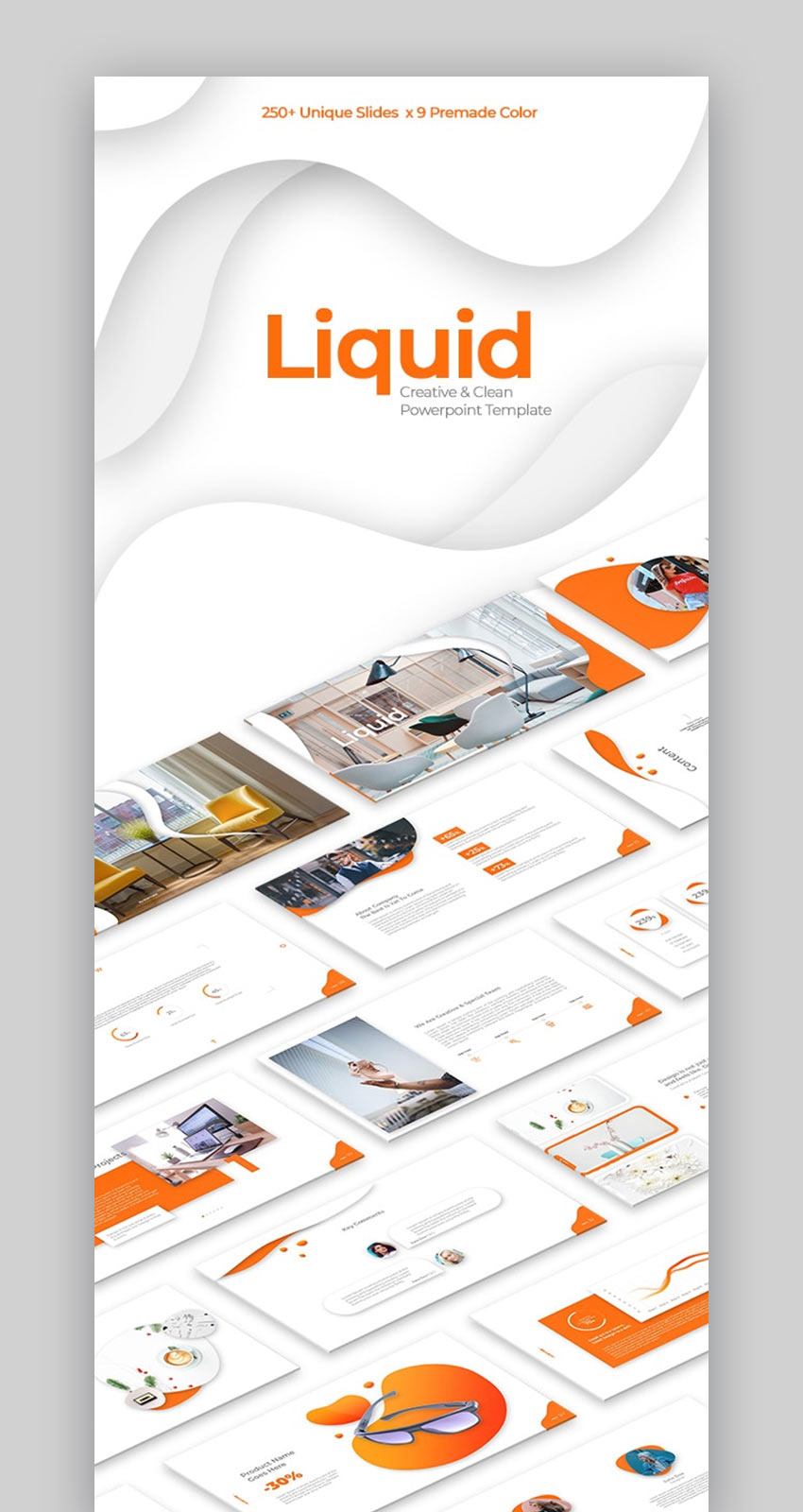
Every minimalist slide design in this PPT template has the touch of an expert graphic designer. Beautiful, bright colors in eight different preset templates set your content up for success. PPT templates for minimalists like this one capture the “less is more” design philosophy that helps audiences understand the key points.
6. Clean Marketing

You’ll love the choices that come with this modern PowerPoint template. The download includes:
- editable maps, infographics, and icons
- 19 color schemes
- 465 different slides
- over 1000 vector icons
- and more!
7. Clean Professional Presentation

This simple PowerPoint template lends an air of modern elegance to any presentation. It features a wide variety of handmade infographics to give your minimalist slideshow the edge it needs. The professional design will help you to make just the right impression with any audience. Plus, the data charts can be updated through Excel.
8. Clean Bundle

A pitch deck is a popular presentation type used by startups and entrepreneurs looking for investment. Pitch decks can use minimalist PowerPoint templates to bring focus to the business. This minimal slides template is the perfect implementation of a pitch deck with minimalist presentation principles, with simplified slide designs to show your big idea.
9. Popular Clean PowerPoint Template

Minimal PPT designs frequently favor images over text-heavy slides. This template focuses on that idea, eschewing slides with walls of text for a more image-focused approach. Use it for a minimalist presentation where slides support your speaking points instead of speaking for you. Try this minimalist PowerPoint design in combination with strong stock imagery.
10. Inspire Clean

Inspire your audience with this minimalist presentation template. Many modern minimal PowerPoint templates use custom image masks that transform your images into shapes, and you’ll see those executed perfectly in Inspire. Combining those slick image masks with simple layouts will help you create your best minimalist presentation.
11. Clean PowerPoint Template

The Clean PowerPoint template has become a customer favorite with a five-star rating and tons of positive reviews. Here’s just some of what our clients say about this one:
“Looks great, well designed and professional.”
” I´m so pleased with this product, It´s really professional and
timesaving since I can concentrate on my areas of expertise.I recommend this to
everyone.”
12. PowerPoint Clean Presentation

This modern and clean PowerPoint template has quite a bit going for it. You’ll love the effective use of white space on this one. Holding the audience’s attention is the challenge of every presenter. This one includes transition and animation effects sure to be noticed. Plus, it’s easy to customize and based only on free fonts for your convenience.
13. BUXE Business Theme – Clean

Buxe is a minimal PPT template that perfectly balances colorful design with simple slides. With more than 115 minimal slides, you’ll never run out of the layouts that you need to craft your story. Use the more than 1,000 icons to simplify slides and focus on your message. You can use minimal PPT templates like this one to find the perfect balance between creativity and minimalism.
14. Pitch Deck Clean Business PowerPoint Template

Are you looking for a pitch deck template that’s clean and effective? If so, this professionally-designed PowerPoint template may be just what you need. It includes over 250 slide designs, each of which is easy to personalize with your own data. It also features some cool eye-catching effects such as full animation and transitions.
15. Axeon Clean Business PowerPoint

Axeon is one of the top minimalist presentation designs for 2019 thanks to the more than 300 slide designs that capture the spirit of minimalism. Choose from a variety of slides that use color splashes and simple slides to draw total focus to your presentation content.
16. Miza – Business Clean Theme

Miza is the best minimalist presentation design for the artistically-inclined. It can help you present your key business concepts and ideas without sacrificing a sense of stylish design. Best of all, it perfectly captures the minimalist presentation design principles that are sure to grab and hold your audience’s attention.
17. Modern Clean PowerPoint Template

Smooth gradients and beautiful image masks are just waiting for your content in this template. This minimal PPT template has all of the key features you’ve come to expect, like:
- more than 120 minimalist slide designs
- informative infographics to explain your key points
- included icons for visual representations of your points
18. Practical – Clean PowerPoint Presentation

Here’s a modern PowerPoint template with plenty of top-notch features. The download includes:
- 76 unique slide designs
- creative slides
- business slides
- device mockups
- and more!
19. Clean PowerPoint Presentation

Clean and minimal design principles go hand in hand. When a slide is minimal, it’s clean and easy for an audience to infer the main points. This minimalist PowerPoint design will help you bring that idea to your next important presentation in less time than ever before. Mix and match the infographics, charts, and device mockups for your best presentation yet.
20. Clean PowerPoint Template

Truly living up to its name, this minimalist PowerPoint design focuses more on typography and iconic explanations. You’ll also benefit from the perfectly designed map slides and infographics to create visual presentations.
How to Quickly Customize Minimalist PowerPoint PPT Slide Designs
Minimal presentation templates are a huge advantage, but you might be wondering how to customize them. In this section, we’re going to customize three slide designs from leading minimal PPT designs so that you can see how easy it is to use a minimal slides template as a launching point.
I’m using the Clean Presentation template in this section to build several examples of minimal PPT designs.
1. The Introduction Slide

Even the most minimalist PowerPoint presentation needs a strong introduction. The slide in the screenshot above is the perfect way to start thanks to its simplicity.
To customize this slide, I’m going to start by adding an image on the right side. Click on the placeholder icon and browse to the image. Then, simply type over the text placeholders to customize it.
You might also want to remove certain text elements, like the placeholders on the side of the starting slide. To customize these objects, you’ll need to learn a PowerPoint trick.
Sometimes, you might find that you can’t simply click and adjust a slide object. That’s likely because that element (text, image, graphic) is on the slide master as opposed to the slide itself.
To adjust a slide master, go to the View > Slide Master option on the ribbon. You can remove those shared elements easily. For a complete (and speedy) guide to customizing minimalist PowerPoint design masters, check out the screencast below:

After you remove any shared elements from the master, wrap up the slide edit with a bit of color customization. Match the main text to your branding with the color chooser, and presto! You’ve created an engaging intro that you can see in the screenshot below.

2. The Team Slide

Practically every presentation benefits from sharing the team and their background. Introducing them to the audience is helpful to build rapport with a potential investor, for example.
Use the example team slide above with your images to do just that. Simply click in the image placeholders and browse to your replacements. Then, type over the nameplate placeholders.
Again, I want to keep my slide in line with minimalist presentation principles. Less is more, and I’ll clean up the slide by removing unneeded text boxes. Finally, I re-colored the text boxes with something more attuned to my branding.

3. The Portfolio Slide

Rounding out our customizations, let’s build a portfolio slide. The purpose of a portfolio is to show off your best work. This is an ideal slide to do just that thanks to its focus on imagery.
To more closely match the idea of a minimalist presentation, I reduced the number of items on the slide. Just click and delete the image placeholders to slim down the slide. Then, click on the remaining image placeholders and your screenshots.
Finally, tweak the text to match your goal. Type in the text placeholders and reposition it as needed.

To learn more about customizing a minimalist presentation template, check out the tutorial below:
5 Tips to Help You Make Better Presentations
Your PowerPoint presentation is important, and it needs to be the best it can be. That’s one of the reasons you’re looking at minimal PowerPoint templates.
To dive deep into the world of learning Microsoft PowerPoint, I highly recommend the resource, How to Use PowerPoint (Ultimate Tutorial Guide.) This is the single most comprehensive source that you’ll find to embark on your PowerPoint learning journey.
Here are five more tips to help you create a powerful presentation:
1. End Strong
The ending of your presentation is crucial. It’s the last thing your audience will see, so it needs to be memorable. This tutorial can help you learn how to make presentations with strong endings:
2. Add Animations
Animations are a quick and easy way to capture your audience’s attention. Learn how to add them to your presentations in this tutorial:
3. Learn the Presentation-Writing Process
There’s a process to writing a good presentation. Learn the process in this tutorial (and don’t forget to check out our eBook below):

4. Use Slide Transitions
Each time you switch slides, you want to set the stage to shift your audience’s attention. Simple animated slide transitions can help you manage those shifts. Learn to use them in this screencast:

5. Add Annotations with Lines & Shapes
Annotations can help draw the audience’s attention to a specific part of a slide. Use the tutorial below to learn to use lines and shapes to really focus your audience’s attention:

Download Our Free PDF eBook on Making Great Presentations
We’ve got a great resource to help you make your presentations even better. Download The Complete Guide to Making Great Presentations now for FREE with a subscription to the Tuts+ Business Newsletter. Get your ideas formed into a powerful presentation that’ll move your audience.

Grab a Clean (Minimalist) PowerPoint Template Today!
Use one of these modern PowerPoint designs to strengthen your next presentation, or take advantage of the wide variety of modern presentation templates available for sale on Envato Elements or GraphicRiver. Besides the clean PowerPoint templates you’ve seen here, we also have a number of pitch deck designs to choose from as well as infographics, timelines and other specialized templates.
Grab one of these clean PowerPoint templates today, learn how to customize it quickly, and use it to make your next presentation shine.
Editorial Note: Our staff updates this post regularly—adding great new minimal PowerPoint template designs so you can present yourself and land your next client.

{excerpt}
Read More
A Senator wants to stop YouTube from recommending videos featuring minors

How to Create a Focus Effect in Photoshop
In this tutorial I will show you how to create the focus on individual items on a photo. Usually, this effect can be done with a photo camera. Final Image Resources Japanese dish Step 1 Open japanese dish photo and let´s start our tutorial. Step 2 Now we need to decide where we want to
Watch Google’s Stadia event here at 12PM ET

How to Set Up an Employee Network & Improve Diversity
An employee network, also known as an employee resource group or affinity group, can be a great way for companies to support their employees and help create a diverse and inclusive workplace culture.
In this tutorial, we’ll look at what an employee network is and the benefits of starting one up. Then we’ll go through the steps involved in starting an effective employee resource group. We’ll also cover some potential problems and how to overcome them.

1. What Is an Employee Resource Group (ERG)?
The idea of an employee network or employee resource group is simple. It’s a space in which employees can come together based on a shared identity or experience and arrange events, discuss issues, raise awareness, and advocate for change.
For example, food company Kellogg has an employee resource group called Women of Kellogg (WOK), which has:
- arranged mentoring to help junior female employees learn from more senior colleagues
- organised a speaking event for International Women’s Day
- set up networking events to promote gender equality
The company also has groups for young professionals, veterans, LGBTQ employees, and more. As one of its members said:
“I am a Kellogg employee, a Kellogg consumer and a member of the LGBTQ community,” said one KPA member. “I have experienced prejudice at other jobs and it was truly amazing to receive acceptance here at Kellogg.”
It’s common for large corporations to have a number of employee resource groups—in fact, 90% of Fortune 500 companies have ERGs. After all, when there are thousands of employees spread across the world, it can be helpful for people to organise around shared experiences, and large companies also have more resources available to support these groups.
But if you run a small or medium-sized business, you could also set up an employee network. There are several important benefits, which we’ll look at in the next section.
2. The Benefits of Employee Networks
So, we’ve looked at the “what” of employee networks; now let’s examine the “why.” In this section, we’ll look at the value of employee resource groups, both for employees and companies. Employee resource groups can help your company:
1. Meet Diversity Goals
In the past, we’ve talked about the benefits of diversity for a company, which include:
- better reputation
- happier staff and customers
- better decision-making
- more innovation
But creating a diverse and inclusive workplace is easier said than done. You’ve got to revamp your hiring practices, transform your workplace culture, and more. See this tutorial for more details:

Employee networks can be a wonderful tool to help you create a more diverse workplace, so that you can take advantage of all those benefits. They show that you take diversity seriously, which can help you in your recruitment efforts. And the support, networking and mentoring opportunities can improve staff happiness and retention too.
2. Support Employees
There’s nothing worse than feeling isolated and misunderstood. Conversely, meeting like-minded people and sharing common experiences can go a long way in helping you feel included and valued.
So just by providing a space for employees to come together and discuss their experiences, affinity groups can be a powerful tool in fostering a sense of inclusion. And by arranging events and exchanging information, they can increase understanding among different groups within the organisation.
Google, for example, has many employee groups, and they’re an important part of the company’s culture. A founder of the Black Googlers Network told the San Jose Mercury News:
“I felt like I was being the executive I wanted to be, the career person I wanted to be, but I wasn’t bringing my whole self to work. I needed the community to let me bring my whole self to work.”
But employee networks can also go further than this. An effective employee group can create real changes in company policy, improving the working experience for employees. Careers community site Fairygodboss conducted a survey of women who have access to a women’s networking group and found that:
- 70% believe it can effect changes in their company’s policy.
- 55% said their women’s ERG has helped to enhance parental leave benefits.
- 53% said the employee group helped to push for more flexibility or better vacation policies.
- 44% said the ERG helped to implement a mentorship or sponsorship program.
By making changes that improve the quality of working life, employee resource groups can support employees in getting the most out of their time and becoming happier and more productive.
3. Promote Engagement
Employee engagement is a huge problem. Only 13% of employees worldwide are actually engaged in their work, according to a long-running Gallup survey.
Employee resource groups can be a great way to get people engaged and involved in meaningful work. That’s because, although companies can help set up employee resource groups, they’re generally run and maintained by rank-and-file employees. They rely on people’s enthusiasm and motivation to organise all those events, and they help increase engagement among members.
According to Erika Irish Brown, Global Head of Diversity and Inclusion at Bloomberg:
“At many companies, including Bloomberg, survey data indicates that employees involved in ERGs have higher engagement scores than those who are not.”
3. How to Start Employee Resource Groups
So now that you know what an employee network is and why you should set one up, let’s move on to look at how to start employee resource groups. What are the steps involved?

1. Establish Interest
An employee network works best when it’s a bottom-up, not a top-down process. As a business owner or manager, you can support employees in setting up the employee groups they want, but there needs to be some genuine interest in order for them to work effectively.
The most important thing in the early stages is to have a core group of employees who are dedicated to the group and motivated to make it succeed. It’s fine if that’s only a handful of people at first. The network can broaden its membership later, so at first just make sure you’ve got a set of founders who can take it forward.
2. Pick a Name and a Purpose
What do you want your group to accomplish? Canvas your founding members for a good, catchy name and establish a mission statement.
Don’t worry about the name too much—if nothing creative comes up, you can just choose something descriptive. The idea is to convey quickly and easily who the group is for and what it aims to achieve.
For example, Oracle’s ERG for Latino employees is called the Oracle Latino Association, and its mission statement is:
“Our mission is to develop and nurture the leadership abilities of Latino employees. We give a voice to the Latino community at Oracle and work together to increase access to opportunities and professional growth, recruit and develop Latino talent, and engage the wider community.”
3. Establish the Employee Resource Group Structure
It’s good to set up a simple structure and a few guidelines about how the employee group will operate. Consider questions like:
- What are the main tasks, and who is responsible for them?
- How often will meetings take place?
- Where will meetings take place, and what’s the process for things like taking minutes, providing updates to people who couldn’t attend, etc.?
- How will you ensure that people feel safe to speak openly?
- How will the employee group be funded?
- How will events be publicised?
- How will new leaders be chosen/elected, and what’s the process for elections?
If all of this seems too much for now, it’s fine to start informally, especially in a small business. But you’ll probably want to get some procedures in place if the group starts to grow—it can help to keep things going if the original members leave, as we’ll see later on.
You can find some sample rules and regulations for an employee resource group in this guide from Cisco, so you could use those as a starting point for developing your own.
4. Provide Resources
Establishing an employee network doesn’t need to be expensive, but you do need to make sure that the appropriate support is in place. Talk to the members about the kinds of activities they want to organise and allocate a budget that’ll allow them to accomplish that.
The resources you provide could also take the form of things like:
- a room to meet in
- a space on the intranet to advertise events
- an online discussion forum
- technical support
- dedicated time set aside for group activities within working hours
Keep in mind, also, that the group may well expand and grow as time goes by. It may make sense to start small in terms of budget and resources but be ready to expand your support if the group proves popular.
5. Launch!
When you’ve assembled a core group of founders and got everything ready, it’s time to launch the group to the wider company.
This is where you can really support the group by giving it lots of publicity. Mention it in company meetings, include the link in company-wide emails or other communications, print posters and put them up around the office, and so on. Encourage people to check out the group and join if they’re interested.
It’s a good idea to have some kind of event to help launch the employee group. It could be tied to a wider event, e.g. International Women’s Day for a women’s group or Pride for an LGBTQ group. Or it could simply be a talk or networking event within the company. Make it fun and try to create a big splash so that people are interested in finding out more and joining the group. Gaining early momentum is important for its success.
4. Potential Problems and How to Overcome Them
When you’ve got everything set up and your new employee resource group is launched, what next?
Well, hopefully, the group builds momentum and gains new members, and all you need to do is let the members keep running it and give them support if they need it.
But sometimes, things don’t go so smoothly. Here are some potential problems you may encounter and some ideas for overcoming them.
1. Lack of Interest
The Problem: Although the employee group has a small group of enthusiastic members, it never achieves wider support within the company.
The Solution: Keep giving the group publicity and senior-level support. If it’s still not gaining new members, help the group to devise new events that’ll prove more popular.
2. Loss of Key Members
The Problem: The group starts out well, but then some of its core members leave the company or can no longer devote time to it, and the group loses momentum as a result.
The Solution: This is where the rules and procedures we talked about earlier can come in handy. With informal groups, it’s easy to become too dependent on a few key members. But if you put proper procedures in place for defining roles and responsibilities and filling vacancies, you should be able to avoid this problem.
3. Lack of Resources
The Problem: The group has good ideas and ambitious objectives but can’t achieve them because it lacks the necessary resources.
The Solution: First, understand where the shortfall is occurring. Does the group need financial resources, or is it more a case of not having enough time to spend on the group’s activities?
If it’s a financial issue, then allocate more budget if it’s available—or you could suggest that the employee group hold fundraising events or charge a small membership fee to raise funds. If it’s a lack of time, then work with the group’s leaders and their line managers to ensure that they’ve got some dedicated hours within the working week for organising the group’s activities.
Get Your Employee Network Started!
In this tutorial, you’ve learned all about employee resource groups. You’ve seen what they are, why they’re useful, and how to set them up. Then you’ve learned about some potential problems and how to overcome them.
The next step is to start setting up your own employee network. It can help support your employees and make your company more diverse and inclusive. If you need some more ideas or inspiration for possible events, check out this list of cultural awareness and diversity topics in the workplace.

{excerpt}
Read More
5 Tips for Freelancers in 2019 (Better Productivity, Data Security, & More Profit)
There’s never been a better time to freelance than in 2019. Fast internet connections, remote roles, and plenty of professional tools for freelancers have helped more people make the switch to working for themselves.
But, that doesn’t mean there aren’t challenges when it comes to freelancing. Keeping your data safe, growing your client list, and improving your profit margins are easy to forget when you’re busy working on lots of client projects.

If you don’t manage your growth carefully, the stress can overshadow the joys of freelancing and lead you to browse for a new day job. Yikes!
In this tutorial, I’m going to share tips in five key categories that can help you make your freelance business better in 2019. They’ll help you level up your success and keep you freelancing for years to come.
1. Protect Your Client Data (Important!)
If there’s one part of freelancing that too many creatives overlook, it’s data protection. A catastrophic event could leave your data (or your clients’ data) exposed. It’s the type of event that could effectively end your freelance practice.
Unfortunately, more security threats exist than ever. Here are a few essential tips to protect your data and keep your business safe in 2019:
Protect Your Connection With a Secure VPN
Maybe you’ve heard about a VPN, but you aren’t quite clear on the details. More freelancers than ever are using a VPN (virtual private network) to ensure that their data stays safe.
Unfortunately, we can’t always guarantee that the internet connections we use are totally safe. If you’re a freelancer, you might be hopping from coffee shop to coffee shop and connecting to networks that you can’t guarantee are secured.
I think of a VPN as a protected tunnel for your data. Instead of exposing data to the person who controls the network, you send it all through a trusted provider instead.

If you’re ready to choose a VPN service, make sure to check out NordVPN. It’s one of the easiest-to-use VPN services to make sure that your data is securely handled. As soon as you connect to any unfamiliar network, you should always use a professional VPN to ensure that your data is protected.
Here are just a few of the benefits of using NordVPN:
- Compatible with most operating systems, including Windows, MacOS, iOS, Android.
- IKEv2/IPsec security protocol cannot be cracked even by the strongest computers.
- Unlimited bandwidth and up to 6 simultaneous connections
- 5,200+ servers in 62 countries (updated weekly)
- Double data encryption for increased anonymity
And so much more. Learn how to start using NordVPN to protect your data in this quick video screencast:
Try NordVPN Today!
Get 75% off NordVPN! Only $2.99/mo, plus you get an additional month FREE at: https://nordvpn.org/tutsplus
Use codeword: tutsplus to apply the discount.
NordVPN has a Risk-free 30-day money-back guarantee, so now is the time to try it out. Keep your data and connection secure with a professional VPN provider.
Establish a Client File Policy
You owe it to your clients to protect their data. Picture this for a moment: a breach of your records leaves your clients sensitive information exposed. This puts you in an uncomfortable situation and ultimately reflects poorly on you.
This is something to plan against before it happens. A good client data policy can help answer the following key questions:
- How long will you retain client data, such as login and project details?
- Where is client data stored, on your premises on the storage devices you own, or in the cloud?
- What will you do in case of a breach, such as notifying your clients and helping them take mitigating steps?
Putting this policy in place not only helps you address the chances of a breach happening but also helps you navigate the worst-case scenarios if one does happen.
Use a Password Manager
You’ve likely heard this tip before, but I can’t stress enough the importance of using a password manager to generate and protect your logins. Data breaches seem to happen every day, and re-using the same passwords opens your business to catastrophe.
Make sure to use a password manager like Last Pass or 1Password. Not only will it help you use complex, highly secure passwords, but a password system also streamlines the process of logging into every site.
2. Scale Your Practice With Systems
Systems create a sense of order in your business. Basically, think of a system as a repeatable set of steps that you use in your business to improve your results. Good systems let you take on more work and grow your freelance business with a scalable and manageable approach.
Use a Project Management System
Managing a freelance business over chains of emails and haphazard notes is a recipe for disaster. It’s an easy way to lose track of what you owe clients and when important deliverables are due.
Instead, use project management systems that keep everything in front of you. That could be a tool like Trello, Basecamp, or Asana. Systems like these let you set up tasks and projects and attach due dates that keep you on track.
Knowing that you have everything in one place brings organization to your freelance work and helps you serve your clients better in the process.
Create a Client Onboarding Checklist
One of the most helpful types of systems is to create a checklist that you put each and every new client through. It helps you grab all of the necessary details on the front-end of an engagement. That way, you can more easily focus on the creative work of your new client projects without any details missing.
Consider making a checklist that every client completes before you start your work together. That could include contact details, access to their systems, and completing a contract before the work begins. A checklist is really a system that standardizes that intake process so that you can start on the work at hand.
Standardize Your Processes
Above all, you have to standardize your processes so that you can repeat them. If a process isn’t standard, it’s just a random set of actions!
That’s why we create standard operating procedures, or SOPs. They capture the steps that make up your key business processes. It also helps you to eventually outsource parts of your business, because you can simply hand off the work instructions and let someone else help you grow.
To learn more about creating SOPs, check out the article below:

3. Don’t Forget to Network
If you work remotely as many freelancers do, there’s a tendency to forget the importance of getting out and meeting others in your industry.
Networking is a buzzword that causes many freelancers to instantly cringe. Let’s face it, part of the allure of freelancing is to leave the office environment that is so dominated by unnecessary small talk and politics.
But networking doesn’t have to be uncomfortable. And in time, you can find partnerships that benefit everyone involved. Here are my top tips for networking the right way in 2019:
Find Those In Your Field
The beauty of freelance work is that there are so many people who do it. It’s easy to find others who are doing similar types of work. Many freelancers also use their personal brand to talk about their approach to doing business, so it’s easy to learn from others in the process.
Networking can be beneficial for everyone involved. When you connect with others who do similar work, it’s entirely possible that they’ll send clients your way. Therefore, you should try to do the same.

Do some Googling and searching for others who freelance and talk about their business in public. These are your ideal partners to network with.
Build Real, Meaningful Relationships While Networking
Sincerity means a lot when it comes to networking. The wrong way to go about it is to blast out a mass email asking to pick your peers’ brains.
Instead, focus on what collaborating can bring to the table. Send emails that share your learnings with others, and look to build long-term, mutually-beneficial relationships.
4. Track, Analyze, and Optimize Your Business
Data is your friend. Specifically, data about your business can help you see where you’re spending your time and how you can make better use of it.
Track Your Time
Here are some practical questions: How many hours are you working? What are you spending your time doing for each task?
For me, I thought I understood this until I began using a time tracking app that closed the gap.
Each time you work on a project, track it and record the relevant information. You might be surprised at how much time you’re spending on administrative tasks and on each project.
Ultimately, tracking your time per task helps you understand how you spend your time. With that knowledge, you’ll quickly see where to use your time better.
Know Your Numbers
Freelancers, particularly creative professionals, sometimes shy away from thinking about finances. The truth is that we all rely on our cash flow and successful engagements to keep doing what we love.

That’s why it helps to know your freelance business’ financials. Consider these questions:
- What are your costs to deliver the work?
- How much are you making on each project?
Also, if you’ve been tracking your time, you can create an important metric that helps you understand your business: your hourly rates, including any admin time you’re spending.
Particularly if you bill clients on flat rate amounts, it’s crucial to periodically divide your income by the time spent to find out what you make per hour.
Optimize Based on Data
Collecting data is one thing but acting on it is the important part. After you’ve been collecting data on your clients and profitability for some time, it’s time to make some decisions.
Here are a few ways that you can leverage your data to grow your freelance business:
- Consider raising your rates on certain types of work where your effective hourly rates are relatively lower.
- If you’re already working too many hours, consider using the clients with the lowest hourly rates as your first “cut point,” walking away from your least profitable work.
- Calculate the cost of hiring a freelancer to subcontract your work to, weighing the value of your time versus the cost of hiring another professional.
Again, having data about your business puts you in the driver’s seat to optimize it. Consider these types of options as you start to understand your business financials better.
5. Branch Out and Grow Your Business
Not everyone wants to grow their business. If you’re already happy with your workload, focus more on optimizing your existing client base.
But if you do want to grow your work, you have to be intentional. Here are my top tips to grow your freelance business in 2019:
Add New Lines of Business
What work are you interested in that you aren’t currently doing?
If you’re a wedding photographer, maybe you’ve been interested in album design, and want to start delivering beautiful, polished albums.
This is the perfect example of growing your business by considering new lines of business. It might feature a learning curve but ultimately leads to the long-term growth that makes you indispensable to clients.
These are new lines of business that complement what you’re already doing. And they can also help you grow your business’ bottom line.
Cross-selling your clients on adjacent services and products that you offer can help you grow your work and make you their “go-to” for more of their needs. It raises your value and will help you bring in more income.
Ask Your Best Clients for Additional Work
If you already have successful relationships with clients, consider asking them if they have other types of work that you could take on.
The challenge is that clients tend to put freelancers in “boxes.” They tend to think of freelancers as providing very specific outputs; they have an “articles person” and a “screencast person,” for example. The reality is that many freelancers have a wide variety of skills that they can offer to a client.
You have to let your clients know what you can bring to the table. They likely don’t know the wide variety of talents you have, problems you can solve, or deliverables that you can create for them. Periodically discussing what other needs you might be able to fill is the key to growing your work with clients.
Just make sure that you don’t stray too far outside of your core work. Sometimes, it can be easy to get too ambitious with clients and jeopardize the work that is already working really well.
Optimize Your Freelance Practice for 2019
Put these tips to grow your freelance business into practice here in 2019. Whether you’re protecting your data, branching out, or just optimizing what you already do, these tips will help you keep freelancing and wowing your clients at every step.
And don’t forget to take advantage of this great offer: Try NordVPN today.
Get 75% off NordVPN! Only $2.99/mo, plus you get an additional month FREE at: https://nordvpn.org/tutsplus
Use codeword: tutsplus to apply the discount.
NordVPN has a Risk-free 30-day money-back guarantee. Now’s a great time to start protecting your data and internet connection with a professional VPN provider.

{excerpt}
Read More
How to Make a Frequency Separation Photoshop Action

Although retouching is an art that requires time and skill, Photoshop actions can automate some of the repetitive tasks. In this tutorial, I’ll show you how to create an action in Photoshop to automate one such task. Frequency separation allows you to edit the colors and textures separately, to retouch the skin without turning it into a plastic mask. With a frequency separation action, you’ll be able to do retouching much faster!
If you want to learn how to use Photoshop actions or what Photoshop actions are, you may want to check these tutorials first:
 Photoshop ActionsWhat Are Photoshop Actions and How to Install Photoshop ActionsKirk Nelson
 Adobe PhotoshopHow to Install Photoshop ActionsMelody Nieves
 Photoshop ActionsHow to Use Photoshop ActionsMelody Nieves
Follow along with us over on our Envato Tuts+ YouTube Channel:
How to Create a Frequency Separation Action
Step 1
Open your photo in Photoshop. Make sure your image is the background layer. If not, go to Layer > New > Background from Layer.

Step 2
Create a New Action.

Step 3
Give it a name.

Step 4
Duplicate the layer twice by pressing Control-J. Name the lower layer Low Frequency and the upper one High Frequency. Hide the High Frequency layer.

Step 5
Select the Low Frequency layer and go to Filter > Blur > Gaussian Blur. Adjust the Radius to remove most of the details. We want this layer to contain colors, but not texture.

Step 6
Show the other layer and change its Blend Mode to Linear Light.

Step 7
Go to Filter > Other > High Pass. Adjust the Radius to bring the texture back. Keep it subtle, trying to avoid the glow.


Step 8
Click Stop Recording.

Step 9
The problem with this action is that every photo needs a different radius for blur and high pass. To make it more universal, check the square next to these positions on the list.

Step 10
Now, every time you play the action, you’ll be asked to adjust the Radius manually.

Step 11
Here’s where the action ends. Now you have two layers: Low Frequency contains colors, and High Frequency contains texture. You can edit them separately.
First, hide the High Frequency layer. Use the Healing Brush Tool (J) or the Clone Stamp Tool (S) to replace the colors and tones that you don’t want to see with colors from other areas. It may take a while, but with this method you don’t have to worry about losing texture in the process. You can focus completely on the colors.


Step 12
Next, show the High Frequency layer. Make sure that your Healing Brush is set to Current Layer only. Then repeat the process, this time filling the unwanted areas with the proper texture. Again, it may be time-consuming, depending on the task, but here you don’t need to care about the colors. You can borrow the texture from any area, regardless of its background. This makes the process much easier.


Retouching Photoshop Actions
Frequency Separation Photoshop Actions
As you can see, Photoshop actions can make the process of retouching easier and faster. But more powerful actions can even do most of the work for you! For example, this set contains highly intelligent actions that utilize face detection to create frequency separation, and it offers an auto-retouch feature as well.

Skin Retouching Actions
These actions let you retouch portraits in a fraction of the time
with only a beginner’s knowledge of Photoshop. You can mattify, airbrush,
and heal skin using the same techniques professionals use. This set contains tools like mattifier, lip enhancer, teeth whitener, and more.

Beauty Box Photoshop Actions
From high-end magazine-quality editing to quick retouching for
everyday use, the “Beauty Box” is all you will need! This collection has
gone above and beyond any other beauty retouching set on the market, by
bringing you one-of-a-kind skin shade matching techniques and an
array of beautifully blended digital cosmetics.

Skin Retouch Photoshop Actions Vol. 2
This set offers a variety of effects that are easy to use and customize. After playing an action, simply open the action folder in the
layers palette and adjust each individual layer’s opacity and blending mode. You have the power to adjust as necessary to fine tune each action for
your personal needs.

Good Job!
Now you know how to create a frequency separation action in Photoshop. If you want to learn how to create other Photoshop actions, check out our tutorials:
 PhotographyHow to Create a Basic Photoshop Action for Your PhotographyMarie Gardiner
 Photoshop ActionsHow to Create a Photoshop Action to Blur the Background in a PhotographMonika Zagrobelna
 Adobe PhotoshopHow to Customize a Photoshop ActionMelody Nieves
 Photoshop ActionsHow to Create a Photoshop Action to Turn a Photo Into a DrawingMonika Zagrobelna
 Photoshop ActionsHow to Create a Photo to Watercolor Photoshop ActionMarko Kožokar


{excerpt}
Read More