Robots have plenty of potential to help people with limited mobility, including models that could help the infirm put on clothes. That's a particularly challenging task, however, that requires dexterity, safety and speed. Now, scientists at MIT CSAIL have developed an algorithm that strikes a balance by allowing for non-harmful impacts rather than not permitting any impacts at all as before.
Humans are hardwired to accommodate and adjust to other humans, but robots have to learn all that from scratch. For example, it's relatively easy for a person to help someone else dress, as we know instinctively where to hold the clothing item, how people can bend their arms, how cloth reacts and more. However, robots have to be programmed with all that information.
In the past, algorithms have prevented robots from making any impact with humans at all in the interest of safety. However, that can lead to something called the "freezing robot" problem, where the robot essentially stops moving and can't accomplish the task it set out to do.
To get past that issue, an MIT CSAIL team led by PhD student Shen Li developed an algorithm that redefines robotic motion safety by allowing for "safe impacts" on top of collision avoidance. This lets the robot make non-harmful contact with a human to achieve its task, as long as its impact on the human is low.
"Developing algorithms to prevent physical harm without unnecessarily impacting the task efficiency is a critical challenge," said Li. "By allowing robots to make non-harmful impact with humans, our method can find efficient robot trajectories to dress the human with a safety guarantee."
For a simple dressing task, the system worked even if the person was doing other activities like checking a phone, as shown in the video above. It does that by combining multiple models for different situations, rather than relying on a single model as before. "This multifaceted approach combines set theory, human-aware safety constraints, human motion prediction and feedback control for safe human-robot interaction," said Carnegie Mellon University's Zackory Erickson.
The research is still in the early stages, but the ideas could be used areas other than just dressing. "This research could potentially be applied to a wide variety of assistive robotics scenarios, towards the ultimate goal of enabling robots to provide safer physical assistance to people with disabilities," Erickson said.
You’re great at music. You want to teach others to be great at music, and you need a flyer to advertise your lessons, but you’re not very good at graphic design.
That’s okay—you focus on your music, and leave your flyer design to the design experts. Today we’ll show you 42 of the best music lesson flyer templates available at three terrific sites: Envato Elements, Placeit, and GraphicRiver.
Music Lesson Flyers From Envato Elements
Envato Elements is a terrific resource for designers and non-designers. It offers thousands of premium digital assets like graphic templates, mockups, logos, photos, fonts, and much more. What makes this service outstanding is that for one low monthly fee you can download as many of these digital assets as you like, as often as you like.
This clever template for guitar lessons is just what you need to catch your prospective students’ eyes. The files come in both PSD and Ai format and are well organised to make it easy for non-designers to add their own text and colour scheme.
Do you want to teach the world how to play better piano? Then use this stunning piano lessons flyer to create eye-catching flyers that you can post on social media or hand out around town. The template is offered in Ai and PSD file formats that are well organised so that customisation is easy. Check it out!
This fun flyer template comes in both Ai and PSD file format and is fully customisable. The text, images, and graphics are all on separate layers, which makes them easy to edit. In no time at all, you’ll have a great music lesson flyer to distribute on your social media or anywhere you like.
This stylish music lesson flyer is more of a brochure than a flyer, but we wanted to include it to show you the kind of variety that’s available at Envato Elements. The bifold template offers a little bit more space to advertise your classes than the single leaf flyer, so if that is something you’re interested in, check it out.
This sweet illustrated flyer is just what you need to communicate your style and your love of everything retro. What’s more, the flyer is very easy to customise in either Illustrator or Photoshop. So choose the program that you feel the most comfortable with and have fun creating your new flyer.
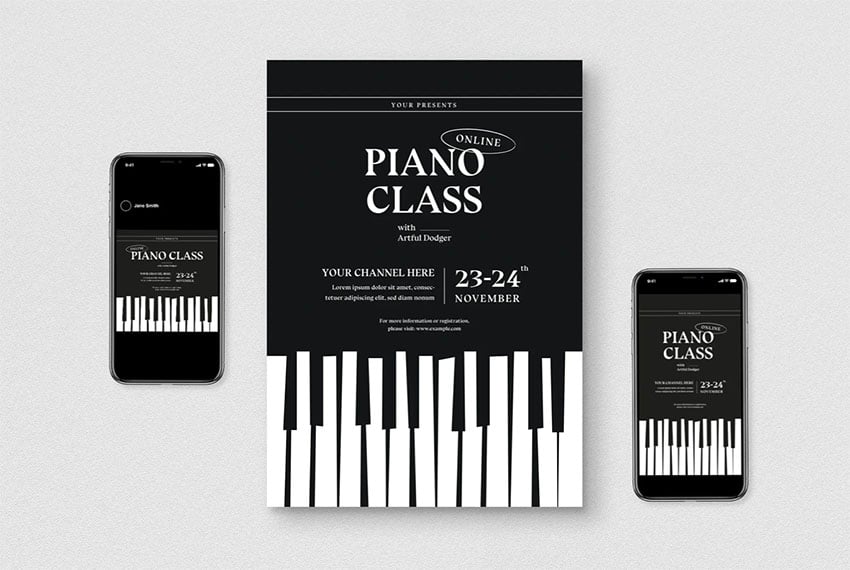
Get your students tickling those ivories with this terrific piano class flyer design. It uses the image of the piano keys to catch your viewer’s attention and then delivers the all-important information like your name, class location, and time.
Share your talent with the world when you teach online classes. This retro music school flyer design is perfect for advertising your classes to a wider audience. The Photoshop file is 100% editable, so you can change the text, photo, and colours to suit your taste.
Share the joy of mastering guitar with students all over the world. The Online Guitar Music Lesson Flyer will have them flocking to your classes. The template contains two files, one in PSD and the other in Ai file format.
This striking flyer template is all you need to call attention to your next music class. The template is fully customisable so that you can change the colours, fonts, and text. No matter what kind of musical instrument you teach, this is a great flyer to let the world know that you’re available to teach.
This gorgeous vintage flyer style will entice your students to take your class. Bold and visually interesting, the A4 template contains one Photoshop file with labeled and colour-coded layers that are organised in groups to keep editing easy.
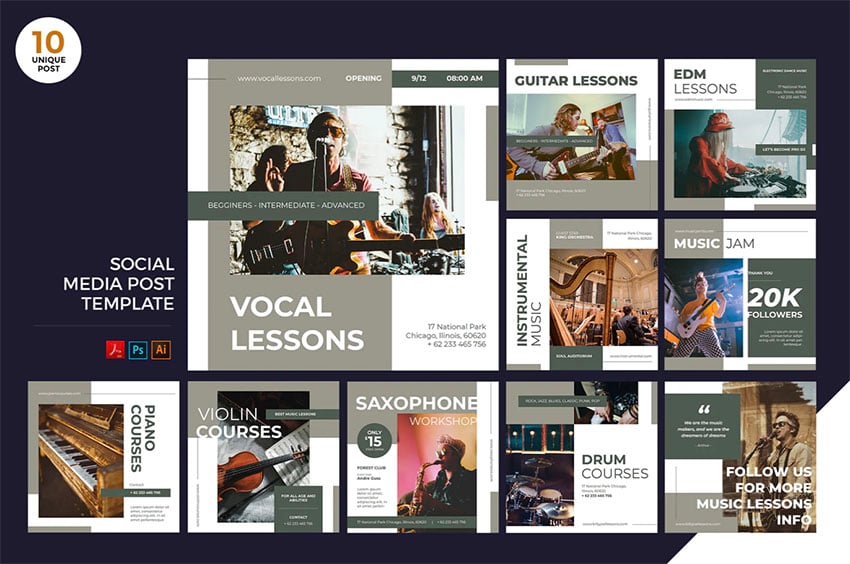
Whether you’re giving vocal lessons, violin, saxophone classes, or something else, this flyer is all that you need to let everyone know that you’re open for business. The pack contains ten high-quality lesson flyer ideas. Use them as a jumping-off point to create your own unique flyer.
Are you a jazz musician looking to teach classes? Then this flyer is for you. With its funky illustrations and retro text, it’s bound to catch the eye of prospective students. It’s also fully customisable in Illustrator and Photoshop, so choose the program that you feel the most comfortable with and get to work adding your text, images, and graphics.
This wonderful retro template is all you need to advertise your next guitar lesson. The A4-sized template offers both PSD and Ai files that are well organised so that editing the text, images, and colour is super easy. Download it today and create your own flyer.
This guitar lesson flyer template offers one Ai and one PSD file. Use either one of them, depending on the program that you’re most comfortable with. The well-organised and layered files are fully editable and scalable, so if you want to make a poster out of the flyer template, you can do so without losing quality.
Another piano lesson flyer that is guaranteed to catch the attention of prospective students. This one also uses the iconic and easily recognisable piano keyboard to call attention to itself. The A4 template includes three PSD and three Ai files.
This terrific flyer for music classes is cool and modern, making it a great choice for advertising your upcoming classes. The A4 template contains two files in AI and PSD formats.
Use this summer music lesson flyer to promote your upcoming music class. The eye-catching flyer is offered in both AI and PSD file format and is easy to customise, providing you are familiar with either program. There is a help file included in case you get stuck.
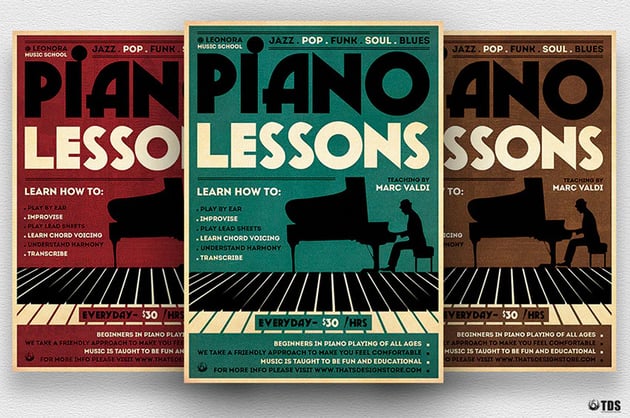
If you teach piano, this is a great flyer for you. It offers bold text and great imagery, and there’s even room to let prospective students know what they’ll be learning in your class.
This modern and striking flyer template is great for any kind of musician or singer. Choose your colour palette, add your text and photo, and your template is ready to use.
Use this bold and striking flyer to promote your upcoming voice class. Your prospective students won’t be able to resist. Add your text, image, and colour scheme using Photoshop. A help file is included.
Music Lesson Flyer Templates From Placeit
Placeit is an affordable online design generator that provides high-quality music lesson flyer templates, logos, videos, mockups, etc. You can customise them directly from your browser, without needing complicated software, and download the results in a matter of seconds.
Moreover, Placeit is designed to suit a range of budgets. You can buy one digital resource at a time for one low fee, or if you regularly need mockups, logos, and various designs, you can sign up for a low monthly or yearly plan that gives you access to unlimited downloads of any and all the digital assets available at Placeit.
How to Make a Flyer for Music Lessons With the Music Flyer Maker
Let’s take a look now at how to make a flyer for music lessons with the Placeit online Music Flyer Maker.
Step 1: Choose a Music Lessons Flyer Template
Step 2: Add Your Text
Step 3: Add a Background Image or Upload Your Own
Step 4: Select Your Colour Scheme
Step 5: Download Your Music Lessons Flyer
That’s it! It really is that simple. Now let’s look at a few examples of the music flyer templates available at Placeit.
This simple and beautiful summer music lesson flyer template offers a great way to advertise that your summer music lessons are in session. If you offer some other type of music lessons, remember that you can customise this template using the music flyer maker to reflect that.
Electric guitar teachers will be happy with this wonderful flyer that gives full details of what lessons are on offer, who the instructor is, and of course the address, telephone numbers, and website. Of course, it’s totally up to you how much information you want to share. The music flyer maker allows you to share more or less according to your needs.
This wonderful illustration with four violins is just one of the graphics available when you use this template. If your lessons are for drums or the sax, then you can look for exactly those instruments using the image search within the template.
Looking for a great private music lessons flyer to advertise your drumming classes? How about this terrific flyer? Use the music flyer maker to customise the flyer by changing the text, instrument and colours to suit your needs.
If you’re trying to drum up interest in piano lessons, then a flyer is a great way to go, and Placeit has just the thing for you with this fabulous Piano Lessons Flyer. Customisation is easy with the music flyer maker, and in no time at all you will have a flyer ready to download.
Summer is a great time to offer music lessons, and the Summer Music Lesson Flyer is a terrific flyer to get the word out. Just about all the elements in this flyer can be adjusted to reflect your own musical style and taste.
Do you want to teach the world to sing? Well, first they have to know about your lessons, right? This Singing Lessons Flyer template will help you do just that. Add your details and choose your colour scheme, and your work is done.
How about this terrific Jazz music lessons flyer for advertising your upcoming classes? The template offers you loads of customisation options to help you create a look that’s right for you.
Advertise your upcoming masterclass with this bold and eye-catching flyer. Use the music flyer maker to change the text, font style, and colour, as well as the background image and graphics.
This terrific template offers loads of customisation options to help you create a cool flyer that’ll attract lots of attention. Use the music flyer maker to experiment and see what you come up with.
Music Lesson Flyer Templates From GraphicRiver
GraphicRiver is another service that offers terrific music lesson flyer templates and other premium digital assets, but it works a bit differently from Elements and Placeit in that it offers single downloads for one low fee. This makes it a great choice for those on a budget.
Let’s take a look at some of the top-quality offerings there.
This Piano Lessons Flyer template is ideal for promoting both piano lessons and classical music events—such as symphonies, orchestras, and jazz nights. The template is offered in both PSD and Ai file format and is easy to edit in either software.
Singing Lessons Flyer template is well organised in layers so that it is easy to customise in Photoshop. Change the text, add your image and colour combinations, and you’re done.
Attract new customers and boost your sales with the terrific Kids Music Lesson Flyer Design. The template is available in both A4 and US Letter size, and the files are well well organised in layers to facilitate easy customisation.
The Private Lesson Flyer Template can be used to advertise a range of music classes, as shown in the example image. You’ll need to add your own text and colour scheme to customise the template. The file contains one PSD file and is in a print ready format.
If you’re looking for a template to advertise your music class, you don’t have to stick to the music lesson flyers offered by GraphicRiver. You can absolutely use a flyer like this Acoustic Music Flyer and adapt it to your purposes.
How awesome is this private music lessons flyer template? The template includes five different styles, all of which are super easy to customise in Photoshop. Give it a try today.
This is a terrific music lessons flyer template pack for promoting a summer music camp. The pack offers three design variations in A4 and US Letter size. The templates are all layered and well organised for easy editing. There’s a help file included in case you need it.
This adorable music lesson flyer example comes in two versions: one for editing in InDesign and the other for editing in Photoshop. Whichever software you choose, editing is as simple as adding your own image, changing the text, and selecting a colour scheme that suits your style.
Get the party started with this terrific Guitar Private Lesson Flyer Template. The files are layered and labelled to make editing in Photoshop easy, and it’s fully print-ready.
Here’s another wonderful flyer that can be adapted for your music lessons. That’s the great thing about templates at GraphicRiver. They are versatile and multipurpose, so you can use them in a number of different ways.
Choose Your Music Lesson Flyer Templates Today
Envato Elements,Placeit, and GraphicRiver are excellent resources for premium music lesson flyer templates. Head over to one of these sites to download your favourite music lesson flyer template today.
If you want more information on other useful resources, check out these really helpful articles below:
After oh so many delays, training up its founder, Sir Richard Branson, and some delightful, sometimes petty, banter with Blue Origin (love those “largest windows in space” claims), Virgin Galactic has made it into space.
Or at least, it did, depending on who you ask. Blue Origin’s first crewed spaceflight is just days away, and it’s pointed out that Virgin Galactic’s SpaceShipTwo didn't’ really fly in space. The craft reached an altitude of 'just' 53.4 miles. However, the Kármán line (the formal demarcation for space) is 62 miles.
Virgin Galactic
It’s a fair point, even if it comes across a little like sour grapes. While not quite crossing over that line, the mission was to evaluate the SpaceShipTwo’s cabin environment, seat comfort and the overall experience it will offer customers. Presumably, this was where Sir Branson’s expertise in astrophysics with his myriad companies came to the fore. Two additional test flights are set to launch before Virgin Galactic begins offering paid flights next year.
Watch Virgin Galactic’s successful flight right here.
The sting operation wasn't just limited to a chat app.
OLIVIER MORIN via Getty Images
The phones the FBI sold to crooks for a sting operation weren't just running a custom messaging app — it appears the operating system itself was customized for the sting. Motherboardobtained one of the "Anom" phones — a modified Pixel 4a underneath it all — and its mysterious ArcaneOS has a number of customizations you wouldn't necessarily expect, even for a privacy-oriented phone.
There’s no app store, and you can't toggle location tracking. You can’t flash the device with third-party firmware to make it behave more like normal phones, either — the bootloader is locked, even though the startup screen tells you the device has been “modified.”
For nefarious types you’d expect to see in Mission Impossible movies, less real-life, there’s a hidden chat app (accessed through the "calculator" when it worked) and PIN scrambling. There’s also a wipe code feature that lets you erase a phone from the lock screen — although it won’t explode. Continue reading.
You’ll only see shared media a single time before it vanishes.
After releasing the feature on Android last month, WhatsApp is debuting self-erasing media and texts on iOS, via a new beta release. If you sign up for the beta version 2.21.140.9 on Testflight, you'll be able to send photos and videos that self-destruct as soon as they're viewed and dismissed. Users with access to the "view once" feature will see a dedicated button resembling a timer in the caption input field.
Unlike WhatsApp's disappearing messages, which delete after seven days, photos and videos sent using view-once mode vanish immediately after you close them. That said, there's nothing stopping users from taking screenshots of media, and you won't be notified if a recipient has done so. Some apps, like Snapchat, make this harder to do or inform the user when screenshots are snapped. Continue reading.
It's also coming to previous-gen systems, PC and Stadia.
EA Sports
While English fans might not want to think about football for a bit, FIFA 22 is, predictably, on its way, and its centerpiece is a new HyperMotion system. This will apparently offer more realistic animation and gameplay when you game on a PlayStation 5, Xbox Series X/S or Google Stadia. The technology uses machine learning to produce animations in real-time, leading to more "organic" movement.
The game is also coming to PS4, Xbox One and PC (via Origin and Steam), while FIFA 22 Legacy Edition is coming to the Nintendo Switch, although EA didn't outline differences. Presumably, it’ll be a less graphically intense version of the game. EA has hinted at a "complete" revamp of the goalkeeper system, a new club creation experience in Career Mode and "reimagined" Volta Football. Continue reading.
The semi-autonomous upgrade has been in the works for years.
Tesla is rolling out FSD beta version 9 to Early Access Program users, and while it's still not full autonomy, it does enable numerous Autopilot driver assists, including lane changes and turns. You'll also get revamped visualizations that offer "additional surrounding information."
The update also references a recently activated feature that uses the cabin camera to make sure you're paying attention while Autopilot is engaged. Musk also urged beta testers to be "paranoid" and stay prepared to take the wheel at a moment's notice. Continue reading.
Nintendo games have been commanding massive prices at auctions this year. Just days after a rare copy of the Legend of Zelda fetched a record $870,000, an N64 classic has almost doubled that amount. A completely sealed Super Mario 64 sold for a whopping $1.56 million over the weekend.
That may seem like an insane price for a best-selling game that millions of people owned, but the auctioneer says the copy's mint condition sets it apart from your dusty old one. According to Heritage Auctions, the boxed game had a 9.8 A++ Sealed rating on the Wata Scale. That means it's immaculately preserved in the same condition as when it left the factory. Such highly rated games are often described as “Case Fresh.”
Add to that the cultural impact of Super Mario 64, the plumber's first true 3D escapade and a massively successful launch title for the beloved N64 console, and you can see why it broke the seven-figure mark. By comparison, a nearly perfect copy of Super Mario Bros. for the NES nabbed a record $660,000 in April before the Legend of Zelda auctionbeat it. While a Wata 9.4 A+ Sealed copy of Final Fantasy III pulled in $96,000 a few days ago.
Amazon has managed to develop a pretty wide range of Fire HD tablets, Echo Show devices, Kindles and Echo Glow lights for kids. Now, it has launched a big sale for all of those products with discounts as high as 40 percent on its Fire 7 Kids Pro tablets, with the latter product now available at just $60 instead of $100.
The Fire HD Kids Pro lineup features bright colors, kid-friendly cases and a two-year "worry-free" replacement warranty if it breaks, but as Amazon puts it, they're real tablets and not toys. To that end, the Fire 7 Kids Pro tablets come with 7-inch 1,024 x 600 displays, front- and rear-facing 2-megapixel cameras, Micro USB ports and 16 GB of RAM, expandable to 512 GB. You also get a 1-year subscription to Amazon Kids+ with over 20,000 apps, games books, videos, songs and Audible books from National Geographic, Rabbids Coding, LEGO and others.
The Fire HD 8 Kids Pro model boosts the screen to a 1,280 x 800 model, with 32GB of storage expandable to 1TB, while the Fire HD 10 Kids Pro offers a 10.1-inch 1,920 x 1,200 display with 2-megapixel front and 5-megapixel rear cameras. All the models come with a digital store when kids can request apps and parents can approve them.
Amazon
Amazon is also offering it's Echo Glow smart multicolor lamp (above) for kids at $20 rather than $30, for a savings of 33 percent. Paired with an Echo Dot Kids (available together for $55 or $35 off the full price), your kids can change the color of the light with their voice, or "ask Alexa to play music, read stories, and call approved friends and family," Amazon notes.
Naturally, Amazon makes the Echo Show 5 (2nd gen) in a kids version with parental controls, and that device is available for $80 or $15 off the regular price. It features a bright "chameleon" cover and allows kids to ask Alexa to play videos, help with homework and make video calls to approved contacts. As with the tablets, it comes with a year of Amazon Kids+ with access to 15,000 videos, audiobooks, games, music stations and more. You can also get it in a bundle with the Echo Glow for $95, for a savings of 24 percent.
Finally, for any young readers in the family, Amazon is offering the Kindle Kids Edition for $70 rather than $110, for a savings of $40 or 36 percent. This model is a 10th-generation Kindle (again, not a toy) with a kid-friendly cover and 2-year worry-free guarantee. It offers a black and white glare-free display, weeks of battery life and a 1-year subscription to Amazon Kids+, with access to the complete Harry Potter series and others like Artemis Fowl.
The latest in a series of leaks ahead of Samsung's upcoming Unpacked event is the most comprehensive yet. We already had a firm grasp on what to expect — folding phones, a couple of Wear OS smartwatches and new earbuds were outed — but now we can see more of the new products including new color variants. Prominent leaker Evan Blass has tweeted a bunch of GIFs of the purported Samsung devices set to make their debut at the virtual event, expected to take place August 11th.
On display are the foldable Galaxy Z Fold 3 and Galaxy Z Flip 3, which Blass previously shared pics of in late June; the Galaxy S21 FE, Samsung's follow-up to the solid sub-$700 phone that was glimpsed in April; the Galaxy Watch 4 and Galaxy Watch 4 Classic smartwatches that were leaked recently, too; and the Galaxy Buds 2, the latest addition to the company's growingrange of wirelessearbuds.
If history is anything to go by, we'll probably see more leaks and teasers (including from Samsung itself) in the run-up to Unpacked. By the time the actual event rolls around, you should be well-versed on what to expect.
After releasing the feature on Android last month, Facebook is debuting WhatsApp self-erasing media and texts on iOS via a new beta release, according to WhatsApp info site WABetaInfo. If you sign up for the beta version 2.21.140.9 on Testflight, you'll be able to send photos and videos that self-destruct as soon as they're viewed and dismissed. Users with access to the "view once" feature will see a dedicated button resembling a timer in the caption input field, as shown in the WABetaInfo screen capture below.
WABetaInfo
Unlike WhatsApp's disappearing messages, which delete after seven days, photos and videos sent using view once mode will vanish immediately after you close them. The sender will be notified when their media has been viewed.
As WABetaInfo notes, there's nothing stopping users from taking screenshots of media and you won't be notified if a recipient has done so. As a recipient, you can't block the sender from being notified after opening the message, either.
WhatsApp has promoted the feature as a way to encourage more authentic and intimate conversations. Parent Facebook previously said that select features would be blocked from users who didn't accept its divisive new privacy policy, but it later backtracked on that decision.
On Monday mornings, I send out a story via email: ultra-brief tales of 1,000 words or more, usually in genres including science fiction, horror, and the supernatural. Those stories collectively are called Once Upon A Time. I’ve also published four ebooks and one paperback anthology of those stories so far.
I’d love to have you as a subscriber to the weekly free story. You can subscribe via email here, or use the form below. Unsubscribe any time, from the link in every issue.
It could be a while before in-person TED talks resume in earnest, but you're about to get an alternative of sorts. The Vergenotes that TED has struck a deal to offer exclusive drop-in audio chats to Clubhouse. The first, the weekly series Thank Your Ass Off, debuts through the platform on July 12th at 11AM Eastern.
The arrangement lets TED sell ads and sponsorships for its conversations. Clubhouse won't take a share, either. It's not clear if the chats will be available as podcasts or other on-demand recordings, although it won't be surprising if there's a way to listen later.
TED already has a thriving podcast business, with over 1.65 million episode downloads per day.
This is a logical agreement for Clubhouse, where some of the more philosophical conversations have already been likened to TED talks. It's also a shrewd move to keep Clubhouse relevant in the face of stiffer competition. Clubhouse's NFL deal lost some of its thunder in light of the league's Twitter Spaces chats. The TED pact reclaims some of that ground, even if the audience doesn't entirely dovetail with that for American football.
Foxconn and TSMC are solving a political drama even as they serve their own tech manufacturing interests. The Wall Street Journalreports that the two companies have agreed to buy 10 million Pfizer/BioNTech COVID-19 vaccine doses on behalf of Taiwan's government. The two are purchasing the shots from Fosun Pharmaceutical, the vaccine's exclusive distributor across the Greater China region, after China allegedly "spiked" Taiwan's bid to directly buy the vaccine.
There was pressure to make a deal. Taiwan has largely kept COVID-19 levels low throughout the pandemic, but new cases started surging in late April and prompted rare restrictions on the island. While infections are dropping, Taiwan has only vaccinated about 14 percent of its population. It will need many more doses if it's going to lift restrictions while keeping cases low.
Tech companies like have offered to buy vaccines for employees and contractors before. Apple helped TSMC buy vaccines for its staff, for instance. A purchase this large for the general population breaks new ground, however — the companies are buying enough doses to inject over 40 percent of Taiwan's 24 million people.
Foxconn and TSMC have strong incentives to step in. Outbreaks could hurt their operations, even for those factories and other facilities beyond Taiwan. That could be particularly dangerous amid a global chip shortage and other manufacturing headaches — mass infections and shutdowns could cause further snarls. A vaccine purchase like this could save the companies money in the long run.
Now that Virgin Galactic has flown its founder to the edge of space, it's ready to give everyday people a chance at a similar trip. Virgin and Omaze have announced a sweepstakes that lets you win two seats aboard "one of the first" commercial spaceflights. While you can enter for free, donating to Space for Humanity (a charity making spaceflight more accessible) will give you more entries.
The sweepstakes ends September 1st, and the companies will reveal the winner on September 29th. Just be ready to take some time off from work if you do win. You'll have to go through the same training as any other Virgin Galactic passenger. You do get a tour of Spaceport America for your trouble, though.
Yes, this is a not-so-subtle way to capitalize on Virgin's spaceflight and drum up hype for the company's space tourism efforts. All the same, it's a significant moment for private spaceflight. The notion of winning tickets to space wasn't imaginable in the days when NASA and other government agencies were the only organizations traveling to space — now, it's entirely logical.
Disney+ has been shy about divulging sales for Premier Access movies like Mulan, but it's now eager to brag. As AV Clubreports, Disney has revealed that Marvel blockbuster Black Widow raked in more than $60 million in estimated revenue solely from customers paying $30 each for Premier Access. That's more than a quarter of the roughly $215 million Disney expected to make from all sources, including US and international box office sales.
The company also bragged that Black Widow was the largest US box office opening during the COVID-19 pandemic, just besting F9. That wasn't difficult, though, given that movie theaters have routinely struggled to attract viewers when they weren't dealing with widespread closures.
We wouldn't count on Disney providing Premier Access figures on a regular basis, especially as the pandemic continues to (hopefully) subside and more people are comfortable venturing to theaters. To some extent, the media giant needed the $60 million number to make Black Widow's debut sound more impressive. We'd add that it's difficult to compare this against data for rivals like Amazon and Netflix. They don't have equivalents to Premier Access, so they measure success for original movies largely in terms of viewership and new subscriptions.
Nonetheless, this represents an important milestone for Disney as it shifts toward streaming. It's now comfortable mentioning Premier Access numbers after months of staying quiet. Even if Premier Access fades into the background, it's now a significant part of Disney's movie release strategy.
Want to create a brochure for your business? Before you begin, it may help to understand just what a brochure is and what it can do for your business.
Today I’ll define a brochure and explain how it is used in the simplest terms. Then I’ll show you how easy it is to create your very own brochure using brochure design templates from Envato Elements.
What Is a Brochure?
A brochure is a marketing tool used to advertise a company’s products or services. Brochures come in several shapes and sizes and can range in form from a single page that has been folded to create sections—as in bifold or trifold brochures—to the more common bound multi-page booklet. They usually consist of pictures accompanied by supporting text.
A brochure is generally used by a business to advertise its key products or services. Because of this, brochures often feature compelling text and eye-catching images. Now that you know what the brochure is all about, let’s explore how to make professional-quality brochures quickly and easily.
How to Make a Brochure
When you need to create a brochure, the easiest and most cost-effective way is to use a professionally designed brochure template. Brochure design templates provide you with an aesthetically appealing layout with placeholder text, images, and graphics. When you customise the template, the layout stays locked in place and you replace the placeholders with your own content. Brochure templates can be used repeatedly, so you only need to buy a template once.
Envato Elements is a great source for the best brochure design templates around. In addition, it offers unlimited downloads of thousands of other premium digital assets like mockups, logos, photos, fonts, and more, all for one low monthly fee.
Let’s take a look at some of the fabulous brochure templates available from Envato Elements.
What is a tri-fold brochure? Here’s a good example to help you understand. With the page folded in three to make six panels in total, you get plenty of space to get your message across. This template will help you make a trifold brochure that your clients will remember.
An interior design brochure has to include lots of eye candy, and this template gives you plenty of space to do just that. Upload your beautiful interior shots, add your own text, and you can make this brochure your own in no time. You get 12 custom page layouts, all easy to edit in InDesign.
If you want to design a stylish brochure, you need a great brochure template and some awesome graphics. Malina gives you two in one. You get a beautifully designed, well-organised brochure template with 24 different page designs, and you also get 20 hand-drawn seamless patterns to help you illustrate your brochure and create a strong impact.
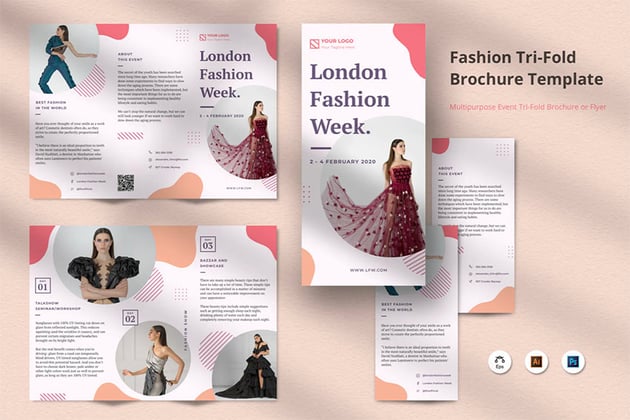
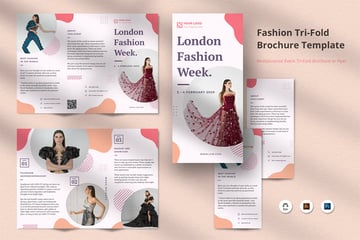
The great thing about brochure templates is their flexibility. This tri-fold brochure template shows a Fashion Week brochure as the example, but you could easily customise it to promote any kind of business or event in any industry. It comes with well-organised, fully layered files to make editing a breeze.
Here’s another interior design brochure, but this one is in landscape rather than portrait format. It’s just as easy to customise, though, with 32 ready-made page layouts, a clean and minimalist design, and a help file in case you get stuck. This InDesign brochure template uses free fonts and is fully print-ready.
Looking for something with more of a corporate feel? Try this professional brochure with its cool layout and exemplary use of white space to help the design breathe. It comes in US Letter size, with a grid layout, automatic page numbering, free fonts, and more. And thanks to the professional design and well-organised files, it’s easy to customise for any industry or purpose you want.
Or why not try something more fun and playful? This trifold brochure template features bold, bright colours, whimsical doodles, and fonts that pack a punch. And best of all, it comes in multiple file types, so whether you want to create your brochure in InDesign, Photoshop, or Illustrator, you can do it with this template.
When you hand out a brochure or send it electronically to your clients, the first question they’ll ask is, “What is the brochure all about?” Your key message needs to come across quickly. Luckily, this template makes it easy for you to create a high-impact brochure that quickly conveys your message even to busy, hurried, distracted readers. Download it and start editing it in InDesign—it’s easy!
Into fashion? Photography? This brochure is the perfect way to showcase your creativity. You get a 20-page A4 template that gives ample space to your images. It’s set up in a clean, professional grid layout, with the images, text and background on separate layers, making it very easy to edit in InDesign. Just add your own photos, change the text, and your brochure is ready!
Remember, you can change these brochure templates up as much as you want. So if you’re not into interior design, just switch out the images and text to make a corporate brochure or to promote any products and services you want. It comes in A4 size, with CMYK colours and a 3 mm bleed, and it’s ready to print as soon as you’ve added your details!
Choose Your Favourite Brochure Template
Now you know all about brochures and where to find great brochure templates. If you haven’t found one here that quite fits your needs, don’t worry—there are plenty of others to choose from at Envato Elements. Head on over to the site and select your favourite brochure template today.
If you want more information on brochure templates, check out these really helpful articles below:
A PDF is a wonderfully versatile file format that you can use for any and every type of document.
Today we will look at: What is a PDF format? Learn how to create a PDF and discover the best way to design brochures, magazines, eBooks, etc. that will convert beautifully into PDFs.
A PDF is a free open standard file format. PDF stands for Portable Document Format. PDFs are usually created in a primary application of the user’s choice—Adobe InDesign, Microsoft Word, etc.—and then converted to the PDF file format. This preserves the fonts, images, and layout of the source document exactly as it was created and allows the creator to share it electronically so that the document can be viewed and printed on any device, independent of operating system or software.
As PDFs don’t rely on the software that created them, nor on any specific digital device or operating system, they look the same no matter what device they’re opened on.
PDF documents can contain text, images, links, interactive buttons, form fields, audio, video, and more. They can be signed electronically, and PDFs can also be edited if they’re not protected by using programs like Adobe Acrobat, Microsoft Word, Sejda PDF Editor, etc.
How to Create a PDF
Creating a PDF is relatively simple. In programs like Microsoft Word and Apple Pages, after you create your document, you go to File > Print > Save to PDF. And in programs like Adobe InDesign, you to File > Export > Format > Adobe PDF.
For more information on creating PDFs, check out these helpful articles.
If you want to create magazines, books, flyers, and brochures that will be eventually converted to PDF for printing or sharing on the web, the quickest and most cost-effective way to do so is to start with an InDesign template. Templates offer professional layouts and placeholders for text, images, and graphics that you can edit to create the exact look you want.
When you’re looking for premium InDesign templates, Envato Elements is a great source. The service offers unlimited downloads of millions of premium digital assets, including various graphic templates, mockups, logos, photos, fonts, and more, for one low monthly fee.
Here’s a selection of the best creative InDesign templates to help you get started on the right foot.
This gorgeous InDesign layout template offers a clean, modern aesthetic that’s perfect for any type of company, organisation, or individual use. The template offers 22 unique layouts in A4 and US Letter size. Use it to create your next powerful and unforgettable promotional campaign.
When you’re looking for just the right cookbook design, this creative InDesign template for cookbooks has to be at the top of your list. The package includes multi-page IDML and INDD templates in A4 size.
When you decide to create a magazine that offers something a bit different from the others out there, you’re going to need a terrific template. This InDesign layout template is it. It offers 32 unique layouts, all of which are fully editable. Choose the pages you need, replace the image placeholders with your own photos, add text, and change the colour scheme to suit your brand.
Need a CV template to impress? How about CV Resume InDesign Layout Template? This professional and modern template is great for a range of professionals, from businesspeople to entrepreneurs to designers and much more. The A4 template includes two versions in yellow and silver. All graphics are resizable and editable.
You deserve the best when creating a brochure for your business, so choose this creative InDesign template. The A4 template offers 12 stunning page layouts, giving you plenty of options for creating a document that meets your needs. The template is fully editable, so you can easily add your own images, text, and colour scheme.
Ready to launch your first eBook? You’re going to need a high-quality design to stand out from the crowd. How about this Adobe InDesign Template for eBooks? It comes in US Letter size, and with 28 unique pages, it’s designed to suit a wide range of purposes.
How about this terrific magazine template for creating a truly unique and eye-catching zine? Lightazine INDD template offers 32 stylish page layouts in both A4 and US Letter size templates. Download this stunning template and get to work creating a product you can be proud of.
Business Brochure Abobe InDesign Template offers enough variety in page layouts to create outstanding brochures. The A4 template is easy to customise. Just select your preferred pages from the 24 offered, replace the placeholder images with your own images, add your text and brand colours, and your brochure is ready to export to PDF.
Ready to update your CV? This INDD template is made for you. Its modern layout suits a number of professionals, and it is super easy to customise in InDesign or Word.
Just drop your own pictures and text into this stunning INDD template for travel-related content, and it’s ready for print. That’s the beauty of using professional templates—they take care of the design part, so you can focus on your content. The template includes 28 unique pages in both A4 and US Letter size.
Choose Your Favourite InDesign Template
Now you know all about PDFs and where to find great InDesign templates that you can convert to PDF. If you haven’t found an INDD template here that quite fits your needs, don’t worry—there are plenty of others to choose from at Envato Elements, so head on over and select your favourite INDD template.
And finally, if you want more information on PDFs and InDesign templates, check out these really helpful articles below: