Why Being A “Jack Of All Trades” Works

In the workplace of yesterday, most jobs existed as a fixed set of clear-cut, unchanging duties. Rarely did the nature of the work vary, and in many cases a worker’s ability to repeat the same exact process and produce identical results was commended. Just ask an assembly-line worker or a railroad builder if “outside-the-box thinking,” or “creative innovating” was welcome in their workplace. They’d probably tell you that “thinking outside the box” is more likely to result in a factory-wide meltdown or a train wreck than a pat on the back or a promotion.

As a result, job candidates of the past were evaluated on specific skills that they already know. For example, if a hiring manager were filling a position for a bricklayer, they would only care about how well you can lay bricks. None of your other accomplishments matter; if you lay the best bricks, you’ll likely get the job. It sounds so delightfully simple, doesn’t it? Well… tough luck, because as we both know, your job is quite the opposite of simple and straightforward.

Job Description: Bricklayer

  • Spread one half-inch of cement.
  • Place brick, straighten and align.
  • Repeat ad infinitum.
  • Retire.

Being a Jack of All Trades

Today’s jobs, unlike the bricklaying positions of the past, are ever changing, and unpredictable. On any given day, the nature of your work could change drastically. Each new project reshapes your responsibilities, and you may eventually find yourself with a job that is completely different from the one described in your interview. To make matters worse, it has probably strayed from your areas of expertise as well.

This is a common occurrence recognized by entry-level workers and executives alike. In fact, today’s job interviewers frequently glaze over the unpredictable demands of their open position with generalities and trite clichés: Have you been told that your job will require you to “wear many hats?” Does your job description have a long, exhaustive list of specific duties capped off with an ironic “other duties as assigned?” If so, you must know exactly what I’m talking about. Despite all of our different titles, departments and specialties, it seems that we’re all destined to be “Jacks-(and Jills)-of-all trades,” whether we like it or not.

Job Description: You

  • Wear many hats.
  • Be a ‘Jack of all trades.’
  • Other duties as assigned.

Unfortunately, our specialties and backgrounds will never change as quickly as our work does. This is how an engineer finds them self marketing new products instead of building them, or how a writer ends up managing a publishing company instead of crafting their own work. While they may prefer staying within their expertise, the reality may be that they’re the best marketer or publishing manager that the company has, even if it’s not their forte.

It’s certainly not easy working outside of your comfort zone: Lack of experience can cause needless frustration, and you might worry that everyone will forget what you are really good at. All the while, you watch your peers doing what they do best, and reaping all kinds of rewards from it.

The situation may look grim, but there is hope: You may not realize it, but you weren’t chosen for this unfamiliar work solely to cause you aggravation or to make you look bad. You also weren’t randomly picked by drawing the unlucky short straw. You were chosen because you have transferable skills, and unlike some of your coworkers, you can adapt to the unfamiliar, and do the atypical work quicker and better than they could.

Transferable Skills

Transferable skills are the skills that you’ve learned and applied throughout your education and work experience. Things like communication, time management, creativity, problem solving, and expression of ideas. Sure, they’re somewhat intangible, but trust me, you’ve had plenty of practice. After all, we didn’t memorize the Pythagorean Theorem or read The Odyssey in school just in case our future work involved geometry or literature. It was mostly just practicing the same general skills that any professional uses. We may have doubted the validity of these studies in high school, but the purpose of all that busywork was clearly to hone our transferable skills for future use. I trust you were paying attention.

Transferable skills may seem boring and insignificant compared to a degree from a top university or an impressive work history, but they are your best assets in the workplace. Wouldn’t you rather be known as “a great communicator,” “a problem solver,” or “very organized” instead of “has a master’s degree” or “came from a big law firm?” Those résumé items are only as good as the transferable skills that came out of them.

Suddenly, those co-workers breezing through the usual work while you struggled with the harder projects no longer seem lucky or favored. It may be that they can only do the usual routine, and you can do more thanks to your transferable skills.

So, next time you find yourself banging your head against the wall, and struggling through yet another peculiar project, remember that you do have the right tools for the job. Besides, you don’t want to do the same familiar, comfortable work every day. You don’t want to be the bricklayer. You’re better than that, and you’ve got the skills to prove it.

Make a Dynamic Copyright Notice in Flash: Part 1 – Basix

This huge tutorial will help you learn a number of useful programming techniques, all tied together with a deceptively simple (and very flexible) end result. Grab a cup of coffee and let’s jump into part one..


From the first look at the demo, I’m sure you will think, what’s the big deal? This can be done with a single timeline tween and a stop() action in the last frame. But in this case, appearances are deceiving. The actual purpose of this tutorial is not to teach you how to make a primitive copyright notice, but to show you a great cluster of useful programming techniques, the copyright notice serving as a simple example.

Of course one may argue that using complex object-oriented programming for such a basic task is like firing a ballistic missile to swat a fly. But then again, if someone would actually manage to hit a fly deliberately with a ballistic missile, that would say a lot about that person’s marksmanship, wouldn’t it? Anyway, in a moment you’ll see that our little module packs a lot more value than is at first obvious.

From this tutorial you will learn a number of useful techniques:

  • Creating timer-based animations
  • Transforming a String received from XML into a MovieClip instance name
  • Correctly interpreting XML String values as Booleans
  • Basic error handling when passing values from XML
  • Drawing shapes with code
  • Creating masks with code
  • Adding and removing event handlers
  • Creating the resizing events
  • Adding text fields in code
  • Text formatting
  • Working with Date class

In the meantime, you can download all the files used in this tutorial from the link above.


Step 1: Create a .fla File

Let’s start by creating a new .fla file.

In that file, let’s change the stage width to 600 and

Read More

Ableton Live Racks: Creating One Knob Macro Controls

Ableton Live has a macro control mapping function similar to the Reason’s Combinator Device. In this tutorial I’ll try to explain how to use it on effect devices and control many parameters with one macro knob.

In this tutorial we are going to create an Audio Effects Rack which consists of a Filter, a Reverb and a Distortion. We will map multiple parameters of these effects to single Macro Knobs and do different mapping combinations for easy effects manipulation.


Step 1: Creating the Effect Rack

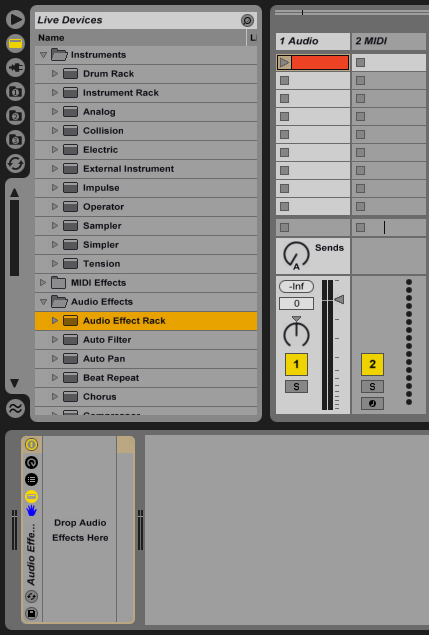
First drop a sample on an empty audio track. The loop I used on this tutorial is in the playpack, you can use any loop though. Go to the Live devices and create a new Audio Effects Rack on this audio track.


Step 2: Low Pass Filter

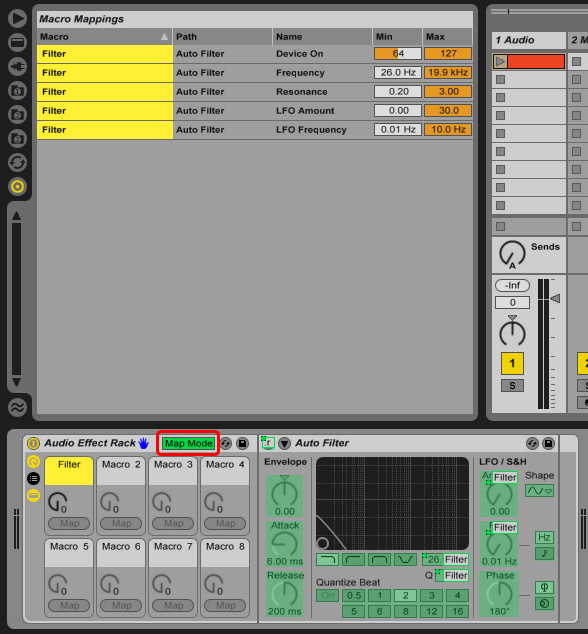
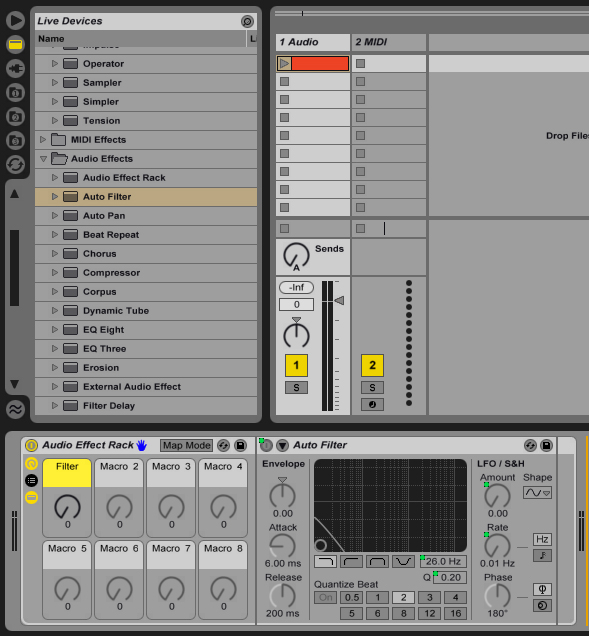
In this Effect Rack we will create several effects and map these to macro controls. Let’s start with a filter, go to audio effects and drop an Auto Filter into the Audio Effects Rack. Right Click on the “Filter Freq” and select “Map to Macro 1″, then do the same for “Filter Q”, “LFO Amount”, “LFO Rate” and “Device On/Off”; map all these parameters to Macro 1 and rename it to “Filter”. I also gave it a nice yellowish color. Notice that as we map the parameters to macros, the parameter becomes disabled and a green dot appears next to it.

The idea here is when we move this knob effect will be enabled and works as a smooth low pass filter. To do this we have to have different control on the parameters we have mapped to Macro 1. On the Audio Effects Rack device bar click the “Map Mode” button, a window like this should appear.

Now the values I use n the filter is:

  • Device On > Min: 1, Max: 0
  • Freqency > Min: 6.70 kHz, Max: 130 Hz
  • Resonance > Min: 0.77, Max: 2.10
  • LFO Amount > Min: 0.00, Max: 15.0
  • LFO Freq > Min: 0.04 Hz, Max: 10.0 Hz

And it sounds like this:

Download audio file (Audio 1.mp3)

As you see when I move Filter Macro up, more low pass is applied with a slight LFO and when it’s at zero the effect is disabled.


Step 3: Reverb

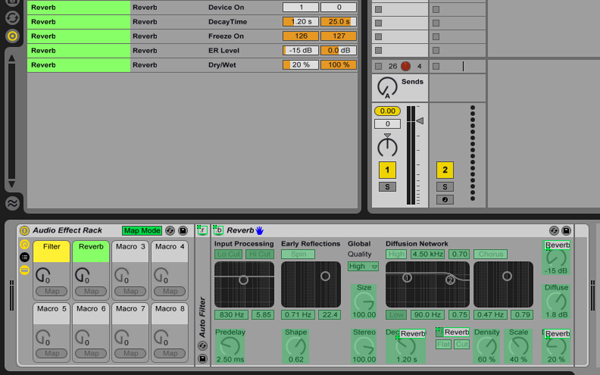
Drop a Reverb device after the Auto Filter, map the “Dry/Wet”, “Decay Time”, “Reflect”, “Device On/Off” and “Freeze” to Macro 2.

Let’s click on the “Map Mode” and configure Reverb controls like this:

  • Device On > Min: 1, Max: 0
  • Decay Time > Min: 1.20 s, Max: 25.0 s
  • Freeze On > Min: 126, Max: 127
  • ER Level > Min: -15 dB, Max: 0.0 dB
  • Dry/Wet > Min: 20 %, Max: 100 %

This is a nice setting on the Reverb which disables it at “0″ and freezes the signal at “127″. I also tweaked the Reverb a little to make it sound better. Here’s How it sounds:

Download audio file (Audio 2.mp3)


Step 4: Vinyl Distortion

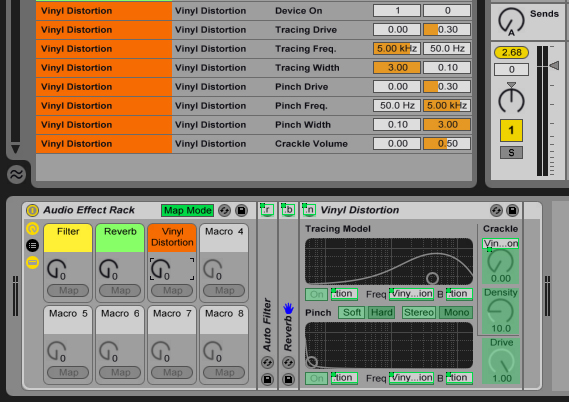
Now add a Vinyl Distortion at the end of the chain, then map “Crackle”, “Tracing Drive”, “Tracing Freq”, “Tracing Width”, “Pinch Drive”, “Pinch Freq”, “Pinch Widht” and “Device On/Off” to the Macro 3. Here’s the mapping for these parameters:

  • Device On > Min: 1, Max: 0
  • Tracing Drive > Min: 0.00, Max: 0.30
  • Tracing Freq > Min: 5.00 kHz, Max: 50.0 Hz
  • Tracing Width > Min: 3.00, Max: 0.10
  • Pinch Drive > Min: 0.00, Max: 0.30
  • Pinch Freq > Min: 50.0 Hz, Max: 5.00 kHz
  • Pinch Width > Min: 0.10, Max: 0.50
  • Crackle Volume > Min: 0.00, Max: 0.50

Feel free to tweak all these mappings as you wish, with my settings it applies a slight cracke which shoud sound nice after the reverb.

Download audio file (Audio 3.mp3)


Step 5: Wet/Dry Control

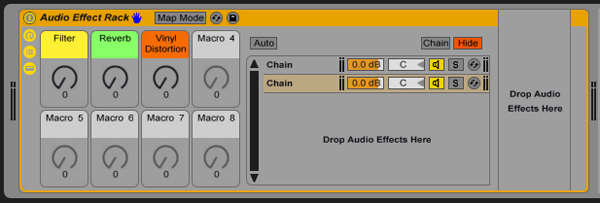
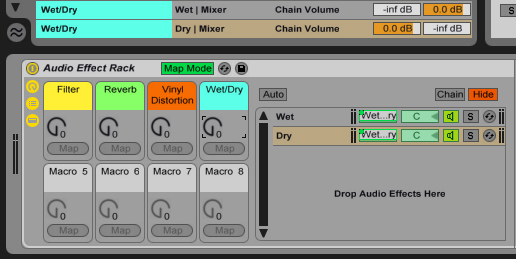
To create a Wet/Dry control, open up the Chain Selection panel on the Audio Effects Rack. We’re going to do a trick here, grab any audio effect -Let’s say an Auto Filter- and drop it below the first Chain. After you have created the chain, delete the effect device so you have an empty chain, this is how it looks:

Name the first chain as “Wet” and the empy one as “Dry”. Right click on the chain volume levels and map them to Macro 4, then rename Macro 4 as “Wet/Dry”. Then go to the Map Mode and:

  • Wet Mixer > Min: -inf dB, Max: 0 dB
  • Dry Mixer > Min: 0 dB, Max: -inf dB

This will create a crossfader between the original and effected sound.

I hope it is all clear and you find it useful. This tutorial should give you the basic idea of mapping the macro controls to multiple parameters. We’ll go for more advanced effect devices in the next tutorials.

Download the Play Pack for this tutorial (8 KB)

Contents

  • Ableton Live Source Files


Step-By-Step Guide to Developing Black and White T-MAX Film

This tutorial will explain the process of developing T-MAX film as a simple step-by-step walkthrough. It’s a great introduction to understanding how film development works, and how you can improve your photography by giving the process a try!

I strongly suggest that reading through the developing process before trying it. Chemicals require specific times and it is difficult to keep track of everything if you are not prepared and somewhat familiar to the process.

I choose T-MAX 100 because it has a very fine grain and it is the black and white developing process that I have had the best results with. This is what fully developed dense negatives look like. If results differ we will cover fogged flawed or thin negatives at the end of this tutorial.

Developed Negatives

Step 1: Gather Supplies

  1. 1-2 rolls of exposed T-MAX film
  2. Developing tank
  3. Can opener
  4. Beaker or measuring cup
  5. Thermometer
  6. Scissors
  7. Containers (for mixed chemicals)
  8. Negative carrier
  9. 3 Containers for mixing chemicals

Chemicals:

  1. Kodak T-MAX Developer
  2. Stop Bath
  3. Rapid fixer with hardening agent
  4. Hypo Clearing Agent (HCA)
  5. Photo Flo
Supplies

Step 2: Load, Expose, Unload the Camera

It is important to remember the film is ISO 100 so make sure there is a strong light source for your photos. A tripod is recommended to take advantage of low shutter speeds. T-MAX is known to be unforgiving with incorrect exposure so bracketing is worthwhile.

Expose

Step 3: Mixing the Chemicals

Once the film has been exposed and the supplies have been gathered, it is time to mix the chemicals.

Start by mixing the developer at a ratio of one part developer for four parts water (1:4). It takes about 10oz of this mixture for each reel that will be developed. In most cases, two reels get developed at a time. Only mix as much developer the tank requires (don’t premix and store). Once T-MAX is diluted it is important to regulate the temperature at 72º.

Next, mix the stop bath. The stop bath should be diluted and stored in excess for later use. Mix with water at a ratio of 1:64. (stop ratio varies depending on the brand, it is recommended you second check the directions).

Fixer and Hypo Clearing Agent (HCA) should be mixed according to the package instructions. Powder fixers often come with the hardener included in one package. Other liquid fixers require mixing of 2 elements. Fixer can be reused so keep it in a sealed container. HCA can be reused, but because it is difficult to determine when it is getting weak, some photographers will discard it after it has been in the developing tank.

Chemicals

Step 4: Light Proof a Room

Light-proofing a room is one of the steps that is easiest to make mistakes. There can be no visible light, not a red or amber safe-light. It is a good idea to start by bathroom or a laundry room with no windows. Use masking tape, foam weather stripping, towels or rags to block any light that may be spill into the work area.

Let your eyes adjust for a few minutes to be sure that there nothing visible. Remember to get all the cracks where light might get in. Both of these photos show a door with enough light getting through to fog your negatives. At first it would seem that the door on the right is light safe but once your eves adjust there is still a crack of light getting through.

Light Proofing

Step 5: Open the Film Canister

Once you have found a light-safe a spot, get the developing tank, reels, film, a bottle opener and a pair of scissors.

Turn off all lights and use the can opener to pry the top off the film canister. (It is not a bad idea to make a second check for any sources of light before this step)

Open Canister

Step 6: Take the Film Out of the Canister

Touching the emulsion side of the film will affect the chemicals in the developing process, so try to remove the film without making any contact with the film itself. Holding only the plastic knob that sticks out of the canister, pull the film out of the canister. The film will unravel but try not to let it touch the ground.

Remove Film

Step 7: Even Off the End of the Film

Without touching the emulsion side of the film, use your thumb and forefinger to grip the film by the edges and feel toward the end of the film. The end of your film has no exposures on it, so it is safe to touch. Using your fingers as a guide, find your scissors and cut the ‘tongue’ off your film.

Even Film

Step 8: Load the Reel

Once the film has an even end, it can be loaded on the reel. Take a reel and feed the first piece of film onto it. It may resist at first but once it passes the ball bearing it seems to pop onto the track. (Remember not to touch the emulsion in areas where the film was exposed).

Most plastic reels have a self feeding oscillating mechanism that allows the user to feed the film without touching the film. Rotate one side of the reel about 1/8th of a turn and return it to it’s original position, as this action is repeated the film will wind around the track without any significant problems.

Loading the Reel

Step 9: Cut Off the Plastic End of the Reel

Toward the end of the reel, you will feel the plastic spindle that was used to pull the film out of the canister. It will find it’s way into your palms as you wind up your film. Take the scissors and cut this plastic spindle free and continue to load the rest of your film.

Do not pull the tape off the film, as it can cause a small amount of static that can fog your negatives. Once all your film is loaded onto reels place the reels inside your light safe tank and close it up. Be sure that it is secured and all reels are safely inside.

At this point it is safe to turn on the lights and clean up the canisters, lids spindle and discarded film that you have dropped.

Cut Spindle

Step 10: Before the Developing Process

There are a few techniques that should be covered before beginning the developing process. The quarter turn and tilt agitations are an essential part of developing T-MAX. The quarter turn inversions are used to make sure that all parts of the film get exposed to the chemicals (see the image below). These inversions should take about 1 second and will be repeated several times in the process, so practicing before you start the process is advised.

Agitations

Because timing of chemical baths must be precise when developing film, it is important to have all your chemicals measured out ahead of time. When one chemical has been exposed to the film for the suggested time you should be able to pour it out and have it replaced within 10 seconds.

It is also important to remember that, while most developing tanks take about 20 fl. oz to cover reels, your tank may differ. Check the recommended volume of the tank before pouring chemicals. There is a guide on the bottom of most plastic developing tanks with the recommended amount of chemicals.

Tank

Step 11: T-MAX Developer

When all of the chemicals are prepared and your film is loaded in the developing tank, you are ready to start the developing process. Pour enough water to fill your tank and let your negatives soak for 1 minute.

You should have already measured out the amount of developer that it takes to cover your reels. The developer should be maintained at 72° but if you are finding it difficult to do that the container has this chart. Pour out the water and pour in the T-MAX Developer.

Once your solution is poured agitate by giving your developing tank the quarter turn and tilt agitations shown in Step 10. Repeat this process 30 times in 30 seconds. Tap to the bottom of your tank, allow the tank to sit for 25 seconds. Agitate again for 5 seconds, tap the bottom again and allow to sit for 25 seconds.

This process of 5 inversions followed by 25 seconds of idleness should be repeated until the developer has had 6 1/2 to 7 minutes in the tank. Pour out and discard your developer.

Developer

Step 12: Stop Bath

Pour in 20oz of stop bath and agitate with 1/4 turn inversions for 30 seconds. Pour out and discard.

Stop

Step 13: Fixer

Pour in 20oz of fixer. Complete 3 1/2 to 8 minutes of cycles that consist of 15 one second inversions, 3 taps and 45 second rests. Once this step is complete you can open your light safe tank to observe your negatives. If your negatives appear purple and thick continue this process for another cycle and check again.

New fixer takes about 3 1/2 minutes, and as you recycle your fixer it will take up to 8 minutes to properly fix your negatives. Once your negatives are similar to the ones shown pour your fixer back into it’s container. If it takes more than 8 minutes for your negatives to clear up it is probably time for new fixer!

Fixer

Step 14: One Minute Wash

Refasten the lid to your tank and give your negatives a 60 second water wash, then discard the water.

Wash

Step 15: Hypo

Use enough HCA to cover your reels. Follow by 1 full minute of full agitation (1 second 1/4 turn inversions). Hypo can be recycled, but it is difficult to tell when the mixture is getting weak.

Hypo

Step 16: Five Minute Running Water Wash

Give your negatives a 5 minute running water wash. Remove light safe lid and let water pour directly onto the reels.

5 Minute Wash

Step 17: Photo Flo

Toward the end of the water wash apply 2 drops of Photo Flo. Rotating your negatives in this solution helps to distribute the Photo Flo.

Agitations

Step 18: Drying and Hardening

Remove the negatives from their reels and hang them in a clean dust free area. Do not touch the negatives with dry fingers, but wet your hands in Photo Flo solution and lightly run fingers along drying film to remove excess water. Negatives should be given at least 2 hours before you touch them again.

Drying

Step 19: Cutting and Archiving Your Negatives

Once you have your negatives, you will probably want to put them into a archival sleeve whether you are using an enlarger to make a contact sheet and prints later, or you are just scanning them to a digital format.

I use Print File’s Contact proofing preserver because I like to store the contact sheet right on top of the negatives for easy proofing. You will probably cut after either every 5 frames or 6 frames depending on the negative preserver.

Cutting & Archiving

Step 20: Examine Your Negatives

It helps if you have access to a light table here, but you can just as easily hold your negatives into any light source to examine them. A well developed negative has both areas that are fully thick but still has areas where the negative is completely transparent.

Thin negatives will result in very gray prints concentrated in the mid tone range, whereas overly thick negatives will result either in prints that are too light and lack detail or gray negatives that appear blurry and fogged.

Inspect the negatives for watermarks, scratches and dust. Scratches to the emulsion side of the film are very difficult to fix. Dust and watermarks are easily removed with an anti-static or micro-fiber cloth (be careful to use clean lintless fabric that is free of grit or dirt they will scratch your negatives).

Final

Well Exposed Negatives

Here is an example of a well developed film. Notice there are areas where the film is comply transparent and there are areas where the negative is completely black. This will result in a print with a full tonal range.

Well Exposed Negatives

Thin Negatives

If your negatives are thin, you underexposed. If you have negatives similar to these you will end up having a print that is gray and muddy. In the printing process you can try to fix this with high contrast filters that but overall you will end up loosing a lot of the grayscale. There values look unnatural compared with that of a well exposed negative.

Thin Negatives

Thick Negatives

If your negatives are too thick, you overexposed. While slightly overexposed images have higher contrast prints overall you will loose a few mid-tones. Overly thick negatives will give you a gray print, but unlike underexposed negatives there will be a lot more dark tones. If a negative is very thick, reciprocity failure becomes an issue (this negative is also slightly fogged).

Thick Negatives

Undeveloped Portions of Your Negative

In this case your film came off the track when were loading the reels. It is rare to have this happen with plastic reels but if metal reels are used it is a more common mistake. If you continue to have these results try practicing with an exposed roll of film with the lights on.

Undeveloped spots

Fogged Negatives

If the negatives were exposed to any source of light, it is visible in the areas of darker tones (where the negatives should be transparent). Indirect or reflected light that is a result of a poorly light-proofed room can be harder to detect.

Look at the edges of the negative. If you see patterns similar to those below it is possible that the room where the film was put onto the reels was not entirely lightproof. Fogged negatives will result in a loss of lighter tones and overall result in darker more muddy prints

Fogged Negatives

Have Fun!

Though the idea of developing your own negatives certainly sounds a little daunting, it’s a great experiment to try and certainly gives you a better understand of how photography works. There’s a huge satisfaction to handling your own images from the initial shoot, through to a finished negative!
Coming Soon from Rockable Press: Rockstar Presentations

Our next release from Rockable Press is approaching, and we’re pretty excited about it! We wanted to let you know before it hits and make sure you’re prepared. Sometime next week, Rockstar Presentations: Tips, Techniques and Terrible Truths by author Joseph Lewis will be available to buy as an eBook or paperback.

Lewis is an experienced writer and veteran of presentations, and is one of our own WorkAwesome writers since launch who has posted regularly on the subject of delivering effective presentations.

Here’s some more about Rockstar Presentations from the back blurb:

In Rockstar Presentations, author Joseph Lewis shares tips, tricks and wisdom on public speaking with no fear, no cue cards and no worries!

Whether you’re giving a blockbuster keynote or teaching a handful of co-workers how to do something cool, this book was written for you.

You’ll learn:

  • Why everything you’ve heard about avoiding stage fright is wrong
  • How not to fail at PowerPoint
  • The secret techniques separating awesome presenters from the rest
  • How you can use the same strategies employed by Abraham Lincoln and Winston Churchill to give great presentations

There’s no exact date for the launch yet, but it will be sometime next week. For immediate notification of the launch and a limited-time discount code for the book, sign-up for the Rockin’ List today.

20 High Rez Metal Texture Sets – CG Premium Content Pack

Today, for the first time ever on CGTuts+, we have a set of 20 incredible high resolution metal texture sets available exclusively to Premium members. Hand crafted from original photos by CGTuts+ author Clinton Jones, each of the 20 texture packs contains 4 high resolution metal textures. If ever you expect to use realistic metal textures in your CG art, then this content pack is perfect for you! Learn more at the jump!

New Realistic High-Rez Metal Textures

This new CG Premium content pack, available exclusively to Premium members, includes 20 realistic high-rez metal texture sets, complete with diffuse, specular, bump, and reflection maps, and ranging from 2000 to 3000 pixels each. Members can Login and Download, otherwise Join Now!.

This new CG Premium content pack was created by Clinton Jones and is available for CG Premium members to download today. Clinton Jones is a regular author at CGTuts+, and creates loads of professional quality photo sourced textures on a regular basis. We are very excited to partner up with him on this release!
Terms of Use

  • You may use these textures in the creation of any commercial or non-commercial work.
  • You may not redistribute these textures in any way, shape, or form.
  • You may not resell these textures.

  • CG Premium Membership

    The Tuts+ network runs a membership service called Premium. For $9 per month, you gain access to exclusive high quality screencast tutorials, extra project and source files, and awesome downloadable content packs like this one at CGtuts+, Psdtuts+, Vectortuts+, Audiotuts+, Nettuts+ and Aetuts+! For less than the price of a movie, you’ll learn from some of the best minds in the business all month long!!. Become a Premium member today!
    Don’t miss more CG Premium tutorials and content packs, published weekly – subscribe to Cgtuts+ by RSS.

    Quick Tip: How to Use Cubase’s Quick Controls to Access Massive

    Massive comes with a host of parameters that you can control in real time with a MIDI controller or using an automation track within your DAW.

    In this tutorial you will learn how to use Cubase’s Quick Controls to assign Massive parameters to your MIDI controller in an uncomplicated way. The advantage of learning to use the Quick Controls for automation is that you can also use them to control the parameters of any other plugin in Cubase.


    Step 1

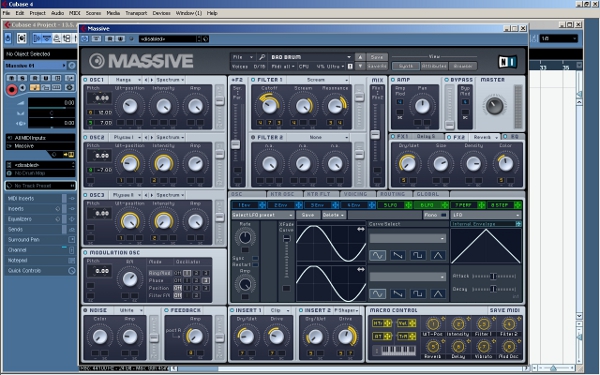
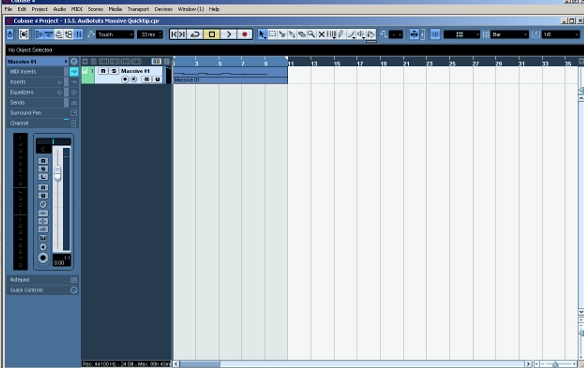
    Open a new Cubase project, add an instrument track and load Massive onto it. Then choose a sound preset. For this demonstration we will use the Massive factory preset “Bad Brum”.


    Step 2

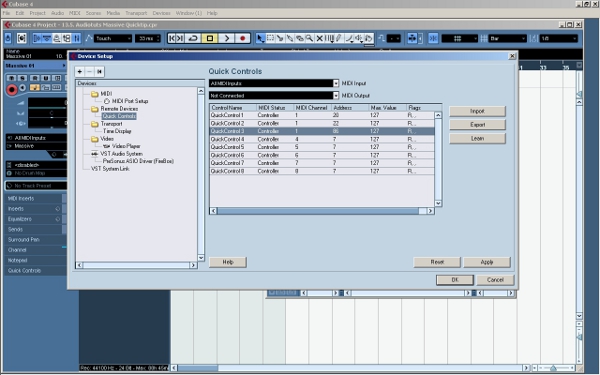
    Now we are going to set up the Quick Controls. Go to Devices>Device Setup under the main menu. Under the section “Remote Devices”, you can set up the Quick Controls.

    We are going to assign an external MIDI controller fader to Quick Control 1. First move the fader on your external MIDI controller. Then select Quick Control 1 (the first line). Then click on the “Learn” button on the right hand side.

    Now repeat the same process with a different MIDI controller fader for line 2 (Quick Control 2). Notice that Cubase automatically detects the MIDI Address of your faders. After doing this, click on “OK” and close the menu.


    Step 3

    Using your MIDI keyboard or Cubase’s key editor, record some musical MIDI data on the Massive track. The example is a simple slow phrase that we can use to showcase the changing parameters.

    Download audio file (1.mp3)

    Original phrase without automation.


    Step 4

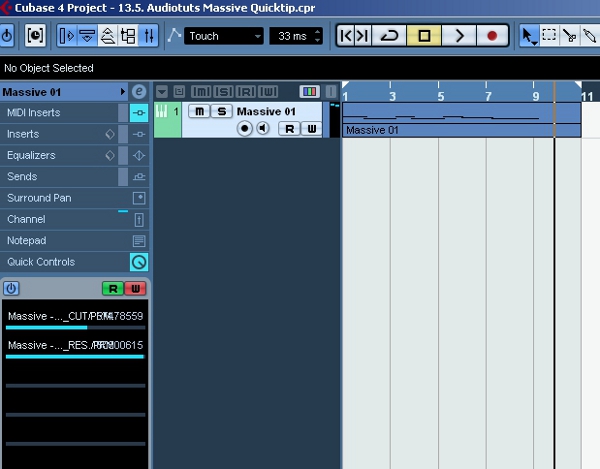
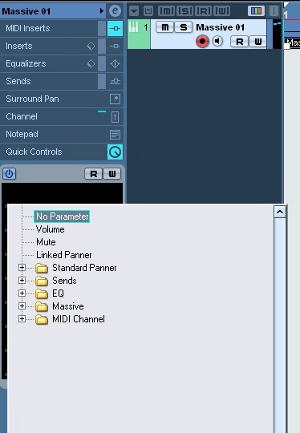
    Go to your the track inspector for your Massive track and open the Quick Controls tab. If you click on one of the lines under this tab, a menu with a number of submenus appears. Under a submenu for Massive, you will see a long list of parameters to choose from.

    Click on “FILTER1_CUT/PRM” for Quick Control 1 and “FILTER1_RES/PRM” for Quick Control 2. This will allow you to control the cut and resonance parameters of the first filter in Massive.


    Step 5

    Click W on the Quick Control tab to enable recording MIDI controller data. Then, using the two MIDI controller faders that you assigned to Quick Controls 1 and 2, record some automation for the phrase we’ve already got.

    To play this data back, click R on the Quick Controls tab to enable reading during playback.

    Download audio file (2.mp3)

    Phrase with automated cut and resonance parameters.

    That’s it! As we have seen, this way of using MIDI controller automation in Cubase is very convenient.

    It enables you to quickly modify plugin parameters inside the DAW using your external MIDI controller, without having to learn to use each plugin’s different interface.


    Quick Tip: Practical CSS Shapes

    A common design technique lately is to create a fold effect, where it appears as if a heading is wrapping behind its container. This is generally achieved through the use of tiny images; however, with CSS, we can mimic this effect quite easily. I’ll show you how in four minutes.

    Example

    Final HTML

    <!DOCTYPE html>
    
    <html lang="en">
    <head>
    	<meta charset="utf-8">
    	<title>CSS Shapes</title>
    
    	<!--[if IE]>
    		<style>
    			.arrow { top: 100%; }
    		</style>
    	<![endif]-->
    
    </head>
    <body>
    	 <div id="container">
    
    		<h1> My Heading <span class="arrow"></span> </h1>
    
    	</div>
    </body>
    </html>
    

    Final CSS

    #container {
    	background: #666;
    	margin: auto;
    	width: 500px;
    	height: 700px;
    	padding-top: 30px;
    	font-family: helvetica, arial, sans-serif;
    	}
    
    h1 {
    	 background: #e3e3e3;
    	 background: -moz-linear-gradient(top, #e3e3e3, #c8c8c8);
    	 background: -webkit-gradient(linear, left top, left bottom, from(#e3e3e3), to(#c8c8c8));
    	 padding: 10px 20px;
    	 margin-left: -20px;
    	 margin-top: 0;
    	 position: relative;
    	 width: 70%;
    
    	-moz-box-shadow: 1px 1px 3px #292929;
    	-webkit-box-shadow: 1px 1px 3px #292929;
    
    	color: #454545;
    	text-shadow: 0 1px 0 white;
    }
    
    .arrow {
    	 width: 0; height: 0;
    	 line-height: 0;
    	 border-left: 20px solid transparent;
    	 border-top: 10px solid #c8c8c8;
    	 top: 104%;
    	 left: 0;
    	 position: absolute;
    }


    Habits That Annoy Your Cubicle Mates

    There are certain habits that one has at home that should not be brought into Cube Land.  We all have our habits and though we may disagree on what’s acceptable in our personal lives, the workplace is a different story as there are certain things that just do not belong in it at all.  There is always the problem with the exposed belly for example, or the butt cleavage.  Then there are those things that I had thought were even more obvious but obviously they weren’t.

    1. Smacking bubble gum

    At one job in New York City I sat next to a woman who smacked her bubble gum all day long.  It drove me out of my mind – but I kindly asked her to stop and she kindly did.  Reading work-related forums I discovered that many office workers had the same problem with “smacker co-worker” but that the overall the smackers were not as receptive to their suggestions as my co-worker was.  Bubble gum smacking is without a doubt not acceptable in the workplace:

    • It is evidence of a lack of consideration for others
    • It distracts or annoys those around the smacker, causing tension in the workplace
    • It definitely will not impress anyone who’s on the other end of a nearby phone conversation
    • It is unprofessional because it is something more closely associated with a careless attitude, such as that of teenagers.  This does not fit well in adult settings, especially not in a work setting.

    2. Talking over speaker phone

    It doesn’t matter if it is for 30 seconds, it doesn’t matter what the reason is.  When we’re sharing an open or semi-open space with other people we need to consider their space as much as we hope they will consider ours.  The person sitting next to us might be in the middle of important work or maybe taking a minute to relax before starting on a major project or speaking on the phone themselves.

    Having a conversation on speaker phone is inappropriate because:

    • It is inconsiderate of others’ space and says that the person having the conversation on speaker puts his/her needs above his/her co-workers’
    • It may cause others to start having conversations on speaker phone and then it will be chaos if everyone starts doing it
    • The person on the other end of the line might say something embarrassing or that requires discretion

    3. Speaking loudly

    This was a major issue in my first job, when I shared my desk with a loud yacker.  This particular specimen spent half her days on the phone talking about her newborn twins and laughing out loud as she leaned back on her chair.  I hoped that her chair would flip backwards and that somehow she’d break her tongue.

    Why this is bad:

    • This too is inconsiderate
    • The loud “yakker” will become undesirable company; if they’re this loud in an office, can you only imagine when this person is in a restaurant or a bar?!  There goes their invitation to happy hour.
    • This will eventually bring disconcerting personal affairs into the workplace

    4. Public performance of personal hygiene

    These days there are people from all over the place living everywhere and cultural clashes occur.  Some things are ok in one place but highly offensive in others.  I am only familiar with Anglo-Saxon, Latin and other Western European cultures so here I can only speak for them, where the following habits are not acceptable in public areas of the workplace (please comment if you’d like to add or protest something):

    • Cleaning your teeth.  This should be done solely in the bathroom.  Sucking your teeth to clean them goes in this category too.
    • Manually cleaning your nasal passages (picking your nose).  This should never, under any circumstances be performed in front of others anywhere.  This is highly offensive and will outcast the worker doing this.  If you have to find 1 thing not to do, this is it.
    • Filing your nails.  Doing this at your desk will irritate co-workers, spread nail dust all over the place and make you look like you’ve got nothing to do.

    Take care.

    5 Habits That Annoy Your Cubicle Mates

    There are certain habits that one has at home that should not be brought into Cube Land.  We all have our habits and though we may disagree on what’s acceptable in our personal lives, the workplace is a different story as there are certain things that just do not belong in it at all.  There is always the problem with the exposed belly for example, or the butt cleavage.  Then there are those things that I had thought were even more obvious but obviously they weren’t.

    1. Smacking bubble gum

    At one job in New York City I sat next to a woman who smacked her bubble gum all day long.  It drove me out of my mind – but I kindly asked her to stop and she kindly did.  Reading work-related forums I discovered that many office workers had the same problem with “smacker co-worker” but that the overall the smackers were not as receptive to their suggestions as my co-worker was.  Bubble gum smacking is without a doubt not acceptable in the workplace:

    • It is evidence of a lack of consideration for others
    • It distracts or annoys those around the smacker, causing tension in the workplace
    • It definitely will not impress anyone who’s on the other end of a nearby phone conversation
    • It is unprofessional because it is something more closely associated with a careless attitude, such as that of teenagers.  This does not fit well in adult settings, especially not in a work setting.

    2. Talking over speaker phone

    It doesn’t matter if it is for 30 seconds, it doesn’t matter what the reason is.  When we’re sharing an open or semi-open space with other people we need to consider their space as much as we hope they will consider ours.  The person sitting next to us might be in the middle of important work or maybe taking a minute to relax before starting on a major project or speaking on the phone themselves.

    Having a conversation on speaker phone is inappropriate because:

    • It is inconsiderate of others’ space and says that the person having the conversation on speaker puts his/her needs above his/her co-workers’
    • It may cause others to start having conversations on speaker phone and then it will be chaos if everyone starts doing it
    • The person on the other end of the line might say something embarrassing or that requires discretion

    3. Speaking loudly

    This was a major issue in my first job, when I shared my desk with a loud yacker.  This particular specimen spent half her days on the phone talking about her newborn twins and laughing out loud as she leaned back on her chair.  I hoped that her chair would flip backwards and that somehow she’d break her tongue.

    Why this is bad:

    • This too is inconsiderate
    • The loud “yakker” will become undesirable company; if they’re this loud in an office, can you only imagine when this person is in a restaurant or a bar?!  There goes their invitation to happy hour.
    • This will eventually bring disconcerting personal affairs into the workplace

    4. Public performance of personal hygiene

    These days there are people from all over the place living everywhere and cultural clashes occur.  Some things are ok in one place but highly offensive in others.  I am only familiar with Anglo-Saxon, Latin and other Western European cultures so here I can only speak for them, where the following habits are not acceptable in public areas of the workplace (please comment if you’d like to add or protest something):

    • Cleaning your teeth.  This should be done solely in the bathroom.  Sucking your teeth to clean them goes in this category too.
    • Manually cleaning your nasal passages (picking your nose).  This should never, under any circumstances be performed in front of others anywhere.  This is highly offensive and will outcast the worker doing this.  If you have to find 1 thing not to do, this is it.
    • Filing your nails.  Doing this at your desk will irritate co-workers, spread nail dust all over the place and make you look like you’ve got nothing to do.

    Take care.

    Switching to Chrome? Download these Extensions

    When Chrome first entered the browser wars in September 2008, although it quickly acquired a big 1% of the audience, many resented the fact it wasn’t as extensible as the long-time favorite Firefox browser. Developers want add-ons – things that’ll make their coding faster and easier, with less room for mistakes. Things which, let’s face it, Chrome couldn’t yet offer. But things have since changed.

    Chrome features a vast collection of extensions at the moment. It also regularly beats its opponents in various speed and compatibility tests, while the great set of developer tools promoted the browser to a very interesting solution for web enthusiasts. But does it have enough ‘extension power’ to overcome Firefox? Check out the following twenty extensions, and make up your own mind!


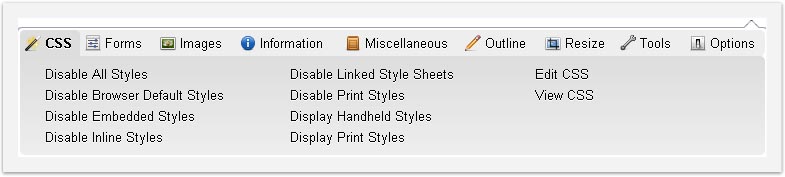
    1. Web Developer

    Some of you might be familiar with this plug-in from Firefox. Although the Chrome version can’t disable JavaScript, due to some restrictions from the browser’s side, WDT remains one of the most powerful additions to a web developer’s arsenal.

    You can easily outline different elements of a site, and test it in various environments (for instance, without CSS and images) through the extension. It also offers quick access to important code validation services and some other interesting options.


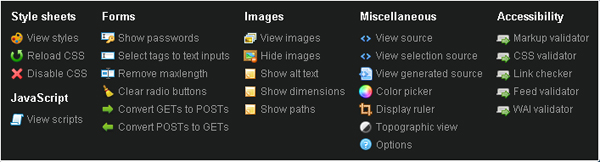
    2. Pendule

    Though it isn’t filled with features like Chris Pederick’s Web developer toolbar, Pendule proves itself to be worthy of comparison against the famous Firefox add-on.

    Other than the basics (source, images, validators), it contains a couple of very cool tools, like the ruler and the color picker, which will be highly valued by web developers and aren’t a part of WDT.


    3. Chrome Sniffer

    No, Chrome sniffer can’t produce smells equivalent to your screen picture. Sorry. However, if you’d like to find out which frameworks and libraries a particular site uses, that’s an area sniffer can help you with.

    As appealing as looking through someone else’s uncommented code might sound to you, there are times when a web developer doesn’t have time to play games. Sometimes you may just want to figure the library out and get it over with. Is the site using jQuery? Yes? OK, let’s move on. That’s what Code sniffer is all about.


    4. Chrome SEO

    Although still in Beta, Chrome SEO is one of the best search engine optimization analyzers you can find as a browser extension these days.

    It provides easy access to various tools that can help you out with Competitive Analysis, Keyword Research, Backlink Checks, PageRank Checks and other daily SEO tasks.


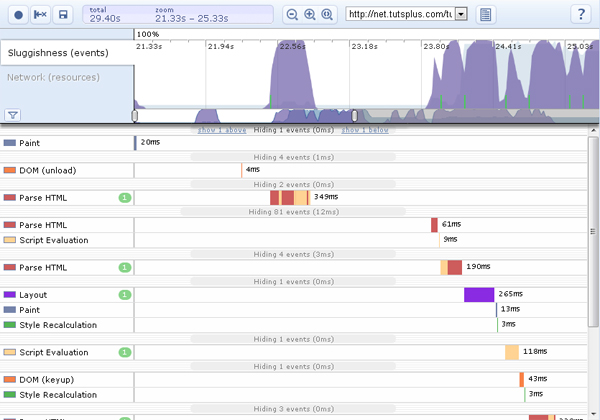
    5. Speed Tracer

    Speed tracer is an official Chrome extension, developed by Google. It tracks your site performance in real-time, generating reports on various problems that might have occurred while communicating with the server. You can then use these metrics to optimize your code for better site performance.

    Note: You should read the getting started guide before using Speed tracer.


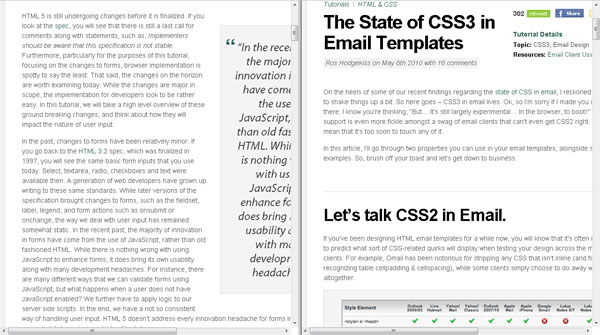
    6. Frame Two Pages

    “Frame Two Pages” does exactly what it sounds like; it splits your two tabs into resizable frames. In other words, your physical screen will be split into independent areas.

    Once you click the extension’s icon, the current tab will be merged with the previous (left) one into a frameset with two rows or columns (frames). Unlike the other similar extensions, “Frame Two Pages” can open links in the same frame they were clicked in.


    7. Snippy

    Snippy allows you to grab snippets from web pages and save them for future use or upload to Google Docs. The extension is very useful when copying a lot of information from various sites, since it shortens the cpoy/paste process to only one simple click.


    8. IE Tab

    No matter how much we hate it, the fact remains that some sites need Internet Explorer to work properly. IE tab acts as if you had the Internet Explorer engine running inside your Chrome browser.

    Although most developers will use IE tab to test their work in Internet Explorer, the extension can also be used to access local (file://) URLs (not possible through Chrome itself).


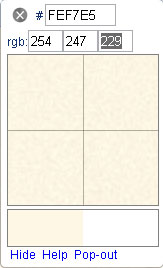
    9. Color Picker

    Color picker can provide you with both hexadecimal and RGB values of a currently selected color. It does a pretty good job most of the time, but the desired site must be fully loaded at 100% zoom level for best results.


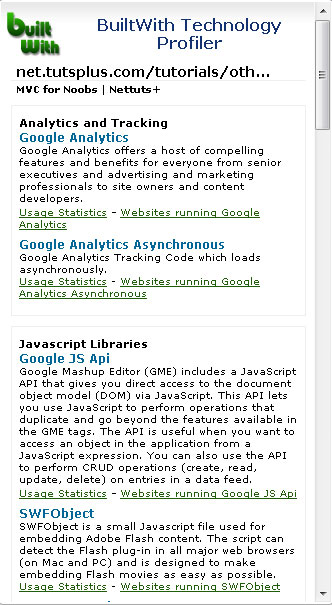
    10. BuiltWith

    Similar to Chrome sniffer, BuiltWith does a great job of understanding which technologies and frameworks a particular site is using. In addition to their names and short descriptions, you’ll be provided with usage statistics and a list of other websites using the same technologies.


    11. Lightshot

    LightShot is a tool which allows you to easily make screenshots of any area of a website. You just hit the Lightshot icon on the toolbar; select an area you want to make a screenshot of, and click “Save” or “Upload to server”. In case of uploading you instantly get a link to the screenshot you’ve just uploaded.

    You can also copy or edit your screenshots (add text, draw lines and more other functions) using an on line tool much reminding of Photoshop.


    12. Xmarks bookmark sync

    If you’re working on multiple computers, you likely know it’s not easy to maintain synchronization between your bookmarks in order. Maybe one of the PCs is using Firefox, the other one Safari, the third Chrome, etc. You can’t just keep copying all your bookmarks between them forever.

    And you don’t have to, because Xmarks will do that for you. It can synchronize across multiple computers and web browsers, and is available as a free extension for Chrome, Firefox, Safari and Internet Explorer.


    13. Web of Trust

    Chrome is an extremely safe browser. The safety measures actually go as far as to start entirely new processes for each tab; so there is very little room for any wandering viruses to crawl thorough and attack your computer. It also warns you if you’re visiting a site that is on the Chrome “blacklist.”

    If you need more security, “Web of Trust” is for you. WOT ratings are powered by the users and their experiences with websites, so it’ll warn you when trying to access a site others have had problems with. It’ll also rate your Google/Yahoo/Bing search results so you are warned about a particular site reputation in advance.


    14. Last Pass

    LastPass is a free online password manager and form filler that easily remembers your on line passwords and auto-fills them for you. The only password you’ll need to remember from now on is the one of your Last pass account!


    15. Chromeshark

    ChromeShark is a Chrome extension containing basic playback controls for your Grooveshark account. You can pause a song, skip it, or stop the playback entirely.

    Note: The extension has problems when multiple Grooveshark tabs are opened.

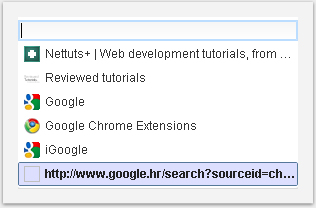
    16. Recent History

    Chrome has a fairly complicated way of accessing your browsing history. It can be done through two long mouse clicks! That’s why Recent history is such a big time saver. It’s positioned in the right-hand side of your address bar, and allows you to access the recently closed tabs and most recently visited pages from only one pop-up.


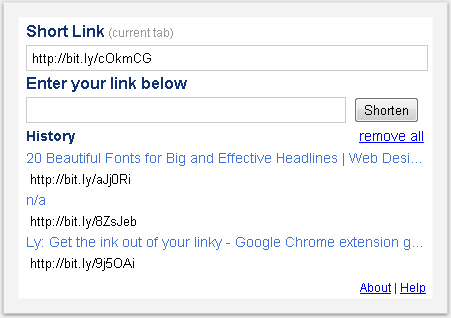
    17. L(ink)y URL Shortener

    Twitter users will absolutely adore this extension. It automatically shortens your URLs using the popular Bit.ly URL shortening service. It also remembers the most recent shortened URLs so you don’t have to retype them.


    18. Tab Menu

    For those who like to get carried away opening new tabs in Google Chrome, this tool will be of great assistance. Instead of looking at tiny horizontal tab icons, it gives you a vertical overview of all your current tabs opened and enables searching as well!


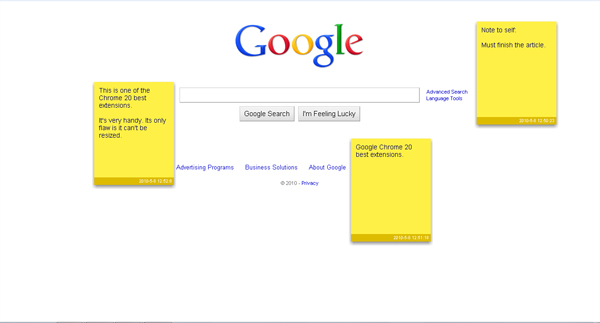
    19. Note Anywhere

    With “Note Anywhere,” you can post a sticky note on any page you are viewing, customize it, and then review the note on a later date.

    It can be quite useful when doing on line research, since the sites you posted the stickers on will be remembered in the extension’s options page. They remain posted until you delete them.


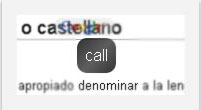
    20. Auto Translate

    This translator can be customized according to your preferences, so you can choose when will the translate pop-up appear.

    For instance, you could set it to translate from English when Control double clicked, but to try to detect the language automatically when you Shift select a word.


    Thanks so much for reading. Which ones are your favorites? Any I missed?


    Fabric Inspired Grunge Brushes – Premium Psdpack

    Today, we have a new set of Premium Brushes available for Psd Premium Members. This set was crafted by Grant Friedman of Colorburned and includes 20 high resolution fabric inspired grunge brushes. If your next project calls for a grungy fabric inspired look, then this set is perfect for you. Learn more at the jump!


    New Fabric Inspired Grunge Brushes

    This new Premium Psdpack Pack is available for Psd Premium Members today and includes 20 high resolution brushes ranging somewhere in the neighborhood of 2500 pixels by 2500 pixels. Members can Log in and Download! Otherwise, Join Now! A preview of the brushes are below.

    sample

    This new Premium Psdpack Pack was created by Grant Friedman of Colorburned and is available for Psd Premium Members to download today. Grant is the Associate Editor of Psdtuts+ and creates loads of professional quality Photoshop brushes on a regular basis. We’re excited to partner up with him on this release.

    pack

    Psd Premium Membership

    As you know, we run a Premium membership system that costs $9 a month (or $22 for 3 months!), which gives members access to the Source files for tutorials as well as periodic extra tutorials, and Premium Packs like this one! If you’re a Premium member you can log in and download the tutorial. If you’re not a member, you can of course join today!


    Memories Photography Competition Grand Final

    Thank you to everyone who’s voted in our recent photography competition. We’ve gone through three rounds of voting, and received over 10,000 responses! I’m pleased to announce the ten images that have made it through to our final. Be sure to take a look, and select the one you’d like to be crowned our overall champion!


    The Voting Process

    We’ve picked the ten images that received the largest percentage of votes. Three from each round, and then a tenth that received the next highest percentage across all rounds.

    This is the grand final. The image that receives the largest percentage of votes will be crowned our “Memories” champion, winning a brand new Canon 550D. Voting will close at Midnight (GMT) on Tuesday 25th May, and we’ll announce the winner shortly afterwards.

    Spend some time looking over the following photos and, when you’ve decided which you’d like to win, scroll to the bottom of the page to cast your vote! You can only vote once, so choose carefully…

    On a related note, it’s obviously not acceptable to use any type of automated voting system to push your percentage up. Any evidence of this will, unfortunately, lead to your image being disqualified.


    The Grand Finalists


    Entry Number: 1

    This image reminds me of when I was young without a care in the world,unaware of the hate, lies, and dilemmas that surround us. Every waking day was an adventure waiting to begin, whether real or constructed in my mind. Love was in abundance, love was simply pure….but as I grew realities came into play.

    Every time I take a look at this picture it reminds me that sometimes we can still close our eyes, dig a little deep and bring out that young kid in our hearts, as we know somewhere within, these things still do exit. The inner child in me still plays a big role in my life.


    Entry Number: 2

    When I was little I really, really wanted to fly up in the sky. Not only did I want to fly but I really wanted to be an astronaut. Ever since, I’ve been obsessed with anything sci-fi or space related, only because it helped me imagine a world beyond our own. This picture of my girlfriend reaching for the moon signifies what remember feeling as a child.

    Obviously, I am not an astronaut and probably never will be. That hasn’t kept me from looking up at the sky though. Now as a photographer, I find myself looking at the clouds and sky more often than most would, while remembering how my passion for the skies all started.


    Entry Number: 3

    Memories are made of Paper and Music. The photo represent a “cinematic like” point of view of what memories can be, such as a music album or a photo-album, and how they can evoke other memories only looking this objects.


    Entry Number: 4

    Reminds me of the pictures i took with this camera when i was a child, i wanted to give it a “vintage” feel with some post processing.


    Entry Number: 5

    A photo of my wife being pregnant on our fourth baby and the first and my only boy on all of my children(3 girls). Everytime i look at this photo and watch my boy grow up now always reminded me of how lucky i was in having him and how he grow up so fast.


    Entry Number: 6

    She was sorry about her village, and its population there. She said to me: “Son, its beautiful here, I wish there were younger people here. Without them everything looks old. The young people left this place long time ago, they all went living in the cities. Now this village is dying. Long time ago there were so much happenings here, but now… I am very happy that I see young people like you here. Take care my son!”

    She was remembering back when she was young. She was very sad. That’s why I named this photo “Reminiscent”. I was really sorry for her, and after taking the photo I said to her that I will come back and give her a print. I will do that in the next few months! She said that she would be happiest person if I do that!


    Entry Number: 7

    Eternal memory was left to us by our grandfathers who were at war for the Native land, for the future generation, in the Second World War. We cannot feel all their pains and sufferings, but we can store memoirs on them and be proud of their courage. War, in which practically in each family somebody has lost, forever remains in memory of generations.


    Entry Number: 8

    Shells thrown into the sea travel far to the horizons and after years, I still come back every evening, in hope of finding the shell I have thrown into the sea , so to revive the old memories of mine!


    Entry Number: 9

    When my boyfriend and I went to Florida last September, I had no idea that he was counting on me to wake up to photograph the sunrise one morning. I love sunrises and make it a point on most vacations to wake up for at least one. Long story short, he knew me well enough to secretly plan his proposal for whichever morning I’d decide to roll us out of bed to head for the beach.

    After the sun had risen about 45 minutes later, I started to pack my camera equipment away, ready to hit the shower and eat breakfast back at the hotel. But instead, Jon proposed.

    It was even more incredible than I’d have imagined that moment to be. I wanted to document it somehow, but in the true essence of early morning photography, I was still in my pajamas… and don’t even get me started on my hair. I snapped a few self portraits of us, but I wanted something that we could frame and look at forever, to preserve the memory of that special morning.

    I set my tripod back up and adjusted the settings to create a silhouette of the two of us, backlit by the sunrise. I am so happy with the way this picture turned out. It brings us right back to that September morning in Florida: sand between our toes, waves washing around our ankles, and a ring upon my finger.


    Entry Number: 10

    We don’t know to enjoy the time when the easiest things are so difficult for us. Instead, we remember all the difficulties we approached with no thinking.


    Cast Your Vote

    Which image should win our “Memories” competition?Market Research

    How to Make an Excellent Rocktobunny Sticker – Vector Premium Tutorial

    This Tutorial is Filled with Creative Techniques

    We have another great Vector Premium tutorial available exclusively for Premium members today. If you want to learn how to transform a fun sketch into a bold and clean vector style character that’s perfect for turning into a street-art sticker, then we have an awesome tutorial for you.

    Continue reading “How to Make an Excellent Rocktobunny Sticker – Vector Premium Tutorial”