Cool Technology Fantasies: What’s Your Wildest Tech Wish?

If you could wave your digital wand and create any time-saving, productivity-boosting tool or web app (never mind if it’s technically possible), what would it be?

I’d love to find some kind of automatic attachment suggester. Sure, there are some useful email features, like the one in Gmail that will detect when you’ve  forgotten an attachment, but I’d love something that would take care of finding the right document and attaching it for me. I have so many folders and subfolders on my MacBook that attaching documents can be a hassle!

Perhaps such a tool could look at my most recent documents, the keywords in my email and the recipient to figure out what I meant to attach. I wouldn’t expect this to be an exact science (at least not right away), so there would have to be some kind of feature where you could reject the attachment and the computer would eventually learn your habits.

That said, maybe something like this already exists…I just don’t know about it!

What’s your wildest tech wish?

Congrats On Our Round-Upper’s Round Two!

So, Topher has quite a good reason for not having a roundup in today, he was busy at the hospital with his wife having their second baby boy, Maddox Daniel Welsh. He was born at 9:57pm, in Renton, Washington, and is 7 pounds, 14 ounces and 20 inches long.

Things will be back to normal next week with our roundups here on AEtuts+ but we thought that our readers would enjoy seeing the first pictures of the little guy all pink and wrinkly right outta the gate! So please join me in wishing congratulations to Topher, his wife, Mary Beth, and new big brother Brennan on a beautiful baby boy addition to their family!


Maddox Daniel Welsh

Mattox1
Mattox2


Eighteen Artists Share Their Opinions on Artistic Style – Part I


Talk to some artists or take a look at an online conversation about artwork and there’s a mighty good chance you’ll hear or read a mention of artistic style at some point. But for as often as it’s mentioned, style seems under-appreciated and misunderstood. So what exactly is behind a style? How does an artist develop a style and what does style mean to an artist? To find out, I spoke with eighteen highly-talented artists and I’ve conveniently assembled their responses for your edification and entertainment. This is part one of a two-part series, the second part of which you’ll have to wait for ever-so patiently.

Continue reading “Eighteen Artists Share Their Opinions on Artistic Style – Part I”

Create an Elegant Theater Interior with Illustrator


The keys to this richly-appointed theater interior are simple Gradient Meshes and a few well-placed gradient fills. Once you’ve created the basic building blocks, it’s easy to re-purpose them for every element in this illustration. Sit back and enjoy the show!

Continue reading “Create an Elegant Theater Interior with Illustrator”

How to Achieve Realistic Spatial Imaging Using Kontakt

When you are using sampled instruments, good spatial imaging can make the difference between obviously fake-sounding mixes and a great ensemble sound that is realistic and pleasing to listen to. This is especially important when you are emulating an orchestra or a chamber ensemble.

In this tutorial I will show you how to create realistic spatial imaging from scratch. Many sample libraries come with instruments prerecorded in fixed positions in a particular studio or hall. This has the disadvantage of you not being able to create your own custom ensembles and spaces.

For this tutorial I will be using Kontakt. Kontakt comes with a good selection of instruments from the VSL (Vienna Symphonic Library) and allows you to configure all spatial aspects of the instruments individually.

Note: The changes made in each step can make fairly subtle differences that might not be audible on first hearings in the examples. However, added together they are a powerful toolkit for creating an impression of space and depth.

Continue reading “How to Achieve Realistic Spatial Imaging Using Kontakt”

Quick Tip: Create an “Awesome” Wrinkled Sticker


Burn and Dodge are very powerful tools that you can use in Photoshop to create a great number of things. In today’s quick tip tutorial we will demonstrate how to create a wrinkled sticker in Photoshop using these fantastic tools. Let’s get started!


Step 1

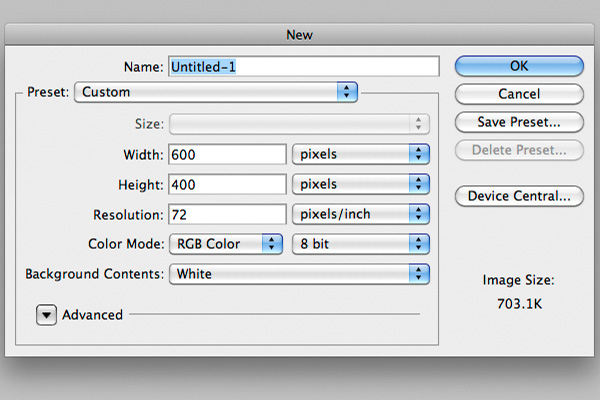
Create a new document. Make it 600px by 400px.


Step 2

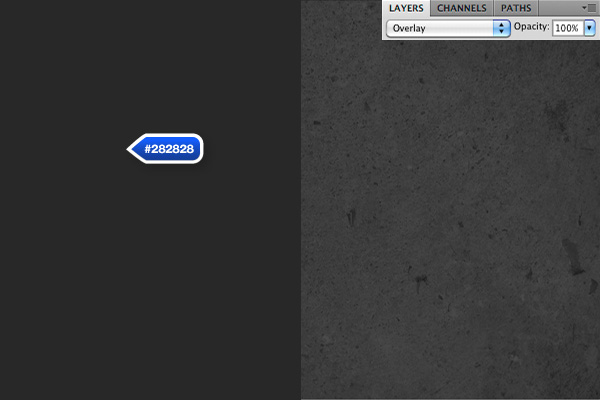
Fill the background with #282828. Then, place a stone texture onto a new layer and place it above. Set the blending mode to Overlay. You can download "stonetexture5.jpg" from the Stone Texture Pack. Choose File > Place.


Step 3

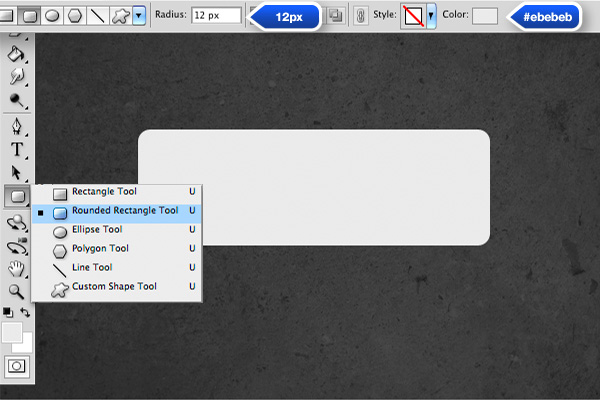
Now, let’s create the sticker. Create a round edged rectangle using the Rounded Rectangle Tool. Set the corner radius to about 12px and set the color to #ebebeb.


Step 4

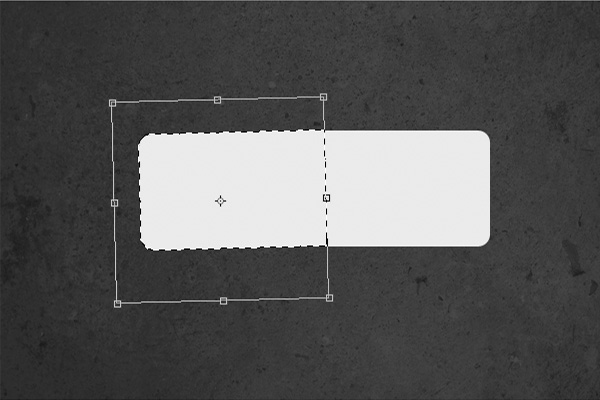
Next, you need to transform the shape, but you need to rasterize it first. Select Layer > Rasterize > Shape. Once this is done, select a part of the sticker using the marquee tool (M) and rotate it a bit using Cmd/Ctrl + T. You might need to adjust the position a bit using the arrow keys to fill any gaps that may have been created.


Step 5

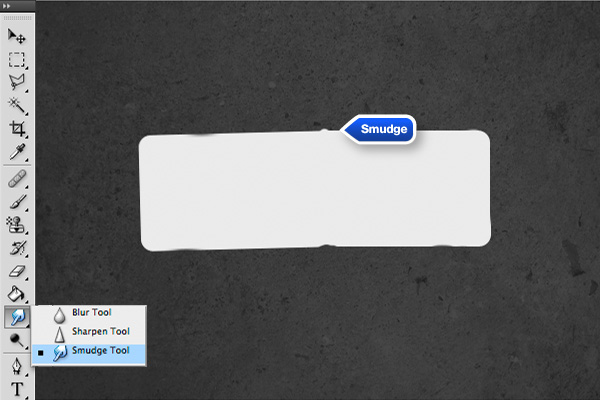
Use the Smudge Tool in various sizes and strengths to create some irregularities in the sticker. Tip: Try to use some hard brushes and high values of strength for best results. Otherwise, it could become too blurry. A similar result can be achieved using the Liquify Filter, but smudge is a bit faster. What we are trying to do here is create a major fold in the center as shown in the example below.


Step 6

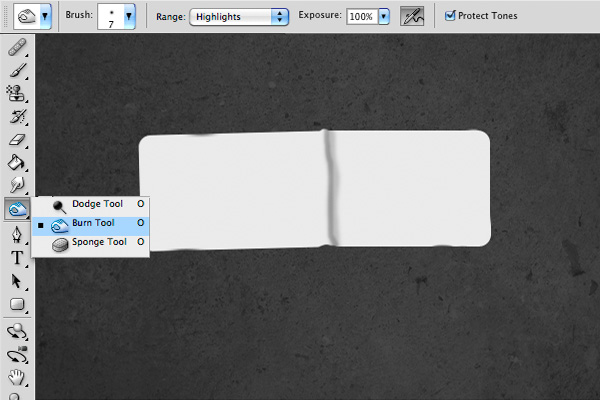
We are now ready to add some shadows and highlights to add some realism. Using the Burn Tool, draw some lines on the right side of the bump. It doesn’t have to be perfect; imperfections will only make it look more realistic. Feel free to adjust the size of the brush to create varied results.

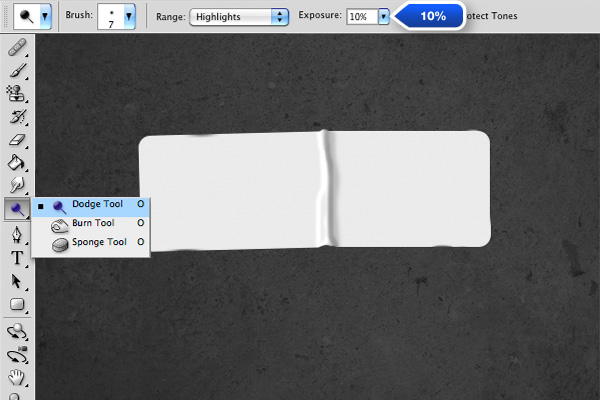
Now, do the same with the Dodge Tool.

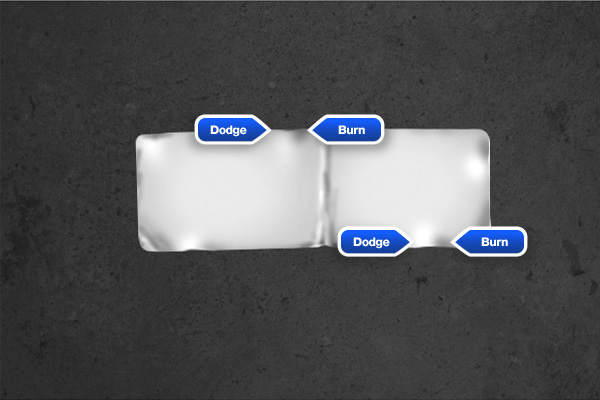
Use the same technique to create some more wrinkles as shown.


Step 7

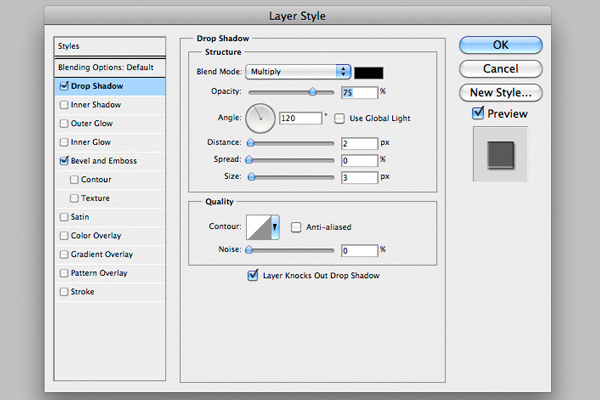
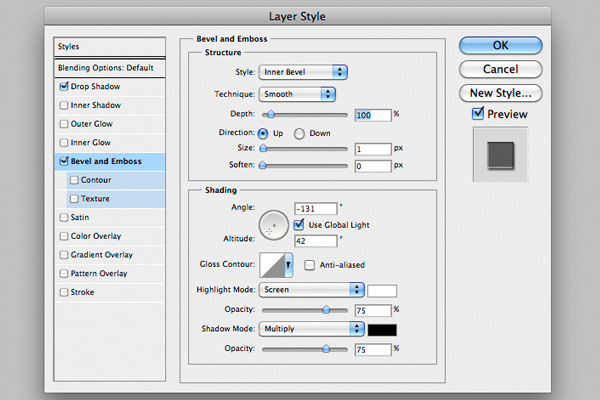
To add a bit of depth, add a slight Drop Shadow and a subtle Bevel as shown.


Step 8

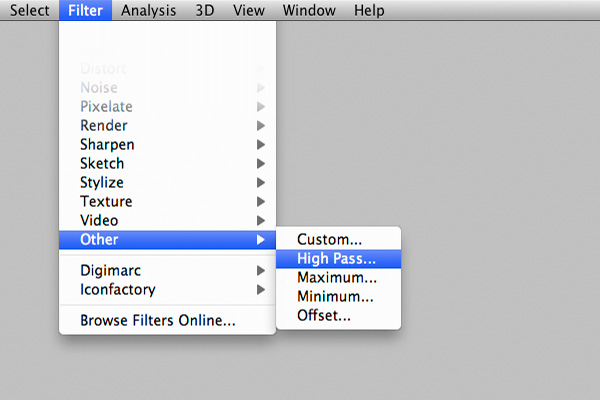
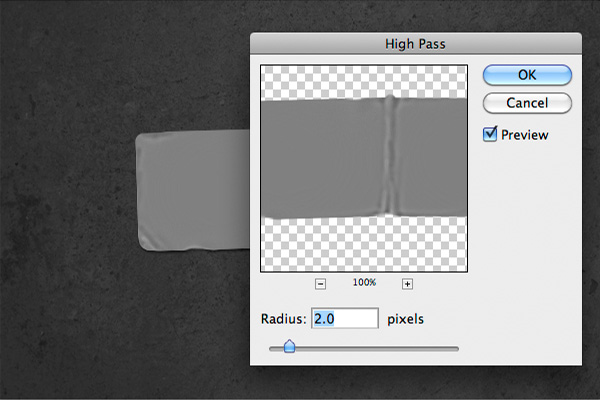
To make the sticker a bit more crisp, make a copy of it and clear the layer styles. Go to Layer > Layer Style > Clear Layer Style. Then, select Filter > Other > High Pass. For those who don’t know much about High Pass filter, it’s a filter that accentuates the dark/bright edges.

Set it to about 2%. Place the layer above the sticker and set the blending mode to Overlay.


Step 9

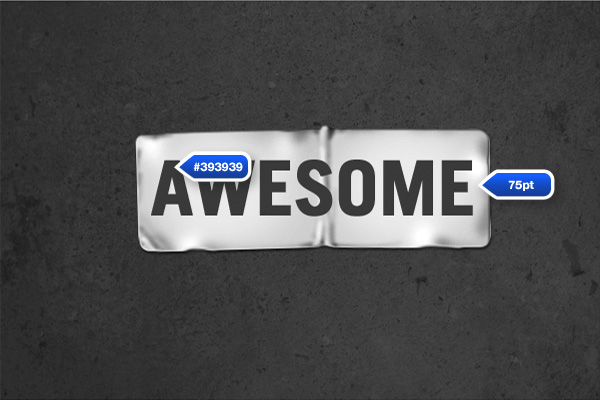
What’s great about this technique, is that the text is quite easily customizable. For this quick tip, I used Trade Gothic Lt Std Bold, it’s a well proportioned gothic font that’s great for titles. Make it about as big as the sticker, depending on the word you choose, it should be around 75pt. Set the color to #393939.


Step 10

When placing your text layer, try to place a letter right in the middle so that it will bump with the folded area. You should rasterize your text before transforming.


Step 11

Using the same method as the sticker, dodge and burn some areas and smudge the letters around the bumps to make them look displaced.


Step 12

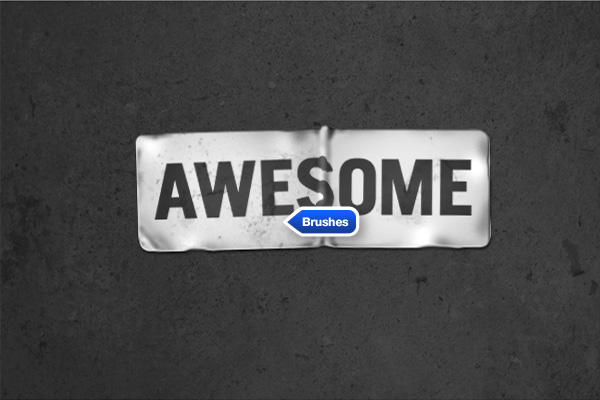
To add some texture, you can paint on some grunge with a grunge brush. There are plenty available on the web.


Step 13

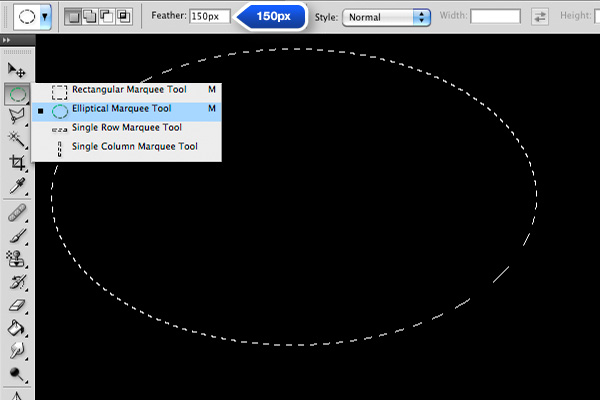
Now let’s add a vignette effect. To do this, create a new layer, fill it black and draw an elliptical shape with 150 px as feather value.

Then, press Delete a few times to get rid of the center, 2-3 times should be enough.


Final Image

That’s it! We’re finished! I hope you enjoyed it!

Exclusive Freebie Pack – 25 Grunge Brushes


Photoshop brushes are a popular tool that designers use to apply an effect to a graphic. Brushes can be used for digital painting or even to distress text or logos. This set of 25 High Resolution Photoshop Brushes is our little treat to the readers of this website and can be used to grunge up your designs in whatever way you need for free!


Exclusive Freebie Pack – 25 Grunge Brushes

There are 25 High Resolution Photoshop Brushes in this pack. The license allows you to use these brushes in your commercial and personal projects. See the download file for details. Below is an example of what type of brushes are included in this set.

sample

This exclusive set of Photoshop Brushes was created by Stefan Surmabojov. We are very excited to partner up with him on the release of this set of freebies.

pack

Friday Photo Critique #37

Friday Photo Critique is our weekly community project, where we publish a photograph submitted by one of our wonderful readers, then ask you all to offer constructive feedback on the image. It’s a great way to learn more about photography, express your viewpoint, and have your own image critiqued!


Quick Ground Rules

  1. Play nice! We’ve deliberately chosen photographs that aren’t perfect, so please be constructive with any criticism.
  2. Feel free to offer any type of advice – composition, lighting, post-processing etc.
  3. You can also link to photographs that you feel offer a great example of this type of image shot exceptionally well.

Without further ado, here is this week’s candidate for Friday Photo Critique!


The Photograph

Photo Critique

Photographer: Espen Dreyer

Please let us know what you think in the comments – how would you have approached the scene or taken the photo differently? A massive thank you to everyone who commented last week.

The most constructive and helpful comments will be featured on the site, and you’ll also be given priority to feature your own work in a future Friday Photo Critique!.

Self-Initiated Productivity Killers

While we clearly discuss ways to be more productive here at WorkAwesome, we’ve don’t often delve too much into the productivity killers that you bring on yourself.  I was thinking about this as I was enjoying the 10th round of solitaire on my iPhone, accidentally-on-purpose avoiding a looming deadline.

It’s not that I didn’t want to do the job; I just didn’t really want to start.  The getting paid part of it was really great, and landing the project is always exciting.  The project itself…not so much.  So I found myself focusing my efforts on winning one more round.  And if it’s not solitaire, it’s crib – trying to get that elusive 29.  Curse you iPhone apps!

So what do you do to avoid doing what you should be doing, and how to you get yourself back on track?

Or am I the only one that does this?

Create a Full Screen, Scalable Flash Website: Part 2

In this part of the tutorial, you’ll learn how to implement SWFAddress, which lets your users bookmark specific pages and use their Back and Forward buttons. We’ll also improve the scaling of the tile-based navigation bar.

(The first part of this tutorial is available here.)


Final Result Preview

Open the preview in a new window and navigate through the site. Notice how the URL changes in the address bar. Also, try clicking the Back and Forward buttons in your browser; even though this is a fully Flash Web site, they’ll work.

Next, check out how the tile-based navigation at the bottom of the page acts when the browser is shrunk; it’s a big step up from the previous version.


Section 1: Implementing SWFAddress

Don’t like ads? Download the screencast.


Section 2: Improving the Tile-Based Navigation with TileBG

Don’t like ads? Download the screencast.


Section 3: Fixing the “Featured” Page

Don’t like ads? Download the screencast.

Tune in again for Part 3, where we’ll focus on preloading and loading content from an XML file.

Model and Texture a Water Tower in 3ds Max – Day 2

In this 2-day tutorial, Chris Tate will be guiding you through the process of modelling and texturing an old water tower model using 3ds Max. Whilst day 1 covered the modelling of the tower, day 2 will take you through the UVing, texturing and rendering process.


Video 1

Download

Note: click the ‘Monitor’ icon to view tutorial in full-screen HD.


Video 2

Download

Note: click the ‘Monitor’ icon to view tutorial in full-screen HD.


Video 3

Download

Note: click the ‘Monitor’ icon to view tutorial in full-screen HD.


Video 4

Download

Note: click the ‘Monitor’ icon to view tutorial in full-screen HD.


Video 5

Download

Note: click the ‘Monitor’ icon to view tutorial in full-screen HD.


Video 6

Download

Note: click the ‘Monitor’ icon to view tutorial in full-screen HD.


Video 7

Download

Note: click the ‘Monitor’ icon to view tutorial in full-screen HD.


Video 8

Download

Note: click the ‘Monitor’ icon to view tutorial in full-screen HD.


This tutorial is Day 2 in a series – Go to Day 1.


Don’t miss more CG tutorials and guides, published daily – subscribe to Cgtuts+ by RSS.

10 Premium Professional PowerPoint Themes and Backgrounds

We showcased some nice free PowerPoint templates in our article 20 Free PowerPoint Templates that Don’t Suck. While those were some great templates (and free too), if you are looking for some PowerPoint themes with a professional touch – and don’t mind spending a few bucks – then check out these 10 premium PowerPoint themes for creating great business presentations.

1. Left Side Navigation PTT Template

left side navigation PTT template

2. Modern Agency Presentation

Modern Agency Presentation

3. BIGIdea PowerPoint Presentation

BIGIdea PowerPoint Presentation

4. Wiked Template With Footer

Wiked Template With Footer

5. Elegant PowerPoint Presentation

Elegant PowerPoint Presentation

6. Black, Strong Presentation

Black, Strong Presentation

7. Graph and Chart Presentation Templates

Graph and Chart Presentation Templates

8. Fresh Creative “Chalkboard” Presentation

Fresh Creative Chalkboard Presentation

9. Business Presentation Template

Business Presentation Template

10. Elegant Portfolio Presentation

Elegant Portfolio Presentation

Need More?

Check out the following links for more presentation templates:

1. 8 Stunning PowerPoint Templates: The Spring Line!
2. 17 Awesome PowerPoint & Keynote Presentation Templates
3. 20 Free PowerPoint Templates that Don’t Suck

7 Items You Never Thought to Bring to a Shoot

Today, we’re taking a look at some of the less-obvious items that you may not consider bringing to a photo shoot. Some are tiny things, others are big – all of them will help to make any photography shoot go far smoother!


What to Bring?

If you’ve ever shot an event such as a wedding or travelled to different locations for a portrait session, you know that it can be quite stressful. Venturing outside of your comfortable and well-equipped studio leaves you open to endless possible unexpected crises, both major and minor.

While preparing for these events, we tend to focus on gathering our major equipment. Lights, softboxes, cameras, stands, camera cards, backup batteries, light meters, flashes; the list goes on and on. However, after your first few outings you start to realize that there is often quite a few little items that you regret not bringing.

I teamed up with a few great professional photographers to bring you a helpful list of items you should consider adding to your list of standard equipment. Keep in mind that we’re not suggesting that you bring all of these items to every single shoot, you’ve no doubt got enough equipment to carry around already. These are merely suggestions to consider individually based on a particular scenario.


A Ladder

Ever wondered how photographers get such great shots of their subjects from above? A dedicated photographer doesn’t mind climbing a tree to get a good photo, but a smart photographer packs a ladder.

You’ll definitely want to invest in something small and portable like in the shot above. A product like this is lightweight and easy to carry and can double as a seat when you need a break on those all day shoots.

Having an elevated mobile vantage point at your disposal will really open you up to some great shot opportunities.


Towels

It’s never a bad idea to bring a few towels to a shoot. They can serve a variety of purposes and you’ll find yourself glad that you brought them several times throughout the day.

People frequently dress up for a photo shoot and occasionally like to be able to lean against or sit on objects without messing up their clothes and towels provide great and comfortable protection. They can also serve as makeup blotters for the ladies and sweat control for the guys.


The Right Shirt

It might sound crazy but you’re shirt can actually have a noticeable impact on an any close-up shots you take. Light bounces right off your chest and can slightly reflect its color onto your subject.

Be especially wary of bright colors like in the picture above, the last thing you want is to spend hours adjusting the red out of people’s faces because you wanted to make a bold fashion statement. Lots of photographers only wear black but a white shirt can actually serve to provide some rudimentary fill light on your subject under the right conditions!

Also in the clothing category, you might want to keep a change of clothes handy in your car in case of an emergency. Photography can a provide for a pretty active day and you never know when you’ll bust a seam or find yourself covered in cake!


Umbrellas

It can often be quite difficult to predict when the weather is going to try to ruin your shoot. You can either choose to come prepared or lose time and money by rescheduling.

If you choose the former, a little rain can actually result in a great shoot filled with some really unique photos opportunities.

Just make sure you pick up a few umbrellas with good aesthetic appeal and have at least one masculine and one feminine option available. Think of the umbrellas as props and work them into your shots in clever ways. The polka dots in the photo above are a nice touch!


Stuff for Kids and Pets

When you’re taking photos of kids or doing a family shoot with a pet, it can be really difficult to get everyone to play along. This can unfortunately lead to you sorting through hundreds of shots of distracted subjects.

If you know you’re going into a shoot with kids, pets or both, be sure to pack some squeaky toys and noise makers to easily capture their attention. Squeaking away behind the camera might make you feel more like a shopping mall photo guy than a professional photographer, but it pays off in results.

While we’re on the subject of children, it’s a good idea to pack some candy as well. If anyone is misbehaving, sugar can provide some powerful bribery leverage. Of course, be sure to run the idea by the parents before you go filling their kids up with lollipops and gum balls!

Finally, consider bringing along some bubbles. Not only are they a cheap way to keep children (and occasionally pets!) happily occupied, they can also provide some excellent photo material.


Insect Repellant and Sunscreen

If you’re wandering out into the great outdoors to bring nature into the shot, be prepared for nature to protest in the form of thirsty blood sucking insects and/or blistering hot sun. Both you and your subjects will be much more comfortable if you take some precautions by packing the necessary chemicals.


Sustenance

I know from experience that shooting all day events like weddings can be physically exhausting. Though the guests are feasting, you’re on your feet all day, constantly running from place to place with hardly any time to stop and eat or drink.

On days like these, toss a couple of protein bars and water bottles in your bag to help keep you going. They’re no substitute for a good wedding buffet but they do provide enough quick sustenance to at least tide you over for a few hours until you can get a proper break.


What Do You Bring?

Obviously, the possibilities for helpful auxiliary items are endless. Some of my final suggestions include band-aids, an mp3 player, comfortable shoes, breath mints, sunglasses, and extension cords.

Let us know in the comments below what untraditional items you always bring to a shoot. Also be sure to share any stories of when you regretted not bringing a particular item!

From A Childs View: 30+ Creative Children’s Book Covers


This inspirational post is all about showing you a great selection of different ways the digital medium is put to use in the modern day world to create illustrations for children’s book covers: from toddlers’ short novels and picture books, to books about color for the youth, to older kids who have a keen interest in art and design – and of course everything in between.

Continue reading “From A Childs View: 30+ Creative Children’s Book Covers”