Struggling with Project Scope Creep

Scope creep is every project manager’s biggest challenge.

When a project’s scope gets expanded to include ambitious work that was never planned for, it can disrupt the original project plan, stretch the timeline and blow away the budget. Some call it featuritis, as in “We’d like to add these features that weren’t included in the initial project.” When software developers are asked to haphazardly include strange, orphaned features, their software becomes bloated with additions that seem out of place. Hence the term “software bloat.”

Are you feeling bloated? You might be due for a surprise addition at any moment. Scope creep can make you the babysitter of someone else’s unplanned brainchild. As a project manager with a new, unexpected addition to the family, all of its needs, complaints, kicking and screaming becomes your problem.

Some try to prevent project scope creep by explicitly defining the plan, timeline and budget of a project on paper. It’s a good strategy, but those set-in-stone documents can often get ignored if someone has a sudden brilliant epiphany that must go into the project. After all, “big picture” people can’t be bothered with silly trivialities like budget, resources and project scope, right?

Have you suffered from scope creep at work? Have you defeated it? How?

5 Novel Ways to Unwind from the Workweek

The weekends are a time when I need to get away from the rigors of a tough workweek.  Even though I oftentimes bring my work home with me, at least in my thoughts, I usually can separate my weekends from the work week.  Finding different and interesting activities to do on the weekend tends to invigorate me and adds a lot to the end of a long workweek.  Here is a brief list of some activities that work for me:

1. Take a Hike.

I have always been a nature lover and either climbing a mountain or just walking a trail on the weekend is a great way to relax and unwind from the workweek.  It is such a stark contrast from sitting in a cubicle and that is what makes it so enjoyable.

2. Visit a Farmers Market.

My wife and I are lovers of great food.  To make great food you need to start with fresh ingredients.  We oftentimes visit local farmers markets on the weekend where we get to see fresh produce from farms in the surrounding area.  You tend to pay a little bit more than the non-local produce in the supermarket but you are 1) supporting local farms and 2) purchasing the freshest produce you can get for your scrumptious nightly meal.

3. Try a new specialty drink.

These days, finding a recipe for a specialty alcoholic beverage is a few clicks away.  I love to explore the variety of different recipes that I can find for frozen margaritas, cosmopolitans, or, better yet, a drink that I have never even heard of.  Add some spice to your weekend and try something new.  It could even be a new wine from a local vineyard.  You’d be surprised at the quality of wines you can purchase from local vineyards, even if you don’t live in Napa or Sonoma.

4. Day Tripping.

As I write this article, I am on vacation.  This time I did not have anything planned, which was different from my typical vacation.  As a result, I was able to take day trips to unfamiliar locations.  Sometimes we just get stuck in the same routine and don’t explore surrounding areas that may be an hour drive from our home.  Venture out and explore your surroundings.  You may just find that it is a lot more interesting than you had assumed.

5. Visit your local library. Really!

OK this one may sound boring to most of you but recently I have really started to take advantage of my local library.  Until I actually checked it out, I didn’t realize that there are a multitude of movies and CDs available for free.  And don’t think that you can’t get the latest books to read.  I can even go online and check out books from my local library which makes it very convenient.

Weekends can go by very quickly but if you fill them with exciting and interesting activities you may find that, by the time Monday morning comes, you just may be ready to tackle the upcoming workweek.  At the same time, you may start planning what your upcoming weekend may entail.

Quick Tip: Simple Portrait Photography Tricks

Portrait photography is one of the most interesting types of photography. What makes it even more rewarding is the fact that you are making someone else beautiful through your camera. Interestingly, there are several things that one should keep in mind in order to get that “Wow” effect in the final portraits. Let’s take a look at a few Quick Tips!


Choose the Right Subject

Photo credits

Your subject is the heart and soul of a portrait composition – the right face will determine the success of your shoot. That’s why you should spend much of your time and effort finding the most suitable subject for your assignment.


Define a Character

Photo credits

Choosing a subject alone is not enough. In portrait photography, every subject has their own individual character. A female portrait with gentle and soft skin defines a character which is very different from a wrinkled, older gentleman. Both are great subjects for portrait photography, but you have to select the best according to the composition you are have in mind.


Try Different Angles and Poses

Photo credits

To add flavour, spice and freshness to your portrait photography, never fear to experiment with position. After you have finalized the model, experiment with different poses, angles and postures of the face and body. This will ensure that you not only end up with great portrait shots, but also very interesting ones. A natural pose is great, but you can also have fun directing unusual an unusual pose or stance.


Lights are Everything

The fate of your final photograph is largely determined by the lighting conditions. For example, if you have a very bright background, it may overpower your subject and result in a completely washed out photograph.

When you set up your portrait shoot, remember the following key points:

  • Don’t use direct flash as it may ruin the photograph and leave you with an overexposed subject
  • Use your photographic sense to make the best use of shadows

Having an Appropriate Background

Background can be sometimes as important as the subject itself. You could go for a beautiful bokeh blur effect, or a very high/low key approach with a black or white background. Either way, be sure to consider background in your mental checklist before pressing the shutter.

A great tip is to open your Aperture as wide as possible, to create a shallow depth of field and make your subject “pop” out of the background.

Looking for more information? Check out our article on 9 Tips for a Perfect Portrait Background.


Natural vs. Artificial Expression

Photo credits

There has always been a debate about natural and artificial expressions of the subject. The most difficult task for a photographer is to make a portrait shot as natural as possible.

To attain this, make sure your subject is comfortable and ready for the shoot. Don’t jump into shooting right away. Spend some time chatting and getting to know one another!


Share Your Tips

Do you have any more suggestions and tips for portrait photography? We’d love to hear them – feel free to share in the comments!

A Simple Guide to Choosing Your First Lens

This article is about the single most important piece of equipment you’re going to buy: the lens. There are myriads of different lenses out there, and it’s easy to get lost. But do not despair – this guide will help you make the right choice. First I’m going to talk about the different characteristics of a lens – among other things we’ll learn about zoom vs. prime lenses, and why the f-number is so important. Then I’ll move on to recommend a few lenses for each different budget!


Characteristics

Each lens is different. At first it can be a little bit intimating to navigate your way through the maze of choices, but once you learn the basics you can easily decide what you need and which lens satisfies your requirements.


Zoom vs. Prime

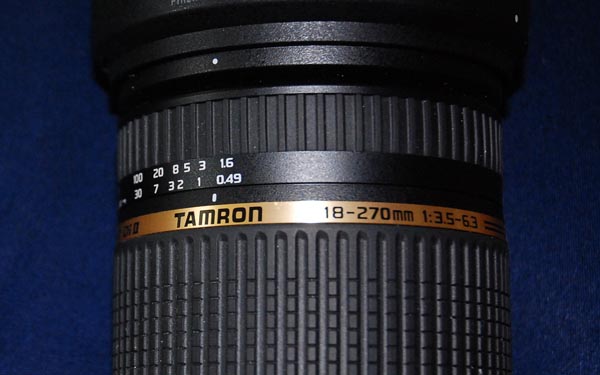
The biggest difference between lenses is their ability or inability to zoom. With a zoom lens you can – what a surprise – zoom. But it comes at a price: the image quality suffers and usually (and this is the crucial one) they have a lager f-number. I’ll talk about f-numbers in a second. You can easily spot a zoom-lens as it has a range of focal-lengths. Just take a look at the label:</p

The first number is always the focal-length. In this case it’s 18-270mm. So the range for this lens is 18mm to 270mm. A prime lens would only have one number, like 50mm. While the majority of photographers usually opt for a zoom lens, prime-lenses have their advantages: they are excellent for portraits, and are fantastic in low-light situations.


F-Number

Don’t underestimate the f-number, like I did at first. It has an influence on lots of things. But what does the number mean? Well, to put it simply, it tells you how much light makes it through the lens and hits the sensor. The smaller the number the wider your camera’s aperture is able to open. Usually it ranges between f/0.9 and f/6.3.

It’s worth noting that zoom lenses don’t always have a fixed f-number. As you can see in the image above, my 18-270mm lens ranges between f/3.5 and f/6.3 – which can be a pain. You can only set your aperture as wide as the f-number, and – in most cases – the lower this number, the better. The are a whole range of benefits that are too extensive to go into in this post alone!


Image Stabilization (IS/VR/DI)

Modern lenses often have some kind of image-stabilization on board. Canon calls it “Image Stabilization”, Nikon “Vibration Reduction” and Tamron “Digitally Integrated”. This is great! They basically let you use a longer shutter speed while maintaining a steady image – to a degree! Usually it’s built into the lens, but a few manufacturers are starting to integrate it into the camera body itself. If you are looking for a new lens, look out for one with this handy feature.


Different Lens Choices

Now that you know what to look out for when buying a lens, I can give you an overview over the market and recommend a lens or two.


Wide-Angle Lenses

These are mostly used for stunning landscape images. As it isn’t hard to get a sharp shot with a low focal-length and the landscape doesn’t move, a larger F-Number will suffice. If you’re not on a budget, grab yourself a Nikkor AF-S 14-24mm f/2.8. To date it is the sharpest lens, but with a price tag: the street price is about $2,000. Although it’s quite expensive, with such unbelievable sharpness it’s still a bargain – a brilliant piece of engineering.

If you’re looking for something cheaper, I can recommend the Tokina AF 12-24mm f/4. For around $500 you’ll get a solid lens with the only downsides being the strong vignetting and the barrel distortions at 12mm.

If you’re looking for a fisheye, the Tokina AF 10-17mm f/3.5-4.5 could be a good choice. You don’t get the best optics, but since a fisheye is an effect-lens this isn’t necessarily all that important. It’s still sharp enough for any purpose and you get good value for your around $600.


Medium-Range Lenses

This is your standard lens, which will work fine most of the time. To some people, a mid-ranged lens seems boring, because it doesn’t deliver an extreme point-of-view. But think again – this can be an advantage if you need to take a picture “as the eye sees it”. Think about shooting a portrait. This can’t be done with a wide-angle lens.

If you have some money to spend, grab yourself either the Nikkor AF-S 24-70mm f/2.8G ED ($1,700) or the Canon EF 24-70 mm f/2.8 L USM ($1,400) depending on your system. Looking for a bargain? Then take a look at the Tamron AF 28-75mm f/2.8. It may not be perfect, but can be picked up for a bargain second hand so you don’t have to dig deep in your wallet to afford it. And it delivers a lot for the money you spent: image quality, sharpness, build quality, compact size etc.

A real classic, and favourite of portrait photographers, is a fixed focal length 50mm lens. They are extremely fast, the images are crisp, they work well in low-light situations and best of all, they train your body, as you have to use your legs to “zoom”. A whole range of different lenses are available depending on your camera type, and budget.


Telephoto Lenses

Fancy yourself as a wildlife or sport photographer? Then you are in need of a telephoto lens. It brings far away objects nearer, and flattens the distances between objects: just look at the sports page in any newspaper. These images are likely shot with a telephoto lens. Notice how the spectators appears to be the same size as the players, despite being 100 yards further away?

These are the most expensive lenses, due to the fact that it is difficult to build a high quality one. The light has to travel a long way before it reaches the sensor, so it’s hard to conserve it. If you are an enthusiastic amateur, consider grabbing the Nikkor AF-S 70-200mm f/2.8 G IF-ED VR or the Canon EF 70-200mm f/2.8 USM L. The Nikkor has the better image quality and an image stabilization system (VR), which is quite important to have on a telephoto.

Both have a fast autofocus which is another important thing to look for on a telephoto – just think about trying to shoot fast moving animals. A good third-party alternative is the Sigma AF 70-200mm f/2.8 ($800). It’s almost comparable in terms of quality, but doesn’t come with image stabilisation. You decide!


Super-Zoom Lenses

If you’re on holiday, wandering around a town, you don’t necessarily want to carry all your lenses around all day. This is where super-zoom lenses come in. They provide a vast focal-length range. The best deal around is the Tamron AF 18-270mm f/3.5-6.3 DI II ($625). Since it the newest of all super-zoom lenses, it dominates the market fairly comprehensively.

The only downside is a slow auto-focus, which makes it a pain to shoot wildlife, insects or any fast moving subject. And the autofocus won’t work properly on 270mm, as it needs at an aperture of least f/5.6. On the other hand, it has a superior image quality (compared to other super-zooms of course) and image stabilization. So grab it if you’re looking to shoot landscapes, architecture, portraits and close-ups with only one lens.


Macro Lenses

Finally, we come to macro lenses. If you have a Nikon body, there is only one choice you really have: the famous Nikkor AF-S 105mm f/2.8G IF-ED VR. It’s one of the sharpest, fastest lenses ever built, along with packing image stabilization. You can get it for around $800, but it’s worth every penny. It’s just pure fun to work with.

Canon offers the Canon EF 100mm f/2.8 USM macro ($600) which is still a great lens. One big downside though is the lack of a image stabilization system, which is very important when shooting macros. For half the price of Nikons lens, you’ll get a Sigma AF 105mm f/2.8 EX macro DG (around $400). It’s inferior in almost every aspect to the competition, but the low price is great if you’re not sure whether macro photography is something you want to pursue.


Experiment, and Have Fun!

Choosing a lens doesn’t need to be a difficult task. It’s an exciting process, that always gives you the chance to learn more about photography and improve your skill set. Remember that the second hand market for lenses is always worth considering, and it gives you a fairly inexpensive way to experiment with different lenses and settle upon a kit that’s right for you.

Have fun, and let us know in the comments which lenses we would find in your photography bag!

19 Important Features to Look for in a Web Host


If you’re reading this, you probably develop websites. We don’t make websites to let them sit on our own computers: we set them free on the web. While it’s often more fun to create the website than to worry about hosting it, web hosting isn’t a decision you should make quickly. In this roundup, I’ll point out 19 things you should look for when choosing your web host.

1. Amount of Storage

Ive Drive Unibody External icon by The Iconfactory, Inc.

When choosing your web hosting, one of your primary concerns will obviously be “How much data can I store?” For most small and medium web sites, you’ll find that several gigabytes should be plenty of storage. Some hosts may offer “unlimited storage”: caveat emptor! If you read the fine print (usually, the Terms and Services) you’ll find that it’s unlimited until you go over the “normal site usage.” If you think you might be close to or over whatever “normal” is, make sure you know what you can use before buying … or go with a host that sets clear limits.


2. Amount of Bandwidth

When looking for a web host, you’ll often see storage and bandwidth hand in hand. What is bandwidth? It’s the amount of data that your host will let you and your visitors upload and download (cumulatively) in a given month. Say your website is 1 megabyte of data and your monthly bandwidth is 10 MB. At the beginning of the month, you upload the entire site; now you’ve used up one MB of bandwidth. If a visitor to your site views every page, they will have downloaded 1MB of data. That means you can have up to 9 visitors in that month (assuming each views your whole site). After that, your web host will either not allow any more visitors, or (more likely) charge you extra per MB. Of course, your bandwidth is something you’ll want to keep an eye on, especially if you run a fairly popular site or do something media intensive (like host your own video, or high-res photos). Just like storage, some hosts offer “unlimited” bandwidth; again, if you think you’ll be in a grey area, find out the limits or choose a host that sets the bar where all can see it.


3. Number of Domains and Subdomains

Once you’re running one site, there’s a good chance it won’t be long until you’ve got a second one up … and then a third. It would be a pain to have to manage a hosting account for each site you own, so make sure your web host will let you host multiple domains. Often, there will be a limit on how many domains you can have on one account; make sure it will accomodate you! Usually, there will be a section in the admin panel for adding your domains and choosing which sub-folders each one will point to. The same is true for sub-domains.


4. Email Accounts and Features

Many web hosts also offer email account for your domains. You’ll want to know how many email accounts they’ll let you set up; also, don’t forget to check out their selections for receiving that mail. Do they have a webmail interface? Multiple ones that you can select from? How about integration with Google Apps (for the Gmail interface)? Can you get your mail in your client of choice via IMAP, or do they only offer POP?


5. Database Support

Database icons (including post preview icon) by barrymieny

Now-a-days, even small websites seem to have a database on the back end. You’ll want to make sure you can use the type of database you’re comfortable with. Most hosts today offer MySQL; that’s probably enough for most people, but if you’d prefer PostsgreSQL, Oracle, SQL Server, or another flavour, don’t settle for anything less. Remember, if they aren’t advertising it, they probably don’t offer it!


6. Framework Support and Easy-Install

A lot of web hosts offer support for popular frameworks, blogging systems, or CMSes. I think it’s safe to say that the majority of Nettuts’ readers are WordPress fans: it’s always nice when your web host offers a one-click install (or at least a super easy set-up) for WordPress or your CMS of choice.


7. Mobile App or Website

For most people, this will probably be a nice extra; however, I’m sure there’s something who will find having a mobile app to access your site administration / statistics on the go indespensible. While I only know of two hosts (MediaTemple and SliceHost) that currently offer iPhone and Android apps (MediaTemple’s Android app is forthcoming ), I’m sure most hosts will follow their lead. Both offer mobile websites as well, and I’m sure other hosts have the same.


8. Tech Support

This one is very important: find out exactly what your prospective host offers for tech support: can you phone them? At what times? Do they have a support email address? A ticket system? What’s their promised response time? How about a live chat? Do they have a wiki or library of help articles / tutorials? Don’t choose a host until you know exactly what support they offer; you’ll be happy for it later, trust me!


9. Shell Access

If you’re a little more advanced, you might want to consider choosing a host that offers shell access: that’s logging into your server from the command line over SSH. You’ll be able to securely copy files up and down, change file permissions for whole groups of files quickly and easily, and perform a multitude of other tasks. If you want this feature, you’ll know all that you do with it!


10. .htaccess Files

Here’s another important one: you’ll want the ability to add your own .htaccess files to your directories. What’s a .htaccess file? It’s a configuration file used by Apache server. You can use them to password protect directories, re-write URLs, redirect pages, and more. Check out the many good tuts here on Nettuts+ to get familiar with them.


11. Cron jobs

Cron jobs are another great feature to have on your web host (and there’s a good chance you’ll have them if you’ve got shell access). Cron is a “time-based job scheduler” (thanks, Wikipedia) that you can use to perform tasks on the server at given times. To learn more about how to use Cron and what you can do with it, check out the great Cron tutorial we ran back in January.


12. Language Support

This should go without saying, but make sure the host you plan to choose offers support for the server-side languages you want to use. If you plan to pick up Ruby on Rails in the next few months, you probably want to see it on the list of supported frameworks. If you want to use Django, make sure there’s Python support. Don’t lock yourself into having PHP as your only option (unless you’re sure that’s all you’ll ever want or need!).


13. Free AdWords

While not a necessarily something you need, it’s something you’ll probably want to take advantage of: many hosts offer some Google AdWords credit (usually ~$50, I’ve found) or some other form of advertising. Even if you’d rather use another advertising proxy, you can’t beat free: you might as well use it!


14. Site Backup

Don’t think that your web host is any less suseptible to data loss than your own computers; remember, servers are just big computers that everyone can read files from! What backup options, if any, does your host provide? You’ll want to back up both your site files and databases. If they don’t offer backup, figure out how you’ll be able to do it yourself: this might be one of the places that shell access and cron come in handy!


15. Choice of OS

For most people, this won’t be a big issue. Of course, if you’re developing in ASP.NET, you’ll need Windows hosting; that’s a little harder to find, and often a bit more expensive, but if you’re a Microsoft developer, the extra cost will be worth it. (If you’re interesting in learning about ASP.NET, check out our great tuts on the subject.) If you’re using an open source language, you probably won’t need to worry about which Linux/Unix distribution you’ll get; however, some hosts give you options, and some developers may have preferences, so it’s worth mentioning.


16. Extra Applications

We already talked about content management systems, but sometimes you’ll want a something more. Several hosts offer set-ups for social features like forums, bulletin boards, mailing lists. If you’ll be running an online store, some hosts offer setups for eCommerce solutions.


17. Up-to-Date-ness

If you can, find out what software versions the host you are considering offers. Some hosts aren’t quick to upgrade to the latest offering, while others will let you choose which version you want. There are few things worse than signing up for a year of hosting only to discover your host is running PHP 4.x (yes, I’ve made that mistake).


18. Up-Time

I’m sure I don’t have to convince you that it’s important to know that your visitors will be able to get to your site when they try! Find out how reliable your prospective host is; when you’re doing this, it’s important to read the fine print. Often, hosts will stretch the truth a bit (claiming 99.9% uptime, not counting almost everything that could go wrong), so make sure you understand exactly what “100% uptime” means. It would be a wise move to google around and see what other users and reviewers have said about the host.


19. Free Domain

While you may already have a domain name, there’s no such thing as too many of them. Most hosts offer this, but all else being equal, a shiny new domain name is a good enough reason to go with one host over the other.


Conclusion: What’s your tip?

I’m sure you’ve got some great tips for choosing a web hosting solution. If you do, don’t hesitate to share them in the comments! Also, let us know what hosts you’ve found reliable and which ones have come back to bite you.

Aetuts+ Survey: What Do You Want?

Our recent Tuts+ Survey showed that many of you have feedback on how we can make Aetuts+ better for you. Now is your chance to let us know what you want from Aetuts+. Please take a few minutes to complete our reader survey.

All questions are optional. You only need to answer what you want to.

You’ll have the chance to tell us what you like, don’t like, and to make suggestions for the site. All questions are optional, so you only have to provide answers where you have something to say. Every completed survey will be read, and your feedback will lead to real, tangible changes in the kinds of content we publish.

Take the Aetuts+ Survey now!


Win an Audio Engineering Notebook from Audio Issues

There is a lot to keep track of when producing music. Win this book to stay on top of it all. To enter, all you’ve gotta do is comment! One random commenter will be chosen as winner. Too easy.


Win an Audio Engineering Notebook from Audio Issues

For the chance to win a copy of Audio Notes (pictured above) put together by Björgvin Bendiktsson, all you need to do is comment. You might like to let us know how you’re currently keeping track of your tracks, or how you think this book will help you. Make sure to include your correct email address with your comment so that we can contact you. This giveaway is open worldwide, but make sure to get your comment in before midnight this Saturday, Pacific Eastern Standard Time.

What Do You Get?

Audio Notes is a compact A5 size notebook. Its small size is perfect to carry with you but still large enough for easy writing. Its coil bound spine enables comfortable page handling.

Audio Notes has a track-sheet on every page designed by a sound engineer for music production purposes. Its custom 24-track design is perfect to capture all the production ideas you need for any of your sessions.

Reviewers of my printable audio engineering track-sheets have said, among other things:

  • “They have helped students prepare for recording/mixing sessions.”
  • “Excellent for keeping things in order.”

So a book filled with these useful track-sheets is guaranteed to help you prepare for your sessions as well as keeping them in order.

There is a lot of fancy home recording equipment out there but sometimes you just need to get back to basics and keep your notes an arms-length away. By using Audio Notes you can keep your sessions organized both in- and outside of the studio.

Audio Notes is a notebook designed for the note-taking engineer that never wants to forget another production idea.

Not only is it designed to keep all your production notes organized by song and artist, but with a little audio engineering tip on every page it’s my hope that it will inspire your productions as well.

If you miss out, check it out at the Audio Issues website.

Please note: Envato staff and people who have written more than two tutorials/articles for a Tuts+ site are not eligible to enter.


Discover Steinberg’s Cubase 5

Cubase 5 is Steinberg‘s MIDI sequencer and digital audio workstation for Mac OSX and Windows (now including 64-bit), retailing for around USD$500. The product has played an important part in the history of professional audio software, and has introduced many of the innovations in DAW software we take for granted today.

This article was previously published on the AudioJungle blog, which has moved on to a new format in 2010. We’ll be bringing you an article from the AudioJungle archives each week.

The most controversial issue relating to Cubase is the use of USB dongles as a copy protection measure. Cubase forums often contain concerns from users about lost or broken dongles, others avoid the product altogether because of the dongle issue, and still others are intent on breaking the copy protection and have succeeded for most (but not all) versions of the program. Of course there are also many happy users of the program who don’t find the dongles a concern. Which camp do you find yourself in?

This is our eighth article in the series “Exploring Digital Audio Workstations”. If you’ve missed the earlier articles, you can find them here:

Now let’s have a look at Cubase.

Read More

It Just Won’t Go Away: iPhone Coming To T-Mobile?

I believe the last time I heard this one was in March of this year. Back then, it was the Financial Times that said that T-Mobile might start selling the iPhone later this year or next year. Now it is Cult of Mac, which quotes a “highly paces source within T-Mobile” that there is an 80% chance that T-Mobile might start selling the iPhone in the third quarter of this year. We leave this one up to you to decide what 80% really means.

Apple’s relationship with AT&T has been discussed so many times over the past week alone and it is clear that AT&T has reached its limits where it can take Apple. And it appears that Apple thinks that AT&T could use some competition to get its act together in some areas, such as data services and especially the limitations AT&T has created.

It is more than likely that a competitor would be willing to open up its network a bit further in exchange to get a portion of the iPhone pie. T-Mobile is the smallest of the big 4 carriers in the U.S. with just under 34 million subscribers and its network quality isn’t the best. But it would help getting the phone to more customers. It might take some time until Verizon will get an iPhone as Apple is reportedly designing a CDMA iPhone from the ground up to accommodate a different chip set.

From Cult of Mac:

“Talks between Apple and T-Mobile are at an advanced stage, our source says, and it’s 80 percent likely that the iPhone will be coming to T-Mobile in Q3. The source works at T-Mobile but asked not to be quoted directly and to remain anonymous because they aren’t authorized to talk to the press. T-Mobile’s parent company, Deutsche Telekom, which carries the iPhone in Germany, was able to influence, the source said. T-Mobile USA is the fourth-largest U.S. carrier with 33.7 million customers. Apple’s exclusive contract with AT&T is reportedly ending this year, and many expect Apple to offer the iPhone to other wireless companies. Overseas, Apple has routinely added extra carriers when exclusivity deals in those markets expire.”

Interview with Russ Cook


Russ Cook is a illustrator and caricature artist from Oxford, UK. He has a unique caricature style which can be seen on his portfolio site that has a number of celebrities and well known people’s caricatures. In this interview, he talks about how he got started with illustration, caricatures, his creative process, ideas and inspirations. He also shares some vector art tips and advice, read about this and more at the jump.

Continue reading “Interview with Russ Cook”

Be Organized Before Mixing With Cubase

A friend brings you a multi-tracked session recorded with another DAW. Before diving in to the mix, send him looking for coffee and a newspaper, and take time to organize your project and optimize the work area. You will save time and gain in efficiency. Some say “Less is more.” Now let’s say “No stress, good mix!”


Step 1: Import the Audio Tracks

Before importing the audio files in the DAW, let’s have a look at those files. Are they WAV or AIFF? Are they OMF? The files’ format depends on the way your friend exported from his DAW.

OMF (Open Media Format): When importing this file format, the DAW recreates the same project and puts all the audio files along the timeline in the proper order with the correct track names. Note that this file format does not capture effects data.

WAV or AIFF: If the export of every track has been done with this file format, all the tracks have to start at the same point. Otherwise you won’t be able to line up the files at the same start point.

Start with an empty project. Hit <ctrl + N>, select your project folder and hit OK. Under the menu File, select Import Audio file and look in your hard disk to select the bounces.

If you import the tracks one by one, you will have to create an audio track beforehand. You can select all the tracks you need by holding the <ctrl> key on your keypad.

At this point, make the good choice in the Import Option windows:

Import Options window

Select “copy files to working directory”. All the audio files will be copied and stored in the audio folder of your project.

Selecting “Convert and copy to project if needed” will convert the audio files to the same sample rate and record format you previously set in the Project Setup.

Some Cubase users set the project at 32-bit floating point (adding extra 8 bits full of zero), arguing that all internal processing in the application are done at 32-bit floating point, which means there is no bit depth conversion during processing. The gain is not clear but the impact on the storage capacity is really clear!

Selecting “split channels” allows you to decide if you want separate a stereo track to two mono tracks.

The next window gives you the choice to insert the audio files on one track or insert on different tracks – select “different tracks”.

Insert objects option


Step 2: Organize the Tracks

We all remember our mother saying “Clean your room!” We thought she was wrong when we were young, but for a mix, she’s so right!

Let’s have a look at the project:

The Mix Project window

As you can see, all the tracks are completely disorganized. They appear in the order you selected them. Some guitar tracks are followed by keyboard tracks, drum track, vocal tracks, piano tracks, drum tracks again, and piano…

Set all the audio tracks in the common order most of the front of house engineers use: First, all the drums tracks (kick, snare top, snare bottom, hh, toms and oh), then the bass tracks, then guitars tracks, then the ‘extra’ instruments (keyboards, strings…) and finished with the vocals tracks.

To do so, drag and drop the kick drum track to the top of the track list. As you move a track on the track list, two green horizontal lines appear. Use the same technique with your project tracks.

Drag and drop the track.


Step 3: Rename the Tracks

Take the time to rename tracks as you want to. If there is only one kick drum track, why keep a track called “bounce kick-01″? Rename it “kick drum” for example. You just have to double click on the name in the track list to edit it.

At the same time, if you want to rename the track in the event display, select the track, click the Show Event Info Line icon in the toolbar and double click on the name under ‘File’.

Rename the track.


Step 4: Colorize the Tracks

You should add some colors to your tracks for easier overview.

You have two options:

  • Eat some pills and paint your tracks like a rainbow, really nice!

  • Or decide to colorize all the drum tracks in one particular color, bass tracks in another color, guitar tracks in a third color…

Select the first drum track (which should be the kick now), hold [ctrl + shift] and click on the last drum track. All the drum tracks are now selected. Choose and apply a color from the color selector in the toolbar located on the top right of the project window.

The colour selector.

At this point, all the tracks are organized, renamed and colorized.


Step 5: Group Channel Track

Using group channel tracks is very useful for mixing. By routing several audio channels to a group channel, you can submix them, apply the same effects and equalization to all of them. Let’s create these tracks and see the benefits.

In this example project we have 10 drums tracks, 2 bass tracks, 3 guitars tracks and 4 keyboards tracks. So we create four group channel tracks.

Do a right click in the track list, select “Add Group Channel Track”, set the count to 4, select Stereo and click OK.

Rename the group channel tracks as ‘Drums’, ‘Bass’, ‘Guitars’ and ‘Keyboard’, set the colors of your choice (the same as the corresponding audio tracks or different one) and place these four group channel tracks at the end of the track list as it is physically placed on an analogue mixing desk.

To route the output of an audio channel to a group, pull down the output routing pop-up and select the corresponding group.

Group Channel Track Routing.

If you want to route multiple audio channels to a group at once, select all the tracks needed, hold Shift+ALT and click on the output routing pop-up to select the group.


Step 6: Solo a Group

If you solo a group channel, all channels routed to the group will be automatically soloed as well. Soloing a channel routed to a group will automatically solo the group channel.

Note that if you solo a group or channel routed to that group, any channels which have AUX sends routed to other group channels, FX channels or output busses will be muted.

In the example below, the solo button on the drums group track has been activated.

The drums group track soloed.


Step 7: Mute a Group

If you mute a group channel, all channels routed to it will be muted as well.

The drums group muted.

You can change this functionality in the Preferences at the VST page.

“Group Channels: Mute Sources as well” option.

If you deactivate the option “Group Channels: Mute Sources as well”, muting a group channel will mute this group channel track but all channels that are routed directly to that group channel will remain unmuted. This means that if any of those channels have aux sends routed to other group channels, FX channels or output busses, those will still be heard.

The drums group track muted (Mute Sources as well deactivated).

Next time, we will continue to organize and prepare the project session. We still have to create folder tracks, check the phase cancellation on the snare, edit some audio tracks and set configurations of the mixer.

I think you need more coffee before you can finally put your fingers on the mixer…


Interview With Croatian Artist Ranko Blazina


Recently, I had a chance to talk with Ranko Blazina who is a very talented and award winning digital artist from Croatia. We talked about his work, career, his techniques and style. Amazing and inspiring words came from Ranko and I welcome you to read the interview.


Q Hello, welcome to the PSDTUTS! Please, introduce yourself, tell us briefly about yourself, where are you from, and how did you start in digital art?

Hi there ! My name is Ranko Blažina aka RaneZ, I come from Samobor, Croatia. I work full time at my graphic design studio – Snooze. In the rest of my free time I spend it developing new skills in retouching, digital art and abstract art. For the last eight years I was working and developing a broad range of illustrations, web sites and graphical products.

My studio deals with innovative solutions which enables clients to get a satisfactory product. Despite the fact that I use my skills for business, I see digital art as a way of living. My first contact with Photoshop was 10 years ago, maybe more, when the first Windows came out. I remember those hand scanners…they were fun!

So I started like many other digital artist, playing with abstract 3d pieces from 3D Studiomax or Cinema4d.. Good old 90′s. Then I realized that I wanted more from 3d…so I started doing some photo manipulations. Especially when the first digital cameras were released. As years passed by I was improving my skills. Today, anyone can do photo manipulations. But, there are just too many average guys out there. You really have to push yourself hard to be better these days.

Q You come from a very small Mediterranean country, Croatia. How does that affect you and your work? Is this relevant for your career?

Well, I must admit, it’s really hard to push a career here. We are just too small for any big plans.
But in some cases, that is an advantage. I must push even harder to be up-to-date.

As I recall, me and 2 other guys that I know, here from Croatia, are the only crew that makes such (digital) art. We have some plans for the future, to get people familiar with these digital techniques and programs that we use. I hope that next year I will have my first exhibition here in Zagreb, so I can start spreading my “digital art revolution” in Croatia :)

Q After browsing your work I couldn’t not to notice your “Winter Cloud Makers” artwork. I see that it has a story behind it. I was inspired and it really opened my imagination. Tell us more about it.

Hehe, that artwork was produced in a few winter nights, just like the title says. A few days before starting to draw this piece, I was starring through my window and watching snowflakes fall.

We have really SNOWY days here in Croatia. Did you notice that every time the snow is falling , there are no clouds?! Just an awesome site to whiteness covering the sky. So, it hit me! There must be someone who MAKES clouds! At least in my imaginary world. A few girls blowing the clouds from their mouths, but only when no one is watching. So I started sketching, planning, and finding some base plates. After few sleepless nights, the "winter cloud makers" piece was done!

Q “Snail Guardian” is my next favorite piece in your portfolio. Really deep and inspiring. Where did the idea came from and how long did it take you to make it?

As you can see, all of my artwork is usually inspired by oversized animals and little humans. That’s just the way I usually dream them up. Snail Guardian was a long time in my mind. A Jungle, little waterfalls, few spooky eyes watching the scene.

The point of this piece is a little girl that controls a giant snail, and together they guard the forest. He can’t exist without her, together they are the one. I especially love this piece because I used tons of brushing for lightning, toning, coloring and making perfect blends.

Q What is the first step you take after you get an idea for a design and how does your process looks like afterwards?

Sketch, sketch, sketch. I always use paper before starting. Paper, pen, coffee. I must admit that I am not so good with paper and pen, but I know what it is in my head that I want. So those sketches do not always look so good, but I don’t care. After some basic scene drawings, I decide which rule of thirds I will use. Not always, but often. Then I search the web for starting the image. Images, that will be plate.

Usually, after I finish my artwork, plate is unrecognizable so I delete it. Then I do some quick placing images in one file so I can visualize what is going where. At the end this process, when I am pleased with order, I start merging, painting, and coloring. Details are added afterwards.

Q You use a lot of photomontage and matte painting in your art and your Photoshop skills are sharp! Could you give our readers an advice on how to approach these techniques and where to begin? Is it hard?

To be honest, I am also new to matte painting. You can search web for this phrase, and you will probably end with some mattes for movie industries. But I am using this same techniques to create my own world. Photomontage is the best way to start using Photoshop. That’s why Photoshop exists ! The hardest things is probably lightning. Good light source and quality shadows and are the basics of digital artwork. I am a former photographer, so I got my "lighting" knowledge earlier. But the principle is the same. Light and shadows. You paint with light. Secondly, the thing to be good at photo manipulation is color balance. Merging black stripes of a zebra taken in local Zoo with flash and a low Mp camera into some winter night scene with lots of different light sources that will be printed on billboard is THE job. Practice. That’s all I can say. Read online tutorials. Browse online artistic groups. Practice.

Q I also see you’re experimenting with Typography, new drawing and Photoshop techniques. Do you do that often? In your opinion, do you think this is necessary step for every digital artist in order to define her style or just to expand knowledge?

Once more, practice. Experiment. You will be surprised what kind of stuff you are able to produce when mixing different styles, techniques. See what are you into. I experiment a lot with typography because I am using it in everyday designs. Not only digital artwork but in Posters, flyers, billboards, signs, letterheads, and booklets. Running my own creative studio (Snooze), I have learned that you must know different styles to satisfy clients.

Q You worked as a freelancer for almost 6 years. Now you’re a proud owner of a Digital Studio based in Croatia. Can you tell us how did that happen? What are main differences in being a freelance digital artist and a Digital Studio owner?

Yep, I run a little creative studio called Snooze here in Croatia. Much less stress than working in an agency. The first and main reason I left the traditional ad agency work is they didn’t allow designers to produce something that YOU thought up, something with YOUR technique and YOUR style. I was so unhappy. So, running my own was like big explosion of ideas in my head. I was able to create client demands like I wanted, and most important thing is that THEY were really satisfied.

Q Your work was published and recognized many times on the web and in offline publications (books and magazines). Among others you were also a 2nd place winner of the American Design Award for the “Day of the planet Earth 2008″ poster. How was that experience for you and did it help you in your professional career?

ADA for Earth poster was really a morale booster. I got a few emails from possible clients asking me to produce more stuff like this. So I have learned that online recognition is important to succeed. How can someone find you if you are a caveman in front of your iMac?

Q You apply your knowledge and skills to all kind of work including advertising and packaging design! How does that work for you and do you think you could start designing websites too?

Packaging, advertising, digital art. Same old story, different clients. That is design. Every day I learn something new, that’s why I love design and art. We have designed a few websites, and I am looking forward to use more Snooze skills for online content.

Q How do you see your industry in 5 or 10 years from now? Does it evolve rapidly as the web industry? Where do you think you could end up by then?

I am looking forward to expand my studio a little more. Add a few more people, a few more Macs, a few more Wacoms. 5 to 10 years? That’s a hard question. Like you said, evolving too rapidly. But, I will try to stay in the flow!

Q Thanks again for providing Psdtuts+ with this opportunity to interview you. Any final thoughts or advice for our readers?

Experiment with your art. Don’t copy. Be yourself. Learn from websites, tutorials, and friends.


Find Ranko on the Web

How to display your average feed readers

As usual, the first thing to do is to paste the function in your functions.php file:

function get_average_readers($feed_id,$interval = 7){
	$today = date('Y-m-d', strtotime("now"));
	$ago = date('Y-m-d', strtotime("-".$interval." days"));
	$feed_url="https://feedburner.google.com/api/awareness/1.0/GetFeedData?uri=".$feed_id."&dates=".$ago.",".$today;
	$ch = curl_init();
	curl_setopt($ch, CURLOPT_RETURNTRANSFER, 1);
	curl_setopt($ch, CURLOPT_URL, $feed_url);
	$data = curl_exec($ch);
	curl_close($ch);
	$xml = new SimpleXMLElement($data);
	$fb = $xml->feed->entry['circulation'];

	$nb = 0;
	foreach($xml->feed->children() as $circ){
		$nb += $circ['circulation'];
	}

	return round($nb/$interval);
}

Once done, you can call the function wherever you want in your theme files. Pass your Feedburner feed id as a parameter:

<?php
$nb = get_average_readers('catswhocode');
echo "I have ".$nb." RSS readers";
?>

Code initially published on Cats Who Blog.

Looking for WordPress hosting? Try WP Web Host. Prices starts at $5/month and you can try it for free!

How to display your average feed readers

31 Absolutely Spectacular VFX Breakdowns

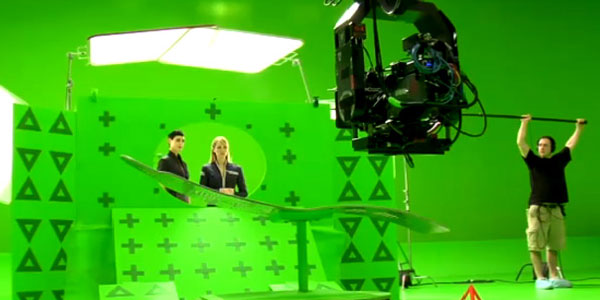
I say it time and time again, these are seriously some of my favorite roundups to do. Watching these amazing making ofs, behind the scenes content, and VFX breakdowns really give you a look into how a shot was made, or what really goes into a production. You can take a lot away from just seeing a couple of shot breakdowns… so check em out!


FXGuide #82 Making of Avatar in Nuke

Heroes: Season 3 “Completing the Scene”

Stargate Studios 24 Demo Reel

FXguide #85 Making of Alice in Wonderland

FXguide #86 Layering Explosions and Dust in Transformers 2

Behind the Scenes of V – Zeus Explained

Zoic Studios June 2010 Film Reel

BTS and Breakdown of Kraft Cheddar Explosion VIP

Travelers Insurance: Snowball

Powershares: Tony Meet Your Ideas

GhostVFX – Tulip Bear Before and After

Physalia: MAD MMX Titles

Making of AT-AT day afternoon

God at the Movies VFX Breakdown

Iron Man 2 Case Study

YouTube Play Intro video: behind the scenes

Making of Musical Picture Frames

MPC Podcast Making of Toyota “Carline”

ILM – Making of Davy Jones

Prime Focus – Making of New Moon/h2>

SPIN VFX Legion Before/After

SPIN VFX Features/Series Reel

SPIN VFX Outlander Breakdown Reel

SPIN VFX Max Payne VFX Breakdown Reel

Iloura – The Bank Job Shot Breakdown

Iloura – Nightmares and Dreamscapes VFX Breakdown

Iloura – Seven Swords VFX Breakdowns

Iloura – Charlottes Web VFX Breakdowns

BTS: Percy Jackson and the Lightning Theif

Superfad: Sony “Eye Candy

Before / After video of AutoTopsy by Capricorn 8

If you enjoyed this post, please give it a vote on Digg or a stumble to say thanks!


Creating a Mysterious Cheshire Cat in Adobe Illustrator – Vector Premium Tutorial


We have another great Vector Premium tutorial available exclusively for Premium members today. Would you like to learn how to create a detailed vector illustration based on the Cheshire Cat? If so, we have an awesome tutorial for you.

Continue reading “Creating a Mysterious Cheshire Cat in Adobe Illustrator – Vector Premium Tutorial”