HTML5 Apps: What, Why, and How


If you want to build web apps, you might want to think about using HTML5. HTML5 is the new hotness when it comes to app development, and it has the potential to change the way software is made and sold. It also activates the millions of people out there who know how to make web pages, and never thought their skill set could be used for something else. But before jumping into development, there are some things you should know about HTML5. In this tutorial, I’ll teach you the basics!

What is HTML5?

HTML5 is a W3C spec in the making.

It started at WHATWG, and is the future gold standard for HTML. If you have been around for awhile, you many know that XHTML 2 was the next major version, but that fell apart. The reasons are varied, but one main point of contention was that few websites use perfect syntax, and XHTML 2 was going to enforce perfect syntax. It has also always been extremely hard to say exactly what perfect syntax is. When the browser vendors realized how hard it was going to be to make the switch to XHTML 2, things just broke down.

At that point a bunch of people broke away from the W3C and started the WHATWG. These guys wanted to rethink not just HTML, but the whole standards making process. They started work on a new HTML5 standard. They operated from the principal that there is no perfect, and it’s not their job to tell the world how to do HTML. Instead they focused on looking at what was happening in the real world of HTML.

They also took the time to codify some conventions that sprung up in the community. That is where a lot of the new elements in the HTML5 spec (like the progress bar, video, and audio tags) came from. People have been making due, and they just wanted to make specific pieces of markup to help people do what they have already been doing.

Besides just markup, the WHATWG started creating some new JavaScript APIs. This is where HTML5 started to look “app”-like. They created standards for offline data storage, and an offline application cache, so that whole apps could be stored offline. They also started new working groups around widgets and device access (for using devices like cameras and accelerometers).

An interesting side note to the whole standards process is this: for awhile the differences in rendering engines were so great that one approach to be cross-browser compliant was to sniff which browser the user was on and deliver a different experience based on that.

The WHATWG and others always thought that browser sniffing wasn’t such a good idea. What is commonly recommend now is progressive enhancement. In a nutshell, progressive enhancement is this. Instead of just deciding that one browser would get experience Y and another would get experience Z, why not detect advanced feature support and build up to a great experience? If, at any point, the browser doesn’t support advanced feature X, the user would just get the default experience.

The Last Numbered Spec

This leads to another point about the HTML5 spec: it will probably be the last numbered spec. In the future, instead of revving HTML versions, like HTML6, the W3C will just maintain the latest version of HTML, and there will be a gold standards spec. Web developers can use progressive enhancement to handle the fragmentation, while waiting for browser vendors to catch-up to the spec.

So What are HTML5 Apps?

With HTML5 defined, what is an HTML5 app?

Essentially, a HTML5 app uses all the shiny, new pieces of the HTML5 draft to create an app-like experience.

This means storing data offline, being functional, and acting like a real app instead of just being content for perusal. You probably use web apps now, like Gmail. Gmail actually has an HTML5 version; if you visit Gmail on an iPhone or iPad, you can check it out.


Why Should I Use HTML5?

Why would I want to use HTML5 instead of Objective-C, Flash, Silverlight, or some other kind of device-specific environment? First, there are a couple reason not to use HTML5.

  1. If I was making the latest, greatest 3D shoot-em-up, I would not use HTML5. It just doesn’t have the rich graphics libraries needed to make intense games like those; however, they are working on standards to allow 3D graphics programs into the browser.
  2. If you need to use the camera on devices, or local files system, HTML5 would not be the best choice. There are workarounds, using a native wrapper, which I will discuss shortly, and there are also some standards coming that will help with that.

While there are specific cases for not using HTML5, many apps that get produced today for iOS and Android could work just as easily in HTML5. Besides just technically being able to do it, there are other good reasons to use HTML5.

You Already Know How to Use It

Right now, if you are a web developer, you have all the tools you need to get into this. HTML5 app development is only little more then changing how you think about webpages. In some instances you can just add a few lines to your HTML, and add some stuff on your server and you will have a full, working, offline HTML5 app.

The more we work with standards, the more useful they become.

Besides, web developers already understand cross-browser problems. While there will be more cross-browser issues than ever, web developers have a distinct advantage over other kinds of developers, because they already have this in their pocket. The other part of cross-browser development is standards. The more we work with standards, the more useful they become. Web developers have led the charge in some respect, and now it’s paying off. Instead of having to learn a whole other non-standards-compliant add-on, you can simply rely on what standards bodies have been working towards.

Finally, when it comes to writing code, it can be difficult to see that you might also be doing something political.

When you look at how a handset manufacturer handles itself, and how it chooses to lock in its developers, by choosing to work outside that system you are supporting the notion of freedom.

It’s a small notion, but it matters, because in the long run we want our handset developers to be open, and let us hack on them as much as we want.


How can I use HTML5?

Actually using HTML5 isn’t that hard. It can range from a couple lines of code, to writing a whole new app. Here are a few ways to get started.


1. Create a Mobile Friendly Website

Many websites are only a few tweaks away from a friendlier mobile experience. The first thing to do is take a look at the viewport.

<html>
    <head>
        <meta name="viewport" content="user-scalable=no, width=device-width"/>
    </head>

The viewport meta tag is not a standard yet, but it is a widely accepted convention. Many mobile browsers use this tag to setup certain aspects of web page rendering.

More info on viewport, check out the following documentation:

Besides just the viewport, make sure that your webpages are flexible; for example, use dynamic widths, instead of static widths. Mobile devices are all shapes and sizes, just like browser windows. Designing with the idea of flexibility in mind will automatically make your web pages more mobile-friendly.

The Doctype

A great little tidbit about the next version of HTML5 is this: the doctype went the way of the dodo. It still has to be there, because of many reasons, but it’s been shriveled to mean almost nothing.

<!DOCTYPE html>

This is awesome. No longer do we have to copy and paste a long string of text, because who can remember that thing, anyway?


2. Take Your Website Offline

Some browsers now implement the application cache. The application cache allows you to tell the browser in advance what resources a web page will need offline. The browser will then download those files for offline usage. When the client goes offline the browser will refer to those cached resources.

The application cache isn’t something that you can do by just changing your markup, though. You will need the ability to change the content-type headers on the server. To do that in Apache, you can either put this in a configuration file, or in a .htaccess file.

AddType text/cache-manifest manifest

Once you do that, you can add the following markup to your html element in your webpage. You can call your manifest anything you want, but make sure it’s at the root of your site, and it ends with a .manifest.

<html manifest="my.manifest">

Then, you can create your manifest file. Simply list all the pieces you will need while you are offline. You can’t put cross-domain files here and you won’t want to list anything that changes often. Here is an example manifest file.

CACHE MANIFEST

# Version 1

my.html
my.css
my.js
my.png

When you have this all setup, check it out in a browser that supports the application cache.

If you need to update a resource, just change the manifest file. Even adding a comment will prompt the browser to update the application cache.

The application cache is notoriously hard to debug. This book has some good methods for checking your application cache status.


3. Make Your Videos Accessible Everywhere

If you host video content on your site, and use a flash player to play it, you’re missing out on an opportunity to display video to people using the iOS devices and phones that don’t support flash (which is most phones).

HTML5 has two new tags that make displaying multimedia easier: audio and video. Here is an example video tag.

<video src="myvideo.mp4" controls />

Now, if you want to support as many browsers as possible, you will need to encode your content in a couple different formats. Then, list them like so.

<video poster="myvideo.jpg" controls>
    <source src="myvideo.m4v" type="video/mp4" />
    <source src="myvideo.ogg" type="video/ogg" />
    <embed src="/to/my/video/player"></embed>
</video>

This makes sure that your content can be seen in Firefox, Safari, Chrome, and mobile phones. Finally, for browsers that don’t support the video tag, you can still fallback to a flash player. When a browser doesn’t support a tag, it will usually just not deal with it, and continue recursing till it finds a tag it does know. In this fashion, if you put the embed or object inside the video tag, a browser like IE will use the object. However, a browser that supports the video tag will ignore the embedded flash.


Conclusion: Start Using HTML5 Tags Today

Tags like header, footer, nav, aside, article, and section are nice because they are semantic. They inform webpage consumers a little bit about your intentions for your content. It’s nice to use them. In the future, they will be more helpful than they are now, but there is nothing to stop you from using them today.

Some browsers, like IE, will “freak out” if you use these new tags, but don’t worry. IE does support adding tag types to the DOM, you just need to inform IE about them. To fix this, Remy Sharp created the HTML5 Shiv. If you include this in the head of your webpage, in an IE conditional comment, your page will render just fine.

Now you are using semantically useful HTML!


Bonus: Sell your Apps in an App Store

Yes, right now, you can take your HTML5 apps and sell them on the mobile app stores. Two projects are helping people develop “native” mobile apps, using nothing more then HTML, JavaScript, and CSS. Check these out:

Alternatively, our very own CodeCanyon, within the next month, will be launching a new category for HTML5 apps. In this category, we’ll be selling everything from advanced and custom video players, to libraries, to presentation apps.

To prepare for the category, we’ve launched a competition with $7000 worth of prizes. You have two weeks left to enter, if that interests you!


Wrapping Up

There should be nothing stopping you from exploring HTML5, and if you wanted to be ahead of the game, you should be building HTML5 apps right now. Thanks for reading!


About the Author

Alex Kessinger is a front-end web developer who currently works for Yahoo!

Quick Tip: An Introduction to Sammy.js


You’ve been seeing it for a while now with Google’s Reader, Gmail, and most recently, on Facebook. Probably, you, too, would like to write RESTful evented JavaScript applications. Well, fellow developers, meet Sammy.js, a tiny JavaScript framework built on top of jQuery. Sammy utilizes the URL hash (#) to allow you to create single page AJAX applications that respond to your browser’s back button. Interested?

In this article, I’ll be providing a short overview of the framework, and then a brief demonstration of what it’s like working with Sammy.js, with the hope of enticing you enough to consider it for your projects.


Setting the Stage

“Sammy.js is light both in size (<20kb) and footprint. Pull it into your already started applications.”

Sammy.js is being put together by Aaron Quint, a web developer out of Brooklyn, NY. Its API is modeled on the popular ruby framework, Sinatra, and is great for both simple and complex applications. It’s easy to get into, and can be pulled into your existing projects. It’s not an all or nothing proposition; so let’s take a look.

Sammy.js allows you to write single page apps, much like Gmail. You can maintain the state of your app with the url, without having to refresh or change the page. There are other MVC JavaScript frameworks, like SproutCore, which tend to be all encompassing. But with Sammy, you have a light (~20kb) framework, capable of invoking several instances simultaneously (ie. running multiple apps in the same document).


Opening Act

Installing Sammy.js is pretty straightforward. Head on over to the download page, grab a copy and move, sammy-0.5.4.min.js to where you store your project’s libraries (typically /js for me). For the purpose of this article, I will be using version 0.5.4, but you may be inclined to try sammy-latest.min.js. You’ll also need a copy of jQuery, at least v. 1.4.1. As with most jQuery plugins, order is important: jQuery, before Sammy.js, before your JavaScript. I tend to put my JavaScript at the bottom of the page, because it blocks other items from loading in parallel, giving the impression of a slower loading page. So far we have:

    <!DOCTYPE html>
    <html lang="en">
    <head>
    	<meta http-equiv="Content-Type" content="text/html; charset=utf-8" />
    	<title>Sammy.js Example</title>
    </head>
    <body>

        <div id="content"></div>

        <script type="text/javascript" src="http://ajax.googleapis.com/ajax/libs/jquery/1.4.2/jquery.min.js"></script>
        <script type="text/javascript" src="js/sammy-0.5.4.min.js"></script>
        <script type="text/javascript">

            // your script goes here

        </script>

    </body>
    </html>

Now to start coding our app. To keep things simple, I’m working inline, which isn’t the best practice. Adding a Sammy.js application is as simple as assigning it to a variable, which I’m calling ratPack. On our page we’ve defined a div with the id “content” upon which our application will be acting. We indicate this as follows:


    var ratPack = $.sammy(function() {

        this.element_selector = '#content';

        // routes will go here

    });

The importance of the element selector is that we can have multiple instances of Sammy.js running in our document, affecting different elements.


Main Attraction

Sammy.js uses the path, as defined in the URL hash, and the common HTTP methods (get, post, put, delete) to determine a callback function to invoke. These are typically known as “routes”. Some examples from around the web would be:

As an example, we’ll sketch up a mailbox application. Let’s first setup the default route of our app, which will land on #/inbox.

    this.get('#/inbox', function(context) {
        context.app.swap('');
        context.$element().append('<h1>inbox</h1>');
    });

Here, you can make the callback function do whatever you’d like. Since I’m displaying an inbox, I’d probably want to make an ajax call and retrieve a list of messages. However, for the sake of simplicity, I’m just going to return a h1 tag. The context.app.swap('') tells Sammy to replace what’s in my content div, rather than just appending to it.

In order to get this working in the browser, we’ll want to run the app using jQuery’s document ready function and pass it to our starting URL, as defined in the above route.


    $(function() {
      ratPack.run('#/inbox');
    });

And that’s it. We should now be able to load our document in a browser, the app should launch and navigate us to our inbox.

Next, we can create another route to handle labeled messages:

    this.get('#/label/:name', function(context) {
        context.app.swap('');
        context.$element().append('<h1>' + this.params['name'] + '</h1>');
    });

Sammy uses the colon var syntax (:var) to return parameters for us to filter our messages. Again, I’m just displaying the name of the label.

To this point, we’ve only been using the “get” HTTP method. Say we were to create a form and route it to #/compose:

    this.get('#/compose', function(context) {
        context.app.swap('');
        context.$element().append('<h1>say hello to?</h1>'
          + '<form action="#/compose" method="post">'
          + '<input type="text" name="to" />'
          + '<input type="submit" name="submit" />'
          + '</form>');
    });

Now we can setup a route to accept the posted data and have Sammy parse it for us.

this.post('#/compose', function(context) {
    context.app.swap('');
    var to = this.params['to'];
    context.$element().append('<h1>hi ' + to + '</h1>');
});

That’s the basics. A simple API, powerful enough for projects both big and small. If you are following along with the code, we can add some navigation for ease of clicking.

    <div id="nav">
        <ul>
            <li><a href="#/inbox">inbox</a></li>
            <li><a href="#/compose">compose</a></li>
            <li><a href="#/label/drafts">drafts</a></li>
        </ul>
    </div>

Encore

Of course, Sammy.js has a lot more to offer than simply defining routes in the app. More advanced users can explore custom events and namespaces, for event-driven applications. Aaron is trying to keep the core of Sammy.js as tight as possible, but it also comes with a lot of plugins. There’s a title plugin, that allows you to easily set the document’s title for different routes. There are several templating systems, including haml and mustache. There’s a nice-looking form builder and Sammy.Store, “an abstract adapter class that wraps the multitude of in browser data storage into a single common set of methods for storing and retreiving data.”

I hope you’ve enjoyed this quick look at Sammy.js and are ready to consider using it in your applications. Let’s hear your thoughts on Sammy.js in the comments!

Two Weeks Left: Build an Incredible HTML5 App: $7000 Competition


Only two weeks left to enter, folks! You have until August 23rd to finish preparing your item!

As HTML5′s popularity continues to increase, we at Tuts+ and CodeCanyon would like to do our part in promoting and rewarding those who are on the cutting edge of what’s possible with HTML5, local storage, geolocation, SVG, and CSS3. Not only that, but we’re also, at the conclusion of this competition, launching a brand new category on our coding marketplace, CodeCanyon, specifically for HTML5 apps.

We have $7000 worth of prizes from some of the most respected companies in our industry, but the creators of the best items will also profit by selling their HTML apps on CodeCanyon. Authors: you have one month to prepare the coolest, cutting edge HTML5 app that you’re capable of. What prizes are we offering??


Grand Prize Winner

I’m pleased to announce that I can personally recommend every single one of the following sponsors who offered items and services to this competition. We wouldn’t promote them if we didn’t feel that way!


2 Runners-Up Prizes


How Does it Work?

The rules are quite simple. Using HTML5 technologies (and feel free to throw in some CSS3 goodness while you’re at it), we want you to build a cutting edge app. It could be similar to something along the lines of:

  • The recent HTML5 presentation app
  • An awesome cross-browser HTML5 video player, with full screen support, Flash fallback, etc.
  • A kick-ass to-do list with offline storage support.
  • An HTML5 website that people would swear was created with Flash
  • etc.

Feel free to combine all modern technologies when building your item, including HTML5, geolocation, offline storage, CSS3, SVG, and any other acronym that is applicable to your project. Once you have finished building your “app,” — and you have a month to make it — return to this page, where there will be a contest submission form to fill out.

Most Importantly: We want you to build an item that people will actually use. Particle effects are great, but unless you have an argument for why others would have a need for your particle item in their project, it most likely won’t be in the running for the grand prize spot. Think wide-spread, when building your app. A presentation app is wide-spread, video players are wide-spread. Use your imagination!


Selling on CodeCanyon

In late August, CodeCanyon.net will be launching a new “HTML5 Apps” category, which we fully expect to be monstrously popular. After we select the best items from this contest — including the ones that didn’t win one of the top three prizes — we will contact the authors about selling their items on CodeCanyon in this new category, where they’ll earn between 40-70% for each sale. Considering Envato’s 430,000 marketplace members, and the fact that many of these authors make thousands of dollars each month, you’ll do quite well if your item appeals to a wide variety of people. By entering this competition, you agree that, if your item is chosen, it will be uploaded to CodeCanyon under your account, and will help to serve as seed content for the category.


Frequently Asked Questions

Please note that this section will sporadically be updated as questions come in from the community.

  1. When is the deadline? You have until August 23rd, 2010, at 11:59 PM (USA Central Standard time).
  2. How do I enter? When ready, submit your item here.
  3. If I win the contest, how will my item be sold on CodeCanyon? At that point, we will contact you about creating your free author account (if you don’t already have one), and submitting your item. It’s quite easy. Plus, because your item will be part of the new category’s seed content, you’ll get a tremendous amount of exposure as we advertise the category like crazy!
  4. Can I submit to the upcoming “HTML5 Apps” category even if I don’t win? Absolutely…and I hope you do!
  5. Can Envato staff enter this competition? Unfortunately not.
  6. Must my item support all browsers? No; we fully understand that these are items that simply won’t work in all browsers. However, do your best to provide some level of support for as many browsers as possible.

Terms and Conditions

  • This competition is open to anyone and everyone, excluding Envato staff.
  • You have until August 23rd, 2010, at 11:59 PM (USA Central Standard time) to submit your item
  • The winners of the contest will be determined by a team of no less than three judges.
  • Items must officially be submitted here to be considered for the prizes.

Good Luck!!

We can’t wait to see what you come up with. There are a lot of prizes at stake here, so submit the best possible item you’re capable of! And remember, even if you don’t win, if your item is of a high quality, you can still profit from every sale on CodeCanyon. Many authors make thousands upon thousands of dollars each month by doing this!

The deadline is August 23rd. Ready…set…go!!

Building Persistent Sticky Notes with Local Storage


HTML5 local storage is like cookies on steroids; it’s incredibly simple to use and yet still so powerful. In this tutorial, I’ll show you how to create “sticky notes” functionality, that allows your users to take persistent notes while browsing your site.


Step 1: The HTML

Because of the dynamic nature of this project, there isn’t really much to code in the way of regular old semantic markup. We’ll just simulate a web page by putting together some filler content:

	<!DOCTYPE html>
	<html>
	<head>
		<meta charset='utf-8' />
		<title>HTML 5 complete</title>
		<link rel="stylesheet" href="default.css" />
		<link rel="stylesheet" href="stickies/stickies.css" />
		<!--[if IE]>
		<script src="http://html5shiv.googlecode.com/svn/trunk/html5.js"></script>
		<![endif]-->
	</head>
	<body>
		<article>
			<header>
				<h1> Sample Article Title</h1>
			</header>
			<p>Lorem ipsum dolor. . . </p>
			<!-- a few lorem-ipsum paragraphs later . . . -->
			<footer>
				<p>Copyright 2010 Andrew Burgess</p>
			</footer>
		</article>

		<script src="http://ajax.googleapis.com/ajax/libs/jquery/1.4.2/jquery.min.js"></script>
		<script src="http://ajax.googleapis.com/ajax/libs/jqueryui/1.8.2/jquery-ui.min.js"></script>
		<script src="json2.js"></script>
		<script src="stickies/stickies.js"></script>
		<script>
		</script>
	</body>
	</html>

There are a few important things to notice here: we’re including two CSS files: the first one is the simple styling for the page, which we’ve called default.css. Then, we’ve got a special CSS files for styles relating to our sticky notes; it’s called stickies.css, and as you can see, it lives in the “stickies” folder. At the bottom, we’re including four scripts:

  • jQuery, from Google’s CDN
  • JQuery UI, from Google’s CDN
  • JSON2, from Douglas Crockford
  • Our own stickies.js, which lives in the “stickies” directory

Then, we’ve got an empty script tag that we’ll use to start the engine a bit later.

And that’s it for HTML!


Step 2: The CSS

The contents of default.css is incredibly simple:

	body {
		margin:0;
		padding:0;
		background:#ccc;
		font:14px/1.5 "Helvetica Neue", Helvetica, Arial, san-serif;
	}
	article, footer, header { display: block; }
	article {
		width:880px;
		background:#fff;
		margin:auto;
		padding:40px;
	}
	article header {
		color:#474747;
		border-bottom:1px solid #474747
	}
	article footer {
		font-size:90%;
		color:#ccc;
	}

That’s it; now, there’s the CSS from stickies.css to look after … but we don’t have that markup yet. So let’s start some JavaScript, and when that’s done, we’ll look at the CSS for the sticky notes.


Step 3: The JavaScript

Here’s the skeleton for our JavaScript application:

	var STICKIES = (function () {
		var initStickies = function () {},
			openStickies = function () {},
			createSticky = function (data) {},
			deleteSticky = function (id) {},
			saveSticky   = function () {},
			markUnsaved  = function () {};

		return {
			open   : openStickies,
			init   : initStickies
		};
	}());

We’ve got a few interesting techniques going on here. First is the self-involking function: it might look like we’re assigning a function to the variable STICKIES, but if you look closely at the end of the function, you’ll see that we’re running it right away. As a hint—to remind us that this isn’t a normal function—we’re wrapping the entire function in parentheses. So, STICKIES isn’t a function, it’s the returned value from that function, which is an object, in this case.

That brings us to the next technique: closure. Notice that of the six functions we create, only two of them are exposed to the user (really, only one is necessary for the usage we’re planning; if we wanted to build support for creating notes into your website, we could expose the createSticky and deleteSticky). Even though the self-involking function finishes executing before we even use the methods, we’ll be able to use the other functions that we’ve defined.

Okay, let’s move on to the content of these function.


initStickies

We’ll start by looking at the initStickies function:

	var initStickies = function initStickies() {
		$("<div />", {
			text : "+",
			"class" : "add-sticky",
			click : function () { createSticky(); }
		}).prependTo(document.body);
		initStickies = null;
	},

This is pretty simple. We’ll be using jQuery to create elements quite a bit, and we’re using some special syntax in v. 1.4: that’s passing an object literal with the specs for the element as a second parameter to the jQuery function. Here, we’re creating a button to create a new note. That mean we need a new div; we’re setting the text to ”+” and giving it a class “add-sticky”; then, we’re setting a click handler to call the createSticky method (it’s important to call createSticky from inside a function, and not have the click handler call directly to createSticky; this is because createSticky can take a single parameter, and we don’t want that to be the event object). Finally, we’re prepending this div to the body. We end by setting initStickies to null; yes, we’re essentially getting rid of the function that we’re running. This assures us that this function will only be run once; we don’t want the user of our API to inadvertantly add multiple “add note” buttons to page.

openStickies

Let’s move on to the next method, openStickies:

	openStickies = function openStickies() {
		initStickies && initStickies();
		for (var i = 0; i < localStorage.length; i++) {
			createSticky(JSON.parse(localStorage.getItem(localStorage.key(i))));
		}
	},

We start by running initStickies … but what’s with the fancy syntax? Well, you’re probably familiar with && operator: the boolean AND operator. You’d usually use it to check multiple conditions in an if-statement. Here’s what it actually does: it evaluates the first expression, and if that comes out true, it will go on to evaluate the second expression. In this case, if initStickies has not been set to null yet, we’ll run the function. This avoids the error that would come from trying to run a null variable as a function.

Next, we’re looping over each item in localStorage. Here’s what we do in that for-loop (from inside to outside):

  • localStorage.key() is a great function that returns the key name of localStorage value; it takes a number as a paramter. It’s a great way to loop over each item in localStorage.
  • Once we have the key for a stored item, we can pass it to localStorage.getItem() to get its value.
  • Then, we pass that value to JSON.parse(); this comes from Crockford’s library. Because we’re storing a few values for each note, we’re using JSON.stringify() on the other end to turn an object into a JSON string, which we store. Here, we’re converting it from a string back into an object.
  • Finally, we pass that object to createSticky(), which turns it back into a sticky note.

createSticky

Now, let’s look at that createSticky method.

	createSticky = function createSticky(data) {
		data = data || { id : +new Date(), top : "40px", left : "40px", text : "Note Here" }

		return $("<div />", {
			"class" : "sticky",
			'id' : data.id
			 })
			.prepend($("<div />", { "class" : "sticky-header"} )
				.append($("<span />", {
					"class" : "status-sticky",
					click : saveSticky
				}))
				.append($("<span />", {
					"class" : "close-sticky",
					text : "trash",
					click : function () { deleteSticky($(this).parents(".sticky").attr("id")); }
				}))
			)
			.append($("<div />", {
				html : data.text,
				contentEditable : true,
				"class" : "sticky-content",
				keypress : markUnsaved
			}))
		.draggable({
			handle : "div.sticky-header",
			stack : ".sticky",
			start : markUnsaved,
			stop  : saveSticky
		 })
		.css({
			position: "absolute",
			"top" : data.top,
			"left": data.left
		})
		.focusout(saveSticky)
		.appendTo(document.body);
	},

Yes, it’s long, but it’s not going to be too hard. First, notice that this function takes a data object; as we just saw in openStickies, we’re passing the stored data to this function. However, if we aren’t passing in any data (i.e., we’re creating a brand new note), we’ll create the default note object. Since all notes have to be created at one point, all notes will start with this configuration. Notice that for the note id, we’re using +new Date(); that prepended unary plus operator converts the date we get from new date to a number, so this statement results in a number representing the number of milliseconds since January 1, 1970. Obviously, this number will be continually changing, so it’s a great way to uniquely identify each note.

The rest of the function is a long string of chained jQuery methods. Before we go through this, notice that we’re returning the result. If we exposed this method to developers using our mirco-API, it would return a reference to the sticky note div element.

So, here’s what’s going on:

  • First, we create the div that is the shell of the sticky note. Using that helpful jQuery 1.4 syntax, we give it a class of “sticky” and the id from the data object.

  • Then, we prepend a div to that one; this div gets a class “sticky-header”. div.sticky-header then gets two spans appended to it. The first, span.sticky-status, gets a click handler that calls the saveSticky function. However, that’s actually a hidden feature: this span will display the status of the sticky: saved or unsaved. There will be a few ways the sticky saves its data to localStorage; it’s possible that the user will think that clicking ‘unsaved’ will save the note, so we’ll provide them with that functionality. The second span, span.close-sticky, will be the delete button: when the user clicks it, we’ll remove the sticky from localStorage, via the deleteSticky method. We pass that method the note id.

  • Next, we’re appending another div to the main div.sticky; notice that we set the html property to data.text; when we save the note’s text, we’re using jQuery’s html() method, because using text() gets rid of line-breaks. We also set contentEditable:true on this div, because it’s the content of the note. As such, it also gets the class sticky-content. Finally, when a key is pressed on this div (meaning the user is changing the content), we want to mark it as unsaved, so we’ll call that function (which we’ll make soon).

  • Now, we’re using the jQuery UI draggable feature to make our sticky note moveable. In our parameter object, we’re using the handle property to make our notes only movable from the header bar. The stack property is a selector for the draggable elements to want to “stack”; by setting this, the currently dragged note will always come to the top. Finally, when we start dragging the note, we want to mark it as “unsaved” (because we have to save its coordinates, too), and when we stop dragging, we’ll save that sticky.

  • Next, we’re setting some styles for our div.sticky; we position it absolutely, and then set its top and left values to the ones in the data object. This way, the note will keep its position as well as its content when we refresh the page.

  • Finally, we’ll set an event handler for when we focusout of the sticky (essentially, click outside it after clicking inside it): we want to save the sticky. Lastly, we’ll append it to the body. For reference, here’s the html structure that we should have generated:

<div class="sticky ui-draggable" id="1281194825332" style="position: absolute; top: 40px; left: 40px;">
	<div class="sticky-header">
			<span class="sticky-status"></span>
			<span class="close-sticky">trash</span>
	</div>
	<div contenteditable="true" class="sticky-content">
		Note Here
	</div>
</div>

And that’s our createSticky function.

deleteSticky

Now we have the deleteSticky function; it’s really simple:

	deleteSticky = function deleteSticky(id) {
		localStorage.removeItem("sticky-" + id);
		$("#" + id).fadeOut(200, function () { $(this).remove(); });
	},

As you recall, the deleteSticky function takes the id of a note as its parameter. localStorage.removeItem() is the method of the hour: we pass it the key to a locally-stored value to remove that key-value pair (Notice that when we store the note data, we’re prepending “sticky-” to the id). Then, we find the element with the given id, fade it our, and remove it. Note deleted!

saveSticky

Second-to-last might be the most important method today: saveSticky: this is the glue that makes it all work.

	saveSticky = function saveSticky() {
		var that = $(this),  sticky = (that.hasClass("sticky-status") || that.hasClass("sticky-content")) ? that.parents('div.sticky'): that,
		obj = {
			id  : sticky.attr("id"),
			top : sticky.css("top"),
			left: sticky.css("left"),
			text: sticky.children(".sticky-content").html()
		}
		localStorage.setItem("sticky-" + obj.id, JSON.stringify(obj));
		sticky.find(".sticky-status").text("saved");
	},

The first line is a bit of resolution: there are three different elements we can call this function from. First, we’ll “jQuerify” this into that; then, if the element has either the “sticky-status” or “sticky-content” classes, we’ll get the parent div.sticky; if it doesn’t have either of those classes, then it’s div.sticky itself, so we’ll just use that.

Then, we need to get the values we want to store. As you can see, we’re getting the id, offset from the top and left, and the html of the child .sticky-content; remember, we’re using html() instead of text() because we want to keep the line breaks. Then, we use localStorage.setItem to store the data. Remember, it takes two parameters: the key and the value to store. Since localStorage only stores strings, we use JSON.stringify() to convert the object to a string.

Lastly, change the sticky status to “saved.”

markUnsaved

We’ve got one last function, which is just a helper function:

	markUnsaved = function markUnsaved() {
		var that = $(this), sticky = that.hasClass("sticky-content") ? that.parents("div.sticky") : that;
		sticky.find(".sticky-status").text("unsaved");
	}

Again, we have to start by resolving the reference to div.sticky; once we do, we can simply find the status span and set the text to “unsaved.”

Believe it or not, that’s all the JavaScript.


Step 4: The CSS, Revisited

Now that we know what our sticky note markup is, we can style it. It’s pretty simple; but look it over, and I’ll make a few comments at the end:

	:focus {
		outline:0;
	}
	.add-sticky {
		cursor: default;
		position:absolute;
		top:1px;
		left:1px;
		font-size:200%;
		background:#000;
		color:#fff;
		border:2px solid #fff;
		border-radius:40px;
		-webkit-border-radius:40px;
		-moz-border-radius:40px;
		text-align:center;
		line-height:25px;
		width:30px;
		height:30px;
	}
	.add-sticky:hover {
		background: #474747;
	}
	.sticky {
		width:300px;
		background:#fdfdbe;
		box-shadow:3px 3px 10px rgba(0,0,0,0.45);
		-webkit-box-shadow:3px 3px 10px rgba(0,0,0,0.45);
		-moz-box-shadow:3px 3px 10px rgba(0,0,0,0.45);
	}
	.sticky-content {
		min-height:150px;
		border-left:3px double rgba(238, 150, 122, .75);
		margin-left:30px;
		padding:5px;
	}
	.sticky-header {
		padding:5px;
		background:#f3f3f3;
		border-bottom:2px solid #fefefe;
		box-shadow:0 3px 5px rgba(0,0,0,0.25);
		-webkit-box-shadow:0 3px 5px rgba(0,0,0,0.25);
		-moz-box-shadow:0 3px 5px rgba(0,0,0,0.25);
	}
	.sticky-status {
		color:#ccc;
		padding:5px;
	}
	.close-sticky {
		background:#474747;
		float:right;
		cursor:default;
		color:#ececec;
		padding:1px 5px;
		border-radius:20px;
		-webkit-border-radius:20px;
		-moz-border-radius:20px;
	}

There are a few points of interest here:

  • Some browsers put an outline around elements with contenteditable=true when you’re editing the content. We don’t want that, so we’re getting rid of it with our :focus declaration.
  • The “Add Sticky” button is positioned in the upper-left corner; it looks vaguely similar to the “Add Dashboard Widget” in Mac OS X.
  • We’re using the border-radius and box-shadow CSS3 properties (and their appropriate vendor-prefix incarnations).
  • We’re also using rgba() for our shadow colours. It takes four parameters: the red, greed, and blue colours, and the alpha (transparency) value.

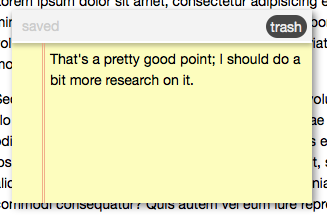
Other than that, it’s just your standard CSS. Here’s what a styled note should look like:

Note

Step 5: Starting The Stickies

Now that we’ve made our API, it’s time to get it started; we can do that from the extra empty script tag in our index.html file:

	STICKIES.open();

Conclusion: The Final Product

Well, we’re done! Here’s the final product in action:

That’s all I’ve got for today; how do you plan to use HTML5 local storage to spice up your web projects? Let me know in the comments!

TUAW TV Live: The photography episode


Are you addicted to taking photos with your iPhone? Do you find that the “best camera is the one that’s with you?” Have you purchased more than just a couple photography apps from the App Store?

If the answer to any of these questions is yes, then you’ve come to the right place. On today’s TUAW TV Live, host Steve Sande will be discussing iPhone photography and videography techniques, demonstrating a dozen or more apps for iPhone, iPad and Mac that can be used to “sweeten” your photography, and talking about the best ways of sharing those frozen moments with others.

To join in from your Mac or PC, just go to the next page by clicking the link at the bottom of this post, and you’ll find a live stream viewer and a chat tool. The chat tool allows you to join in on the fun by asking questions or making comments.

If you’re driving somewhere and would like to watch TUAW TV Live while you’re stuck in traffic, please don’t — keep your eyes on the road! However, if someone else is doing the driving, you can watch the show on your iPhone by downloading the free Ustream Viewing Application.

We haven’t forgotten about iPad users, as you can tune in to TUAW TV Live on your iPad! That link will send you to a non-Flash page, although you won’t have access to our chat tool.

Remember, old episodes of TUAW TV Live are always available for your viewing pleasure on Ustream.

TUAWTUAW TV Live: The photography episode originally appeared on The Unofficial Apple Weblog (TUAW) on Wed, 11 Aug 2010 16:55:00 EST. Please see our terms for use of feeds.

Read | Permalink | Email this | Comments

Engadget: Apple TV gets apps, new name in iTV

Our friends at Engadget have heard from a trusted source that Apple is indeed remaking the Apple TV, as was previously guessed based on its past trajectory. But the final product may surprise you: it won’t have 1080p output, according to Engadget (which refutes earlier rumors), but it will keep that US$99 price, and bring apps from the App Store to the table. It’s not yet known whether it will simply use iPhone or iPad apps (or get a brand new entry of its own), but Engadget says some connection to both the App Store and streaming services is going to happen. Internally, the box is supposed to be comparable to the hardware found in an iPhone 4, including one of Apple’s own A4 chips running the show.

And with all of these other changes, the device is reportedly getting a new name, the iTV. That makes a lot of sense, actually — not only does it distinguish this new unit from the “AppleTV” hobby, but it brings the device in line with the iPhone, iPad, and Apple’s other iOS devices. Engadget also notes that the iTV isn’t a new name so much as it is a return to the old one, so if all of this turns out to be true, it would seem like Apple has a much more directed strategy for its set-top box this time around.

Engadget says we’ll see all revealed by sometime this Fall. It all sounds very interesting — if Apple can squeeze all of that into a box that costs only $99, who wouldn’t plug that into their television?

TUAWEngadget: Apple TV gets apps, new name in iTV originally appeared on The Unofficial Apple Weblog (TUAW) on Wed, 11 Aug 2010 17:30:00 EST. Please see our terms for use of feeds.

Read | Permalink | Email this | Comments

Intuit buys Cha-Ching after hiring developers

We’ve been pretty big fans of Cha-Ching, both the OS X app and the iOS version, over the years. Turns out Intuit liked the app a lot, too — the financial juggernaut has acquired Cha-Ching and its code after hiring the app’s developers a little while back. The website currently points to both Quicken for Mac and Mint.com, so presumably this is the end of the app — its functionality will be brought into Intuit’s other properties, used to smooth out Quicken for Windows, while Cha-Ching Touch’s functionality will eventually show up in the Mint.com iPhone app.

Too bad for users of the app currently — I know the app was sold in at least one MacHeist sale, so it’s definitely out there and fairly popular. There’s no word on any upgrades at all. The Mint.com app is great (and free), but of course Quicken is $50 just to get started. Looks like if you depend on Cha-Ching for your financial planning but want upgrades in the future, you’ll have to look elsewhere.

TUAWIntuit buys Cha-Ching after hiring developers originally appeared on The Unofficial Apple Weblog (TUAW) on Wed, 11 Aug 2010 18:30:00 EST. Please see our terms for use of feeds.

Permalink | Email this | Comments

There may be a fix coming for the AT&T Microcell

Last weekend I reported on some apparently widespread problems with the AT&T Microcell, particularly in regard to the iPhone 4. The AT&T and Apple support boards are still filled with comments from irate customers who can barely hear the people calling them because the audio is breaking up unless you are right next to the MicroCell device.

I called in my trouble report to AT&T a few days ago, and today I was surprised to hear from a tech support person. She asked if I had used the MicroCell lately, and I said I hadn’t because it was pretty much useless. She told me in the last couple of days a ‘script’ had been sent to my unit, and asked me to try again. Since she called me on my iPhone I walked around the house, and quite a distance out in the yard to test it. The call was fine. I’ve used my iPhone several times today, all with good results.

I can’t say it is a permanent fix, but whatever they did, it has worked for me so far. If you’ve had MicroCell problems I’d strongly suggest you file a trouble report, and if you have, be sure to follow up with AT&T. The tech support number that deals with MicroCell issues is 877-998-5175. Ask them to download the mysterious ‘script’ to your MicroCell and hope for the best.

I had thought this was completely an iPhone 4 issue, but the tech I talked to said there are issues on some other phones as well. The jury is still out on whether this is a real solution, but at least in my case I haven’t heard any bad audio since AT&T downloaded the fix to my MicroCell.

Let us know your experiences, good or bad!

TUAWThere may be a fix coming for the AT&T Microcell originally appeared on The Unofficial Apple Weblog (TUAW) on Wed, 11 Aug 2010 19:30:00 EST. Please see our terms for use of feeds.

Read | Permalink | Email this | Comments

Camera+ pulled from App Store for ‘volume button as camera shutter’ workaround

From the “It Was Only a Matter of Time Department” comes news that Camera+, the top-rated photography app from developer tap tap tap, has been pulled from the App Store, most likely for violating Apple’s developer agreement. Apple previously rejected an update to the Camera+ app which would have allowed users to use one of the iPhone’s volume buttons as a mechanical shutter button while using Camera+. This is a feature many iPhone photographers have wished for — tapping the screen to take a picture is far less stable than pressing a physical button — but Apple cited “user confusion” in rejecting the Camera+ update which included the feature.

tap tap tap posted (and later deleted) instructions on Twitter that allowed users to enable the “volume button as shutter” functionality via a back door workaround. This is most likely what got Camera+ kicked off the App Store; other apps with “hidden features” or “easter eggs” like this have been banished from the App Store before, like a flashlight app that allowed users to stealthily enable internet tethering.

Apple’s well within its rights to react in this manner when developers put “hidden” features in their apps. On the other side of the mobile pond, Android users are currently getting hit by a trojan posing as a media player app which then sends unauthorized SMS messages to premium-rate numbers. While Apple’s “user confusion” excuse for not letting Camera+ use the volume buttons as a shutter doesn’t necessarily fly (how often are you going to mess with the iPhone’s volume while taking a picture?), tap tap tap’s “workaround” was out of line, at least in principle — if Apple’s not going to let a flashlight app secretly enable internet tethering or allow apps with blatant malware on the App Store, then it shouldn’t come as a surprise that “hidden” functionality, however innocuous, will get your app banished.

Hopefully this ban is only temporary until Camera+ gets updated without the “workaround” in place — or, better still, Apple could recognize that many users have triple-digit IQs and stop citing “user confusion” as an excuse for denying useful functionality. Either way, I hope Camera+ comes back eventually.

TUAWCamera+ pulled from App Store for ‘volume button as camera shutter’ workaround originally appeared on The Unofficial Apple Weblog (TUAW) on Thu, 12 Aug 2010 03:00:00 EST. Please see our terms for use of feeds.

Read | Permalink | Email this | Comments

The Photography app smackdown on TUAW TV Live today

All over the Northern Hemisphere, a lot of people are taking advantage of the warm weather and longer days, and they’re getting out of the office to take some vacation. Using a camera to capture vacation memories is great, but using your iPhone to nab those snapshots is even better.

On today’s episode of TUAW TV Live, host Steve Sande will demonstrate and discuss more than a dozen photography apps for iPhone, iPad, and Mac. Find out how to take better photos with the iPhone, apply effects or retouch those shots, and share them with your friends and relatives.

The fun starts at 5 PM EDT (2 PM PDT, 11 AM HDT) right here at TUAW.com. Drop by a few minutes before the show starts for instructions on how to watch the live show and participate in the chat.

TUAWThe Photography app smackdown on TUAW TV Live today originally appeared on The Unofficial Apple Weblog (TUAW) on Wed, 11 Aug 2010 14:00:00 EST. Please see our terms for use of feeds.

Read | Permalink | Email this | Comments

Apple starts iPod nano swap program in Japan

Back in 2008, the Japanese Trade Ministry identified 3 reports of fires that were caused by overheating iPod nanos. An investigation followed and Japan’s Ministry of Economy, Trade and Industry found a total of 34 incidents of overheating that could be attributed to the lithium-ion battery used in those nanos. Issues ranged from discoloration to, in rare instances, fires. As a result, Apple agreed to replace defective units in Japan. That program went into effect this week.

Anyone who bought a first-generation iPod nano between September 2005 and September 2006 in Japan can get it replaced if it overheats. Note that only the original nano was affected. If you’ve got one of these units, head on down to an Apple Store or follow the instructions here. Good luck.

[Via iPodNN]

TUAWApple starts iPod nano swap program in Japan originally appeared on The Unofficial Apple Weblog (TUAW) on Wed, 11 Aug 2010 15:00:00 EST. Please see our terms for use of feeds.

Read | Permalink | Email this | Comments

iOS 4.0.2 for iPhone/iPod touch, iOS 3.2.2 updates available now

Within the last few minutes, iOS 4.0.2 for iPhone 3G, 3GS, 4, and iPod touch 2nd and 3rd generation (late 2009 models with 32 or 64 GB) has become available for download. In addition, the iPad has received an update to iOS 3.2.2.

The updates fix a security vulnerability that was associated with viewing malicious PDF files. It doesn’t appear that there are any fixes to any other issues (i.e., the proximity sensor glitch), but the fix to the PDF exploit insures that the iOS platform remains secure.

For a security fix, the update is huge — the iPhone update is 580MB in size and the iPad update is 457MB. For a look at more detailed information about what the updates patch, check out the iOS 4.0.2 Update description and the iOS 3.2.2 Update description on Apple’s website.

TUAWiOS 4.0.2 for iPhone/iPod touch, iOS 3.2.2 updates available now originally appeared on The Unofficial Apple Weblog (TUAW) on Wed, 11 Aug 2010 15:40:00 EST. Please see our terms for use of feeds.

Read | Permalink | Email this | Comments

iPhone Post It Notes take your Apple love analog

Here’s a useful tool for developers who want to sketch out UI ideas for iPhone apps. These clever Post-It Notes from Apps-on and 3M have a 20 pixel grid on the drawing surface, and feature the exact dimensions of the iPhone 4. So, you can draw your ideas in a perfect 1:1 scale. There are 50 sheets per pad, so don’t be afraid to toss bad ideas into the trash.

They’re available in three packs: the Starter offers 5 pads for US$20, the Pro offers 10 for $35 and finally you can get 20 pads for $59 by choosing the Master pack. Heck, I’m not a developer but I’d use them as plain old Post-Its!

This isn’t the first example of this type of thing that we’ve seen. Notepod+ is a similar sketchpad aimed at iPad developers, and the folks at Design Commission have produced a stencil that lets you add all sorts of UI elements to your sketches. If any of these suit your fancy, have at it and get sketching!

[Via Total Apps]

TUAWiPhone Post It Notes take your Apple love analog originally appeared on The Unofficial Apple Weblog (TUAW) on Wed, 11 Aug 2010 16:00:00 EST. Please see our terms for use of feeds.

Read | Permalink | Email this | Comments

OkCupid: iPhone users have more sex

I’ve been a huge fan of social dating site OkCupid’s OkTrends blog for a while now. They’re constantly sharing data (anonymized, of course) from their social site about what people find attractive and interesting in each other. The latest post has some fun information about cameras — specifically, the perceived link between what type of camera OkCupid’s patrons use and successful relationships. All of the data is fascinating (as usual), but there’s one little note of potential interest to iPhone fans.

Apparently, when compared to users who post pictures from other smartphone brands, users who reported using iPhones for their profile pictures tend to identify more sexual partners over all. As you can see in the chart above, male and female iPhone users (at age 30) report higher numbers of sexual partners to OkCupid.

In fact, across all ages, iPhone users reported having more sexual partners than those who used Android or Blackberry smartphones to take their profile pictures. Of course, OkCupid is just having fun here. Maybe iPhone users are actually more inclined to lie about their amorous conquests, or maybe there’s a higher likelihood that Android or Blackberry users have reason to report a lower number.

But then again, we already know that iPhone owners tend to be rich, engage in vigorous activity, and like to be outspoken about their buying choices and preferences. And aren’t those the kind of people who end up going home with the girl (or guy) from the bar anyway?

TUAWOkCupid: iPhone users have more sex originally appeared on The Unofficial Apple Weblog (TUAW) on Wed, 11 Aug 2010 11:00:00 EST. Please see our terms for use of feeds.

Read | Permalink | Email this | Comments

iPhone body armor case looks cool

Speaking of iPhone cases that look … different, here’s an interesting metal case for everybody’s favorite smartphone. A company called Ltd Tools has created a metal, cage-style case that adds a flip cover to the phone and gives it a pretty distinctive look. I don’t think it will be for everybody; it actually makes the iPhone 4 look kind of like a big RAZR, but I like it. What it lacks in actual protection, it makes up for in some interesting functionality, which includes unimpeded access to the charging port and a cool little rubber band that can hold business or credit cards.

There is a warning that a metal case can “affect reception,” but it can’t be that much worse than what you’re getting already. And OK, sure, the case is US$95, which is a bit much to pay for a case like this (although it does look pretty well-machined). But I just like the look of it anyway. A great many cases tend to make the phone look like a colored lump, so it’s neat to see a case that adds a little something to the iPhone’s design.

[via iPhone Savior]

TUAWiPhone body armor case looks cool originally appeared on The Unofficial Apple Weblog (TUAW) on Wed, 11 Aug 2010 12:00:00 EST. Please see our terms for use of feeds.

Read | Permalink | Email this | Comments