The 5 Best Start Page Services to Start Your Morning

A start page, or “startpage”,  is meant to give you access to all those sites and tools you start your day with, on a single page. Startpages ensure that you don’t have to open several tabs and windows for email, news, important websites etc. You’ve got everything right there in one view.

If you haven’t tried a startpage yet, you could get started with one of the following and see if it makes you more productive.

1. Netvibes

When it comes to start pages, Netvibes usually gets the conversation started. And it deserves the accolades it gets for being the best start page. Not only it was (probably) the first one to introduce this concept, over the years it has adapted well to changes and now boasts of a cool new features that could give all the new players a run for their money.

2. iGoogle

iGoogle, like Netvibes, is feature-rich and powerful. The main advantage being its obvious integration with Google services like Gmail, Google Reader etc, that makes it more attractive to Google loyalists (a huge number by the way).

3. Pageflakes

Pageflakes is another cool startpage that’s been there for sometime. It comes with some nice default tabs and lets you quickly get started.

4. MyFav.es

What separates MyFav.es from the above mentioned tools is its minimalistic interface. It’s easy to customize and looks beautiful too.

5. Speeddial

Last but not the least, we’ve got the default Chrome/Opera Speedial page that shows huge snapshots of most visited sites. Certainly saves you the effort and time to open a new tab and type the website address.

So, do you use a startpage? Is it one of the above?

100 Helpful Photography Tutorials for Beginners and Professionals

Photography as both a profession and a hobby is an incredibly expansive topic that covers a remarkably vast range of subjects from science and art. No matter where you lie on the professional spectrum, there is simply always more to learn. We spent countless hours scouring the web for the best content we could find and share with you, and today we’ll help you expand your knowledge with 100 photography related tutorials!


Basic Theory and Technical Info

10 Top Photography Composition Rules

“There are many composition guidelines which can be applied in almost any situation, to enhance the impact of a scene. Below are ten of the most popular and most widely respected composition rules.”

RAW vs. JPEG – the real story

“Graphic illustrations [and explanations] of the difference between RAW and JPEG (also called JPG). Understanding this will help with an understanding of why correct exposure and white balance in the camera are important.”

Understanding White Balance

A basic discussion of white balance and how to respond to different lighting situations.

White Balance

“Use a simple device to get perfect color in all of your shots”

Four Facts About High ISOs

“What you need to know to get the most from today’s amazing high-ISO settings”

Focal Length Facts

“A beginner’s guide to focal lengths and how they affect photographs”

Wedding Photography; Two “Camps” Of Style And Vision

“Today, when describing their photographic style, wedding photographers typically label themselves as either photojournalists or traditionalists. “

Film Vs. Digital

“A look at some of the differences between shooting in Ansel Adams’ era versus today”

Missing Pages: Aperture and Shutter Priority

“Shutter Priority is an auto exposure system in which the camera achieves correct exposure by selecting the aperture after the user has selected the shutter speed.”

Photography Basics

“Ever wonder what it is that actually makes a camera work? This tutorial will cover the inner workings of a camera, and introduce you into photography basics and the expansive world of taking better photographs.”


Lighting

7 Tips for Great Photos in the Dark

“Follow these seven helpful tips to improve your night photographs.”

How to Create Sunshine Effect in Studio with Artificial Sunlight

“In this tutorial video we’ll give you tips on how to cheat Mother Nature and show you How to Create Your Own Sunshine in the Studio. “

Professional Lighting in Model Photography

“This case study shows how lighting was manipulated to create the perfect environment for a fashion photoshoot.”

Portable Lighting for the Studio and on Location

“In this lesson, we decided to keep things very simple and just illustrate some uses of this one simple shoe mount flash lighting kit, the XS OctoDome nxt Basic Kit with Grids, for both indoor and outdoor portraits.”

A Photography Lighting Tutorial

A brief discussion on understanding the quality and directionality of light as it pertains to photography.

Lighting Tutorial: Fashion Lighting Made Easy

A basic fashion lighting setup with diagrams and examples.

Photography Tutorial: Get the Right Light

“When shooting portraits, good lighting is all-important. To make sure you have it, you can buy expensive lighting rigs and multiple flash units. Or you can spend a few bucks and carry just the right mix of sun and clouds in your pack.”

10 DIY Lighting Hacks for Digital Photographers

“Most of us can’t afford a full lighting rig – however what if there was a way to experiment with the type of lighting gear that pro photographers use without spending too much money? What if you could make it yourself?”

Low Key Portrait Lighting Tutorial

“You’re perfectly outfitted to do a beautiful, classic low-key lighting setup. Your camera’s dedicated flash unit could even be set up off-camera to achieve this result.”

Portrait Lighting Tutorial: Character Study

“Every man has a unique personality and a story all his own. A portrait should honor the man and the life that’s made him who he is.”

Take Low Light Photos Like a Professional

“Low light photography can be a lot of fun. And you don’t need to trade your soul for an expensive camera to do it. You just need to have one that has some manual setting options. I’m focusing on digital here, but I think most of what I’m going to talk about will apply to film cameras too.”

Understanding Digital Camera Histograms: Tones and Contrast

“Understanding image histograms is probably the single most important concept to become familiar with when working with pictures from a digital camera. A histogram can tell you whether or not your image has been properly exposed, whether the lighting is harsh or flat, and what adjustments will work best. It will not only improve your skills on the computer, but as a photographer as well.”

High key and Low key lighting tutorial

“The highs and lows of lighting – Karl Taylor’s back to explain what high key and low key lighting is.”

How I Shoot: Lowkey Portrait

A great in-depth tutorial with plenty of explanation and a bonus video tut at the end.

Histograms

“You might already know all about histograms, if you don’t it’s well worth getting your head around them because, well, they are pretty awesome. Unfortunately they are often overlooked, dismissed or misunderstood but they are very helpful especially when it comes to strobist photography.”

Photographing Young Children with Low-Key Lighting – Tutorial

“Here is no doubt that photographing young children can be a challenge, and never more so than when using a low-key lighting setup. So why bother? Because the drama and richness inherent in this type of lighting is SO worth it and because it’s unexpected for high energy children’s photography.”


Macro Tuts

The Complete Guide For Photographing Live Insects At Home

“For starters, I’ll walk you through the gear I am shooting with and some basic technical tips, then I’ll wrap this up by sharing some ideas on working with the insects and most importantly “containment” during the shoot.”

How To Shoot Macro Photos

“Macro product photography can be extremely challenging, but also very rewarding. Commercial opportunities for high quality product close ups are strong and growing, both in print and online.”

Macro Photography

“How to take close-up pictures of small things.”

Bug Pictures (Insect Macro Photography)

“An article on the techniques involved.”

Underwater macro photography – taking great photos

“You must be able to evaluate the potential of a subject. Some subjects you will want to pass over because there is no chance of a good moment or presentation. This is something that comes with experience.”

Introduction to Macro Photography – Part 1

“Shooting all styles of photography is a privilege for me but it seems to be that more true with macro photography. In this 3-part tutorial, I hope to pass along not just my technical knowledge but also my passion for macro photography.”


DIY Tips and Tricks

DIY – High Speed Photography at Home

“You can use this technique to take picture of exploding things like tomatoes, water balloons, watermelons, or even your Canon camera as you smash it against a wall for not understanding the menus.”

Reversing Lenses for Macro Photography

“If you have a telephoto lens and an old 50mm lying around you might want to give this a shot. It’s not too difficult of a procedure and probably won’t take 2 minutes to read through this. All you’ll need is a reverse ring (coupler), a step up ring, and a small piece of cardboard or folded paper.”

DIY Light Reflector

“You don’t need tons of cash to own effective lighting tools — often you can make them yourself.”

Studio In A Small Space; Big Studio Effect Without The Cost

“Some photographers just prefer having complete control over the lighting. Instead of the hassle and cost of renting a studio, why not create one using a room you already have? The real secret, if there is any, of making portraits in limited spaces is having the right equipment with gear that doesn’t have to be expensive.”

How To: DIY $10 Macro Photo Studio

Using a cardboard box and poster board to create a makeshift studio.

How to Make An Inexpensive Light Tent – DIY

“If you’re like me, you don’t want to spend money if you can do it yourself and yield the same results. One day I was at my local photography store I saw one of these “Pop-Up” light tents. It consisted of a collapsible white fabric box with a hole in the front and 3 lights – used for photographing small objects in photographic studios.”

DIY Photography Flash Diffuser

“A diffuser is designed to soften the effects of the flash by spreading out and dampening down the amount of light emitted, reducing the creation dark shadows while still allowing a subject to be properly lit.”

Homemade Light Box for Product Photography

“The following article describes the process for making your own lightbox for small object photography. From start to finish this project should take no longer than 30 minutes.”

How To Make A DIY String Tripod

“Camera shake is a universal problem for photographers, yet many find the traditional tripod to be too cumbersome for everyday use. Enter the string tripod, an easy to make, easy to use little knickknack that might just solve your camera shake problems.”

How to Make a DIY Ring Flash

“Make your own for a very very cheap price, about 20 euros. The only thing is that you need to already have a cobra flash.”

Create Your Own Bokeh for Beautiful Photo Effect

“What’s a bokeh you say? It’s that oh-so-wonderful fuzziness in the background of photographs with a shallow depth of field and accompanying starry highlights. You can create you own bokeh effects with a little craftiness.”

DIY: Make Your Own Light Reflector For $5

“If you’re one of those people who has been wanting to get a reflector set but doesn’t want to shed the cash, you should know that there are do-it-yourself options.”

Tutorial: DIY > $10 beauty dish

“Here is a super cheap way to make a decent looking, cheap and very effective beauty dish for your speedlight. The whole project should take perhaps 20-30 minutes and shouldn’t cost more than $10.00.”

K’nex Lightbox Tutorial

“After months of photographing my work with so-so results, I decided it was time to invest in a lightbox. And what better way to do it than to Do It Yourself? In search of the perfect supplies, I raided my parents basement and came across my favorite childhood toy: a box of K’nex!”

Post-Processing Lightens The Load

“Raw Conversion As A Studio Tool “


Helpful Techniques

How to Create the Misty Water Effect in Photography

“Have you looked at a landscape photographer’s photo and wondered how they got the water coming down from a waterfall to look so misty? Or how did they get the ocean in a seascape photograph to look so smooth?”

Photographing Complex Architecture

“Photographer Philipp Klinger gives his advice on capturing elaborate structures.

Tilt-Shift Photography Photoshop Tutorial

This photography shows you how to give a city shot a neat miniaturization effect.

5 Black and White Photography Tips

“Continuing the Black and White Photography theme we’ve been on lately in the latest forum assignment (where the photos featured in this post were submitted) I thought I’d share five pretty random Black and White Photography Tips.”

Correcting and Preventing Chromatic Aberration

“When examining their photos closely, almost every photographer has come across a situation in which a colored halo (usually purple, green or red) is apparent around certain elements of a scene. This sort of optic anomaly, more commonly known as color fringing, is known as chromatic aberration. In this article we’ll understand its causes and learn ways to easily avoid it both while shooting and in post-production.”

How To: Take Better Landscape Photos

“What looks ideal? Rather than tackle the problem head-on, I’ve come up with a few basic guidelines that can yield a profound improvement in your landscape photographs. In fact, it’s as simple as A, B, C: Angle, Balance, and Crop.”

Intuitive B&W Conversions

“Try this simple step-by-step process for making beautiful monochrome images.”

Isolated Sharpness

“Tips and techniques for using shallow depth of field to add impact to your macro shots.”

Travel With Still+Video

“Tips for better technical and creative results shooting video with your DSLR”

The heart of the matter

“How to capture the essence of your subjects”

A Soft Touch For Wedding Photography; Soft-Focus & Blur Effects In The Digital Darkroom

“Despite lens makers’ ads to the contrary, photographers don’t always want or need tack-sharp photographs, especially for wedding or bridal portraits. The use of creative or selective blur when applied in the digital darkroom to an otherwise ordinary photograph can create a mood or look that fits an impression of the original image more than its reality.”

How-To: A Primer on Long Exposures

“In contrast to using fast shutter speeds to freeze action, using long exposures is a very creative means to convey motion in a photograph. A blurred image can be a very impressionistic rendition of movement, giving the viewer a sense of sensation. “

Colorizing Black-And-White Photos

“Using Photoshop to create a classic hand-painted effect.”

How To: Photograph During Bright Midday Sun

“Turn a lighting faux pas into an element that adds punch to your photo.”

How To Make Money As A Photographer

“To be successful, you have to be able to effectively sell yourself. It doesn’t matter if you want to do wedding photography, sports photography, product photography or simply work for the local newspaper – you have to market and sell yourself and your talent.”

Shoot The Moon

“When the sun sets and the rest of the photographers pack up for the night, you can get some of the most stunning and unique images.”

How To: Photograph A Shattering Image

“A sound trigger and flash snap the moment of impact.”

Beyond HDR

“How to expand your photo’s tonal range when HDR techniques aren’t ideal”

Vintage Emulation; Recreating That “Old Photo” Look In The Digital Ag

“We have all had the experience of looking at old photographs that transport us back to a different age, whether it is 20 years ago, or 120. It can be very tempting to try to recreate a vintage look, whether for a particular emotional effect or simply because we can. But what are the actual differences, and how can we recreate them?”

Understanding Depth of Field

“This section is designed to give a better intuitive and technical understanding for photography, and provides a depth of field calculator to show how it varies with your camera settings.”

How to Get “Tack Sharp” Photo Images – Part I

“Shutter Speed, Focal Length, Image Stabilizers and Tripods”

Give Any Photograph A Little Bokeh

“You can–thanks to Alien Skin software”

A “Mist-Shot”—Better Fog Photography

“Some people associate fog with inclement weather and avoid the outdoors. Not me. I grab my camera to create some extremely exciting images. Foggy conditions elicit moody and ethereal feelings. The light is diffused and even, but very flat. Knowing how to take advantage of this allows you to create great fog photos.”

How To Photograph Moving Vehicles

“A step-by-step guide to capturing that perfect motion shot.”

Ten Tips For Photographing Kids

“Summer is a perfect opportunity to photograph children at play”

Photographic Time Shifting

“Change the time of day and date of a picture”

Zoom with Your Feet

“A Basic Photo Gear Recipe for Beginners and Pros”

Shooting Water

“Whether it’s your focal subject or a supporting element, these quick tips will get your feet wet”


Video Tuts

Photography Lighting Tutorial- Strip Lighting Light Tec Tip

“How to use strip lighting in the studio, hosted by Light Tec in Dallas, Texas. Light Tec offers photo lighting equipment and training.”

Photography lighting tutorial with Adam Bonilla strobist

“A behind the scenes look at a photoshoot with professional Denver based photographer Adam Bonilla.”

Photography Tutorial – Perfect Exposures, The Histogram Pt 1

“This how-to video from John Mireles of the Photographer’s Toolkit is part of a series about using the histogram to create properly exposed images with your camera. This first installment explains in simple language what is the histogram and how to read it.”

Macro Photography Tutorial

“This video shows you in simple steps how to do close-up using Micro-Nikkor and third-party close-up lenses and how to do 1:1 magnification. Remember, this tutorial is for controlled situations (which means we won’t show you how to do bugs, portraits, or pets at 1:1 magnification). Enjoy!”

Smoke Photography

“Terry Watson shows his technique for doing Smoke Photography”

ProPhotoInsights Tutorial — Digital Photography Tutorial,-Blend Colour

“In this Digital Photography Tutorial we look at a quick & simple and very flexible way to manipulate colour within an image.Step behind the scenes on pro photo
shoots with our unique digital photography tutorials.”

The Assignment Macro Photography Tutorial

A detailed introduction to macro photography.

Photography Tutorial – How to photograph a fast car in motion

“Photography Tutorial – This image was shot for a Pentax advert in the UKs DSLR User Magazine. We’ve also used it in our downloadable photography course Digital Photography Exposed.”

Long Exposure Photography Tutorial (Light trails)

“This is a tutorial on how to take nightscapes using bulb. In this video I describe how I capture star trails, how to set up your camera and how to light subjects in your image.”

Photography tutorial 5 ( Light Quality)

“This month’s lesson teaches the difference between hard and soft light. Light is a main ingredient to any photograph and this video gives you a better understanding. Enjoy”

Studio lighting Portrait photography tutorial

“Using the smick.co.uk 120cm octagonal softbox Gavin Hoey shows how by just using this one softbox and a 400Ws studio flash head for his studio lighting setup to produce some quality portraits. Live action show shows how Gavin uses several different lighting setups and shows you just how to produce quality results in a simple to understand way.”

Strobist: Lighting 101

A video explaining the basic gear and techniques you need to be familiar with for professional lighting.

A Photography Lighting Tutorial

“Photography lighting can be natural light, ambient light or studio light, which should include a main light, a fill light and a back light. Create subtle shadows and perfect lighting with helpful tips from a freelance photographer in this free video on digital photography.”

Light Leaks in Photography

“A trend that is becoming more and more popular in Photography recently is a vintage/film/retro style. You can see examples in Urban Outfitters, Nylon Mag, Anthropologie, etc. One of the major elements in this style is the light leak.”

Macro Photography Tutorial

Focus stacking: a macro photography technique.

DIY Photo Studio Lighting – Photography Tutorial

“Create a larger, more sophisticated studio photography lighting setup but still use simple materials.”


From the Archives: 10 Awesome Phototuts+ Articles

We don’t want to toot our own horn or anything but we firmly believe we have some of the best free content on the web for photographers. Below are ten excellent articles from our archives that you should definitely take a loot at.

Taking Amazing Studio Portraits On a Tight Budget

“Other than a subject, you’ll need a background, some light and some props. Props are really optional, but I’ll cover them later as well. Where most photographers get hung up is the light.”

Using Hyperfocal Distance to Ensure Maximum Depth of Field in Landscape Photography

“By applying the simple rules of Hyperfocal Distance you can be sure that you are shooting images which are sharp from foreground to background on almost every occasion. I will be using an image that I took recently of Castlerigg Stone Circle to show you how you can put these simple rules into practice so that you can obtain maximum depth of field (DOF) in all your landscape images.”

An Introduction to Using Strobes in Your Photography

“Do you ever see a picture and wonder how the photographer obtained perfect lighting on a subject? You might be asking “What kind of flash does he use?” or “What are the settings on his camera to get such lighting?” In this tutorial, I will be explaining the secrets to turning your pictures into perfection. “

Create a Vibrant Lighting Effect With Cross Polarization

“Light has the ability to create many different types of dramatic effect, though there is none as vivid as cross polarization. It awakens the imagination with its vibrance of colors. Though this technique was popular 20+ years ago, it seems to have been lost in the digital shuffle. This tutorial will walk you through the process and equipment to experiment with cross polarization.”

Achieving Better Focus and Sharpness in Your Images

” This tutorial will give you a better understanding of focus and sharpness, and hopefully help you take photographs that you’re very happy with!”

Mastering the Art of Black and White Photography

“So why does black and white photography command such acclaim? One reason is that colour is a distraction. It takes attention away from the visual building blocks of a great photo; texture, tonal contrast, shape, form and lighting. A photographer shooting in black and white has to learn how to use all these elements to create a memorable image.”

Adobe Camera RAW for Beginners: Histogram & White Balance

“Adobe Camera RAW (not to be confused with RAW picture format your camera takes) is a powerful tool for editing and tweaking your photography. The software gives you artistic control over your files while still maintaining the original photo. I like to call it non-destructive editing.”

9 Tips for a Perfect Portrait Background

“Flatter your portrait subject with the perfect background, even if you don’t have professional backdrops or lighting. A little exposure and composition know-how can get you a long way toward a beautiful portrait background”

Shooting & Editing a High Speed Fruity Water Splash

“This tutorial will make for a fun weekend project that has the potential to spark your imagination, teach you some interesting lighting techniques and even give you some great shots for your portfolio. It’s a great way to spend a few hours, experimenting and honing your photography skills.”


Share Your Favorite Tuts!

The huge list above barely scratches the surface of the excellent free tutorials you can find online. Leave a comment below with a link to some tutorials or blogs that you’ve either written or have helped you out a lot as a photographer.

An Introduction to Split Testing in WordPress


Split testing is a way to experiment with a live site and find which headlines and text are the most effective. Amazon uses split testing to determine which versions of their site convert customers better. We’ll use WordPress and Google’s Website Optimizer to test two different headlines, and find which works best at capturing customer emails.


Step 1: Decide on Your Experiment Type

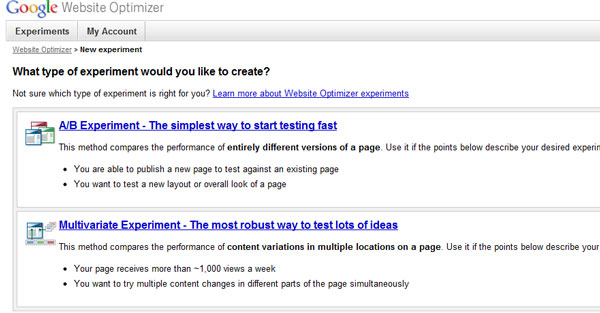
First, we’ll need to decide what sort of an experiment we’d like to run. In Google’s Website Optimizer, we have two choices: Multivariate Testing or A/B Testing.

Multivariate testing is a good way to test a lot of things at once. Big online stores use multivariate testing to figure out which layouts and ad copies work best. For the purpose of this tutorial, however, we’ll use A/B testing.

A/B Testing is a way to test two different types of copy, and see which works best. We start with two different variations of the same page, send some traffic to the pages, and see which converts best statistically. For the purposes of our split test, we’ll want to have at least 100 conversions before deciding which page is the statistically significant winner.


Step 2: Design Your Experiment Flow

In order to have a successful experiment, we’ll need to decide first what page we’d like to test. It’s important that your page have a goal you’d like your user to accomplish. For this page, we want our user to click and sign up for their free eBook. When our user opens their email and confirms their subscription, they’ll be taken to our goal page.

Important: Change One Thing At a Time

For our purposes, we’re only going to change the headline at the top of the page. It’s important to keep the rest of the page the same, so we have a control. This ensures that our changes are responsible for the improvements. We know exactly what’s working, and we keep improving, always testing one thing at a time.


Step 3: Design the Test Page

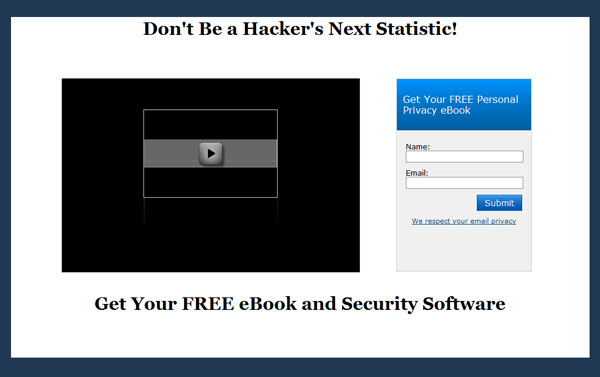
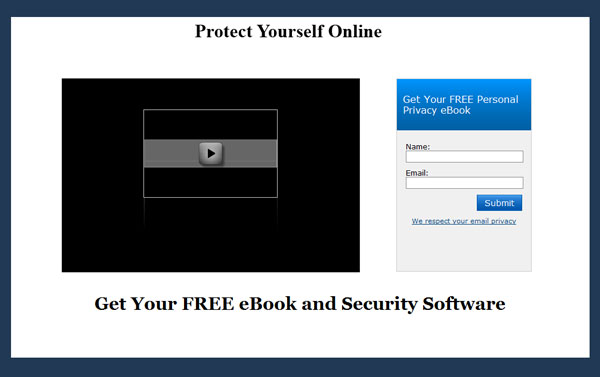
Log into WordPress, and create a new page. Copy and paste the same text from your inital page, but change the headline. Click “Publish,” and make sure your page is exactly the same, except for your new header text:

In our case, we’re using the headings “Don’t Be a Hacker’s Next Statistic!” and “Protect Yourself Online.”

You’ll need to make a note of the URLs for the two test pages. We’ll need those to set up the experiment in Google’s Website Optimizer.


Step 3: Design the Goal Page

Our goal page will be hidden from the rest of the site. It will only be accessible after our customer signs up for the free eBook.

You’ll notice that all our pages have hidden the WordPress header and footer. You can do this to WordPress pages with a custom page template.


Step 4: Install the Google Website Optimizer Plugin

The Google Website Optimizer Plugin allows us to install the special JavaScript code that Google will give us. This code gives users one random page at a time, and tests to see whether or not they reach our goal page.

Installing the Google Website Optimizer Plugin is easy enough in WordPress 2.8+: log in to your Admin console, click the Plugin drop down, and click Add New.

Search for Google Website Optimizer. Our plugin is called, “Google Website Optimizer Plugin for WordPress.” Click “Install” to the right of the plugin in the drop down.

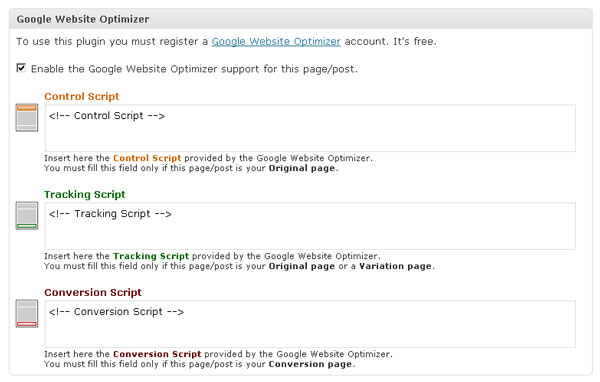
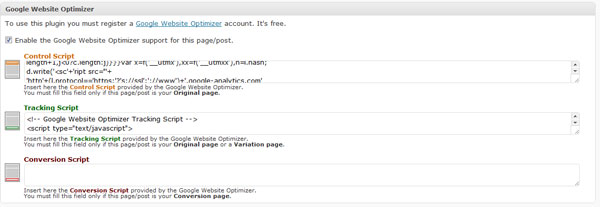
This plugin ads the following form to all your WordPress pages:


Step 5: Set Up the Optimizer Experiment

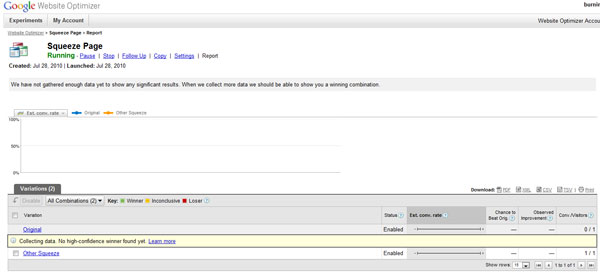
You’ll need to set up a Google Account if you don’t already have one. Then, go to Google’s Website Optimizer and log in. You’ll be presented with two options:

Obviously, for our purposes, we’ll be choosing the A/B Experiment, to try our two different page headlines out for effectiveness. So, click A/B and continue.

On the next page, Google will ask you if you’ve prepared for the experiment. Check “I’ve completed the steps above.” at the bottom of the page and then click “Create” to continue.

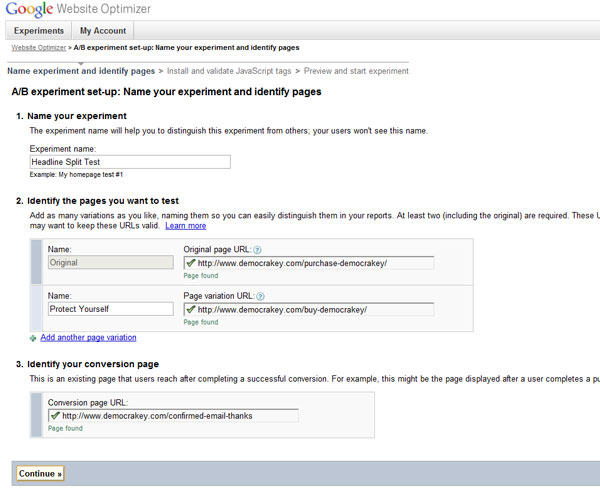
Now, we’ll pick a name for our experiment, and let Google know which pages we’ll be testing. Look at the image below to see how our campaign is set up. Notice Google checks to make sure our pages exist and are currently viewable.

Click continue when you’ve verified your pages, and Google has acknowledged that they can reach the pages.


Step 6: Install Your Optimizer Code

On the next page, Google will give you the code necessary to embed in your pages. First, open up your WordPress control panel and navigate to the first page you made.

Check the box to enable Google Website Optimizer, and insert the first (Control Script) and second (Tracking Script) pieces of code Google gave you for your experiment.

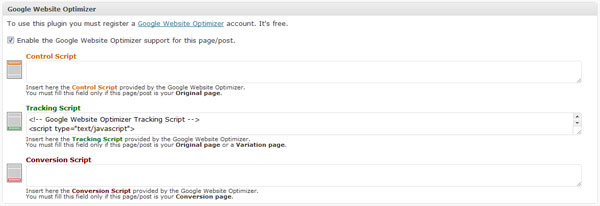
Save your post, and open up your second page. Insert only the second piece of code (the Tracking Script), as below:

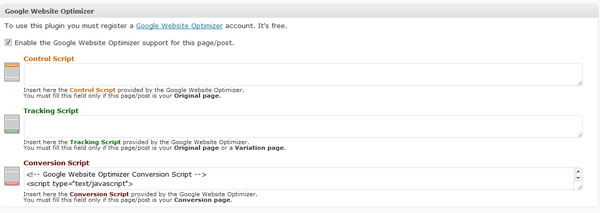
Save this one too, and finally, open up your Goal page, and insert one the final Conversion script:

Publish this page, and make sure Google is reading the Website Optimizer Code. Congratulations, you are now running your first A/B Test!


Step 6: Run Your Experiment, Check Results, Keep Experimenting!

Your experiment will now run, and Google will let you know when one of your pages is a clear winner. It’s important you let the experiment run for at least 100 conversions, because your test must be statistically significant. Again, Google will let you know when you have a clear winner.

You’ve run your first scientific test using Google Website Optimizer. Now take your clear winner, and keep improving all your sales pages. The more you measure, the more you can improve. Good luck!

Kindle, iPad, and paper examined microscopically

The above image is a picture of the iPad’s screen, multiplied by 24 times over. Keith Peters at Bit-101 used his new USB microscope to examine a few different e-reader displays up really close, and the results are definitely a fun read. The iPad doesn’t do too well, actually — I think the Kindle looks much cleaner, although there’s some debate about that in the comments, so each to his own. At any rate, it’s cool to see how these displays “work” — the actual pixels going into the picture that our eyes just collate into full text. The 400x newspaper, book, and magazine closeups are very interesting as well. With all of the digital display talk going around, you tend to forget what those displays are actually trying to recreate, which is really very organic smears on a thin fabric.

Unfortunately, Keith didn’t get his hands on the Retina Display, and you’d assume that’s a game changer. With four times the pixels seen in the image above, the iPhone 4‘s display probably gives the Kindle a nice challenge, and might even start competing with the actual paper printing. Still, until that display makes its way to the tablet, this is the best we’ve got for now.

TUAWKindle, iPad, and paper examined microscopically originally appeared on The Unofficial Apple Weblog (TUAW) on Tue, 17 Aug 2010 19:00:00 EST. Please see our terms for use of feeds.

Read | Permalink | Email this | Comments

Found Footage: Sony attacks iPhone gaming in new PSP ad

Well, when you get big enough, there’s a target painted on your back. Sony has gone after the iPhone and the App Store in a new ad for their PSP gaming system. As you can see above, the ad comes from the “Marcus PSP” series (starring 30 Rock’s hilarious Bobb’e J. Thompson as an advice-giving kid), and calls out iPhone gamers for not playing “big boy games.” The ad then shows games like Twisted Metal: Head-On and Hot Shots Golf: Open Tee, bragging that they are all available for $9.99 (though the small text confirms that they are $9.99 each, not together).

Very interesting. Truth be told, the ad is kind of weak — it doesn’t tell you to not own an iPhone, just that phones are better meant for texting and calling. But the biggest attack point here is that iPhone game developers are amateurs compared to Sony’s stable, with a Doodle-esque “Game Castle” going up against high profile franchises. Nintendo has pretty much ignored iPhone gaming in the past, admitting that Apple is an eventual enemy, but generally staying unconcerned about the App Store, even as its share of handheld gaming grows. But this is the first time a competitor has publicly acknowledged the competition to consumers, and given Sony’s rough history with the PSP lately, it looks a lot like a guppy trying to bite a shark.

TUAWFound Footage: Sony attacks iPhone gaming in new PSP ad originally appeared on The Unofficial Apple Weblog (TUAW) on Tue, 17 Aug 2010 20:00:00 EST. Please see our terms for use of feeds.

Read | Permalink | Email this | Comments

No criminal charges in Pennsylvania MacBook spying probe

The Associated Press is reporting that a federal investigation into the possible misuse of webcams on Apple laptops did not find criminal intent.

The investigation was at a suburban Philadelphia school district that used special software that wound up covertly snapping images of students who were at home with their school provided MacBooks.

The FBI opened the investigation to see if there were violations of federal wiretap statutes or privacy invasions. The school has said the security software had been purchased to track laptops that had been reported stolen, but one student, Blake Robbins, claimed he had been photographed more than 400 times during a two week period on a laptop that had not been reported to be stolen.

The dropping of the federal probe does not have any bearing on a civil lawsuit against the Lower Merion School District. Another student has also joined that legal action.

The school district issued 2,300 MacBook computers and installed software from LanRev to track stolen laptops. Parents and students were not notified the software was on the laptops. The civil suits allege that students’ text messages were intercepted, and they were photographed while sleeping or only partially dressed. The school has since deactivated the anti-theft software.

TUAWNo criminal charges in Pennsylvania MacBook spying probe originally appeared on The Unofficial Apple Weblog (TUAW) on Tue, 17 Aug 2010 21:15:00 EST. Please see our terms for use of feeds.

Read | Permalink | Email this | Comments

Photojojo has real camera lenses available for your iPhone

I love the camera on the iPhone 4, but I’ve always disliked digital zoom and do whatever I can to avoid using it. Photojojo has responded to my inner camera snob with two glass lenses that can be attached to the phone via a magnetic ring.

You can always rig an existing camera lens to your phone, and the progress on the iPhone DSLR project is amazing, but this looks to be a more portable solution. A fisheye lens is available for $25 and a wide angle/macro lens is $20. You can get both together for $40.

Be warned that the lens does cover the flash on the iPhone 4. The lens can be used with a case as long as the case is tight against the phone.
The ring itself is attached to your phone with adhesive and some will be reluctant to mar the surface of their phone with it, but using a case may offer a solution if you’re willing to take the risk of possible light leaks.

TUAWPhotojojo has real camera lenses available for your iPhone originally appeared on The Unofficial Apple Weblog (TUAW) on Tue, 17 Aug 2010 15:00:00 EST. Please see our terms for use of feeds.

Read | Permalink | Email this | Comments

FedEx delivery person robbed of Apple gear by co-workers

robberSomehow I think there’s an easier way for a FedEx employee to steal electronic goods.

Last week, a California FedEx driver was held at gunpoint by four masked men, forced to hand over his delivery truck’s shipments. Among the items in the cargo area were boxes of Apple products, though it’s not clear what they were.

As usual, the suspects bumbled the heist by allowing the license plate of their getaway vehicle to lead right to one of the suspects. One suspect, though, just so happened to be a FedEx employee who worked in the same area as the held-up driver. Apparently he saw what was being loaded in the co-worker’s truck and made his hasty plan.

So now the question is: were these robbers over-the-top Apple fans, or did they think they could get away selling these on the black market?

TUAWFedEx delivery person robbed of Apple gear by co-workers originally appeared on The Unofficial Apple Weblog (TUAW) on Tue, 17 Aug 2010 16:00:00 EST. Please see our terms for use of feeds.

Read | Permalink | Email this | Comments

Apple Discussion Boards to receive major overhaul

apple discussion boardThe Apple Discussion Boards have long been a great source of help for Apple end-users and professionals looking for both Apple-supplied and community-supplied assistance. In my personal experience, though, it can sometimes be a frustrating place to visit.

Apple has announced that what has been known as “Apple Discussion Boards” will be renamed “Apple Support Communities” and sport some new functionality and design elements.

One of the biggest changes will be the concept of a user-designed homepage, where one can customize it with social sharing elements, widgets and discussion activity alerts. Another new feature will be user avatars, which is likely meant to make the site feel more social and friendly and less like a place where pros will tell the novices to get the hell off their lawn.

What’s been your experience with the Apple boards up until now? What do you hope they’ll address in the update?

[via MacFixIt]

TUAWApple Discussion Boards to receive major overhaul originally appeared on The Unofficial Apple Weblog (TUAW) on Tue, 17 Aug 2010 17:00:00 EST. Please see our terms for use of feeds.

Read | Permalink | Email this | Comments

Snow Leopard Graphics Update available

Apple has released a Snow Leopard graphics update to address some graphical issues introduced in Apple’s 10.6.4 update for OS X. Specifically, the update fixes frame rate issues with Valve’s games Portal and Team Fortress 2, and it fixes a problem that may have caused Aperture 3 or StarCraft II to crash or become unresponsive. The update also resolves graphics corruption issues brought on by disconnecting and reconnecting external displays while a Mac is running.

The graphical issues with Valve’s games following the 10.6.4 update received a fair bit of publicity. Fortunately, this update should resolve those issues. Let us know in the comments how it goes for you.

Snow Leopard Graphics Update is 69 MB and is available in Software Update or via direct download here.

TUAWSnow Leopard Graphics Update available originally appeared on The Unofficial Apple Weblog (TUAW) on Tue, 17 Aug 2010 17:17:00 EST. Please see our terms for use of feeds.

Read | Permalink | Email this | Comments

Vimeo now on iPad, iPhone

Popular video site Vimeo (think a more artsy YouTube) has changed its code to be completely HTML5 compatible, which means you can now browse the site completely on the iPhone or the iPad. I just pulled the site up on my iPhone, and I have to say, I think it’s a smoother browsing experience than the browser itself — you just get a list of videos, and clicking on whichever one you want (like, for example, the great Dennis Liu music video above) opens it right up in Quicktime. Good deal. Vimeo’s been flirting with HTML5 for the better part of this year, but this switchover means everything (including embeds when seen from an iPhone or iPad) is in HTML5 from the start — bye bye Flash.

The new update also adds a “Watch Later” feature to accounts on the site, so you can save videos and pull them back up on the device of your choice, even if you’re not using something that works well. Eventually, the Watch Later feature will be added in to the Vimeo API, and there’s also a new Vimeo channel available on Roku set-top boxes if you’ve got one of those.

But the HTML5 change is the biggest one — one more site leaves the Flash fold and becomes extremely accessible to Apple’s platform.

TUAWVimeo now on iPad, iPhone originally appeared on The Unofficial Apple Weblog (TUAW) on Tue, 17 Aug 2010 18:00:00 EST. Please see our terms for use of feeds.

Read | Permalink | Email this | Comments

Power your iPad from underpowered USB ports

The new iXP1-500 Dongle claims to eliminate the “Not charging” issue that some iPad owners experience when connecting to older machines. We haven’t tested one, but our initial instinct is dubious at best.

Shortly after the iPad was released in the US, users noticed a “charging issue.” Specifically, the iPad would report “Not charging” when connected to an older MacBook Pro, Macbook, iMac or non-Apple machine. We later confirmed that the iPad actually does charge in that scenario, just very slowly.

Honestly, we’re skeptical about this thing. Click below to find out why.

[Via Cult Of Mac]

TUAWPower your iPad from underpowered USB ports originally appeared on The Unofficial Apple Weblog (TUAW) on Tue, 17 Aug 2010 18:30:00 EST. Please see our terms for use of feeds.

Read | Permalink | Email this | Comments

Streaming app Grooveshark pulled from App Store

Grooveshark, the music-streaming app that’s had a home on Cydia for the past year, was kicked out of the App Store after Apple notified the company that they received a complaint from Universal Music Group UK.

While Apple has approved streaming music apps (such as Rhapsody) in the past, Grooveshark’s woes appear to be related to a lawsuit between the company and Universal Music Group. The lawsuit, reported by CNET in January, alleges that Grooveshark is distributing illegal copies of the company’s music. A similar suit with EMG was resolved in 2009.

Grooveshark is still available for other mobile devices, so if you’re a fan of the service, you may want to stick with your Cydia copy if your iPhone is jailbroken or download it to one of those. I don’t think we’ll be seeing this app back in the App Store until this lawsuit is resolved.

[Via ReadWriteWeb]

TUAWStreaming app Grooveshark pulled from App Store originally appeared on The Unofficial Apple Weblog (TUAW) on Tue, 17 Aug 2010 13:00:00 EST. Please see our terms for use of feeds.

Read | Permalink | Email this | Comments

And here comes the FaceTime porn

FaceTime live sex chat is for real, courtesy IP4Play (link goes to an adult site, likely NSFW). It’s a natural extension of phone sex lines and chat cams, and plenty of people had the idea when Apple unveiled FaceTime. After all, the white-hot fervor around Chatroulette had just died down when the iPhone 4 was announced. Currently IP4Play has five ladies available online, although at the time I wrote this none were actually available for a call.

As Cult of Mac reported, you can buy blocks of time (5, 10, 20 or 30 minutes) starting at US$4 per minute. You’ll need a Visa or Mastercard, plus all the requisites for FaceTime (WiFi, iPhone 4) and preferably a private place to have your conversation. The service calls you back once you’ve registered and purchased your minutes, although no word on what the turnaround time is for a callback.

I think we’ll see a bunch more players in this space, IP4Play just happens to be the first. They started advertising for models on Craigslist a while ago, so I have little doubt other operators will follow suit, some of them potentially big names in the adult industry. If you think about it, a five-minute FaceTime call from a real porn star would probably cost a lot more than $4 per minute, and be insanely lucrative for the performer. Juice up those batteries, FaceTimers.

TUAWAnd here comes the FaceTime porn originally appeared on The Unofficial Apple Weblog (TUAW) on Tue, 17 Aug 2010 13:30:00 EST. Please see our terms for use of feeds.

Read | Permalink | Email this | Comments

Apple awarded patents for Slide to Unlock, keyboard letter pop

In the fast-changing world of smartphone design, often the most valuable thing that a company can own is a patent for a specific feature they’ve invented. No matter how seemingly trivial the design feature is, a company like Apple will seek patent protection in order to maintain the uniqueness of their product.

Three years ago, Apple filed for patents on two features that iPhone, iPod touch and iPad users see every day — the Slide to Unlock feature of the Lock screen and the pop-up letters that appear when you’re typing on the iPhone keyboard. The United States Patent and Trademark Office has today awarded Apple a series of two patents titled “Animated graphical user interface for a display screen or portion thereof ” that provide Apple with patent protection for the animated unlock screen and keyboard.

Even though most other smartphone manufacturers have avoided having the same design elements on their own phones, the patent protection awarded by the USPTO means that Apple can now require license fees from any company that seeks to use the same or significantly similar elements.

You can view the two patents here:
D621849
D621848

TUAWApple awarded patents for Slide to Unlock, keyboard letter pop originally appeared on The Unofficial Apple Weblog (TUAW) on Tue, 17 Aug 2010 14:00:00 EST. Please see our terms for use of feeds.

Read | Permalink | Email this | Comments