Using AS3XLS with the Flex Framework: Data Export

This is the third in a series of tutorials covering implementation of the AS3XLS ActionScript 3.0 library for the Flex framework. We’ll demonstrate how to save an Excel .xls file from modified Flex datagrid controls and also how to write CSV files using the same data to the local filesystem.


View Screencast

Don’t like ads? Download the screencast, or subscribe to Activetuts+ screencasts via iTunes!

Poll: Would You Attend an Envato Meetup?

Last week, in Chicago, we held our first ever Envato meetup with our Australian, American, Canadian, and European staff. During the week, we held a community meetup with a group of Envato authors and readers at a local pub. We really enjoyed getting to meet our community and would like to judge your interest for more meetups. Would you like to attend a meetup if we held one in your area?

Right now, we are considering holding an initial meetup in New York City and possibly additional events in other major metropolitan areas. Please feel free to cast your vote and let us know what you think in the comments.


Would you like to attend an Envato meet up?survey software

Data Backup and Sync Strategies #4: Mobile Backup and Sync

Considering the fact that our cellphones have become our secondary computers (or primary for many) and hold important personal information, keeping a backup of the data is essential. And losing a mobile phone is easier than losing a computer. So mobile backup and mobile sync have become more important.

I have categorized the tools under popular cellphone operating systems, and also have a section for tools that work universally on all phones.

iPhone

iTunes

iTunes can backup and sync almost all of the important stuff on your iPhone like contacts, calendars, notes, bookmarks and more. The entire list of information it is capable of backing up and more about the process is provided on this Apple support page.

Wi-Fi Sync Tool For iPhone

Wi-Fi Sync for iPhone, iPod Touch and iPad is a pretty cool tool that lets you sync your iOS device with iTunes over a Wi-Fi network. It’s a third party app and you won’t find it in the App Store. You’d also need to jailbreak your iPhone if you want to install this app.

Blackberry

Blackberry Desktop Manager

The latest Blackberry desktop manager lets you backup and restore your Blackberry data. Here’s a complete guide to Blackberry backup and restore using this tool.

Blackberry Protect

Blackberry Protect is an advanced backup, restore and security software for Blackberry phones that’s currently in beta and being rolled out slowly. It can help you do wireless backups and also track your lost Blackberry device.

Android

Instead of mentioning Android backup apps and tools, I would direct your to this superb guide to backing up your Android phone by Tested. The article pretty much sums up all the available methods to get your Android device backed up safely.

Windows Mobile

Microsoft My Phone

Microsoft My Phone is a brilliant backup and sync tool for Windows Mobile phones. It can backup all the important data like contacts, text messages, photos etc from your cellphone to their site where you created your account. It can also help you track your lost Windows phone.

PIM for Windows

PIM Backup is another excellent, free backup tool for those who own Windows Mobile units. Apart from backing up your contacts and messages, it also backs up your call logs, appointments and any folder you add. Backups can be scheduled, too.

Tools that Support All Kinds of Phones

Here are certain tools that work not only for the smartphones mentioned above, but also on Symbian devices like Nokia phones and other brands.

Vodafone 360

Zyb, the popular online mobile backup and sync tool was rechristened as Vodafone 360 after its acquisition by Vodafone. It looks like all the Zyb functions that included online contacts and address book backup, photos backup and sharing it on social networks (among other features) have been kept intact. It may not be available for your country, however, so you’ll have to check that when signing up.

BitPim

BitPim is a nice, cross-platform backup software for CDMA phones and lets you backup and manage most of your mobile phone data like contacts, calendars and wallpapers. It works particularly well for LG phones..

AT&T Mobile Backup

AT&T Mobile Backup is a service by AT&T to help its users do an online backup of their cellphone contacts and other data. It supports a wide range of phones and brands.

iDrive Lite

iDrive Lite is a nifty tool that can backup your contacts on iPhone, Android and Blackberry. It can also locate your contacts and  has a “map” feature.

When it comes to mobile backup and sync tools, I’ve only highlighted a few.  There are others – share with us in the comments as to which ones you’ve used – and what you’ve thought of them.

Conclusion

This wraps up the backup and sync series.  Here are the links to the other articles that make up the series:

1. What Data Should You Back Up?

This was the first article in the series that talked about the importance of data backup, what are the different things you should consider backing up and certain methods to adopt.

2. Top Backup and Sync Tools

The second post in the series talked about various data backup and sync software that could help you backup and sync the kinds of data mentioned in the first article.

3. Why You Should Use Dropbox

This article talked about benefits of using Dropbox as your personal backup and sync solution.

While this series has given an overview of backup and sync options, ultimately what needs to be stressed is no matter which strategy you use – have one.  The only thing worse than not having your data updated and at your fingertips is to find out that you don’t have any data left at all because you failed to back it up.

Get-It-Done Guy’s 9 Steps to Work Less and Do More: Book Drops Tomorrow!

For those that like their productivity advice with a dash of humor on the side, Stever Robbins (best known as the Get-It-Done Guy) has been at it for years.  Whether you regularly visit his site or listen to his brief – but informative – podcasts, he delivers the goods with a light touch.  His approach is a great way to attract an audience to what some consider to be a “dry” topic…and Robbins does it very well.

We should have a review of the book up by next week. In the meantime, if you want to head on over to the book’s social media release, it offers audio samples of the book, an interview with the author and much more. All these “extras” are there to help whet your appetite before the book drops tomorrow.

Get-It-Done Guy News

Poll: Would You Like to Attend an Envato Meetup?

Last week, in Chicago, we held our first ever Envato meetup with our Australian, American, Canadian, and European staff. During the week, we held a community meetup with a group of Envato authors and readers at a local pub. We really enjoyed getting to meet our community and would like to judge your interest for more meetups. Would you like to attend a meetup if we held one in your area?

Right now, we are considering holding an initial meetup in New York City and possibly additional events in other major metropolitan areas. Please feel free to cast your vote and let us know what you think in the comments.


Would you like to attend an Envato meet up?survey software

The Comprehensive Guide to Shooting Photo Stories & Essays

Robert Capa, W. Eugene Smith, Henri Cartier Bresson, James Natchway. If you’ve heard of even one of these names, and even if you haven’t, you’ve probably experienced photojournalism at it’s finest. When you’re dealing with a big issue and not just an event, a long form, multiple-image project is a great way to tell the story. In this tutorial, I’ll take you through the steps to choosing and following through on a long-term documentary photo project, also known as photo story or essay.


Getting Started

The first thing logical step in starting a project is choosing your subject. The most important rule of long-term projects is to choose a subject that you are interested in. You cannot expect your audience to care about a topic that you yourself don’t care about. So when you start your search, first choose a broad topic that you want to learn more about.

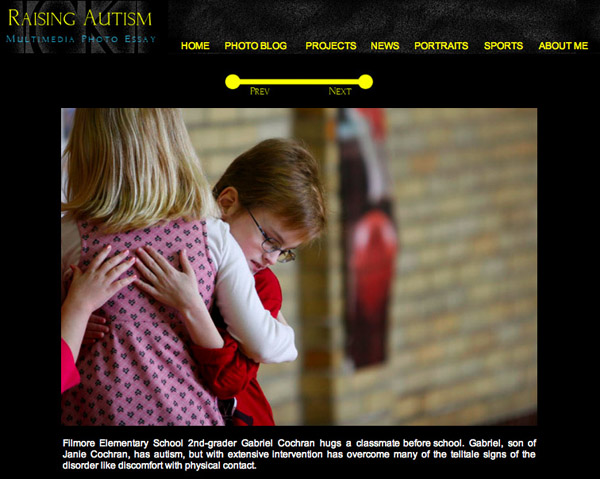
You also want it to be something that other people want/need to know about. Examples of this might be homelessness, a pandemic disease like HIV/AIDS or obesity, or something lighter like the Punk-Rock subculture or extreme athletes. The first three photos in this tutorial are from a project about a child with autism.


The Project Levels

The hardest thing for me when doing a project is maintaining focus. Therefore, I’ve developed a theory. For me there are four levels of projects. This is a system I use with myself and students to help narrow down topics and keep the subject of the project clearly defined.

Level One: A Broad Topic Project

Once you’ve decided on a topic, your first instinct might be to dive right in and cover the entirety of it. This usually ends in biting off more than you can chew. This isn’t to say that a project covering something big like homelessness can’t be achieved, but would take many years. And a large topic project like that is usually just made up of smaller parts and pieces. These smaller pieces are usually Level Two, Three and Four projects placed together.

Level Two: The Specific Topic Project

For one of my first projects, I was really interested in religion. So I wanted to do a project that touched on that. Religion is a huge topic that would take a two or three lifetimes to document in any good way. So I had to narrow it down a bit.

First I looked at what I had access to. I was in a relatively small town in the state of Kentucky in the U.S. So the main religion in the area was Christianity. The city had about 60,000 people living there, and at least 20 different Christian churches there. And they were all very different, so the topic of Christianity was still too broad.

So then I started to think about interesting topics within Christianity. Because I had access to the college organizations and there was a nearby Catholic elementary school, I decided to do a project on how young are indoctrinated and grow with their faith.

The photos you’ve been seeing here, are from that project. I wanted to “follow” children as the grew, but as I had a limited time, I photographed different children of all ages. I went to a couple different Christian schools, spend time with a youth group and followed the activities of national college organization called Campus Crusade for Christ.

I consider this project a photo essay. It covers a big topic using photos of many different people in many different places. The final presentation was around 20 photos.

Let me emphasize that this information won’t be found in any textbooks. I’ve made up these terms. So if you talk to another photojournalist, don’t say “I’m working on a Level Two project about Childhood Christianity,” because they won’t have a clue what you’re talking about. Maybe one day, my theories about photojournalism will be that important and well-known, but not yet!

Level Three: A Location Project

The next level of project is another type that I believe should be avoided. It is the dreaded Location Project. These projects seem easy when you think about them. You just hang out in one place. If you choose an interested place, then things should meet interesting people and see interesting things.

Though I don’t recommend it as a stand alone piece, this type of project can also be used to tell the story of a larger issue. So it could be worked into a Level One project or even as a small part of a level two project. If you’re doing a piece of HIV/AIDS, doing a short piece on a unique clinic might work well.

The reason these projects rarely work is that they are extremely confining. While you may get some good photos that sum up what is happening at the location, you’ll quickly run out of backgrounds. Also, mainly the same things occur over and over again at any given place, so photos can often times get a little redundant.

The photos you’ve been seeing in this section are from a Location Project I completed on an after school learning center. I learned my lesson. The few photos you see here are really about all that’s needed to educate the viewer on what happens there. Not quiet enough variety to warrant a long-term, big project.

Level Four: A Personality Project

The final level is the Personality Project. This is a series of photos that attempts to tell the story of a specific person or very small group of people. I think this type of project is a great approach to many topics. It allows the audience to make an emotional connection with the individual. We like seeing inside other people’s lives.

And like Level Two and Three projects, this type of project can be used to tell the story of a larger issue. For example, the photos you are seeing in this section are from a project I did on a single mother and daughter who has cerebral palsy. The goal of the project was to tell the story of raising a disabled child through the eyes of one family. The basic ideas extrapolate out to everyone in that situation.

I think of these projects as photo stories as opposed to photo essays. In these projects, you’ll be spending a lot of time with the subjects. You’ll follow them through their daily lives, and it can become a hard balancing act to not get too involved with your subject and at the same time allow them to trust you. But we’ll dive deeper into that later.

The last thing about Personality Projects that’s important to remember is that while you’re trying to tell a larger story through the story of an individual, the planning stage is where that type of thinking needs to end. Once you’ve found a subject, concentrate on their unique story. And don’t let your preconceived notions affect how you tell the story.

Levels Summary

So let’s run through a quick example. Let’s say for instance, that you are interested in Indian Religion. A Level One project would be just that. A project on the religions of India, in order to be successful, it could take many many years. And it could also be made up of many smaller projects.

A Level Two project on Indian Religions would be on a more focused topic like Jainism, a single faith within Indian, and possible narrowed even further to focus on Jains in the United States, like the photos you’re seeing in this section. This type of project would involve photographing many different people in different locations to tell an overall and complete story.

A Level Three project centered on Jainism might be about a temple or meeting place. These types of projects should generally be avoided unless they are being used as a small part of a Level One project because of their limiting nature.

A Level Four project with this same theme would be about a single Jain person or family. The project would be centered around the personalities and personal stories of your subject.


Compassion vs. Bias

Now that you’ve determined what your broad approach will be to your project, you’ll need to consider ethics. Photojournalism and documentary photography have rules of ethics. You don’t pose photos (unless the image is obviously a portrait). You don’t manipulate scenes or exploit your subjects. But there are also generalized ethical principles that apply to how you treat your subjects.

Caring For Your Subject

If you spend enough time with anyone, you will undoubtedly have some feelings toward them. You may discover you really like them or you may disagree with their lifestyle. Regardless of whether the feelings are good or bad, you’re not there to judge. You’re there to document.

You need to be concerned with how your work will affect their life. If you think the impact of work will harm them in some way, then you need to weigh that cost against the benefit of having the story be made public. Ask yourself who it will help? But mostly, be a human, be compassionate, let them know that you care whether they live or die.

Try to understand their situation. It will make your story much better. And if you make your intentions clear, your subjects will trust you and let you into their lives.

Remaining Neutral

Being compassionate does not mean slanting your story to make the subject appear to be something or someone they are not. It also means you should extremely careful about helping your subject by giving them anything.

By becoming a big part of their life, you are altering their story and becoming an acting force in what happens. The story is no longer just about them. I’m telling you to withhold food from a starving man, just remember consider the implications of intervening.


Image Variety

A large factor in making your photo essay or story interesting will be how much visual variety the images have. If all of your photos look the same, your piece will be boring. So use a wide array of lenses and angles. Make use of wide scene-setting shots to show the audience the environment.

Also don’t forget about close-up detail photos that might add to the story. Another hint is compare the size of the subject’s face in your images. If the faces are all the same size, you might want to consider using different lens, shooting at a different distance or cropping to have more variety.


The Flow of Images

The images in an essay or a story usually appear in an order. You’ll want to determine what image appears first and which appears lasts. Sometimes the images might flow chronologically. But you can also make your images flow using juxtaposition so the images play off of each other.

Sometimes simply finding images with similar shapes can be enough to keep the story moving along. This process can be tricky, but making out small low-quality prints can help you to physically move things around and visualize the final look.


Captioning

Captioning a photo is pretty standard. You want to answer the questions, who, what, where, when and why. Ideally they are one or two sentences. For your project, you’ll want to make sure you aren’t being redundant. If three photos in a row are from the same location, you don’t need to answer the “where” question every time.

It’s best to write the captions for your project in one document and read it separately from the photos. They should read like a story as well. Be careful to just restate what’s going on in the photo. If someone is using a drill, don’t say “Joe Smith uses a drill.” Go deeper. You might say, “Joe Smith drills into an old piece of oak,” or “Joe Smith’s wife saved two dollars a week for year to purchase a drill for her husband.” Make your captions apply to the story.


Presentation

There are many ways that photo stories and essay can be presented to the public. The internet offers many different formats of photo galleries and slideshow. So if you’re publishing the project or your own site, browse the internet for free plug-ins and code.

If you’ll be printing your project, I’m a big advocate of using online printing services due to their cost effectiveness. Basically, you’ll want to be able to show your work to someone who is in a position to publish it, so make sure it’s tidy and, if it’s online, that it works on a variety or web browser and operating systems.


Getting Published

If your story is well photographed and covers and interesting topic, there are a variety of places that you can pitch your piece. Your local newspaper is a great place to start. If you live in the U.S. in a medium to large-sized city, don’t forget about the AAN (Association of Alternative Newsweeklies). Most big cities in the U.S. have a weekly paper that is part of this network.

If you’re looking for non-traditional media, there are two great websites that publish photo essays. The first is JPG: Magazine, which takes the best content that’s submitted to its site and publishes a print magazine.

The second is Vewd, which has an interesting profit sharing model for its contributors.

Now that you’ve read this tutorial, you should be able to impress even the most shrewd editor – well, as long as your pictures are good enough. But that’s what the rest of this site is for! So keep reading, and get started on that project.


Quick Tip: Using Anonymous Objects for Key/Value Pairs in .NET


Writing applications using the .NET Framework can be a cumbersome experience, primarily due to the vast amount of classes one has to know in order to write applications. But developers can use those classes to make writing code easier. One such class is the TypeDescriptor class, and the ability to use anonymous objects as a key/value pair collection.

Venturing into Vim: New Premium Video Series


Some say it’s a decade-old piece of junk; others widely consider it to be the best code editor available. I’m on a quest to find out for myself. So, for four weeks (and four screencasts to track my progress), I will use nothing but Vim.

Along the way, if you choose to join me, I’ll share what I’ve learned, what frustrated me, and everything that falls in between. If you’ve been hoping to venture into Vim territory, there’s no better time to do so! Let’s do it together. Gain access to this screencast series, as well as many others by becoming a Premium member.


Week 1

In this first episode, we:

  • Discuss what Vim is / where it came from
  • Learn how to install it / MacVim for Mac users
  • Review basic keys
  • Discuss why a language is a better tool for code editing. What are the benefits
  • Create multiple windows with ease
  • Quickly connect to an FTP site to edit files on our server in a matter of seconds
  • And more…

Join Net Premium

NETTUTS+ Screencasts and Bonus Tutorials

For those unfamiliar, the family of Tuts+ sites runs a premium membership service. For $9 per month, you gain access to exclusive premium tutorials, screencasts, and freebies from Nettuts+, Psdtuts+, Aetuts+, Audiotuts+, Vectortuts+, and CgTuts+ For the price of a pizza, you’ll learn from some of the best minds in the business. Become a Premium member to read this tutorial, as well as hundreds of other advanced tutorials and screencasts.

Top 15 Podcasts All Web Developers Should Follow


As web developers, we’re always trying to get better at what we do. One of the best ways to do that is to listen to what other developers have to share. And even if you’re not learning, it’s still fun to hear what other devs are talking about. Today, I’ll share 15 podcasts that you should definitely check out.


1. Yahoo! Theater

It seems that as often as a few times a month, Yahoo! brings in developers on the cutting edge of web technology to keep their employees up to date. For the benefit of the rest of us, these talks are recorded and published. You’ll find well-known devs like Douglas Crockford and NNicolas Zakas, and talks on everything from performance and accessibility to JavaScript and the DOM.


2. The Dev Show

This may be my favourite show from this list. The Dev Show, hosted weekly by Dan Benjamin and Jason Seifer, will give you a carefully curated set of development-related links (usually with a web dev slant) to enjoy. As an added bonus, you can watch the show live on Tuesdays at 1pm EST.


3. The Changelog

The tagline for the Changelog says it all: “Open Source moves fast. Keep up.” This podcast, and the accompanying blog, is all about keeping you updated with the latest in Open Source Technology. It’s hosted by Adam Stacoviak and Wynn Netherland, and seems to be the official Github podcast.


4. jQuery Podcast

If you’re familiar with jQuery (and you probably are), you know there’s a podcast to go with it. Each week, hosts Ralph Whitbeck and Rey Bango bring you the latest in jQuery news, as well as great interviews with important people in the jQuery community. You can listen in to the jQuery wisdom of people like Remy Sharp, Yehuda Katz, Cody Lindley, and our own Jeffrey Way, among so many others.


5. SitePoint

Sitepoint is a great resource for anyone interesting in technology, design, and even business. Books, courses, forums, blogs, articles, they’ve got it all. Of course, there’s a podcast too: check it out to find out what’s going on in the web industry.


6. WebPulp

According to the site, WebPulp is “a podcast about technology that powers the web.” In each podcast, host Josh Owens interviews someone from behind the scenes of a well-known webapp; you’ll find out what hardware and software it takes to run apps like the 37signals apps, or GitHub.


7. The WordPress Podcast

It’s pretty apparent that both Nettuts+ readers and writers are big fans of WordPress. If you can’t get enough WordPress goodness, you’ll probably want to sign up for the WordPress Podcast, “a weekly podcast with news, interviews and plugin tips.” There’s a bonus here: one of the most recent interviewees was none other than Collis Ta’eed, CEO of Envato.


8. EE Podcast

If you’re a user of Ellis Lab’s Expression Engine, you’ll enjoy the EE Podcast (Ellis Lab is the company behind CodeIgniter; in fact, EE is build completely on CI). Each week, Ryan Irelan and Lea Alcantara will fill in you on a certain aspect of of EE deveopment.


9. CSS Tricks Screencasts

If you’re a web developer, you’re probably pretty familiar with Chris Coyier’s website CSS Tricks. Besides his excellent articles, Chris occasionally puts out a screencast every few weeks. With his relaxed style, you’ll learn about a random—but always practical—part of web development in each episode.


10. The Big Web Show

Hosted by Jeffrey Zeldman and Dan Benjamin, the Big Web Show “features special guests and topics like web publishing, art direction, content strategy, typography, web technology, and more. It’s everything web that matters.” You’ll listen to interviews in which famous web personalities like Eric Meyer, Jason Fried, Nicole Sullivan, Ethan Marcotte, and other professionals you should know open their minds and let you learn from the best. You can catch this show live on Thursdays a 1PM EST. Just like the Dev Show and the EE Podcast, the Big Web Show is part of Dan Benjamin’s incredible 5by5 podcast network.


11. Think Vitamin Radio

You may be familiar with Carsonified, the company behind many web dev / design training initiatives (including the Future of Web Design and Future of Web Apps confernces). On Think Vitamin, Carsonified’s “blog about the web”, you can catch Think Vitamin Radio, “a bi-weekly chat about web design, development, and entrepreneurship.”


12. The Userability Podcast

User Interface Engineering “is a leading research, training, and consulting firm specializing in web site and product usability.” You can take advantage of some of the free usability training they offer in their podcast, the Userability Podcast.


13. jQuery for Designers

This is a great resource for any beginner (and even intermediate) jQuery developers. In each episode, Remy Sharp will explain how to create an popular web effect using jQuery. You’ll learn how to build pop-up bubbles, sliding headers, and simple tabs.


14. Nettuts+ iTunes

Of course, Nettuts+ publishes screencasts, too! For your convenience, you can get these in an iTunes feed, or subscribe to them on YouTube.


Bonus: HuffDuffer

HuffDuffer is a site created by Jeremy Keith; it allows you to easily create your own podcasts. From the tag cloud above, you can see that a lot of the content being collected is related to web development. Check it out!


Get Listening!

I’m sure most developers listen to the occasional podcast. Have I missed your favourite podcast? Let us all know in the comments!

Submitting iPhone Apps To The Apple App Store – A Step by Step Guide

Here’s a quick step by step guideline that you can print and keep hand, to use when your app is ready for submission. I am assuming that the reader of this article has an iPhone Developer License.

====== Step 1 ======

Certificate is an essential element to submit or test an application on iphone. It comes with code sign(Signatures) which would verified when an application is submitted on apple store or when tested on iphone.

One can bypass these if an application is installed on jail-break iphone or  when submitted on Cydia but this is not possible when one wants submit it to Appstore.

One has to through 2 step procedure to create a certificate from developer portal. I simply copied those two from “iphone developer portal”

[1] Generating Certificate Signing Request

[2] Submitting a Certificate Signing Request for Approval

Generating a Certificate Signing Request:

[3] Open the Utilities folder and launch Keychain Access from the Applications folder.

[4] Set the value of Online Certificate Status Protocol (OCSP) and Certificate Revocation List (CRL) to “off” in the Preferences Menu.

[5] Select Keychain Access -> Certificate Assistant -> Request a Certificate from a Certificate Authority.

[6] Fill in your email address in User Email Address Field. Confirm that this email address is same as provided at the time of registering as iPhone developer.

[7] Fill in your name in the Common Name field. Confirm that this name is same as provided at the time of registering as iPhone developer.

[8] It is not necessary to have an Certificate Authority (CA). The ‘Required’ message would be eliminated after finishing the following step.

[9] Click the ‘save to disk’ radio button if prompted, choose ‘Let me specify key pair information’ and proceed.

[10] If  you choose ‘Let me specify key pair’ option then one has provide a file name and click ‘Save’. Select ‘2048 bits’ for Key Size and ‘RSA’ for the algorithm in next screen and proceed.

[11] CSR file would created on the desktop by Certificate Authority.

Submitting a Certificate Signing Request for Approval:

[1] Once CSR file is created log in to the iPhone developer program portal and go to ‘Certificates’> ‘Development’ and select ‘Add Certificate’.

[2] Click the ‘Choose file’ button, select your CSR and click ‘Submit’. The portal will reject the CSR if Key Size is not set to 2048 bit at the time of CSR creation.

[3] This will followed by notification to Team Admins by email of the certificate request.

[4] The change in the certificate status would informed by email on approval or rejection of the CSR by Team Admin.

Download/Installing Certificate on your machine

[5] Once the CSR is approved the Team Members and Team Admins can download their certificates via the ‘Certification’ section of the Program Portal.  Choose ‘Download’ next to the certificate name to download your iPhone development certificate to your local machine.

[6] Once this is done double-click the .cer file to launch Keychain Access and install your certificate.

On installation of certificate on your MAC the next step is to create an App ID.

Note: You have to follow this step only once and late you don’t have to make certificates for your other applications.

====== Step 2 ======

Follow the following steps to create an App ID:

[1] Go to ‘App IDs’ and click ‘App ID’ after logging in to iPhone developer program portal.

[2] Populate the ‘App Id Name’ field with your application name (that is – iPhone app) and in ‘App Id’ enter something like com.yourdomain.applicationname (i.e com.edumobile.iphoneapp) and click submit.

[3] Please do note down the “App Id” as this would be utilized in Info.plist, bundle identifier tag.

====== Step 3 ======

Next step would be to create a Provisioning file for our Xcode and is the last step for creating binary which would submit it to Appstore.

[1] After you navigate to ‘Provisioning’> ‘Distribution’ click ‘Add Profile’ in iphone developer program portal.

[2] Choose “App Store” in “Distribution Method”.

[3] In “Profile Name” enter your application name (i.e iphoneapp) which will be your provisioning profile name as well.

[4] In “App ID” select the app name(i.e. iphoneapp) which you created in Step 2.

[5] After downloading the Provisioning profile copy it to your/YourUserName/Library/MobileDevice/Provisioning Profile.

====== Step 4 ======

Now everything is step up, open your project in Xcode

[1] Click “i” Info button after selecting your project from “Group & File” in left side bar.

[2] Navigate to “Configuration” tab and select “Release”. Click the “Duplicate” button from bottom, name is “iphoneDistribution”.

[3] Click on “Build” tab and choose “iphoneDistribution” and enter in “Search in Build Settings” filed ‘Base SDK’ and select the current selected Device and  change to what gadget your application is targeting (I prefer “Device-iPhone OS 2.0)

[4] Now in “Search in build setting” field enter “code signing identity” and choose the provisioning profile created earlier in Step 3. Apply the same to the child property “Any iPhone OS Device”.

[5] Once this done close the Info screen and select the “Target”> “Your App” from “Group & File” in left side bar and click on “Info” button again from Xcode.

[6] To be on the safer side repeat step 3 and 4.

[7] With the Info screen still open click on “Properties” tab and enter “App Id”(i.e. com.edumobile.iphoneapp) in Identifier field.

[8] Now that all is done, click on “Build” (cmd+B) from Xcode>Build.

[9] You will find your binary file created on right clicking on “Product”> “YourApp” and selecting “Reveal in Finder”. Zip this file.

====== Step 5 ======

The next step is to submit the binary file created to itunesconnect.

[1] In your browser type https://itunesconnect.apple.com/ (this website is very slow over https) and login using your iPhone developer account.

[2] Click on “Manage Your Account” > “Add Application”

[3] On replying to a simple question from apple you can sumbit your application to app store. You also need few things in your system before you submit your application.

a) Application Name (must be unique)

b) Application description

c) Application Category

d) URL for your application feedback.

e) Icon of your application in 512 x 512 size.

f) Main picture of your application in 320 x 480 or 320 x 460 size. (You have option to submit up to 4  more pictures of your application).

Thats it… you’re done now! Don’t forget to bookmark and save this page for later!

Proloquo2Go gets a major update

Proloquo2Go (US$189.99) is the most fully featured augmentative and alternative communication device (AAC) we’ve yet covered. It provides iPhone, iPod touch, or iPad owners who do not have the ability to speak well enough to be understood (and that number is estimated to be 2.5 million Americans alone) a fully functional and quite customizable solution that rivals stand-alone devices that can cost up to $8,000. This is a universal app, and as such, it takes full advantage of the iPad screen. It’s really quite a marvel. Its developer, AssistiveWare, was one of the first to release apps for the assistive technology community, and they do a great job of listening to their customers and providing support. This attention has paid off with the first major revision to Proloquo2Go taking it to version 1.4, which was released earlier this month.

The update includes many new enhancements and features, including:

  • Optimization of over 7,000 graphic symbols to take advantage of the Retina display of the iPhone 4 and new iPod touch
  • The addition of higher quality voices
  • The ability to backup the user customized vocabulary through iTunes File Sharing on the syncing computer (as long as the mobile device is using iOS 3.2 or better)
  • Faster conversion of text to symbols
  • Much quicker uploading of the saved vocabulary from the syncing computer to the app via Wi-Fi.
  • and many other under-the-hood bug fixes.

These changes make a marked difference in the feel and flow of using ProloQuo2Go. It now seems quite a bit more responsive. The update is free and results in making an already remarkable achievement that much better.

TUAWProloquo2Go gets a major update originally appeared on The Unofficial Apple Weblog (TUAW) on Mon, 13 Sep 2010 18:00:00 EST. Please see our terms for use of feeds.

Read | Permalink | Email this | Comments

Newest Canadian Apple Store draws hundreds

Here’s a local report from Newmarket, Ontario in Canada, where Apple opened up a brand new store at the Upper Canada Mall over the weekend. Apparently hundreds of people were in line for the opening on Saturday morning, trying to get the iPhone 4 as well as all of the new iPod devices. Everybody involved sounds pretty happy, from the people who got in line starting at 4:30am, to the manager of the new store and the landlord in the mall itself. Then again, maybe that’s their Canadian friendliness coming through.

Good for Newmarket — Toronto was one of the closest stores to the town, but now the folks up there will have to travel 60 fewer kilometers to get their Apple fix. Congrats on the new store, eh?

TUAWNewest Canadian Apple Store draws hundreds originally appeared on The Unofficial Apple Weblog (TUAW) on Mon, 13 Sep 2010 18:30:00 EST. Please see our terms for use of feeds.

Read | Permalink | Email this | Comments

Drobo wants Mac users to "Upgrade your RAID"

Did you buy one of those “quasi-RAID” storage devices over the last few years? You know, the ones that tried to squeeze a few hard disks into a shiny silver box and call it RAID? In many cases, those devices simply implemented RAID 0 (block-level striping without parity or mirroring) as a way to create a big drive out of two or more smaller drives. If one drive fails, the entire array is toast.

Well, Data Robotics wants to save Mac users from that harrowing experience by offering to “Upgrade your RAID.” Until the end of the month of September, you can trade in a qualifying device (which will be sent to an reputable electronics recycler) and receive 10% off of a DroboPro or DroboElite, or 15% off the price of a Drobo, Drobo S, or Drobo FS.

To take advantage of this deal, register on the Drobo upgrade page or call the Drobo sales folks at 1-866-997-6268. This program is a good way to keep your data safe and probably gain a lot of capacity in the process.

TUAWDrobo wants Mac users to “Upgrade your RAID” originally appeared on The Unofficial Apple Weblog (TUAW) on Mon, 13 Sep 2010 19:00:00 EST. Please see our terms for use of feeds.

Read | Permalink | Email this | Comments

40.1 million people are playing games on iDevices, 45% fine with in-app ads

Here are two interesting stats about iOS gaming to round out your Monday. First up, a new industry survey says that 40.1 million people in the US are playing games on Apple’s mobile devices — that’s over half of the 77 million strong total gaming audience. That’s a huge market share, especially considering this platform has only existed for a few years.

By comparison, Sony’s PSP system only has an audience of around 18 million, and Nintendo’s DS audience in the States sits at 41 million. We’ve talked about sales of all of those systems before, but the same survey says that while two-thirds of gamers will pay for games on traditional handhelds, a much smaller percentage will pay for games on the iDevices (only 45% on iPhone and iPod touch, and only 32% on iPad).

Not that apps aren’t bringing money in — Parks Associates also says that the North American apps market is now worth $2 billion, and will double in value over the next few years. Even if gamers aren’t willing to buy games, more and more are willing to put up with ads in both games and apps — a recent report says 45% of adults 18-34 don’t mind sitting through ads to play games and use apps for free.

In short, Apple has built one heck of a market here in the last few years, and it’s only going to be growing from here on out.

TUAW40.1 million people are playing games on iDevices, 45% fine with in-app ads originally appeared on The Unofficial Apple Weblog (TUAW) on Mon, 13 Sep 2010 20:00:00 EST. Please see our terms for use of feeds.

Read | Permalink | Email this | Comments

CBS News launches dedicated iPad app

iPad owners looking for CBS News content now have a free app for that. CBS is following the lead of ABC News with an app that caters to the dimensions of the iPad. The CBS News app features an easy to use interface that includes stories, images, videos, and even various CBS News Twitter feeds.

Like much of TV news, there is a lot of stuff, but not much depth. Stories usually run just a few paragraphs, but sometimes there is some more welcome detail.

Many of the videos are from CBS owned CNET, but they are tech specific and appear to be there as filler. There is no local news, other than your local temperature, and every time you quit the app and come back in, you have to tell the app to use your local location. That’s just dumb.

TUAWCBS News launches dedicated iPad app originally appeared on The Unofficial Apple Weblog (TUAW) on Mon, 13 Sep 2010 17:30:00 EST. Please see our terms for use of feeds.

Read | Permalink | Email this | Comments