Downgrade iOS 4.2 to iOS 4.1, iOS 4.0.1 (iPhone, iPod Touch)

In this guide you’ll learn how to downgrade iOS 4.2 to iOS 4.1 / 4.0.1 on iPhone 4, 3GS, 3G and iPod Touch 4G, 3G, 2G. Follow the steps below to downgrade iOS 4.2 to 4.0.1/4.0 firmware on iPhone and iPod Touch.


downgrade ios 4.2
iOS 4.2 is not jailbreakable ATM. So, if you want to jailbreak iPhone 4, 3GS, 3G or iPod Touch 4G 3G, 2G then you MUST downgrade to iOS 4.1 or 4.0.1 first. iOS 4.1 jailbreak is expected soon via GreenPois0n.

In this guide we’ll discuss following two methods to downgrade iOS 4.2 iPhone / iPod Touch firmware:

  1. Using TinyUmbrella (Recommended)
  2. By Editing Hosts file

IMPORTANT: iPhone 4, iPhone 3GS, 3G, iPod Touch 4G, iPod Touch 3G, 2G users MUST have SHSH blobs saved for 4.0.1/4.0 firmware in order to downgrade from iOS 4.2.

How to: Save SHSH blobs for iPhone, iPod Touch

How to Downgrade iOS 4.2 to iOS 4.1, iOS 4.0.1

Download your desired firmware for which you’ve SHSH blobs saved and want to downgrade to:

Method 1: Using TinyUmbrella

Download TinyUmbrella from the link below:

If you’ve SHSH blobs saved on Saurik’s server via Cydia, download them into your computer first. To do that:

  1. Connect your device, Fire up the TinyUmbrella and Check mark the Advanced Options.
  2. Select your device, firmware (the one for which you’ve SHSH saved at Cydia; 4.1, 4.0.1 or older) and Cydia as Location.
  3. Hit the save My SHSH button. that’s it.

Step 1 – DFU Mode

Put your iPhone into DFU Mode (How to: enter DFU Mode)

Step 2 – Start TSS Server

  1. Run the TinyUmbrella
  2. Hit the Display SHSH button to confirm that downloaded SHSH blobs has been cached by TinyUmbrella for 4.1, 4.0.1 or older. (If you already have them in your PC, drag and drop the SHSH blobs in the TinyUmbrella window then hit the display SHSH blobs button to confirm).
  3. Then hit the Start TSS Server button.

Step 3 – Restoring the Firmware

  1. Now Open the iTunes.
  2. Hold down the Shift (Windows)/Alt (Mac) key and hit the Restore button.
  3. Select the downloaded firmware (iOS 4.1, iOS 4.0.1 or older) and let the restore process complete.

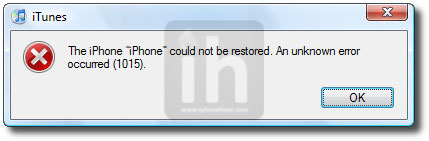
iTunes will bring up error 1015, 1013 or 1011 message. Don’t worry, it’s normal. You’ve successfully downgraded your iPhone/iPod Touch firmware.
downgrade ios 4.0.2

Step 4 – Getting Out of Recovery

Now in order to get out of recovery mode, hit the “Kick Device Out of Recovery” button on TinyUmbrella right below the Start TSS Server button or you can also use RecBoot. That’s it!

__________________________________________________________________________________

Method 2: Edit Hosts File

**We assume that you’ve SHSH blobs saved via Saurik’s server.

Download your desired firmware for which you’ve SHSH blobs saved and want to downgrade:

Step 1 – DFU Mode

Put your iPhone into DFU Mode (How to: enter DFU Mode)

Note: Apple is currently signing iOS 4.1. If you’re downgrading to iOS 4.1 then you can skip Step 2 and continue from Step 3. Once Apple stops signing iOS 4.1, Step 2 will become compulsory for iOS 4.1 as well. If downgrading to iOS 4.0.2, 4.0.1 or 4.0, you MUST follow Step 2.

Step 2 – Editing Hosts File

Now we are going to redirect iTunes from Apple Servers to Saurik’s server.

———————————-
Windows:

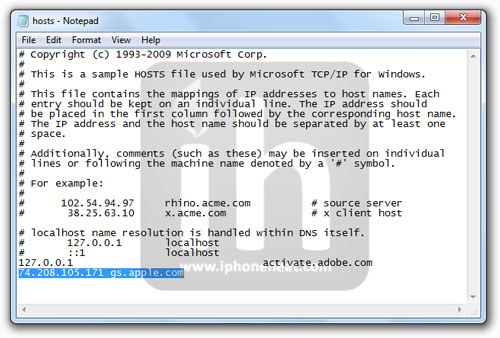
Go to C:\Windows\System32\drivers\etc\ and locate hosts file.
Open the hosts file in Notepad.
NOTE: Win 7 and Vista users MUST run Notepad with admin privileges. Right click on Notepad app and select Run as Administrator.

Mac OS X:

Go to \etc\ directory and locate hosts file. Copy it on your desktop
Open the hosts file in TextEdit.
———————————-

Add the following line at the end of the hosts file and then save and close the file:

74.208.105.171 gs.apple.com

Mac OS X users needs to copy the edited hosts file from desktop back to /etc/ directory and replace the older one.

(Click to enlarge)

Step 3 – Restoring the Firmware

  1. Now Open the iTunes.
  2. Hold down the Shift (Windows)/Alt (Mac) key and hit the Restore button.
  3. Select the downloaded firmware (iOS 4.1, iOS 4.0.1 or older) and let the restore process complete.

iTunes will bring up error 1015, 1013 or 1011 message. Don’t worry, it’s normal. You’ve successfully downgraded your iPhone/iPod Touch firmware.

downgrade ios 4.0.2

Step 4 – Getting Out of Recovery

Now in order to get out of recovery mode, hit the “Kick Device Out of Recovery” button on TinyUmbrella right below the Start TSS Server button or you can also use RecBoot. That’s it!

You must now remove 74.208.105.171 gs.apple.com line from the host file and save it. Doing this will let iTunes to prompt you about future updates from Apple.

Jailbreak iOS 4.0.1

How to: Jailbreak iPhone 4 iOS 4.0.1

How to: Jailbreak iPhone 3GS, 3G iOS 4.0.1

How to: Jailbreak iPod Touch 3G, 2G (MC, non-MC) iOS 4.0.1

You can follow us on Twitter, Join us at Facebook, and also Subscribed to RSS Feed to receive latest updates.

Digg
Twitter
StumbleUpon
Facebook
Reddit
del.icio.us

Tutorial: Simple Twitter Client Using Oauth Authentication

Recently Twitter finally made the move which they had been promising for a long time requiring all Twitter applications to utilize Oauth authentication.  This has pushed many of the older tutorials on creating twitter clients into obsolescence.

The other day I posted about a very handy open source OAuth authentication library from Google that can be implemented with just a few lines of code.  I also found a new tutorial that has been created which goes through the in-depth creation of a simple Twitter client that uses Oauth authentication.

The tutorial utilizes Matt Gemmell’s MGTwitterEngine along with modifications from Benn Gottlieb, you can find the open source project for the modified libraries on Github here:
http://github.com/bengottlieb/Twitter-OAuth-iPhone

The tutorial is from Collin Ruffenach and can be found here:
Dealing With The Twitter Oauth Apocalypse

This is a good tutorial if you want to go through the entire building of a complete working Twitter client.

Thanks for reading, please share this using the buttons below!

©2010 iPhone, iOS 4, iPad SDK Development Tutorial and Programming Tips. All Rights Reserved.

.

Share and Enjoy:

RSS
Twitter
Facebook
DZone
HackerNews
del.icio.us
FriendFeed

Tutorial: How To Calculate MD5 or SHA Hash Of File Efficiently

Calculating an MD5 hash is a fairly simple task using the CommonCrypto library, which I mentioned previously in an article on getting Gravatars which involved calculating the MD5 hash of a user’s e-mail.

While it is easy to do these calculations with CommonCrypto it is extremely inefficient to do so with the commonly used high level NSFileHandle commands.  Unfortunately, the problem with this solution is that it makes very inefficient use of memory because NSFileHandle returns an autorelease object making it impractical for large files.  One solution to this is to use the CFReadStream.

With this solution you can keep the memory usage low while reading in very large files.

You can read a more in depth tutorial on this topic here:
Compute MD5 Or SHA Hash Efficiently On iOS

A Github project has also been created to make this solution more straightforward:
http://github.com/Fuitad/FileMD5Hash

If you’re in a situation where you need to calculate the MD5 hash of a file, and are running into memory problems this should help.

Thanks for reading, please share this using the buttons below!

©2010 iPhone, iOS 4, iPad SDK Development Tutorial and Programming Tips. All Rights Reserved.

.

Share and Enjoy:

RSS
Twitter
Facebook
DZone
HackerNews
del.icio.us
FriendFeed

How to: Automatically notify your members on new posts

Just paste the following code on your functions.php file:

function email_members($post_ID)  {
    global $wpdb;
    $usersarray = $wpdb->get_results("SELECT user_email FROM $wpdb->users;");
    $users = implode(",", $usersarray);
    mail($users, "New WordPress recipe online!", 'A new recipe have been published on http://www.wprecipes.com');
    return $post_ID;
}

add_action('publish_post', 'email_members');

Once saved, all registered users will receive an email when a new post is published.

This recipe is inspired from an example found in WordPress Codex.

Looking for WordPress hosting? Try WP Web Host. Prices starts at $5/month and you can try it for free!

How to: Automatically notify your members on new posts

MacTastik Weekly #75: The Final Comic!

I can’t believe that we’ve featured 75 MacTastik comics over the past 18 months. How time flies! It’s been a fantastic addition to our usual content, and always provided an interesting break from the norm.

Today marks the end of the MacTastik series, as we make some changes to our publishing schedule and move on to offer ever more useful and interesting content.

I’d like to say an absolutely huge thank you to N.C. Winters, the talented artist and writer behind MacTastik. You can still catch his work in the form of the Freelance Freedom comic strip over at FreelanceSwitch.

Without further ado, we’ll leave you with the final instalment of MacTastik. I hope you enjoy it!

Embedding this MacTastik strip elsewhere? Please provide a link back to this post and to NCWinters.com


Two Popular Mac Bundles Drawing to a Close

Mac software bundles are big business these days, and new ones seem to be cropping up on a regular basis. Spawned by the still-popular MacHeist in 2006, bundle software sales always generate a stir in the Mac user community.

Whether this is down to the excitement of gaining a bunch of software for a really low price, or in kickback to the often poor deals given to the developers, most Mac users have an opinion on the issue in one form or another.

Whichever camp you fall into, you’ll be interested to know that two popular Mac bundles are drawing to a close over the next few days.

The first is the MacUpdate September 2010 Bundle. This costs $49.99, and gives you twelve Mac applications including Toast, Concentrate, Espionage, Voila, and ShareTool.

The second is Bundleecious 2, a considerable cheaper alternative at only $9.99. The quality of applications of course also takes a slight hit, but there are some handy utilities on offer such as Cinch, Awaken, and Punakea.

Personally, I fall largely into the thought category of “It’s not a bargain if you don’t need it”. If you’re going to find almost all the apps in a bundle worthwhile, it’s a no-brainer purchase. On the other hand, if you only see yourself using one or two, head over to the developer’s site and buy them directly. You’ll give them a better deal, and support the software you really care about.

Which camp do you fall into? Are you a compulsive bundle purchaser, or do you tend to have second thoughts when your finger is hovering over the “Purchase” button? I’d be interested to hear your thoughts!


Open Mic: Tell Us About Your Favorite Instrument

What is your favorite musical instrument? I’m not asking about the type of instrument that you prefer, but about the actual instrument you own, play and enjoy?

Each weekend we open our mic to readers and lurkers alike to come out of the woodwork and tell us your thoughts and opinion, your experiences and mistakes, what you love and what you hate. We want to hear from you, and here’s your chance.


Which of your musical instruments is your favorite? Tell us about the type of instrument it is, the make and model, and anything else that stands out to you.

Why do you like this instrument in particular? Does it have sentimental value? Does it have great quality sound? Is it something about the way you came to possess it? Does it have to do with the way you feel when you play it?


Discover Cockos REAPER

REAPER (which stands for Rapid Environment for Audio Production, Engineering, and Recording) is an affordable DAW by Cockos – “a complete multitrack audio and MIDI recording, editing, processing, mixing, and mastering environment.” Until recently it has only been available for Microsoft Windows, but there is now a beta Mac OSX version available.

This article was previously published on the AudioJungle blog. We’ll be bringing you an article from the archives each week.

This is our sixteenth article in the series “Exploring Digital Audio Workstations”. If you’ve missed the earlier articles, you can find them here:

  1. Exploring Digital Audio Workstations
  2. Discover Pro Tools LE
  3. 11 Essential Pro Tools Tutorials
  4. Discover Logic Pro
  5. 11 of the Best Tutorials for Logic Pro
  6. Discover Propellerhead’s Reason
  7. 18 Reason Tutorials That Cover All the Bases
  8. Discover Steinberg’s Cubase 5
  9. 20 Instructive Cubase Tutorials
  10. Discover Cakewalk’s SONAR
  11. 14 Tutorials that Make Using SONAR a Piece of Cake
  12. Discover Ableton Live
  13. 17 Amazing Ableton Live Tutorials
  14. Discover FL Studio 9
  15. 21 Fruitful FL Studio Tutorials

Now let’s have a look at Reaper.

About Cockos REAPER

REAPER has a lot of fans – mainly because of its price. For musicians who don’t need all of the bells and whistles of more expensive software (the REAPER download is only 4.1 MB in size), the program offers enough features for the right price. And its scripting API and broad support of plug-ins can greatly extend its features.

Cockos have a “Fair Pricing Policy” for REAPER, which makes it very affordable if you qualify:

Fair Pricing
There is only one version of REAPER. We offer two licenses, depending on how you use it.

$225: full commercial license.
$60: discounted license.

You may use the discounted license if any of the following is true:

  • You are an individual, using REAPER only for personal use.
  • You are an individual or business, using REAPER for commercial use, and the yearly gross revenue does not exceed USD $20,000.
  • You are an educational or non-profit organization.

The product’s website lists the main features:

Fast, Powerful Editing

  • Drag and drop to import, arrange, and render
  • Freely mix audio, MIDI, video, still image media on any track
  • Easily move, split, glue, resize, trim, loop, time stretch, pitch shift, fade, crossfade, slip, snap to grid, without switching tools
  • Intuitive zoom, scroll, scrub, jog, tab to audio transient, MIDI navigation
  • Simple and powerful nested folder system allows group editing, routing, bussing, all in one step
  • Full automation recording, playback, and editing support for track controls and plug-ins
  • Easily manage tempo, time signature, and varispeed changes
  • Separate audio or MIDI into freely arrangeable takes and lanes for easy comping
  • Easily copy or move regions, to quickly try out alternate arrangements
Plug-in Support
  • Insert almost any third-party audio or MIDI plug-in: VST, VSTi, DX, DXi, AU (OSX only), JS
  • Native bridging and firewalling: run Win32 plug-ins in REAPER x64, maximize RAM utilization, protect against plug-in crashes
  • ReWire (audio and MIDI) any capable application for even more flexibility
  • Fully automatic plug-in delay compensation (PDC)
  • Sidechain any plug-in, even if the plug-in does not natively support sidechaining
  • Apply FX in real time, or non-destructively render FX output
  • Real-time network FX processing: use other local machines as an FX farm
64-bit ReaPlugs Suite
  • Unlimited multiband EQ with draggable nodes
  • Graphical FFT EQ/dynamics processing
  • Technical and multiband compression
  • Flexible, open-format convolution reverb
  • Real-time pitch correction, with Elastique 2 Pro built in
  • Multitap delay, basic synthesizer, sample player, vocoder, algorithmic reverb, and more
  • Special-use plug-ins to virtualize outboard hardware, stream audio, connect to NINJAM servers, and more
  • Includes the JS audio and midi plug-in scripting engine, and hundreds of user-programmable effects
Intangibles
  • REAPER starts and loads fast – be ready to record in just a few seconds
  • Portable – put REAPER in your pocket and run it from a USB key or other removable media
  • Tightly coded – installer is only a few MB, updates can be installed in less than a minute
  • Rapid, efficient development – new features and optimizations are added quickly and often
  • Very active, enthusiastic, and helpful user forum, get help quickly
  • Fantastic and readable user-created user guide
  • An honest business model that aims to provide the best possible user experience

10 REAPER Tutorials

Reaper Introduction

REAPER is a powerful Windows application for multi-track recording and editing of audio.

Reaper – Getting Started tutorial by Rocket

Getting started using Reaper a very powerful DAW – by Rocket – check it out www.reaper.fm/

REAPER is a fully featured multitrack audio and MIDI recording, editing, processing, mixing, and mastering environment.

REAPER is reasonably priced, requires no dongle, has no copy protection, and can be evaluated with full functionality.

REAPER demo part 1/2

Justin Frankel demoing REAPER at TechBreakfast Norcal ITB.. It was a quick 15 minute presentation but a lot gets packed in.

REAPER demo part2/2

Justin Frankel demoing REAPER at TechBreakfast Norcal ITB.. It was a quick 15 minute presentation but a lot gets packed in.

Open Labs multitrack software “Reaper” Tutorial

Open Labs Tech Support Lead “David Williams” shows us how to use the recording software “Reaper” that comes installed on all Open Labs machines.

Open Labs Reaper Tutorial – Add a VSTi

This tutorial video, used in conjunction with our Intro and Overview videos, will help you learn to use your Open Labs instrument and the software that comes preloaded on your machine.

Open Labs Reaper Tutorial – Record a VSTi

This tutorial video, used in conjunction with our Intro and Overview videos, will help you learn to use your Open Labs instrument and the software that comes preloaded on your machine.

(1/3) Automation in Reaper DAW

This is part 1 of a 3 part video series that shows you how to use the automation features in Reaper.

This video was created by Rocket, a member of the Cockos / Reaper forum.

(2/3) Automation in Reaper DAW

This is part 2 of a 3 part video series that shows you how to use the automation features in Reaper.

This video was created by Rocket, a member of the Cockos / Reaper forum.

(3/3) Automation in Reaper DAW

This is part 3 of a 3 part video series that shows you how to use the automation features in Reaper.

This video was created by Rocket, a member of the Cockos / Reaper forum.

Have you used REAPER? Tell us about your experiences in the comments.


Workshop #121: Rubber Truck by Bad Maxton

At Audiotuts+ we regularly put up a reader track for workshopping and critique (find out how to submit a track). This is how it works: you upload your song, and every week or so we’ll publish one here and step away from the podium. The floor is yours to talk about the track and how the artist can fix problems in and improve upon the mix and the song.

This track has been submitted for your friendly, constructive criticism. They have put their track (and their heart and soul) in your hands to learn and get useful feedback.

  • Do you enjoy the song or track itself? Does it have potential?
  • Can the arrangement be improved?
  • How did you find the mix? What would you do differently?
  • What do you enjoy about the rhythm track? What can be done to improve it?
  • Is the choice of instruments relevant and effective for the style/song?
  • Are the lyrics (if any) effective? Does the style, arrangement and genre of the song suit them?
  • Can you suggest any specific techniques that might improve the track?
  • Do you have any other constructive feedback?

Rubber Truck by Bad Maxton

Artist’s website: myspace.com/badmaxton

Description of the track:

Rubber Truck originates from a late-night guitar jam, complemented by catchy drums and a hooky synth chorus. Any comments welcome!

Download audio file (RubberTruck.mp3)

Terms of Use: Download is allowed.

Have a listen to the track and offer your constructive criticism for this Workshop in the comments section.


Submit Your Tracks for Workshopping

Need constructive criticism on your own tracks? Submit them using this form.


Interview With Diego L. Rodríguez

Diego L. Rodríguez is a multi talented designer and photographer who has recently made a name for himself in the design field by working with some prominent clients. Diego has an interesting philosophy on life that has not let him down, a go out and get it mentality is his view on how to get clients. His approach has gotten him a few jobs and he plans to keep at it. So lets get into another interesting interview with another great artist.


Q Welcome to Psdtuts+, please introduce yourself. Could you tell us where you’re from and how you got started in the field?

Thank you. Good morning people! My name is Diego L. Rodríguez; I’m an illustrator and photographer based in Spain. I’m currently working as freelance designer, photographer and retoucher in Mexico City.

My first contact with the new digital art possibilities was around 2005; I was studying “Cinema Production” and I wanted to customize some DVD covers and wallpapers. I discovered some forums dedicated to digital art as well as communities such as DeviantART. I then became passionate about this amazing world of art and graphics. In 2007 I had my first clients and considered seriously dedicating myself to the field.

QHave you always been artistic from childhood? Or did it start to appear later in life?

I was a creative kid; when I was 10 I drew characters from cartoons and invented my own series (I keep all those drawings in a rusty folder). My inspiration came from “G.I.-Joe” toys and some Japanese anime series, but my real passion came when I was 15 years old when I really wanted to dedicate my life to the audiovisual field, especially with music videos.

When I was 16 years old I started to work as a Camera Operator for a local TV station. That experience was essential for me. After finishing school I studied "Cinema Production", and after that I started the Publicity & Public Relations career. Around 2005/2006, I discovered this amazing world of digital art, illustration and graphic design.

QFrom drawing to photo manipulation, how do you manage to blend so many different styles together into one consistent whole?

Most of the drawings I do are made digitally; I use Illustrator and the graphic tablet as main tools. Sometimes I start from sketches, basically when I work with typography; graphite pencils are my best friends.

I export the illustrations and make the rest of the post-work in Photoshop. I can say Photoshop is the definitive tool: retouching, coloring, detailing…seriously I love using Photoshop every day, there are infinite possibilities.

The consistency is clearly influenced by your patience and dedication to your artwork. Working on a big resolution, cutting very smooth, studying the light. There are a lot of factors, but your dedication and exigency to get the most detailed work is very important.

QYou have recently attracted some high profile clients with your artwork, in your opinion what does a designer have to do to build up a strong clientele?

To be honest, I think I took a step forward with some recent clients, but I’m still developing my career. I fight everyday for clients, showing my portfolios, joining projects, etc. I don’t have a solid client agenda.

My philosophy is based in being active all the time, not waiting for the client. If some brand, company or musician interests me, I contact them. All my motivation came from a "don’t give up" thought. I follow my instincts; if you want to work in some very specific field, do your best there. Clients do not come by magic; I keep that philosophy and it’s worked out well for me recently.

Q“The Variable” was an amazing illustration that you created for the readers of PsdTuts. Please walk us through the creation of this unique and detailed illustration, and what exactly inspired you to create it?

Thanks for your words. I started playing with some architecture photography on the canvas. Later I inserted a human stock, playing with textures and my own 3D renders. The arm took a very interesting effect, like crossing a dimensional door threshold. That was the part when the whole piece appeared on my head.

I was watching "LOST" the TV show, and all the time-traveling stuff was very present on my mind, so I tried to create an instant, when someone is crossing a dimensional door (kind of a "Stargate" too).

By mixing my own stocks, 3D renders, fluids and digital painting I composed the whole scene, introducing some depth and the island as a tribute to the "LOST" TV show (the title itself is an homage to one chapter from the 5th season). I must say the starting process was really random and funny, playing with lot of stuff. That’s my real workflow when I start some kind of artistic manipulation or photo-illustration.

QWho or what were your main influences that made you pursue the field of designing?

First of all, Cinema. Especially when I discovered a genius like David Lynch. All the work he does is special, deep and complicated. On the other hand: Music and music videos. I always used to ask my best friend to record VHS tapes with hours of MTV music videos and commercials.

When I started to get into art and graphics, evidently the references and inspirations were growing up. Some of my favorite artists of all time are Edward Hopper, Salvador Dali, John Everett Millais or Gustave Moureau. Some of my actual references are Nicholas Di Genova, Non-Format, Jeff Soto or Grandpeople.

QWhat can we look for from you in the future? What projects will you be working on?

On the design and illustration fields, I’m currently creating some cover artwork for Hip-Hop artists, as well as collaborating with some worldwide photographers doing photo-illustration and photo-manipulation art pieces. I’m involved too in several projects with my buddy Luis M. Torres for some companies and artistic stuff.

About my other main field, photography, I will update my website soon with some new fashion & editorial projects.

Finally, I recently collaborated recording a documentary film in the USA about the “Blues Route” and the “Crossroads” with a Mexican musician, and I created an illustration in collaboration with the DACS Project.

Q Thanks again for providing Psdtuts+ with this opportunity to interview you. Any final thoughts for our readers?

Thanks to PSDTUTS+ and the readers for the time dedicated to my interview. Don’t give up, believe in yourself and don’t stop creating and experimenting.


Find Diego on the Web

Productive Kitchen Gadgets #3: Immersion Hand Blender

Being productive in the kitchen is a priority in our household. The next productive kitchen gadget that I would like to feature is the immersion hand blender. How often have you had to quickly blend up something? I use this gadget for mixing up a quick smoothie or a protein shake. It is also great to puree solid food into a liquid mixture for a baby’s digestive system. It’s also handy when you want to whip up some heavy cream into whipped cream for your dessert.

The version pictured above and to the right comes with a handy cup for blending, but you can use any container that you have in your kitchen. Believe me, the uses are endless for this versatile kitchen gadget.

One of the best features with this kitchen tool is that it is extremely easy to clean. Just a quick warm rinse under your faucet and you are done. Talk about time savings. If you want to add a handy kitchen gadget to your arsenal you should definitely consider the immersion hand blender.

Mac developers: 360|MacDev conference scheduled for December

360|Conferences, the company that hosts the popular 360|iDev iOS development conferences, is now reaching out to the Mac development world. They’re launching a new conference, 360|MacDev, and the premiere event will be held December 10th and 11th in Denver, Colorado.

360|Conferences felt that it was important to get into the Mac development conference gig, since the C4 conference has been terminated and WWDC not only sells out quickly, but seems to be focusing more and more on iOS development. They’re starting small and short with this event, so if you’re interested in attending you’ll want to get registered soon. A deal for early bird tickets ($200) expires on Friday, September 24th, and after that date the registration cost jumps up to $300. You might want to consider attending the conference and then taking a ski vacation at the many resorts just a few hours away.

If you’d like to showcase your Mac development mojo, the Call For Papers is open. There’s a Facebook page and a LinkedIn Event for the conference, so you can get more info about 360|MacDev as the event date gets closer. TUAW will be covering the event as well, and we look forward to talking with the stars of the Mac development world.

TUAWMac developers: 360|MacDev conference scheduled for December originally appeared on The Unofficial Apple Weblog (TUAW) on Sat, 18 Sep 2010 12:00:00 EST. Please see our terms for use of feeds.

Read | Permalink | Email this | Comments

Tonight is International Observe the Moon Night so grab your iPhone

Tonight is the first-ever International Observe the Moon Night. If you have an iOS device, you can get even more out of observing our nearest neighbor and learning about what its made of, how it came to be, and how to observe it.

Free apps like Moon Globe will allow you to explore the lunar service in detail tonight, or any night. If you’re a social, rather than a solitary backyard astronomer, then here’s a map to help you find local public observing groups all over the world. Expect to find some telescopes to get you a live close-up view.

Since you’ll already be outside, don’t forget some of the great astronomy apps that help orient you to the visible planets and constellations. I like Star Walk, Pocket Universe and Distant Suns. Happily, the author of Distant Suns has put version 2 of the app on sale for US$0.99 today only in honor of the lunar event. If you have an iPhone, or iPod touch, it’s a good night to look up.

TUAWTonight is International Observe the Moon Night so grab your iPhone originally appeared on The Unofficial Apple Weblog (TUAW) on Sat, 18 Sep 2010 14:00:00 EST. Please see our terms for use of feeds.

Read | Permalink | Email this | Comments

GV Mobile+ for Google Voice on the iPhone released

GV Mobile + has returned to the App Store. If you live in the USA and therefore have access to Google Voice, grab a copy of GV Mobile + for $3 and celebrate the return of arguably the best Google Voice app for the iPhone. (We also reported that another app by the name of GV Connect is available for the same price. The biggest initial difference is that GV Mobile has been well-known and developed for several years.)

The original app, GV Mobile, had to be renamed to GV Mobile + because Sean Kovacs, the developer, deleted it once it was removed from the App Store, and wasn’t able to reclaim the name. That means that even if you owned GV Mobile you’ll still have to pay for GV Mobile +.

Yes, that’s frustrating, but let’s keep things in perspective: it’s $3, not a kidney. Deleting the app was a very understandable thing to do when Apple removed all Google Voice apps from the App Store and gave absolutely no indication that they would ever be allowed to return. Click Read More for additional information about GV Mobile+.

Note: we received the iTunes link directly from the developer, but it usually takes some time before it is available to all iTunes users. To quote Han Solo, “it’s not my fault.”

TUAWGV Mobile+ for Google Voice on the iPhone released originally appeared on The Unofficial Apple Weblog (TUAW) on Sat, 18 Sep 2010 15:00:00 EST. Please see our terms for use of feeds.

Read | Permalink | Email this | Comments

Have some Black Walnut with your Apple Wireless Keyboard

Personally, I consider Apple’s Bluetooth Wireless Keyboard to be one of the sexiest input devices around. I’ve even replaced my Logitech DiNovo Edge (you may recall seeing it before) with one. Now, Combine Collective has upped the ante with a peripheral for your peripheral which — in the right surroundings — is guaranteed to make this classy keyboard even classier.

These carved Black Walnut keyboard trays come in three flavors, each holding a different combination of wireless devices. The largest holds your Apple Wireless Keyboard, Apple Remote and Magic Trackpad, all sheathed in smooth, dark wood. In a cubicle with bad carpet, it might stand out like an eyesore, but on the right desk… well, I probably get more excited than I should about interior decoration. Still, I want one.

The prices are probably what you’d expect for executive-office-looking wares: US$69 for the small (Wireless Keyboard only), $74 for the medium (keyboard and Magic Trackpad) and $79 for the aforementioned large version. Feeling extravagant? Wander on over to the Combine Collective site.

TUAWHave some Black Walnut with your Apple Wireless Keyboard originally appeared on The Unofficial Apple Weblog (TUAW) on Sat, 18 Sep 2010 16:00:00 EST. Please see our terms for use of feeds.

Read | Permalink | Email this | Comments