
Category: Tutorials
Tutorials,freelance,projects,joomla,php,mysql,wordpress,blancer.com
NASA selects proposals for smallsats built to study deep space

Twitter is displaying China-made ads attacking Hong Kong protesters

‘Rainbow Six: Siege’ adds a ‘Fortnite’ style Battle Pass

Three UK rolls out 5G home internet access in London

Sonos’ portable smart speaker leaks in greater detail

Kevin Smith is making a ‘He-Man’ anime series for Netflix

SpaceX Starman Roadster completes its first orbit around the Sun

Ransomware attack in Texas targets local government agencies

Tesla’s relaunched solar power efforts include $50 panel rentals
After Math: Plead the fifth

25+ Export to PDF Format Resume Templates (Free + Premium for 2019)
Creating your resume in a PDF format is a great way to ensure everyone can open and see your resume, regardless of what operating system or office software they’re using.
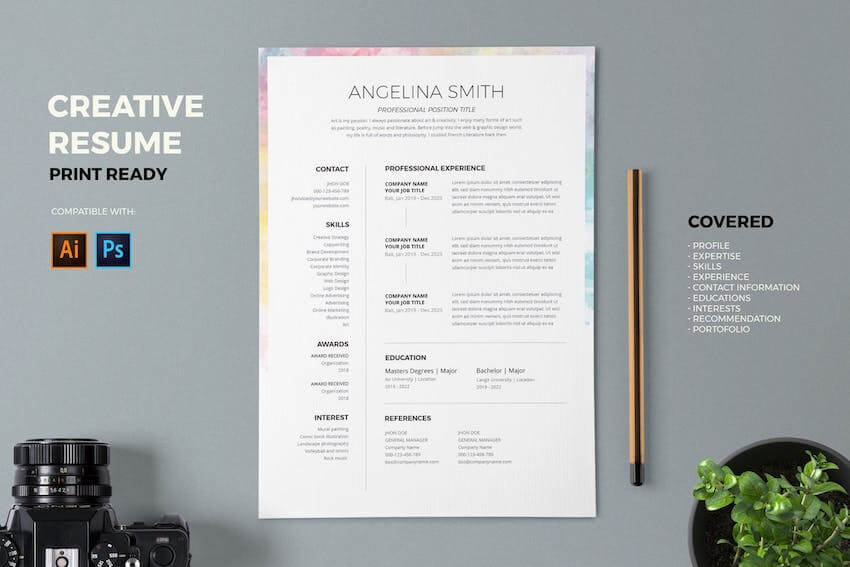
Thankfully, there are several applications that allow you to create and easily export your resume to PDF format.
In this post, we’ll show you a number of free resume templates that you can work with quickly to customize them, export them to PDF, and send them in with your job application. We’ll also share some top resume templates for PDF from Envato Elements and GraphicRiver.
Find Premium Beautiful PDF Resume Templates on Envato Elements and GraphicRiver
Before we dive into the free resume templates, let’s take a look at a few examples of premium resume templates available on Envato Elements and GraphicRiver.
Envato Elements is a great starting point when you’re looking for a resume template that can be exported to PDF. It’s a subscription marketplace, which means you pay a low monthly fee in exchange for access to thousands of premium design assets such as resume templates, fonts, icons, stock photos, logo templates, and more.
However, if you prefer buying individual items, you should stop by GraphicRiver. GraphicRiver has thousands of design assets, resume templates included, and you pay for each item you want to download and use.
Here are some of our best-selling resume PDF templates from Envato Elements and GraphicRiver.
1. Resume CV – Modern PDF Resume Template

The Resume CV template is a beautiful and modern resume template. It’s got two resume pages and comes with a matching cover letter and references page. The template can be edited in InDesign, Word, and Pages, and each version can easily be exported to PDF.
2. Rye CV Resume – Beautiful Resume Template In PDF Format

The Rye CV resume is sure to make you stand out thanks to the attention-grabbing header area. The template includes a one-page resume, a matching cover letter and portfolio page, all of which can be edited in InDesign.
3. Resume/CV Template – Bold Resume Template for PDF Export

If you want a resume template that’s not only easy to edit but also stands out, check out the Resume/CV template. It comes with a one-page resume and features a bold design. You can edit it with Illustrator before exporting the resume to PDF.
4. Creative Resume – Minimalist Resume Template in PDF Format

This creative resume template has a minimalist design and can be edited in Photoshop or Illustrator. It’s got two total pages, image placeholders, and well-organized layers.
5. Resume – Elegant Export to PDF Resume Template

This elegant resume template comes with a resume, portfolio, and a cover letter. You can edit the resume in Photoshop, Word, InDesign, and Illustrator before exporting to PDF. The template also has well-organized layers and one-click color changes.
6. Resume – Clean Resume for PDF Export
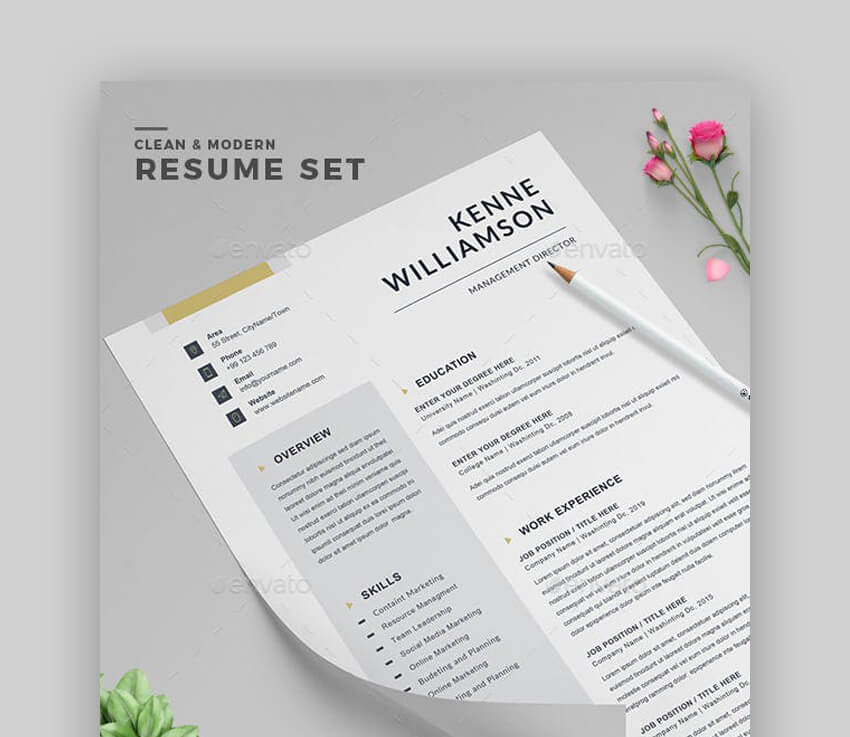
This clean resume template can easily be edited in Photoshop. You can change colors and fonts and then export it to PDF. You’ll also find a matching cover letter.
7. Resume – Minimal PDF Resume Template
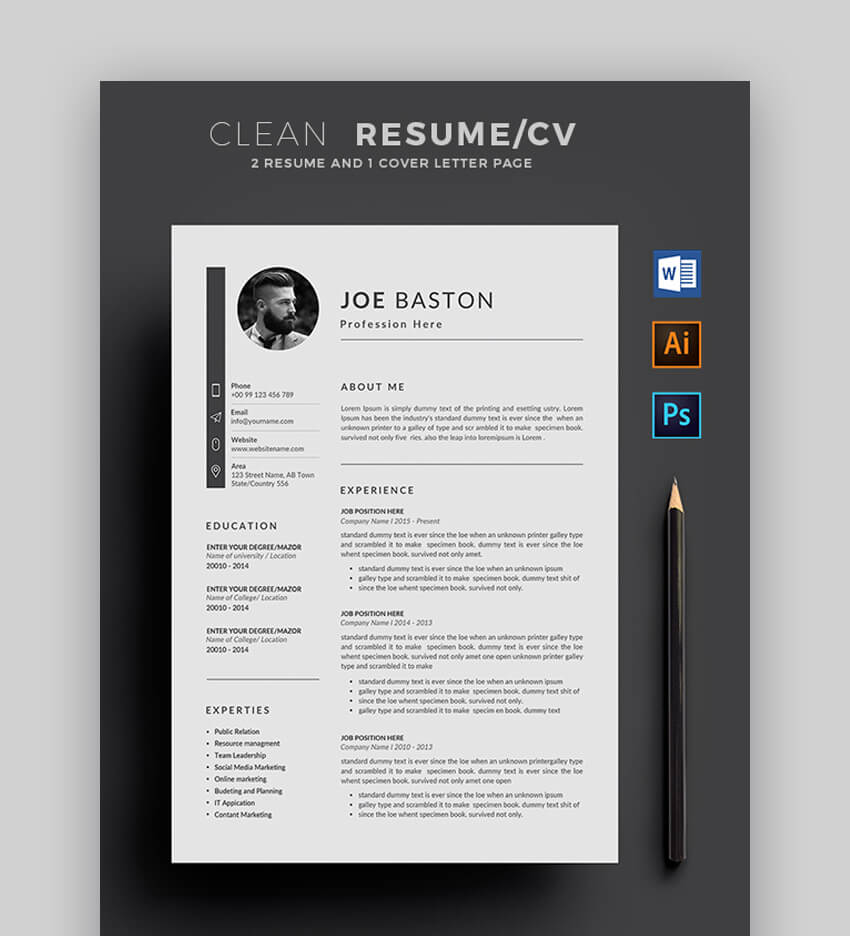
This resume template has a minimalistic design and a two-column layout. You can easily include a list of your skills in the sidebar and even include your profile photo. The template can be edited in Word, Illustrator, and Photoshop and you can then export the resume to PDF format.
8. Resume – Amazing Resume Template for PDF Export

If you’re looking for an elegant and creative design, try this resume template. It’s got a two-column layout and features elegant typography that’s sure to make your resume stand out. It also includes a matching cover letter. You can edit the template in Word, Illustrator, and Pages.
9. Resume – Simple Resume Template

Here’s a resume template that’s easy to edit and allows you to not only share details about your education and experience, but also your skills and achievements. Use Word, Illustrator or Photoshop to customize the template before exporting it to PDF.
10. Resume – Colorful Resume Template

Consider this colorful resume template if you want a resume that grabs attention. You can easily tweak the colors to your liking and you’ll also get a matching cover letter. The template can be edited in Photoshop, Illustrator, and Word.
The above templates represent just a small collection of all the templates we’ve got available on Envato Elements and GraphicRiver. If you need more inspiration for your resume design or want to see more premium templates, be sure to check out these roundups:
 Resumes20 Modern Resume Templates With Clean (Elegant) CV Designs (2019)Brenda Barron
 ResumesBest in 2019: 25 Professional Resume Design Templates (Cool + Modern)Andrew Childress
18+ Free Resume Templates Ready for PDF Format
Free resume templates are a good starting point if you’re on a budget or fresh out of college and about to start your job hunt. If you’re looking for a free PDF resume template, there are dozens of free templates available online. Here are over 18 of the best free resume templates for 2019.
1. Free Clean Resume Template

This free resume template has a clean design and comes with a matching cover letter. You can edit the template with Illustrator and Photoshop and then export it to PDF and send it along with your job application.
2. Free Resume and CV Template
Try this free resume template if you want a clean and simple design. The template is easy to edit in Photoshop. You can easily showcase your past experience and education and include a list of your skills.
3. Free Resume Template in PDF
This free resume template was made in Sketch and can easily be exported to the PDF format. It’s a good choice for someone working in the design industry and it also includes a handy resume summary section.
4. Clean Minimal PDF Resume
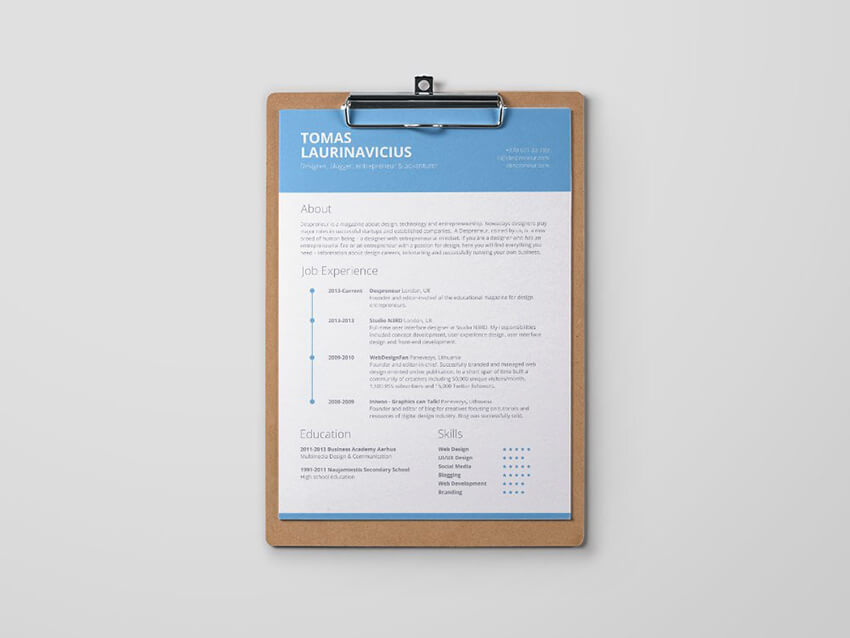
This free resume template has a minimalistic design with a subtle blue header that makes your contact information easy to see. The template can be edited in Photoshop and can be exported to PDF.
5. Free Stylish Resume Template in PDF Format
Consider this free template if you want a stylish design. The template has a two-column layout and you can even include your profile photo. Edit the template with Illustrator, Photoshop, and Word and then export it as PDF.
6. Modern Resume For PDF Export

If you’re on the lookout for a general resume template, this modern resume is a good starting point. You can customize the design to your liking in Photoshop and then export the design to PDF.
7. Line Resume PDF Template
8. Free Formal Resume Template in PDF Format

This formal resume template is a good starting point if you’re applying for a job in a corporate and traditional setting. It’s got a two-column layout and can be customized in Word. It also includes a cover letter.
9. Universal Resume Template for PDF Export
10. Colorful Resume Template
11. Professional PDF Resume Template
Try this resume template if you’re looking for a template with a professional design. The template can be customized with Adobe Photoshop and it’s got well-organized layers.
12. Free Resume Template With Clean Design
This free resume template has clean design and three different color variations that you can use as a starting point for your resume. Customize it with Photoshop and then export as PDF.
13. Resume Template
This free resume template has a modern and professional design that can be edited in Photoshop, InDesign, Word, and Illustrator. You can change colors, add your experience, education, and skills, and then export the finished resume design to PDF format.
14. Free Clean Resume for PDF Export

One of several free resumes, this simple and clean resume has a one-column design and thin lines that act as dividers. It can be edited in Word and then you can export it to PDF and send it with your job application.
15. Two-Column Free PDF Resume Template
Try this resume template if you want to be able to include your headshot on the resume. The template follows a two-column layout and can be edited with Word.
16. Free Resume Template With Icons
Let your resume stand out in the resume pile by using icons creatively on your resume template. This template will help you achieve that, and you can edit it with Word.
17. Corporate Free Resume Template
If you want a more corporate look and feel, try this resume template with a blue header. It’s got a one-column layout and plenty of space for your education and experience. It can be edited in Word and you can export it to PDF easily.
18. Minimalist Free Resume

If you love a minimalistic approach to design, try this resume template. It can be edited in Illustrator and you can tweak colors and fonts as well as the header photo. The template has well-organized layers.
19. Free Resume Template in PDF Format
This resume template can be edited in Illustrator. You’ll find a two-column layout with neatly placed dividers and headers that separate resume sections. You can change the colors and the fonts and then export the finished resume to PDF format.
Learn More About Making a Professional Resume
Creating a professional resume starts with a great template, but you still have to make sure that you format the resume properly and include all the necessary and relevant information.
If you’re looking to take your resume to the next level, we’ve got plenty of tutorials that’ll help you learn more about making a professional resume. Here are a few suggested tutorials to get you started:
 CareersThe Secret to Writing a Simple Resume That Works (+Best Tips for 2019)David Masters
 ResumesHow to Write a Functional or Skills-Based Resume (With Examples + Templates)Charley Mendoza
 ResumesHow to Best Use Resume Action Words (+117 Powerful Verbs)Charley Mendoza
Create a Professional Resume in PDF Format
Creating a professional and attractive resume in PDF format makes it easy for anyone to open up easily see your resume, no matter which operating system or office software they’re using.
If you’re looking for a resume template that’s easy to export to PDF, check out our premium and attractive pdf resume templates on Envato Elements and get access to thousands of other design assets.
If, on the other hand, you want to purchase a single template, be sure to take a look at all the available resume templates we’ve got over on GraphicRiver.
No matter which template you choose, you’ll be able to create a stunning resume and export it to PDF so take action today.

{excerpt}
Read More
The best smart home sensors for Alexa

This post was done in partnership with Wirecutter. When readers choose to buy Wirecutter's independently chosen editorial picks, Wirecutter and Engadget may earn affiliate commission. Read the full guide to smart home sens…
29 Cool YouTube Profile Pictures to Customise (Using a YouTube Profile Picture Maker)
If you’re a solopreneur or small business that has decided to join the YouTube community and you want to make a YouTube profile picture that will make an impression, or if you’re just looking to change your YouTube profile picture, you need to check out the YouTube profile picture maker at Placeit.
The YouTube profile picture maker offers a wide selection of amazing YouTube profile picture templates that you can customise quickly and easily to create cool YouTube profile pictures. Let’s take a look at how.
How to Make a YouTube Profile Picture Quickly and Easily
1. Navigate to the YouTube profile picture maker at Placeit.

2. Review the YouTube profile picture template on offer and select the one you like the most.

3. Use the templates provided by the YouTube profile picture creator to make a profile picture for YouTube.
- Starting with the controls on the left, you can add your own text and change the font style.

- Moving to the controls on the right, you can change the graphic and the colour of the graphic as well as the YouTube profile picture template’s background colour.

4. You can resize any of your text or graphics and move them around to find the layout that’s right for you.
- If you’re not happy with the changes you’ve made, you can reset the layout to return the design to its original layout.

5. Once you’re satisfied with your YouTube profile picture, hit the download button at the top of the screen and download your YouTube profile picture for a small fee.
- If you change your profile picture regularly or frequently need logos, flyers, posters, social media banners, etc., then the monthly plan may be the best deal for you. And that’s how to cool profile pictures for YouTube in five simple steps using a YouTube profile picture creator.

29 Cool YouTube Profile Picture
1. Stylist Logo Maker With Floral Graphics

Stylist Logo Maker With Floral Graphics is a simple, modern template which would make a good YouTube profile picture for a fashion-related business. To customise it, just add your text, apply your brand colours, choose the appropriate letter moniker for your business, and you’re ready to go.
2. Logo Maker for Cupcake Shops

If you’re a bakery looking to create cool YouTube profile pictures, check out the Logo Maker for Cupcake Shops template, which offers wonderful illustrations of cupcakes and gorgeous vintage fonts.
3. Cosmetology Logo Maker

Beauty vlogs do extremely well on YouTube, and one of the things that help them get noticed is a good YouTube profile picture. Update your profile with this elegant template that is super simple to customise.
4. Craft Chocolate Logo Maker

Your fabulous craft chocolate shop deserves an equally fabulous YouTube profile picture to represent it, and that’s exactly what Craft Chocolate Logo Maker is for. This clean template features a warm, brown background with a bold and arresting serif font, topped with a beautifully curly graphic and tastefully presented oval for your tagline, if you have one.
5. Online Logo Template for Yoga Studio With Yoga Images

Taking your yoga practice to the internet and looking for a wide selection of cool profile pictures for YouTube? Look no further than the Online Logo Template for Yoga Studio With Yoga Images. The template offers gorgeous yoga-centred motifs and clean, modern fonts.
6. Online Logo Maker for a Yoga Studio Green Theme

Online Logo Maker for a Yoga Studio Green Theme is a good YouTube profile picture alternative to Online Logo Template for Yoga Studio With Yoga Images above.
7. Custom Logo Maker for Dance Studios

This divine template will make a YouTube profile picture that no one can ignore. It features a selection of awesome graphics and clean, bold fonts. Change the colours of all the elements to match your brand or suit your taste.
8. Handmade Soap Business Logo Maker

This is a good YouTube profile picture for a number of businesses. You can add your text and use it as is or add a background texture and customise extensively.
9. Channel Logo Maker With Avatar Graphics

Looking for a YouTube gaming profile picture maker? Placeit has you covered. The YouTube profile picture creator offers a wide range of customisable gaming profile picture templates just like the Channel Logo Maker With Avatar Graphics pictured here.
10. Fashion Influencer Logo Template

A good YouTube profile picture for fashion influencers and other working in the fashion industry, this template is all about colour and font. Add your text, select the font with the most impact, and then adjust the colour of the text and the background so they reflect your brand or appeal to your taste.
11. Logo Design Template for Braille Learning Center

Here’s another clean and modern YouTube profile picture template that is easy to update. This template features gorgeous braille graphics on one side of the image and the name of the business on the other. As part of your customisation, you can of course upload your own logo in place of the graphic.
12. Logo Template for Art Schools With 3D Shapes

Logo Template for Art Schools With 3D Shapes is a great example of how you can change your YouTube profile picture by customising the Logo Design Template for Braille Learning Center to create a different look.
13. Simple Natural Beauty Brand Logo Maker

If you’re an artisanal beauty brand, why not change your YouTube profile picture using this Simple Natural Beauty Brand Logo Maker template? The template offers beautifully illustrated graphics and a choice of equally elegant fonts.
14. Online Logo Maker for Dance Schools

If you run a dance studio and need to change your YouTube profile picture, check out Online Logo Maker for Dance Schools. This is a dynamic template that offers all sorts of great graphics, bold fonts, and a wide range of colour customisation options.
15. Custom Logo Maker for Drama Schools With Theatre Icons

You never have to worry about YouTube profile picture size when you use the Placeit YouTube profile picture creator. That’s because all templates use the exact dimensions of the YouTube profile picture size, so that all you need to do is customise your template, download it, and upload it to your site.
16. Logo Maker to Design a Cupcake Logo

If your business or interest focuses specifically on baking, then you’ll love the Logo Maker to Design a Cupcake Logo template, which features an array of gorgeous cake graphics, under which you can add the name of your cake shop and your shop’s tagline if there’s one.
17. Simple Logo Maker for Language Schools

Change your YouTube profile picture with the help of the Simple Logo Maker for Language Schools template. Add your business title, select an appropriate graphic, update the template’s colours, and you’re done.
18. Logo Maker for Self Defense Classes

Use the Logo Maker for Self Defense Classes template to make a YouTube profile picture for your channel. There are loads of choices of graphics and nice, clean, modern text.
19. Online Logo Maker for Music School With Jazz Icons

Want to make cool profile pictures for YouTube? This Online Logo Maker for Music School With Jazz Icons template will help you do just that. And you also have the option of using the catalogue of illustrated instruments to add your instrument to the template.
20. Custom Logo Maker for School With Piano Lessons

Make a profile picture for YouTube with this awesome Custom Logo Maker for School With Piano Lessons template for musicians. The template is similar to the one above but deviates by using the relevant musical instrument to replace a letter in the business name.
21. Custom Logo Maker for Acting Schools With Abstract Shapes

Use this clean, modern template to make a profile picture for YouTube. It’s simple to customise. Just add your text, upload your company logo, apply your brand colours, and you’re done.
22. Bread Logo Maker

Placeit has many cool profile pictures for YouTube for bakeries that specialise in organic bread, like the Bread Logo Maker template. Just browse through the images provided to find one the most appeals, add your company name and tagline, change the colours, and you’ve got a new profile picture.
23. Logo Maker for Ballet Studios

Logo Maker for Ballet Studios makes a statement with a simple graphic of a ballet shoe in tendu and a stylish but clean sans-serif font. A great example of the cool YouTube profile pictures with fabulous graphics found at Placeit.
24. Beauty Logo Maker for Skin-Care Products

Make a YouTube profile picture for your new skincare venture with the Beauty Logo Maker for Skin-Care Products template. The template offers a beautiful selection of floral wreaths which emphasise the freshness of your brand. Just enter your text, select your floral wreath arrangement, and select your colours.
25. Kid’s Toys Logo Maker

For more cool YouTube profile pictures, check out Kid’s Toys Logo Maker, a colourful and creative template for child-related businesses. Experiment with all the wonderful customisation features available within the template to make a profile picture for YouTube that is uniquely yours.
26. Logo Maker for Natural Beauty Care Brand

Natural beauty care brands will appreciate the Logo Maker for Natural Beauty Care Brand template, which features a nice selection of plants and flowers. Use it to create some cool profile pictures for your YouTube channel.
27. YouTube Gaming Channel Logo Template With Control Graphics

The Placeit YouTube gaming profile picture maker will help you create the best gaming profiles around. Just select an image from among those offered, add your channel name, select your colours, and you’re done.
28. Beauty Salon Logo Maker

Another gorgeous logo for beauty brands, Beauty Salon Logo Maker offers a variety of abstract brush stains against which your text stands out. You can customise the colour of the background, the brush stain, and the text, and you have the option to add other graphics if you like.
29. University Logo Maker With Tree Graphic

If your university is getting onto YouTube but needs help to make a profile picture for YouTube, this template is the answer. Just add the appropriate text, upload the school logo, make the colour scheme consistent with the school’s brand, and just like that you’ve got a professional YouTube profile picture ready to use.
Use the YouTube Profile Picture Maker and Create Your Own YouTube Profile Picture
The YouTube Profile Picture Maker is a terrific tool to help you make a profile picture for your YouTube channel quickly and easily, with minimal cost. The 29 YouTube profile picture templates featured here are just a few of of the profile pictures that you can create with the YouTube profile picture creator at Placeit. I hope you now feel confident that you know how to make a profile picture for YouTube channels. Use your favourite template to make your own and share it with us here. We’d love to see what you come up with.
And if you’re interested in designing other resources like flyers, movie posters, magazine covers, etc., here are some great templates for you:
 Book Cover31 Best Book Cover Designs & Ideas (With a Book Cover Maker)Nona Blackman
 Magazine Design19 Best Magazine Cover Designs You Can Personalise (With a Magazine Generator)Nona Blackman
 Poster Design13 Best Movie Poster TemplatesNona Blackman
 Graphic Design27 Album Cover Art Templates Using an Album Cover MakerNona Blackman
 Social Media20+ Social Media Image Maker Templates for Instagram, Facebook + MoreNona Blackman
 FlyersBest of 2018: 20+ Online Flyer Maker Template DesignsNona Blackman
 Flyers23 Best Sale Flyer Templates (Using a Flyer Maker)Nona Blackman
 Placeit24 Best Gaming YouTube Banners Made With a YouTube Banner MakerNona Blackman

{excerpt}
Read More
Runkeeper drops its Wear OS app due to a ‘buggy experience’
