What’s it like having newborn twins? Well, the other day while eating a cinnamon roll for breakfast at 1:30pm, I accidentally bit off the end of the plastic fork I was using and I just kept chewing because I simply did not have time to react. I am wr…
Category: Tutorials
Tutorials,freelance,projects,joomla,php,mysql,wordpress,blancer.com
30 Best Shopify Themes With Responsive (Mobile-Ready) Designs for 2020
Your online store is the face of your brand. Design matters. It should make your visitors feel welcome and encourage them to explore all the products you offer.
An attractive design shows customers that you care about their experience. Plus, it helps build trust, which can increase conversion rates.

If your website is responsive, you’ll ensure that visitors on mobile devices can enjoy a smooth shopping experience. That also helps your bottom line.
Due to the increased usage of mobile devices, many people use their phones and tablets to research their purchases online. According to several studies, conversion rates are on the rise.
Luckily, Shopify has plenty of themes that are both attractive and responsive. And in this roundup, we’re featuring the best mobile Shopify themes for 2020 and a selection of great Shopify themes from Envato Market.
Find the Best Shopify Themes for 2020 on Envato Elements (With Unlimited Use)
Discover tons of easy to use best Shopify themes for mobile and desktop on Envato Elements, with a great offer: download as many as you want for one low price.
Each of these most popular Shopify themes 2020 from Envato Elements has tons of professional and creative design options. While stacked with pro design features, and great functionalities to choose from, they’re also quick and easy to work with.

Easy to use best mobile Shopify themes have plenty of potential for high traffic as well as monetization opportunities making it perfect for companies to quickly start getting their products onto an online store.
Grab one of these best Shopify themes in 2020 to quickly create a modern and professional e-commerce website store. These simple themes that come with ready-to-use designs and functionalities can be used to create clean and modern websites. Some of the key functionalities that are included in most of these responsive Shopify themes:
- sticky and mega menus
- deal countdown
- SEO-optimized
- Ajax shopping cart,
- wishlist and product compare features
- lazy image load and much more
Just add your company logo, product information, text, image or video content and preferred colors to these already visually impactful best converting Shopify themes. Swiftly complete your e-commerce website project professionally. Launch your website and you’re all ready to sell. It’s that easy!
10 Top Shopify Themes for Mobile (New From Envato Elements For 2020)
Here are a few most popular Shopify themes for mobile (with cool designs to help you create your web shop) that are trending on Envato Elements in 2020:
1. Elise – Multi-Concept Shopify Theme

The Elise theme comes with unlimited layout options and a powerful admin panel that lets you tweak every aspect of your store. It can be used for a variety of niches and includes a beautiful slider that lets you showcase products on sale or the most popular products. Other notable features include:
- unlimited colors
- retina-ready
- newsletter popup
- advanced shopping cart in header
- sticky and mega menus
- wishlist
- Ajax shop by price slider
2. Foodly – Responsive Shopify Theme for Food Niche

The Foodly theme features a clean and responsive design with unlimited color options, Google fonts, and plenty of other customization choices. The responsive theme is also optimized to load fast and features an AJAX-loading blog, which means your articles load instantly. You’ll also find a wishlist feature, mega menu, SEO-optimized reviews, a separate landing page template, and integration with social media.
3. Marley – Responsive Shopify Theme

Consider the Marley theme if you like minimal design and run a watch shop. The theme is responsive and includes a stunning parallax effect that helps your products grab the attention of your visitors. Other notable features include:
- mega menu
- multi-layout
- product landing page
- blog and CMS pages
- SEO optimization
- advanced product filter
- and many more features
4. Cosmify – Fashion and Cosmetics Best Converting Shopify Theme

If you sell cosmetics or fashion items, consider the Cosmify theme. It features an inviting and responsive design as well as tons of customization options. You can change the typography easily thanks to Google fonts integration and improve your search engine rank thanks to SEO optimization. The theme also supports lightbox product images, a wishlist, mega menus, and more.
5. Furni – Responsive Furniture Theme for Shopify

Consider the Furni theme if you run a furniture or a wood products store. The theme is fully responsive and comes with support for multiple layouts as well as special landing pages for individual products. It’s also easy to set up and customize thanks to the detailed documentation and it also integrates fully with Google Maps and MailChimp.
6. Nautica – Best Converting Shopify Theme

Nautica is a multipurpose and responsive Shopify theme for online supermarkets, shopping malls, fashion shops or any other type of store. The theme has been optimized to load fast and includes several premium modules and more to help you wow your customers and increase sales.
7. Lena – Fresh Shopify Theme

The Lena theme is a fresh and responsive theme with six unique homepage layouts and a powerful admin panel. It comes with a built-in header slider and a unique drop-down shopping cart that lets you customers instantly view the products they’ve added. Thanks to Quick view, they can easily preview the products and even buy related or similar products thanks to upsell features.
8. Furniture Paradise – Full-Screen Best Converting Shopify Theme

The Furniture Paradise may seem like it’s a theme built exclusively for furniture stores, but don’t let the name fool you. Thanks to multipurpose design, the theme can be used for other stores such as fashion, sports, handmade items, and more. The theme comes with features such as:
- Mega menu
- Ajax shopping cart
- Product owl carousel
- Ajax product filters
- Quick Shop & Cloud zoom
- newsletter pop-up
- currency switcher
- Ajax wishlist
- grid and list view and much more
9. Leather – Fashion Theme for Shopify With Responsive Design

The Leather theme features a beautiful header slider, perfect for showcasing your most popular products as well as multiple header styles. The theme allows you to customize fonts, colors, and other aspects of your store and you’ll also be able to make use of the built-in wishlist, advanced shopping cart, and product filter options, and more. On top of that, the theme is optimized for better performance thanks to the built-in lazy loading of the images.
10. Enzo – Responsive Shopify Multi-Purpose Theme

The Enzo theme is a perfect choice if you can’t decide which theme to choose. It’s a multipurpose theme, which means it can be used for a variety of niches and it offers a modern and responsive design. The theme is packed with features such as over sticky header, shipping calculator, newsletter signup form with MailChimp, custom links and icons for social media, drop-down shopping cart, hover effect for product image, product reviews, multiple currencies and many more. It’s also SEO-optimized making your site stay on top of competitors.
Envato Elements (Design Without Limits)

Envato Elements has a single compelling (all inclusive) offer:
Sign up for Envato Elements and you get access to thousands of creative graphics and templates (with unlimited use), from Shopify themes to royalty free audio tracks, and more — all for one low price.

That’s right! Download as many creative e-commerce themes, graphics and royalty free audio as you want, then customize them to fit any of your project needs.
While Envato Elements is a powerful option, if you prefer to buy a new responsive Shopify theme one at a time (instead of getting unlimited access to hundreds of creative designs), check out the selection from our Envato Market below.
20 Trending Shopify Themes for 2020 on Envato Market (Buy It One at a Time)
We also have you covered if you need to buy a theme one at a time, in our e-commerce, Shopify themes category, which is part of our Envato Market.
Here are our trending (best-selling) most popular Shopify themes for this year:

Here are some trending Shopify themes from ThemeForest:
1. Gecko – Responsive Theme Shopify

Gecko is one of the best Shopify themes around. It comes with 15+ stunning homepage layouts, eight shop layouts and nine product layouts—allowing you to create that perfect online store you’ve got in mind. It’s easy to import and customize. It also comes with amazing features like product video thumbnail, lazyload and infinite scroll. Create a professional online store with a responsive theme from Shopify that helps you save time and focus on other parts of the business.
2. Avenue – Shopify Responsive Theme

Avenue’s Shopify responsive theme comes with tons of theme setting options and features like Ajax wishlist, mega menu, product images swap (multiple images) with slider and drop-down login. It’s an ideal theme for apparel or fashion boutiques, but it’s also multipurpose. This is an excellent Shopify responsive theme that also comes with great customer support.
3. Wokiee – Multipurpose Shopify Theme

With more than 8,000 sales, Wokiee is one of our best-selling Shopify themes from Envato Market. It’s got all the necessary tools and modules to create a super fast, responsive website. Wokiee is a multipurpose theme, which means it includes a great variety of layouts and skins to build an online shop about:
- fashion
- electronics
- sports
- transport
- health
- books
- flowers
- food
- interior
4. Woodmart – Responsive Theme Shopify

With a best responsive theme for Shopify like Woodmart, you’ll be able to create stunning and modern websites that look perfect on any screen resolution and mobile devices. Woodmart comes with a full Ajax shop, filters, add to cart and search that focuses on improving customer user experience and increasing sales without page reloading. This is not only great for the customer, but also makes the site very SEO-friendly.
5. Elessi – Shopify Themes

Elessi is a stylish, responsive, clean and modern shop theme that’s perfect for any fashion web shop. Fully loaded with features, this theme was built not only with the customer experience in mind, but also the developer. It’s easy to use and you’ll be able to build your professional website store fast without coding knowledge.
6. Ella Shopify Theme – Fashion and Apparel

Try the Ella Shopify theme if you’re building a fashion store. The theme features an elegant design and includes a large banner that you can use to showcase your most popular products. Your customers can also easily browse all categories thanks to Ella Shopify theme’s special category module as well as filter products based on price, size, color or brand. Our customers praise the features and level of customization:
Ella Shopify theme is hands down the best theme I’ve used on Shopify. I love it for its features and advanced customization. Makes any store look like a top of the line business in just a few minutes.
7. Basel – Minimal Shopify Theme

The Basel theme offers a minimalistic design suitable for any type of store; from fashion to furniture, and more. You can easily customize the layout of any page thanks to the drag-and-drop editor and style every aspect of your site through the admin panel. Additionally, the theme is translation-ready, which is perfect if you’re trying to reach an international audience.
8. Fastor – Powerful Shopify Responsive Theme

The Fastor theme not only includes 50+ premade skins, but also more than 20 different header styles and the ability to tweak fonts, colors, and more. Fastor also supports both left-to-right and right-to-left languages as well as features such as:
- SEO-Optimized
- hover effect for banners
- custom layout width
- Sale and New badges
- various product image effects
- quick view
- custom social sharing widgets
- and more
9. Everything – Versatile Shopify Mobile Theme
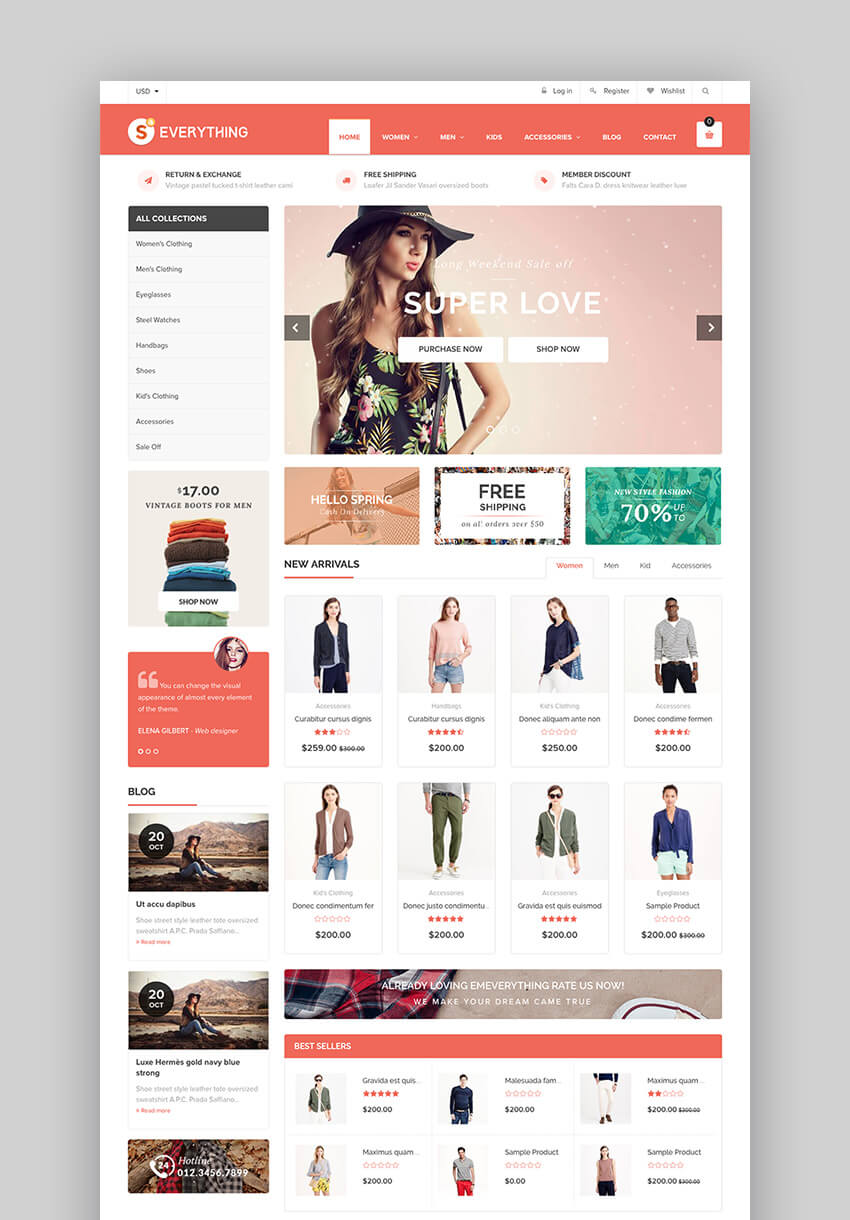
The Everything theme is a Shopify theme suitable for a variety of niches and features a responsive design that looks stunning on both desktop and mobile devices. It comes with more than 65 different designs and features full support for the Oberlo app so you can easily start a drop shipping business using AliExpress. Customers love the features as well as the support from the developer:
This is a great looking theme with many features! It is very customizable! The customer support has been fantastic to top it all off!
10. Fastest – Customizable Responsive Theme for Shopify

The Fastest theme is packed with customization options, allowing you to style every aspect of your store. It’s also fully responsive and includes features such as:
- multiple pre-demos websites
- upsell products
- advanced search
- compare and wishlist feature
- deal countdown
11. Porto Shopify Theme – SEO-Friendly

This Porto Shopify theme comes with unlimited color options and an impressive number of Google Fonts so you can easily change the colors and typography. On top of SEO optimization, Porto Shopify theme includes demo data that’s easy to install so you can speed up the setup process and you can choose from unlimited product detail page variations, setup parallax banners, and add even more products and content using custom blocks. Porto Shopify theme is definitely a must have!
12. Gemini – Drag-and-Drop Shopify Mobile Theme

The Gemini is clean and elegant Shopify mobile theme, perfect for fashion and apparel stores. It’s easy to use and packed with customization options as well as drag-and-drop sections that you can rearrange to create a unique look for your store. Aside from standard e-commerce features, this theme comes with an off-canvas menu, several product labels, a cookie notice, and more. Customers praise the design and features:
Everyone seems to love the design of our website. Visually appealing layout, easily customizable features, customer service is very helpful and thorough. We are very happy that we purchased this theme.
13. Electro – Electronics and Gadgets Shopify Mobile Theme

The Electro theme is a modern, user-friendly, and responsive theme with a unique vertical menu. The theme includes several demo layouts for the home page as well as pre-made color schemes, so you don’t have to spend a ton of time customizing your store. It also comes with FontAwesome integration, which means you can add icons for added visual appeal. The Electro theme makes it easy to upsell products and compare prices and your customers can easily leave a review so you can build social proof.
14. Zoa – Best Shopify Themes For Mobile

Zoa is a minimal, modern and responsive Shopify e-commerce theme. It was crafted for watch stores, apparel stores, furniture stores, bookstores and other stores alike. With clean and simple minimalistic design and layout, your products get the full attention it needs. Zoa also comes with amazing features like product variation swatch, flexible built-in mega menu, layered navigation, layout variations, SEO-optimization and many more features.
15. Uma – Multipurpose Best Shopify Themes

The Uma theme was built to load fast as well as to offer flexibility for both you and your customers. The theme is fully responsive and retina-ready and comes with more than 17+ premade layouts as well as Shopify builder integrations so you can easily edit any page with drag & drop builder and large elements library. Uma was also built with SEO in mind. Key SEO features like Google Rich Snippets, clean and well-structured code base, mobile friendly and CSS + JS compression makes your site search engine friendly and is sure to improve your store ranking.
16. Lopez – Jewelry Shopify Themes

Lopez Jewelry Shopify Themes is designed to be clean and smooth, giving your products the center stage. This theme is easy to customize without having any coding knowledge and comes with loads of features. Get your hands on this outstanding, unique, and responsive Shopify theme to create your dream web store.
17. Mixture – Single Product Shopify Themes

A fantastic multipurpose single product Shopify theme that’s responsive and retina ready. This theme comes with three homepages, giving you the option to pick the one that suits your business best. Mixture comes with loads of great features, but the one that stands out the most is the 360 product view. 360 product view allows you to show off your product in a lovely and professional way.
18. Louis – Handmade & Craft Responsive Shopify Theme

Louis is a handmade and craft shop responsive Shopify theme that’s got a minimal design. Build your website using drag & drop page builder and adjust your online store as you go. Louis supports multi-currency, allowing you to sell your products to customers worldwide efficiently. Other handy features are like quick view, product filters, dynamic single product, drop-shipping, and affiliate marketing integration.
Customers praise the design and features:
This is a fantastic theme. I wasn’t at all happy with the selection that Shopify has in their theme store, not to mention their prices. So glad to have stumbled across this one. It’s fantastic value for money and it works brilliantly. This is coming from someone who is completely new to Shopify. The support team are great too. They really go the extra mile, are genuinely helpful and want you to succeed. I highly recommend this theme to anyone using or looking to get it.
19. Eveland – Best Shopify Themes for Mobile

Install your website fast with the express installation. Make your web store look exactly the same as the demo with just one click and customize it from there. This theme comes with an instant search function that shows the list of products when you start typing in the search field. This function is a great way to help your customers find their products quick and easy. Increase your sales by giving your customers a 360-degree product view, size guide pop-up, and creating Shoppable Instagram Galleries.
20. Kala – Customizable Shopify Theme

Kala is one of the best converting Shopify themes 2020. It provides many different layouts and design styles, powerful theme settings, and it’s easy to customize for any business and any store.
This multipurpose Shopify theme has a responsive design and it’s mobile friendly. Create your own online shop about:
- fashion
- shoes
- beauty
- furniture
- baby
- garden
- watches
- sport
- jewelry
5 Mobile Ecommerce Shopify Trends for 2020
Now that you’ve seen our selection of the best Shopify themes from Envato markets, let me share the hottest eCommerce trends for this year. Follow these trends and you’ll have a stunning online store that’ll help you drive customers and sales:
1. Social Media and Mobile Sales
This is one of 2020’s biggest trends. If you’re on any social media platform, then you’ve seen how it’s easier than ever to buy any product directly on the app in your phone. This is because the most important rule of User Experience Design (UX) is to have your user do as little work as possible.
Invest on a Shopify theme that’s fully responsive to any screen resolution and works on all desktop and mobile devices. Let your visitors complete the transaction without even leaving your app or mobile website on their phones. This translates to more sales for you.
This is a good example of a responsive UX Shopify theme:

2. Motion Design
Use video whenever you can. Many of our eCommerce templates include the option to add video, a feature in motion design that’s trending in 2020. Whether it’s adding GIFs to your website or incorporating a video into the website header, motion can help to bring your products to life.
3. Personal Product Descriptions
Another big 2020 eCommerce design trend is to choose personalization and a more human approach to address your customers. Add a more personal touch to your product descriptions by including appealing sections like usage advice, testimonials or even product recommendation quizzes.
4. Unique Different Grid Layouts
For many years, the structured grid layout has been the standard in eCommerce stores. Now, going off the grid has many advantages and it’s a big trend.
Forget the rows and columns and your store will stand out with a different design. Also, your brand will have a modern and edgy look.
Keep this in mind: this trend works better with a limited product range. If you sell a lot of products, this setup may complicate the shopping process for your customers.

5. Branded Shipping Boxes
One rule of marketing is to never miss an opportunity. For online stores there’s one often ignored opportunity: the shipping box itself. Don’t miss the chance to promote your brand by adding a unique design to your shipping package.
Discover More Shopify Themes From Envato
We hope you’ve liked the Shopify themes we’ve shown you. Now, to get even more inspired, check these selections of the best converting Shopify themes 2020:
 Shopify15+ Best Shopify Templates for Your Online Store (Updated for 2020)Paula Borowska
 Shopify20+ Best Shopify Themes With Beautiful eCommerce DesignsBrenda Barron
 Shopify19 Best Shopify Themes For Clothing and FashionFranc Lucas
5 Ways to Increase Sales in Your Online Store in 2020
Once your store is set up with a responsive theme, there are a few more things to keep in mind if you want to increase sales:

- Offer a Coupon Code to First-Time Visitors. When someone stumbles upon your store for the first time, a coupon is a nice welcome gift that encourages them to browse the products and make a purchase. It can also be used as an incentive to grow your email list so you can follow up with them and invite them back to your store
- Include a List of Related or Similar Products. Sometimes your visitors may come for a particular product, add it to the cart, and checkout. But if you show them a related product, they may buy that item too. Use a theme like Fastest to easily add this feature to your store.
- Simplify Your Checkout Process. According to several studies, the complicated checkout process is often the reason why people abandon their carts. Consider enabling a one-page checkout or adding tabs that clearly show how many steps there are before their order is placed.
- Add Live Chat. Adding a live chat option or even integrating Facebook messenger, like in the Fastor theme, on your site allows you to reach out to visitors and answer any questions they might have about the products. This can help eliminate any doubt and convince them to proceed with the purchase.
- Use Proof. Social proof is always a great incentive. Consider using an app like Proof that shows recent purchases on your site. Seeing other people buy an item from your store helps visitors see that you’re a reputable business and increases the chances of new prospects completing a purchase.
Where to Find the Best Mobile Shopify Themes in 2020 (Envato Elements vs ThemeForest)
Both Envato Elements and ThemeForest have trendy, popular best Shopify themes built by professional authors. They lead the pack in 2020. But, should you use ThemeForest or Envato Elements? And, what are the key benefits of each:
1. Key Benefits of Envato Elements
Envato Elements is a premium subscription service that gives you unlimited creative template downloads for a single monthly fee. That’s a powerful offer for heavy users of digital assets.
Download as many top Shopify themes you need to use at any time, as well as other web templates, fonts, add-ons, and graphic assets. There are loads of quality best Shopify themes for mobile with on-trend designs available on Envato Elements:

2. Key Benefits of ThemeForest (& Envato Market)
ThemeForest is the leading digital marketplace for purchasing single-use web templates. It’s part of the Envato Market suite of online marketplaces that cater to numerous single-use creative digital asset needs.
When you need a best mobile Shopify theme, to use right now on your project, then head over to ThemeForest to make a purchase and download your files. Here are the most popular Shopify themes that are currently trending on ThemeForest:

3. Your Choice (What’s Right for You?)
If you’re a serial entrepreneur launching new brands regularly, a digital marketer with multiple projects to promote, or a graphic or web designer with numerous clients to serve and in need for multiple digital assets monthly, then Envato Elements offers a great bang for your buck. Sign up for Envato Elements now.
Or, if you just need a best converting Shopify theme or another file type to download right now and only need a minimal number of digital assets in a year, then head over to ThemeForest (or another Envato Market site) to find just what you need.
Common Shopify Questions Answered (FAQ)
Maybe you’re new to Shopify and the world of eCommerce. Perhaps you’re looking how to start your own online store. Well, it’s normal to have some questions about eCommerce platforms. Let me help you with some answers:
1. What Is eCommerce?
Let’s start with the basic definitions. eCommerce refers to business transactions conducted through the Internet. It involves any purchase from an online website. Perhaps its biggest advantage is that you don’t need a physical store to start an eCommerce business. You just need a product that you can sell online.
Interesting, right? We’ve got more about it here:

2. How Do I Start My Own Online Store?
Gone are the days when establishing an online store was a long, complex process. With the new platforms and technologies, today is easier to start your own online business. We suggest you follow these steps:
- First, research market demand and product fit.
- Analyze online eCommerce platforms and choose the best for you.
- Plan your marketing and sales strategy.
- And launch your store.

3. Which eCommerce Platforms Are There?
There a few main eCommerce platforms that you can choose from to set up your store:
- Magento. This is commonly used by big companies because it offers the most customization options for larger sites. But, keep in mind that Magento is also the least user-friendly, so it may not be your best option if you’re just starting your business and you’re new to eCommerce. Check our Magento themes.
- WordPress (WooCommerce). WooCommerce is a good option because it gives you a better mix of custom flexibility and user friendliness. Also, WooCommerce powers most of the WordPress eCommerce sites. See our WooCommerce themes.
- Shopify. This is the most user-friendly platform, which makes it perfect for smaller, simpler online stores. Their stores come ‘pre-built’ with many useful options like Shopify Payments, so you don’t have to worry about complex issues. Check our Shopify themes here.
- BigCommerce. This platform, which had a major makeover, is the only eCommerce software that works directly with Google’s Merchant Center, a function that helps you get your online store and products into Google and make them widely available in the search engine. See our BigCommerce themes.
Learn more here:
 eCommerceWooCommerce vs. Shopify: How to Choose the Best eCommerce Platform for You?Brenda Barron
 BigCommerceBigCommerce vs Shopify: How to Choose the Best Online Store SoftwareBrenda Barron
4. What Do I Need to Do Before My Shopify Site Goes Live?
Mat Mullen is a successful freelancer specializing in Shopify. He’s launched over 100 Shopify stores and has shared with us a helpful checklist to have in mind before your store goes live:
- verify primary domain
- do quality assurance
- check all the links
- update templates
- test transactions
- test email notification system
- do a backup of your store theme and files
See more details on Mat’s suggestions here:

5. How Do I Work With Images in Shopify?
One area of Shopify development that can often cause confusion for new theme developers are the images. That’s because there are four types of images in a Shopify theme:
- theme images
- product images
- collection images
- article images
Don’t stress. Read more here:

Learn More About Ecommerce Themes
If you’re still looking for more useful resources about Shopify and eCommerce, here are more useful articles:
Bonus: we’ve created this Shopify guide especially for web designers and developers. Check it out if it’s up your alley!
 ShopifyHow to Use Shopify Themes to (Quickly) Make Online StoresBrenda Barron
 ShopifyThe Shopify Store Owner’s Holiday Survival GuideJordan Labelle
 Cost-Benefit AnalysisShopify or Not? A Cost-Benefit Analysis of ShopifyBrad Zomick
Spice Up Your Store With a Responsive Shopify Theme
While the quality of your products matters, your store’s design is the first thing your visitors see. Make sure they feel welcome and enjoy browsing all the items with an attractive and responsive e-commerce Shopify theme. Have a look at our wide-selection of Shopify mobile themes for 2020 from Envato Elements, and the best converting Shopify themes 2020 from ThemeForest and grab the ones that’s right for you. All these responsive themes are completely customizable and easy to work with quickly, so get yours today!
Editorial Note: Our staff updates this post regularly—adding new, interesting most popular Shopify themes with the best and trending responsive theme designs. That way, you can find the design you need to make awesome websites.

{excerpt}
Read More
‘Final Fantasy Adventure’ was everything I hoped for 25 years later
When I play older games, I usually prefer to do so with the original cartridge and on original hardware. (I still have all of my 8- and 16-bit consoles, the Japanese equivalents of each, as well as a few CRTs to play them on.) There are a few situati…
25 Great PowerPoint Templates to Use for Change Management Models in PowerPoint
Are you currently working on a change management project and want a professional change management slide presentation? Are you creating a slide presentation on your change management process and have a limited amount of time?
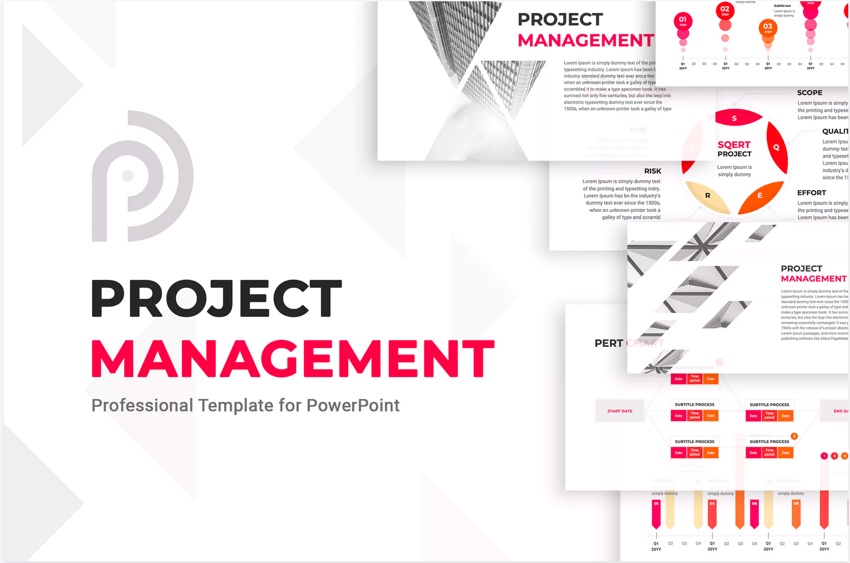
Use one of our templates to get a clean and professional change management PowerPoint presentation without wasting a lot of time.
Using a premium template will save you time. And you’ll get access to a lot of graphs (which are especially helpful for creating change management presentation slides).
To use a PowerPoint presentation template to create a change management PPT presentation, enter your data and change the slide layouts to your needs. Having a graph in your slide presentation will help your audience visualize the data you’re discussing. Graphs help people to see the difference in two sets of data.
Choose between hundreds of different premium templates to depict your change management models with Envato Elements and GraphicRiver.
Best PowerPoint Change Management Templates on Envato Elements (With Unlimited Use)
You can find hundreds of the best PowerPoint presentation templates on Envato Elements, with a great offer. Download as many as you want for one low price.

The premium change Management PowerPoint presentation templates we feature here from Envato Elements are designed specifically for making pitches and presenting business plans.

If you need a change management template for PowerPoint that you can customize quickly, we’ve hand-picked some of the best-designed ones to feature in this article.
All the templates in this article can be easily edited. These templates make it easy to have a quick and professional template. All you’ve got to do is input your data, and you’re ready to make your presentation.
5 Best Change Management PowerPoint PPT Templates From Envato Elements for 2020
Here’s a selected list of premium templates you can use to create your change management presentation slides:
1. The PowerPoint Project – With Diagrams and Charts

This change management PowerPoint presentation template comes with three different color schemes. Having a choice of color schemes allows you to make the template match your company’s color scheme. This template comes with editable icons. Icons are great for breaking up text. Easily add any image you would like by dragging and dropping the image of your choice into the place holder. This template comes with over 40 unique slides.
2. The Project PowerPoint – Good to Show Data

The Project PowerPoint is great for a change management plan. Here are the highlights of this template:
- over 120 unique slides, which gives you a lot of slides to choose from when you add your data
- infographics, puzzle diagrams, tree diagrams, maps, data charts and a GNATT chart making it easy to add any type of information you need to the presentation
- 50 premade color schemes giving so you can customize the presentation to the color of your choice
- icons and vector shapes to allow you to break up the text
The Project PowerPoint is great for anyone looking to make a slideshow with a lot of data. With this template, you get many choices on how to present your data in a professional way.
3. Marketing Plan – With SWOT Analysis

Are you in the marketing business looking for a change management model in PowerPoint? Then, the Marketing Plan template is for you. This template has over 80 unique slides providing you choices of how to present your data. This template comes with a SWOT analysis template and a budget slide. Easily drag and drop the image of your choice into the place holders. This template comes with 30 pre-made color schemes. This allows many options to choose from whether you want to use your favorite colors or company colors.
4. Data Analysis – Easy to Edit

Are you looking for a data-heavy change management model? The Data Analysis template may be for you. Here are some key features:
- 33 unique data analysis slides allowing you to add as much data to your presentation as required
- 11 Color schemes to choose from giving you many options to choose from
- comes with editable icons to help you illustrate your point and break up the text
- includes handmade infographics that’ll help you illustrate your data
This template is good for anyone with a heavy data presentation. With the Data Analysis template being easy to edit, you’ll be able to create an expert presentation quickly.
5. Project Status Report – for Change Management Status Reports

Is part of your change management process giving status reports? This template enables you to create a quick and professional project status report.
There are five different color schemes that you can choose from. This template also comes with an editable world map template and 800 icons. Also included with this template is a task timeline to show the projected due dates. Plus, the Project Status Report template includes GANTT charts for one week, one month, three months, six months, and a year. This template comes with all the templates you need when preparing a project status report.
Envato Elements (Design Without Limits)
Envato Elements has a single compelling (all inclusive) offer:
Sign up for Envato Elements. You’ll get access to thousands of graphics and templates (with unlimited use), from creative website themes to presentation templates, and more—all for one low price.

That’s right! Download as many professional templates and graphics as you want, then customize them to fit any of your project needs.
While Elements is an incredible resource for change management presentation projects, it isn’t the only option Envato offers. GraphicRiver is another great choice for change management designs for PowerPoint slides. Rather than paying for a membership with unlimited downloads, GraphicRiver is pay-as-you-go.
20 More Top PowerPoint Change Management PPT Templates for 2020
GraphicRiver also has great premium templates for change management projects. Buy the template you want for a one-time use and customize it for your needs. Here’s a curated lists of project management PowerPoint templates that’ll be helpful for change management PPTs:
1. Project Management

The Project Management PowerPoint template is a versatile option for your next slide deck. Many layouts are featured, including the commonly used 4:3 and 16:9 aspect ratios. You’ll find an array of strategic change management slides. Most include easy-to-use image placeholders for dragging and dropping photos right into your presentation.
2. SMART001 Project Management PowerPoint Template
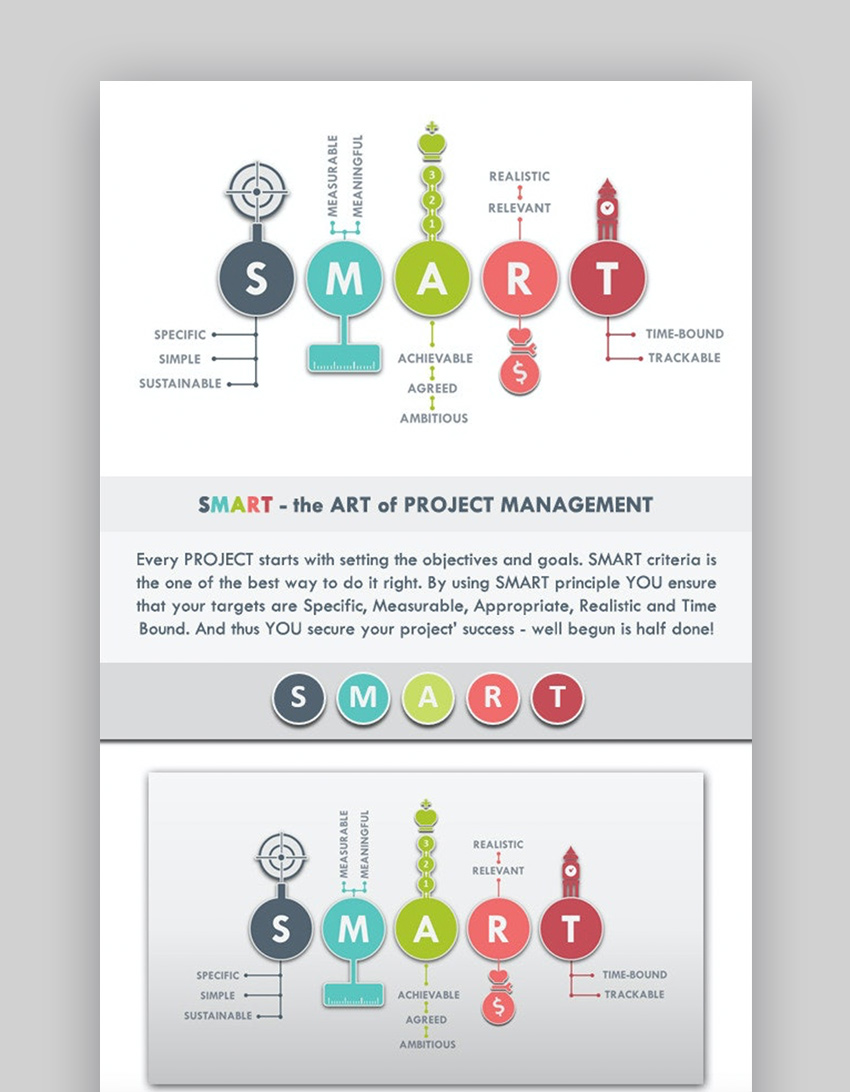
A leading change management PPT, this one illustrates your key concepts in style. Inside the pack, you’ll find a variety of options like:
- custom animations built in
- 15 flexible slide layouts
- master slide designs for fast bulk edits
- charts and unique infographics
If you’re looking for a change management slide deck with plenty of room to customize, SMART001 is a winning choice.
3. IKON Business & Project Template (PPTX)

Downloading a change management PowerPoint presentation for free might provide a basic set of features. But to give your management models for PPT the styling it deserves, use a premium template like IKON instead. Over 100 slides are included, with every strategic change management theme imaginable. Paired with 400+ icons and unlimited customization options, this is a powerful offering for all your needs.
4. Project Management PowerPoint Presentation Template
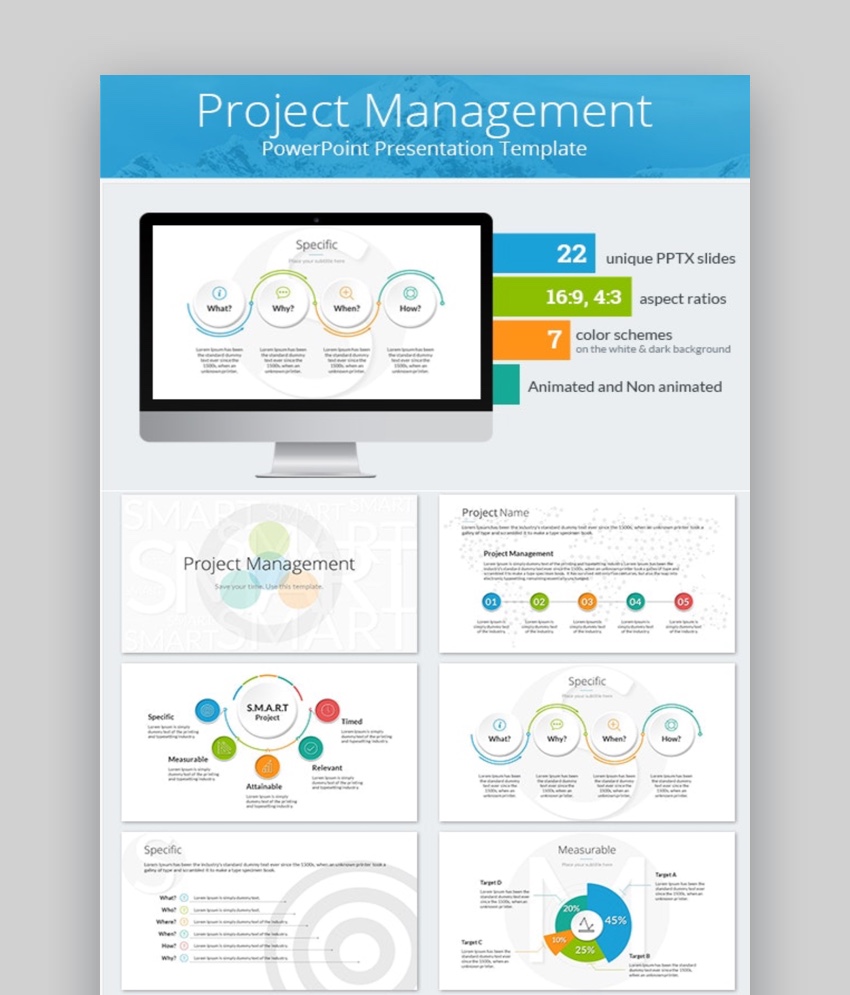
This change management PowerPoint comes with 22 unique slides. There are seven color schemes that come with this template. The Project Management PowerPoint Presentation Template comes with a dark and light version. So, you can use the version that suits your needs. The template also comes with over 2000 editable icons that can be used to illustrate a point or break up the text.
5. Smart Business Solutions – 2 In 1 PowerPoint Presentation Template Bundle
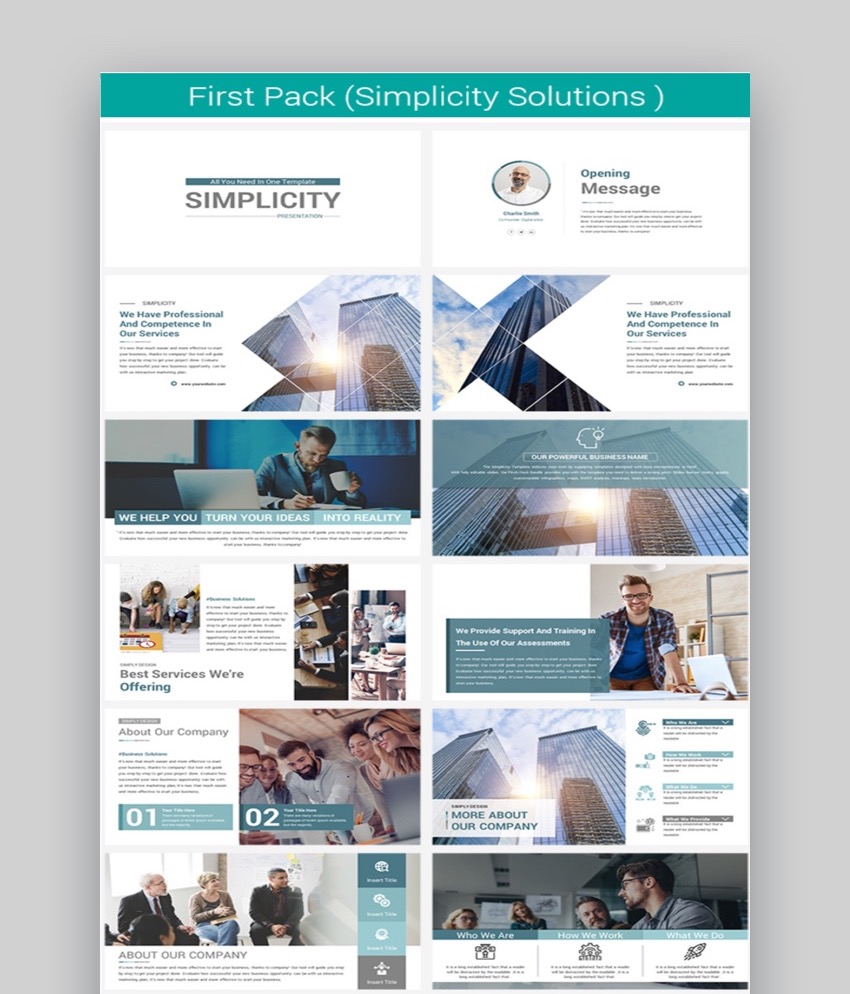
Smart Business Solutions is a change management PowerPoint presentation multi-purpose bundle. Here are some highlights of this template:
- 12,000 slides that enable you to add as much information to the presentation that you need to
- free fonts and icons to help personalize your presentation
- lots of infographics so that you can illustrate anything you may need to
- 12 pre-made color scheme options to choose from
This template is great for most business presentation needs. Easily customize it to illustrate a change management process.
6. Mystery Creative PowerPoint – With Charts and Infographics

Mystery Creative PowerPoint is a change management PowerPoint presentation template. The template has over 130 unique slides. This template also comes with maps for Europe, U.S, Asia, and Australia, which allows you to present data particular to a country or geographic region. Included are infographics and charts such as pie, bar and line charts. These charts and infographics allow you to present change management plan data in an interesting way. Mystery is a creative and a minimalist presentation. This is a professional template that’s essential for anyone with a creative company.
7. Target Segments – Modern Change Management PPT Presentation

Target Segments lets you show your change management steps in presentation form. Here are some key features of this template:
- over 350 unique multipurpose slides giving you options of how much data to include
- contains infographics to help you present your data or ideas
- comes with over 500 icons to help you present your data visually
- add any image you’d like by dragging and dropping the image of your choice into the placeholder
This template is great to show what your goals are for each step in a process. It’s modern and minimal while remaining professional.
8. Rambo Presentation Template

Rambo has over 60 distinctive change management presentation slides. This template comes with around 500 icons to help you get your point across. Easily add any image you want by dragging and dropping the image of your choice into place. Another feature of this template is that it comes with maps for Europe, the U.S, Asia, and Australia.
9. Hunt 3 in 1

Hunt is a multipurpose bundle template that’s got over 780 different slides, many of which can be used for change management presentation slides. Here are some key features of this template:
- over 500 icons to help you illustrate your point and break up the text
- includes maps and infographics
- easily drag and drop the image of your choice into the placeholder
This template bundle has so many options, making it easy to use this template for any business presentation.
10. Mabu Business PowerPoint Template

Mabu Business PowerPoint is great to use for a change management PowerPoint presentation. This template has over 360 unique slides to create your change management PPT presentation with. Add any image you want by dragging and dropping the image of your choice into the placeholder. This package comes with infographics and maps to help you illustrate your point. This template includes over 500 icons to assist you in illustrating your point.
11. Elegant PowerPoint Presentation Template

The Elegant template change management PowerPoint presentation template is for you if you want an elegant professional change management template for your presentation. Here are some key features of this template:
- comes with over 90 themes to choose for your presentation
- contains a total of 70 slides
- includes over 45,000 icons to choose from
- comes with timelines and infographics to help you present your information
This template is a good choice for anyone looking for a simple and professional template.
12. Bright Template – Easy to Modify

Bright is a vibrant change management PowerPoint presentation that’s suitable for anyone looking for a creative PowerPoint template. This template has over 170 different slides. This template comes with over 500 icons that’ll help you get your point across.
Use any images you like by dragging and dropping the image of your choice into the place holder. Easily change this template to fit your change management plan needs.
13. Jena – Use to Make Change Management Presentation Slides

Jena is a beautiful change management PowerPoint presentation. Easily edit it to make the change management presentation slides that you want. Here are some highlights of this template:
- over 52 different slides to choose from to fit the data you’re presenting
- over 500 icons to illustrate your points
- drag and drop a photo of your choice into the place holder to add a photo to the template
- comes with data charts and maps making it easy to present any kind of statistic or geographical information that you may have
Use this presentation for any business purpose. With the fine design and how professional it looks, you’ll easily impress your audience
14. Sirena PowerPoint Template

Sirena is a creatively designed PowerPoint template that’s perfect for a change management PPT presentation template. This is great for any creative company or anyone who wants to show their creativity.
This template has over 340 different modern slides that you can use create your change management models in PPT. This template also comes with over 500 icons to help you illustrate your point. Also included are infographics, maps, and device mockups. All these can be used to show your data.
15. Camero – Professional, Innovative

Camero has over 230 slides that’ll easily accommodate the presentation of a lot of data on your change management presentation slides. Here are some key features of this template:
- comes in 16:9 screen ratio
- includes over 500 editable icons
- contains maps, infographics and device mockups
- all the layouts are fully editable
This template is great if you’re looking for a professional, innovative template.
16. Eira PowerPoint Presentation Template

Eira is a creative change management PowerPoint presentation template with over 50 slides to choose from. This template comes with more than 500 icons to help you illustrate your point. Eira includes stylish company profile slides, data charts, and infographics. Easily add any image that you’d like to by dragging and dropping the image of your choice into the placeholder.
17. Process Overview

Are you looking for a presentation template that reflects the change management process? Then this is the template for you. Here are some highlights of this template:
- contains over 260 slides to choose from
- includes puzzle diagram infographics to show data in a unique way
- comes with world maps
- has many charts and graphs to help you present data
This template is great to show your colleagues or your boss what your work process is.
18. DataSift

Data sift is great for any data-rich change management PowerPoint presentation. This template comes with over 570 different multi-purpose slides. Drag and drop any image or video of your choice into the image placeholders to add photos or videos. Data sift with over 500 icons to help you present your data visually.
19. Strategy – Business & Multipurpose PowerPoint Template

A strategy isn’t just a moment in time. Instead, it’s an ongoing journey to success. A robust project management PowerPoint helps you build a roadmap. Emphasizing the inclusion of significant detail, this change management slide deck:
- includes more than 40 slides
- features fully resizable graphics
- offers an array of custom icons
- uses stylish free fonts
Plus, you’ll receive a helpful PDF guide to bring your change management presentation ideas to life.
20. Approach PowerPoint Presentation Template

Approach presents your change management PPT in an engaging, colorful way. This is key to keeping your audience focused and engaged. 100 slides are included, with 10 individual color schemes. Photo placeholders and infographics feature throughout to showcase your data and ideas. Plus, slides are pre-animated, giving you added style with less work.
How to Customize Change Management Model PPT Template Designs
Project management PowerPoint templates lay the foundation for a successful change management slide deck. When you’ve chosen your favorite template from Elements or GraphicRiver, follow these straightforward steps to make each slide your own.
For this tutorial, we’ll work with The PowerPoint Project management model PPT from Envato Elements.

Let’s get started:
1. Choose the Best Change Management Slides
A change management slide deck will typically include a wide assortment of layouts. To choose only the slides you need, click on the View tab in PowerPoint with your presentation open.

Now, choose Slide Sorter. Hold Shift on your keyboard and click to select the slides you’d like to discard. Press Delete. You’ll be left with only the slides you want to work with. Choose Normal on the View tab to return and begin editing.
2. Add an Image Background
Adding a photo to the slide deck is incredibly easy. This title slide has a pre-built image placeholder background. To add one, browse to an image file stored on your computer.

Then, simply drag and drop the image onto the slide. That’s it: PowerPoint inserts and scales it automatically.
3. Customize Fonts and Colors
To customize font colors, highlight a block of text, then find the Fonts section of the Home tab. Click Font Color to view your options. You’ll see a collection of default and theme colors.

A fully featured color wheel can be found by clicking More Colors. Once you find one you like, click OK. It’ll instantly apply to your selected text.
4. Customize a Chart
The best management models in PPT like this one include customized charts that you can use to share data. Naturally, that means adding your own numbers. Begin by clicking on the chart to select it. On the ribbon, browse to the Chart Design menu.

Now, click Edit Data in Excel. A spreadsheet window will launch. Inside, simply type in your own information, including section headers, data, and more. The chart will update as you go.
5. Change Theme Colors
In PowerPoint, it’s easy to change the color palette of a full slide. On the Design tab, click the drop-down in the upper right. Then choose Colors. Click any of the pre-set palettes to apply it, or use Customize Colors to make your own precise adjustments. It’s an easy way to quickly change up the appearance of any slide.

Thinking of building your own change management PPT slide deck? Want to learn more, including the key aspects of change management and how best to present them? Then you’ll want to explore our full tutorial, where we answer all these questions:

5 Quick Tips to Make Great Change Management PowerPoint Presentations in 2020
These contemporary change management model slide decks are the perfect launchpad for your next project. But to truly embrace change, you need to embrace the latest trends in slide design.
To build the very best project management PowerPoint, check out the most current tips for style:
1. Don’t Overwhelm With Data
Your change management presentation is meant to share goals and inform your audience. Cluttered slides packed full of distracting data fail to meet those objectives. By embracing minimalist design and focusing on key ideas, you can avoid this pitfall.
In general, slides should focus on one key idea. Brevity is essential.

2. Map Projects With Timelines
Past, present, and future: any project operates within a set period. Whether measuring goalposts or milestones, it’s crucial to keep your audience informed of exactly where a project stands.
Timelines are a great way to do it. They’re visually appealing, they’re easy to understand, and they’re very easy to create in PowerPoint.
To start building your own timelines, turn to our quick tutorial to learn all the steps:

3. Build a Foundation by Focusing on Context
For audiences to fully embrace change, they need a reason. A project typically doesn’t stand alone. Most often, projects are meant to resolve a problem or embrace an opportunity.

Those contextual details, the purpose behind a project, must be clearly explained. Whether through an internal study or an external competitive analysis, providing context in your slide deck is a key to success.
4. Craft Animated Charts to Guide the Narrative
Charts are compelling tools to illustrate data. But presenting every element simultaneously can defeat the purpose of simplifying ideas. For example, think of a bar chart. You might want to introduce one bar at a time, giving you the chance to talk about each data point without audiences reading ahead.
That’s what animations in PowerPoint can do. Learn to add them in just 60 seconds here:
.jpg)
5. Focus on Significant Milestones
For a project to succeed, stakeholders need to stay motivated. A big part of this is achieved by reviewing accomplishments. That’s why it pays to focus on major milestones.

By discussing major successes and significant outcomes, you’re helping your audience strive to achieve even more. Build detail-oriented slides with plenty of illustrations (images, videos, charts, infographics, and more). Share them frequently to boost engagement.
Additional PowerPoint Templates to Use for Change Models
Didn’t find a template that suits your needs? Here are some more articles with templates you can use to show your change management plan or process:
 Microsoft PowerPoint32+ Professional PowerPoint Templates: For Better Business PPT PresentationsSean Hodge
.jpg) Presentations30 PPT Templates: To Make Simple Modern PowerPoint Presentations in 2020Sean Hodge
Presentations30 PPT Templates: To Make Simple Modern PowerPoint Presentations in 2020Sean Hodge Microsoft PowerPoint35 Best Infographic PowerPoint Presentation Templates—With Great PPT Data SlidesSean Hodge
Common PowerPoint Questions Answered (FAQ)
What’s perfect to pair with a project management PowerPoint template? Having all your lingering questions answered!
Here are five popular questions you might face when learning how to work with management models in PPT.
1. How Should You Present Data?
Data is crucial. As you’re navigating change, it helps to include the data that helps you show your audience the “why” for the change.
Learn how to create charts and graphs in PowerPoint. It’s sure to spark change management presentation ideas.

2. What’s The First Step to Create a Change Management Slide Deck?
Before you start working with management models in PPT, you’ve got to form your content. That’s why writing a presentation is the most important part of the process.
Learn all about the presentation writing process in our article below. Project management PowerPoint templates work perfectly with the steps for writing your presentation.

3. What Are the Best Dimensions for a Change Management Slide Deck?
Whether you use a change management PowerPoint presentation for free or a premium option, be sure to set your presentation up properly.
Make sure that you use all the available screen area with our tutorial. You’ll set the perfect size every time.
4. How Can You Collaborate With Others in PowerPoint?
Send your presentation out for feedback for the best results. You’ll need to use a feature so that it’s easy to watch, review, and add their changes.
Tracking changes is actually a form of change management! Learn to use this feature in our guide.

5. What’s a PowerPoint Slide Layout?
Think of a PowerPoint slide layout as the blueprint for your slide. It’s got all the objects, placeholders, and elements you need to design a presentation.
Management models for PPT include layouts. Learn to make even more of your own with the help of this tutorial:

Learn More About Project Management
Want to learn even more about project management? Here are some helpful articles:
 Project ManagementProject Management With monday.com: A 101 IntroductionAlexis (Lexi) Rodrigo
 Small BusinessThe Best Online Project Management Software for Small BusinessMarc Schenker
 Project ManagementProject Management Kickstart: How to Tackle Large ProjectsLaura Spencer
Download a Professional Template Today for Your Change Management PPT Presentation
Don’t fall into the trap of downloading a change management PowerPoint presentation for free. You’ll get better results if you use a professionally designed premium change management slide deck.
We’ve shared change management presentation ideas. You’ve seen some change management PowerPoint presentation templates from Envato Elements. You’ve also seen great PowerPoint templates from GraphicRiver. We’ve also shared extra resources to read more about project management.
Why not download your favorite change management PowerPoint presentation template right now? Start making your professional presentation right away?
Editorial Note: Our staff updates this post regularly—adding new PowerPoint PPT change management models with the latest features.

{excerpt}
Read More
Amazon UK will stream some English Premier League games for free
Amazon first started showing live Premier League football matches in the UK last year and will do so again this summer, but because of restrictions imposed by the ongoing coronavirus crisis, it’s announced that it’ll also be showing additional fixtur…
Samsung made a hand washing app for Galaxy Watch owners
Chances are you’re washing your hands more than ever before right now, but if you like the validating assurance of technology to make sure you’re doing it right, Samsung’s got the app for you. Designed for its range of wearable Gears and Watches, the…
The Morning After: Sega’s tiny Game Gear Micro appears
The next step for the retro console craze is here. Sega is celebrating its 60th anniversary with this Game Gear Micro, which is unthinkably small. Of course, if the 1.15-inch screen strains your eyesight then you can always buy a four-pack of the ret…
Zoom explains why free users won’t get encrypted video calls
Zoom has confirmed it won’t be offering end-to-end encryption on free accounts. Last week, the company’s security consultant Alex Stamos revealed that plans for tightened security on paying accounts were in the pipeline — today Zoom CEO Eric Yuan has…
Lawsuit accuses Google of tracking users in Incognito mode
A proposed class action lawsuit filed against Google is accusing the company of violating federal wiretap laws by tracking users’ online activities even when they’re in Incognito mode. The complaint says the tech giant uses tools like Google Analytic…
TAG Heuer’s special edition smartwatch is made for the golf course
In March, TAG Heuer released the third generation of its Connected watches. The gadgets — which are powered by Google’s Wear OS — merge smartwatch functionality with the classic style of a chronograph timepiece. The company’s new Connected Golf Edi…
3 Top Instagram Fitness Video Templates for Premiere Pro
{excerpt}
Read More
Best WordPress Widgets for 2020
{excerpt}
Read More
3 Top Instagram Dance Video Templates for Premiere Pro
{excerpt}
Read More
10 Top Animation Presets and Templates for Premiere Pro
{excerpt}
Read More
The first Atari VCS units should be ready by mid-June
Atari’s repeatedly delayed VCS console is nearly ready two years after its announcement. The team has revealed that the first 500 (or so) Atari VCS production models should leave the factory by mid-June. That will still leave the majority of Atari’s…