You won't have to buy a Galaxy Z Fold 3 or Flip 3 to get their software upgrades. Samsung is rolling out a One UI 3.1.1 update that brings many of those phones' multitasking and app resizing features to the original Fold, Fold 2, Flip and Flip 5G.
The Fold line unsurprisingly benefits the most thanks to its larger, tablet-like screen. Features like Multi-Active Window (up to three apps at once) and App Split View (seeing extra content for an app) make that folding display much more useful. You can also force apps to resize and rotate on your Fold, pin your favorites with the Taskbar and mirror your internal display on the cover screen.
Not that Flip owners are out of luck. Drag & Split lets all Samsung foldable owners create a new window for an already-open app, and you can invoke Flex Mode to bring up media controls when the phone is partially folded.
Most of these features are deploying now, although you'll have to wait an extra week if you're using the first Galaxy Fold. Not that you'll likely mind. This could significantly improve the usefulness of your older foldable, and suggests Samsung is eager to earn the loyalty of early adopters — if just to increase the chances that you'll buy another Fold or Flip when you're due for an upgrade.
If you’re a creative professional or if you’re a developer looking to get hired, you’re going to need a portfolio. A strategic portfolio is the best way to show visitors why you should get hired and showcase the range of your skills.
Creating a portfolio doesn’t have to be difficult or time-consuming. A Bootstrap portfolio template makes it easy to create a portfolio you can proudly show off. What’s even better, there are numerous Bootstrap portfolio templates that you can use as a starting point.
5 Things to Include in Your Portfolio
Your portfolio should help you land clients or get hired. As such, there are a few things your portfolio must include if you want to increase the likelihood of that happening.
Add personality with Anne, vector illustrations for your portfolio
1. Examples Of Work You Want To Do
It goes without saying that your portfolio should include examples of your past work. However, you want to be strategic and intentional about those samples. It’s best to include projects that you were most excited to work on and that you’d like to work on in the future. This will help you attract the type of work you enjoy doing and the type of clients you love working with.
2. Description Of Technologies Used
Potential clients and employers might have a specific platform or software in mind when looking to hire a creative professional. If they see that you have experience working with those technologies, they’ll be more inclined to hire you over someone else in the same industry.
3. Testimonials
It’s also a good idea to include testimonials from past clients. This will go a long way towards establishing trust and credibility with your visitors.
4. Your Creative Process
Put your visitors at ease by sharing the most important steps and milestones of your creative process in your portfolio. This helps them understand what it’s like to work with you and what they can expect.
5. Call To Action
Lastly, don’t forget to include a call to action that tells them what the next step is and how to go about hiring you. This can be as simple as asking them to fill out a form or book a call with you.
Find The Best Bootstrap Portfolio Templates on ThemeForest
ThemeForest is the best marketplace to find modern Bootstrap portfolio templates. ThemeForest is a part of Envato Market — a suite of marketplaces that cater to various creative needs.
You can buy as many individual portfolio templates and other creative assets as you need and customize them to your needs. When you need to create a portfolio quickly, head on over to ThemeForest to find the best template for your needs.
Best Bootstrap Portfolio Templates From ThemeForest
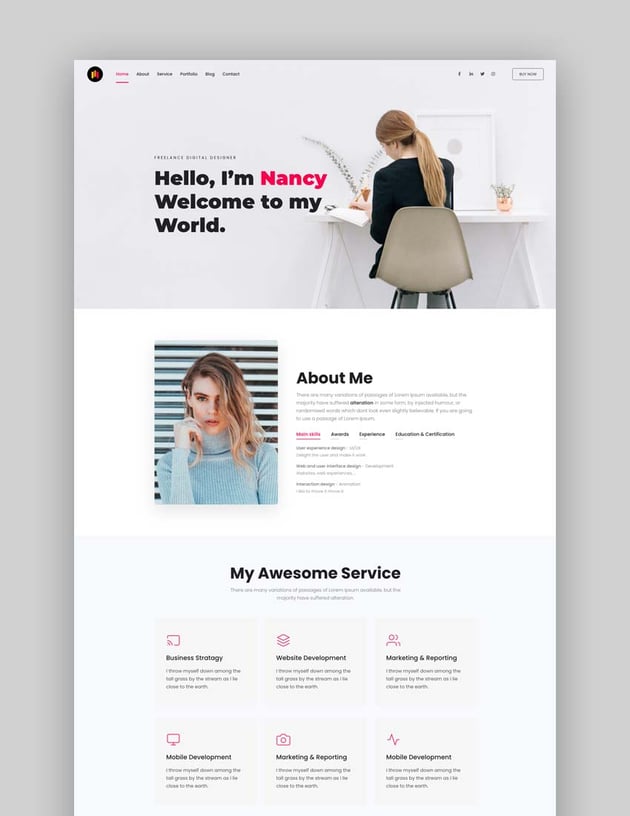
The Personite template is a minimal and simple Bootstrap portfolio template. It comes with a grand total of 40+ HTML files to create all the pages you need for your portfolio. The template offers 4 different background styles: video, image, image and color, and solid color.
You’ll also find a working contact form as well as an integrated Mailchimp sign up form. The template is fully responsive and cross-browser compatible.
The Profilekit is a creative Bootstrap portfolio template with 39+ demos. You can use any of them as a starting point and customize them to your liking. The template is fully responsive and offers a variety of different background styles. You’ll find a working contact form, integrated sign up form, and hundreds of FontAwesome icons to spice up the design of your portfolio.
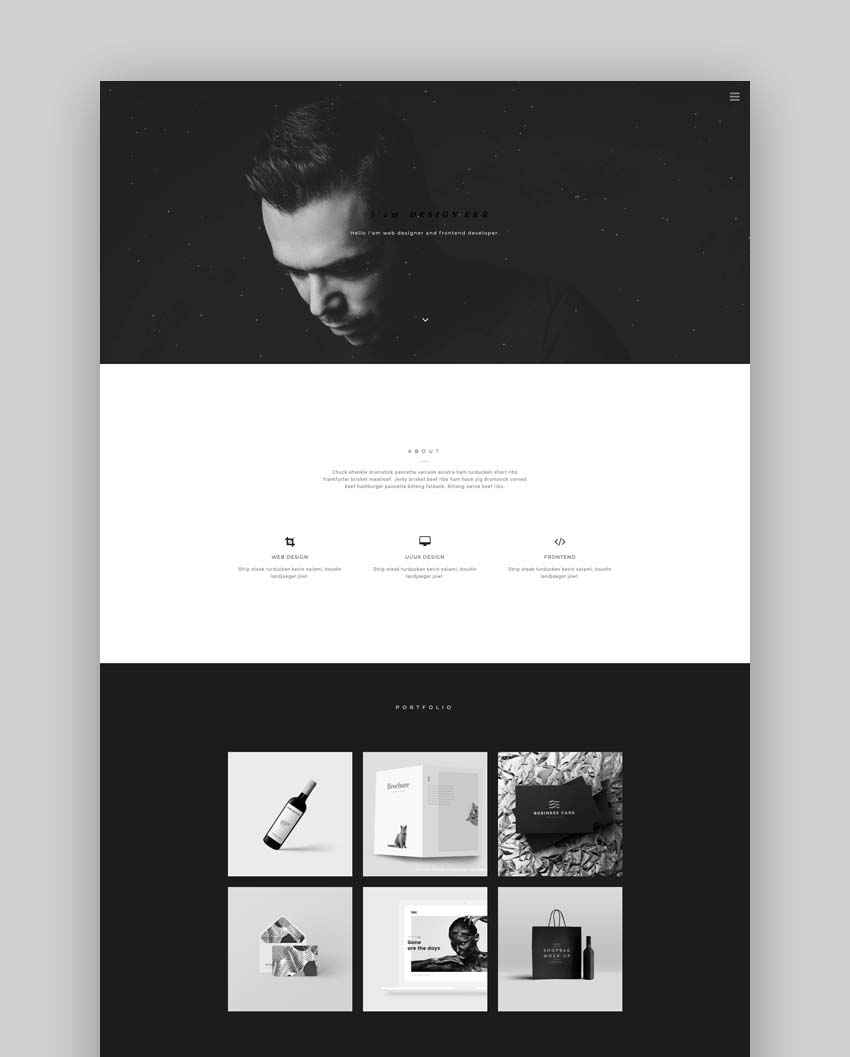
The Joe Black template is a stunning and elegant Bootstrap portfolio template. It has a striking dark design that draws attention to your portfolio pieces and makes them stand out. The template is fully responsive and includes a working contact form.
On top of that, it includes a smooth black to color transition for your portfolio pieces. Plus, you’ll get access to PSD files for even more customization options.
The Paper template has a bold and dark design with a black background. The template includes all the sections you’d need to showcase your past projects, skills, experience, process, and more. It’s fully responsive and cross-browser compatible. On top of that, it has a filterable portfolio so visitors can easily find project examples that would fit their needs.
The Trydo template is a creative portfolio Bootstrap template with many different demos. It offers one page and multipage demos that you can use as a starting point for your portfolio design. The template is fully responsive and loads fast. It also comes with a number of inner pages to help you flesh out your portfolio.
The Imroz template is another creative portfolio template built with the Bootstrap framework. The template is fully responsive and comes in both light and dark versions. You can easily create a personal portfolio as well as an agency portfolio.
If you’re looking for a dramatic design that stands out, try the Borne template. This template offers several different demos and it would be perfect for an agency portfolio. It’s fully responsive, cross-browser compatible, and loads fast. The template also includes detailed documentation to help you set up your portfolio.
The Krozo Bootstrap portfolio template is a highly creative, modern, visually stunning template. It’s best suited for personal portfolio websites. The template is responsive and cross-browser compatible.
It comes with FontAwesome icons, Google Fonts, a working contact form, and more. On top of that, it includes all the necessary sections to present your past projects, skills, and education.
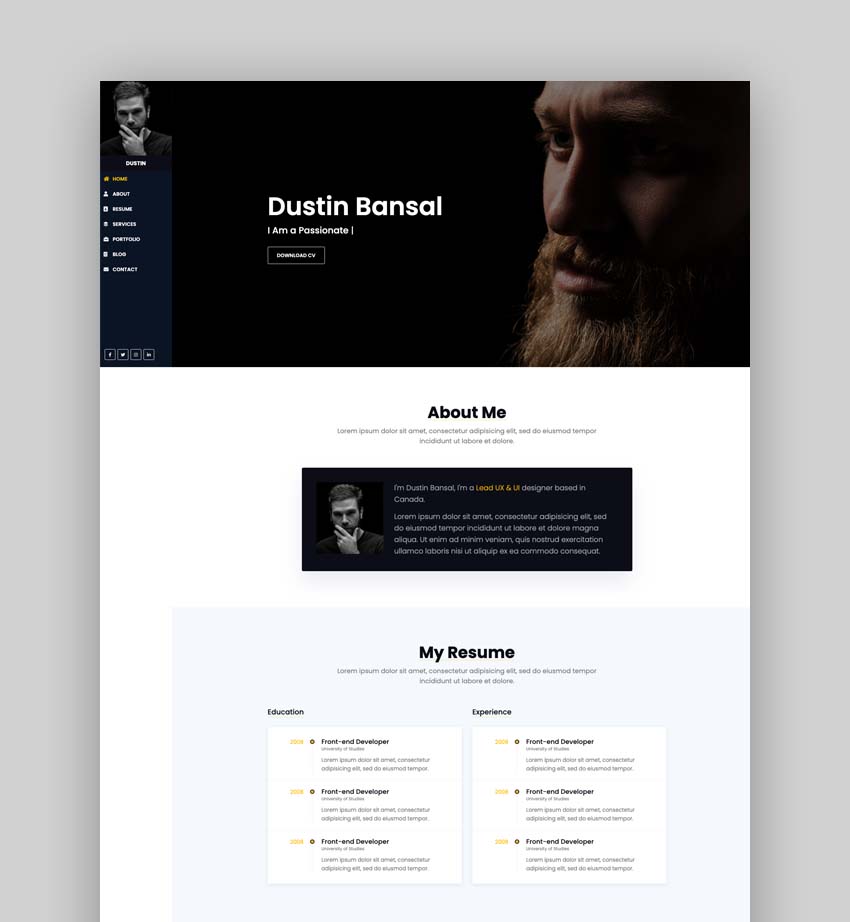
The Dustin template is another visually stunning portfolio template built with personal portfolios in mind. The template is responsive and looks great no matter which device or browser your visitors are using. You’ll find several demos to choose from as well FontAwesome and Themify icons.
The Kerri template has a creative and professional design. It comes in both light and dark versions and offers a variety of premade demos. You can use it as a one page or a multi-page portfolio template.
The template includes plenty of sections to showcase your skills and past projects. In addition to that, the template has 6 predefined color schemes and includes FontAwesome icons as well as Google Fonts.
The Tony template has a simple and clean design. It can be used to create a beautiful personal portfolio with all the sections necessary to showcase skills, education, and past projects. You can also include testimonials and a call to action. The template is fully responsive and cross-browser compatible.
The Kayden template includes 14 different demos to use as a starting point. The template has a modern and professional design with light and dark versions. The template includes slick animations and 2 email templates as well as a fully working contact form. It’s responsive and looks great no matter what device or browser your visitors are using.
The Arika template is a colorful and creative personal portfolio template built on the Bootstrap framework. This template includes several different demos that you can use as a starting point for your design.
You’ll also find support for FontAwesome and Themify icons and Google Fonts. The template is responsive and cross-browser compatible.
The Jordis template has an eye-catching header area with a full-width image. You’ll also find other sections to share your skills, education, past projects, testimonials, and more. The template is easy to customize and includes unlimited color options as well as 6 premade color schemes. It comes with the ability to include a video background. You can choose between a light and a dark version for your portfolio.
The Arshia template can be used as a portfolio as well as a resume template. It has a minimal and simple design. The template includes several different demos as well as a light and a dark version. You’ll find plenty of sections to showcase your past work, process, skills, testimonials, and more. The template is fully responsive and cross-browser compatible.
The Nairo template offers a light and a dark version to make your portfolio pieces stand out even more. This template is a great choice for a personal portfolio. It allows you to present your past work as well as include details about your skills, process, and a call to action. The template comes with a working contact form, Google Fonts, and FontAwesome icons.
The Cristino template has a modern and professional design. It’s responsive which means your portfolio will look great no matter what device your visitors are using. It’s also cross-browser compatible. The template includes both light and dark versions as well as an RTL version. You’ll find a working contact form, video backgrounds, and smooth animations.
The Raquel template not only makes it easy to see your past projects but it also highlights your skills and contact details. The template is fully responsive and cross-browser compatible. The template has a minimal design and includes a blog page so you can easily share case studies about your projects. It comes with Google Fonts, FontAwesome, and Themify icons.
The Nill template offers a great choice of premade demos that you can use as a starting point for your portfolio design. The template supports image, slider, and video backgrounds. It includes a light and a dark version. You’ll also find a working contact form. The template is fully responsive and compatible with all major browsers. In addition to that, the template includes elegant line icons.
Here’s a creative and bold portfolio template built with Bootstrap. The template is best suited for a one page portfolio design. It comes with several premade demos and it includes a blog page. This is a great addition for case studies. The template is responsive and allows you to showcase your past work, skills, testimonials, and more. You can also include a working contact form.
Create a Stunning Portfolio, Quickly!
A stunning portfolio will help you showcase your skills as well as show potential clients and employers what they can expect when working with you. Luckily, with the help of a portfolio template, you can easily and quickly create a portfolio that shows your skills and expertise.
Ghostrunner was one of the best surprises of 2020. It’s a stylish first-person platformer that takes the best elements of Titanfall’s parkour mechanics and adds a cyberpunk twist to the proceedings. It’s also a challenging game that demands precision and purpose from the player. Make a single mistake, and you’ll need to replay a section of a level again. That can get frustrating fast, so developer One More Level is adding a new feature called Assist Mode.
Assist Mode introduces three options you can toggle on and off. You can opt to shorten your character’s ability cooldowns, slow down the game to give you more time to react and play with an extra life to make mistakes less punishing. Accessibility modes are becoming more common in video games, and it’s always good to see another developer find a way to allow more people to enjoy their work.
For experienced players, there’s a new feature called Wave Mode that is essentially Ghostrunner’s take on a roguelike. You’ll need to complete 20 rounds in succession, with each one featuring different enemies — even when you attempt the same one multiple times. Make it all the way to the end, and you’ll earn a fancy new katana for your character.
Both Assist and Wave modes are available today for free on the platforms where you can already buy Ghostrunner. That includes PlayStation 4, Xbox One, Nintendo Switch and PC via Steam, the Epic Games Store and GOG. When the game makes its way to PlayStation 5 and Xbox Series X/S on September 28th, it will come with those modes included.
Electronic Arts is dipping back into college football with a limited-time mode in Madden NFL 22. The Campus Legends mode features ten school teams, including rosters filled with college football icons, as well as current and former NFL stars who are alumni of those squads.
The event is available through the Superstar KO multiplayer mode. The college teams are Clemson University, University of Miami, Louisiana State University, University of Florida, University of Oklahoma, University of Texas, University of Southern California (USC), University of Oregon, University of Nebraska and Michigan State University.
The NEW Campus Legends event is now live, ft. ? historic programs to challenge your friends with! ?
EA notes Madden 22 is now the first game since 2013 to include a college football experience. The publisher announced earlier this year that it's bringing back the College Football series. The next game in the no-longer-dormant franchise is likely years away though, so college football modes in Madden might have to do the trick for now.
To mark the release of the mode, former college and NFL stars Vince Young and Reggie Bush will play against each other as their respective alma maters (University of Texas and USC). The pair faced off in the Rose Bowl in 2006, and they'll return to the Rose Bowl Stadium to repeat the matchup in Madden 22. You can watch the showdown tonight starting at 7PM ET on the NFL YouTube or Madden NFL Twitch channels.
You have a few weeks to check out Campus Legends. The mode will be available until September 27th.
Best Buy is jumping on the e-bike bandwagon. Starting today, you can visit the retailer’s website to purchase powered bicycles, as well as electric scooters and mopeds from brands like Unagi, Bird, Segway and SWFT. In October, Best Buy will begin stocking those same EVs in select stores across the US, including Los Angeles, New York and San Francisco. The company’s Geek Squad contingent will also offer a $100 service where it will come to your house to adjust the brakes, seat height and handlebars on your new whip.
It’s not surprising to see Best Buy embrace e-bikes. Nearly all forms of electric transportation have done well during the pandemic, but e-bikes, in particular, have had a moment. Last summer, sales of powered bicycles outpaced all others by a significant margin. In most cases, you’re probably best off visiting your local bike shop to see what they have on offer, but with how difficult it's been to buy a new bicycle during the pandemic, it never hurts to have another place to shop for your next ride.
Amazon may be the next to hop on the live audio bandwagon, although its take might not be what you'd expect. Axiossources claim Amazon is developing a live audio offering that would focus on music, including concerts and other events — more like Spotify than Clubhouse. The company is reportedly considering podcasts and talk radio as extensions, but Amazon Music would lead the project.
The internet giant also hopes to build live audio into Twitch. The sources didn't say how or when this might arrive.
We've asked Amazon for comment on the rumors. It wouldn't be surprising if Amazon leapt into the live audio space, at least. Amazon recently integrated Twitch streams into the Music app, and the firm's acquisition of podcast subscription business Wondery in 2020 signalled an intent to dive further into audio. There's also the simple matter of competition. Spotify, Twitter Spaces and Facebook's audio rooms could all pose a threat, even if Clubhouse doesn't. This would at least give Amazon a foothold before others dominate the category.
Facebook is planning to reduce political content in the News Feed starting today, it confirmed to Engadget. The move, which was first reported by Axios, follows tests in the US, Canada, Brazil and Indonesia earlier this year, where Facebook limited political content. The company plans to expand the tests to Costa Rica, Sweden, Spain and Ireland.
"These changes are in response to common feedback from our community," a Facebook spokesperson told Engadget. "We conduct ongoing research with people to hear what parts of Facebook are working well for them, and to gather feedback about what we could be doing better. One of the themes we’ve heard is that some people feel that there’s too much political content in their News Feeds. We hope these changes address this feedback and preserve the ability for people to find and interact with political content on Facebook, while respecting their appetite for it at the top of their News Feed."
Facebook says some engagement signals are better than others at indicating which posts people deem interesting or valuable. As a result, the company is expanding some tests related to engagement signals. The tests put less importance on how likely a user is to share or comment on political content. "At the same time, we’re putting more emphasis on new signals such as how likely people are to provide us with negative feedback on posts about political topics and current events when we rank those types of posts in their News Feed," Facebook wrote in an updated blog post.
The changes could reduce the level of misinformation on Facebook, if the algorithms are able to effectively detect and de-emphasize all political content. Political campaigns might have to rethink their strategies of how to reach voters too. On the flip side, the move could come as a blow to news organizations, especially those focused on politics, given the volume of traffic Facebook can drive to websites.
The switch could also make Facebook a less hostile place for users. Political discussions can quickly get heated, which might put off those who use the service largely for keeping in touch with their loved ones and sharing pictures of their kids. For what it's worth, Facebook claimed in November political content makes up just six percent of what users see.
"We’ve learned that these changes will affect public affairs content more broadly and that publishers may see an impact on their traffic," Facebook said. "Knowing this, we are planning a gradual and methodical rollout for these tests, but remain encouraged, and expect to announce further expansions in the coming months."
The reported changes follow other moves that Facebook has made to make political content less visible. It stopped recommending civic and political groups to users earlier this year after temporarily pausing those recommendations ahead of the 2020 US election.
With NBA 2K22’s September 10th release date fast approaching, 2K has shared a first look at the game’s PlayStation 5 and Xbox Series X/S version. The publisher calls this a gameplay reveal, but it's mostly a showcase of what developer Visual Concepts managed to do with the new hardware from Sony and Microsoft. Thankfully, the studio also published a new Courtside Report that details some of the gameplay enhancements players can look forward to when they pick the game up next month.
To start, Visual Concepts says it completely rebuilt the shot contest and blocking systems, as well as made a significant update to how the game handles defensive rotations. When it comes to moving a player up the court, the studio promises tighter controls that will allow you to put together new combos in creative ways.
But some of the most significant changes look like they’re coming to how the game handles shooting. NBA 2K22 will feature a new shot meter that will dynamically change depending on the abilities of the player you’re controlling and whether their shot is contested. According to Visual Concepts, NBA 2K22 will put a greater emphasis on Shot IQ. You’ll be more successful if you take the time to find an open teammate and take a smart shot. For players who like to drive to the basket, there’s a new dunk style creator that will allow you to customize their dunk repertoire.
Outside of those improvements, fans of women's basketball can look forward to much-improved WNBA mode. All told, it looks like NBA 2K's second PS5 and Xbox Series X outing should be a good one.
Google might just save you from hitting your browser's "back" button (or sifting through your history) more than you'd like. The company is rolling out a Chrome beta feature that adds New Tab Page cards (pictured below) for resuming recent tasks. You can quickly jump back to your shopping cart, a recipe or a Google Doc you were working on. You'll have to switch this on by enabling the #ntp-modules flag, but it could be helpful if you'd rather not backtrack through your page visits just to pick up where you left off.
Google
Another addition will help you avoid a back-and-forth when digging through your search results. An experimental feature adds a row below Chrome's address bar on Android to display the rest of your search results. If one link wasn't what you were looking for, you won't have to tap "back" to check out the rest. You can try the row by enabling the #continuous-search flag.
The Android beta will help you share pithy sayings, too. Enable the #webnotes-stylize flag and Chrome will create stylized images from quotes. You just have to share highlighted text and tap "create card" to choose a template.
It's not certain if or when these features will be active by default in Chrome. Don't be surprised if Google changes or even cuts them based on feedback. With that said, they appear to be helpful enough that it might just be a matter of time before they reach more users.
Social fitness network Strava has made one of its most useful safety features available to all users. Starting today, anyone — not just those with a subscription — can use the app’s Beacon feature to share their location with friends and family members.
To enable the feature, tap the “You” tab at the bottom of the main interface and then the cog icon that appears near the top right corner. Once you’re in the settings menu, scroll down until you see the relevant section and toggle the feature on. With Beacon, you can share your location with up to three people. When you add a list of safety contacts to the app, Strava will automatically notify those individuals when you start recording an activity. Another option is to manually text a Beacon link to a friend or family if you don’t want to flood them with notifications each time you go out for a spin.
As a free user, you won’t be able to use the Beacon functionality through a connected device like a Wahoo bike computer or Apple Watch. Strava says that’s something that you will still need a subscription to access “due to the added complexity of supporting those integrations.” One other thing to keep in mind is the software will only share your location as long as you’re recording an activity. Either way, making a safety tool like Beacon free in most contexts is a good move for Strava, particularly after the company moved some previously free features behind a subscription.
Most of us have had meetings that simply could have been an email. Google Calendar will soon provide insights on how you spend your work day, including how long you spend in meetings, so you can find out just how much time you could be saving if your bosses sent memos instead.
This idea behind Time Insights is for you to gain a better understanding of how your time is taken up, so perhaps you can make adjustments if you're spending too much time in Zoom calls or conference rooms. For instance, maybe you can consolidate meetings if you spend many of them with the same people.
The feature can highlight the days and times where you tend to be in meetings the most. You'll also see a time breakdown (including the average time spent in meetings each day) and details about the people with whom you're in meetings most often. When you hover over a person, Google Calendar will highlight all the meetings they're included in.
Time Insights will only be visible on computers, not mobile devices. The insights will typically only be visible to you, but if you manage other people's calendars and they've enabled the “manage sharing access” permission, you'll be able to see their Time Insights too.
Workspace admins will be able to turn the feature off, but other users won't have that option. You can, however, hide Time Insights by closing the bar on the right of the screen.
Time Insights is coming to certain Google Workspace accounts (i.e. Business Standard, Business Plus, Enterprise Standard, Enterprise Plus, Education Plus and Nonprofits users). It won't be available to those on other plans, including G Suite Basic and Business users. Workspace admins should see it within the next couple of weeks. Google will roll out Time Insights to Rapid Release domains and Scheduled Release domains on September 6th and 20th, respectively. The rollout will take up to 15 days on each type of domain.
Motional, the autonomy-focused joint venture from Hyundai and Aptiv, has chosen its next robotaxi — and it's entirely what you'd expect. The company has revealed that its first commercial robotaxi will be based on the Ioniq 5, adding self-driving hardware (cameras, LiDAR and radar) to the brand new EV. It'll also include in-cabin interfaces to give passengers some options during their ride, such as asking for an extra stop.
The crossover includes "safety redundancies" to keep critical systems running. Motional can also take remote control if the robotaxi doesn't know how to handle a given situation — likely necessary when this is a Level 4 self-driving car that can't quite operate autonomously under all conditions.
The driverless Ioniq 5 will enter service in 2023 through Motional's partnership with Lyft. While it isn't surprising that Motional would pick a Hyundai car over previous examples (such as the BMWs Aptiv used), this might be an ideal fit — it's a roomy, zero-emissions car with a 300-mile range. That might also give Motional a slight edge over other manufacturer-linked robotaxi services, such as GM's Cruise (which currently relies on the smaller, shorter-ranged Bolt EV).
After months of hype, Windows 11 has a release date. Microsoft has announced that Windows 11 will be available on October 5th, both as a free upgrade for qualifying Windows 10 systems as well as new PCs shipping with the OS pre-installed.
Don't assume you'll get the upgrade on day one, though. This is a gradual rollout that will prioritize newer hardware and use "intelligence models" to determine who gets the upgrade first, including reliability and device age. All supporting machines will get the update by mid-2022, but this suggests you may be toward the back of the queue if you're using relatively old hardware. At least some shipping Windows 10 PCs will be on the fast track for Windows 11 updates, including models from Acer, ASUS, Dell, HP, Lenovo, Samsung and (of course) Microsoft.
Notably, though, Android app support won't be available on launch. Microsoft now only expects to introduce the feature in a Windows Insider preview build sometime in the "coming months." That's not completely shocking given the challenges of translating mobile apps to a mouse-and-keyboard experience, but this still means one of Windows 11's tentpole features won't be available for a long while.
The new platform centers on a refreshed interface with a new Start interface, Snap Layouts, widgets and Teams integration. You'll also find a redesigned Microsoft Store that even lets third-party stores operate within its walls. Technology like DirectX 12, DirectStorage and Auto HDR also promise to help gamers.
This might not be Microsoft's smoothest launch, however. On top of the delayed Android feature, Microsoft sparked some confusion with relatively steep hardware requirements that have evolved over time and include demands for security features like TPM 2.0. Microsoft will technically let you install Windows 11 on unsupported hardware, but you might be denied updates unless you're willing to install new OS images on a frequent basis. Unlike Windows 10, then, you can't just assume your years-old computer will run this software without a hitch — there's a chance you'll have to upgrade your hardware first, even if it's still fast enough for your needs.
Bose introduced its QuietComfort 35 II headphones back in 2017, and despite debuting the stellar Bose 700 model in 2019, the company was adamant its QC line wasn't going away. Now the QC35 II has a proper replacement: the QuietComfort 45. Bose says these headphones "maintain the hallmarks of their predecessor" when it comes to audio quality, comfort, reliable controls and more. As you can see, the QC45 also keeps nearly the same design at the QC35 and QC35 II except for a few subtle changes. And at $329.95, they'll debut at a lower price than the previous two QuietComfort models.
While the company went with an updated look for the Bose 700, it largely maintained the aesthetic of the QuietComfort line for the QC45. Bose says it kept the design elements that made the QC35 and QC35 II "an identifiable classic," but it got rid of the pleats on the earpads and closed some gaps to create "smooth transitions." You should still expect these to be light and cozy as none of the changes should impact the QuietComfort's highly-regarded status as a travel companion. The QC45 still folds flat for ear storage, thanks to the return of rotating earcups and a hinged headband.
Bose
On the inside is where the most notable changes lie. Bose says it improved the noise cancellation with the combination of internal and external microphones paired with a "proprietary digital chip." The company explains that this setup can detect and silence more mid-range frequencies — things like the roar of train, office or coffee shop — when you activate Quiet mode. The QuietComfort 45 also has an Aware setting that offers full transparency to your environment. Unlike other Bose models, there's no level adjustment for the active noise cancellation (ANC) here, you just get the two aforementioned modes separately.
Those two audio settings are accessible via the QC45's on-board controls. There's a dedicated button for them on the left earcup that can also mute the mic during a call. All of the core functions — volume, play/pause, voice assistant, power and pairing — are on the right side. Like the previous models, they're all physical buttons instead of touch controls, so they should preform reliably.
Bose also extended the battery life with the QuietComfort 45. The company says you can expect up to 24 hours of listening time on a charge. That's up from 20 hours on the QC35 II. A quick-charge feature will give you three hours of listening time in 15 minutes and the QC45 charges via a USB-C cable.
The QuietComfort 45 headphones will be available in black and light grey color options on September 23rd for $329.95. Pre-orders begin today at Amazon and Bose's website.
Back in June, Spotify introduced Blend, a shared playlist that pulls together songs from your listening history and that of a friend’s. Today, that feature is not only rolling out to Spotify users globally, but it also comes with some new improvements.
To start, each time you create a Blend playlist with a friend, Spotify will generate a match score, telling the two of you how close you are on your musical tastes. Like with the company’s end-of-year Wrapped feature, it will now also create a shareable story that tells you some fun facts about the songs and artists that made their way into your playlist. Spotify says it has also tweaked the cover art to make it easier to identify each Blend playlist you create.
All users can try out the feature. However, if you’re a Premium subscriber, you’ll see whose music taste contributed to each song in a playlist. To make your first one, tap the “Create Blend” option in the For You hub in the Spotify mobile app, and then invite your friend. Once they accept, Spotify will handle the rest, and you can share the resulting story the company generates about your playlist.