Dieselgate has shaken Volkswagen to its foundation, prompting the automaker to embrace a radical new direction and invest nearly $40 billion into EV R&D as well as the factory tech needed to make it. The initial result of that massive investment has now hit the streets in the form of a compact crossover SUV. Say hello to the 2021 ID.4, VW’s first EV for the people.
The ID.4’s on-paper stats aren’t particularly striking, especially when compared to some of its higher-priced, luxury alternatives. With a 77.0-kWh lithium-ion battery pack putting out 201 HP and 229 pound-feet of torque, the ID.4’s specs are very much in line with its gas model equivalents like the Honda CRV or similarly specced EVs like the Hyundai Kona or Kia Niro EV (though each of those only have 64 kwH batteries).
The ID.4 tips scales at 4,600-plus pounds. Yeah, that’s stout, even for an electric and it’s roughly 800 pounds heavier than the biggest 2021 Kona EV. As such, you shouldn’t be surprised that the EV crossover takes its sweet time getting up to 60 mph in around seven and a half seconds, which is pretty pokey for an EV. Even when overtaking other vehicles at freeway speeds, the ID.4 can feel downright lackadaisical. Combined with a governed top speed of 100 MPH, the ID.4 is very much a people mover, not a sports car in disguise.
Andrew Tarantola / Engadget
Its EPA estimated 250-mile range feels generous and seems very much geared towards urban errands and freeway commutes with ready access to charging stations. Even when using the electron-sipping Economy mode to cruise along a nearly empty Highway 280 outside San Francisco, the power gauge shrank far more quickly than I was comfortable with. This was the first EV I’ve test driven where I’ve felt a bit of palpable range anxiety. Thankfully, the ID.4’s 400V electrical architecture supports both level 2 and DC fast charging protocols which enable it to imbibe an 80 percent charge in, respectively, around 9.5 hours and just under 40 minutes (per VW’s estimates).
Style-wise, I find myself smitten with the ID.4. The crossover’s exterior is less windswept than last year’s Honda HRV but not as rigidly straight-edged as Volvo’s upcoming C40 Recharge. And unlike what we saw on the Mach-E, e-tron GT or even the XC40 Recharge, the ID.4 appears to use surprisingly muted head and tail lights — you won’t find any Thor’s Hammers bedazzling the hood or distended brakelights climbing the trunk lid like LED ivy. Kind of a shame, really.
The interior is sparse. But, I guess, no more sparse than any of the other last few EVs I’ve recently been in? Honestly, They all feel sterile and minimalist to me, if only to varying degrees. In this case, the dashboard of the ID.4 comprises two LED displays, a smattering of steering column stalks and some AC vents.
The gear shift is located on the steering column as well and it’s weird — basically a wide paddle mounted on the column and capped with a parking brake button. You twist it back and forth to change between forward and reverse gears. I mean, I wasn’t initially a fan of the Mach-E’s cylindrical iDrive-style shifter but at least it didn’t take me 5 minutes just to identify the damn thing the first time I got into the car. Same with the Start button. I haven't thought to look for a start button on the steering column itself since the days of physical ignition cylinders. Touche, Volkswagen.
Despite the confusing nature of various sticks, stalks and buttons, the cabin itself is really quite comfortable. It’s roomy enough for five grown adults to fit in without having to slouch in the back seat, plus the perceived headroom and vertical space is accentuated by an all-glass roof. Unlike the Mach-E, the ID.4’s roof is much less opaque and is instead concealed from external prying eyes by a rollaway cloth headliner which slides out of the way at the swipe of an overhead touch control. The trunk space is equally well appointed with 30 cubic feet of space that more than doubles if you lower the rear seat backs.
The infotainment system, however, is like if 2020 were digital cabin controls. I’ve yet to encounter such a system with a steeper initial learning curve. The menu system feels like it was designed via dare. Upon taking delivery of the vehicle I was auditorily assaulted with adult contemporary music for an unconscionable span of time while I tried in vain to locate a power button, a pause button — hell, even the volume controls — in what proved to be VW’s byzantine infotainment menu system. And for that I will never forgive you, Michael Bolton. YOU KNOW WHAT YOU DID, MICHAEL.
Thank goodness for a robust voice control system combined with integration for both Android Auto and Apple CarPlay to enable more seamless control of the cabin environment. But note that these aren’t fully integrated like what you’d see on the XC40 Recharge or the Polestar 2 with Android Auto — those operate directly through the infotainment system head unit.
The ID.4 does bear a passing resemblance to the Tesla Model Y, and I like that, it’s just tall enough to provide a clear view of the traffic around me without feeling top-heavy — the thousand pounds of battery pack under my seat certainly helps with that. The suspension is strung tightly enough to keep the ID.4 from body-rolling through turns while remaining soft enough that driving over potholes wouldn’t jar my spine out of alignment.
Oddly, I could seem to find a one-pedal driving option. One-pedal driving is a system found in EVs that uses the accelerator pedal to modulate both the vehicle’s drive and braking — press down on the pedal to go faster, ease off it to automatically engage the regenerative brakes and recoup precious charge. I personally am not a fan of the method but its absence from a vehicle so clearly designed as a practical family commuter is both noticeable and notable.
The ID.4’s ADAS system, IQ.DRIVE, works generally as you’d expect it would. It offers the standard mix of forward collision warning, autonomous emergency braking, blind-spot monitoring, rear traffic alert, and adaptive cruise control. In my limited experience with it, I found the lane keeping feature demanded an iron will to engage as the vehicle kept seeming to delay recentering itself within the lane until it was already riding the side marker. It’s certainly no hands-free steering like what GM’s SuperCruise feature offers, but this is helpful when you're in traffic and trying to fight through infotainment menus.
Andrew Tarantola / Engadget
The ID.4 starts at around $40,000 and comes available in three trim packages, the Pro, the Pro S and the 1st edition. All three are currently only available as RWD though the Pro and Pro S will begin offering an AWD version later this year as a $4,000 option. Specifically, the 1st Edition, which I drove, starts at $43,995, the Pro will put you back $40-44,000 depending on drive type and the Pro S (the S stands for Statement) will start at $44-48K with the option to upgrade to 19-inch rims and a 12-inch infotainment display for an added $1,500.
Overall, the ID.4 is a solid first attempt at an EV. Sure Volkswagen included a few… ahem, unusual design decisions, it’s range and power consumption were twitchy enough to keep my eyes glued to the battery gauge during my drive, and the whole vehicle in general felt just a touch under-powered. But this is the first of what we expect will be many more EV models from the automaker. I’d personally wait a model year or two for everything to fully shakedown and for VW to work all the bugs out but if you’re in the market for a sensible mass-market EV that can shuttle your family around town, carry home a full load of groceries, and perform all those other innocuous errands that used to fill our days before the pandemic hit, the 2021 ID.4 is well worth your consideration.
As impressive as Amazon’s Alexa technology is, the best way to utilize it isn’t always clear. Sure, you can get it to tell you the weather, play music and set alarms, but that’s just scratching the surface of what this AI is truly capable of. And if you never get around to purchasing and syncing compatible peripherals, you won't get to explore much further than that.
If you haven’t quite been sold on voice-activated tech yet, or simply want to up the ante a spell, it's absolutely worth checking out the GE C by GE Sol, an Alexa-enabled smart light that’s available right now for just $90 (normally $199). It has Amazon Alexa built right into it, so it serves a direct function in addition to having such a charming voice.
This smart light has all the features, functionality and control you'd expect from Amazon Alexa — only it’s packed into an innovative Richard Clarkson-inspired design. Speaking of which, this device fits in perfectly with your contemporary (or even traditional) space with its smooth, polished steel frame and soft, cozy lighting.
Part of the brilliance of the design is how it synchronizes its own aesthetic with the Alexa technology. Not only can you set alarms, but you can sync them with the light to emit something called “vibration lighting” in the morning to help wake you up, or “calming light” in the evening to help you unwind.
You can also set it to passively transition from daylight lighting to soft white shade in the evening, helping maintain your circadian rhythm without even thinking about it. And, of course, it’s compatible with all the Alexa-friendly smart home devices you already own (or just have your eye on).
If you’re looking for a sophisticated way to add smart voice functionality and lighting to any room in your home, you can purchase a GE C by GE Sol Wi-Fi Alexa Enabled Smart Light on sale for $90, or 55 percent off.
Prices are subject to change.
Engadget is teaming up with StackSocial to bring you deals on the latest headphones, gadgets, tech toys, and tutorials. This post does not constitute editorial endorsement, and we earn a portion of all sales. If you have any questions about the products you see here or previous purchases, please contact StackSocial support here.
Only a few days after gaining approval from regulators in the US and European Union, Microsoft and ZeniMax Media have made it official. The parent company of Bethesda Softworks is now part of Xbox following the completion of a $7.5 billion deal.
The deal adds eight more studios to Xbox’s portfolio, including id Software, Arcane and Bethesda Game Studios. It remains to be seen which games developed by those studios will be exclusive to PC and Xbox, but there definitely will be some titles that won't make their way to PlayStation, Switch or other platforms.
"With the addition of the Bethesda creative teams, gamers should know that Xbox consoles, PC, and Game Pass will be the best place to experience new Bethesda games, including some new titles in the future that will be exclusive to Xbox and PC players," Xbox chief Phil Spencer wrote in a blog post.
When Xbox and Bethesda announced the deal, they confirmed they'd abide by previous agreements with Sony. Deathloopand GhostWire: Tokyowill still be PlayStation 5 console exclusives for a limited time. Future games may be released on non-Xbox or PC platforms, but Xbox and Bethesda will decide those on a "case-by-case basis." Currently, Bethesda is working on The Elder Scrolls VI and a new franchise called Starfield.
Spencer noted that Xbox will have more to share about what its new studios are working on later this year. As previously rumored, Microsoft will add more Bethesda games to Xbox Game Pass later this week.
While not all Mario games are on sale, you can grab quite a few titles at good sale prices this week. It's also worth noting that Super Mario 3D All-Stars, Nintendo's collection of classic Mario games remade for the Switch, will not be sold for much longer. Nintendo's pulling the collection from physical and digital shelves on March 31. We doubt it'll see a huge price drop before the cut-off date, so if you want it, you have only a few more weeks to get it.
Those are the best deals happening for Mar10 Day this year, but Nintendo's also celebrating with special in-game extras throughout the month. Players of Animal Crossing: Pocket Camp will notice special poses for Fave Photos throughout March in addition to past event items coming back for a limited time. Anniversary-themed items are also coming to Animal Crossing: New Horizons and new tours, drivers, karts and gliders will pop up in Mario Kart Tour, too.
Follow @EngadgetDeals on Twitter for the latest tech deals and buying advice.
If you’re a North American League of Legends fan, you’ve been forced to sit on sidelines and watch while people in Europe and other parts of the world have had a chance to play Wild Rift. That changes later this month, with Riot announcing today that it’s expanding the game’s open beta to Android and iOS users in Canada and the US on March 29th.
We had a chance to check out the beta recently and came away impressed with how Riot had managed to translate the League of Legends formula to mobile. The on-screen controls worked surprisingly well and all of the complexity that the MOBA is known for is still there. Currently, there are 50 playable champions to master, each with their own selection of skills, and item builds are still a major part of the experience. All of that can make the game overwhelming if you've never played LoL before, but thankfully Wild Rift comes with a handful of tutorials that explain all the basics.
Samsung has finally introduced a 980 SSD that isn't part of the high-priced Pro line, and it's mostly good news for performance-minded PC users — with a caveat. The company's new base level 980 NVMe drive is billed as a significant upgrade over the long-serving 970 Evo with similar sequential read speeds (up to 3,500MB/s), but faster writes (up to 3,000MB/s versus 2,500MB/s), and more sustained performance through a larger buffer. It even promises 36 percent lower power consumption, 54 percent greater power efficiency and improved cooling that should prevent overheating. It may be a better fit for laptops as a result.
However, Samsung is also ditching built-in DRAM on the plain 980, joining the ranks of lower-cost SSDs. It's promising speeds "identical" to faster DRAM-equipped drives in part by using Host Memory Buffer technology to directly access system RAM, but it's clear this is a tradeoff to keep prices down and compete with lower-end SSDs.
Those prices are low, thankfully. Samsung is selling the 980 starting at $50 for a 250GB model, $70 for 500GB and $130 for 1TB (there's no 2TB edition, at least not yet). That compares favorably to Samsung's current prices for the 970 Evo line, where a 500GB model normally costs $80 and a 1TB drive will cost you $160. It's certainly lower than the 970 Evo's launch-era prices, when even the 250GB drive started at $120. The 980 may be worthwhile for the price, then, even if it's not the uniform upgrade you might have hoped for.
Another European country could soon place legal restrictions on video game loot boxes. As Der Spiegel and Eurogamer report, Germany's Bundestag has passed a reformed Youth Protection Act that would limit loot boxes to games with an 18-plus age rating. The "gambling-like mechanisms" pose too many risks for kids, according to the law.
The revised law still has to receive approval from the Bundesrat (Federal Council), but could take effect as early as the spring if it moves forward.
Developers like EA have long denied connections to gambling, likening loot boxes to Kinder eggs and other treats with surprises inside. Critics have rejected these defenses, though, accusing studios of designing loot box mechanics to exploit users with promises of rare cosmetic items or pay-to-win advantages.
This wouldn't be an outright ban, as in Belgium, but it could still have a dramatic impact on games sold in Germany. Game stores may have to implement more stringent age checks, and developers might need to either limit access to loot boxes in the country or remove the mechanics entirely. It could be particularly damaging to publishers like EA, which has made these systems a staple in games like FIFA 21's Ultimate Team mode — it would have to raise the game's age rating from 3-plus to 18-plus and cut off some of its audience.
Other countries might follow suit. Elements of the UK government have called for regulations that would treat loot boxes like gambling. If so, developers might face even tougher decisions about loot boxes. No matter how committed a creator might be to these semi-random packs, they might decide to back away if enough governments make the boxes impractical.
Fitbit has revealed the latest version of its fitness tracker for kids. Fitbit Ace 3 includes many of the features from the previous model, including sleep tracking and a swim-proof design (albeit a more rounded look). It also offers more animated clock faces, along with a battery life of up to eight days. That's an improvement over the five days you can get out of an Ace 2 before having to recharge it.
Parents can review their kids' sleep habits and activity through a Fitbit family account, while parental controls help protect youngsters' privacy. At $79.95, Ace 3 costs $10 more than the last model and it's available in black and sport red or blue and astro green. It's for kids age six and older and they can customize the device with accessories. Minions-themed accessory bands will be available this summer for $29.95.
It's been almost two years since Fitbit released the Ace 2, so it was perhaps about time for an update. Ace 3 could help parents to motivate their kids to stay active and get away from screens a bit more often while the COVID-19 pandemic persists. Fitbit says this is the first of its spring products, so it seems it'll have more items to show off very soon. This is also the first product from the company since it became part of Google earlier this year.
Looking for the best 80s fonts to complete your projects? Check out this new list of exciting pro fonts!
Everyone is in love with the 80s. Inspired by everything from the futuristic sci-fi films to the awesome retro graphics, designers are getting really creative with their 80s style fonts.
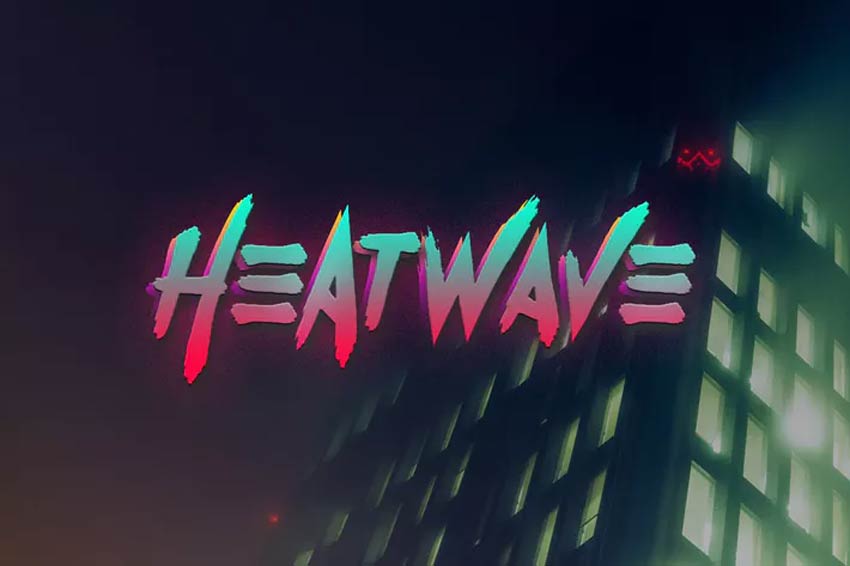
Heatwave is a really cool 80s retro font. Get it from Envato Elements
Want to incorporate a few into your next poster? Enjoy this inspiring collection of high-quality fonts from Envato Elements and Envato Market.
If you’re a graphic designer or digital artist who constantly needs the best retro fonts from the 80s, then you can benefit from Envato Elements, our subscription-based marketplace. For a low monthly price, you get unlimited downloads of all the fonts that you need. And that’s not all. You can also download templates, add-ons, photos, videos and more with your subscription.
On the other hand, if a subscription isn’t your thing and you prefer to get 80s style fonts one at a time, then you’ll love our single-purchase marketplace, GraphicRiver. There you’ll find everything you need for your creative digital projects.
40+ Best 80s Retro Fonts to Use in 2021
Without further ado, let me show you some of the coolest retro fonts from the 80s you can get from Envato Elements and GraphicRiver.
Retro fonts from the 80s inspired by movie titles look really cool. Check out Horsemen, an 80s retro font inspired by artwork, movies, and music from that decade. This retro font will look fantastic on T-shirts, posters, comics, album covers, and any creative project you’ve got.
Hanahelia is a great example of an 80s style font. Add some neon and shiny effects, and you’ll get a cool 80s lettering design. This script font is perfect for logos, flyers, posters, and more.
In the 80s, futuristic looks were very popular. And this eighties font is all about it. Take advantage of this very complete pack. It comes with the OTF typeface, as well as cool backgrounds and elements in EPS, JPG, PNG, and PSD files.
Neon was trending in the 80s, and it sure is trending now. Check out this cool 80s type script and add a really cool touch to your retro designs. Use it for logos, branding, business, or any project you’ve got in mind.
This nice sans-serif eighties font is described by its creator as the result of mixing “the trends of aesthetic design with the implementation of vintage poster design, and 80s disco boogie music”. We think it’s a really cool 80s typeface for your designs.
This wicked 80s type design is inspired by Star Wars. Crush the competition with a cool retro font that’s perfect for sci-fi projects and games. Included in this download are letters, numbers, and additional alternates and ligatures. Check it out!
Handmade fonts are created by scanning in high-resolution images of letters elegantly brushed by hand. This set of 80s typefaces includes a versatile brush typeface inspired by simple masculine vibes. Try it out on posters, invites, or stationery.
Looking for a clear 80s retro font? This popular trend often features a great metallic sheen that will work on many 80s projects. Add it to a movie or product title like the image above. For more great results, personalize the 80s lettering to fit your brand’s style.
Eighties-style fonts like this one don’t often come with extra bonus features. So make sure to grab this creative typeface inspired by the neon lights of the 1980s. You can even test drive this 80s type font with any word by visiting the preview link. Try it out!
Eighties text fonts like Ambisi are like no other. They feature interesting geometric shapes inspired by abstract and futuristic concepts. Make your work stand out with this cool and unique eighties font text style.
Need another great retro font for your collection? Thunderstorm is a hand-painted 80s typeface that emulates classic show titles from the past. Add it to your YouTube videos, social media pictures and more for a whole new look!
Nemphis is a brilliant new font based on the popular 80s Memphis Design trend. It uses funky shapes and letter arrangements to create intricate letters with lots of personality. Use this display 80s typeface on almost any project, from web work to print design.
Or wrap your signature around a stunning skyline with the Ambrogio eighties font. This 80s script font is destined to give your work a bold new aesthetic. Designed entirely by hand, this signature font will work perfectly with book covers, magazines, and text effects.
Need a neon 80s font? Heatwave might be just the fit for your 80s poster. Inspired by classic retro 80s graphics, this font is cool and edgy. Included in this download is a full set of letters, numbers, and punctuation. Multi-language support is also included!
Get inspired to make great graphics. This next cool 80s font really stands out on posters, logos, and header designs. You can also add it to illustrations for a nice comic effect. Grab this pro 80s text font for just under $20!
So where’s the party? Lay out the plans with this incredible 80s script font. Whether you’re throwing a party or creating signs for a tropical bar, this 80s type font will help you set up your brand right. Grab it today for just under $15.
Feeling burnt out? Stay inspired with a creative typography project. This burnout font is an all caps typeface that is loud and proud. So stand out with this complete set of letters, numbers, and punctuation. Perfect for retro album covers too!
Want a bold font next? Boldwest is a creepy and spooky font type. Inspired by Halloween, the letters were created to emulate spooky ghost shapes and funny characters. Add it to your work for a cute and funny typeface.
Many of New York’s famous buildings were made in the 80s. Now you can get that 80s New York vibe with this retro font. Featuring eight creative fonts, this pack includes amazingly detailed grunge textures and serif typefaces.
Craving a little nostalgia? Step into a time machine with the wonderful Crava retro font. This 80s font is curvy and big. It’s a unique display font with large, looping letters and an all caps style. Use it for a retro twist to any poster or project.
What was your favorite game in the 80s? Many of the 80s style fonts we’ve seen already are inspired by eight-bit pixel games and sci-fi films. And the Game Over font is no different. Grab it for just $11 to see how it will look on your next design. Try it out!
Create bold logos with the Blagious script typeface. An extraordinary design by Cotbada-studio, this script is flirty and makes any packaging stand out. Visit the preview link to see more examples and to test it out!
Relive the magic of the 1980s arcade. Inspired by 80s classics like Knight Rider, Miami Vice, and arcade games, this retro font pack is sure to make your T-shirts and posters shine. It comes with uppercase and lowercase letters as well as additional ligatures.
Here’s another great neon 80s font to add to your collection. This retro, classic script could easily have come out of any vintage film. It features stylish capital and lowercase letters you can definitely bring into modern designs. Try it out with your work!
Create more harmony in your designs with this creative font duo. Friday Sunday is a cool retro font with a nice modern edge. Easily implement it into logos, websites, and stylish branding material. The possibilities are limitless with this one.
The neon 80s font trend has seen many great fonts, like this Neolion font duo. This download comes with amazing regular, italic, and script neon styles. Suitable for a variety of purposes, this font can definitely help if you need a boost in your creative content.
Many fonts from the 80s are just plain old quirky, like Cred. Inspired by the fun and funny fat typefaces from the 80s, this typeface is full of texture and personality. It’ll certainly take up space too, so use it wisely for the best impact.
There’s nothing like a classic sci-fi movie from the 80s. The Futurist 6 font explores the wonderful geometric trend with angular shapes and minimalist lines. It’s legible enough to read as a book title or a bold logo. Add it to your collection today!
Eighties text fonts are sometimes messy too. The Minority retro font features a hand-painted condensed script that is bold and explosive. Enjoy the realistic spray-painted effect and epic stylistic alternates. How would you use this font in a project?
31. Broken Font (OTF, TTF, WOFF) (Envato Elements)
You can fix just about anything with good design. So fix your work with the Broken font. Made by designer yandidesigns, this bold scratch font is new and unique. It features a full set of uppercase letters with realistic dents and scratches. Give it a go!
If you’re looking for a logo design that looks effortlessly natural, try the Saltino typeface. This natural, handwritten typeface was made by designer khurasan. Its sultry style is soft and elegant, making it the perfect fit for wedding designs.
Want another great 80s text font? The Alaska Adventure typeface has a clean, sans serif style. The subtle letter arrangement has awesome character to it and works incredibly well with minimalist projects like logos and headers. Try it out on invites and print design too!
Here’s another impressive brush font to add to your arsenal. Kust Brush is both bold and effective. It features a realistic brush style with lots of texture. Every letter has been given a distorted look, so you’ll truly get a unique vibe with this typeface.
Love the video games of the 80s? Create your very own video game titles with this amazing video game font. The designer created this pack of fonts and video game characters, including 17 retro Martians. Mix and match this pack for a cool result!
Or tell your story as you would in school. School Story is a cute display typeface made with a lot of creativity. It can instantly add a cheerful element to your designs and works well with presentations and more. Get letters, numbers, and punctuation with this set!
Feeling a little artsy? Express your creative juices with the Artzopo font. This handmade font can easily be fitted for logos on T-shirts and apparel. Make an impact with a cool handwritten look that’s hard to miss. Try it out!
This next 80s text font is sleek and sophisticated. Zeky is a classic typeface with tall characters and sans serif letters. Download this font to get everything you need as well as a helpful instructional guide. Easy installation too!
Brush fonts are one of the best ways to add a little edge to your projects. The Manticore font is an 80s brush font with letters, numbers, and extra glyphs. It works best on 80s styled prints like punk graphics or horror themes. Check it out!
Looking for something new? Step out of the box with the Newtype typeface. This fresh and unique font is sure to add character to your typography. It’s available in OTF and TTF format and works well with various media. Try it out on video games or movie titles.
Or make a lasting impression with the stunning Jagalana typeface. This 80s script font has beautiful, swooping letters and a nice, elegant feel. Calligraphy styles like these are lovely on invites, but you can also try them out on branding material and more. So add it today!
Megaton is a really cool 80s typeface. Check this big and bold stencil font with uppercase and multilingual letters, numbers, and punctuation. If you mix it with a cool sans-serif or script font, it will take your design to the next level.
We close the selection with a really cool neon 80s lettering. This is a bold display font with a vintage feel, totally inspired by the 80s. The pack includes a neon sans-serif font and a neon script font. Use it to make your logos stand out!
Learn More About Retro Design Trends
Now that you’ve seen our coolest 80s lettering styles, I’m sure you’d like to know more about this retro design trend that is taking over social media and brands. I’ve got this useful video where you can learn more about it:
Don’t forget to visit our Envato Tuts+ YouTube channel, where you can find dozens of interesting and helpful tutorials and videos.
You can also try out these epic 80s design tutorials:
Fonts used in the 80s are getting their long-overdue praise this year. So how will you incorporate these cool designs into your next work? Let us know your favorites in the comments! Learn more about 80s styled fonts. Check out these links:
This has been a selection of premium resources perfect for the avid designer. For more retro fonts from the 80s and cool 80s lettering, check out Envato Elements and Envato Market Happy designing!
In this lesson of “Mastering Calligraphy”, we’re going to learn how to write in cursive script.
Flowing, cursive calligraphy is still seen today on wedding invitations and menus at fancy restaurants. While it looks extremely difficult to ink, it’s actually made of a few basic strokes. Better yet, with the Cursive Script, you hardly ever have to lift your pen off the paper!
In this tutorial, you’ll learn how to write in cursive letters. But if you’d like to save time and find the best calligraphy fonts for your digital projects, scroll down after this tutorial. We’ve got a hand-picked selection of cursive calligraphy fonts from Envato Elements.
First, let’s begin with the full process of how to write in cursive for beginners.
What You Will Learn in This Calligraphy Tutorial
How to write in cursive/learn cursive writing
How to write the alphabet in Cursive Script
Cursive script writing in lowercase
Cursive script writing in uppercase
What You’ll Need
Pencil
Pencil sharpener
Eraser
Ballpoint pen or gel pen (any pen with good ink flow)
Before we dive into cursive script writing, let’s warm up our hands.
Step 1
Print out four or five of the practice sheets on blank paper.
Step 2
Practice the basic entrance/exit stroke for one or two lines to warm up. Keep in mind that cursive script is all about joined letters; to ensure easy connecting, all lowercase letters have entrance and exit strokes.
Step 3
Practice the basic upward stroke for one or two lines to warm up. This stroke is a bit new but very easy. You start just above the bottom line. Then, you shoot up to the top line.
Step 4
Practice the basic curve stroke for one or two lines to warm up. This one hasn’t changed, but you may curl up a bit more than before. Starting a little under the dashed line, go up and around anticlockwise toward the bottom line and curve up, leaving a little gap.
Okay! Now we’re ready to start. In this lesson on how to write in cursive for beginners, we’re going to learn a very familiar alphabet called Cursive Script.
2. How to Write the Cursive Script Lowercase Alphabet
Let’s take a look at the cursive script alphabet in lowercase. As you can see, it looks almost identical to the cursive you learned in elementary school. The red arrows above show the directions of the pen strokes.
Cursive script is all about efficiency, so when writing most of the letters, the pen stays on the paper. Most letters will be made with just one stroke as cursive is all about efficiency. We’re going to start with the lowercase alphabet and break it up into two sections: upward stroke letters and curve stroke letters. So let’s start with the upward stroke letters!
Print out a copy of the cursive calligraphy alphabet above, so that you have it handy for reference.
3. How to Write the Upward Stroke Lowercase Letters
Step 1
Let’s start learning some cursive calligraphy letters. The letters b, f, h, i, j, k, l, m, n, p, r, s, t, u, v, w, x, y, and z all begin with an upward stroke. Some have strokes that fill up the entire height of the line, and others only reach to the dashed line. Some, like the “f”, even reach below the bottom line.
To start, I’m going to show you the direction of each stroke. When you’re writing out the letters yourself, you can sketch them out using your pencil first. Then you can simply follow the pencil lines with your pen. This is also helpful for learning to write a “k” in cursive.
Step 2
Let’s start with the “u” since it’s easiest. Place your pen tip on the bottom line. Make an upward stroke to the dashed line. Then make a downward stroke that dips to the bottom line and then swings back up again. Next, make another downward stroke and end just below the dashed line. Voila! You have a Cursive Script “u”. It kind of felt like drawing waves on the sea, right?
Step 3
Repeat the process of making the letter “u” three times so that you get the feel of it. Many letters, such as the i, j, m, n, r, v, w, and y, are very similar to the “u”. Once you have the “u” down, it’s easy to see how other letters are made.
Step 4
Let’s try a harder letter: h. The “h” starts the same as the “u”, but its stroke reaches all the way up to the top line. You then arc to the left and make a downward stroke to the bottom line. You’ll cross over your previous line right near the bottom. Now arc up to the dashed line and make a downward stroke back down to the bottom line, curling up and ending just below the dashed line.
Step 5
Repeat the process of making the letter “h” three times so that you get the feel of it. Many letters, such as the b, f, k, and l, are very similar to the “h”.
Step 6
Slowly make your way through the rest of the curved stroke lowercase letters, using the guide of the strokes as a reference.
4. How to Write the Curved Stroke Lowercase Letters
Step 1
Now, let’s practice some more lowercase cursive script letters. The letters a, c, d, e, g, o, and q all begin with an entrance stroke that starts at the bottom line and ends just below the dashed line. After completing our entrance stroke, we then curve anticlockwise and round.
To start, I’m going to show you the direction of each stroke. You can always sketch out the letters using your pencil first to feel more comfortable. Then you can simply follow the pencil lines with your pen.
Step 2
Let’s start with the “o”, since it’s easiest. Place your pen tip just above the bottom line. Arc up just below the dashed line and curve round anticlockwise, closing the gap just below the dashed line. Then come down slightly and flick out ending on the dashed line. Voila! You have a Cursive Script “o”. Not too hard, was it?
Step 3
Repeat the process of making the letter “o” three times so that you get the feel of it. Once you have the “o” down, it’s easy to see how the other downward curve letters are made.
Step 4
Let’s try a harder letter: g. Make the same start to the “g” as you did the “o”, but instead of creating a circular shape when coming round, go straight up, closing the gap. Then make a downward stroke and go past the bottom line. Curl to the left and make an upward, diagonal stroke that continues up toward and ends just below the dashed line. It should intersect the downward stroke of your “g” right at the bottom line.
Step 5
Repeat the process of making the letter “g” three times so that you get the feel of it.
Step 6
Slowly make your way through the rest of the curved stroke lowercase letters, using the guide of the strokes as a reference.
5. How to Write the Lowercase Cursive Alphabet
Now that you’ve written each letter multiple times, it’s time to put it all together and write out the cursive script alphabet in lowercase.
6. How to Write the Cursive Script Uppercase Alphabet
The uppercase cursive script alphabet always plays by different rules and is generally much more elaborate. The curved strokes are much bigger, and the upward strokes have more curls and slant to them. Besides that, the uppercase letters are just as simple to write as the lowercase.
You can always sketch out the letters using your pencil first to feel more comfortable. Then you can simply follow the pencil lines with your pen. When it comes to uppercase letters, I prefer to pencil mine out beforehand.
Step 1
Since most of the cursive script letters begin with a curved stroke, I didn’t divide the alphabet into groups. Instead, we’ll simply work our way through it, using the guide above to see what direction the strokes go.
So let’s start with an easy letter: the letter “L”. Place your pen tip just below the top line. Arc down just above the dashed line and around anticlockwise, coming up to the top line. Then arc over to the left and make a downward stroke to the bottom line. Your line will be slanting to the right. When you reach the bottom line, curl up and around. Finally, sweep your line out to the right, making a nice, gentle curve. Voila! You have a Cursive Script uppercase “L”. Remember, it’s all about curls and slants. The bigger, the better.
Step 2
Repeat the process of making the letter “L” three times so that you get the feel of it. As I said before, when it comes to uppercase letters, the more flourish, the better, so don’t be scared to make some big curls and sweeping lines. Once you have the “L” down, it’s easy to see how other uppercase letters like the C, E, G, O, and Q are made.
Step 3
Let’s try a harder letter: R. Start with your pen tip on the top line. Make a downward stroke to the bottom line, arcing slightly to the left and ending in a fancy curl. Then lift up your pen and place it on the dashed line. Make a curved stroke up and around clockwise toward the top line. Then curve down to the dashed line again and go up and over ever so slightly, creating a loop. Now make another curved stroke out to the right and down to the bottom line, again ending in a fancy curl. A bit tricky but not too hard, right?
Step 4
Repeat the process of making the letter “R” three times so that you get the feel of it. The letter “R” is very similar to the letters B, D, F, I, J, P, and T. So once you have this one down, you can do the rest!
Step 5
Slowly make your way through the rest of the uppercase letters, using the guide of the strokes as reference.
Now that you’ve written each letter multiple times, it’s time to put it all together and write out the uppercase cursive script alphabet.
7. An Exercise in How to Write in Cursive
Step 1
Cursive script is incredibly popular and is used for everyday writing. Now that we have learned both the lowercase and uppercase cursive script alphabet, let’s put our new skills to work and write out a simple sentence.
Step 2
To start, replicate the first stroke in the uppercase “R” we learned earlier. Then, starting a little below the top line, from the left, make a slightly waved horizontal line to the right. Then, write the letter “h” as we learned earlier, bringing its exit stroke all the way to the dashed line. Without lifting your pen off the page, continue your line straight down toward the bottom line and dip, swinging right back up to the dashed line.
Finally come back down with a slight curve going to the right and close the gap at the bottom line, reverse direction and end with an exit stroke just below the dashed line. Dot your “i” and, voila, first and second words complete! This word will allow you to write “is” with ease.
Step 3
Again, as we did earlier, write an “h”, bringing its exit stroke up to the dashed line, but in a slight arc fashion, and write the letter “o” as we did earlier. Then from its little flick, come straight down, dip, and swing back up to the dashed line. Repeat this one more time, and at the dashed line, make a little flick. Third word down—great work!
Step 4
Starting with an entrance stroke, go to write the letter “u”, but instead of swinging up from the bottom line, shoot straight down to the last line and loop up like in the letter “g” we learned earlier. Then, coming straight up and slightly arcing toward the dashed line, write the letter “o”, connecting to the letter “u” as we did in the previous word. Fourth word down—simple, right?
Step 5
With an entrance stroke, write the letter “w”, using the previous word as a reference. At the end, at the dashed line, make a short diagonal line coming down to the right, pause and come straight down, dipping and swinging back up to the dashed line to make the letter “i”. Then swing up toward the top line, not quite reaching it, and reverse, coming straight down to the bottom line. Then dip and swing back up toward the dashed line and make the letter “e”. Fifth word down!
Step 6
For this word, write the letter “i” like in our previous words, and at the dashed line, arc down. Then arc up and down again to the bottom line and end with an exit stroke, just below the dashed line. Sixth word down!
Step 7
For our uppercase “C”, start just below the top line and curve down to the right toward the dashed line. Then come back up to the top line, curving to the left and coming straight down to the bottom line. Finish by curving back up to the dashed line.
Keeping our pen on the page, write the letter “u”, coming straight up to the dashed line, and then write the lowercase “r” like in the previous word, making sure to end at the dashed line. Then write the letter “s”, ending at the dashed line, and come straight down to make the letter “i”, also ending at the dashed line.
From this point, make a slight diagonal line to the right, ending at the bottom line, and come up, making another slight diagonal line to the right, up to the dashed line, and flick out like our “w”. Instead of our flick ending at the dashed line, we want to bring it a little lower and curve to the right and round anticlockwise, to write the letter “e”.
Sixth word down—we nearly have a full sentence written!
Step 8
For our uppercase “s”, start at the bottom line and make an upward stroke as we learned earlier, looping slightly to the left at the top line. Then come straight down to the bottom line, curving to the left, and up a little—halfway down from the dashed line. Curve back down to the bottom line and immediately write the lowercase “c”, followed by the lowercase “r”, “i”, “p”, and “t”. And that’s it—you’ve done it!
You’ve Mastered the Cursive Script!
This style of calligraphy is the one most often used in everyday writing as it makes for fast and legible handwriting, while looking elegant. I hope that you’ve discovered it’s actually quite a simple font to write, despite looking very fancy. The more you practice, the easier it will be to ink the letters and the faster you’ll be at writing. In future tutorials, we’ll learn a slightly more complicated script that looks even fancier.
5 Top Cursive Calligraphy Fonts From Envato Elements
Now you know how to write in cursive for beginners. Next up, I’ll share with you some of the best cursive calligraphy fonts from Envato Elements.
If you’re working on multiple digital creative projects, you’ll love our subscription-based marketplace. For a low monthly fee, enjoy unlimited downloads of the best calligraphy fonts. You can also get unlimited premium fonts, graphic templates, actions and presets, and more.
Montheylin is an elegant cursive script font. These cursive calligraphy letters feature a natural handwritten look. This cursive script font features beautiful ligatures, stylistic sets, and multilingual support.
Are you looking for classic cursive calligraphy fonts? Quenyland is a beautiful cursive script font, perfect for branding and stationery.
This calligraphy font is compatible with software like the Adobe suite and MS Word. Quenyland includes alternates and ligatures, along with PUA-encoded characters.
Hargalia is a classic cursive script font. It’s inspired by Renaissance style and the famous Lucida calligraphy font.
This cursive script font looks great in headlines, branding, quotes, and other creative projects. If you’d like an alternative to the Lucida calligraphy font, be sure to try this one!
Butterscotch is a beautiful cursive calligraphy alphabet. If you need a classic and clean cursive script font for stationery and logos, this is for you. This cursive calligraphy font supports ligatures and stylistic sets, as well as multilingual support.
Ralyne is another classic cursive script font. These cursive calligraphy letters feature a beautiful handwritten look. The cursive calligraphy alphabet includes a full set of uppercase and lowercase letters, multilingual symbols, numerals, punctuation, and ligatures.
Discover More Calligraphy Font Inspiration
Here you’ve learned how to write the alphabet in cursive. I’ve also shared with you some of the top cursive calligraphy fonts from Envato Elements. Now, I’m sure you’d like to discover more awesome calligraphy fonts:
If you’re interested in getting some help with your lettering or calligraphy, Envato Studio has a great collection of Lettering and Calligraphy Services that you might like to explore.
Or if you prefer a digital solution that lets you create elegant invitations with that hand-written look, browse the selection of cursive calligraphy fonts on Envato Elements.
On Monday mornings, I send out a story via email: ultra-brief tales of 1,000 words or more, usually in genres including science fiction, horror, and the supernatural. Those stories collectively are called Once Upon A Time. I’ve also published three ebooks and one paperback anthology of those stories so far.
I’d love to have you as a subscriber to the weekly free story. You can subscribe via email here, or use the form below. Unsubscribe any time, from the link in every issue.