Amazon is launching a new range of Fire HD 10 tablets including a kids edition and a new line-up of Fire Kids Pro slates aimed at older children.
Category: Tutorials
Tutorials,freelance,projects,joomla,php,mysql,wordpress,blancer.com
Famicom Detective Club is a pair of visual novels for people new to the genre
Nintendo’s re-release of the Famicom Detective Club games is an interesting time capsule of the visual novel genre.
20 Best Etsy Banner Designs (Using an Etsy Banner Maker)
If you have an Etsy shop, you need an eye-catching banner template to make sure your page stands out from the crowd.


Don’t worry—you don’t need to waste time trying to figure out how to make an Etsy banner template yourself. That’s because Placeit’s Etsy banner maker will help you create an eye-catching banner in a matter of minutes. What’s more, you don’t have to worry about figuring out Etsy banner template dimensions because the Etsy banner maker figures that all out for you. Let me show you how it works.
How to Make an Etsy Banner Template Using the Etsy Banner Maker
1. Go to Placeit.net > Search for Etsy Banner


2. Select an Etsy Banner


3. Select a Background Design


Choose a colour scheme.


4. Add Your Text > Choose a Font > Choose a Font Style


5. Select Your Preferred Etsy Banner Size
With Etsy, you can use an Etsy banner size of 1200 x300 pixels or a mini-banner of 1200 x 160. At any stage in the customisation process, you can change your mind about the banner size you prefer. That means you can start out using one size and switch to the other at any point without losing your edits.
To change your Etsy banner dimensions, scroll down the page until you see “Also Available in These Dimensions“. Click on the Etsy banner size you prefer. It’s worth noting that you will also see your design in the correct Facebook Cover and Twitter Header sizes in case you want to use the same designs across different social media.


6. Download Your Design for a Small Fee


And that’s how to make an Etsy banner in six easy steps. Now let’s take a look at the 20 best Etsy banner designs to be found at Placeit.
20 Best Etsy Banner Designs
Etsy Header Template


Flowers often add a refreshing lightness to a design, and this Etsy shop banner template is no exception. Choose the design that most appeals to you and follow up with your colour scheme and text.
Etsy Shop Banner Template


The style of flowers in this Etsy header template is a bit different from those in the previous template, but no less lovely. Where this template really differs is with the strong geometric shapes it uses to lead and contain the eye. To create an Etsy banner, try this terrific banner today!
Etsy Banner


Wow your customers with this eye-catching Etsy shop banner template which offers a collection of beautiful geometric shapes with wonderful textures and colours. Subtle yet eye-catching, this is a template that says sophistication.
Etsy Banner Idea


Create your own cool Etsy banners with this gorgeous dreamscape. Change the colours to fit your scheme, and after you’ve added your text, experiment with the fonts until you get the look you want.
Etsy Banner Examples


This is a stylish Etsy banner example with a retro feel. The almond shape motif is enhanced with textures and colours that are both elegant and striking. To create an Etsy banner, just use the online Etsy Banner Maker to add your text, and your design is ready to use.
Etsy Shop Banner


These bold, organic shapes give this Etsy header template a special quality, while the central rectangle creates a great background that prevents the text from getting lost in the pattern. Use this template to help your business stand out.
Etsy Banner Idea


Lush and rustic certainly describe this beautiful Etsy banner idea. Of course, once customised, it may ultimately take on a completely different character, and that’s what makes using the banner maker so exciting.
Etsy Banner Logo


Brushstrokes give a wonderful painterly texture to Etsy banner design. So don’t hesitate to try this banner out. All you need to do is change the colours to suit your brand and add your text. In minutes, your banner will be ready to download.
Etsy Shop Logo


What’s really nice about this Etsy header template is that you can change the colour of the flowers as well as the background to suit your own taste, and then change the colour of the banner and text to complement those. If you like the feeling of lush vegetation, this might just be the banner for you.
Etsy Banner Design


There’s something dramatic about a black and white design. If you think so too, why not see how your shop details would work with this theme. The great thing with Placeit is that experimentation is absolutely free. So you can play all you want to see what works for you.
Etsy Shop Logo


Create a modern and eye-catching Etsy banner design when you select this template. Add an image of your choice from the template or upload your own image. Change the background colour, add your text, and your banner is ready to be used.
Cool Etsy Banner Template


Here’s an art-inspired Etsy banner idea that you can transform to reflect your taste and purpose. You can customise the colours, central shapes, and text to create a design that is uniquely yours.
Cool Etsy Banner


Dazzling is one way to describe this cool Etsy banner. The template uses abstraction combined with colour and texture to create a banner your customers will love.
Etsy Header Template


This particular Etsy shop banner template is a great option for furniture makers and related industries. That’s because the images provided with this particular template are all related to furniture or interiors. If that’s your niche, have fun exploring and experimenting with this template. You may end up with an irresistible banner for your Etsy shop.
Etsy Logo Maker


Why spend time and money trying to come up with Etsy banner ideas and design a banner from scratch, when Placeit has done all the heavy lifting for you? With its range of awesome designs like this one and the super easy-to-use banner maker, you can have your own unique design ready to download in minutes.
Etsy Shop Banner Template


Never has creating a professional Etsy banner design been so easy. With the Etsy banner maker, you really can’t go wrong. You can either use the design as is and just add your text, or spend a bit more time trying out different backgrounds, colours, and fonts to come up with something a bit more one of a kind. The choice is yours.
Etsy Banner Maker


Fern lovers will fall in love with this beautiful design. Change the colours of the ferns and the background to create your own unique look, and then change the colour of the banner to complement your colour choice.
Etsy Banner Maker


Go retro when you choose this Etsy banner design. There are several groovy designs to choose from, and then it’s just a matter of adding colour and text. Professional Etsy banners at your fingertips.
Etsy Logo Maker


Want to bring a bit of glitz and glamour to your Etsy shop banner? Then this may be the banner for you. It offers a range of super cool designs to choose from, and once you’ve made that decision, all you need to do is choose your colour scheme and add your text. What could be easier?
Etsy Banner Template Examples


This folky Etsy banner idea is for those who aren’t afraid of bold design and colour. If the design supports your business brand, then add your shop details and colour scheme and see how the design looks as your header.
Etsy Shop Banner


If you love chevrons, then you’ll probably love this cool Etsy banner template. Change the colour of your chevrons to any combination you prefer, select an Etsy shop logo from the one provided, add your shop details to the template, and all that’s left to do is download your design.
Make Your Own Etsy Banner Designs Today
Now that you know how many wonderful Etsy banner designs are available at Placeit, head on over today and create a wonderful banner for your store.
And if you’re interested in other cool designs and awesome mockups, check out these roundups of the best resources available at Placeit:


 Banner Ads20+ Online Ad Banner (Maker) Template Designs to Customise NowNona Blackman

 Patreon22+ Best Patreon Banners (Using a Patreon Cover Image Creator)Nona Blackman

 Social Media20+ Social Media Image Maker Templates for Instagram, Facebook + MoreNona Blackman

 Graphic Design27 Album Cover Art Templates Using an Album Cover MakerNona Blackman

 ArtPrintMockup26 Best Art Print Mockups (Using an Art Print Mockup Generator)Nona Blackman

 Product Mockup22 Best Magazine Mockups Using an Online Generator (Cover, Layout, Flat, and More)Nona Blackman

 Product Mockup25 Must-Have Packaging Mockups for Product DesignersNona Blackman

 Book Cover27 Best Book Mockups Using a Book Mockup GeneratorNona Blackman

{excerpt}
Read More
ADT sues Amazon’s Ring over lookalike blue octagon signs
ADT has filed a lawsuit against Ring for using blue octagon signs that look similar to its own.
Spotify counters Apple with its own podcast subscription plan
Spotify will take on Apple with its own paid podcast subscription platform, but it won’t take a cut for the first two years.
30 Popular WordPress User Interface Elements
{excerpt}
Read More
The Morning After: Tesla’s record car sales, despite COVID-19
Today’s headlines: Tesla built, sold and shipped more vehicles in this last quarter than ever before, Apple releases iOS 14.5 with stricter app tracking privacy, and Zoom’s Immersive View crams up to 25 people inside one virtual background.
EU set to charge Apple over anti-competitive App Store policies this week
The EU will reportedly file anti-competitive behaviour charges against Apple later this week over issues relating to its App Store policies.
The final ‘Resident Evil Village’ demo will be playable for 8 days
RE Village’s final 60-minute demo will be playable for a full week.
How to Make Discord Emojis
Ever wanted to know how to make emotes on Discord? In this tutorial, we’ll look at how to make Discord emojis. We’ll also cover some frequently asked questions about things like Discord emote size and how to add emojis to Discord. Looking for the best Discord emojis for your server? We’ll take a look at some cool emotes, Discord emojis ideas, and more too.

What You’ll Need
In this article, we’ll cover a lot of different content about emojis for Discord. However, we’ll also walk through how to make Discord emotes in Adobe Photoshop. Here’s what you’ll need to make Discord emojis of your own:
- Adobe Photoshop (or some kind of graphics software)
- your own Discord server (which is free), or have server permissions to upload emoji
- artwork or a photograph to use in your emote
If you don’t have Adobe Photoshop, there are other great alternatives out there, like Affinity Photo. If you don’t have any software to work with, don’t worry. You have some options too.
Looking for a Discord Emote Maker?
If you’re looking for an easy, online Discord emoji maker, check out Placeit. It’s a fun, browser-based tool that lets you customize designs without any software required. It’s free to give this Discord emote maker a try, too. Choose from a library of content and import, change colors, add text, and more.


So, if you don’t have software, why not give a Discord emoji maker a try? The content is licensed for commercial use too, so you could take your custom emoji and turn it into T-shirts, merch, and more. Check out Placeit today.
1. What Are Discord Custom Emojis?
Before we dig into questions like how to make emotes on Discord, let’s start with the basics. If you’re new to emotes for Discord, this is a good place to start.
What Are Emotes for Discord and How Do I Use Them?
Discord allows its users to use a large collection of emotes: both the standard ones and custom ones. You’re probably familiar with emotes from other places, like social media, smartphones, and other devices. They’re very similar on Discord. Discord servers with cool emotes can be more appealing to their community.
To use a Discord emoji, click on the emoji picker icon, down in the bar where you would normally type to chat.


Then, we’re presented with a list of emojis you can choose from. There’s a big standard list you can browse through, as shown below. You can either click to choose one, or type in the shortcode for the emote. In this example, :stuck_out_tongue_closed_eyes: is the chosen shortcode for the tongue-out face emoji.


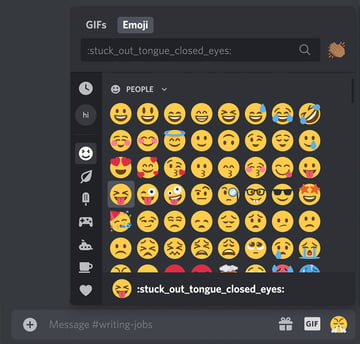
However, you can also access your available custom Discord emoji from this list too. At the top of the list, we have a clock, which shows your most recently/frequently used emotes. Then, right below that, you can start viewing emotes by server.
In this example, I can check out the emotes available in the test server called “Hi”. It’s a little blue flower doodle, and I can use this custom emoji in chat. It’s been assigned the shortcode :sampleflower:, as seen in the example below.


Do I Have to Be in a Server to Use Discord Custom Emojis?
Yes, different Discord servers have different custom emoji (although some may have none at all; custom emotes are not mandatory). So some users could be in a huge list of servers and have access to a giant library of custom emotes.
Why Can’t I Use Discord Custom Emotes Everywhere or in Direct Messages?
Custom Discord emotes are only available in the server they’ve been uploaded to. They are not global, by default. Notice how, in this example, that same custom emote is grayed out. This is because I’m viewing this from outside of the applicable server.


However, Discord does offer a paid service that makes all custom emotes, from all the servers you are in, available to use across Discord. This would include all of your servers and DMs.
What About Twitch Emotes, Does Discord Use Those?
Yes, you can use Twitch emotes for Discord integration. Twitch emotes are special because they can be used globally. To make use of this integration, make sure you have synced your Twitch account with your Discord account. If you’ve subscribed to any Twitch streamers who also make their Twitch emotes enabled for Discord, you’ll be able to use those emotes globally (even in DMs).
Want to learn more about Twitch emotes? Check out this free tutorial from Envato Tuts+:


How Do I Use Animated Emoji on Discord?
Animated emotes are reserved for Discord users who pay extra to use the service; they’re not available to free users.
What Are the Discord Emote Size Requirements?
Discord emotes can be up to 128 pixels wide by 128 pixels high, although they will be resized to 32 by 32 when used in Discord.
What File Type Is Best for Emojis for Discord?
PNG is recommended, especially if you are working with a transparent image. JPG would be acceptable, but keep in mind that this file type does not support transparency. GIF would be an option, if you are uploading an animated emoji.
2. How to Make Discord Emojis Yourself
Step 1
Now, let’s experiment with creating our own emoji. Let’s turn to Adobe Photoshop and create a new document. To do so, go to File > New.
We want our new document to have a Width of 128 px and a Height of 128 px. A resolution of 72 ppi will work for this project, and let’s work with a transparent background.
Once you’re happy with your values, click Create to create your new document.


Step 2
We have some options here: we could either import imagery or create imagery for our new Discord emote. Let’s try working with an imported photo.
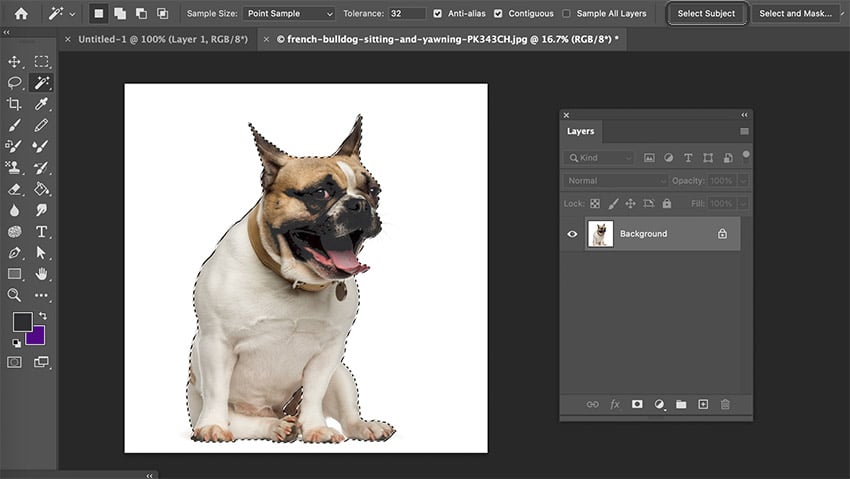
Start by opening your photo in Adobe Photoshop by going to File > Open. I’m going to use this silly photo of a dog from Envato Elements.


Step 3
With the Magic Wand Tool active, click on Select Subject, up in the Options Bar.


Step 4
Then, open your Layers panel, by going to Window > Layers. At the bottom of the Layers panel, click Add Vector Mask.
Now, our subject is isolated. The checkered background indicates transparency.


Step 5
However, we can adjust this mask. Click on the mask thumbnail, beside the layer thumbnail in our Layers panel. This allows us to edit it. Any content in black will hide content, while any content we add in white will reveal content.
For example, we can select the bottom portion of the dog using any method we prefer (like the Lasso Tool), and then use the Paint Bucket Tool to fill that portion of the mask with black. Now, the dog’s face is isolated.


Step 6
To finish up our image, click on the mask thumbnail, and then right-click on PC or Control-click on Mac, and select Apply Layer Mask.
Now, our image is ready.


Step 7
Next, let’s select our work by going to Select > All. Then, go to Edit > Copy.
Return to our Discord emoji document, at 128 by 128 pixels. Go to Edit > Paste. Photoshop will paste our prepared image in this space, although it’s likely much too large. Resize it by going to Edit > Free Transform. Click and drag on the resize handles until the image is just the right size in our square workspace.


Step 8
We can use this idea for drawn artwork too. Simply open your artwork, copy, paste, and resize your content to fit the appropriate Discord emote size.
However, we can create original content here too. Let’s give that a try. Create another new document, if you’d like to save your previous work. We’ll work at the same dimensions and resolution.
When it comes to illustration, you might prefer to draw larger and then scale down. However, you can draw directly in this space with the Brush Tool too. In this example, let’s draw a fruit emoji with a smiling face. Start with a wide heart shape in red, like this.


Step 9
Next, select a dark, black color, and draw a facial expression. Use the Brush Tool to do so, and just have fun with it. It doesn’t have to be perfect!


Step 10
You can really doodle any way you want in this space. I added a green stem and a little pink highlight, both with the Brush Tool using a Hard Round Brush. Since this art is small, you can keep it simple.


Step 11
Once you’re finished with your custom emojis, we need to save and export our work. All we need to do is go to File > Save As.
Choose PNG. It’s a great choice for transparency, like we have in our dog emoji and our smiling cherry. Name your file and save it to your computer. That’s it! You’ve created your emoji.


3. How to Add Emojis to Discord
Step 1
Next, let’s walk through how to add emotes to Discord. Remember, to add emotes to Discord, you need to either own a server (which is free) or have permissions within a server to add emotes.
Start by right-clicking on the server icon on PC (or Control-clicking on Mac). From the resulting menu, go to Server Settings > Emoji.


Step 2
Then, click on Upload Emoji. Discord will prompt you to select a file from your computer. Navigate to the file, select it, and click OK.


Step 3
And there you have it! You’ve figured out how to add emotes to Discord. Simple, right? You can also change your custom emoji’s shortcode here, so make sure to give it a relevant name.
You can also see a list of all the custom emoji available on the server. This is where you’d need to go to delete custom Discord emoji. Simply hover over an emote and click the X on the right-hand side to delete it.


4. Discord Emote Ideas for Your Server
Idea #1: Your Channel, Your Community
If you’re a streamer, YouTuber, or other online content creator, Discord emojis can be a fun way to interact with your audience. Not only that, but it can also keep imagery associated with your brand present and relevant to your audience.
This might sound a little corporate or impersonal, but your community might be a part of your job as a content creator. Creating fun, memorable visual associations is a great way to help build a positive attachment to your brand. Consider emotes that directly correspond to what your brand or channel is, like an avatar, likeness, or other relevant icon.


Idea #2: You Can Use Text Too
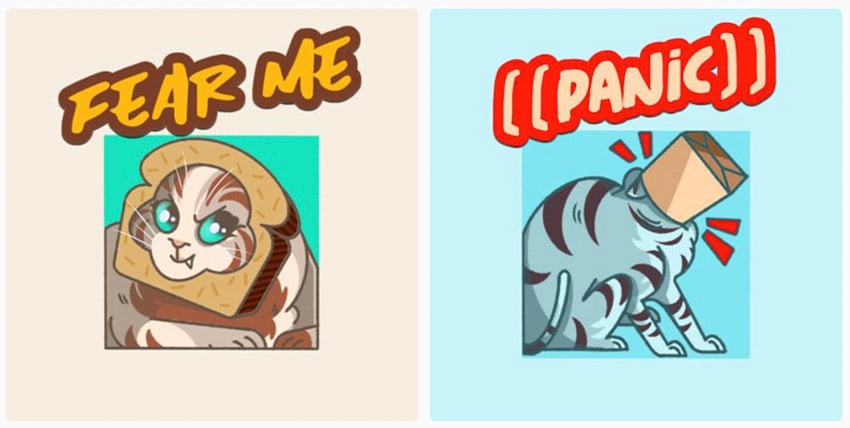
Discord emotes don’t exclusively have to be imagery. Try writing out a catchphrase or welcoming message for a cute, custom emote. Remember to choose colors that work well both in dark and light modes. Check out these ideas for inspiration:


Idea #3: Think About Reactions
A lot of people use emoji to react to something. Think about it: when would you use an emote that’s a picture and not necessarily a reaction? What reaction, for example, is a flower? It’s cute, and there’s nothing wrong with that, but it likely gets less use than an expressive face.
So, when thinking about what Discord emotes you’d want in your server, think about what others might most regularly use and how. A cute image might not necessarily represent a feeling, emotion, or reaction. Keep in mind that this is just a suggestion, however. It’s your server!


Idea #4: Inside Joke? Happy Memory? Try That!
Have fun with it! Make something silly, memorable, and relevant—to you and your community. If a smiling rabbit is a running thing with your circle of friends, why not make it a Discord emote? Did your dog do something weird that your friend group just can’t get over? Snap a photo and make your furry friend into an emote. Or create/customize an emote to fit the memory. The sky’s the limit, and sometimes the best Discord emotes are the ones with the most emotional relevance.


5. How to Make Discord Emotes Online
Step 1
Curious about how a discord emote maker like Placeit works? Let’s give it a try.
All you need to do is navigate through the list of emoji that you can customize. There’s plenty to choose from, and think of them like a starting point. You can really change things up. Let’s try out this cute cat emote, below.


Step 2
Prefer a kitty with a different fur color? We can do that. We can change up the text and give our work a transparent background too. You can even import and add content here, if you’d like to.
Click on the options on either side of the artwork to customize the emote.


Step 3
When we’re done, all we need to do is click download to proceed. Remember, this design would be licensed for commercial use too, so you can use it for a lot more than Discord. Make shirts for your community, mugs, pins, and more.


What Would Be the Best Discord Emojis for Your Server?
The best Discord emotes are going to depend on your server and your preferences. That’s why it’s so fun to create and upload custom Discord emojis of your own.
Remember, Placeit is a great choice for a Discord emote maker. Create an emote, download it, and use it commercially too—put your emote on merchandise for your community, like T-shirts or pins. Placeit is an awesome, professional tool. It’s free to try, so check it out today.
Looking for Discord backgrounds? How about more info about Twitch? There’s plenty more to see on Envato Tuts+. Check out these free tutorials and articles today.


 Discord20 Best Discord Custom Backgrounds (Using a Discord Theme Maker)Nona Blackman

 Resources35 Twitch Panel Templates (Using a Twitch Panel Maker)Nona Blackman

 MinecraftHow to Make a Minecraft Twitch OverlayDaisy Ein

 twitchGaming Templates for Twitch & YouTube Gamers (Streaming Overlays, Banners, and More!)Daisy Ein

 Emotes20+ Best Custom Twitch Emotes (Using a Twitch Emote Maker)Nona Blackman

{excerpt}
Read More
17 Best Video Background Plugins for WordPress
{excerpt}
Read More
42 Best Cyrillic Fonts (Russian Fonts Including Cyrillic Script)
About 250 million people use Cyrillic as the official alphabet for their national languages, and though many people may not realise it, some of the most popular Latin alphabet fonts also offer the Cyrillic font alphabet.

Today we showcase 42 of the most beautiful Cyrillic fonts you can find at Envato Elements and GraphicRiver. Some of the photos shown here may display the Latin alphabet, but we have only selected fonts which offer nice Cyrillic font versions as well.
Cyrillic Sans Serif Fonts
Noir Pro Cyrillic Font (TTF, OTF, WOFF)

Bold and beautiful, Noir is a gorgeous Cyrillic sans serif font family of 12 fonts with a contemporary vibe heavily influenced by early 20th century geometric typefaces. The Noir Cyrillic lettering font family ranges from light and elegant weights perfect for small text to extremely heavy and masculine weights suited for large display sizes.
Carson Cyrillic Alphabet Font (TTF, OTF, WOFF)

Carson is an uppercase Cyrillic sans serif font family that’s available in three weights. It is characterised by smooth and even lines and is perfect for big displays like billboards, posters, and signage.
Vonique 43 Cyrillic Style Font (TTF, OTF, WOFF)

Check out this gorgeous Cyrillic style font. Sleek and glamorous, Vonique is a terrific choice for logos, product branding, and more.
CornerOne Cyrillic Alphabet Font (TTF, OTF, WOFF)

This clean and simple font is an excellent choice for those times when you need an understated font for a title, header, or poster design. The font includes two styles—regular and bold—and is offered in both Cyrillic and Latin alphabets. Check it out.
Vulgat San Serif Font (TTF, OTF, WOFF)

This super legible contemporary font is offered in both Cyrillic and Latin alphabets. It includes three styles that you can mix and match to really make a statement.
CA Saygon Cyrillic Style Font (TTF, OTF, WOFF)

CA Saygon is quite an interesting font as some of the letters are twisted while others are fairly conventional. Offered as a Cyrillic alphabet font and a Latin one as well, this is a great font for special projects where you need a font with a strong personality that will call attention to the text.
Grotte Cyrillic Font (TTF, OTF, WOFF)

Grotte is a simple yet bold Cyrillic font that’s offered in three weights: light, regular, and bold. It’s an excellent choice for body text, titles, and display text. So if you need a nice Cyrillic font for your next project, this is it.
Myla Cyrillic Old Font (TTF, OTF, WOFF)

An innovative Cyrillic Old Font, Myla is a terrific display font that comes in three styles: regular, bold, and black. Use it for your clothing labels, posters, titles, album covers, and more.
Boldstrom Russian Style Font (TTF, OTF, WOFF)

Boldstrom is a solid display font that would look great in titles, movie posters, signage, etc. This uppercase characters font comes in five versions that can be mixed and matched to create really interesting text.
Antario Russian Character Font (TTF, OTF, WOFF)

Antario is a high-contrast sans-serif font with a classic rounded style that is elegant and eye-catching. This Russian character font comes in regular and bold styles and includes discretional ligatures, swashes, stylistic sets, fractions, etc.
Black Crow Cyrillic Style Font (TTF, OTF, WOFF)

Create posters that pop when you use this contemporary font that comes in Latin and Cyrillic. This bold sans-serif includes upper and lowercase characters, numerals, punctuation, and ligature swashes. Have fun.
Royal Crescent Sans Serif Font Cyrillic (TTF, OTF, WOFF)

How about Royal Crescent Sans Serif Font Cyrillic? This clean and attractive font includes lower and uppercase characters, numbers, punctuation, and symbols. Use Royal Crescent for posters, magazines, company logos, and more.
Quam Cyrillic Lettering Font (TTF, OTF, WOFF)

Designed to be used as either a display or text font, Quam Cyrillic Lettering Font comes in eight weights. Use it for all sorts of projects, from business cards to posters.
Etna Cyrillic Sans Serif Fonts (TTF, OTF, WOFF)

Offered as both a Latin and a Cyrillic font, Etna comes with 415 glyphs. It’s a great font for projects that require text coverage of large spaces like billboards and signage.
Spacegate Latin and Cyrillic Sans Serif Font (TTF, OTF, WOFF, SVG)

Looking for a futuristic font for your next movie or poster? Well, check out Spacegate, a sans serif font that’s offered in two styles: regular and light. It uses both the Latin and Cyrillic alphabets for maximum versatility.
Ovsyanka Russian Cyrillic Font Download (TTF, OTF, WOFF, SVG)

Who doesn’t like a font with a bit of distressed texture? Ovsyanka is a new typeface with rounded corners and a worn letters effect. It’s ideal for titles, branding, logos, and product labels.
Tatype Russian Style Font Family (TTF, OTF, WOFF)

If you’re looking for a cool Cyrillic font that you can use on your website or blog, Tatype is an excellent choice. With its simple and clean design, Tatype is super legible. Exactly what you need when there’s a lot of text to get through.
Corruption Cyrillic Lettering Font (OTF)
Corruption is a tall, condensed font that’s a great choice when you need your text to stand out. The font includes uppercase Latin and Cyrillic alphabets.
Tcho Cyrillic Lettering Font (TTF, OTF, WOFF)

Tcho is a versatile font that combines a large range of OpenType features like alternate characters, various forms of numbers, and swashes with multilingual support. Tcho covers the Cyrillic, Latin, Hebrew, Arabic, and Thai alphabets. How cool is that?
Cyrillic Serif Fonts
Afjat Serif Font Cyrillic (TTF, OTF, WOFF)

If you’re looking for a Cyrillic serif font with a modern style, try Afjat. Its light, elegant lines make it ideal for branding, logos, or invitations. It comes in both OTF and TTF formats, and it’s also available as a web font.
Nadira Pro Greek Cyrillic Style Font (TTF, OTF, WOFF)

Nadira Pro is a truly multilingual display font, with the Latin, Greek, and Cyrillic alphabets fully represented. It’s a decorative, formal typeface that would be perfect for wedding invitations, and with 882 glyphs in two weights, it offers plenty of versatility to help you create something truly unique.
Kage Latin & Cyrillic Alphabet Font (TTF, OTF, WOFF)

Try out this elegant serif Cyrillic alphabet font to give your branding projects or poster designs that extra touch of class. Kage’s design was inspired by luxury fashion, so it would also be ideal for use on glossy magazines or for the headers of fashion websites. Download it today, and take your typography to a new level.
Monly Extended Russian Character Font (TTF, OTF, WOFF)

There’s a wonderfully playful, handwritten quality to the Monly Russian character font. It would be great for fun, informal settings or for magazines and websites targetting a younger audience. Envato Elements includes unlimited font downloads, so why not give it a try?
Unreal Latin & Cyrillic Style Font (TTF, OTF, WOFF)

Check out the high contrast between thick and ultra-thin strokes in this stylish Cyrillic style font. With more than 1,000 glyphs, this is a very versatile typeface, and its eye-catching design makes it perfect for branding projects where you want to make a strong impression.
Delacorso Seric Font Cyrillic (TTF, OTF, WOFF)

Give your designs a touch of luxury with the stylish Delacorso all-caps display font. The tall characters and hairline serifs make it ideal for posters, headers, or other large-scale settings. Or why not use it to create a logo for your luxury lifestyle brand?
Carnival Cyrillic Lettering Font (TTF, OTF, WOFF)

Here’s another Cyrillic display font that will make an impact. Carnival would be perfect for headlines, packaging, or magazines. It’s uppercase only, with a full set of numerals, punctuation, and symbols. And it supports multiple Cyrillic alphabets: Russian, Ukrainian, Bulgarian, and more.
Bootleggers Serif Font Cyrillic (TTF, OTF, WOFF)

Looking for a vintage-style serif font that supports the Cyrillic alphabet? Try Bootleggers. Its retro style, with the characters composed of strong, straight lines, makes it the perfect choice for any design project that wants to evoke the magic of the past. Download it today!
Russian Handwriting Fonts
Nafta Latin and Russian Handwriting Fonts (TTF, OTF, WOFF)

There’s nothing more fun than a handwriting font. And Nafta Latin and Russian Handwriting Font is certainly a fun one. Featuring handwritten marker shapes with natural edges, Nafta is great for handwritten quotes, T-shirt designs, greeting cards, and more.
Minako Fonts for Russian Alphabet (TTF, OTF, WOFF)

Minako Fonts for Russian Alphabet is a handwritten font with a casual style that is offered in regular and light styles. Perfect for comics, children’s books, quotes, menus, invitations, and more, Minako includes both upper and lowercase characters, numbers, punctuation, and multilingual support.
Montclar Russian Character Font (TTF)

When you need an elegant Russian handwriting font for a special project, Montclar Russian Character Font is a great choice. Offered in both Latin and Cyrillic alphabets, Montclar includes upper and lowercase characters, numbers, punctuation, and special symbols.
SUNN Line Russian Handwriting Font (TTF, OTF, WOFF)

If you like Montclar above, you’ll love SUNN Line Russian Handwriting Font, another great option when you are looking for a legible and elegant handwriting font. Like Montclar, SUNN includes upper and lowercase characters, numbers, punctuation, and special symbols.
LeOsler (TTF, OTF, WOFF)

LeOsler is a decorative, fun, handwritten font which will bring a ton of personality to your projects. The font includes the Cyrillic, Latin, and Greek alphabets in regular and light weights and rough and stamp styles. Lots of options to have fun with.
Jack`s Russian Letter Font (TTF, OTF, WOFF)

Here’s another terrific Russian letter font you can have great fun with. Offered in both Cyrillic and Latin alphabets, the font includes upper and lowercase characters, numbers, and punctuation. Use it for greetings cards, quotations, posters, T-shirts, and more.
Besom (TTF, OTF, WOFF)

Each letter in the Besom font has been drawn with a thick brush on white paper, making the font as unique as it gets. It’s an excellent choice when you need a Russian handwriting font to create posters, T-shirts, quotations, etc.
Cyrillic Script Fonts
Watermelon Russian Script Font (TTF, OTF, WOFF)

Here’s the perfect Russian script font for invitations, slogans, product packaging, and more. This stylish hand-lettered typeface gives you that calligraphic, ink-brush look.
Maloishe Brush Cyrillic Cursive Font (TTF, OTF, WOFF)

Maloishe is a handmade brush script font that’s full of character. The fabulous font includes both Cyrillic and Latin characters in upper and lowercase with numbers and punctuation. A perfect brush Cyrillic cursive font for logos, product packaging, signs, and much more.
Decorative Cyrillic Fonts
StripedPrint Russian Font (TTF, OTF, WOFF)

StripedPrint is exactly the font you need when you’re looking for something special that will really call attention to your text. This bold, condensed font is offered in both Latin and Cyrillic alphabets with upper and lowercase characters, numbers, punctuation, and symbols.
Disappear Russian Style Font (TTF, OTF, WOFF)

Have some fun with this fab Russian character font. Great for inspirational quotes, posters, and more, this unique font is just what you need when you’re looking for something a bit different.
Futurism Headline Russian Style Lettering Font (TTF, OTF, WOFF)

The future is now, and so is this great Russian style lettering font. With its futuristic style, this gorgeous font is perfect for branding projects, logos, emblems, posters, etc.
Ibu Ibu Cyrillic Alphabet Font (TTF)

With its angular and condensed form, Ibu Ibu is an excellent font choice for short and punchy text when standing out is important. The stylish font is offered in both Latin and Cyrillic alphabets, with upper and lowercase characters, numbers, and punctuation.
Harrison: Cyrillic Retro Typeface (TTF, OTF, WOFF)

How awesome is Harrison, a bold and retro font that’s offered in both Latin and Cyrillic alphabets? This stunning form includes regular, outline, and rough versions. Plenty of choices to have some fun with.
Choose Your Favourite Cyrillic Font Today
If you’re looking for beautiful Cyrillic fonts, you’ll find them at both Envato Elements and GraphicRiver. Just click on your favourite font above to download your choice and get to work on your next project.
And finally, if you want more information on other terrific font styles, check out these really helpful articles below:
 Fonts36 Best Wild and Crazy FontsNona Blackman
 Fonts31+ Best Brush Fonts (Script, Paint, and More!)Melody Nieves
 Fonts43 Best Retro 80s Fonts to Download in 2021Melody Nieves
 Fonts20+ Best Free Elegant Fonts (Stylish Fonts to Download)Nona Blackman
 Fonts26 Best Sci-Fi Fonts (Science and Retro Styles)Nona Blackman
 Fonts35 Best Calligraphy FontsMelody Nieves
 Fonts40+ Best Swash Fonts and Fonts With Tails (Download Now!)Nona Blackman
 Fonts34 Best New Fonts for 2021Melody Nieves

{excerpt}
Read More
Four Free Flutter Widgets You Should Know About
{excerpt}
Read More
4 Free Flutter Widgets You Should Know About
Flutter development has experienced unprecedented growth in the last year. Not only has it expanded as a channel for developers to expand their skillset in Dart, but it has also allowed them to enjoy the perks of a single codebase. Whether you are making a widget on Flutter or looking for a Flutter widget that could make a difference to your app, you have landed on the right page!
{excerpt}
Read More
Build a Shopping Cart With PHP and MySQL
{excerpt}
Read More