MacUpdate bundle gets Toasty, TUAW readers can win

The MacUpdate Promo bundle is back again — this edition features the marquee player of Roxio’s Toast 10 Titanium, for all your CD and DVD burning needs. Blu-ray and HD capabilities, if you need them, require the separate US$19.95 plugin from Roxio, but that’s still only $70 for all the mojo of an app that would normally run $130. Plus, the bundle includes other winners like MindNode Pro, ShareTool [TUAW review] and Voila. Total retail value of the apps: over $400.

There are two giveaway apps for the first 20K buyers (Vitamin-R and Compartments) but it looks like those are almost sold out already.

TUAW has a couple of bundle licenses to give away, and we’re eager to do so. All you need to do: enter a comment below, telling us which of the apps in the bundle is most intriguing, or most useful, or appealing, or which one makes you say “I can’t imagine ever using that, but to each their own.” Two comments will be selected at random as winners.

  • Open to legal residents of the 50 United States and the District of Columbia, and of Canada (excluding Quebec), who are 18 and older.
  • To enter leave a comment on this post discussing the MacUpdate bundle offerings.
  • The comment must be left before Wednesday, September 22, 11:59PM Eastern Daylight Time.
  • You may enter only once.
  • Two winners will be selected in a random drawing.
  • Prize: One bundle license for the MacUpdate Promo September 2010 bundle (ARV $49.95)
  • Click Here for complete Official Rules.

TUAWMacUpdate bundle gets Toasty, TUAW readers can win originally appeared on The Unofficial Apple Weblog (TUAW) on Sun, 19 Sep 2010 14:30:00 EST. Please see our terms for use of feeds.

Read | Permalink | Email this | Comments

iPanel will turn your iPad into a very expensive remote control unit

I’ve previously reviewed a couple of relatively inexpensive products to turn your iPhone into a universal remote. The RedEye and POWER A remotes are pretty cool, but the one thing that always sunk it for me was the lack of hard buttons. Plus, I’m always on the lookout for a decent contender on the iPad. [Note that we covered Savant Systems’ iOS and Mac mini solutions for automation and AV several months back. -Ed.]

Crestron
, maker of high-end AV and automation solutions for home and office/presentation use, has a solution for both: the iPanel, which surrounds the iPad in a hardware dock with buttons for key functions. At US$500, it’s not something I’m going to be running out to buy, but the option is there.

Obviously, at $500 it should do more than change the volume on your TV, and it does. Lighting, music, media centers … all the usual Crestron fun stuff. It’s also cheaper to turn your iPad into a touchscreen Crestron remote than it is to buy an actual touchscreen Crestron remote. The 13 hardware buttons also function without the iPad connected, so you’re not up a creek if your iPad is off charging and you need to change the channel or dim the lights.

The iPanel will be shown at the CEDIA Expo 2010.

[via Engadget]

TUAWiPanel will turn your iPad into a very expensive remote control unit originally appeared on The Unofficial Apple Weblog (TUAW) on Sun, 19 Sep 2010 13:30:00 EST. Please see our terms for use of feeds.

Read | Permalink | Email this | Comments

TUAW earphone throwdown: Altec Lansing Muzx Ultra vs. Scosche IDR655m

When it comes to listening to music, watching movies on the run, or even making phone calls, the earphones you use on your iDevice make a difference. Apple’s iconic white earbuds are everywhere, and the inline remote control and mic can be used on every iPhone, iPod, and iPad to some extent, although the lower-end iPods logically can’t use the mic.

For audiophile Apple fans, those white earbuds just don’t cut it, so a number of manufacturers have come out with high-end earphones. As fate would have it, two of those earphones — the Altec Lansing Muzx Ultra ($99.95) and Scosche IDR655m ($99.99) both arrived at my door about the same time. When I have competing reviews to do, I go the lazy route and force the entries to face off in a TUAW throwdown. Click the Read More link below and see who the winner is in this head-to-head battle of the earphones.

TUAWTUAW earphone throwdown: Altec Lansing Muzx Ultra vs. Scosche IDR655m originally appeared on The Unofficial Apple Weblog (TUAW) on Sun, 19 Sep 2010 10:00:00 EST. Please see our terms for use of feeds.

Read | Permalink | Email this | Comments

Downgrade iOS 4.2 to iOS 4.1, iOS 4.0.1 (iPhone, iPod Touch)

In this guide you’ll learn how to downgrade iOS 4.2 to iOS 4.1 / 4.0.1 on iPhone 4, 3GS, 3G and iPod Touch 4G, 3G, 2G. Follow the steps below to downgrade iOS 4.2 to 4.0.1/4.0 firmware on iPhone and iPod Touch.

downgrade ios 4.2
iOS 4.2 is not jailbreakable ATM. So, if you want to jailbreak iPhone 4, 3GS, 3G or iPod Touch 4G 3G, 2G then you MUST downgrade to iOS 4.1 or 4.0.1 first. iOS 4.1 jailbreak is expected soon via GreenPois0n.

In this guide we’ll discuss following two methods to downgrade iOS 4.2 iPhone / iPod Touch firmware:

  1. Using TinyUmbrella (Recommended)
  2. By Editing Hosts file

IMPORTANT: iPhone 4, iPhone 3GS, 3G, iPod Touch 4G, iPod Touch 3G, 2G users MUST have SHSH blobs saved for 4.0.1/4.0 firmware in order to downgrade from iOS 4.2.

How to: Save SHSH blobs for iPhone, iPod Touch

How to Downgrade iOS 4.2 to iOS 4.1, iOS 4.0.1

Download your desired firmware for which you’ve SHSH blobs saved and want to downgrade to:

Method 1: Using TinyUmbrella

Download TinyUmbrella from the link below:

If you’ve SHSH blobs saved on Saurik’s server via Cydia, download them into your computer first. To do that:

  1. Connect your device, Fire up the TinyUmbrella and Check mark the Advanced Options.
  2. Select your device, firmware (the one for which you’ve SHSH saved at Cydia; 4.1, 4.0.1 or older) and Cydia as Location.
  3. Hit the save My SHSH button. that’s it.

Step 1 – DFU Mode

Put your iPhone into DFU Mode (How to: enter DFU Mode)

Step 2 – Start TSS Server

  1. Run the TinyUmbrella
  2. Hit the Display SHSH button to confirm that downloaded SHSH blobs has been cached by TinyUmbrella for 4.1, 4.0.1 or older. (If you already have them in your PC, drag and drop the SHSH blobs in the TinyUmbrella window then hit the display SHSH blobs button to confirm).
  3. Then hit the Start TSS Server button.

Step 3 – Restoring the Firmware

  1. Now Open the iTunes.
  2. Hold down the Shift (Windows)/Alt (Mac) key and hit the Restore button.
  3. Select the downloaded firmware (iOS 4.1, iOS 4.0.1 or older) and let the restore process complete.

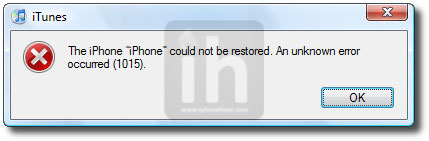
iTunes will bring up error 1015, 1013 or 1011 message. Don’t worry, it’s normal. You’ve successfully downgraded your iPhone/iPod Touch firmware.
downgrade ios 4.0.2

Step 4 – Getting Out of Recovery

Now in order to get out of recovery mode, hit the “Kick Device Out of Recovery” button on TinyUmbrella right below the Start TSS Server button or you can also use RecBoot. That’s it!

__________________________________________________________________________________

Method 2: Edit Hosts File

**We assume that you’ve SHSH blobs saved via Saurik’s server.

Download your desired firmware for which you’ve SHSH blobs saved and want to downgrade:

Step 1 – DFU Mode

Put your iPhone into DFU Mode (How to: enter DFU Mode)

Note: Apple is currently signing iOS 4.1. If you’re downgrading to iOS 4.1 then you can skip Step 2 and continue from Step 3. Once Apple stops signing iOS 4.1, Step 2 will become compulsory for iOS 4.1 as well. If downgrading to iOS 4.0.2, 4.0.1 or 4.0, you MUST follow Step 2.

Step 2 – Editing Hosts File

Now we are going to redirect iTunes from Apple Servers to Saurik’s server.

———————————-
Windows:

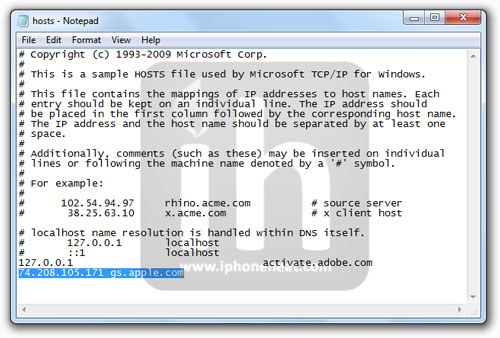
Go to C:\Windows\System32\drivers\etc\ and locate hosts file.
Open the hosts file in Notepad.
NOTE: Win 7 and Vista users MUST run Notepad with admin privileges. Right click on Notepad app and select Run as Administrator.

Mac OS X:

Go to \etc\ directory and locate hosts file. Copy it on your desktop
Open the hosts file in TextEdit.
———————————-

Add the following line at the end of the hosts file and then save and close the file:

74.208.105.171 gs.apple.com

Mac OS X users needs to copy the edited hosts file from desktop back to /etc/ directory and replace the older one.

(Click to enlarge)

Step 3 – Restoring the Firmware

  1. Now Open the iTunes.
  2. Hold down the Shift (Windows)/Alt (Mac) key and hit the Restore button.
  3. Select the downloaded firmware (iOS 4.1, iOS 4.0.1 or older) and let the restore process complete.

iTunes will bring up error 1015, 1013 or 1011 message. Don’t worry, it’s normal. You’ve successfully downgraded your iPhone/iPod Touch firmware.

downgrade ios 4.0.2

Step 4 – Getting Out of Recovery

Now in order to get out of recovery mode, hit the “Kick Device Out of Recovery” button on TinyUmbrella right below the Start TSS Server button or you can also use RecBoot. That’s it!

You must now remove 74.208.105.171 gs.apple.com line from the host file and save it. Doing this will let iTunes to prompt you about future updates from Apple.

Jailbreak iOS 4.0.1

How to: Jailbreak iPhone 4 iOS 4.0.1

How to: Jailbreak iPhone 3GS, 3G iOS 4.0.1

How to: Jailbreak iPod Touch 3G, 2G (MC, non-MC) iOS 4.0.1

You can follow us on Twitter, Join us at Facebook, and also Subscribed to RSS Feed to receive latest updates.

Digg
Twitter
StumbleUpon
Facebook
Reddit
del.icio.us

Tutorial: Simple Twitter Client Using Oauth Authentication

Recently Twitter finally made the move which they had been promising for a long time requiring all Twitter applications to utilize Oauth authentication.  This has pushed many of the older tutorials on creating twitter clients into obsolescence.

The other day I posted about a very handy open source OAuth authentication library from Google that can be implemented with just a few lines of code.  I also found a new tutorial that has been created which goes through the in-depth creation of a simple Twitter client that uses Oauth authentication.

The tutorial utilizes Matt Gemmell’s MGTwitterEngine along with modifications from Benn Gottlieb, you can find the open source project for the modified libraries on Github here:
http://github.com/bengottlieb/Twitter-OAuth-iPhone

The tutorial is from Collin Ruffenach and can be found here:
Dealing With The Twitter Oauth Apocalypse

This is a good tutorial if you want to go through the entire building of a complete working Twitter client.

Thanks for reading, please share this using the buttons below!

©2010 iPhone, iOS 4, iPad SDK Development Tutorial and Programming Tips. All Rights Reserved.

.

Share and Enjoy:

RSS
Twitter
Facebook
DZone
HackerNews
del.icio.us
FriendFeed

Tutorial: How To Calculate MD5 or SHA Hash Of File Efficiently

Calculating an MD5 hash is a fairly simple task using the CommonCrypto library, which I mentioned previously in an article on getting Gravatars which involved calculating the MD5 hash of a user’s e-mail.

While it is easy to do these calculations with CommonCrypto it is extremely inefficient to do so with the commonly used high level NSFileHandle commands.  Unfortunately, the problem with this solution is that it makes very inefficient use of memory because NSFileHandle returns an autorelease object making it impractical for large files.  One solution to this is to use the CFReadStream.

With this solution you can keep the memory usage low while reading in very large files.

You can read a more in depth tutorial on this topic here:
Compute MD5 Or SHA Hash Efficiently On iOS

A Github project has also been created to make this solution more straightforward:
http://github.com/Fuitad/FileMD5Hash

If you’re in a situation where you need to calculate the MD5 hash of a file, and are running into memory problems this should help.

Thanks for reading, please share this using the buttons below!

©2010 iPhone, iOS 4, iPad SDK Development Tutorial and Programming Tips. All Rights Reserved.

.

Share and Enjoy:

RSS
Twitter
Facebook
DZone
HackerNews
del.icio.us
FriendFeed

Mac developers: 360|MacDev conference scheduled for December

360|Conferences, the company that hosts the popular 360|iDev iOS development conferences, is now reaching out to the Mac development world. They’re launching a new conference, 360|MacDev, and the premiere event will be held December 10th and 11th in Denver, Colorado.

360|Conferences felt that it was important to get into the Mac development conference gig, since the C4 conference has been terminated and WWDC not only sells out quickly, but seems to be focusing more and more on iOS development. They’re starting small and short with this event, so if you’re interested in attending you’ll want to get registered soon. A deal for early bird tickets ($200) expires on Friday, September 24th, and after that date the registration cost jumps up to $300. You might want to consider attending the conference and then taking a ski vacation at the many resorts just a few hours away.

If you’d like to showcase your Mac development mojo, the Call For Papers is open. There’s a Facebook page and a LinkedIn Event for the conference, so you can get more info about 360|MacDev as the event date gets closer. TUAW will be covering the event as well, and we look forward to talking with the stars of the Mac development world.

TUAWMac developers: 360|MacDev conference scheduled for December originally appeared on The Unofficial Apple Weblog (TUAW) on Sat, 18 Sep 2010 12:00:00 EST. Please see our terms for use of feeds.

Read | Permalink | Email this | Comments

Tonight is International Observe the Moon Night so grab your iPhone

Tonight is the first-ever International Observe the Moon Night. If you have an iOS device, you can get even more out of observing our nearest neighbor and learning about what its made of, how it came to be, and how to observe it.

Free apps like Moon Globe will allow you to explore the lunar service in detail tonight, or any night. If you’re a social, rather than a solitary backyard astronomer, then here’s a map to help you find local public observing groups all over the world. Expect to find some telescopes to get you a live close-up view.

Since you’ll already be outside, don’t forget some of the great astronomy apps that help orient you to the visible planets and constellations. I like Star Walk, Pocket Universe and Distant Suns. Happily, the author of Distant Suns has put version 2 of the app on sale for US$0.99 today only in honor of the lunar event. If you have an iPhone, or iPod touch, it’s a good night to look up.

TUAWTonight is International Observe the Moon Night so grab your iPhone originally appeared on The Unofficial Apple Weblog (TUAW) on Sat, 18 Sep 2010 14:00:00 EST. Please see our terms for use of feeds.

Read | Permalink | Email this | Comments

GV Mobile+ for Google Voice on the iPhone released

GV Mobile + has returned to the App Store. If you live in the USA and therefore have access to Google Voice, grab a copy of GV Mobile + for $3 and celebrate the return of arguably the best Google Voice app for the iPhone. (We also reported that another app by the name of GV Connect is available for the same price. The biggest initial difference is that GV Mobile has been well-known and developed for several years.)

The original app, GV Mobile, had to be renamed to GV Mobile + because Sean Kovacs, the developer, deleted it once it was removed from the App Store, and wasn’t able to reclaim the name. That means that even if you owned GV Mobile you’ll still have to pay for GV Mobile +.

Yes, that’s frustrating, but let’s keep things in perspective: it’s $3, not a kidney. Deleting the app was a very understandable thing to do when Apple removed all Google Voice apps from the App Store and gave absolutely no indication that they would ever be allowed to return. Click Read More for additional information about GV Mobile+.

Note: we received the iTunes link directly from the developer, but it usually takes some time before it is available to all iTunes users. To quote Han Solo, “it’s not my fault.”

TUAWGV Mobile+ for Google Voice on the iPhone released originally appeared on The Unofficial Apple Weblog (TUAW) on Sat, 18 Sep 2010 15:00:00 EST. Please see our terms for use of feeds.

Read | Permalink | Email this | Comments

Have some Black Walnut with your Apple Wireless Keyboard

Personally, I consider Apple’s Bluetooth Wireless Keyboard to be one of the sexiest input devices around. I’ve even replaced my Logitech DiNovo Edge (you may recall seeing it before) with one. Now, Combine Collective has upped the ante with a peripheral for your peripheral which — in the right surroundings — is guaranteed to make this classy keyboard even classier.

These carved Black Walnut keyboard trays come in three flavors, each holding a different combination of wireless devices. The largest holds your Apple Wireless Keyboard, Apple Remote and Magic Trackpad, all sheathed in smooth, dark wood. In a cubicle with bad carpet, it might stand out like an eyesore, but on the right desk… well, I probably get more excited than I should about interior decoration. Still, I want one.

The prices are probably what you’d expect for executive-office-looking wares: US$69 for the small (Wireless Keyboard only), $74 for the medium (keyboard and Magic Trackpad) and $79 for the aforementioned large version. Feeling extravagant? Wander on over to the Combine Collective site.

TUAWHave some Black Walnut with your Apple Wireless Keyboard originally appeared on The Unofficial Apple Weblog (TUAW) on Sat, 18 Sep 2010 16:00:00 EST. Please see our terms for use of feeds.

Read | Permalink | Email this | Comments

How to replace iTunes 10’s grey with eye-popping black

Several iTunes 10 users were less than thrilled with the new all-grey UI theme. I’ve gotten used to it, but I agree it was a bit prettier with the color icons in the sidebar. Here’s how you can replace the grey entirely with an eye-popping, high-contrast black and white.

First, quit iTunes. Then open up Terminal and enter the following:

defaults write com.apple.iTunes high-contrast-mode-enable -bool TRUE

Re-launch and pow! You’ll be presented with the UI depicted above. It’s definitely legible, and Macworld suggests that it looks best in List View. They also explain how to switch back.

We don’t know if the stark theme is better, but it is different.

TUAWHow to replace iTunes 10’s grey with eye-popping black originally appeared on The Unofficial Apple Weblog (TUAW) on Sat, 18 Sep 2010 09:00:00 EST. Please see our terms for use of feeds.

Read | Permalink | Email this | Comments

Apple, others talking to DoJ about anti-poaching agreement

Apple, Google, Pixar, Intel, and a few other companies are currently in talks with the Department of Justice about an alleged anti-poaching agreement, according to sources speaking to the Wall Street Journal. The government is considering accusing the companies of agreeing to not hire each others’ employees for a certain period of time. If, as a law professor tells the Journal, the government finds that these companies are actually agreeing to not poach, then employees could be hurt by not having access to the best deal available.

For their part, the companies are reportedly arguing that non-poaching agreements are a requirement, especially when companies are so closely collaborating on various technologies and standards. Apple and Google, for example, would want to create the best products possible for customers, and wouldn’t be able to do that if they had to worry about their employees possibly getting hired away by the other partner.

There’s no actual lawsuit yet — this is still just an investigation, and the Journal says that there are “some companies more willing to settle to avoid an antitrust case than others.” But we’ll see — if the Department determines that the companies did make an agreement and that employees were punished by it, then the case could end up in court eventually.

TUAWApple, others talking to DoJ about anti-poaching agreement originally appeared on The Unofficial Apple Weblog (TUAW) on Sat, 18 Sep 2010 10:00:00 EST. Please see our terms for use of feeds.

Read | Permalink | Email this | Comments

iBooks love: free e-books worth reading

The National Association of Scholars just published a list of brain-challenging books that they recommend for college reading programs, but which should be of interest to any passionate adult-level reader. These books were selected for presenting important, well-argued ideas with a level of complexity that stretches the mind — basically they function as upgraded “beach reading” for the scholarly set.

Many of these titles are freely downloadable in ePub format and can be synced to iBooks for your portable reading pleasure. Here’s a quick run-down of some of the recommended books, along with quick links to iBooks-compatible downloads.

TUAWiBooks love: free e-books worth reading originally appeared on The Unofficial Apple Weblog (TUAW) on Sat, 18 Sep 2010 11:00:00 EST. Please see our terms for use of feeds.

Read | Permalink | Email this | Comments

Dear Aunt TUAW: Help me accessorize my iPod nano on the cheap

Dear Aunt TUAW,

I bought a brand new multitouch nano, and now I want to accessorize it. But money is tight, and I don’t have a lot to spend. I don’t really care about “pretty,” but I’d like to see what kind of functionality I can get (accessory-wise) on the cheap.

Can you recommend any really affordable add-on accessories for my new little pal?

Thanks a lot in advance,

Your nephew Stephano J.

TUAWDear Aunt TUAW: Help me accessorize my iPod nano on the cheap originally appeared on The Unofficial Apple Weblog (TUAW) on Sat, 18 Sep 2010 08:00:00 EST. Please see our terms for use of feeds.

Read | Permalink | Email this | Comments

iPA God: Install Cracked Apps on iOS 4.2, iOS 4.1 without Jailbreak

IPA God is a new, yet to be released, app that lets to install cracked apps on iOS 4.2 and iOS 4.1 without jailbreaking iPhone, iPod Touch and iPad.

ipa god install cracked appsIPA God takes advantage of a new exploit found in iOS 4.2 and iOS 4.1 firmware that allows you to install cracked apps on iPhone, iPad and iPod Touch. Unlike AppSync, IPA God does not require any jailbreak.

The video below shows IPA God in action on an iPad running iOS 4.2 beta which is not jailbreakable ATM. It will also work on iPhone and iPod Touch.

According to developer, IPA God will be sold out at a price under $20 (UDID registration for the app) because Apple would never let the app appear in the AppStore.

There’s ETA for the IPA God. We will keep you posted as soon as it goes live.

DISCLAIMER: We strongly OPPOSE app piracy and encourage you to purchase Apps from the AppStore. We truly hope Apple fixes the exploit in time via software update. The information available on our site is purely for informational purposes ONLY.

NOTE: Jailbreak and App Piracy are two different things. To put it simple: Jailbreaking is LEGAL but App Piracy is ILLEGAL.

You can follow us on Twitter, Join us at Facebook, and also Subscribed to RSS Feed to receive latest updates.

Digg
Twitter
StumbleUpon
Facebook
Reddit
del.icio.us