iPads used by House of Representatives officially

Hot on the heels iPad’s recent appearance in the U.S. House of Representatives, thanks to congressman Henry Cuellar, Politico reports that the iPad may soon gain formal access to Congress. As it stands, no electronic devices are allowed on the House floor.

A tech-savvy group of incoming group of lawmakers are keen to see the formal rules changed, allowing them to use electronic devices on the House floor, though, according to a House leadership aide, no official decision has been made on the iPad.

House Parliamentarian John Sullivan said, “I would advise the speaker that if an iPad is not being used to play sound or…as a transmitting device, it is allowed.”

If the rules are formally changed, the new Congress could see a far-reaching effect in the way members debate, according to U.S. Naval Academy professor Steve Frantzich, a renowned technology and politics expert.

“There will be the ability to have real-time information brought to the floor in a readable, usable format. A member could make a factual statement, and someone with an iPad could say, ‘No, your data is two years old.’ All of a sudden, you have a member being able to one-up someone speaking on the floor,” said Frantzich.

There is also a proposal for legislation to be transmitted electronically to members, instead of printing copies every time. The House currently has a multimillion-dollar printing budget.

iPads used by House of Representatives officially originally appeared on TUAW on Fri, 17 Dec 2010 10:00:00 EST. Please see our terms for use of feeds.

Source | Permalink | Email this | Comments

Found Footage: iPad app delivers humorous look at Swiss history

You have to admire the sense of humor.

The Swiss Broadcasting Corporation launched its iPad app last week with a short video boiling the history of Switzerland down to a tongue-in-cheek story of William Tell, chocolate, a potato field and a Super Mario-like rescue of a princess.

Check out the video following the jump, and if you’re interested in the Swiss perspective on news, the swissinfo.ch app is a free download available in
English, Chinese, Arabic, Japanese, Spanish, Portuguese, French, German and Italian.

Thanks to all of those who sent in this tip!

Continue reading Found Footage: iPad app delivers humorous look at Swiss history

Found Footage: iPad app delivers humorous look at Swiss history originally appeared on TUAW on Fri, 17 Dec 2010 09:00:00 EST. Please see our terms for use of feeds.

Source | Permalink | Email this | Comments

TUAW’s Daily App: Tron Legacy

Yes, the new Tron Legacy movie is out this weekend, and if you haven’t heard about it yet, you probably will soon. There has been a free promotional app out for a while now (and it actually has a few little games to play with), but Disney has also released an official Tron Legacy game, now available on the App Store. This one’s a full-fledged 3D game, featuring a Light Cycle racing mode along with an on-rails shooting mode that puts you behind a “Recognizer” (one of the big ships they fly around in the movie).

The games in this one work pretty well, though the app itself is a little disappointing — there’s no real storyline or overarching campaign to the map you play through. You’re basically just competing in a series of events (and even those are pretty inexplicable — why are you piloting a Recognizer and racing Light Cycles?). But as a US 99 cent game, it’s not bad, and the Tron stylings are enough to remind you how awesome the movie is.

The app is universal and even has Game Center integration to track achievements (That’s a first for a Disney mobile game; it’s good to see them endorse Apple’s social gaming network.) If you’re looking for a nugget of official Tron goodness on iOS, the game is worth checking out.

TUAW’s Daily App: Tron Legacy originally appeared on TUAW on Fri, 17 Dec 2010 08:00:00 EST. Please see our terms for use of feeds.

Source | Permalink | Email this | Comments

Beta Beat: Kylo Browser featuring 10-foot interface

Kylo is a free browser you use from your couch that embraces the 10-foot UI philosophy. The idea is that buttons, menus and text are larger than when viewed at your desk. This aids in usability when sitting farther away from the display, as would be the case in a living room environment.

It is powered by Mozilla — which may or may not be a feature depending on your opinion — and is easy to navigate with little visual clutter. In addition to standard Web browsing, Kylo offers a host of online video options, including YouTube, Netflix and many network offerings. The most notable source that appears to be absent is Hulu; if you browse the Kylo forums you’ll find there are workarounds to this, but your mileage may vary.

The experience is definitely more pleasurable than using Firefox in full-screen mode. The only issue I really have with Kylo is that, even though it is free, there is an occasional advertisement for its companion product, the Loop. The ads don’t seem to be too intrusive, but that could change in the future.

If you’ve got a Mac that you hook up to your TV for online video duty or just general Web surfing from the couch, then Kylo seems to be a real winner. Do you have any other suggestions for couch computing? We’d love to hear from you in the comments about how you’re getting the most out of the 10-foot experience with your Mac.

Beta Beat: Kylo Browser featuring 10-foot interface originally appeared on TUAW on Fri, 17 Dec 2010 07:00:00 EST. Please see our terms for use of feeds.

Source | Permalink | Email this | Comments

Dropbox 1.0 available with performance enhancements, Selective Sync

Dropbox, the multi-platform file syncing application that frankly puts Apple’s own iDisk to shame, has been updated to version 1.0. The application has been in public beta for over two years, and an iOS version of Dropbox came out about a year after the public beta began.

Dropbox reaching 1.0 is more than a numerical milestone for its developers. They’ve also made hundreds of bug fixes, reduced resource usage (memory usage in particular has been reduced by 50 percent), and made tweaks to the interface to make it more user-friendly. The most intriguing new feature is Selective Sync, which allows users to choose which of their Dropbox folders to sync to their devices, which the developers say will come in handy on netbooks or other devices with limited storage space.

You can get Dropbox 1.0 here. If you’re not already running Dropbox, now’s the perfect time to give it a shot — the program is so good that many people have wondered why Apple hasn’t bought it yet and incorporated it into Mac OS X.

Dropbox 1.0 available with performance enhancements, Selective Sync originally appeared on TUAW on Fri, 17 Dec 2010 01:30:00 EST. Please see our terms for use of feeds.

Source | Permalink | Email this | Comments

Tango updated to support iPod touch

This is going to be a great holiday gift for many of our readers. Tango Video Calls, the app that lets you do free video chats with friends over 3G as well as Wi-Fi, has been updated to work on the 4th generation iPod touch. Rather than use the app for registration, you can register via email.

The update, which also applies to the iPhone 4, gives the contact list a new look and feel and also has improved resolution on the Retina Display.

Check our previous review for details on how Tango works, and if you have a newer iPod touch, well, get over to the App Store.

Tango updated to support iPod touch originally appeared on TUAW on Thu, 16 Dec 2010 23:00:00 EST. Please see our terms for use of feeds.

Source | Permalink | Email this | Comments

Word Lens: an augmented reality language translator for iPhone

Word Lens is one of those apps that grabs your attention the first time you see it in action. Created by Quest Visual, it is an iPhone-based optical character recognition (OCR) application used for language translation. In real-world usage, it will translate a foreign language sign in an instant using your camera. Word Lens uses OCR to single out the letters in an image captured by your camera. It identifies letters, builds the words and looks them up in its built-in dictionary. Once the words are identified, translation from one language to another is easy. Translation is not perfect, but it is good enough to get the basic understanding of the translated words.
Word Lens is similar in functionality to Google Goggles, which also lets you translate words within an image. Word Lens, though, has a leg up on its competition as the image processing and translating is done on the phone, in real-time. Google Goggles relies on Google’s servers for the translation, which slows down the translation time and requires you to have an internet connection.

Word Lens is now available on the App Store for you to try. The core app is available for free, and language pairs (English/Spanish) are available as an in-app purchase. At launch, the app only supports English to Spanish and Spanish to English translations. Additional languages will be added in future versions. If you don’t want to buy a language pack, it is worth a download as the app includes two demo modes. The reverse mode will reverse the letters in an image, and the erase mode will white-out the words.

Word Lens requires iOS 4.0 or later and a video camera. It is compatible with the iPhone 4, iPhone 3GS or the 4th generation iPod touch. You can see Word Lens in action after the break.

Continue reading Word Lens: an augmented reality language translator for iPhone

Word Lens: an augmented reality language translator for iPhone originally appeared on TUAW on Fri, 17 Dec 2010 01:15:00 EST. Please see our terms for use of feeds.

Source | Permalink | Email this | Comments

Apple updates AirPort Utility 5.5.2 for Mac and Windows

Following the Digital Camera RAW Compatibility update released earlier today, Apple has just released a software update for AirPort Utility. The 5.5.2 update contains bug fixes and improvements, including the following:

  • Resolves an issue that caused the DHCP settings tab to display incorrectly
  • Resolves an issue that caused the application to quit unexpectedly when automatically launched
  • Resolves an issue that prevented the network password from being stored in the Keychain when the network on the 5GHz band was named differently

The AirPort Utility 5.5.2 update requires Mac OS X 10.5.7 or later and weighs in at 10.29 MB. You can download the update now via Software Update or via the web for Mac and Windows.

Apple updates AirPort Utility 5.5.2 for Mac and Windows originally appeared on TUAW on Thu, 16 Dec 2010 20:00:00 EST. Please see our terms for use of feeds.

Source | Permalink | Email this | Comments

App Review: Reiner Knizia’s Through The Desert proves that pastel camels have serious staying power

through the desert ipad

The latest big name board game to make an appearance on the iPad is Though The Desert. Serious board game fans have been anxiously waiting for this app ever since it was announced and I’m happy to say that this latest Reiner Knizia port to the digital realm is totally worth the wait. The app currently costs $5.99 and is available on the App Store.

Even before the game was released, there was reason to believe it would be a solid experience. TribeFlame, the developer, released Keltis Oracle this past spring and it’s been one of the board game apps that I turn to again and again, even with my iDevices getting fuller and fuller with outstanding gaming options. Read on to see why you will, in fact, want to take a pastel-colored camel caravan Through The Desert.

Continue reading App Review: Reiner Knizia’s Through The Desert proves that pastel camels have serious staying power

App Review: Reiner Knizia’s Through The Desert proves that pastel camels have serious staying power originally appeared on TUAW on Thu, 16 Dec 2010 21:00:00 EST. Please see our terms for use of feeds.

Source | Permalink | Email this | Comments

Apple releases Time Capsule and AirPort Base Station firmware update to fix AirPlay issues

We’ve heard several reports of people having various problems trying to stream movies and music to their AppleTV via AirPlay using Time Capsules and AirPort Base Stations. Hopefully for those experiencing problems, your solution is just a download away. Apple has just released AirPort Base Station and Time Capsule Firmware Update 7.5.2. The update “fixes some issues with AirPlay streaming.” Additionally it provides:

  • General fixes to Wi-Fi base station stability
  • General fixes with USB interoperability including connection to external storage devices
  • Fixes some issues with NAT port mapping settings
  • Disables TKIP security with 802.11n rates per the Wi-Fi Alliance specifications

The firmare update is for all 802.11n capable AirPort base stations and Time Capsules and requires Mac OS X 10.5.7 or later, Windows XP SP3 or later, Windows Vista SP1 or later, or Windows 7.

Apple releases Time Capsule and AirPort Base Station firmware update to fix AirPlay issues originally appeared on TUAW on Thu, 16 Dec 2010 19:00:00 EST. Please see our terms for use of feeds.

Source | Permalink | Email this | Comments

32 GB versus 32GB: Almost everyone is writing it wrong

Fair warning, dear reader: this may be the most pedantic post in the history of TUAW. Maybe in history, period. But I can’t help it: someone is wrong on the internet.

Here’s a fun trick. Go to the Apple menu on your Mac and select “About This Mac.” A little window will come up listing your processor and RAM specs. Mine describes a 2.6 GHz Intel Core 2 Duo processor and 4 GB of RAM. If I click “More Info” to open System Profiler, I’ll also learn that I have a 250 GB hard drive.

Now go to Apple’s product page for the MacBook Pro and click on “Buy Now” to see descriptions of tech specs. The 17-inch model is currently listed with a 2.53GHz processor, 4GB of RAM, and a 500GB hard drive. Other than the obvious differences in specs, did you notice anything different? All the spaces disappeared. 2.53GHz instead of 2.6 GHz. 4GB and 500GB instead of 4 GB or 250 GB.

Almost everyone in the computer industry is writing tech specs this way on their product pages, and they’re all doing it wrong. Click “Read More” to find out why.

Continue reading 32 GB versus 32GB: Almost everyone is writing it wrong

32 GB versus 32GB: Almost everyone is writing it wrong originally appeared on TUAW on Thu, 16 Dec 2010 18:00:00 EST. Please see our terms for use of feeds.

Source | Permalink | Email this | Comments

Retaining your masculinity while carrying the iPad

The New York Times had an odd post recently in which it responded to men who were having trouble carrying their iPad around town in a masculine fashion. According to the article in its Fashion & Style section, some men have even eschewed taking their iPad in public just because there’s a lack of suitably macho bags. Scott Stein at CNET even rated iPad bags in terms of their “humiliation index.”

I’ve used a laptop for many, many years and I’ll admit this isn’t a problem that’s ever occurred to me. Any doubts or questions about my bag are instantly dissipated when I bust out awesome technology like the iPad. I guess I could see a bit of embarrassment if you’re wearing a funky fanny pack or something, but there are tons of great looking bags for the iPad. Just check out the Booq Boa push bag, for example

If you really have trouble with establishing your masculinity via your gadget bag, let me suggest using a Sharpie to draw some skulls on it or maybe add some spikes.

Retaining your masculinity while carrying the iPad originally appeared on TUAW on Thu, 16 Dec 2010 18:30:00 EST. Please see our terms for use of feeds.

Source | Permalink | Email this | Comments

2.8 million downloads for Gun Bros, 7.3 million for Zombie Farm

I am anxiously awaiting some stats on this past week’s releases in the App Store — over the past two weeks, we’ve seen some gigantic games released for iOS, and yet familiar names like Cut the Rope, Angry Birds, and Fruit Ninja are still topping the charts (along with some big EA titles benefiting from that price drop). But even if it takes a while for all of those releases to find their place on the App Store, here’s news of a few more recent titles that have done well. First up, freemium shooter Gun Bros (featured as our Daily App choice a while back) has picked up 2.8 million downloads so far, and claims 175,000 daily active users so far. That’s not huge, but it’s a nice sizable audience for a freemium title, especially one that tends a little more towards the hardcore gamer. Glu is also supporting the app with updates, including a new planet to play on, special Christmas-themed gear, and some extra in-game currency rewards for users who update the app.

Zombie Farm is doing even better than that — the wacky cross between zombies and Farmville has earned 7.3 million downloads since launch, and is still growing at about 25% a month. Currently, the app’s reviews section is full of complaints about some bugs, but nevertheless, Playforge has claimed 2.76 billion minutes of playtime, and while it hasn’t shared actual revenue numbers, there’s no question that players have probably spent plenty of money on the game’s in-app purchases.

I would call both of those solid hits for sure. We’ll have to see what other big games rise to the top after this raucous holiday season on the App Store continues.

2.8 million downloads for Gun Bros, 7.3 million for Zombie Farm originally appeared on TUAW on Thu, 16 Dec 2010 17:30:00 EST. Please see our terms for use of feeds.

Source | Permalink | Email this | Comments

N.O.V.A. 2 for iPhone and iPod Touch Now Available in App Store

N.O.V.A. 2 for iPhone and iPod touch is now available for download in the App store for $9.99. N.O.V.A. 2, the smash hit first-person shooter sequel, now fully supports Retina Display and Gyroscope and smooth game controls.


Those unfamiliar with the game, N.O.V.A. is Gameloft’s take on the ever popular HALO genre. Checkout what’s new below.

What’s New in N.O.V.A 2

  • Meet new enemies with improved AI! Volterites’ new tactics make the gyroscope controls ideal
  • Master a larger range of weapons & powers
  • Much more diversified gameplay: run, shoot, fall, drive a motorbike, pilot a giant mech, and blast a laser
  • The more, the merrier, now with up to 10 players in 10 multiplayer maps
  • Build a career and rise through the multiplayer leaderboard
  • Explore new locations, offering amazing graphics, fully optimized for the Retina display
  • Enjoyed the first N.O.V.A. – Near Orbit Vanguard Alliance? Be rewarded with extra bonuses.

6 years have passed since the events depicted in the first episode.
Humanity is now thrown into a bloody civil war fought on one side by the central government of the Terran Orbitals and the self-appointed Human-Alien Alliance; a new organization with a mysterious origin and agenda. Kal Wardin left active service in N.O.V.A. years ago and now lives among the colonists of the desert planet Scorpius.
But war never spares even the most peaceful places…

An Unparalleled Single-Player Compaign

  • 12 chapters taking you through hostile, yet amazing environments of various Orbitals
  • Over a dozen weapons including the Dual Hand Guns, Assault Rifle, Shotgun, Automatic Shotgun, Sniper Rifle, Rocket Launcher, Grenade Launcher, Alien Plasma Gun, Alien Lightning Gun, Alien Laser Gun, Turrets, Frag Grenades and Mines
  • 3 special powers: Freeze, Slow Time and Disc for melee combat
  • A wide range of enemies with improved AI, for even more intense combats

Internet Multiplayer Modes

  • 1~10 players online or locally
  • 5 modes: Free for All, Team Deathmatch, Capture the Flag, Freeze Tag, and InstaGib
  • Ranking & Perk systems
  • 10 maps on which to battle it out
  • Play against your friends or the entire world through Gameloft LIVE!
  • Worldwide leaderboards in the game & on the official website, www.near-orbit-vanguard-alliance.com

Exclusive Rawards for Veteran Players

  • If you played the first episode:
  • Jump into multiplayer with bonus XP, allowing you access to advanced weaponry
  • Unlock a special achievement on Gameloft LIVE!

Download N.O.V.A. 2 for iOS

You can purchase and download N.O.V.A. 2 from the App Store for $9.99. [iTunes Link]

You can follow us on Twitter, Join us at Facebook, and also Subscribed to RSS Feed to receive latest updates.

Digg
Twitter
StumbleUpon
Facebook
Reddit
del.icio.us

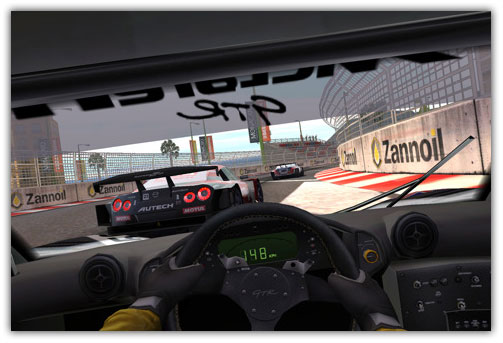
Real Racing 2 for iPhone and iPod Touch Hits the App Store

Real Racing 2 for iPhone and iPod Touch is now available for download in the App Store for $9.99. Real Racing 2 for iOS features 30 officially licensed cars, each with unique performance characteristics.

Official Description

Get ready for the most exhilarating handheld racing experience! Take control of 30 officially licensed cars, each with unique performance characteristics. Feel the thrill of authentic pack racing action in an incredible 16-car grid – the first on iOS!

  • Get to know meticulously detailed cars including the 2010 Ford Shelby Mustang GT500, 2010 Nissan GT-R (R35) and 2011 McLaren MP4-12C. See the full list at http://firemint.com/r2.
  • Enjoy well over 10 hours of gameplay in the massive career mode with time trials, head-to-head races, eliminations, single ‘cup’ races, qualifiers and championships. Win races to purchase new cars and feel the difference with performance upgrades that affect handling. Work your way up from rookie to pro, or just jump into a Quick Race for instant fun.
  • Find out who the real champion is! Enter auto-matched 16 player online races. Meet up with friends for 8 player local WiFi races. Compete on global leaderboards in Time Trials.
  • Race in 15 beautiful locations, with 40 miles of highly detailed race tracks, speedways and city circuits including twilight and night races.
  • Choose control options to suit your personal style. Earn the checkered flag with our intuitive and easy to master controls or take things up a notch by disabling all driving assists. Set anti-skid, steering assist and sensitivity, automatic or manual acceleration and brake assist level. Touch or tilt to steer.
  • Cutting edge graphics and physics powered by Firemint’s exclusive high performance Mint3D™ engine – optimized to push OpenGL ES2 and retina display technology to the limit, and fine tuned for the best experience on older devices.

Download Real Racing 2

You can purchase and download Real Racing 2 from the App Store for $9.99. [iTunes Link]

You can follow us on Twitter, Join us at Facebook, and also Subscribed to RSS Feed to receive latest updates.

Digg
Twitter
StumbleUpon
Facebook
Reddit
del.icio.us