How to build a clickable button using Canvas?

Here is my Code, I have just created a box and added some text to it. I am not sure if it works or not. The purpose is to build a clickable button. Any suggestion and help will be appreciated.

//create Button
let canvas = document.getElementById("myCanvas");
let ctx = canvas.getContext("2d");
let bthHeight = 40;
let btnWidth = 100;
ctx.fillStyle = "lightgrey";
ctx.fillRect(20,20,btnHeight,btnWidth);

//Add Button innerText
ctx.font = "30px Comic Sans MS";
ctx.fillStyle = "black";
ctx.textAlign = "center";
ctx.fillText("Login",btnHeight/2,btnWidth/2);

Hide div overlay on page load or back navigation not working in Chrome

I have a div overlay that shows a loading gif. When the page is loaded, the div overlay is supposed to disappear.

<div id="posts">
  <div id="loading" style="display: none;">
    <img id="loading-image" src="/loading.gif" alt="Loading...">
  </div>
  <div>
    ...
  </div>
</div>

To hide the div overlay, I was using:

$(window).on('load', function () {
  // hide loading div
  $('#loading').hide();
})

In Chrome, if I navigate to some link, then navigate “back”, the loading div overlay doesn’t hide. It only hides when I reload the page.

If I add unload or beforeunload to the jQuery event list, I get the behavior I want, but unload is deprecated and beforeunload will likely cause cache problems and performance issues.

The way I understand it, a load event isn’t triggered when a user hits “back”.

But I want the div overlay to disappear when page is loaded OR when user hits back to page.

How can I achieve this without taking a performance hit?

I’ve tried DomContentLoaded with regular js.

window.addEventListener('DOMContentLoaded', function() {
  let loading = document.querySelector('#loading');
  loading.style.display = 'none';
  console.log('Loaded');
})

“Loaded” prints in the console, but the overlay has an empty style tag, like so:

<div id="loading" style>...</div>

window.addEventListener('pageshow', function() {...} seems to work but I’m not sure if it will cause a performance hit or if it’s the best solution. Never used it before.

Is this a Chrome thing? Is there a Chrome setting I should look at? I test in MS Edge and Firefox and $('#loading').hide(); works fine on load and back navigation.

Chrome version: Version 101.0.4951.67 (Official Build) (64-bit)

Even this logs to the console but doesn’t hide the div in Chrome!

$(document).ready(function () {
  $('#loading').hide();
  console.log('Should be hidden?')
})

Javasript Changing values ​by selecting only true values ​from among array values

I want to change the value of AdditionalShipping when button onChange occurs only to the values ​​in which select is true among the array values ​​in additionalShippingArray.

console.log(additionalShippingArray)

0: {select: false, key: 1, AdditionalShipping: 0}
1: {select: true, key: 2, AdditionalShipping: 0}
2: {select: false, key: 3, AdditionalShipping: 0}

I want to put 5000 in AdditionalShipping only if the additionalShippingCost value is additionalShippingArray select true .

const [additionalShippingCost, setAdditionalShippingCost] = useState<number>(5000);

I want the button to be onClick and applied when the onClickBatchApplication function is called. What should I do?

  const onClickBatchApplication = () => {
    
  };

   return (
     <button onClick={onClickBatchApplication}>apply</button>
)

update products’ price in woocommerce using functions.php

Our website is built using WordPress and Woocommerce and has products listed on it. Each product has a quantity field associated with it. The products prices are obtained by products defined in Woocommerce in WordPress. There is a location field on the website. The location field is changeable by the user. When a user selects a particular location, I want to update the prices of all products (possibly using ajax) without refreshing the whole page.
Thanks.

Angular Unit Test: Uncaught Error: Uncaught (in promise): Error: Cannot match any routes

I am struggling with Angular Unit test on running “ng test”, I get the below error in terminal.

ERROR: 'Unhandled Promise rejection:', 'Cannot match any routes. URL Segment: 'my-account'', '; Zone:', 'ProxyZone', '; Task:', 'Promise.then', '; Value:', Error: Cannot match any routes. URL Segment: 'my-account'
Error: Cannot match any routes. URL Segment: 'my-account'

ERROR: 'Unhandled Promise rejection:', 'Cannot match any routes. URL Segment: 'my-cards'', '; Zone:', 'ProxyZone', '; Task:', 'Promise.then', '; Value:', Error: Cannot match any routes. URL Segment: 'my-cards'
Error: Cannot match any routes. URL Segment: 'my-cards'
    at ApplyRedirects.push../node_modules/@angular/router/fesm5/router.js.ApplyRedirects.noMatchError (http://localhost:9876/_karma_webpack_/webpack:/node_modules/@angular/router/fesm5/router.js:2469:1)

ERROR: 'Unhandled Promise rejection:', 'Cannot match any routes. URL Segment: 'add-beneficiary/manage-recurring-transfer'', '; Zone:', 'ProxyZone', '; Task:', 'Promise.then', '; Value:', Error: Cannot match any routes. URL Segment: 'add-beneficiary/manage-recurring-transfer'
Error: Cannot match any routes. URL Segment: 'add-beneficiary/manage-recurring-transfer'
    at ApplyRedirects.push../node_modules/@angular/router/fesm5/router.js.ApplyRedirects.noMatchError (http://localhost:9876/_karma_webpack_/webpack:/node_modules/@angular/router/fesm5/router.js:2469:1)


ERROR: 'Unhandled Promise rejection:', 'Cannot match any routes. URL Segment: 'home'', '; Zone:', 'ProxyZone', '; Task:', 'Promise.then', '; Value:', Error: Cannot match any routes. URL Segment: 'home'
Error: Cannot match any routes. URL Segment: 'home'

The route files are as below-

app-routing.module.ts

import { NgModule } from '@angular/core';
import { Routes, RouterModule } from '@angular/router';
import { OtpComponent } from './otp/otp.component';
import { AuthGuard } from './_guards/auth.guard'

const routes: Routes = [
  { path: '', loadChildren: './login/login.module#LoginModule' },
  {
    path: 'login',
    loadChildren: './login/login.module#LoginModule'
  },
  {
    path: 'forgot-password',
    loadChildren: './forgot-password/forgot-password.module#ForgotPasswordModule'
  },
  {
    path: 'home',
    loadChildren: './home/home.module#HomeModule', canActivate: [AuthGuard]
  },
  {
    path: 'my-account',
    loadChildren: './my-account/my-account.module#MyAccountModule', canActivate: [AuthGuard]
  },
  {
    path: 'account-setting',
    loadChildren: './account-setting/account-setting.module#AccountSettingModule', canActivate: [AuthGuard]
  },
  {
    path: 'create-account',
    loadChildren: './create-account/create-account.module#CreateAccountModule',
  },
  {
    path: 'my-cards',
    loadChildren: './my-cards/my-cards.module#MyCardsModule', canActivate: [AuthGuard]
  },
  {
    path: 'my-cards/:card_id',
    loadChildren: './my-cards/my-cards.module#MyCardsModule', canActivate: [AuthGuard]
  },
  {
    path: 'faq',
    loadChildren: './faq/faq.module#FaqModule'
  },
  {
    path: 'change-password',
    loadChildren: './change-password/change-password.module#ChangePasswordModule'
  },
  {
    path: 'add-beneficiary',
    loadChildren: './add-beneficiary/add-beneficiary.module#AddBeneficiaryModule', canActivate: [AuthGuard]
  },
  {
    path: 'give-feedback',
    loadChildren: './feedback/feedback.module#FeedbackModule', canActivate: [AuthGuard]
  },
  {
    path: 'my-profile',
    loadChildren: './my-profile/my-profile.module#MyProfileModule', canActivate: [AuthGuard]
  }
];

@NgModule({
  imports: [RouterModule.forRoot(routes, { useHash: true, onSameUrlNavigation: 'reload' })],
  exports: [RouterModule]
})
export class AppRoutingModule { }

app.module.ts

import { BrowserModule } from '@angular/platform-browser';
import { RouterModule } from '@angular/router';
import { BrowserAnimationsModule } from '@angular/platform-browser/animations';
import { NgModule, CUSTOM_ELEMENTS_SCHEMA, NO_ERRORS_SCHEMA } from '@angular/core';
import { HttpClientModule, HTTP_INTERCEPTORS } from '@angular/common/http';
import { AppRoutingModule } from './app-routing.module';
import { PolymerModule } from '@codebakery/origami';
import { AppComponent } from './app.component';

import { AuthGuard } from './_guards/auth.guard';
import { LoginModule } from './login/login.module';
import { SharedModule } from './shared/shared.module';

@NgModule({
  declarations: [
    AppComponent
  ],
  imports: [
    BrowserModule,
    AppRoutingModule,
    PolymerModule,
    BrowserAnimationsModule,
    HttpClientModule,
    RouterModule,
    LoginModule,
    SharedModule,
  ],
  providers: [
    {
      provide: HTTP_INTERCEPTORS,
      useClass: MbwHttpInterceptor,
      multi: true,
    },
    AuthGuard
  ],
  schemas: [CUSTOM_ELEMENTS_SCHEMA, NO_ERRORS_SCHEMA],
  bootstrap: [AppComponent]
})
export class AppModule { }

Please help what did I missed or doing wrong in the above….

I had also tried multiple solutions from stackoverflow tried with RouterTestingModule.withRoutes[] within spec.ts file of component having the route,

Also tried changing routerLink=”/home” to [routerLink]=[‘home’] this also didn’t work,
On running ng test the above error persists….
Want to print triplicate copies of the invoice with different headers like original , duplicate , triplicate using html javascript

I want to print triplicate copies of the invoice with different headers like original, duplicate, and triplicate using HTML javascript. I don’t use any library files for pdf. Check out the js code.

    <button type="button" onclick="printDiv('printableArea')" class="btn btn-light btn-sm ml-3"><i class="icon-printer mr-2"></i> Print</button>
 <div id="printableArea">
<p>
    Lorem, ipsum dolor sit amet consectetur adipisicing elit. Natus suscipit debitis omnis. Accusamus fuga laudantium dolores neque architecto laborum, quia esse magnam rem quidem, alias ullam magni pariatur voluptatum porro?
</p>
</div>

  function printDiv(divName) {
                    // Print layout style code
                    var css = '@page { size: A4; }body{font-family: "Times New Roman", Times, serif !important;} .particulars_body{min-height:800px !important;color:red;}',
                        head = document.head || document.getElementsByTagName('head')[0],
                        style = document.createElement('style');

                    style.type = 'text/css';
                    style.media = 'print';

                    if (style.styleSheet) {
                        style.styleSheet.cssText = css;
                    } else {
                        style.appendChild(document.createTextNode(css));
                    }

                    head.appendChild(style);

                    setTimeout(function() {
                        mywindow.print();
                    }, 1000);
                    var printContents = document.getElementById(divName).innerHTML;
                    var originalContents = document.body.innerHTML;
                    document.body.innerHTML = printContents;
                    window.print();
                    document.body.innerHTML = originalContents;
                }

Why is my component in React being called multiple times?

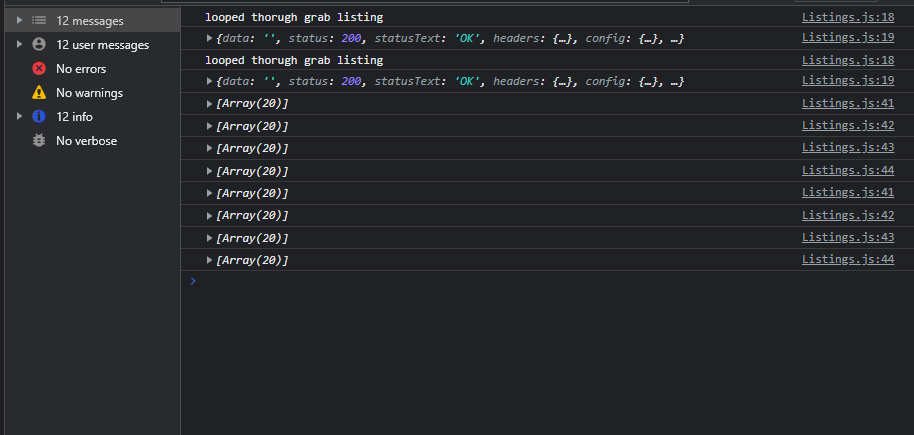
I am having an issue where my Listings component is running twice and I only want it to run once. I tried adding a counter below that would only run the code that grabs the data from the backend once but that did not work as you can see below it is still looping through the “grabListings” Function twice. I also tried a while loop and same result I am getting two results instead of one.

I believe my issue has to do with the way I am calling the Listings component on my LandingPage.

How can I run the grabListings component only once?

LandingPage

    import NavBar from '../componets/NavBar/NavBar.js'
    import Footer from '../componets/Footer/Footer'
    import Slide1 from '../pictures/slide-1.jpg'
    import Listings from '../componets/Listings'
    import '../css/LandingPage.css';
    
    const LandingPage = () => {
    
        return (
            <div className='wrapper'>
                <NavBar />
    
                <div className='top-img'>
                    <img src={Slide1} alt='E46 Slide Show Pic 1' />
                </div>
    
                <Listings />
    
                <Footer />
            </div>
    
        )
    }
    
    export default LandingPage

Listings Component

   const Listings = () => {

    let cars = []
    let links = []
    let prices = []
    let pictures = []

    let counter = 0

    const grabListings = async () => {
        
        if (counter < 1) {
            try {
                // console.log("looped thorugh grab listing")
                await axios.get('http://localhost:5000/scrape').then(async (res) => {
                    console.log("looped thorugh grab listing");
                    console.log(res);
                    const carsData = await (await axios.get('http://localhost:5000/car')).data;
                    cars.push(carsData);

                    const linksData = await (await axios.get('http://localhost:5000/link')).data;
                    links.push(linksData);

                    const pricesData = await (await axios.get('http://localhost:5000/price')).data;
                    prices.push(pricesData);

                    const picturesData = await (await axios.get('http://localhost:5000/picture')).data;
                    pictures.push(picturesData);

                    counter++
                });
            } catch (err) {
                console.log(err);
                counter++
            };

        };

        console.log(cars);
        console.log(links);
        console.log(prices);
        console.log(pictures);
    };

    grabListings();


    return (
        <>
            <h1>{cars[0]}</h1>
        </>
    )
}

export default Listings

Result
enter image description here

How to loop xml document using javascript

HTML CODE FOR THE PROBLEM
Anyone please help out in traversing through each node of the XML document !

<!DOCTYPE html>
    <html>
    <head>
    <meta charset="ISO-8859-1">
    <title>Insert title here</title>
    </head>
    <body>
    <h1>AJAX JSON example</h1>
    
    <script>
    function loadDoc(){
    console.log('loadDoc');
    var xhttp= new XMLHttpRequest();


    xhttp.onreadystatechange=function()
    {
    if (this.readyState == 4 && this.status == 200){
    xhttp=xhttp.responseXML;
    
    document.getElementById("name").innerHTML= xhttp.getElementsByTagName("name")[0].childNodes[0].nodeValue;
    document.getElementById("company").innerHTML= xhttp.getElementsByTagName("company")[0].childNodes[0].nodeValue;
    document.getElementById("phone").innerHTML= xhttp.getElementsByTagName("phone")[0].childNodes[0].nodeValue;
    }
    };
    xhttp.open("GET","address.xml",true);
    xhttp.send();
    }
    
    </script>
    
    <div>
    <b>Name:</b>  <span id="name"></span><br>
    <b>Company:</b> <span id="company"></span><br>
    <b>Phone:</b> <span id="phone"></span><br>
    <button type="button" onclick="loadDoc()">
    change button</button>
    <button type="button" onclick="loadDoc()">
    Next</button>
    <button type="button" onclick="loadDoc()">
    Previous</button>
    </div>
    
    </body>
    </html>

XML CODE FOR THE PROBLEM

 <?xml version="1.0"?>
    <staff>
    <contact-info>
        <name>Rinku</name>
        <company>Bihar University</company>
        <phone>91987897876</phone>
    </contact-info> 
    <contact-info>
        <name>Rinki</name>
        <company>University</company>
        <phone>9145397876</phone>
    </contact-info> 
    <contact-info>
        <name>Rinka</name>
        <company>Bir University</company>
        <phone>9198347876</phone>
    </contact-info> 
    </staff>

HOW TO LOOP THROUGH EACH XML NODE USING NEXT AND PREVIOUS BUTTON. PLEASE HELP !!!
I am able to fetch single node using the above code but can’t loop through each of the node present in the above code !

Handle error in axios.get and data received in react/js

I’m struggling to figure out how to prevent my app from crashing after fetching data from an API. Here’s what I have done so far:

User searches for a word and based on that word, the program goes to a link with the searched phrase, then fetches and stores data in a const

var baseUrl = `https://www.alphavantage.co/query?function=TIME_SERIES_DAILY&symbol=${search}&apikey=****`;

${search} = whatever the user enters in the searchbar

then baseUrl is the webite used to get all the data from API

  useEffect(() => {
      axios.get(baseUrl)
      .then(res => {
        setChart(res.data);
        // console.log(res.data)
      })
      .catch(error => {
        console.log("there was an error: " + error);
      })
  }, [baseUrl]);

   useEffect(()=>{}, [chart]);

then the program loops thru the API and stores DATE and PRICE for each entry in const stockPrices and stockDates.

      const stockPrices = useMemo(() => chart && Object.values(chart['Time Series (Daily)']).map(i => i['1. open']).reverse(), [chart]); 
      const stockDates = useMemo(() => chart && Object.keys(chart['Time Series (Daily)']).map(x => x.replace(/d{4}-/, "")).reverse(), [chart]);

However, sometimes if user enter a search for which there’s no existing link.. the app crashes, as it’s trying to loop and display data that doesn’t exist.

I’m not really sure how to handle this.

In the search component, I added this little “if” statement to stop it doing anything if the search is empty ( because no such link exists ):

  const handleSearch = (e) => {
    e.preventDefault();
    if (e.target.value !== ``) {
    setSearch(e.target.value.toUpperCase())
    }};

However, this only solves a small part of the problem. If the app tries to fetch data from an invalid link it simply crashes.

when the app crashes – in the console it says
“Cannot convert undefined or null to object” which is reported from the line where const stockPrices and const stockDates are sitting on.

How can I stop the app from fetching data if a link doesn’t exist – how to handle this bug ?

just for context the data stored in those variables is then passed to render a chart with prices (Y-axis) and dates(X-axis) so it needs to at least have some sort of replacement..

if(typeof stockDates === 'undefined') {
    return ('undefined');
} else if(stockDates=== null){
    return ('null');
} 

I tried doing this to replace bad fetch with ‘null’ || ‘undefined’ but it’s still crashing.

Please help.

IN SHORT: App crashes if it’s trying to fetch data from a link that doesn’t exist ( based on input from searchbar )

Forbidden Request while requesting POST from Axios

I got a forbidden request when sending a POST request using axios.

Here is my axios function:

const headers = {
    'Authorization': `bearer ${JSON.parse(localStorage.getItem('TOKEN'))}`,
    'Content-Type': 'application/json'
}

const getByRelationCode = (data) => {
    const response = Client.post(`${TRACKING_API}/getByRelationCode`, data, {
        headers
    })

    return response
}

And this is the calling function

const getDocument = (relationCode) => {
    await Service.getByRelationCode({ relationCode })
        .then((res) => {console.log(res))
        .catch(err => console.log(err))
}

When I hit the endpoint using postman, the endpoint returned the response. But when i call it using Axios it returns a forbidden request. Is there missing from my code?

How do I flash one word at a time from within a post body to a separate div

I’m trying to flash the individual words from within a post body, into a div one word at a time really really quickly.

var postbody = document.getElementById('postbody');
var posttext = $('#postbody').text();
var postwords = posttext.split(" ");
for (var i=0; i < postwords.length; i+=1) {
    console.log(i)
    setTimeout(function(i)
    {
        $("#flashreadword").fadeOut("slow", function (i)
        {
            currentword = postwords[i];
            console.log(currentword)
            $("#flashreadword").html(currentword);
            $("#flashreadword").show();
        });
    }, 300);
};

Regular expression that finds all matches of ${any expression}

The following regular expression should find all matches of ${any expression}, the code is as follows:

const reg= /${[^]+}/g
let txt= '`${i + " test"} RESULT ${2 + 4} now ${i} hi`'
let result= [...txt.matchAll(reg)];
console.log(result)

As you will notice, the result is that it extracts almost the entire string, the correct operation should print in the console an array of 3 elements that would contain the ${any expression}

The following case shows an error that is generated if I use: [^}]

const reg= /${[^}]+}/g
let i= "some"
let txt= `${i + " test"} RESULT ${2 + 4} now ${i + "}" } hi`
let txtString= '`${i + " test"} RESULT ${2 + 4} now ${i + "}" } hi`'
let result= [...txtString.matchAll(reg)];
console.log(result)
console.log(txt)

the expression ${i + "}" } is valid in JavaScript so the regular expression should return [${i + "}" }, other matches] but in the example shown it returns

${i + "}

Why function declaration does not override variable declaration [duplicate]

I have code like below:

var showName;
function showName() {
};
typeof showName; // function

And we know that JS engine automatically assigns undefined value to variable decalred with var, so in my mind I assume below code will output the same with above(but actually not)

var showName = undefined;
function showName() {
};
typeof showName; // undefined

Any explanation will be thankful