Woocommerce hide/show product image thumbnails with toggle button

how can i make all my product images totally black or grey and if i push a toggle button then they all show as normal?

tryed some different javascripts but cant seem to get it to work

my class is named
class=”attachment-woocommerce_thumbnail size-woocommerce_thumbnail”

System used latest WordPress/Woocommerce with Flatsome Theme

This is how i want it to work like
(dampsvamp.dk)

This is my site
(dampringen.dk)

React Leaflet : ugly Warning: Each child in a list should have a unique “key” prop

I’ve set an leaflet map component that iterate throught users fetched from db that contains, for each of them, coordinates.
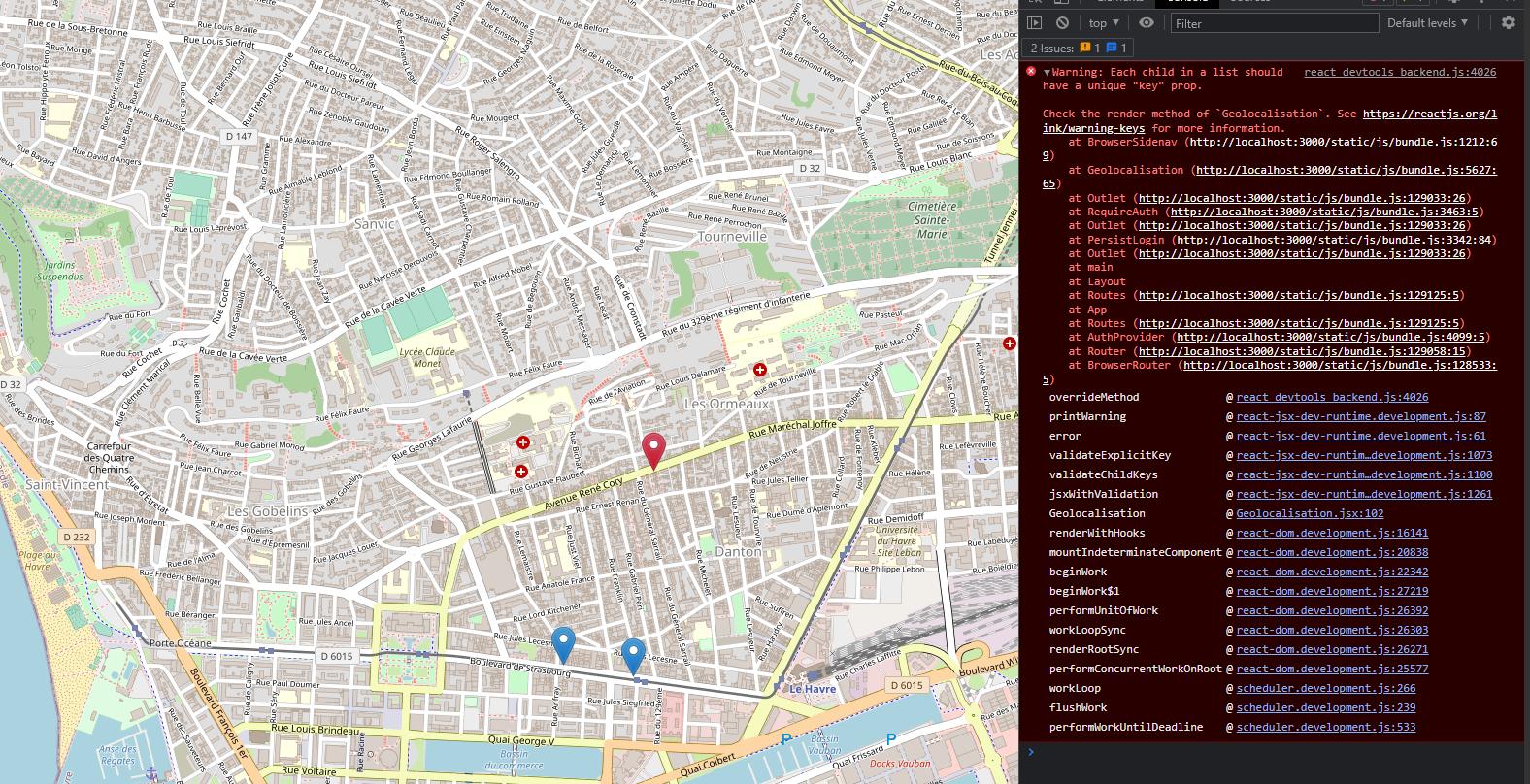
Devtool throw me : Warning: Each child in a list should have a unique “key” prop.
Not the first time i got this warning and i usually find easly how to fix it but this time i can’t find a solution.

All is working fine but this warning keeps triggering me :/

Console Warning

I’ve tried to put the key as Marker component identifier, Popup component identifier, both of them.

I’ve seen a post that recommend to put the key as Fragment identifier for each element of my map function. I tried in a div component (seems equal to Fragment to me??) still not working.

<MapContainer  id={!isMobile ? "browser-leaflet" : "mobile-leaflet"} center={POSITION} zoom={15} scrollWheelZoom={true}>
    <TileLayer
    attribution='&copy; <a href="https://www.openstreetmap.org/copyright">OpenStreetMap</a> contributors'
    url="https://{s}.tile.openstreetmap.org/{z}/{x}/{y}.png?lang=fr"
    />
    {contacts.map(contact => (
        <div key={contact.email}> <-- last try here
            <Marker //also tried here// position={[contact.lat, contact.lon]} icon={new Icon({iconUrl: contact.is_client ? markerIconClient : markerIconProspect, iconSize: [25, 41], iconAnchor: [12, 41]})}>
                <Popup //also tried here// offset={[0, -15]}>
                    <p style={{marginBottom: "1vh", textAlign: "center", fontSize: "1.5em"}}>
                        {contact.raison_sociale}
                    </p>
                    <Button variant="sub" className="mx-auto" style={{border: "teal", borderRadius: "15px", fontSize: "1em", display: "flex", justifyContent: "center"}}>
                        <a 
                        href={"https://www.waze.com/fr/live-map/directions?navigate=yes&to=ll." + contact.lat + "%2C" + contact.lon}
                        style={{textDecoration: "none", color: "black", backgroundColor: "#D0FCB3"}}
                        >
                            Allez-y
                        </a>
                    </Button>
                </Popup>
            </Marker>
        </div>
    ))}
    <SetMap />
</MapContainer>

Error seems to be located @Geolocalisation.jsx (my whole page compo) line:102 wich is where i set style and navbar based on client device.

return ( <--- here l:102
        <>
            {!isMobile ? (
                [
                    <BrowserSidenav />, 
                    <style>
                        {browserLeafletContainer}
                    </style>
                ]
            ) : (
                <style>
                    {mobileLeafletContainer}
                </style>
            )}

Does someone knows how to fix it?
(P.S: sry for bad english, not native and not using online translator)

Whole return from my component Geolocalisation.jsx : (funcs are just a users fetch, a useEffect that delete users with no lat/lon.

return (
        <>
            {!isMobile ? (
                [
                    <BrowserSidenav />, 
                    <style>
                        {browserLeafletContainer}
                    </style>
                ]
            ) : (
                <style>
                    {mobileLeafletContainer}
                </style>
            )}

            <MapContainer  id={!isMobile ? "browser-leaflet" : "mobile-leaflet"} center={POSITION} zoom={15} scrollWheelZoom={true}>
                <TileLayer
                attribution='&copy; <a href="https://www.openstreetmap.org/copyright">OpenStreetMap</a> contributors'
                url="https://{s}.tile.openstreetmap.org/{z}/{x}/{y}.png?lang=fr"
                />
                {contacts.map(contact => (
                    <div key={contact.email}>
                        <Marker position={[contact.lat, contact.lon]} icon={new Icon({iconUrl: contact.is_client ? markerIconClient : markerIconProspect, iconSize: [25, 41], iconAnchor: [12, 41]})}>
                            <Popup offset={[0, -15]}>
                                <p style={{marginBottom: "1vh", textAlign: "center", fontSize: "1.5em"}}>
                                    {contact.raison_sociale}
                                </p>
                                <Button variant="sub" className="mx-auto" style={{border: "teal", borderRadius: "15px", fontSize: "1em", display: "flex", justifyContent: "center"}}>
                                    <a 
                                    href={"https://www.waze.com/fr/live-map/directions?navigate=yes&to=ll." + contact.lat + "%2C" + contact.lon}
                                    style={{textDecoration: "none", color: "black", backgroundColor: "#D0FCB3"}}
                                    >
                                        Allez-y
                                    </a>
                                </Button>
                            </Popup>
                        </Marker>
                    </div>
                ))}
                <SetMap />
            </MapContainer>
        </>
    )
Javascript get one object key name if I know other [duplicate]

Let’s say I have an object that has two key-values:

let object = {name: "abc", id: 12}

But let’s say, I don’t know one of the key-names, so:

let object = {<unknown_to_me>: "abc", id: 12}

How can I get the first key name if I know the other one? Their positions

THe first one is reachable via:

object.id

Can I get the other one by positions, the ! operator,…?

Is there anything needed for NPM install to work?

I am trying to istall NPM, i have downloaded Node.js and have a lock.json package, however when I run NPM install i get several errors.. I’ve run npm audit and fix with no success.. all files are saved in the same folder on my computer. What do i need to do to get npm install to work?

I have attached a screenshot of some of the error messages.
Error messages

Loading dynamic images (fetched using API) in ‘react-grid-carousel’ React

I use ‘react-grid-carousel’ and it perfectly fits my requirements.

However I realized that the demo examples provided by this uses static images.

In my case, I want to load images in Carousel, that I’m fetching using API at runtime.But somehow my images are not placed in carousel.

import React, {useState, useEffect} from 'react'
import axios from 'axios';
import '../styles/Container.css';
import {Link, NavLink} from "react-router-dom";
import Carousel from 'react-grid-carousel'
const ContactCo = (props) => {

    const [posts, setPosts] = useState([])

    useEffect(() => {
    setPosts(props.posts)
    },[props.posts])

    const renderData = () => {
        let x = []
        const myData =  posts.map((ele) => {
            ele.caption.includes("#aboutloeildemelie") && ele.children.data.map((item) => {
              x.push(
               <>
                 
                <div>
                <Carousel cols={2} rows={1} gap={10} loop>
                    <Carousel.Item>
                    <img className="container_img" src={item.media_url} />
                    <p className="co_caption" key={ele.id}>{ele.caption.split(' ').slice(1).join(' ')}</p>
                    </Carousel.Item>

                </Carousel>
                 </div>
                
                </>
                 )
            })
        })
    
        return x;
    }
    return (
    
    <div className="menu_item">
         {renderData()}
    </div>
   
    )
}

    export default ContactCo;
    

How to efficiently get & set url query parameters in React?

Unable to efficiently get & set url query params in React. The app is using react router v4 and hooks such as useHistory, useLocation are not available. I cannot update the react router version since the app is a large production app.

On every feature of the app there are various filters like startDate, endDate and so on. I need a way to:

  1. Check whether any query params are being passed on the initial mount => can be done in useEffect
  2. on changing state of any filter such as startDate or endDate, the url param should change as well.

Currently what I’ve tried is:

// Init
React.useEffect(() => {
    const params = new URLSearchParams(location.search);
    const startDateParam = params.get('startDate');
    const endDataParam = params.get('endDate');
    const isDog = params.get('isDog'); //example

    if (startDateParam) setStartDate(startDateParam);
    else {
      params.set('startDate', startDate || '');
    } 

    if (endDateParam) setEndDate(endDateParam);
    else {
      params.set('endDate', endDate || '');
    }
},[])

React.useEffect(() => {
   const params = new URLSearchParams(location.search);
   const startDateParam = params.set('startDate', startDate);
   const endDataParam = params.set('endDate', endDate);
},[startDate, endDate]);

const [startDate, setStartDate] = useState(
    moment()
      .subtract(30, 'days')
      .format('YYYY-MM-DD')
  );
const [endDate, setEndDate] = useState(moment().format('YYYY-MM-DD'));

But this is not changing the url the I expect it to.

I need help with changing the url in my current implementation or a completely new (efficient) implementation

How to change and manipulate the value of one row in react-table?

I am using react-table in my application. In the react-table, I can’t find a way to convert the data in one column into a whole number. I fetch data from the api. Then I need to display the data in one specific column into a whole number.

<table style={{
                borderCollapse: 'separate',
                borderSpacing: '90px 0',
                color: 'white', fontSize: '20px'
            }} {...getTableProps()}>
                <thead  >
                    {
                        headerGroups.map((headerGroup) => (
                            <tr {...headerGroup.getHeaderGroupProps()}>
                                {
                                    headerGroup.headers.map((column) => (
                                        <th {...column.getHeaderProps()}>
                                            {
                                                column.render('Header')

                                            }


                                        </th>
                                    ))
                                }
                            </tr>
                        ))
                    }

                </thead>
                <tbody {...getTableProps()}>
                    {
                        page.map((row) => {
                            prepareRow(row)
                            return (
                                <tr {...row.getRowProps()}>
                                    {
                                        row.cells.map((cell) => {
                                            return <td style={{
                                                padding: '1px 0',
                                                color: 'white'
                                            }} {...cell.getCellProps()}>{cell.render('Cell')}</td>

                                        })
                                    }

                                </tr>
                            )
                        })
                    }

                </tbody>
            </table>

How to set a specific delay in JavaScript

In a function, normally you would use setTimeout() to delay a function. However, it will be kind of annoying when you need to use setTimeout() a number of times. For example:

function annoying(){
  setTimeout(function(){
    //code
    setTimeout(function(){
      //code
      setTimeout(function(){
        //code
      }, 3000)
    }, 3000)
  }, 3000)
}

So is there a simple function to delay it, like time.sleep in python?

Node.js multiple requests

I have a localhost node.js web server that contains 1MB of data

And a client which I’m trying to download the data from using require(‘http’)

after 130 iterations the program breaks:

Error: connect ECONNREFUSED 127.0.0.1:3000

Here is my code:

const timeWrapper = (callback, param) => {
    const start = performance.now();
    callback(param)
    const stop = performance.now();
    console.log('Runtime: ', (stop - start)/1000 + ' seconds');
}


const getData = (from) => {
    for (let i = 0; i < 1000; i++) {
        download(from);
    }
}

// Don't work
timeWrapper(getData, web);

I’d like to know how to fix it

REACT: How can I change something in one component from another, that are not parent/child? [duplicate]

I am trying to recreate my website that I made in Node.Js and move it to React as practice. In my old website, I have 5 pages and a menu with icons. Depending on the page you are on, the icon changes color to let you know which one you are on, as shown: https://i.stack.imgur.com/gzv7I.png.

In React, I have my App set up like this:

<div className="container">
      <Navbar />
      <div className="content" style={{backgroundImage: 'url('+splashImage+')'}}>
        <Routes>
          <Route path="/" element={<Home />} />
          <Route path="/contact" element={<Contact />} />
          <Route path="/about" element={<About />} />
          <Route path="/projects" element={<Projects />} />
          <Route path="/art" element={<Art />} />
        </Routes>
        
      </div>
</div>

Here is what I have in my Navbar.Js:

function Navbar() {


    return (
        <div className="header">
            <Link to="/" onClick={closeMenuBar}>
                <div className="icon">
                    <img className="logo-img" alt="Calamari" src={CalamariWhite} />
                </div>
            </Link>
            <div className="navbar">
                <div className="navbox">
                    <Link to="/" onClick={closeMenuBar}>
                        <div className="nav-text">
                            HOME
                        </div>
                        <div className="nav-icon">
                            <svg width="1em" height="1em" viewBox="0 0 16 16" className="bi bi-house" fill="currentColor" xmlns="http://www.w3.org/2000/svg">
                                <path fillRule="evenodd" d="M2 13.5V7h1v6.5a.5.5 0 0 0 .5.5h9a.5.5 0 0 0 .5-.5V7h1v6.5a1.5 1.5 0 0 1-1.5 1.5h-9A1.5 1.5 0 0 1 2 13.5zm11-11V6l-2-2V2.5a.5.5 0 0 1 .5-.5h1a.5.5 0 0 1 .5.5z"/>
                                <path fillRule="evenodd" d="M7.293 1.5a1 1 0 0 1 1.414 0l6.647 6.646a.5.5 0 0 1-.708.708L8 2.207 1.354 8.854a.5.5 0 1 1-.708-.708L7.293 1.5z"/>
                            </svg>
                        </div>
                    </Link>
                </div>
                <div className="navbox">
                    <Link to="/about" onClick={closeMenuBar}>
                        <div className="nav-text">
                            ABOUT
                        </div>
                        <div className="nav-icon">
                            <svg width="1em" height="1em" viewBox="0 0 16 16" className="bi bi-person" fill="currentColor" xmlns="http://www.w3.org/2000/svg">
                                <path fillRule="evenodd" d="M10 5a2 2 0 1 1-4 0 2 2 0 0 1 4 0zM8 8a3 3 0 1 0 0-6 3 3 0 0 0 0 6zm6 5c0 1-1 1-1 1H3s-1 0-1-1 1-4 6-4 6 3 6 4zm-1-.004c-.001-.246-.154-.986-.832-1.664C11.516 10.68 10.289 10 8 10c-2.29 0-3.516.68-4.168 1.332-.678.678-.83 1.418-.832 1.664h10z"/>
                            </svg>
                        </div>
                    </Link>
                </div>
                <div className="navbox">
                    <Link to="/projects" onClick={closeMenuBar}>
                        <div className="nav-text">
                            PROJECTS
                        </div>
                        <div className="nav-icon">
                            <svg width="1em" height="1em" viewBox="0 0 16 16" className="bi bi-gear" fill="currentColor" xmlns="http://www.w3.org/2000/svg">
                                <path fillRule="evenodd" d="M8.837 1.626c-.246-.835-1.428-.835-1.674 0l-.094.319A1.873 1.873 0 0 1 4.377 3.06l-.292-.16c-.764-.415-1.6.42-1.184 1.185l.159.292a1.873 1.873 0 0 1-1.115 2.692l-.319.094c-.835.246-.835 1.428 0 1.674l.319.094a1.873 1.873 0 0 1 1.115 2.693l-.16.291c-.415.764.42 1.6 1.185 1.184l.292-.159a1.873 1.873 0 0 1 2.692 1.116l.094.318c.246.835 1.428.835 1.674 0l.094-.319a1.873 1.873 0 0 1 2.693-1.115l.291.16c.764.415 1.6-.42 1.184-1.185l-.159-.291a1.873 1.873 0 0 1 1.116-2.693l.318-.094c.835-.246.835-1.428 0-1.674l-.319-.094a1.873 1.873 0 0 1-1.115-2.692l.16-.292c.415-.764-.42-1.6-1.185-1.184l-.291.159A1.873 1.873 0 0 1 8.93 1.945l-.094-.319zm-2.633-.283c.527-1.79 3.065-1.79 3.592 0l.094.319a.873.873 0 0 0 1.255.52l.292-.16c1.64-.892 3.434.901 2.54 2.541l-.159.292a.873.873 0 0 0 .52 1.255l.319.094c1.79.527 1.79 3.065 0 3.592l-.319.094a.873.873 0 0 0-.52 1.255l.16.292c.893 1.64-.902 3.434-2.541 2.54l-.292-.159a.873.873 0 0 0-1.255.52l-.094.319c-.527 1.79-3.065 1.79-3.592 0l-.094-.319a.873.873 0 0 0-1.255-.52l-.292.16c-1.64.893-3.433-.902-2.54-2.541l.159-.292a.873.873 0 0 0-.52-1.255l-.319-.094c-1.79-.527-1.79-3.065 0-3.592l.319-.094a.873.873 0 0 0 .52-1.255l-.16-.292c-.892-1.64.902-3.433 2.541-2.54l.292.159a.873.873 0 0 0 1.255-.52l.094-.319z"/>
                                <path fillRule="evenodd" d="M8 5.754a2.246 2.246 0 1 0 0 4.492 2.246 2.246 0 0 0 0-4.492zM4.754 8a3.246 3.246 0 1 1 6.492 0 3.246 3.246 0 0 1-6.492 0z"/>
                            </svg>
                        </div>
                    </Link>
                </div>
                <div className="navbox">
                    <Link to="/art" onClick={closeMenuBar}>
                        <div className="nav-text">
                            ART
                        </div>
                        <div className="nav-icon">
                            <svg width="1em" height="1em" viewBox="0 0 16 16" className="bi bi-brush" fill="currentColor" xmlns="http://www.w3.org/2000/svg">
                                <path fillRule="evenodd" d="M15.825.12a.5.5 0 0 1 .132.584c-1.53 3.43-4.743 8.17-7.095 10.64a6.067 6.067 0 0 1-2.373 1.534c-.018.227-.06.538-.16.868-.201.659-.667 1.479-1.708 1.74a8.117 8.117 0 0 1-3.078.132 3.658 3.658 0 0 1-.563-.135 1.382 1.382 0 0 1-.465-.247.714.714 0 0 1-.204-.288.622.622 0 0 1 .004-.443c.095-.245.316-.38.461-.452.393-.197.625-.453.867-.826.094-.144.184-.297.287-.472l.117-.198c.151-.255.326-.54.546-.848.528-.739 1.2-.925 1.746-.896.126.007.243.025.348.048.062-.172.142-.38.238-.608.261-.619.658-1.419 1.187-2.069 2.175-2.67 6.18-6.206 9.117-8.104a.5.5 0 0 1 .596.04zM4.705 11.912a1.23 1.23 0 0 0-.419-.1c-.247-.013-.574.05-.88.479a11.01 11.01 0 0 0-.5.777l-.104.177c-.107.181-.213.362-.32.528-.206.317-.438.61-.76.861a7.127 7.127 0 0 0 2.657-.12c.559-.139.843-.569.993-1.06a3.121 3.121 0 0 0 .126-.75l-.793-.792zm1.44.026c.12-.04.277-.1.458-.183a5.068 5.068 0 0 0 1.535-1.1c1.9-1.996 4.412-5.57 6.052-8.631-2.591 1.927-5.566 4.66-7.302 6.792-.442.543-.796 1.243-1.042 1.826a11.507 11.507 0 0 0-.276.721l.575.575zm-4.973 3.04l.007-.005a.031.031 0 0 1-.007.004zm3.582-3.043l.002.001h-.002z"/>
                            </svg>
                        </div>
                    </Link>
                </div>
                <div className="navbox">
                    <Link to="/contact" onClick={closeMenuBar}>
                        <div className="nav-text">
                            CONTACT
                        </div>
                        <div className="nav-icon">
                            <svg width="1em" height="1em" viewBox="0 0 16 16" className="bi bi-envelope" fill="currentColor" xmlns="http://www.w3.org/2000/svg">
                                <path fillRule="evenodd" d="M0 4a2 2 0 0 1 2-2h12a2 2 0 0 1 2 2v8a2 2 0 0 1-2 2H2a2 2 0 0 1-2-2V4zm2-1a1 1 0 0 0-1 1v.217l7 4.2 7-4.2V4a1 1 0 0 0-1-1H2zm13 2.383l-4.758 2.855L15 11.114v-5.73zm-.034 6.878L9.271 8.82 8 9.583 6.728 8.82l-5.694 3.44A1 1 0 0 0 2 13h12a1 1 0 0 0 .966-.739zM1 11.114l4.758-2.876L1 5.383v5.73z"/>
                            </svg>
                        </div>
                    </Link>
                </div>


            </div>

            <div className="icon menubutton">
                <img className="logo-img mobileonly" alt="" src={HamMenu} onClick={openMenuBar} />
            </div>
            
        </div>

        
      );
}

The Navbar is where the icons are located, and each of the routed components are my pages. I am lost in figuring out how to make a ‘nav-icon’ change color. In my old site, the makeMenuActive() function was ran on each html page, where the input number was the page number:

function makeMenuActive(idx){
    document.getElementsByClassName("nav-icon")[idx].classList.add("activePage");
}

makeMenuActive(4);

Is there an easier way to do this, or am I structuring my React App wrong.

I am new to React so any help is great. Thank you!

Angular router-outlet chilld doesn’t take all width

I have a router outlet in a component. The child component doesn’t take the whole width. I tried to give to the child’s div width:100%, min-width:100%, also with !important, but it’s not working. How can I force the child’s div to take the whole width available?
Parent HTML:

<div fxLayout="column" fxLayoutAlign="space-between stretch">
    <div>
          ...
    </div>

    <div fxLayout="row" fxFlexFill>
        <div class="navbar" fxLayout="column">
        </div>
        <div class="mainDiv" fxFlex>
            <router-outlet></router-outlet>
        </div>
    </div>

    <div fxLayoutAlign="end"></div>
</div>

Parent CSS:

.navbar {
    padding-top: 40px;
    padding-right: 80px;
    border-top: none;
}

.mainDiv {
    width: 100%;
    border-top: none;
}

Child CSS:

<div class="container">...</div>

select distinct where id in a list of values – gives me a wrong result

$('#btnmails').on('click', function(){
    let ids = $.map($('.atitle'), (e) => $(e).attr('data-id'));
    ids = JSON.stringify(ids);
    console.log(ids);  // ["26","25","24","23","22","21"]
    $.post('pro.php', {fn: 'btn_mails', args: [ids]}, function(data){
        console.log(data);  // 0 - but it is not true
    });
});

pro.php

function btn_mails($ids){
    global $db;
    $sq = "select distinct mail from clients where id in ('" . $ids . "')";
    $st = $db->prepare($sq);
    $st->execute();
    $arr = $st->fetchAll();
    echo count($arr);
}

I have all six ids in table and each of them with a distinct mail
so result should be 6 and not 0
pls help

Once the options are selected, then they should be marked as checked in the list in reat js

I have a set of objects which displays on selecting an option. Once the user selects any object it should show as checked for the user. After selecting few options the user saves the package by naming it, when user wants to add some new objects to the saved package then also it should show the selected objects as checked.
I don’t have any code regarding this requirement, I am trying to develop it on my own as I am new to react.