FS import -> null

When I try to install fs, I get an error that fs is null. Just to make sure that my node modules are actually being read, I tried importing a made up module to see if it would ether become null or throw an error that it can’t be found. It threw an error just as expected. I then imported Three.js, and when I logged it, it was the entire Three.js object.

So how is Three.js importing, and node:fs isn’t?
Is fs only supported for require() and not import (I can’t remember the technical term for it)?

import fs from 'fs';
console.log(fs)

//At this moment, I get "Null has no properties"
fs.readFile('../../../hello.txt', (err, data) => {
    if (err) {
        console.error(err);
        return;
    }
    console.log(data);
});

how to refactor the code for better readability [closed]

I have recently started using nested functions, as (sometimes) it makes sense to have a type of functionality clustered. The issue I am having, is that the readability has declined.

If I understand correctly, any time a function/variable/… is encountered, it takes up memory space, so I am trying to expose the minimum ammount of functions/variables.

My question is, how can I reorganize the code so the readability improves. Any and all suggestions are welcome.

ie: I am declaring nested functions inside variables (const outOfBounds = indexOutOfBounds())

code example:

function runTheCode(){
  const input = document.querySelector("#editable");
  const { preData, modData } = preProcess(input);
  const resData = simulateDataExchange(preData);
  postProcess(input, resData, preData);
  
  function preProcess(input){
    //not a problem
    const preData = removeEOL(input);
    return preData;
    
    function removeEOL(element){
      const preData = [];
      const nodes = input.childNodes;
      for (const node of nodes){
        if (node.nodeName === 'BR'){
          preData.push({newLine: true})
          continue;
        }
        if (node.length){
          const words = node.textContent.split(" ");
          for (const word of words){
            preData.push({text: word})
          }
        }
      }
      
      const modData = [];
      for (const part of preData){
        if (part.text){
          modData.push(part);
        }
      }
      return {preData, modData};
    }
  }

  function simulateDataExchange(data){
    //just a placeholder
    const reqData = data;
    const resData = reqData;
    return resData;
  }
  
  function postProcess(input, resData, preData){
    input.innerHTML = '';
    for (const part of resData){
      const textNode = document.createTextNode(part.text ? part.text : '');
      input.append(textNode);
    }
    const data = {preData, resData};
    
    addEOL(input, data)
    
    //culsterf****
    function addEOL(input, arrays){
      //all nested functions need to be declared here
      //making the code hard to read...
      
      // fn. declerations for addEOL
      
      function indexOutOfBounds(){
        function current(array, idx){
          return array.length <= idx;
        }
        function next(array, idx){
          return array.length <= idx + 1;
        }
        function all(array, idx, nm){
          return array.length <= idx + nm;
        }
        return {
          current,
          next,
          all
        }
      }
      
      function syncIndexes(){
        // fn. declerations for syncIndexes
        
        function normalizeAll(this_element, last_element) {
          if (this_element !== last_element){
            this_element.normalize();
            normalizeAll(this_element.parentElement, last_element);
          } else {
            this_element.normalize();
          }
        }
        
        function getWordData(array, idx){
          const outOfBounds = indexOutOfBounds();
          if (outOfBounds.current(array, idx)){ return idx }
          const wordData = {
            text: array[idx]?.text,
            newLine: array[idx]?.newLine
          }
          return wordData;
        }
        
        function insertNewLine(input, idx){
          const nodes = input.childNodes;
          let insertNow = false;
          let word_idx = 0;
          for (const node of nodes){
            if (node.nodeType === 3){
              const words = node.textContent.split(" ");
              let charCount = 0;
              for (const word of words){
                if (word_idx == idx){
                  newLine(node, charCount)
                }
                if (!word.length){
                  charCount++;
                  continue;
                } else {
                  charCount += word.length + 1;
                }
                word_idx++;
              }
            } else if (node.nodeType === 1){
              const words = node.textContent.split(" ");
              for (const word of words){
                if (word_idx == idx){
                  newLine(node, charCount)
                }
                if (!word.length){
                  charCount++;
                  continue;
                } else {
                  charCount += word.length + 1;
                }
                word_idx++;
              }
            }
          }
          function newLine(node, charCount){
            const textContent = node.textContent;
            const before = textContent.slice(0, charCount)
            const after = textContent.slice(charCount)
            const textNodeAfter = document.createTextNode(after)
            const br = document.createElement('br')
            
            node.textContent = before;
            node.parentElement.insertBefore(br, node.nextSibling)
            node.parentElement.insertBefore(textNodeAfter, br.nextSibling)
            normalizeAll(node, input);
          }
        }
        
        function checkForSolutions(arrays, pre_idx, res_idx){
          const outOfBounds = indexOutOfBounds();
          
          function checkNextWord(){
            let inSync = false;
            if (outOfBounds.next(arrays.preData, pre_idx) || outOfBounds.next(arrays.resData, res_idx)){ 
              return {inSync, pre_idx, res_idx} 
            }
            if (arrays.preData[pre_idx] === arrays.resData[res_idx + 1]{
              res_idx++;
              inSync = true;
            }
            if (arrays.resData[res_idx] === arrays.preData[pre_idx + 1]{
              pre_idx++;
              inSync = true;
            }
            
            return {inSync, pre_idx, res_idx} 
          }
          function combineWords(){
            let inSync = false;
            if (outOfBounds.next(arrays.preData, pre_idx) || outOfBounds.next(arrays.resData, res_idx)){ 
              return {inSync, pre_idx, res_idx} 
            }
            if (arrays.preData[pre_idx] === arrays.resData[res_idx] + arrays.resData[res_idx + 1]{
              res_idx++;
              inSync = true;
            }
            if (arrays.resData[res_idx] === arrays.preData[pre_idx] + arrays.preData[pre_idx + 1]{
              pre_idx++;
              inSync = true;
            }
            return {inSync, pre_idx, res_idx} 
          }
          function checkNewLines(){
            let inSync = false;
            if (outOfBounds.next(arrays.preData, pre_idx) || outOfBounds.next(arrays.resData, res_idx)){ 
              return {inSync, pre_idx, res_idx} 
            }
            if (arrays.preData[pre_idx].newLine){
              if (arrays.preData[pre_idx + 1] === arrays.resData[res_idx]){
                insertNewLine(input, pre_idx - 1);
                inSync = true;
              }
            }
          
            return {inSync, pre_idx, res_idx}
          }
          reutrn {
            checkNextWord,
            combineWords,
            checkNewLines
          }
        }
        
        // we can start using syncIndexesusing code here... 
        // I find this kind of code where execution 
        // is way down unclear.
      
        let inSync = false;
        const findSolutions = checkForSolutions(arrays, pre_idx, res_idx, 3);
        const methods = Object.values(findSolution).filter(method => typeof method === 'function');
        for (let method of methods){
          ({isSync, pre_idx, res_idx } = method()}
          if (inSync) {
            return {pre_idx, res_idx}
          }
        }
        
      }
      
      //postProcess execution can only happen here because of the nested functions 
      //declared in variables ie: const outOfBounds = indexOutOfBounds();
      
      for (let pre_idx = 0, res_idx = 0; res_idx < arrays.resData.length; pre_idx++, res_idx++){
        const outOfBounds = indexOutOfBounds();
        if (outOfBounds.current(arrays.resData, res_idx) || outOfBounds.current(arrays.preData, pre_idx ) { break }
        
        if (arrays.preData[pre_idx].text !== arrays.resData[res_idx].text){
          ({ pre_idx, res_idx } = syncIndexes(arrays, pre_idx, res_idx)
        }
      }
    
    }
  }
}
#editable{
  min-height: 30%;
  border: 1px solid black;
}
<div id='editable'>Some placeholder text.</br> It countains new lines.</br> They are removed in the preprocess function.</br>They are later added in the postprocess function.</div>

How to ensure pagehide handler has enough time to execute before page is navigated away

I am using the below to try to perform some action before the page is navigated away, but unfortunately there is not enough time for the action to fully execute before that happens:

window.addEventListener('pagehide', (event) => {
    ...
});

For more context, the above is part of a page I have embedded as an iframe inside of Qualtrics (a survey platform), and the pagehide is used to detect when the user clicks next in the survey. I’ve tried using the beforeunload event, but that is not triggered by when the user clicks next.

The action I want to perform is writing to a Firebase database, but it seems connection is lost to it before it can fully do so.

My question is: Is there any way to ensure that the event handler for pagehide has enough time to execute before the page is navigated away? Or a way to maintain the Firebase connection long enough for data to be written to. Alternatively, are there other methods for detecting when the user clicks next on the survey page before the page basically gets destroyed?

Need help creating react native animation

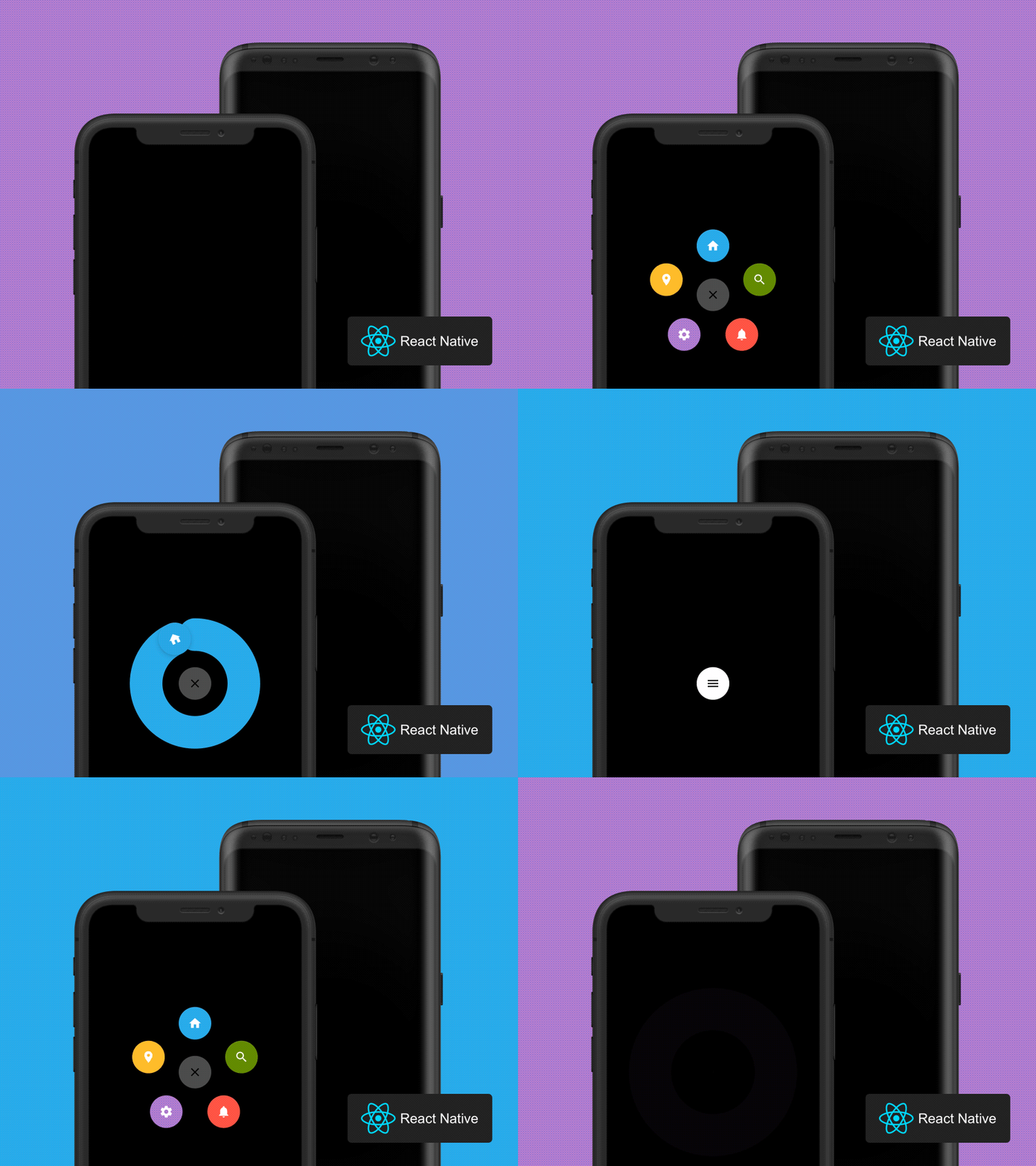
I am trying to create this animation in react native
https://raw.githubusercontent.com/Ramotion/react-native-circle-menu/HEAD/preview.gif

Since the library is no longer maintained it doesnt work anymore in modern expo
I was able to create the radial menu and almost the circular animation but facing some problems

My radial menu Code

//ActionButtonItem.js
import React, { Component } from "react";
import { StyleSheet, View, Animated, TouchableOpacity, Platform } from "react-native";
import PropTypes from "prop-types";

export const iosElevation = (forIos, forAndroid) => {
  return (
    Platform.OS === "ios" && {
      shadowOffset: { width: -2, height: 4 },
      shadowColor: "#171717",
      shadowOpacity: 0.2,
      shadowRadius: 3,
    }
  );
};

export default class ActionButtonItem extends Component {
  handlePress = (e) => {
    e.stopPropagation(); // Prevents the parent ActionButton from closing
    this.props.onPress && this.props.onPress(e);
  };

  render() {
    const offsetX = this.props.radius * Math.cos(this.props.angle);
    const offsetY = this.props.radius * Math.sin(this.props.angle);
    
    return (
      <Animated.View
        style={[
          {
            opacity: this.props.anim,
            width: this.props.size,
            height: this.props.size,
            transform: [
              {
                translateY: this.props.anim.interpolate({
                  inputRange: [0, 1],
                  outputRange: [0, offsetY],
                }),
              },
              {
                translateX: this.props.anim.interpolate({
                  inputRange: [0, 1],
                  outputRange: [0, offsetX],
                }),
              },
              {
                rotate: this.props.anim.interpolate({
                  inputRange: [0, 1],
                  outputRange: [
                    `${this.props.startDegree}deg`,
                    `${this.props.endDegree}deg`,
                  ],
                }),
              },
              {
                scale: this.props.anim.interpolate({
                  inputRange: [0, 1],
                  outputRange: [0, 1],
                }),
              },
            ],
          },
        ]}
      >
        <TouchableOpacity
          style={{ flex: 1 }}
          activeOpacity={this.props.activeOpacity || 0.85}
          onPress={this.handlePress}
        >
          <View
            style={[
              styles.actionButton,
              {
                width: this.props.size,
                height: this.props.size,
                borderRadius: this.props.size / 2,
                backgroundColor: this.props.buttonColor,
                elevation: 15,
              },
              iosElevation(),
            ]}
          >
            {this.props.children}
          </View>
        </TouchableOpacity>
      </Animated.View>
    );
  }
}

ActionButtonItem.propTypes = {
  angle: PropTypes.number,
  radius: PropTypes.number,
  buttonColor: PropTypes.string,
  onPress: PropTypes.func,
  children: PropTypes.node.isRequired,
  startDegree: PropTypes.number,
  endDegree: PropTypes.number,
};

ActionButtonItem.defaultProps = {
  onPress: () => {},
  startDegree: 0,
  endDegree: 720,
};

const styles = StyleSheet.create({
  actionButton: {
    justifyContent: "center",
    alignItems: "center",
    flexDirection: "row",
    paddingTop: 2,
    shadowOpacity: 0.3,
    shadowOffset: {
      width: 0,
      height: 1,
    },
    shadowColor: "#444",
    shadowRadius: 1,
    backgroundColor: "red",
    position: "absolute",
  },
});


//ActionButton.js
import React, { Component } from "react";
import {
  StyleSheet,
  Text,
  View,
  Animated,
  TouchableOpacity,
  TouchableWithoutFeedback,
} from "react-native";
import PropTypes from "prop-types";
import ActionButtonItem, { iosElevation } from "./ActionButtonItem";
import { RFPercentage } from "react-native-responsive-fontsize";
import * as Progress from "react-native-progress";

const alignMap = {
  center: {
    alignItems: "center",
    justifyContent: "flex-end",
    startDegree: 180,
    endDegree: 360,
  },

  left: {
    alignItems: "flex-start",
    justifyContent: "flex-end",
    startDegree: 270,
    endDegree: 360,
  },

  right: {
    alignItems: "flex-end",
    justifyContent: "flex-end",
    startDegree: 180,
    endDegree: 270,
  },
  radial: {
    alignItems: "center",
    justifyContent: "center",
    startDegree: 0,
    endDegree: 360,
  },
};

export default class ActionButton extends Component {
  constructor(props) {
    super(props);
    this.state = {
      active: props.active,
      anim: new Animated.Value(props.active ? 1 : 0),
    };

    this.timeout = null;
  }

  componentWillUnmount() {
    clearTimeout(this.timeout);
  }

  getActionButtonStyle() {
    return [styles.actionBarItem, this.getButtonSize()];
  }

  getActionContainerStyle() {
    const { alignItems, justifyContent } = alignMap[this.props.position];
    return [
      styles.overlay,
      styles.actionContainer,
      {
        alignItems,
        justifyContent,
      },
    ];
  }
  getActionsStyle() {
    return [this.getButtonSize()];
  }

  getButtonSize() {
    return {
      width: this.props.size,
      height: this.props.size,
    };
  }

  animateButton() {
    if (this.state.active) {
      this.reset();
      return;
    }

    Animated.spring(this.state.anim, {
      toValue: 1,
      duration: 250,
      friction: 5,
      tension: 100,
      useNativeDriver: true,
    }).start();

    this.setState({ active: true });
  }

  reset() {
    Animated.spring(this.state.anim, {
      toValue: 0,
      duration: 250,
      friction: 5,
      tension: 100,
      useNativeDriver: true,
    }).start();

    setTimeout(() => {
      this.setState({ active: false });
    }, 250);
  }

  renderButton() {
    return (
      <View style={this.getActionButtonStyle()}>
        <TouchableOpacity
          activeOpacity={0.85}
          onLongPress={this.props.onLongPress}
          onPress={() => {
            this.props.onPress();
            if (this.props.children) {
              this.animateButton();
            }
          }}
        >
          <Animated.View
            style={[
              styles.btn,
              iosElevation(),
              {
                width: this.props.size - 5,
                height: this.props.size - 5,
                elevation: RFPercentage(5),
                borderRadius: this.props.size / 2,
                backgroundColor: this.state.anim.interpolate({
                  inputRange: [0, 1],
                  outputRange: [this.props.buttonColor, this.props.btnOutRange],
                }),
              },
              {
                top: 5,
                transform: [
                  {
                    scale: this.state.anim.interpolate({
                      inputRange: [0, 1],
                      outputRange: [1, this.props.outRangeScale],
                    }),
                  },
                  {
                    rotate: this.state.anim.interpolate({
                      inputRange: [0, 1],
                      outputRange: ["0deg", this.props.degrees + "deg"],
                    }),
                  },
                ],
              },
              // {backgroundColor:'red'}
            ]}
          >
            {this.renderButtonIcon()}
          </Animated.View>
        </TouchableOpacity>
      </View>
    );
  }

  renderButtonIcon() {
    if (this.props.icon) {
      return this.props.icon;
    }

    return (
      <Animated.Text
        style={[
          styles.btnText,
          {
            color: this.state.anim.interpolate({
              inputRange: [0, 1],
              outputRange: [
                this.props.buttonTextColor,
                this.props.btnOutRangeTxt,
              ],
            }),
          },
        ]}
      >
        +
      </Animated.Text>
    );
  }

renderActions() {
  if (!this.state.active) return null;

  const startDegree =
    this.props.startDegree || alignMap[this.props.position].startDegree;
  const endDegree =
    this.props.endDegree || alignMap[this.props.position].endDegree;
  const startRadian = (startDegree * Math.PI) / 180;
  const endRadian = (endDegree * Math.PI) / 180;

  const childrenCount = React.Children.count(this.props.children);
  let offset = 0;
  if (childrenCount !== 1) {
    offset = (endRadian - startRadian) / (childrenCount || 1);
  }

  return React.Children.map(this.props.children, (button, index) => {
    return (
      <View pointerEvents="box-none" style={this.getActionContainerStyle()}>
        <ActionButtonItem
          key={index}
          position={this.props.position}
          anim={this.state.anim}
          size={this.props.itemSize}
          radius={this.props.radius}
          angle={startRadian + index * offset}
          btnColor={this.props.btnOutRange}
          {...button.props}
          onPress={() => {
            if (this.props.autoInactive) {
              this.timeout = setTimeout(() => {
                this.reset();
              }, 200);
            }
            button.props.onPress();
          }}
        />
      </View>
    );
  });
}

 
  render() {
    let backdrop;
    if (this.state.active) {
      backdrop = (
        <TouchableWithoutFeedback
          style={styles.overlay}
          onPress={() => {
            this.reset();
            this.props.onOverlayPress();
          }}
        >
          <Animated.View
            style={{
              backgroundColor: this.props.bgColor,
              opacity: this.state.anim,
              flex: 1,
            }}
          >
            {this.props.backdrop}
          </Animated.View>
        </TouchableWithoutFeedback>
      );
    }
    return (
      <View pointerEvents="box-none" style={styles.overlay}>
        {backdrop}

        {this.props.children && this.renderActions()}
        <View pointerEvents="box-none" style={this.getActionContainerStyle()}>
          {this.renderButton()}
        </View>
      </View>
    );
  }
}

ActionButton.Item = ActionButtonItem;

ActionButton.propTypes = {
  active: PropTypes.bool,
  bgColor: PropTypes.string,
  buttonColor: PropTypes.string,
  buttonTextColor: PropTypes.string,
  size: PropTypes.number, 
  itemSize: PropTypes.number,
  autoInactive: PropTypes.bool,
  onPress: PropTypes.func,
  onOverlayPress: PropTypes.func,
  backdrop: PropTypes.oneOfType([PropTypes.bool, PropTypes.object]),
  startDegree: PropTypes.number,
  endDegree: PropTypes.number,
  radius: PropTypes.number,
  children: PropTypes.node,
  position: PropTypes.oneOf(["left", "center", "right","radial"]),
};

ActionButton.defaultProps = {
  active: false,
  bgColor: "transparent",
  buttonColor: "rgba(0,0,0,1)",
  buttonTextColor: "rgba(255,255,255,1)",
  position: "center",
  outRangeScale: 1,
  autoInactive: true,
  onPress: () => {},
  onOverlayPress: () => {},
  backdrop: false,
  degrees: 135,
  size: 63,
  itemSize: 36,
  radius: 100,
  btnOutRange: "rgba(0,0,0,1)",
  btnOutRangeTxt: "rgba(255,255,255,1)",
};

const styles = StyleSheet.create({
  overlay: {
    position: "absolute",
    bottom: 0,
    left: 0,
    right: 0,
    top: 0,
    backgroundColor: "transparent",
  },
  actionContainer: {
    flexDirection: "column",
    // padding: 10,
  },
  actionBarItem: {
    alignItems: "center",
    justifyContent: "center",
    backgroundColor: "transparent",
  },
  btn: {
    justifyContent: "center",
    alignItems: "center",
    // shadowOpacity: 0.3,
    // shadowOffset: {
    //   width: 0,
    //   height: 1,
    // },
    // shadowColor: '#444',
    // shadowRadius: 1,
  },
  btnText: {
    marginTop: -4,
    fontSize: 24,
    backgroundColor: "transparent",
    position: "relative",
  },
});

Giving output asenter image description here

Now I want the radial animation and here is my attempt

//RadialAnimation.js
import React, { useEffect } from "react";
import { View, StyleSheet } from "react-native";
import Svg, { Circle } from "react-native-svg";
import Animated, {
  useSharedValue,
  useAnimatedProps,
  withTiming,
  useAnimatedStyle,
  Easing,
} from "react-native-reanimated";
import Icon from "react-native-vector-icons/Ionicons";

const AnimatedCircle = Animated.createAnimatedComponent(Circle);

const RadialProgressAnimation = ({
  color = "blue",
  radius = 150,
  icon = "ios-add",
  height,
  width,
  anglez,
}) => {
  const progress = useSharedValue(0);
  const circumference = 2 * Math.PI * radius;

  useEffect(() => {
    progress.value = withTiming(1.7, {
      duration: 1400,
      easing: Easing.linear,
    });
  }, []);

  const animatedProps = useAnimatedProps(() => {
    return {
      strokeDashoffset: circumference * (1 - progress.value),
    };
  });

  const iconStyle = useAnimatedStyle(() => {
    const angle = progress.value * 360;
    return {
      transform: [
        { translateX: radius },
        { rotate: `${angle}deg` },
        { translateY: progress.value },
      ],
    };
  });

  return (
    <View style={styles.container}>
      <Svg
        height={radius * 2.5} // Adding some extra space to avoid clipping
        width={radius * 2.5}
        style={{
          transform: [{ rotate: `${anglez}deg` }],
          flex: 1,
          
        }} 
      >
        <AnimatedCircle
          cx={radius} //15 for right
          cy={radius}
          r={radius}
          fill="transparent"
          stroke={color}
          strokeWidth={100}
          strokeLinecap="round"
          strokeDasharray={`${circumference}, ${circumference}`}
          animatedProps={animatedProps}
          style={{ flex: 1 }}
        />
      </Svg>
      <Animated.View
        style={[
          iconStyle,
          {
            position: "absolute",
            backgroundColor: "green",
            flex: 1,
          },
        ]}
      >
        <Icon
          name={icon}
          size={32}
          color={"white"}
          style={{ backgroundColor: color }}
        />
      </Animated.View>
    </View>
  );
};

const styles = StyleSheet.create({
  container: {
    flex: 1,
    backgroundColor: "white",
    display: "flex",
    justifyContent: "center",
    alignItems: "center",
    height: "auto",
    width: "auto",
    margin: 30,
    zIndex: 150,
  },
});

export default RadialProgressAnimation;

//Index.js
import { useState } from "react";
import React, { StyleSheet, View, useWindowDimensions } from "react-native";
import ActionButton from "@kashyap_trivedi/react-native-circular-action-menu";
import Icon from "react-native-vector-icons/Ionicons";
import RadialProgressAnimation from "./components/RadialAnimation";
const CircleMenu = () => {
  const [activeButton, setActiveButton] = useState(null);

  const handleButtonClick = (color, icon, anglez) => {
    setActiveButton({ color, icon, anglez });
    // Reset after animation (duration + a little extra)
    setTimeout(() => setActiveButton(null), 1100);
  };

  const { height, width } = useWindowDimensions();
  return (
    <View
      style={{
        flex: 1,
        backgroundColor: "#f3f3f3",
        position: "absolute",
        top: height / 2,
        left: width / 2,
      }}
    >
      {activeButton && (
        <View
          style={{
            flex: 1,
            position: "absolute",
            zIndex: 50,
            height: "100%",
            width: "100%",
          }}
        >
          <RadialProgressAnimation
            color={activeButton.color}
            icon={activeButton.icon}
            anglez={activeButton.anglez}
            height={height}
            width={width}
            radius={150}
          />
        </View>
      )}
      <ActionButton
        buttonColor="rgba(231,76,60,1)"
        radius={150}
        btnOutRange={"rgba(231,76,60,1)"}
        degrees={360}
        size={90}
        itemSize={90}
        position="radial"
        autoInactive={false}
      >
        <ActionButton.Item
          buttonColor="#9b59b6"
          title="New Task"
          onPress={() => handleButtonClick("#9b59b6", "navigate", 360)}
        >
          <Icon name="navigate" style={styles.actionButtonIcon} />
        </ActionButton.Item>
        <ActionButton.Item
          buttonColor="#3498db"
          title="Notifications"
          onPress={() => handleButtonClick("#3498db", "accessibility", 90)}
        >
          <Icon name="accessibility" style={styles.actionButtonIcon} />
        </ActionButton.Item>
        <ActionButton.Item
          buttonColor="#1abc9c"
          title="All Tasks"
          onPress={() => handleButtonClick("#1abc9c", "menu", 180)}
        >
          <Icon name="menu" style={styles.actionButtonIcon} />
        </ActionButton.Item>
        <ActionButton.Item
          buttonColor="#1abc9c"
          title="All ok"
          onPress={() => handleButtonClick("#1abc9c", "home", 270)}
        >
          <Icon name="home" style={styles.actionButtonIcon} />
        </ActionButton.Item>
      </ActionButton>
    </View>
  );
};

export default CircleMenu;
const styles = StyleSheet.create({
  actionButtonIcon: {
    fontSize: 20,
    height: 22,
    color: "white",
  },
});

Leading to this
https://imgur.com/a/aRPip7T

Now how to solve these problems in the animation
1)RadialAnimation gets clipped even on setting a higher height and width
2)Animation should start from bottom of the button
3)Button Icon should translate in the radial progress animation

I get a ‘Cannot GET’ error in express project

Getting cannot GET error while trying to access a url

I was making a simple node.js express project and doing login and register urls, but I can’t access them
This is my routes/users.js file:

const express = require('express');
const router = express.Router();
const bcrypt = require('bcryptjs');
const passport = require('passport');
const User = require('../models/User');

router.get('/register', (req, res) => res.render('register'));

router.post('/register', (req, res) => {
    const { name, email, password, password2 } = req.body;
    let errors = [];

    if (!name || !email || !password || password2) {
        errors.push({ msg: 'Please fill in all fields!' });
    }

    if (password !== password2) {
        errors.push({ msg: 'Password do not match' });
    }

    if (errors.length > 0) {
        res.render('register', {
            errors,
            name,
            email,
            password,
            password2
        });
    } else {
        User.findOne({ email: email }).then(user => {
            if (user) {
                errors.push({ msg: 'Email is already registered' });
                res.render('register', {
                    errors,
                    name,
                    email,
                    password,
                    password2
                });
            } else {
                const newUser = new User({
                    name,
                    email,
                    password
                });

                bcrypt.genSalt(10, (err, salt) => {
                    bcrypt.hash(newUser.password, salt, (err, hash) => {
                        if (err) throw err;
                        newUser.password = hash;
                        newUser.save()
                        .then(user => {
                            req.flash('success_msg', 'You are now registered and can log in');
                            res.redirect('/users/login');
                        })
                        .catch(err => console.log(err));
                    })
                });
            }
        });
    }
});

router.get('/login/', function(req, res){
    res.render('login');
});

router.post('/login', (req, res, next) => {
    passport.authenticate('local', {
        successRedirect: '/dashboard',
        failureRedirect: '/users/login',
        failureFlash: true
    })(req, res, next);
});

module.exports = router;

And this is my app.js file:

const express = require('express');
const mongoose = require('mongoose');
const passport = require('passport');
const session = require('express-session');
const flash = require('connect-flash');
const dotenv = require('dotenv');
const app = express();
const ejsMate = require('ejs-mate');

dotenv.config();

require('./config/passport');

const db = process.env.MONGO_URI;

mongoose.connect(db, { useNewUrlParser: true, useUnifiedTopology: true })
.then(() => console.log('MongoDb connected'))
.catch(err => console.log(err));

app.set('view engine', 'ejs');

app.use(express.urlencoded({ extended: false }));

app.use(session({
    secret: 'secret',
    resave: true,
    saveUninitialized: true
}));

app.use(passport.initialize());
app.use(passport.session());

app.use(flash());

app.use((req, res, next) => {
    res.locals.success_msg = req.flash('success_msg');
    res.locals.error_msg = req.flash('error_msg');
    res.locals.error = req.flash('error');
    next();
});

app.use('/', require('./routes/index'));
app.use('/users', require('./routes/users'));
app.use('/coworkings', require('./routes/coworkings'));

const PORT = process.env.PORT || 5000;

app.listen(PORT, console.log('Server started on ${PORT}'));

I don’t know what do you need more. Please reply if you need some other files. aaaaaaaaaaaaaaaaaaaaaaaaaaaaaaaaaaaaaaaaaaaaaaaaaaaaaaaaaaaaaaaaaaaaaaaaa

How can I use the Llama 3.1 model in my app without using an API?

I want to use the Llama 3.1 8B LLM in my web app without relying on any external API.

I believe that models in GGUF format are best suited for my needs. My plan is to use the user’s CPU for text generation. I think this is feasible because I was able to use LM Studio offline on my laptop (which has no GPU). I downloaded the Llama 3.1 model, and the application worked well. The text generation speed was acceptable.

How to efficiently append to a file?

I’m appending data to a log file using OPFS (Origin Private File System browser API) and I noticed it’s very slow.

It takes ~22ms to write 5MB to a new file but it also takes ~23ms to append a single byte.

I didn’t file anything like an append flag. I had to read the file size and start writing at that position to append data. Is there a better way of appending data?

For comparison, in Node.js it takes 1.3ms to write 5MB to a new file and 0.1ms to append a single byte.

OPFS benchmark code:

(async () => {
  async function create5MBFile(fileHandle) {
    console.time('create5MBFile');
    const writable = await fileHandle.createWritable();
    const chunkSize = 5 * 1024 * 1024;

    const chunk = new Uint8Array(chunkSize).fill(0);
    await writable.write(chunk);

    await writable.close();
    console.timeEnd('create5MBFile');
  }

  async function appendByte(fileHandle) {
    console.time('appendByte');
    const file = await fileHandle.getFile();
    const currentSize = file.size;

    const writable = await fileHandle.createWritable({ keepExistingData: true });
    const byteToAppend = new Uint8Array([0]);

    await writable.write({ type: 'write', position: currentSize, data: byteToAppend });
    await writable.close();
    console.timeEnd('appendByte');
  }

  const root = await navigator.storage.getDirectory();
  const fileHandle = await root.getFileHandle('append.log', { create: true });
  await create5MBFile(fileHandle);
  await appendByte(fileHandle);
})();

Node.js benchmark:

const fs = require('fs');
const path = require('path');
const filePath = path.join(__dirname, 'append.log');
const fileSize = 5 * 1024 * 1024;
const byteToAppend = Buffer.from([0]);

function create5MBFileSync() {
  const fileBuffer = Buffer.alloc(fileSize, 0);
  console.time('write 5MB');
  fs.writeFileSync(filePath, fileBuffer);
  console.timeEnd('write 5MB');
}

function appendByteSync() {
  console.time('appendByteSync');
  fs.appendFileSync(filePath, byteToAppend);
  console.timeEnd('appendByteSync');
}

create5MBFileSync();
appendByteSync();

running variable++ adds 2 instead of 1 (Reactjs)

im trying to increment a value by 1. no matter what i try it adds more than 1. i know the function only gets called once, and only when a button is clicked

const [counter, setCounter] = useState(0)
const handleSubmit = () => {
    setCounter(counter + 1)
    console.log('handleSubmit is running', counter) //TO SHOW ME HOW MANY TIMES THE FUNCTION RUNS. ONLY INCREMENTS BY 1 EACH TIME I CLICK THE BUTTON

    setLeveledChar(prevChar => {
        
        let newChar = {...prevChar}
        //INCRIMENTS BY 1
        newChar.char_level++

        //SELECTED CLASS IS DIFFERENT DEPENDING ON WETHER OR NOT ISmULTICLASING IS TRUE.
        //EITHER THE SELECTED MULTICLASS OR LEVELEDcHAR.PRIMARY_CLASS
        // BY CLASS I MEAN LIKE A ROLE PLAYING CLASS BTW. NOT A PROGRAMMING CLASS
        const leveledClass = isMulticlassing ? newChar.multiclass.find(x => x.name === selectedClass.name)
            :newChar.primary_class
        
        //INCRIMENTS BY 2
        leveledClass++

        return newChar
    })

}

i tried leveledClass.level = leveledClass.level + 1 leveledClass.level += 1 but they all add 2.

Multiple choice checkboxes as filters in JS but filters don’t apply

I’m building an overview of plants with HTML, SCSS and JS and the user should have the option to filter plants by their need of light. It works fine, that the plants are displayed as cards but checking the checkbox does absolutely nothing.

This is what the checkboxes in HTML look like:

<div class="multiple-choice">
        <span><b>Light:</b><br/></span>
        <label for="halbschattig">
          <input type="checkbox" name="checklight" value="0" id="halbschattig">
          halbschattig
        </label><br/>
        <label for="hell">
          <input type="checkbox" name="checklight" value="1" id="hell">
          hell
        </label><br />
        <label for="sonnig">
          <input type="checkbox" 
          name="checklight" value="2" id="sonnig">
          sonnig
        </label>
      </div>

I stored all information about the plants in a JSON file, fetch it and then they get displayed. This is my JS code to fetch and display the data:

let plantsArr = [];
const plantcards = document.getElementById("plantcards");

let allCheckboxes = document.querySelectorAll("input[type=checkbox]");
let plantcard = Array.from(document.querySelectorAll(".plantcard"));
let checked = {};

async function getPlants() {
  try {
    const response = await fetch("../files/pflanzen.json", {
      method: "GET",
    });

    if (!response.ok) {
      throw new Error(`Error! status: ${response.status}`);
    }

    let data = await response.json();

    for (const key in data) {
      {
        plantsArr.push(data[key]);
      }
    }

    return data;
  } catch (error) {
    console.log(error);
  }
}

/* Load plants */

getPlants().then((data) => {
  data.forEach((data) => {
    plantcards.insertAdjacentHTML(
      "afterbegin",
      `<article class="plantcard">
        <div class="article-wrapper">
          <figure>
            <img src="../images/plant_types/${data.Image}" alt="${data.Name}" />
          </figure>
          <div class="article-body">
            <h2>${data.Name}</h2>
            <h3>${data.NameLatin}</h3>
            <p>
               Standort: ${getPlantLight(data.Light)}<br/>
            </p>
            <a href="#" class="read-more">
              Read more <span class="sr-only">about this is some title</span>
              <svg xmlns="http://www.w3.org/2000/svg" class="icon" viewBox="0 0 20 20" fill="currentColor">
                <path fill-rule="evenodd" d="M12.293 5.293a1 1 0 011.414 0l4 4a1 1 0 010 1.414l-4 4a1 1 0 01-1.414-1.414L14.586 11H3a1 1 0 110-2h11.586l-2.293-2.293a1 1 0 010-1.414z" clip-rule="evenodd" />
              </svg>
            </a>
          </div>
        </div>
      </article>`
    );
  });
});

I tried to apply the filter (at the moment only for the light demand until this works) like the following:

getChecked("checklight");

Array.prototype.forEach.call(allCheckboxes, function (el) {
  el.addEventListener("change", toggleCheckbox);
});

function toggleCheckbox(e) {
  getChecked(e.target.name);
  setVisibility();
}

function getChecked(name) {
  checked[name] = Array.from(
    document.querySelectorAll("input[name=" + name + "]:checked")
  ).map(function (el) {
    return el.value;
  });
}

function setVisibility() {
  plantcard.map(function (el) {
    let checklight = checked.checklight.length
      ? _.intersection(Array.from(el.classList), checked.checklight).length
      : true;

    if (checklight) {
      el.style.display = "block";
      console.log("block");
    } else {
      el.style.display = "none";
      console.log("none");
    }
  });
}

Nothing happens in the console. If anyone might have a look at this and could give me a hint what I’m missing I’d be very grateful! 🙂

Can I use a google sheets document that calculates the size of a book spine to open a Adobe Indesign document at that size

I have a boo spine caulator on google, it uses page numbers and paper stock to calculate the size of a book spine in a seprate feild. If i added a page size column would there be a way to add a button with a script that could then open up the correct size document in Adobe Indesign… eg an a4(297mmx210mm) page with a 2mm could open a document at 297×422 (double page spread with spine added).

I havent had much luck so far using chatgpt for answers

Dynamically created Function is not calling or returning

I’m trying to dynamically create a Function in javaScript. Here is my code:

class Server {
   // Omitted for brevity
     public async method(method: Function, args: any[]) {
    const fsp = await import("fs/promises");
    const currentMethods: string[] = [];

    Object.keys(fsp).forEach((method) => {
      currentMethods.push(method);
    });

    Object.keys(fsp.default).forEach((method) => {
      currentMethods.push(method);
    });

    let matchedType = false;

    for (const currentMethod of currentMethods) {
      if (method.name === currentMethod) {
        matchedType = true;
      }
    }

    if (!matchedType) {
      throw new Error("Invalid method");
    }

    const callMethod = Function(
      `"use strict"; async () => {const {${method.name}} = await import("fs/promises"); return await ${method.name}(${JSON.stringify(args).replace("[", "").replace("]", "")});}`
    );

    const result = await callMethod();
    console.log(result);
    return result;
  }
}

Usage:

const server = new Server();

await server.method(fsp.writeFile, ["temp.txt", "hello world"]);

The code works like this:

  • I pass the method I want to use in this case fsp(Node fs/promises).writeFile
  • Then I pass the args as an array
  • That generates the following code: "use strict"; async () => {const {writeFile} = await import("fs/promises"); return await writeFile("temp.txt","hello world");}
  • Then I call it and it should write the file

However, this does not work and does nothing. How can I fix it.

How to let javascript access file in wwwroot directory(with php file in it)

I have a php file in the C:inetpubwwwroot directory, which is being hosted via IIS(version 10) on my computer. I also have an SQL server running with XAMPP, i just used PHPMyAdmin to make some tables. The code in this php file connects with the database, to add a row to a specific table. Furthermore, i have a little website with html+css+JS. the JS for that website is:

window.onload = function(){ 

$('#inputBTN').click(function() {
    var request = $.ajax({
        url: "C:/inetpub/wwwroot/werkthet.php",
        data: { label: "value" },
        method: "POST"
    });

    request.done(function() {
    });
 });

};

i want to Post to the php file:

<?php 

$servername = "localhost:3306";
$username = "root";
$password = "";
$dbname = "albums";

$conn = new mysqli($servername, $username, $password, $dbname);

if ($conn->connect_error) {
  die("Connection failed: " . $conn->connect_error);
}
echo "Connected successfully";


$sql = "INSERT INTO metal (TITLE, ARTIST, YEAR, RATING, PRISG, SECSG)
VALUES ('Crimson', 'Edge of sanity', '1994', 3.94, 'death metal', 'progressive metal')";

if ($conn->query($sql) === TRUE) {
  echo "New record created successfully";
} else {
  echo "Error: " . $sql . "<br>" . $conn->error;
}

$method = $_SERVER['REQUEST_METHOD'];
print_r($method);

$conn->close();

?>

This file works when i reload the page http://localhost/werkthet.php. It adds a row to the table. From what i understood, the POST method in JS makes this file basically do its thing. But the problem is, that C:inetpubwwwroot‘s access is denied(my error: jquery-1.11.0.min.js:4 Not allowed to load local resource: file:///C:/inetpub/wwwroot/werkthet.php). I have tried to set all permissions to allow everything(in the properties -> security) but its doing a bit weird but i at least have permission myself to paste and remove files there.

is there a way i could let javascript post to the php file succesfully? maybe a virtual directory? would that help?

Ive tried to just fill in the directory of the file, but also the actual URL(http://localhost/werkthet.php), but that gave a different error. this seemed better.

Extracting RFC 3161 timestamp from digitally signed PDF using Javascript

I’m trying to extract the signing time from my pdf document, I know it has a timestamp from the Acrobat below :

Adobe Acrobat Info regarding timestamp

But when I try to print the authenticated attributes, I can’t find them (OID for signingTime is 1.2.840.113549.1.9.5)

This is my code for finding the signingTime Attributes :

// Extract all authenticated attributes
  const authenticatedAttributes = attrs.map(attribute => {
    const oid = forge.asn1.derToOid(attribute.value[0].value);
    const attributeName = forge.pki.oids[oid] || oid; // Try to resolve OID to a human-readable name // Extract the value, which might be a date, a string, or another encoded type
    let value;
    try {
      value = forge.util.bytesToUtf8(attribute.value[1].value[0].value);
    } catch (e) {
      value = forge.util.bytesToHex(attribute.value[1].value[0].value);
    }
    return {
      oid,
      name: attributeName,
      value,
    };
  });
  console.log("Authenticated Attributes:", authenticatedAttributes);

Autenticated Attributes Console Log

But this is the console info for my “Authenticated Attributes” there are no signingTime OIDs, even though I know it exists from the Acrobat Signature Details above.

Can anyone please help?

The steps in order for me to extract the data is as follows:

const verify = (signature, signedData, signatureMeta) => {
  const message = getMessageFromSignature(signature);
  const {
    certificates,
    rawCapture: {
      signature: sig,
      authenticatedAttributes: attrs,
      digestAlgorithm,
    },
  } = message;
  // console.log(attrs);
  // Extract all authenticated attributes
  const authenticatedAttributes = attrs.map(attribute => {
    const oid = forge.asn1.derToOid(attribute.value[0].value);
    const attributeName = forge.pki.oids[oid] || oid; // Try to resolve OID to a human-readable name
    // Extract the value, which might be a date, a string, or another encoded type
    let value;
    try {
      value = forge.util.bytesToUtf8(attribute.value[1].value[0].value);
    } catch (e) {
      value = forge.util.bytesToHex(attribute.value[1].value[0].value);
    }
    return {
      oid,
      name: attributeName,
      value,
    };
  });
  console.log("Authenticated Attributes:", authenticatedAttributes);
};

I have read many similar questions :

the signature includes en embedded timeStamp but it could not be verified

How to decode timestamp from digital PKCS7 signature?

Verify RFC 3161 trusted timestamp

And have read the documentation about digital signature from:

https://www.adobe.com/devnet-docs/acrobatetk/tools/DigSigDC/Acrobat_DigitalSignatures_in_PDF.pdf

https://www.ietf.org/rfc/rfc3161.txt

But to no avail.