GWD Web Design Banner with Swipe Gallery- 6 Sizes (Ad Templates)

Swipe Gallery Demonstration

An Exclusive Swipable Banner designed in GWD is ideal for designers, companies, individuals, agencies etc. You can easily update as many portfolio images as you like with the help of very easy to use documentation.

WEB DESIGN COMPANY BANNER 004 – HTML5 AD BANNER BASED ON GOOGLE WEB DESIGNER

    Attractive HTML 5 based ad banner features-

  • 6 Standard Sizes (160×600, 728×90, 300×250, 300×600, 200×200, 336×280)
  • HTML5/CSS3 based
  • Fully editable using Google Web Designer
  • Google based web fonts
    Download will include-

  • 6 fully editable layered PSD files
  • 6 HTML5 ready banners editable in Google Web Designer
  • Javascript, HTML and CSS files
  • Detailed Help File

Google Fonts used-
Oswald & Roboto Slab

Images are only for preview purposes. You can download images from photodune.

Please rate us it will help us a lot :)

Download GWD Web Design Banner with Swipe Gallery- 6 Sizes (Ad Templates)

HTML5 web version + CAPX file for easy creation (Templates)

Hello.
I saw the templates for greeting cards HTML and decided to create them in the constructor 2.. They do not than do not differ from cards in html made by other means. Can be edited as plain html code, as well as through the program Construct 2, does not require coding.
You can easily create any kind of greeting cards.

For the free version of the program Construct2

I did it to help you create your own greeting cards for the holidays.
Create your own greeting cards do not require a knowledge of coding . Create your own script congratulations.
See your results in real-time.
Features
– HTML 5 version (if you replace the graphics, the old way)
– CAPX file (you can replace the graphics, or create your own postcard)
– Described in detail the code
– Instructions on how to export your card and placed on the host
– 2 Christmas cards for experiments
– sound effects

I always answer your questions in the comments or email and help you.
_________________________________________
License agreement:
Licenses backgrounds belongs http://www.zzve.com
Licenses other graphics drawings belongs:
http://ru.freepik.com/free-photos-vectors/snowman

audio files are distributed under a free license

Download HTML5 web version + CAPX file for easy creation (Templates)

Twirl Puzzle (Images and Media)

Gather the puzzle moving 4 adjacent tiles. Many settings for all tastes.

Features

  • Numbering of tiles
  • Any number of pieces
  • Ability to add and use any number of your own images
  • Any number of moves
  • Any number of puzzles on one page
  • Editable CSS file (background color, font, animation)
  • Easy-editable parameters
  • Transfer options from the menu
  • Cross-browser support

Download Twirl Puzzle (Images and Media)

Morphing Buttons – Buttons X Add-on (Add-ons)


Note: This is an add-on that works only with Buttons X – Powerful Button Builder For WordPress.

Morphing Buttons is a premium add-on for Buttons X. Morph means to change smoothly from one image to another. The idea is to use a button, and morph it into a full screen overlay or modal window when clicked.

Features

  1. Animations
    We support animations for modal window and for content in and content out.
  2. Embeds
    Out of the box support for embeds. All WordPress supported embeds can be included as morph content.
  3. Easy To Use
    It is super easy to configure. We even provide tutorials on how to create morphing buttons.
  4. Full Control
    We give you full control. Use percentage or pixel based values for modal window.
  5. Mobile Ready
    It works well on mobile devices as well.
  6. Shortcodes
    Use any short code as part of content.
  7. Page Builders
    Use any page builder like Visual Composer to format modal content.

Support

World Class Support!

We manage technical queries through the item page and are proud of our One Day Turnaround!

Changelog

Initial Release.

Download Morphing Buttons – Buttons X Add-on (Add-ons)

SEO for Books (W/ Schema) for Adobe Muse (Muse Widgets)

Have a book that you want to draw attention to? This Adobe Muse widget will boost your SEO with schema, open graph and twitter card data.
Types of SEO in this widget

Types of SEO markup produced by this widget:

    All SEO widgets include a robots tag and a canonical URL tag

  • Schema — for search engines
    • Type
    • URL
    • Title
    • Description
    • Image
    • Author
    • ISBN
    • Genre
    • Date Published
    • Publisher Name
    • Copyright Year
  • Open Graph — for social media platforms
    • Type
    • URL
    • Title
    • Description
    • Image
    • ISBN
    • Author
    • Release Date
    • Page Count
  • Twitter Card — for Twitter
    • Type
    • URL
    • Title
    • Description
    • Image

Read this post to learn how to verify any of the SEO markup

How to install Adobe Muse widgets

How to install

Adding widgets to Adobe Muse

  1. Unzip the file
  2. Double click on any of the .mulib files. The widgets will automatically import into Adobe Muse
    • If the widget does not automatically import, open the Library tab on the right and select Import Muse Library
  3. In Muse, open the Library tab on the right
    • If you do not see this tab, you can open it by going to Windows > Library
  4. Locate the widget you’re wanting to use and drag and drop it onto your page

Download SEO for Books (W/ Schema) for Adobe Muse (Muse Widgets)

WordPress Plugin Maker – Freelancer Version (Help and Support Tools)

WordPress Plugin Maker is a powerful tool to increase WordPress development productivity,
saving time and increasing profits. WordPress Plugin Maker can build complete plugins and create customized features and quickly. WordPress Plugin Maker not WordPress Plugin but a Tool for Create WordPress Plugin

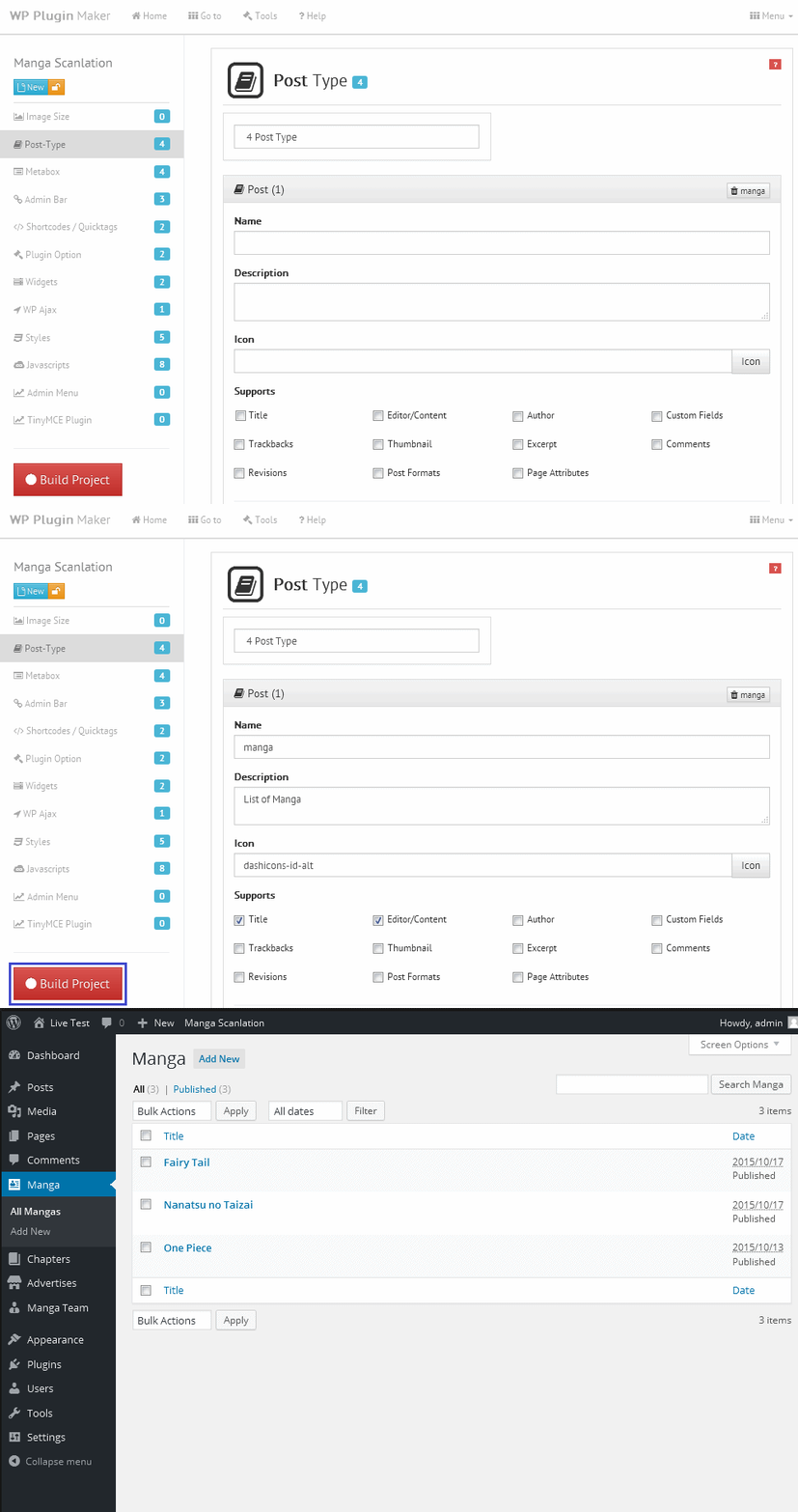
How it works? Eazy to Use

WordPress Plugin Maker can work with any web browser, either on your Local Network or on the Internet. Simply put side by side with WordPress CMS (copy-paste) when making plugins, then start a project then build it, done!

What it can do? With Code Builder

Through WordPress Plugin Maker you can develop WordPress Plugin and customized features very quickly. It can build plugins in an intuitive and fast way, like image size, custom post type or database, toolbox (metabox), admin bar (toolbar), shortcode and quicktags, plugin option, widget front-end/back-end, WP Ajax nopriv & auth, insert CSS, insert JS, Top level admin menu, tinymce plugin and other.
Experienced users? Not require high skill

You just need to make some css and javascript make your work look beautiful, if possible you can also edit the php code, it easily because it supports todo (IDE Editor), comments and variables have also been provided, simply use echo to see these variables.

Features

  • Support backup/restore project
  • Generate WordPress API Codes
    • Localization/Language Support (text-domain)
    • Image Size Codes
    • Post-Type Codes
    • Metabox Codes
      • Tiny Text
      • Large Text
      • Checkbox
      • Select Dropdown
      • Select Radio
      • API Color Picker
      • API Media Upload
      • API Dropdown Page
      • API Dropdown Categories
      • API Dropdown Users
    • Admin Bar Codes
    • Shortcodes/Quicktags Codes
      • API Get POST
      • API List Page
    • Plugin Option Codes
      • Tiny Text
      • Large Text
      • Checkbox
      • Select Dropdown
      • Select Radio
      • API Color Picker
      • API Media Upload
      • API Dropdown Page
      • API Dropdown Categories
      • API Dropdown Users
    • Widget Front/Back End Codes
      • API Get POST
      • API List Page
    • WP Ajax (No Priv/Auth) Codes
      • No Priv
      • Auth
    • Javascript Link Codes
      • Front-end
      • Back-end
    • Import CSS Codes
      • Front-end
      • Back-end
    • Top level admin menu Codes
    • TinyMCE Plugin Codes
  • Additional Feature
    • Dashicon Support
    • WordPress API Tool
  • Data relation
  • There are examples of code that you can use quickly.
  • TODO, comments and variables Support.


The first day


Download WordPress Plugin Maker – Freelancer Version (Help and Support Tools)

Avatar Widgets (Edge Animate Templates)

This project template has a cool look with a universal design to accommodate almost any type of projects, products or services. This brings a modern unique look and feel for your business marketing.

This file includes:

  • Html file
  • JPG files
  • Antmpl and Edge files
  • Support Muse files
  • Reusable Objects (Symbols)
  • Clickable

Do you want to change the Avatar or Image Background?
No problem.

You only need replace images with the same name
1000×473px to Background and 360×360px to Avatar

Just drag and drop, save and replace the png file.

If you are interested in making a sale with this presentation, please purchase the Extended license.

Easy to use and edit, READY TO USE

Download Avatar Widgets (Edge Animate Templates)

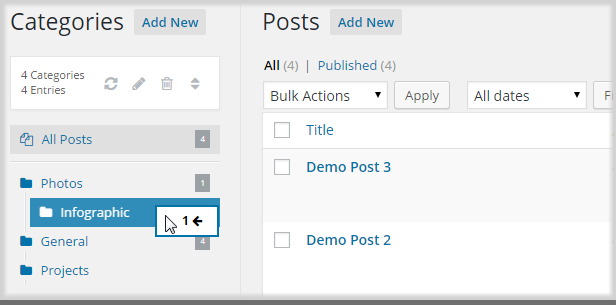
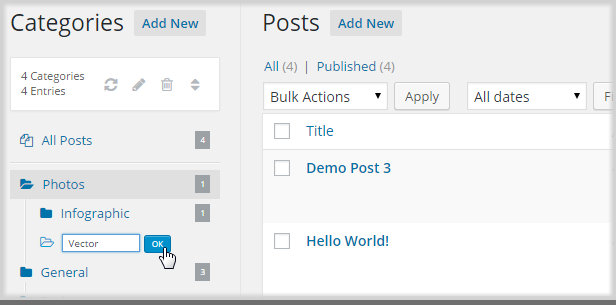
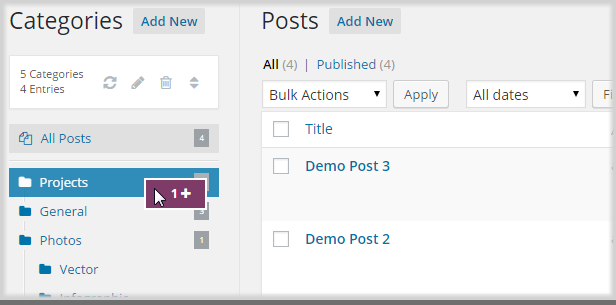
Better organization for your WordPress Categories (Utilities)


Features

  • Easy to use!
  • Flexible view of your categories structure
  • Drag and drop your posts via mouse
  • Create, rename, delete and reorder your categories
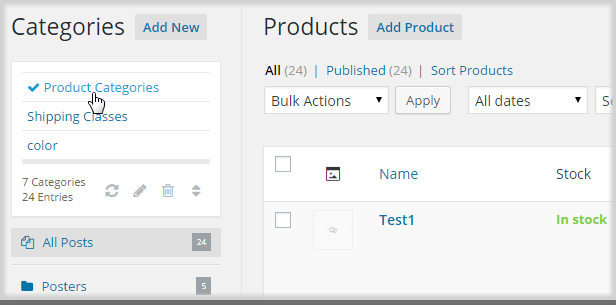
  • Works fine with WooCommerce products and product attributes
  • Just install and it works with your current categories
  • Move or append to category
  • Supports custom post types
  • Supports multisite

What customers say

Updates

10 November 2015 - Version 1.0.1 - In Review
- fixed javascript error for firefox, ie and opera

08 November 2015 - Version 1.0
- initial review

Download Better organization for your WordPress Categories (Utilities)

ContentLock – Content Locking Solution (Miscellaneous)

video overview

ContentLock is universal content locking solution. Covered with back-end admin dashboard where you can organize your locks, email them to selected users, or multiple recipients, or to all subscribers. You can monitor your statistics and collect new leads with simple content locking.

Ask your visitors to subscribe (provide you an email address) in order to receive password for locked content. Subscribe form with automatic password sending is implemented with ContentLock plugin.

Main Features

  • Create single Locks for individual content, or create a group lock, one password for multiple content.
  • Lock Any Content on web page – paragraphs (text),articles, videos, audio, images, download links, coupon codes, or even web page itself.
  • Simple built-in support for locking downloads.
  • Flexible Subscribe Box Integration – per lock, or you can place it in sidebar or any other container on your page.
  • Fully automated system for collecting new subscribers.
  • Send passwords from admin dashboard to your friends, users, list of users, or all current subscribers
  • Monitor your statistics from Admin Dashboard.

unlocking

Requirements

  • Web Server
  • PHP (admin dashboard requires PHP, and front-end plugin can’t work without it’s back-end.)

Download ContentLock – Content Locking Solution (Miscellaneous)

Super Ninja + AdMob + Multiple Character (Android)

<div style=”mso-element:para-border-div;border:none;border-bottom:solid #D4D4D4 1.0pt;
mso-border-bottom-alt:solid #D4D4D4 .75pt;padding:0cm 0cm 8.0pt 0cm”>

Amazing Super Ninja

<p style=”margin-top:0cm;margin-right:0cm;margin-bottom:15.0pt;margin-left:
0cm;line-height:18.0pt”>
 
APK file :

https://drive.google.com/file/d/0B3VormSt1JgtanY5TXdrMDVwTFU/view?usp=sharing

Play store :

https://play.google.com/store/apps/details?id=com.pappillon.ninja

Brief Summary:
You are the superNinja, fight and Fly to escape the chasing of your enemy…
<p style=”margin-top:0cm;margin-right:0cm;margin-bottom:15.0pt;margin-left:
0cm;line-height:18.0pt”>

Category :
Acade/Action/Adventure


Ad
Network:

–
AdMob Interstitial
 

Game Features

–
Easy tap and fly motion game
–
Tight and fast paced game play;
–
20 levels (and more coming soon )
–
Collect coins to pass levels
–
Collect coins to Unlock different players
–
Music and sound effects
– Resume From checkpoints
– Facebook Like Button
– Review Button
–
And more features!


  Development Engine and Language:

Cocos2d-x Engine with C++ and Java – Eclipse Engine or Android Studio

Download Super Ninja + AdMob + Multiple Character (Android)

Click – Pricing Table (Pricing Tables)

Demo URL:
http://www.mediacity.co.in/click

Key Features

  • 13 Different Styles
  • 5 Color Themes
  • Bootstrap
  • Clean Design
  • Responsive
  • CSS3 Transitions
  • 3 column and 4 Column
  • Google Fonts
  • Documentation Include
  • Easy to Implement and Customize

Source & Credits

Thanks for each of these people that made our theme look amazing with their fabulous Icons, Fonts and Css.
Icons: Icons made by Freepik from www.flaticon.com is licensed by CC BY 3.0
Fonts: fontawesome.io
Google Fonts
CSS: Bootstrap
JS: Color-Switcher-Plugin (MIT) Plugin Documentation


Download Click – Pricing Table (Pricing Tables)

GWD Cloud Service | Business Banner – 7 Sizes (Ad Templates)

CLOUD SERVICE – BUSINESS BANNER 006 – HTML5 AD BANNER BASED ON GOOGLE WEB DESIGNER

    Attractive HTML 5 based ad banner features-

  • 7 Standard Sizes (160×600, 728×90, 300×250, 300×600, 160×600, 200×200, 336×280)
  • HTML5/CSS3 based
  • Fully editable using Google Web Designer
  • Google based web fonts
    Download will include-

  • 7 fully editable layered PSD files
  • 7 HTML5 ready banners for multipurpose usage
  • CSS included

Google Fonts used-
Roboto

Preview Image used can be downloaded from here –
Phone img
http://photodune.net/item/office-ip-telephone-set-with-lcd-display-isolated-on-white/4111694?s_phrase=office%20telephone&s_rank=78

BG image
http://photodune.net/item/space-clouds-background/5814586?s_phrase=cloud%20background&s_rank=96

Please rate us it will help us a lot :)

Download GWD Cloud Service | Business Banner – 7 Sizes (Ad Templates)

Maria – All in One Social Share WordPress Plugin (Social Networking)

Maria is a first all in one social sharing WordPress Plugin integrated with lot of designs. It will increase your social sharing visibility. It allow to display Twitter tweet, Instagram Photos and 21+ Social Share Count. In addition you can display social icons, twitter tweet, instagram in your sidebar or other widget areas and you can monitor social shares in an impressive looking interface.

Features

  • Support Shortcode
  • 100% Responsive
  • Easy Documentation
  • Dynamic Loading
  • Support Visual Composer and all kinds of page builder
  • HD/Retina Ready
  • 50+ Social Counts
  • Colourful Social Count
  • Plain Social Count
  • 1/2/3 Column Social Count
  • New: Twitter tweet included
  • New: Instagram Photo included
  • Facebook, Google Plus, Twitter, Youtube, Vimeo, Dribble, Soundcloud, Github, Behance, Delicious, Instagram, Email, Foursquare, Linkedin,
    Tumblr, 500px, Vine, pinterest, Flickr, Steam
    social count option support
  • Easy Customize Option
  • WordPress 4.0+
  • Upcoming More

Usage in Themeforest Themes

If you want to use Maria – All in One Social Share WordPress Plugin in your product for Themeforest purchase
One Extended license for each theme
for you.

Support

If you face any problem or want to say just hello, you can do this by Our profile . We will be happy.

Download Maria – All in One Social Share WordPress Plugin (Social Networking)

List & Poll Importer for Buzzy (Add-ons)

Disclaimer: P.B. stands for PlayBuzz® which is registered trademark of PlayBuzz Ltd and we are in no way associated with PlayBuzz or its associates.

IMPORTER DEMO

http://buzzy.xpertscripts.com/importer

SITE’S FRONTEND

http://buzzy.xpertscripts.com

Introduction

“List & Poll Importer for Buzzy” is an add-on and must have tool for anyone using “Buzzy – News, Viral Lists, Polls and Videos”.

Note: This is an add-on for Buzzy script which will work only if you have installed Buzzy.

If you are not familiar with the “Buzzy” script, here is the link:

http://codecanyon.net/item/buzzy-news-viral-lists-polls-and-videos/13300279

Thousands of viral lists and polls (only from P.B.) are ready to import from the top viral websites viz. BuzzFeed and PlayBuzz

  • BuzzFeed List Importer

    First time you can import viral lists from buzz feed as well. It supports almost all kind of lists containing items like, images, videos, twitter and instagram. For more, visit the demo and try it yourself.

  • P.B. List Importer

    As you can see in demo, you can import “LISTS” from play buzz.

  • Poll Importer

    Similar to Lists, you can also import POLLS from P.B.

SALIENT FEATURES

  • Select User

    Choose different users before import. Users list will be available in a drop-down select box.

  • Select Category

    Select desired category from the list before hitting import button. You may add new categories from Buzzy’s Admin Panel.

  • Auto Publish or Save as Draft

    You may choose whether you want to auto-publish the imported item or save it as DRAFT (to be activated later from admin panel).

  • Credits

    There are plenty of options to give attribution to the author. You may choose whether you want to give credits or not. And,
    if you want to give credits, there are different templates to customize the look of “credits note”.
    To know more about credits settings, click here.

If you have any questions, please feel free to contact via contact form:
http://codecanyon.net/user/xpertscripts#contact

Download List & Poll Importer for Buzzy (Add-ons)