Christmas Card Retro (Canvas)

Let’s celebrate Christmas as before. A Christmas card with colors and retro or vintage style. With a beautiful musical style and incredible effects, your friends and customers will feel back in time!

You can see the animation on the tablet and phone, because the card was made with html5. Fully touuch! The arts are included, are 3 color cards and even has a help file.

Download Christmas Card Retro (Canvas)

Fall Jump Roll – HTML5 Game (CAPX) (Games)

FALL JUMP ROLL is a three games in one game.

Play all stages of stick man in it.

This game is build by Construct 2 Game Engine (Capx File Included).

How To Play

In First game you have to swipe up to jump over the obstacles and swipe down to roll.

In Second game you just have to touch on screen to change the directions to get away from obstacles.

In Third game you have to tap to jump through obstacles and not to fall in empty area.

Features

– HTML 5
– Ludei + Ads Supported
– Playable in all platforms (Mobile, PC, etc.)
– Including Constuct 2 file (.capx – all source)
– Easy export to Android & iOS
– Single Touch To Play

Download Android Example APK

Our Other Games

Download Fall Jump Roll – HTML5 Game (CAPX) (Games)

Fruit Matching – HTML5 Matching Game (Games)

Play It Now!

Fruit Matching is a HTML5 Matching Game. Play this coloured match-3 game with fruit to slice! You have 1 minute of time to collect as many points as possible!

3 Power-ups available:
– Bomb: destroy fruits around (you got it if you make a combo 4).
– Changing Fruit: destroy all fruit of a kind present in the grid (you got it if you make a combo 5).
– Hourglass: Earn some precious seconds.

This game has been developed in HTML5/js and third-party library CreateJs – http://createjs.com/ (not Construct2 or other framework).

The ZIP package contains the game with 540×960 resolution that scales to fit the whole screen device
Just warning that for very wide screens, the game may not be perfectly full screen.
The game is fully compatible with all most common mobile devices.
WARNING:
Sounds are enabled for mobile but we can’t grant full audio compatibility on all mobile devices due to some well-know issue between some mobile-browser and HTML5.
So if you want to avoid sound loading, please read the documentation
Sounds can’t be enabled for Windows Phone as this kind of device have unsolvable issues with <audio> and <video> tag.

Game Screenshoot


 Follow Us

 Contact Us

YOU MIGHT ALSO BE INTERESTED IN:

Katana Fruits

Gummy Blocks

Christmas Shooter

Halloween Chain

Easter Breaker

Stone of Pharaoh

Pet Party Columns

Apples

Funny Faces

The Sorcerer

Bubble Shooter

Slot The Fruits

Scratch Fruit

The Keno

Jacks or Better

All games

All Graphic Assets

All Models

Flag Counter

Download Fruit Matching – HTML5 Matching Game (Games)

Readit – iOS8/9 Social News App Template (Swift) (Full Applications)


Readit – Full iOS 8/9 Universal Social News App Template (Swift)


Readit is a Universal App template that works similarly to reddit.com website, you can login/sign up for an account and post links of the news you want, vote and share them on social networks or email, and also comment them. Your account screen includes the list of your posts and the saved ones (you can only save news from other users, since your own ones will be automatically added to your account’s page).

Since this app works with Parse™ backend, you can run it for the first time on XCode and browse posts, but if you want to leave comments, post links or create users we recommend you to create your own app in your Parse.com console (it’s FREE) and use your own Client and ID keys to do that, otherwise you may mess up the demo database and experience some issues, we clean our demo databases weekly.

You’ll also find a Categories.json file into this package, which is a class you should import into your Parse database to start working with some categories for this app news. You can edit them as you wish by just entering new Rows or removing the existing ones.
This app is a native XCode project, Swift language, super easy to customize. Check out its video preview to see it in action!


IMPORTANT: As per Envato rules, you must purchase Readit under an Extended License if:
1. You plan to sell your own version of this app as a PAID app on the AppStore
2. You plan to add In-App Purchase to your own version of this template (which means that your users get charged of money).
3. You plan to sell your own version of this app on Flippa and similar markets.
Thanks!

FEATURES:

  • XCode 7.x project – Swift – 64bit
  • iOS 8/9.x – Universal – Storyboard
  • iAd + AdMob banners
  • Works with Parse™ backend (http://parse.com)
  • Easily post your links, give them a title, choose a category
  • PDF User Guide included
  • PSD graphics included
  • Easy to customize, well commented code


Have fun with Readit, and don’t forget to rate it on your Downloads page!


Flag Counter


Important Disclaimer: We’ve recently found out that some developers have bought our app templates, reskinned them just a bit and put them on sale on other source code markets smilar to CodeCanyon, saying that they developed and own such source codes.
That is a serious copyright infringement, developers who buy our templates are allowed to reskin and sell them as apps on the App Store (accordingly to the License type they’ve purchased a template for), but are not allowed to put our original source codes for sale on source code markets, including CodeCanyon.
We will report developers who made copyright infringements to the competent authorities.
Thanks.

Download Readit – iOS8/9 Social News App Template (Swift) (Full Applications)

Out of Stock! Manager (Products)

Easily manage multiple and custom warning low stock values for all your products!

LIVE DEMO

http://www.codecanyon.eu/wcosm/wp-admin/
user: demo
pass: demo

MULTIPLE & CUSTOM LOW STOCK VALUES

WCOSM is a powerful and flexible tool that lets the shop admin to assign custom low stock values to a set of product and/or categories.
Using the custom value configurator the shop admin can:

  1. Create “Threshold” rules by which the shop admin can assign custom warning low values for sets of products/categories.
  2. Configure a default warning value for products which do not match any custom value rule.
  3. Email notifications.
  4. Multiple email notification recipients.

DASHBOARD WIDGET

WCOSM helps the shop admin to speed up the editing and monitoring of the products under custom low levels (or all stock manageable items) adding a widget directly to the WordPress Dashoboard.

EMAIL NOTIFICATION SYSTEM

After an order is placed WCOSM checks all purchased products stock left value notifying the Shop admin if one (or more) of the items
has reached a configured custom warning level.

EMAIL MULTIPLE RECIPIENS

WCOSM by default sends email notifications to admin email but optionally can be configured multiple recipeins.

WPML COMPATIBLE

WCOSM is WPML COMPATIBLE

DASHNOARD WIDGET

WCOSM

UNDER CUSTOM STOCK VALUES/STOCK MANAGABLE ITEMS LIST PAGE

WCOSM

STOCK THRESHOLD CONFIGURATOR

WCOSM

CHANGE LOG

= 1.0 - 30.11.15 =
* Release

Download Out of Stock! Manager (Products)

Bin it (HTML5)

Bin it! aims to inform young people aged 6-13 about the importance of using dust bins.

Great for educating kids in a fun way about 6 different types of waste bin (depending upon the type of waste that can be disposed in them) to be unlocked over multiple different engaging rounds.

Choosing the appropriate waste in accordance to the type of bin present does seem simple enough but it will present considerable challenge when there is more than one waste bin present.

Random fun facts are unlocked at the end of each round.

The ZIP package contains the game with 650×550 resolution that automatically scales to fit current screen device and all the assets to grant complete game customization.

Anyway we can’t grant full compatibility on all mobile devices if this feature is enabled. More info into help file

If you are having some issue we intend to give you good support throughout. If you want to extend the game or some thing other then that ,feel free to contact me .

Please understand graphics are not included in this package its only source code of the game .If you are interested in graphics as well feel free to contact us.

Download Bin it (HTML5)

Beautiful Girl Run Game For SocialKit (Miscellaneous)

Beautiful Girl Run Game For SocialKit is a game for SocialKit. From now users can play game instant.

Features :

> No need to go other website.

>All Version Supported.

>Customized for both theme Grape and Blackberry.

>Fastest Working Script.

> Fully Responsive.

> No Needed Any Coding Skill

BUY IT NOW

Don’t forget to rate this product


after purchases

Download Beautiful Girl Run Game For SocialKit (Miscellaneous)

Contact Plugin for Buzzy (Add-ons)

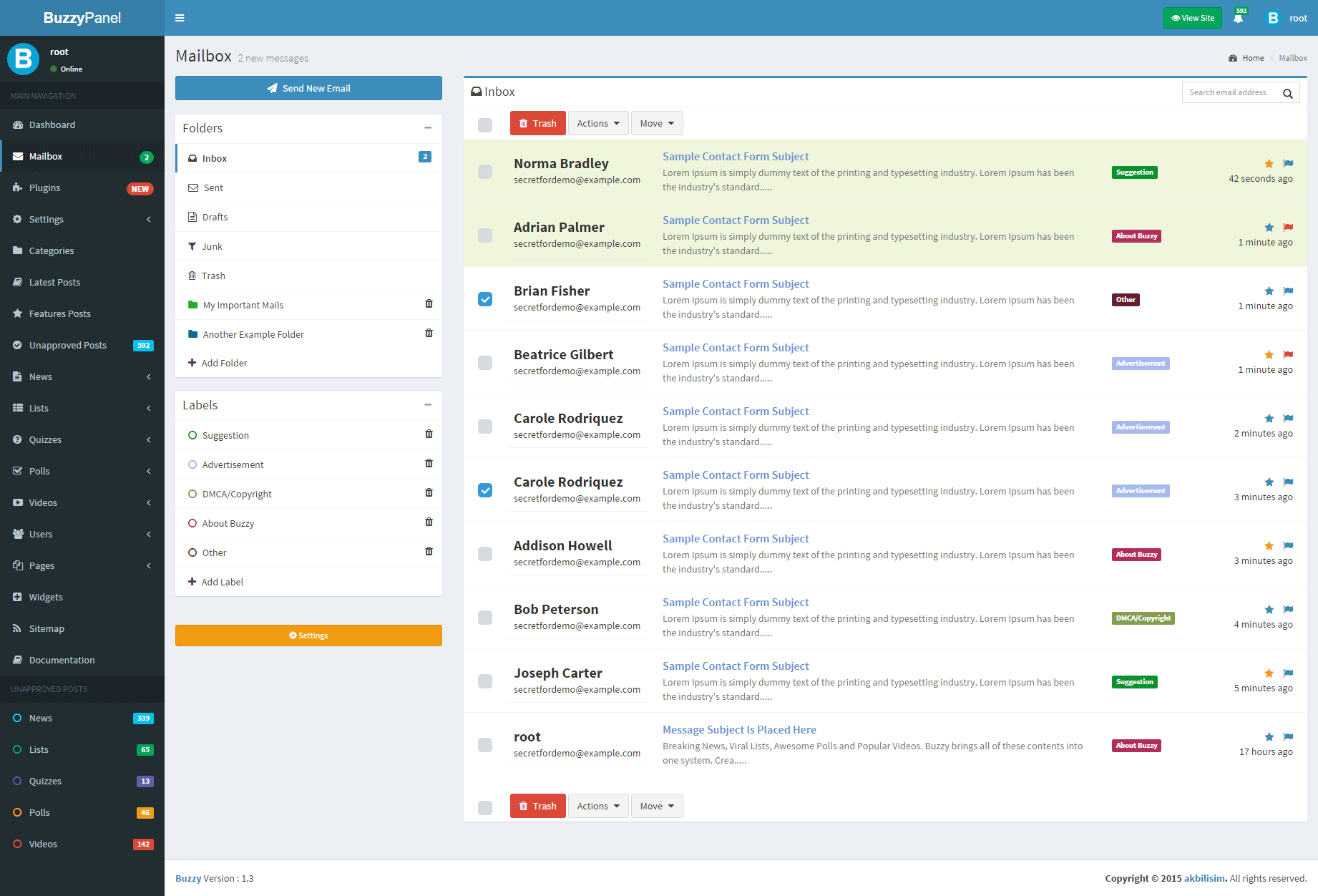
Buzzy Contact Form plugin allows you to create contact form in your Buzzy site.

Admin Panel Mailbox Demo

Email: [email protected]
Password: demoadmin

Documentation can be found on archive file you downloaded.

Screenshot

\
\

Features

– Simple Functional Design
– Advanced Inbox page for admin panel
– Fully Manageable Contacts
– Google reCAPTCHA Protection
– Unlimited Private Folders
– Unlimited Department Option
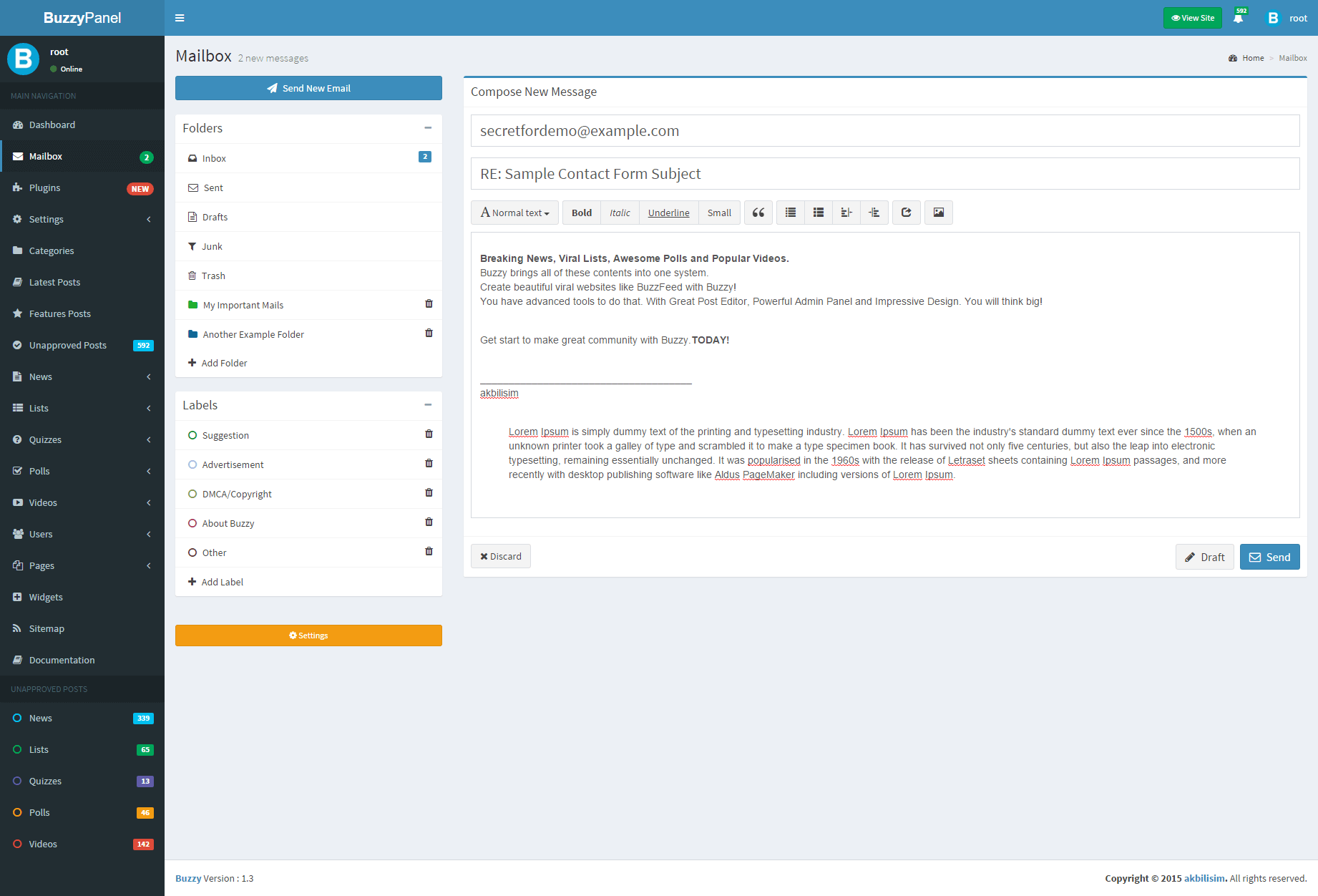
– Easy to Send New Email to Users
– Draft Save Option
– Sent contact mail copy to private email
– Much more advanced features…

Requirements

  1. Buzzy Script >= 1.3
    http://codecanyon.net/item/buzzy-news-viral-lists-polls-and-videos/13300279

Updates

v1.0.0

– Initial public release

Download Contact Plugin for Buzzy (Add-ons)

Fruit Memory – HTML5 Memory Game (Games)

Description

Fruit Memory – Flip over tiles of fruit and find the matching pairs. Look out for that speeding timer! (Mobile responsive.)

Features

  • Educational.
  • Complete Game.
  • Smooth and Dynamic animations.
  • HTML5 Mobile Optimized. (Responsive)
  • Simple to Reskin using GameMaker Studio.
  • Music and Sound FX included.
  • GameMaker Studio .gmz source file included.

Supported Platforms

  • All browsers on PC.
  • Apple phones and tablets.
  • Samsung Tab 3 and higher
  • Samsung S5 and higher

Screenshots

Fruit Memory

Download Fruit Memory – HTML5 Memory Game (Games)

Badlander – Endless & Admob (Games)

Badlander is a Badland clone app, you play as a bird who must avoid obstacles and bullets and gain gold eggs.

This source code is EASY TO RESKIN !

Features:

-Badland Gameplay

-Endless Fun

-Elegant Art

-Smooth Soundtrack

-Source code with universal support, Phone and Tablet support.

AD Networks:

AdMob Banner AdMob Interstitial Ads

TRY IT :

http://bit.ly/1lSvWFX

How To:

-Import Project into Eclipse.

-Change Package ID, Version ID, App Name.

-Setup new icons, launch screens, localization and meta-data for your app.

-Change ID for Ad Networks.

-Update Review Us URL.

-Change Atlases file with new images.

-Export Project and upload to Play Store

Download Badlander – Endless & Admob (Games)

Prestashop Custom Banners and Slideshows (Prestashop)

This is a Prestashop module aimed to help merchants and especially developers to add custom banners and/or Slideshows to their shop. You can use it to add any number of banners or slideshows to any number of Hooks, for each shop language. The module features an in-page hook and position management and also supports the creation of custom hooks on the fly. The backoffice interface is all ajaxified, while the frontend is fully customizable (tpl, css, js and php). All the parts can be also fully translated to any language. English and Italian manuals included.

Download Prestashop Custom Banners and Slideshows (Prestashop)

Material Review (Miscellaneous)

Material Review is a script that allows you to publish and manage reviews. It is full responsive PHP application based on MVC framework and google material design. It comes with 19 different color themes which can be applied from admin. It also proivde support for multilanguage for user side.

Features :

  • Google material design
  • Full responsive interface
  • AJAX based
  • Easy install
  • 19 different color themes for user/admin both
  • Multilanguage support for user side (English, Spanish, German, French, Russian, Italian, Dutch, Hindi, Gujarati)
  • Product categories
  • Products listing
  • Products search with tags
  • Product description with slides
  • Product views count
  • User rating system
  • Disqus comment system
  • Add to favorite for users
  • SEO friendly URLs
  • Ad management for advertisement
  • Slides for home page
  • SMTP support
  • HTML designed emails
  • New sign-in notification for admin panel
  • Material admin panel
  • User management – ban/unban user, remove user
  • Manage categories, products, slides, ads, disqus, language etc. from admin
  • and many more.

Requirements:

  • PHP 5.5 or later
  • PHP extension php_fileinfo optinal

Download Material Review (Miscellaneous)

Woocommerce Social Login (WooCommerce)

WooCommerce Social Login allows your customers to link their store accounts with a social media account for easier, faster checkout. Customers no longer have to remember yet another username and password. Instead, they can use their preferred social network to create an account for your site for a frictionless checkout experience every time they visit.

Installation :

  • Download the extension from your dashboard
  • Go to Plugins > Add New > Upload and select the ZIP file you just downloaded
  • Click Install Now, and then Activate
  • Go to WooCommerce > Settings > Social Login and read the next section to learn how to setup and configure the plugin.

Features:

  • One click registration.
  • Integrate your store’s customer accounts with Facebook, Twitter, Google, Yahoo, LinkedIn, Foursquare, Windows Live, VK (VK.com), Instagram, PayPal and Amazon.
  • Make account access and checkout easy and seamless – customers don’t need to remember another username and password.
  • Improve security and increase trust by using social sign-on
  • Auto Integrate on checkout page.
  • Includes a short code, [woocommerce_social_login_buttons return_url=”“], that can be used to place the social login buttons on any page, as well as a widget that can be used in any widget area.
  • Ability to set custom redirect URL on which user will get redirected after they login with social media.
  • View number of sign-ups for each social network.
  • Offer to link accounts on the “My Account” page and “Order Received” page for easier checkout in the future.
  • clean & user friendly
  • Requirements :

  • To use WooCommerce Social Login, you must have pretty permalinks enabled. Go go to Settings > Permalinks and select anything but the default option.
  • To allow sign in with Amazon, you must use an SSL for your “My Account” and “Checkout” pages. This is a requirement from Amazon.
  • To use the Twitter integration, your hosting provider must have cURL enabled. The plugin will display a notice if you try to use Twitter sign in and cURL is not available.
  • Using bbPress? The username generated by a social login will be the customer’s email, which unfortunately bbPress displays for some reason instead of a display name.

Supported Networks:

  • Facebook
  • Twitter
  • Google
  • Yahoo
  • LinkedIn
  • VK(VK.com)
  • Instagram
  • PayPal
  • Amazon

Social Login buttons can be used on the “My Account” and “Checkout” pages, as well as on the “Thank You” page:

My Account : Checkout : Thank You :

Social Login Options :

  • Display Social Login on – This controls where the social login options are displayed:
    • Checkout: Within the checkout “Log In” Notice
    • My Account: On the “My Account” page login
    • Checkout Notice: Within a unique Notice on the checkout page (recommend this OR Checkout, not both)

    Please note that if a user is logged in (including you), s/he won’t see social login options. The goal is to make your checkout experience seamless, so introducing a distraction at checkout when user information is already there hinders this.

  • Display “Link Your Account” button on Thank You page – This will display a notice on the top of the Order Received page to ask logged in users to link their account for faster checkout in the future.
  • Social Login Display Text – This controls the text displayed to users above the social login buttons.
  • Force SSL for all Providers – Enable this to force all callback URLs (when returning to your site) to use SSL (you must have an SSL certificate installed).
  • Providers – List of connected providers; drag and drop to change the display order on the frontend.

Usage :

Once you’ve created your apps and configured the plugin, there’s nothing else that needs to be done from the admin side. If you’d like some insight into how this is used, you can view WooCommerce > Reports > Customers and go over to “Social Registration”. This graphic will show you total registration based on social network:

User :

You can also view this information by visiting your “Users” menu, where you’ll see a new column for “Social Profiles”. This will display which accounts have been linked for a customer.

Shortcodes and Widgets :

WooCommerce Social Login provides both a shortcode and widget for shop admins to display social login buttons anywhere they’d like to on their website. Note that buttons from shortcodes or widgets are not displayed to logged in users, as they’ve already logged into your site. They can link accounts from the “My Account” page.

You can use this shortcode: [woocommerce_social_login_buttons return_url=""] to display the Social Login message and buttons for any activated networks. The return_url attribute is the page to which customers will be redirected after signing in. We recommend the “My Account” page, but you can use any URL for a page / post on your site.

You can also use the WooCommerce Social Login widget to add social login buttons to your sidebar or any widget area. The Return URL does the same thing here – it’s the page you want to redirect customers to after using the social sign in.

Documentation:

Please see the Documentation of the plugin to learn how to use the plugin.

Support

If you have any suggestions or you find a problem, call me ASAP!… i’m eager to get suggestions and ready to solve bugs!


Download Woocommerce Social Login (WooCommerce)

Myframe – Tiny Live Preview Frame & Size Switcher (Miscellaneous)

About Myframe:

If you are web designer or developer and if you are sell your works on Envato, I think this plugin ideal and very important for you. So, HTML templates with our awesome Myframe demo bar plugin. This is a demo bar would be shown on top of page, allow users to preview another theme. The demo bar is customisable at “frame.css”.

One of major features of this script, you can test responsive layouts with demo bar (try mini device icons),, you can upload your custom logo and favicons, purchase and remove iframe button included. You can create limitless of theme demos with myFrame!. You can create wonderful demo bar without needing to know programming or coding!

FEATURES:

Responsive Layout Design.
Responsive Test Tools.
Redirect Function (Remove any bars).
Modern Browsers Compatible.
Detailed Documentation.
Easy to use.
No database or anything like that.
Two theme files are available for your pick.
Create meta links as many as you need.
Optional logo image.
Show/Hide “remove frame” button.
24/7 Support.

Download Myframe – Tiny Live Preview Frame & Size Switcher (Miscellaneous)

[ cosmos ] infinite content engine for WordPress (eCommerce)

[ cosmos ] infinite content engine – turn clicks into customers

Supercharge Your Marketing Campaign With Personalized Content

How can [ cosmos ] help grow your business?

Improve Conversion Rates

Automatically deliver content that’s perfectly matched to each visitor’s search.
Advertising campaigns are only as good as the pages they lead to. [ cosmos ] transforms your landing page to appeal to your customer’s interests. Turn your clicks into customers time and time again.

Maximize the Effectiveness of your Marketing Campaigns

Save time and increase ROI – let Cosmos personalize your website for each and every new customer.
Cosmos creates a personalized, dynamic landing page for every user who visits your website, based on their web search.

One Dynamic Landing Page is All You Need

With a single template, you can launch unlimited online campaigns. Although the content may change, it will always remain relevant to your customer’s search!

Built For WordPress

[ cosmos ] is built exclusively for WordPress, the most popular content management system on the web.

Frequently Asked Questions

Q. What documentation is available?

A.There is online documentation that is kept up to date. It’s available from the plugin settings page in the WP Dashboard.

Q. What types of content will [ cosmos ] work with?

A. [ cosmos ] infinite content engine will work with most content types that can be displayed within templates or shortcodes. Several standard shortcodes for content types are included.

  • Posts
  • Pages
  • Images
  • WooCommerce Products

Q. How many URL parameters can be set?

A.There is no limit to the number of URL parameters that can be set. The settings page provides an easy to use way of adding an unlimited number of URL parameters, along with operators for each – IN or NOT IN

Q. How does [ cosmos ] work?

A. [ cosmos ] works by adding a custom shortcode to a page or post. The shortcode has parameters that determine what content type to display, all coming from your site. This can be WooCommerce products, blog posts, events from an event calendar, images, videos, any content type or custom post type that is on your site can be used.
Once the page or post with the shortcode loads, it will first check to see if any URL parameters are present. If there are URL parameters, it will look for content that matches it in categories, tags or any other taxonomy. [ cosmos ] looks at all taxonomies associated with a given content type. Once a match is found, then that content will be displayed. If multiple matches are found, then [ cosmos ] will follow instructions in the shortcode parameter for ordering. This means either random content, latest published, latest modified, by name, or by author.

Q. Can more than one instance of the shortcode be placed on a page or post?

A. There is no limit to how many instances of the shortcode can be used on a single page or post. [ cosmos ] does however prevent duplicate content from appearing on a single page or post.

Q. Can I change the styling of the generated content?

A. Yes. There are specific class names assigned to the different types of content blocks that can be targeted in CSS.

Q. Can the dynamic content results be limited to certain categories or tags (terms)?

A. Yes. Under advanced options in the shortcode builder UI, the user has the ability to either exclude or limit results to specified terms.

Cosmos Will Help Grow Your Business

Using Cosmos, your marketing campaigns will have more impact. When your potential customer clicks on your ad, the content served on the landing page will be personalized to their search. This means better conversion rates and return on investment for your pay-per-click dollars.

[ cosmos ] can be used in many different ways, ranging from adding a small dynamic content region to a page or template that displays completely random content, all the way to being used to build a full page with multiple content regions and content types that listens to incoming URL parameters to determine what content to display.

[ cosmos ] infinite content engine for WordPress is a one of a kind plugin that gives you the power to quickly and easily create dynamic landing pages on your WordPress sites, which are integrated with marketing campaigns. Make sure your potential customers are getting an experience that is relevant to what they were searching for when they clicked on one of your ads.

[ cosmos ] will match incoming URL parameters with content on your website, delivering a personalized experience for potential customers. This helps increase conversion rates, up sells and cross sells.

Limit results to certain terms or exclude terms you don’t want the plugin to draw from to generate the content.

[ cosmos ] is also WordPress MultiSite capable, meaning it can draw content from an entire network, further increasing the options for creating dynamic content.

Even without incoming URL parameters, [ cosmos ] can breathe new life into your website by setting up dynamic regions on existing pages that will display randomized content.

Build custom queries through specifying multiple URL parameters that can be matched. This allows for complex results such as ‘red shoes not leather’ or ‘white t-shirts with graphics’.

Download [ cosmos ] infinite content engine for WordPress (eCommerce)