Super Ball Game With AdMob (Games)

Super Ball is a adventure platform game

Collect cups and win

use the ball through 24 exciting levels full of adventure.
Make your way through tricky traps.
Very easy to play.

Demo APK : https://play.google.com/store/apps/details?id=com.jtgames.superball

Features:

1. 24 Levels
2. Tricky traps
3. Awesome Elements
4. suspense guaranteed
5. Cool song
6. On-screen Controls

The item is packed with AdMob template. You can exchange the AdMob Publish ID and make money only for you…

This item is a java project on Eclipse. That project includes all resources of this game.

All the Image files and Sound files that included, you can use them in your other projects.

This item is very easy to reskin to other you want.
You can also Add more levels.

Download Super Ball Game With AdMob (Games)

SCS Web Security – SSL Alternative & More (Miscellaneous)

What is SCS

SCS is a PHP and JS written security script for your website / server which enables encrypted communication between a web browser and a web server. The principle of operation is just like of the SSL/TLS certificate – after encryption the data can be only returned to a readable format with the proper decryption key.

Why using it

Nowadays the technology is very important part of our life but over 80% of the websites on the internet do not provide server-side security to their users and some of them just because the SSL certificates are too expensive. Unprotected server communications can be targeted by hackers at any time.
You own a website / server? Do not let it happen. SCS is now here.

  • To encrypt the communication
  • To defend users from network sniffing
  • To protect from replay attacks

How does it work

To encrypt the data SCS uses asymmetric encryption (RSA) for the conclusion of security key. The way it works is based on a few requests:

  1. Client requests public key from the server
  2. Server gives the current public key to the client
  3. Client generates random text which encrypts with the public key from “step 1 & 2” and sends it to the server
  4. Server accepts the key from “step 3” and decrypts it with the private key
  5. The decrypted text from “step 4” is the key that should be used for the symmetric communication. This key is saved in the session of server and in local storage of browser

With saved key server and client start symmetric communication with AES. All data sent from client/server will be encrypted with AES. Warning
Client decrypts with the local storage key; server – with the session ones

Download SCS Web Security – SSL Alternative & More (Miscellaneous)

Christmas Gifts – HTML5 Game Android+AdMob (Capx) (Games)

Christmas Gifts – HTML5 Game Android+AdMob (Capx)

Description:

Match 3 games are puzzle games you need to match 3 or more object by exchanging two pieces or by clicking on a group of 3 or more. Made in Construct 2. Enjoy the game!

Features:

  • Full Game;
  • One-Touch Control;
  • Simple Gameplay;
  • Easy to Reskin;
  • Easy to Add Content;
  • Easy to Change Source;
  • Touch & Mouse;
  • Sound Fx;
  • High Resolution;
  • Online Support 24/7;
  • AdMob, MoPub-ADS;
  • No Programming Knowledge Needed!
  • Project Events:106;
  • Including Constuct 2 file (.capx – all source).
  • Download Demo Android Example APK

    Screenshots:

    Our Other Games:

    Christmas Gifts - HTML5 Game Android+AdMob (Capx)
    Christmas Bubbles - HTML5 Game Android+AdMob(Capx)
    Stick Panda - HTML5 Game Android + AdMob (Capx)
    Christmas Balls - HTML5 Game Android+AdMob (Capx)
    Road Racer - HTML5 Game + Android + AdMob (Capx)
    Jewels Match - HTML5 Game + Android + AdMob (Capx)

    Billiards - HTML5 Game + AdMob (Capx)

    Mini Racer - HTML5 Game + Android + AdMob (Capx)

    Frog - Super Bubbles HTML5 Game (CAPX)

    Download Christmas Gifts – HTML5 Game Android+AdMob (Capx) (Games)

    Christmas Bubbles – HTML5 Game Android+AdMob(Capx) (Games)

    Christmas Bubbles – HTML5 Game Android+AdMob(Capx)

    Description:

    Christmas Bubbles is a simple match game, shoot in 3 or more balls with same colors, and get high score!. Made in Construct 2. Enjoy the game!

    Features:

  • Full Game;
  • One-Touch Control;
  • Simple Gameplay;
  • Easy to Reskin;
  • Easy to Add Content;
  • Easy to Change Source;
  • Touch & Mouse;
  • Sound Fx;
  • High Resolution: 960×640px;
  • Online Support 24/7;
  • AdMob, MoPub-ADS;
  • Commented Source;
  • No Programming Knowledge Needed!
  • Project Events:172;
  • Including Constuct 2 file (.capx – all source);
  • Screenshots:

    Our Other Games:

    Christmas Gifts - HTML5 Game Android+AdMob (Capx)
    Christmas Bubbles - HTML5 Game Android+AdMob(Capx)
    Stick Panda - HTML5 Game Android + AdMob (Capx)
    Christmas Balls - HTML5 Game Android+AdMob (Capx)
    Road Racer - HTML5 Game + Android + AdMob (Capx)
    Jewels Match - HTML5 Game + Android + AdMob (Capx)

    Billiards - HTML5 Game + AdMob (Capx)

    Mini Racer - HTML5 Game + Android + AdMob (Capx)

    Frog - Super Bubbles HTML5 Game (CAPX)

    Download Christmas Bubbles – HTML5 Game Android+AdMob(Capx) (Games)

    Android Material UI Template (Templates)


    Description

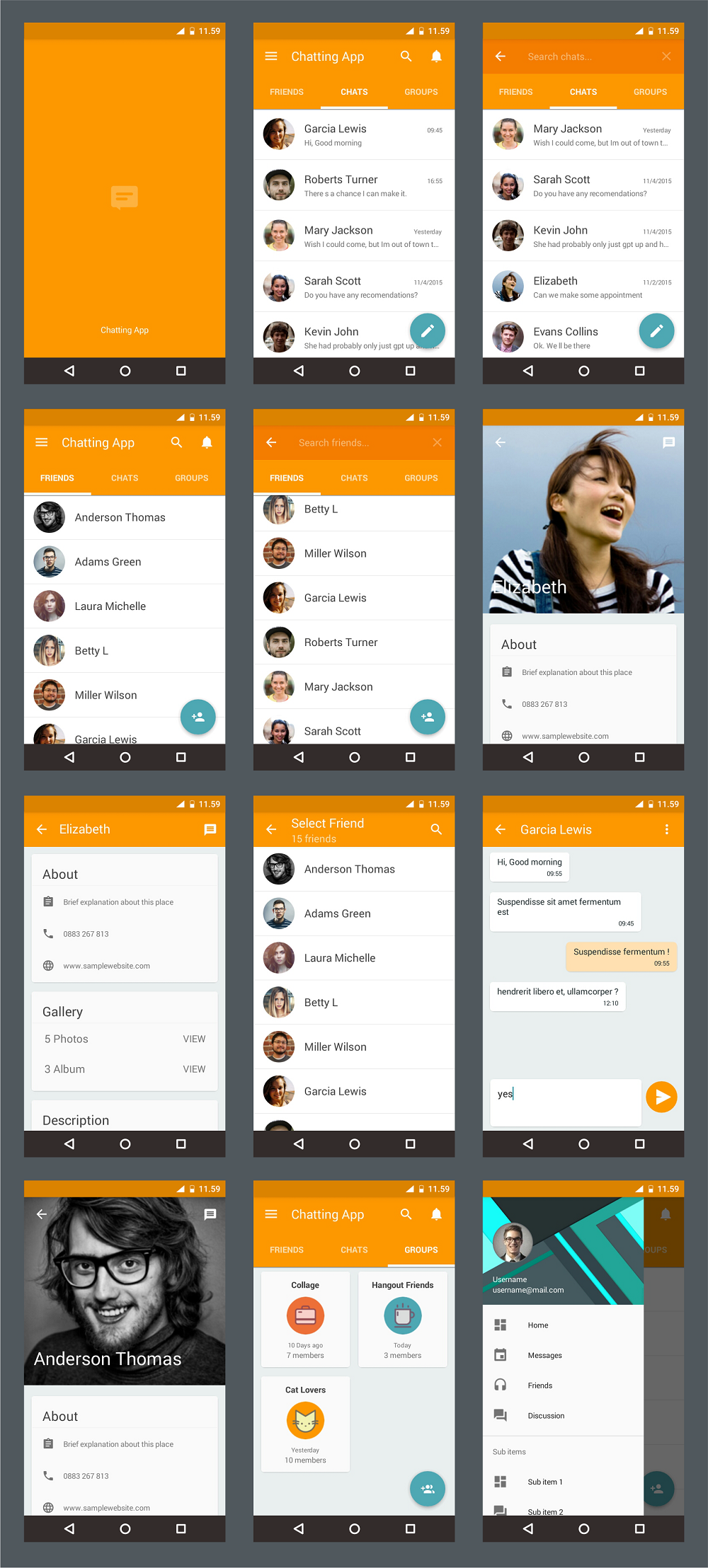
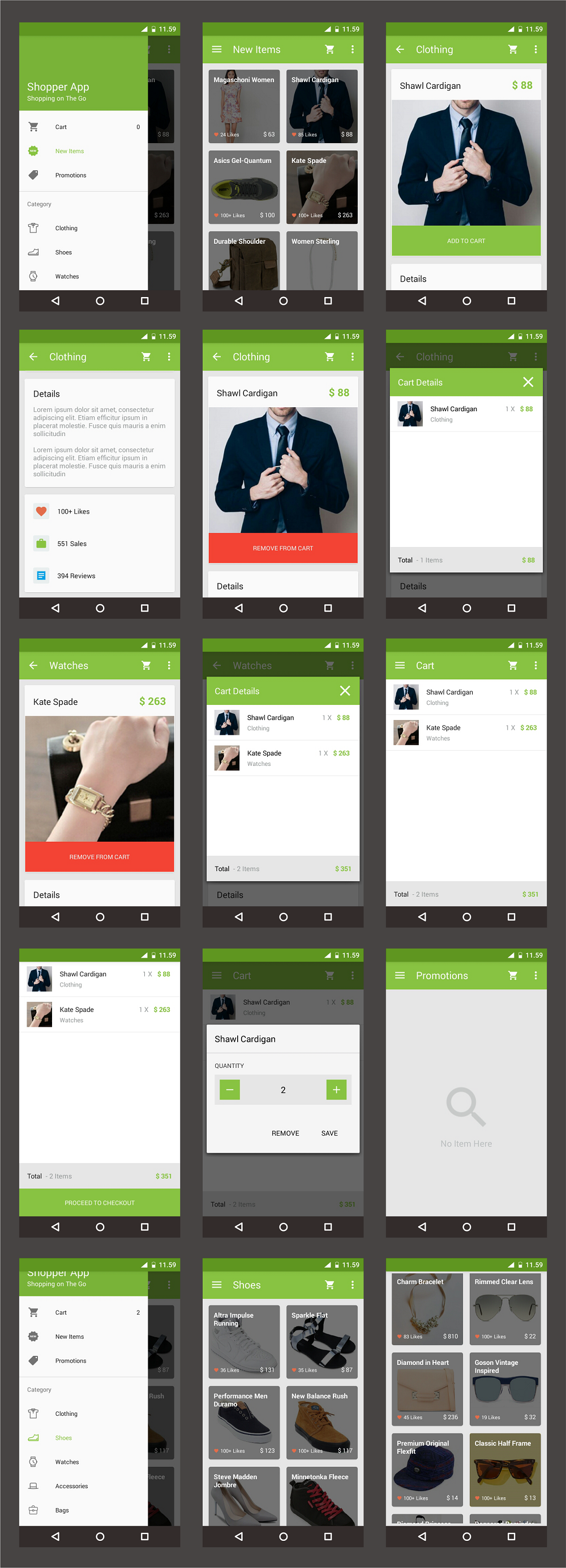
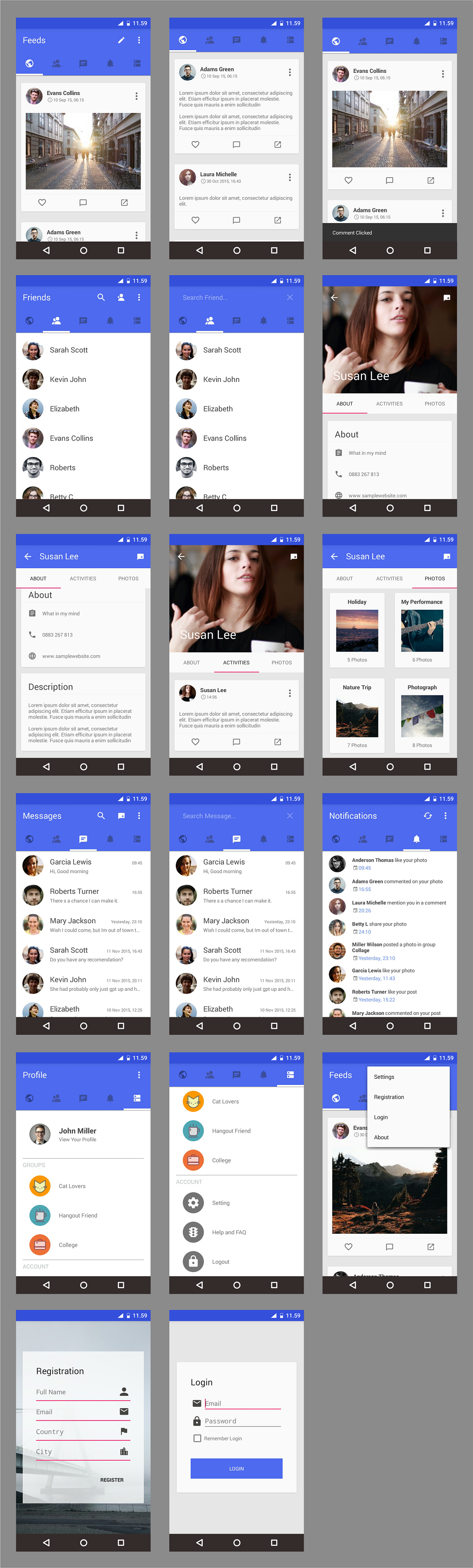
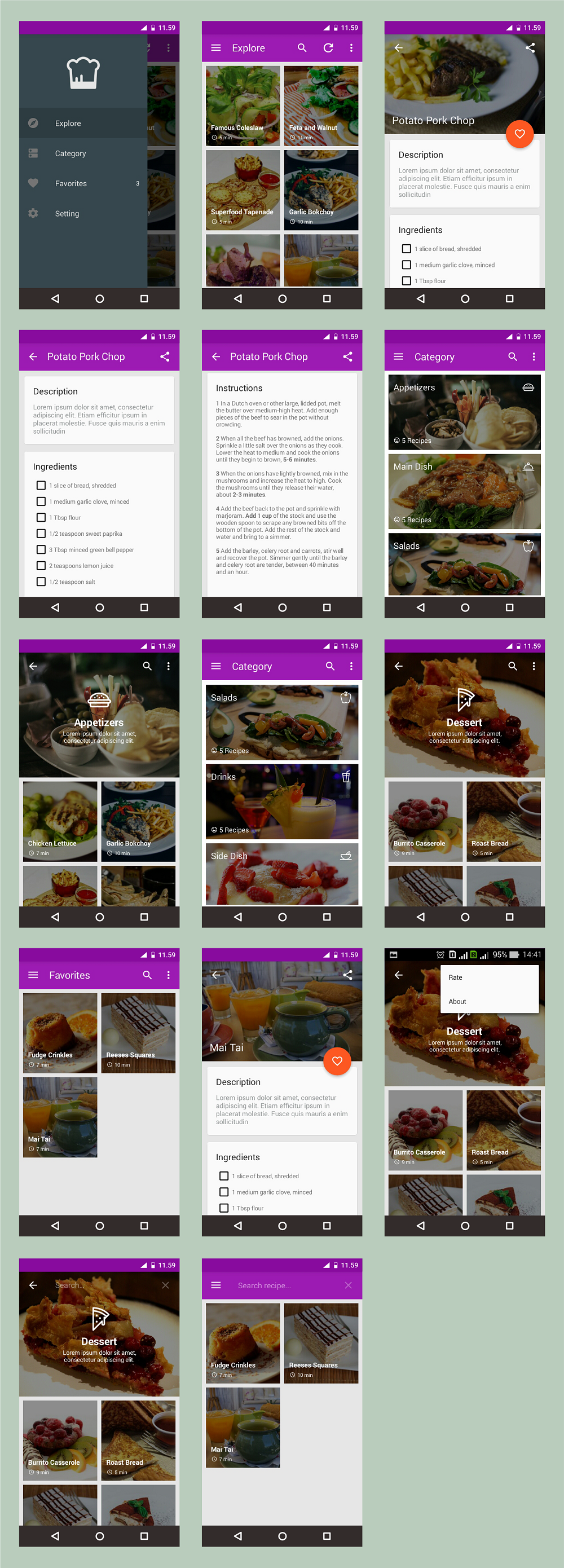
    Android Material UI Template is example implementation material design in various app. This UI template provide developers easy way to make their own app, developer just focuse on fuctionality and here the beautiful UI Template.

    Feature

    • Good Material Design
    • Available 5 UI Template :
    • 1. Chatting App
    • 2. Mailbox App
    • 3. Shopper App
    • 4. Social App
    • 5. The Recipe
    • Ripple Effect
    • Material Drawer
    • Beauty Cardview
    • Parallax Scrollbar
    • Using Android Studio
    • Clean Code

    DEMO APK

    Library

    Dummy Image Source

    Download Android Material UI Template (Templates)

    Settings Update (built on Ripple) (Miscellaneous)

    Description

    Settings Update (built on Ripple)

    Settings Update (built on Ripple) is an PHP script, allowing you to update variable Ripple settings for your Ripple account.

    Settings Update futures

    • E-mail hash (the gravatar icon and name).
    • Domain (the domain that holds this account).
    • Transfer rate (fee for transferring balances issued by this account).
    • Require destination tag (you can set it as required).
    • Require authorization (you can set it as required).
    • Disallow XRP (if XRP should not be sent to this account).

    E-mail hash

    Hash of an email address to be used for generating an avatar image.
    Conventionally, clients use Gravatar to display this image.
    Create your own here: http://en.gravatar.com/.
    Gravatar email hash examples: 767fc9c115a1b989744c755db47feb60, 7dc7d254af9648054dd03211d16a5c3e.

    Domain

    The domain that holds this account

    Transfer rate

    If set, imposes a fee for transferring balances issued by this account.
    Must be between 0 and 100, with up to 7 decimal places of precision.
    If it’s 0, no transfer rate will be set, or preveous rate will be unset.
    Example, if you need 2% you need to set it to: 2.

    Destination tag

    If required, require a destination tag to send payments to this account.
    (This is intended to protect users from accidentally omitting the destination tag
    in a payment to a gateway’s hosted wallet.)

    Authorization

    If required, require authorization for users to hold balances issued by this account.
    (This prevents users unknown to a gateway from holding funds issued by that gateway.)

    XRP

    If disallowed, XRP should not be sent to this account.
    (Enforced in clients but not in the server, because it could cause accounts
    to become unusable if all their XRP were spent.)

    Configuration

    In the config.php file you will find the following settings for configuring the script.

    • $ripple – your ripple address.
    • $secret – secret key for your ripple account.
    • $ripple_server – in case if you want to use your own.

    How to find my secret key in Ripple Trade?

    • Click on the gear icon in the upper right corner.
    • Click “Settings”.
    • Click the “Security” sub-tab on the left hand side.
    • In the Security section, navigate to the “Secret key” header.
    • Click “Show” to reveal your secret key.
    • Enter your password. Your secret key is displayed.

    The secret key is a long string of alphanumeric characters that starts
    with a lowercase “s”. Here is an example: snoPBrXtMeMyMHUVTgbuqAfg1SUTb

    Installation

    • Unzip the folder “updateripple.zip”.
    • Download the folders to your server.
    • Visit the folder which you loaded to your server, script will run automatically.
    • *Install Curl if it wasn’t installed on your web-server

    Demo

    You can find a demo for this PHP script by visiting a live site at
    Settings Update (built n Ripple)

    Credits

    Download Settings Update (built on Ripple) (Miscellaneous)

    Test Drive Sandbox (WordPress)

    Let your visitors access to the admin area and test your theme before purchase!

    Sandbox is an isolated computing environment in which a program or file can be executed without affecting the application in which it runs. “Test Drive Sandbox” is a plugin that access visitors to the wordpress admin area without username and password. Each visitor has own database, so other visitors see default theme that sets before test drive.

    Use Test Drive Sandbox without any risk!

    Download Test Drive Sandbox (WordPress)

    Stick Panda – HTML5 Game Android + AdMob (Capx) (Games)

    Stick Panda – HTML5 Game Android+AdMob (Capx)

    Description:

    Hold your finger on screen to make the stick grow. Stretch the stick in order to reach and walk on the platforms. Watch out! If the stick is not long enough, Panda will fall down! How far can you go? Made in Construct 2. Enjoy the game!

    Features:

  • Full Game;
  • One-Touch Control;
  • Simple Gameplay;
  • Easy to Reskin;
  • Easy to Add Content;
  • Easy to Change Source;
  • Touch & Mouse;
  • Sound Fx;
  • High Resolution;
  • Online Support 24/7;
  • AdMob, MoPub-ADS;
  • No Programming Knowledge Needed!
  • Project Events:87;
  • Including Constuct 2 file (.capx – all source).
  • Download Demo Android Example APK

    Screenshots:

    Our Other Games:

    Christmas Gifts - HTML5 Game Android+AdMob (Capx)
    Christmas Bubbles - HTML5 Game Android+AdMob(Capx)
    Stick Panda - HTML5 Game Android + AdMob (Capx)
    Christmas Balls - HTML5 Game Android+AdMob (Capx)
    Road Racer - HTML5 Game + Android + AdMob (Capx)
    Jewels Match - HTML5 Game + Android + AdMob (Capx)

    Billiards - HTML5 Game + AdMob (Capx)

    Mini Racer - HTML5 Game + Android + AdMob (Capx)

    Frog - Super Bubbles HTML5 Game (CAPX)

    Download Stick Panda – HTML5 Game Android + AdMob (Capx) (Games)

    TV – Video Subscription (Images and Media)

    TV – Video subscription applications arranging and present your video files within a simple web application system

    Features

    • Simple Backend Create Project & Upload Your Files
    • Easy Frontend Navigate
    • Group of Projects
    • Files Categories
    • Project View Counter
    • Project Like Counter
    • Project Download Counter
    • Social Media Share Button
    • Publish your video
    • Payment subscription video
    • Free video

    Access

    Download TV – Video Subscription (Images and Media)

    My Social Network (App and Website) (Full Applications)

    With My Social Network you can easily and simply create your own personal social network. With My Social Network you can publish posts, read the posts of friends, to have a personal conversation with your friends in real time, and more.

    My Social Network application is built in Android Studio. The server side is built on object oriented php with a MySQL database. Installation of the server part is done quickly in a few simple steps.

    Google play demo: Link to google play

    Website demo: Link to Website

    About admin panel:

    The full-featured admin panel allows you to manage user accounts. With sections Stream and Messages Stream You can see in real time what is happening in your social network now. Also, the admin panel has other important features: view personal conversations of users and management of advertising in the application.

    About the main functions:

    • Feed section will show you the posts of users for whom you are following and your posts.
    • Friends section will show you the users for whom you are following.
    • Profile section: this is your personal profile, where you can see your posts, you can edit your personal information, change the photo or cover.
    • In the Messages section you can see all your conversations.
    • Section Notifications: Here you see the history of notifications of new likes, comments and new followers.

    Application Features:

    • Hashtags
    • Likes
    • Comments
    • Edit/Delete posts
    • Search users
    • Followers | Following
    • Share My Location in posts
    • Posts for everyone and only for followers
    • Blocked List
    • Personalize your notifications
    • Direct Messages with images/photos (Real time)
    • Submitting tickets to support from application
    • Abuse reports to the posts and users
    • Facebook login|sign up|connect|disconnect
    • Images and photos in posts
    • Profile photo and cover
    • Verified profiles
    • Push notifications about new comments, likes, followers, messages
    • AdMob banner
    • And much more …

    Website Features:

    The same functionality as in the application.

    Admin panel Features:

    • Statistics
    • Posts Stream (View and Delete)
    • Messages Stream (View and Delete)
    • View abuse reports to post and users
    • Support section
    • Edit user profile
    • Block|unblock user profile
    • View personal user conversations
    • On/Off AdMob banner for all users or for an individual user
    • View recently sent messages (GCM)
    • Send push notifications (GCM) to all users or for an individual user

    Admin panel demo: Link

    Login: administrator

    Password: administrator

    Requirements:

    Hosting with support apache mod_rewrite, PHP, MYSQL

    Download My Social Network (App and Website) (Full Applications)

    Rcwd Upload for Contact Form 7 (Add-ons)

    Overview

    This add-on extends the functionality of the free WordPress plugin Contact Form 7.

    It allows to add a new file upload field with a lot of features!.

    It uses a different folder for every location (based on form id and field id). Also, you can activate the option to let user upload more than 1 file!!!

    FEATURES!

    \ Upload in chunks (by using the filter cf7_rcwdupload_chunks)
    \ Setting for IMAGE THUMB AFTER UPLOAD

    \ AUTO UPDATER (experimental, be careful, alway made a backup before do it).
    \ Sortable. Reorder elements in list using drag&drop (if repeater option is On).
    \ Support for image preview before upload with size settings! (for all modern browsers)
    \ Option for autoupload after file selection
    \ Option for rename the file (if repeater is active, a progressive numeric suffix will be added)
    \ Option for weight limit (KB or MB)

    \ Options for resizing (clientside and serverside)
    \ Options for filtering the allowed extensions
    \ Repeater option! Yes you can let users to upload more to add additional upload fields
    \ Support for drag&drop
    \ Useful filters that will let you customize some stuff (new filters will be added to next releases)
    \ Language translation for english and italian

    Support

    You need support for it? no problem! Send me an email at [email protected].

    No support in comments section. Please use it for presale questions only, thanks :)

    F.A.Q.

    • When i click the linked file in notification mail or in entry detail, it opens the 404 page. How can i fix the link?
      This is a permalink structure bug. To fix it, just go to BACKOFFICE -> SETTINGS -> PERMALINK.
      No need to save there, WP will update the permalink structure automatically just opening that admin page.
      If this will not fix it, please send an email to [email protected] with your htaccess file attached and all info about your server type (windows or linux).

    Updates

    Don’t forget to check the checkbox “Get notified by email if this item is updated” in your Downloads page :)

    To update the plugin you have 2 ways

    1. login to CodeCanyon -> Downloads section -> re-download the plugin
    2. Use the (experimental, be careful and do a backup!) auto-updater feature

    v1.0.0

    • first version

    Download Rcwd Upload for Contact Form 7 (Add-ons)

    Taxi Booking Complete Android and Web Solution (Android)

    Put your taxi company logo and start branding your passenger app instantly. It is easy to use, easy to customize, dynamic passenger app that helps grab more passengers in this technological era.


    Admin Features
    1.A web-based admin control centre allows taxi companies to manage users and drivers.
    2.By using the administration panel, taxi organizations can register new drivers/taxis.
    3.Real time track drivers location on the map on the move
    4.View all information of registered customers
    5.View all information of registered drivers
    6.Detail view of all driver ride histories
    7.Filter ride history by location, driver name, passenger name and booking date
    8.Coupon Management
    9.Driver Approval
    11.SMS Notification management
    12.Payment Management
    13.Information Management
    14.Manage Review
    and many more ….

    PASSENGER FEATURES:
    1.Passenger Registration and Login
    2.Select Taxi from the Google map
    3.The application pick-up the nearest taxi for the users detecting the users location
    4.GPS to select the pick up address request any drivers to take your on ride
    5.Options to cancel bookings
    6.Track the driver till he gets to your door step after the confirmation
    7.Driver details and contact details after confirmation
    8.Create and edit profile
    9.View past Ride History
    10.View pending driver request
    11.View accepted drivers
    12.SMS Notification
    13.Email Notification
    14.Wallet (Like as Paytm)

    DRIVER FEATURES:
    1.Login to Application
    2.Look for new user ride request
    3.Receive notification from users when they request for ride
    4.Accept ride request from user
    5.Cancel ride request from user
    6.Complete a ride after ride finishes
    7.Change status online / offline – to appear on passenger map
    8.View past rides history
    9.SMS Notification
    10.Email Notification

    Passenger :
    User Name – [email protected]
    password – demo@123

    Driver:
    User Name – [email protected]
    password – demo@123

    Admin Panel:
    User Name: [email protected]
    Password: abc@123
    http://amigatesting.com/android/newtaxi/public/admin/login/

    Download Driver Demo:
    https://www.dropbox.com/s/11tmljyrvpsj5sr/ProTaxi%20Driver.apk?dl=0

    Download Passenger Demo:
    https://www.dropbox.com/s/q0lhxpgty0sn4k8/ProTaxi%20passenger.apk?dl=0

    Download Taxi Booking Complete Android and Web Solution (Android)

    HTML5 Digital-Marketing Banners – GWD – 7 Sizes (Ad Templates)

    NF-CC-046-Digital-Marketing_HTML5-banners.

    Very easy to edit and detailed help file is included. Google fonts used. Files can be edited with free Google Web Designer software.

    All the files are included with the download file. ( Icons, Shapes)

    This set includes the following 7 sizes

    – 160×600
    – 180×150
    – 300×250
    – 300×600
    – 320×50
    – 336×280
    – 728×90

    Download HTML5 Digital-Marketing Banners – GWD – 7 Sizes (Ad Templates)

    HTML5 Multi Purpose Banners – GWD – 7 Sizes (Ad Templates)

    NF-CC-049-Multipurpose_HTML5 Banners.

    Very easy to edit and detailed help file is included. Google fonts used. Files can be edited with free Google Web Designer software.

    All the files are included with the download file. ( Icons, Shapes)

    This set includes the following 7 sizes

    – 160×600
    – 180×150
    – 300×250
    – 300×600
    – 320×50
    – 336×280
    – 728×90

    Download HTML5 Multi Purpose Banners – GWD – 7 Sizes (Ad Templates)