Modern Material Forms (Forms)

Modern Material Forms are form elements built with only CSS3 and HTML5 without any images or javascript. These components can be used for creating forms faster using the included form elements such as inputs, radios, checkboxes, selects, toggle switches, file inputs among many others. In addition, various starter templates and themes are included to get you started.

Modern Material Forms are designed to fit all form needs from simple forms to creating clean forms with large data amounts with simplicity like in this – Demo

Modern Form Feaures

  • Multiple form inputs
  • CSS3 material effects on inputs
  • Pure CSS3 HTML5 design
  • File inputs / uploaders
  • CSS3 checkboxes + Radios
  • CSS3 toggle switches
  • CSS3 star rating widgets
  • 500+ Fontawesome vector icons
  • Animated information tooltips
  • Form error, success and disabled states
  • Cross Browser and device for tablets and mobile
  • Retina ready design
  • Responsive design
  • 12 column grid
  • 9 theme colors
  • CSS3 buttons

THIS IS NOT A WORDPRESS PLUGIN

03.02.2016 – Version 1.0

  • Initial Release

Download Modern Material Forms (Forms)

Video Upload plugin for phpDolphin (Add-ons)

Allow your users to upload and post videos on their accounts without depending on YouTube or Vimeo!

This plugin will add a new button on message posting form that allows your users to select a MP4 file (this format is accepted by all browsers and devices, now) and post it.

It has guides about setting upload limits on your server, and will also delete the video file if the user has deleted the video post.

Download Video Upload plugin for phpDolphin (Add-ons)

Ultimate Sales Page – WordPress Sales Pages Builder (Products)

You can build complete sales pages with the freedom to create unlimited styles, with your custom logo and content. You can make unlimited pages for you or your clients from any WordPress blog. Use multiple blogs or control hundreds from an existing blog WITHOUT affecting your current WordPress theme or with other plugins. This is your secret weapon to create ultimate sales pages without Photoshop!


Download Ultimate Sales Page – WordPress Sales Pages Builder (Products)

BeDojo – Behance Works WordPress Portfolio Plugin (Social Networking)

Your Behance portfolio items on your WordPress website

Yup – you read that right. Let’s say you found an awesome WordPress theme which is simple, has some awesome animations and you want it for your own personal portfolio website. You setup it in minutes, but there’s a problem: the portfolio items. Adding them one more time can consume long hours.

That made us think how to solve this issue. And the solution is simple – let’s just use the content you already inserted over the years on your Behance profile and include it into your website. Because we know how time consuming is to add all your portfolio’s works on a WordPress website.

So – just insert your Behance API key to the plugin and you’re all set.

Just check how detailed a Behance project gets imported using BeDojo
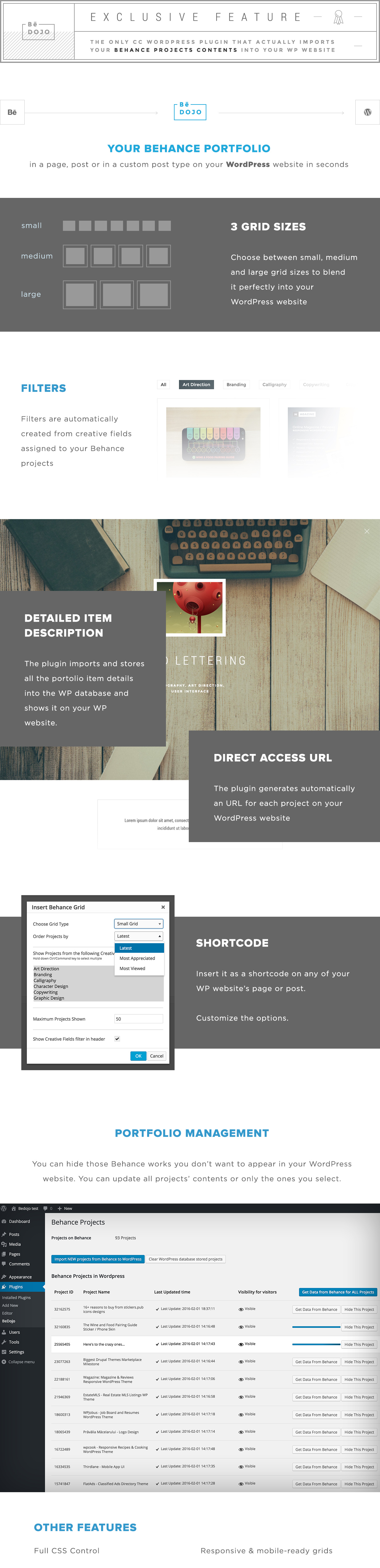
BeDojo WordPress Plugin Features Overview

3 Grid Sizes

You can choose between small, medium and large grid sizes to blend your Behance portfolio submissions perfectly into your WordPress website

Filters

We’ve extracted all the created fields attached to your Behance portfolio works so they can be used as portftolio filters on your WordPress website.

Detailed Item Description

We don’t just show the Behance project thumbnail and title. The plugin imports into WordPress all the text description and media so you can show off your portfolio projects on your website and not send visitors to Behance.

Direct access URL

The plugin generates automatically an URL for each of the imported projects so they can be directly accessed via the browser.

Shortcode

Include the portfolio in a WordPress page or post using our custom shortcode which gives you several options, as Grid sizes, Ordering, Creative Fields selection, maximum number of projects shown and filters option.

Portfolio Management

You can exclude the projects you think are irelevant for your WordPress website portfolio and remain only with the chosen ones ;) Also you can update selected projects into your WordPress database if you modified something via Behance.

Behance Performance Block

You can choose to include this block at the end of the projects and it will show the number of appreciations, comments and views on Behance.

Advanced Styling

You have full CSS control so you can style everything – colors, font related attributes, spacings, etc.

Responsive Grids

Yup – it’s all mobile-ready.

Optimized

Behance API has some limitations over the permitted number of requests per hours. So we had to do our best to optimize all that process so you have a seamless experience while using the plugin. It will show you in real time the number of used requests so you can decide how to use them in the most optimal way.

Important Note:

Behance API integration is available only with enabled php CURL. Make sure that your webserver has this option enabled.
Related Plugins
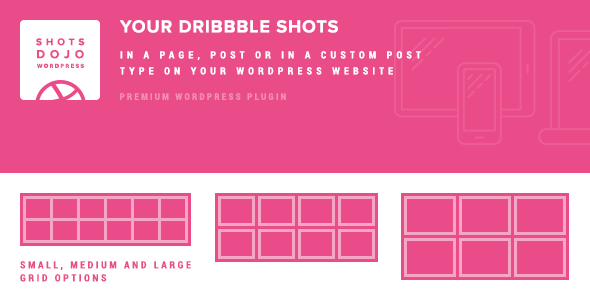

With WP Shots Dojo you can now include your Dribbble shots in your WordPress website.

Download BeDojo – Behance Works WordPress Portfolio Plugin (Social Networking)

Static pages/footer links plugin for phpDolphin (Add-ons)

Do you still need to edit the source code to change your static pages and footer links (like “About us”, “Privacy Policy”, “Terms of Use” and so on)?

This plugin allows you to manage, edit and create your phpDolphin footer links by creating static pages with a visual (WYSIWYG) editor, as well as putting links to other pages or external pages. Right from your administration panel!

When visiting the demo page ( http://demo.phpdolphiners.cf ), login to administration panel with username “admin” and password “123456”.

Download Static pages/footer links plugin for phpDolphin (Add-ons)

Whatschat- Whatsapp clone (Full Applications)

Whatschat app for android

Whatschat is an android application created as a replica of popular app whatsapp. With Whatschat you can easily implement the real time chat functionality for your android application. It has full material design followed by google guidelines.
The app has following features

  • Real time chat functionality
  • Whatsapp feel
  • Add Friends
  • User Profile and Status
  • User online and offline system
  • Create Group and add friends to group
  • Chat in group
  • Chat with friends
  • Login and Registration System

Demo App

Download Whatschat- Whatsapp clone (Full Applications)

User Guide Builder WordPress Plugin (WordPress)

Users quickly get frustrated, when they cannot find what they are looking for in the user manual.

Make instructions easy on users with visual stepping stones using User Guide Builder WordPress Plugin. It is the great solution to help your customers get to the needed section with ease and to guide them exactly where they wanted to be.

User Guide Builder WordPress Plugin Features:

  • One-page quick start guide builder
  • Instructions as step-by-step procedures
  • Organize information hierarchically
  • Step-by-step sequences in the correct order
  • Quick navigation through categories
  • Map instructions to the product
  • Visual stepping stones (e.g. Step 1, Step 2 etc.)
  • Create as many steps as you want
  • Existing page as a final step
  • Page’s featured image as a step image
  • Custom text for sections
  • Breadcrumbs with icons
  • Crayon Syntax Highlighter Compatible

Changelog

1.0 (February 08 2016)
* First release

Download User Guide Builder WordPress Plugin (WordPress)

Amazing Cart for Native IOS (Full Applications)

Amazing Cart is the most convenient and easy way to sell your products via iOS devices. The application based on WooCommerce enables you to do your business everywhere and anytime.

Basically this application integrates with your WooCommerce Store and Receives all products, categories, cart information, profile information, payment api allows to use (Direct Bank Transfer, Cheque Payment, PayPal).

This is a full store with all WooCommerce features only for IOS Devices.

Download Amazing Cart for Native IOS (Full Applications)

Retail Store Discount Banners – HTML5 (Ad Templates)

HTML5 Animated Retail Store Discount Banners

Created with Google Web Designer

Item Features:

  • Super fast and easy customization
  • Google Web Fonts used
  • Created and fully editable with Google Web Designer
  • Compatible with Adwords and Doubleclick
  • Pixel-Perfect cross-browser compatible

Whats Included?

  • 6 Popular Sizes : 160×600, 300×250, 728×90, 468×60, 300×600, 180×150
  • Detailed instruction file
  • Generic and Google spec source files
  • 6 Month Item Support
  • Free item updates

Notes:

The product images are not included in the download file, it is for demo purposes only. Visit istockphoto.com or photodune.net for a great selection of images.

Want us to customize this item to your exact specs? We offer item customization services for a small fee, contact us to get started!

Download Retail Store Discount Banners – HTML5 (Ad Templates)

Horizontal Accordion Slider – Responsive Joomla Extensions (Sliders)

Keep update with our latest news and releases at:


follow us on evanto


follow us on facebook


follow us on twitter


follow us on pinterest


follow us on youtube


forum support

JUX Horizontal Accordion Slider is a joomla image slider used to display images in accordion style which can present your gallery with title, caption and description

Works great on any screen

JUX Horizontal accordion slider is fully responsive and totally flexible. You can play the slider on different devices like mobile, tablet, smartphone and on any browser.

Visually appealing with beautiful effects

\

Joomla Accordion slider provide 4 theme styles which help you easily change the displaying interface:

  • Horizontal Accordion Default
  • Horizontal Accordion with Button
  • Horizontal Accordion with Control Panel
  • Horizontal Accordion with Title

The accordion is optimized to bring smooth and slight animations by using CSS3 transition.
Moreover, you also can add gallery title, caption or description to the slide with multiple links can be inserted.

Keyboard and mouse navigation

\

With this HorizontalAccordion Slider, the slides can be navigated by keyboard or mouse wheel. You can easily move to another images by press left, or right arrows keys or simply hover to the picture you want, it will automatically slide to there.

Drag&drop to order in back-end

\

Easily control all functions in the admin area with the simple enable or disable button. The best thing about its back-end is that you can upload unlimited images and easily drag&drop to order picture’s position. You also can design your slide by choose the slide size, height, width, caption size, etc and unlimited image upload.

Highlight features

  • Fully responsive
  • Show title, caption, description.
  • 4 theme styles provided
  • Smooth and slight animation
  • Using CSS3 transaction
  • Multiple links can be inserted
  • Keyboard and mouse navigation
  • Control slide size supported
  • Target URL supported
  • Interval time(ms)

Support

All support is handled in our Community Support Forum. We encourage you to post all your questions concerning our extension there as your questions may have already been answered or may be of help to other people that have also purchased the extension.

Download Horizontal Accordion Slider – Responsive Joomla Extensions (Sliders)

Animated HTML5 Banners (Ad Templates)

Animated HTML5 Banners

Created with Google Web Designer

Item Features:

  • Super fast and easy customization
  • Google Web Fonts used
  • Created and fully editable with Google Web Designer
  • Compatible with Adwords and Doubleclick
  • Pixel-Perfect cross-browser compatible

Whats Included?

  • 6 Popular Sizes : 160×600, 300×250, 728×90, 468×60, 300×600, 180×150
  • Detailed instruction file
  • Generic & Google spec source files
  • 6 Month Item Support
  • Free item updates

Notes:

Want us to customize this item to your exact specs? We offer item customization services for a small fee, contact us to get started!

Download Animated HTML5 Banners (Ad Templates)

Practi Cal (Laravel 5.1 Edition) (Calendars)

A fully functional MVC calendar application using Laravel’s 5.1 framework and Bootstrap 3.3.5. Here are a few
features:

  • Public & Admin instances included
  • Color-coded events
  • Recurring events: Daily, Weekly, Bi-Weekly, Monthly, Annually, and Relative (i.e. every third Monday, every
    first Friday, etc.)
  • Edit events as well as recurrence (all connected events at one time)
  • Dragable events
  • Month, Day, and Week view
  • iCal functionality (save events to MS Outlook or Apple’s Calendar). This feature must be configured to your locale.
  • Tested on PHP 5.6 and 7.0

Note

  • When Viewing the live demo, please turn off the “frame”, it interferes with the calendar

Download Practi Cal (Laravel 5.1 Edition) (Calendars)

Advanced WooCommerce Order Status & Action Manager + Colorize filtering on Order List (WooCommerce)


Each order in woocommerce has a status. The order statuses let you know how far along the order is, starting from pending and ending with complete.

The following order statuses are used:

  • Pending payment : Order received (unpaid)
  • Failed : Payment failed or was declined (unpaid). Note that this status may not show immediately and instead show as pending until verified (i.e., PayPal).
  • Processing : Payment received and stock has been reduced- the order is awaiting fulfillment
  • Completed : Order fulfilled and complete – requires no further action
  • On-Hold : Awaiting payment – stock is reduced, but you need to confirm payment
  • Cancelled : Cancelled by an admin or the customer – no further action required
  • Refunded : Refunded by an admin – no further action required

but these may not fit the workflow for every eCommerce shop. The Advanced WooCommerce Order Status & Actions Manager allows you to create, edit, and delete custom order statuses, create a “next status” flow so that you can add action buttons to your orders page, add icons and bulk actions, and even tie emails to these new statuses to completely support your fulfillment workflow.

Key Features

  • Clean Design
  • Compatible with last version of wordpress
  • Compatible with last version of Woocommerce
  • Compatible with last version of Advanced WooCommerce Reporting Plugin
  • Easy to Use UI
  • Add Custom Order Status
  • Assign Icon and Action Button to New Order Status
  • Add bulk actions for new statuses in the orders list
  • Set Color for each Order Status
  • When Display : Display when current order status is set to one of these statuses.
  • Next Statuses : Use “Next Statuses” to create a seamless fulfillment workflow and add order action buttons.
  • Drag and drop orders statuses to re-order the way they’re shown in your admin
  • Mark order statuses as “Paid” to include download links, purchase notes, or other features when customers view these orders
  • Safely delete custom statuses without losing orders
  • Add Rules : This is a easy way to control the orders through determine orders with specific Rules in different colors for order row. You can add Rules ( Coloring filter based on Status type and Order Total).
  • Add new order emails, which can be triggered based on status changes
  • Edit new email content via new templates

Download Advanced WooCommerce Order Status & Action Manager + Colorize filtering on Order List (WooCommerce)

Active Sessions plugin for phpDolphin (Add-ons)

Increase your phpDolphin site’s security level!

This plugin adds a new menu item on the user settings page that allows your users to see a list of places where they are logged in from, with a map, browser details and other informations. They can also do remote logout (logout from a computer to another, from distance).

Download Active Sessions plugin for phpDolphin (Add-ons)

HTML5 Multipurpose Banners – GWD – 7 Sizes (Ad Templates)

BEE-CC-070-Multipurpose _HTML5_Banners.

Very easy to edit and detailed help file is included. Google fonts used. Files can be edited with free Google Web Designer software.

All the files are included with the download file. ( Icons, Shapes)

This set includes the following 7 sizes

– 160×600
– 180×150
– 300×250
– 300×600
– 320×50
– 336×280
– 728×90

Download HTML5 Multipurpose Banners – GWD – 7 Sizes (Ad Templates)