Hi,
this is the Spanish Language for zFiles Upload Center.
Original Script Link:

Blancer.com Tutorials and projects
Freelance Projects, Design and Programming Tutorials
download PHP, ASP.NET, Java and Javascript from CodeCanyon – the marketplace for code scripts and snippets.Javascript, Java, Program, Code, Snippet, Script, Dev, Development, Codebase, MySQL, Class, Widget, System, CMS
Joomla World Clock Multiple (mod_joomlaworldclockmultiple) is a clean and simple but very functional clock module for Joomla 3.X. It is adjusted for Daylight Saving Time rules. You can show up to 20 clocks.
The settings for the module are the following:

Collabo is a feature-rich collaboration platform for teams, businesses and small enterprises that turns any hosting or server into a powerful Intranet Network for fast and efficient collaboration.
Forget about e-mails, complicated file-sharing and inefficient collaboration – Collabo is a powerful Enterprise Social Network that helps your Team or Business collaborate fast and easily.
Highlights
– Powerful and feature-rich Enterprise Social Network
– Perfect for Teams, Businesses and small Enterprises
– Collaboration, Messenger, Filesharing, Task- and Eventmanagement
– Unlimited users
– Works with any hosting or server
– NO DATABASE NEEDED
– 30 seconds installation (just upload – that’s it)
All Features
Channels
Create channels for teams, departments, projects, topics or simply anything and organize communication, filesharing, task- and eventmanagement and collaboration fast and efficient.
Messages
Send private messages and create group chats to connect and collaborate with team members and colleagues directly and privately.
Drives
A drive is like a virtual external harddrive. Create drives for teams, departments, projects, work-groups or simply anything to share and exchange files and data effortlessly.
Events
Create events in any channel, message or group chat to manage and organize events, dates, appointments and meetings etc. with ease.
Tasks
Create tasks in any channel, message or group chat to manage and organize tasks and track progress on anything that happens. Users can work on tasks, update the current status and much more to ensure perfect collaboration and transparency.
Users
Admins can create unlimited users. Every user has a profile with Avatar to create a great experience throughout the whole application.
And so much more…
Demo
DEMO
Please note: Some functions are switched off in the demo (e.g. creating new spaces and drives, managing users etc.)
Username: Tom
Password: password
Username: John
Password: password
Username: Anna
Password: password


Contact form is Addon for sngine v2.Now, your website’s users can contact you directly from your site without having to open their email account to send a message.Customers can contact you at all hours.It helps you get more information.You can provide better service.It helps your customer relationship management.Please watch screenshots for more details.
All verify buyers,Thanks for support!As a reward,I will give you FREE solution to fix “See More” and paragraph’s size in post and comments for sngine v2!Please contact me,after purchasing any addons from me!Thanks again!
What is Sngine v2?
Sngine v2 is a Social Network Platform is the best way to create your own social website or online community.
Note: Remember to rate this product after purchase.
A lovingly crafted CSS library allowing you to easily implement scaleable image hover effects. 58 hover effect classes to choose from a CSS library weighing in at a minified size of only 28KB. Each effect uses the same basic markup allowing you to change effect by simply editing the containing class.
Include the imagehover.css stylesheet on your document’s <head>
<head>
  <link rel="stylesheet" href="imagehover.min.css">
</head>
Place the following markup in to your HTML document
<figure class="imghvr-fade">
  <img src="#">
  <figcaption>
    // Hover Content
  </figcaption>
</figure>
Edit the URL to your image and add your hover content. Then simply set the imagehover.css class of your choice to the containing figure element. In the example above this has been set to ‘imghvr-fade’. A full list of hover effects and their classes can be found below!.
To link your image, add an empty <a> tag just after the figcaption element.
<figure class="imghvr-fade">
  <img src="#">
  <figcaption>
    // Hover Content
  </figcaption>
  <a href="http://www.imagehover.io"></a>
</figure>
You can change the background color via some inline CSS added to the figure element like so…
<figure class="imghvr-fade" style="background-color:#D14233;">
  <img src="#">
  <figcaption>
    // Hover Content
  </figcaption>
</figure>
Alternatively this can be applied via your CSS files. The following example will effect all elements with a imagehover.css class applied.
*[class^='imghvr-'],
*[class*=' imghvr-'] {
  background-color: #D14233;
}In most cases you can change the caption background color via some inline CSS added to the figure element like so…
<figure class="imghvr-fade">
  <img src="#">
  <figcaption style="background-color:#D14233;">
    // Hover Content
  </figcaption>
</figure>
Alternatively this can be applied via your CSS files. The following example will effect all elements with a imagehover.css class applied.
*[class^='imghvr-'] figcaption,
*[class*=' imghvr-'] figcaption {
  background-color: #D14233;
}
Imagehover.css relies heavely on some CSS3 features inlcuding pseudo-elements, animations, transitions and transforms. Some older browsers will have limited support of these features.
What is CorePlayer?
With CorePlayer you can run your videos with many features. It is simply, easy and powerful.
Features:
– 3 Type of Advertisement”
.Modal Popup ads during video.
.Pre Roll Advertisement.
.Interactive ads.
– Playlist function
– Lyrics & Description
– Subscribe
– Share
– Social Locker
– Related Videos
Dental Clinic Appointment System (DCAS) is an application developed specifically for appointment management in professional dental clinic.
Features in this application are:
1. Dentist Managers.
2. Patient Managers.
3. Appointment Managers.
4. Appointment Calendars ( integrated with fullcalendar ).
5. Dentist can set their own time table for dental practice schedule.
6. All users (Dentist, Patient, Receptionist / Admin) have their own spesific dashboard views.
7. Appointment time slots are accurate based on the schedule for dentists.
8. Audit Trails feature which record every user’s activity in the system.
9. User auth control & Role managers.
10. Mailbox system, ability to send direct message to dentists and/or patients.
11. And many more features which made this system very useful to facilitate your business. As for features addition in the future will be done regularly, and please feel free to give feedback for addition or correction to this system.
This application used SLIM PHP framework, Twig templating engine, and Laravel Eloquent which is very flexible, so that you can easily customize if needed.
I will help you if you got problem in installation process, please contact me anytime ([email protected] or via codecanyon contact form) and I will process in 8 PM – 10 PM time span (GMT + 7) everyday.
Link : http://comestoarra.koding.io/envato/dcas/manage/
For Super Admin : username // pass => demo // 12345678
For Dentist : username // pass => dentist // 12345678
For Patient : username // pass => patient // 12345678
*notes : some features are disabled for demo purposes !

The Ionic Bitcoin App Starter is a simple ionic project integrated with Angular to provide the best functionality as possible. It is the complete solution to get you started on making your own bitcoin app.
Ionic is a powerful open source HTML5 SDK that helps you build native-feeling mobile apps using web technologies like HTML, CSS, and JavaScript. It is focused mainly on the look and feel, and UI interaction of the app. The Ionic Bitcoin Starter provides you with the necessary features to kick start the development of your own Bitcoin App based on this powerful framework.
The Ionic View App allows you to quickly and easily load, view and test the apps you build with Ionic Framework on a device. Feel free to visit http://view.ionic.io/ and install the ionic view app on your Android or IOS device, then sign up and enter the app id provided below to view the Ionic Bitcoin Starter App.
App ID: 97a1ab8e
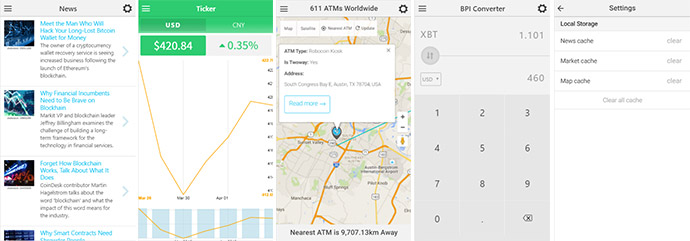
You can download any public Atom, RSS, or Media RSS feed using only JavaScript, so you can mash up feeds with your content and other APIs with just a few lines of JavaScript. This makes it easy to quickly integrate feeds on your app.
Serve real-time bitcoin market data. Coindesk API already preconfigured.
You can accurately represent the market data over different periods.
Convert all the supported currencies market value relative to the current value of bitcoin.
You can use the Google Maps API to serve up the map and the Coin ATM Radar API to get locations for all installed Bitcoin processing ATMs worldwide. Geolocation is used to get user location.
You can cache your app’s data for different amounts of time i.e. News feed, Market data and ATM locations. The caches can be cleared from the settings control.
Below are Cordova plugins integrated in the starter project.
Money manager script is PHP based application on Bootstrap 3 for managing your money flow and have statistics for long time period.
Features:
– Add / delete money flow record
– Dashboard of records sorted by months
– Statistic page (income, expense, difference)
– Multiple user registrations
– Forgotten password function
– Fast account access link
– Send message form to inform owner with improvements app by customers
– Invite a friend form
– User account setting page
Background image included in pack.
Install instructions and more in documentation inside.
Work record system plugin allows you to store informations about your work commissions and display it as table on page.
Link to admin page defined in live preview
Login: demo
Password: demo
Train your memory. Remember random numbers and then open them in ascending order. Difficulty of the game is increased from 3 to 7 numbers. Also you have a time limit, be quick. Enjoy!

Are you using contact Form 7? This is a nice plugin for you!
Contact Form 7 Multi-Step help you can add multi-step for your form. This is the best way if you form is long and want to display simply for users.
Live Demo: http://ninjateam.org/contact-form-7-multi-step

|

|

|

|


07/03/2016: (version 1.0)
- Version 1.0 Initial Release
Pit jump is a Top Chart in app store and play store and very addictive game. Tap to jump on tiles. Different tiles come and tiles are generated randomly try to survive and stay as long as possible on the road.
This game is made with buildbox designed our own graphics in photoshop so you can easily reskin it.
You have just to change some assets and value and you are ready to upload it. With the leaderboard feature now you can share your score and compete with all the other players around the world.
Enjoy the endless fun and the beautiful design and don’t forget to share your top score to beat your friends
demo link
https://play.google.com/store/apps/details?id=com.kermoulab.pitjump