Headline Slider (Sliders)

Headline Slider is a jQuery slider for displaying what you think is important for your website.

Features

– jQuery driven.
– Responsive design.
– Mobile friendly.
– Adjustable width and height.
– Auto slideshow with pause on hover for featured images.
– Can add Title, Description and Link button to each slide.
– Compatible with all major browsers.

Methods

start – starts the slider after you have added slides. example:

var my_slider = $('.my-placeholder-div').hlslider();

...
...

my_slider.start();

destroy – removes the slider

var my_slider = $('.my-placeholder-div').hlslider();

...
...

my_slider.destroy();

addSlideContainer – adds big featured slide container. example:


// this example adds featured container with 2 images inside

my_slider.addSlideContainer([

    // container slide 1
    {
        image:       'img/image1.jpg',              // Image src
        title:       'Slide Title 1',               // Title
        description: 'Description for Slide 1',     // Slide Description
        link:        'http://mywebsite.com'         // Read More URL link
    },

    // container slide 2
    {
        image:       'img/image2.jpg',              // Image src
        title:       'Slide Title 2',               // Title
        description: 'Description for Slide 2',     // Slide Description
        link:        'http://mywebsite.com'         // Read More URL link
    }

]);

addSlide – adds small slide block. example:

// Add small slide
my_slider.addSlide({
    image:       'img/image3.jpg',              // Image src
    title:       'Slide Title 3',               // Title
    description: 'Description for Slide 3',     // Slide Description
    link:        'http://mywebsite.com'         // Read More URL link
});

Displaying the slider with all settings:

<script type="text/javascript">

    $(document).ready(function () {

        var my_slider = $('.my-placeholder-div').hlslider();

        my_slider.settings({

            height: "360px",      // Slider Height
            width:  "800px",      // Slider Width (NOTE Max-Width is set to 100%)

            // Big (featured) slide settings
            bigSlide: {
                charLimit: 0,     // characters limit, 0 - disabled
                autoSlide: 1,     // auto slide inner images (1 - ON, 0 - OFF)
                duration: 5000,   // auto slide image duration in milliseconds
                maxWidth: '80%',  // big slide container max width in percents
                minWidth: '300px' // big slide container min width in pixels
            },

            // Small slide settings
            smallSlide: {
                charLimit: 200,   // characters limit, 0 - disabled
                maxWidth: '35%',  // small slide max width in percents
                minWidth: '250px' // small slide min width in pixels
            },

            aTarget: '_SELF'      // link on click target (_BLANK, _SELF). _BLANK opens in new window, _SELF opens in same window

        });

        // Adding slides

        // Add Big (featured) container 
        my_slider.addSlideContainer([

            // container slide 1
            {
                image:       'img/image1.jpg',              // Image src
                title:       'Slide Title 1',               // Title
                description: 'Description for Slide 1',     // Slide Description
                link:        'http://mywebsite.com'         // Read More URL link
            },

            // container slide 2
            {
                image:       'img/image2.jpg',              // Image src
                title:       'Slide Title 2',               // Title
                description: 'Description for Slide 2',     // Slide Description
                link:        'http://mywebsite.com'         // Read More URL link
            }

        ]);

        // Add small slide
        my_slider.addSlide({
            image:       'img/image3.jpg',              // Image src
            title:       'Slide Title 3',               // Title
            description: 'Description for Slide 3',     // Slide Description
            link:        'http://mywebsite.com'         // Read More URL link
        });

        // Run the slider

        my_slider.start();

    });
</script>
Download Headline Slider (Sliders)

WP OS Desktop Backend (Interface Elements)

PRESENTATION

Tired of having to open tons of tabs in your browser when you manage your WP site ?
You use a lot of plugins, and your customers are lost in the admin interface of their website ? They don’t know what menu link they must click to make simple operations ?

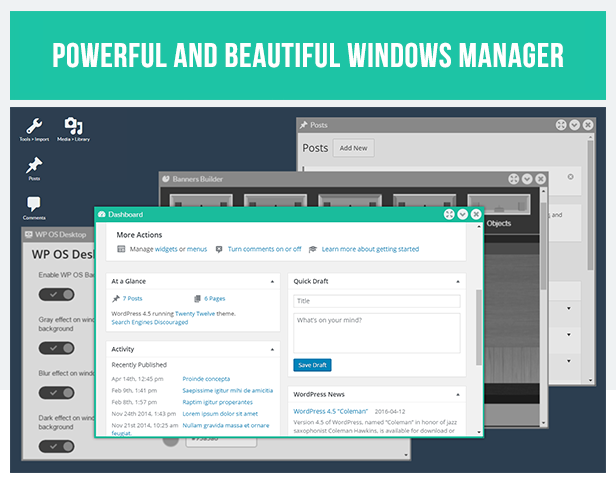
This unique WordPress plugin gives your WordPress backend an awesome O/S Desktop style, allowing you to manage the different admin pages in windows and create shortcuts on the desktop in one click.

Windows can be resized, maximized, minimified, and easily placed side by side to truly improve your productivity.
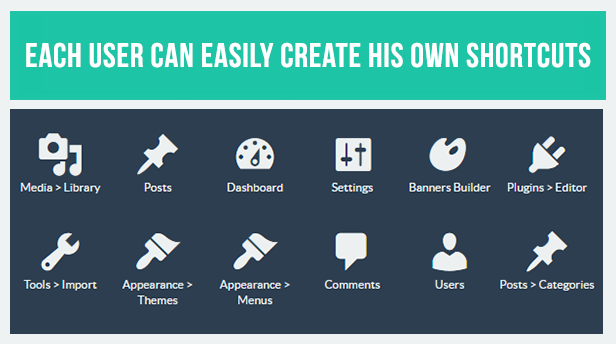
Each user can create its own shortcuts simply dragging a link from the WP menu to the desktop.
All colors, background image and windows effects can be customized from the settings window.

Intuitive, beautiful, fluid and really useful for you and your customers, this plugin will make managing your website even faster and easier.

FEATURES

  • Gives to your WordPress backend a real O/S desktop look !
  • Powerful and beautiful windows manager
  • Windows can be resized, maximized, minimized and displayed side by side in 1 click
  • Each user can create his own shortcuts simply dragging a link from the menu to the desktop
  • Works with your WP admin skins and plugins
  • Customizable from settings panel : activate grayscale, blur and dark effect on background windows, freely change colors of elements and background image
  • Fully ajax powered, browser history supported
  • Automatically disabled on mobile devices (classical backend navigation)
  • Fully translatable (WPML & .po ready)
  • Reactive support !

* If you like this plugin, please leave a note ! *

SUPPORT

If you need help, contact me from my envato profile

Plugins


\


\


\

\


PHP Plugins


PHP Flat Visual Chat


PHP Flat Estimation and Payment Forms

Plugins


Download WP OS Desktop Backend (Interface Elements)

Flappy Fish – Flappy Game Android Game Template Eclipse Project (Games)

About Flappy Fish Game Template

Flappy fish is clone Flappy bird game , but not only basic flappy game , you will get unique Undersea Game with beautiful Background make you feel fun with this game . This game is really fun to play like another flappy game . The goals is Beat your High Score and share to your friends . This game is Based by Cocod2D Library and made by Buildbox Software.

Main Features Flappy Fish

  • Universal (phone & tablet)
  • AdMob Banner + Interstitial
  • Endless Game
  • Share buttons
  • Fun Game just 1 Tap Play
  • Beautiful Sprite Image
  • Up To 35 Level
  • Share Button
  • Sound on/Off Option
  • Pause Menu
  • And Many More Again

This File Includes

  • Flappy Fish Eclipse Project
  • PNG Files ( Icon Game )
  • Documentation File DOCX and PDF File

Disclaimer

if You Already Purchase this Items , and you have Problem with my items you must read this before .

If you want to Build APK , You need ?

Eclipse Juno (Android Developer Tools):
For 32 Bit Version : http://dl.google.com/android/adt/adt-bundle-windows-x86-20140702.zip
For 64 Bit Version : http://dl.google.com/android/adt/adt-bundle-windows-x86_64-20140702.zip

JDK 7 for Your Sistem
http://www.oracle.com/technetwork/java/javase/downloads/jdk7-downloads-1880260.html

Another Important !!

Install API 21 or higher from SDK Manager on ADT Bundle .
If you want to Preview the Game , you can try on Genymotion or Real Device . Do not use Eclipse Emulator .

More Game Template

Out Circle + Eclipse Project Game Template (Pending)

Buildbox Game Template – Falling Ball An Addictive Game Android Template + Eclipse Project

Thanks You!

Hello There , Thanks For View this Post , and I hope you buy this item and if you need help or want to request game template from me you can contact me . Hope this item make you intrested :D

Download Flappy Fish – Flappy Game Android Game Template Eclipse Project (Games)

Envato WooCommerce Importer (WooCommerce)

Introduction

It is a plugin that used to import products from envato to your WordPress WooCommerce site. The plugin is helpful to create a store with specific products and use affiliate URLs.

You can easily import products from envato. Once uploading process is completed, uploaded items will appear as products in WooCoommere table.

Live Previews

Frontend Preview – displaying of products in WooCommerce. You can change the view as you want if edit WooCommerce template files.
Backend Preview – plugin backend

Full features list

  • Looking for envato specific product using the Product ID
  • Search envato products by different filters: eywords, category, price range, shipment options, condition, site.
  • Sorting of searching results by the any column
  • Bulk uploading of selected products by click.
  • Scheduled posting of uploading products.
  • Import products into original (envato) structure of categories or into own one.
  • Editing of uploaded product before posting.
  • Default ptoduct status and product type for posting.
  • Using external envato API. if you want to take part in the envato affiliate program, you need specify own API Key and turn on this setting. Also the “Default Product Type” setting should be set to “Exteranl/Affiliate Product”.
  • Keeping of original product and seller pages.

Look at the main features

Settings

To configure the plugin you can use several settings:

  1. Settings API

    You need to setup API Keys to work with platforms, or you can use our prepared key that initially set in the Setting.
  2. Price Multiplier
    It`s used to set the multiplier value of price for all imported products. This parameter is usefull when you set your markup.
  3. Currency conversion factor
    If your store has currency that differs from us dollar then you need specify the conversion factor right here. The price will be multiplied by its value.
  4. Products per page
    It`s the showing count of product per page in the search results.
  5. Use attributes
    If the setting is on, then the plugin uses source attributes in WooCommerce.
  6. Use source shipment charges
    The parameter determines if loads shipment charges by product seller.
  7. Shipment charges
    Set own value for charges.
  8. Use affiliate product URLs
    If you want to take part in the affiliate program, you need specify own API Key and turn on this setting. Also the Default Product Type setting should be set to Exteranl/Affiliate Product .
  9. Default Product Type
    This is WooCommerce setting. By default WooCommerce assign simple product type for each product that has been imported from some provider (eBay, Aliexpress and etc.).
    If the setting value is Grouped Product , WooCommerce will assign grouped product type for the imported product.
    If you want to transfer user on the provider website, once he clicks on buy button on the WooCommerce product page, then just set the setting to External/Affiliate Product . Also the setting value should be used if you want to generate affiliate links for user.
  10. Default Product Status
    Set the default product status for importing into WooCommerce.
  11. Update price
    Turn this option on to activate auto price update feature for the imported products. This feature works for Aliexpress and Ebay products.
  12. Update price period
    Set the default period for price update feature.

settings woocommerce importer

Search filters

You can looking for specific product using ProductId field. Also there are several search filters for each platform: keywords, category, price range, condition, site

search filter envato woocommerce importer

Importing products

You can easily import products into WooCommerce using our built-in API key or use your own keys.

product list envato woocommerce importer

Sort results by fields

The plugin lets you to sort imported products by different fields.

sort results by fields woocommerce importer

Edit product functions

You can edit the product data before placing it into WooCommerce.
Notice: For editing of some data you need to press the button Load more details

edit product functions woocommerce importer

Schedule Post

You can post products at a scheduled time.

schedule post woocommerce importer

Choose a product category

You can choose some existing WooCommerce category to load products into it directly. if you don`t specify this field, then original category will be used.

choose a product category woocommerce importer

Keeping the seller url

Once product has been imported into WooCommerce, there is new custom field Seller_url appeared in the product.

keeping the seller url woocommerce importer

Changelog

Core version 2.1.0.14
envato version 1.0

Updates:

  • Envato. Initial release.

How to install and update the plugin?

Installation

Installing of Envato WooCommerce Importer is very simple. Technically, the plugin Installation on your blog can be done in two ways:

  • Dashboard method (upload and install)
  • FTP

In FTP method, you upload the plugin`s zip using an FTP software such as FileZilla, and activate and configure it. Whereas, in dashboard method, you upload, install and activate the plugin.

1. Install Plugin from WordPress Dashboard
Login to your blog dashboard and click on Plugins >Add new . There is an option to upload. Click on it and upload the plugin`s zip.

installing woocommerce importer

2. FTP method to Install the Plugin:
Unzip the plugin`s zip and upload it to your WordPress plugin upload folder using FTP software. Normally, the folder is located under …/wp-content/plugins . Once you are done uploading the file in unzipped format, you can simply go to WordPress plugins folder under WP dashboard and activate the plugin.

installing woocommerce importer

Installing Extensions

If you have already installed some our importer plugin (eBay & Aliexpress, Amazon, envato WooCommerce Importer), then make sure to make the actions:

1. Unpack the archive EnvatoWooImporter.zip

2. Replace the includes folder on your server with the same folder from the plugin archive root. The includes folder on your server you can find using the path like …/wp-content/plugins/WooImporter/includes .

installing extensions for woocommerce importer

3. Reactivate plugin.

About us

Geometrix Digital Agency specializes in WordPress plugins creation.
Company page: gmetrixteam.com
Plugin page: Envato WooCommerce Importer

Our fields in details:

  • Create WordPress plugins
  • Configure mobile apps to work with WordPress (REST API SERVICE)
  • Make integration with 3rd-party platforms like Ebay, Aliexpress, Amazon, etc.
  • Connect social network APIs (FB, twitter, LinkedIn, etc.).

Download Envato WooCommerce Importer (WooCommerce)

Electronic Library Management system (PHP Scripts)

A Simple and flexible library portal through which e-books/ and hard-copy books, journals of all possible genre can be stored and made available for library users.

It’s a responsive web application for libraries of all sizes that want to modernize their services and improve staff productivity. This software can be used both web-based or local host based.

Features at glance

  1. User management,
  2. Library Catalogue Item management,
  3. OPAC access to authorised users,
  4. Instant Messaging system,
  5. Access to library news and events,
  6. Users’ shelf for storing study materials,
  7. Catalog Item (Books/ journal etc) Reservation,
  8. Violations Management,
  9. Resources Recommendation Management,
  10. Importation and exportation of catalogue items,
  11. much more

Online access for registered user to see the status of their books.

No need to invest heavily on Hardware.

and much more.

Please check the demo @

http://demo.cccmessiahparish.com/library/

Admin : [email protected] pass: admin

User : [email protected] pass : user

CORE MODULES

  1. Dashboard
  2. System Management (Catalog management, Physical library management , eLibrary mangement,Misc. Records, User Management )
  3. Transaction
  4. News & Event
  5. OPAC Search
  6. My Library
  7. Messages
  8. My Shelves
  9. Library News
  10. User Guide

Dashboard

The “Dashboard” section of this system shows a summarized infomation of records which include

Reserved library Resources (For today and other days.)
Borrowed library Resources (For today and other days.)
Returned library Resources (For today and other days.)
Violations (For today and other days.)
Created local libraries

System Management

This section allows an authorized user to set core system settings which made up of two four(4) sub-sections which include the following

Catalog management : Creating/editing/deleting library catalog records
Physical library management: Adding/modifying physically sited library to the system
eLibrary mangement: Creating / editing / deleting eLibrary records
Misc. Records : This manages all the type of resources that can be added to library catalog system (format, category) and type of violations approved by the institution
User Management : To manage (create/ update) library users's account

Transaction

The “Transaction” section of this system is divided into four sections which give access to authorized users to

View elibrary resources reservation made by users
Lend resource and view lent resources
Enter record for resources being returned by users
View records of violators, fines and status of the record

News & Events

News & events setion of this module allows authorized users to create/ edit and publish news/events to the library users community

OPAC Search

“OPAC Search” is an online catalog search system that allows you to search for library resources hosted on our local server (using basic / advanced searches) or external servers(external search). This feature also allow you to view your previous serach history.

My Library

“My Librarys” is a section of this system that gives you access to record linked to your account which include

Your Private uploads
Reservations
Borrowed Resource
Violations of rule/instructions and fines

Messages

Its an internal mailing systems thats allows you to send and recieve electronic messages.

My Shelves

“My shelves” as the name implies is an electronic version of your physical library shelve that allows you to keep your library resources in group-like manner.

Library News

“Library News” section of this system shows you lists of the latest happenings (news/ events)

Download Electronic Library Management system (PHP Scripts)

Bitcoin Calculator – Supports 32 Currencies (Social Networking)

Bitcoin Calculator

This script allows you to create your very own bitcoin calculator & ticker website supporting 32 currencies with the ability to change the default currency, website color scheme and more extremely easily!

Bitcoin Calculator Features

  • Supporting 32 currencies
  • Configurable JSON Data Cache
  • Change the default currency/calculator (index page)
  • Individual currency pages
  • Super fast loading times
  • Clean, Mobile Responsive Design
  • Configurable title and description
  • Configurable color scheme

Currencies supported

(AUD) Australian Dollar, (BGN) Bulgarian Lev, (BRL) Brazilian Real, (CAD) Canadian Dollar, (CHF) Swiss Franc, (CNY) Chinese Yuan, (CZK) Czech Koruna, (DKK) Danish Krone, (GBP) Pound Sterling, (HKD) Hong Kong Dollar, (HRK) Croatian Kuna, (HUF) Hungarian Forint, (IDR) Indonesian Rupiah, (ILS) New Israeli Shekel, (INR) Indian Rupee, (JPY) Japanese Yen, (KRW) Korean Won, (MXN) Mexican Peso, (MYR) Malaysian Ringgit, (NOK) Norwegian Krone, (NZD) New Zealand Dollar, (PHP) Philippine Peso, (PLN) Polish Zloty, (RON) Romanian Leu, (RUB) Russian Ruble, (SEK) Swedish Krona, (SGD) Singapore Dollar, (THB) Thai Baht, (TRY) Turkish Lira, (ZAR) South African Rand, (EUR) Euro, (USD) US Dollar

Server Requirements

  • PHP 5+
  • CURL Enabled

Download Bitcoin Calculator – Supports 32 Currencies (Social Networking)

Layers CMK Addons (Add-ons)

IMPORTANT: To use this plugin you must have a Layers Theme (or Layers Child Theme) installed on your WordPress site!

Layers CMK Addons is combination of widgets and plugins for layers. This Addons will help you to make your layers wordpress better without code.

List of Addons

  • Accordion
  • Progress bars and Circular
  • Tabs
  • Pricing Tables
  • Team with socials
  • Counter Element
  • Icons box Element

List of Plugins

  • Fullscreen Menu
  • Change Fonts

Personal Request

If there is any bug or something wrong please contact me first via comments. I will love to fix it for you. I am working hard on this plugin to add more and more features so I need your feedback to improve and make it best layers plugin. Thank you very much!

Download Layers CMK Addons (Add-ons)

Screen Recorder (Full Applications)

Screen Recorder lets you record your screen to HD and Full HD videos.

You can also record audio from the mic and it is automatically muxed into the screencast videos. That makes it very convenient to create tutorial, promotional video, comment about your game and gameplay or record video chat.

– Record HD Videos
– Record Audio With Screencast Video
– No Root Access Required
– No time limit
– No watermark
– Ad free
– Very easy to use with one action to start and stop recording

Demo Apk : https://play.google.com/store/apps/details?id=com.screenrecorder.demo

Video Preview : https://youtu.be/ZGiC3mnzM0c

Note:

Includes Full Source Code – Eclipse Compatible (Not Android Studio) – No Advertising included (But you can add any advertising network if you wish)

Download Screen Recorder (Full Applications)

Hello Followers – Social Counter Plugin for WordPress (Social Networking)

Unique and innovative followers counter plugin for WordPress that automatically displays followers/fans/subscribers from your social networks in attention grabbing way. It was never so easy to attack new followers directly from your site.
promo-image-1-02promo-image-2-02promo-image-3-02promo-image-4-1-02promo-image-5-02promo-image-6-02promo-image-7-02 essb3-buttons3.5-05essb3-buttons3.5-06

Hello Followers supports

  • Facebook (Page Likes, Profile Followers)
  • Twitter
  • Pinterest
  • Google+
  • LinkedIn (Company Followers)
  • Instagram
  • YouTube (Channel, User)
  • Vimeo (Channel, User)
  • Tumblr
  • Spotify
  • Flickr (Group)
  • 500px
  • MailChimp
  • myMail
  • MailPoet
  • RSS
  • Envato
  • VKontakte (Profile, Community)
  • Vine
  • SoundCloud
  • Behance
  • Dribbble
  • GitHub
  • Love Counter (with Easy Social Share Buttons only)
  • Forsquare
  • Delicious
  • Steam
  • Twich
  • Forrst
  • SlideShare
  • Audioboo
  • WeHeartit
  • Feedly
  • WordPress Comments
  • WordPress Posts
  • WordPress Users


Why Hello Followers is unique?

  • Supported more that 30 of most popular social networks
  • 16 build in templates including set of templates for dark backgrounds
  • Advanced color customizer in single or multi color mode
  • Display with or without space between buttons
  • Various column displays (automatically up to 6 columns or single row display)
  • Different total style display
  • 8 attention grabbing animations (you can set individual animation for each instance of buttons)
  • Unique layout builder – with very few clicks you can create unique layout to display your followers.
  • Cover box designs
  • Powerful social profile analytics
  • Display it anywhere with shortcode or widget
  • Visual Composer elements for followers display or total followers


Social Profile Analytics

Social Profile Analytics will help you to monitor the change of social profile fans/followers/subscribers of all active network on your WordPress installation. It is easy way to inspect in details the profile count changes by different time periods (from day to year). So Social Profile Analytics is must have tool in the process of analyzing the reactions of your audience and base your online marketing strategy on real facts.


  • Makes it easy to analyze long time process changes.
  • Easy to compare fans/followers/subscribers count numbers, when you have a lot networks activated.


essb-promo-02

Download Hello Followers – Social Counter Plugin for WordPress (Social Networking)

DuckSell – Sell Your Digital Products and Deliver Them Securely (Miscellaneous)

DuckSell allows you to sell your digital products on your own website and deliver them securely to your customers. You can easily sell various types of downloads. For example: pdf, ebook, program, template, photo, music, video, audio, mp3 etc.

The script automatically generates a unique, secure download URL for every purchase which do not show the location of the download files on the server. For every purchase new license key is generated and it can be set to expire if required. Unlimited products and multiple products per order are supported.

Tracking cookies are seamlessly used so you can know exactly where your customers are coming from and how they interact and convert on your website. Check referrals in your reports and optimize your marketing efforts for best conversion rates.

Main Features

  • Simple to setup
  • Easy to manage
  • No software to install or learn
  • Add products and you’re ready to start accepting orders
  • Real-time analytics
  • Use with your existing domain name
  • Works in almost any currency
  • Invoicing supported
  • Detailed reports and export data
  • Multiple users with administrator or manager roles
  • Responsive and mobile friendly design
  • Multiple languages supported
  • With its pluggable architecture, additional functionality can be dynamically added to the application at runtime.

In order to unlock DuckSell’s full potential you will need to have

  • Your own website (like this example site)
  • 2checkout sellers account – see Plugins
  • Reliable smtp email service (gmail will do just fine)

System Requirements

  • Apache web server with mod_rewrite
  • MySQL database
  • PHP 5.4 or above
  • mysqli, PDO, pdo_mysql, mcrypt, zip, openssl, mbstring and tokenizer PHP Extensions installed. Note that all of these are enabled in PHP by default on most servers.
  • Read and Write permissions for all files inside main folder.
  • As of PHP 5.5, some OS distributions may require you to manually install the PHP JSON extension.

Download this test script to check your sever for system requirements.

Installation Instructions

  • Download and unzip the DuckSell package if you haven’t already.
  • Create a database for DuckSell on your web server, as well as a MySQL user who has all privileges for accessing and modifying it.
  • Copy all files to your web server using your favorite FTP client
  • Run DuckSell installation script by accessing the URL in a web browser. This should be the URL where you uploaded the DuckSell files.
  • Follow installation instructions
  • Default administrator email/password is [email protected]/admin123

Technology Used

  • PHP 5.4+ with Apache2 (see requirements)
  • Laravel 5.0 Framework
  • Bootstrap v3 frontend
  • PDO Database Driver
  • SMTP or PHP mail() email adapters
  • reCaptcha support
  • Database-Driven Session
  • Plugin system for additional functionality

Good luck with your sales!

Download DuckSell – Sell Your Digital Products and Deliver Them Securely (Miscellaneous)

SEO Stats and Site Analysis (Ratings and Charts)

Seo Stats a web service that lets you explore any website’s information and its history, help you learn how to optimize your website, and increase your website traffic and income..

Main Features:

– Alexa Global Rank
– Alexa Country Rank
– PageRank
– Web Safety
– Primary Traffic
– Server Location
– HTTPS (SSL)
– Top Search Keywords
– Visitor’s Country Map Location
– Server IP Address
– HTTP Header
– Domain Information – DNS Record

Admin Panel Features:

<tbody>

</tbody>

  • User Management System
  • Responsive Bootstrap Theme
  • SEO settings such as Site name, Site slogan, Site meta description etc..
  • Ads control panel (Ads with prefect spots to increase click’s)
  • Easily add/edit custom pages
  • Inbuilt Easy Installer Panel

Demo

Front End Demo:
http://toolbox.smallseostats.com/

Admin Panel Demo:
http://toolbox.smallseostats.com/admin/

Admin username: [email protected]
Admin password: 123456

Requirements

– PHP 5.3.0 or higher
– PDO and MySQLI extension
– cURL Extension
– Higher execution time
– GD extension
– Rewrite module (optional)
– DOMDocument (optional. For sitemap generation)
– Cron Jobs (optional)
– PHP allow_url_fopen ON
– file_get_contents() ON
– curl_init() ON

Easy Installation

– No advanced technical knowledge required.
– Also only few seconds and clicks are needed, to install the script.

Change Log

Version 1.0 (1/10/2015)

- Initial release

Download SEO Stats and Site Analysis (Ratings and Charts)

Ray – Bootstrap Skin (Bootstrap)

Demo URL:
http://www.mediacity.co.in/ray

Key Features

  • HTML5 and CSS3
  • Bootstrap v3.3.6
  • Font Awesome v4.6.1
  • Clean Design
  • Responsive
  • Google Maps
  • CSS3 Transitions
  • Google Fonts
  • Extra Page Included
  • Landing Page
  • Gallery Page
  • Our Team Page
  • Login/Register Page
  • Contact Us Page
  • Documentation Include
  • Easy to Implement and Customize

Source & Credits

Thanks for each of these people that made our theme look amazing with their fabulous Image, Icons, Fonts and Css.
Images:

  • Pixbay.com Licance CC0 Public Domain
  • Icons:

  • fontawesome.io
  • Fonts:

  • fontawesome.io
  • Google Fonts
  • CSS:

  • Bootstrap
  • JS:

  • Owl Carousel
  • Google Map
  • jQuery
  • Follow Us


    Download Ray – Bootstrap Skin (Bootstrap)

    Custom bubble for WooCommerce (Marketing)

    WooCommerce custom bubble plugin

    Install this plugin and activate it, you can create your awesome bubble for each product.

    More information about this:

    – Enable or disable bubble for a single product

    – Customize text for any single bubble

    – Choose font size and text color inside the bubble

    – Choose different shape and color for your bubble

    – No html, no css skills required

    – Ready for all WooCommerce themes

    Download Custom bubble for WooCommerce (Marketing)

    AniCount – Counter Animation Effects (Muse Widgets)

    AniCount – Counter Animation Effects

    AniCount is a widget for Adobe Muse, which gives your projects a great number counter animated. It is ideal to inform site visitors about: statistics, number of work performed, number of satisfied customers and the number of awards won, among others. The AniCount widget gives dynamism and modernity to your projects Adobe Muse, is easy to use and configure, has a clean code that does not overload the page with repeated and unnecessary code.

    Main Features:

    • Scroll activation.
    • Animated.
    • Clean Code.
    • FontAwesome Widget.
    • Unlimited Items.
    • Easy to Use.
    • Quick Setup.
    • Responsive.
    • Repeat Animation.
    • Modern.
    • and much more..

    Package content:

    • widget AniCount.mulib
    • Font Awesome Cheatsheet
    • Assets
    • Detailed Documentation

    Installation:

    1. Browse to the location where you downloaded the widget file.
    2. Extract the contents of the file.
    3. Double-click the MULIB file to import it into the Library. This will launch Muse if it’s not already open.
    4. After extracting the files, click the Import Muse Library icon at the bottom of the Library Panel in Muse.
    5. Browse to the location you where you extracted the widget files. Select the MULIB file.

    Credits:

    Animate.css from Daniel Eden.

    FontAwesome from Dave Gandy.

    Note: The help file is included in the main package.

    Download AniCount – Counter Animation Effects (Muse Widgets)

    Wedding Photo Frames Editor (Full Applications)

    – Overview : Wedding Photo Frames Editor is a full app source code created with eclipse. It includes Startapp and Admob Ads ( Banner and Interstitial) and no programing skills needed to create your own photo frames app just edit the graphics, put your ads ID and change the package name.

    The app allow the user to choose a photo from the gallery or take a photo with the camera, then apply the frame that she/he like (20 photo frames available ). the user can Rotate, scale, zoom in, zoom out or drag the photo to fit the frame.

    Also the App included : Share menu ( allow the user to share your app with friend). Rate menu ( allow the user to review your app ). More app menu ( it send the user to your google play account to generate more download ). Facebook menu ( it send the user to your fans page ). Animated Buttons.

    – Demo : https://www.dropbox.com/s/w3zlve5ejrjihws/WeddingPhotoFramesEditor_demo.apk?dl=0

    – Features and Requirements The App included ads from: AdMob ( banner, interstitial ). Startapp ( Banner). 20 Photo frames. Save and share the final photo menu. Share the app, Review, More app and Facebook page menu. Splash screen , Animated Buttons.

    – Requires : Eclipse. Adobe Photoshop ( or any photo editor). *

    – How to Setup and Reskin Your logo in the splash screen. 1 Background (Home). 12 buttons . 20 photo frames . 4 Icons.

    Full documentation with the game source code.

    Download Wedding Photo Frames Editor (Full Applications)