EcoDevs Mega Converter (Miscellaneous)

Mega Converter is a script that provides different types of converters like File converter, Currency converter, Unit converter, Base converter, Cloud API converter.. Application is based on PHP CodeIgniter framework, so if you know it you can easy customize anything you want.

Features

  • Full responsive interface
  • Easy install
  • Ad management for advertisement
  • Bootstrap 3+
  • CodeIgniter
  • Converters :

    • File Converter
    • Currency Converter
    • Unit Converter
    • Base Converter
    • Cloud API0. Converter
  • and many more.

Admin Demo

Admin Panel

  • Admin username – admin
  • Admin password – admin

Download EcoDevs Mega Converter (Miscellaneous)

Digital Clock – HTML5 Canvas (Canvas)

Digital Clock is a jQuery plugin that transform a HTML5 canvas element into configurable digital clock animation using CreateJS library, the digital clock is form by 48 blocks where it will transform to different numbers.

Features:

  • Customizable settings are:
    • Blocks (Colour, Width, Height and Spacing)
    • Toggle clock and colon animation
    • Speed of animation
    • 24 Hour Clock
  • Run in all platforms (Mobile, PC, etc.)
  • Make with CreateJS

Download Digital Clock – HTML5 Canvas (Canvas)

Magento 2 Currency Converter (Magento Extensions)

Overview

Currency Converter contains exchange rate from many countries in the world and display to front-end for users, because customers come from multi national. That is very convenient for customers who want to know about currency rate. The currency exchange rate data is collected from Yahoo Finance Service, then display for users and they can view easily. Exchange rate data will auto update frequently. This extension is full configuration. All functions are able to change on configuration page.

Demo Version

This is frontend & backend demo version

Frontend: http://demo.x-mage2.com

Backend: Currency Converter

Username: cvdemouser

Password: xmage2demouser


Features

  • List available currencies
  • Change display status
  • Change enable/disable display status in frontend
  • Custom user interface (change color, font, font-color, background color, border color, number of item on each page, number after decimal)
  • Mass enable and disable exchange rate
  • Full sort and filter
  • Auto update currencies exchange rate data

Installation

  • Downloads the extension
  • Unzip the file
  • Copies the content from the unzip folder to {Magento Root}

To enable extension:

  • php -f bin/magento module:enable—clear-static-content Yosto_CurrencyConverter
  • php -f bin/magento setup:upgrade

After that, you need to refresh cache at System -> Cache Management. If magento get some trouble such as
broken UI, css or js not found, please run this command:

  • php bin/magento setup:static-content:deploy 

Execute cronjob to update currency

  • Type the command:

    php bin/magento cron:run --group='yosto'

    Note:—group=’yosto’ mean that execute only module of group “yosto” (this module is belong to group ‘yosto’),
    if not, the command will execute all cron job.

    After that, cron job will run by schedule (30 minutes per update time). The update time is config in file ‘Yosto/CurrencyConverter/etc/crontab.xml’
    with code: <schedule>*/30 * * * *</schedule>

    If you want to update currency instantly, you must add more command : php bin/magento cron:run --group='yosto' after the first command.

For more details, administrator can go to this link and follow the instruction to install and run cron job.

Change Setting:

Logs into your Magento Admin, then go to Store -> Currency -> Currency exchange

  • Clicks on “Store/Currency/Currency Exchange Rate”

  • Clicks on “Configuration” button to change General setting for this function.

  • Clicks on “Edit” link in each item to change setting for it..

Request Support

Feel free to get support via email: [email protected]

Download Magento 2 Currency Converter (Magento Extensions)

Box Breaker – HTML5 Mobile Game + AdMob (Construct 2 – CAPX) (Games)

Box Breaker is inspired by akanoid/brick game. touch and keyboard supported. Demo http://play.google.com/store/apps/details?id=com.redfoc.boxbreaker (Play Store)

FEATURES

– Made with Construct 2 (game engine)

– Colorful graphics

– Advanced menu transition

– Include CAPX

– Sound & music

– Enable sound/music button

– 16 levels with 4 background

– Ball powers

– AdMob ads (interstitial)

– Save last complete levels

– Save highscore

– Layout Transition

Download Box Breaker – HTML5 Mobile Game + AdMob (Construct 2 – CAPX) (Games)

Balls and Spikes – HTML5 Mobile Construct 2 Game (Games)

Use your reflexes to avoid those deadly spikes!

HTML5 Mobile Ready Game

-Optimized for both Desktop and Mobile browsers
-Simple yet engaging gameplay
-Beautiful futuristic graphics
-Comes with both exported HTML5 ready files and Construct 2 project

Download Balls and Spikes – HTML5 Mobile Construct 2 Game (Games)

Responsive Apartment Management System (PHP Scripts)


“Apartment Management System” or “AMS” is a webbased responsive application for apartment management. You can manage your whole apartment system through this web application.

“Apartment Management System” is the best software for managing highly customizable apartment, flat, building or any kind of real estate properties. It will help you to control whole apartment in your hand at a glance.

This Application has four steps dashboard like Admin Dashboard, Apartment Owner Dashbaord, Employee Dashboard and Renter Dashboard. Admin can controll all and Owner can Monitor Renter all. Employee can Check his Info. Renter can also check his all information.

If you manage an apartment it will give you full flexibility. It can handle all apartment calculations and reporting with all flexible settings.

You will be really impressed when you use it Beacause it has smooth operation, user friendly interface, full of functionality and compatible features.

“Apartment Management System” is built by using PHP, Mysql, Javascript, jQuery and Ajax. Fully Responsive Application.

  • Built for apartment, useful for everyone.
  • Four steps dashboard.
  • Manage all reporting.
  • Manage all Settings.
  • Fully responsive.
  • Suitable for all platforms.
  • Extremely flexible interface.
  • Whole apartment management system at your fingertips.
  • Smooth operation, user friendly interface, full of functionality and compatible features.
  • Expandable, customizable and fully supported by us!
  • Full of features.

Download Responsive Apartment Management System (PHP Scripts)

Map Showcase – Show-off Your Good Addresses (Utilities)

Map Showcase is a complete tool to display your addresses with style.

Based on Mustache and Google Maps API, Map Showcase is ultra fast even with 100+ addresses.

An import tool is provided so you can import your addresses using a properly formated CSV file.

Here is the full list of features:

  • Easy to use
  • Ultra fast
  • Search by address or zip code
  • Order by distance using search address
  • Responsive and works well on any screen size
  • Display anything you want below the address name with Display Fields
  • Fully Customizable from colors to markers
  • No configuration required: you can use it without API key if limit rate is not an issue with you
  • Stylize your map in three clicks
  • Translation ready
  • Dedicated support

Current version: 1.0.1

Credits

Download Map Showcase – Show-off Your Good Addresses (Utilities)

Downhill Ski – buildbox file included (Games)

Downhill Ski & + Buildbox file

This game is made with buildbox and designed
our own graphics in photoshop so you can easily reskin it.

Notes: Only Buildbox File

Features:

    ENDLESS GAME WITH SIMPLE GRAPHICS, EASY TO RESKIN, FUN TO PLAY

  • Buildbox Template Included
  • Easy to reskin using Buildbox.
  • Admob and chardtboost ad networks to monetize your game
  • Leaderboard – compete with world of gamers
  • Cocos2d-x libraray – Light weight lib , support low end device too
  • Share and review us button
  • How to reskin:

    It’s Very easy :) just open the projects in BuildBox and change the character,objects,backgrounds & sounds with your own….& Change Package ID, Version ID, App Name,Setup new icons, launch screens, localization and meta-data for your app,Change ID for Ad Networks,Update Review Us URL,Configure Game Center,Build and export project.


    BANNER5


    BANNER4


    banner


    banner3


    banner2

    Support Guidelines:

  • Email ID- [email protected]

Download Downhill Ski – buildbox file included (Games)

PHP Easy Cache Pro (Loaders and Uploaders)

Mini Simple PHP Cache Function

PHP Easy Cache Pro – Intelligent Output Caching

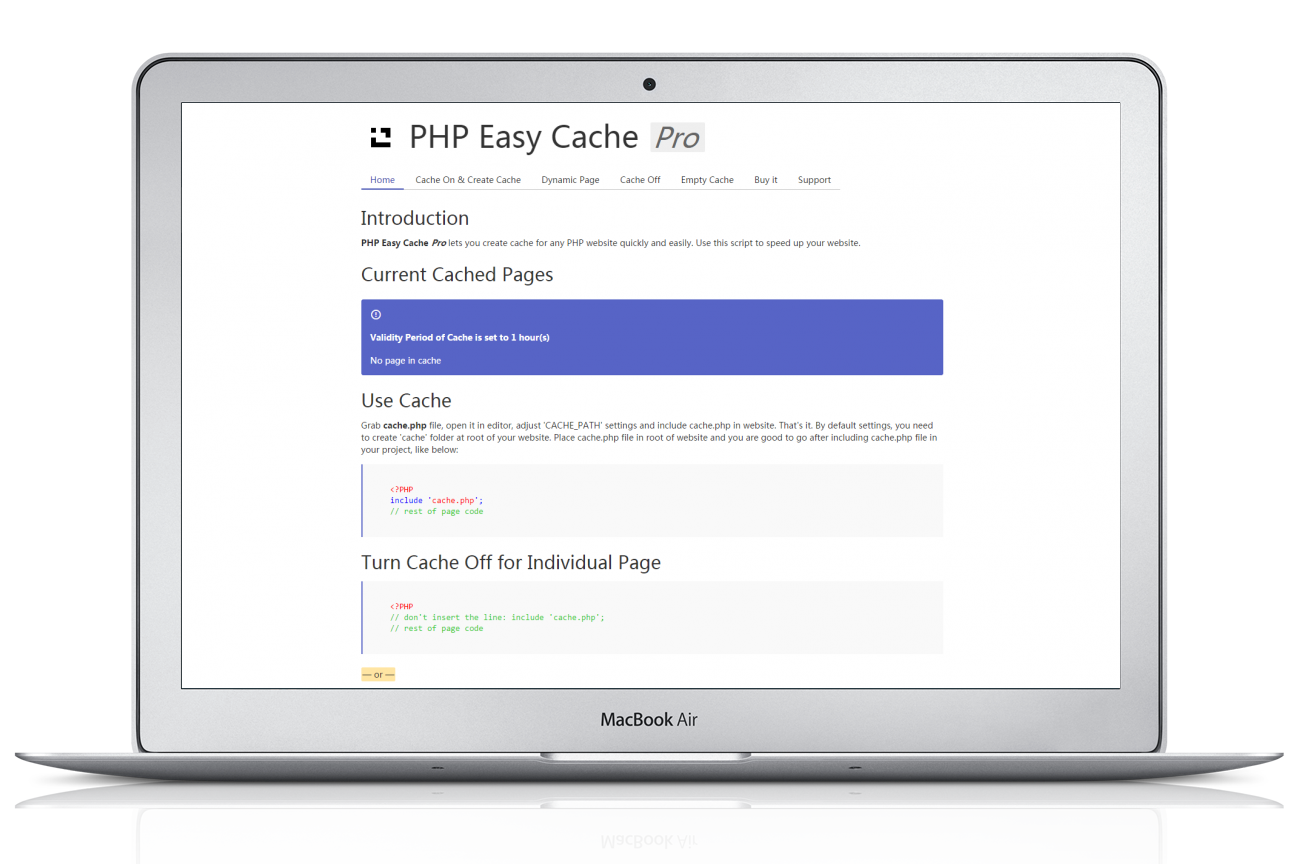
Easy Cache Pro let you create simple cache for any PHP website quickly and easily. Use this PHP Script to speed up your website. Also usable for WordPress!

The next buyer of this script who can give a 5 stars rating will get a free script by mail from my portfolio here at codecanyon — Thanks for your support ;-)

WHAT’S NEW?

PHP Easy Cache Pro is totaly new build up from scratch!
Hand picked — New Features

LIKE WHAT YOU SEE?

Screenshot

WHAT IS IT?

PHP is a programming language to create dynamic websites. Dynamic websites display content that is requested by user. This content changes if user submits form, logs in, sends email, submits comment, add/retrieve data in/from database etc. PHP scripts also retrieve data from database and display it on a dynamic page. Every time such page is loaded in browser, PHP server has to translate PHP script, request database server, retrieve data and then display it for user.Cache reduces server’s effort. Cache stores a translated version of page (HTML) to display it later. When this page is called again, cache verifies its cached version. If cached copy of page is available and is not expired, it will be displayed and PHP server won’t have to translate PHP scripts and connect to database server to retrieve data. This process reduces server memory usage, server effort and server resources consumption.If some kind of dynamic action is performed, old cache is deleted and a new fresh cached copy of page is created for later use. In this way, you website remains up and running at fast speed. A cached version of page is much faster than original dynamic page.It is logical and based on rule that “Only go through PHP scripts and database if content of page changes. If content is same, store its copy, do not go through PHP scripts and database tables and display cached copy.”

PHP Easy Cache Pro is a small PHP accelerator that substantially increases the speed of PHP website and improves the web page generation process by server. Basically it catches a page that has been loaded in browser once.Next time cached HTML version of PHP page loads instead of telling PHP server to translate the PHP code again. Similarly, in case of data retrival from database server, it will cache that data and store it in cached file to display it later, instead of connecting to database again.

It enables dynamic PHP pages to load quickly and reduces server load by saving server translated page into cached files and serving that saved data on demand.

Usage

Include script (cache.php) at the top of every page in your website that you want to be cached and that’s it. If not every page, you can also include this script in database file, configuration file or settings file of your project to cache whole website. Turn off cache for individual pages by passing a single variable to the page you do not want to be cached. If passing a variable or submitting a form, include another single script file to empty cache, so that dynamic functionality of website remains intact.In short, cache all PHP website, but when performaing a dynamic action on any individual page, refresh cache to ensure site’s stable functionality and optimal performance at the same time.

KEY-FEATURES

  • Easy to integrate and configure with any website (just include one file)
  • Use online at your webhost or locally (localhost, wamp, xampp)
  • Lightweight system
  • Only connects to the database or original file when cache has expired or cache page does not exist
  • Set cache lifespan easily
  • Ability to delete cached files
  • Ability to turn on/off for individual pages
  • Makes PHP website faster
  • Reduces server load and resources consumption
  • Reduces database queries requests
  • Reduces server processing per request
  • Increases page loading speed (resulting in better Google Rank)


WHAT MY AMAZING CUSTOMERS THINK

Best Rating

SIMPLE SETUP

  • It is very easy to use this. Simply include the script (cache.php) at the top of every Page you would like to use it.
  • <?php include ‘cache.php’; ?>
  • That’s it… You are ready to start!!

REQUIREMENTS

PHP 4 or newer
zlib for gzip compression (optional)


HOSTING

This script does not make any use of special functions, so it will work in nearly every server environment. In case of any problems with specific hostings let me know immediately!

SUPPORT

If you run into problems please give me not a bad rate, please take a look at the documentation of the script. If you need more help, be free to contact me via the support tab. I will do everything so that my product deserves a 5 star rating! All updates are included. Remember that the script will be updated regularly.

Thank you very much.
Best Regards, adilbo


DEVELOPER

Do you want to customize my script as you want? Just purchase the Extended License and shoot me a message from my profile page to let me know how you’re using it. Thanks!

HINT

Please take a look at my other scripts on codecanyon.net

CHANGELOG

Version 1.0 (05.2016)
        NEW -  Release of this Script on CodeCanyon


Download PHP Easy Cache Pro (Loaders and Uploaders)

Offline Writer (Utilities)

Offline Writer lets you easily generates posts based on the documents created with your favorite desktop applications.

Create posts with a word processor

Use MS Word, OpenOffice, LibreOffice (or other word processors able to generate .odt documents) to create your WordPress posts.

Watch the video: Offline Writer – Create a post from an .odt file

Speed up your workflow with the Markdown syntax

Markdown is a lightweight and easy-to-use syntax for creating HTML. With just regular text with a few non-alphabetic characters you will be able to control the display of the document, format words as bold or italic, add images, create lists and more.

Watch the video: Offline Writer – Create a post from an .md file

If you still don’t know what is the Markdown syntax check out these two great resource:

Easily create your posts with a word processor

With Offline Writer you will be able to use MS Word, OpenOffice, LibreOffice, and basically any ODT-capable word processor, to create the content of your posts, pages or custom post types.

Writing your posts in a word processor gives you the advantages that:

  • You don’t need to go online, log in or pass other security checks each time you have an idea for a new post.
  • You can make use of the extensions available for your word processor, like advanced spell checker and grammar checker usually not available in WordPress. This helps you improve the quality of your articles.
  • Considered the user-friendliness of word processors, you might collect contributions for the creation of new content from non-technical people.
  • You can work on your articles even if a internet connection is not available.

If you don’t have a word processor currently installed on your computer dozens of alternative are available, both free and paid. Check out this list from Wikipedia for details.

Details about the ODT parser

Technically when .odt files are uploaded and imported the ODT parser make use of XMLReader to read the embedded XML documents and convert the tags that are common between the XML part used by the .odt format and HTML.

The difference between the HTML documents generated with the word processor built-in feature and the HTML documents generated by this plugin is that:

  • The word processor built-in feature generates a real conversion of the document with all the style embedded inline. The resulting HTML is accurate but clearly not suitable to be used as a content for a WordPress post. (at least without spending a lot of time cleaning all the inline style applied to each element and removing all the additional span elements injected in the code)
  • The ODT parser included in this plugin is selective, converts a limited set of elements and ignore all the rest. The resulting HTML is clean and suitable to be published on your blog.

To be specific all the styles applied by the word processor in the .odt file and all the elements that are not included in the following conversion table are completely ignored by the parser.

  • text:p -> p
  • text:a -> a
  • draw:image -> img
  • text:h -> h1, h2, h3, h4, h5, h6
  • text:list -> ul/ol
  • text:list-item -> li
  • table:table -> table
  • table:table-row -> tr
  • table:table-cell -> td

For the reasons explained in this section the ODT menu should be used to import content that make use of this set of common elements and not to create complex layouts based on the styles applied on the .odt files.

How the images embedded in the uploaded .odt files are handled

The images included in the .odt files are automatically uploaded in the WordPress upload directory (the actual directory depends on your selection performed in the Settings -> Media menu), along with the images manually added in the posts with the “Add Media” button.

During the upload process you will prompted with a form that allows you to set the following details related to the images:

  • Filename (the name of the image in the filesystem)
  • Alt attribute
  • Title attribute
  • Link (this allows to link the image to the specified URL)
  • Link target attribute
  • Link nofollow attribute

All these details are optional, you can even leave all the fields blank if you want and in this case the filename will be auto-assigned.

Speed up you workflow with the .md format

Markdown is a lightweight and easy-to-use syntax for creating HTML. Let’s see some of the advantages of using this emerging format with the Offline Writer plugin:

  • Markdown is extremely easy to use, the tokens available with the Markdown syntax can be learned in less than 30 minutes.
  • Markdown translates to perfect HTML. No missing closing tags, no improperly nested tags, no blocks left without containers.
  • The Markdown files are simple text files editable with any text or code editor, on any operative system.
  • The Markdown files are extremely lightweight text files which don’t need to be compressed to be transported or sent on the internet.
  • Writing with the Markdown syntax requires and average of 25% less characters than writing HTML.
  • You can stop thinking about html and focus on what’s important, the content.
  • You can start writing your posts in your personal distraction free editor, like a simple text/code editor customized for your needs or one of the specific Markdown editors available on the market.
  • Programmers no longer need to manually convert to HTML entities the problematic characters present in code snippets. The Markdown parsers do this job for you.
  • With five included parser and three Markdown variations supported, this plugin can certainly satisfy even a Markdown expert who make use of any possibility provided by the syntax.

Five Markdown parsers and three markdown flavors

At this time there isn’t a clearly defined Markdown standard and different implementations are currently used on the web. For this reason this plugin doesn’t force you to adopt a specific Markdown syntax, but instead allows you to select your favorite parser between the five available.

In the Offline Writer options you will be able to selected one of these five parser. In this list for each parser you have a reference to the supported syntax.

Improve your publishing workflow

Unlock the ODT menu or the MD menu to specific categories of users, so that your authors will be able to upload their posts with these two handy formats.

Feature-specific requirements

Basic functionalities:
  - WordPress 3.8 or higher
  - PHP 5.3 or higher
ODT Parser:
  - WordPress 3.8 or higher
  - PHP 5.3 or higher
  - XMLReader
  - Zip
  - Zlib
Parsedown Parsers:
  - WordPress 3.8 or higher
  - PHP 5.3 or higher
Cebe Markdown Parsers:
  - WordPress 3.8 or higher
  - PHP 5.4 or higher

Credits

This plugin make use of the following resources:

Legal Note

The name “Markdown” is used with the only purpose of making clear to the visitors and possible buyers the type of syntax supported by this plugin.
You should not assume that the original author of the “Markdown” syntax, defined in 2004 with this post, endorses this product.

Do you care about your website’s SEO?

Improve your internal links structure and get more visits on your WordPress website with the Interlinks Manager plugin.

Interlinks Manager plugin for WordPress

Download Offline Writer (Utilities)

Print a Product (Prestashop)

OVERVIEW

This module gives your customers possibility to VIEW, DOWNLOAD or PRINT product information in PDF file format.

FUNCTIONALITIES

• PDF delivers detailed product description to the customer.

• Helps for customer to make a faster buying decision.
• Raises the conversion rate.
• Customers can share product PDF in social media.

FEATURES

* Change module display settings
• Enable/disable product image in PDF document
• Enable/disable product title in PDF document
• Enable/disable product manufacturer in PDF document
• Enable/disable product price in PDF document
• Enable/disable short product description in PDF document
• Enable/disable full product description in PDF document
• Enable/disable product gallery in PDF document
• Enable/disable product features in PDF document
• Enable/disable product attributes in PDF document

User *
• Download PDF document
• View PDF document
• Print PDF document

WHAT YOUR CUSTOMERS WILL LIKE

• The ability to send description for other person and ask for advice.
• PDF files brings detailed product information for local storage or use.
• The ability to download a description and consider whether they want to buy.

INSTALLATION

• We are constantly updating our modules; therefore this module is fully compatible with all PrestaShop 1.5 and PrestaShop 1.6 versions.

SUPPORT

• If you have any questions do not hesitate to ask.
• We can also develop custom modules for you or make some core modifications for your PrestaShop web store if needed.
• If you have an issue with our module, please fill in this contact form and we will do our best to help you.

We are always happy if we can help our customers!

Download Print a Product (Prestashop)

Olaf The Viking – HTML5 Running Game (Games)

Play It Now!

Olaf the Viking is a HTML5 Arcade Game.
Guide Olaf on his adventures through the glaciers. Collect coins to get points and avoid all the sharp spikes to survive as long as possible!

This game has been developed in HTML5/js and third-party library CreateJs – http://createjs.com/ (not Construct2 or other framework).

The ZIP package contains the game with 1360×540 resolution that scales to fit current screen device.
The game is fully compatible with all most common mobile devices.

WARNING:
Sounds are enabled for mobile but we can’t grant full audio compatibility on all mobile devices due to some well-know issue between some mobile-browser and HTML5.
So if you want to avoid sound loading, please read the documentation
Sounds can’t be enabled for Windows Phone as this kind of device have unsolvable issues with <audio> and <video> tag.

Level’s loading is managed by JSON.Chrome, for some security policies, doesn’t allow this kind of loading, locally.
This issue doesn’t occur with other browsers, like Firefox i.e.
Anyway, once you’ve uploaded the game on your server, it will work properly.

Game Screenshoot

CTL Arcade

This game is fully compatible with CTL Arcade

A WordPress Plugin that allows you to create a real arcade on your website.

Easy to Install

With CTL Arcade you can:

  • Monetize with your games adding Ads Banners
  • Promote your website with Social Share Buttons
  • Improve our games with Leaderboard, and Rating Feature

=== Even if we do our best to minimize any inconvenience, we can’t ensure the full compatibility of all our games on every device and every operating system update.
Thank you for the understanding. ===

FIX UPDATE
27/05/2016:
– Help Panel Modified


 Follow Us

 Contact Us

CODETHISLAB’S MOST-WANTED GAME OF THIS MONTH:

Jumper Frog

YOU MIGHT ALSO BE INTERESTED IN:

Wothan the Barbarian

Ahoy! Pirates Adventure

The Bandit Hunter

Hero Jump

Virus Attack

Brick Out

Radioactive Ball

Miner Blocks

Beer Rush

Free Kick

Snake

Slot Arabian

Scratch Fruit

Baccarat

Deuces Wild

All games

All Graphic Assets

All Models

Flag Counter

Download Olaf The Viking – HTML5 Running Game (Games)

Spin2Win Wheel – Spin It 2 Win It! (Miscellaneous)

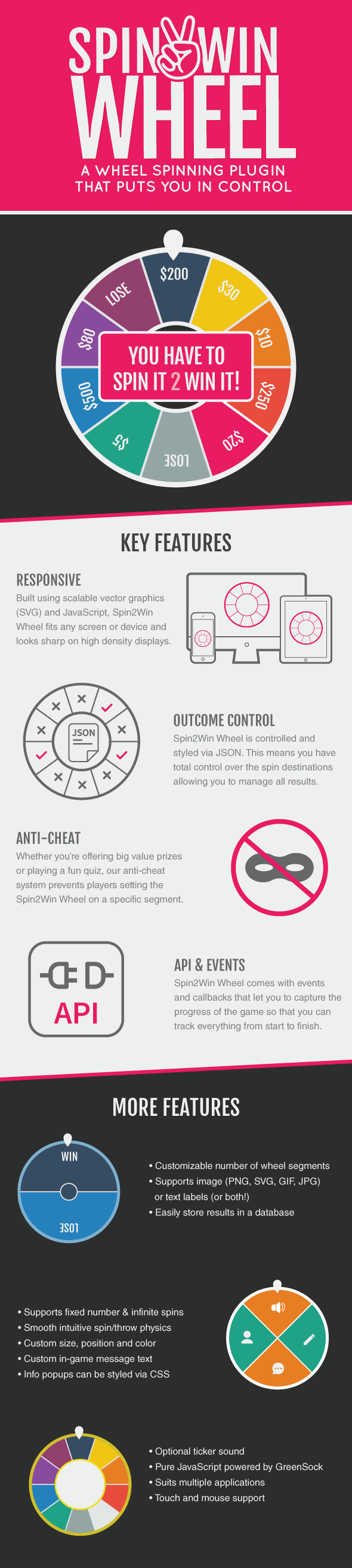
Built using Scalable Vector Graphics Spin2Win Wheel is a responsive, flexible, customisable, resolution independent spin wheel game whose outcomes you control.

Spin results, prizes, win/lose, number of spins and more can be controlled using JSON data. You can also customise the look and feel of Spin2Win Wheel to bring it in line with your brand or color scheme and it even has an anti-cheat mechanism to prevent players placing the wheel on a chosen segment.

The documentation is here.

Download Spin2Win Wheel – Spin It 2 Win It! (Miscellaneous)