Advanced Music Widget WordPress Plugin (Widgets)

Advanced Music Widget is a plugin which creates a widget that can be used to display a music player with artist’s name, song, and a cover image. It can also be used as an audio player, podcast player and etc.

Features:

  • Fully responsive
  • Fully customizable
  • Unlimited colors for customization
  • Supports HTML5 audio player
  • Supports WordPress default audio embed
  • Upload cover image and audio files
  • Use external cover imager url and audio file url
  • Two different album cover styles
  • Full audio player control (set loop and autoplay in settings)
  • Custom message after the player
  • Custom messages before and after the widget
  • Using shortcodes to place the music player on any page or post
  • Supports all major browsers

Plugin Installation and Setup

Installing Advanced Music Widget is very similar to installing any other plugins on your WordPress website. Simply select the zip file in the add new plugin section and once activate it, go to Dashboard > Appearance > widgets and configure the plugin.

The full documentation is available online here

Having Trouble with the Plugin?

If you have any questions, feel free to submit them via the support tab or by contacting me directly.

Enjoying the Plugin?

If you like this plugin and you enjoyed using it, please rate it and write a review. Thank you !

Changelog

18.8.2016 – Version 1.0.0

 - Initial release
Download Advanced Music Widget WordPress Plugin (Widgets)

Cart to Quote for Woocommerce (WooCommerce)

The most complete quoting plugin for Woocommerce and WordPress. Max your sales NOW.

How it works

FRONTEND

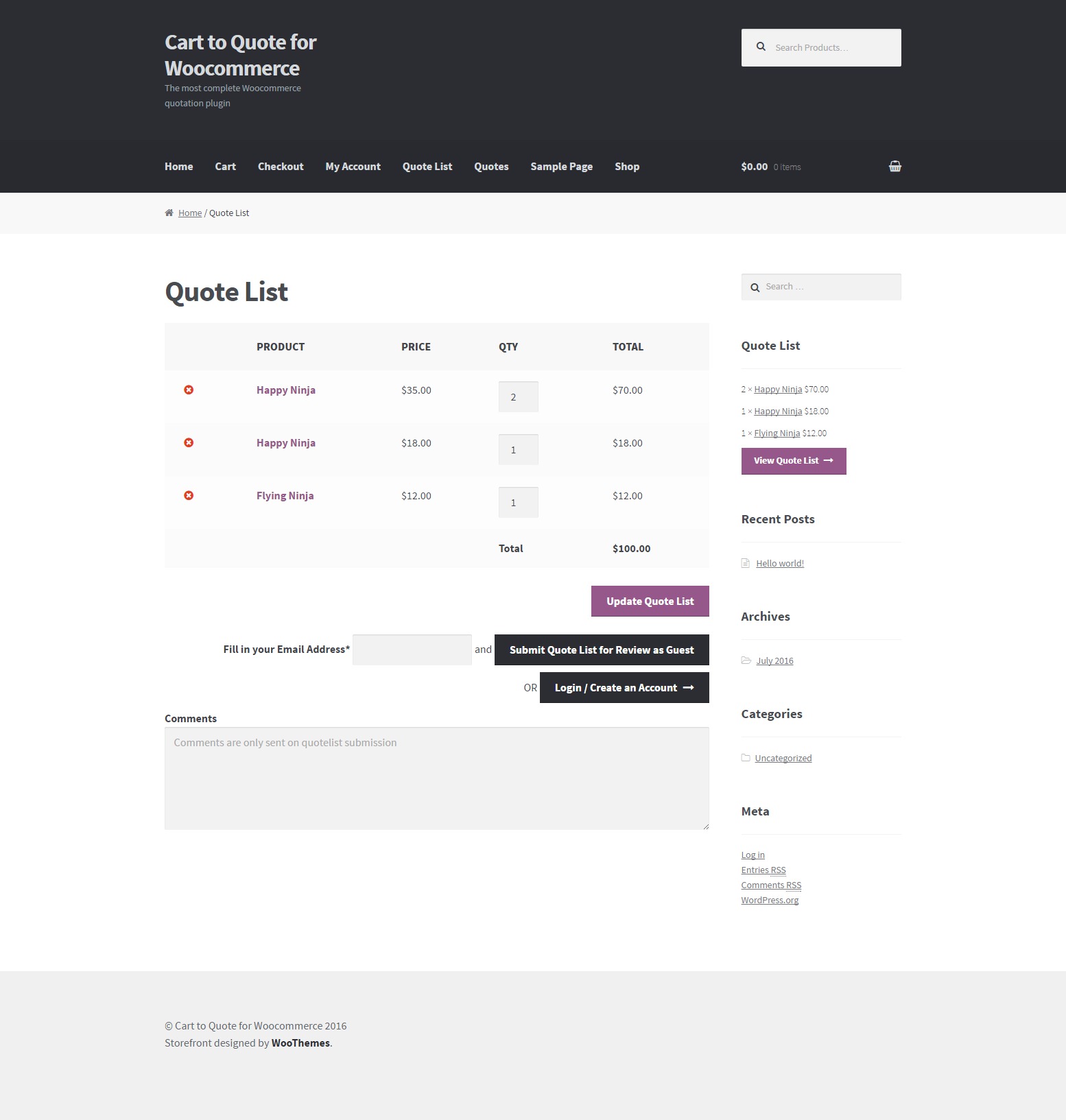
User has the ability to add products in the quote list. It works like a cart (adding, removing, overview etc). After he has added all the desired products he can submit the list for quoting. At submission, a quote is created on the backend for the shop manager to review and the shop manager also receives an email notification.

BACKEND

1st case: The shop manager can review the quotes that have been submitted by the customers. He can add new prices to each item for this quote and approve OR can cancel, decline etc. Many statuses are available. The customer can get notifications on the update status and then go ahead and buy the new quote as normal via woocommerce checkout, with all the changes and new prices that were made by the shop manager.

2nd case: You (the shop manager) get a call from your VIP customer asking you for a nice price on a long products list. You get on the backend, go to quotes, and create a new one with all the items he asked. Here you can tweak the prices and add some discount to make your VIP customer happy. After the quote is done, you can save it and your customer will receive an email notification with all the quote details, the prices he, exclusively gets and a link to review and accept the quote so he can checkout.

NOTE: The cart and the checkout are functioning as normal. The “add to quote” button will not replace the “add to cart” button.

Features

  • Integrates with any theme by using the default Woocommerce design
  • Works for both logged in and guest users
  • Can be limited to logged in users only
  • User friendly and self-explanatory administration panel fully integrated with Woocommerce.
  • Orders alike quotes administration
  • Admin can create quotes for existing users or anyone but just knowing his/her email address
  • Ability to add your custom attachment to any quote and send to the customer
  • Auto creates PDF attachment with the quote details to be sent to the customer
  • admin can edit and approve or decline any quote request
  • Quote expiry, reminder and follow up date can be set per quote
  • Easily edit the content of each email via the plugin options
  • Easily translatable via .po / .mo files.
  • Available translations: English, Greek

Requirements

  • WordPress 4.0+
  • Woocommerce 2.5, Woocommerce 2.6
  • PHP 5.4+

Usage

Plugin Settings

In order to setup the Cart to Quote for Woocommerce plugin navigate from your WordPress administration panel to “Woocommerce ? Settings” and click on the Cart to Quote Tab.

Settings
  1. Always prompt for log in: Disallow access to guests and prompt for log in even in single quotes.
  2. Require account: Allow access to the plugin functionality, but require login to submit quote list.
  3. Add quotes list on my account: Add the quotes list before the orders list on Woocommerce my account page.
  4. Remove add to quote button on product: Removes the “add to quote” button on the single product page.
  5. Remove add to quote button from product archives: Removes the “add to quote” button on the product archives list/loop page.
  6. Disallow user remarks: Users will not be able to add remarks (notes) to quotes, if you check this.
  7. Empty cart before adding quote items: The cart will be emptied before adding quote items to it when the user accepts a quote.
  8. Days to remember user’s quote list: How many days should the plugin remember the users quote list when the user is logged out (default is 100). Basically is the cookie life.
  9. New quote email notification: Here you may insert an email address to receive new quote requests notification, eg. the shop manager email address.
  10. Email user on frontend new quote: Email quote details to the user that is submitting the new quote from the frontend.
  11. Text before the quote list on the reminder email: Here you may enter any custom text that will be inserted before the quote list on the quote reminder email that is sent to the customer.
  12. Text after the quote list on the reminder email: Here you may enter any custom text that will be inserted after the quote list on the quote reminder email that is sent to the customer.
  13. Text before the quote list on the follow up email: Here you may enter any custom text that will be inserted before the quote list on the quote follow up email that is sent to the customer.
  14. Text after the quote list on the follow up email: Here you may enter any custom text that will be inserted after the quote list on the quote follow up email that is sent to the customer.
  15. PDF Logo: Drag and drop or “Add Media” to the editor in order to customize the logo on the PDF that is sent as attachment to the customer on the quote list creation.
  16. PDF Company Address: The address of your company that you may want to display on the PDF with the quote details.
  17. PDF Text Before Product’s Table: Any text that you want to be displayed on the PDF, before the table with the list of the quoted products.
  18. PDF Page Footer: Any text that you want to be displayed on the PDF footer.
  19. PDF Headers Background Color: Any color that you would like as background in the PDF (table) headers.
  20. PDF Links Color: Any color that you would like for any links on the PDF.
  21. PDF Style: Here you may enter any CSS rules to be applied to the PDF (do NOT include <style></style>).
  22. You are ready to go! * Save Changes *

Quotes Administration

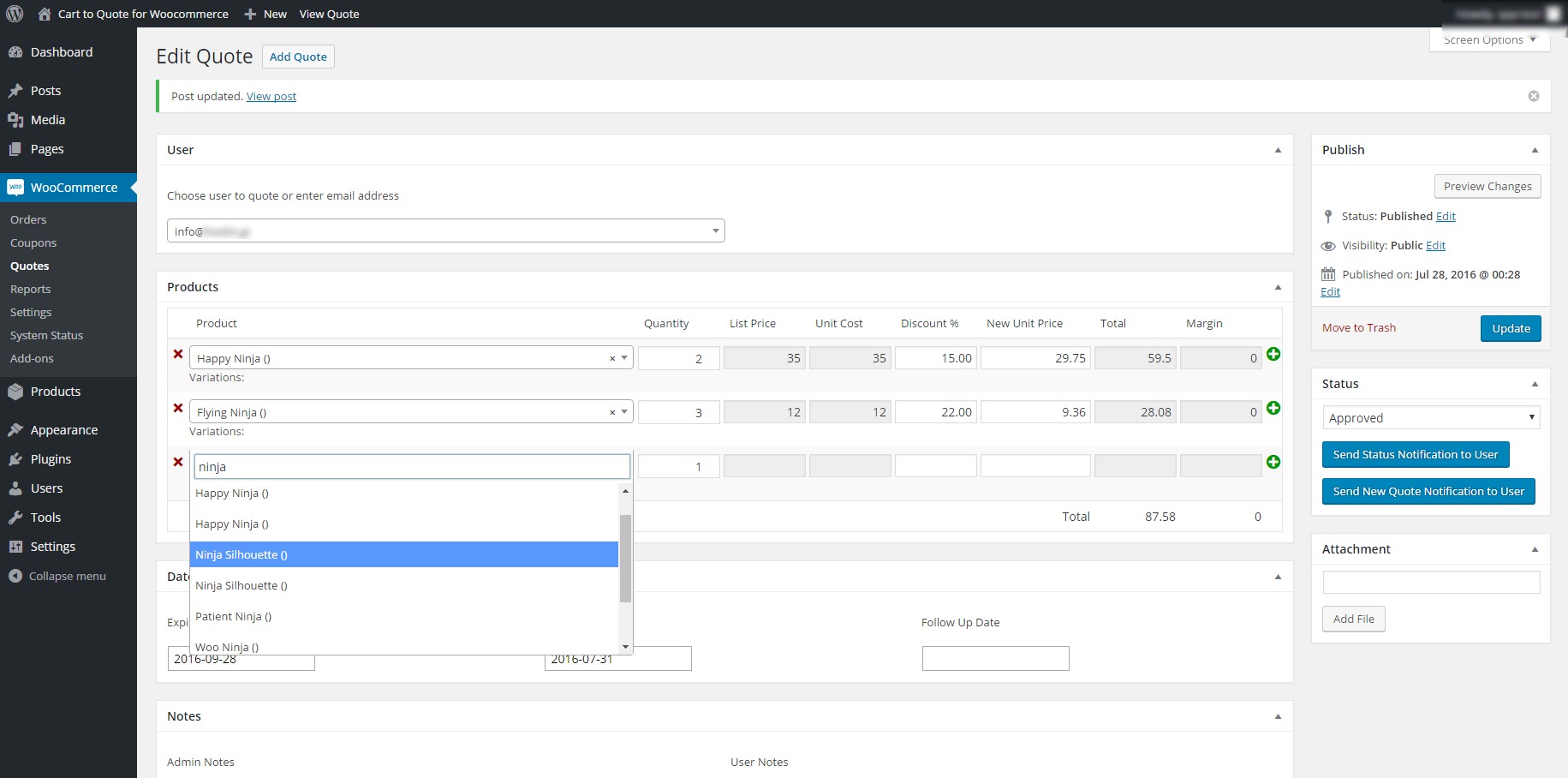
In order to create or edit any quote navigate from your WordPress administration panel to “Woocommerce ? Quotes”. The functionality is the same as any WordPress Custom Post Type.

Quotes Management
  • Add a quote buy clicking on the “add Quote” button
  • If you already have quotes created you may edit, quick edit, trash or view any quote. Just hover on the quote title for the links to show up.
Quotes Editing
  • User: You may add a user by start typing on the User field. An AJAX search will be ran on the background for already registered users and you will be prompt to select one if anyone is found. If the user does not exist you may type his email and the select it. YOu will be prompt to fill in his/her details. It is not obligatory to add the details of the user.
  • On the next area you may select the products you want to add to the quote or edit the existing ones. In the same way start typing the title or SKU of the product and you will be prompt to select on of the results that are found. All fields bu the quantity will be autofilled for you after you select a product.
  • You may enter the profit margin by editing each individual product. Look for the “Unit Cost” field.
  • To add more product click on the plus (+) sign on the end of each row.
  • To remove a product click on the (x) sign on the start of each row.
  • To enter an expiry, reminder and follow up date click on any of the three fields. A calendar will pop up.
  • You may keep notes for admins only on the “Admin Notes” textarea.
  • If the quote was submitted bya user and the user added some remarks (notes), those will be displayed on the “User Notes” textarea.
  • On the sidebar you may select nad/or change the status of the quote.
  • You may add an attachment to the quote by clicking on the “Add File” button. The default WordPress media manager will pop up. This attachment will be sent to the user on quote submission.
  • If you are editing a quote then you will have two additional options.
    • “Send status notification to user” (self explanatory).
    • “Send New Quote Notification to USer” in case you want to resend the email that was sent to him/her when the quote was first created.

Quotes Frontend

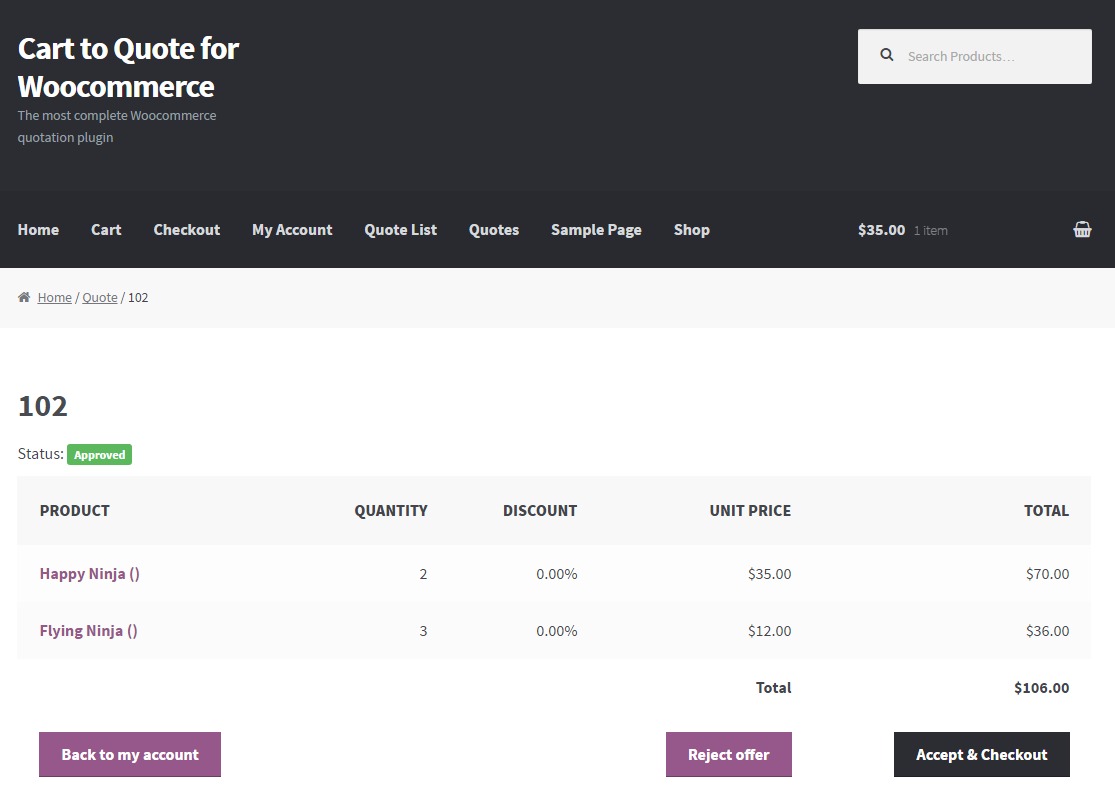
Users, depending on your settings, will be able to add products in their quotes list and ask for quotes. They will be able to ask for a quote and see their quotes on the “My Account” page.

For Developers

Templating

You may override any of the plugin templates in the same way you do for woocommerce. Just copy the file in “your-theme-directory/c2q/”.

eg. if you want to override the single-quote.php and your theme is “storefront-child” then create a folder named “c2q” in ”/wp-content/themes/storefront-child/” and copy the file “single-quote.php” in there. Now you may edit it as preferred.

Hooks

Many hooks are in place. Please search the code for a full list. A list is also available in the documentation.

Frequently Asked Questions

  1. Are variable products supported?

    Yes, they are.

  2. Will it work with this (any not tested by us) plugin?

    Please ask!

  3. I need this change on the plugin. Will you do it for me?

    If this is a change that will benefilt all buyers, we may consider it. If it is a customization, then we are sorry, but this is not included on the support.

  4. How many quotes can it handle?

    This really depends on the server and site optimization.

Changelog

1.0.1 08/19/2016
  • Bug: Missing comma was preventing DB table from being created
  • Bug: Added some checks to remove warnings for undifined indexes
1.0.0 08/15/2016
  • Initial release

Sources and Credits

This plugin uses the following libraries

Download Cart to Quote for Woocommerce (WooCommerce)

FreelanceHub – Complete Freelancing Solution (Project Management Tools)

FreelanceHub is a complete solution for all your freelancing needs. It allowes you to manage projects, invoices and price inquiries. It also allowes you to distribute tasks across your team.

Not only you but your clients will love it too! It’ll enable them to pay your invoices directly using the integrated PayPal and CreditCard gateways.

Preview login credentials

Administrator:
Username: [email protected]
Password: admin

Staff Member:
Username: [email protected]
Password: staff

Customer:
Username: [email protected]
Password: customer

Detailed Feature List

Invoices
– Create Invoices
– View transactions
– Refund transactions
– Mark invoice as paid
– Set due date

Payment
– Enable your clients to pay their invoices online
– Paypal, stripe and 2checkout already integrated

Project
– Create tasks and allocate them
– Submit bugs so your team members can work on them
– Assign projects to your co-workers
– Upload files related to a project
– Communicate with the buyer directly in the project

Inquiries
– Let customers create price inquiries
– Respond to price inquiries with a detaild offer

Permissions
– Assign users to user groups
– Create user groups and assign permissions to them
– Three different predefined permission levels

Changelog

Update 1.1
Fixed PayPal gateway

Download FreelanceHub – Complete Freelancing Solution (Project Management Tools)

Grid – 3×3 (Games)

Your goal is to recreate the pattern as fast as you can. For every pattern you get extra time and a point.

Extra built in the app:
– Google Admob
– Apple Game Center
– Facebook SDK (for deep link)

Try it yourself: https://itunes.apple.com/dk/app/grid-3×3/id1128718253?mt=8

This app is a fully working, complete iOS application, that is ready to be submitted to the App Store. Written in the latest Xcode, using Swift 2.0 for supporting iPhone and iPad devices from iOS 9.0. (Will be updated to Swift 3.0 when it is out)

Download Grid – 3×3 (Games)

Shopist | Laravel eCommerce (PHP Scripts)

Shopist | Laravel eCommerce (v 1.0)

Shopist is very easy eCommerce for the laravel framework. It has powerfull products designer. User will able to design using this feature.

Documentation located in the shopist folder.

Check The Demo (admin)

Check The Demo (frontend)

Products Designer Tool

front-design

Server Requirements

  • PHP >= 5.6.4
  • OpenSSL PHP Extension
  • PDO PHP Extension
  • Mbstring PHP Extension
  • Tokenizer PHP Extension

Features

  • Installation very easy
  • Products designer tool included
  • Dynamic reports system
  • Multiple products type
  • And many more

Support

Email:[email protected]

Download Shopist | Laravel eCommerce (PHP Scripts)

MultiNews – Ultimate All-In-One News App (PHP Scripts)

About

MultiNews is a fully responsive News API for your website or application. It allows you to easily display all of your RSS feeds in a single place with a very simple and user friendly admin panel. Key features of MultiNews include:

  • Advanced Filtering – Filter articles based on keywords set in the admin panel
  • Unlimited Feeds – MultiNews can handle as many news feeds as you need
  • Ajax Loading – Load more articles straight into the current page
  • Responsive Design – Built ontop of Bootstrap 3 ensuring MultiNews is fully responsive
  • Track Interactions– Tracks which articles are producing the most interest
  • Monetize Articles – Display advertisement or sponsor message when user views full article
  • Analytics – View which articles are producing the most interactions
  • Simple admin panel – Very simple, highly customizable and user friendly admin panel
  • Secure – Password protected admin panel and protected from SQL injection

MultiNews is fully supported and worked on as a continued project based on feedback from customers. Think MultiNews could use some extra functionality? Please let me know in the comments section.

Requirements

  • PHP 5.x
  • MySQL database

Support

Please don’t use the comments section for support requests, use the Support tab instead for quicker responses.

Pre-Sales Questions

Please send me your pre-sales questions via this link, usually respond within a few hours.

Special thanks to:

Download MultiNews – Ultimate All-In-One News App (PHP Scripts)

QuForms Address Autocomplete (Forms)

For Live Preview click here

Click here for Video Demonstration

To get this plugin CUSTOMIZED , Just send me an email.

Quforms Address Autosuggest Autocomplete simplifies the form filling process helping your users to enter their address with the Google Places suggest API. You make them save time by finding accurate addresses with suggestions and filling forms faster with autofill.

It uses Google Places API to suggest addresses to your users while they type.

The admin has the option to use them exclusively on selected text fields. You can use it on as many fields as required.

If you need customisation of this plugin, please contact me.

*INSTALLATION*
Method 1:-

  1. Download the zip file you receive after purchase
  2. Install via WordPress > Admin Dashboard > Plugins > Add New > Upload File
  3. Press Install
  4. Activate the plugin

Method 2:-

  1. Download the zip file you receive after purchase
  2. Extract the contents of the zip file
  3. Copy the extracted address-autocomplete-quforms folder to the //your-wordpress-installation/wp-content/plugins folder
  4. Activate the plugin from the Admin

HOW TO USE:-

Please follow the video to

https://www.youtube.com/watch?v=swuvt9lS_Ms

That’s all folks!!

If you have any questions please send us the message through our profile page or leave a comment.

Do rate the plugin if you like it :)

Configuring the API key (if required)

In certain cases google browser API key may be required. In that case please obtain the google browser API key from http://console.developers.google.com/ and add it to the settings

Please ensure you enable the following APIs

Download QuForms Address Autocomplete (Forms)

Multipurpose Travel Agency Banners – HTML5 Animated GWD (Ad Templates)

Multipurpose / Travel / Tour / Vacation – HTML5 Banner Ad Templates

Created with Google Web Designer

Item Features:

  • Super fast and easy customization
  • Google Web Fonts used
  • Created and fully editable with Google Web Designer
  • Compatible with Adwords, Doubleclick, Adroll and more
  • Pixel-Perfect cross-browser compatible

What’s Included?

  • 6 Popular Sizes : 160×600, 300×250, 728×90, 468×60, 300×600, 180×150
  • Detailed instruction file
  • Generic and Google spec source files
  • 6 Month Item Support
  • Free item updates

Notes:

The stock image is not included in the download file, it is for demo purposes only. Visit istockphoto.com or photodune.net for a great selection of images.

Want us to customize this item to your exact specs? We offer item customization services for a small fee, contact us to get started!

Download Multipurpose Travel Agency Banners – HTML5 Animated GWD (Ad Templates)

Law Firm Legal Attorney Banners – HTML5 Animated GWD (Ad Templates)

Law firm / Legal / Attorney / Lawyer – HTML5 Banner Ad Templates

Created with Google Web Designer

Item Features:

  • Super fast and easy customization
  • Google Web Fonts used
  • Created and fully editable with Google Web Designer
  • Compatible with Adwords, Doubleclick, Adroll and more
  • Pixel-Perfect cross-browser compatible

What’s Included?

  • 6 Popular Sizes : 160×600, 300×250, 728×90, 468×60, 300×600, 180×150
  • Detailed instruction file
  • Generic and Google spec source files
  • 6 Month Item Support
  • Free item updates

Notes:

The stock image is not included in the download file, it is for demo purposes only. Visit istockphoto.com or photodune.net for a great selection of images.

Want us to customize this item to your exact specs? We offer item customization services for a small fee, contact us to get started!

Download Law Firm Legal Attorney Banners – HTML5 Animated GWD (Ad Templates)

Pendo Dreamweaver Ads Template (Ad Templates)

Pendo is Dreamweaver Ads Template
HTML5 JS CSS3 Minimal version Dreamweaver cs5.5
provided 5 most frequently used sizes in the market

1. 336X280
2. 300X250
3. 728X90
4. 160X600
5. 300X600

Features
– Google Web Fonts
– Unlimited Possibilities Custom Animation
– Customize in design view and html div tag
– Hover interactive animation on the last frame
– Made from scratch (hand code) using technology HTML5 JS CSS3
– compatible with Doubleclick, GDN, Sizmek
– Include all psd and icon,logo, in Ai File
– File size below than 150kb

About
You can use these ad banners for any purpose, just by change content, text, background image, and logo, it is very easy, no need to know the HTML and CSS language to use, WYSIWYG (What You See Is What You Get)

All files are included for buyers to edit content easily
modify content like Background, Logo, Images, text, and also new feature for animation
easily according to requirement.

Don’t forget to rate 5 star in download section, it will help me to create more intersting file soon

once again, thank you so much for purchasing this Template
As I said at the beginning, I’d be glad to help you if you have any question relating to this template, I’ll do my best to assist.<br />
if you have a more general question relating this template please visiting the forums and asking your question in the item discussion section.

Feel free to ask any queries, i will welcome to assist

and for another size dont hesitate to asking me

stay tuned, i will update more option animation on this Template :)

Download Pendo Dreamweaver Ads Template (Ad Templates)

Milo Blog (Add-ons)

Milo Blog is an beautiful blog module for Joomla! It get articles from Joomla source and display with various layout style as masonry, list and many special functions…
There are lots of parameters and you can set them easily.
This awesome module is responsive and seo optimized. It is totally compatible with Joomla 3.x, easy to install and a perfect solution for you to create your own blog or news module on joomla …

Highlight feature:
• Support Joomla 3.x
• Articles Source from Joomla
• 3 Layout type are masonry, list big image and list small image
• Support Loadmore articles via ajax
• Easy to change color style
• Flexible Configuration at back-end
• Easy customization with custom css.
• Multi browsers supported (IE 10+, FireFox, Chrome,…)

Download Milo Blog (Add-ons)

Milo Portfolio Pro (Galleries)

Milo Portfolio Pro is a responsive extension for Joomla! This is the full version of Milo Portfolio that helps users create a portfolio easily with filter, lightbox effect, item details with source from images folder and load more items function and packery layout mode.
There are lots of parameters and you can set them easily. This awesome module is responsive and seo optimized.
It is totally compatible with Joomla 3.x, easy to install and a perfect solution for you to create your own portfolio on joomla.

Highlight feature:
• Support Joomla 3.x
• Images source from images folder
• Unlimited Images
• Using Isotope jQuery with masonry effect
• Load more items with button click
• Packery layout mode
• Full responsive with all devices
• Flexible Configuration
• Easy customization with custom css
• Multi browsers supported (IE 10+, FireFox, Chrome,…)

Download Milo Portfolio Pro (Galleries)

Pizza Banners HTML5 – GWD (Ad Templates)

DESCRIPTION :

Pizza Banners HTML5 Ads Template is a clean and unique design so far using the latest trendy perfect for Fast food offers and services, suitable for any kind of food business

BANNERS FEATURES :

– Include psd file

– 06 standard size

– Google Ads

– Layered by name

– Fully editable – all colors and text can be modified.

FONTS USE :

+ Google font

NOTE

All the images are display only, not included in the main download package. All links download image included in file download.

Need another template or logo, please contact me directly via e-mail form on my profile page.

Download Pizza Banners HTML5 – GWD (Ad Templates)

Interactive Textual Map United States (Charts and Graphs)

Features

  • HTML + CSS based map of United States of America featuring the most important cities.
    Easy to customize. No Javascript knowledge needed
  • Easy to include the code in your website or in your wordpress Widgets
  • Export it as an image if it suits better your needs
  • Highlight the cities you want.
  • Two color sets included and easy to add your own color sets, so it fits in your site styleguide.
  • Teko Font Included
  • Full documentation included.

More maps to come. Stay tuned!

Download Interactive Textual Map United States (Charts and Graphs)

Skhover – CSS3 Hover Effects (Animations and Effects)

A collection of CSS3 text effects can be applied to links, buttons, logos, featured images and so on. Easily apply to your own elements, modify or simply use as inspiration.
There are 10 different options to choose from, some hover effects are integrated within others to show the simplicity on how to use these hover effects. There are descriptions in the code to help understand.

Download Skhover – CSS3 Hover Effects (Animations and Effects)