StickMan Ninja Hero + Buildbox Game Template (Games)

Overview

The stick man ninja is back!

One of the most amazing game this year.

Be Careful! If you jump to the wrong place, you will fall down! Press the screen to jump the ninja star, and the running ninja.

“StickMan Ninja Hero” is a new fun game with interesting gameplay and gorgeous graphics. Get ready to spend an epic jumping journey with our adorable Ninja in this game!

How far can you go? Become the greatest hero!

Android Demo:

DEMO APK :

https://play.google.com/store/apps/details?id=com.visiondevapp.stickmanninja

Features:

  • Admob + Interstitial Ads Supported.
  • Easy to Re skin.
  • Generate revenue instantly $$$
  • xCode Project.
  • Leaderboard – Compete with your friends for high scores.
  • Full Source Code with help file

What You Get :

  1. Full xCode Projecte
  2. StickManNinja.bbdoc ( BUILDBOX TEMPLATE )
  3. Documentation File HTML

Download StickMan Ninja Hero + Buildbox Game Template (Games)

Magento Countdown Timer from Orange35 (Magento Extensions)

If you wish to run promotions on Magento Store, take a look at the following plugin. It is a simple Magento Extension that will provide an opportunity to add an eye-catchy countdown timer for every part of the store. It can be used on product pages, category listings, sidebars and other places.

All you need to do is download and install the extension to your store. Then, open the configuration panel, set the time and configure the places where the countdown should appear.

It is as easy as one-two-three. So, purchase Magento Countdown Timer plugin right now and boost your store with new features

Download Magento Countdown Timer from Orange35 (Magento Extensions)

Demo Builder for any WordPress Product (Utilities)

MotoPress Demo Builder is an all-in-one plugin to easily build an effective demo of any WordPress product. Whatever it’s a plugin, theme or any other item to present.

There is no better way to win trust of your potential customers than providing them with a chance to test your WordPress products firsthand. MotoPress Demo plugin allows to do it both ways: frontend and backend. Easily create memorable demos to impress the visitors and provide access to the product backend to give users freedom of customization test-drive.

With this plugin you don’t only get an ability to build a stunning presentation of your products and increase chances to outperform your competitors in a natural way, but also enhance your marketing opportunities thanks to such built-in tools as MailChimp and Responsive toolbar (to refer to your other brand products).

Demo Builder Highlights:

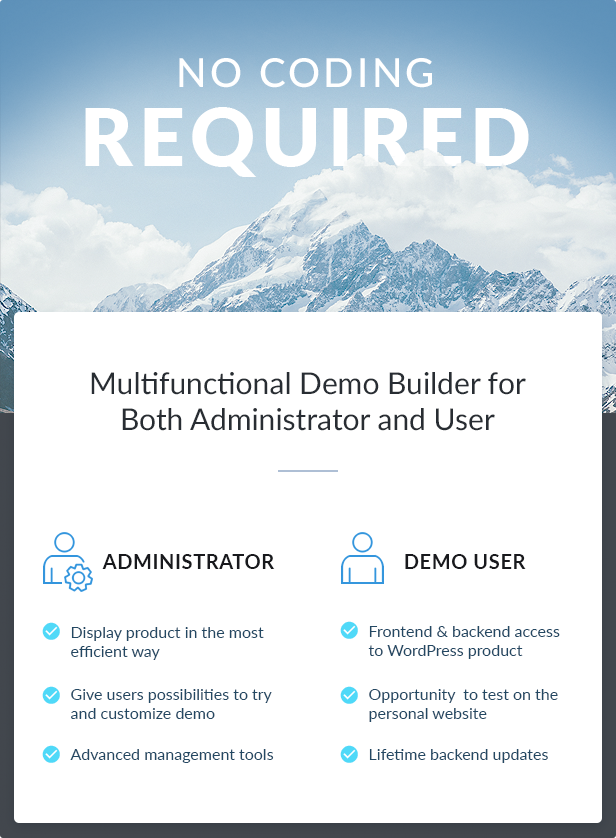
What you get as a plugin administrator
You create a demo version of any WordPress product just once, your potential clients are free to discover all other advantages by themselves. Your management tools are unlimited.

What demo users get
Frontend and backend access to your WordPress products. Ability to test the plugin as on their own websites (backend access is defined by a plugin administrator). Confidence that all their backend updates are saved during a demo website lifetime.

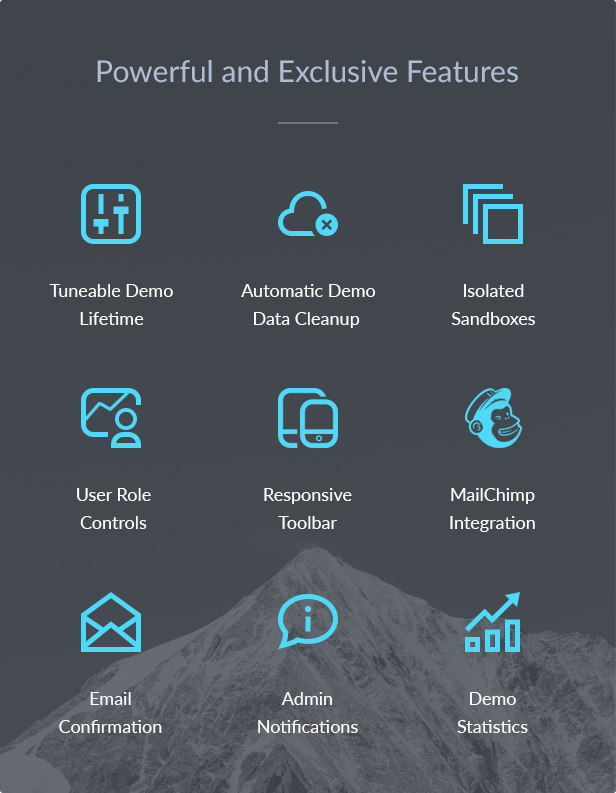
Powerful and Exclusive Features:

Tuneable Demo Lifetime
Set any trial period you think is enough for proper testing of your WordPress products.
MP Demo administrator has full control over the trial period applied for all demo websites. Setting demo lifetime is performed in several clicks and can be changed at any moment. After the user’s demo website (sandbox) expires, it’ll be automatically cleaned up in order for you not to keep old demo data.

Automatic Demo Data Cleanup
Demo data are automatically cleaned up upon account expiration.
When a demo website is due to clean up depends on a previously set demo lifetime. It means, firstly, you get rid of all unused demo data on time and, secondly, all demo users are aware for how long they can use their accounts so no further misunderstanding on data loss should appear.

Isolated Sandboxes
Independent demo user accounts are guaranteed.
Every user is able to experiment with the demo version of your WordPress products without worries of their updates being affected by other users. All user changes will stay intact until the trial period is finished.

User Roles and Restrictions
You define what Dashboard pages a user can access and modify.
Allow users to access only needed options within their sandboxes (user demo websites). For example, you may block access to all posts or to only particular posts as well. Access to particular page of demo accounts can be also restricted by any network admin.

Redirecting upon Sandbox Creation
Land your demo users right on the most attractive and handy demo product page after account confirmation.
Choose the most optimal way to firstly present your demo product to a user: it can be a dashboard, particular post, plugin settings or whatever you think is a right place for your demo users to get started. They’ll be automatically redirected to this page.

Responsive Toolbar
Great cross-marketing tool to boost popularity of your brand and other products.
This can be especially useful for featuring your WordPress themes and plugins. A toolbar on top of a demo product page lets your users see your logo, images and links to other related products and all needed buttons. You are free to optionally hide this bar or show only on the needed pages.

MailChimp Integration
Collect email addresses of your users with the best email marketing service from MailChimp.
Converting your demo users into clients is much easier with MailChimp plugin integrated. Group your users by interests and let them stay updated on your latest product news even after their the demo websites are expired.

Easy Management of Created Demos
View all existed demo website and analyze what features your users test the most.
You get flexible tools for managing and viewing of all sandboxes and delete the needed ones easily. As a network admin, you are also allowed to edit any of the created sandboxes.

Statistics
Handy tables to monitor an amount of created/activated sandboxes per certain period of time.
Choosing any date from the calendar you can browse a detailed statistics on total created and total activated demos. Even if the demo website was already deleted, you still can see information about its creation in statistics.

Shortcodes
Use handy shortcodes to output all needed demo content data.
A great range of shortcodes are your disposal. Using one of them you can easily create a new demo account Registration form outputting all needed form fields and customizing system messages/notifications. You have full freedom to make the registration process for your users maximum clear and handy. Switch between a standard demo form and a pop-up form to change its appearance.

Email Confirmation
Demo user accounts validation via email will prevent any spam.
You won’t need to fight with spam. A new sandbox is created only in case the confirmation link in the user’s email inbox is clicked. You’ll just rest assured all fresh accounts are created by real people. Email templates are also fully customizable.

Optional Admin Notifications
Stay updated on all new demo accounts created.
It’s totally up to your needs to receive notification about all created demo websites or not. If this option is switched on, you’ll get appropriate notifications right to your email inbox. If you prefer periodic manual checks of statistics, simply turn the option off in the plugin settings.

Opportunities for Developers
Action hooks are at your command.
The plugin comes with multiple useful action hooks to help programmers improve the plugin or adjust to their requirements. A great range of filters and functions is your powerhouse to control plugin’s behaviour maximum customizing it to your needs.

Download Demo Builder for any WordPress Product (Utilities)
BBCode Shortcodes for Drupal 8 (Drupal)

IMPORTANT: The module requires “Shortcodes API for Drupal 8” module, but it is not provided with this module; it must be purchased separately on Code Canyon (https://codecanyon.net/item/shortcodes-api-for-drupal-8/17409505)

The BBCode Shortcodes for Drupal 8 module is a package of standard BBCode tags for Shortcodes like highlight, dropcap, etc. allowing Drupal to parse them.

BBCode or Bulletin Board Code is a lightweight markup language used to format posts in many message boards. The available tags are usually indicated by square brackets ([ ]) surrounding a keyword, and they are parsed by the system before being translated into a markup language that web browsers understand – usually HTML or XHTML .

BBCode was devised to provide a safer, easier and more limited way of allowing users to format their messages. It was introduced in 1998 by the message board software Ultimate Bulletin Board (UBB) implemented in Perl. In 2000 BBCode was used in phpBB – an internet forum system written in PHP.

Download BBCode Shortcodes for Drupal 8 (Drupal)

Destroy Virus (Animations)

This game embeddable component for any site in which the system is implemented prizavogo coupon code that can be changed at any time. The process of the game is that anyone could destroy the virus, which appeared on the website and received a prize.

1. Responsive design
2. Increase the speed when motor fuels
3. Works with mobile devices
4. Browser: Google Chrome / Firefox / Opera / Microsoft Edge

Download Destroy Virus (Animations)

CoolNotifier PopUp Module for Joomla (Joomla)

Add Skills to Your Website with Cool Notifier. Pop up now!

Whether you’re running a special promotion or want to give an existing product or service more visibility, our fully-customizable notifier will allow you to increase the chance of building relationships with the visitors on your site and converting them into valuable lifetime customers.

Easy Setup, 100% Responsive, Fully Documented, Great Support, +80 InEffects, +80 OutEffects, +10 Sound Effects, Perfect Back end, Audience Select, Smart Triggers, Many Themes, Ready Parameters

Let your site talk to your visitors! Show messages, updates, discounts, promotions, remind anything you want! Pop up now!

Over 300% to 500% increase in email subscribers!

Make a Difference on Your Website with Cool Notifier popup Joomla module!

Do you want to sell more of your products and services?

One of the most important functions of a website is to keep visitors on your site longer and educate them on the key points of your business so they buy!

Download CoolNotifier PopUp Module for Joomla (Joomla)

Reservation (Prestashop)

Table of Contents

  1. What is this?
  2. Features
  3. Installation
  4. Configuration
  5. FAQ
  6. Changelog

A. What is this?

A Prestashop 1.5+ addon that displays a weekly calendar where customers can find courses and apply.

B. Features

  • A beautiful responsive calendar.
  • Really easy: in one click, customers can apply to a course (it works with all types of booking, reservation, rent, services, etc.).
  • Multilingual: EN, ES, FR.
  • Possibility to display preview pictures.
  • Possibility to add a text before the calendar.
  • An infinity of event categories.
  • Each category defines its own text and background colors.
  • Price display with or without VTA.
  • Well-written: 100% in the Prestashop validation!

C. Installation

  1. Into the backend of your Prestashop, select the Modules and Services menu.
  2. Click on the Add a new module icon.
  3. Choose the ZIP file to upload (its name is reservation- .zip).
  4. Click on the Upload this module button.
  5. The module should be listed with other ones, find it and click on the Install button.

D. Configuration

First, you need to select the parent category where products are and click on the Save button.

Then, you can edit others options as you wish.

E. FAQ

  • How to set text and background colors for an event?

    Events colors are managed on the module configuration page. When you have a chosen parent category, the category and its children are displayed below the first configuration form.

    Note: if the product is associated to a child category of the selected category, colors taken into account are those from the child category.

  • How to set dates for a product?

    1. On the product page, check the Reservation tab.
    2. Choose the starting and ending dates.
  • How to set the available places?

    1. On the product page, check the Quantities tab.
    2. Choose a value for Quantity.
  • Can I set several dates for one product?

    No, each product has only one starting date and one ending date. But you can easily update the product dates to new ones to re-enable the product into the calendar. Just think to update quantities too.

F. Changelog

  • Version 1.0.0 (2016-08-29)

    - initial version

Download Reservation (Prestashop)

FolioTrader – Domain Portfolio Seller Script (Miscellaneous)

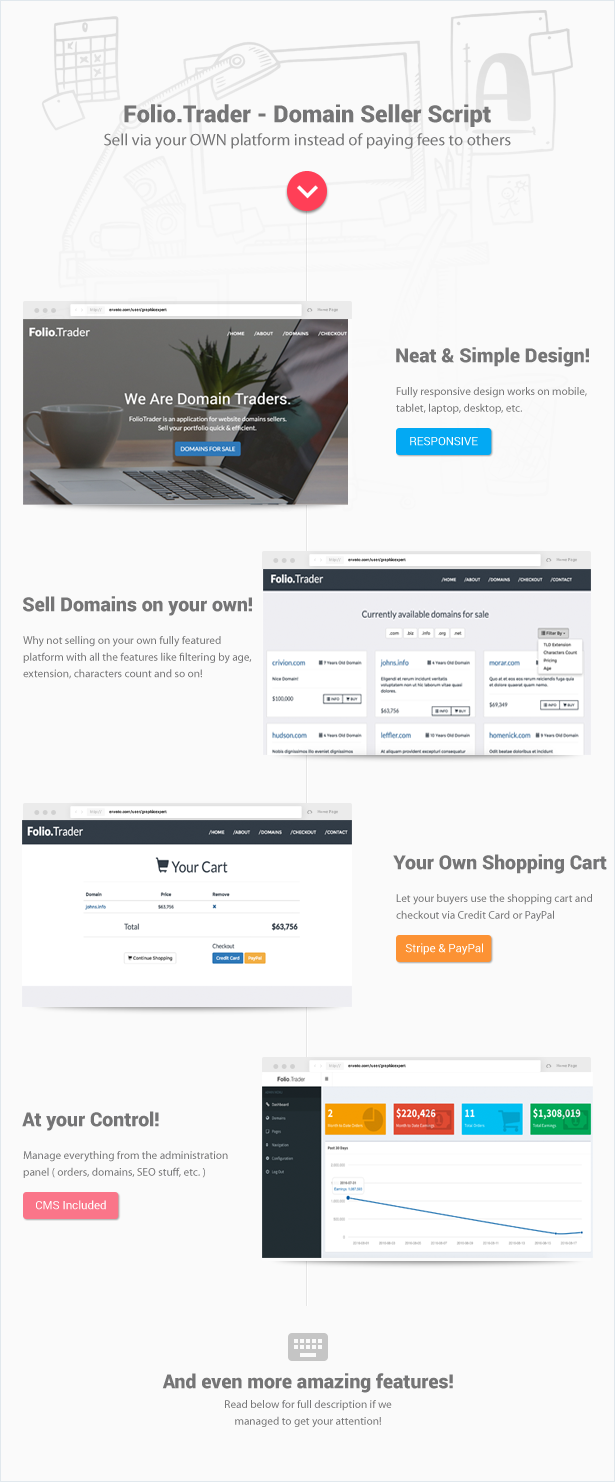
Folio.Trader: Domain Portfolio Seller Script gives you control over your online domain selling process. Run your own platform instead of paying fees to others!

folio.trader script features overview

Sell Domains on your OWN

Why not selling on your own fully featured platform with all the features like filtering by age, extension, characters count and so on!

Stop paying huge fees to others!

Your Own Shopping Cart

We’ve integrated two of the most popular payment gateways for you: Stripe & PayPal
Let your buyers use the shopping cart and checkout via Credit Card or PayPal to pay for your domains.

Email Notifications

Packed with nicely formatted HTML email notifications so you as an admin ( seller ) and the buyer both get notified once a domain sale gets completed.

Content Management System

Includes a nice CMS to enable you to create any number of extra pages you desire! With WYSIWYG editor of course!

Fully Responsive

Twitter Bootstrap 3 based, domain seller script design works on mobile, tablet, laptop and desktop!

Full Control Admin Panel

User: admin
Pass: admin
http://foliotrader.crivion.com/admin/login

  • Password protected admin control panel
  • Nice dashboard with financial stats & charts
  • Orders management
  • Domain listings management
  • CMS for managing Pages
  • Navigation items management
  • SEO Configuration ( Title, Meta Description, Keywords )

You’re in good hands with Crivion

safe branding

Domain Seller Script Server Requirements

server icon
  • apache mod_rewrite
  • IMPORTANT: PHP >= 5.5.9
  • OpenSSL PHP Extension
  • PDO PHP Extension
  • Mbstring PHP Extension
  • Tokenizer PHP Extension
  • PHP FileInfo extension

Download FolioTrader – Domain Portfolio Seller Script (Miscellaneous)

Magento Facebook Auto Poster (Magento Extensions)

Facebook Auto Poster for Magento Store is a simple, flexible, yet powerful solution to provide information to your buyers, advertise, promote your products, special offers and campaigns on Facebook. The extension helps you post status about your product after add new product automatically. It can save your time with feature post multiple product on Facebook with just one click. Additionally, you can post status on multiple Facebook page and Facebook account at the same time. The extension also does not change any core file of Magento, so you can update your installation with total peace of mind.

Feature

Auto Post a new status on Facebook after add a new product
Auto Post multiple status with just one click
Auto Post status with photo
Auto Post status on multiple Facebook Pages/Groups
Scheduled post on multiple Facebook Pages
Auto Post status on both Facebook Account and Facebook Page at the same time.
Auto Post randomly product hourly/daily.
Auto Post custom status with three post types.
Auto Post multiple blog articles on Facebook (use optional with aheadWorks Blog extension)
If you want to use auto post multiple blog articles on Facebook functionality, you should install aheadWorks Blog extension at first. You can click here to install that extension. It is a free extension.

Download Magento Facebook Auto Poster (Magento Extensions)

Magento Social Media Automation (Magento Extensions)

Social Media Automation All-in-one for Magento is a simple, flexible, yet powerful solution to provide information to your buyers, advertise, promote your products, special offers and campaigns on social networks (Facebook, Twitter, Pinterest). The extension helps you post status about your product after add new product automatically. Additionally, It can save your time with feature post multiple product on social networks (Facebook, Twitter, Pinterest) with just one click. The extension also does not change any core file of Magento, so you can update your installation with total peace of mind.

Feature

Facebook

Auto Post a new status on Facebook after add a new product
Auto Post multiple status with just one click
Auto Post status with photo
Auto Post status on multiple Facebook Pages/Groups
Scheduled post on multiple Facebook Pages
Auto Post status on both Facebook Account and Facebook Page at the same time.
Auto Post randomly product hourly/daily.
Auto Post custom status with three post types.
Auto Post multiple blog articles on Facebook (use optional with aheadWorks Blog extension)
If you want to use auto post multiple blog articles on Facebook functionality, you should install aheadWorks Blog extension at first. You can click here to install that extension. It is a free extension.

Pinterest

Auto Pin product on Pinterest after add a new product
Auto Pin multiple products with just one click
Create new Pin on multi Pinterest boards
Auto Pin products on multiple Pinterest Boards
Auto Pin randomly product hourly/daily.

Twitter

Auto Tweet product on Twitter after add a new product
Auto Tweet multiple products with just one click
Auto Tweet randomly product hourly/daily.

Download Magento Social Media Automation (Magento Extensions)

Insta Downloader (Full Applications)

Demo App:

You can download demo application from Play Store via below link.

https://play.google.com/store/apps/details?id=com.apps.instadownloader

Features

  1. All Device Combability.
  2. Download Photos/Videos of instagram
  3. AutoDownload which lets you download items at one click
  4. Material Design
  5. Simple UI and easy to use
  6. Open/Share downloaded items
  7. Swipe to clear items, also can do undo
  8. One Signal Integrated
  9. Admob Integrated
  10. Start App Integrated

What You Get

  1. Full Android Source Code.
  2. Android Package hierarchy (that tells which class is used for what).
  3. Full Document with Screen Shot.

Download Insta Downloader (Full Applications)

MyBizCMS (PHP Scripts)

MyBizCMS is a complete and fully functional Sales, Marketer and Client Relationship Management system. Drive your sales operations from quotes to invoices with all the information you need, easily accessible. Keep track of long term contracts, automate invoicing and notify sales when they have things to do. MyBizCMS helps you record sales lead types, sales stages, add marketers, new customers, register sales entries and create invoices and receipts. It also calculates commissions earned for every marketer. The whole sales process simplified in a simple modern light-weight system that will change how you do business. We also implemented an invoicing system so you can add discounts and taxes for certain customers when generating invoices. The receipts give a clear record of the payments done on that specific entry.

Key Features

Add new admins, marketers and clients.
Add new product categories and products.
Define your own sales lead types and sales stages.
Add sales entry payments.
Automated commission calculation once a sale is completed.
Generate invoices.
Email invoices to customers.
View paid and unpaid invoices.
Generate entries and payment reports based on dates.
After completed payments, generate Receipts with payment records, comments, etc
And so many more..

Demo Details
Admin
Username – [email protected]
Password – adminadmin
URL – http://demo.mysales.co.ke
Marketer
Username – [email protected]
Password – marketermarketer
URL – http://demo.mysales.co.ke

Contact us at [email protected]

Download MyBizCMS (PHP Scripts)

Bulk Product Key Generator (Windows)

Bulk Product Key Generator is a very useful application to generate product keys based in a username or a predefined string.

Principal features:
Adjustable chunk length
Adjustable chunk number
Hard to crack algorithm
Single & Bulk product key generator
Export as CSV file
Load username list from file (.TXT)
Use custom prefixes
Short or long product keys
Alphanumeric product keys
Simple & easy to use
Portable

Download Bulk Product Key Generator (Windows)

Something’s Not RIght! + IAP + Game Service (Games)

Introducing Something’s Not Right!
Play as mythical creature Mimo and collect as many Coins as you can on your way to the top.
Be careful not to kick and fall from different moving obstacles on you way up.

Features:

Simple Touch Gameplay
Endless Fun
Elegant Art
Smooth Soundtrack
Compete with Friends, Family with Game Center Leaderboards!

Source code with universal support, IOS 9 64 bit Support Xcode 7.0.1
Buildbox Included.

AD Networks:

AdMob Banner
Chartboost
AppLovin
iAD Banner
RevMob
LeadBolt

Artwork Included with .PSD file

https://itunes.apple.com/us/app/not-right!/id987972968?mt=8

Download Something’s Not RIght! + IAP + Game Service (Games)

Visual Composer Social Stream (Add-ons)

Note: Before purchasing this add-on, please make sure that you purchased Visual Composer plugin.

Visual Composer Social Stream is an add-on that allows you to easily create a stream from your favorite social networks.

Features

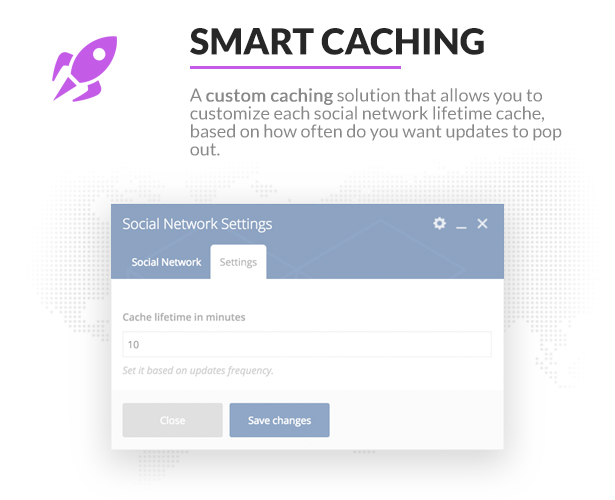
  • Smart Caching system
  • Facebook (page feed), Twitter (username and hashtag feed), YouTube (channel name) – all API based
  • Multiple layouts to chose from (masonry – 4 different layouts; news ticker)
  • Option to filter masonry posts

Please check out our live demo page.

Changelog

02/09/2016 - Version 1.0
Initial release.

Download Visual Composer Social Stream (Add-ons)