Woocommerce Products List Pro (Products)

Woocommerce Products List PRO is a simple but powerful WordPress plugin to list all your Woocommerce products

Features

  • User friendly and self-explanatory administration panel.
  • Displays all the needed data for your products according to your settings.
  • Easy to add a list anywhere on your WordPress via shortcode.
  • Easy to add a list anywhere on your WordPress via PHP function.
  • Comes with a WordPress shortcode builder / creator editor plugin.
  • You can create unlimited product lists allowing you to filter byproduct category, product tag, product publishing date etc.
  • “Add Selected to Cart” with select all checkbox for mass / bulk adding multiple products to cart
  • Extensible / developer friendly. You can alter the plugin without hacking it, but via WordPress filters and actions.
  • Make your products stand out with your custom sticker/icon. You can enable/disable or override it per product.
  • Supports YITH WooCommerce Wishlist
  • Supports WooCommerce Product Gift Wrap
  • AJAX can be enabled / disabled from the settings page
  • Sorting of table columns in the frontend by clicking at each column header
  • Responsive Layout / Mobile Ready
  • Easily translatable via .po / .mo files.
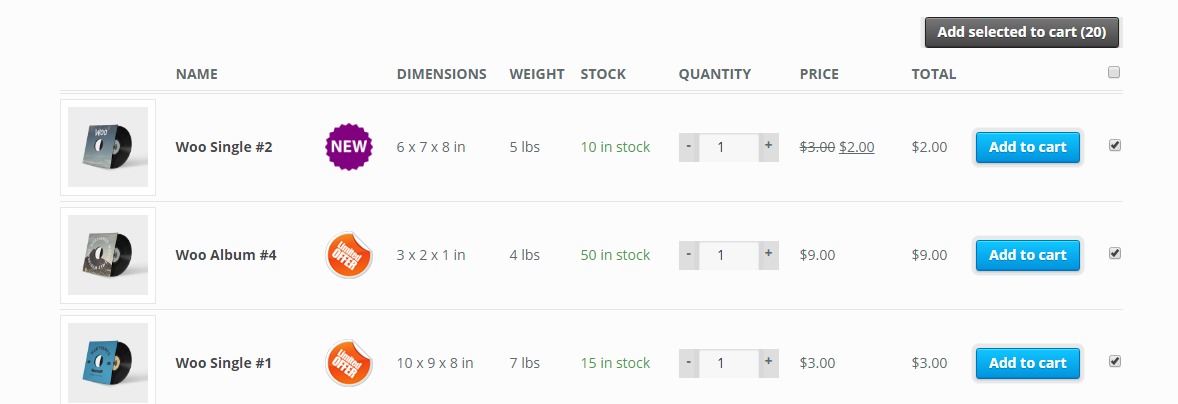
Woocommerce Products List Pro Front End

Requirements

  • WordPress 4.0+
  • Woocommerce 2.4+
  • PHP 5.3+

Usage

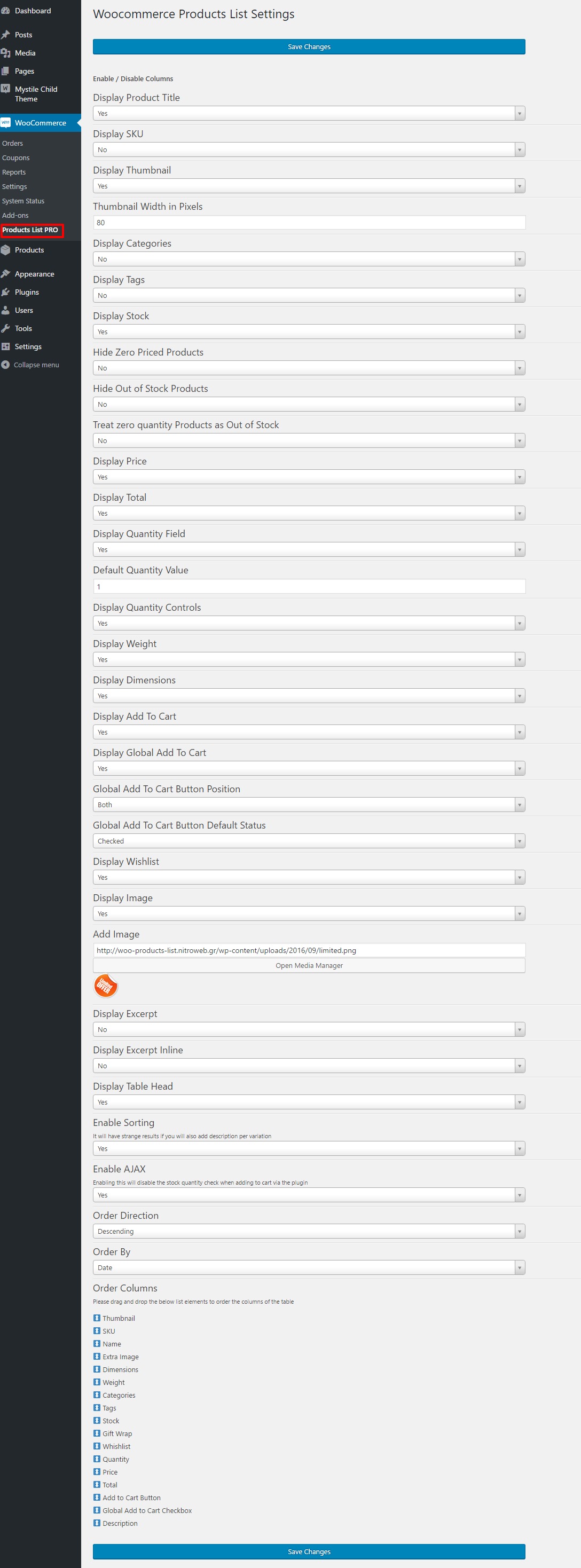
In order to use the Woocommerce Products List PRO plugin, please navigate from your WordPress administration panel to “Woocommerce ? Products List PRO

Options
  1. Display Product Title: Select “yes” to display the product title column or “no” to hide it.
  2. Display SKU: Select “yes” to display the product SKU column or “no” to hide it.
  3. Display Thumbnail: Select “yes” to display the thumbnail column or “no” to hide it.
  4. Thumbnail Width in Pixels: You may define the with of the thumbnail in pixels in this field
  5. Display Categories: Select “yes” to display a column with the categories that are assigned to the product or “no” to hide it.
  6. Display Tags: Select “yes” to display a column with the tags that are assigned to the product or “no” to hide it.
  7. Display Stock: Select “yes” to display the stock condition column or “no” to hide it.
  8. Hide Zero Priced Products: Select “yes” to skip empty or zero priced products or “no” to include them on the list.
  9. Hide Out of Stock Products: Select “yes” to skip out of stock products or “no” to include them on the list.
  10. Treat zero quantity Products as Out of Stock: Select “yes” to skip products that do not have a quantity set or “no” to include them on the list.
  11. Display Price: Select “yes” to display the price column or “no” to hide it.
  12. Display Total: Select “yes” to display the total per row column or “no” to hide it.
  13. Display Quantity Field: Select “yes” to display the quantity input field of the products to be added to cart column or “no” to hide it.
  14. Display Quantity Controls: Select “yes” to display -/+ buttons for the quantity field or no to hide them.
  15. Default Quantity Value: Enter any number to set as default quantity, default is 1.
  16. Display Weight: Select “yes” to display the weight of the products or “no” to hide it.
  17. Display Dimensions: Select “yes” to display the dimensions of the products or “no” to hide it.
  18. Display Add To Cart: Select “yes” to display the add to cart button column or “no” to hide it.
  19. Display Global Add To Cart: Select “yes” to display the global add to cart button or “no” to hide it.
  20. Global Add To Cart Button Position: Here you can choose where to place the global add to cart button.
  21. Global Add To Cart Button Default Status: You may set it to checked or un-checked when the list loads.
  22. Display Wishlist: Select “yes” to display the wishlist icon column or “no” to hide it.
  23. Display Gift Wrap Option: Select “yes” to display the gift wrap checkbox column or “no” to hide it, if you have the gift wrap plugin.
  24. Display Image: Select “yes” to display an extra image/sticker/icon column or “no” to hide it.
  25. Add Image: Upload the extra image/sticker/icon by clicking on the Open Media Manager button. The image will obey the thumb width settings.
  26. Display Excerpt: Select “yes” to display a excerpt of the product.
  27. Display Excerpt Inline: Select where you would like to place the description.
  28. Display Table Head: Select “yes” to display table head or no to hide it. Hiding it will also remove the frontend sorting functionality.
  29. Enable Sorting: Select “yes” to enable sorting by clicking the table header on the frontend
  30. Enable Ajax: Select “yes” to enable AJAX for the “add to cart” button
  31. Order Direction: Select “ascending” or “descending” to set the default order direction for the list.
  32. Order By: Select the desired value to set the default element to order the products list.
  33. Order Columns: You may order the columns by drag-n-dropping the list elements.
  34. You are ready to go! * Save Changes *

Woocommerce Products List Pro wp-admin settngs

Shortcode

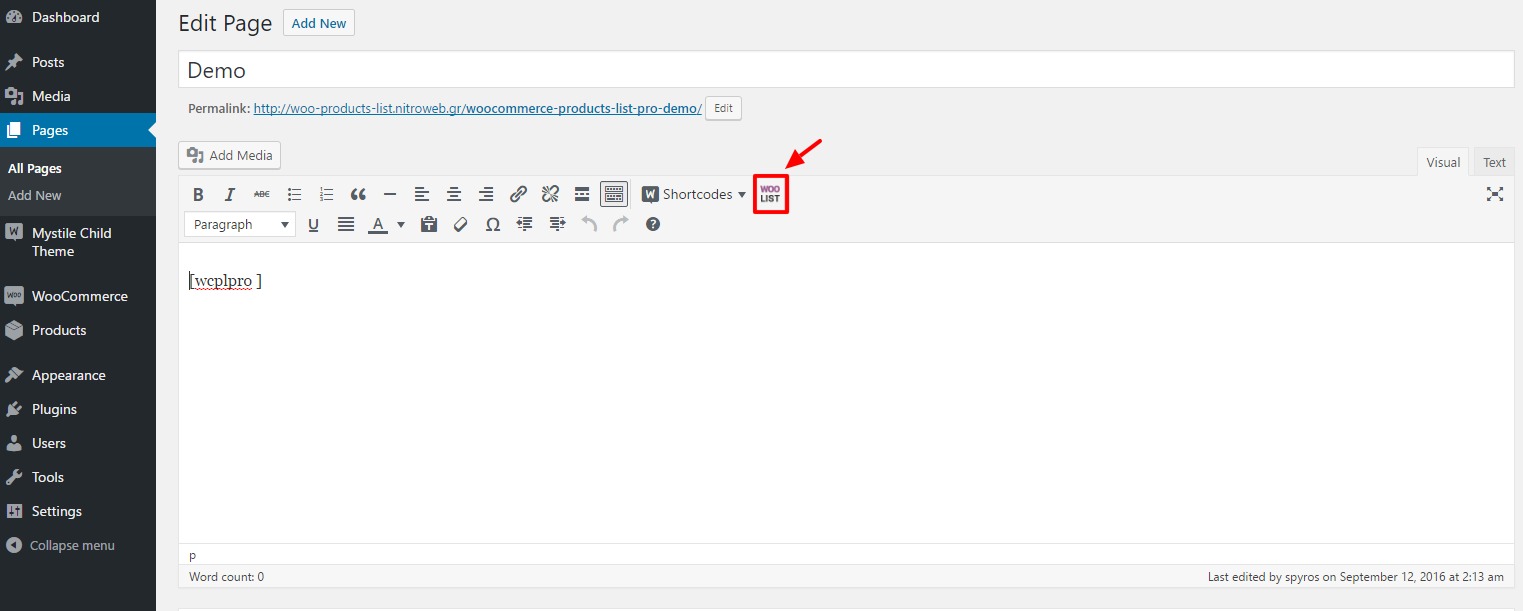
On your product page or anywhere were shortcodes are executed (eg. posts and pages), you may use the shortcode [wcplpro] . If you just put the shortcode then it will read the default settings of the plugin that you have just set via the admin settings panel.

In order to customize the shortcode, it is strongly recommended to use the “WOO List” icon that is now available on the WP Editor.
However, you may also enter the shortcode manually by using any of the following attributes (respectively to the above options):

  • keyword
  • categories_exc
  • categories_inc
  • tag_exc
  • tag_inc
  • categories
  • tags
  • sku
  • title
  • thumb
  • thumb_size
  • stock
  • hide_zero
  • hide_outofstock
  • zero_to_out
  • price
  • total
  • offer
  • image
  • qty
  • default_qty
  • qty_control
  • cart
  • globalcart
  • globalposition
  • global_status
  • wishlist
  • gift
  • ajax
  • desc
  • weight
  • dimensions
  • desc_inline
  • head
  • sorting
  • order
  • orderby
  • order_direction
  • date

Woocommerce Products List Pro shortcode builder

On all attributes, setting it to “1” equals to “yes” and “0” equals to “no”, when yes or no apply as a possible options. Here is an example:

[wcplpro keyword="woo ninja" thumb=1 thumb_size=150 stock=1 offer=0 qty=1 default_qty=4 ajax=0]

As you may notice we have not set the cart, wishlist etc. attributes, hence the shortcode will do as we have set via the plugin’s settings panel

Guide to some special shortocde attributes

keyword: This is a free text attribute. The shortcode will do a search for the term you entered.
categories_exc: Comma separated categories IDs that you want its products’ to be excluded form the list.
categories_inc: Comma separated categories IDs that you want products from these categories only to be excluded to the list.
tag_exc: Same as categories but for excluding product tags
tag_inc: Same as categories but for restricting to specific product tags only
thumb_size: This will take a number only and will be used as pixels
image: It has to be a full URL to the image
globalposition: Available values are “bottom”, “top” and “both”
desc: This will display the excerpt or not. Again 0 and 1 are the available options
order_direction: Available values are “asc” for ascending and “desc” for descending
orderby: Available values are “date”, “title”, “_price”, “_sale_price”, “_regular_price”, “_sku”, “_weight”, “_length”, “_width”, “_stock”, “total_sales”, “_stock_status”, “_wc_average_rating”
date: You can use this to display products only from specific year, month or day, eg. 2016 will display only products that were added in 2016 and 2016/09 will display products added on September of 2016 etc.

For Developers

Many hooks are in place. Please search the code for a full list. Below are some of them with examples.

Filters

You can add alter the css class of the link to the full image for each variation with the filter “vartable_thumb_class_filter”, eg.

add_filter( 'wcplpro_thumb_class_filter', 'my_wcplpro_custom_img_class');
function my_wcplpro_custom_img_class($class) {
  $class = $class.' myclass anotherclass';
  return ($class);
}

The Woocommerce “single_add_to_cart_text” filter is in place. Please refer to Woocommerce documentation.

Actions

You may add your own css class for the table with “wcplpro_table_class”, eg.

add_action( 'wcplpro_table_class', 'my_wcplpro_table_class');
function my_wcplpro_table_class($class) {
  $class = ' table-hover table-striped ';
  return ($class);
}

You can add text before and after the table with, “wcplpro_before_table” and “wcplpro_after_table”, eg.

add_action( 'wcplpro_before_table', 'my_wcplpro_before_table');
function my_wcplpro_before_table($text) {
  $text = 'This text ';
  $text .= 'will go before the table';
  echo $text;
}
add_action( 'wcplpro_after_table', 'my_wcplpro_after_table');
function my_wcplpro_after_table($text) {
  $text = 'This text ';
  $text .= 'will go after the table';
  echo $text;
}

Frequently Asked Questions

  1. Can I list all Woocommerce products filtered by category?

    Yes, you can via “categories_inc” shortcode attribute.

  2. Can I list all Woocommerce products filtered by tag?

    Yes, you can via “tag_inc” shortcode attribute.

  3. Can I put this anywhere in my site?

    Yes, you can via the shortcode, if the field where you put it is able to execute shortcodes.

  4. Can I exclude products from the list?

    Yes, you can via the product edit screen. Please select “Yes” at the option “Remove this product from Woocomerce Products List” under the product’s general settings tab.

  5. Are variable products supported?

    Variable products will be listed, however the “add to cart” button will not be available for them. Instead there will be a “read more” button that will link to the product single page.

  6. What about stock check and AJAX?

    By enabling AJAX, this will disable the stock quantity check when adding to cart via the plugin.

Changelog

1.0.1 09/19/2016
  • Feature: Better AJAX request handling
  • Feature: Added more hooks
  • Feature: Added CSS classes for some popular themes
  • Feature: Added link to the cart at the sliding notification area
  • Feature: Added the option to manually close the “added to cart” notification sliding panel
1.0.0 09/12/2016
  • Initial release

Sources and Credits

This plugin uses the following libraries
Download Woocommerce Products List Pro (Products)

Construction Banners – HTML5 – GWD (Ad Templates)

Description:

Construction Ads Banner HTML5 Template is a clean and modern design provided in six different dimensions.

Features:

• 06 standard sizes

• Google Ads

• 06 X PSD files ( layered )

Font used:

+ Google font

Need assistance? Please contact me on my email from my profile page:

https://codecanyon.net/user/exe-design

Download Construction Banners – HTML5 – GWD (Ad Templates)

Mind the circles (Games)

-Mind The Circles made on Construct 2 game engine, Infinity game play
-Responsive on all device
-Easy to reskin
-Included all the source file ready to export for mobile and web game (html5, cordova, cocoonjs) and .CAPX file

-Flexible event system

Features

-Construct 227+
-Play on desktop and device
-Easy export to HTML5 for website
-Ready to export for Android, iOS with Cordova platform such as intel XDK, phonegap, CocoonJS – Ludei.
-AdmobAds integration
-Touch & Mouse
-Share on Facebook, Twitter, Google plus

Download Mind the circles (Games)

WooCommerce Coupons Extended (WooCommerce)

WooCommerce Coupons Extended v1.0.1

Say “Hello” to the last plugin you’ll ever need to manage,report,track your WooCommerce coupons. Go beyound traditional WooCommerce Coupons usage and unluck more premium features. WooCommerce Coupons Extended offers complete front end tracking and back-end management of coupons plus more.

Extending The Coupons Function

Traditionally WooCommerce coupons balance are not re-usable. Let’s say a coupon worth $900 is used on an order of $20, the coupon balance on WooCommerce remains $900. It doesn’t get updated to $880 and this makes it difficult to use the Coupons as gift cards. WooCommerce Coupons Extended tracks amount used by the user then deducts the discount amount from the coupon balance and updates the coupon balance.

Coupon Email Updates

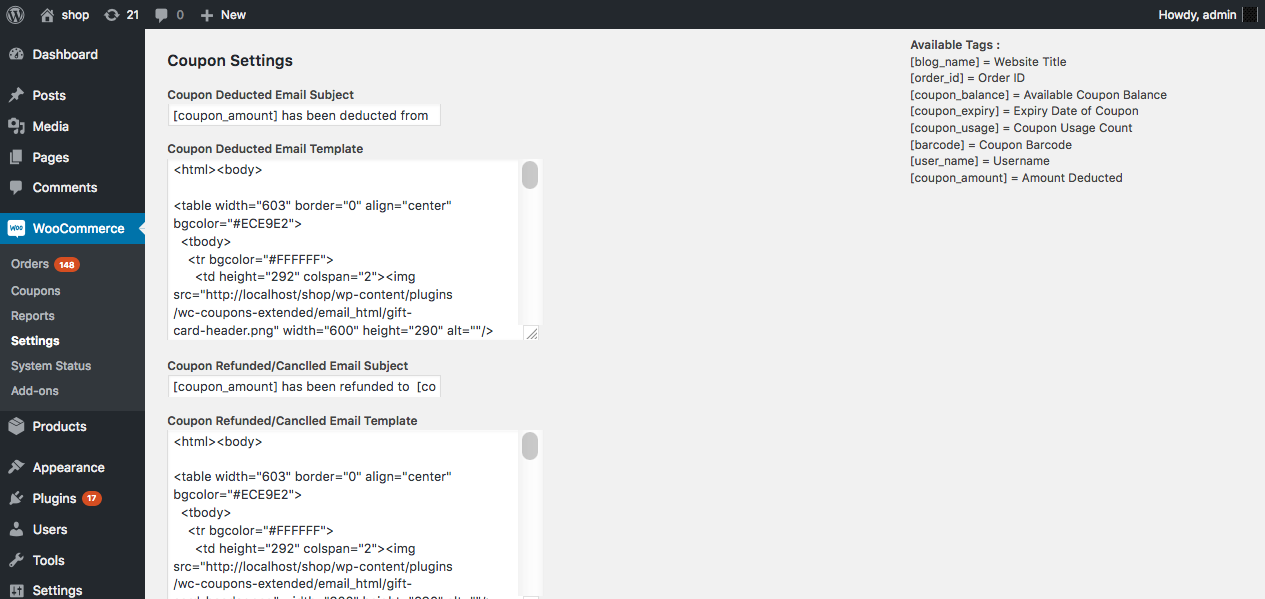
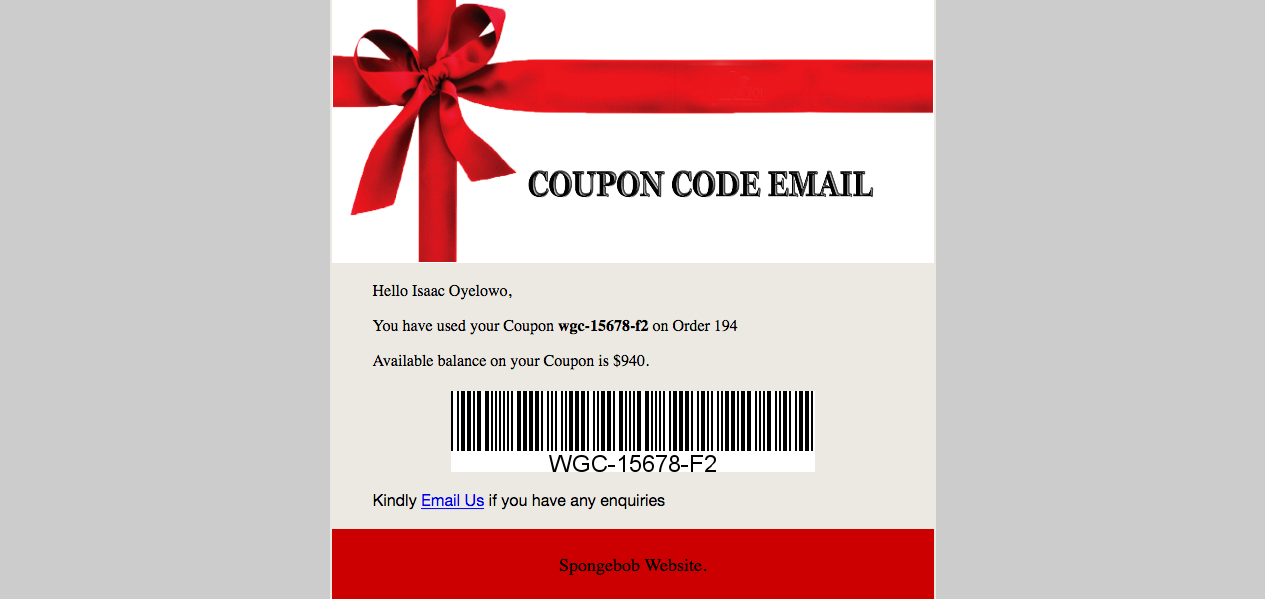
Buyers recieve order emails but nothing is sent to them regarding the coupon they used on the order. Set up stylish HTML email templates using available shortcodes to notify buyers when a coupon has been used.

Send email notification to buyers when Coupon value is deducted or refunded.

Available Email Tags :
[blog_name] => Website Title
[order_id] => Order ID
[coupon_balance] => Available Coupon Balance
[coupon_expiry] => Expiry Date of Coupon
[coupon_usage] => Coupon Usage Count
[barcode] => Coupon Barcode
[user_name] => Username
[coupon_amount] => Amount Deducted
settings

Refunds and Order Cancellation

WooCommerce Coupons Extended got your back on this. If orders containing coupons are cancelled or refunded, the coupon discount amount deducted from the coupon is added back to the coupon. Absolutely no woriies !

Coupon Campaigns

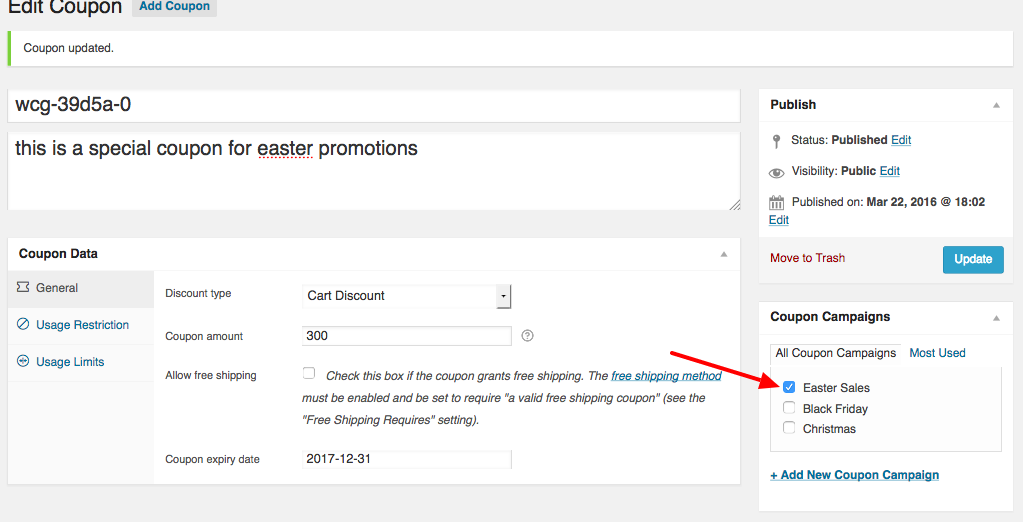
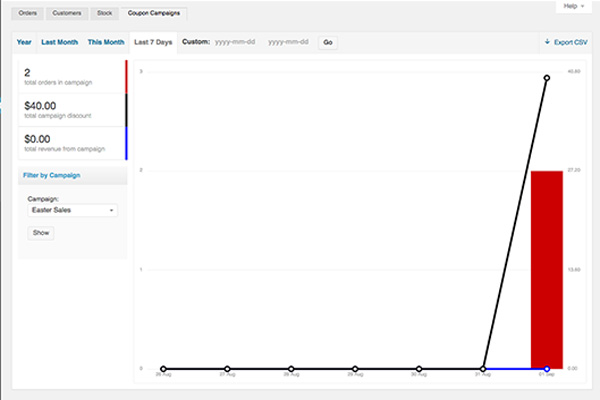
Set up coupons and group them into campaigns to monitor how a particular campaign is doing.

edit coupon

Campaigns Reporting

Track how a campaign is doing

coupon reports

Barcode Integration

Barcode Packaged with barcode integration.

Stylish Coupon Tracking Form

Input Field

Still Includes

6months Support
Easily Localizable
HTML email template
Header PSD Template

Change Log


11th September 2016 - Version 1.0.1
Initial release

Download WooCommerce Coupons Extended (WooCommerce)

WordPress Pretty HTML Emails – Responsive Modern HTML Email Templates (Utilities)

WordPress Pretty Emails is an advanced and highly extend-able email template system for WordPress,
There are 4 email
template by default on the plugin so you can select your desired template.

Features

Multiple Template Support

Customize WooCommerce Emails

Do you know that using WordPress Pretty Emails you can set different email templates for certain
plugins? Isn’t it
fantastic?! Imagine that you can set a clean HTML template for WordPress emails, an advanced invoicing email
template for your WooCommerce plugin, a newsletter email template for your newsletter and contact form plugins, etc.

Responsive & Retina ready

Customize WP Emails with 4 Exclusive Responisve Templates

Template Selectors

Bunch of Settings for Each Template

Bunch of settings for each template

There’s a lot of options that you can change templates to be what you want and also there’s several perfect size background to give great look to your emails.

Your Main Brand Color in Your Emails

You can match your email template color with your website theme color simply by setting your desired color in our advanced template editor.

Your Company Contact Info in the Footer

Do you like to insert your company address, tel, name, slogan, etc. on footer of your emails? It’s very simple using advanced email template editor of WP Pretty Emails.

Several Background Image for Your Emails

You can choose between a lot of background image or upload your prefer image as a background image of your email and use it.

Change your website sender email and sender name

No need to challenge with WordPress filters anymore for changing sender email and sender mail. You can simply set your desired email and name in the WP Pretty Emails plugin.

Add your company logo to send emails

You can set your company Logo in top our bottom of email.

Check the result of your changes in your email inbox

You could send your customized email to your inbox and see the result before any client.

Are you a theme developer?

Do you know that you can simply override WP Pretty Emails templates in your theme (just like WooCommerce templates
files) to make it fully compatible with your theme? This way your theme users will have a same theme for their
websites and their emails.

This is a great selling point for your theme and it can increase satisfactions of your clients. No need to say that
you will earn more money because of this great feature!

We will be more than happy to help you if you had any questions during the development.

Technologies

Changelog

Version 1.0.0

- [ADDED] WooCommerce1 email template for styling WooCommerce emails such as invoices.
- [ADDED] Simple email template with many options for configurations.
- [ADDED] Introduction email template with some advanced options.
- [ADDED] Events email template for promoting your events in style.
- [ADDED] Ability to change WordPress sender name and email.
- [ADDED] Ability to set a specific email template for certain plugins.
- [ADDED] Ability to disable/enable HTML editor.
- [ADDED] Ability to disable template sections such as footer, header etc. completely.
- [ADDED] Retina optimized panel.

Download WordPress Pretty HTML Emails – Responsive Modern HTML Email Templates (Utilities)

Blocker – HTML5 game + Android. Construct 2 (capx) + ADS cocoon (Games)


How to play on mobile devices?

Tap on the right or left side of the screen

How to play in the browser

Use arrows on keyboard

Features

  • The game works on all popular browsers
  • Easy export to Android and IOS platforms
  • Very easy customization, reskin
  • Cocoon + Ads Supported
  • Including Constuct 2 file (.capx – all source)
  • AdMob!
  • Mobile control
  • Easy to use
  • Nice graphics
  • Social
  • Tap and keyboard control
  • Adding new levels
  • The ability to change the location of the on-screen buttons and their size
  • ADS quick start!!!

File includes

  • Images
  • Sounds
  • Project file Construct 2
  • HTML5
  • ADS cocoon plugin
  • logo 16-550px
  • Quick start DOCUMENTATION

BEST SELLING


platformer game android download
games for android
HTML5 game. Construct 2, android, IOS

OTHER GAMES


construct 2 game capx download project

Construct 2 game. Easy export to Android and IOS
new games for android
buy game project. Android, IOS, construct 2
buy game. Download games for android
Buy new games for android. Construct 2. CAPX
Android and IOS games. Buy here. Construct 2 capx
Amazing game. Games free. Download
Easy dev game

Logos:

construct new games for android. Pokemon GO
construct 2 game android ios capx


Download Blocker – HTML5 game + Android. Construct 2 (capx) + ADS cocoon (Games)

All Fun App (Full Applications)

All Fun App

Welcome to the All Fun App.Here you will find thousands of Funny jokes,
Funny photos and Funny videos.
If you are looking for funny jokes,photos and videos this is definitely the app for you as you will find all
kinds of jokes,photos and videos that you can share with your friends and
relatives in a fast and simple way and make everyone laugh.You don’t need to update app for
new jokes,photos and videos.it will automatically grab new jokes,photos and videos when
you add new jokes,photos and videos via admin panel.and also easy to use this app and make your own app.

Features:

  • Photos,Jokes & Videos
  • Favorite Mode
  • Download and Set as photos
  • Add Unlimited Photos,Jokes & Videos
  • Direct share on whatsapp and other social media
  • Navigation Drawer Menu
  • Android Studio and Eclipse Projets Support
  • Easy To Customize
  • Beautiful Ui with Material Design
  • Responsive Admin Panel
  • AdMob Integrate(Banner & Interstitial)
  • Download Apk

mockup 
 mockup1 
  mockup2

Download Apk

Download All Fun App (Full Applications)

BADGES SYSTEM for OOBENN (Add-ons)

To entice users system
Automatically assign badges to your users ( 5 badges )

First badge – from 0 to 3 post added
Second badge – from 5 to 15 post added
Third – from 20 to 100 post added
Fourth badge – from 102 to 200 post added
Fifth badge – from 202 to 100 post added

They are easily customizable

WATCH NOW:
https//www.instasquare.net
USER: demouser
PASSWORD: demouser

\
\

Download BADGES SYSTEM for OOBENN (Add-ons)

Sidebar menu (Menus)

Responsive menu and navigation sidebar plugin for WordPress. 50+ customizeable settings. You can choose every color and create your own unique design!

See it live here: http://ahogenhaven.com/stuff/sidebar-menu/

Features:
– 50+ Customizeable settings
– You can literally choose colors on everything!
– Widget support
– Custom background image
– Center title & tagline
– Customer support
– Lightweight, does not slow down pagespeed
– You can add a logo or upload an image
– Multi level menu hierarchy
– Secondary menu which can be disabled
– Addable custom Title & Description
– Flawless animated design
– Integrated search function which can be disabled
– Addable background image or pattern with a custom height
– Customize overlay colors and opacity
– The menu button can either always follow the screen when you scroll or stay the same place
– Retina support
– Customize what sizes the menu should be shown on
– Activation

Compatible Browsers:
IE9, IE10, IE11, Firefox, Safari, Opera, Chrome, Edge

Upload & Activate the plugin
Go to appearance > Menu & choose a menu for responsive menu
Go to Settings > Responsive Menu & make your settings
Go to customize > Responsive Menu & pick your colors ($10 version feature)
Go to appearance > widgets and pick your widgets ($10 version feature)

Download Sidebar menu (Menus)

Visual Composer – Background Gradient Animation (WordPress)

Visual Composer – Background Gradient Animation

Create fluid and interactive gradients animations with Visual Composer – Background Gradient Animation plugin
you can set gradient animation type, speed, parallex, image mask and many more…

Feature

  • Basic gradients animation
  • Radial gradients animation
  • Gradients with an image
  • Gradients with an image mask
  • Parallex background image with gradient

Our other Plugins

Visual Composer - Magic Popup - CodeCanyon Item for Sale

Polygon Posts Grid For Visual Composer - CodeCanyon Item for Sale

Download Visual Composer – Background Gradient Animation (WordPress)

Submarine War – HTML5 Arcade Game (Games)

How To Play
– Right Key to Right Control
– Left Key to Left Control
– Space To Shoot

FEATURES :
– Keyboard And Touch Screen
– Arcade Game
– Power Up
– HTML5 File
– convert to Android n IOS (Cocoon JS, Intel XDK)
– Easy to Reskin
– Simple Graphic
– Made in Construct 2
– Included Construct 2 file .CAPX

Download Submarine War – HTML5 Arcade Game (Games)

Lastform – Attractive form templates add-on for Gravity Forms – WordPress Plugin (Forms)

INSTANTLY INCREASE YOUR FORM CONVERSION RATE IN 200-300% BY DECREASING USER DISTRACTION

lastform #gravityforms #codecanyon

Dear friend,

If you want to double, triple or even quadruple the conversion rate of your forms… without leaving your existing forms on Gravity Forms… just by clicking “activate” plugin, then this letter will show you how.

Here’s the story:

My name is Meydjer Windmüller, and I am an WordPress Elite Author, developer and designer. I’m on CodeCanyon and ThemeForest since 2010, with more than 4.100 sales and an average rating of 4.09 stars. My work was already featured in the Web Designer Magazine, in the CodeCanyon Featured Items section and I had myself featured in the authors CodeCanyon Hall of Fame.

Anyway, you can check my profile.

But forget about that now.

It’s not all that important.

What is important is that, about 6 months ago (March 2016), I was trying to capture leads for a side project. While reading all market stuff available on Google, a great friend of mine (actually, I consider him my brother) advised me to create a survey form to do market research and get leads… also, to promote this survey form using Facebook Ads. Best. Advise. Ever.

My Facebook campaign was an incredible success. When I told him my numbers, he couldn’t believe it. It was far beyond his expectations. Why? Well, he told me to use Google Forms, but I didn’t followed this part of his advice.

Call it luck if you want, but the first tool I tried was indeed the right tool: Typeform. Using good design, they reinvented online forms, increasing conversion rates in 2x, 3x, 4x and more.

CONVERSION RATE IS A TRICK - You  just need the right tool to unlock it

BUT, unfortunately, it sucks in two important points: 1) It’s really expensive ($70/month for the pro white label version. ouch!), and 2) It’s not made with WordPress.

As every living WordPress addicted, you know that Gravity Forms is the best WordPress form builder available on the market. But, we need to be honest: Gravity Forms is great for site admins, not for your visitors. Actually, like any other old fashioned standard form, you probably get sleepy only by looking at it.

Long story short:

Since there is no better form builder than Gravity Forms, and there is no better presentation than Typeform, I created a plugin that indeed resolve this conflict in a fantastic way.

The result?

Lastform: an Add-on that brings unbelievable user experience and conversion rates to the best WordPress form builder ever made

Just install Lastform now and see for yourself.

Lastform can…

Provide to your visitors an addictive user experience. They simply cannot stop filling the form

Display an entirely separate layout so you can keep your existing forms working normally as you provide an alternative Lastform link

Work perfectly with Zapier using the existing Gravity Forms triggers

Assure compatibility with the modern web using responsive and retina-ready design, WordPress 4.6 and Gravity Forms 2

Customise colors, background images and fonts so easily that yours visitors will see you as a top level designer

Increase conversion rate in 2x, 3x or even 4x for the price of a t-shirt. All these features you let you…

Turn your Gravity Forms into a conversion machine as fast as the blink of an eye

Anyway, I could go on and on, but here is the deal:

Off course you can use Typeform, BUT, as I said before, 1) It was not made for WordPress, so you will not be able to integrate it with your current plugins and theme. 2) One year Typeform will cost you between 350 and 700 dollars. For – only – one – year. It’s far beyond your lifetime Lastform license.

Lastform costs a flat $18. Single payment. No tricks.

The very first day after you install Lastform you may marvel at your new conversion rate numbers!

Wait, you do not have a Gravity Forms license? It costs 39 bucks. 39 + 18 = 57. Yes, you did your math right, that’s 293-643 dollars (5.14x-11.28x) more for Typeform (again, for only a year).

You are losing a lot with your current conversion rate.

By installing Lastform you will…

Stop losing money with the admin-friendly old-fashioned form builders and start gaining with a user-friendly and conversion driven modern design

Click this link to get your hands on Lastform today:

Add to cart
CLICK GERE TO GET LASTFORM

Sincerely,

Meydjer Windmüller
Meydjer Windmüller
Lastform creator

P.S.: “Fast response” bonus:

If you order today, I’ll give you an plugin installation entirely free.

For this service I would charge 45 bucks. Off course, you can hire a WordPress guy that don’t know the plugin and will charge 20 dollars for the service on Envato Studio, or you can get it done by the plugin creator (me) for free today:

Add to cart
CLICK GERE TO GET LASTFORM

Download Lastform – Attractive form templates add-on for Gravity Forms – WordPress Plugin (Forms)

Codeigniter Installer – Version 2.0 / 3.0 Easy Installer (Help and Support Tools)

Code-igniter Easy Installer is the really wonderful solution to install Code-igniter Application, Using code-igniter Easy installer you can install any types of code igniter application without any hassle.You do not need to look at coding but easy to install. This is compatible with code igniter Version 2.x and 3.x . You can complete all your task within 3 unites only.

Main Features :

  • Wonderful only 3 Steps Application Installation
  • Modern and Responsive Design
  • Step By Step Installation
  • Server Requirement Analysis
  • Code-igniter Version 2.x & 3.x Supported
  • Fresh and Clean Code
  • PSR Standard Coding
  • All Common Security Checked
  • Fully Responsive
  • No Coding Hassle

SECURITY

  • XSS Filtering
  • CSRF protection
  • Validate input data

Please Appreciate Our Work Giving Your important Feedback


Download Codeigniter Installer – Version 2.0 / 3.0 Easy Installer (Help and Support Tools)

Messaging System (Network / Connectivity)

With this Messaging System you can send messages to any person from contact book for free using such Internet connections as WiF or 4G, 3G, 2G and EDGE.

Please check our live demo app to see how stable it is!
https://play.google.com/store/apps/details?id=com.kenzap.messenger

Features:
– 100% message delivery. If your phones goes offline or you experience poor Internet connection your messages will always be delivered.
– Delivery reports.
– Create conversations with multiple contacts from your phone book. Groupchat.
– Set nicknames, avatars, custom visual notifications and sounds.
– Extremely simple interface, no unknown buttons
– No passwords or pin codes. Just sign-in with your phone number. SMS based registration.
– Send messages to anyone from your phone book.
– Clean and open source code.
– Easy to Reskin (logo, master color scheme, notification sounds etc.)
– Admob Ready.
– Free backend usage
– Fault tolerant messenger.
– Superior TCP connectivity algorithm together with new optimised V2 backend.
– Improved registration process.
– Avatar images in chat window.

The backend uses the following technologies: MongoDB, Redis, NodeJS, Twilio.
You can check live demo of admin panel here:

http://chat.kenzap.com:8080/dashboard/
[email protected]
password

The backend code is 100% open source and written on NodeJS. NodeJs ensures fault tolerant, instant message processing. Because of its asynchronous nature server resource usage is optimised which results in high capabilities and throughput.
For example, 1000 message routing requests per second can be processed on single $5 DigitalOcean virtual machine without any delay.

MongoDB is used for user administration, groupchats and message storage.
Redis is used for message routing
Twilio is used for sending SMS for user registrations

Our backend was actively tested since 2014. All bugs and drawback were fixed and optimised. You maybe sure you are buying one of the best solutions available on market today!

Download Messaging System (Network / Connectivity)