CMS Manager (Magento Extensions)

CMS Manager provide feature to the Magento store owner to Manage their CMS page content and its layout very easily.its has 4 different layout that will help them to create any pages like FQA,Policy, Terms and condition e.t.c within very short period of time.

Key features

  • Easy and Zero configuration settings
  • Create Professional looks CMS pages
  • Accordion Feature for the CMS pages
  • Tab Feature for the CMS pages
  • Another two smart layout
  • Fully Responsive

Frontend Demo Url:

http://itheavens.com/demo1/demo-faq

Admin Demo Url:

http://itheavens.com/demo1/index.php/admin123/

user:zahid

Password:itheaven123

How does it works

Suppose We are Managing the content for Faq page

After log in in Magento admin panel we will find the extension in the top menu
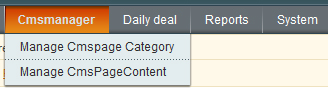
In the menu there is two drop down menu

  • Manage Cmspage Category.

    We will create a category For the Faq

  • Manage CMSpage content

    Where we can able to Manage the content

Manage Cmspage Category:

After click on the Manage Cmspage category we will see the following screen.
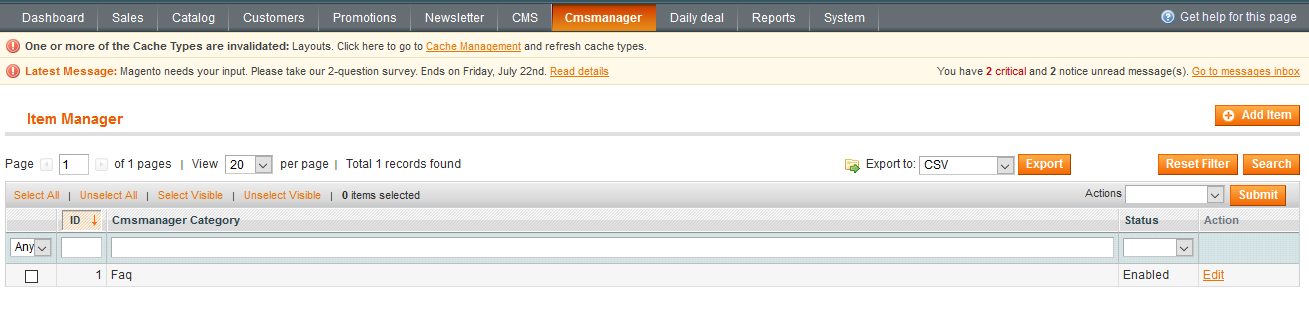
After click on Add new button we will get the form to add a Cmspage Category Name for exmaple “Faq” like the folowing screenshot
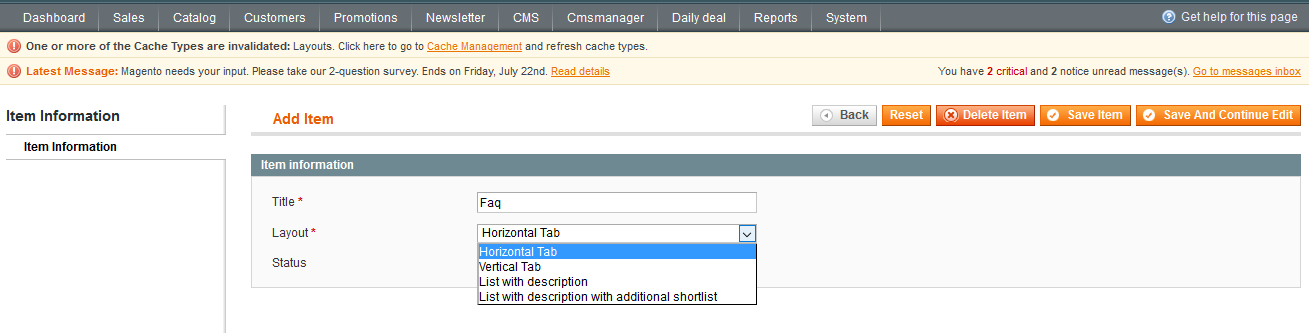
Where we can add the layout for the cms page as well

Manage Cmspage Content:

After click on the Manage Cmspage content from the dropdown we will see the following screen.
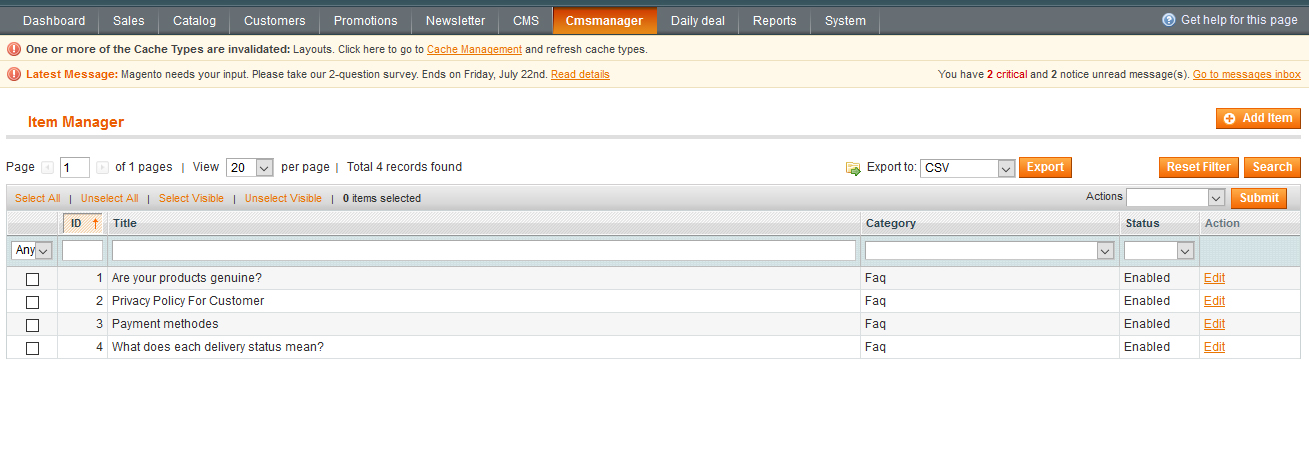
After click on Add new button we will get the form to add a Cmspage content for the to add some content like the folowing screenshot
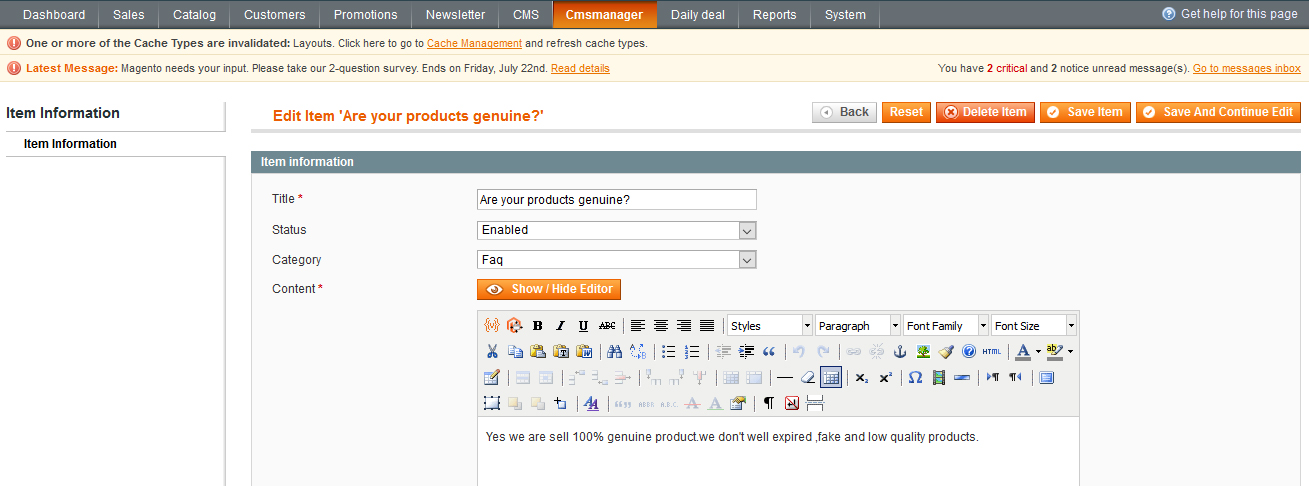
Where we can add the title ,category(Faq) we created in previous steps, status and the content same way we can do for Magento CMS pages

after add some Cmspage conter for the pages we will get the list like this

Now will will go to final step CMS->Pages Will click on Add new page button. then we will see the following screen
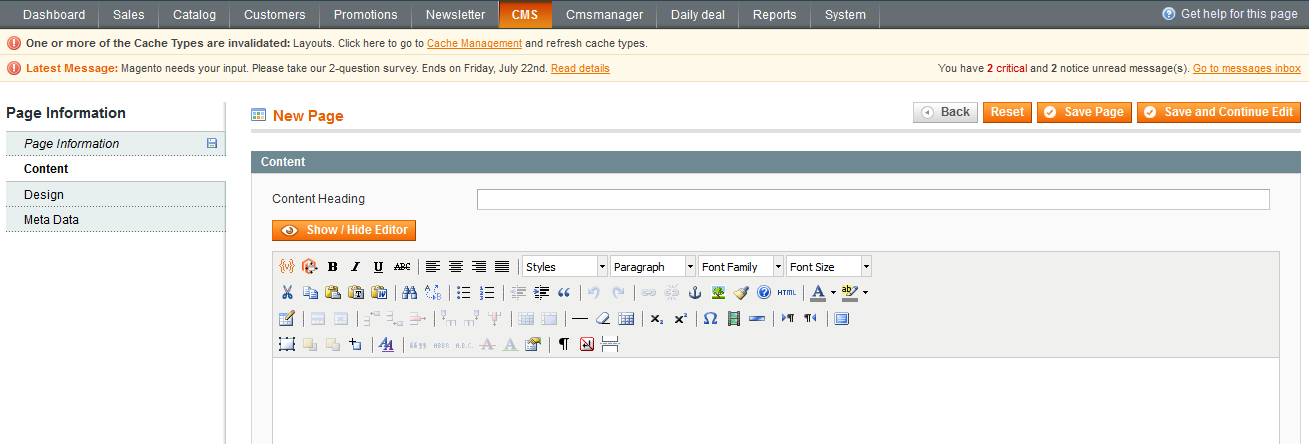
After click on show/hide Editor button will see the following screen shot
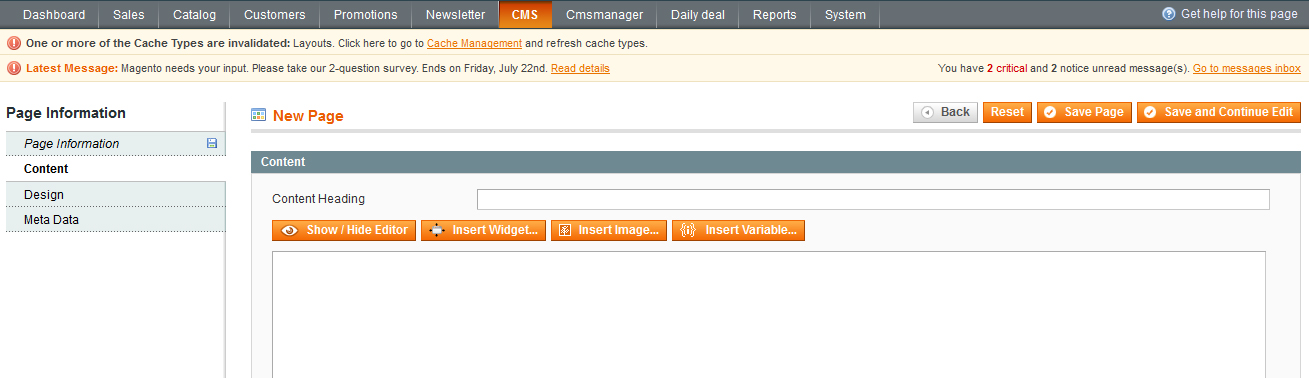
After click on Insert widget button will see the following screen shot
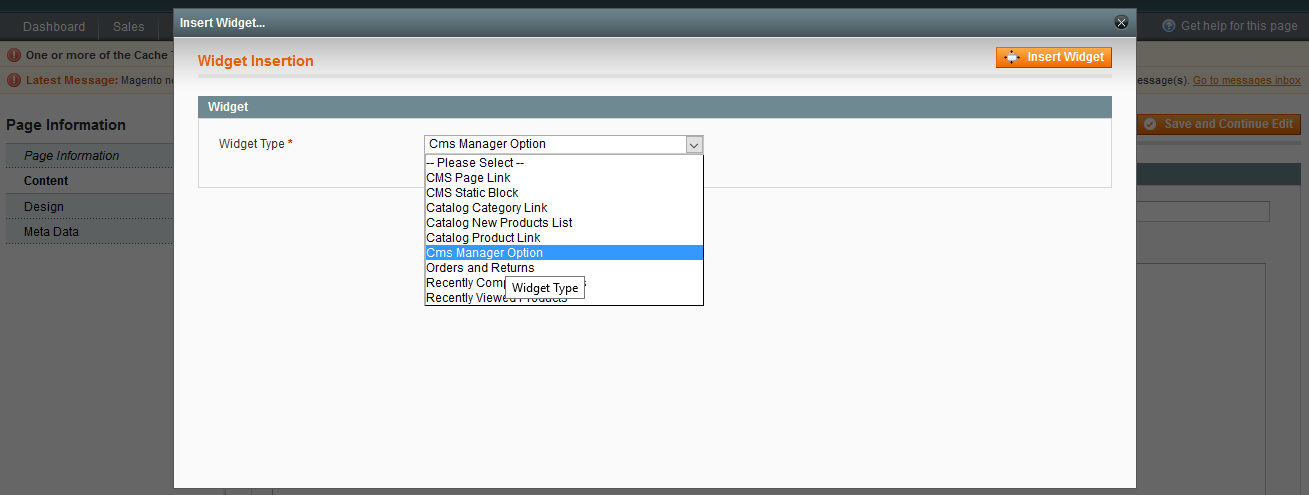
After Select Cms Manger Option from the dropdowm will get the following screen shot
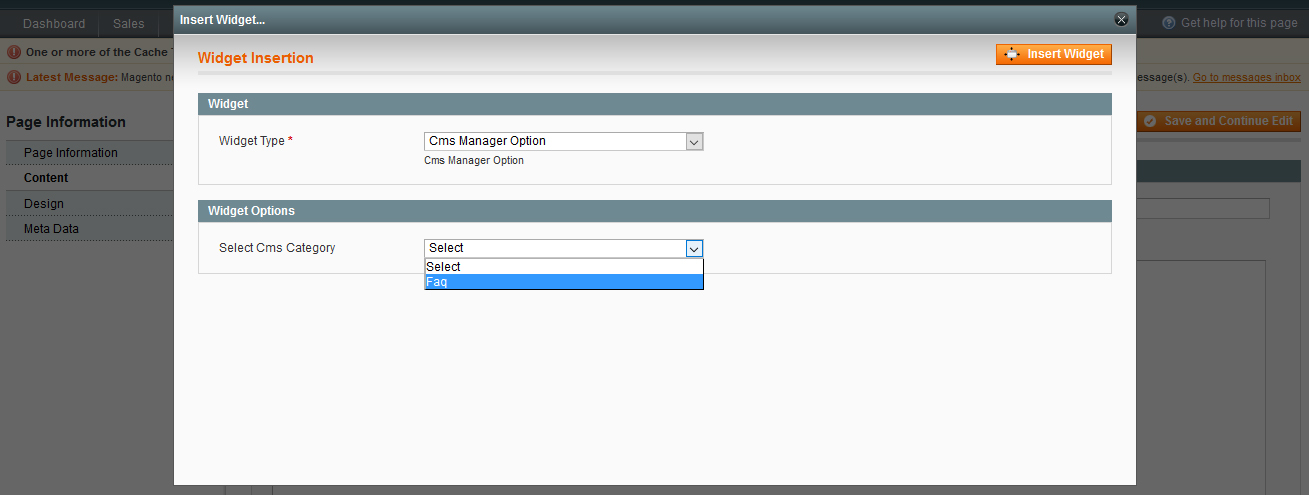
Now we will select the category form the dropdoen .click on inset buton on the top and save the cms page

View in frontend

Then if we go to the frontnend {store_base_ulr/cmspage} will will see the following screens short
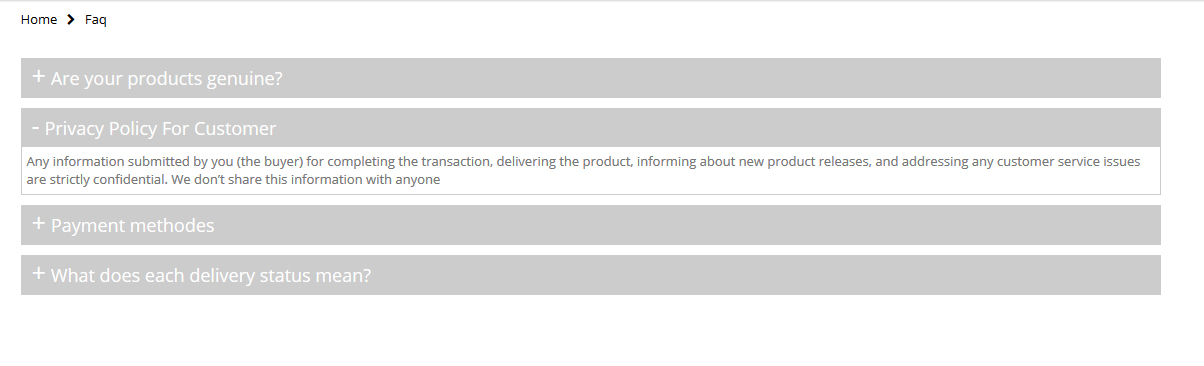
This is the layout for the defualt horizontal layout

if we change the layout form the admin to vertical tab will see the following screen shot


Download CMS Manager (Magento Extensions)

Guess The Place – Android Game (Games)

Hot Offer

Overview

Guess The Place game has more than 100 levels for 100 places around the world, Let users test their knowledge and guess what is the country or city of this place in the picture. We filled it with many features and make awesome design for it. it has leaderboard, some helps to help you to guess the place and share it with your friends, also it has admin panel to add new levels as you want instead of uploading new version on google play and more other features.. Enjoy!!

Features

  • +100 levels.
  • Admin panel.
  • RateMyApp & Share.
  • Help system.
  • Sound Effects.
  • RTL lnaguages.
  • Leaderboard.
  • New admob.
  • Video tutorials.
  • Easy customize.
  • Prepared re-skin.
  • Eclipse & Android Studio.

Leaderboards, IAP & Reskin

We can add the features you want to your version like leaderboards and IAP, Also we can reskin the app for you or translate it to other language .. Just send us a message with your request on the email [email protected]

Right-To-Left language

One of the nice features of this app, its ability to be converted to RTL language if you want like Arabic and you can do that in one step by changing langDirection in strings.xml file to rtl.

After that the app will be ready to use any RTL language, you need just to change alphabet with your language alphabet.

Also for making your life easy, we collect all texts in the app in strings.xml file to change them easily without having to catch them in whole project.

Prepared premium re-skins

We make a full re-skin for the app and we have already prepared some re-skins for you. If you like one of them contact us and reserve your re-skin.

Admin Panel

The game is provided with an admin panel which you can use for adding more levels then users can get them directly from the server without having to publish a new version on Google Play.

How to Setup and Reskin:

We will provide you with some video tutorials to show you how to use this code and customize it. These tutorials includes:

  • How to import the project in eclipse?
  • How to edit sqlite dataabse?
  • How to install your admin panel?
  • How to add your leaderboard?
  • How to change admob id?
  • How to change the language of the app?
  • How to export a signed apk file?

See also :

Matches Puzzle – Android Game

Success Quotes – Android Template


Download Guess The Place – Android Game (Games)

Hypersonic-Weather Plugin (Miscellaneous)

This is also my project

Description

Hypersonic-weather plugin is a amazing script for displaying weather conditions and detailed forecast informations for your location and any place other in the world.

Features

  • Weather font icon flat
  • Modern design
  • Address location
  • Weather location
  • Weather forecast
  • Various themes
  • 6 styles and 6 different theme skins
  • Well Documented
  • Font Awesome icons
  • Google fonts
  • Cross browser compatible – IE10+, Chrome, Firefox, Safari, Opera
  • CSS3 Animations
  • Both °C and °F format
  • Yahoo weather API
  • Animated preloader and fade-in effect for results
  • Super clean and unique design
  • Easy to manage
  • Free support

Widget detailed information preview 1

                           hypersonic_gif_1

Widget detailed information preview 2

                           hypersonic_gif_2

Style changing view

hypersonic_gif_3

Download Hypersonic-Weather Plugin (Miscellaneous)

Dodge Line – iOS Game Template (Games)

Hebergeur d'image

About Dodge Line

Dodge Line is a simple game that will amaze you !

Control the little dot, tap the screen to jump on the lines. Be careful and don’t touch the blue ennemies !

Features

– Many Unique Crazy Levels

– One Tap Play ! So Simple

– AdMobs Integrated Banner & Interstitial, Heyzap, Chartboost and many others

– Assets easy to modify, Images, Icon and Sounds

– Multiple Characters

What you will have

– Dodge Line iOS

– Documentation on how to set up the game and change the Images and Sounds

– Preview Images

– Assets and Sounds already prepared for modification

Test APK

Hebergeur d'image

For more information on building the APK file, go check the video of Mobile Game Templates :

Building the APK file

Thank you

Thanks for purchasing this item, we wish you the best of luck and stay available for any further information in the comments section ! ;)

Caution !

If you don’t have buildbox, you won’t be able to change the levels but only the graphics as to know, the icon and the images.
If you need some support to change the images, do not hesitate to contact me via the comments section once again ! :)

P.S. : The Buildbox Project is not included, feel free to contact me if you are interested in purchasing it =).

Portfolio

Hebergeur d'image

Hebergeur d'image

Hebergeur d'image

Hebergeur d'image

Hebergeur d'image

Hebergeur d'image

Hebergeur d'image

Hebergeur d'image

Hebergeur d'image

Download Dodge Line – iOS Game Template (Games)

Dodge Line – Android Game Template (Games)

Hebergeur d'image

About Dodge Line (BUILDBOX LIBNG FIXED)

Dodge Line is a simple game that will amaze you !

Control the little dot, tap the screen to jump on the lines. Be careful and don’t touch the blue ennemies !

Features

– Many Unique Crazy Levels

– One Tap Play ! So Simple

– AdMobs Integrated Banner & Interstitial, Heyzap, Chartboost and many others

– Assets easy to modify, Images, Icon and Sounds

– Multiple Characters

What you will have

– Dodge Line Android Project

– Documentation on how to set up the game and change the Images and Sounds

– Preview Images

– Assets and Sounds already prepared for modification

Test APK

Hebergeur d'image

For more information on building the APK file, go check the video of Mobile Game Templates :

Building the APK file

Thank you

Thanks for purchasing this item, we wish you the best of luck and stay available for any further information in the comments section ! ;)

Caution !

If you don’t have buildbox, you won’t be able to change the levels but only the graphics as to know, the icon and the images.
If you need some support to change the images, do not hesitate to contact me via the comments section once again ! :)

P.S. : The Buildbox Project is not included, feel free to contact me if you are interested in purchasing it =).

Portfolio

Hebergeur d'image

Hebergeur d'image

Hebergeur d'image

Hebergeur d'image

Hebergeur d'image

Hebergeur d'image

Hebergeur d'image

Hebergeur d'image

Hebergeur d'image

Download Dodge Line – Android Game Template (Games)

Jungle world for IOS (Games)

Description:

WOW !, it’s just awesome Super Jungle Game .
For each world we have tried to stick to a theme while attempting to make each world feel unique, we hope you will enjoy playing these levels because it’s very Interesting .
As a hidden bonus , we have placed a special hidden Mega Jewelery in each stage, and you can challenge your friends ! can you find all Jewelery !?
Nob Castle Temple World players are challenging how can win ?!.
Did you know glitches to complete all this worlds ?!


[The game includes ]
—Very easy and intuitive controls
—With 7 beautiful enjoyable and delightful worlds (more coming soon )
—180+ different stages (more coming soon )
—15+ scary hobo enemies
—Classic platform game style
—And a lot more features !

Features:

  • 3 characters to unlock
  • 7 worlds to unlock
  • AdMob Banner & Interstitial ads
  •  So much Worlds & levels: jungle, desert, cave, subway world 
  •  Fun for all ages 
  •  Addictive game-play 
  •  Challenging game design 
  •  Very nice levels graphics 
  • Game servers leaderboard 
  • Share button
  •  Worlds Selection
  • Shop screen
  • Splash screen
  • Full step by step documentation for reskin

Use Rights:

All graphic assets you can’t use them. They are copyrighted.

Credits:

  1. CreationArchive
  2. blueacesky
  3. playdesign
  4. canvaskite: #1 , #2 , #3
  5. Game-Art
  6. pasilan
  7. blueacesky: #1 , #2

If you purchase this items you can Upload the  game to stores without change graphics.

Download Jungle world for IOS (Games)

Jungle world for Android (Games)

Description:

WOW !, it’s just awesome Super Jungle Game .
For each world we have tried to stick to a theme while attempting to make each world feel unique, we hope you will enjoy playing these levels because it’s very Interesting .
As a hidden bonus , we have placed a special hidden Mega Jewelery in each stage, and you can challenge your friends ! can you find all Jewelery !?
Nob Castle Temple World players are challenging how can win ?!.
Did you know glitches to complete all this worlds ?!


[The game includes ]
—Very easy and intuitive controls
—With 7 beautiful enjoyable and delightful worlds (more coming soon )
—180+ different stages (more coming soon )
—15+ scary hobo enemies
—Classic platform game style
—And a lot more features !

Features:

  • 3 characters to unlock
  • 7 worlds to unlock
  • AdMob Banner & Interstitial ads
  •  So much Worlds & levels: jungle, desert, cave, subway world 
  •  Fun for all ages 
  •  Addictive game-play 
  •  Challenging game design 
  •  Very nice levels graphics 
  • Game servers leaderboard 
  • Share button
  •  Worlds Selection
  • Shop screen
  • Splash screen
  • Full step by step documentation for reskin

Use Rights:

All graphic assets you can’t use them. They are copyrighted.

Credits:

  1. CreationArchive
  2. blueacesky
  3. playdesign
  4. canvaskite: #1 , #2 , #3
  5. Game-Art
  6. pasilan
  7. blueacesky: #1 , #2

If you purchase this items you can Upload the  game to stores without change graphics.

Download Jungle world for Android (Games)

Wchat – Fully Responsive PHP/AJAX Chat (Social Networking)

wchat free support

Demo Login

Username : Eric / 1234 and Fabia / 1234

INTRODUCTION

Wchat is a popular responsive php ajax inbox messaging (Chat) WebApp for websites, mobile apps and control panels. It is a responsive chating app that is Built with PHP/MySQLI-PDO and design with CSS framework Bootstrap 3.3.6 It utilizes all of the Bootstrap components in its design and re-styles many commonly used plugins to create a consistent design that can be used as a user interface for web and mobile applications. Wchat is based on a modular design, which allows it to be easily customized and built upon. This documentation will guide you through installing the wchat and exploring the various components that are bundled with the wchat.

INSTALLATION GUIDE

First of all, copy demo folder and paste to your server/localhost.

  • Run the wchat directory.
  • It will redirect to /install directory.
    • Step 1: Choose language. and click Next
    • Step 2: Create a database with phpmyadmin.
    • Step 3: Enter database dbhostname,dbusername,dbpassword,dbname. and click Next
    • Step 4: Enter Admin login details. and click Next
  • All is done Installation completed. click on frontend and enjoy with wchat

wchat

Changelog history

Version 1.0

- Intial Release

Download Wchat – Fully Responsive PHP/AJAX Chat (Social Networking)

Happy Jump – Construct 2 Game Template (Games)

Just a simple one touch arcade game where you have to keep jumping higher and higher without dying.

[Features]

• Optimized for all screen resolutions, that means no black bars!
• Small size, since this is being built with CocoonJS compiler the apk file is very small compared to other services.
• Super fast, the game runs at 60fps constantly.
• Optimized Admob / Chartboost ads so you can earn money!
• Amazing and beautiful 2D graphics
• Great sounds
• One touch controls
• Infinite gameplay.
• Easy to reskin using Construct 2

[What is included?]

• Source Code (.capx file)
• Game assets (graphics and sounds)
• Premium Construct 2 plugins that has been used on the making of the game.
• Fonts that were used on the game.
• A guide on how to reskin the game.

[How to reskin]

1. Change the app name and package name.
2. Replace the icon, image files (optionally sound effects)
3. Add your admob or chartboost IDs
4. Thats all, just export the project compile it with CocoonJS and submit!

A pretty detailed guide on how to do this is included on the product files.
If you still have any questions about this process just contact me and i will help you.

[Documentation]

Quick start guide / How to Reskin

• Download: https://www.dropbox.com/s/xstm0qcxqhvq8hd/How%20to%20Reskin.rar?dl=0

[Framework & Compiler]
REQUERIMENTS : CONSTRUCT 2 & COCOONJS

This game was built with Construct 2 engine. You can find all the info about this framework here: https://www.scirra.com/store/construct-2

After you export the game you will need to compile it (apk file). That is where CocoonJS comes into play. You can find all the info about the compiler here: cocoon.io/home

Download Happy Jump – Construct 2 Game Template (Games)

Panda Adventure – Construct 2 Game Template (Games)

Just a simple on touch arcade game where you have to collect all the coins on the current level to reach the next one!

[Features]

  • Optimized for all screen resolutions, that means no black bars!
  • Small size, since this is being built with CocoonJS compiler the apk file is very small compared to other services.
  • Super fast, the game runs at 60fps constantly.
  • Optimized Admob / Chartboost ads so you can earn money!
  • Amazing and beautiful 2D retro graphics
  • Great retro sounds
  • One touch controls
  • The game currently has 20 levels.
  • Easy to reskin using Construct 2

[What is included?]

  • Source Code (.capx file)
  • Game assets (graphics and sounds)
  • Premium Construct 2 plugins that has been used on the making of the game.
  • Fonts that were used on the game.
  • A guide on how to reskin the game.

[How to reskin]

  1. Change the app name and package name.
  2. Replace the icon, image files (optionally sound effects)
  3. Add your admob or chartboost IDs
  4. Thats all, just export the project compile it with CocoonJS and submit!

A pretty detailed guide on how to do this is included on the product files. If you still have any questions about this process just contact me and i will help you.

[Test the game]

Android: https://play.google.com/store/apps/details?id=com.chal1.pandaadventure

[Documentation / Quick Start Guide]

Download: https://www.dropbox.com/s/xstm0qcxqhvq8hd/How%20to%20Reskin.rar?dl=0

[Framework & Compiler]
REQUERIMENTS : CONSTRUCT 2 & COCOONJS

This game was built with Construct 2 engine. You can find all the info about this framework here: https://www.scirra.com/store/construct-2

After you export the game you will need to compile it (apk file). That is where CocoonJS comes into play. You can find all the info about the compiler here: cocoon.io/home

Download Panda Adventure – Construct 2 Game Template (Games)

Classified iOS iPhone App (Full Applications)

support

Native Swift iOS App template for our Classifieds Ads Infinity Market solution. Build with robust, compatibility and customization in mind!

Our product “Classifieds Multipurpose Portal – Infinity Market” is required to use this app!

Demo

Try live demo on your iOS device: https://itunes.apple.com/us/app/classified-ads-infinitymarket/id1150074039?mt=8

Live demo on market

Admin interface demo

Easy to customize

Visual customizations

App features:

  • Easy to translate
  • Quick/Smart search listings based on few words (address part, title, short description etc.)
  • Advanced search based on multiple level categories and specific criteria
  • Near listings search, will detect your location and find listings near you (50km), you can also enter address manually to detect near address
  • Add location available as link to website
  • Location preview contains slider for gallery, overview, amenities, distances, location map, agent details and link to listing preview on website
  • You can add custom amenities/distances/overview fields via admin interface
  • Results listings will not load all listings in one request, but 10 per 10 as infinite scroll
  • Google maps by default support generate route from you to location and navigate functionality
  • Custom map pin icon for different type of listings
  • App can be translated and of course currency can be changed

Perfectly compatible with your existing portal based on script below

Classifieds Multipurpose Portal - Infinity Market

Compatibility

Our product “Classifieds Multipurpose Portal – Infinity Market” is required to use this app!

When using portal script you will add listings only on one place to show on both places, web portal and app.

Documentation

Technical documentation, Knowledge base, FAQ, Support center

Package content:

  • Swift iOS native source code
  • Documentation
  • Icons and pin markers

Requirements:

  • Classifieds Multipurpose Portal – Infinity Market working installation
  • MAC OSX 10.11 El Capitan
  • CocoaPods 0.39.0
  • Xcode 7.2

Check also my other similar apps:

Classified iOS Template
Property Listing and Hotel Booking Portal #02
Real Estate Android Template

Few reviews from random items

Few reviews

Flag Counter

Download Classified iOS iPhone App (Full Applications)

Stick Man – Construct 2 Game Template (Games)

Just a simple game where you have to touch the screen to make the stick grow and reach the next platform without falling.

[Features]

  • Optimized for all screen resolutions, that means no black bars!
  • Small size, since this is being built with CocoonJS compiler the apk file is very small compared to other services.
  • Super fast, the game runs at 60fps constantly.
  • Optimized Admob / Chartboost ads so you can earn money!
  • Amazing and beautiful 2D graphics
  • Great sounds
  • One touch controls
  • Infinite gameplay.
  • Easy to reskin using Construct 2

[What is included?]

  • Source Code (.capx file)
  • Game assets (graphics and sounds)
  • Premium Construct 2 plugins that has been used on the making of the game.
  • Fonts that were used on the game.
  • A guide on how to reskin the game.

[How to reskin]

  1. Change the app name and package name.
  2. Replace the icon, image files (optionally sound effects)
  3. Add your admob or chartboost IDs
  4. Thats all, just export the project compile it with CocoonJS and submit!

A pretty detailed guide on how to do this is included on the product files. If you still have any questions about this process just contact me and i will help you.

[Test the game]

Android: https://play.google.com/store/apps/details?id=com.chal1.stickman

[Documentation / Quick Start Guide]

Download: https://www.dropbox.com/s/xstm0qcxqhvq8hd/How%20to%20Reskin.rar?dl=0

[Framework & Compiler]
REQUERIMENTS : CONSTRUCT 2 & COCOONJS

This game was built with Construct 2 engine. You can find all the info about this framework here: https://www.scirra.com/store/construct-2

After you export the game you will need to compile it (apk file). That is where CocoonJS comes into play. You can find all the info about the compiler here: cocoon.io/home

Download Stick Man – Construct 2 Game Template (Games)

Happy Bird – Construct 2 Game Template (Games)

Just a simple but super fun flappy bird clone.

[Features]

  • Optimized for all screen resolutions, that means no black bars!
  • Small size, since this is being built with CocoonJS compiler the apk file is very small compared to other services.
  • Super fast, the game runs at 60fps constantly.
  • Optimized Admob / Chartboost ads so you can earn money!
  • Amazing and beautiful 2D graphics
  • Great sounds
  • One touch controls
  • Infinite gameplay.
  • Easy to reskin using Construct 2

[What is included?]

  • Source Code (.capx file)
  • Game assets (graphics and sounds)
  • Premium Construct 2 plugins that has been used on the making of the game.
  • Fonts that were used on the game.
  • A guide on how to reskin the game.

[How to reskin]

  1. Change the app name and package name.
  2. Replace the icon, image files (optionally sound effects)
  3. Add your admob or chartboost IDs
  4. Thats all, just export the project compile it with CocoonJS and submit!

A pretty detailed guide on how to do this is included on the product files. If you still have any questions about this process just contact me and i will help you.

[Test the game]

Android: https://play.google.com/store/apps/details?id=com.chal1.happybird

[Documentation / Quick Start Guide]

Download: https://www.dropbox.com/s/xstm0qcxqhvq8hd/How%20to%20Reskin.rar?dl=0

[Framework & Compiler]
REQUERIMENTS : CONSTRUCT 2 & COCOONJS

This game was built with Construct 2 engine. You can find all the info about this framework here: https://www.scirra.com/store/construct-2

After you export the game you will need to compile it (apk file). That is where CocoonJS comes into play. You can find all the info about the compiler here: cocoon.io/home

Download Happy Bird – Construct 2 Game Template (Games)

Web to App Finest WebView (Utilities)

Android studio project and Easy to use .

Beautiful and customizable Android Activity that shows web pages within an app.

Builder pattern
Material design & Pre-made icons
Webview listeners
Custom themes & Custom transition animations
Support collapsing toolbar & contextual actionbar
SwipeRefreshLayout & Progressbar
Device rotation
Gradient divider
Custom typeface & translation
Supports Right to Left

Download Web to App Finest WebView (Utilities)

Restrict COD by ZIP / PIN Code (Magento Extensions)


Restrict COD by ZIP / PIN Code

cod magento extension live documentation

cod features

cod magento extension support

Restrict COD by ZIP/PIN Code Magento Extesion

Allows customers to check cash on delivery is available at their place from the product detail page.

Using this extension store owner can restrict Cash on Delivery payment to certain ZIP / PIN codes and also add an option of checking the availability of the Cash on Delivery payment method directly on the product page. Admin can upload a CSV file containing all the ZIP / PIN codes for which the Cash on Delivery payment method will be allowed. The payment method will be disabled for any ZIP / PIN codes that do not match the ones mentioned in the CSV file.

Admin can add zip/pin codes in two ways:

1) Using bulk csv import

2) Manually adding zip/pin codes

Admin also can edit/remove/disable zip/pin codes from backend. You can download sample csv file from backend system configuration.

Note: This extension requires an existing Cash on Delivery payment method on your store, and does not add one for you. Once the extension is installed, you can select the COD payment method to associate with this extension.

Core Features

  • Easy to use & manage.
  • Check COD availability using ajax which makes it highly interactive
  • Customized Success and Failure Messages
  • Abundance of configurations have been used to make the extension more flexible for admin?s needs
  • Manually & bulk zipcode import/export from backend
  • You could have COD verification on the basis of zip/pin codes
  • Admin can add, edit, delete, enable and disable zip code
  • You will provided documentation with screenshot for how to use extension
  • No core files changes

Installation Process

Note: Please take backup of your Magento installation (files and database) before install/update any extension.

1) Download the extension’s .ZIP file.

2) Extract .ZIP file from magento root directory.

3) Clear Cache

4) Go to ‘Kerss Tech-> Manage Cod -> General tab and select Enable Module to Yes.

Set all other options as per your requirements and save settings.

For more details please read our Documentation

Improvement suggestions

If you have any suggestions on how to improve this item please let us know! We will be happy to consider any suggestion and appreciate your efforts. We will go through all your feedback weekly and pick the most requested features to be included in a future update!

Changelog

v1.0.0

  • Initial release

Download Restrict COD by ZIP / PIN Code (Magento Extensions)